A new article has been published at prMac.
Esri Selects Zerion's iFormBuilder as 2014 Best New Partner - Published on 03/10/14
Zerion Software's iFormBuilder, the universal mobile data collection platform for iOS and Android devices, was selected as the 2014 Best New Partner by Esri, the global leader in GIS (Geographic Information Systems). At the Esri Partner Conference on Sunday March 9th, Sze Wong, CEO of Zerion Software Inc., accepted the honor. iForm & Esri have teamed to assist in mapping and data collection in the battle against the San Francisco rimfire, harmful insect migration and helping NGOs with M&E.
Palm Springs, California - Zerion Software's iFormBuilder, the universal mobile data collection platform for iOS and Android devices, was selected as the 2014 Best New Partner by Esri, the global leader in GIS (Geographic Information Systems). At the Esri Partner Conference on Sunday March 9th, Sze Wong, CEO of Zerion Software Inc., accepted the honor.
During 2013, Zerion Software developed a deep integration between iFormBuilder and the Esri platform. GIS Professionals now have the ability to build robust forms with skip logic, calculations and related tables, capture data on their mobile devices with or without an internet connection and seamlessly integrate data collected in the field with their existing Esri ArcGIS Online or Esri for Server.
"When Esri is the 'Where' and iFormBuilder is the 'What'... great things happen. It is an honor and privilege to be recognized by Esri for this award," said Sze Wong, CEO at Zerion Software, Inc. The past year presented amazing opportunities for both Esri and iFormBuilder to do what they do best and use good data to make a difference in communities around the world.
Together iFormBuilder and Esri:
* Provided a complete end-to-end, offline enabled solution in a matter of hours to assist Forestry Engineers with the evaluation and recovery of assets threatened by the 2013 California Rim Fire.
* Redefined how a State Department of Agriculture monitored how invasive species migrated across their state.
* Transformed how a global non-governmental organization (NGO) visualized the monitoring and evaluation (M&E) of its project impact.
"Being named 2014 Best New Partner motivates our team to be champions of discovering what's next for mobile data collection in the GIS community," said Chris Reichart, CBO of Zerion Software, Inc. "iFormBuilder and Esri are better together. iFormBuilder's ability to capture complex data and critical GIS information on an iOS or Android device, even while offline, and easily visualize datain Esri's ArcGIS is a game changer for many organizations."
iFormBuilder offers a full suite of apps for secure data collection on smart devices, as well as ThunderPlug, a mobile data hub for ultra-disconnected environments. NGOs, Healthcare, EHS, Corportae and Government organizations interested in tapping into the iFormBuilder Mobile Platform can sign up for a demo or Free trial at the website.
About Esri
Since 1969, Esri has been giving customers around the world the power to think and plan geographically. The market leader in geographic information system (GIS) technology, Esri software is used in more than 300,000 organizations worldwide including each of the 200 largest cities in the United States, most national governments, more than two-thirds of Fortune 500 companies, and more than 7,000 colleges and universities. Esri applications running on more than one million desktops and thousands of web and enterprise servers, provide the backbone for the world's mapping and spatial analysis.
Device Requirements:
* iPhone, iPad, and iPod touch
* Requires iOS 5.0 or later
* 17.2 MB
Pricing and Availability:
iForm 5.6.1.14 is free and available worldwide exclusively through the App Store in the Business category.
iFormBuilder: http://www.iformbuilder.com
Esri and iFormBuilder for GIS Professionals: https://www.iformbuilder.com/esri/
iFormBuild 5.6.1.14: https://itunes.apple.com/app/iform/id378502270
Dopwnload fromGoogle Play: https://play.google.com/store/apps/details?id=com.zerion.apps.iform.main&hl=en
Screenshot : http://www.iformbuilder.com/wp-content/uploads/2013/07/devices_iform_gis.png
Screenshot/App Icon: http://www.iformbuilder.com/wp-content/uploads/2014/03/iform_sq.jpg
Zerion Software, the creator of iFormBuilder, was founded in 2004. iFormBuilder is a universal, cloud based mobile data collection platform helping customers around the globe collect data on their mobile devices. iFormBuilder believes "Knowledge is Gathered." The iFormBuilder Mobile Platform offers companies, universities, non-governmental organizations and government agencies the ability to build robust and flexible forms, maintain unmatched security on mobile devices and collect data with or without an Internet connection. Learn more at the website. All Material and Software (C) Copyright 2014 Zerion Software, Inc. All Rights Reserved. Apple, the Apple logo, iPhone, iPod and iPad are registered trademarks of Apple Inc. in the U.S. and/or other countries. Other trademarks and registered trademarks may be the property of their respective owners.
*******
Link To Article: http://prmac.com/release-id-66048.htm
*******
---------------------------------------------------------------------------------
Note that you can alter delivered distributions at any time.
Login to your account on prMac to alter your channel selection, or to opt-out at any time.


How Files-Finder Edition Can Make Your iPad Experience Hassle Free
A new article has been published at prMac.
How Files-Finder Edition Can Make Your iPad Experience Hassle Free - Published on 03/10/14
Now after years of research and work we have something that iPad users have waited for a long time. Appsicum introduces Files - Finder Edition 1.0, a finder like app for iPad users to give the entire functionality of a file management as finder gives in Mac desktop environments. You can also edit most of document files with this app using Google drive. We have enabled the sorting the files based on the multiple sorting parameters so now you can search your file system for multiple parameters.
Jaipur, India - iPad users who use their device frequently often wonder if is there any app which can give them some sort of relaxation regarding their files. Many iPad users have lots of things to deal but what about general files which you can manage. Sometimes people find it really difficult to transfer their file to a PC/mac from an iPad. Often you want to take your pictures from iPad to PC/Mac but could not do it because of apple's security. You can not manage your files better and efficiently while you find it problematic if you have to find one files from a large collection of scrap files. You can not sort them and tag them so that others can understand them better. Moreover, no matter how pro-efficient you are on your iPad, you found yourself always puzzled in clutter files of iPad.
Now, with Files-Finder Edition App you can have a better file management on your iPad. This app has lots of brilliant features which can totally change your file handling experience on your iPad. The most fantastic feature of this app is that it has familiar interface for users who are from Mac and Windows background and now switching to an iPad. Sometimes it happens that users who switch from windows to iPad find it really difficult to manage files on iPad because of the interface problems they face on iOS devices. Additionally, users who have switched from Mac environment will this app much like finder of Mac. The app has gesture controlled interface with touch screen optimization. It also supports a wide range of file formats so you won't be having problems regarding unknown file formats. The app has a built in previewer for most of the file types.
For users who often store their iPad files on cloud networks like Googledrive, sugarsync and dropbox, files-finder edition lets you store your iPad files on such networks while being on the same interface. The most important aspect for which most of the iPad users keep worrying is editing their files on the iPad. With this app you can edit your doc, docx, excel files and other documents online. You can create shortcuts for files you frequently use and you can also assign them filters. This app has functional address bar/breadcrumb to enable quick navigation. There is a in-built browser with back download support and one download manager is also there to show the documents you have downloaded on your iPad.
You can lock your important files with password. The browser's search is integrated with Twitter, Wikipedia and Dictionary along with Google so you can now search directly with your browser's address bar. You can search and filter your files according to file tags, file types, file size and more. You can create voice note creation just like you create voice notes in Evernote. Wi-fi file sharing with password protection is enable so you can send your files securely.
Device Requirements:
* Compatible with iPad
* Requires iOS 5.0 or later
* 5.3 MB
Pricing and Availability:
Files � Finder Edition 1.0 is $5.99 USD (or equivalent amount in other currencies) and available worldwide exclusively through the App Store in the Productivity category.
Files � Finder Edition 1.0: http://appsicum.com/
Purchase and Download: https://itunes.apple.com/app/files-finder-edition/id733259837
Screenshot 1: http://a2.mzstatic.com/us/r30/Purple4/v4/56/7b/ad/567bad7c-ede7-e530-b54f-ad1cd755fa19/screen480x480.jpeg
Screenshot 2: http://a2.mzstatic.com/us/r30/Purple/v4/58/25/75/58257513-fd6c-483b-cdfd-174fe12e4f6f/screen480x480.jpeg
App Icon: http://a3.mzstatic.com/us/r30/Purple6/v4/1e/ee/3b/1eee3b23-c009-6438-89e8-087f2482061f/mzl.zdlifktz.175x175-75.jpg
Appsicum is a crew of talented and skilled app developers who constantly work hard to bring the smile on your face through some innovative,cool and unique apps for your smartphones like iPhone, iPad, iPod touch, Android and Blackberry. We put the best of our efforts to simplify your life with our apps. Some of our popular apps released so far are future scheduler, photos to albums, Text Disaster, Location Alert, Photo Effect Plus, etc. Recently We released Files-Finder Edition App for iPad users. Stay Tuned with Us for more updates on Apps that can change your life. Visit us at our website.
*******
Link To Article: http://prmac.com/release-id-66047.htm
*******
---------------------------------------------------------------------------------
Note that you can alter delivered distributions at any time.
Login to your account on prMac to alter your channel selection, or to opt-out at any time.
How Files-Finder Edition Can Make Your iPad Experience Hassle Free - Published on 03/10/14
Now after years of research and work we have something that iPad users have waited for a long time. Appsicum introduces Files - Finder Edition 1.0, a finder like app for iPad users to give the entire functionality of a file management as finder gives in Mac desktop environments. You can also edit most of document files with this app using Google drive. We have enabled the sorting the files based on the multiple sorting parameters so now you can search your file system for multiple parameters.
Jaipur, India - iPad users who use their device frequently often wonder if is there any app which can give them some sort of relaxation regarding their files. Many iPad users have lots of things to deal but what about general files which you can manage. Sometimes people find it really difficult to transfer their file to a PC/mac from an iPad. Often you want to take your pictures from iPad to PC/Mac but could not do it because of apple's security. You can not manage your files better and efficiently while you find it problematic if you have to find one files from a large collection of scrap files. You can not sort them and tag them so that others can understand them better. Moreover, no matter how pro-efficient you are on your iPad, you found yourself always puzzled in clutter files of iPad.
Now, with Files-Finder Edition App you can have a better file management on your iPad. This app has lots of brilliant features which can totally change your file handling experience on your iPad. The most fantastic feature of this app is that it has familiar interface for users who are from Mac and Windows background and now switching to an iPad. Sometimes it happens that users who switch from windows to iPad find it really difficult to manage files on iPad because of the interface problems they face on iOS devices. Additionally, users who have switched from Mac environment will this app much like finder of Mac. The app has gesture controlled interface with touch screen optimization. It also supports a wide range of file formats so you won't be having problems regarding unknown file formats. The app has a built in previewer for most of the file types.
For users who often store their iPad files on cloud networks like Googledrive, sugarsync and dropbox, files-finder edition lets you store your iPad files on such networks while being on the same interface. The most important aspect for which most of the iPad users keep worrying is editing their files on the iPad. With this app you can edit your doc, docx, excel files and other documents online. You can create shortcuts for files you frequently use and you can also assign them filters. This app has functional address bar/breadcrumb to enable quick navigation. There is a in-built browser with back download support and one download manager is also there to show the documents you have downloaded on your iPad.
You can lock your important files with password. The browser's search is integrated with Twitter, Wikipedia and Dictionary along with Google so you can now search directly with your browser's address bar. You can search and filter your files according to file tags, file types, file size and more. You can create voice note creation just like you create voice notes in Evernote. Wi-fi file sharing with password protection is enable so you can send your files securely.
Device Requirements:
* Compatible with iPad
* Requires iOS 5.0 or later
* 5.3 MB
Pricing and Availability:
Files � Finder Edition 1.0 is $5.99 USD (or equivalent amount in other currencies) and available worldwide exclusively through the App Store in the Productivity category.
Files � Finder Edition 1.0: http://appsicum.com/
Purchase and Download: https://itunes.apple.com/app/files-finder-edition/id733259837
Screenshot 1: http://a2.mzstatic.com/us/r30/Purple4/v4/56/7b/ad/567bad7c-ede7-e530-b54f-ad1cd755fa19/screen480x480.jpeg

Screenshot 2: http://a2.mzstatic.com/us/r30/Purple/v4/58/25/75/58257513-fd6c-483b-cdfd-174fe12e4f6f/screen480x480.jpeg

App Icon: http://a3.mzstatic.com/us/r30/Purple6/v4/1e/ee/3b/1eee3b23-c009-6438-89e8-087f2482061f/mzl.zdlifktz.175x175-75.jpg

Appsicum is a crew of talented and skilled app developers who constantly work hard to bring the smile on your face through some innovative,cool and unique apps for your smartphones like iPhone, iPad, iPod touch, Android and Blackberry. We put the best of our efforts to simplify your life with our apps. Some of our popular apps released so far are future scheduler, photos to albums, Text Disaster, Location Alert, Photo Effect Plus, etc. Recently We released Files-Finder Edition App for iPad users. Stay Tuned with Us for more updates on Apps that can change your life. Visit us at our website.
*******
Link To Article: http://prmac.com/release-id-66047.htm
*******
---------------------------------------------------------------------------------
Note that you can alter delivered distributions at any time.
Login to your account on prMac to alter your channel selection, or to opt-out at any time.
Wallapop: a second-hand app with one million happy users
A new article has been published at prMac.
Wallapop: a second-hand app with one million happy users - Published on 03/08/14
Wallapop allows individuals to buy and sell used items in an easy and fast way through their smartphone. Launched 5 months ago, the app has already changed the second-hand market. It promotes the exchange of products between people from the same neighbourhood. You are able to get in touch directly with the seller, and meet them to see the item before you buy it. Forget about the shipping costs. Wallapop is here for iPhone and Android, now and for free.
London, United Kingdom - Wallapop is a fleamarket community on your mobile phone. Everything for sale on Wallapop is placed in order of how fast you can get to it. You are able to get in touch directly with the seller, and even meet them to see the item before you buy it. As we said, everything for sale on Wallapop is sorted by how close it is to your location. If you've been wondering what kind of vintage treasures you could discover in your local area, here's your chance to find out. Forget about the shipping costs that make your purchase or sold item more expensive; Wallapop is here, now and for free.
United Kingdom has always been keen on everything second hand and local; Wallapop is the best app to fulfil all those two passions. The success of its method is that it's based on proximity, so you can sell and buy without leaving your neighbourhood or without having to use the mail and postal services. Wallapop it's easy, fast and free.
Wallapop has a great catalog of products that go from bicycles to furniture, from clothing to mobile phones. We estimate that each person has at least 300 Pounds worth of items that they don't use anymore; this app is the way of earning a bit of extra money without any hassle. Wallapop, a place to exchange, to find, the beginning of stories and great opportunities.
Device Requirements:
* iPhone, iPad, and iPod touch
* Requires iOS 6.1 or later
* 13.0 MB
Pricing and Availability:
Wallapop 1.4 is free to use for both sellers and buyers and available worldwide through the App Store and Google Play in the Lifestyle category. Currently Wallapop is avaliable in four countries - United Kingdom, Spain, France and Portugal with hope to add more countries in future, based on user demands.
Wallapop 1.4: http://www.wallapop.com/
Download from iTunes: https://itunes.apple.com/gb/app/wallapop/id692753615
Download from Google Play: https://play.google.com/store/apps/details?id=com.wallapop&hl=en
Screenshot 1: http://a5.mzstatic.com/eu/r30/Purple/v4/8e/db/10/8edb10c5-9514-e8bd-005e-a7aefb4bb3fa/screen568x568.jpeg
Screenshot 2: http://a5.mzstatic.com/eu/r30/Purple4/v4/cf/54/b3/cf54b3c2-b0df-a708-5092-92c5cd2dce16/screen568x568.jpeg
App Icon: http://a2.mzstatic.com/us/r30/Purple/v4/c9/ff/22/c9ff22ea-2be6-d835-4fb2-41869c770756/mzl.opzfkfxg.175x175-75.jpg
Secondhanding Networks is a company founded by three spanish young entrepreneurs. It was founded in Barcelona on April of 2013. Secondhanding Networks is a company, that for now, its main purpose is to re-think about the secondhand world and communities. All Material and Software (C) Copyright 2014 Secondhanding Networks. All Rights Reserved. Apple, the Apple logo, iPhone, iPod and iPad are registered trademarks of Apple Inc. in the U.S. and/or other countries. Other trademarks and registered trademarks may be the property of their respective owners.
*******
Link To Article: http://prmac.com/release-id-66046.htm
*******
---------------------------------------------------------------------------------
Note that you can alter delivered distributions at any time.
Login to your account on prMac to alter your channel selection, or to opt-out at any time.
Wallapop: a second-hand app with one million happy users - Published on 03/08/14
Wallapop allows individuals to buy and sell used items in an easy and fast way through their smartphone. Launched 5 months ago, the app has already changed the second-hand market. It promotes the exchange of products between people from the same neighbourhood. You are able to get in touch directly with the seller, and meet them to see the item before you buy it. Forget about the shipping costs. Wallapop is here for iPhone and Android, now and for free.
London, United Kingdom - Wallapop is a fleamarket community on your mobile phone. Everything for sale on Wallapop is placed in order of how fast you can get to it. You are able to get in touch directly with the seller, and even meet them to see the item before you buy it. As we said, everything for sale on Wallapop is sorted by how close it is to your location. If you've been wondering what kind of vintage treasures you could discover in your local area, here's your chance to find out. Forget about the shipping costs that make your purchase or sold item more expensive; Wallapop is here, now and for free.
United Kingdom has always been keen on everything second hand and local; Wallapop is the best app to fulfil all those two passions. The success of its method is that it's based on proximity, so you can sell and buy without leaving your neighbourhood or without having to use the mail and postal services. Wallapop it's easy, fast and free.
Wallapop has a great catalog of products that go from bicycles to furniture, from clothing to mobile phones. We estimate that each person has at least 300 Pounds worth of items that they don't use anymore; this app is the way of earning a bit of extra money without any hassle. Wallapop, a place to exchange, to find, the beginning of stories and great opportunities.
Device Requirements:
* iPhone, iPad, and iPod touch
* Requires iOS 6.1 or later
* 13.0 MB
Pricing and Availability:
Wallapop 1.4 is free to use for both sellers and buyers and available worldwide through the App Store and Google Play in the Lifestyle category. Currently Wallapop is avaliable in four countries - United Kingdom, Spain, France and Portugal with hope to add more countries in future, based on user demands.
Wallapop 1.4: http://www.wallapop.com/
Download from iTunes: https://itunes.apple.com/gb/app/wallapop/id692753615
Download from Google Play: https://play.google.com/store/apps/details?id=com.wallapop&hl=en
Screenshot 1: http://a5.mzstatic.com/eu/r30/Purple/v4/8e/db/10/8edb10c5-9514-e8bd-005e-a7aefb4bb3fa/screen568x568.jpeg

Screenshot 2: http://a5.mzstatic.com/eu/r30/Purple4/v4/cf/54/b3/cf54b3c2-b0df-a708-5092-92c5cd2dce16/screen568x568.jpeg

App Icon: http://a2.mzstatic.com/us/r30/Purple/v4/c9/ff/22/c9ff22ea-2be6-d835-4fb2-41869c770756/mzl.opzfkfxg.175x175-75.jpg

Secondhanding Networks is a company founded by three spanish young entrepreneurs. It was founded in Barcelona on April of 2013. Secondhanding Networks is a company, that for now, its main purpose is to re-think about the secondhand world and communities. All Material and Software (C) Copyright 2014 Secondhanding Networks. All Rights Reserved. Apple, the Apple logo, iPhone, iPod and iPad are registered trademarks of Apple Inc. in the U.S. and/or other countries. Other trademarks and registered trademarks may be the property of their respective owners.
*******
Link To Article: http://prmac.com/release-id-66046.htm
*******
---------------------------------------------------------------------------------
Note that you can alter delivered distributions at any time.
Login to your account on prMac to alter your channel selection, or to opt-out at any time.
Glewp- A new service to share and discover iOS applications
A new article has been published at prMac.
Glewp- A new service to share and discover iOS applications - Published on 03/10/14
Glewp is a service that allows users and developers to post the apps they love or made and share them with the world. Using a voting system and an algorithm we ensure that only the best and most talked about apps reach the top pages. Because of the unique way in which Glewp works, users decide if an app or game deserves to reach the top and be discovered. The important thing is that the top pages will constantly be refreshed, ensuring that all apps or games get a chance to be seen.
Bucharest, Romania - The true value of any mobile device is given by the applications it has to offer, and there is no doubt that iOS has the best applications available out there, not only that, but, most of the new and innovative applications and games appear first on this platform. This all sounds good but a very important problem arises, the discoverability one.
Given the fact that there are now over 1,000,000 apps on the AppStore and more appear daily, with the AppStore top 200 being dominated by mostly the same apps, it is harder and harder to discover great new apps or to get discovered. This is where Glewp, a service that helps users and developers share and discover new exciting iOS applications, comes to fix all that.
Glewp is a service that allows users and developers to post the apps they love or made and share them with the world. Using a voting system and a carefully crafted algorithm we ensure that only the best and most talked about apps reach the top pages. Because of the unique way in which Glewp works, users decide if an app or game deserves to reach the top and be discovered. One of the most important things is that the top pages will constantly be refreshed with the help of the community, ensuring that all deserving apps or games get a chance to be seen.
If you are a user who loves an app or game so much that you want to share it with the world or a developer that wants his hard work to get noticed, Glewp will help you do just that and will allow people to judge your applications on their quality and not on their marketing budget. Glewp can be accessed through any browser having a mobile versions build from the ground up especially for the beautiful retina screens respecting Apple's design and quality guidelines. We want to give you the best experience possible while you search for that one app that will make you love your device even more.
How Glewp works? After creating an account, in the sharing section you simply start typing the name of the app you want to share and we will show you in real time all the iOS apps that match your name. After you find your app, you click share and we do the rest for you; we create the apps page, screenshots, icon, etc. Your app will be ready in seconds to be discovered and voted by our glewpers, it's that easy. Only apps that are live on the App Store can be shared on Glewp.
Glewp: http://www.glewp.com
Glewp was founded in early 2014. Glewp was launched two months ago and is still in beta, with the team working around the clock to continuously improve the overall user experience, feedback is always welcomed and encouraged. All Material and Software (C) Copyright 2014 Glewp. All Rights Reserved. Apple, the Apple logo, iPhone, iPod and iPad are registered trademarks of Apple Inc. in the U.S. and/or other countries. Other trademarks and registered trademarks may be the property of their respective owners.
*******
Link To Article: http://prmac.com/release-id-66045.htm
*******
---------------------------------------------------------------------------------
Note that you can alter delivered distributions at any time.
Login to your account on prMac to alter your channel selection, or to opt-out at any time.
Glewp- A new service to share and discover iOS applications - Published on 03/10/14
Glewp is a service that allows users and developers to post the apps they love or made and share them with the world. Using a voting system and an algorithm we ensure that only the best and most talked about apps reach the top pages. Because of the unique way in which Glewp works, users decide if an app or game deserves to reach the top and be discovered. The important thing is that the top pages will constantly be refreshed, ensuring that all apps or games get a chance to be seen.
Bucharest, Romania - The true value of any mobile device is given by the applications it has to offer, and there is no doubt that iOS has the best applications available out there, not only that, but, most of the new and innovative applications and games appear first on this platform. This all sounds good but a very important problem arises, the discoverability one.
Given the fact that there are now over 1,000,000 apps on the AppStore and more appear daily, with the AppStore top 200 being dominated by mostly the same apps, it is harder and harder to discover great new apps or to get discovered. This is where Glewp, a service that helps users and developers share and discover new exciting iOS applications, comes to fix all that.
Glewp is a service that allows users and developers to post the apps they love or made and share them with the world. Using a voting system and a carefully crafted algorithm we ensure that only the best and most talked about apps reach the top pages. Because of the unique way in which Glewp works, users decide if an app or game deserves to reach the top and be discovered. One of the most important things is that the top pages will constantly be refreshed with the help of the community, ensuring that all deserving apps or games get a chance to be seen.
If you are a user who loves an app or game so much that you want to share it with the world or a developer that wants his hard work to get noticed, Glewp will help you do just that and will allow people to judge your applications on their quality and not on their marketing budget. Glewp can be accessed through any browser having a mobile versions build from the ground up especially for the beautiful retina screens respecting Apple's design and quality guidelines. We want to give you the best experience possible while you search for that one app that will make you love your device even more.
How Glewp works? After creating an account, in the sharing section you simply start typing the name of the app you want to share and we will show you in real time all the iOS apps that match your name. After you find your app, you click share and we do the rest for you; we create the apps page, screenshots, icon, etc. Your app will be ready in seconds to be discovered and voted by our glewpers, it's that easy. Only apps that are live on the App Store can be shared on Glewp.
Glewp: http://www.glewp.com
Glewp was founded in early 2014. Glewp was launched two months ago and is still in beta, with the team working around the clock to continuously improve the overall user experience, feedback is always welcomed and encouraged. All Material and Software (C) Copyright 2014 Glewp. All Rights Reserved. Apple, the Apple logo, iPhone, iPod and iPad are registered trademarks of Apple Inc. in the U.S. and/or other countries. Other trademarks and registered trademarks may be the property of their respective owners.
*******
Link To Article: http://prmac.com/release-id-66045.htm
*******
---------------------------------------------------------------------------------
Note that you can alter delivered distributions at any time.
Login to your account on prMac to alter your channel selection, or to opt-out at any time.
OldBooth App Releases Update for iOS7 and Provides Two Week Free
A new article has been published at prMac.
OldBooth App Releases Update for iOS7 and Provides Two Week Free - Published on 03/10/14
GetApp today announces OldBooth 7.2, an important update to their popular photography app developed for iPhone, iPad and iPod touch devices. Featuring up to 170 fun yearbook photos to play with, OldBooth gives modern photos taken on an electronic or 'smart' device a vintage twist. The app offers an elegant and super easy to use interface. Version 7.2 features a completely rewritten engine, photo capture, as well as support for iOS 7 and so much more.
Czestochowa, Poland - The creators of the 'OldBooth' app have recently announced that their successful update for iOS7 is to be the best yet. OldBooth creators, GetApp, told of how they were struggling to create the best version of the application for new Apple updates, the most recent of which is iOS7. The app, which gives modern photos taken on an electronic or 'smart' device a vintage twist, has been a worldwide success topping the ranking charts.
A spokesperson from the GetApp company said: 'Creating an update for OldBooth to contend with iOS7 was a challenge, but the recent update to version 7.2 has given us new success.' The spokesperson then went on to say 'The newest version of OldBooth is easier, faster, and better in every aspect.'
The Good Web Guide described the OldBooth app as 'A bargain at 99c' and claimed that the app provides laughter to those who want to appreciate their golden years.
The app will return to the standard price of 99 cents following the two week free period so buyers are being encouraged by the company to keep checking in with the OldBooth application and download when the initial charge has been waved.
However, despite the app currently costing the sum of 99 cents to download and use, it will soon allow users the opportunity to download and enjoy the app for free. GetApp recently announced that their OldBooth app is to be free to download for a two week period only.
A second spokesperson for GetApp said 'the new version of OldBooth will include updated features such as new photo packs to choose from, making the app widely appealing to all ages, and providing more hilarious twists on your favourite photos. It's simply fun for the whole family to enjoy.'
Device Requirements:
* iPhone, iPad, and iPod touch
* Requires iOS 7.0 or later
* 10.4 MB
Pricing and Availability:
OldBooth 7.2 is Free and available worldwide exclusively through the App Store in the Photo & Video category. The app will return to the standard price of 99 cents following the two week free period.
OldBooth 7.2: http://oldbooth.com
Download from iTunes: https://itunes.apple.com/app/oldbooth/id298007500
Screenshot: http://www.oldbooth.com/7.2/screen.png
App Icon: http://www.oldbooth.com/7.2/icon.png
GetApp is a companhy from Poland, that works on iOS applications since 2008. All Material and Software (C) Copyright 2014 GetApp. All Rights Reserved. Apple, the Apple logo, iPhone, iPod and iPad are registered trademarks of Apple Inc. in the U.S. and/or other countries. Other trademarks and registered trademarks may be the property of their respective owners.
*******
Link To Article: http://prmac.com/release-id-66033.htm
*******
---------------------------------------------------------------------------------
Note that you can alter delivered distributions at any time.
Login to your account on prMac to alter your channel selection, or to opt-out at any time.
OldBooth App Releases Update for iOS7 and Provides Two Week Free - Published on 03/10/14
GetApp today announces OldBooth 7.2, an important update to their popular photography app developed for iPhone, iPad and iPod touch devices. Featuring up to 170 fun yearbook photos to play with, OldBooth gives modern photos taken on an electronic or 'smart' device a vintage twist. The app offers an elegant and super easy to use interface. Version 7.2 features a completely rewritten engine, photo capture, as well as support for iOS 7 and so much more.
Czestochowa, Poland - The creators of the 'OldBooth' app have recently announced that their successful update for iOS7 is to be the best yet. OldBooth creators, GetApp, told of how they were struggling to create the best version of the application for new Apple updates, the most recent of which is iOS7. The app, which gives modern photos taken on an electronic or 'smart' device a vintage twist, has been a worldwide success topping the ranking charts.
A spokesperson from the GetApp company said: 'Creating an update for OldBooth to contend with iOS7 was a challenge, but the recent update to version 7.2 has given us new success.' The spokesperson then went on to say 'The newest version of OldBooth is easier, faster, and better in every aspect.'
The Good Web Guide described the OldBooth app as 'A bargain at 99c' and claimed that the app provides laughter to those who want to appreciate their golden years.
The app will return to the standard price of 99 cents following the two week free period so buyers are being encouraged by the company to keep checking in with the OldBooth application and download when the initial charge has been waved.
However, despite the app currently costing the sum of 99 cents to download and use, it will soon allow users the opportunity to download and enjoy the app for free. GetApp recently announced that their OldBooth app is to be free to download for a two week period only.
A second spokesperson for GetApp said 'the new version of OldBooth will include updated features such as new photo packs to choose from, making the app widely appealing to all ages, and providing more hilarious twists on your favourite photos. It's simply fun for the whole family to enjoy.'
Device Requirements:
* iPhone, iPad, and iPod touch
* Requires iOS 7.0 or later
* 10.4 MB
Pricing and Availability:
OldBooth 7.2 is Free and available worldwide exclusively through the App Store in the Photo & Video category. The app will return to the standard price of 99 cents following the two week free period.
OldBooth 7.2: http://oldbooth.com
Download from iTunes: https://itunes.apple.com/app/oldbooth/id298007500
Screenshot: http://www.oldbooth.com/7.2/screen.png

App Icon: http://www.oldbooth.com/7.2/icon.png

GetApp is a companhy from Poland, that works on iOS applications since 2008. All Material and Software (C) Copyright 2014 GetApp. All Rights Reserved. Apple, the Apple logo, iPhone, iPod and iPad are registered trademarks of Apple Inc. in the U.S. and/or other countries. Other trademarks and registered trademarks may be the property of their respective owners.
*******
Link To Article: http://prmac.com/release-id-66033.htm
*******
---------------------------------------------------------------------------------
Note that you can alter delivered distributions at any time.
Login to your account on prMac to alter your channel selection, or to opt-out at any time.
LinkOptimizer for Adobe InDesign Improves Transparency Handling in TIFF
A new article has been published at prMac.
LinkOptimizer for Adobe InDesign Improves Transparency Handling in TIFF - Published on 03/10/14
Zevrix Solutions announces LinkOptimizer 4.8.11, a maintenance update to its popular workflow automation solution for Adobe InDesign. LinkOptimizer allows to reduce the size of InDesign links and speed up processing by eliminating excess image data. It also performs image adjustments such as color conversion and sharpening, converts file formats and more. The new version preserve transparency when converting image formats to TIFF and addresses some monochrome image issues on German systems.
Toronto (ON) Canada - Zevrix Solutions today is thrilled to announce the release of LinkOptimizer 4.8.11, a compatibility update to its popular workflow automation solution for Adobe InDesign. Awarded 4 out of 5 starts by Computer Arts magazine, LinkOptimizer automates complex image manipulation tasks allowing to significantly reduce the size of InDesign links, save processing time and reduce production costs.
The new version preserves transparency when converting image formats to TIFF, which is especially helpful for users who need to convert layered Photoshop (PSD) files and resave TIFF images with different compression settings. The update also ensures that the correct image resolution is set for monochrome images on German operating system and addresses some other minor issues.
"LinkOptimizer makes cutting huge linked images down to size a cinch," says Computer Arts. "For those wanting to quickly optimize their images and cut down on processing time, LinkOptimizer is a very smart choice."
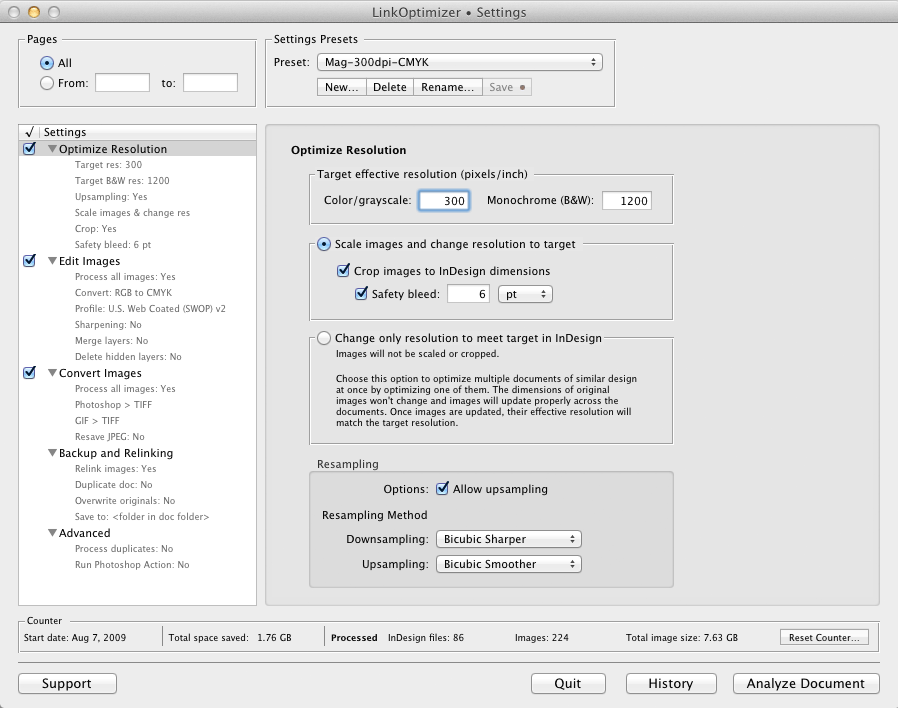
LinkOptimizer works automatically with Adobe Photoshop to eliminate the excess image data of InDesign links, perform essential image adjustments and convert image formats. For example, with just a click of a button users can:
* Scale and crop images to match their dimensions in InDesign
* Change their resolution to 300 dpi
* Convert RGB images to CMYK
* Apply color profile
* Resave JPEG images as TIFF
* Run a Photoshop Action on each image
* Reimport images to InDesign at 100% in their precise position
As a result, users can save gigabytes of disk space and countless hours of optimizing images manually, accelerate document output, reduce job turnaround, and cut costs through faster processing.
Pricing and Availability:
LinkOptimizer can be purchased from Zevrix website for $259.95 USD (Light version: $179.95) as well as from authorized resellers. Trial is also available for download. The update is free for LinkOptimizer 4.x users and $130 to upgrade from previous versions. LinkOptimizer is available for Mac OS X 10.5-10.9 and works with Adobe InDesign and Photoshop CS3-CC.
Zevrix Solutions: http://zevrix.com
LinkOptimizer 4.8.11: http://zevrix.com/LinkOptimizer.php
Download LinkOptimizer: http://zevrix.com/LinkOptimizer.dmg
Purchase: http://zevrix.com/store.php
Screenshot: http://zevrix.com/screenshots/lo4/optres-win.gif
Located in Toronto, Canada, Zevrix Solutions provides automation and productivity solutions for Adobe Creative Suite software, PDF and graphic file diagnostics and Microsoft Office on Mac OS. Zevrix is dedicated to help professionals increase their profits through automating everyday tasks, producing error-free documents, saving disk space and cutting production costs. For more information, visit their website. Copyright (C) 2013 Zevrix Solutions. All Rights Reserved.
*******
Link To Article: http://prmac.com/release-id-66044.htm
*******
---------------------------------------------------------------------------------
Note that you can alter delivered distributions at any time.
Login to your account on prMac to alter your channel selection, or to opt-out at any time.
LinkOptimizer for Adobe InDesign Improves Transparency Handling in TIFF - Published on 03/10/14
Zevrix Solutions announces LinkOptimizer 4.8.11, a maintenance update to its popular workflow automation solution for Adobe InDesign. LinkOptimizer allows to reduce the size of InDesign links and speed up processing by eliminating excess image data. It also performs image adjustments such as color conversion and sharpening, converts file formats and more. The new version preserve transparency when converting image formats to TIFF and addresses some monochrome image issues on German systems.
Toronto (ON) Canada - Zevrix Solutions today is thrilled to announce the release of LinkOptimizer 4.8.11, a compatibility update to its popular workflow automation solution for Adobe InDesign. Awarded 4 out of 5 starts by Computer Arts magazine, LinkOptimizer automates complex image manipulation tasks allowing to significantly reduce the size of InDesign links, save processing time and reduce production costs.
The new version preserves transparency when converting image formats to TIFF, which is especially helpful for users who need to convert layered Photoshop (PSD) files and resave TIFF images with different compression settings. The update also ensures that the correct image resolution is set for monochrome images on German operating system and addresses some other minor issues.
"LinkOptimizer makes cutting huge linked images down to size a cinch," says Computer Arts. "For those wanting to quickly optimize their images and cut down on processing time, LinkOptimizer is a very smart choice."
LinkOptimizer works automatically with Adobe Photoshop to eliminate the excess image data of InDesign links, perform essential image adjustments and convert image formats. For example, with just a click of a button users can:
* Scale and crop images to match their dimensions in InDesign
* Change their resolution to 300 dpi
* Convert RGB images to CMYK
* Apply color profile
* Resave JPEG images as TIFF
* Run a Photoshop Action on each image
* Reimport images to InDesign at 100% in their precise position
As a result, users can save gigabytes of disk space and countless hours of optimizing images manually, accelerate document output, reduce job turnaround, and cut costs through faster processing.
Pricing and Availability:
LinkOptimizer can be purchased from Zevrix website for $259.95 USD (Light version: $179.95) as well as from authorized resellers. Trial is also available for download. The update is free for LinkOptimizer 4.x users and $130 to upgrade from previous versions. LinkOptimizer is available for Mac OS X 10.5-10.9 and works with Adobe InDesign and Photoshop CS3-CC.
Zevrix Solutions: http://zevrix.com
LinkOptimizer 4.8.11: http://zevrix.com/LinkOptimizer.php
Download LinkOptimizer: http://zevrix.com/LinkOptimizer.dmg
Purchase: http://zevrix.com/store.php
Screenshot: http://zevrix.com/screenshots/lo4/optres-win.gif
Located in Toronto, Canada, Zevrix Solutions provides automation and productivity solutions for Adobe Creative Suite software, PDF and graphic file diagnostics and Microsoft Office on Mac OS. Zevrix is dedicated to help professionals increase their profits through automating everyday tasks, producing error-free documents, saving disk space and cutting production costs. For more information, visit their website. Copyright (C) 2013 Zevrix Solutions. All Rights Reserved.
*******
Link To Article: http://prmac.com/release-id-66044.htm
*******
---------------------------------------------------------------------------------
Note that you can alter delivered distributions at any time.
Login to your account on prMac to alter your channel selection, or to opt-out at any time.
Delivering Contents with Page-Turning Flipbook Rather Than Static PDF
A new article has been published at prMac.
Delivering Contents with Page-Turning Flipbook Rather Than Static PDF - Published on 03/10/14
1stFlip has launched a new content marketing solution for business owners. The digital flipbook with page-turning effect, created by PDF to flipbook converter, allows readers to click the page corner or flip button to flip pages on desktop, tablets and mobile devices, just like reading real printed books. Effortlessly create and publish digital Flash & HTML5 page-flipping magazines, brochures, catalogs, flyers, presentations, e-books, newspapers, photo albums and more.
Los Angeles, California - Business owners from all walks of life have taken note and are increasingly choosing online page-turning flipbooks for content marketing instead of static PDF to attract potential customers. The digital flipbook with page-turning effect, created by PDF to flipbook converter, allows readers to click the page corner or flip button to flip pages on desktop, tablets and mobile devices, just like reading real printed books.
"Product and services providers need to care more for customers to stand out from the competition. People have gradually lose the patience to scrolling through long and static PDF catalogs, brochures, guides, etc., while page-flipping publications provides the experience of reading real book via browser using flash on computers and HTML5 on mobile devices", said 1stflip.com founder, Jeff Lee.
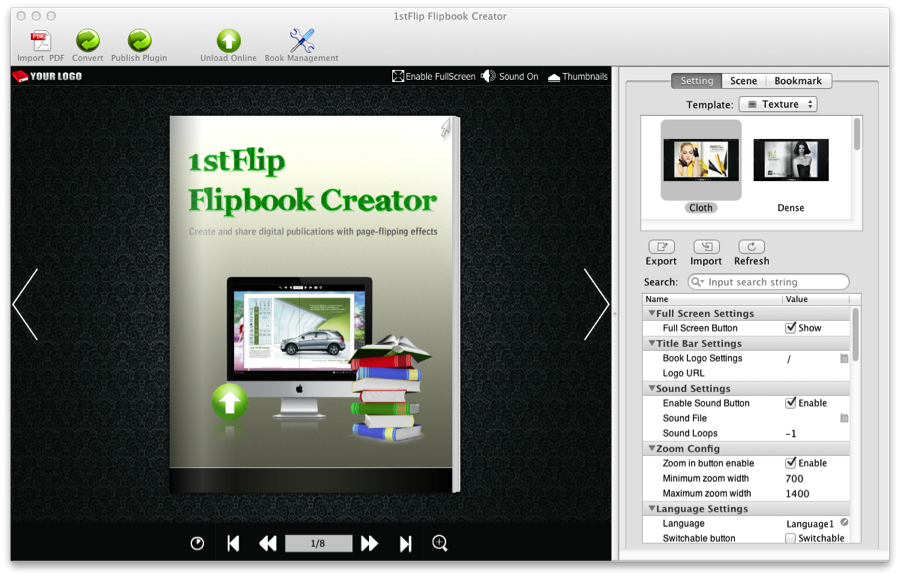
The PDF to flipbook converter doesn't require users to have development knowledge and is very easy to use. Business owners also benefit from adding logo and preserving all links in the original PDF to the created flipbook. Multilingual toolbar, various templates and sense, background music, and more helps to make the flipbook more international and personalized. Convert PDF to local flipbook then upload to own websites or upload to 1stFlip hosting service directly. Add title, keywords, and descriptions to make flipbooks search engine friendly. Social network is integrated to better promote the flipbook and reach more audiences.
Business owners and web analytics consultants all tend to use Google Analytics to monitor and analysis the traffic of website to tweak marketing strategies. 1stFlip Flipbook Creator understands the needs and allows users to easily integrate Google analytics into the created flipbooks.
System Requirements:
* Mac OS X 10.6.0 and above
Pricing and Availability:
1stFlip Flash & HTML5 Flipbook Maker for Mac 1.0.5 is only $99 USD (or equivalent amount in other currencies) and available worldwide exclusively from the web site. To view examples of flip books or get more information about the 1stFlip Flipbook Creator for Mac, please go to the web site. Potential customers can download the free trial version at the web site.
1stFlip Flipbook Creator: http://www.1stflip.com
Flash & HTML5 Flipbook Maker for Mac: http://www.1stflip.com/flipbook-creator-mac/
Download: http://www.1stflip.com/download/1stflipfilpbookcreator_mac.dmg
Purchase: http://www.1stflip.com/store.html
Screenshot: http://www.1stflip.com/flipbook-creator-mac/images/interface1.jpg
Application Icon: http://www.1stflip.com/assets/img/icon512.png
1stFlip is dedicated to offering digital publication creation and release software and solutions for businesses and professionals. 1stFlip's PDF to flipbook software product, 1stFlip Flipbook Creator for Mac, helps users to make and upload professional digital page flip publications. All Material and Software (C) Copyright 2014 1stFlip. All Rights Reserved. Apple, the Apple logo, Macintosh and Mac OS X are registered trademarks of Apple Inc. in the U.S. and/or other countries. Other trademarks and registered trademarks may be the property of their respective owners.
*******
Link To Article: http://prmac.com/release-id-66043.htm
*******
---------------------------------------------------------------------------------
Note that you can alter delivered distributions at any time.
Login to your account on prMac to alter your channel selection, or to opt-out at any time.
Delivering Contents with Page-Turning Flipbook Rather Than Static PDF - Published on 03/10/14
1stFlip has launched a new content marketing solution for business owners. The digital flipbook with page-turning effect, created by PDF to flipbook converter, allows readers to click the page corner or flip button to flip pages on desktop, tablets and mobile devices, just like reading real printed books. Effortlessly create and publish digital Flash & HTML5 page-flipping magazines, brochures, catalogs, flyers, presentations, e-books, newspapers, photo albums and more.
Los Angeles, California - Business owners from all walks of life have taken note and are increasingly choosing online page-turning flipbooks for content marketing instead of static PDF to attract potential customers. The digital flipbook with page-turning effect, created by PDF to flipbook converter, allows readers to click the page corner or flip button to flip pages on desktop, tablets and mobile devices, just like reading real printed books.
"Product and services providers need to care more for customers to stand out from the competition. People have gradually lose the patience to scrolling through long and static PDF catalogs, brochures, guides, etc., while page-flipping publications provides the experience of reading real book via browser using flash on computers and HTML5 on mobile devices", said 1stflip.com founder, Jeff Lee.
The PDF to flipbook converter doesn't require users to have development knowledge and is very easy to use. Business owners also benefit from adding logo and preserving all links in the original PDF to the created flipbook. Multilingual toolbar, various templates and sense, background music, and more helps to make the flipbook more international and personalized. Convert PDF to local flipbook then upload to own websites or upload to 1stFlip hosting service directly. Add title, keywords, and descriptions to make flipbooks search engine friendly. Social network is integrated to better promote the flipbook and reach more audiences.
Business owners and web analytics consultants all tend to use Google Analytics to monitor and analysis the traffic of website to tweak marketing strategies. 1stFlip Flipbook Creator understands the needs and allows users to easily integrate Google analytics into the created flipbooks.
System Requirements:
* Mac OS X 10.6.0 and above
Pricing and Availability:
1stFlip Flash & HTML5 Flipbook Maker for Mac 1.0.5 is only $99 USD (or equivalent amount in other currencies) and available worldwide exclusively from the web site. To view examples of flip books or get more information about the 1stFlip Flipbook Creator for Mac, please go to the web site. Potential customers can download the free trial version at the web site.
1stFlip Flipbook Creator: http://www.1stflip.com
Flash & HTML5 Flipbook Maker for Mac: http://www.1stflip.com/flipbook-creator-mac/
Download: http://www.1stflip.com/download/1stflipfilpbookcreator_mac.dmg
Purchase: http://www.1stflip.com/store.html
Screenshot: http://www.1stflip.com/flipbook-creator-mac/images/interface1.jpg
Application Icon: http://www.1stflip.com/assets/img/icon512.png
1stFlip is dedicated to offering digital publication creation and release software and solutions for businesses and professionals. 1stFlip's PDF to flipbook software product, 1stFlip Flipbook Creator for Mac, helps users to make and upload professional digital page flip publications. All Material and Software (C) Copyright 2014 1stFlip. All Rights Reserved. Apple, the Apple logo, Macintosh and Mac OS X are registered trademarks of Apple Inc. in the U.S. and/or other countries. Other trademarks and registered trademarks may be the property of their respective owners.
*******
Link To Article: http://prmac.com/release-id-66043.htm
*******
---------------------------------------------------------------------------------
Note that you can alter delivered distributions at any time.
Login to your account on prMac to alter your channel selection, or to opt-out at any time.
Subscribe to:
Posts (Atom)