A new article has been published at prMac.
Macgo Offers Three Months Giveaway of Mac iPhone Data Recovery - Published on 04/16/14
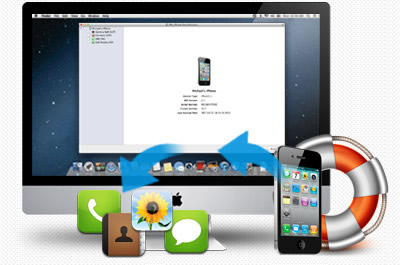
With the coming of April Fool's Day, Macgo is holding a three months' giveaway with its Macgo Mac iPhone Data Recovery until the end of June. The 1.3 version can help you retrieve photos, contacts, messages and recall history you lost from iOS devices on the Mac platform. The Macgo Mac iPhone Data Recovery can scan and recover data on iPhone/iPad/iPod touch with higher quality, completeness and stability, thus providing users with a better user experience.
Hong Kong, China - With the coming of April Fool's Day, Macgo International Ltd., a long reputed media player software provider for Mac, is offering a delightful Free Feedback to all Mac users for three months - from April 1 to June 30, during which Macgo Mac iPhone Data Recovery can be downloaded and used for free for a lifelong time. Don't worry, it's not a joke.
The 1.3 version Macgo Mac iPhone Data Recovery is developed by Macgo Team and can help you retrieve photos, contacts, messages and recall history you lost from iOS devices on Mac platform. With more mature data recovery technology and improvement of practical functions, the app can scan and recover data on iPhone/iPad/iPod touch with higher quality, completeness and stability, thus providing users with a better user experience.
* All-in-one Data Recovery for All iOS devices:
Mac iPhone Data Recovery is the world's best data recovery software for iPhone on Mac Platform. Its fantastic data recovery supports all iOS devices, not only the popular iPhone 5S, 5, 4S, 4, 3GS, but also the previous ones
* Recover Photos, Contacts, Call History and Messages from your iOS devices:
It can recover photos, messages, call history, and contacts data that have been deleted from iPad/iPhone/iPod touch from iTunes backup
* Automatically Scan and Arrange Files in Alphabetical or Chronological Order:
After running it, this data recovery software can automatically scan iOS devices, provide the preview of the desired data, and arrange the files in alphabetical or chronological order which makes it much easier to look for the file you want
* Ultrafast and Easy-to-use:
As for how to recover the lost data of your iOS devices on Mac OS, this easy-to-use app enables beginners to recover lost files by the following brief instruction, and no prior recovery experience is required. You can refer to the Mac iPhone Data Recovery Tutorial on Macgo homepage to find out
System Requirements:
* Supported iOS Devices: iPhone, iPad, iPod touch (iTouch)
* Supported OS: Mac OS X 10.6, 10.7, 10.8, and 10.9
Pricing and Availability:
Macgo Mac iPhone Data Recovery v1.3 is free for a limited time and available worldwide exclusively through the Macgo website. Save $69.95 Precondition: deleted data can be recovered only from iTunes backup.
Macgo: http://www.macblurayplayer.com
Macgo Mac iPhone Data Recovery v. 1.3.0: http://www.macblurayplayer.com/mac-iphone-data-recovery.htm
Download: http://www.macblurayplayer.com/user/download/Mac_iPhone_Data_Recovery.dmg
Tutorial: http://www.macblurayplayer.com/how-to-recover-iphone-data-on-mac-os.htm
Screenshot: http://www.macblurayplayer.com/image/data-recovery.jpg
App Icon: http://www.macblurayplayer.com/image/page1_img2.png
Macgo INTERNATIONAL LIMITED has over ten years of experience in DVD Blu-ray video and has developed many DVD Blu-ray video tools with advanced technology. In the past ten years, Macgo has established itself as the innovative leader in video DVD Blu-ray technology by pioneering more performance enhancing technology. All Material and Software (C) Copyright 2014 Macgo INTERNATIONAL LIMITED. All Rights Reserved. Apple, the Apple logo, iPhone, iPod and iPad are registered trademarks of Apple Inc. in the U.S. and/or other countries. Other trademarks and registered trademarks may be the property of their respective owners.
*******
Link To Article: http://prmac.com/release-id-67067.htm
*******
---------------------------------------------------------------------------------
Note that you can alter delivered distributions at any time.
Login to your account on prMac to alter your channel selection, or to opt-out at any time.


King Leonidas Spartan Warrior Hoplite Wars out now on iOS
A new article has been published at prMac.
King Leonidas Spartan Warrior Hoplite Wars out now on iOS - Published on 04/16/14
Rookie Sensation Mobile Games announces King Leonidas Spartan Warrior Hoplite Wars for iOS. Play as King Leonidas in this runner game and vanquish the Persians who aim to topple the kingdom of Sparta. As the lone surviving Spartan see how far you can go to defend the Glory of Sparta and relive the Battle of Thermopalye in the last stand of the Spartans. In his last stand, dodge obstacles, jump over cliffs and destroy the invaders in this epic game of skill and reflexes.
Sydney, Australia - Rookie Sensation Mobile Games is pleased to announce King Leonidas Spartan Warrior Hoplite Wars for iOS. Play as King Leonidas in this runner game and vanquish the Persians who aim to topple the kingdom of Sparta. In his last stand, dodge obstacles, jump over cliffs and destroy the invaders in this epic game of skill and reflexes.
The other 299 Spartans have fallen and it is up to you to restore pride in the empire and defend for the glory of Greece. As the lone surviving Spartan see how far you can go to defend the Glory of Sparta and relive the Battle of Thermopalye in the last stand of the Spartans.
This is a speed running game where you are constantly running and manoeuvring to get to the end of the level. Each level presents a different challenge and forward thinking to test your ability to get through each stage.
Features:
* Single Player
* Non Stop Action
* Different landscapes
* Simple Gameplay
* 3D Runner
* 20 Levels + more
* Future updates
* Different landscapes
* Different Enemies
Device Requirements:
* iPhone, iPad, and iPod touch
* Requires iOS 6.0 or later
* 53.6 MB
Pricing and Availability:
King Leonidas Spartan Warrior Hoplite Wars 1.0 is free and available worldwide exclusively through the App Store in the Games category. Possible future updates will be considered.
Rookie Sensation Mobile Games: http://www.rsmobilegames.com.au
King Leonidas Spartan Warrior Hoplite Wars 1.0: https://itunes.apple.com/app/king-leonidas-spartan-warrior/id844791661
Screenshot: http://a4.mzstatic.com/us/r30/Purple6/v4/e2/8e/85/e28e8586-8891-b878-d923-8cd1afb9054e/screen568x568.jpeg
App Icon: http://a5.mzstatic.com/us/r30/Purple/v4/64/b0/fe/64b0fe67-f2fd-9d2d-0de5-36c85bf87801/mzl.pdthovyi.175x175-75.jpg
Rookie Sensation Mobile Games is a newly founded Indie Startup company based in Sydney, Australia. It caters to make mobile games for all the masses. It was created in 2013, to offer sensational gameplay for the casual gamer, both new and old. Copyright (C) 2013-2014 Rookie Sensation Mobile Games. All Rights Reserved. Apple, the Apple logo, iPhone, iPad, iPad mini, iPod touch, and Mac are registered trademarks of Apple Inc. in the U.S. and/or other countries. Other trademarks and registered trademarks may be the property of their respective owners.
*******
Link To Article: http://prmac.com/release-id-67066.htm
*******
---------------------------------------------------------------------------------
Note that you can alter delivered distributions at any time.
Login to your account on prMac to alter your channel selection, or to opt-out at any time.
King Leonidas Spartan Warrior Hoplite Wars out now on iOS - Published on 04/16/14
Rookie Sensation Mobile Games announces King Leonidas Spartan Warrior Hoplite Wars for iOS. Play as King Leonidas in this runner game and vanquish the Persians who aim to topple the kingdom of Sparta. As the lone surviving Spartan see how far you can go to defend the Glory of Sparta and relive the Battle of Thermopalye in the last stand of the Spartans. In his last stand, dodge obstacles, jump over cliffs and destroy the invaders in this epic game of skill and reflexes.
Sydney, Australia - Rookie Sensation Mobile Games is pleased to announce King Leonidas Spartan Warrior Hoplite Wars for iOS. Play as King Leonidas in this runner game and vanquish the Persians who aim to topple the kingdom of Sparta. In his last stand, dodge obstacles, jump over cliffs and destroy the invaders in this epic game of skill and reflexes.
The other 299 Spartans have fallen and it is up to you to restore pride in the empire and defend for the glory of Greece. As the lone surviving Spartan see how far you can go to defend the Glory of Sparta and relive the Battle of Thermopalye in the last stand of the Spartans.
This is a speed running game where you are constantly running and manoeuvring to get to the end of the level. Each level presents a different challenge and forward thinking to test your ability to get through each stage.
Features:
* Single Player
* Non Stop Action
* Different landscapes
* Simple Gameplay
* 3D Runner
* 20 Levels + more
* Future updates
* Different landscapes
* Different Enemies
Device Requirements:
* iPhone, iPad, and iPod touch
* Requires iOS 6.0 or later
* 53.6 MB
Pricing and Availability:
King Leonidas Spartan Warrior Hoplite Wars 1.0 is free and available worldwide exclusively through the App Store in the Games category. Possible future updates will be considered.
Rookie Sensation Mobile Games: http://www.rsmobilegames.com.au
King Leonidas Spartan Warrior Hoplite Wars 1.0: https://itunes.apple.com/app/king-leonidas-spartan-warrior/id844791661
Screenshot: http://a4.mzstatic.com/us/r30/Purple6/v4/e2/8e/85/e28e8586-8891-b878-d923-8cd1afb9054e/screen568x568.jpeg

App Icon: http://a5.mzstatic.com/us/r30/Purple/v4/64/b0/fe/64b0fe67-f2fd-9d2d-0de5-36c85bf87801/mzl.pdthovyi.175x175-75.jpg

Rookie Sensation Mobile Games is a newly founded Indie Startup company based in Sydney, Australia. It caters to make mobile games for all the masses. It was created in 2013, to offer sensational gameplay for the casual gamer, both new and old. Copyright (C) 2013-2014 Rookie Sensation Mobile Games. All Rights Reserved. Apple, the Apple logo, iPhone, iPad, iPad mini, iPod touch, and Mac are registered trademarks of Apple Inc. in the U.S. and/or other countries. Other trademarks and registered trademarks may be the property of their respective owners.
*******
Link To Article: http://prmac.com/release-id-67066.htm
*******
---------------------------------------------------------------------------------
Note that you can alter delivered distributions at any time.
Login to your account on prMac to alter your channel selection, or to opt-out at any time.
Proshake lite - the Protein Tracker; Just Shake, Add and Track
A new article has been published at prMac.
Proshake lite - the Protein Tracker; Just Shake, Add and Track - Published on 04/16/14
back2frontsolutions intoduces ProShake Lite 1.0.3 for iOS. We know that having too little protein is not beneficial for maintaining or building muscle, but having too much is unnecessary. Whether you are male or female, a body builder or just your average 'Joe', using ProShake allows you to calculate your daily protein intake & monitor your progress. Shake your device or use our food picker. The app helps you keep on top of your goal by notifying you. Shake, add & track your gains with ProShake!
London, United Kingdom - We know that having too little protein is not beneficial for maintaining or building muscle, but having too much is unnecessary and can be costly. Whether you are male or female, a body builder or fitness enthusiast or just your average 'Joe' who wants to start working out. Using ProShake from back2frontsolutions allows you to calculate your daily protein intake and monitor your progress. Either shake your device or use our intuitive and easy to use food picker. Then check your profile to see how you are doing. Shake, add and track your gains with ProShake!
Features:
* Protein calculator based off gender, weight (kg or lbs) and activity level. You can also provide your own intake value if the calculated intake is too high or low
* Gold, Silver, Bronze protein score system. Make sure you're hitting protein goal every day
* Unique Interactive Protein shake function
* Scrollable weekly calendar view
* Food Log - add, edit or delete items from your food diary
* Notifications - ProShake can help you to keep on top of your goal by notifying you every so often
* ProShake ships with a small database of food items to get you started
Coming Soon: ProShake Premium - The Complete Nutrient Tracker
* Full nutritional breakdown - fat, carbs and calorific data
* Barcode reader
* Pill Box - track your supplement usage
Device Requirements:
* iPhone, iPad, and iPod touch
* Requires iOS 7.0 or later
* 12.3 MB
Pricing and Availability:
Proshake lite - The Protein Tracker 1.0.3 is free and available through the App Store in the Health & Fitness category.
back2frontsolutions: http://back2frontsolutions.com
ProShake Lite1.0.3: http://back2frontsolutions.com/proshake/
Download from iTunes: https://itunes.apple.com/app/proshake-lite-protein-tracker/id830744947
Screenshot: http://a4.mzstatic.com/eu/r30/Purple/v4/e7/ad/cd/e7adcd83-10bb-3196-d3bb-893f825b60d1/screen568x568.jpeg
App Icon: http://a3.mzstatic.com/us/r30/Purple4/v4/60/e9/78/60e978ca-165c-4de6-e9d6-f3b3d2f111e3/mzl.vowcyfxx.175x175-75.jpg
Located in London, Newcastle, UK and Sicily, Italy, back2frontsolutions was founded in 2013 by Noel Morgala and Ian Poultney. We are independent developers who try to create useful apps that have something different about them. The aim is to stand out from the crowd in an increasingly crowded marketplace but most importantly have fun doing it. All Material and Software (C) 2014 back2frontsolutions. All Rights Reserved. Apple, the Apple logo, iPod, the iPod logo, are registered trademarks of Apple Computer in the U.S. and/or other countries. Other trademarks and registered trademarks may be the property of their respective owners.
*******
Link To Article: http://prmac.com/release-id-67065.htm
*******
---------------------------------------------------------------------------------
Note that you can alter delivered distributions at any time.
Login to your account on prMac to alter your channel selection, or to opt-out at any time.
Proshake lite - the Protein Tracker; Just Shake, Add and Track - Published on 04/16/14
back2frontsolutions intoduces ProShake Lite 1.0.3 for iOS. We know that having too little protein is not beneficial for maintaining or building muscle, but having too much is unnecessary. Whether you are male or female, a body builder or just your average 'Joe', using ProShake allows you to calculate your daily protein intake & monitor your progress. Shake your device or use our food picker. The app helps you keep on top of your goal by notifying you. Shake, add & track your gains with ProShake!
London, United Kingdom - We know that having too little protein is not beneficial for maintaining or building muscle, but having too much is unnecessary and can be costly. Whether you are male or female, a body builder or fitness enthusiast or just your average 'Joe' who wants to start working out. Using ProShake from back2frontsolutions allows you to calculate your daily protein intake and monitor your progress. Either shake your device or use our intuitive and easy to use food picker. Then check your profile to see how you are doing. Shake, add and track your gains with ProShake!
Features:
* Protein calculator based off gender, weight (kg or lbs) and activity level. You can also provide your own intake value if the calculated intake is too high or low
* Gold, Silver, Bronze protein score system. Make sure you're hitting protein goal every day
* Unique Interactive Protein shake function
* Scrollable weekly calendar view
* Food Log - add, edit or delete items from your food diary
* Notifications - ProShake can help you to keep on top of your goal by notifying you every so often
* ProShake ships with a small database of food items to get you started
Coming Soon: ProShake Premium - The Complete Nutrient Tracker
* Full nutritional breakdown - fat, carbs and calorific data
* Barcode reader
* Pill Box - track your supplement usage
Device Requirements:
* iPhone, iPad, and iPod touch
* Requires iOS 7.0 or later
* 12.3 MB
Pricing and Availability:
Proshake lite - The Protein Tracker 1.0.3 is free and available through the App Store in the Health & Fitness category.
back2frontsolutions: http://back2frontsolutions.com
ProShake Lite1.0.3: http://back2frontsolutions.com/proshake/
Download from iTunes: https://itunes.apple.com/app/proshake-lite-protein-tracker/id830744947
Screenshot: http://a4.mzstatic.com/eu/r30/Purple/v4/e7/ad/cd/e7adcd83-10bb-3196-d3bb-893f825b60d1/screen568x568.jpeg

App Icon: http://a3.mzstatic.com/us/r30/Purple4/v4/60/e9/78/60e978ca-165c-4de6-e9d6-f3b3d2f111e3/mzl.vowcyfxx.175x175-75.jpg

Located in London, Newcastle, UK and Sicily, Italy, back2frontsolutions was founded in 2013 by Noel Morgala and Ian Poultney. We are independent developers who try to create useful apps that have something different about them. The aim is to stand out from the crowd in an increasingly crowded marketplace but most importantly have fun doing it. All Material and Software (C) 2014 back2frontsolutions. All Rights Reserved. Apple, the Apple logo, iPod, the iPod logo, are registered trademarks of Apple Computer in the U.S. and/or other countries. Other trademarks and registered trademarks may be the property of their respective owners.
*******
Link To Article: http://prmac.com/release-id-67065.htm
*******
---------------------------------------------------------------------------------
Note that you can alter delivered distributions at any time.
Login to your account on prMac to alter your channel selection, or to opt-out at any time.
Speedoodle - The Quick Doodling Game With a Hilarious, Social Twist
A new article has been published at prMac.
Speedoodle - The Quick Doodling Game With a Hilarious, Social Twist - Published on 04/16/14
Independent developer, Caleb Stultz announces the release of his new game Speedoodle for iOS. The Speedoodle is fun, addictive and hilariously social. You have three seconds to draw anything you can imagine. Once the time is up, the doodle is out of your control and into the hands of a friend to complete - allowing for imaginative creative of an immeasurable scale! In Speedoodle, you race against the clock to create and complete doodles, making every moment of pure creativity count.
San Francisco, California - Independent developer, Caleb Stultz, is pleased to announce the release of his new game Speedoodle for iOS. The Speedoodle is fun, addictive and hilariously social. Whatever you can imagine, you can draw. Complete your friends' drawings or turn it on its head - the only limitation is your imagination. Start a game or colorize friends' doodles - and then try the opposite!
So - here's the plan: you have three seconds to draw anything you can imagine; from crazy robots to hyperactive trees and everything in-between. But, here's the catch: Once the time is up, the doodle is out of your control and into the hands of a friend to complete - allowing for imaginative creative of an immeasurable scale!
You love to doodle, right? So do we, and that's why we created Speedoodle - the first super-social doodling game for your fingertips. In Speedoodle, you race against the clock to create and complete doodles, making every moment of pure creativity count!
Features:
* Draw any doodle in 3 seconds
* Take turns colorizing each doodle; change the perspectiie or create a masterpiece
* Share your doodles on Facebook with a tap
* Fun, addictive, and shamelessly social
* Get SpeedSwag to purchase additional colors and so much more
Device Requirements:
* iPad, iPhone, and iPod touch
* Requires iOS 7 or later
* 6.7 MB
Pricing and Availability:
Speedoodle: the quick doodling game with a hilarious, social twist! 1.0.2 is free and available worldwide exclusively through the App Store in the Games category.
Speedoodle 1.0.2: http://www.speedoodle.com
Download from iTunes: https://itunes.apple.com/app/speedoodle-quick-doodling/id840849690
Screenshot 1: http://a3.mzstatic.com/us/r30/Purple/v4/de/13/86/de1386ac-bf19-888a-3cc8-8b044fbd6c69/screen568x568.jpeg
Screenshot 2: http://a5.mzstatic.com/us/r30/Purple/v4/c2/d2/e2/c2d2e274-c705-8507-9bcf-7e9e380f407b/screen568x568.jpeg
App Icon: http://a1.mzstatic.com/us/r30/Purple2/v4/12/55/94/1255943c-7199-64b9-6ed0-fd397b72b9fd/mzl.vhlvlawt.175x175-75.jpg
San Francisco based Culeb Stultz developes software for different areas. This is a new title for the App Store. All Materials and Software (C)Copyright 2014 Culeb Stultz. All Rights Reserved. Apple, the Apple logo, iPhone, iPod and iPad are registered trademarks of Apple Inc. in the U.S. and/or other countries. Other trademarks and registered trademarks may be the property of their respective owner.
*******
Link To Article: http://prmac.com/release-id-67064.htm
*******
---------------------------------------------------------------------------------
Note that you can alter delivered distributions at any time.
Login to your account on prMac to alter your channel selection, or to opt-out at any time.
Speedoodle - The Quick Doodling Game With a Hilarious, Social Twist - Published on 04/16/14
Independent developer, Caleb Stultz announces the release of his new game Speedoodle for iOS. The Speedoodle is fun, addictive and hilariously social. You have three seconds to draw anything you can imagine. Once the time is up, the doodle is out of your control and into the hands of a friend to complete - allowing for imaginative creative of an immeasurable scale! In Speedoodle, you race against the clock to create and complete doodles, making every moment of pure creativity count.
San Francisco, California - Independent developer, Caleb Stultz, is pleased to announce the release of his new game Speedoodle for iOS. The Speedoodle is fun, addictive and hilariously social. Whatever you can imagine, you can draw. Complete your friends' drawings or turn it on its head - the only limitation is your imagination. Start a game or colorize friends' doodles - and then try the opposite!
So - here's the plan: you have three seconds to draw anything you can imagine; from crazy robots to hyperactive trees and everything in-between. But, here's the catch: Once the time is up, the doodle is out of your control and into the hands of a friend to complete - allowing for imaginative creative of an immeasurable scale!
You love to doodle, right? So do we, and that's why we created Speedoodle - the first super-social doodling game for your fingertips. In Speedoodle, you race against the clock to create and complete doodles, making every moment of pure creativity count!
Features:
* Draw any doodle in 3 seconds
* Take turns colorizing each doodle; change the perspectiie or create a masterpiece
* Share your doodles on Facebook with a tap
* Fun, addictive, and shamelessly social
* Get SpeedSwag to purchase additional colors and so much more
Device Requirements:
* iPad, iPhone, and iPod touch
* Requires iOS 7 or later
* 6.7 MB
Pricing and Availability:
Speedoodle: the quick doodling game with a hilarious, social twist! 1.0.2 is free and available worldwide exclusively through the App Store in the Games category.
Speedoodle 1.0.2: http://www.speedoodle.com
Download from iTunes: https://itunes.apple.com/app/speedoodle-quick-doodling/id840849690
Screenshot 1: http://a3.mzstatic.com/us/r30/Purple/v4/de/13/86/de1386ac-bf19-888a-3cc8-8b044fbd6c69/screen568x568.jpeg

Screenshot 2: http://a5.mzstatic.com/us/r30/Purple/v4/c2/d2/e2/c2d2e274-c705-8507-9bcf-7e9e380f407b/screen568x568.jpeg

App Icon: http://a1.mzstatic.com/us/r30/Purple2/v4/12/55/94/1255943c-7199-64b9-6ed0-fd397b72b9fd/mzl.vhlvlawt.175x175-75.jpg

San Francisco based Culeb Stultz developes software for different areas. This is a new title for the App Store. All Materials and Software (C)Copyright 2014 Culeb Stultz. All Rights Reserved. Apple, the Apple logo, iPhone, iPod and iPad are registered trademarks of Apple Inc. in the U.S. and/or other countries. Other trademarks and registered trademarks may be the property of their respective owner.
*******
Link To Article: http://prmac.com/release-id-67064.htm
*******
---------------------------------------------------------------------------------
Note that you can alter delivered distributions at any time.
Login to your account on prMac to alter your channel selection, or to opt-out at any time.
SketchUp Models Become a Mobile AR Experience with SightSpace View
A new article has been published at prMac.
SketchUp Models Become a Mobile AR Experience with SightSpace View - Published on 04/16/14
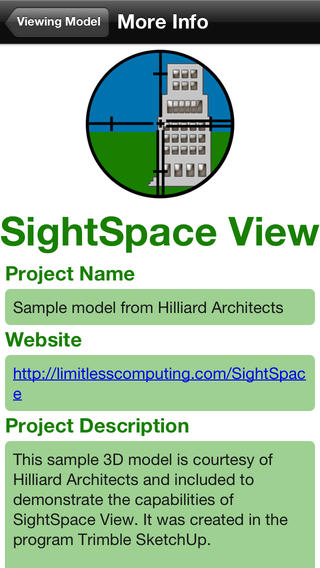
Limitless Computing Inc. has announced the immediate availability of SightSpace View for iOS. This is a Trimble SketchUp plugin and companion mobile app that quickly and easily deploys designs to mobile. The plugin connects a QR-code to a SketchUp model. When the code is scanned with the SightSpace View mobile app (on Apple or Android), the model appears in the real-world overlaid onto the code. Limitless Computing will showcase SightSpace View at SketchUp 3D Basecamp 2014.
Boulder, Colorado - Limitless Computing Inc.(R), a leading provider of 3D mobile Augmented Reality, has announced immediate availability of SightSpace View, its Trimble SketchUp plugin and companion mobile app that quickly and easily deploys designs to mobile. The plugin, which supports SketchUp 2014, connects a QR-code to a SketchUp model. When the code is scanned with the SightSpace View mobile app (on Apple or Android), the model appears in the real-world overlaid onto the code.
"SightSpace View is an exceptionally impactful marketing tool and an effective way to use 3D content to drive sales, check construction progress, share models, and build brand recognition," commented Dr. Errin T. Weller, president, Limitless Computing Inc. "This truly is Augmented Reality for everyone."
Limitless Computing will showcase SightSpace View at SketchUp 3D Basecamp 2014, taking place April 14-16 in Vail, Colorado.
Device Requirements:
* iPhone, iPad�2 Wi-Fi or later, iPod touch (4th generation) or later
* Requires iOS 4.3 or later
* 3.6 MB
Pricing and Availability:
SightSpace View 1.2.2 is free and available worldwide exclusively through the App Store in the Productivity category. A free download for PC or Mac is available now at the website.
About SightSpace View Plugin and Mobile App
SightSpace View plugin can connect to any Trimble SketchUp digital model with a QR code for the ultimate mobile AR experience. When scanned with the free View mobile app, users experience the 3D design overlaid onto the real-world using the live camera feed of the device. View service starts at $29/month with a free mobile app viewer.
Limitless Computing: http://www.limitlesscomputing.com
SightSpace View 1.2.2: https://extensions.sketchup.com/en/content/sightspace-view
Download from iTunes: https://itunes.apple.com/app/sightspace-view/id660528467
Screenshot: http://a1.mzstatic.com/us/r30/Purple/v4/c0/1f/be/c01fbe55-b231-dc0e-d915-e6092fcd39e8/screen568x568.jpeg
App Icon: http://a3.mzstatic.com/us/r30/Purple/v4/dd/38/a8/dd38a87b-4caf-c0d8-ced6-71b102d74995/mzl.kxybatul.175x175-75.jpg
Boulder, CO-based Limitless Computing Inc. has provided cloud computing since 2006, specializing in Augmented Reality. Limitless Computing brought Augmented Reality to Google SketchUp in 2011 with the release of the mobile application SightSpace 3D for Apple and added Kindle Fire and Android devices in 2012. Its newest product, Circulizar, set a new standard for virtual gift-giving through Facebook. Limitless Computing and logo are registered trademarks of Limitless Computing Inc. Copyright (C) 2012 Limitless Computing Inc. All Rights Reserved. Apple, the Apple logo, iPhone, iPod and iPad are registered trademarks of Apple Inc. in the U.S. and/or other countries. All other brand names, product names, or trademarks belong to their respective holders. Limitless Computing, its logo, and SightSpace are registered trademarks of Limitless Computing Inc. All others brand names, product names, or trademarks belong to their respective holders.
*******
Link To Article: http://prmac.com/release-id-67063.htm
*******
---------------------------------------------------------------------------------
Note that you can alter delivered distributions at any time.
Login to your account on prMac to alter your channel selection, or to opt-out at any time.
SketchUp Models Become a Mobile AR Experience with SightSpace View - Published on 04/16/14
Limitless Computing Inc. has announced the immediate availability of SightSpace View for iOS. This is a Trimble SketchUp plugin and companion mobile app that quickly and easily deploys designs to mobile. The plugin connects a QR-code to a SketchUp model. When the code is scanned with the SightSpace View mobile app (on Apple or Android), the model appears in the real-world overlaid onto the code. Limitless Computing will showcase SightSpace View at SketchUp 3D Basecamp 2014.
Boulder, Colorado - Limitless Computing Inc.(R), a leading provider of 3D mobile Augmented Reality, has announced immediate availability of SightSpace View, its Trimble SketchUp plugin and companion mobile app that quickly and easily deploys designs to mobile. The plugin, which supports SketchUp 2014, connects a QR-code to a SketchUp model. When the code is scanned with the SightSpace View mobile app (on Apple or Android), the model appears in the real-world overlaid onto the code.
"SightSpace View is an exceptionally impactful marketing tool and an effective way to use 3D content to drive sales, check construction progress, share models, and build brand recognition," commented Dr. Errin T. Weller, president, Limitless Computing Inc. "This truly is Augmented Reality for everyone."
Limitless Computing will showcase SightSpace View at SketchUp 3D Basecamp 2014, taking place April 14-16 in Vail, Colorado.
Device Requirements:
* iPhone, iPad�2 Wi-Fi or later, iPod touch (4th generation) or later
* Requires iOS 4.3 or later
* 3.6 MB
Pricing and Availability:
SightSpace View 1.2.2 is free and available worldwide exclusively through the App Store in the Productivity category. A free download for PC or Mac is available now at the website.
About SightSpace View Plugin and Mobile App
SightSpace View plugin can connect to any Trimble SketchUp digital model with a QR code for the ultimate mobile AR experience. When scanned with the free View mobile app, users experience the 3D design overlaid onto the real-world using the live camera feed of the device. View service starts at $29/month with a free mobile app viewer.
Limitless Computing: http://www.limitlesscomputing.com
SightSpace View 1.2.2: https://extensions.sketchup.com/en/content/sightspace-view
Download from iTunes: https://itunes.apple.com/app/sightspace-view/id660528467
Screenshot: http://a1.mzstatic.com/us/r30/Purple/v4/c0/1f/be/c01fbe55-b231-dc0e-d915-e6092fcd39e8/screen568x568.jpeg
App Icon: http://a3.mzstatic.com/us/r30/Purple/v4/dd/38/a8/dd38a87b-4caf-c0d8-ced6-71b102d74995/mzl.kxybatul.175x175-75.jpg

Boulder, CO-based Limitless Computing Inc. has provided cloud computing since 2006, specializing in Augmented Reality. Limitless Computing brought Augmented Reality to Google SketchUp in 2011 with the release of the mobile application SightSpace 3D for Apple and added Kindle Fire and Android devices in 2012. Its newest product, Circulizar, set a new standard for virtual gift-giving through Facebook. Limitless Computing and logo are registered trademarks of Limitless Computing Inc. Copyright (C) 2012 Limitless Computing Inc. All Rights Reserved. Apple, the Apple logo, iPhone, iPod and iPad are registered trademarks of Apple Inc. in the U.S. and/or other countries. All other brand names, product names, or trademarks belong to their respective holders. Limitless Computing, its logo, and SightSpace are registered trademarks of Limitless Computing Inc. All others brand names, product names, or trademarks belong to their respective holders.
*******
Link To Article: http://prmac.com/release-id-67063.htm
*******
---------------------------------------------------------------------------------
Note that you can alter delivered distributions at any time.
Login to your account on prMac to alter your channel selection, or to opt-out at any time.
Time Buttons: find activities wasting your time
A new article has been published at prMac.
Time Buttons: find activities wasting your time - Published on 04/16/14
Nikolay Grebenshikov presents the new time management tool to track and analyse personal time - Time Buttons. The main idea of the app is the metaphor of a task as a button. It's very clear; just press the button to track time and find the activities you want to do. A user can plan his everyday activities creating a button for each task and arrange them into several groups. Time Buttons can show a brief summary of users's activities for a period of time.
Abakan, Russian Federation - Nikolay Grebenshikov, an indie developer from Russia, presents the new time management tool to track and analyse personal time - Time Buttons. The main idea of the app is the metaphor of a task as a button. It's early clear. Just press the button to track time and find the activities using your time.
Easy to start:
It has a pure user interface and the most needed functionality. A user can plan his everyday activities creating a button for each task and arrange them into several groups (screens). We don't have many properties. Just doble tap on free space and a new button will appear. Fill the title, select the icon. That's it.
Easy to track:
The main part of the application is tracking time for planned activities. Just press a button starting a new activity. A pressed button means that time for corresponding activity is being tracked.
Time Buttons provides a feature to increase both positive and negative motivations. After
a user sets time he's planning to spend doing some activity the app will highlight
a corresponding button with colors from green to red. The green colour means that
a user is invited to do the task. The red means the time a user planned time ran out and the user can't to do the task.
Freedom to analyze:
All data tracking is nothing without its analysis. Time Buttons can show a brief summary of users's activities for a period of time. It's a simple tool but it's enough for most cases. The application also provides emailing of all data to specific email and analyze it with third-party tools.
Device Requirements:
* iPhone, iPad, and iPod touch
* Requires iOS 7 or later.
* 11.1 MB
Pricing and Availability:
Time Buttons 1.1 is only $0.99 USD (or equivalent amount in other currencies) and available worldwide exclusively through the App Store in the Productivity category.
Time Buttons 1.1: http://www.time-buttons.com
Purchase and Download: https://itunes.apple.com/WebObjects/MZStore.woa/wa/viewSoftware?id=833988701
Screenshot 1: http://a3.mzstatic.com/us/r30/Purple/v4/cd/11/54/cd115469-7481-5829-ef3f-294f38310476/screen568x568.jpeg
Screenshot 2: http://a5.mzstatic.com/us/r30/Purple/v4/d6/07/88/d6078846-549c-b6eb-004f-f1580733f7db/screen480x480.jpeg
App Icon: http://a5.mzstatic.com/us/r30/Purple6/v4/61/d0/66/61d066d9-f791-9122-c105-fb3c4d2e0200/mzl.dsevvxyj.175x175-75.jpg
Nikolay Grebenshikov is an indie developer from the snowing Siberia (Russia). He's also has developed web projects. E.g. moulinella.com that helps creating a cross-stitch pattern of a picture (photo). All Material and Software (C) Copyright 2014 Nikolay Grebenshikov. All Rights Reserved. Apple, the Apple logo, iPhone, iPod and iPad are registered trademarks of Apple Inc. in the U.S. and/or other countries. Other trademarks and registered trademarks may be the property of their respective owners.
*******
Link To Article: http://prmac.com/release-id-67062.htm
*******
---------------------------------------------------------------------------------
Note that you can alter delivered distributions at any time.
Login to your account on prMac to alter your channel selection, or to opt-out at any time.
Time Buttons: find activities wasting your time - Published on 04/16/14
Nikolay Grebenshikov presents the new time management tool to track and analyse personal time - Time Buttons. The main idea of the app is the metaphor of a task as a button. It's very clear; just press the button to track time and find the activities you want to do. A user can plan his everyday activities creating a button for each task and arrange them into several groups. Time Buttons can show a brief summary of users's activities for a period of time.
Abakan, Russian Federation - Nikolay Grebenshikov, an indie developer from Russia, presents the new time management tool to track and analyse personal time - Time Buttons. The main idea of the app is the metaphor of a task as a button. It's early clear. Just press the button to track time and find the activities using your time.
Easy to start:
It has a pure user interface and the most needed functionality. A user can plan his everyday activities creating a button for each task and arrange them into several groups (screens). We don't have many properties. Just doble tap on free space and a new button will appear. Fill the title, select the icon. That's it.
Easy to track:
The main part of the application is tracking time for planned activities. Just press a button starting a new activity. A pressed button means that time for corresponding activity is being tracked.
Time Buttons provides a feature to increase both positive and negative motivations. After
a user sets time he's planning to spend doing some activity the app will highlight
a corresponding button with colors from green to red. The green colour means that
a user is invited to do the task. The red means the time a user planned time ran out and the user can't to do the task.
Freedom to analyze:
All data tracking is nothing without its analysis. Time Buttons can show a brief summary of users's activities for a period of time. It's a simple tool but it's enough for most cases. The application also provides emailing of all data to specific email and analyze it with third-party tools.
Device Requirements:
* iPhone, iPad, and iPod touch
* Requires iOS 7 or later.
* 11.1 MB
Pricing and Availability:
Time Buttons 1.1 is only $0.99 USD (or equivalent amount in other currencies) and available worldwide exclusively through the App Store in the Productivity category.
Time Buttons 1.1: http://www.time-buttons.com
Purchase and Download: https://itunes.apple.com/WebObjects/MZStore.woa/wa/viewSoftware?id=833988701
Screenshot 1: http://a3.mzstatic.com/us/r30/Purple/v4/cd/11/54/cd115469-7481-5829-ef3f-294f38310476/screen568x568.jpeg

Screenshot 2: http://a5.mzstatic.com/us/r30/Purple/v4/d6/07/88/d6078846-549c-b6eb-004f-f1580733f7db/screen480x480.jpeg

App Icon: http://a5.mzstatic.com/us/r30/Purple6/v4/61/d0/66/61d066d9-f791-9122-c105-fb3c4d2e0200/mzl.dsevvxyj.175x175-75.jpg

Nikolay Grebenshikov is an indie developer from the snowing Siberia (Russia). He's also has developed web projects. E.g. moulinella.com that helps creating a cross-stitch pattern of a picture (photo). All Material and Software (C) Copyright 2014 Nikolay Grebenshikov. All Rights Reserved. Apple, the Apple logo, iPhone, iPod and iPad are registered trademarks of Apple Inc. in the U.S. and/or other countries. Other trademarks and registered trademarks may be the property of their respective owners.
*******
Link To Article: http://prmac.com/release-id-67062.htm
*******
---------------------------------------------------------------------------------
Note that you can alter delivered distributions at any time.
Login to your account on prMac to alter your channel selection, or to opt-out at any time.
Product Manager 2.0 to manage company products on Macintosh
A new article has been published at prMac.
Product Manager 2.0 to manage company products on Macintosh - Published on 04/16/14
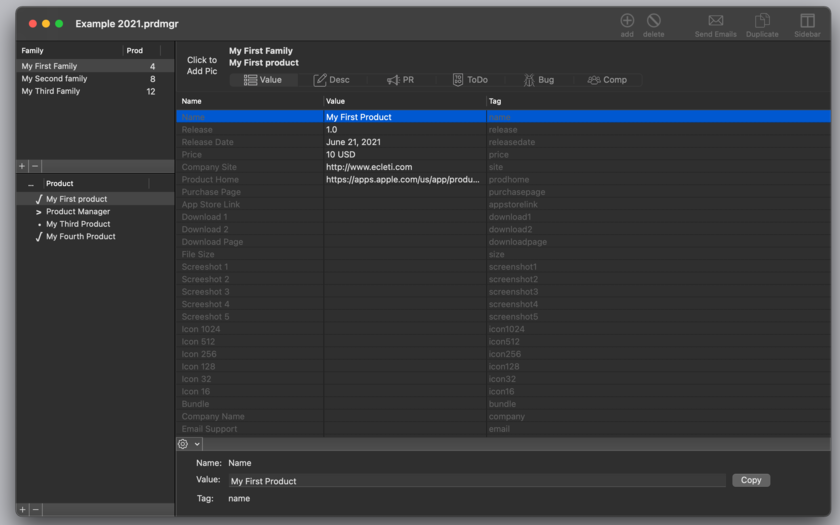
Tension Software announces Product Manager 2.0 for OS X. It's an app used to manage company products from different standpoints. The app is document based and can manage an unlimited number of documents each with an unlimited number of products, subdivided in families. Product Manager can be used also for a different typology of products (not only software) to manage the activities associated to the improvements, distributions and marketing of the product.
Milano, Italy - Tension Software is pleased to announce Product Manager 2.0. The app is a Mac OS X application to manage company products from different standpoints. It's document based and can manage an unlimited number of documents each with an unlimited number of products, subdivided in families. Product Manager can be used also for a different typology of products (not only software) to manage the activities associated to the improvements, distributions and marketing of the product.
The application is customizable with the labels the user needs to better describe the specific managed products. Product Manager can be the general repository for all the data used for the technical management of your products from a various point of views.
Product Manager allows:
* Organize products in a logical subdivision in families of products and products owned by a family
* Define a custom layout of data values (fields) used by any documents with custom name and data tags (names, values, url and more)
* Specify for any product custom values associated to the data tags layout
* Create Press Release (for any product release) using templates where the data values associated with any specific product are created automatically merging press release including data tags with assigned custom value for any product
* Manage descriptions for the products, with various kind and keeping track of them for any different release
* Keeping track of the ToDo associated for the product and keeping track of work. Create reports for items done and not done yet
* Keeping track of the Bugs. Create reports for items done and not done yet
* Keeping track of the competitor products
For every product the user can store Main data with generic data fields that can be automatically recalled to generate updated press release, releases notes, press releases, bug list, ToDo list and competitive product list. The application provides also storage for further data: Media Points for press release and Text snippets for internal use. Product manager can provide press release automatic sending controlling mail.app on the user's Macintosh, all this with just a single click.
Features:
* Easy to use interface
* No learning period required
* Products stored in a hierarchical view by families
* Totally customizable layout of values associated to products to be used in Press Release creation and for reference
* Customizable labels adaptable to different products type
* Descriptions of the product for the release of the product over time
* Press release of the product, for the different release, and create dynamically merging text templates with custom data (using text data tags to insert data values)
* ToDo list of activities relate dot the product
* Bug or problems product related to solve
* List of competitors for the product
* Can manage an unlimited families and products
* Automatic email preparing and sending to an address list controlling mail.app from inside Product Manager via Scripting Bridge
* Text template ready to be inserted inside text view
New in this release:
* Redesigned new interface
* Custom layout of values for any product
* Press release preparing via merge of values with templates
* Customizable label descriptions
* ToDo filtering
* Bug filtering
System Requirements:
* OS X Version 10.8 or higher
* Optimized for OS X 10.9
* 6.2 MB
Pricing and Availability:
Product Manager 1.0 is $40 USD (or equivalent amount in other currencies) and available both from the company web site and from the Mac App Store.
Tension Software: http://www.tensionsoftware.com
Product Manager: http://www.tensionsoftware.com/osx/productmanager/
Download: http://sec.tensionsoftware.com/osx/productmanager/productmanager.dmg
Purchase: http://www.tensionsoftware.com/buy/
Screenshot: http://www.tensionsoftware.com/static/tensionsoftware/images/app/productmanager/screenshots/mac/1.png
Application Icon: http://www.tensionsoftware.com/static/tensionsoftware/images/app/productmanager/icons/128.png
Tension Software develops software for Mac OS X and iOS using the latest Apple technology, Cocoa and Objective-C. All Material and Software (C) Copyright 2014 Tension Software. All Rights Reserved. Apple, the Apple logo, iPhone, iPod and iPad are registered trademarks of Apple Inc. in the U.S. and/or other countries. Other trademarks and registered trademarks may be the property of their respective owners.
*******
Link To Article: http://prmac.com/release-id-67061.htm
*******
---------------------------------------------------------------------------------
Note that you can alter delivered distributions at any time.
Login to your account on prMac to alter your channel selection, or to opt-out at any time.
Product Manager 2.0 to manage company products on Macintosh - Published on 04/16/14
Tension Software announces Product Manager 2.0 for OS X. It's an app used to manage company products from different standpoints. The app is document based and can manage an unlimited number of documents each with an unlimited number of products, subdivided in families. Product Manager can be used also for a different typology of products (not only software) to manage the activities associated to the improvements, distributions and marketing of the product.
Milano, Italy - Tension Software is pleased to announce Product Manager 2.0. The app is a Mac OS X application to manage company products from different standpoints. It's document based and can manage an unlimited number of documents each with an unlimited number of products, subdivided in families. Product Manager can be used also for a different typology of products (not only software) to manage the activities associated to the improvements, distributions and marketing of the product.
The application is customizable with the labels the user needs to better describe the specific managed products. Product Manager can be the general repository for all the data used for the technical management of your products from a various point of views.
Product Manager allows:
* Organize products in a logical subdivision in families of products and products owned by a family
* Define a custom layout of data values (fields) used by any documents with custom name and data tags (names, values, url and more)
* Specify for any product custom values associated to the data tags layout
* Create Press Release (for any product release) using templates where the data values associated with any specific product are created automatically merging press release including data tags with assigned custom value for any product
* Manage descriptions for the products, with various kind and keeping track of them for any different release
* Keeping track of the ToDo associated for the product and keeping track of work. Create reports for items done and not done yet
* Keeping track of the Bugs. Create reports for items done and not done yet
* Keeping track of the competitor products
For every product the user can store Main data with generic data fields that can be automatically recalled to generate updated press release, releases notes, press releases, bug list, ToDo list and competitive product list. The application provides also storage for further data: Media Points for press release and Text snippets for internal use. Product manager can provide press release automatic sending controlling mail.app on the user's Macintosh, all this with just a single click.
Features:
* Easy to use interface
* No learning period required
* Products stored in a hierarchical view by families
* Totally customizable layout of values associated to products to be used in Press Release creation and for reference
* Customizable labels adaptable to different products type
* Descriptions of the product for the release of the product over time
* Press release of the product, for the different release, and create dynamically merging text templates with custom data (using text data tags to insert data values)
* ToDo list of activities relate dot the product
* Bug or problems product related to solve
* List of competitors for the product
* Can manage an unlimited families and products
* Automatic email preparing and sending to an address list controlling mail.app from inside Product Manager via Scripting Bridge
* Text template ready to be inserted inside text view
New in this release:
* Redesigned new interface
* Custom layout of values for any product
* Press release preparing via merge of values with templates
* Customizable label descriptions
* ToDo filtering
* Bug filtering
System Requirements:
* OS X Version 10.8 or higher
* Optimized for OS X 10.9
* 6.2 MB
Pricing and Availability:
Product Manager 1.0 is $40 USD (or equivalent amount in other currencies) and available both from the company web site and from the Mac App Store.
Tension Software: http://www.tensionsoftware.com
Product Manager: http://www.tensionsoftware.com/osx/productmanager/
Download: http://sec.tensionsoftware.com/osx/productmanager/productmanager.dmg
Purchase: http://www.tensionsoftware.com/buy/
Screenshot: http://www.tensionsoftware.com/static/tensionsoftware/images/app/productmanager/screenshots/mac/1.png
Application Icon: http://www.tensionsoftware.com/static/tensionsoftware/images/app/productmanager/icons/128.png

Tension Software develops software for Mac OS X and iOS using the latest Apple technology, Cocoa and Objective-C. All Material and Software (C) Copyright 2014 Tension Software. All Rights Reserved. Apple, the Apple logo, iPhone, iPod and iPad are registered trademarks of Apple Inc. in the U.S. and/or other countries. Other trademarks and registered trademarks may be the property of their respective owners.
*******
Link To Article: http://prmac.com/release-id-67061.htm
*******
---------------------------------------------------------------------------------
Note that you can alter delivered distributions at any time.
Login to your account on prMac to alter your channel selection, or to opt-out at any time.
Subscribe to:
Posts (Atom)