A new article has been published at prMac.
Graphic Design App Candy Apple Updated to Version 1.2 - Published on 04/22/14
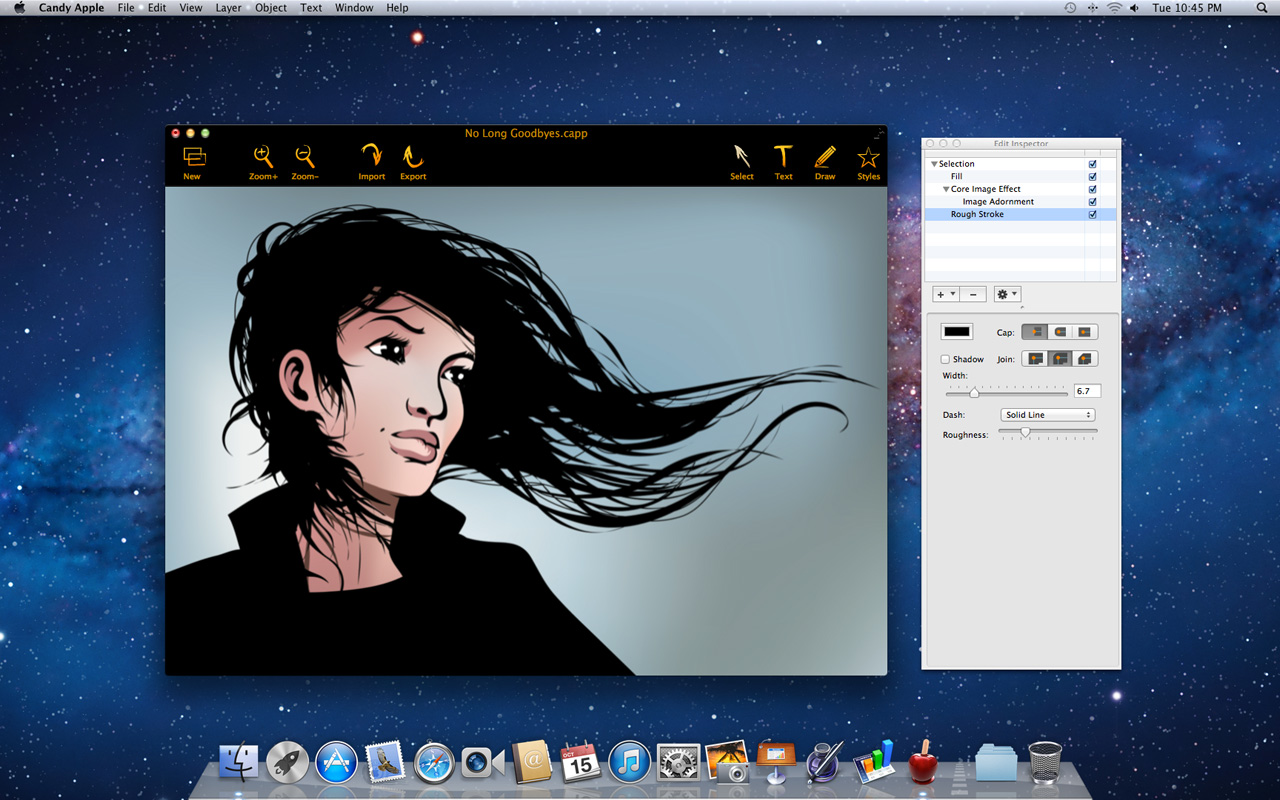
California based MacAppware today announces Candy Apple 1.2, an update to their popular vector based graphic design and illustration app designed for OS X. Perfect for novice or pros alike, Candy Apple lets anyone create drawings, logos, banners, buttons, icons and more. Users can easily edit and enhance photos, or even convert images to draw-able vector paths. Version 1.2 brings full support for Scalable Vector Graphics and fixes two reported bugs.
San Francisco, California - MacAppware, a division of 128bit Technologies, introduces version 1.2 of Candy Apple for Mac OS X, a tasty vector based graphic design and illustration app available on the Mac App Store and on the MacAppware website. For a limited time this new version is offered at 50% off to new customers, and current users can simply update for free through the Updates section of the App Store application on their Mac.
The newly added feature now allows you to import fully editable SVG graphics, or drag and drop SVG graphics directly onto the canvas to begin working with. The update also fixes minor bugs with coloring and layers.
Perfect for novice or pros alike, Candy Apple lets anyone create drawings, logos, banners, buttons, icons and more. You can also edit and enhance photos, or convert images to draw-able vector paths. Take a bite and treat yourself to a full featured vector drawing application packed with professional tools and dynamic effects that will make every design a polished work of art. Candy Apple features include:
* New! Added support for SVG format
* Full vector support
* Enhance pictures and add effects
* Draw illustrations and graphics
* Draw Rectangle, Oval, Round Rectangle, Round End Rectangle, Line, Polygon, Path, Freehand, Ring, Speech Balloon, and Arc
* Use what you create royalty free
* Convert text to a shape or path
* Adjust freehand drawing to create smooth looking paths
* Vectorize images to turn any photo into an editable graphic
* Add strokes (regular, arrowed, rough, zig-zag)
* Add fills (solid, gradient, pattern, zig-zag, hatch)
* Add text on a path
* Add an image to text
* Blend and mask effects
* Over 130 filters and effects
* Full layer support
* Boolean operation support to combine shapes
* Easily align multiple items on your canvas
* Rulers and guides make it easy to place items in the right location
* Snap to grid, snap to guides, or snap to other objects
* Zoom in or out to get every detail pixel perfect
* Import SVG graphics and edit their vector paths
* Export in fully editable vector PDF
* Export as an image (JPEG, TIFF, PNG, BMP, GIF)
* Supports transparent backgrounds
* Extensive help file explains Candy Apple's tools in detail
* And more
Pricing and Availability:
Candy Apple 1.2 is supported on Mac OS X 10.6 and higher (including Mavericks) and is available on the Mac App Store or the MacAppware website, for a limited time discount of $14.99 (USD), a savings of 50% off the full price of $29.99.
MacAppware: http://www.macappware.com
Candy Apple 1.2: http://macappware.com/software/candy-apple/
Purchase: http://sites.fastspring.com/macappware/product/candyapple?coupon=CA50BDL
Purchase and Download (MAS): https://itunes.apple.com/app/candy-apple-vector-graphic/id726792280
Screenshot: http://macappware.com/images/candyapple/CandyAppleScreen_Drawing1.jpg
Application Icon: http://macappware.com/images/candyapple/Candy-Apple-App-Icon-512.png
MacAppware is a division of 128bit Technologies and a dedicated Mac software developer currently offering Mac software, app and design bundles, and unique commercial use fonts. Copyright (C) 2014 128bit Technologies. All Rights Reserved. Apple, the Apple logo, Mac OS X, and Macintosh are registered trademarks of Apple Inc. in the U.S. and/or other countries. All other trademarks are the property of their respective owners.
*******
Link To Article: http://prmac.com/release-id-67192.htm
*******
---------------------------------------------------------------------------------
Note that you can alter delivered distributions at any time.
Login to your account on prMac to alter your channel selection, or to opt-out at any time.

Easily Import Event Lists From Text Into Apple's Calendar
A new article has been published at prMac.
Easily Import Event Lists From Text Into Apple's Calendar - Published on 04/22/14
Independent software developer, John Maisey introduces Multi Event Filter 1.0 for OS X. Multi Event Filter offers a new, quick and flexible way to create events in Apple's Calendar application from lists of plain text. Easily process events in text from websites, emails, spreadsheets and anywhere else events are listed. The user can select, filter and modify each event's information before adding to their calendar of choice in Apple's Calendar application.
London, United Kingdom - Independent software developer, John Maisey is proud to announce the initial release of Multi Event Filter 1.0 on the Mac App Store. Multi Event Filter is a new, quick and flexible way to create events in Apple's Calendar application from lists of plain text. Process events in text from websites, emails, spreadsheets and anywhere else events are listed. The user can select, filter and modify each event's information before adding to their calendar of choice in Apple's Calendar application.
Multi Event Filter can be used as a service from other applications, by pasting text into it and even by entering text directly into Multi Event Filter itself. Dates found in the text are highlighted and the user is prompted with options of the event time, duration, title and which of their calendars the event should be added to.
Multi Event Filter uses and extends Apple's Data Detectors giving access to event information from applications which do not support them directly, allows each individual event to be placed in the calendar the user chooses, and it also provides comprehensive keyboard shortcuts to allow quick edit and entry of multiple events.
System Requirements:
* OS X 10.8 or later
* 0.6 MB
Pricing and Availability:
Multi Event Filter 1.0 is $2.99 USD (or equivalent amount in other currencies) and available worldwide through the Mac App Store in the Productivity category.
John Maisey: http://www.nhoj.co.uk
Multi Event Filter 1.0: http://www.nhoj.co.uk/multi
Purchase and Download: https://itunes.apple.com/us/app/multi-event-filter/id860633406?mt=12
Screenshot: http://www.nhoj.co.uk/sites/default/files/images/Multi_Event_FIlter.png
Application Icon: http://www.nhoj.co.uk/sites/default/files/images/multi_icon.png
John Maisey is an independent software developer based in London, UK. He has been programming since 1989 and has been using Apple Macs to do so since 2000. His software releases for the Apple Mac include Dates to iCal, iCal Reply Checker, iCal Dupe Deleter and YAI. Copyright (C) 2014 John Maisey. All Rights Reserved. Apple, the Apple logo, Macintosh and OS X are registered trademarks of Apple Inc. in the U.S. and/or other countries.
*******
Link To Article: http://prmac.com/release-id-67191.htm
*******
---------------------------------------------------------------------------------
Note that you can alter delivered distributions at any time.
Login to your account on prMac to alter your channel selection, or to opt-out at any time.
Easily Import Event Lists From Text Into Apple's Calendar - Published on 04/22/14
Independent software developer, John Maisey introduces Multi Event Filter 1.0 for OS X. Multi Event Filter offers a new, quick and flexible way to create events in Apple's Calendar application from lists of plain text. Easily process events in text from websites, emails, spreadsheets and anywhere else events are listed. The user can select, filter and modify each event's information before adding to their calendar of choice in Apple's Calendar application.
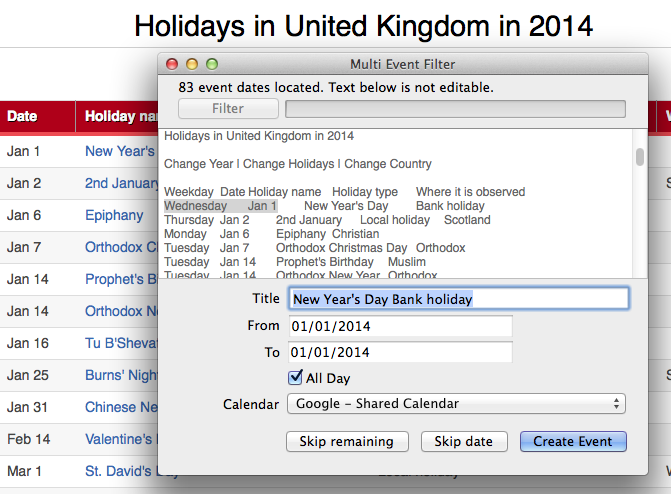
London, United Kingdom - Independent software developer, John Maisey is proud to announce the initial release of Multi Event Filter 1.0 on the Mac App Store. Multi Event Filter is a new, quick and flexible way to create events in Apple's Calendar application from lists of plain text. Process events in text from websites, emails, spreadsheets and anywhere else events are listed. The user can select, filter and modify each event's information before adding to their calendar of choice in Apple's Calendar application.
Multi Event Filter can be used as a service from other applications, by pasting text into it and even by entering text directly into Multi Event Filter itself. Dates found in the text are highlighted and the user is prompted with options of the event time, duration, title and which of their calendars the event should be added to.
Multi Event Filter uses and extends Apple's Data Detectors giving access to event information from applications which do not support them directly, allows each individual event to be placed in the calendar the user chooses, and it also provides comprehensive keyboard shortcuts to allow quick edit and entry of multiple events.
System Requirements:
* OS X 10.8 or later
* 0.6 MB
Pricing and Availability:
Multi Event Filter 1.0 is $2.99 USD (or equivalent amount in other currencies) and available worldwide through the Mac App Store in the Productivity category.
John Maisey: http://www.nhoj.co.uk
Multi Event Filter 1.0: http://www.nhoj.co.uk/multi
Purchase and Download: https://itunes.apple.com/us/app/multi-event-filter/id860633406?mt=12
Screenshot: http://www.nhoj.co.uk/sites/default/files/images/Multi_Event_FIlter.png
Application Icon: http://www.nhoj.co.uk/sites/default/files/images/multi_icon.png

John Maisey is an independent software developer based in London, UK. He has been programming since 1989 and has been using Apple Macs to do so since 2000. His software releases for the Apple Mac include Dates to iCal, iCal Reply Checker, iCal Dupe Deleter and YAI. Copyright (C) 2014 John Maisey. All Rights Reserved. Apple, the Apple logo, Macintosh and OS X are registered trademarks of Apple Inc. in the U.S. and/or other countries.
*******
Link To Article: http://prmac.com/release-id-67191.htm
*******
---------------------------------------------------------------------------------
Note that you can alter delivered distributions at any time.
Login to your account on prMac to alter your channel selection, or to opt-out at any time.
Snappy Balloon Killer Game
A new article has been published at prMac.
Snappy Balloon Killer Game - Published on 04/22/14
Forget Flappy Bird and it's clones and welcome Snappy Balloon. Snappy Balloon is an extremely addictive, easy to play but hard to master new game available on the App Store. Most clones of Flappy Bird look and feel all the same. Snappy Balloon's game play is fresh and hooking. The aim of the game is to reach as high as possible and to collect maximum points. As the test result shows, this game is obsessive and equally popular among both children and adults.
Ruse, Bulgaria - Developed by highly skilled app developers, Snappy Balloon is the brain child of the team at Shell Curve Ltd. Snappy Balloon is completely free. The game play might be simple but very hard to master; it's about helping a balloon fly through the trees, branches and falling green apples. When one passes an obstacle he/she gets a point to his name. The aim of the game is to reach as high as possible and to collect maximum points. As the test result shows, this game is highly addictive and equally popular among both adults and children. Snappy Balloon is easy to play and where one can navigate the balloon by rotating the phone. Gamers can compete with friends for the top place on the Leaderboard or can challenge his/her score.
"I was one of the lucky ones who got a chance to play the game and I must say I was very impressed. This game is very addictive and you will find yourself playing this all the time," Anna Catherine (one of few fortunate ones to test the game in the beta phase).
Features:
* Price: free
* Launch Date: April 8
* Controls: Accelerometer or tapping
* Game Center
* Facebook sharing
Device Requirements:
* iPhone, iPad, and iPod touch
* Requires iOS 7.0 or later
* 9.5 MB
Pricing and Availability:
Snappy Balloon 1.0 is free and available worldwide exclusively through the App Store in the Games category.
Snappy Balloon 1.0: http://shellcurve.com/
Download from iTunes: https://itunes.apple.com/app/snappy-balloon/id838849898
Instagram: http://instagram.com/snappyballoon
YouTube Video: https://www.youtube.com/channel/UCZJjS_LtlVQXhnVyUwT4RlQ/videos
Located in Bulgaria, Shell Curve Ltd. was founded in 2013 by Pavel Nenkov. The company has developed some quite successful applications in the AppStore like Drive Style - Eco Meter and Sex Secrets series. Pavel Nenkov, CEO and founder of Shell Curve Ltd. is entrepreneur, thinker and innovator aimed at bring cutting edge technology in the app world. All Material and Software (C) 2014 Shell Curve Ltd. / All Rights Reserved. Apple, the Apple logo, iPod, the iPod logo, are registered trademarks of Apple Computer in the U.S. and/or other countries.
*******
Link To Article: http://prmac.com/release-id-67199.htm
*******
---------------------------------------------------------------------------------
Note that you can alter delivered distributions at any time.
Login to your account on prMac to alter your channel selection, or to opt-out at any time.
Snappy Balloon Killer Game - Published on 04/22/14
Forget Flappy Bird and it's clones and welcome Snappy Balloon. Snappy Balloon is an extremely addictive, easy to play but hard to master new game available on the App Store. Most clones of Flappy Bird look and feel all the same. Snappy Balloon's game play is fresh and hooking. The aim of the game is to reach as high as possible and to collect maximum points. As the test result shows, this game is obsessive and equally popular among both children and adults.
Ruse, Bulgaria - Developed by highly skilled app developers, Snappy Balloon is the brain child of the team at Shell Curve Ltd. Snappy Balloon is completely free. The game play might be simple but very hard to master; it's about helping a balloon fly through the trees, branches and falling green apples. When one passes an obstacle he/she gets a point to his name. The aim of the game is to reach as high as possible and to collect maximum points. As the test result shows, this game is highly addictive and equally popular among both adults and children. Snappy Balloon is easy to play and where one can navigate the balloon by rotating the phone. Gamers can compete with friends for the top place on the Leaderboard or can challenge his/her score.
"I was one of the lucky ones who got a chance to play the game and I must say I was very impressed. This game is very addictive and you will find yourself playing this all the time," Anna Catherine (one of few fortunate ones to test the game in the beta phase).
Features:
* Price: free
* Launch Date: April 8
* Controls: Accelerometer or tapping
* Game Center
* Facebook sharing
Device Requirements:
* iPhone, iPad, and iPod touch
* Requires iOS 7.0 or later
* 9.5 MB
Pricing and Availability:
Snappy Balloon 1.0 is free and available worldwide exclusively through the App Store in the Games category.
Snappy Balloon 1.0: http://shellcurve.com/
Download from iTunes: https://itunes.apple.com/app/snappy-balloon/id838849898
Instagram: http://instagram.com/snappyballoon
YouTube Video: https://www.youtube.com/channel/UCZJjS_LtlVQXhnVyUwT4RlQ/videos
Located in Bulgaria, Shell Curve Ltd. was founded in 2013 by Pavel Nenkov. The company has developed some quite successful applications in the AppStore like Drive Style - Eco Meter and Sex Secrets series. Pavel Nenkov, CEO and founder of Shell Curve Ltd. is entrepreneur, thinker and innovator aimed at bring cutting edge technology in the app world. All Material and Software (C) 2014 Shell Curve Ltd. / All Rights Reserved. Apple, the Apple logo, iPod, the iPod logo, are registered trademarks of Apple Computer in the U.S. and/or other countries.
*******
Link To Article: http://prmac.com/release-id-67199.htm
*******
---------------------------------------------------------------------------------
Note that you can alter delivered distributions at any time.
Login to your account on prMac to alter your channel selection, or to opt-out at any time.
WaterField's Rough Rider Leather Messenger available for 15 inch Laptops
A new article has been published at prMac.
WaterField's Rough Rider Leather Messenger available for 15 inch Laptops - Published on 04/22/14
WaterField Designs today announces the new 15-inch size of its popular Rough Rider leather messenger bag, a vintage-looking bag with distinctly modern functionality. Every detail of the Rough Rider is engineered with precision. The meticulously engineered Rough Rider is now available in both a 13-inch and 15-inch laptop size. Premium, rough leather edges combine with clean lines for a look that will appeal to everyone from professionals to free-spirited world travelers.
San Francisco, California - WaterField Designs, an innovative leader in custom laptop sleeves, bags and cases for digital-minded professionals, today is thrilled to announce the new 15-inch size of its popular Rough Rider leather messenger bag, a vintage-looking bag with distinctly modern functionality.
Now available in both a 13-inch and 15-inch laptop size, the Rough Rider is engineered with precision. A unique strap system compresses bag contents to maintain a slim, neat profile. The bag rests snuggly against the body to help ease back fatigue. Premium, rough leather edges combine with clean lines for a look that will appeal to everyone from professionals to free-spirited world travelers.
"I like the timeless, Old West look of the Rough Rider - it's tough and rustic with raw edges," explained owner Gary Waterfield. "We had so many requests for a 15-inch version of our recently launched bag, that we've bumped the new size up on our launch calendar to offer it in time for graduation and Father's Day."
The Rough Rider
* Constructed of rugged, naturally-tanned, full-grain leather that develops stunning patina over time
* Unlined interior and natural edges reveal leather's premium quality
* Splash of nylon under the flap - in six color choices - allows for customization
* Main compartment can house 15-inch laptop or tablet, files, chargers, and other necessities (Also available in 13-inch laptop size)
* Two deep, waxed canvas pockets in main compartment
* Two additional scratch-free, lined pockets under the flap - perfect for iPad mini and smartphone
* Flap snaps securely shut with two options to adjust based on bulk of what is inside
* Removable no-slip shoulder pad keeps adjustable strap in place
* Top leather handle for quick grab
Pricing and Availability:
The 15-inch Rough Rider is $355 (USD). The 13-inch is $335. Colors: Distressed, "Grizzly" brown, naturally-tanned leather with color accents in black, copper, pine, grass, flame, or pearl. Available for pre-order at WaterField Designs online. Shipping begins May 20, 2014.
WaterField Designs: http://www.sfbags.com/
The Rough Rider Leather Laptop Messenger Bag: http://www.sfbags.com/products/rough-rider/rough-rider.php
YouTube Video (Demo): http://www.youtube.com/watch?v=t1Sjzk0X810
Screenshot: http://www.sfbags.com/products/rough-rider/images/rough-rider-lifestyle.jpg
WaterField Designs manufactures custom-fitted, high-quality cases and bags for a full-range of laptop computers, tablets, smartphones, MP3s, gaming devices, electronic readers, and other digital gear. All products are manufactured to exacting standards in San Francisco. WaterField Designs, SFBags, and Rough Rider are trademarks of WaterField Designs. Copyright (C) 2009-2014 WaterField Designs. All Rights Reserved. Other company and product names may be trademarks of their respective owners.
*******
Link To Article: http://prmac.com/release-id-67187.htm
*******
---------------------------------------------------------------------------------
Note that you can alter delivered distributions at any time.
Login to your account on prMac to alter your channel selection, or to opt-out at any time.
WaterField's Rough Rider Leather Messenger available for 15 inch Laptops - Published on 04/22/14
WaterField Designs today announces the new 15-inch size of its popular Rough Rider leather messenger bag, a vintage-looking bag with distinctly modern functionality. Every detail of the Rough Rider is engineered with precision. The meticulously engineered Rough Rider is now available in both a 13-inch and 15-inch laptop size. Premium, rough leather edges combine with clean lines for a look that will appeal to everyone from professionals to free-spirited world travelers.
San Francisco, California - WaterField Designs, an innovative leader in custom laptop sleeves, bags and cases for digital-minded professionals, today is thrilled to announce the new 15-inch size of its popular Rough Rider leather messenger bag, a vintage-looking bag with distinctly modern functionality.
Now available in both a 13-inch and 15-inch laptop size, the Rough Rider is engineered with precision. A unique strap system compresses bag contents to maintain a slim, neat profile. The bag rests snuggly against the body to help ease back fatigue. Premium, rough leather edges combine with clean lines for a look that will appeal to everyone from professionals to free-spirited world travelers.
"I like the timeless, Old West look of the Rough Rider - it's tough and rustic with raw edges," explained owner Gary Waterfield. "We had so many requests for a 15-inch version of our recently launched bag, that we've bumped the new size up on our launch calendar to offer it in time for graduation and Father's Day."
The Rough Rider
* Constructed of rugged, naturally-tanned, full-grain leather that develops stunning patina over time
* Unlined interior and natural edges reveal leather's premium quality
* Splash of nylon under the flap - in six color choices - allows for customization
* Main compartment can house 15-inch laptop or tablet, files, chargers, and other necessities (Also available in 13-inch laptop size)
* Two deep, waxed canvas pockets in main compartment
* Two additional scratch-free, lined pockets under the flap - perfect for iPad mini and smartphone
* Flap snaps securely shut with two options to adjust based on bulk of what is inside
* Removable no-slip shoulder pad keeps adjustable strap in place
* Top leather handle for quick grab
Pricing and Availability:
The 15-inch Rough Rider is $355 (USD). The 13-inch is $335. Colors: Distressed, "Grizzly" brown, naturally-tanned leather with color accents in black, copper, pine, grass, flame, or pearl. Available for pre-order at WaterField Designs online. Shipping begins May 20, 2014.
WaterField Designs: http://www.sfbags.com/
The Rough Rider Leather Laptop Messenger Bag: http://www.sfbags.com/products/rough-rider/rough-rider.php
YouTube Video (Demo): http://www.youtube.com/watch?v=t1Sjzk0X810
Screenshot: http://www.sfbags.com/products/rough-rider/images/rough-rider-lifestyle.jpg

WaterField Designs manufactures custom-fitted, high-quality cases and bags for a full-range of laptop computers, tablets, smartphones, MP3s, gaming devices, electronic readers, and other digital gear. All products are manufactured to exacting standards in San Francisco. WaterField Designs, SFBags, and Rough Rider are trademarks of WaterField Designs. Copyright (C) 2009-2014 WaterField Designs. All Rights Reserved. Other company and product names may be trademarks of their respective owners.
*******
Link To Article: http://prmac.com/release-id-67187.htm
*******
---------------------------------------------------------------------------------
Note that you can alter delivered distributions at any time.
Login to your account on prMac to alter your channel selection, or to opt-out at any time.
Number Whizz - A unique app to improve childrens' mental arithmetic
A new article has been published at prMac.
Number Whizz - A unique app to improve childrens' mental arithmetic - Published on 04/22/14
XTC Arts today announces the up and coming release of Number whizz, its new educational math game for iOS and Android devices. Perfect for kids aged 6+ and older, Number whizz is pick up and play simple with its greatest features being simplicity and tempo. The game requires kids to delete an ever growing, accelerating chain of numbers using number bonds. This quickly improves their mental arithmetic. The app releases worldwide on 10th May 2014, promo codes are available for early access.
London, United Kingdom - XTC Arts today is proud to announce the up and coming release of Number whizz, its new educational math game for kids aged 6+, available on iOS and Android. Its greatest features are the app's simplicity and tempo; the game is pick up and play simple and the action never stops, so children never lose interest whilst playing. This quickly improves their mental arithmetic. The game requires kids to delete an ever growing, accelerating chain of numbers using number bonds. The app releases worldwide on 10th May 2014, promo codes are available for early access.
Number Whizz is centered on the principle of number pairing to ten. Numbers appear one by one on the right hand side of the screen and slowly make their way to the left. The player must enter the number that when added to the first number in the queue makes ten. If correct, the number is deleted and they must move to the next number in the queue. As the player deletes more and more numbers, the speed will gradually increase and the game will end when the first number in the queue reaches the end.
The reason for creating this app was to find a way to help boost kids mental arithmetic whilst they were having fun. The app was extensively tested using a class of students in Ashford, England and went through many iterations before we arrived at the final product. The class played Number Whizz on their shared iPad and they very much enjoyed trying to get the high score. The scores of the kids rapidly increased and their improvement was apparent very quickly. We had originally implemented a way for the kids to track their improvement over time, but they were only interested in their top scores so for simplicity we temporarily removed it. However we fully expect to put it back in if teachers and parents should request such a feature.
Pricing and Availability:
Number Whizz is available from 10th May on iPhone, iPad, iPod touch and all Android devices. It will cost $0.99 (USD) with discount for educational institutes. There are no hidden costs or In-App Purchases. The app mines no data from the user and our privacy policy can be viewed from XTC Arts online. If you would like to cover Number Whizz please request a promo code for free early access. You can also download a press kit containing images, app icon and trailer links, from our product page. We ask that any coverage is delayed until the release on 10th May this year.
XTC Arts: http://www.xtcarts.com
Number Whizz: http://www.xtcarts.com/NumberWhizz.html
Press Kit (zip): http://www.xtcarts.com/Number_Whizz_Press_kit.zip
XTC Arts is focussed on developing a range of apps for people of all backgrounds. Presently, the company is dedicated to educational and kids apps. They teamed up with Newcastle University last year to bring out 'Apocalypse Lab,' a strategy game about saving the world that gently informs the user about healthy living and ageing. At Christmas the company released a fun game about splatting penguins with ice cream called 'Penguin Blitz.' All Material and Software (C) Copyright 2014 XTC Arts. All Rights Reserved. Apple, the Apple logo, iPhone, iPod and iPad are registered trademarks of Apple Inc. in the U.S. and/or other countries. Other trademarks and registered trademarks may be the property of their respective owners.
*******
Link To Article: http://prmac.com/release-id-67186.htm
*******
---------------------------------------------------------------------------------
Note that you can alter delivered distributions at any time.
Login to your account on prMac to alter your channel selection, or to opt-out at any time.
Number Whizz - A unique app to improve childrens' mental arithmetic - Published on 04/22/14
XTC Arts today announces the up and coming release of Number whizz, its new educational math game for iOS and Android devices. Perfect for kids aged 6+ and older, Number whizz is pick up and play simple with its greatest features being simplicity and tempo. The game requires kids to delete an ever growing, accelerating chain of numbers using number bonds. This quickly improves their mental arithmetic. The app releases worldwide on 10th May 2014, promo codes are available for early access.
London, United Kingdom - XTC Arts today is proud to announce the up and coming release of Number whizz, its new educational math game for kids aged 6+, available on iOS and Android. Its greatest features are the app's simplicity and tempo; the game is pick up and play simple and the action never stops, so children never lose interest whilst playing. This quickly improves their mental arithmetic. The game requires kids to delete an ever growing, accelerating chain of numbers using number bonds. The app releases worldwide on 10th May 2014, promo codes are available for early access.
Number Whizz is centered on the principle of number pairing to ten. Numbers appear one by one on the right hand side of the screen and slowly make their way to the left. The player must enter the number that when added to the first number in the queue makes ten. If correct, the number is deleted and they must move to the next number in the queue. As the player deletes more and more numbers, the speed will gradually increase and the game will end when the first number in the queue reaches the end.
The reason for creating this app was to find a way to help boost kids mental arithmetic whilst they were having fun. The app was extensively tested using a class of students in Ashford, England and went through many iterations before we arrived at the final product. The class played Number Whizz on their shared iPad and they very much enjoyed trying to get the high score. The scores of the kids rapidly increased and their improvement was apparent very quickly. We had originally implemented a way for the kids to track their improvement over time, but they were only interested in their top scores so for simplicity we temporarily removed it. However we fully expect to put it back in if teachers and parents should request such a feature.
Pricing and Availability:
Number Whizz is available from 10th May on iPhone, iPad, iPod touch and all Android devices. It will cost $0.99 (USD) with discount for educational institutes. There are no hidden costs or In-App Purchases. The app mines no data from the user and our privacy policy can be viewed from XTC Arts online. If you would like to cover Number Whizz please request a promo code for free early access. You can also download a press kit containing images, app icon and trailer links, from our product page. We ask that any coverage is delayed until the release on 10th May this year.
XTC Arts: http://www.xtcarts.com
Number Whizz: http://www.xtcarts.com/NumberWhizz.html
Press Kit (zip): http://www.xtcarts.com/Number_Whizz_Press_kit.zip
XTC Arts is focussed on developing a range of apps for people of all backgrounds. Presently, the company is dedicated to educational and kids apps. They teamed up with Newcastle University last year to bring out 'Apocalypse Lab,' a strategy game about saving the world that gently informs the user about healthy living and ageing. At Christmas the company released a fun game about splatting penguins with ice cream called 'Penguin Blitz.' All Material and Software (C) Copyright 2014 XTC Arts. All Rights Reserved. Apple, the Apple logo, iPhone, iPod and iPad are registered trademarks of Apple Inc. in the U.S. and/or other countries. Other trademarks and registered trademarks may be the property of their respective owners.
*******
Link To Article: http://prmac.com/release-id-67186.htm
*******
---------------------------------------------------------------------------------
Note that you can alter delivered distributions at any time.
Login to your account on prMac to alter your channel selection, or to opt-out at any time.
Tile Runner - Addictive Tile Tapping Game for iOS Released
A new article has been published at prMac.
Tile Runner - Addictive Tile Tapping Game for iOS Released - Published on 04/22/14
NewClear today introduces Tile Runner 1.0, their new game title developed for iPhone, iPad and iPod touch. In Tile Runner, players have to skillfully tap their way through the colored tiles to the finish line, trying to make it as quick as possible. Similar in style to the latest Japanese hit game, Tile Runner features addictive gameplay, bright graphics and two challenging modes with clear rules. Players are encouraged to share their score via Game Center, Facebook, Twitter and more.
Minsk, Belarus - NewClear today is thrilled to announce the release of Tile Runner 1.0 for iOS, a game where users have to make their way to the goal by quickly tapping red tiles and avoiding yellow ones. Based on the recent Japanese hit tile tapping game, Tile Runner boasts same addictive gameplay everyone is so hooked on, but totally refurbished cheerful graphics and a clear set of rules. There are two modes in Tile Runner:
Time Attack:
A great way to test one's reaction, accuracy and fast tapping skills, Time Attack is all about how quickly you can cover the 50 steps to the finish line without tapping the wrong tiles. The high scores of other players take excitement to a new level.
Survival:
The faster you go, the more time you have in this challenging mode. This one is quite tricky, as players should mind where to step: one step on the wrong-colored tile and the game is over.
Tile Runner is a game of competition, and players are encouraged to share their score in a number of ways: via GameCenter, Facebook, Twitter, etc.
"Tile Runner is simple and lacks sophisticated features, yet it's truly challenging and addictive," says Sviatlana Abrosimova, the CEO of NewClear. "We believe that games like this are the future of casual gaming, and latest trends among mobile players only prove this idea. We hope users will appreciate the effort we put in this game; meanwhile, our team will work hard to create more beautiful and entertaining apps."
Device Requirements:
* iPhone 3GS/4/4S/5, iPod touch (3rd/4th/5th generation), and iPad
* Requires iOS 6.0 or later
* This app is optimized for iPhone 5
* 7.3 MB
Pricing and Availability:
Tile Runner 1.0 is Free and is available worldwide exclusively through the App Store in the Games category.
NewClear: http://newclear.us
Tile Runner 1.0: https://itunes.apple.com/app/tile-runner-dont-step-on-yellow/id854360149
Screenshot: http://a5.mzstatic.com/us/r30/Purple4/v4/d3/f4/db/d3f4db84-f911-87f1-4cc9-b213e322e119/screen480x480.jpeg
App Icon: http://a3.mzstatic.com/us/r30/Purple2/v4/98/35/f8/9835f8e8-d83d-d0f9-898e-bd8b3349c394/mzl.vspvoplx.175x175-75.jpg
Press Kit (zip): http://www.newclear.us/wp-content/uploads/2014/04/Press_kit.zip
NewClear is a friendly team of developers and designers keen on building clear apps that can extend your digital life without undue effort. The company is totally committed to bring iPhone and iPad users the most clean and clear apps ever. All Material and Software (C) Copyright 2014 NewClear. All Rights Reserved. Apple, the Apple logo, iPhone, iPod and iPad are registered trademarks of Apple Inc. in the U.S. and/or other countries. Other trademarks and registered trademarks may be the property of their respective owners.
*******
Link To Article: http://prmac.com/release-id-67194.htm
*******
---------------------------------------------------------------------------------
Note that you can alter delivered distributions at any time.
Login to your account on prMac to alter your channel selection, or to opt-out at any time.
Tile Runner - Addictive Tile Tapping Game for iOS Released - Published on 04/22/14
NewClear today introduces Tile Runner 1.0, their new game title developed for iPhone, iPad and iPod touch. In Tile Runner, players have to skillfully tap their way through the colored tiles to the finish line, trying to make it as quick as possible. Similar in style to the latest Japanese hit game, Tile Runner features addictive gameplay, bright graphics and two challenging modes with clear rules. Players are encouraged to share their score via Game Center, Facebook, Twitter and more.
Minsk, Belarus - NewClear today is thrilled to announce the release of Tile Runner 1.0 for iOS, a game where users have to make their way to the goal by quickly tapping red tiles and avoiding yellow ones. Based on the recent Japanese hit tile tapping game, Tile Runner boasts same addictive gameplay everyone is so hooked on, but totally refurbished cheerful graphics and a clear set of rules. There are two modes in Tile Runner:
Time Attack:
A great way to test one's reaction, accuracy and fast tapping skills, Time Attack is all about how quickly you can cover the 50 steps to the finish line without tapping the wrong tiles. The high scores of other players take excitement to a new level.
Survival:
The faster you go, the more time you have in this challenging mode. This one is quite tricky, as players should mind where to step: one step on the wrong-colored tile and the game is over.
Tile Runner is a game of competition, and players are encouraged to share their score in a number of ways: via GameCenter, Facebook, Twitter, etc.
"Tile Runner is simple and lacks sophisticated features, yet it's truly challenging and addictive," says Sviatlana Abrosimova, the CEO of NewClear. "We believe that games like this are the future of casual gaming, and latest trends among mobile players only prove this idea. We hope users will appreciate the effort we put in this game; meanwhile, our team will work hard to create more beautiful and entertaining apps."
Device Requirements:
* iPhone 3GS/4/4S/5, iPod touch (3rd/4th/5th generation), and iPad
* Requires iOS 6.0 or later
* This app is optimized for iPhone 5
* 7.3 MB
Pricing and Availability:
Tile Runner 1.0 is Free and is available worldwide exclusively through the App Store in the Games category.
NewClear: http://newclear.us
Tile Runner 1.0: https://itunes.apple.com/app/tile-runner-dont-step-on-yellow/id854360149
Screenshot: http://a5.mzstatic.com/us/r30/Purple4/v4/d3/f4/db/d3f4db84-f911-87f1-4cc9-b213e322e119/screen480x480.jpeg

App Icon: http://a3.mzstatic.com/us/r30/Purple2/v4/98/35/f8/9835f8e8-d83d-d0f9-898e-bd8b3349c394/mzl.vspvoplx.175x175-75.jpg

Press Kit (zip): http://www.newclear.us/wp-content/uploads/2014/04/Press_kit.zip
NewClear is a friendly team of developers and designers keen on building clear apps that can extend your digital life without undue effort. The company is totally committed to bring iPhone and iPad users the most clean and clear apps ever. All Material and Software (C) Copyright 2014 NewClear. All Rights Reserved. Apple, the Apple logo, iPhone, iPod and iPad are registered trademarks of Apple Inc. in the U.S. and/or other countries. Other trademarks and registered trademarks may be the property of their respective owners.
*******
Link To Article: http://prmac.com/release-id-67194.htm
*******
---------------------------------------------------------------------------------
Note that you can alter delivered distributions at any time.
Login to your account on prMac to alter your channel selection, or to opt-out at any time.
Make Any Photo Talk Back With Talking Face App From Selectsoft
A new article has been published at prMac.
Make Any Photo Talk Back With Talking Face App From Selectsoft - Published on 04/22/14
Share hilarious talking selfies, snapshots and more with Talking Face 1.0, the new animated iPhone app introduced by California-based developer Selectsoft. The app makes it easy to transform selfies, snapshots & more into sharable, realistic videos. Users can talk or text to the app to make any photo talk back in a silly voice, or choose from preset phrases for hours of entertainment for kids and adults. The videos can be used as e-cards, turned into viral videos, used as music videos and more.
San Mateo, California - Quickly turn any photo into a hilarious talking video with Talking Face, the new animated app for iPhone from California-based developer Selectsoft. The app makes it easy to transform selfies, snapshots and more into sharable, realistic videos. Users can talk or text to the app to make any photo talk back in a silly voice, or choose from preset phrases and jokes. Featuring easy share options via Vine, Instagram, Facebook and YouTube, plus two recording modes, Talking Face makes it simple to put words into the mouths of selfies, family, friends, pets, or even celebrities.
It's fast to get started with the app - users take or pick a photo, find the face in the picture, then start recording. Unlike other talking pet and animated booth apps, Talking Face features two different easy-to-use modes, copycat mode and robot text. In copycat mode, users simply say anything they want and the photo will instantly animate and repeat the phrase in a silly voice. In text and talk robot mode, users can access the robust text/talk feature to enter text and hear the picture talk back in a funny robotic voice. The app also includes the option to unlock preset phrase packs including Funny Essentials, Funny Sarcasm, Silly Jokes and the Wisdom of Mark Twain. Once users pick what phrases to use, they can speed up or slow down the playback, and change pitch for maximum hilarity. The videos are easy to share, and can be used as e-cards, turned into viral videos, used as music videos and more.
About Talking Face:
Share silly, realistic Talking Face photos with your friends and family! Put words into the mouths of selfies, family, friends, pets - even celebrities! Just speak and your Talking Face photo will instantly animate and repeat. Take hilarious selfies or hunt through your albums for favorite photos of family and friends to share. Record your best quotes and share your videos via Facebook, YouTube, Vine, Instagram and more. Switch to robot mode by typing text or use funny preset phrases for even more ridiculous fun! Have your friends send Talking Faces back and see what your friends are doing and saying.
* Fast and easy - take or pick a photo, find the face, then record and share your video
* Versatile framing - zoom and pan for the perfect Talking Face
* Copycat mode - hear the photo repeat anything you say in a silly voice
* Robot voice - enter any text you want and hear your photo talk back in a funny robotic voice
* Speed up and slow down playback speed, and change pitch
* Make e-cards, viral videos, songs - the possibilities are endless
* Put words into the mouths of friends, family, pets, selfies, celebrities, babies - even objects
* No internet needed to make the animation
* Save and share via Facebook, YouTube, Vine, Instagram, email and more
* Small file size and high quality video are perfect for sharing! No watermarks
* Cool upgrades such as Angry Face animation and silly jokes
* Autosave Talking Face photos to play and edit later
* Save your own preset phrases or get additional speech packs including Funny Essentials, Funny Sarcasm, Silly Jokes and the Wisdom of Mark Twain
Device Requirements:
* iPhone, iPad, and iPod touch
* Requires iOS 6.0 or later
* 43.8 MB
Pricing and Availability:
Talking Face 1.0 is only $0.99 USD (or equivalent amount in other currencies) and available worldwide exclusively through the App Store in the Photo & Video category.
Selectsoft: http://www2.selectsoft.com
Talking Face 1.0: http://www2.selectsoft.com/ios/talking-face
Purchase and Download: https://itunes.apple.com/app/talking-face-photo-booth-selfie/id843893162
Screenshot 1: http://www2.selectsoft.com/sites/default/files/iPhone1136scr-001.png
Screenshot 2: http://www2.selectsoft.com/sites/default/files/iPhone1136scr-002.png
Screenshot 3: http://www2.selectsoft.com/sites/default/files/iPhone1136scr-003.png
Headquartered in San Mateo, California, Selectsoft is a leading developer of family-friendly games and apps, creating best-selling games for iOS, consoles, Android, Mac and PC. It's also one of the largest independent publishers of PC and Mac software, featuring licensed content from Broderbund, Disney, The Learning Company and many more. For almost 20 years, Selectsoft has been dedicated to providing affordable, fun entertainment for the whole family. Copyright (C) 1992-2014 Selectsoft. All Rights Reserved. Apple, the Apple logo, iPhone, iPod and iPad are registered trademarks of Apple Inc. in the U.S. and/or other countries.
*******
Link To Article: http://prmac.com/release-id-67185.htm
*******
---------------------------------------------------------------------------------
Note that you can alter delivered distributions at any time.
Login to your account on prMac to alter your channel selection, or to opt-out at any time.
Make Any Photo Talk Back With Talking Face App From Selectsoft - Published on 04/22/14
Share hilarious talking selfies, snapshots and more with Talking Face 1.0, the new animated iPhone app introduced by California-based developer Selectsoft. The app makes it easy to transform selfies, snapshots & more into sharable, realistic videos. Users can talk or text to the app to make any photo talk back in a silly voice, or choose from preset phrases for hours of entertainment for kids and adults. The videos can be used as e-cards, turned into viral videos, used as music videos and more.
San Mateo, California - Quickly turn any photo into a hilarious talking video with Talking Face, the new animated app for iPhone from California-based developer Selectsoft. The app makes it easy to transform selfies, snapshots and more into sharable, realistic videos. Users can talk or text to the app to make any photo talk back in a silly voice, or choose from preset phrases and jokes. Featuring easy share options via Vine, Instagram, Facebook and YouTube, plus two recording modes, Talking Face makes it simple to put words into the mouths of selfies, family, friends, pets, or even celebrities.
It's fast to get started with the app - users take or pick a photo, find the face in the picture, then start recording. Unlike other talking pet and animated booth apps, Talking Face features two different easy-to-use modes, copycat mode and robot text. In copycat mode, users simply say anything they want and the photo will instantly animate and repeat the phrase in a silly voice. In text and talk robot mode, users can access the robust text/talk feature to enter text and hear the picture talk back in a funny robotic voice. The app also includes the option to unlock preset phrase packs including Funny Essentials, Funny Sarcasm, Silly Jokes and the Wisdom of Mark Twain. Once users pick what phrases to use, they can speed up or slow down the playback, and change pitch for maximum hilarity. The videos are easy to share, and can be used as e-cards, turned into viral videos, used as music videos and more.
About Talking Face:
Share silly, realistic Talking Face photos with your friends and family! Put words into the mouths of selfies, family, friends, pets - even celebrities! Just speak and your Talking Face photo will instantly animate and repeat. Take hilarious selfies or hunt through your albums for favorite photos of family and friends to share. Record your best quotes and share your videos via Facebook, YouTube, Vine, Instagram and more. Switch to robot mode by typing text or use funny preset phrases for even more ridiculous fun! Have your friends send Talking Faces back and see what your friends are doing and saying.
* Fast and easy - take or pick a photo, find the face, then record and share your video
* Versatile framing - zoom and pan for the perfect Talking Face
* Copycat mode - hear the photo repeat anything you say in a silly voice
* Robot voice - enter any text you want and hear your photo talk back in a funny robotic voice
* Speed up and slow down playback speed, and change pitch
* Make e-cards, viral videos, songs - the possibilities are endless
* Put words into the mouths of friends, family, pets, selfies, celebrities, babies - even objects
* No internet needed to make the animation
* Save and share via Facebook, YouTube, Vine, Instagram, email and more
* Small file size and high quality video are perfect for sharing! No watermarks
* Cool upgrades such as Angry Face animation and silly jokes
* Autosave Talking Face photos to play and edit later
* Save your own preset phrases or get additional speech packs including Funny Essentials, Funny Sarcasm, Silly Jokes and the Wisdom of Mark Twain
Device Requirements:
* iPhone, iPad, and iPod touch
* Requires iOS 6.0 or later
* 43.8 MB
Pricing and Availability:
Talking Face 1.0 is only $0.99 USD (or equivalent amount in other currencies) and available worldwide exclusively through the App Store in the Photo & Video category.
Selectsoft: http://www2.selectsoft.com
Talking Face 1.0: http://www2.selectsoft.com/ios/talking-face
Purchase and Download: https://itunes.apple.com/app/talking-face-photo-booth-selfie/id843893162
Screenshot 1: http://www2.selectsoft.com/sites/default/files/iPhone1136scr-001.png

Screenshot 2: http://www2.selectsoft.com/sites/default/files/iPhone1136scr-002.png

Screenshot 3: http://www2.selectsoft.com/sites/default/files/iPhone1136scr-003.png

Headquartered in San Mateo, California, Selectsoft is a leading developer of family-friendly games and apps, creating best-selling games for iOS, consoles, Android, Mac and PC. It's also one of the largest independent publishers of PC and Mac software, featuring licensed content from Broderbund, Disney, The Learning Company and many more. For almost 20 years, Selectsoft has been dedicated to providing affordable, fun entertainment for the whole family. Copyright (C) 1992-2014 Selectsoft. All Rights Reserved. Apple, the Apple logo, iPhone, iPod and iPad are registered trademarks of Apple Inc. in the U.S. and/or other countries.
*******
Link To Article: http://prmac.com/release-id-67185.htm
*******
---------------------------------------------------------------------------------
Note that you can alter delivered distributions at any time.
Login to your account on prMac to alter your channel selection, or to opt-out at any time.
Subscribe to:
Posts (Atom)