A new article has been published at prMac.
Out Thinking Launches MakeMyMovie for iOS Devices - Published on 04/23/14
Out Thinking Limited introduces MakeMyMovie 1.0, with the sole purpose to help users to make digital movies out of photos with any iOS device. MakeMyMovie will turn your photos into sensational movies by adding beautiful animations and music. This free app allows you to select the Photos, Theme, effects and Audio of your Choice, and allows you to create and Share your Stunning Video. It's never been easier to create slide show of your photos on any iDevice.
Bangalore, India - Out Thinking Limited, the creator of the "MakeMyMovie" app for iOS devices has launched its newest app to help users make movies on the go. Out Thinking Limited, created the app with the sole purpose of helping users to make digital movies out of photos with any iOS devices.
The days when only being able to share pictures alone are long gone. Now users can take photos on the devices and make a movie with it to share with others. The "MakeMyMovie" app gives users a chance to do more than just share photos on social media but to share videos that are more likely to be viewed by a larger audience.
"Nowadays more and more people are using their phones, tablets, and iPods to take pictures and video. Our new app will make movie on your phone, tablet, or iPod that you can share with family and friends easy," says an Out Thinking Limited representative.
The "MakeMyMovie" app is a photography app that allows users to create movies (or slide show) from photos that are stored on any iOS mobile device. The app is capable of detecting faces in photos and focusing on the faces for the video. It can upload videos to Facebook, Instagram, and vine. Once photos are selected users can turn the photos into movies by adding animation and music. Users can choose from a variety of themes and audio to create stunning videos to share with others.
Key Features:
* Create Stunning Video from your Photos
* Add our in-built effects to your photos
* Add Music from our in-built library
* You can choose song or music of your own choice if you wish
* You can arrange the images according to your choice
* Add Title to your Video/Photo
* This app will auto recognize your face to focus on your face.
* Option to choose photos from your camera roll
* In-built option to share your Awesome video with social networking sites
* You can share on Facebook, Instagram, email, YouTube, Viddy etc.
The app is easy to use. There are only a few steps to complete before a user will be able to share the video. Here is how to use the app:
* Choose the photos
* Choose a theme- there are more than 12 movie themes
* Add music- choose from a variety of music
* Add effects
Creating Movies using your photos is very tedious job, it requires lot of video editing knowledge or requires expensive subscriptions to create video slideshows or movies using your photos, but with the "MakeMyMovie" iPhone app users can create their movies using their photos. The videos made with the app can be shown at parties, anniversaries, birthdays, vacations, and more. Businesses could use this app to make videos of products to show to potential customers and save time and money.
Device Requirements:
* iPhone, iPad, and iPod touch
* Requires iOS 7.0 or later
* 52.8 MB
Pricing and Availability:
MakeMyMovie 1.0 is Free and available worldwide exclusively through the App Store in the Photo & Video category. Download the updated app for a one-time low cost payment and start making magical memories by turning photos into videos to share with others.
Out Thinking: http://www.outthinkingindia.com/
MakeMyMovie 1.0: http://makemymovieapp.com/
Download from iTunes: https://itunes.apple.com/app/makemymovie-free-professional/id844928276
Purchase and Download: https://itunes.apple.com/app/makemymovie-magical-video/id829542666
YouTube Video (Demo): https://www.youtube.com/watch?v=0qoGy7Qg07k
Press Kit (zip): http://makemymovieapp.com/Make_My_Movie_PR.zip
Outthinking is a Mobile phone Applications and game development company founded by one of the most successful Android and iPhone developers. With over 20 plus years of combined experience on consumer electronics products. The company designs innovative technology-based consumer products and continually explores how new technologies can be applied in intuitive ways to make people's lives more fun. Some of our most successful titles in Apple and Android App Stores are Color Splurge, Photo Splash, Photo To Sketch and Pic Shells with over 10 million downloads to date and counting. All Material and Software (C) Copyright 2014 out thinking pvt ltd. All Rights Reserved. Apple, the Apple logo, iPhone, iPod and iPad are registered trademarks of Apple Inc. in the U.S. and/or other countries. Other trademarks and registered trademarks may be the property of their respective owners.
*******
Link To Article: http://prmac.com/release-id-67227.htm
*******
---------------------------------------------------------------------------------
Note that you can alter delivered distributions at any time.
Login to your account on prMac to alter your channel selection, or to opt-out at any time.

The first issue of Happily Hooked Crochet Magazine hits Apple Newsstand
A new article has been published at prMac.
The first issue of Happily Hooked Crochet Magazine hits Apple Newsstand - Published on 04/23/14
California based Lutz Endeavors, LLC introduces Happily Hooked Magazine 1.0, a brand new crochet magazine app developed for Apple's revolutionary iPad device. The industry's top designers and crochet authorities are featured in every issue of Happily Hooked Magazine. Enjoy free crochet patterns, lessons and inspirational stories and interviews. The first issue of Happily Hooked Magazine features crochet amigurumi superstar Stacey Trock, and many more.
Garden Grove, California - Lutz Endeavors, LLC is thrilled to announce the release of Happily Hooked Magazine 1.0, a brand new crochet magazine app developed for Apple's revolutionary iPad device. The industry's top designers and crochet authorities are featured in every issue of Happily Hooked Magazine. Created by crochet enthusiast and mother of 2, Happily Hooked Magazine offers free patterns, fun projects, exclusive interviews and inspirational stories in every monthly issue. The app is now available for download through the iTunes App Store.
"We love the community behind this art form and we want to showcase all different pockets of it - from pattern designing to yarnborming, amigurumi to the healing benefits crochet offers, and everything in between. The crochet community is an eclectic group of people and we really want this magazine to shine a light on all of us" said Alison Lutz, co-founder and Editor of Happily Hooked Magazine. "We're just a husband and wife team, who decided to combine our passions and skills together to create this magazine ... and we hope you'll enjoy it!"
Inside each monthly issue you'll find cute crochet patterns, fun amigurumi projects, great crocheting tips and exclusive interviews - all brought to you by top crocheting authorities and most talented designers in the industry, like craft superstar and HGTV celebrity Vickie Howell, Fresh Stitches founder Stacey Trock, Design Wars Challenge founder and host Salena Baca and many more.
Happily Hooked Magazine enhances the regular magazine reading experience with video tutorials, interactivity, handy crochet stitch guides, fun features and plenty of free patterns and projects. This magazine is created by crocheters, for crocheters, and offers something for any level of crochet enthusiast, from beginner to extremely experienced.
"My hope with this magazine is to reach all types of 'hookers' out there," said Alison. "It's such a supportive and loving community that I love being a part of it and I hope our magazine will be a great new forum for creativity and support."
Device Requirements:
* Compatible with iPad
* Requires iOS 5.1.1 or later
* 25.7 MB
Pricing and Availability:
Happily Hooked Magazine 1.0 is Free (app) and available worldwide exclusively through the App Store in the Education category. Each issue is $6.99, or you can become a monthly subscriber for $4.99. There is a free 2-month trial available.
Happily Hooked Magazine 1.0: http://happilyhooked.com
Download from iTunes: https://itunes.apple.com/app/happily-hooked-magazine/id844556005
Screenshot: http://happilyhooked.com/issues/HHM-cover-issue1.png
App Icon: http://happilyhooked.com/issues/HHM-icon-1024x1024.png
Based in Garden Grove, California, Alison Lutz created this Newsstand app for use in Apple devices. Copyright (C) 2014 Lutz Endeavors, LLC. All Rights Reserved. Apple, the Apple logo, iPhone, iPod and iPad are registered trademarks of Apple Inc. in the U.S. and/or other countries.
*******
Link To Article: http://prmac.com/release-id-67223.htm
*******
---------------------------------------------------------------------------------
Note that you can alter delivered distributions at any time.
Login to your account on prMac to alter your channel selection, or to opt-out at any time.
The first issue of Happily Hooked Crochet Magazine hits Apple Newsstand - Published on 04/23/14
California based Lutz Endeavors, LLC introduces Happily Hooked Magazine 1.0, a brand new crochet magazine app developed for Apple's revolutionary iPad device. The industry's top designers and crochet authorities are featured in every issue of Happily Hooked Magazine. Enjoy free crochet patterns, lessons and inspirational stories and interviews. The first issue of Happily Hooked Magazine features crochet amigurumi superstar Stacey Trock, and many more.
Garden Grove, California - Lutz Endeavors, LLC is thrilled to announce the release of Happily Hooked Magazine 1.0, a brand new crochet magazine app developed for Apple's revolutionary iPad device. The industry's top designers and crochet authorities are featured in every issue of Happily Hooked Magazine. Created by crochet enthusiast and mother of 2, Happily Hooked Magazine offers free patterns, fun projects, exclusive interviews and inspirational stories in every monthly issue. The app is now available for download through the iTunes App Store.
"We love the community behind this art form and we want to showcase all different pockets of it - from pattern designing to yarnborming, amigurumi to the healing benefits crochet offers, and everything in between. The crochet community is an eclectic group of people and we really want this magazine to shine a light on all of us" said Alison Lutz, co-founder and Editor of Happily Hooked Magazine. "We're just a husband and wife team, who decided to combine our passions and skills together to create this magazine ... and we hope you'll enjoy it!"
Inside each monthly issue you'll find cute crochet patterns, fun amigurumi projects, great crocheting tips and exclusive interviews - all brought to you by top crocheting authorities and most talented designers in the industry, like craft superstar and HGTV celebrity Vickie Howell, Fresh Stitches founder Stacey Trock, Design Wars Challenge founder and host Salena Baca and many more.
Happily Hooked Magazine enhances the regular magazine reading experience with video tutorials, interactivity, handy crochet stitch guides, fun features and plenty of free patterns and projects. This magazine is created by crocheters, for crocheters, and offers something for any level of crochet enthusiast, from beginner to extremely experienced.
"My hope with this magazine is to reach all types of 'hookers' out there," said Alison. "It's such a supportive and loving community that I love being a part of it and I hope our magazine will be a great new forum for creativity and support."
Device Requirements:
* Compatible with iPad
* Requires iOS 5.1.1 or later
* 25.7 MB
Pricing and Availability:
Happily Hooked Magazine 1.0 is Free (app) and available worldwide exclusively through the App Store in the Education category. Each issue is $6.99, or you can become a monthly subscriber for $4.99. There is a free 2-month trial available.
Happily Hooked Magazine 1.0: http://happilyhooked.com
Download from iTunes: https://itunes.apple.com/app/happily-hooked-magazine/id844556005
Screenshot: http://happilyhooked.com/issues/HHM-cover-issue1.png

App Icon: http://happilyhooked.com/issues/HHM-icon-1024x1024.png

Based in Garden Grove, California, Alison Lutz created this Newsstand app for use in Apple devices. Copyright (C) 2014 Lutz Endeavors, LLC. All Rights Reserved. Apple, the Apple logo, iPhone, iPod and iPad are registered trademarks of Apple Inc. in the U.S. and/or other countries.
*******
Link To Article: http://prmac.com/release-id-67223.htm
*******
---------------------------------------------------------------------------------
Note that you can alter delivered distributions at any time.
Login to your account on prMac to alter your channel selection, or to opt-out at any time.
PhatWare Releases WritePad 7.2 Notetaking App for iOS
A new article has been published at prMac.
PhatWare Releases WritePad 7.2 Notetaking App for iOS - Published on 04/23/14
Washington based PhatWare Corp. today announces WritePad 7.2, a new version of the popular note-taking and handwriting recognition software for iPad and iPhone devices. WritePad converts practically any handwriting into computer text. Version 7.2 features several improvements based on the user's feedback, such as support for Adonit Jot Touch stylus, custom date, improved letter shape editor showing letter animations, and numerous performance improvements.
Spokane, Washington - PhatWare Corp., a leading professional software application developer, has announced today the immediate release of WritePad 7.2, a new version of the popular note-taking and handwriting recognition software for iPads and iPhones. WritePad 7.2 features numerous improvements, all of which are based on feedback we received from WritePad users during the Macworld show last month. These features include support for Adonit Jot Touch 4 stylus, improved handwriting recognition, letter shape selector showing animation for all supported letter shapes, custom date formats, and numerous performance improvements.
About WritePad
WritePad, an advanced note-taker for iPads and iPhones, converts practically any handwriting into computer text. Notes created with WritePad can be sent via email or SMS, tweeted, saved, posted on a Facebook, printed, exported as PDF, translated to other languages, synchronized with major computing cloud services, and exchanged directly between two or more iOS devices. WritePad also features integration with Events, Contacts, Maps, and other apps.
WritePad is designed to deliver considerably faster note-taking, by offering multiple suggestions for words or phrases as notes are input in the user's own handwriting. As a user writes, alternative recognition results and word completions are presented in a scrollable suggestion bar next to the text, allowing a user to select an alternative result if the initial translation of the handwriting was incorrect. With WritePad, users can:
* Create and edit text documents using the advanced handwriting recognition engine or iPad keyboard for text entry in landscape or portrait mode.
* Improve productivity by using inline gestures, spell checker, context analyzer, and shorthand features.
* Improve overall handwriting recognition quality using WritePad's Statistical Analyzer, which addresses common recognition errors. When enabled, this WritePad feature learns and adapts to the user's handwriting style.
* Synchronize WritePad documents with Microsoft SkyDrive, Google Drive, Dropbox, Box, Evernote, iCloud, and iTunes.
* Email, Tweet, print, or post Facebook updates directly from WritePad.
* The shorthand feature, which allows users to insert current date and time and repetitive text by writing a short name on the app's input panel. Built-in calculator, enabling users to write simple equations such as "22.3 15.66=" and WritePad will calculate the result.
Device Requirements:
* Compatible with iPad
* Requires iOS 6.0 or later
* 27.4 MB
Pricing and Availability:
WritePad 7.2 is available now in the iTunes App Store. WritePad is priced at $4.99 (USD) for iPad version, and $1.99 for iPhone version, however for first 3 days both versions are offered for only $0.99. For more information about the WritePad product line, please visit PhatWare's website.
PhatWare: http://www.phatware.com/
WritePad 7.2: http://www.phatware.com/index.php?q=page/writepad/ipad#
Direct Download Link: http://itunes.apple.com/app/writepad-for-ipad/id363618389
YouTube Video: https://www.youtube.com/watch?v=wSBSTkvQIhA
Screenshot: http://www.phatware.com/_components/page/writepad/media/iPad4.png
App Icon: http://a5.mzstatic.com/us/r30/Purple/v4/13/0b/a8/130ba879-c7f8-795b-3f4c-2895a387007b/mzl.ngfotmop.175x175-75.jpg
Founded in October 1997, PhatWare Corporation is a leading provider of easy to use powerful software products and professional services for the mobile and desktop computing marketplace. PhatWare specializes in handwriting recognition, digital ink, note taking and database, and network management software development. PhatWare's products include such popular titles as CalliGrapher(R), PenOffice(R), PhatNotes(TM), PhatPad(TM), WritePad(TM), and others. PhatWare Corporation is a Microsoft Certified Partner, and Intel Software Partner. Copyright (C) 1997-2014 PhatWare Corporation. All Rights Reserved. PhatWare, PhatPad, PenOffice, and WritePad are registered trademarks of PhatWare Corp. in the U.S. and/or other countries. Apple, the Apple logo, iPhone and iPod are registered trademarks of Apple Inc. in the U.S. and/or other countries.
*******
Link To Article: http://prmac.com/release-id-67219.htm
*******
---------------------------------------------------------------------------------
Note that you can alter delivered distributions at any time.
Login to your account on prMac to alter your channel selection, or to opt-out at any time.
PhatWare Releases WritePad 7.2 Notetaking App for iOS - Published on 04/23/14
Washington based PhatWare Corp. today announces WritePad 7.2, a new version of the popular note-taking and handwriting recognition software for iPad and iPhone devices. WritePad converts practically any handwriting into computer text. Version 7.2 features several improvements based on the user's feedback, such as support for Adonit Jot Touch stylus, custom date, improved letter shape editor showing letter animations, and numerous performance improvements.
Spokane, Washington - PhatWare Corp., a leading professional software application developer, has announced today the immediate release of WritePad 7.2, a new version of the popular note-taking and handwriting recognition software for iPads and iPhones. WritePad 7.2 features numerous improvements, all of which are based on feedback we received from WritePad users during the Macworld show last month. These features include support for Adonit Jot Touch 4 stylus, improved handwriting recognition, letter shape selector showing animation for all supported letter shapes, custom date formats, and numerous performance improvements.
About WritePad
WritePad, an advanced note-taker for iPads and iPhones, converts practically any handwriting into computer text. Notes created with WritePad can be sent via email or SMS, tweeted, saved, posted on a Facebook, printed, exported as PDF, translated to other languages, synchronized with major computing cloud services, and exchanged directly between two or more iOS devices. WritePad also features integration with Events, Contacts, Maps, and other apps.
WritePad is designed to deliver considerably faster note-taking, by offering multiple suggestions for words or phrases as notes are input in the user's own handwriting. As a user writes, alternative recognition results and word completions are presented in a scrollable suggestion bar next to the text, allowing a user to select an alternative result if the initial translation of the handwriting was incorrect. With WritePad, users can:
* Create and edit text documents using the advanced handwriting recognition engine or iPad keyboard for text entry in landscape or portrait mode.
* Improve productivity by using inline gestures, spell checker, context analyzer, and shorthand features.
* Improve overall handwriting recognition quality using WritePad's Statistical Analyzer, which addresses common recognition errors. When enabled, this WritePad feature learns and adapts to the user's handwriting style.
* Synchronize WritePad documents with Microsoft SkyDrive, Google Drive, Dropbox, Box, Evernote, iCloud, and iTunes.
* Email, Tweet, print, or post Facebook updates directly from WritePad.
* The shorthand feature, which allows users to insert current date and time and repetitive text by writing a short name on the app's input panel. Built-in calculator, enabling users to write simple equations such as "22.3 15.66=" and WritePad will calculate the result.
Device Requirements:
* Compatible with iPad
* Requires iOS 6.0 or later
* 27.4 MB
Pricing and Availability:
WritePad 7.2 is available now in the iTunes App Store. WritePad is priced at $4.99 (USD) for iPad version, and $1.99 for iPhone version, however for first 3 days both versions are offered for only $0.99. For more information about the WritePad product line, please visit PhatWare's website.
PhatWare: http://www.phatware.com/
WritePad 7.2: http://www.phatware.com/index.php?q=page/writepad/ipad#
Direct Download Link: http://itunes.apple.com/app/writepad-for-ipad/id363618389
YouTube Video: https://www.youtube.com/watch?v=wSBSTkvQIhA
Screenshot: http://www.phatware.com/_components/page/writepad/media/iPad4.png

App Icon: http://a5.mzstatic.com/us/r30/Purple/v4/13/0b/a8/130ba879-c7f8-795b-3f4c-2895a387007b/mzl.ngfotmop.175x175-75.jpg

Founded in October 1997, PhatWare Corporation is a leading provider of easy to use powerful software products and professional services for the mobile and desktop computing marketplace. PhatWare specializes in handwriting recognition, digital ink, note taking and database, and network management software development. PhatWare's products include such popular titles as CalliGrapher(R), PenOffice(R), PhatNotes(TM), PhatPad(TM), WritePad(TM), and others. PhatWare Corporation is a Microsoft Certified Partner, and Intel Software Partner. Copyright (C) 1997-2014 PhatWare Corporation. All Rights Reserved. PhatWare, PhatPad, PenOffice, and WritePad are registered trademarks of PhatWare Corp. in the U.S. and/or other countries. Apple, the Apple logo, iPhone and iPod are registered trademarks of Apple Inc. in the U.S. and/or other countries.
*******
Link To Article: http://prmac.com/release-id-67219.htm
*******
---------------------------------------------------------------------------------
Note that you can alter delivered distributions at any time.
Login to your account on prMac to alter your channel selection, or to opt-out at any time.
Bark'n Mad - Bark Monitor and Correction
A new article has been published at prMac.
Bark'n Mad - Bark Monitor and Correction - Published on 04/23/14
Woof, Woof, Woof! That's what dogs do! Sometimes dogs seem to bark continually which can be annoying to both you and your neighbours. Independent developer, John Hall has released Bark'n Mad 1.1.1 for iOS. With this convenient IOS App you can now find out whether your dog is quiet or barking while you are away. Bark'n Mad features a convenient graphical display of recording session with barking highlighted in red, noisy time periods in yellow and quiet time in blue.
Buderim (QLD) Australia - Is your dog barking while you are out? Now you can find out using your iPad or iPhone with the 'Bark'n Mad' app. Get peace of mind knowing that you have a quiet dog or take appropriate action if your dog is continually barking. Set up a monitoring session to record dog activity. The app features a convenient graphical display of recording session with barking highlighted in red, noisy time periods in yellow and quiet time in blue.
Fast playback review features: Visually review bark activity, manually choose which sections to replay, automatic skip and replay of noisy intervals plus double speed playback. For appropriately trained dogs you can record a 'Be Quiet' message to be played back to your dog when it barks for longer than 20 seconds. Follow this up with a recorded 'Good Dog' message for when the dog ceases barking. Low disk usage and low battery usage with background and screen-locked recording. Record barking sessions well in excess of 12 hours.
Key Features:
* Record dog barking activity while you are out
* Fast review of the recording output
* Quiet commands and praise for your dog(s)
* Rename session recordings
* Low disk usage
* Long recording times
If your dog is barking excessively then punishment is not the answer. To deal with the problem you need to seek out the cause, resolve any medical or anxiety problems and select an appropriate training program.
Device Requirements:
* iPhone, iPad, and iPod touch
* Requires iOS 7.0 or later
* 28.3 MB
Pricing and Availability:
Bark'n Mad 1.1.1 is only $0.99 USD (or equivalent amount in other currencies) and available worldwide exclusively through the App Store in the Lifestyle category. Reviewers please contact John Hall for a press kit and free app promo code.
Bark'n Mad 1.1.1: http://www.john-hall.com.au/bark-n-mad.htm
Purchase and Download: https://itunes.apple.com/app/barkn-mad-bark-monitor-correction/id805343896
Usage Guide and FAQ: http://www.john-hall.com.au/bark-n-mad-usage.htm
YouTube Video (Trailer): https://www.youtube.com/watch?v=Wh3FM4fBLyw
Screenshot (Annotated Monitoring): http://www.john-hall.com.au/john-hall/images/BarkNMad/monitoring.png
App Icon: http://www.john-hall.com.au/john-hall/images/BarkNMad/icon.png
John Hall is a sole trader located in Buderim, Australia. Now developing Apps for the iPad and iPhone. Extensive experience in corporate application development is being put to good effect in robust and reliable iOS Apps.. All Material and Software (C) 2013-2014 John Hall / All Rights Reserved. Apple, the Apple logo, iPod, the iPod logo, are registered trademarks of Apple Computer in the U.S. and/or other countries.
*******
Link To Article: http://prmac.com/release-id-67222.htm
*******
---------------------------------------------------------------------------------
Note that you can alter delivered distributions at any time.
Login to your account on prMac to alter your channel selection, or to opt-out at any time.
Bark'n Mad - Bark Monitor and Correction - Published on 04/23/14
Woof, Woof, Woof! That's what dogs do! Sometimes dogs seem to bark continually which can be annoying to both you and your neighbours. Independent developer, John Hall has released Bark'n Mad 1.1.1 for iOS. With this convenient IOS App you can now find out whether your dog is quiet or barking while you are away. Bark'n Mad features a convenient graphical display of recording session with barking highlighted in red, noisy time periods in yellow and quiet time in blue.
Buderim (QLD) Australia - Is your dog barking while you are out? Now you can find out using your iPad or iPhone with the 'Bark'n Mad' app. Get peace of mind knowing that you have a quiet dog or take appropriate action if your dog is continually barking. Set up a monitoring session to record dog activity. The app features a convenient graphical display of recording session with barking highlighted in red, noisy time periods in yellow and quiet time in blue.
Fast playback review features: Visually review bark activity, manually choose which sections to replay, automatic skip and replay of noisy intervals plus double speed playback. For appropriately trained dogs you can record a 'Be Quiet' message to be played back to your dog when it barks for longer than 20 seconds. Follow this up with a recorded 'Good Dog' message for when the dog ceases barking. Low disk usage and low battery usage with background and screen-locked recording. Record barking sessions well in excess of 12 hours.
Key Features:
* Record dog barking activity while you are out
* Fast review of the recording output
* Quiet commands and praise for your dog(s)
* Rename session recordings
* Low disk usage
* Long recording times
If your dog is barking excessively then punishment is not the answer. To deal with the problem you need to seek out the cause, resolve any medical or anxiety problems and select an appropriate training program.
Device Requirements:
* iPhone, iPad, and iPod touch
* Requires iOS 7.0 or later
* 28.3 MB
Pricing and Availability:
Bark'n Mad 1.1.1 is only $0.99 USD (or equivalent amount in other currencies) and available worldwide exclusively through the App Store in the Lifestyle category. Reviewers please contact John Hall for a press kit and free app promo code.
Bark'n Mad 1.1.1: http://www.john-hall.com.au/bark-n-mad.htm
Purchase and Download: https://itunes.apple.com/app/barkn-mad-bark-monitor-correction/id805343896
Usage Guide and FAQ: http://www.john-hall.com.au/bark-n-mad-usage.htm
YouTube Video (Trailer): https://www.youtube.com/watch?v=Wh3FM4fBLyw
Screenshot (Annotated Monitoring): http://www.john-hall.com.au/john-hall/images/BarkNMad/monitoring.png

App Icon: http://www.john-hall.com.au/john-hall/images/BarkNMad/icon.png

John Hall is a sole trader located in Buderim, Australia. Now developing Apps for the iPad and iPhone. Extensive experience in corporate application development is being put to good effect in robust and reliable iOS Apps.. All Material and Software (C) 2013-2014 John Hall / All Rights Reserved. Apple, the Apple logo, iPod, the iPod logo, are registered trademarks of Apple Computer in the U.S. and/or other countries.
*******
Link To Article: http://prmac.com/release-id-67222.htm
*******
---------------------------------------------------------------------------------
Note that you can alter delivered distributions at any time.
Login to your account on prMac to alter your channel selection, or to opt-out at any time.
Moviedo - Todo Lists for Movies released on the App Store
A new article has been published at prMac.
Moviedo - Todo Lists for Movies released on the App Store - Published on 04/23/14
Independent developer, Ryan Nystrom today introduces Moviedo 1.0.1, his new entertainment app developed for iOS devices. Moviedo finds movies from RottenTomatoes and iTunes feeds that can be sorted and put into custom lists. Perfect for movie lovers who want to keep track of any type of movie, Moviedo offers the best way to find, organize, and get reminders about movies you want to see. Create your own lists for all types of occasions: favorites, date night, oldies but goodies and more.
Columbus, Ohio - Independent developer, Ryan Nystrom today is proud to announce the release of Moviedo v1.0.1, available in the App Store. Moviedo finds movies from RottenTomatoes and iTunes feeds that can be sorted and put into custom lists. This app is for movie lovers who want to keep track of any type of movie that they want to see. With a broad range of options and settings, Moviedo allows people to use the app however they want.
New features:
* The best movies pulled in from RottenTomatoes and iTunes
* Don't waste time on bad movies with movie scores
* Get rid of bad movies
* Quickly find out if a movie is streaming on iTunes or Netflix
* Find new movies without lifting a finger
* Keep lists safe and synced with iCloud
* Get alerts when saved movies come out in theaters or for rent
* Find trailers for any movie
* Tons of settings to customize how the app works
Beta testers have raving about Moviedo:
"This is a great app for movie lovers. It does everything you'd want, and just what you need." - Brett Terpstra
"Ugh, you make the nicest apps." - Jen Butson
"Being able to watch trailers ... is huge!" - Phil Franks
"Easy and simple." - Keyton Weissinger
Device Requirements:
* iPhone, iPad, and iPod touch
* Requires iOS 7.0 or later
* 8.0 MB
Pricing and Availability:
For a limited time, Moviedo 1.0.1 is Free (after launch, Moviedo will be $1.99) and available worldwide exclusively through the App Store in the Entertainment category.
Ryan Nystrom: http://whoisryannystrom.com/
Moviedo 1.0.1: https://itunes.apple.com/app/moviedo-todo-lists-for-movies/id856463297
Screenshot 1: http://cl.ly/image/2s2A3T1e0U1m
Screenshot 2: http://cl.ly/image/0v2X1Z3m1U3A
Screenshot 3: http://cl.ly/image/130N420q0F10
App Icon: http://cl.ly/image/0N0s1c2Z3K1g
Ryan Nystrom is the lead mobile developer at Dynamit. There, he creates custom iOS and Android apps for clients and helps with mobile web projects. He is a passionate open source contributor where he builds UI controls and frameworks for others to use and learn from. All Material and Software (C) Copyright 2014 Ryan Nystrom. All Rights Reserved. Apple, the Apple logo, iPhone, iPod and iPad are registered trademarks of Apple Inc. in the U.S. and/or other countries. Other trademarks and registered trademarks may be the property of their respective owners.
*******
Link To Article: http://prmac.com/release-id-67221.htm
*******
---------------------------------------------------------------------------------
Note that you can alter delivered distributions at any time.
Login to your account on prMac to alter your channel selection, or to opt-out at any time.
Moviedo - Todo Lists for Movies released on the App Store - Published on 04/23/14
Independent developer, Ryan Nystrom today introduces Moviedo 1.0.1, his new entertainment app developed for iOS devices. Moviedo finds movies from RottenTomatoes and iTunes feeds that can be sorted and put into custom lists. Perfect for movie lovers who want to keep track of any type of movie, Moviedo offers the best way to find, organize, and get reminders about movies you want to see. Create your own lists for all types of occasions: favorites, date night, oldies but goodies and more.
Columbus, Ohio - Independent developer, Ryan Nystrom today is proud to announce the release of Moviedo v1.0.1, available in the App Store. Moviedo finds movies from RottenTomatoes and iTunes feeds that can be sorted and put into custom lists. This app is for movie lovers who want to keep track of any type of movie that they want to see. With a broad range of options and settings, Moviedo allows people to use the app however they want.
New features:
* The best movies pulled in from RottenTomatoes and iTunes
* Don't waste time on bad movies with movie scores
* Get rid of bad movies
* Quickly find out if a movie is streaming on iTunes or Netflix
* Find new movies without lifting a finger
* Keep lists safe and synced with iCloud
* Get alerts when saved movies come out in theaters or for rent
* Find trailers for any movie
* Tons of settings to customize how the app works
Beta testers have raving about Moviedo:
"This is a great app for movie lovers. It does everything you'd want, and just what you need." - Brett Terpstra
"Ugh, you make the nicest apps." - Jen Butson
"Being able to watch trailers ... is huge!" - Phil Franks
"Easy and simple." - Keyton Weissinger
Device Requirements:
* iPhone, iPad, and iPod touch
* Requires iOS 7.0 or later
* 8.0 MB
Pricing and Availability:
For a limited time, Moviedo 1.0.1 is Free (after launch, Moviedo will be $1.99) and available worldwide exclusively through the App Store in the Entertainment category.
Ryan Nystrom: http://whoisryannystrom.com/
Moviedo 1.0.1: https://itunes.apple.com/app/moviedo-todo-lists-for-movies/id856463297
Screenshot 1: http://cl.ly/image/2s2A3T1e0U1m
Screenshot 2: http://cl.ly/image/0v2X1Z3m1U3A
Screenshot 3: http://cl.ly/image/130N420q0F10
App Icon: http://cl.ly/image/0N0s1c2Z3K1g
Ryan Nystrom is the lead mobile developer at Dynamit. There, he creates custom iOS and Android apps for clients and helps with mobile web projects. He is a passionate open source contributor where he builds UI controls and frameworks for others to use and learn from. All Material and Software (C) Copyright 2014 Ryan Nystrom. All Rights Reserved. Apple, the Apple logo, iPhone, iPod and iPad are registered trademarks of Apple Inc. in the U.S. and/or other countries. Other trademarks and registered trademarks may be the property of their respective owners.
*******
Link To Article: http://prmac.com/release-id-67221.htm
*******
---------------------------------------------------------------------------------
Note that you can alter delivered distributions at any time.
Login to your account on prMac to alter your channel selection, or to opt-out at any time.
Senomix introduces HTML5 cloud-based time and expense tracking
A new article has been published at prMac.
Senomix introduces HTML5 cloud-based time and expense tracking - Published on 04/23/14
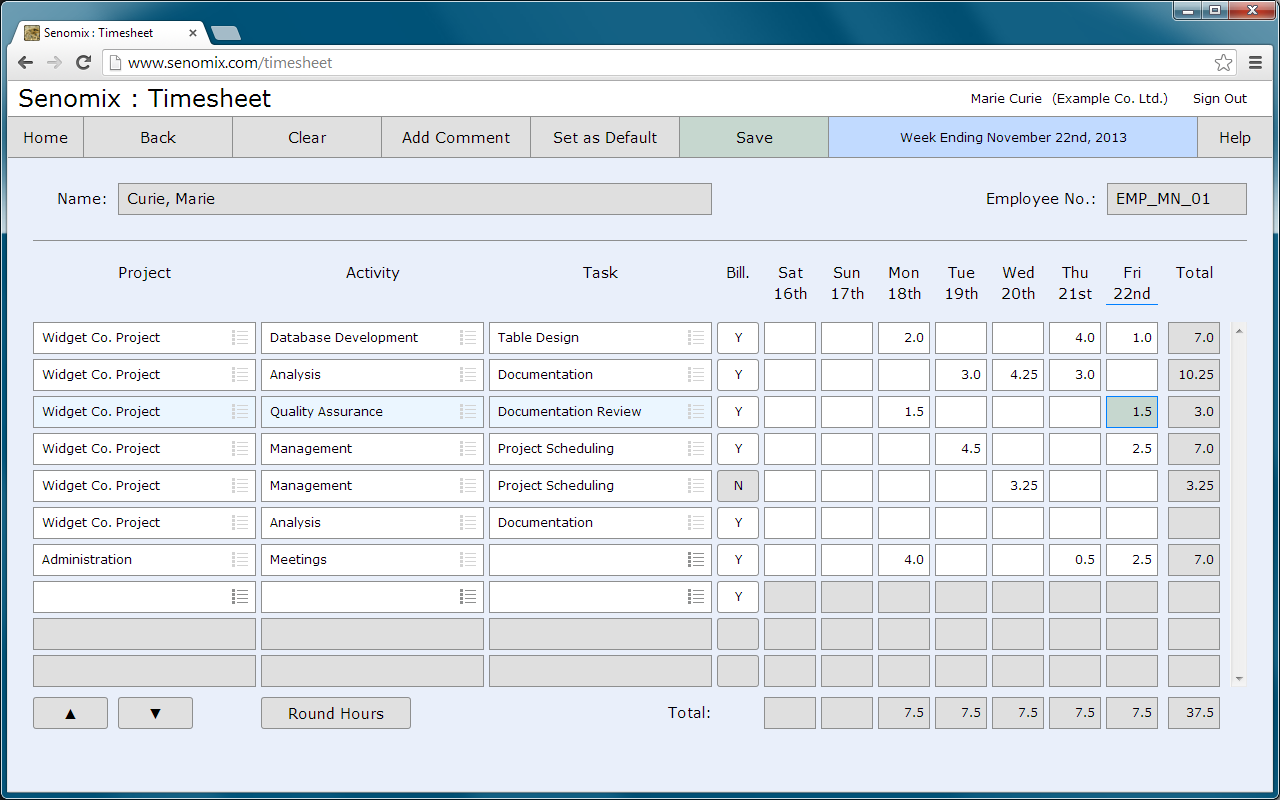
Toronto based Senomix Software Inc. has released the Senomix web portal, a cloud-based HTML5 and WebSocket app for their time and expense tracking system, Senomix Timesheets. Providing the responsiveness of a desktop application within a web browser, Senomix Timesheets runs directly from Mac and Windows computers, or iPad, iPhone and Android devices, to connect staff to a central cloud-based system or to a company's own server infrastructure.
Toronto, Canada - Senomix Software Inc. has released the Senomix web portal, a cloud-based HTML5 and WebSocket app for their time and expense tracking system, Senomix Timesheets. Providing the responsiveness of a desktop application within a web browser, Senomix Timesheets runs directly from Mac and Windows computers, or iPad, iPhone and Android devices, to connect staff to a central cloud-based system or to a company's own server infrastructure.
Working with Microsoft Excel to enable managers to create reports in their familiar spreadsheet workspace, Senomix combines the connectivity, simplicity and hands-off management of a web application with the speed and responsiveness of traditional desktop software to provide a packaged solution for an office's time and expense management. Using the latest in HTML5 and WebSocket networking technologies, Senomix's system frees an office to focus on their billable work without needing to concern themselves with the operation, application deployment or management of their supporting software.
Usable as a stand-alone time and expense tracking system, or as a front-end for an office's QuickBooks or database billing and payroll package, Senomix Timesheets is available both through a hosted service plan from $9.50 (USD) per-user per-month, or through a self-installed in-office system available for a one-time server licensing charge. Both options can be purchased online through the Senomix web site, with a 30-day free trial available for immediate use.
Senomix Software: http://www.senomix.com
Mobile Web Apps: http://www.senomix.com/time-tracking/mobile
Screenshots: http://www.senomix.com/time-tracking
Plans and Pricing: http://www.senomix.com/time-tracking/pricing
Time Tracking Free Trial: http://www.senomix.com/timesheets-free-trial
Screenshot: http://www.senomix.com/pad/screenshot.png
Senomix Software Inc. was founded in 2003 to create office management software with the robustness and reliability of the mission-critical systems on which a modern business depends. Based in Toronto, Ontario, Canada, Senomix provides time and expense tracking software for Mac OS X, Windows, Android and iOS devices. Copyright (C) 2003-2014 Senomix Software Inc. All Rights Reserved. Apple, the Apple logo, iOS and Macintosh are registered trademarks of Apple Inc. in the U.S. and/or other countries. Android is a trademark of Google Inc.
*******
Link To Article: http://prmac.com/release-id-67220.htm
*******
---------------------------------------------------------------------------------
Note that you can alter delivered distributions at any time.
Login to your account on prMac to alter your channel selection, or to opt-out at any time.
Senomix introduces HTML5 cloud-based time and expense tracking - Published on 04/23/14
Toronto based Senomix Software Inc. has released the Senomix web portal, a cloud-based HTML5 and WebSocket app for their time and expense tracking system, Senomix Timesheets. Providing the responsiveness of a desktop application within a web browser, Senomix Timesheets runs directly from Mac and Windows computers, or iPad, iPhone and Android devices, to connect staff to a central cloud-based system or to a company's own server infrastructure.
Toronto, Canada - Senomix Software Inc. has released the Senomix web portal, a cloud-based HTML5 and WebSocket app for their time and expense tracking system, Senomix Timesheets. Providing the responsiveness of a desktop application within a web browser, Senomix Timesheets runs directly from Mac and Windows computers, or iPad, iPhone and Android devices, to connect staff to a central cloud-based system or to a company's own server infrastructure.
Working with Microsoft Excel to enable managers to create reports in their familiar spreadsheet workspace, Senomix combines the connectivity, simplicity and hands-off management of a web application with the speed and responsiveness of traditional desktop software to provide a packaged solution for an office's time and expense management. Using the latest in HTML5 and WebSocket networking technologies, Senomix's system frees an office to focus on their billable work without needing to concern themselves with the operation, application deployment or management of their supporting software.
Usable as a stand-alone time and expense tracking system, or as a front-end for an office's QuickBooks or database billing and payroll package, Senomix Timesheets is available both through a hosted service plan from $9.50 (USD) per-user per-month, or through a self-installed in-office system available for a one-time server licensing charge. Both options can be purchased online through the Senomix web site, with a 30-day free trial available for immediate use.
Senomix Software: http://www.senomix.com
Mobile Web Apps: http://www.senomix.com/time-tracking/mobile
Screenshots: http://www.senomix.com/time-tracking
Plans and Pricing: http://www.senomix.com/time-tracking/pricing
Time Tracking Free Trial: http://www.senomix.com/timesheets-free-trial
Screenshot: http://www.senomix.com/pad/screenshot.png
Senomix Software Inc. was founded in 2003 to create office management software with the robustness and reliability of the mission-critical systems on which a modern business depends. Based in Toronto, Ontario, Canada, Senomix provides time and expense tracking software for Mac OS X, Windows, Android and iOS devices. Copyright (C) 2003-2014 Senomix Software Inc. All Rights Reserved. Apple, the Apple logo, iOS and Macintosh are registered trademarks of Apple Inc. in the U.S. and/or other countries. Android is a trademark of Google Inc.
*******
Link To Article: http://prmac.com/release-id-67220.htm
*******
---------------------------------------------------------------------------------
Note that you can alter delivered distributions at any time.
Login to your account on prMac to alter your channel selection, or to opt-out at any time.
Nano C - C language interpreter is better than ever & available on iOS
A new article has been published at prMac.
Nano C - C language interpreter is better than ever & available on iOS - Published on 04/23/14
Kiyv based independent developer Erziman Asaliyev has announced the recent launch of the newly updated version of Nano C for the iPhone, iPad, and iPod touch. Nano C turns iOS devices into flexible calculation tools, able to convey statistics, programming information, and more. A useful mobile C language interpreter, this app gives students and researchers the power to create and view C language calculations as text or graphs, and offers an in-depth array of other math functionalities as well.
Kiyv, Ukraine - Erziman Asaliyev, the independent mobile application developer behind Nano C - C language interpreter - and its free companion app Nano Basic, has announced the recent release of a newly updated version of Nano C onto the App Store. Compatible on iPhone, iPad, and iPod touch devices, this uniquely practical math utility enables users to create and show arbitrary C based calculations as text or graphs right on their mobile devices on demand. A perfect education companion app for students, teachers, and researchers alike, Nano C turns iOS devices into flexible calculation tools, able to convey statistics, programming information, a wide array of math calculations, and more. Newly enhanced, Nano C 1.2 is currently available for download on the App Store for $1.99 in the Education category.
Geared towards college students, teachers, and researchers, this math utility highlights a variety of charting features that enable users to not only perform calculations ranging from the very simple to the very complex, but visually show their results and implications via a single intuitive hub as well. A perfect asset for teachers to help educate students too, Nano C brings a full library of math functions, graphs, and C language interpretation tools under one digital roof that can be utilized in any setting. Accessible to even novice programming or math inclined learners, Nano C comes complete with an in-depth Help section to guide users through the app's many ins and outs, while switching between editing and viewing modes to create and augment calculations, and display results is as simple as a tap of a button.
This isn't a simple mobile calculator gimmick. Nano C offers users full C language calculation capabilities varied enough to meet virtually any need. Users - students, researchers, and teachers alike - deserve an iOS solution that offers a practical mobile outlet to create and display the high level calculations Nano C provides them with. Its an eloquent 360 degree solution, and built from the ground up to be the most user friendly C language calculation tool available on the App Store.
Device Requirements:
* iPhone, iPad, and iPod touch
* Requires iOS 7.0 or later
* 1.20
Pricing and Availability:
Nano C (C language interpreter) 1.2.0 is $1.99 USD (or equivalent amount in other currencies) and available worldwide exclusively through the App Store in the Education category.
Erziman: http://www.erziman.com/
Nano C (C language interpreter) 1.2.0: http://www.erziman.com/nano-c
Purchase and Download: https://itunes.apple.com/app/nano-c-c-language-interpreter/id829783283
Screenshot 1: http://a2.mzstatic.com/us/r30/Purple/v4/2a/ea/6e/2aea6e8b-83a9-f3dc-72f8-2eae9468ae80/screen568x568.jpeg
Screenshot 2: http://a2.mzstatic.com/us/r30/Purple4/v4/b3/5e/53/b35e532b-0126-5cc5-237a-b5cdc1f4e5d1/screen568x568.jpeg
App Icon: http://www.erziman.com/userdata/modules/werziman/galleries/icons/erz_pages_gallery_photog_270.png
Erziman Asaliyev is a Russian based independent mobile application developer committed to creating effective utility solutions geared towards science and math minded iOS users. (C) Erziman Asaliyev 2014. All Rights Reserved. Apple, the Apple logo, iPhone, iPod and iPad are registered trademarks of Apple Inc. in the U.S. and/or other countries.
*******
Link To Article: http://prmac.com/release-id-67141.htm
*******
---------------------------------------------------------------------------------
Note that you can alter delivered distributions at any time.
Login to your account on prMac to alter your channel selection, or to opt-out at any time.
Nano C - C language interpreter is better than ever & available on iOS - Published on 04/23/14
Kiyv based independent developer Erziman Asaliyev has announced the recent launch of the newly updated version of Nano C for the iPhone, iPad, and iPod touch. Nano C turns iOS devices into flexible calculation tools, able to convey statistics, programming information, and more. A useful mobile C language interpreter, this app gives students and researchers the power to create and view C language calculations as text or graphs, and offers an in-depth array of other math functionalities as well.
Kiyv, Ukraine - Erziman Asaliyev, the independent mobile application developer behind Nano C - C language interpreter - and its free companion app Nano Basic, has announced the recent release of a newly updated version of Nano C onto the App Store. Compatible on iPhone, iPad, and iPod touch devices, this uniquely practical math utility enables users to create and show arbitrary C based calculations as text or graphs right on their mobile devices on demand. A perfect education companion app for students, teachers, and researchers alike, Nano C turns iOS devices into flexible calculation tools, able to convey statistics, programming information, a wide array of math calculations, and more. Newly enhanced, Nano C 1.2 is currently available for download on the App Store for $1.99 in the Education category.
Geared towards college students, teachers, and researchers, this math utility highlights a variety of charting features that enable users to not only perform calculations ranging from the very simple to the very complex, but visually show their results and implications via a single intuitive hub as well. A perfect asset for teachers to help educate students too, Nano C brings a full library of math functions, graphs, and C language interpretation tools under one digital roof that can be utilized in any setting. Accessible to even novice programming or math inclined learners, Nano C comes complete with an in-depth Help section to guide users through the app's many ins and outs, while switching between editing and viewing modes to create and augment calculations, and display results is as simple as a tap of a button.
This isn't a simple mobile calculator gimmick. Nano C offers users full C language calculation capabilities varied enough to meet virtually any need. Users - students, researchers, and teachers alike - deserve an iOS solution that offers a practical mobile outlet to create and display the high level calculations Nano C provides them with. Its an eloquent 360 degree solution, and built from the ground up to be the most user friendly C language calculation tool available on the App Store.
Device Requirements:
* iPhone, iPad, and iPod touch
* Requires iOS 7.0 or later
* 1.20
Pricing and Availability:
Nano C (C language interpreter) 1.2.0 is $1.99 USD (or equivalent amount in other currencies) and available worldwide exclusively through the App Store in the Education category.
Erziman: http://www.erziman.com/
Nano C (C language interpreter) 1.2.0: http://www.erziman.com/nano-c
Purchase and Download: https://itunes.apple.com/app/nano-c-c-language-interpreter/id829783283
Screenshot 1: http://a2.mzstatic.com/us/r30/Purple/v4/2a/ea/6e/2aea6e8b-83a9-f3dc-72f8-2eae9468ae80/screen568x568.jpeg

Screenshot 2: http://a2.mzstatic.com/us/r30/Purple4/v4/b3/5e/53/b35e532b-0126-5cc5-237a-b5cdc1f4e5d1/screen568x568.jpeg

App Icon: http://www.erziman.com/userdata/modules/werziman/galleries/icons/erz_pages_gallery_photog_270.png

Erziman Asaliyev is a Russian based independent mobile application developer committed to creating effective utility solutions geared towards science and math minded iOS users. (C) Erziman Asaliyev 2014. All Rights Reserved. Apple, the Apple logo, iPhone, iPod and iPad are registered trademarks of Apple Inc. in the U.S. and/or other countries.
*******
Link To Article: http://prmac.com/release-id-67141.htm
*******
---------------------------------------------------------------------------------
Note that you can alter delivered distributions at any time.
Login to your account on prMac to alter your channel selection, or to opt-out at any time.
Subscribe to:
Posts (Atom)