A new article has been published at prMac.
Kickstarting 'Freya' - A Women's Calendar For 21st Century - Published on 04/23/14
Following the positive reception of CircleTime, its creators decided to take the new round calendar a notch further - by combining the circular format with a calendar for women. The calendar will let you track the menstrual and fertility cycles with a circle. From this idea was born Freya, a calendar app that the HedgeHog team plans to implement for Apple iOS devices. They decided to seek support on Kickstarter. The fundraising campaign is expected to be launched in May 2014.
Ljubljana, Slovenia - Following the positive reception of CircleTime - the first round perpetual calendar in the world, its creators decided to take the new round calendar a notch further - by combining the circular format with a calendar for women. This means that the calendar will let you track the menstrual and fertility cycles in a much more sensible manner - with a circle.
From this idea was born Freya, a calendar app that the HedgeHog team plans to implement for Apple iOS devices, and for which they decided to seek support on the popular crowdfunding platform Kickstarter. It is their intent to offer the future users a unique opportunity to become involved with the design process itself.
The new round calendar presents time in the way of natural cycles which are continuously repeating in a circular fashion from day to day and year to year, and which is traversed by spinning the circle in either direction. This format is perfect for the women�s calendar which is also all about the cycles.
�The purpose of Freya is to provide a remarkable calendar for women which will be immensely appealing in both appearance as well as functionality,� said Dean Durini, inventor of the new round calendar and project leader.
The fundraising campaign is expected to be launched in May 2014.
Freya: http://www.newroundcalendar.com/freya.html
HedgeHog, an independent software developer for iOS applications, is located in Ljubljana, Slovenia, and was formed in 2010 by Dejan Durini and Daniel Nunic. Copyright (C) 2012 HedgeHog. All Rights Reserved. Apple, the Apple logo, iPhone, iPod and iPad are registered trademarks of Apple Inc. in the U.S. and/or other countries.
*******
Link To Article: http://prmac.com/release-id-67242.htm
*******
---------------------------------------------------------------------------------
Note that you can alter delivered distributions at any time.
Login to your account on prMac to alter your channel selection, or to opt-out at any time.

ZipGrade Grades 1,000,000 Paper Multiple Choice Tests
A new article has been published at prMac.
ZipGrade Grades 1,000,000 Paper Multiple Choice Tests - Published on 04/23/14
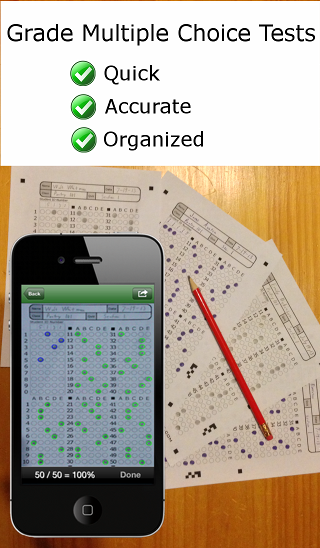
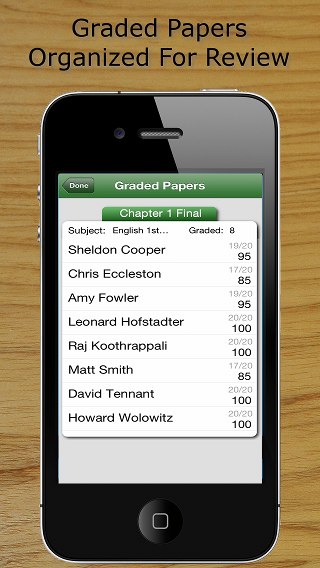
Developed by John Viebach, ZipGrade saves teachers hours of grading by turning their iOS device into an optical grading machine that reads paper answer sheets by using the iPhone or iPad's camera. It has recently reached the milestone of grading 1,000,000 papers. Teachers can now grade exams, quizzes, and exit tickets before students leave the classroom while providing detailed item analysis and student data exports for their grade books.
Chicago, Illinois - Since ZipGrade was released at the start of the school year, it has graded over 1,000,000 papers. At 18,021 papers, the busiest day was April 21, 2014. ZipGrade has saved teachers countless hours of hand grading while offering immediate feedback to students in the classroom.
To use ZipGrade, a teacher chooses from a 20, 50 or 100 question form on the website. All forms are free to download, print, and customize. Within the app, the teacher defines a key for each test or scans a known good paper. From there, to grade a paper a teacher merely aligns the paper in the viewfinder. ZipGrade will autofocus and let the teacher know when the paper has been graded-- all in a few seconds. The results and item analysis are available within the app and synchronized to the website when an internet connection is present. An internet connection is not required to grade papers.
ZipGrade was developed by John Viebach, whose wife was teaching an SAT prep class in a borrowed classroom. With no access to an OMR machine, she was hand grading sample tests in order to assign homework to students. Now an adjunct professor, she uses ZipGrade to give her college students immediate feedback on tests and quizzes.
* "I've used it for a week and I still think it's magic that waving my iPhone over a paper will grade it." - Kimberly
* "It's midterms and someone forgot to order Scantron forms for the school. We copied enough ZipGrade forms for each student and bought enough licenses for those that have iPhones. It worked so well, we're doing this for all tests now." - Leah
* "I use ZipGrade for an exit ticket in every class, every day and for chapter tests. My students love the immediate results." - Rob
Many teacher requested features have been added since ZipGrade's first release at the beginning of the school year. "One hundred question answer sheets and more export options have been the biggest request throughout the year," says John. ZipGrade has also added iPad support, multi-device sync, and a central secure website where teachers may use any web browser to access quiz reports. John adds, "And no classroom is the same." This is why John answers all emails directly. It has proven to be the best way to learn what configuration options to add to best meet each classroom's need.
What's next? "Android, android, android. The demand has been overwhelming," says John, who is busy developing this next version. Teachers that are interested in hearing more about ZipGrade or hearing when the Android version is available should sign up at ZipGrade online.
Device Requirements:
* iPhone, iPad, and iPod touch
* Requires iOS 7.0 or later
* 22.0 MB
Pricing and Availability:
ZipGrade 1.13 is currently available as a free demo in the Apple App Store. After using it to grade 100 papers, teachers may choose to purchase ZipGrade for $1.99 for 2 months or $6.99 for a year. For schools, there is a special version, ZipGrade VPP, that is eligible for Apple's Education Volume Purchase Program and a bulk discount.
ZipGrade 1.13: http://www.zipgrade.com
Download from iTunes: https://itunes.apple.com/app/zipgrade-grade-tests-your/id635077270
YouTube Video: http://www.youtube.com/embed/FZuY22aJZio
Screenshot 1: http://www.zipgrade.com/static/images/ScreenShot1.png
Screenshot 2: http://www.zipgrade.com/static/images/ScreenShot2.png
Logo: http://www.zipgrade.com/static/images/LeftLogoIPhone.png
ZipGrade LLC was founded in 2013 to build a cost effective assessment tools for teachers. The primary focus has been on innovative uses of computer vision and machine learning to give teachers tools that they can use easily within a classroom. ZipGrade LLC was founded by John Viebach, who is always looking for teacher input in what to build next. All Material and Software (C) 2014 ZipGrade LLC / All Rights Reserved. Apple, the Apple logo, iPod, the iPod logo, are registered trademarks of Apple Computer in the U.S. and/or other countries.
*******
Link To Article: http://prmac.com/release-id-67230.htm
*******
---------------------------------------------------------------------------------
Note that you can alter delivered distributions at any time.
Login to your account on prMac to alter your channel selection, or to opt-out at any time.
ZipGrade Grades 1,000,000 Paper Multiple Choice Tests - Published on 04/23/14
Developed by John Viebach, ZipGrade saves teachers hours of grading by turning their iOS device into an optical grading machine that reads paper answer sheets by using the iPhone or iPad's camera. It has recently reached the milestone of grading 1,000,000 papers. Teachers can now grade exams, quizzes, and exit tickets before students leave the classroom while providing detailed item analysis and student data exports for their grade books.
Chicago, Illinois - Since ZipGrade was released at the start of the school year, it has graded over 1,000,000 papers. At 18,021 papers, the busiest day was April 21, 2014. ZipGrade has saved teachers countless hours of hand grading while offering immediate feedback to students in the classroom.
To use ZipGrade, a teacher chooses from a 20, 50 or 100 question form on the website. All forms are free to download, print, and customize. Within the app, the teacher defines a key for each test or scans a known good paper. From there, to grade a paper a teacher merely aligns the paper in the viewfinder. ZipGrade will autofocus and let the teacher know when the paper has been graded-- all in a few seconds. The results and item analysis are available within the app and synchronized to the website when an internet connection is present. An internet connection is not required to grade papers.
ZipGrade was developed by John Viebach, whose wife was teaching an SAT prep class in a borrowed classroom. With no access to an OMR machine, she was hand grading sample tests in order to assign homework to students. Now an adjunct professor, she uses ZipGrade to give her college students immediate feedback on tests and quizzes.
* "I've used it for a week and I still think it's magic that waving my iPhone over a paper will grade it." - Kimberly
* "It's midterms and someone forgot to order Scantron forms for the school. We copied enough ZipGrade forms for each student and bought enough licenses for those that have iPhones. It worked so well, we're doing this for all tests now." - Leah
* "I use ZipGrade for an exit ticket in every class, every day and for chapter tests. My students love the immediate results." - Rob
Many teacher requested features have been added since ZipGrade's first release at the beginning of the school year. "One hundred question answer sheets and more export options have been the biggest request throughout the year," says John. ZipGrade has also added iPad support, multi-device sync, and a central secure website where teachers may use any web browser to access quiz reports. John adds, "And no classroom is the same." This is why John answers all emails directly. It has proven to be the best way to learn what configuration options to add to best meet each classroom's need.
What's next? "Android, android, android. The demand has been overwhelming," says John, who is busy developing this next version. Teachers that are interested in hearing more about ZipGrade or hearing when the Android version is available should sign up at ZipGrade online.
Device Requirements:
* iPhone, iPad, and iPod touch
* Requires iOS 7.0 or later
* 22.0 MB
Pricing and Availability:
ZipGrade 1.13 is currently available as a free demo in the Apple App Store. After using it to grade 100 papers, teachers may choose to purchase ZipGrade for $1.99 for 2 months or $6.99 for a year. For schools, there is a special version, ZipGrade VPP, that is eligible for Apple's Education Volume Purchase Program and a bulk discount.
ZipGrade 1.13: http://www.zipgrade.com
Download from iTunes: https://itunes.apple.com/app/zipgrade-grade-tests-your/id635077270
YouTube Video: http://www.youtube.com/embed/FZuY22aJZio
Screenshot 1: http://www.zipgrade.com/static/images/ScreenShot1.png
Screenshot 2: http://www.zipgrade.com/static/images/ScreenShot2.png
Logo: http://www.zipgrade.com/static/images/LeftLogoIPhone.png

ZipGrade LLC was founded in 2013 to build a cost effective assessment tools for teachers. The primary focus has been on innovative uses of computer vision and machine learning to give teachers tools that they can use easily within a classroom. ZipGrade LLC was founded by John Viebach, who is always looking for teacher input in what to build next. All Material and Software (C) 2014 ZipGrade LLC / All Rights Reserved. Apple, the Apple logo, iPod, the iPod logo, are registered trademarks of Apple Computer in the U.S. and/or other countries.
*******
Link To Article: http://prmac.com/release-id-67230.htm
*******
---------------------------------------------------------------------------------
Note that you can alter delivered distributions at any time.
Login to your account on prMac to alter your channel selection, or to opt-out at any time.
Social-Planning App Bridges Local Events with Mobile Devices
A new article has been published at prMac.
Social-Planning App Bridges Local Events with Mobile Devices - Published on 04/23/14
ZookCity, a social-planning app created by a San Francisco-based startup co-founded by Michiel van der Vlugt and Clara Ko, officially launched in the iTunes store this week. ZookCity is designed as a tool used to connect with friends in real life. ZookCity displays all local happenings and events in the user's area. Users browse through local businesses and events, plan meet-ups, and invite guests with the help of Facebook, email and phone contact syncing.
San Francisco, California - ZookCity, a social-planning app created by a San Francisco-based startup co-founded by Michiel van der Vlugt and Clara Ko, officially launched in the iTunes store this week. ZookCity is designed as a tool used to connect with friends in real life. Users browse through local businesses and events, plan meet-ups, and invite guests with the help of Facebook, email and phone contact syncing.
"We wanted to create an event planner that enables you to take full advantage of your mobile phone, using your phone's contacts, geolocation, direction/map capabilities, and calendar, to provide a completely integrated experience in event planning," says Michiel van der Vlugt, CEO of ZookCity.
With its mobile-locating technology, ZookCity displays all local happenings and events in the user's area. Using the app to discover nearby restaurants, sports events, shopping, theater shows, concerts and much more, ZookCity has now made it easier than ever for the public to get to know a city they may not be familiar with, and plan activities with their friends. Unlike Facebook events, ZookCity enables invitations to go out by SMS or email, as well as Facebook, because not everyone's friends are on Facebook, or want to be reached via Facebook. Guests can RSVP to events they're invited to, even if they don't have the app, by following a link to the ZookCity website. Group messaging, and photo-posting also serve as key features for sharing memories from the events.
"We noticed that many planning apps out there are only focused on planning, but we wanted to do more - we wanted to provide ideas for things to do, like event listings and ticket options for concerts, sporting events, and theater performances. We also wanted to enable last minute or impromptu meetings by making it very easy and fast to create an event at your current or a nearby location and get a quick response from your friends," says Clara Ko, Chief Product Officer of ZookCity.
Device Requirements:
* iPhone, iPad, and iPod touch
* Requires iOS 6.0 or later
* 14.3 MB
Pricing and Availability:
ZookCity 4.5 is Free and available (US and Canada as well as in select countries internationally) through the App Store in the Lifestyle category. An Android version is in the works and will be available soon. For more information, visit ZookCity online.
ZookCity 4.5: https://www.zookcity.com/
Download from iTunes: https://itunes.apple.com/app/id632225412
Screenshots: https://www.google.com/search?q=zook+city&source=lnms&tbm=isch&sa=X&ei=nNlWU4aoGufP8AGxmoG4BQ&ved=0CAYQ_AUoAQ&biw=1366&bih=667#q=zook+city+app&tbm=isch&facrc=_&imgrc=4WOdyrz4-hw7TM%253A%3Brh9zvXMFQbDuFM%3Bhttps%253A%252F%252Fwww.zookcity.com%252Fimages%25
App Icon: http://a4.mzstatic.com/us/r30/Purple4/v4/91/36/76/9136765f-39ad-5e18-4034-f7f031311a23/mzl.qiethzkw.175x175-75.jpg
ZookCity is founded by Michiel van der Vlugt and Clara Ko. Michiel van der Vlugt holds a degree in computer science and a MBA at Rotterdam School of Management, Erasmus University. With a background in IT Operations, where he managed a team responsible for business-critical applications in an energy firm, Michiel gives unique insight in how to make software that is reliable and maintainable. As the CEO, he oversees the day-to-day business for ZookCity and is fully involved with the creation and design of the app. All Material and Software (C) Copyright 2014 Michiel van der Vlugt and Clara Ko. All Rights Reserved. Apple, the Apple logo, iPhone, iPod and iPad are registered trademarks of Apple Inc. in the U.S. and/or other countries. Other trademarks and registered trademarks may be the property of their respective owners.
*******
Link To Article: http://prmac.com/release-id-67228.htm
*******
---------------------------------------------------------------------------------
Note that you can alter delivered distributions at any time.
Login to your account on prMac to alter your channel selection, or to opt-out at any time.
Social-Planning App Bridges Local Events with Mobile Devices - Published on 04/23/14
ZookCity, a social-planning app created by a San Francisco-based startup co-founded by Michiel van der Vlugt and Clara Ko, officially launched in the iTunes store this week. ZookCity is designed as a tool used to connect with friends in real life. ZookCity displays all local happenings and events in the user's area. Users browse through local businesses and events, plan meet-ups, and invite guests with the help of Facebook, email and phone contact syncing.
San Francisco, California - ZookCity, a social-planning app created by a San Francisco-based startup co-founded by Michiel van der Vlugt and Clara Ko, officially launched in the iTunes store this week. ZookCity is designed as a tool used to connect with friends in real life. Users browse through local businesses and events, plan meet-ups, and invite guests with the help of Facebook, email and phone contact syncing.
"We wanted to create an event planner that enables you to take full advantage of your mobile phone, using your phone's contacts, geolocation, direction/map capabilities, and calendar, to provide a completely integrated experience in event planning," says Michiel van der Vlugt, CEO of ZookCity.
With its mobile-locating technology, ZookCity displays all local happenings and events in the user's area. Using the app to discover nearby restaurants, sports events, shopping, theater shows, concerts and much more, ZookCity has now made it easier than ever for the public to get to know a city they may not be familiar with, and plan activities with their friends. Unlike Facebook events, ZookCity enables invitations to go out by SMS or email, as well as Facebook, because not everyone's friends are on Facebook, or want to be reached via Facebook. Guests can RSVP to events they're invited to, even if they don't have the app, by following a link to the ZookCity website. Group messaging, and photo-posting also serve as key features for sharing memories from the events.
"We noticed that many planning apps out there are only focused on planning, but we wanted to do more - we wanted to provide ideas for things to do, like event listings and ticket options for concerts, sporting events, and theater performances. We also wanted to enable last minute or impromptu meetings by making it very easy and fast to create an event at your current or a nearby location and get a quick response from your friends," says Clara Ko, Chief Product Officer of ZookCity.
Device Requirements:
* iPhone, iPad, and iPod touch
* Requires iOS 6.0 or later
* 14.3 MB
Pricing and Availability:
ZookCity 4.5 is Free and available (US and Canada as well as in select countries internationally) through the App Store in the Lifestyle category. An Android version is in the works and will be available soon. For more information, visit ZookCity online.
ZookCity 4.5: https://www.zookcity.com/
Download from iTunes: https://itunes.apple.com/app/id632225412
Screenshots: https://www.google.com/search?q=zook+city&source=lnms&tbm=isch&sa=X&ei=nNlWU4aoGufP8AGxmoG4BQ&ved=0CAYQ_AUoAQ&biw=1366&bih=667#q=zook+city+app&tbm=isch&facrc=_&imgrc=4WOdyrz4-hw7TM%253A%3Brh9zvXMFQbDuFM%3Bhttps%253A%252F%252Fwww.zookcity.com%252Fimages%25
App Icon: http://a4.mzstatic.com/us/r30/Purple4/v4/91/36/76/9136765f-39ad-5e18-4034-f7f031311a23/mzl.qiethzkw.175x175-75.jpg

ZookCity is founded by Michiel van der Vlugt and Clara Ko. Michiel van der Vlugt holds a degree in computer science and a MBA at Rotterdam School of Management, Erasmus University. With a background in IT Operations, where he managed a team responsible for business-critical applications in an energy firm, Michiel gives unique insight in how to make software that is reliable and maintainable. As the CEO, he oversees the day-to-day business for ZookCity and is fully involved with the creation and design of the app. All Material and Software (C) Copyright 2014 Michiel van der Vlugt and Clara Ko. All Rights Reserved. Apple, the Apple logo, iPhone, iPod and iPad are registered trademarks of Apple Inc. in the U.S. and/or other countries. Other trademarks and registered trademarks may be the property of their respective owners.
*******
Link To Article: http://prmac.com/release-id-67228.htm
*******
---------------------------------------------------------------------------------
Note that you can alter delivered distributions at any time.
Login to your account on prMac to alter your channel selection, or to opt-out at any time.
Tower Math for iPhone and iPad makes practicing math fun
A new article has been published at prMac.
Tower Math for iPhone and iPad makes practicing math fun - Published on 04/23/14
Charlotte based game developer, Dan Russell-Pinson today introduces Tower Math 1.0 for iOS. Tower Math makes practicing math fun by combining the excitement of tower defense games with arithmetic. The numbers have been turned into monsters and it's up to the player to save them. To break the spell, children must build magic towers by solving math problems. The app comes with 20 unique environments and allows for up to 5 player profiles so each member of the family can track their own progress.
Charlotte, North Carolina - Tower Math, the latest release from the developer of Stack the States and Monster Physics, is available for the iPad and iPhone. Tower Math is a unique math app that makes practicing math fun by combining the excitement of tower defense games with arithmetic.
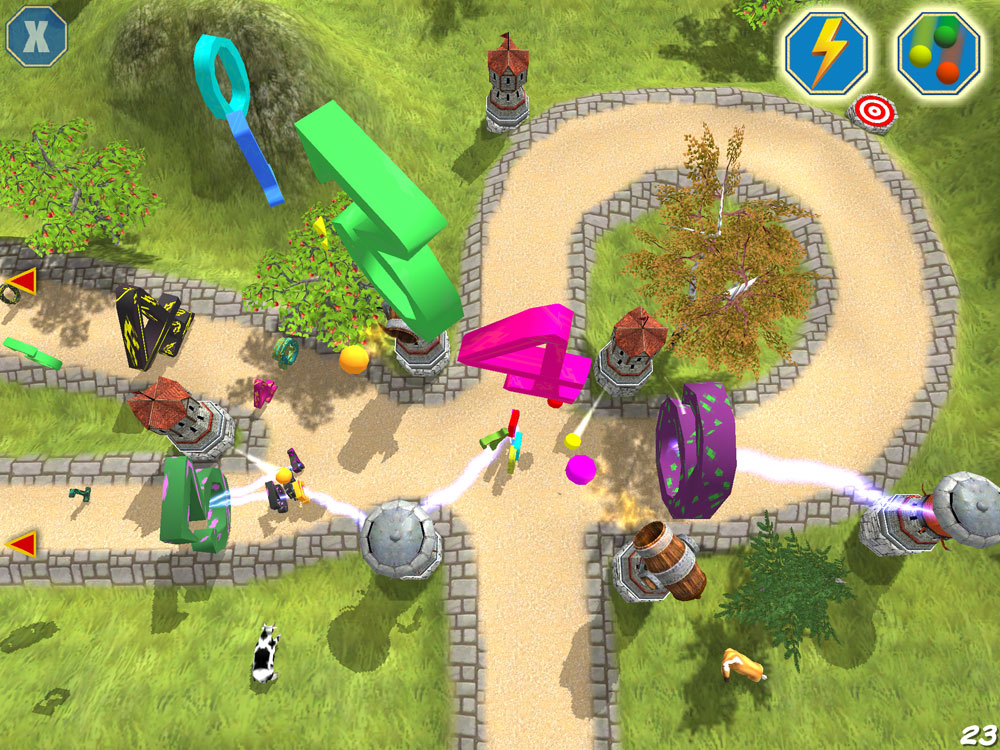
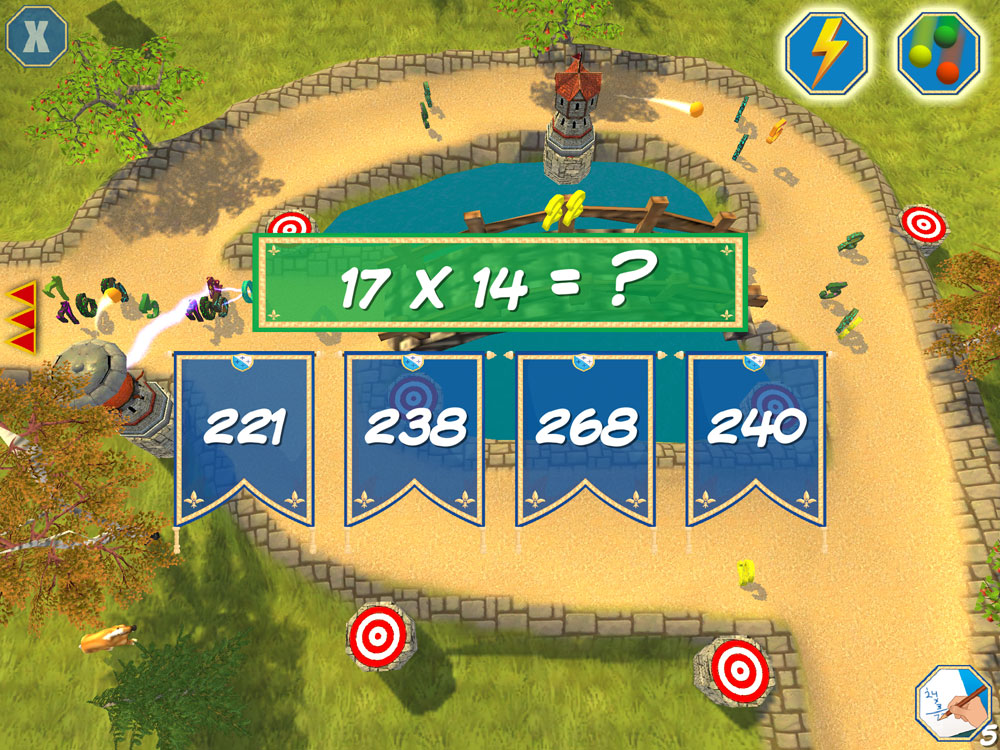
In Tower Math, the numbers have been turned into monsters and it's up to the player to save them. To break the spell, children must build magic towers by solving math problems. Players are encouraged to work at their highest level because solving more difficult problems results in more powerful towers. There are three types of towers to choose from: Cannon, Lobber and Lightning. Each tower type has its own unique abilities. There are also two special powers, freeze ray and magic rain, that players can use after successfully answering math problems.
Tower Math comes with 20 unique environments and allows for up to 5 player profiles so each member of the family can track their own progress. Bronze, silver or gold medals are awarded for each level based on performance. Math accuracy is also reported at the end of each level.
Tower Math Features:
* A full-featured tower defense game
* Beautiful 3D graphics
* 20 unique scenes
* Create up to five player profiles
* Earn medals for each level
* Fun sound effects and music
* iPhone 5 and iPad Retina Display support
* Works on both iPhone and iPad - a universal app
Device Requirements:
* iPhone, iPad and iPod touch
* 66.3 MB
* Requires iOS 4.3 or later
Pricing and Availability:
Tower Math 1.0 is $0.99 USD (or equivalent amount in other currencies) and available worldwide through the App Store in the Education category.
Tower Math 1.0: http://dan-russell-pinson.com/category/games/tower-math/
Purchase and Download: https://itunes.apple.com/app/tower-math/id858919286
Screenshot 1: http://freecloud.com/dl/TMSS1.jpg
Screenshot 2: http://freecloud.com/dl/TMSS2.jpg
Screenshot 3: http://freecloud.com/dl/TMSS3.jpg
App Icon: http://freecloud.com/dl/TMIcon200.png
Dan Russell-Pinson has been independently creating video games since 2007 focusing heavily on educational games. His best known titles are Stack the States, Stack the Countries and Mathmateer which have all been Top 10 education apps for iPhone and iPad. Copyright (C) 2014 Dan Russell-Pinson. All Rights Reserved. Apple, the Apple logo, iPhone and iPod are registered trademarks of Apple Inc. in the U.S. and/or other countries.
*******
Link To Article: http://prmac.com/release-id-67229.htm
*******
---------------------------------------------------------------------------------
Note that you can alter delivered distributions at any time.
Login to your account on prMac to alter your channel selection, or to opt-out at any time.
Tower Math for iPhone and iPad makes practicing math fun - Published on 04/23/14
Charlotte based game developer, Dan Russell-Pinson today introduces Tower Math 1.0 for iOS. Tower Math makes practicing math fun by combining the excitement of tower defense games with arithmetic. The numbers have been turned into monsters and it's up to the player to save them. To break the spell, children must build magic towers by solving math problems. The app comes with 20 unique environments and allows for up to 5 player profiles so each member of the family can track their own progress.
Charlotte, North Carolina - Tower Math, the latest release from the developer of Stack the States and Monster Physics, is available for the iPad and iPhone. Tower Math is a unique math app that makes practicing math fun by combining the excitement of tower defense games with arithmetic.
In Tower Math, the numbers have been turned into monsters and it's up to the player to save them. To break the spell, children must build magic towers by solving math problems. Players are encouraged to work at their highest level because solving more difficult problems results in more powerful towers. There are three types of towers to choose from: Cannon, Lobber and Lightning. Each tower type has its own unique abilities. There are also two special powers, freeze ray and magic rain, that players can use after successfully answering math problems.
Tower Math comes with 20 unique environments and allows for up to 5 player profiles so each member of the family can track their own progress. Bronze, silver or gold medals are awarded for each level based on performance. Math accuracy is also reported at the end of each level.
Tower Math Features:
* A full-featured tower defense game
* Beautiful 3D graphics
* 20 unique scenes
* Create up to five player profiles
* Earn medals for each level
* Fun sound effects and music
* iPhone 5 and iPad Retina Display support
* Works on both iPhone and iPad - a universal app
Device Requirements:
* iPhone, iPad and iPod touch
* 66.3 MB
* Requires iOS 4.3 or later
Pricing and Availability:
Tower Math 1.0 is $0.99 USD (or equivalent amount in other currencies) and available worldwide through the App Store in the Education category.
Tower Math 1.0: http://dan-russell-pinson.com/category/games/tower-math/
Purchase and Download: https://itunes.apple.com/app/tower-math/id858919286
Screenshot 1: http://freecloud.com/dl/TMSS1.jpg
Screenshot 2: http://freecloud.com/dl/TMSS2.jpg
Screenshot 3: http://freecloud.com/dl/TMSS3.jpg
App Icon: http://freecloud.com/dl/TMIcon200.png

Dan Russell-Pinson has been independently creating video games since 2007 focusing heavily on educational games. His best known titles are Stack the States, Stack the Countries and Mathmateer which have all been Top 10 education apps for iPhone and iPad. Copyright (C) 2014 Dan Russell-Pinson. All Rights Reserved. Apple, the Apple logo, iPhone and iPod are registered trademarks of Apple Inc. in the U.S. and/or other countries.
*******
Link To Article: http://prmac.com/release-id-67229.htm
*******
---------------------------------------------------------------------------------
Note that you can alter delivered distributions at any time.
Login to your account on prMac to alter your channel selection, or to opt-out at any time.
Act Faster with iTrackFast App for Calendar, FlowNote, Share, Slideshows
A new article has been published at prMac.
Act Faster with iTrackFast App for Calendar, FlowNote, Share, Slideshows - Published on 04/23/14
Massachusetts based AllFocus, Inc. today introduces iTrackFast 1.0, its new productivity app developed for iPad. iTrackFast offers a concurrent Day-and-Month Grid view to see all of the details in the big picture and act quickly with express icons. Update priorities and share with groups directly, or open the multi-tasking FlowNote for editing, browsing, and sharing. Don't miss the priority sort with due-date tracker, calendar sync with privacy, search, slideshows, and more.
Concord, Massachusetts - AllFocus, Inc. today announces the release of iTrackFast on the App Store. The iTrackFast app for iPad is built on an innovative flat architecture to unleash the power of iOS with the following features:
Grid View to Navigate Day and Month Together and Act Quickly with the Express Icons:
* Our unique Grid view presents daily events in color-coded cards annotated with express icons, which are integrated with bi-directional scrolling and quick zoom to another Day or Month grid - As a result, users can stay on top of their schedules, and act faster with express icons
* The Priority view also offers the card interface to update and sort the daily priorities and check due dates so nothing falls through the cracks
FlowNote as the Multi-tasking Workhorse:
* Edit text, location, priority status, due date, repeat pattern, photo album, voice memo, and calendar assignment, all in one multi-media browser
* Copy an event with list of invitees, with easy-to-use date and time pickers
* Browse slideshows, voice memos, Google maps, and Safari links
* Manage the events on a Day or overlapping list in one continuous stream
* Share with groups with dynamic mailing list tracking, or reply to organizers in a snap
* Organize the events by calendars, priorities, repeat patterns, smileys, and keywords for fast search
Share with Groups Effortlessly
* Tell contacts apart with their email addresses
* Email via the secure Apple Mail server with dynamic mailing lists, whether the invitees are picked from the imported list, mini Contacts list, or groups defined in Settings
Slideshows to Share the Precious Moments:
* Make albums with captions, play slideshows, and share photos in a snap
* Attach albums to events and play slideshows inside FlowNote
More Key Features:
* Sync the calendars on iPad with the app indirectly with privacy, while the imported calendars, contacts and camera rolls staying entirely on iPad
* Search by five classes of tags, then edit and share it in FlowNote
* Scribble to enjoy creativity and avoid the keyboard blues
* Get a quick start with the on-the-go help and search
Device Requirements:
* Compatible with iPad
* Requires iOS 6.0 or later
* 13.7 MB
Pricing and Availability:
iTrackFast 1.0 for iPad is 2.99 (USD) and is available worldwide through the App Store's Productivity category.
iTrackFast 1.0: http://itrackfast.com
Purchase and Download: https://itunes.apple.com/app/itrackfast-calendar-flownote/id837770170
Screenshot: http://a3.mzstatic.com/us/r30/Purple4/v4/7f/e1/ba/7fe1ba4c-40bd-c457-d85c-248afa1d5828/screen480x480.jpeg
App Icon: http://a1.mzstatic.com/us/r30/Purple/v4/c1/e6/0b/c1e60bd8-effb-bec4-5b1a-825ca64c5729/mzl.gehrhheb.175x175-75.jpg
AllFocus is a software firm that builds productivity apps on the iTrackFast platform for functionality lovers. All Material and Software Copyright (C) 2014 AllFocus, Inc. All Rights Reserved. Apple, the Apple logo, iPad are registered trademarks of Apple Inc. in the U.S. and/or other countries. Other trademarks and registered trademarks may be the property of their respective owners.
*******
Link To Article: http://prmac.com/release-id-67231.htm
*******
---------------------------------------------------------------------------------
Note that you can alter delivered distributions at any time.
Login to your account on prMac to alter your channel selection, or to opt-out at any time.
Act Faster with iTrackFast App for Calendar, FlowNote, Share, Slideshows - Published on 04/23/14
Massachusetts based AllFocus, Inc. today introduces iTrackFast 1.0, its new productivity app developed for iPad. iTrackFast offers a concurrent Day-and-Month Grid view to see all of the details in the big picture and act quickly with express icons. Update priorities and share with groups directly, or open the multi-tasking FlowNote for editing, browsing, and sharing. Don't miss the priority sort with due-date tracker, calendar sync with privacy, search, slideshows, and more.
Concord, Massachusetts - AllFocus, Inc. today announces the release of iTrackFast on the App Store. The iTrackFast app for iPad is built on an innovative flat architecture to unleash the power of iOS with the following features:
Grid View to Navigate Day and Month Together and Act Quickly with the Express Icons:
* Our unique Grid view presents daily events in color-coded cards annotated with express icons, which are integrated with bi-directional scrolling and quick zoom to another Day or Month grid - As a result, users can stay on top of their schedules, and act faster with express icons
* The Priority view also offers the card interface to update and sort the daily priorities and check due dates so nothing falls through the cracks
FlowNote as the Multi-tasking Workhorse:
* Edit text, location, priority status, due date, repeat pattern, photo album, voice memo, and calendar assignment, all in one multi-media browser
* Copy an event with list of invitees, with easy-to-use date and time pickers
* Browse slideshows, voice memos, Google maps, and Safari links
* Manage the events on a Day or overlapping list in one continuous stream
* Share with groups with dynamic mailing list tracking, or reply to organizers in a snap
* Organize the events by calendars, priorities, repeat patterns, smileys, and keywords for fast search
Share with Groups Effortlessly
* Tell contacts apart with their email addresses
* Email via the secure Apple Mail server with dynamic mailing lists, whether the invitees are picked from the imported list, mini Contacts list, or groups defined in Settings
Slideshows to Share the Precious Moments:
* Make albums with captions, play slideshows, and share photos in a snap
* Attach albums to events and play slideshows inside FlowNote
More Key Features:
* Sync the calendars on iPad with the app indirectly with privacy, while the imported calendars, contacts and camera rolls staying entirely on iPad
* Search by five classes of tags, then edit and share it in FlowNote
* Scribble to enjoy creativity and avoid the keyboard blues
* Get a quick start with the on-the-go help and search
Device Requirements:
* Compatible with iPad
* Requires iOS 6.0 or later
* 13.7 MB
Pricing and Availability:
iTrackFast 1.0 for iPad is 2.99 (USD) and is available worldwide through the App Store's Productivity category.
iTrackFast 1.0: http://itrackfast.com
Purchase and Download: https://itunes.apple.com/app/itrackfast-calendar-flownote/id837770170
Screenshot: http://a3.mzstatic.com/us/r30/Purple4/v4/7f/e1/ba/7fe1ba4c-40bd-c457-d85c-248afa1d5828/screen480x480.jpeg

App Icon: http://a1.mzstatic.com/us/r30/Purple/v4/c1/e6/0b/c1e60bd8-effb-bec4-5b1a-825ca64c5729/mzl.gehrhheb.175x175-75.jpg

AllFocus is a software firm that builds productivity apps on the iTrackFast platform for functionality lovers. All Material and Software Copyright (C) 2014 AllFocus, Inc. All Rights Reserved. Apple, the Apple logo, iPad are registered trademarks of Apple Inc. in the U.S. and/or other countries. Other trademarks and registered trademarks may be the property of their respective owners.
*******
Link To Article: http://prmac.com/release-id-67231.htm
*******
---------------------------------------------------------------------------------
Note that you can alter delivered distributions at any time.
Login to your account on prMac to alter your channel selection, or to opt-out at any time.
Drive Help - Your Best Driving Buddy
A new article has been published at prMac.
Drive Help - Your Best Driving Buddy - Published on 04/23/14
Are you looking for a perfect app for the road? Algotech Apps has announced Drive Help 1.1.1 for iOS, a simple tool that will quickly become your best driving companion. Users are able to track their trip duration, current, average and max speed, travel expenses and much more. Users can also report police patrols and speed traps while simultaneously receive reports from other users shown in a radar-like display. Help us in our effort to make the roads a bit safer for everyone.
Belgrade, Serbia - Are you looking for a perfect app for the road? Look no further! Drive Help is a simple tool that will quickly become your best driving companion with its superb trip computing features. However, that's not its main strength. With ease you can report police patrol locations and receive reports from other users shown in a radar-like display. Just knowing the location of police patrols increases the drivers level of caution so - help us in our effort to make the roads a bit safer for everyone.
Key features: Away with those bulky speedometer apps that provide you with dozens of data types that have absolutely no practical application while driving. We took the drivers' feedback into consideration and engineered the right combination of relevant information. Enough to keep you informed, but not overwhelmed with unnecessary data.
Users are able to track their trip duration, current, average and max. speed, travel expenses and much more. With Drive Help users can report police patrols and speed traps while, at the same time, see reports from other users within seconds - completely effortless. If there is a need for you to interact with the app, good thing to know is that every interaction requires only one touch.
Another great thing is the data consumption optimisation. And what an optimisation it is! Using an advanced location prediction and compression methods we are proud to say that one whole day of Drive Help usage will consume as little traffic as downloading a medium sized picture from the internet. So, no matter what the data plan you're on, Drive Help will not be a burden at all.
Drive Help features a very intuitive alerting system, so it warns drivers in a discrete audible and visual way. Driver will be alerted appropriately but not distracted at the same time.
The power of community:
First few weeks after the initial release have been great for Drive Help. We introduced a completely free user based police reporting tool for both iPhones and iPads and the community responded enthusiastically! Users are popping up from all over the globe and sharing traffic data with ease - just like we imagined it.
Heartwarming feedback:
One of the favorite things about Drive Help is reading user stories about how Drive Help helps people in their everyday lives. Since our target audience is obviously drivers, we receive so much words of praise that we feel like a little angel network looking out for you on the road.
Seriously though, we helped a large number of drivers in not just avoiding police patrols and paying fines but we ensured that the roads are a little bit safer since you're on guard a little bit more when you know there's a traffic police patrol nearby.
Drive Help is made with simplicity in mind, so it's user interface does not contain any excess information. Interaction with the app is very simple, based on one touch so it does not distract the user while driving. Alerting module is very intuitive so you will be warned properly about the risks on the road reported by other users.
Features:
* Simple Personal Trip Computer
* Track your trip duration, distance, average, maximum and current speed
* Set up fuel price, currency and fuel consumption so you can track your travel expenses
* Report police patrols on the road and see reports from other users
* Available in metric and imperial measures, so you can use Drive Help all over the world
Language Support:
Drive Help is localized in English, German, French, Italian, Spanish, Croatian, Serbian and Slovenian languages.
Device Requirements:
* iPhone 3GS, 4, 4S, 5, 5c, iPhone 5s and iPad
* iPod touch (3/4/5 Gen)
* Requires iOS 4.0 or later
* 37.0 MB
Pricing and Availability:
Drive Help 1.1.1 is Free and available worldwide exclusively through the App Store in the Travel category. Try Drive Help for free, join our driving community and experience your journey in a whole new way.
Algotech Apps: http://www.algotechapps.com
Drive Help 1.1.1: http://www.drivehelp.info
Download from iTunes: https://itunes.apple.com/app/drive-help/id820930899
Screenshot 1: http://algotechapps.com/wp-content/uploads/2014/04/drive_help_screenshot1.jpg
Screenshot 2: http://algotechapps.com/wp-content/uploads/2014/04/drive_help_screenshot2.jpg
App Icon: http://algotechapps.com/wp-content/uploads/2014/04/drive_help_icon.png
Algotech Apps was founded in December 2012. Our creative team members has the goal to create innovative and unique experience of using applications for smartphone users. Algotech Apps department mission is to bring more entertainment and fun to world wide audience, mainly for Android and iOS users. Algotech Apps team enjoys having brainstorming and exchanging ideas so apps development is much more easier and creative. In one sentence, we love what we do! If you share our enthusiasm and ideas stay tuned and follow our work so we can grow together. All Material and Software (C) Copyright 2012-2014 Algotech d.o.o. All Rights Reserved. Apple, the Apple logo, iPhone, iPod and iPad are registered trademarks of Apple Inc. in the U.S. and/or other countries. Other trademarks and registered trademarks may be the property of their respective owners.
*******
Link To Article: http://prmac.com/release-id-67224.htm
*******
---------------------------------------------------------------------------------
Note that you can alter delivered distributions at any time.
Login to your account on prMac to alter your channel selection, or to opt-out at any time.
Drive Help - Your Best Driving Buddy - Published on 04/23/14
Are you looking for a perfect app for the road? Algotech Apps has announced Drive Help 1.1.1 for iOS, a simple tool that will quickly become your best driving companion. Users are able to track their trip duration, current, average and max speed, travel expenses and much more. Users can also report police patrols and speed traps while simultaneously receive reports from other users shown in a radar-like display. Help us in our effort to make the roads a bit safer for everyone.
Belgrade, Serbia - Are you looking for a perfect app for the road? Look no further! Drive Help is a simple tool that will quickly become your best driving companion with its superb trip computing features. However, that's not its main strength. With ease you can report police patrol locations and receive reports from other users shown in a radar-like display. Just knowing the location of police patrols increases the drivers level of caution so - help us in our effort to make the roads a bit safer for everyone.
Key features: Away with those bulky speedometer apps that provide you with dozens of data types that have absolutely no practical application while driving. We took the drivers' feedback into consideration and engineered the right combination of relevant information. Enough to keep you informed, but not overwhelmed with unnecessary data.
Users are able to track their trip duration, current, average and max. speed, travel expenses and much more. With Drive Help users can report police patrols and speed traps while, at the same time, see reports from other users within seconds - completely effortless. If there is a need for you to interact with the app, good thing to know is that every interaction requires only one touch.
Another great thing is the data consumption optimisation. And what an optimisation it is! Using an advanced location prediction and compression methods we are proud to say that one whole day of Drive Help usage will consume as little traffic as downloading a medium sized picture from the internet. So, no matter what the data plan you're on, Drive Help will not be a burden at all.
Drive Help features a very intuitive alerting system, so it warns drivers in a discrete audible and visual way. Driver will be alerted appropriately but not distracted at the same time.
The power of community:
First few weeks after the initial release have been great for Drive Help. We introduced a completely free user based police reporting tool for both iPhones and iPads and the community responded enthusiastically! Users are popping up from all over the globe and sharing traffic data with ease - just like we imagined it.
Heartwarming feedback:
One of the favorite things about Drive Help is reading user stories about how Drive Help helps people in their everyday lives. Since our target audience is obviously drivers, we receive so much words of praise that we feel like a little angel network looking out for you on the road.
Seriously though, we helped a large number of drivers in not just avoiding police patrols and paying fines but we ensured that the roads are a little bit safer since you're on guard a little bit more when you know there's a traffic police patrol nearby.
Drive Help is made with simplicity in mind, so it's user interface does not contain any excess information. Interaction with the app is very simple, based on one touch so it does not distract the user while driving. Alerting module is very intuitive so you will be warned properly about the risks on the road reported by other users.
Features:
* Simple Personal Trip Computer
* Track your trip duration, distance, average, maximum and current speed
* Set up fuel price, currency and fuel consumption so you can track your travel expenses
* Report police patrols on the road and see reports from other users
* Available in metric and imperial measures, so you can use Drive Help all over the world
Language Support:
Drive Help is localized in English, German, French, Italian, Spanish, Croatian, Serbian and Slovenian languages.
Device Requirements:
* iPhone 3GS, 4, 4S, 5, 5c, iPhone 5s and iPad
* iPod touch (3/4/5 Gen)
* Requires iOS 4.0 or later
* 37.0 MB
Pricing and Availability:
Drive Help 1.1.1 is Free and available worldwide exclusively through the App Store in the Travel category. Try Drive Help for free, join our driving community and experience your journey in a whole new way.
Algotech Apps: http://www.algotechapps.com
Drive Help 1.1.1: http://www.drivehelp.info
Download from iTunes: https://itunes.apple.com/app/drive-help/id820930899
Screenshot 1: http://algotechapps.com/wp-content/uploads/2014/04/drive_help_screenshot1.jpg

Screenshot 2: http://algotechapps.com/wp-content/uploads/2014/04/drive_help_screenshot2.jpg

App Icon: http://algotechapps.com/wp-content/uploads/2014/04/drive_help_icon.png

Algotech Apps was founded in December 2012. Our creative team members has the goal to create innovative and unique experience of using applications for smartphone users. Algotech Apps department mission is to bring more entertainment and fun to world wide audience, mainly for Android and iOS users. Algotech Apps team enjoys having brainstorming and exchanging ideas so apps development is much more easier and creative. In one sentence, we love what we do! If you share our enthusiasm and ideas stay tuned and follow our work so we can grow together. All Material and Software (C) Copyright 2012-2014 Algotech d.o.o. All Rights Reserved. Apple, the Apple logo, iPhone, iPod and iPad are registered trademarks of Apple Inc. in the U.S. and/or other countries. Other trademarks and registered trademarks may be the property of their respective owners.
*******
Link To Article: http://prmac.com/release-id-67224.htm
*******
---------------------------------------------------------------------------------
Note that you can alter delivered distributions at any time.
Login to your account on prMac to alter your channel selection, or to opt-out at any time.
Ramble Interactive Releases Dragonfly Fleet for iOS
A new article has been published at prMac.
Ramble Interactive Releases Dragonfly Fleet for iOS - Published on 04/23/14
California based Ramble Interactive today introduces Dragonfly Fleet 2.0 for iOS, an exciting uniquely themed shooter for one or two players set high in the WWII skies and featuring music by The United States Air Force Band. Players take to the air with a fleet of elite Dragonflies as they battle a legion of nasty creatures bent on taking over the skies. Players can fly Solo Flight or play Team Flight with a friend in heated battles for air supremacy against the enemy.
Escondido, California - Ramble Interactive today is pleased to announce the release and immediate availability of Dragonfly Fleet on iOS. Set high in the WWII skies and featuring music by The United States Air Force Band, this exciting uniquely themed shoot-em-up game offers endless amounts of high-flying fun for both one or two players.
In Dragonfly Fleet, players take to the air with a fleet of elite Dragonflies as they battle a legion of nasty creatures bent on taking over the skies. There are four complete game modes, two for one player and two for two players. In one player modes, fantastic full screen relative touch for your hero combined with tap-to-shoot offers the option of exciting one finger gameplay which is perfect for smaller screens.
Players can fly Solo Flight or play Team Flight with a friend in heated battles for air supremacy against the enemy. In all game modes, you have to watch your fire and guide your Dragonfly through the air with care to collect awesome Power-Ups giving you superb advantage against the evil denizens of the skies. In the grueling GridShock Battles, things get even tougher as you fire to break down brick walls and clear the field of enemies. Finally, go head-to-head against an opponent, break down the walls and destroy the enemy during the ultimate battle for victory in the dueling FaceOff.
Four Game Modes:
* Solo Flight (one player)
* Team Flight (two player - best on iPad)
* GridShock (one player)
* FaceOff (two player)
Dragonfly Fleet Features:
* Awesome Power-Ups
* Fantastic full screen relative touch (one player modes)
* One-Finger gameplay with tap-to-shoot, or use the fire button
* Four local high score boards and Game Center Leaders
* Score Sharing via FaceBook and Twitter with picture
* Music by The United States Air Force Band (really)
"We couldn't be more excited about this game and the feedback from our users has been phenomenal" says Keith Otto of Ramble Interactive. "You know you have something really fun when you get into a battle with your beta testers to see who can get the highest score! One of our main focuses was making the controls super slick and simple for an awesome mobile gaming experience. Originally we had just a fire button, but after adding the option of tap-to-shoot it really brought the game to a whole new level of fun. We also payed very close attention to setting the theme, so we are extremely proud to be featuring music by The United States Air Force Band!"
Device Requirements:
* iOS 5.1 or higher
* Universal Binary for iPhone and iPad
* 13.4 MB
Pricing and Availability:
Dragonfly Fleet v2.0 is available worldwide exclusively on the App Store in the Games category for $.99 USD or equivalent.
Dragonfly Fleet 2.0: http://www.rambleinteractive.com/games/dragonfly-fleet/
Purchase and Download: https://itunes.apple.com/app/dragonfly-fleet/id852689139
YouTube Video (Trailer): https://www.youtube.com/watch?v=rr_K_miYuvA
Screenshot: http://www.rambleinteractive.com/assets/Uploads/photo.jpg
App Icon: http://www.rambleinteractive.com/assets/Uploads/dragonfly-web-icon-220x220.jpg
Press Kit (zip): http://www.rambleinteractive.com/assets/Uploads/dragon-press.zip
Based in Escondido, CA, Ramble Interactive is an independent game studio creating unique and exciting games for iOS and Android crafted with care. All Material and Software (C) Copyright 2014 Ramble Interactive. All Rights Reserved. Apple, the Apple logo, iPhone, iPod and iPad are registered trademarks of Apple Inc. in the U.S. and/or other countries. Other trademarks and registered trademarks may be the property of their respective owners.
*******
Link To Article: http://prmac.com/release-id-67226.htm
*******
---------------------------------------------------------------------------------
Note that you can alter delivered distributions at any time.
Login to your account on prMac to alter your channel selection, or to opt-out at any time.
Ramble Interactive Releases Dragonfly Fleet for iOS - Published on 04/23/14
California based Ramble Interactive today introduces Dragonfly Fleet 2.0 for iOS, an exciting uniquely themed shooter for one or two players set high in the WWII skies and featuring music by The United States Air Force Band. Players take to the air with a fleet of elite Dragonflies as they battle a legion of nasty creatures bent on taking over the skies. Players can fly Solo Flight or play Team Flight with a friend in heated battles for air supremacy against the enemy.
Escondido, California - Ramble Interactive today is pleased to announce the release and immediate availability of Dragonfly Fleet on iOS. Set high in the WWII skies and featuring music by The United States Air Force Band, this exciting uniquely themed shoot-em-up game offers endless amounts of high-flying fun for both one or two players.
In Dragonfly Fleet, players take to the air with a fleet of elite Dragonflies as they battle a legion of nasty creatures bent on taking over the skies. There are four complete game modes, two for one player and two for two players. In one player modes, fantastic full screen relative touch for your hero combined with tap-to-shoot offers the option of exciting one finger gameplay which is perfect for smaller screens.
Players can fly Solo Flight or play Team Flight with a friend in heated battles for air supremacy against the enemy. In all game modes, you have to watch your fire and guide your Dragonfly through the air with care to collect awesome Power-Ups giving you superb advantage against the evil denizens of the skies. In the grueling GridShock Battles, things get even tougher as you fire to break down brick walls and clear the field of enemies. Finally, go head-to-head against an opponent, break down the walls and destroy the enemy during the ultimate battle for victory in the dueling FaceOff.
Four Game Modes:
* Solo Flight (one player)
* Team Flight (two player - best on iPad)
* GridShock (one player)
* FaceOff (two player)
Dragonfly Fleet Features:
* Awesome Power-Ups
* Fantastic full screen relative touch (one player modes)
* One-Finger gameplay with tap-to-shoot, or use the fire button
* Four local high score boards and Game Center Leaders
* Score Sharing via FaceBook and Twitter with picture
* Music by The United States Air Force Band (really)
"We couldn't be more excited about this game and the feedback from our users has been phenomenal" says Keith Otto of Ramble Interactive. "You know you have something really fun when you get into a battle with your beta testers to see who can get the highest score! One of our main focuses was making the controls super slick and simple for an awesome mobile gaming experience. Originally we had just a fire button, but after adding the option of tap-to-shoot it really brought the game to a whole new level of fun. We also payed very close attention to setting the theme, so we are extremely proud to be featuring music by The United States Air Force Band!"
Device Requirements:
* iOS 5.1 or higher
* Universal Binary for iPhone and iPad
* 13.4 MB
Pricing and Availability:
Dragonfly Fleet v2.0 is available worldwide exclusively on the App Store in the Games category for $.99 USD or equivalent.
Dragonfly Fleet 2.0: http://www.rambleinteractive.com/games/dragonfly-fleet/
Purchase and Download: https://itunes.apple.com/app/dragonfly-fleet/id852689139
YouTube Video (Trailer): https://www.youtube.com/watch?v=rr_K_miYuvA
Screenshot: http://www.rambleinteractive.com/assets/Uploads/photo.jpg

App Icon: http://www.rambleinteractive.com/assets/Uploads/dragonfly-web-icon-220x220.jpg

Press Kit (zip): http://www.rambleinteractive.com/assets/Uploads/dragon-press.zip
Based in Escondido, CA, Ramble Interactive is an independent game studio creating unique and exciting games for iOS and Android crafted with care. All Material and Software (C) Copyright 2014 Ramble Interactive. All Rights Reserved. Apple, the Apple logo, iPhone, iPod and iPad are registered trademarks of Apple Inc. in the U.S. and/or other countries. Other trademarks and registered trademarks may be the property of their respective owners.
*******
Link To Article: http://prmac.com/release-id-67226.htm
*******
---------------------------------------------------------------------------------
Note that you can alter delivered distributions at any time.
Login to your account on prMac to alter your channel selection, or to opt-out at any time.
Subscribe to:
Posts (Atom)