A new article has been published at prMac.
eWeather HD 3.1 adds photorealistic animations and future weather maps - Published on 05/05/14
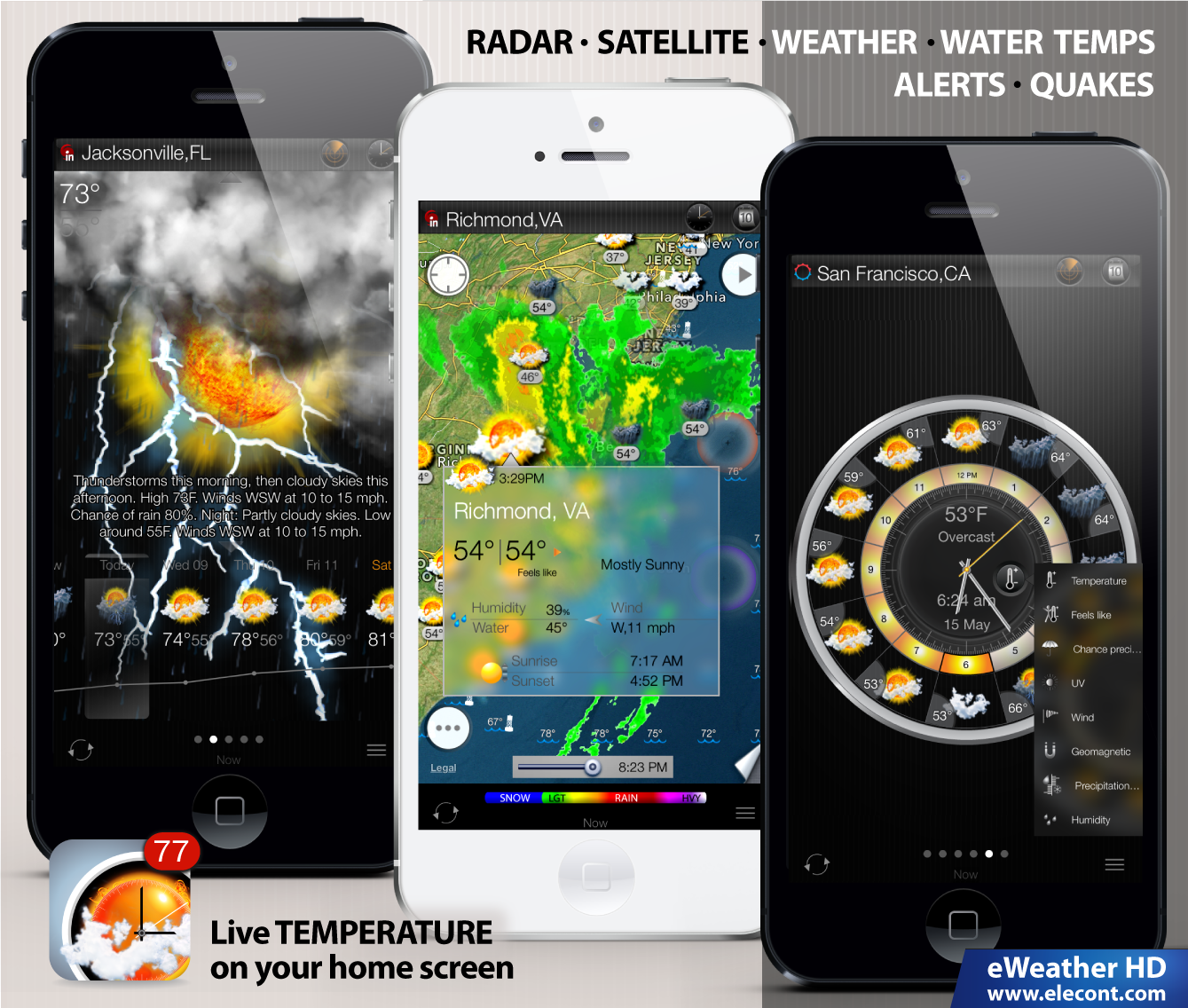
Elecont LLC today announces eWeather HD 3.1, an update to its leading weather forecast tracking tool for iPhone and iPad. eWeather HD puts everything you need to know to prepare for a summer season in the palm of your hand. This app displays both radar and satellite images, beach water temperatures, tornado and thunderstorm weather alerts and much more. Version 3.1 introduces new photorealistic weather animations, "future weather" maps, improved support for Twitter and Facebook.
Saint-Petersburg, Russian Federation - Elecont LLC today is proud to announce the release of eWeather HD 3.1, an update to its leading weather forecast app for iPhone and iPad. With new animated effects, huge improvements to the weather maps and better performance, eWeather HD 3.1 is the biggest release ever. eWeather HD puts everything you need to know to prepare for a summer season - in the palm of your hand. It combines ten day and hourly weather forecasts from multiple sources with a beautiful radar and satellite images and unique "weather wheel" interface. eWeather HD also provides water temperature at beaches around the world, hour-by-hour UV levels, data from buoys, earthquakes, weather alerts for U.S.A. and Europe and much more.
Summer is the time of year when many things change - including the weather. Thunderstorms cause most of the severe summer weather. They can bring lightning, tornadoes and flooding. New eWeather HD provides access to the most relevant weather forecasts, weather alerts, marine and seismic data. Prepare for storms, floods, and tornadoes as if you know in advance they are coming, because in the summer, they very likely will.
Summer is a great time to travel. In reality trying to take a vacation without planning ahead rarely works out that well. This is especially true if you are going to another country. Discover your best beach vacation spots with eWeather HD ! eWeather HD is the most complete weather app that provides all of the necessary information about weather and water on worlds popular beaches and resorts. Explore unique interactive map to find the best place to spend a vacation.
Some of new app features include:
* New photorealistic visual effects for current weather conditions and forecasts
* Animated 24-hour and 10-day weather forecast maps (available worldwide)
* Animated imagery loops of cyclones and tropical storms for Europe (also available in U.S.A. and Japan)
* Faster download speed
* Improved support for Twitter and Facebook
* Romanian language
* New Japanese translation
* Lots of other improvements and fixes
Supported Languages:
eWeather HD is available in US English, Albanian, Arabic, Armenian, Azerbaijani, Bulgarian, Catalan, Croatian, Czech, Danish, Dutch, Finnish, French, Georgian, German, Greek, Hebrew, Hungarian, Italian, Japanese, Kazakh, Korean, Latvian, Lithuanian, Mongolian, Persian, Polish, Portuguese, Romanian, Russian, Serbian, Simplified Chinese, Slovak, Spanish, Swedish, Thai, Turkish and Ukrainian.
Device Requirements:
* iPhone, iPad, or iPod touch
* Requires iOS 5 or later
* 35.1 MB
Pricing and Availability:
For a limited time, eWeather HD 3.1 is offered at an introductory one-time fee of $1.99 USD (or equivalent amount in other currencies) and available worldwide exclusively through the App Store in the Weather category. There are no subscription fees or hidden costs.
eWeather HD 3.1: http://www.elecont.com/defaultip.aspx
Purchase and Download: http://itunes.apple.com/app/eweather-hd-weather-forecast/id401533966
Screenshot: http://www.elecont.com/img/eweatherhd/eweather-hd-3-1-weather-forecast-app-iphone-ipad.png
App Icon: http://elecont.com/img/eweatherhd/eweather-hd-icon-3-1.png
Elecont LLC is a fast growing software development company specializing in the mobile market, developing software solutions for Android, iOS and Windows Mobile devices. Elecont LLC was founded in 2007 and its primary offices are located in Russia. Copyright (C) 2014 Elecont Software LLC. All Rights Reserved. Apple, the Apple logo, iPhone, iPod and iPad are registered trademarks of Apple Inc. in the U.S. and/or other countries.
*******
Link To Article: http://prmac.com/release-id-67528.htm
*******
---------------------------------------------------------------------------------
Note that you can alter delivered distributions at any time.
Login to your account on prMac to alter your channel selection, or to opt-out at any time.


Eco Recorder - A new way to record your voice
A new article has been published at prMac.
Eco Recorder - A new way to record your voice - Published on 05/05/14
Independent indie Developer, Huy Le, has launched a new recorder app - Eco Recorder for the iPhone, iPad and iPod touch. The app has quickly received a lot of downloads and got Best New app feature in the Lifestyle category in the Viet Nam App Store. Eco Recorder has made a new way to record your voice for learning and speaking a new language. Easy to record with a long press on the screen, and immediately playback when tapping again on screen.
Ho Chi Minh, Viet Nam - Independent indie developer, Huy Le is pleased to introduce Eco Recorder 1.0.2 for the iOS platform. Eco Recorder is best new recorder for learning speaking English, French, Spanish, Italian, Chinese, Russian, Portuguese, German. This app is made for learning, speaking skill, and presentation skill. Therefore, you can easily start learning with few steps.
The idea is too simple. Some people complain that they waste a lot of time to record, save, playback and delete their recordings when learning to speak on the iPhone. When learning to speak, you record your voice and then playback to listen again for checking your voice. So you repeat that process again and again.
In almost all of recorder apps, the process is too complex, you have too many steps to complete your process. Therefore, the Eco Recorder was born, it reduces most steps. Just 2 step, record and play, you easily learn speaking quickly.
In a few days after launch, the app has received the 4 star review and show in Lifestyle's Best New app feature in the Viet Nam store. With simple features, very beautiful UI, and a cheap price, the author hope this app will become a best app for anyone wanting to learn speaking a new language. He hopes this small app can help people around the world learn speaking better and faster.
Device Requirements:
* iPhone, iPod touch, iPad
* iOS 7.1 above
* 2.6 MB
Pricing and Availability:
Eco Recorder 1.0.2 is $0.99 USD (or equivalent amount in other currencies) and available worldwide exclusively through the App Store in the Lifestyle category.
Eco Recorder 1.0.2: http://ares-huy-le.github.io/eco-recorder/
Purchase and Download: https://itunes.apple.com/app/eco-recorder-super-easy-to/id843060301
Screenshot : http://ares-huy-le.github.io/eco-recorder/images/screen-01.png
App Icon: http://ares-huy-le.github.io/eco-recorder/images/AppIcon76x76@2x.png
Independent indie developer, Huy Le, works as a designer, developer, marketer, seller and manager. He wants to create a small company, with talented members to change the world. He wants to make various apps to help our life better. All Material and Software (C) Copyright 2014 Huy Le. All Rights Reserved. Apple, the Apple logo, iPhone, iPod and iPad are registered trademarks of Apple Inc. in the U.S. and/or other countries. Other trademarks and registered trademarks may be the property of their respective owners.
*******
Link To Article: http://prmac.com/release-id-67529.htm
*******
---------------------------------------------------------------------------------
Note that you can alter delivered distributions at any time.
Login to your account on prMac to alter your channel selection, or to opt-out at any time.
Eco Recorder - A new way to record your voice - Published on 05/05/14
Independent indie Developer, Huy Le, has launched a new recorder app - Eco Recorder for the iPhone, iPad and iPod touch. The app has quickly received a lot of downloads and got Best New app feature in the Lifestyle category in the Viet Nam App Store. Eco Recorder has made a new way to record your voice for learning and speaking a new language. Easy to record with a long press on the screen, and immediately playback when tapping again on screen.
Ho Chi Minh, Viet Nam - Independent indie developer, Huy Le is pleased to introduce Eco Recorder 1.0.2 for the iOS platform. Eco Recorder is best new recorder for learning speaking English, French, Spanish, Italian, Chinese, Russian, Portuguese, German. This app is made for learning, speaking skill, and presentation skill. Therefore, you can easily start learning with few steps.
The idea is too simple. Some people complain that they waste a lot of time to record, save, playback and delete their recordings when learning to speak on the iPhone. When learning to speak, you record your voice and then playback to listen again for checking your voice. So you repeat that process again and again.
In almost all of recorder apps, the process is too complex, you have too many steps to complete your process. Therefore, the Eco Recorder was born, it reduces most steps. Just 2 step, record and play, you easily learn speaking quickly.
In a few days after launch, the app has received the 4 star review and show in Lifestyle's Best New app feature in the Viet Nam store. With simple features, very beautiful UI, and a cheap price, the author hope this app will become a best app for anyone wanting to learn speaking a new language. He hopes this small app can help people around the world learn speaking better and faster.
Device Requirements:
* iPhone, iPod touch, iPad
* iOS 7.1 above
* 2.6 MB
Pricing and Availability:
Eco Recorder 1.0.2 is $0.99 USD (or equivalent amount in other currencies) and available worldwide exclusively through the App Store in the Lifestyle category.
Eco Recorder 1.0.2: http://ares-huy-le.github.io/eco-recorder/
Purchase and Download: https://itunes.apple.com/app/eco-recorder-super-easy-to/id843060301
Screenshot : http://ares-huy-le.github.io/eco-recorder/images/screen-01.png

App Icon: http://ares-huy-le.github.io/eco-recorder/images/AppIcon76x76@2x.png

Independent indie developer, Huy Le, works as a designer, developer, marketer, seller and manager. He wants to create a small company, with talented members to change the world. He wants to make various apps to help our life better. All Material and Software (C) Copyright 2014 Huy Le. All Rights Reserved. Apple, the Apple logo, iPhone, iPod and iPad are registered trademarks of Apple Inc. in the U.S. and/or other countries. Other trademarks and registered trademarks may be the property of their respective owners.
*******
Link To Article: http://prmac.com/release-id-67529.htm
*******
---------------------------------------------------------------------------------
Note that you can alter delivered distributions at any time.
Login to your account on prMac to alter your channel selection, or to opt-out at any time.
MacXDVD Offers Mother's Day Gift Discounts before May 15
A new article has been published at prMac.
MacXDVD Offers Mother's Day Gift Discounts before May 15 - Published on 05/05/14
MacXDVD Software today announces an extraordinary Mother's Day promotion in which customers can receive up to 70% off DVD video converter software and free Mother's Day gifts for the gift pack purchase. The special discount is slated to start on May 5th and go on till May 15th, 2014, during which holiday shoppers can grab these price-slashed gifts for DVD backup, video conversion, YouTube downloading, and many more.
Chengdu, China - The year 2014 marks the 100th anniversary of Mother's Day. To celebrate and honor motherhood, MacXDVD today kicks off an anything-but-ordinary Mother's Day promotion in which its best-seller Mother's Day Gift Pack is up for grabs at never-heard-of prices. Specifically, everyone can enjoy at least 70% discount for a single piece of the 3-in-1 software pack which serves for DVD backup, video conversion, movie streaming, etc. Besides, the discount offer is coupled with a "Buy One Get Two Free" holiday promotion from May 15th, 2014, lasting almost 10 days.
It is estimated that customers have spent the last few years treating mom to electronic gifts like tablets and smartphones, and more, and will this year celebrate Mother's Day keeping practicality top of mind. To that end, MacXDVD cuts the price of its well-received gift pack by almost $100. The software discount is to provide a one-stop-shop for those electronic gadgets and enable not merely moms but also other users to experience an unlimited digital entertainment in the special day.
MacXDVD 2014 Mother's Day Gift Pack includes 3 ( 2) programs with 30 day money back guarantee.
MacX DVD Ripper Pro: A No.1 fast DVD ripper for Mac users to copy and rip mother-themed DVD movies to MP4, MOV, AVI, WMV, FLV, MKV, etc with 36X faster speed and intact audio and video quality. Provide 359 profiles for the latest mainstream devices including iPhone 5S/5C, iPad Air, iPad Mini with Retina display, Samsung Galaxy S5, HTC One M8, PS4, etc so that customers can enjoy DVD movies with mom on whatever devices on the go. Support all copy protected DVDs (incl. the latest Disney released DVDs).
MacX Video Converter Pro: A world-famous Mac video converter for customers to convert Mother's Day movies, TV shows, recorded clips, YouTube videos, etc to a file format compatible with various media players and devices, including Apple, Android, Google, Microsoft, and other mainstream smartphones, tablets and game consoles. Make a funny slideshow from mom-themed photos, record on-screen activities and edit videos for sharing on YouTube, Facebook and blog.
Airplayit: Stream audio and video to iPhone, iPad, iPod touch and Android at any time and place. Make 320 originally incompatible video & audio formats playable by Apple device. Realize wirelessly real-time video playing via WiFi and 3G/4G network. Play home music and movies on the go.
Bonus Gifts for Gift Pack Purchase: In addition to getting the abovementioned DVD video converter software at a preferential price, the "Buy One Get Two Free" Mother's Day deal cannot be ignored either. Once buying the gift pack, every user can get Disk Drill and iPhone Mounter as the bonus gifts.
MacXDVD also offers many other options to appreciate the time of mothers and help shoppers treat their moms to something nice without breaking the bank. These exclusive deals include a 40% off DVD ripper sale, a half-off video converter sale and a heavily discounted Pro Pack at a more competitive price.
Price and Availability:
With nearly $100 price drop from the original price, Mother's Day Gift Pack is now available at the minimum price $39.95 before May 15th, 2014. Apart from this, various DVD and video converter programs are provided at different discounts.
Mother's Day Promotion: http://www.macxdvd.com/special-offer/
MacX DVD Ripper Pro: http://www.macxdvd.com/mac-dvd-ripper-pro/
MacX Video Converter Pro: http://www.macxdvd.com/mac-video-converter-pro/
MacXDVD Software is a division of Digiarty Software Company, owns a professional multimedia software development team, providing a range of products for Macintosh Computer users, including MacX Video Converter, MacX DVD Ripper, DVD Author, DVD backup tools, etc, series of apps for Apple video player, and iPhone, iPad 2D and 3D video games. Copyright (C) 2014 MacXDVD Software. All Rights Reserved. Apple, the Apple logo and Macintosh are registered trademarks of Apple Inc. in the U.S. and/or other countries.
*******
Link To Article: http://prmac.com/release-id-67510.htm
*******
---------------------------------------------------------------------------------
Note that you can alter delivered distributions at any time.
Login to your account on prMac to alter your channel selection, or to opt-out at any time.
MacXDVD Offers Mother's Day Gift Discounts before May 15 - Published on 05/05/14
MacXDVD Software today announces an extraordinary Mother's Day promotion in which customers can receive up to 70% off DVD video converter software and free Mother's Day gifts for the gift pack purchase. The special discount is slated to start on May 5th and go on till May 15th, 2014, during which holiday shoppers can grab these price-slashed gifts for DVD backup, video conversion, YouTube downloading, and many more.
Chengdu, China - The year 2014 marks the 100th anniversary of Mother's Day. To celebrate and honor motherhood, MacXDVD today kicks off an anything-but-ordinary Mother's Day promotion in which its best-seller Mother's Day Gift Pack is up for grabs at never-heard-of prices. Specifically, everyone can enjoy at least 70% discount for a single piece of the 3-in-1 software pack which serves for DVD backup, video conversion, movie streaming, etc. Besides, the discount offer is coupled with a "Buy One Get Two Free" holiday promotion from May 15th, 2014, lasting almost 10 days.
It is estimated that customers have spent the last few years treating mom to electronic gifts like tablets and smartphones, and more, and will this year celebrate Mother's Day keeping practicality top of mind. To that end, MacXDVD cuts the price of its well-received gift pack by almost $100. The software discount is to provide a one-stop-shop for those electronic gadgets and enable not merely moms but also other users to experience an unlimited digital entertainment in the special day.
MacXDVD 2014 Mother's Day Gift Pack includes 3 ( 2) programs with 30 day money back guarantee.
MacX DVD Ripper Pro: A No.1 fast DVD ripper for Mac users to copy and rip mother-themed DVD movies to MP4, MOV, AVI, WMV, FLV, MKV, etc with 36X faster speed and intact audio and video quality. Provide 359 profiles for the latest mainstream devices including iPhone 5S/5C, iPad Air, iPad Mini with Retina display, Samsung Galaxy S5, HTC One M8, PS4, etc so that customers can enjoy DVD movies with mom on whatever devices on the go. Support all copy protected DVDs (incl. the latest Disney released DVDs).
MacX Video Converter Pro: A world-famous Mac video converter for customers to convert Mother's Day movies, TV shows, recorded clips, YouTube videos, etc to a file format compatible with various media players and devices, including Apple, Android, Google, Microsoft, and other mainstream smartphones, tablets and game consoles. Make a funny slideshow from mom-themed photos, record on-screen activities and edit videos for sharing on YouTube, Facebook and blog.
Airplayit: Stream audio and video to iPhone, iPad, iPod touch and Android at any time and place. Make 320 originally incompatible video & audio formats playable by Apple device. Realize wirelessly real-time video playing via WiFi and 3G/4G network. Play home music and movies on the go.
Bonus Gifts for Gift Pack Purchase: In addition to getting the abovementioned DVD video converter software at a preferential price, the "Buy One Get Two Free" Mother's Day deal cannot be ignored either. Once buying the gift pack, every user can get Disk Drill and iPhone Mounter as the bonus gifts.
MacXDVD also offers many other options to appreciate the time of mothers and help shoppers treat their moms to something nice without breaking the bank. These exclusive deals include a 40% off DVD ripper sale, a half-off video converter sale and a heavily discounted Pro Pack at a more competitive price.
Price and Availability:
With nearly $100 price drop from the original price, Mother's Day Gift Pack is now available at the minimum price $39.95 before May 15th, 2014. Apart from this, various DVD and video converter programs are provided at different discounts.
Mother's Day Promotion: http://www.macxdvd.com/special-offer/
MacX DVD Ripper Pro: http://www.macxdvd.com/mac-dvd-ripper-pro/
MacX Video Converter Pro: http://www.macxdvd.com/mac-video-converter-pro/
MacXDVD Software is a division of Digiarty Software Company, owns a professional multimedia software development team, providing a range of products for Macintosh Computer users, including MacX Video Converter, MacX DVD Ripper, DVD Author, DVD backup tools, etc, series of apps for Apple video player, and iPhone, iPad 2D and 3D video games. Copyright (C) 2014 MacXDVD Software. All Rights Reserved. Apple, the Apple logo and Macintosh are registered trademarks of Apple Inc. in the U.S. and/or other countries.
*******
Link To Article: http://prmac.com/release-id-67510.htm
*******
---------------------------------------------------------------------------------
Note that you can alter delivered distributions at any time.
Login to your account on prMac to alter your channel selection, or to opt-out at any time.
NetSuxxess publishes Contract and Subscription Management App for iOS
A new article has been published at prMac.
NetSuxxess publishes Contract and Subscription Management App for iOS - Published on 05/05/14
NetSuxxess GmbH today introduces NetSuxxess Contracts 1.01, its new contract and subscription management app for iOS & Android. NetSuxxess Contracts lets consumers keep a watchful eye on their contracts & subscriptions. It allows consumers to have all documents at their fingertips; allowing them to put their consumer rights into practice, such as timely canceling, make claims under guarantee, warranty clauses as well as saving money. The app also supports associating consultants with contracts.
Frankfurt, Germany - NetSuxxess GmbH today is thrilled to announce the release of NetSuxxess Contracts 1.01, its new contract and subscription management app developed for iOS and Android. Millions of contracts exist without being actively managed. Losing track of contracts, subscriptions and cancellations costs consumers in the U.S. billions of dollars per year.
The GSA Federal Citizen Information Center recommends in its 2014 Consumer Action Handbook saving any information the seller gives to the consumer, such as order confirmation number, product description, delivery date, cancellation policy, privacy policy and warranties.
The new NetSuxxess Contracts app for iOS lets consumers keep a watchful eye on their contracts and subscriptions. The app allows consumers to have all documents at their fingertips. Now they can put their consumer rights into practice, e.g. cancel in time, make claims under guarantee or warranty clauses and save money.
The Florida Bar states: "If a contract provides a right of rescission, in order to cancel such a contract, you must give written notice of cancellation within the time provided by the contract or by law and it must be in the form required." Often consumers fail to give notice in time because they lack an overview of their contracts and its deadlines. If they react late they often miss the required form, e.g. they only call the seller instead of giving written notice, and this also may cause severe problems proving the cancellation happened in time.
The Florida Bar continues: "Each year, Florida residents lose money because they do not understand contracts when they enter into them or what to do when the other side breaches the agreement. In many of these cases, the advice of a lawyer would have prevented the loss of money."
Therefore the app also supports associating consultants with contracts. The consumer can easily contact the associated consultant by email, e.g. its lawyer or senior friends, and ask about advice.
"Consumers can easily become victims of large companies' professional customer retention management when they lose track of their contracts and obligations," explained Michael Kubert, CEO of NetSuxxess. "They end up with several contracts for the same service, or have forever prolonging subscriptions for things they don't need more. Our app brings the consumer back on the driver's seat. Contracts and subscriptions are the key to build private wealth and reduce debts."
The app provides the following functions:
* Managing contracts, subscriptions and cancellations
* Managing relations with business partners and consultants
* Updating the status of each contract (e.g. "signed" or "to be cancelled")
* Assigning a monetary value per period to each contract (e.g. 100 USD/month)
* Assigning critical dates to each contract (e.g. "prolongation date")
* Attaching important contract pages to each contract (using Camera or Photos)
* Sending emails to business partners and consultants (e.g. for cancellation)
Device Requirements:
* iPhone, iPad, and iPod touch
* Requires iOS 4.3 or later
* 16.1 MB
Pricing and Availability:
NetSuxxess Contracts 1.01 is $2.99 USD (or equivalent amount in other currencies) and available worldwide exclusively through the App Store in the Finance category. NetSuxxess Contracts supports several languages, including English, Spanish, French and German. There is also an Android version available at Google Play and Samsung Apps, and a Kindle version available at the Amazon App Store.
NetSuxxess: http://www.netsuxxess.de
NetSuxxess Contracts 1.01: http://www.netsuxxess-contracts.de
Purchase and Download: https://itunes.apple.com/app/netsuxxess-contracts/id858028697
2014 Consumer Action Handbook: http://www.usa.gov/topics/consumer/consumer-action-handbook.pdf
Screenshot: http://a1.mzstatic.com/us/r30/Purple4/v4/dc/9d/13/dc9d1363-088c-e269-081a-ec788571ed50/screen480x480.jpeg
App Icon: http://a2.mzstatic.com/us/r30/Purple2/v4/46/4c/bc/464cbcfd-157f-62a8-dca9-0c47f42bb711/mzl.wabsldvp.175x175-75.jpg
NetSuxxess GmbH was founded in 1997 by Michael Kubert and supports large companies in their IT projects, including Accenture, BMW, Deutsche Bank, DHL, EMC2, Esprit, HP, Ogilvy, Sartorius, T-Mobile and Volkswagen. Michael Kubert is a IPMA Level B Certified Senior Project Manager, living in Frankfurt, Germany. He's a well-known keynote speaker at project management events. His roots are in programming, starting at the age of only 10 years on a Digital Research CP/M system. Later he studied Computer Sciences and Law at the University of Tuebingen/Germany, where he got his diploma. He worked more than one year for a Heidelberg law firm, specialized in information technology and is co-author of books like "IT Contract Law" and "Design and Management of IT Contracts" as well as "IT Contracts - Validity of Terms and Conditions" helping its readers to understand fundamental law concepts. All Material and Software (C) Copyright 1997-2014 NetSuxxess GmbH. All Rights Reserved. Apple, the Apple
logo, iPhone, iPod and iPad are registered trademarks of Apple Inc. in the U.S. and/or other countries. Other trademarks and registered trademarks may be the property of their respective owners.
*******
Link To Article: http://prmac.com/release-id-67506.htm
*******
---------------------------------------------------------------------------------
Note that you can alter delivered distributions at any time.
Login to your account on prMac to alter your channel selection, or to opt-out at any time.
NetSuxxess publishes Contract and Subscription Management App for iOS - Published on 05/05/14
NetSuxxess GmbH today introduces NetSuxxess Contracts 1.01, its new contract and subscription management app for iOS & Android. NetSuxxess Contracts lets consumers keep a watchful eye on their contracts & subscriptions. It allows consumers to have all documents at their fingertips; allowing them to put their consumer rights into practice, such as timely canceling, make claims under guarantee, warranty clauses as well as saving money. The app also supports associating consultants with contracts.
Frankfurt, Germany - NetSuxxess GmbH today is thrilled to announce the release of NetSuxxess Contracts 1.01, its new contract and subscription management app developed for iOS and Android. Millions of contracts exist without being actively managed. Losing track of contracts, subscriptions and cancellations costs consumers in the U.S. billions of dollars per year.
The GSA Federal Citizen Information Center recommends in its 2014 Consumer Action Handbook saving any information the seller gives to the consumer, such as order confirmation number, product description, delivery date, cancellation policy, privacy policy and warranties.
The new NetSuxxess Contracts app for iOS lets consumers keep a watchful eye on their contracts and subscriptions. The app allows consumers to have all documents at their fingertips. Now they can put their consumer rights into practice, e.g. cancel in time, make claims under guarantee or warranty clauses and save money.
The Florida Bar states: "If a contract provides a right of rescission, in order to cancel such a contract, you must give written notice of cancellation within the time provided by the contract or by law and it must be in the form required." Often consumers fail to give notice in time because they lack an overview of their contracts and its deadlines. If they react late they often miss the required form, e.g. they only call the seller instead of giving written notice, and this also may cause severe problems proving the cancellation happened in time.
The Florida Bar continues: "Each year, Florida residents lose money because they do not understand contracts when they enter into them or what to do when the other side breaches the agreement. In many of these cases, the advice of a lawyer would have prevented the loss of money."
Therefore the app also supports associating consultants with contracts. The consumer can easily contact the associated consultant by email, e.g. its lawyer or senior friends, and ask about advice.
"Consumers can easily become victims of large companies' professional customer retention management when they lose track of their contracts and obligations," explained Michael Kubert, CEO of NetSuxxess. "They end up with several contracts for the same service, or have forever prolonging subscriptions for things they don't need more. Our app brings the consumer back on the driver's seat. Contracts and subscriptions are the key to build private wealth and reduce debts."
The app provides the following functions:
* Managing contracts, subscriptions and cancellations
* Managing relations with business partners and consultants
* Updating the status of each contract (e.g. "signed" or "to be cancelled")
* Assigning a monetary value per period to each contract (e.g. 100 USD/month)
* Assigning critical dates to each contract (e.g. "prolongation date")
* Attaching important contract pages to each contract (using Camera or Photos)
* Sending emails to business partners and consultants (e.g. for cancellation)
Device Requirements:
* iPhone, iPad, and iPod touch
* Requires iOS 4.3 or later
* 16.1 MB
Pricing and Availability:
NetSuxxess Contracts 1.01 is $2.99 USD (or equivalent amount in other currencies) and available worldwide exclusively through the App Store in the Finance category. NetSuxxess Contracts supports several languages, including English, Spanish, French and German. There is also an Android version available at Google Play and Samsung Apps, and a Kindle version available at the Amazon App Store.
NetSuxxess: http://www.netsuxxess.de
NetSuxxess Contracts 1.01: http://www.netsuxxess-contracts.de
Purchase and Download: https://itunes.apple.com/app/netsuxxess-contracts/id858028697
2014 Consumer Action Handbook: http://www.usa.gov/topics/consumer/consumer-action-handbook.pdf
Screenshot: http://a1.mzstatic.com/us/r30/Purple4/v4/dc/9d/13/dc9d1363-088c-e269-081a-ec788571ed50/screen480x480.jpeg

App Icon: http://a2.mzstatic.com/us/r30/Purple2/v4/46/4c/bc/464cbcfd-157f-62a8-dca9-0c47f42bb711/mzl.wabsldvp.175x175-75.jpg

NetSuxxess GmbH was founded in 1997 by Michael Kubert and supports large companies in their IT projects, including Accenture, BMW, Deutsche Bank, DHL, EMC2, Esprit, HP, Ogilvy, Sartorius, T-Mobile and Volkswagen. Michael Kubert is a IPMA Level B Certified Senior Project Manager, living in Frankfurt, Germany. He's a well-known keynote speaker at project management events. His roots are in programming, starting at the age of only 10 years on a Digital Research CP/M system. Later he studied Computer Sciences and Law at the University of Tuebingen/Germany, where he got his diploma. He worked more than one year for a Heidelberg law firm, specialized in information technology and is co-author of books like "IT Contract Law" and "Design and Management of IT Contracts" as well as "IT Contracts - Validity of Terms and Conditions" helping its readers to understand fundamental law concepts. All Material and Software (C) Copyright 1997-2014 NetSuxxess GmbH. All Rights Reserved. Apple, the Apple
logo, iPhone, iPod and iPad are registered trademarks of Apple Inc. in the U.S. and/or other countries. Other trademarks and registered trademarks may be the property of their respective owners.
*******
Link To Article: http://prmac.com/release-id-67506.htm
*******
---------------------------------------------------------------------------------
Note that you can alter delivered distributions at any time.
Login to your account on prMac to alter your channel selection, or to opt-out at any time.
New App Encourages Children To Visit God Everyday - Dear God Kids 1.0
A new article has been published at prMac.
New App Encourages Children To Visit God Everyday - Dear God Kids 1.0 - Published on 05/05/14
Y Factory today introduces Dear God Kids 1.0 for iOS devices, a new children's app based on Anne Fitzgerald's best-selling spiritual book series. Dear God Kids contains 96 questions that children can ask God. Each question also includes words of guidance and a relative Bible verse. Encouraging kids to visit God everyday, Dear God Kids allows children to search for a specific question based on topic, keyword, and Bible verse. They can also collect favorite questions and share them on Facebook.
Seoul, Korea - Y Factory today is proud to introduce Dear God Kids 1.0 for iPad, iPhone, and iPod touch devices. Dear God Kids is based on the spiritual book series by bestselling American author, Anne Fitzgerald. By encouraging children to visit God everyday, Dear God Kids strives to instruct and nurture their relationship with God.
Dear God Kids contains 96 questions and reflections that children can bring to God. Each question also contains words of guidance and a Bible verse related to the topic. Examples of questions include:
* Dear God, why do I get sick with the flu?
* Dear God, my brother makes me mad!
* Dear God, do you have any problems?
* Dear God, thanks for making me special!
* Dear God, help me to make friends.
* Dear God, do you ever take a break?
* Dear God, Where am I? I'm lost.
From the Main Menu, kids can choose to read Today's Question, search in Find a Question, review their Favorite Questions or change the app settings. Children can also tap on the book image to open the book and scroll through all of the questions. A menu tab at the top of the screen provides several links. Kids can bookmark a page, indicate a Favorite question, choose to scroll through an index list of questions, switch languages, and return to Home. The menu tab also contains a link to Facebook, although parental controls are in place to protect young users.
Children can search Dear God Kids for a specific question based on topic, keyword, and Bible verse. Each category is listed at the top of the screen on an interface colorfully designed to appear as a cork-board. Once the child has selected how they would like to search for a question, options are listed on the left side of the screen. When the child taps on a selection, the related questions appear on the right side of the screen.
Feature Highlights:
* Colorful and kid-friendly User Interface
* 96 thoughtful questions and reflections
* Daily questions
* Option to read as a book
* Collect favorite questions
* Easy search based on keyword, subject, or Bible verse
* Ability to bookmark a page
* Set alarm to receive Dear God Kids questions
* Grow spiritual tree by reading a question a day
* Professional narration, sound effects and original background music
* Ability to share on Facebook (parental control)
Another feature that Dear God Kids offers as incentive for children is the spiritual tree. For each day that they read one question a day, the spiritual tree will grow a leaf. After all 96 days have passed, all the branches of the spiritual tree will be covered in leaves. Children can visit their spiritual tree from a tab above the book image on the Main Menu.
"Dear God Kids is a charming and instructive app that promotes a closer relationship between children and God," explains Yong nam kim, CEO of Y Factory. "American author Anne Fitzgerald wrote and illustrated this beautiful book which has sold more than 60 million copies worldwide. It's the first time that Dear God Kids has been translated into an application and we look forward to introducing this series to a new generation of readers."
Language:
* English, Korean
Device Requirements:
* iPhone, iPad, and iPod touch
* iOS 5.1 or later
* 228 MB (iPad), 357 MB (iPhone)
Pricing and Availability:
Dear God Kids 1.0 is only $3.99 (USD) and available worldwide exclusively through the App Store in the Books category. Review copies are available upon request.
Y Factory: http://yfactorysoft.com/about/
Dear God Kids HD 1.0: http://yfactorysoft.com/app/dear-god-kids/
Purchase and Download (iPad): https://itunes.apple.com/app/dear-god-kids-hd/id723317276
Purchase and Download (iOS): https://itunes.apple.com/app/dear-god-kids/id723317446
Screenshot: http://a5.mzstatic.com/us/r30/Purple/v4/1e/dd/6a/1edd6a77-db1d-bdb0-9afd-00bab531b0a9/screen568x568.jpeg
App icon: http://a1.mzstatic.com/us/r30/Purple4/v4/f7/52/9c/f7529ca6-e3cc-0aaa-78d3-dce3fb73b196/mzl.wlroduys.175x175-75.jpg
Based in Seoul, South Korea, Y Factory is an iOS, Android & Smart TV App development company that was launched in 2008. Developing interactive kids book apps and educational apps, Y Factory strives to create apps that kids will learn from as well as enjoy. Copyright (C) 2008-2014 Y Factory. All Rights Reserved. Apple, the Apple logo, iPhone, iPod and iPad are registered trademarks of Apple Inc. in the U.S. and/or other countries. Other trademarks and registered trademarks may be the property of their respective owners.
*******
Link To Article: http://prmac.com/release-id-67507.htm
*******
---------------------------------------------------------------------------------
Note that you can alter delivered distributions at any time.
Login to your account on prMac to alter your channel selection, or to opt-out at any time.
New App Encourages Children To Visit God Everyday - Dear God Kids 1.0 - Published on 05/05/14
Y Factory today introduces Dear God Kids 1.0 for iOS devices, a new children's app based on Anne Fitzgerald's best-selling spiritual book series. Dear God Kids contains 96 questions that children can ask God. Each question also includes words of guidance and a relative Bible verse. Encouraging kids to visit God everyday, Dear God Kids allows children to search for a specific question based on topic, keyword, and Bible verse. They can also collect favorite questions and share them on Facebook.
Seoul, Korea - Y Factory today is proud to introduce Dear God Kids 1.0 for iPad, iPhone, and iPod touch devices. Dear God Kids is based on the spiritual book series by bestselling American author, Anne Fitzgerald. By encouraging children to visit God everyday, Dear God Kids strives to instruct and nurture their relationship with God.
Dear God Kids contains 96 questions and reflections that children can bring to God. Each question also contains words of guidance and a Bible verse related to the topic. Examples of questions include:
* Dear God, why do I get sick with the flu?
* Dear God, my brother makes me mad!
* Dear God, do you have any problems?
* Dear God, thanks for making me special!
* Dear God, help me to make friends.
* Dear God, do you ever take a break?
* Dear God, Where am I? I'm lost.
From the Main Menu, kids can choose to read Today's Question, search in Find a Question, review their Favorite Questions or change the app settings. Children can also tap on the book image to open the book and scroll through all of the questions. A menu tab at the top of the screen provides several links. Kids can bookmark a page, indicate a Favorite question, choose to scroll through an index list of questions, switch languages, and return to Home. The menu tab also contains a link to Facebook, although parental controls are in place to protect young users.
Children can search Dear God Kids for a specific question based on topic, keyword, and Bible verse. Each category is listed at the top of the screen on an interface colorfully designed to appear as a cork-board. Once the child has selected how they would like to search for a question, options are listed on the left side of the screen. When the child taps on a selection, the related questions appear on the right side of the screen.
Feature Highlights:
* Colorful and kid-friendly User Interface
* 96 thoughtful questions and reflections
* Daily questions
* Option to read as a book
* Collect favorite questions
* Easy search based on keyword, subject, or Bible verse
* Ability to bookmark a page
* Set alarm to receive Dear God Kids questions
* Grow spiritual tree by reading a question a day
* Professional narration, sound effects and original background music
* Ability to share on Facebook (parental control)
Another feature that Dear God Kids offers as incentive for children is the spiritual tree. For each day that they read one question a day, the spiritual tree will grow a leaf. After all 96 days have passed, all the branches of the spiritual tree will be covered in leaves. Children can visit their spiritual tree from a tab above the book image on the Main Menu.
"Dear God Kids is a charming and instructive app that promotes a closer relationship between children and God," explains Yong nam kim, CEO of Y Factory. "American author Anne Fitzgerald wrote and illustrated this beautiful book which has sold more than 60 million copies worldwide. It's the first time that Dear God Kids has been translated into an application and we look forward to introducing this series to a new generation of readers."
Language:
* English, Korean
Device Requirements:
* iPhone, iPad, and iPod touch
* iOS 5.1 or later
* 228 MB (iPad), 357 MB (iPhone)
Pricing and Availability:
Dear God Kids 1.0 is only $3.99 (USD) and available worldwide exclusively through the App Store in the Books category. Review copies are available upon request.
Y Factory: http://yfactorysoft.com/about/
Dear God Kids HD 1.0: http://yfactorysoft.com/app/dear-god-kids/
Purchase and Download (iPad): https://itunes.apple.com/app/dear-god-kids-hd/id723317276
Purchase and Download (iOS): https://itunes.apple.com/app/dear-god-kids/id723317446
Screenshot: http://a5.mzstatic.com/us/r30/Purple/v4/1e/dd/6a/1edd6a77-db1d-bdb0-9afd-00bab531b0a9/screen568x568.jpeg

App icon: http://a1.mzstatic.com/us/r30/Purple4/v4/f7/52/9c/f7529ca6-e3cc-0aaa-78d3-dce3fb73b196/mzl.wlroduys.175x175-75.jpg

Based in Seoul, South Korea, Y Factory is an iOS, Android & Smart TV App development company that was launched in 2008. Developing interactive kids book apps and educational apps, Y Factory strives to create apps that kids will learn from as well as enjoy. Copyright (C) 2008-2014 Y Factory. All Rights Reserved. Apple, the Apple logo, iPhone, iPod and iPad are registered trademarks of Apple Inc. in the U.S. and/or other countries. Other trademarks and registered trademarks may be the property of their respective owners.
*******
Link To Article: http://prmac.com/release-id-67507.htm
*******
---------------------------------------------------------------------------------
Note that you can alter delivered distributions at any time.
Login to your account on prMac to alter your channel selection, or to opt-out at any time.
PDF Checkpoint Is Now on Mac App Store: Preflight and Conversion Tool
A new article has been published at prMac.
PDF Checkpoint Is Now on Mac App Store: Preflight and Conversion Tool - Published on 05/05/14
Toronto based Zevrix Solutions today announces that its PDF preflight and conversion solution PDF Checkpoint is now available on Mac App Store. Remarkably fast, PDF Checkpoint automatically preflights, converts to images, splits and optimizes multiple Adobe PDF files. Users can convert PDF colors, compress images, check documents for errors and preview them in built-in viewer. The program is equally suitable to process hundreds of files as well as single PDF documents.
Toronto (ON) Canada - Zevrix Solutions today is proud to announce that its PDF preflight and conversion solution PDF Checkpoint is now available on Apple's Mac App Store. Remarkably fast, PDF Checkpoint automatically preflights, converts to images, splits and optimizes multiple Adobe PDF files. PDF Checkpoint is an ideal program for users who need fast, affordable and easy-to-use software for efficient PDF workflows. Mac users can download and purchase PDF Checkpoint on Mac App Store at $39.99.
PDF Checkpoint is designed to automate and simplify PDF workflows of publishers, ad agencies, prepress houses, graphic designers and printers, and offers the following key features:
* Batch preflighting and conversion of multiple PDF files.
* View all PDF fonts, colors, images and metadata at a glance.
* Create preflight profiles for various job types.
* Route files by preflight results into success and error folders.
* Split files into single page PDFs.
* Export PDF as images with specific resolution, color and page scale.
* Convert PDF color mode using ICC profiles.
For example, users can preflight a folder of PDF files and convert them to CMYK TIFF images at 300 dpi while scaling each page by 50%. Or optimize documents for the web and mobile devices while reducing file size dramatically by downsampling images to the screen resolution.
Pricing and Availability:
PDF Checkpoint can be purchased from Mac App Store for $39.99 (USD), as well as from Zevrix website and authorized resellers. PDF Checkpoint is bundled with free Graphic Inspector software (a $40 value). Trial is also available for download. PDF Checkpoint requires Mac OS X 10.5-10.9 (some features require Mac OS X 10.7 or later).
Zevrix Solutions: http://zevrix.com
PDF Checkpoint 1.7: http://zevrix.com/PDFCheckpoint.php
Download Trial: http://zevrix.com/PDFCheckpoint.dmg
Purchase and Download (MAS): https://itunes.apple.com/us/app/pdf-checkpoint/id793149951?ls=1&mt=12
Screenshot: http://zevrix.com/screenshots/pdfcheckpoint/main-bmw-web.jpg
App Icon: http://a5.mzstatic.com/us/r30/Purple4/v4/46/3b/ba/463bba37-38f8-f45b-6af5-bdffb513e08d/PDFC_App.175x175-75.png
Located in Toronto, Canada, Zevrix Solutions provides automation and productivity solutions for Adobe Creative Suite software, PDF and graphic file diagnostics and Microsoft Office on Mac OS. Zevrix is dedicated to help professionals increase their profits through automating everyday tasks, producing error-free documents, saving disk space and cutting production costs. For more information, visit their website. Copyright (C) 2014 Zevrix Solutions. All Rights Reserved.
*******
Link To Article: http://prmac.com/release-id-67509.htm
*******
---------------------------------------------------------------------------------
Note that you can alter delivered distributions at any time.
Login to your account on prMac to alter your channel selection, or to opt-out at any time.
PDF Checkpoint Is Now on Mac App Store: Preflight and Conversion Tool - Published on 05/05/14
Toronto based Zevrix Solutions today announces that its PDF preflight and conversion solution PDF Checkpoint is now available on Mac App Store. Remarkably fast, PDF Checkpoint automatically preflights, converts to images, splits and optimizes multiple Adobe PDF files. Users can convert PDF colors, compress images, check documents for errors and preview them in built-in viewer. The program is equally suitable to process hundreds of files as well as single PDF documents.
Toronto (ON) Canada - Zevrix Solutions today is proud to announce that its PDF preflight and conversion solution PDF Checkpoint is now available on Apple's Mac App Store. Remarkably fast, PDF Checkpoint automatically preflights, converts to images, splits and optimizes multiple Adobe PDF files. PDF Checkpoint is an ideal program for users who need fast, affordable and easy-to-use software for efficient PDF workflows. Mac users can download and purchase PDF Checkpoint on Mac App Store at $39.99.
PDF Checkpoint is designed to automate and simplify PDF workflows of publishers, ad agencies, prepress houses, graphic designers and printers, and offers the following key features:
* Batch preflighting and conversion of multiple PDF files.
* View all PDF fonts, colors, images and metadata at a glance.
* Create preflight profiles for various job types.
* Route files by preflight results into success and error folders.
* Split files into single page PDFs.
* Export PDF as images with specific resolution, color and page scale.
* Convert PDF color mode using ICC profiles.
For example, users can preflight a folder of PDF files and convert them to CMYK TIFF images at 300 dpi while scaling each page by 50%. Or optimize documents for the web and mobile devices while reducing file size dramatically by downsampling images to the screen resolution.
Pricing and Availability:
PDF Checkpoint can be purchased from Mac App Store for $39.99 (USD), as well as from Zevrix website and authorized resellers. PDF Checkpoint is bundled with free Graphic Inspector software (a $40 value). Trial is also available for download. PDF Checkpoint requires Mac OS X 10.5-10.9 (some features require Mac OS X 10.7 or later).
Zevrix Solutions: http://zevrix.com
PDF Checkpoint 1.7: http://zevrix.com/PDFCheckpoint.php
Download Trial: http://zevrix.com/PDFCheckpoint.dmg
Purchase and Download (MAS): https://itunes.apple.com/us/app/pdf-checkpoint/id793149951?ls=1&mt=12
Screenshot: http://zevrix.com/screenshots/pdfcheckpoint/main-bmw-web.jpg

App Icon: http://a5.mzstatic.com/us/r30/Purple4/v4/46/3b/ba/463bba37-38f8-f45b-6af5-bdffb513e08d/PDFC_App.175x175-75.png

Located in Toronto, Canada, Zevrix Solutions provides automation and productivity solutions for Adobe Creative Suite software, PDF and graphic file diagnostics and Microsoft Office on Mac OS. Zevrix is dedicated to help professionals increase their profits through automating everyday tasks, producing error-free documents, saving disk space and cutting production costs. For more information, visit their website. Copyright (C) 2014 Zevrix Solutions. All Rights Reserved.
*******
Link To Article: http://prmac.com/release-id-67509.htm
*******
---------------------------------------------------------------------------------
Note that you can alter delivered distributions at any time.
Login to your account on prMac to alter your channel selection, or to opt-out at any time.
Thousands Of Artists Update To New CopyIt Version 4.0
A new article has been published at prMac.
Thousands Of Artists Update To New CopyIt Version 4.0 - Published on 05/05/14
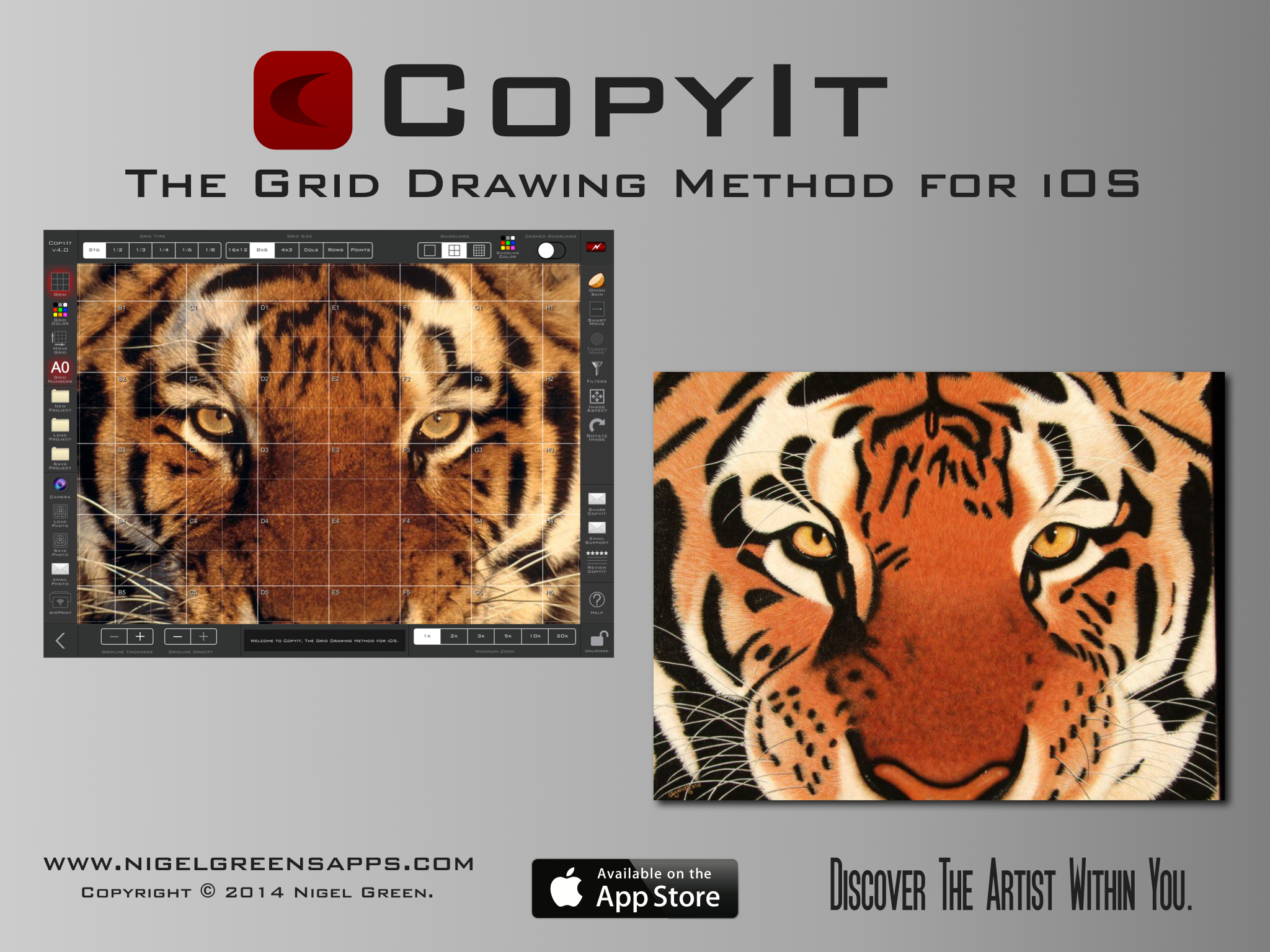
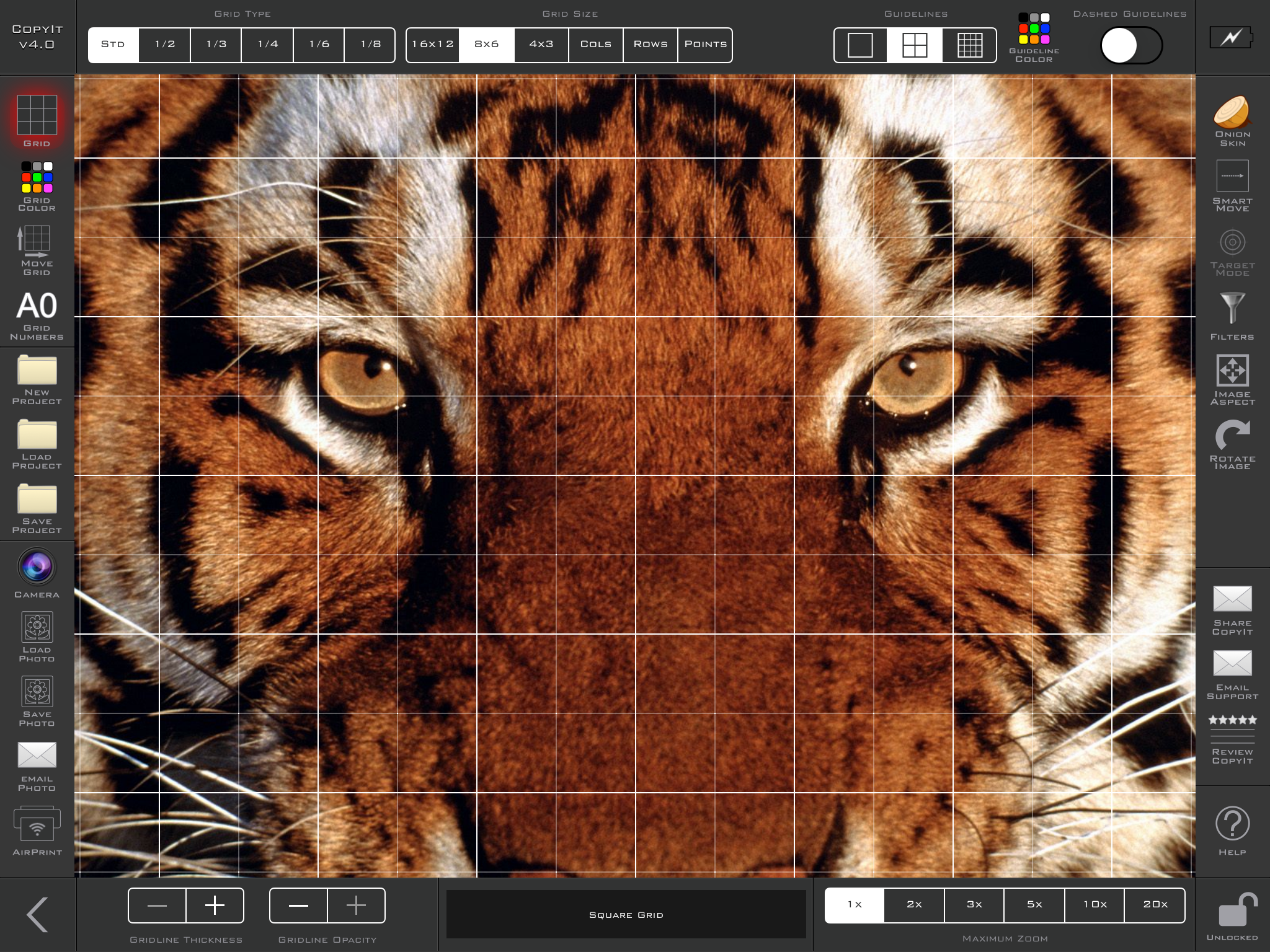
Indie developer, Nigel Green today releases the latest update to CopyIt - The Grid Drawing Method for iOS. CopyIt is a tool for artists and illustrators which aids them in accurately copying their subjects from photos onto another medium, such as canvas, paper or even walls. A grid is placed over an image that is loaded from the user's Photo Album, breaking the image down into easily manageable work areas. Redesigned for iOS 7, version 4.0 sports a new UI and includes 6 new posterize filters.
Brisbane, Australia - Software developer, Nigel Green today is proud to announce the release and immediate availability of his latest update to CopyIt - The Grid Drawing Method for iOS. Version 4.0 is designed for iOS 7 and includes 6 new posterize filters and an updated user interface. The developer stated that thousands of CopyIt users have updated to the new version 4.0 since it was released on May 3rd, 2014 and initial feedback has all been very positive.
CopyIt is a tool for artists and illustrators which aids them in accurately copying their subjects from photos onto another medium, such as canvas, paper or even walls.
Thousands of CopyIt users have already updated to the new version since it was released on May 3rd, 2014 and initial feedback has all been very positive. Montana artist, Helen Rietz has recently contacted the developer to inform him that she finds CopyIt so useful that she has persuaded some of her fellow artists in her art group to purchase iPad's, specifically to use CopyIt.
More user comments:
5/5 Stars - "...Love the new update, keep up the good work! My most valued app!" - Robin Taylor, UK
5/5 Stars - "Professional and very useful app, new update looks great" - Giblets1234, UK
5/5 Stars - "...I use this app almost every day and I love it!" - heNBCvideo, USA
5/5 Stars - "CopyIt is a great tool for creating image outlines for mosaics. The grid and aspect settings are very flexible, enabling matching the image to the support board perfectly." - DevonSeadog, UK
5/5 Stars - "A very useful app, and has already earned its keep by increasing my awareness of perspective..." - Jillbee54, UK
"It is great to hear from so many talented artists and how CopyIt has made their workflow faster and easier. Since it was first released in June 2010, CopyIt has continued to grow and be shaped by suggestions from its users. Without them, CopyIt would not be what it is today - the most advanced Grid Drawing App available anywhere." the developer, Nigel Green said.
Features:
* Universal App, designed for iPhone, iPod touch and iPad
* New user interface allows users to work with toolbars showing
* Comprehensive Help within the App
* 6 Grid types
* 18 Filters like negative, greyscale, outline and posterize
* Maintain Grid visibility by choosing from 9 gridline colours
* Change Grid opacity and line thickness
* Load, Save and Delete Projects
* Onion Skin: Overlays a transparent outline of the photo through the camera so users can assess the accuracy of their work
* Use SmartMove and Target mode to navigate around the grid and aid in focusing on one grid square at a time, by highlighting the current square while dimming the rest
* For the full feature list please visit the Support Page
Device Requirements:
* iPad, iPhone and iPod touch
* Requires iOS 7.0 or later
* Universal Application
* 3.4 MB
Pricing and Availability:
CopyIt 4.0 is available for $7.99 USD (or equivalent in other currencies) and is available worldwide exclusively on the App Store in the 'Productivity' category. For more details and screenshots please visit the Support Website.
Nigel Greens Apps: http://www.nigelgreensapps.com
CopyIt 4.0: http://www.nigelgreensapps.com/copyit.php
Purchase and Download: http://itunes.apple.com/app/copyit-grid-drawing-method/id377185812
CopyIt Artwork Example: http://www.nigelgreensapps.com/images/copyit-v4-ad.png
Screenshot: http://www.nigelgreensapps.com/images/copyit-screenshot.png
App Icon: http://www.nigelgreensapps.com/images/copyit.png
Located in Brisbane, Queensland/Australia, Nigel Green is an independent developer of iPhone, iPod touch and iPad Apps. All Material and Software (C) 2014 Nigel Green. All Rights Reserved. Apple, the Apple logo, iPod, the iPod logo, are registered trademarks of Apple Computer in the U.S. and/or other countries.
*******
Link To Article: http://prmac.com/release-id-67508.htm
*******
---------------------------------------------------------------------------------
Note that you can alter delivered distributions at any time.
Login to your account on prMac to alter your channel selection, or to opt-out at any time.
Thousands Of Artists Update To New CopyIt Version 4.0 - Published on 05/05/14
Indie developer, Nigel Green today releases the latest update to CopyIt - The Grid Drawing Method for iOS. CopyIt is a tool for artists and illustrators which aids them in accurately copying their subjects from photos onto another medium, such as canvas, paper or even walls. A grid is placed over an image that is loaded from the user's Photo Album, breaking the image down into easily manageable work areas. Redesigned for iOS 7, version 4.0 sports a new UI and includes 6 new posterize filters.
Brisbane, Australia - Software developer, Nigel Green today is proud to announce the release and immediate availability of his latest update to CopyIt - The Grid Drawing Method for iOS. Version 4.0 is designed for iOS 7 and includes 6 new posterize filters and an updated user interface. The developer stated that thousands of CopyIt users have updated to the new version 4.0 since it was released on May 3rd, 2014 and initial feedback has all been very positive.
CopyIt is a tool for artists and illustrators which aids them in accurately copying their subjects from photos onto another medium, such as canvas, paper or even walls.
Thousands of CopyIt users have already updated to the new version since it was released on May 3rd, 2014 and initial feedback has all been very positive. Montana artist, Helen Rietz has recently contacted the developer to inform him that she finds CopyIt so useful that she has persuaded some of her fellow artists in her art group to purchase iPad's, specifically to use CopyIt.
More user comments:
5/5 Stars - "...Love the new update, keep up the good work! My most valued app!" - Robin Taylor, UK
5/5 Stars - "Professional and very useful app, new update looks great" - Giblets1234, UK
5/5 Stars - "...I use this app almost every day and I love it!" - heNBCvideo, USA
5/5 Stars - "CopyIt is a great tool for creating image outlines for mosaics. The grid and aspect settings are very flexible, enabling matching the image to the support board perfectly." - DevonSeadog, UK
5/5 Stars - "A very useful app, and has already earned its keep by increasing my awareness of perspective..." - Jillbee54, UK
"It is great to hear from so many talented artists and how CopyIt has made their workflow faster and easier. Since it was first released in June 2010, CopyIt has continued to grow and be shaped by suggestions from its users. Without them, CopyIt would not be what it is today - the most advanced Grid Drawing App available anywhere." the developer, Nigel Green said.
Features:
* Universal App, designed for iPhone, iPod touch and iPad
* New user interface allows users to work with toolbars showing
* Comprehensive Help within the App
* 6 Grid types
* 18 Filters like negative, greyscale, outline and posterize
* Maintain Grid visibility by choosing from 9 gridline colours
* Change Grid opacity and line thickness
* Load, Save and Delete Projects
* Onion Skin: Overlays a transparent outline of the photo through the camera so users can assess the accuracy of their work
* Use SmartMove and Target mode to navigate around the grid and aid in focusing on one grid square at a time, by highlighting the current square while dimming the rest
* For the full feature list please visit the Support Page
Device Requirements:
* iPad, iPhone and iPod touch
* Requires iOS 7.0 or later
* Universal Application
* 3.4 MB
Pricing and Availability:
CopyIt 4.0 is available for $7.99 USD (or equivalent in other currencies) and is available worldwide exclusively on the App Store in the 'Productivity' category. For more details and screenshots please visit the Support Website.
Nigel Greens Apps: http://www.nigelgreensapps.com
CopyIt 4.0: http://www.nigelgreensapps.com/copyit.php
Purchase and Download: http://itunes.apple.com/app/copyit-grid-drawing-method/id377185812
CopyIt Artwork Example: http://www.nigelgreensapps.com/images/copyit-v4-ad.png
Screenshot: http://www.nigelgreensapps.com/images/copyit-screenshot.png
App Icon: http://www.nigelgreensapps.com/images/copyit.png

Located in Brisbane, Queensland/Australia, Nigel Green is an independent developer of iPhone, iPod touch and iPad Apps. All Material and Software (C) 2014 Nigel Green. All Rights Reserved. Apple, the Apple logo, iPod, the iPod logo, are registered trademarks of Apple Computer in the U.S. and/or other countries.
*******
Link To Article: http://prmac.com/release-id-67508.htm
*******
---------------------------------------------------------------------------------
Note that you can alter delivered distributions at any time.
Login to your account on prMac to alter your channel selection, or to opt-out at any time.
Subscribe to:
Posts (Atom)