A new article has been published at prMac.
PDF Forms 2.0 Goes Universal, Brings New Look - Published on 06/12/14
DAR Software announces the release of PDF Forms 2.0 Universal, the major upgrade of their popular application for filling forms and signing PDF documents previously available for iPad users only. One can download PDF forms from the web sites, emails, and more, fill them out or turn into templates to fill at any time later. Version 2.0 has undergone the major redesign, added an innovative file manager and offers the choice of usability improvements.
Odessa, Ukraine - DAR Software is thrilled to announce the release of PDF Forms 2.0 Universal, the major upgrade of their popular application for filling forms and signing PDF documents previously available for iPad users only. Version 2.0 brings a new fresh design, adds an innovative file manager and offers the choice of usability improvements.
PDF Forms is one of the most essential business applications for iPhone and iPad owners. It allows its users to fill PDF forms right on their iDevices, offers the complete annotation tools and features versatile sharing options.
With the help of this application, one can download PDF forms from the web sites, emails, cloud storages or via iTunes file sharing, fill them out or turn into templates with the purpose to fill at any time later.
PDF Forms offers all popular annotation tools including text, notes, shapes, stamps, highlights and handwriting. They give users the power to make comments and notes on any document supplied in the Portable Document Format.
To crown it all, the users have ability to sign documents with hand-writing on the device. The signature can be dragged to any place inside the document and resized when necessary. One can keep the collection of signatures in the specialised gallery. Any signature can be password-protected to ensure the legal security of the user.
Version 3.0 enhances document management with the innovative "VisiTouch" File Manager. The users are offered to handle their documents in the traditional List View or switch to the intuitive Tabbed View which provides for the visual document management. Moreover, the Tabbed View allows performing most common operations by dragging and dropping files on the buckets that visually represent popular command.
In the end, it's important to mention versatile sharing options available in PDF Forms. One can send the files by email, share them via Dropbox or Google Drive or print via AirPrint.
Device Requirements:
* iPhone, iPad, and iPod touch
* Requires iOS 6.0 or later
* 25.4 MB
Pricing and Availability:
PDF Forms 2.0 Universal is available from iTunes App Store for $8.99 USD in the Business category.
PDF Forms 2.0: http://www.dar-soft.com
Purchase and Download from iTunes: https://itunes.apple.com/app/pdf-forms-fill-sign-annotate/id479202541?mt=8
Screenshot: http://a1.mzstatic.com/us/r30/Purple4/v4/09/1b/a4/091ba420-a986-d63a-0818-efda0f113e7f/screen568x568.jpeg
App Icon: http://a3.mzstatic.com/us/r30/Purple4/v4/80/ec/64/80ec64e6-ac73-97bb-0440-80bd3950b2e8/mzl.jolgoggp.175x175-75.jpg
DAR Software is the leading developer for iOS devices in Business and Productivity App Store categories. Its family of apps includes such popular titles as PDF PROvider and Print Agent Pro. The line of apps is crowned with Passwarden - the secure password manager and digital wallet for iOS and Mac. Since its market entry, DAR Software apps enjoyed over million of downloads in the App Store. Copyright (C) 2013 Darsoft Inc. All Rights Reserved. Apple, the Apple logo, iPhone, iPod and iPad are registered trademarks of Apple Inc. in the U.S. and/or other countries.
*******
Link To Article: http://prmac.com/release-id-68386.htm
*******
---------------------------------------------------------------------------------
Note that you can alter delivered distributions at any time.
Login to your account on prMac to alter your channel selection, or to opt-out at any time.


PageMeUp 1.0.0b released for OS X - Easy-To-Use Layout Editor
A new article has been published at prMac.
PageMeUp 1.0.0b released for OS X - Easy-To-Use Layout Editor - Published on 06/12/14
Softobe today introduces PageMeUp 1.0.0b, their easy-to-use layout editor for OS X. PageMeUp lets you quickly layout your text & images with the utmost simpicity and get a professional PDF document or build your web site. Create a document, choose its page format, size and background color, set the margins, bleed, custom guides, rows and columns and even apply RGB or CMYK ICC color profiles. Then drag, import or paste images and text onto the PageMeUp document and place/resize them on the page.
Milan, Italy - Softobe today is proud to announce the release and immediate availability of PageMeUp 1.0.0b, their easy-to-use layout editor for OS X. PageMeUp lets you quickly layout your text and images with the utmost simpicity and get a professional PDF document or build your web site. With PageMeUp you can create a document, choose its page format, size and background color, set the margins, bleed, custom guides, rows and columns and apply the RGB and CMYK ICC color profiles. Then drag, import or paste images and text onto the PageMeUp document and place/resize them on the page.
A powerful and fast snap assistant will help you at aligning the boxes on the page. Edit and format your text, scale the images (custom, fit, fill), shadow, fill or gradient background, border, mask, rotation, opacity, flip, web links, page html metadata... then print or export as PDF, HTML, TIFF, PNG or JPG with custom resolution, compression and icc profile.
System Requirements:
* OS X Version 10.8 or higher
* For Intel
Pricing and Availability:
PageMeUp 1.0.0b is available as a full-featured demo. A single user license is $24.00 USD. Registered 1.x.x customers may upgrade for free to all the next 1.x.x releases. Version 1.0.0b is the first release.
PageMeUp 1.0.0b: http://www.softobe.com/pagemeup.html
Download PageMeUp: http://www.softobe.com/download/pmup.dmg
Purchase: http://www.softobe.com/sb_store.html
Screenshot 1: http://www.softobe.com/pagemeup_files/pagemeup_screenshot.png
App Icon: http://www.softobe.com/pagemeup_files/pagemeup_app_icon.png
Located in Milan, Italy, Softobe is an italian software development company. Copyright (C) 2014 Softobe. All Rights Reserved. Apple, the Apple logo and Mac OS X platforms are trademarks of Apple Inc. in the U.S. and/or other countries.
*******
Link To Article: http://prmac.com/release-id-68388.htm
*******
---------------------------------------------------------------------------------
Note that you can alter delivered distributions at any time.
Login to your account on prMac to alter your channel selection, or to opt-out at any time.
PageMeUp 1.0.0b released for OS X - Easy-To-Use Layout Editor - Published on 06/12/14
Softobe today introduces PageMeUp 1.0.0b, their easy-to-use layout editor for OS X. PageMeUp lets you quickly layout your text & images with the utmost simpicity and get a professional PDF document or build your web site. Create a document, choose its page format, size and background color, set the margins, bleed, custom guides, rows and columns and even apply RGB or CMYK ICC color profiles. Then drag, import or paste images and text onto the PageMeUp document and place/resize them on the page.
Milan, Italy - Softobe today is proud to announce the release and immediate availability of PageMeUp 1.0.0b, their easy-to-use layout editor for OS X. PageMeUp lets you quickly layout your text and images with the utmost simpicity and get a professional PDF document or build your web site. With PageMeUp you can create a document, choose its page format, size and background color, set the margins, bleed, custom guides, rows and columns and apply the RGB and CMYK ICC color profiles. Then drag, import or paste images and text onto the PageMeUp document and place/resize them on the page.
A powerful and fast snap assistant will help you at aligning the boxes on the page. Edit and format your text, scale the images (custom, fit, fill), shadow, fill or gradient background, border, mask, rotation, opacity, flip, web links, page html metadata... then print or export as PDF, HTML, TIFF, PNG or JPG with custom resolution, compression and icc profile.
System Requirements:
* OS X Version 10.8 or higher
* For Intel
Pricing and Availability:
PageMeUp 1.0.0b is available as a full-featured demo. A single user license is $24.00 USD. Registered 1.x.x customers may upgrade for free to all the next 1.x.x releases. Version 1.0.0b is the first release.
PageMeUp 1.0.0b: http://www.softobe.com/pagemeup.html
Download PageMeUp: http://www.softobe.com/download/pmup.dmg
Purchase: http://www.softobe.com/sb_store.html
Screenshot 1: http://www.softobe.com/pagemeup_files/pagemeup_screenshot.png

App Icon: http://www.softobe.com/pagemeup_files/pagemeup_app_icon.png

Located in Milan, Italy, Softobe is an italian software development company. Copyright (C) 2014 Softobe. All Rights Reserved. Apple, the Apple logo and Mac OS X platforms are trademarks of Apple Inc. in the U.S. and/or other countries.
*******
Link To Article: http://prmac.com/release-id-68388.htm
*******
---------------------------------------------------------------------------------
Note that you can alter delivered distributions at any time.
Login to your account on prMac to alter your channel selection, or to opt-out at any time.
Become a Guitar God by playing your iPhone with ChordShaker
A new article has been published at prMac.
Become a Guitar God by playing your iPhone with ChordShaker - Published on 06/12/14
Musopia today introduces ChordShaker Pocket Guitar 2.0, the latest free iOS app from the mobile music app developer. ChordShaker Pocket Guitar pushes the boundaries of the iPhone by using five simultaneous touch points on the screen allowing the player to hold it just like a real guitar neck to play the chords. Once players have learned the basics, ChordShaker then becomes a virtual guitar with its 'jamming' function helping fast track those guitar solos to perfection.
London, United Kingdom - Launching worldwide today, ChordShaker, the latest free iOS app from mobile music app developer Musopia, turns your iPhone into a guitar fret board to learn chords and play songs. Musopia's series of music apps, starting with FourChords Guitar Karaoke (free on iOS), are designed specifically to help everyone learn to play guitar easily and quickly and to inspire the Guitar Gods of tomorrow!
ChordShaker Pocket Guitar pushes the boundaries of the iPhone by using five simultaneous touch points on the screen allowing the player to hold it just like a real guitar neck to play the chords. ChordShaker enables enthusiastic beginners to learn guitar chords on the move so you can practice anytime, anywhere. From learning initial chord finger positions to playing from the in-app song selections, players develop muscle memory for their fingers and then transfer their new skills to a real guitar.
Once players have learned the basics, ChordShaker then becomes a virtual guitar with its 'jamming' function helping fast track those guitar solos to perfection. ChordShaker has been designed as the first stage in Musopia's guitar app series, where beginners learn the chords, then progress up to the next stage with the FourChords Guitar Karaoke where they learn to play over 500 hit songs with easy chords and lyrics.
Paula Lehto, Musopia CMO said: "Tools like this can make the world of difference to learning an instrument. With over 80% of beginner guitarists quitting within the first 6 months*, we are using mobile technology to make music making more accessible. We designed ChordShaker to make learning guitar fun, rewarding and intuitive, and most importantly, to keep players playing - ChordShaker is the guitar teacher in your pocket."
Important Information W/C 9Th June:
Musopia has been invited to reveal ChordShaker to the international gaming community at the Games First Helsinki conference on Tuesday 10th June. Musopia will perform an exclusive ChordShaker pocket guitar/acoustic guitar stage performance two days before the global launch on Thursday 12th June. Games First Helsinki is a developers-only conference organised by Supercell CEO Ilkka Paananen and start-up investor company Reaktor. Musopia's CEO Topi Lopponen is available throughout the event.
Device Requirements:
* iPhone, iPad, and iPod touch
* Requires iOS 6.0 or later
* 8.7 MB
Pricing and Availability:
ChordShaker Pocket Guitar 2.0 is Free and available worldwide exclusively through the App Store in the Music category.
ChordShaker Pocket Guitar 2.0: http://www.chordshaker.com
Download from iTunes: https://itunes.apple.com/app/chordshaker-pocket-guitar/id638703853
Media Assets: https://www.dropbox.com/sh/k6r7kscpbjme9y2/AACPxHMFKUFgmHWvu1CjzPhNa
Based in Helsinki, Finland, Musopia Ltd is a mobile app development studio dedicated to creating fresh and innovative music software that makes playing music easier. FourChords Guitar Karaoke is the first app from this team of guitar enthusiasts and IT professionals and their next app, Chordshaker, is released in 2014. In March 2014, Musopia Oy was selected as a Red Herring 100 Europe Finalist. Musopia has a partnership with one of the world's leading online guitar teachers Justin Sandercoe (JustinGuitar), providing video tutorials for beginner guitarists as part of the FourChords Guitar Karaoke experience. Musopia is a member of the Guitar Accessories Marketing Association (GAMA). All Material and Software (C) Copyright 2014 Musopia Ltd. All Rights Reserved. Apple, the Apple logo, iPhone, iPod and iPad are registered trademarks of Apple Inc. in the U.S. and/or other countries. Other trademarks and registered trademarks may be the property of their respective owners.
*******
Link To Article: http://prmac.com/release-id-68391.htm
*******
---------------------------------------------------------------------------------
Note that you can alter delivered distributions at any time.
Login to your account on prMac to alter your channel selection, or to opt-out at any time.
Become a Guitar God by playing your iPhone with ChordShaker - Published on 06/12/14
Musopia today introduces ChordShaker Pocket Guitar 2.0, the latest free iOS app from the mobile music app developer. ChordShaker Pocket Guitar pushes the boundaries of the iPhone by using five simultaneous touch points on the screen allowing the player to hold it just like a real guitar neck to play the chords. Once players have learned the basics, ChordShaker then becomes a virtual guitar with its 'jamming' function helping fast track those guitar solos to perfection.
London, United Kingdom - Launching worldwide today, ChordShaker, the latest free iOS app from mobile music app developer Musopia, turns your iPhone into a guitar fret board to learn chords and play songs. Musopia's series of music apps, starting with FourChords Guitar Karaoke (free on iOS), are designed specifically to help everyone learn to play guitar easily and quickly and to inspire the Guitar Gods of tomorrow!
ChordShaker Pocket Guitar pushes the boundaries of the iPhone by using five simultaneous touch points on the screen allowing the player to hold it just like a real guitar neck to play the chords. ChordShaker enables enthusiastic beginners to learn guitar chords on the move so you can practice anytime, anywhere. From learning initial chord finger positions to playing from the in-app song selections, players develop muscle memory for their fingers and then transfer their new skills to a real guitar.
Once players have learned the basics, ChordShaker then becomes a virtual guitar with its 'jamming' function helping fast track those guitar solos to perfection. ChordShaker has been designed as the first stage in Musopia's guitar app series, where beginners learn the chords, then progress up to the next stage with the FourChords Guitar Karaoke where they learn to play over 500 hit songs with easy chords and lyrics.
Paula Lehto, Musopia CMO said: "Tools like this can make the world of difference to learning an instrument. With over 80% of beginner guitarists quitting within the first 6 months*, we are using mobile technology to make music making more accessible. We designed ChordShaker to make learning guitar fun, rewarding and intuitive, and most importantly, to keep players playing - ChordShaker is the guitar teacher in your pocket."
Important Information W/C 9Th June:
Musopia has been invited to reveal ChordShaker to the international gaming community at the Games First Helsinki conference on Tuesday 10th June. Musopia will perform an exclusive ChordShaker pocket guitar/acoustic guitar stage performance two days before the global launch on Thursday 12th June. Games First Helsinki is a developers-only conference organised by Supercell CEO Ilkka Paananen and start-up investor company Reaktor. Musopia's CEO Topi Lopponen is available throughout the event.
Device Requirements:
* iPhone, iPad, and iPod touch
* Requires iOS 6.0 or later
* 8.7 MB
Pricing and Availability:
ChordShaker Pocket Guitar 2.0 is Free and available worldwide exclusively through the App Store in the Music category.
ChordShaker Pocket Guitar 2.0: http://www.chordshaker.com
Download from iTunes: https://itunes.apple.com/app/chordshaker-pocket-guitar/id638703853
Media Assets: https://www.dropbox.com/sh/k6r7kscpbjme9y2/AACPxHMFKUFgmHWvu1CjzPhNa
Based in Helsinki, Finland, Musopia Ltd is a mobile app development studio dedicated to creating fresh and innovative music software that makes playing music easier. FourChords Guitar Karaoke is the first app from this team of guitar enthusiasts and IT professionals and their next app, Chordshaker, is released in 2014. In March 2014, Musopia Oy was selected as a Red Herring 100 Europe Finalist. Musopia has a partnership with one of the world's leading online guitar teachers Justin Sandercoe (JustinGuitar), providing video tutorials for beginner guitarists as part of the FourChords Guitar Karaoke experience. Musopia is a member of the Guitar Accessories Marketing Association (GAMA). All Material and Software (C) Copyright 2014 Musopia Ltd. All Rights Reserved. Apple, the Apple logo, iPhone, iPod and iPad are registered trademarks of Apple Inc. in the U.S. and/or other countries. Other trademarks and registered trademarks may be the property of their respective owners.
*******
Link To Article: http://prmac.com/release-id-68391.htm
*******
---------------------------------------------------------------------------------
Note that you can alter delivered distributions at any time.
Login to your account on prMac to alter your channel selection, or to opt-out at any time.
ZooGue Announces 3 New Thin yet Functional iPad Cases
A new article has been published at prMac.
ZooGue Announces 3 New Thin yet Functional iPad Cases - Published on 06/12/14
California based ZooGue today announces the release and redesign of the highly sought after Case Prodigy made for iPad Air and iPad mini. With tablets evolving, becoming lighter and thinner, ZooGue took on the challenge of creating what's by far the most versatile, stable and secure cases on the market to date. The redesigned cases are approximately 40% thinner, 25% lighter and have an additional angle added for extra convenience. ZooGue will also offer a new 3 ring binder case for the iPad Air.
Laguna Hills, California - ZooGue today is proud to announce the release and redesign of the highly sought after Case Prodigy made for iPad Air and iPad mini. The redesigned cases are approximately 40% thinner, 25% lighter and have an additional angle added for extra convenience. The Thin iPad mini and Air Case Prodigy Elite will provide enhanced protection by encompassing the tablet in a plastic shell protecting the corners from harm. With the addition of the shell, the tablet is also free of any obstruction to the bezel of the tablets. Considering the redesigned cases will still provide the same stable and secure use of the magnetic kickstand, and allow access to all buttons and ports, ZooGue believes these cases will offer unsurpassed benefits that competitor cases do not provide.
Owner Tim Angel states, "Our newest elite design is a huge accomplishment for us and we are proud to call this new design our best case ever." In keeping with the idea of updating designs, ZooGue will also offer a new 3 ring binder case for the iPad Air. With the rave reviews received over the original BinderPad, ZooGue felt it necessary to introduce the iPad Air 3 Ring Binder insert case. This nylon exterior with microfiber interior case fits into any 3 ring binder turning it into a protective case for the iPad Air. The thin, light design can also be used to hang the iPad for viewing. Available July 11th, the Elite cases and 3 Ring Binder cases are now available for preorder at ZooGue online.
ZooGue: http://www.zoogue.com
iPad Air Case Prodigy Elite: http://www.zoogue.com/best-ipad-air-case-prodigy/
iPad mini Case Prodigy Elite: http://www.zoogue.com/thin-ipad-mini-case-prodigy-elite/
iPad Air - 3 Ring Binder Case: http://www.zoogue.com/ipad-air-3-ring-binder-insert-case/
Screenshot: http://cdn1.bigcommerce.com/server2600/35a75/products/94/images/956/Thin_iPad_Air_Case_Prodigy_Elite_Black__63940.1402438875.1280.1280.jpg?c=2
ZooGue is a leading developer of mobile accessories, such as iPad cases and iPhone 5 cases that enhance and protect today's technology. The brain child of inventor, Tim Angel, ZooGue is constantly striving for exciting opportunities to push technology to the next level with innovative designs and quality products. Tim Angel has been known to test technology in extreme situations, pitting the latest gadgets against the elements just to see what will happen. Built on customer service and entrepreneurship, ZooGue is also committed to giving back. Copyright (C) 2014 ZooGue. All Rights Reserved. Apple, the Apple logo, iPhone, iPod and iPad are registered trademarks of Apple Inc. in the U.S. and/or other countries.
*******
Link To Article: http://prmac.com/release-id-68392.htm
*******
---------------------------------------------------------------------------------
Note that you can alter delivered distributions at any time.
Login to your account on prMac to alter your channel selection, or to opt-out at any time.
ZooGue Announces 3 New Thin yet Functional iPad Cases - Published on 06/12/14
California based ZooGue today announces the release and redesign of the highly sought after Case Prodigy made for iPad Air and iPad mini. With tablets evolving, becoming lighter and thinner, ZooGue took on the challenge of creating what's by far the most versatile, stable and secure cases on the market to date. The redesigned cases are approximately 40% thinner, 25% lighter and have an additional angle added for extra convenience. ZooGue will also offer a new 3 ring binder case for the iPad Air.
Laguna Hills, California - ZooGue today is proud to announce the release and redesign of the highly sought after Case Prodigy made for iPad Air and iPad mini. The redesigned cases are approximately 40% thinner, 25% lighter and have an additional angle added for extra convenience. The Thin iPad mini and Air Case Prodigy Elite will provide enhanced protection by encompassing the tablet in a plastic shell protecting the corners from harm. With the addition of the shell, the tablet is also free of any obstruction to the bezel of the tablets. Considering the redesigned cases will still provide the same stable and secure use of the magnetic kickstand, and allow access to all buttons and ports, ZooGue believes these cases will offer unsurpassed benefits that competitor cases do not provide.
Owner Tim Angel states, "Our newest elite design is a huge accomplishment for us and we are proud to call this new design our best case ever." In keeping with the idea of updating designs, ZooGue will also offer a new 3 ring binder case for the iPad Air. With the rave reviews received over the original BinderPad, ZooGue felt it necessary to introduce the iPad Air 3 Ring Binder insert case. This nylon exterior with microfiber interior case fits into any 3 ring binder turning it into a protective case for the iPad Air. The thin, light design can also be used to hang the iPad for viewing. Available July 11th, the Elite cases and 3 Ring Binder cases are now available for preorder at ZooGue online.
ZooGue: http://www.zoogue.com
iPad Air Case Prodigy Elite: http://www.zoogue.com/best-ipad-air-case-prodigy/
iPad mini Case Prodigy Elite: http://www.zoogue.com/thin-ipad-mini-case-prodigy-elite/
iPad Air - 3 Ring Binder Case: http://www.zoogue.com/ipad-air-3-ring-binder-insert-case/
Screenshot: http://cdn1.bigcommerce.com/server2600/35a75/products/94/images/956/Thin_iPad_Air_Case_Prodigy_Elite_Black__63940.1402438875.1280.1280.jpg?c=2

ZooGue is a leading developer of mobile accessories, such as iPad cases and iPhone 5 cases that enhance and protect today's technology. The brain child of inventor, Tim Angel, ZooGue is constantly striving for exciting opportunities to push technology to the next level with innovative designs and quality products. Tim Angel has been known to test technology in extreme situations, pitting the latest gadgets against the elements just to see what will happen. Built on customer service and entrepreneurship, ZooGue is also committed to giving back. Copyright (C) 2014 ZooGue. All Rights Reserved. Apple, the Apple logo, iPhone, iPod and iPad are registered trademarks of Apple Inc. in the U.S. and/or other countries.
*******
Link To Article: http://prmac.com/release-id-68392.htm
*******
---------------------------------------------------------------------------------
Note that you can alter delivered distributions at any time.
Login to your account on prMac to alter your channel selection, or to opt-out at any time.
Labyss 1.0 - Help Roklyss Collect Stars In Complex New Puzzle Maze Game
A new article has been published at prMac.
Labyss 1.0 - Help Roklyss Collect Stars In Complex New Puzzle Maze Game - Published on 06/12/14
Independent developer Jerome Cabridens today introduces Labyss 1.0, his brand new puzzle game for iOS devices. Labyss is both a maze and puzzle challenge of 3 worlds and 45 levels. Users play as Roklyss, the little creature who must collect the stars within each world in as few moves and as little time as possible. Roklyss only stops moving when he hits a wall so players must choose their movements wisely to solve the puzzle. Roklyss must also avoid touching his evil twin or the game ends.
Paris, France - Independent developer Jerome Cabridens today is pleased to announce the release and immediate availability of Labyss 1.0, his brand new puzzle game for iPhone, iPad, and iPod touch devices. With bright colorful graphics and animations, Labyss is both a challenging maze and puzzle game. Users play as Roklyss, the little creature who must collect the stars within each world in as few moves and as little time as possible.
Each level of Labyss displays three stars that must be collected by Roklyss. These stars are situated in different labyrinth locations. What makes Labyss more challenging is that Roklyss only stops moving when he hits a wall. Therefore, players must choose their movements wisely to solve the puzzle as quickly and as efficiently as possible. Roklyss also has an evil twin who appears on certain levels and blocks Roklyss' ability to collect the stars. Roklyss must navigate around the evil twin without touching him to achieve his goals. If Roklyss touches his evil twin, the game is over.
Feature Highlights:
* Beautifully complex and addictive puzzle game
* 3 different worlds
* 45 challenging levels
* Unlock bonus levels by collecting all stars
* Progressively becomes more challenging
* Compete against the clock
* Choice of swiping or tapping to control movements
* Retina display support
* Game Center support
Labyss features 45 different levels of gameplay within the 3 worlds of Mercurium, Terrarius, and Saturnios. Players must complete all levels of one world before moving on to the next. If a player earns three stars on all 15 levels of the world, special bonus levels are unlocked. At the end of each level, points are calculated by how few moves were taken to solve the puzzle and collect the stars. Time bonuses are also awarded if the player completes the puzzle quickly. Labyss is also Game Center-supported so players can earn achievements and issue challenges to their friends.
"In high school, I was already passionate about programming and starting to create my own games on my graphic calculator - a TI 82 Stats FR," explains independent developer Jerome Cabridens. "I began researching puzzle games on the Internet and programmed a very early, rudimentary version of Labyss. It only had ten levels but my friends in class loved it. Several years later, following my studies in programming, I remembered that early version of Labyss and began thinking how cool it would be to program a version for smartphones with great graphics, engaging animations, and improved navigation control. In 2013, I started the Labyss project, choosing the iOS platform since I already had an iPod touch. Eight months later, I am thrilled that Labyss is available on the App Store and look forward to adding more levels and challenging gameplay in future versions."
Supported Languages:
* English and French
Device Requirements:
* iPhone, iPad or iPod touch
* Requires iOS 6.0 or later
* 69.5 MB
Pricing and Availability:
Labyss 1.0 is only $1.99 USD (or equivalent in other currencies) and available worldwide exclusively through the App Store in the Games category. Promo codes are available for qualified reviewers. Please specify the website or blog you represent when making your request.
Labyss 1.0: http://www.labyssgame.com/
Purchase and Download: https://itunes.apple.com/app/labyss/id846030095
YouTube Video: https://www.youtube.com/watch?v=ZMg-WugUXcM
Screenshot 1: http://www.labyssgame.com/wp-content/uploads/2014/04/Labyss_Screenshot6.png
Screenshot 2: http://a4.mzstatic.com/us/r30/Purple6/v4/18/1d/9c/181d9c90-4478-df5d-82f2-ef70d2eef2cd/screen568x568.jpeg
App icon: http://www.labyssgame.com/wp-content/uploads/2014/05/Icone-512.png
Based in Paris, France, Jerome Cabridens is an independent software developer for iOS platforms. Copyright (C) 2014 Jerome Cabridens. All Rights Reserved. Apple, the Apple logo, iPhone and iPod are registered trademarks of Apple Inc. in the U.S. and/or other countries.
*******
Link To Article: http://prmac.com/release-id-68393.htm
*******
---------------------------------------------------------------------------------
Note that you can alter delivered distributions at any time.
Login to your account on prMac to alter your channel selection, or to opt-out at any time.
Labyss 1.0 - Help Roklyss Collect Stars In Complex New Puzzle Maze Game - Published on 06/12/14
Independent developer Jerome Cabridens today introduces Labyss 1.0, his brand new puzzle game for iOS devices. Labyss is both a maze and puzzle challenge of 3 worlds and 45 levels. Users play as Roklyss, the little creature who must collect the stars within each world in as few moves and as little time as possible. Roklyss only stops moving when he hits a wall so players must choose their movements wisely to solve the puzzle. Roklyss must also avoid touching his evil twin or the game ends.
Paris, France - Independent developer Jerome Cabridens today is pleased to announce the release and immediate availability of Labyss 1.0, his brand new puzzle game for iPhone, iPad, and iPod touch devices. With bright colorful graphics and animations, Labyss is both a challenging maze and puzzle game. Users play as Roklyss, the little creature who must collect the stars within each world in as few moves and as little time as possible.
Each level of Labyss displays three stars that must be collected by Roklyss. These stars are situated in different labyrinth locations. What makes Labyss more challenging is that Roklyss only stops moving when he hits a wall. Therefore, players must choose their movements wisely to solve the puzzle as quickly and as efficiently as possible. Roklyss also has an evil twin who appears on certain levels and blocks Roklyss' ability to collect the stars. Roklyss must navigate around the evil twin without touching him to achieve his goals. If Roklyss touches his evil twin, the game is over.
Feature Highlights:
* Beautifully complex and addictive puzzle game
* 3 different worlds
* 45 challenging levels
* Unlock bonus levels by collecting all stars
* Progressively becomes more challenging
* Compete against the clock
* Choice of swiping or tapping to control movements
* Retina display support
* Game Center support
Labyss features 45 different levels of gameplay within the 3 worlds of Mercurium, Terrarius, and Saturnios. Players must complete all levels of one world before moving on to the next. If a player earns three stars on all 15 levels of the world, special bonus levels are unlocked. At the end of each level, points are calculated by how few moves were taken to solve the puzzle and collect the stars. Time bonuses are also awarded if the player completes the puzzle quickly. Labyss is also Game Center-supported so players can earn achievements and issue challenges to their friends.
"In high school, I was already passionate about programming and starting to create my own games on my graphic calculator - a TI 82 Stats FR," explains independent developer Jerome Cabridens. "I began researching puzzle games on the Internet and programmed a very early, rudimentary version of Labyss. It only had ten levels but my friends in class loved it. Several years later, following my studies in programming, I remembered that early version of Labyss and began thinking how cool it would be to program a version for smartphones with great graphics, engaging animations, and improved navigation control. In 2013, I started the Labyss project, choosing the iOS platform since I already had an iPod touch. Eight months later, I am thrilled that Labyss is available on the App Store and look forward to adding more levels and challenging gameplay in future versions."
Supported Languages:
* English and French
Device Requirements:
* iPhone, iPad or iPod touch
* Requires iOS 6.0 or later
* 69.5 MB
Pricing and Availability:
Labyss 1.0 is only $1.99 USD (or equivalent in other currencies) and available worldwide exclusively through the App Store in the Games category. Promo codes are available for qualified reviewers. Please specify the website or blog you represent when making your request.
Labyss 1.0: http://www.labyssgame.com/
Purchase and Download: https://itunes.apple.com/app/labyss/id846030095
YouTube Video: https://www.youtube.com/watch?v=ZMg-WugUXcM
Screenshot 1: http://www.labyssgame.com/wp-content/uploads/2014/04/Labyss_Screenshot6.png

Screenshot 2: http://a4.mzstatic.com/us/r30/Purple6/v4/18/1d/9c/181d9c90-4478-df5d-82f2-ef70d2eef2cd/screen568x568.jpeg

App icon: http://www.labyssgame.com/wp-content/uploads/2014/05/Icone-512.png

Based in Paris, France, Jerome Cabridens is an independent software developer for iOS platforms. Copyright (C) 2014 Jerome Cabridens. All Rights Reserved. Apple, the Apple logo, iPhone and iPod are registered trademarks of Apple Inc. in the U.S. and/or other countries.
*******
Link To Article: http://prmac.com/release-id-68393.htm
*******
---------------------------------------------------------------------------------
Note that you can alter delivered distributions at any time.
Login to your account on prMac to alter your channel selection, or to opt-out at any time.
Comic App Halftone 2 Adds Video
A new article has been published at prMac.
Comic App Halftone 2 Adds Video - Published on 06/12/14
Halftone 2, an Apple Editors' Choice and App Store Best of 2013 winner, has added video to its popular app for iPhone and iPad. Halftone 2 re-imagines what it means to turn your photos into professionally-themed comic book pages on a touch device. The update makes it easy to turn photo pages into high-definition movies with dynamic camera movement, professionally designed captions, and fun sound effects. Version 1.3 also includes 50 licensed sound effects that can be assigned to each photo.
Sammamish, Washington - Halftone 2, an Apple Editors' Choice and App Store Best of 2013 winner, has added video to its popular app for iPhone and iPad. The update makes it easy to turn photo pages into high-definition movies with dynamic camera movement, professionally designed captions, and fun sound effects.
"Customers are constantly looking for ways to add more action to their homemade comics and scrapbooks," says Mike Swanson, Founder of Juicy Bits. "With the new video feature, Halftone 2 users are literally one tap away from seeing their photo pages as exciting movies and only a few taps away from adding a soundtrack, customized camera movement, and creative sound effects."
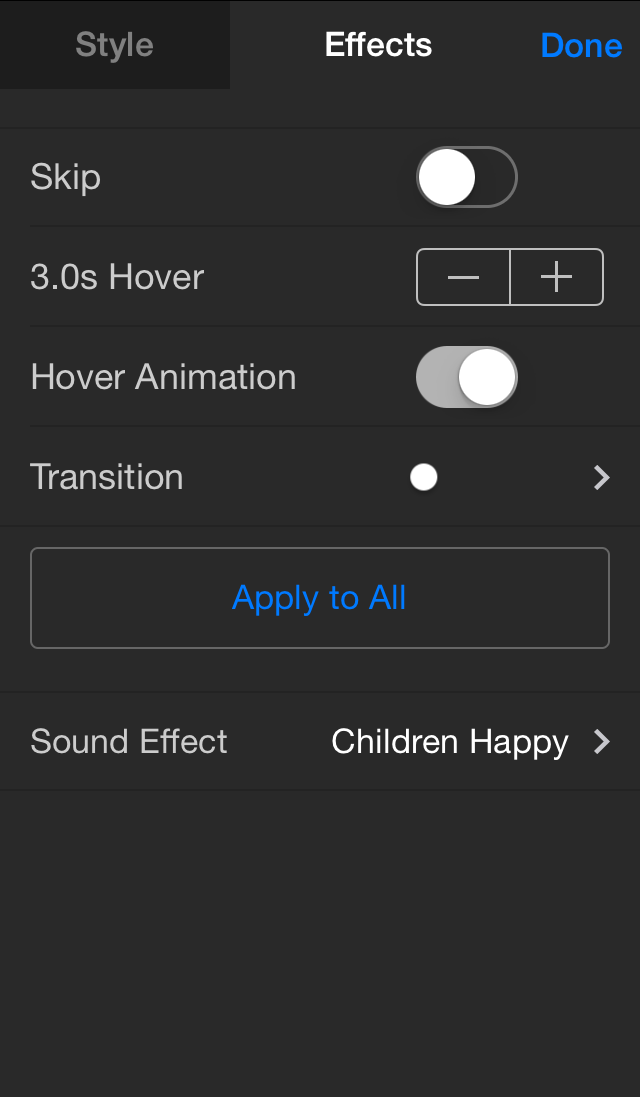
The new functionality enables users to configure the order that the virtual camera visits each photo on a page, the speed and motion of the camera, and how long the camera hovers over each image.
The update also includes 50 licensed sound effects that can be assigned to each photo, including growls, crashes, instruments, vehicles, and background ambience. An in-app purchase is available that adds 50 more sound effects to the mix.
A unique "auto stretch" feature allows users to choose a soundtrack for their video and have Halftone 2 automatically shorten or lengthen the movie to match the length of the song.
Final video is exported at up to 720p high-definition and can be saved to the camera roll for later use or sent directly to Facebook, Dropbox, or other compatible apps.
Halftone 2 makes it easy to create multi-page comic and scrap books by assembling photos from Facebook, Flickr, and the photo album. Users can add filters, customize page layouts, add speech and thought balloons, position captions, place some WHAMs, BAMs, and POWs, and share their creations with the world. The app is localized for English, German, Spanish, French, Italian, Japanese, and Simplified Chinese.
Pricing and Availability:
Halftone 2 (v1.3) is currently available for $1.99 USD on the App Store. Halftone 2 is a Universal app that runs on iPad 2 (or later) and iPhone 4 (or later) with iOS 7.0 (or later).
Halftone 2 (v1.3): http://www.juicybitssoftware.com/halftone2/
Purchase and Download: https://itunes.apple.com/app/halftone-2/id603139024
YouTube Video (Exported Video Example): http://www.youtube.com/watch?v=VrTGaigZ03k&feature=youtu.be
YouTube Video (How to Make a Halftone 2): http://www.youtube.com/watch?v=q2q4WNreN-c
Screenshot (Video Options): http://www.juicybitssoftware.com/images/media/halftone2/1.3/Halftone%202%20-%20Panel%20Options.png
App Icon: http://www.juicybitssoftware.com/images/media/halftone2/1.3/Halftone%202%20-%20App%20Icon.png
Founded in 2009, Juicy Bits is a small company that produces unique, freshly squeezed software for mobile devices. Their first release, 3D Camera, earned 4 1/2 mice (out of 5) from Macworld and is frequently among the top photography apps worldwide. Their Layout app was named by Apple as one of the best photo apps of 2012, and Halftone, with over two million user downloads, was named by Apple as one of the best photo apps as part of App Store Rewind 2011. Halftone 2, an Apple Editors' Choice, was also selected for the App Store Best of 2013. Copyright (C) 2009-2014 Juicy Bits. All Rights Reserved. Apple, the Apple logo, iPhone, iPod and iPad are registered trademarks of Apple Inc. in the U.S. and/or other countries.
*******
Link To Article: http://prmac.com/release-id-68394.htm
*******
---------------------------------------------------------------------------------
Note that you can alter delivered distributions at any time.
Login to your account on prMac to alter your channel selection, or to opt-out at any time.
Comic App Halftone 2 Adds Video - Published on 06/12/14
Halftone 2, an Apple Editors' Choice and App Store Best of 2013 winner, has added video to its popular app for iPhone and iPad. Halftone 2 re-imagines what it means to turn your photos into professionally-themed comic book pages on a touch device. The update makes it easy to turn photo pages into high-definition movies with dynamic camera movement, professionally designed captions, and fun sound effects. Version 1.3 also includes 50 licensed sound effects that can be assigned to each photo.
Sammamish, Washington - Halftone 2, an Apple Editors' Choice and App Store Best of 2013 winner, has added video to its popular app for iPhone and iPad. The update makes it easy to turn photo pages into high-definition movies with dynamic camera movement, professionally designed captions, and fun sound effects.
"Customers are constantly looking for ways to add more action to their homemade comics and scrapbooks," says Mike Swanson, Founder of Juicy Bits. "With the new video feature, Halftone 2 users are literally one tap away from seeing their photo pages as exciting movies and only a few taps away from adding a soundtrack, customized camera movement, and creative sound effects."
The new functionality enables users to configure the order that the virtual camera visits each photo on a page, the speed and motion of the camera, and how long the camera hovers over each image.
The update also includes 50 licensed sound effects that can be assigned to each photo, including growls, crashes, instruments, vehicles, and background ambience. An in-app purchase is available that adds 50 more sound effects to the mix.
A unique "auto stretch" feature allows users to choose a soundtrack for their video and have Halftone 2 automatically shorten or lengthen the movie to match the length of the song.
Final video is exported at up to 720p high-definition and can be saved to the camera roll for later use or sent directly to Facebook, Dropbox, or other compatible apps.
Halftone 2 makes it easy to create multi-page comic and scrap books by assembling photos from Facebook, Flickr, and the photo album. Users can add filters, customize page layouts, add speech and thought balloons, position captions, place some WHAMs, BAMs, and POWs, and share their creations with the world. The app is localized for English, German, Spanish, French, Italian, Japanese, and Simplified Chinese.
Pricing and Availability:
Halftone 2 (v1.3) is currently available for $1.99 USD on the App Store. Halftone 2 is a Universal app that runs on iPad 2 (or later) and iPhone 4 (or later) with iOS 7.0 (or later).
Halftone 2 (v1.3): http://www.juicybitssoftware.com/halftone2/
Purchase and Download: https://itunes.apple.com/app/halftone-2/id603139024
YouTube Video (Exported Video Example): http://www.youtube.com/watch?v=VrTGaigZ03k&feature=youtu.be
YouTube Video (How to Make a Halftone 2): http://www.youtube.com/watch?v=q2q4WNreN-c
Screenshot (Video Options): http://www.juicybitssoftware.com/images/media/halftone2/1.3/Halftone%202%20-%20Panel%20Options.png
App Icon: http://www.juicybitssoftware.com/images/media/halftone2/1.3/Halftone%202%20-%20App%20Icon.png

Founded in 2009, Juicy Bits is a small company that produces unique, freshly squeezed software for mobile devices. Their first release, 3D Camera, earned 4 1/2 mice (out of 5) from Macworld and is frequently among the top photography apps worldwide. Their Layout app was named by Apple as one of the best photo apps of 2012, and Halftone, with over two million user downloads, was named by Apple as one of the best photo apps as part of App Store Rewind 2011. Halftone 2, an Apple Editors' Choice, was also selected for the App Store Best of 2013. Copyright (C) 2009-2014 Juicy Bits. All Rights Reserved. Apple, the Apple logo, iPhone, iPod and iPad are registered trademarks of Apple Inc. in the U.S. and/or other countries.
*******
Link To Article: http://prmac.com/release-id-68394.htm
*******
---------------------------------------------------------------------------------
Note that you can alter delivered distributions at any time.
Login to your account on prMac to alter your channel selection, or to opt-out at any time.
KlickOrder Wins Tech Cocktail's DC's Hottest Startup Competition
A new article has been published at prMac.
KlickOrder Wins Tech Cocktail's DC's Hottest Startup Competition - Published on 06/12/14
KlickOrder won Tech Cocktail's DC's Hottest Startup Competition on June 5th, 2014 in Crystal City, Virginia. Founder grew up mopping floors and stocking shelves of his dad's convenience store. Now he wants to make convenience high tech. The KlickOrder app helps people searching for restaurants find reviews and restaurant information for 500,000 restaurants across the country. KlickOrder has over 300+ restaurants in the DC area set up for ordering take out and delivery through the app.
Alexandria, Virginia - Joe Keum, founder of KlickOrder, has produced a restaurant app that combines food and convenience. His company was recognized as DC's Hottest Startup at a Tech Cocktail Competition on June 5th, 2014. The company has been invited to the next level of competition that takes place in Las Vegas in October of this year.
The KlickOrder app helps customers browse a database of 500,000 restaurants across the United States and 10,000,000 restaurant food pictures, read reviews, and get detailed mapping and restaurant information. In the DC area the app can be used to order take out and delivery by clicking on menu items displayed on the app.
The app launched in November 2013 with a handful of Georgetown restaurants signed on for take out and delivery ordering over the smartphone. Now Mr. Keum's business has grown to 300+ restaurants including restaurants in Alexandria, Arlington, Dupont Circle, GW University area, and College Park of the DC metropolitan area. KlickOrder is currently planning to expand in the Richmond, VA area.
The KlickOrder app also allows customers to receive loyalty points from KlickOrder as well as from individual restaurants on the app. Loyalty points are gained automatically on the app upon each meal purchase.
"Having spent the last two years in restaurant kitchens, observing the take out and delivery process, I have learned that it is a very tough business. Delivery management takes place in a few very busy hours and the restaurants that do it well are extremely hard working." says Joe Keum, the Founder of KlickOrder.
Mr. Keum is familiar to the food and convenience business having grown up helping out at his dad's convenience store every weekend as a child. "I remember countless weekends mopping the floors and stocking the shelves from morning to evening. It helps me to relate when I walk into a restaurant and watch the restaurant owner managing his or her business," says Mr. Keum. Now, he supervises the orders of thousands of customers in the DC area staying up until the late hours tracking take out and delivery orders. His aerospace engineering background from the University of Virginia allows him to incorporate a high tech angle to the business of convenience he grew up observing as a child.
Device Requirements:
* iPhone, iPad, and iPod touch
* Requires iOS 6.0 or later
* 9.0 MB
Pricing and Availability:
KlickOrder 3.8 is Free and available worldwide exclusively through the App Store in the Food & Drink category.
KlickOrder 3.8: http://www.klickorder.com
Download from iTunes: https://itunes.apple.com/app/klickorder/id600098001
Daily App Show Review: http://dailyappshow.com/klickorder
Screenshot: http://www.klickorder.com/static/website/klickorder_first_screen.png
App Icon: http://www.klickorder.com/static/website/klickorderLogoBig.png
KlickOrder is start up that has released a restaurant app for browsing restaurant information and ordering take out and delivery food. The company is based in Alexandria, Virginia. All Material and Software (C) Copyright 2014 KlickOrder. All Rights Reserved. Apple, the Apple logo, iPhone, iPod and iPad are registered trademarks of Apple Inc. in the U.S. and/or other countries. Other trademarks and registered trademarks may be the property of their respective owners.
*******
Link To Article: http://prmac.com/release-id-68399.htm
*******
---------------------------------------------------------------------------------
Note that you can alter delivered distributions at any time.
Login to your account on prMac to alter your channel selection, or to opt-out at any time.
KlickOrder Wins Tech Cocktail's DC's Hottest Startup Competition - Published on 06/12/14
KlickOrder won Tech Cocktail's DC's Hottest Startup Competition on June 5th, 2014 in Crystal City, Virginia. Founder grew up mopping floors and stocking shelves of his dad's convenience store. Now he wants to make convenience high tech. The KlickOrder app helps people searching for restaurants find reviews and restaurant information for 500,000 restaurants across the country. KlickOrder has over 300+ restaurants in the DC area set up for ordering take out and delivery through the app.
Alexandria, Virginia - Joe Keum, founder of KlickOrder, has produced a restaurant app that combines food and convenience. His company was recognized as DC's Hottest Startup at a Tech Cocktail Competition on June 5th, 2014. The company has been invited to the next level of competition that takes place in Las Vegas in October of this year.
The KlickOrder app helps customers browse a database of 500,000 restaurants across the United States and 10,000,000 restaurant food pictures, read reviews, and get detailed mapping and restaurant information. In the DC area the app can be used to order take out and delivery by clicking on menu items displayed on the app.
The app launched in November 2013 with a handful of Georgetown restaurants signed on for take out and delivery ordering over the smartphone. Now Mr. Keum's business has grown to 300+ restaurants including restaurants in Alexandria, Arlington, Dupont Circle, GW University area, and College Park of the DC metropolitan area. KlickOrder is currently planning to expand in the Richmond, VA area.
The KlickOrder app also allows customers to receive loyalty points from KlickOrder as well as from individual restaurants on the app. Loyalty points are gained automatically on the app upon each meal purchase.
"Having spent the last two years in restaurant kitchens, observing the take out and delivery process, I have learned that it is a very tough business. Delivery management takes place in a few very busy hours and the restaurants that do it well are extremely hard working." says Joe Keum, the Founder of KlickOrder.
Mr. Keum is familiar to the food and convenience business having grown up helping out at his dad's convenience store every weekend as a child. "I remember countless weekends mopping the floors and stocking the shelves from morning to evening. It helps me to relate when I walk into a restaurant and watch the restaurant owner managing his or her business," says Mr. Keum. Now, he supervises the orders of thousands of customers in the DC area staying up until the late hours tracking take out and delivery orders. His aerospace engineering background from the University of Virginia allows him to incorporate a high tech angle to the business of convenience he grew up observing as a child.
Device Requirements:
* iPhone, iPad, and iPod touch
* Requires iOS 6.0 or later
* 9.0 MB
Pricing and Availability:
KlickOrder 3.8 is Free and available worldwide exclusively through the App Store in the Food & Drink category.
KlickOrder 3.8: http://www.klickorder.com
Download from iTunes: https://itunes.apple.com/app/klickorder/id600098001
Daily App Show Review: http://dailyappshow.com/klickorder
Screenshot: http://www.klickorder.com/static/website/klickorder_first_screen.png

App Icon: http://www.klickorder.com/static/website/klickorderLogoBig.png

KlickOrder is start up that has released a restaurant app for browsing restaurant information and ordering take out and delivery food. The company is based in Alexandria, Virginia. All Material and Software (C) Copyright 2014 KlickOrder. All Rights Reserved. Apple, the Apple logo, iPhone, iPod and iPad are registered trademarks of Apple Inc. in the U.S. and/or other countries. Other trademarks and registered trademarks may be the property of their respective owners.
*******
Link To Article: http://prmac.com/release-id-68399.htm
*******
---------------------------------------------------------------------------------
Note that you can alter delivered distributions at any time.
Login to your account on prMac to alter your channel selection, or to opt-out at any time.
Subscribe to:
Posts (Atom)