A new article has been published at prMac.
Ynews - Read 5000 newspapers from all over the world on your iPhone/iPad - Published on 06/26/14
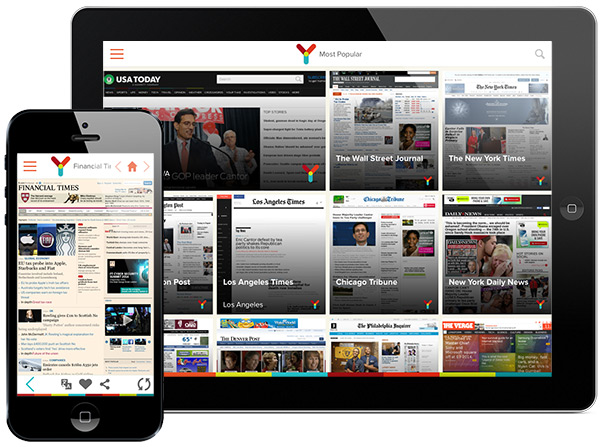
Following the success of myTuner Radio, AppGeneration has just released a brand new media app for iOS, named Ynews. With this new app you can browse more than 5000 online newspapers in 80 countries. It also allows you to read the news on your native language without needing to leave the app. Since it auto translates newspaper websites, it enables you to read a Chinese newspaper in Russian, an English tech magazine in Spanish or a Thai economic newspaper in French!
Porto, Portugal - Following the success of myTuner Radio, AppGeneration has just released a brand new media app for iOS, named Ynews. With this new app you can browse more than 5000 online newspapers in 80 countries. It also allows you to read the news on your native language without needing to leave the app. Since it auto translates newspaper websites, it enables you to read a Chinese newspaper in Russian, an English tech magazine in Spanish or a Thai economic newspaper in French!
Read all the important news from all over the globe in order to get a full insight about what's going on in the world each day. You can browse important newspaper websites such as USA Today, Le Monde, The Guardian, Daily Mail, Financial Times, Bild, La Repubblica, El Mundo, De Telegraaf, The New York Times, Le Figaro, Die Zeit, Corriere della Sera, El Pas, The Daily Telegraph, Folha de So Paulo, The Washington Post, Toronto Star, Komsomolskaya Pravda and many more...
Feature highlights:
* Access to more than 5000 newspapers of the most renowned titles in the world, in more than 80 different countries, in their native language or in your language
* Search and filter newspapers by name, country, city and genre
* Access to the top 50 most influential blogs in technology
* Automatic language translator for 60 different languages
* Listen to more than 1000000 podcasts from more than 80 different countries
* Add newspapers to your favorites list
* Archive the recent newspapers you have browsed through
* Share the latest news on Facebook or by e-mail
Language support:
* English
* Spanish
* Portuguese
Device Requirements:
* iOS 7.1 or later
* 8.4 MB
* This app is optimized for iPhone 5/5S/5C
* This is an universal app for iPhone and iPad
Pricing and Availability:
Ynews Pro is available at $0.99 USD (80% launch discount) for iOS in the App Store in the News category. Ynews Free is available for Free in the App Store in the News category.
AppGeneration Software: http://www.appgeneration.com/
Ynews: https://itunes.apple.com/app/id882762430
Ynews Pro: https://itunes.apple.com/app/id882767959
Screenshot: http://a3.mzstatic.com/us/r30/Purple/v4/d7/f5/58/d7f55837-bbeb-00f8-ad87-071ebbf019c8/screen480x480.jpeg
Screenshot (iPad/iPhone): http://sendy.appgeneration.com//uploads/1403713217.jpg
App Icon: http://sendy.appgeneration.com//uploads/1403703580.png
Based in Porto, Portugal, AppGeneration Software specializes in software development and editorial content to provide a unique experience centered on smartphones and tablets. Copyright (C) 2014 AppGeneration. All Rights Reserved. Apple, the Apple logo, iPhone, iPod, and iPad are registered trademarks of Apple Inc. in the U.S. and/or other countries.
*******
Link To Article: http://prmac.com/release-id-68777.htm
*******
---------------------------------------------------------------------------------
Note that you can alter delivered distributions at any time.
Login to your account on prMac to alter your channel selection, or to opt-out at any time.



Pool Stars - Free Online Multiplayer 8 Ball Pool for iOS
A new article has been published at prMac.
Pool Stars - Free Online Multiplayer 8 Ball Pool for iOS - Published on 06/26/14
Lucky Clan today introduces Pool Stars 1.1 for iOS, its new online pool game. Enjoy the most popular version of billiards: 8-ball. Play online against people from all over the world on your iPhone or iPod Touch. Featuring realistic billiards physics with smooth animated graphics, Pool Stars offers 2 online modes, over 20 custom cues, Game Center support and so much more. Win games, earn coins and buy better cues. Gain rank points, go up in ranking and become a Pool Star!
Lodz, Poland - Lucky Clan today is proud to announce the release and immediate availability of Pool Stars 1.1 for iPhone and iPod touch. Enjoy the most popular version of billiards: 8-ball! Play online against people from all over the world on your iPhone or iPod Touch. Win games, earn coins and buy better cues. Gain rank points, go up in ranking and become a Pool Star!
Features:
* Multiplayer mode, play against people all over the world
* 2 Online modes: Choose Opponent & Random Match
* Improve skills using Single Player mode
* Very realistic billiards physics
* Detailed players statistics
* 33 Achievements
* Over 20 custom cues available
* In-game chat
* Ranking based on the most well-known rating system, "Elo"
* Rank lists: My Country/Global, All time/This month/This week
* Smooth, 60fps animated graphics, 3D rendered antialiased balls, beautiful tables
* One-tap registering
Pool Stars requires Internet connection to play online matches.
We do not store username / password / address / email / avatar on our servers for your privacy.
Device Requirements:
* iPhone 4/4S/5/5S/5C, iPod touch (4th/5th generation)
* iOS 7.0 or later
* 58.0 MB
Pricing and Availability:
Pool Stars 1.1 is free and available worldwide exclusively through the App Store in the Games category. For more information, or to schedule an interview, please contact Sylwester Los.
Lucky Clan: http://luckyclan.com/
Pool Stars 1.1: http://luckyclan.com/poolstars
Download from iTunes (iPhone): https://itunes.apple.com/app/pool-stars/id880042921
YouTube Video (Trailer): https://www.youtube.com/watch?v=Pta3RgBQBdU
Screenshot: http://luckyclan.com/poolstars/Screen1.jpg
App Icon: http://luckyclan.com/poolstars/Icon.png
Located in Lodz, Poland, the Lucky Clan team is an independent software company founded by Sylwester Los in March of 2010. With a focus on the iOS platform, Lucky's mission is to provide their customers with the highest quality, reliability and compatibility with every device produced by Apple. Their flagship app, ArtStudio, has become one of the most popular tools for drawing, painting, and photo editing for iPhone and iPad. Copyright (C) 2014 Lucky Clan. All Rights Reserved. Apple, the Apple logo, iPhone, iPod and iPad are registered trademarks of Apple Inc. in the U.S. and/or other countries.
*******
Link To Article: http://prmac.com/release-id-68776.htm
*******
---------------------------------------------------------------------------------
Note that you can alter delivered distributions at any time.
Login to your account on prMac to alter your channel selection, or to opt-out at any time.
Pool Stars - Free Online Multiplayer 8 Ball Pool for iOS - Published on 06/26/14
Lucky Clan today introduces Pool Stars 1.1 for iOS, its new online pool game. Enjoy the most popular version of billiards: 8-ball. Play online against people from all over the world on your iPhone or iPod Touch. Featuring realistic billiards physics with smooth animated graphics, Pool Stars offers 2 online modes, over 20 custom cues, Game Center support and so much more. Win games, earn coins and buy better cues. Gain rank points, go up in ranking and become a Pool Star!
Lodz, Poland - Lucky Clan today is proud to announce the release and immediate availability of Pool Stars 1.1 for iPhone and iPod touch. Enjoy the most popular version of billiards: 8-ball! Play online against people from all over the world on your iPhone or iPod Touch. Win games, earn coins and buy better cues. Gain rank points, go up in ranking and become a Pool Star!
Features:
* Multiplayer mode, play against people all over the world
* 2 Online modes: Choose Opponent & Random Match
* Improve skills using Single Player mode
* Very realistic billiards physics
* Detailed players statistics
* 33 Achievements
* Over 20 custom cues available
* In-game chat
* Ranking based on the most well-known rating system, "Elo"
* Rank lists: My Country/Global, All time/This month/This week
* Smooth, 60fps animated graphics, 3D rendered antialiased balls, beautiful tables
* One-tap registering
Pool Stars requires Internet connection to play online matches.
We do not store username / password / address / email / avatar on our servers for your privacy.
Device Requirements:
* iPhone 4/4S/5/5S/5C, iPod touch (4th/5th generation)
* iOS 7.0 or later
* 58.0 MB
Pricing and Availability:
Pool Stars 1.1 is free and available worldwide exclusively through the App Store in the Games category. For more information, or to schedule an interview, please contact Sylwester Los.
Lucky Clan: http://luckyclan.com/
Pool Stars 1.1: http://luckyclan.com/poolstars
Download from iTunes (iPhone): https://itunes.apple.com/app/pool-stars/id880042921
YouTube Video (Trailer): https://www.youtube.com/watch?v=Pta3RgBQBdU
Screenshot: http://luckyclan.com/poolstars/Screen1.jpg

App Icon: http://luckyclan.com/poolstars/Icon.png

Located in Lodz, Poland, the Lucky Clan team is an independent software company founded by Sylwester Los in March of 2010. With a focus on the iOS platform, Lucky's mission is to provide their customers with the highest quality, reliability and compatibility with every device produced by Apple. Their flagship app, ArtStudio, has become one of the most popular tools for drawing, painting, and photo editing for iPhone and iPad. Copyright (C) 2014 Lucky Clan. All Rights Reserved. Apple, the Apple logo, iPhone, iPod and iPad are registered trademarks of Apple Inc. in the U.S. and/or other countries.
*******
Link To Article: http://prmac.com/release-id-68776.htm
*******
---------------------------------------------------------------------------------
Note that you can alter delivered distributions at any time.
Login to your account on prMac to alter your channel selection, or to opt-out at any time.
Loud Crow Unleashes a World of Kids Content with New Toontales App
A new article has been published at prMac.
Loud Crow Unleashes a World of Kids Content with New Toontales App - Published on 06/26/14
Loud Crow Interactive have teamed up with DHX Media releasing the much-anticipated Toontales children's content platform. Toontales offers a collection of stories, games and educational activities based on your child�s favorite shows. Solve a mystery with Huckle and the Busytown crew, or build a castle with Caillou. Each episode is an innovative blend of humor and learning based around six unforgettable friends and many other colorful characters from the amazing world of Richard Scarry's books.
Vancouver, Canada - Leaders in digital entertainment and new media, Loud Crow Interactive, have teamed up for a second time with DHX Media releasing the much-anticipated Toontales children's content platform. A toon with a tale! The new platform designed specifically for the eager minds of preschoolers is jam packed with kid friendly activities, games and interactive reading experiences focusing in on educational learning content in an entertaining episodic format.
Spring boarding off the success of Loud Crow's first published Toontale's app, Busytown Mysteries, hitting nearly 1 million downloads to date, Toontale's app now provides users with a similar learning experience with the addition of Caillou! Users now have more offerings to the multi-faceted world of educationally-focused content that is entertaining and interactive.
Calvin Wang, President and CEO of Loud Crow adds, "We are thrilled with the addition of Caillou. Toontales offers a broad content experience unlike anything else currently available on the children's app marketplace, our aim and objective is to keep young minds engaged and excited about learning alongside their favorite cartoons.
Equipped with Loud Crow's signature interactivity and educational offerings, the Toontales app features a growing collection of age-appropriate activities, interactive adventures and entertaining games. Highlights of the Toontale's app include:
* New interactive Toontale episodes featuring characters from Caillou and Richard Scarry's Busytown Mysteries
* Interactive story experiences, each with a focus on a clearly defined educational objective
* New Toy Box area featuring digital toys, activities and educational games
* Rich, responsive animations that engage children in playful interactions with their favorite characters
* Initial "Freeview" and "Freeplay" modes
* Learning tools that help children grasp pre-reading concepts about print
About Caillou:
Caillou(TM) is an award-winning brand that began as a book series created by Christine L'Heureux, about an inquisitive four year old whose unique way of relating to the world has charmed generations of preschoolers who connect with how he plays, learns and lives. The Caillou(TM) television series has consistently ranked as one of the top 10 television series for preschoolers nationwide since its premiere in 2000. The series teaches life lessons that address fear, anger, consequences, loneliness, anxiety and empathy to help preschool age children understand those emotions. Surrounded by his parents, his younger sister Rosie, his grandparents and peers his age, Caillou is fascinated by the world around him and is constantly finding opportunities to learn and grow.
About Busytown Mysteries:
Busytown Mysteries is a well-known television property based on the books by beloved author and illustrator Richard Scarry. Curiosities are everywhere in Busytown and so are Huckle Cat, Lowly Worm, Sally Cat, Hilda Hippo plus Pig Will and Pig Won't. Each episode is an innovative blend of humor and learning based around six unforgettable friends and many other colorful characters from the amazing world of Richard Scarry's books. Richard Scarry books have sold over 150 million copies and last year celebrated an incredible 50 years of success. There are over 300 titles translated into 30 different languages. Five Richard Scarry books also made Publishers Weekly's Top 100 List of All-Time Bestselling Children's Books. For more information please contact Aimee Norman at DDA Blueprint PR for DHX Media +44 (0) 20 8985 4708.
About DHX Media:
DHX Media is a leader in the creation, production and marketing of family entertainment. DHX Media owns, markets and distributes over 10,000 episodes of entertainment programming worldwide and licenses its owned properties through its dedicated consumer products business. DHX Media is recognized for brands such as Yo Gabba Gabba!, Caillou, Teletubbies, In the Night Garden, Inspector Gadget, Johnny Test, and the multi-award winning Degrassi franchise. DHX Media's full-service international licensing agency, Copyright Promotions Licensing Group, (CPLG), represents numerous entertainment, sport and design brands. DHX Media has offices in Toronto, Los Angeles, Vancouver, Halifax, London, Paris, Barcelona, Milan, Munich and Amsterdam and is listed on the Toronto Stock Exchange.
Device Requirements:
* iPhone, iPad, and iPod touch
* Requires iOS 6.0 or later
* 201 MB
Pricing and Availability:
Toontales - Caillou, Busytown Mysteries 2.0 is Free and available worldwide exclusively through the App Store in the Education category. Additional free and paid content is planned for release later this summer. This will include the introduction of new brands, new Toy Box activities and new full-length Toontale learning experiences. Learn more about all of the latest digital offerings from Loud Crow Interactive online. For more information, please contact Tom Mara at Loud Crow +1 (604) 566-9691.
Loud Crow Interactive: http://www.loudcrow.com
DHX Media: http://www.dhxmedia.com
Toontales - Caillou, Busytown Mysteries 2.0: https://itunes.apple.com/app/toontales-caillou-busytown/id731023052
Screenshot: http://a5.mzstatic.com/us/r30/Purple/v4/13/4a/7c/134a7ca5-2ed1-345e-2b19-5e90aee65078/screen480x480.jpeg
App Icon: http://a3.mzstatic.com/us/r30/Purple4/v4/d1/dd/f8/d1ddf83f-2504-a20e-3ede-f6be56a74e91/mzl.tuxlkhpd.175x175-75.jpg
Based in Vancouver, British Columbia, Loud Crow Interactive Inc. is an award-winning developer and publisher of interactive digital content. The company's PopOut!, Boynton Moo Media and PEANUTS series of books have garnered numerous honors including Parents' Choice Gold Awards, Kirkus Reviews Kirkus Stars, Apple iPhone and iPad App of the Week, and Apple iPad Hall of Fame. Loud Crow's products have also been featured in the NY Times, Mashable, FOX News, USA Today, The New Yorker, MSNBC, NPR, Kirkus Reviews, and School Library Journal. The team's ongoing mission is to create the highest-quality interactive experiences possible in the digital age. Copyright (C) 2014 Loud Crow Interactive Inc. All Rights Reserved. Apple, the Apple logo, iPhone, iPod and iPad are registered trademarks of Apple Inc. in the U.S. and/or other countries.
*******
Link To Article: http://prmac.com/release-id-68773.htm
*******
---------------------------------------------------------------------------------
Note that you can alter delivered distributions at any time.
Login to your account on prMac to alter your channel selection, or to opt-out at any time.
Loud Crow Unleashes a World of Kids Content with New Toontales App - Published on 06/26/14
Loud Crow Interactive have teamed up with DHX Media releasing the much-anticipated Toontales children's content platform. Toontales offers a collection of stories, games and educational activities based on your child�s favorite shows. Solve a mystery with Huckle and the Busytown crew, or build a castle with Caillou. Each episode is an innovative blend of humor and learning based around six unforgettable friends and many other colorful characters from the amazing world of Richard Scarry's books.
Vancouver, Canada - Leaders in digital entertainment and new media, Loud Crow Interactive, have teamed up for a second time with DHX Media releasing the much-anticipated Toontales children's content platform. A toon with a tale! The new platform designed specifically for the eager minds of preschoolers is jam packed with kid friendly activities, games and interactive reading experiences focusing in on educational learning content in an entertaining episodic format.
Spring boarding off the success of Loud Crow's first published Toontale's app, Busytown Mysteries, hitting nearly 1 million downloads to date, Toontale's app now provides users with a similar learning experience with the addition of Caillou! Users now have more offerings to the multi-faceted world of educationally-focused content that is entertaining and interactive.
Calvin Wang, President and CEO of Loud Crow adds, "We are thrilled with the addition of Caillou. Toontales offers a broad content experience unlike anything else currently available on the children's app marketplace, our aim and objective is to keep young minds engaged and excited about learning alongside their favorite cartoons.
Equipped with Loud Crow's signature interactivity and educational offerings, the Toontales app features a growing collection of age-appropriate activities, interactive adventures and entertaining games. Highlights of the Toontale's app include:
* New interactive Toontale episodes featuring characters from Caillou and Richard Scarry's Busytown Mysteries
* Interactive story experiences, each with a focus on a clearly defined educational objective
* New Toy Box area featuring digital toys, activities and educational games
* Rich, responsive animations that engage children in playful interactions with their favorite characters
* Initial "Freeview" and "Freeplay" modes
* Learning tools that help children grasp pre-reading concepts about print
About Caillou:
Caillou(TM) is an award-winning brand that began as a book series created by Christine L'Heureux, about an inquisitive four year old whose unique way of relating to the world has charmed generations of preschoolers who connect with how he plays, learns and lives. The Caillou(TM) television series has consistently ranked as one of the top 10 television series for preschoolers nationwide since its premiere in 2000. The series teaches life lessons that address fear, anger, consequences, loneliness, anxiety and empathy to help preschool age children understand those emotions. Surrounded by his parents, his younger sister Rosie, his grandparents and peers his age, Caillou is fascinated by the world around him and is constantly finding opportunities to learn and grow.
About Busytown Mysteries:
Busytown Mysteries is a well-known television property based on the books by beloved author and illustrator Richard Scarry. Curiosities are everywhere in Busytown and so are Huckle Cat, Lowly Worm, Sally Cat, Hilda Hippo plus Pig Will and Pig Won't. Each episode is an innovative blend of humor and learning based around six unforgettable friends and many other colorful characters from the amazing world of Richard Scarry's books. Richard Scarry books have sold over 150 million copies and last year celebrated an incredible 50 years of success. There are over 300 titles translated into 30 different languages. Five Richard Scarry books also made Publishers Weekly's Top 100 List of All-Time Bestselling Children's Books. For more information please contact Aimee Norman at DDA Blueprint PR for DHX Media +44 (0) 20 8985 4708.
About DHX Media:
DHX Media is a leader in the creation, production and marketing of family entertainment. DHX Media owns, markets and distributes over 10,000 episodes of entertainment programming worldwide and licenses its owned properties through its dedicated consumer products business. DHX Media is recognized for brands such as Yo Gabba Gabba!, Caillou, Teletubbies, In the Night Garden, Inspector Gadget, Johnny Test, and the multi-award winning Degrassi franchise. DHX Media's full-service international licensing agency, Copyright Promotions Licensing Group, (CPLG), represents numerous entertainment, sport and design brands. DHX Media has offices in Toronto, Los Angeles, Vancouver, Halifax, London, Paris, Barcelona, Milan, Munich and Amsterdam and is listed on the Toronto Stock Exchange.
Device Requirements:
* iPhone, iPad, and iPod touch
* Requires iOS 6.0 or later
* 201 MB
Pricing and Availability:
Toontales - Caillou, Busytown Mysteries 2.0 is Free and available worldwide exclusively through the App Store in the Education category. Additional free and paid content is planned for release later this summer. This will include the introduction of new brands, new Toy Box activities and new full-length Toontale learning experiences. Learn more about all of the latest digital offerings from Loud Crow Interactive online. For more information, please contact Tom Mara at Loud Crow +1 (604) 566-9691.
Loud Crow Interactive: http://www.loudcrow.com
DHX Media: http://www.dhxmedia.com
Toontales - Caillou, Busytown Mysteries 2.0: https://itunes.apple.com/app/toontales-caillou-busytown/id731023052
Screenshot: http://a5.mzstatic.com/us/r30/Purple/v4/13/4a/7c/134a7ca5-2ed1-345e-2b19-5e90aee65078/screen480x480.jpeg

App Icon: http://a3.mzstatic.com/us/r30/Purple4/v4/d1/dd/f8/d1ddf83f-2504-a20e-3ede-f6be56a74e91/mzl.tuxlkhpd.175x175-75.jpg

Based in Vancouver, British Columbia, Loud Crow Interactive Inc. is an award-winning developer and publisher of interactive digital content. The company's PopOut!, Boynton Moo Media and PEANUTS series of books have garnered numerous honors including Parents' Choice Gold Awards, Kirkus Reviews Kirkus Stars, Apple iPhone and iPad App of the Week, and Apple iPad Hall of Fame. Loud Crow's products have also been featured in the NY Times, Mashable, FOX News, USA Today, The New Yorker, MSNBC, NPR, Kirkus Reviews, and School Library Journal. The team's ongoing mission is to create the highest-quality interactive experiences possible in the digital age. Copyright (C) 2014 Loud Crow Interactive Inc. All Rights Reserved. Apple, the Apple logo, iPhone, iPod and iPad are registered trademarks of Apple Inc. in the U.S. and/or other countries.
*******
Link To Article: http://prmac.com/release-id-68773.htm
*******
---------------------------------------------------------------------------------
Note that you can alter delivered distributions at any time.
Login to your account on prMac to alter your channel selection, or to opt-out at any time.
Presentime Synchronized Presentation Timer for iOS 7 Gets Even Better
A new article has been published at prMac.
Presentime Synchronized Presentation Timer for iOS 7 Gets Even Better - Published on 06/26/14
Midnight Oil Enterprises, LLC has released Presentime 1.4, an exciting update to their remotely controllable countdown clock app for speakers and performers. Presentime's multipeer synchronization allows a device at the podium to be adjusted on the fly by a moderator or colleague in the audience. The update includes: consolidated timing control buttons, larger time-remaining digits, overrun bells/vibration options (every 30 seconds), and support for landscape orientation on iPhone & iPod touch.
Amherst, Massachusetts - You control the time! Gone are the days of holding up fingers or minutes-remaining signs for the presenter to notice. Gone are the days of interrupting speakers to tell them that they are out of time. Midnight Oil Enterprises, LLC has released Presentime Synchronized Presentation Timer 1.4 for iOS, an update to their remotely controllable countdown clock for speakers and performers. Presentime is an easy-to-use presentation timer app with a unique difference. In addition to operating as a stand-alone timer, Presentime can be used as a broadcasting Master Timer or synchronized with a Master Timer. The Presentime app uses iOS 7's Multipeer Connectivity for direct device-to-device interaction, so a device at the podium can be adjusted on the fly by a moderator or colleague in the audience. A quick glance at the Presentime app from time to time is all that is needed to adapt to the time remaining.
The 1,4 update makes Presentime even easier and more intuitive to use, the timer digits more visible from a distance, and adds some new overrun-notification options. "We worked hard on the original design for Presentime to create the most useful, easiest to set and adjust, and intuitively natural stand-alone presentation timer that we could imagine, and then we added multiple-device synchronization to it," says Midnight Oil Enterprises co-founder Dan Corkill. "We incorporated a number of context-based prompts, available actions, and subtle visual feedback into the user experience to make operating Presentime quick, clear, and resistant to mistakes. For example, irreversible actions such as ending a timing session require longer, 1-second touches, so accidentally touching the screen isn't an issue."
"We have continued to refine our original Presentime design, guided by wonderful feedback and suggestions from our users. Visual changes and suggested new features had to come together seamlessly and without adding complexity or distractions to the user. As a result, the Presentime 1.4 update is significantly more substantial than we planned, but we're thrilled with the results! I think Presentime 1.4 is the best speaker clock available anywhere - with or without remote control capabilities."
Using Presentime is fast and easy:
To set the presentation time, simply touch the Set button and then slide your finger up and down on the time display, Time-remaining alert settings are adjusted by sliding the yellow, orange, and red alert marks left and right. Then touch the Start button to begin timing.
Once timing, the Start button changes to a Pause/Resume control. In addition, the allotted time can be adjusted up or down in thirty-second amounts by using the two time-adjustment buttons that appear in context. The total time added or removed is indicated below the countdown display. The time-remaining alert settings can also be adjusted during the presentation, if appropriate. As the time remaining drops below each alert setting, the display background changes color to alert the presenter. The alerts can be augmented with optional sound and, on iPhones, vibration.
Timing is stopped by touching the End button for one second, and preparing for the next presenter begins again by touching the Set button. Default allotted and alert-time values can be adjusted in the app's Settings screen, so setting up the next in a series of equal length presentations requires touching only the Set and then the Start buttons.
Becoming a Master Timer:
Simply select Master Timer on the segmented mode control. That's it, your device is now acting as a Master Timer. The displayed four-digit connection ID is used by other devices that want to synchronize with your device.
Synchronizing with a Master Timer:
Synchronizing devices is equally simple. All that is needed is to select Synched on the segmented mode control and then enter the four-digit connection ID of the Master Timer.
Synchronized, on-the-fly adjustment:
Meeting chairs or directors can pause the Master Timer if the presenter is interrupted and even adjust the time remaining on the fly, if appropriate. Changes made at the Master Timer device are reflected at all synchronized devices. Synchronization uses iOS 7's Multipeer Connectivity framework, which enables direct device-to-device discovery and connection via WiFi or bluetooth without a network connection or bluetooth pairing. Direct synchronization is ideal for venues without internet access.
Major features:
* Three operating modes -
1) Stand-alone timer
2) Broadcasting Master Timer
3) Synchronized with a Master Timer
* Direct device-to-device discovery and synchronization via WiFi or bluetooth without a network connection or bluetooth pairing
* Adjustable yellow, orange, and red time-remaining alert settings and time-expired notification with optional sound or vibration
* Quick time and alert setting using gestures
* "Night" mode for darkly lit rooms
* Overrun bells option (sound and/or vibration every 30 seconds)
* A "really stop now" bell button in Master Timer mode that sounds and vibrates on synchronized devices (so a presenter has no excuse for continuing!)
* Landscape orientation option on iPhone & iPod touch with double-tap start/pause gesture and 1-second-touch set/reset/end gesture
Additions and changes in Presentime version 1.4 include:
* Larger time-remaining font and elimination of leading hours digits when they are zero
* Consolidated timing control buttons (now only 2 main control buttons)
* New landscape orientation option on iPhone & iPod touch with double-tap start/pause gesture and 1-second-touch set/reset/end gesture
* New overrun bells option (sound and/or vibration every 30 seconds)
* New Master Timer connection ID regenerate button in Settings
* Replaced individual default alert time sliders in Settings with Presentime's panning alert-marks control
* Replaced alternating timer overrun background colors with a non-alternating purple background
* Subtler tinted/shaded background colors
Supports all devices running iOS 7 or later. Ad hoc peer-to-peer wireless networking requires:
* iPhone 5 or later
* iPad Air or 4th generation
* iPad mini
* iPod touch 5th generation
* Universal Application
* 1.8 MB
Pricing and Availability:
Presentime 1.4 is $2.99 USD (or equivalent amount in other currencies) and available worldwide exclusively through the App Store in the Productivity category. It is a free upgrade from earlier versions.
Midnight Oil Enterprises: http://mn-oil.com/
Presentime 1.4: http://mn-oil.com/Presentime
Purchase and Download: http://itunes.apple.com/app/id777654864
In-Browser Demo: https://app.io/DUeQpJ?ios7=true
Screenshots: http://mn-oil.com/Presentime/press/screenshots.html
App Icon: http://mn-oil.com/Presentime/images/Presentime-logo.png
Midnight Oil Enterprises, LLC was founded in 2009 by Susan Lander and Dan Corkill. Located in Amherst, Massachusetts, we strive to produce high quality iOS apps that are intuitive and easy to use. Our apps typically provide unique capabilities. For example, the Presentime Synchronized Presentation Timer app uses iOS 7's Multipeer Connectivity for ad hoc peer-to-peer synchronization. On iPhones, our Disappearing Bedside Clock app uses proximity detection to provide touch-free display activation. Copyright (C) 2014 Midnight Oil Enterprises, LLC. All Rights Reserved. Presentime and Disappearing Bedside Clock are trademarks of Midnight Oil Enterprises, LLC. Apple, the Apple logo, iPhone, iPod touch, and iPad are registered trademarks of Apple Inc. in the U.S. and/or other countries.
*******
Link To Article: http://prmac.com/release-id-68774.htm
*******
---------------------------------------------------------------------------------
Note that you can alter delivered distributions at any time.
Login to your account on prMac to alter your channel selection, or to opt-out at any time.
Presentime Synchronized Presentation Timer for iOS 7 Gets Even Better - Published on 06/26/14
Midnight Oil Enterprises, LLC has released Presentime 1.4, an exciting update to their remotely controllable countdown clock app for speakers and performers. Presentime's multipeer synchronization allows a device at the podium to be adjusted on the fly by a moderator or colleague in the audience. The update includes: consolidated timing control buttons, larger time-remaining digits, overrun bells/vibration options (every 30 seconds), and support for landscape orientation on iPhone & iPod touch.
Amherst, Massachusetts - You control the time! Gone are the days of holding up fingers or minutes-remaining signs for the presenter to notice. Gone are the days of interrupting speakers to tell them that they are out of time. Midnight Oil Enterprises, LLC has released Presentime Synchronized Presentation Timer 1.4 for iOS, an update to their remotely controllable countdown clock for speakers and performers. Presentime is an easy-to-use presentation timer app with a unique difference. In addition to operating as a stand-alone timer, Presentime can be used as a broadcasting Master Timer or synchronized with a Master Timer. The Presentime app uses iOS 7's Multipeer Connectivity for direct device-to-device interaction, so a device at the podium can be adjusted on the fly by a moderator or colleague in the audience. A quick glance at the Presentime app from time to time is all that is needed to adapt to the time remaining.
The 1,4 update makes Presentime even easier and more intuitive to use, the timer digits more visible from a distance, and adds some new overrun-notification options. "We worked hard on the original design for Presentime to create the most useful, easiest to set and adjust, and intuitively natural stand-alone presentation timer that we could imagine, and then we added multiple-device synchronization to it," says Midnight Oil Enterprises co-founder Dan Corkill. "We incorporated a number of context-based prompts, available actions, and subtle visual feedback into the user experience to make operating Presentime quick, clear, and resistant to mistakes. For example, irreversible actions such as ending a timing session require longer, 1-second touches, so accidentally touching the screen isn't an issue."
"We have continued to refine our original Presentime design, guided by wonderful feedback and suggestions from our users. Visual changes and suggested new features had to come together seamlessly and without adding complexity or distractions to the user. As a result, the Presentime 1.4 update is significantly more substantial than we planned, but we're thrilled with the results! I think Presentime 1.4 is the best speaker clock available anywhere - with or without remote control capabilities."
Using Presentime is fast and easy:
To set the presentation time, simply touch the Set button and then slide your finger up and down on the time display, Time-remaining alert settings are adjusted by sliding the yellow, orange, and red alert marks left and right. Then touch the Start button to begin timing.
Once timing, the Start button changes to a Pause/Resume control. In addition, the allotted time can be adjusted up or down in thirty-second amounts by using the two time-adjustment buttons that appear in context. The total time added or removed is indicated below the countdown display. The time-remaining alert settings can also be adjusted during the presentation, if appropriate. As the time remaining drops below each alert setting, the display background changes color to alert the presenter. The alerts can be augmented with optional sound and, on iPhones, vibration.
Timing is stopped by touching the End button for one second, and preparing for the next presenter begins again by touching the Set button. Default allotted and alert-time values can be adjusted in the app's Settings screen, so setting up the next in a series of equal length presentations requires touching only the Set and then the Start buttons.
Becoming a Master Timer:
Simply select Master Timer on the segmented mode control. That's it, your device is now acting as a Master Timer. The displayed four-digit connection ID is used by other devices that want to synchronize with your device.
Synchronizing with a Master Timer:
Synchronizing devices is equally simple. All that is needed is to select Synched on the segmented mode control and then enter the four-digit connection ID of the Master Timer.
Synchronized, on-the-fly adjustment:
Meeting chairs or directors can pause the Master Timer if the presenter is interrupted and even adjust the time remaining on the fly, if appropriate. Changes made at the Master Timer device are reflected at all synchronized devices. Synchronization uses iOS 7's Multipeer Connectivity framework, which enables direct device-to-device discovery and connection via WiFi or bluetooth without a network connection or bluetooth pairing. Direct synchronization is ideal for venues without internet access.
Major features:
* Three operating modes -
1) Stand-alone timer
2) Broadcasting Master Timer
3) Synchronized with a Master Timer
* Direct device-to-device discovery and synchronization via WiFi or bluetooth without a network connection or bluetooth pairing
* Adjustable yellow, orange, and red time-remaining alert settings and time-expired notification with optional sound or vibration
* Quick time and alert setting using gestures
* "Night" mode for darkly lit rooms
* Overrun bells option (sound and/or vibration every 30 seconds)
* A "really stop now" bell button in Master Timer mode that sounds and vibrates on synchronized devices (so a presenter has no excuse for continuing!)
* Landscape orientation option on iPhone & iPod touch with double-tap start/pause gesture and 1-second-touch set/reset/end gesture
Additions and changes in Presentime version 1.4 include:
* Larger time-remaining font and elimination of leading hours digits when they are zero
* Consolidated timing control buttons (now only 2 main control buttons)
* New landscape orientation option on iPhone & iPod touch with double-tap start/pause gesture and 1-second-touch set/reset/end gesture
* New overrun bells option (sound and/or vibration every 30 seconds)
* New Master Timer connection ID regenerate button in Settings
* Replaced individual default alert time sliders in Settings with Presentime's panning alert-marks control
* Replaced alternating timer overrun background colors with a non-alternating purple background
* Subtler tinted/shaded background colors
Supports all devices running iOS 7 or later. Ad hoc peer-to-peer wireless networking requires:
* iPhone 5 or later
* iPad Air or 4th generation
* iPad mini
* iPod touch 5th generation
* Universal Application
* 1.8 MB
Pricing and Availability:
Presentime 1.4 is $2.99 USD (or equivalent amount in other currencies) and available worldwide exclusively through the App Store in the Productivity category. It is a free upgrade from earlier versions.
Midnight Oil Enterprises: http://mn-oil.com/
Presentime 1.4: http://mn-oil.com/Presentime
Purchase and Download: http://itunes.apple.com/app/id777654864
In-Browser Demo: https://app.io/DUeQpJ?ios7=true
Screenshots: http://mn-oil.com/Presentime/press/screenshots.html
App Icon: http://mn-oil.com/Presentime/images/Presentime-logo.png

Midnight Oil Enterprises, LLC was founded in 2009 by Susan Lander and Dan Corkill. Located in Amherst, Massachusetts, we strive to produce high quality iOS apps that are intuitive and easy to use. Our apps typically provide unique capabilities. For example, the Presentime Synchronized Presentation Timer app uses iOS 7's Multipeer Connectivity for ad hoc peer-to-peer synchronization. On iPhones, our Disappearing Bedside Clock app uses proximity detection to provide touch-free display activation. Copyright (C) 2014 Midnight Oil Enterprises, LLC. All Rights Reserved. Presentime and Disappearing Bedside Clock are trademarks of Midnight Oil Enterprises, LLC. Apple, the Apple logo, iPhone, iPod touch, and iPad are registered trademarks of Apple Inc. in the U.S. and/or other countries.
*******
Link To Article: http://prmac.com/release-id-68774.htm
*******
---------------------------------------------------------------------------------
Note that you can alter delivered distributions at any time.
Login to your account on prMac to alter your channel selection, or to opt-out at any time.
Power APP updated their multifunctional QR Reader for iOS to V 2.6
A new article has been published at prMac.
Power APP updated their multifunctional QR Reader for iOS to V 2.6 - Published on 06/26/14
Power APP optimized their multifunctional QR Reader for iOS with the latest version of Xcode, making it run smoother and and giving it a better overall performance. The app also allows to create own QR-codes with a logo in the middle. The advantages are better compatibility with the newest iOS and a more complete and smoother testing of the finished app before releasing it. Features of QR Reader include AirPrint support and direct access to URL.
Pfaeffikon, Switzerland - Power APP announced an update of their multifunctional QR Reader for iOS to version 2.6. While not offering a lot of new functionality, the app was being optimized using the newest release of Xcode. The advantages are better compatibility with the newest iOS and a more complete and smoother testing of the finished app before releasing it.
"Sometimes my devs really surprise me with what they do. Telling me that they are releasing an update for an app just because they can is pretty bold. But then I liked to hear that they were able to ensure better compatibility with the newest iOS and that testing the app can be extended while running smoother at the same time," was the reaction of Christian Schaffner to the latest update of QR Reader when he was told about by his team.
QR Reader for iOS does not only recognize almost any type of QR-Code or barcode and EAN code, it also allows to create own QR-codes with a logo in the middle. "Originally I was hesitating to allow logos and images in the QR-code, since this is not covered by any standard. Our team agreed to a compromise between what's possible and stability and readability of QR-codes. The maximum size of a picture in a QR-code is limited by the maximum setting of the error correction," explains Christian Schaffner.
Main Features of QR Reader:
* Scanning and creating of standard QR-Codes
* Reading Barcodes in almost any known standard
* Creating Custom QR-Codes with image
* AirPrint support
* Scan History
* Direct access to URL
* Direct access to adresses on map
Device Requirements:
* iPhone, iPad, and iPod touch
* Requires iOS 6.0 or later
* 9.7 MB
Pricing and Availability:
QR Reader - Scan, Create and Read QR Code with Logo / Icon 2.6.0 is only $0.99 USD (or equivalent amount in other currencies) and available worldwide exclusively through the App Store in the Utilities category.
Power App: http://www.powerapp.ch
QR Reader 2.6.0: http://powerapp.ch/product/qr-reader-scan-create-read-qr-code-logo-icon/
Purchase and Download: https://itunes.apple.com/app/qr-reader-scan-create-read/id416340726
Screenshot 1: http://a5.mzstatic.com/us/r30/Purple6/v4/81/e0/fe/81e0feed-1951-a0bd-8895-b816b7fabd8b/screen568x568.jpeg
Screenshot 2: http://a3.mzstatic.com/us/r30/Purple6/v4/78/5c/36/785c3660-c176-9a3d-140e-8c69db0efe6c/screen568x568.jpeg
App Icon: http://a5.mzstatic.com/us/r30/Purple6/v4/a1/61/83/a16183b3-f933-2971-50f6-348e5a63727d/mzl.ajpxucvb.175x175-75.jpg
Based in Pfaeffikon, Switzerland, Power App AG is an independent company founded in 2010 by Christian Schaffner. Power App's main focus is developing powerful, versatile applications for the Mac and iOS platforms. Copyright (C) 2010-2014 Power App AG. All Rights Reserved. Apple, the Apple logo, Mac, iPhone, iPod, and iPad are registered trademarks of Apple Inc. in the U.S. and/or other countries. Other trademarks and registered trademarks may be the property of their respective owners.
*******
Link To Article: http://prmac.com/release-id-68772.htm
*******
---------------------------------------------------------------------------------
Note that you can alter delivered distributions at any time.
Login to your account on prMac to alter your channel selection, or to opt-out at any time.
Power APP updated their multifunctional QR Reader for iOS to V 2.6 - Published on 06/26/14
Power APP optimized their multifunctional QR Reader for iOS with the latest version of Xcode, making it run smoother and and giving it a better overall performance. The app also allows to create own QR-codes with a logo in the middle. The advantages are better compatibility with the newest iOS and a more complete and smoother testing of the finished app before releasing it. Features of QR Reader include AirPrint support and direct access to URL.
Pfaeffikon, Switzerland - Power APP announced an update of their multifunctional QR Reader for iOS to version 2.6. While not offering a lot of new functionality, the app was being optimized using the newest release of Xcode. The advantages are better compatibility with the newest iOS and a more complete and smoother testing of the finished app before releasing it.
"Sometimes my devs really surprise me with what they do. Telling me that they are releasing an update for an app just because they can is pretty bold. But then I liked to hear that they were able to ensure better compatibility with the newest iOS and that testing the app can be extended while running smoother at the same time," was the reaction of Christian Schaffner to the latest update of QR Reader when he was told about by his team.
QR Reader for iOS does not only recognize almost any type of QR-Code or barcode and EAN code, it also allows to create own QR-codes with a logo in the middle. "Originally I was hesitating to allow logos and images in the QR-code, since this is not covered by any standard. Our team agreed to a compromise between what's possible and stability and readability of QR-codes. The maximum size of a picture in a QR-code is limited by the maximum setting of the error correction," explains Christian Schaffner.
Main Features of QR Reader:
* Scanning and creating of standard QR-Codes
* Reading Barcodes in almost any known standard
* Creating Custom QR-Codes with image
* AirPrint support
* Scan History
* Direct access to URL
* Direct access to adresses on map
Device Requirements:
* iPhone, iPad, and iPod touch
* Requires iOS 6.0 or later
* 9.7 MB
Pricing and Availability:
QR Reader - Scan, Create and Read QR Code with Logo / Icon 2.6.0 is only $0.99 USD (or equivalent amount in other currencies) and available worldwide exclusively through the App Store in the Utilities category.
Power App: http://www.powerapp.ch
QR Reader 2.6.0: http://powerapp.ch/product/qr-reader-scan-create-read-qr-code-logo-icon/
Purchase and Download: https://itunes.apple.com/app/qr-reader-scan-create-read/id416340726
Screenshot 1: http://a5.mzstatic.com/us/r30/Purple6/v4/81/e0/fe/81e0feed-1951-a0bd-8895-b816b7fabd8b/screen568x568.jpeg

Screenshot 2: http://a3.mzstatic.com/us/r30/Purple6/v4/78/5c/36/785c3660-c176-9a3d-140e-8c69db0efe6c/screen568x568.jpeg

App Icon: http://a5.mzstatic.com/us/r30/Purple6/v4/a1/61/83/a16183b3-f933-2971-50f6-348e5a63727d/mzl.ajpxucvb.175x175-75.jpg

Based in Pfaeffikon, Switzerland, Power App AG is an independent company founded in 2010 by Christian Schaffner. Power App's main focus is developing powerful, versatile applications for the Mac and iOS platforms. Copyright (C) 2010-2014 Power App AG. All Rights Reserved. Apple, the Apple logo, Mac, iPhone, iPod, and iPad are registered trademarks of Apple Inc. in the U.S. and/or other countries. Other trademarks and registered trademarks may be the property of their respective owners.
*******
Link To Article: http://prmac.com/release-id-68772.htm
*******
---------------------------------------------------------------------------------
Note that you can alter delivered distributions at any time.
Login to your account on prMac to alter your channel selection, or to opt-out at any time.
Desert Fox, iPad and iPhone Turn-based Strategy Game Now Available
A new article has been published at prMac.
Desert Fox, iPad and iPhone Turn-based Strategy Game Now Available - Published on 06/26/14
Shenandoah Studio today introduces Desert Fox: The Battle of El Alamein 1.0.1, the much anticipated WWII turn-based strategy game for iOS devices. Desert Fox is a perfect introduction to turn-based strategy gaming. In this historical strategy game, players take control at the turning point of the battle for North Africa; battle across a grand campaign, making key decisions and controlling the final engagement. Will you hold the line as the Commonwealth or capture the Suez Canal as the Axis?
Philadelphia, Pennsylvania - Shenandoah Studio today is thrilled to announce the release and immediate availability of Desert Fox: The Battle of El Alamein 1.0.1, the much anticipated new game based on the hit Battle of the Bulge, now available as a Universal App. In Desert Fox: The Battle of El Alamein, a WWII turn-based strategy game, players take control at the turning point of the battle for North Africa. Will you hold the line as the Commonwealth or capture the Suez Canal as the Axis? Find out today on the App Store.
"With Desert Fox, Shenandoah Studio has raised the bar for iOS strategy gaming again!" - Bruce Shelley, Designer - Age of Empires
A Grand Campaign:
In this historical strategy game, players battle across a grand campaign, making key decisions and controlling the final engagement. They must use minefields, ridges, and depressions to shape the battle lines. Diving deeper than Battle of the Bulge and Drive on Moscow, the campaign mode offers a new level of control and customization to players. As commander, players must decide when to defend or attack, preserving valuable forces, or risking them in a daring offensive. Each match results in a unique play experience.
A Wargame for Every Player:
Desert Fox, designed from the ground up for iPhone and iPad, is a thrilling wargame experience for both casual and veteran players. To help new players, we have created a new tutorial system with four learning scenarios that teach concepts as they are encountered by the player. Desert Fox is a perfect introduction to turn-based strategy gaming.
"Battle of the Bulge and Drive on Moscow have run away with untold hours of my time. Desert Fox is primed to do the same!" - Brian Reynolds, lead designer - Sid Meier's Alpha Centauri
Key Features:
* Command tanks, recon units, flak guns, and more in strategic desert warfare
* Call the shots and decide when to attack or defend in campaign mode
* Face off against distinct AI opponents, local friends, or players online
* Battle through two stand-alone scenarios in addition to the grand campaign
* Relive victories with replays, leaderboards, and achievements
* Improve your strategy with full rules, charts, and tables
* Discover history with extensive historical photos and commentary
* Designed by Mark Herman, award-winning creator of Washington's War
Desert Fox was developed by Shenandoah Studio, the same team who brought you Drive on Moscow and Battle of the Bulge, one of GAMES Magazine's Top 100 Games and winner of two Charles S. Roberts Awards.
Praise for Battle of the Bulge:
* "Battle of the Bulge is a must-have for anyone with an interest in historical wargaming. 5 Stars" - TouchArcade
* "A fantastic game and a fitting tribute, Battle of the Bulge is unique. 9/10" - Eurogamer
* "Battle of the Bulge is as cold, brutal, and unforgiving as the titular conflict, but it's also one of the top choices for hardcore iPad strategists." - Pocket Gamer UK
* Drive on Moscow Metacritic Score: 90
Device Requirements:
* iPhone, iPad, and iPod touch
* Requires iOS 7.0 or later
* Universal Application
* 479 MB
Pricing and Availability:
Desert Fox: The Battle of El Alamein 1.0.1 is $9.99 USD (or equivalent amount in other currencies) and available worldwide exclusively through the App Store in the Games category. Access a full press kit with screenshots and check out the Kickstarter project that funded this game.
Desert Fox: The Battle of El Alamein 1.0.1: http://www.desertfoxgame.com
App Store Link: https://itunes.apple.com/app/desert-fox-battle-alamein/id745555885
YouTube Video (Trailer): http://youtu.be/I9yb7TPike4
Screenshot: http://a5.mzstatic.com/us/r30/Purple6/v4/f6/01/6a/f6016ac1-53d4-99f6-e9d3-7e127aece43a/screen480x480.jpeg
App Icon: http://a2.mzstatic.com/us/r30/Purple4/v4/fc/35/1e/fc351e85-94cc-f216-26b1-a0a3db92c78f/mzl.uuoqtpqj.175x175-75.jpg
Press Kit (zip): http://www.shenandoah-studio.com/botb/presskit/DesertFoxPressKit.zip
Shenandoah Studio is the premier provider of classic wargames on iOS. Copyright (C) 2014 Shenandoah Studio. All Rights Reserved. Apple, the Apple logo, iPhone, iPad, iPad mini, iPod touch, and Mac are registered trademarks of Apple Inc. in the U.S. and/or other countries. Other trademarks and registered trademarks may be the property of their respective owners.
*******
Link To Article: http://prmac.com/release-id-68771.htm
*******
---------------------------------------------------------------------------------
Note that you can alter delivered distributions at any time.
Login to your account on prMac to alter your channel selection, or to opt-out at any time.
Desert Fox, iPad and iPhone Turn-based Strategy Game Now Available - Published on 06/26/14
Shenandoah Studio today introduces Desert Fox: The Battle of El Alamein 1.0.1, the much anticipated WWII turn-based strategy game for iOS devices. Desert Fox is a perfect introduction to turn-based strategy gaming. In this historical strategy game, players take control at the turning point of the battle for North Africa; battle across a grand campaign, making key decisions and controlling the final engagement. Will you hold the line as the Commonwealth or capture the Suez Canal as the Axis?
Philadelphia, Pennsylvania - Shenandoah Studio today is thrilled to announce the release and immediate availability of Desert Fox: The Battle of El Alamein 1.0.1, the much anticipated new game based on the hit Battle of the Bulge, now available as a Universal App. In Desert Fox: The Battle of El Alamein, a WWII turn-based strategy game, players take control at the turning point of the battle for North Africa. Will you hold the line as the Commonwealth or capture the Suez Canal as the Axis? Find out today on the App Store.
"With Desert Fox, Shenandoah Studio has raised the bar for iOS strategy gaming again!" - Bruce Shelley, Designer - Age of Empires
A Grand Campaign:
In this historical strategy game, players battle across a grand campaign, making key decisions and controlling the final engagement. They must use minefields, ridges, and depressions to shape the battle lines. Diving deeper than Battle of the Bulge and Drive on Moscow, the campaign mode offers a new level of control and customization to players. As commander, players must decide when to defend or attack, preserving valuable forces, or risking them in a daring offensive. Each match results in a unique play experience.
A Wargame for Every Player:
Desert Fox, designed from the ground up for iPhone and iPad, is a thrilling wargame experience for both casual and veteran players. To help new players, we have created a new tutorial system with four learning scenarios that teach concepts as they are encountered by the player. Desert Fox is a perfect introduction to turn-based strategy gaming.
"Battle of the Bulge and Drive on Moscow have run away with untold hours of my time. Desert Fox is primed to do the same!" - Brian Reynolds, lead designer - Sid Meier's Alpha Centauri
Key Features:
* Command tanks, recon units, flak guns, and more in strategic desert warfare
* Call the shots and decide when to attack or defend in campaign mode
* Face off against distinct AI opponents, local friends, or players online
* Battle through two stand-alone scenarios in addition to the grand campaign
* Relive victories with replays, leaderboards, and achievements
* Improve your strategy with full rules, charts, and tables
* Discover history with extensive historical photos and commentary
* Designed by Mark Herman, award-winning creator of Washington's War
Desert Fox was developed by Shenandoah Studio, the same team who brought you Drive on Moscow and Battle of the Bulge, one of GAMES Magazine's Top 100 Games and winner of two Charles S. Roberts Awards.
Praise for Battle of the Bulge:
* "Battle of the Bulge is a must-have for anyone with an interest in historical wargaming. 5 Stars" - TouchArcade
* "A fantastic game and a fitting tribute, Battle of the Bulge is unique. 9/10" - Eurogamer
* "Battle of the Bulge is as cold, brutal, and unforgiving as the titular conflict, but it's also one of the top choices for hardcore iPad strategists." - Pocket Gamer UK
* Drive on Moscow Metacritic Score: 90
Device Requirements:
* iPhone, iPad, and iPod touch
* Requires iOS 7.0 or later
* Universal Application
* 479 MB
Pricing and Availability:
Desert Fox: The Battle of El Alamein 1.0.1 is $9.99 USD (or equivalent amount in other currencies) and available worldwide exclusively through the App Store in the Games category. Access a full press kit with screenshots and check out the Kickstarter project that funded this game.
Desert Fox: The Battle of El Alamein 1.0.1: http://www.desertfoxgame.com
App Store Link: https://itunes.apple.com/app/desert-fox-battle-alamein/id745555885
YouTube Video (Trailer): http://youtu.be/I9yb7TPike4
Screenshot: http://a5.mzstatic.com/us/r30/Purple6/v4/f6/01/6a/f6016ac1-53d4-99f6-e9d3-7e127aece43a/screen480x480.jpeg

App Icon: http://a2.mzstatic.com/us/r30/Purple4/v4/fc/35/1e/fc351e85-94cc-f216-26b1-a0a3db92c78f/mzl.uuoqtpqj.175x175-75.jpg

Press Kit (zip): http://www.shenandoah-studio.com/botb/presskit/DesertFoxPressKit.zip
Shenandoah Studio is the premier provider of classic wargames on iOS. Copyright (C) 2014 Shenandoah Studio. All Rights Reserved. Apple, the Apple logo, iPhone, iPad, iPad mini, iPod touch, and Mac are registered trademarks of Apple Inc. in the U.S. and/or other countries. Other trademarks and registered trademarks may be the property of their respective owners.
*******
Link To Article: http://prmac.com/release-id-68771.htm
*******
---------------------------------------------------------------------------------
Note that you can alter delivered distributions at any time.
Login to your account on prMac to alter your channel selection, or to opt-out at any time.
Wrap Camera HD for iOS by Power APP updated with extended Functionality
A new article has been published at prMac.
Wrap Camera HD for iOS by Power APP updated with extended Functionality - Published on 06/26/14
Power APP today announces Wrap Camera HD 3.2.0, an update to their very popular picture editing app developed for iOS devices. With more than 300 filters and effects, Wrap Camera HD is the ultimate photo and image editing tool to create stunning pictures and awesome artwork. Version 3.2.0 introduces new face tune and smoothing filters, a free rotation control for images and improved crop functions that are easier to use while extending the functionability of the app in general.
Pfaeffikon, Switzerland - Power APP today is pleased to announce the release of Wrap Camera HD 3.2.0, an update to their very popular picture editing app developed for iPhone, iPad and iPod touch devices. With the previous major jump to version 3.0.0, a new user interface was introduced. Version 3.1.0 introduced new functions like face tune and smoothing filters. The newest update contains free rotation control for images and improved crop functions with simplified use while extending the functionability of the app in general.
"After modernizing the user interface we found that we need to extend the functionality of the app. Blending pictures has become faster, and new there are presets to create collages from different pictures. And since everybody likes to share selfies we not only added voice control but also extended the sharing options." explains Christian Schaffner, CEO of Power App.
Power APP claims that Wrap Camera HD now offers more than 300 filters and effects, that can be freely combined and superimposed, enabling the user to do everything within a single app from taking a picture until sharing or saving it.
Main Features:
* Wrap and roll pictures like paper
* Drag and elastic deforming of pictures
* Advanced cropping tools
* Brushes and painting tools
* Adjustable mirroring and rotation
* Adjustable picture blend
* Collage presets
* Choice of more than 300 filters and effects
* Adjustable focus, zoom and blur
* White Balancing and Quick Sharp filter
* Tilt-Shift tools
* Free superimposing and combining of any effect
* History for easy recreation
Christian Schaffner points out that "Wrap Camera HD is an app that makes it unnecessary to save a picture to perform specific steps in a separate app". Furthermore he talks about "the workflow that should not be disturbed by switching between several apps" and that "between taking a picture or a selfie until sharing or saving it there should be no need to switch between apps, Wrap Camera allows to do everything that is needed, and probably a lot of things a user doesn't even think about."
Device Requirements:
* iPhone, iPad, and iPod touch
* Requires iOS 6.1 or later
* 68.7 MB
Pricing and Availability:
Wrap Camera HD 3.1.0 is $1.99 USD (or equivalent amount in other currencies) and available worldwide exclusively through the App Store in the Photo & Video category.
Power App: http://www.powerapp.ch
Wrap Camera HD 3.2.0: http://powerapp.ch/product/wrap-camera-hd-photo-wrapping-and-rolling-and-other-awesome-effects/
Purchase and Download: https://itunes.apple.com/app/wrap-camera-hd-photo-wrapping/id570649443
Screenshot: http://a5.mzstatic.com/us/r30/Purple4/v4/9a/06/b8/9a06b867-f077-290b-6051-f789cd95ff8b/screen480x480.jpeg
App Icon: http://a3.mzstatic.com/us/r30/Purple6/v4/47/05/7e/47057e90-f0df-5ba4-9166-513f9bbac152/mzl.jaywuzwf.175x175-75.jpg
Based in Pfaeffikon, Switzerland, Power APP AG is an independent company founded in 2010 by Christian Schaffner. Power APP's main focus is developing powerful, versatile applications for the Mac and iOS platforms. Copyright (C) 2010-2014 Power App AG. All Rights Reserved. Apple, the Apple logo, Mac, iPhone, iPod, and iPad are registered trademarks of Apple Inc. in the U.S. and/or other countries. Other trademarks and registered trademarks may be the property of their respective owners.
*******
Link To Article: http://prmac.com/release-id-68770.htm
*******
---------------------------------------------------------------------------------
Note that you can alter delivered distributions at any time.
Login to your account on prMac to alter your channel selection, or to opt-out at any time.
Wrap Camera HD for iOS by Power APP updated with extended Functionality - Published on 06/26/14
Power APP today announces Wrap Camera HD 3.2.0, an update to their very popular picture editing app developed for iOS devices. With more than 300 filters and effects, Wrap Camera HD is the ultimate photo and image editing tool to create stunning pictures and awesome artwork. Version 3.2.0 introduces new face tune and smoothing filters, a free rotation control for images and improved crop functions that are easier to use while extending the functionability of the app in general.
Pfaeffikon, Switzerland - Power APP today is pleased to announce the release of Wrap Camera HD 3.2.0, an update to their very popular picture editing app developed for iPhone, iPad and iPod touch devices. With the previous major jump to version 3.0.0, a new user interface was introduced. Version 3.1.0 introduced new functions like face tune and smoothing filters. The newest update contains free rotation control for images and improved crop functions with simplified use while extending the functionability of the app in general.
"After modernizing the user interface we found that we need to extend the functionality of the app. Blending pictures has become faster, and new there are presets to create collages from different pictures. And since everybody likes to share selfies we not only added voice control but also extended the sharing options." explains Christian Schaffner, CEO of Power App.
Power APP claims that Wrap Camera HD now offers more than 300 filters and effects, that can be freely combined and superimposed, enabling the user to do everything within a single app from taking a picture until sharing or saving it.
Main Features:
* Wrap and roll pictures like paper
* Drag and elastic deforming of pictures
* Advanced cropping tools
* Brushes and painting tools
* Adjustable mirroring and rotation
* Adjustable picture blend
* Collage presets
* Choice of more than 300 filters and effects
* Adjustable focus, zoom and blur
* White Balancing and Quick Sharp filter
* Tilt-Shift tools
* Free superimposing and combining of any effect
* History for easy recreation
Christian Schaffner points out that "Wrap Camera HD is an app that makes it unnecessary to save a picture to perform specific steps in a separate app". Furthermore he talks about "the workflow that should not be disturbed by switching between several apps" and that "between taking a picture or a selfie until sharing or saving it there should be no need to switch between apps, Wrap Camera allows to do everything that is needed, and probably a lot of things a user doesn't even think about."
Device Requirements:
* iPhone, iPad, and iPod touch
* Requires iOS 6.1 or later
* 68.7 MB
Pricing and Availability:
Wrap Camera HD 3.1.0 is $1.99 USD (or equivalent amount in other currencies) and available worldwide exclusively through the App Store in the Photo & Video category.
Power App: http://www.powerapp.ch
Wrap Camera HD 3.2.0: http://powerapp.ch/product/wrap-camera-hd-photo-wrapping-and-rolling-and-other-awesome-effects/
Purchase and Download: https://itunes.apple.com/app/wrap-camera-hd-photo-wrapping/id570649443
Screenshot: http://a5.mzstatic.com/us/r30/Purple4/v4/9a/06/b8/9a06b867-f077-290b-6051-f789cd95ff8b/screen480x480.jpeg

App Icon: http://a3.mzstatic.com/us/r30/Purple6/v4/47/05/7e/47057e90-f0df-5ba4-9166-513f9bbac152/mzl.jaywuzwf.175x175-75.jpg

Based in Pfaeffikon, Switzerland, Power APP AG is an independent company founded in 2010 by Christian Schaffner. Power APP's main focus is developing powerful, versatile applications for the Mac and iOS platforms. Copyright (C) 2010-2014 Power App AG. All Rights Reserved. Apple, the Apple logo, Mac, iPhone, iPod, and iPad are registered trademarks of Apple Inc. in the U.S. and/or other countries. Other trademarks and registered trademarks may be the property of their respective owners.
*******
Link To Article: http://prmac.com/release-id-68770.htm
*******
---------------------------------------------------------------------------------
Note that you can alter delivered distributions at any time.
Login to your account on prMac to alter your channel selection, or to opt-out at any time.
Subscribe to:
Posts (Atom)