A new article has been published at prMac.
New pdf2cad Promotion Offering Users up to 20% Off - Published on 06/26/14
ThePowerXChange and XChange UK, the sources for extended technology worldwide are excited to announce a new promotion that offers users 20% savings on pdf2cad software. pdf2cad can be used to transform vector PDF files into editable CAD drawings and saves users hours of redraw time. And right now, users can save up to 20% off the regular retail price if they purchase pdf2cad before September 30, 2014 from either ThePowerXChange or XChange UK!
Carson City, Nevada, USA and London, UK - ThePowerXChange and XChange UK, the sources for extended technology worldwide are excited to announce a new promotion that offers users 20% savings on pdf2cad software. pdf2cad can be used to transform vector PDF files into editable CAD drawings and saves users hours of redraw time. And right now, users can save up to 20% off the regular retail price if they purchase pdf2cad before September 30, 2014 from either ThePowerXChange or XChange UK!
In just seconds, users are able to extract an accurate drawing which can be easily modified in popular engineering programs such as AutoCAD, TurboCAD and MicroStation. Output formats include DWG, DXF and HPGL.
pdf2cad is ideal for converting CAD drawings, floor-plans, network diagrams and organization charts. It extracts editable CAD entities, layers, objects and text from any computer-generated PDF file while images from scanned PDF files are placed on a non-editable tracing layer.
Features:
* Convert PDF files into standard CAD interchange formats, DXF and HPGL
* Convert one file or multiple files using the built-in batch mode
* Convert all pages or specify a page range for conversion
* Intelligent object recognition
* Concatenates characters to form editable words and lines of text
* Add white space to page
* Rotate output by any degree
* Option to ignore text, images or paths during conversion
* Map fonts for high fidelity file match
* Scale page to match original dimensions of file
* Specify minimum line width
* Separates layers in CAD drawing based on color or other definitions
* Dashed/dotted lines as segments
* Saves all images as a referenced file in DXF format
* Expanded support for non-standard fonts
* Option to remove or outline hatches/fills
* Improved reporting on errors and warnings
* Streamlined interface for faster and easier conversions
"I have to say that the software was amazing! It exceeded my expectations. We have from time to time a need to do the conversion and your software was the only one we found to do such a complete job." - George Root, Port Coquitlam, BC.
pdf2cad is available for Microsoft Windows or Apple Mac OS X.
pdf2cad License Options:
* pdf2cad Single User Licenses are sold for use by one user on one computer and are offered at 20% savings during this promotion.
* pdf2cad Home & Office Licenses are for use by one user in multiple locations (home, office, laptop) and are offered at 10% - 20% savings during this promotion.
The pdf2cad promo is available now through XChange UK and ThePowerXChange worldwide. To order, or for more information, users can visit the websites or call during business hours.
ThePowerXChange (North America) pdf2cad: http://www.thepowerxchange.com/pdf2cad_save_20_until_september_10879_prd1.html
XChange UK (UK & Ireland) pdf2cad Home & Office License: http://www.xchangeuk.com/pd/detail/PDFHAPUKE010M01/pdf2cad_home_office_license.html
XChange UK (UK & Ireland) pdf2cad Single User License: http://www.xchangeuk.com/pd/detail/PDFCPIUKE010M01/pdf2cad_single_user_license.html
ThePowerXChange and XChange UK are leading suppliers of PDF workflow and automation tools, desktop graphic and publishing applications, QuarkXTension(R) technology; Adobe InDesign(R), Acrobat(R) and Photoshop(R) Plug-ins(R) and other design and publishing utilities. Both companies offer extended technology products from across the world specific to the print, pre-press, publishing and creative industries and make them available to an extensive user base via their their web sites. All Material and Software (C) Copyright 2014 ThePowerXChange and XChange UK. All Rights Reserved. Apple, the Apple logo, Mac OS X and Macintosh are registered trademarks of Apple Inc. in the U.S. and/or other countries. Other trademarks and registered trademarks may be the property of their respective owners.
*******
Link To Article: http://prmac.com/release-id-68787.htm
*******
---------------------------------------------------------------------------------
Note that you can alter delivered distributions at any time.
Login to your account on prMac to alter your channel selection, or to opt-out at any time.

Dynadel releases Lease Miles 4.0 - a lease miles and overage tracker
A new article has been published at prMac.
Dynadel releases Lease Miles 4.0 - a lease miles and overage tracker - Published on 06/26/14
Dynadel today announced the release of Lease Miles 4.0 for iPhone and iPod. The app allows you to track your lease miles to avoid overage costs when retuning your car. Every time you update the odometer reading it will calculate your current driving behavior and how it affects your lease limits. If Lease Miles predicts that you will exceed the total miles allowed on your lease, it will compute the cost of the overage.
Miami, Florida - Dynadel announced today the release of Lease Miles 4.0 for iPhone and iPod. Lease Miles allows you to track the miles driven to avoid overage costs when retuning your car at the end of your lease.
"Lease Miles" estimates your driving habits and how they affect the limits on your lease. It calculates the average number of miles that you should drive -daily and monthly- to avoid overage costs at the end of your lease.
Every time you update the odometer reading it will calculate your current driving behavior and how it affects your lease limits. If the application predicts that you will exceed the total miles allowed on your lease, it will compute the cost of the overage. This will give you an idea of how much money you should save to cover the overage or how many miles you should drive daily, or monthly, to avoid overage charges.
Feature Highlights:
* Multiple car support
* iCloud integration
* Simple and intuitive interface
* Limits recommendation at a glance
Device Requirements:
* iPhone, iPad, and iPod touch
* Requires iOS 7.0 or later
* 0.6 MB
Pricing and Availability:
Lease Miles 4.0 is $2.99 USD (or equivalent amount in other currencies) and available worldwide exclusively through the App Store in the Finance category.
Lease Miles 4.0: http://myleasemiles.com
Purchase and Download: https://itunes.apple.com/app/lease-miles/id299464787
Screenshot 1: http://myleasemiles.com/img/1.png
Screenshot 2: http://myleasemiles.com/img/3.png
Screenshot 3: http://myleasemiles.com/img/2.png
App Icon: http://myleasemiles.com/img/logo.png
Dynadel is located in Miami and specializes in software development for multiple platforms. Copyright (c) 2014 Dynadel. All rights reserved. Apple, Apple logo, iPhone and iPod are registered trademarks of Apple Inc. in the U.S. and/or other countries. Other trademarks and registered trademarks may be the property of their respective owners.
*******
Link To Article: http://prmac.com/release-id-68786.htm
*******
---------------------------------------------------------------------------------
Note that you can alter delivered distributions at any time.
Login to your account on prMac to alter your channel selection, or to opt-out at any time.
Dynadel releases Lease Miles 4.0 - a lease miles and overage tracker - Published on 06/26/14
Dynadel today announced the release of Lease Miles 4.0 for iPhone and iPod. The app allows you to track your lease miles to avoid overage costs when retuning your car. Every time you update the odometer reading it will calculate your current driving behavior and how it affects your lease limits. If Lease Miles predicts that you will exceed the total miles allowed on your lease, it will compute the cost of the overage.
Miami, Florida - Dynadel announced today the release of Lease Miles 4.0 for iPhone and iPod. Lease Miles allows you to track the miles driven to avoid overage costs when retuning your car at the end of your lease.
"Lease Miles" estimates your driving habits and how they affect the limits on your lease. It calculates the average number of miles that you should drive -daily and monthly- to avoid overage costs at the end of your lease.
Every time you update the odometer reading it will calculate your current driving behavior and how it affects your lease limits. If the application predicts that you will exceed the total miles allowed on your lease, it will compute the cost of the overage. This will give you an idea of how much money you should save to cover the overage or how many miles you should drive daily, or monthly, to avoid overage charges.
Feature Highlights:
* Multiple car support
* iCloud integration
* Simple and intuitive interface
* Limits recommendation at a glance
Device Requirements:
* iPhone, iPad, and iPod touch
* Requires iOS 7.0 or later
* 0.6 MB
Pricing and Availability:
Lease Miles 4.0 is $2.99 USD (or equivalent amount in other currencies) and available worldwide exclusively through the App Store in the Finance category.
Lease Miles 4.0: http://myleasemiles.com
Purchase and Download: https://itunes.apple.com/app/lease-miles/id299464787
Screenshot 1: http://myleasemiles.com/img/1.png

Screenshot 2: http://myleasemiles.com/img/3.png

Screenshot 3: http://myleasemiles.com/img/2.png

App Icon: http://myleasemiles.com/img/logo.png

Dynadel is located in Miami and specializes in software development for multiple platforms. Copyright (c) 2014 Dynadel. All rights reserved. Apple, Apple logo, iPhone and iPod are registered trademarks of Apple Inc. in the U.S. and/or other countries. Other trademarks and registered trademarks may be the property of their respective owners.
*******
Link To Article: http://prmac.com/release-id-68786.htm
*******
---------------------------------------------------------------------------------
Note that you can alter delivered distributions at any time.
Login to your account on prMac to alter your channel selection, or to opt-out at any time.
Imagining a tomorrow (ePub Edition)
A new article has been published at prMac.
Imagining a tomorrow (ePub Edition) - Published on 06/26/14
Independent publisher Luigi Savagnone has announced the book Imagining a tomorrow. The protagonist tries to get distracted by thinking about a novel that he has read recently. But he is plagued by a malaise in the society in which he lives and he really wants to escape. After several misadventures, with his small boat moves away into open sea. Here he meets a siren that makes him an inhabitant of a wonderful underwater world. But it was all just a dream, and he still hopes to find love.
Palermo, Italy - Independent publisher Luigi Savagnone has announced the release of the book Imagining a tomorrow. The novel is divided into two basic parts: 1) A narrator tells the story of Anna and Lucia two girls of Italian origin, who after spending a childhood and a peaceful and happy childhood in Borneo discovered a love affair between their parents, so disgusted, they decide to leave and reach Italy. Here find a very closed society, resulting in great difficulty in entering and get to know people. However, they manage to find a permanent job, but it soon proves a real torture.
They are also able to find a partner, but with the help of a marriage agency. Here begin the visits to some of the most important places and monuments of Sicily, but also of Rome, Florence and Venice, where Anna spends her honeymoon. This is illustrated by several images and accurate historical reconstructions. When for the two friends finally everything seemed to go for the best, something happens. In this first part, which can be defined a fable with a final suspense, however, are treated different topics of scientific, philosophical, architectural and cultural heritage;
2) The narrator of this romance is in a state of suffering for the ills of society and human weaknesses that are highlighted in an exaggerated way in this second part, which is characterized by mental ravings and tragicomic adventures that lead to an escape from the sci-fi world of work. With his small boat he goes to sea and is called by a mermaid who leads him into an unknown world. It was all a dream, and he continues to hope and strongly want to know a woman to love.
Device Requirements:
* iBooks 1.3.1 or later on an iPad, iPhone (3G or later), or iPod touch (2nd generation or later)
* iOS 4.3.3 or later is required
* a Mac with iBooks 1.0 or later and OS X 10.9 or later.
* Print Length: 294 Pages
Pricing and Availability:
Imagining a tomorrow is Free and available worldwide exclusively through the App Store in the Short Stories category. This book is also available for $0.99 in Enhanced Edition.
Imagining a Tomorrow: https://imaginingatomorrow.files.wordpress.com/2013/06/imagining-a-tomorrow-cover1.jpg
Introductory video: http://imaginingatomorrow.wordpress.com
Download from iTunes: https://itunes.apple.com/book/imagining-a-tomorrow/id629167933
Screenshot: http://a3.mzstatic.com/us/r30/Publication2/v4/b9/c7/05/b9c70531-3d55-0384-5568-68108bef62de/sirena.480x480-75.jpg
App Icon: http://a5.mzstatic.com/us/r30/Publication2/v4/df/f3/ee/dff3ee78-d6e9-d5b8-1570-b0eb1b5b27c7/Imagining_a_tomorrow_cover.225x225-75.jpg
Luigi Savagnone is a private writer. He writes more for hobby than a profession. Luigi Savagnone publishes books in digital format only. Copyright (C) 2013 Luigi Savagnone. All Rights Reserved. Apple, the Apple logo, iPhone, iPod and iPad are registered trademarks of Apple Inc. in the U.S. and/or other countries.
*******
Link To Article: http://prmac.com/release-id-68783.htm
*******
---------------------------------------------------------------------------------
Note that you can alter delivered distributions at any time.
Login to your account on prMac to alter your channel selection, or to opt-out at any time.
Imagining a tomorrow (ePub Edition) - Published on 06/26/14
Independent publisher Luigi Savagnone has announced the book Imagining a tomorrow. The protagonist tries to get distracted by thinking about a novel that he has read recently. But he is plagued by a malaise in the society in which he lives and he really wants to escape. After several misadventures, with his small boat moves away into open sea. Here he meets a siren that makes him an inhabitant of a wonderful underwater world. But it was all just a dream, and he still hopes to find love.
Palermo, Italy - Independent publisher Luigi Savagnone has announced the release of the book Imagining a tomorrow. The novel is divided into two basic parts: 1) A narrator tells the story of Anna and Lucia two girls of Italian origin, who after spending a childhood and a peaceful and happy childhood in Borneo discovered a love affair between their parents, so disgusted, they decide to leave and reach Italy. Here find a very closed society, resulting in great difficulty in entering and get to know people. However, they manage to find a permanent job, but it soon proves a real torture.
They are also able to find a partner, but with the help of a marriage agency. Here begin the visits to some of the most important places and monuments of Sicily, but also of Rome, Florence and Venice, where Anna spends her honeymoon. This is illustrated by several images and accurate historical reconstructions. When for the two friends finally everything seemed to go for the best, something happens. In this first part, which can be defined a fable with a final suspense, however, are treated different topics of scientific, philosophical, architectural and cultural heritage;
2) The narrator of this romance is in a state of suffering for the ills of society and human weaknesses that are highlighted in an exaggerated way in this second part, which is characterized by mental ravings and tragicomic adventures that lead to an escape from the sci-fi world of work. With his small boat he goes to sea and is called by a mermaid who leads him into an unknown world. It was all a dream, and he continues to hope and strongly want to know a woman to love.
Device Requirements:
* iBooks 1.3.1 or later on an iPad, iPhone (3G or later), or iPod touch (2nd generation or later)
* iOS 4.3.3 or later is required
* a Mac with iBooks 1.0 or later and OS X 10.9 or later.
* Print Length: 294 Pages
Pricing and Availability:
Imagining a tomorrow is Free and available worldwide exclusively through the App Store in the Short Stories category. This book is also available for $0.99 in Enhanced Edition.
Imagining a Tomorrow: https://imaginingatomorrow.files.wordpress.com/2013/06/imagining-a-tomorrow-cover1.jpg

Introductory video: http://imaginingatomorrow.wordpress.com
Download from iTunes: https://itunes.apple.com/book/imagining-a-tomorrow/id629167933
Screenshot: http://a3.mzstatic.com/us/r30/Publication2/v4/b9/c7/05/b9c70531-3d55-0384-5568-68108bef62de/sirena.480x480-75.jpg

App Icon: http://a5.mzstatic.com/us/r30/Publication2/v4/df/f3/ee/dff3ee78-d6e9-d5b8-1570-b0eb1b5b27c7/Imagining_a_tomorrow_cover.225x225-75.jpg

Luigi Savagnone is a private writer. He writes more for hobby than a profession. Luigi Savagnone publishes books in digital format only. Copyright (C) 2013 Luigi Savagnone. All Rights Reserved. Apple, the Apple logo, iPhone, iPod and iPad are registered trademarks of Apple Inc. in the U.S. and/or other countries.
*******
Link To Article: http://prmac.com/release-id-68783.htm
*******
---------------------------------------------------------------------------------
Note that you can alter delivered distributions at any time.
Login to your account on prMac to alter your channel selection, or to opt-out at any time.
Visit Websites with VisuSurfer - QR Code Not Required
A new article has been published at prMac.
Visit Websites with VisuSurfer - QR Code Not Required - Published on 06/26/14
iRead Solutions Inc. today announces VisuSurfer for iOS. The app makes it easy to automatically browse web addresses from printed text in magazines, posters, business cards, signs, flyers, newspapers - anywhere. A user moves their phone to the printed text and VisuSurfer automatically actions it after multiple identical readings - within a second or two - no typing - no tapping. It is QR code convenience with printed text.
Ottawa, Canada - iRead Solutions Inc. today is thrilled to announce the release and immediate availability of VisuSurfer 1.0, a new productivity app developed for iPhone. VisuSurfer provides an easy way to browse websites from printed web addresses - without typing or tapping. The app features advanced OCR technology that automatically takes action within seconds to quickly and accurately recognize web addresses.
Printed phone numbers, web and map address exist in many places. QR codes were invented to permit computer technology to easily and accurately detect information and are used in many places so people can easily browse to a website. However, humans cannot read these codes and there are many places where printed websites exist without a QR code. Today, VisuSurfer give users the ability to experience the same convenience from QR codes with normal printed text.
"When reading a newspaper or magazine advertising, I can now visit a website immediately, by simply placing the phone over the printed web address and VisuSurfer browses to it automatically," said Mona Regner, president of iRead Solutions Inc.
The OCR technology in the app detects printed text very quickly. VisuSurfer provides a simple single purpose function, which recognizes web addresses from printed text. User interactions with this app are minimal - move the iOS device so it can see the printed text of interest (tapping to focus if necessary) and wait as little as a second for the data to be recognized and take action. It is that simple.
Device Requirements:
* iPhone, iPad, and iPod touch
* Requires iOS 6.0 or later
* 1.0 MB
Pricing and Availability:
VisuSurfer 1.0 is $1.99 USD (or equivalent amount in other currencies) and available worldwide exclusively through the App Store in the Productivity category.
iRead Solutions: http://www.ireadsolutions.com
VisuSurfer 1.0: http://www.ireadsolutions.com/index_files/VisuSurfer.htm
Purchase and Download: https://itunes.apple.com/app/visusurfer/id807061888
Screenshot: http://a5.mzstatic.com/us/r30/Purple/v4/d2/0d/83/d20d8391-d9bf-6cbd-832e-b023cdbdf542/screen568x568.jpeg
App Icon: http://a1.mzstatic.com/us/r30/Purple/v4/de/73/eb/de73eb8a-57e3-8070-786d-886387cecbee/mzl.whyhmhjv.175x175-75.jpg
iRead Solutions Inc. provides smart phone apps that leverage device camera capabilities to read information of relevance to each app. The first app was released in 2011. All Material and Software (C) Copyright 2014 iRead Solutions Inc. All Rights Reserved. Apple, the Apple logo, iPhone, iPod and iPad are registered trademarks of Apple Inc. in the U.S. and/or other countries. Other trademarks and registered trademarks may be the property of their respective owners.
*******
Link To Article: http://prmac.com/release-id-68784.htm
*******
---------------------------------------------------------------------------------
Note that you can alter delivered distributions at any time.
Login to your account on prMac to alter your channel selection, or to opt-out at any time.
Visit Websites with VisuSurfer - QR Code Not Required - Published on 06/26/14
iRead Solutions Inc. today announces VisuSurfer for iOS. The app makes it easy to automatically browse web addresses from printed text in magazines, posters, business cards, signs, flyers, newspapers - anywhere. A user moves their phone to the printed text and VisuSurfer automatically actions it after multiple identical readings - within a second or two - no typing - no tapping. It is QR code convenience with printed text.
Ottawa, Canada - iRead Solutions Inc. today is thrilled to announce the release and immediate availability of VisuSurfer 1.0, a new productivity app developed for iPhone. VisuSurfer provides an easy way to browse websites from printed web addresses - without typing or tapping. The app features advanced OCR technology that automatically takes action within seconds to quickly and accurately recognize web addresses.
Printed phone numbers, web and map address exist in many places. QR codes were invented to permit computer technology to easily and accurately detect information and are used in many places so people can easily browse to a website. However, humans cannot read these codes and there are many places where printed websites exist without a QR code. Today, VisuSurfer give users the ability to experience the same convenience from QR codes with normal printed text.
"When reading a newspaper or magazine advertising, I can now visit a website immediately, by simply placing the phone over the printed web address and VisuSurfer browses to it automatically," said Mona Regner, president of iRead Solutions Inc.
The OCR technology in the app detects printed text very quickly. VisuSurfer provides a simple single purpose function, which recognizes web addresses from printed text. User interactions with this app are minimal - move the iOS device so it can see the printed text of interest (tapping to focus if necessary) and wait as little as a second for the data to be recognized and take action. It is that simple.
Device Requirements:
* iPhone, iPad, and iPod touch
* Requires iOS 6.0 or later
* 1.0 MB
Pricing and Availability:
VisuSurfer 1.0 is $1.99 USD (or equivalent amount in other currencies) and available worldwide exclusively through the App Store in the Productivity category.
iRead Solutions: http://www.ireadsolutions.com
VisuSurfer 1.0: http://www.ireadsolutions.com/index_files/VisuSurfer.htm
Purchase and Download: https://itunes.apple.com/app/visusurfer/id807061888
Screenshot: http://a5.mzstatic.com/us/r30/Purple/v4/d2/0d/83/d20d8391-d9bf-6cbd-832e-b023cdbdf542/screen568x568.jpeg

App Icon: http://a1.mzstatic.com/us/r30/Purple/v4/de/73/eb/de73eb8a-57e3-8070-786d-886387cecbee/mzl.whyhmhjv.175x175-75.jpg

iRead Solutions Inc. provides smart phone apps that leverage device camera capabilities to read information of relevance to each app. The first app was released in 2011. All Material and Software (C) Copyright 2014 iRead Solutions Inc. All Rights Reserved. Apple, the Apple logo, iPhone, iPod and iPad are registered trademarks of Apple Inc. in the U.S. and/or other countries. Other trademarks and registered trademarks may be the property of their respective owners.
*******
Link To Article: http://prmac.com/release-id-68784.htm
*******
---------------------------------------------------------------------------------
Note that you can alter delivered distributions at any time.
Login to your account on prMac to alter your channel selection, or to opt-out at any time.
Maintain Releases Cocktail 7.5.2 (Mavericks Edition)
A new article has been published at prMac.
Maintain Releases Cocktail 7.5.2 (Mavericks Edition) - Published on 06/26/14
Maintain has released Cocktail 7.5.2 (Mavericks Edition), the latest maintenance update for users running OS X Mavericks. Cocktail is a general purpose utility for OS X that lets users clean, repair and optimize their Macs. This version adds ability to change tool tip display delay and ability to disable App Napp. It also contains improvements on the "Clear DNS cache procedure" and addresses an issue in which Cocktail may fail to restart Core Audio daemon.
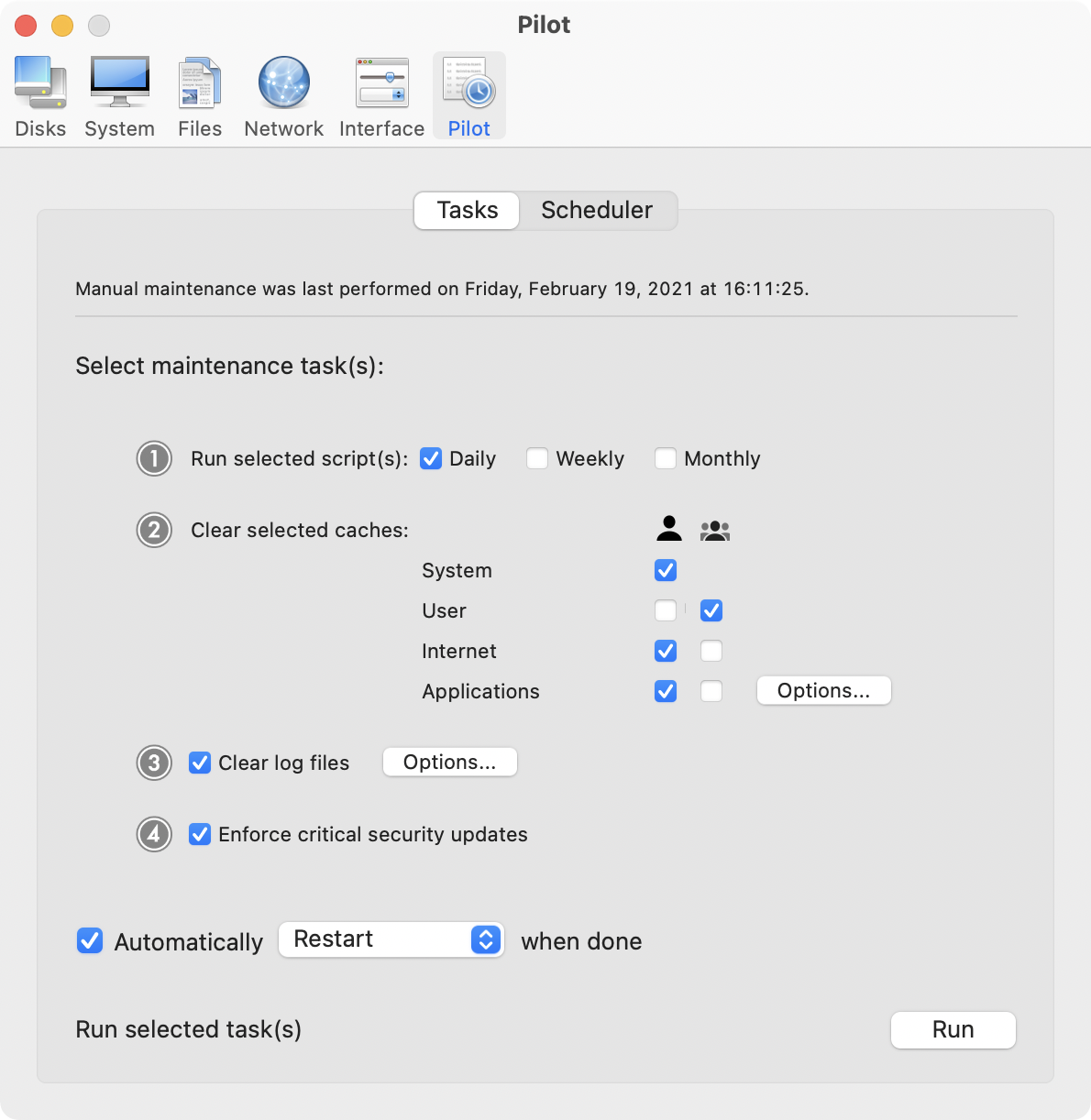
Ekero, Sweden - Maintain has released Cocktail 7.5.2 (Mavericks Edition), the latest maintenance update of Cocktail for users running OS X Mavericks 10.9. Cocktail is a general purpose utility for OS X that lets you clean, repair and optimize your Mac. The application serves up a perfect mix of maintenance tools and tweaks, all accessible through a clean and easy to use interface. Cocktail's features are arranged into five categories that helps you manage various aspects of your computer. It also comes with an automatic Pilot mode that allows you to simply press a button and relax, knowing that Cocktail will take care of the rest.
What's New:
* Added ability to change tool tip display delay (Interface - General)
Tool tips are little floating yellow tags of explanatory text that appear when you move the mouse pointer over an application button or other onscreen item.
* Added ability to disable App Napp feature entirely and system wide, for every single application and process (System - Misc)
App Nap is an energy feature that causes inactive applications to go into a paused state, helping to reduce power usage. While the idea of "napping" background applications to save energy seems like a good one overall, some users may not want their background applications interfered with and would prefer to manage their Mac's power usage on their own. You will need to restart the computer in order for changes to take effect.
* Improvements on the clear DNS cache procedure
* Addresses an issue in which Cocktail may fail to restart Core Audio daemon
* Improvements to the uninstaller
System Requirements:
Cocktail 7.5.2 (Mavericks Edition) requires OS X Mavericks 10.9 to run. Cocktail (Mountain Lion Edition) for OS X 10.8, Cocktail (Lion Edition) for OS X 10.7 and Cocktail (Snow Leopard Edition) for OS X 10.6 are available for download from Maintain website.
Pricing and Availability:
Cocktail is $19.00 (USD) for a single user license and available for purchase from the Maintain website.
Cocktail: http://www.maintain.se/cocktail
Download Cocktail 7.5.2 (Mavericks Edition): http://usa.maintain.se/CocktailME.dmg
Vimeo Video: http://vimeo.com/53001695
Purchase Cocktail: http://www.maintain.se/cocktail
Screenshot: http://www.maintain.se/downloads/screenshots/screenshot1.png
App Icon: http://www.maintain.se/downloads/screenshots/icon.png
Maintain develops tailored applications for Mac users. We work towards creating technical solutions which maintain your computer and make it as efficient and easy to use as possible. In addition, we offer comprehensive consultancy and support services which cover everything from operation of existing systems to purchase and implementation of new technical solutions. Among our clients are: Major League Baseball, Puma, The New York Times, Sony Pictures, Ericsson, Fortum, The City Of Calgary, Peak Performance, Loreal, Harvard University, Los Angeles Times, Swedish Film Institute, Weber, ESPN, Business Week, Swedish National Police Board, Norwegian Broadcasting Corporation, Getty Images, University of Texas, South Park Studios, CompUSA, bwin, Lockheed Martin, Defense Intelligence Agency, University of Michigan and hundred of thousands of Mac users around the world. Copyright (C) 2014 Maintain. All Rights Reserved. Apple, the Apple logo and Mac are registered trademarks of Apple Inc. in
the U.S. and/or other countries.
*******
Link To Article: http://prmac.com/release-id-68785.htm
*******
---------------------------------------------------------------------------------
Note that you can alter delivered distributions at any time.
Login to your account on prMac to alter your channel selection, or to opt-out at any time.
Maintain Releases Cocktail 7.5.2 (Mavericks Edition) - Published on 06/26/14
Maintain has released Cocktail 7.5.2 (Mavericks Edition), the latest maintenance update for users running OS X Mavericks. Cocktail is a general purpose utility for OS X that lets users clean, repair and optimize their Macs. This version adds ability to change tool tip display delay and ability to disable App Napp. It also contains improvements on the "Clear DNS cache procedure" and addresses an issue in which Cocktail may fail to restart Core Audio daemon.
Ekero, Sweden - Maintain has released Cocktail 7.5.2 (Mavericks Edition), the latest maintenance update of Cocktail for users running OS X Mavericks 10.9. Cocktail is a general purpose utility for OS X that lets you clean, repair and optimize your Mac. The application serves up a perfect mix of maintenance tools and tweaks, all accessible through a clean and easy to use interface. Cocktail's features are arranged into five categories that helps you manage various aspects of your computer. It also comes with an automatic Pilot mode that allows you to simply press a button and relax, knowing that Cocktail will take care of the rest.
What's New:
* Added ability to change tool tip display delay (Interface - General)
Tool tips are little floating yellow tags of explanatory text that appear when you move the mouse pointer over an application button or other onscreen item.
* Added ability to disable App Napp feature entirely and system wide, for every single application and process (System - Misc)
App Nap is an energy feature that causes inactive applications to go into a paused state, helping to reduce power usage. While the idea of "napping" background applications to save energy seems like a good one overall, some users may not want their background applications interfered with and would prefer to manage their Mac's power usage on their own. You will need to restart the computer in order for changes to take effect.
* Improvements on the clear DNS cache procedure
* Addresses an issue in which Cocktail may fail to restart Core Audio daemon
* Improvements to the uninstaller
System Requirements:
Cocktail 7.5.2 (Mavericks Edition) requires OS X Mavericks 10.9 to run. Cocktail (Mountain Lion Edition) for OS X 10.8, Cocktail (Lion Edition) for OS X 10.7 and Cocktail (Snow Leopard Edition) for OS X 10.6 are available for download from Maintain website.
Pricing and Availability:
Cocktail is $19.00 (USD) for a single user license and available for purchase from the Maintain website.
Cocktail: http://www.maintain.se/cocktail
Download Cocktail 7.5.2 (Mavericks Edition): http://usa.maintain.se/CocktailME.dmg
Vimeo Video: http://vimeo.com/53001695
Purchase Cocktail: http://www.maintain.se/cocktail
Screenshot: http://www.maintain.se/downloads/screenshots/screenshot1.png
App Icon: http://www.maintain.se/downloads/screenshots/icon.png

Maintain develops tailored applications for Mac users. We work towards creating technical solutions which maintain your computer and make it as efficient and easy to use as possible. In addition, we offer comprehensive consultancy and support services which cover everything from operation of existing systems to purchase and implementation of new technical solutions. Among our clients are: Major League Baseball, Puma, The New York Times, Sony Pictures, Ericsson, Fortum, The City Of Calgary, Peak Performance, Loreal, Harvard University, Los Angeles Times, Swedish Film Institute, Weber, ESPN, Business Week, Swedish National Police Board, Norwegian Broadcasting Corporation, Getty Images, University of Texas, South Park Studios, CompUSA, bwin, Lockheed Martin, Defense Intelligence Agency, University of Michigan and hundred of thousands of Mac users around the world. Copyright (C) 2014 Maintain. All Rights Reserved. Apple, the Apple logo and Mac are registered trademarks of Apple Inc. in
the U.S. and/or other countries.
*******
Link To Article: http://prmac.com/release-id-68785.htm
*******
---------------------------------------------------------------------------------
Note that you can alter delivered distributions at any time.
Login to your account on prMac to alter your channel selection, or to opt-out at any time.
Show Me The Animation Releases iOS App
A new article has been published at prMac.
Show Me The Animation Releases iOS App - Published on 06/26/14
The Show Me The Animation team are delighted to announce a specially curated iOS app is now available via the App Store. The app aims to showcase the best animation from around the world, from both award-winning animators to up-and-coming animation talent. Each film within the app provides a revenue stream that is shared. Users of the app have the flexibility of either streaming or downloading each film on their device. New films will be added to Show Me The Animation periodically.
Bristol, United Kingdom - Over the past few months Show Me The Animation has been busy creating a specially curated iOS app. The app aims to showcase the best animation from around the world, from both award-winning animators to up-and-coming animation talent.
The Show Me The Animation team are now are delighted to announce the app is now available to download via the Apple App Store for iOS devices. The app features a selection of 28 films hand selected by the Show Me The Animation team for you to enjoy. The short films selected offer an eclectic mix of styles from across the globe and between them have been screened at hundreds of festivals and won bags full of awards.
Each film within the app provides a revenue stream that is shared top heavy with the filmmaker (85/15). Some films are ad-supported, running an interstitial advert before and after the film is played. Other films allow the user to Pay-What-You-Want from pre-defined options (0.69/2.49/4.99) and "Fuel" the directors creativity. Finally some films are offered under a premium payment method and require a purchase before being viewed. With every option the intention is to help support the continued production of animated short films and see independent creativity thrive.
App developer Jake Hobbs stated, "Whilst running Show Me The Animation I have the pleasure of seeing hundreds of great animated short films, often these are produced on shoe-string budgets and from the pure love and dedication of their talented directors. The app is our attempt at creating mechanisms in which filmmakers can earn revenue from their creations and support the production of their future work."
Users of the app have the flexibility of either streaming or downloading each film on their device, meaning films can be viewed with or without a Wifi connection, perfect for the morning commute. Each film can also be shared across social networks as well as offering links to connect with the filmmakers themselves. So if you find a favourite film you can help spread the word about it directly from within the app.
Alongside the initial set of 28 films the app also includes Show Me The Animation's Faces of Animation series featuring interviews with top industry talent, as well as all of the monthly 'Do It In Ten' animation entries. There will also be regular updates to the app with new films added periodically and Show Me The Animation already has a number of films they are really excited about adding in the future. They are also accepting applications for films to be considered in future updates and interested film makers can find out more at the website.
Device Requirements:
* iPhone, iPad, and iPod touch
* Requires iOS 4.3 or later
* 31.1 MB
Pricing and Availability:
Show Me The Animation 1.0 is free and available worldwide exclusively through the App Store in the Entertainment category.
Show Me The Animation is created for the animation community. Providing you with the latest animation news and up-to-date listings of upcoming animation events. We also offer a showcase of the latest animation talent from around the globe and other regular features. Show Me The animation is run and maintained by WONKY Films & Helen Brunsdon.
WONKY Films: http://www.wonkyfilms.com
Show Me The Animation 1.0: http://www.showmetheanimation.com
Download from iTunes: https://itunes.apple.com/app/show-me-the-animation/id795077561
Screenshot 1: http://www.showmetheanimation.com/wp-content/uploads/2014/06/4-500x333.png
Screenshot 2: http://www.showmetheanimation.com/wp-content/uploads/2014/06/3-500x333.jpg
Screenshot 3: http://www.showmetheanimation.com/wp-content/uploads/2014/06/2-500x333.jpg
App developer WONKY Films is an award winning studio specialising in illustration and animation for broadcast, advertising and digital. WONKY work as a collective of creatives including illustrators, animators, musicians and writers to create content across a variety of media. Our passion is character animation and everyone at WONKY shares the same sense of humour that brings our characters to life. All Material and Software (C) Copyright 2014 WONKY Films. All Rights Reserved. Apple, the Apple logo, iPhone, iPod and iPad are registered trademarks of Apple Inc. in the U.S. and/or other countries. Other trademarks and registered trademarks may be the property of their respective owners.
*******
Link To Article: http://prmac.com/release-id-68769.htm
*******
---------------------------------------------------------------------------------
Note that you can alter delivered distributions at any time.
Login to your account on prMac to alter your channel selection, or to opt-out at any time.
Show Me The Animation Releases iOS App - Published on 06/26/14
The Show Me The Animation team are delighted to announce a specially curated iOS app is now available via the App Store. The app aims to showcase the best animation from around the world, from both award-winning animators to up-and-coming animation talent. Each film within the app provides a revenue stream that is shared. Users of the app have the flexibility of either streaming or downloading each film on their device. New films will be added to Show Me The Animation periodically.
Bristol, United Kingdom - Over the past few months Show Me The Animation has been busy creating a specially curated iOS app. The app aims to showcase the best animation from around the world, from both award-winning animators to up-and-coming animation talent.
The Show Me The Animation team are now are delighted to announce the app is now available to download via the Apple App Store for iOS devices. The app features a selection of 28 films hand selected by the Show Me The Animation team for you to enjoy. The short films selected offer an eclectic mix of styles from across the globe and between them have been screened at hundreds of festivals and won bags full of awards.
Each film within the app provides a revenue stream that is shared top heavy with the filmmaker (85/15). Some films are ad-supported, running an interstitial advert before and after the film is played. Other films allow the user to Pay-What-You-Want from pre-defined options (0.69/2.49/4.99) and "Fuel" the directors creativity. Finally some films are offered under a premium payment method and require a purchase before being viewed. With every option the intention is to help support the continued production of animated short films and see independent creativity thrive.
App developer Jake Hobbs stated, "Whilst running Show Me The Animation I have the pleasure of seeing hundreds of great animated short films, often these are produced on shoe-string budgets and from the pure love and dedication of their talented directors. The app is our attempt at creating mechanisms in which filmmakers can earn revenue from their creations and support the production of their future work."
Users of the app have the flexibility of either streaming or downloading each film on their device, meaning films can be viewed with or without a Wifi connection, perfect for the morning commute. Each film can also be shared across social networks as well as offering links to connect with the filmmakers themselves. So if you find a favourite film you can help spread the word about it directly from within the app.
Alongside the initial set of 28 films the app also includes Show Me The Animation's Faces of Animation series featuring interviews with top industry talent, as well as all of the monthly 'Do It In Ten' animation entries. There will also be regular updates to the app with new films added periodically and Show Me The Animation already has a number of films they are really excited about adding in the future. They are also accepting applications for films to be considered in future updates and interested film makers can find out more at the website.
Device Requirements:
* iPhone, iPad, and iPod touch
* Requires iOS 4.3 or later
* 31.1 MB
Pricing and Availability:
Show Me The Animation 1.0 is free and available worldwide exclusively through the App Store in the Entertainment category.
Show Me The Animation is created for the animation community. Providing you with the latest animation news and up-to-date listings of upcoming animation events. We also offer a showcase of the latest animation talent from around the globe and other regular features. Show Me The animation is run and maintained by WONKY Films & Helen Brunsdon.
WONKY Films: http://www.wonkyfilms.com
Show Me The Animation 1.0: http://www.showmetheanimation.com
Download from iTunes: https://itunes.apple.com/app/show-me-the-animation/id795077561
Screenshot 1: http://www.showmetheanimation.com/wp-content/uploads/2014/06/4-500x333.png

Screenshot 2: http://www.showmetheanimation.com/wp-content/uploads/2014/06/3-500x333.jpg

Screenshot 3: http://www.showmetheanimation.com/wp-content/uploads/2014/06/2-500x333.jpg

App developer WONKY Films is an award winning studio specialising in illustration and animation for broadcast, advertising and digital. WONKY work as a collective of creatives including illustrators, animators, musicians and writers to create content across a variety of media. Our passion is character animation and everyone at WONKY shares the same sense of humour that brings our characters to life. All Material and Software (C) Copyright 2014 WONKY Films. All Rights Reserved. Apple, the Apple logo, iPhone, iPod and iPad are registered trademarks of Apple Inc. in the U.S. and/or other countries. Other trademarks and registered trademarks may be the property of their respective owners.
*******
Link To Article: http://prmac.com/release-id-68769.htm
*******
---------------------------------------------------------------------------------
Note that you can alter delivered distributions at any time.
Login to your account on prMac to alter your channel selection, or to opt-out at any time.
Chester & Flop's Flying Numbers Adventure for iPad and iPhone Released
A new article has been published at prMac.
Chester & Flop's Flying Numbers Adventure for iPad and iPhone Released - Published on 06/26/14
Educational Gaming Company, Blue Moon Learning today introduces Chester & Flop's Flying Numbers Adventure for iPad and iPhone; a challenging and fun adventure game that teaches integers, decimals, and fractions to children ages 6-9. With pristine graphics, memorable music, and enchanting characters, Chester & Flop's Flying Numbers Adventure offers children ages 6-9 a delightful and engaging way to expand and apply their knowledge of numbers.
Madison, Wisconsin - Educational Gaming Company, Blue Moon Learning, today is pleased to announce the release of Chester & Flop's Flying Numbers Adventure for iPad and iPhone; a challenging and fun adventure game that teaches integers, decimals, and fractions to children ages 6-9 years old.
Set in the context of a flowery meadow, children playing Chester & Flop's Flying Numbers Adventure join Chester the butterfly and Flop the bunny on a trip to their garden. Along the way children are challenged to compare and sort integers, decimals, and fractions by tapping the screen to guide Chester and his number over or under oncoming numbers. After surmounting 10 numeric hurdles in each level, children reach the garden where they can feed Flop his favorite vegetables, direct Chester to the flowers, and interact with nature by sliding the clouds, setting the sun, drawing constellations in the night sky, and more.
Flying Numbers is packed with learning and fun, including 36 levels designed for children ages 6-9 years old by a team of both Montessori and public school teachers. Early levels begin with Common Core Standards, while later levels provide greater challenge with exposure to fractions, decimals, and even negative numbers.
Chester & Flop's Flying Numbers Adventure includes a horizontally scrolling number line ranging from negative 100 to 1000, and an interactive visualizer providing kids with a pictorial representation of each integer or fraction.
Chester & Flop's Flying Numbers Adventure perfectly balances entertainment with educational value, holding children's attention as they learn.
"There is so much we can do now, with this amazing technology that kids hold in their hands, to make learning and play one and the same, " explains Steve Glinberg, Blue Moon Learning's Founder and CEO.
"With Chester & Flop's Flying Numbers Adventure I aimed to provide children with an immersive and exciting educational game where they can grow their understanding of numbers while they play. When I watch my daughters play with determination and celebrate their successes as they progress from one level to the next, I know I have accomplished my goal."
With its pristine graphics, memorable music, and enchanting characters, Chester & Flop's Flying Numbers Adventure offers children ages 6-9 a delightful and engaging way to expand and apply their knowledge of integers, fractions, and decimals.
Also created by Blue Moon Learning, top ranked education apps 123 Color, 123 Glow, and KidCalc Math Fun have received critical acclaim from publications including The New York Times, iPhone Life Magazine, and Cult of Mac Magazine, and placement on Apple's list of New and Noteworthy iOS apps. With more than 3.5 million downloads, Blue Moon Learning's apps enable parents to feel great about the games their children are playing.
Blue Moon Learning: http://bluemoonlearning.com
Chester & Flop's Flying Numbers Adventure 1.07: http://kidcalc.wordpress.com/2014/06/25/626/
Purchase and Download: https://itunes.apple.com/app/chester-flops-flying-numbers/id889795332
Screenshots: http://docs.bluemoonlearning.com/pressreleases/20140626/Index.htm
App Icon: http://docs.bluemoonlearning.com/pressreleases/20140626/icon-256x256.png
Located in beautiful Madison, Wisconsin, Blue Moon Learning makes top selling mobile educational games for children. Blue Moon Learning was founded by, Steve Glinberg, a software developer, iPhone/iPad enthusiast, and dad who is passionate about finding simple and effective ways to teach even advanced concepts to young children. All Material and Software (C) 2014 Blue Moon Learning / All Rights Reserved. Apple, the Apple logo, iPhone, and iPod, are registered trademarks of Apple Computer in the U.S. and/or other countries.
*******
Link To Article: http://prmac.com/release-id-68782.htm
*******
---------------------------------------------------------------------------------
Note that you can alter delivered distributions at any time.
Login to your account on prMac to alter your channel selection, or to opt-out at any time.
Chester & Flop's Flying Numbers Adventure for iPad and iPhone Released - Published on 06/26/14
Educational Gaming Company, Blue Moon Learning today introduces Chester & Flop's Flying Numbers Adventure for iPad and iPhone; a challenging and fun adventure game that teaches integers, decimals, and fractions to children ages 6-9. With pristine graphics, memorable music, and enchanting characters, Chester & Flop's Flying Numbers Adventure offers children ages 6-9 a delightful and engaging way to expand and apply their knowledge of numbers.
Madison, Wisconsin - Educational Gaming Company, Blue Moon Learning, today is pleased to announce the release of Chester & Flop's Flying Numbers Adventure for iPad and iPhone; a challenging and fun adventure game that teaches integers, decimals, and fractions to children ages 6-9 years old.
Set in the context of a flowery meadow, children playing Chester & Flop's Flying Numbers Adventure join Chester the butterfly and Flop the bunny on a trip to their garden. Along the way children are challenged to compare and sort integers, decimals, and fractions by tapping the screen to guide Chester and his number over or under oncoming numbers. After surmounting 10 numeric hurdles in each level, children reach the garden where they can feed Flop his favorite vegetables, direct Chester to the flowers, and interact with nature by sliding the clouds, setting the sun, drawing constellations in the night sky, and more.
Flying Numbers is packed with learning and fun, including 36 levels designed for children ages 6-9 years old by a team of both Montessori and public school teachers. Early levels begin with Common Core Standards, while later levels provide greater challenge with exposure to fractions, decimals, and even negative numbers.
Chester & Flop's Flying Numbers Adventure includes a horizontally scrolling number line ranging from negative 100 to 1000, and an interactive visualizer providing kids with a pictorial representation of each integer or fraction.
Chester & Flop's Flying Numbers Adventure perfectly balances entertainment with educational value, holding children's attention as they learn.
"There is so much we can do now, with this amazing technology that kids hold in their hands, to make learning and play one and the same, " explains Steve Glinberg, Blue Moon Learning's Founder and CEO.
"With Chester & Flop's Flying Numbers Adventure I aimed to provide children with an immersive and exciting educational game where they can grow their understanding of numbers while they play. When I watch my daughters play with determination and celebrate their successes as they progress from one level to the next, I know I have accomplished my goal."
With its pristine graphics, memorable music, and enchanting characters, Chester & Flop's Flying Numbers Adventure offers children ages 6-9 a delightful and engaging way to expand and apply their knowledge of integers, fractions, and decimals.
Also created by Blue Moon Learning, top ranked education apps 123 Color, 123 Glow, and KidCalc Math Fun have received critical acclaim from publications including The New York Times, iPhone Life Magazine, and Cult of Mac Magazine, and placement on Apple's list of New and Noteworthy iOS apps. With more than 3.5 million downloads, Blue Moon Learning's apps enable parents to feel great about the games their children are playing.
Blue Moon Learning: http://bluemoonlearning.com
Chester & Flop's Flying Numbers Adventure 1.07: http://kidcalc.wordpress.com/2014/06/25/626/
Purchase and Download: https://itunes.apple.com/app/chester-flops-flying-numbers/id889795332
Screenshots: http://docs.bluemoonlearning.com/pressreleases/20140626/Index.htm
App Icon: http://docs.bluemoonlearning.com/pressreleases/20140626/icon-256x256.png

Located in beautiful Madison, Wisconsin, Blue Moon Learning makes top selling mobile educational games for children. Blue Moon Learning was founded by, Steve Glinberg, a software developer, iPhone/iPad enthusiast, and dad who is passionate about finding simple and effective ways to teach even advanced concepts to young children. All Material and Software (C) 2014 Blue Moon Learning / All Rights Reserved. Apple, the Apple logo, iPhone, and iPod, are registered trademarks of Apple Computer in the U.S. and/or other countries.
*******
Link To Article: http://prmac.com/release-id-68782.htm
*******
---------------------------------------------------------------------------------
Note that you can alter delivered distributions at any time.
Login to your account on prMac to alter your channel selection, or to opt-out at any time.
Subscribe to:
Posts (Atom)