A new article has been published at prMac.
Play With Your Creativity (On an iPad) with Brainbean 1.2 - Published on 07/07/14
If you're looking for brain games on your iPad, you'll want to get Brainbean 1.2 from independent developer Tanner Christensen. Fun for all ages, this colorful and elegantly designed app is full of creative mini-games, each 60 seconds, that will challenge your creativity and exercise your brain. Brainbean combines time-tested creativity techniques with the touch-capable power of the iPad. There are hundreds of ways to explore each game, so you'll never be bored.
Salt Lake City, Utah - If you're looking for a creative-boosting brain game on your iPad, look no further than Brainbean from developer Tanner Christensen. This colorful app is elegantly designed and fun for both children and adults. Brainbean reached the #3 position on the "Most Popular" apps its first week in the store. To-date the app has been downloaded more than 600,000 times.
"With its diversity of games, Brainbean provides both cognitive and creative challenges that will appeal to children and adults alike." - TUAW
Brainbean combines time-tested creativity techniques with the touch-capable power of the iPad in order to help you:
* Build creative confidence
* Test working memory
* Craft resourcefulness
* Energize imagination
* Boost problem solving skills
"Brainbean is a colorful, kid-friendly game that will boost your students' critical thinking and problem solving skills." - Class Tech Tips
Currently included games:
* Letter List
* Incomplete Figure
* Remote Association
* Pattern Tiles
* Word Scramble
* Mosaic Drawing
* Broken Connections
* Block Builder
Brainbean is offered as an iPad-only app at the moment, with future versions coming out for iPhone. There are hundreds of ways to explore each game, so you'll never be bored with Brainbean, exclusively on your iPad. There's no complete right or wrong way to play the games.
"Brainbean stands out thanks to the quality of the artwork and the variety of challenges on offer." - MSN Best New Apps
Device Requirements:
* Compatible with iPad
* Requires iOS 6.0 or later
* 55.7 MB
Pricing and Availability:
Brainbean 1.2 is Free and available worldwide exclusively through the App Store in the Education category. Brainbean offers eight unique games based on scientific creative exercises. Four are free to play, and four additional ones can be unlocked for just $0.99 each (or $2.99 for all four). Each game is just 60 seconds, so you can pick-up Brainbean for a quick brain teaser, or play for an hour or more to really get the most benefits. For more information, please contact Tanner Christensen.
Tanner Christensen: http://tannerchristensen.com
Brainbean 1.2: http://brainbeanapp.com
Download from iTunes: https://itunes.apple.com/app/brainbean/id861639107
YouTube Video (Promo): https://www.youtube.com/watch?v=ZrHYqPbdRCU
Screenshot: http://a3.mzstatic.com/us/r30/Purple/v4/c7/6f/5a/c76f5a1e-cece-7f96-db17-97a7b4334a00/screen480x480.jpeg
Press Kit (zip): http://brainbeanapp.com/presskit
Tanner Christensen is an independent, Salt Lake City-based developer who is best known for his creativity apps Prompts, Oflow, and Drwer. Over the past several years he's made a name for himself online as a creative specialist, blogging at CreativeSomething and contributing to Behance's 99U (part of the Adobe family). Copyright (C) 2014 Tanner Christensen. All Rights Reserved. Apple, the Apple logo, iPhone, iPod and iPad are registered trademarks of Apple Inc. in the U.S. and/or other countries. Other trademarks and registered trademarks may be the property of their respective owners.
*******
Link To Article: http://prmac.com/release-id-69036.htm
*******
---------------------------------------------------------------------------------
Note that you can alter delivered distributions at any time.
Login to your account on prMac to alter your channel selection, or to opt-out at any time.


Football Fight Songs: College and Pro Football Team Anthems on iOS
A new article has been published at prMac.
Football Fight Songs: College and Pro Football Team Anthems on iOS - Published on 07/07/14
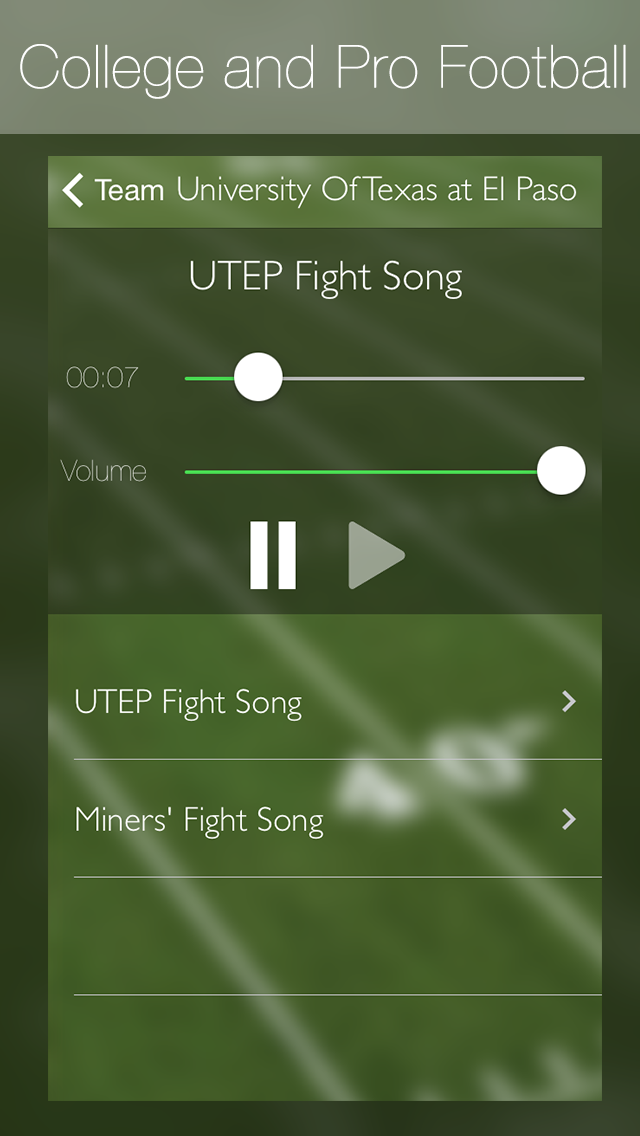
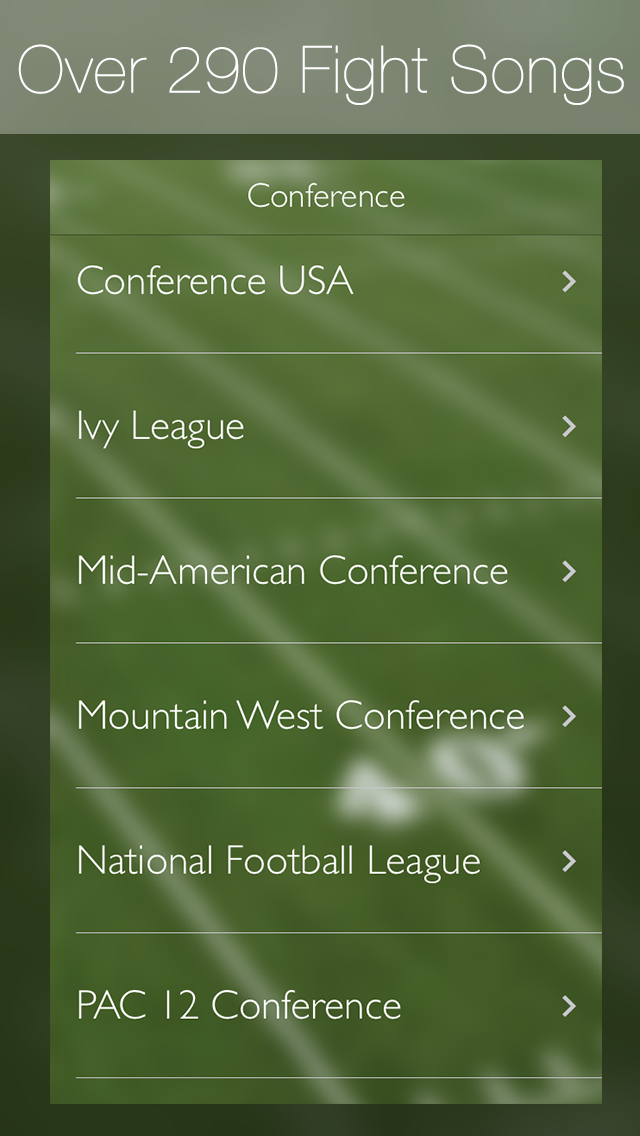
Sperensis Applications announces an updated version of Football Fight Songs for iOS. Launched in July 2009, Football Fight Songs was the first application to feature anthems from Pro Football teams. In both professional and amateur sports, fight songs are a popular way for fans to cheer for their team. As well as new songs, the app's interface has been redesigned. As of today, the latest version brings the inclusion of college teams, which totals over 290 fight songs available.
Toronto, Canada - Bristol, United Kingdom - Sperensis Applications are pleased to announce an updated version of Football Fight Songs for iOS. Launched in July 2009, Football Fight Songs was the first application to feature anthems from Pro Football teams. As of today, the latest version brings the inclusion of College teams, which totals over 290 fight songs available.
A fight song is a song associated with a team's school. In both professional and amateur sports, fight songs are a popular way for fans to cheer for their team. Although the term "fight song" is primarily used in America, the use of fight songs is commonplace around the world, but they may be referred to as team anthems or team songs in other countries.
As well as new songs, the app's interface has been redesigned. "The apps appearance has changed little over the last 5 years. It was time to bring Football Fight Songs up to date with an easy to use, well structured new look," says Andy Edwards, Founder of Sperensis Applications. "We will be bringing regular updates to continually add new songs for more teams."
Selected teams from the following conferences include:
* American Athletic Conference
* Atlantic Coast Conference
* Big Ten Conference
* Big Twelve Conference
* Conference USA
* Ivy League
* Mid-American Conference
* Mountain West Conference
* National Football League
* PAC 12 Conference
* Southeastern Conference
* Sun Belt Conference
Device Requirements:
* iPhone, iPad or iPod touch
* Requires iOS 7.0 or later
* 112 MB
Pricing and Availability:
Football Fight Songs: College & Pro Football Team Anthems 3.0 is priced at $0.99 (USD) and is available worldwide exclusively through the App Store in the Sports category.
Football Fight Songs: College & Pro Football Team Anthems 3.0 3.0: https://itunes.apple.com/app/football-fight-songs/id323848046
Full list of teams : http://sperensis.com/FightSongs/
Screenshot 1: https://s1.mzstatic.com/us/r30/Purple/v4/c6/c5/7c/c6c57c3f-991e-cc49-8479-6e191b070688/mzl.oagjwrpk.png
Screenshot 2: https://s4.mzstatic.com/us/r30/Purple4/v4/d6/c8/43/d6c843c1-e53c-6db9-0a1e-fa1a17e21aac/mzl.ajanivao.png
App Icon: https://s2.mzstatic.com/us/r30/Purple6/v4/bc/ef/cc/bcefccc7-95ae-790d-c31a-89186b13332f/icon340x340.png
Sperensis Applications is a UK / Canadian based mobile app development company established in 2009. Applications released by Sperensis has seen global success in the overall top 10 paid charts and featured on the iTunes store. Copyright (C) 2014 Sperensis Applications. All Rights Reserved. Apple, the Apple logo, iPhone, iPad, iPad mini, iPod touch, and Mac are registered trademarks of Apple Inc. in the U.S. and/or other countries. Additional Registered Trademarks may be the property of their respective owners.
*******
Link To Article: http://prmac.com/release-id-68996.htm
*******
---------------------------------------------------------------------------------
Note that you can alter delivered distributions at any time.
Login to your account on prMac to alter your channel selection, or to opt-out at any time.
Football Fight Songs: College and Pro Football Team Anthems on iOS - Published on 07/07/14
Sperensis Applications announces an updated version of Football Fight Songs for iOS. Launched in July 2009, Football Fight Songs was the first application to feature anthems from Pro Football teams. In both professional and amateur sports, fight songs are a popular way for fans to cheer for their team. As well as new songs, the app's interface has been redesigned. As of today, the latest version brings the inclusion of college teams, which totals over 290 fight songs available.
Toronto, Canada - Bristol, United Kingdom - Sperensis Applications are pleased to announce an updated version of Football Fight Songs for iOS. Launched in July 2009, Football Fight Songs was the first application to feature anthems from Pro Football teams. As of today, the latest version brings the inclusion of College teams, which totals over 290 fight songs available.
A fight song is a song associated with a team's school. In both professional and amateur sports, fight songs are a popular way for fans to cheer for their team. Although the term "fight song" is primarily used in America, the use of fight songs is commonplace around the world, but they may be referred to as team anthems or team songs in other countries.
As well as new songs, the app's interface has been redesigned. "The apps appearance has changed little over the last 5 years. It was time to bring Football Fight Songs up to date with an easy to use, well structured new look," says Andy Edwards, Founder of Sperensis Applications. "We will be bringing regular updates to continually add new songs for more teams."
Selected teams from the following conferences include:
* American Athletic Conference
* Atlantic Coast Conference
* Big Ten Conference
* Big Twelve Conference
* Conference USA
* Ivy League
* Mid-American Conference
* Mountain West Conference
* National Football League
* PAC 12 Conference
* Southeastern Conference
* Sun Belt Conference
Device Requirements:
* iPhone, iPad or iPod touch
* Requires iOS 7.0 or later
* 112 MB
Pricing and Availability:
Football Fight Songs: College & Pro Football Team Anthems 3.0 is priced at $0.99 (USD) and is available worldwide exclusively through the App Store in the Sports category.
Football Fight Songs: College & Pro Football Team Anthems 3.0 3.0: https://itunes.apple.com/app/football-fight-songs/id323848046
Full list of teams : http://sperensis.com/FightSongs/
Screenshot 1: https://s1.mzstatic.com/us/r30/Purple/v4/c6/c5/7c/c6c57c3f-991e-cc49-8479-6e191b070688/mzl.oagjwrpk.png
Screenshot 2: https://s4.mzstatic.com/us/r30/Purple4/v4/d6/c8/43/d6c843c1-e53c-6db9-0a1e-fa1a17e21aac/mzl.ajanivao.png
App Icon: https://s2.mzstatic.com/us/r30/Purple6/v4/bc/ef/cc/bcefccc7-95ae-790d-c31a-89186b13332f/icon340x340.png

Sperensis Applications is a UK / Canadian based mobile app development company established in 2009. Applications released by Sperensis has seen global success in the overall top 10 paid charts and featured on the iTunes store. Copyright (C) 2014 Sperensis Applications. All Rights Reserved. Apple, the Apple logo, iPhone, iPad, iPad mini, iPod touch, and Mac are registered trademarks of Apple Inc. in the U.S. and/or other countries. Additional Registered Trademarks may be the property of their respective owners.
*******
Link To Article: http://prmac.com/release-id-68996.htm
*******
---------------------------------------------------------------------------------
Note that you can alter delivered distributions at any time.
Login to your account on prMac to alter your channel selection, or to opt-out at any time.
ABBYY FineReader Pro for Mac Now Supports Seven Interface Languages
A new article has been published at prMac.
ABBYY FineReader Pro for Mac Now Supports Seven Interface Languages - Published on 07/07/14
ABBYY FineReader Pro for Mac is a professional OCR application for efficient document scanning and conversion. The app provides handy tools for scanning documents and converting images of documents. It also allows users to process and recognize only selected areas on a document to quickly copy and quote information. FineReader Pro for Mac can also be effectively used to prepare documents for use by various text-to-speech utilities. The app now supports seven interface languages.
Moscow, Russian Federation - ABBYY(R), a leading provider of document recognition, data capture and linguistic technologies and services, announces that FineReader Pro for Mac, a professional OCR (Optical Character Recognition) application for efficient document scanning and conversion on the Mac platform is now available with seven user interface languages including English, German, French, Italian, Russian, Spanish, and Japanese. The application allows Mac users to easily edit, share, archive and search through their documents by turning them into popular electronic file formats, as well as effortlessly copy and quote text from scans, PDFs and digital photos. By providing highly accurate text recognition, intelligent reconstruction of layout and formatting, and a straightforward interface, FineReader Pro for Mac offers a reliable alternative to manual retyping.
Aimed to simplify everyday work with documents and images, FineReader Pro for Mac streamlines tasks which have historically been time-consuming for Mac users. The solution provides handy tools for scanning documents and converting images of documents such as scans, photographs and PDFs into popular formats including DOCX, ODT, RTF, XSLX, searchable and protected PDF and PDF/A, PPTX, HTML, EPUB(R), and FB2. In addition, it allows users to process and recognize only selected areas on a document to quickly copy and quote information they need without having to process the entire document. FineReader Pro for Mac can also be effectively used to prepare documents for use by various text-to-speech utilities.
Features include:
* Unmatched OCR Accuracy and Broadest Language Support on Mac - FineReader Pro for Mac is based on ABBYY's award-winning OCR and document conversion technology that delivers up to 99.8 percent accuracy* of character recognition. Moreover, it automatically detects and recognizes text in more than 180 languages including European languages, Chinese, Japanese, Korean, Thai, Vietnamese, Hebrew and Arabic - in any combination.
* Converting to Microsoft(R) Word, PDF, and Apache OpenOffice Writer with Native Formatting - With ABBYY's intelligent Adaptive Document Recognition Technology (ADRT(R)), FineReader Pro for Mac precisely re-creates document structure and formatting across multiple pages, including text size and font styles, tables, diagrams, columns, headers, footers, footnotes, table of contents, page numbers and other attributes commonly found in multi-page documents. When saving to PDF, the application identifies and reproduces the document's content outline bookmarks with live links for better navigating and reading.
* Intuitive, Task-Oriented User Interface - FineReader Pro for Mac offers a highly-optimized, easy-to-navigate user interface designed to reduce the amount of steps typically required to process documents to a single click of a button.
* Digital Camera OCR and Image Pre-processing - Users can photograph documents for OCR and conversion by using their cameras and mobile devices as alternatives to common scanners. Depending on the image, FineReader Pro for Mac applies various image pre-processing options to correct possible distortions before recognition. With its versatile Image Editor, users can also correct brightness and contrast, straighten curved text lines, correct trapezium distortions, reduce ISO noise, remove motion blur, split dual pages, crop images, and more.
* Reliable Archiving and Sharing of PDFs - FineReader Pro for Mac allows users to truly leverage the PDF format in their daily work by turning documents into searchable, compressed and protected PDF files. It can also create PDF outlines for fast navigation across a document, support tagged PDFs that are optimized for portable and screen reader devices, and export to the PDF/A format for long-term archiving.
* Quick E-book Creation - The application can be easily used to convert paper documents and images to formats supported by e-book readers, tablet PCs and smartphones, including the popular Electronic Publication (.ePub) and FictionBook (.fb2) formats.
* According to internal ABBYY testing - Accuracy and formatting results can vary depending on factors such as document quality and scanner settings.
Availability:
The latest version of FineReader Pro for Mac with seven interface languages is available for purchase via the Mac App Store and the ABBYY Online store. Customers who previously purchased FineReader Pro for Mac will have access to newly added interface languages through updates in the Mac App Store or by downloading the new version from the ABBYY Web site.
ABBYY: http://www.abbyy.com/?from=prmac
ABBYY FineReader Pro for Mac: http://finereader.abbyy.com/pro_for_mac/?from=prmac
Trial Download: http://download.abbyy.com/frmac_pro/
Purchase: http://shopping.abbyy.com/frmac_pro/dl/
Screenshot: http://www.abbyy.com/adx/aspx/adxGetMedia.aspx?width=1394&height=1116&DocID=4f6d2889-800c-49b5-998b-2ea82614d03a&Filename=screen_3%20Main%20window.png
Application Icon: http://www.abbyy.com/frmac_pro/icon512.png
ABBYY is a leading provider of document recognition, data capture, and linguistic technologies and services. ABBYY products are used in large-scale government projects such as those of Australian Taxation Office, Lithuanian Tax Inspectorate, Ministry of Education of Russia, Ministry of Education of Ukraine, and Montgomery County Government of the USA. Companies that license ABBYY technologies include BancTec, Canon, EMC/Captiva, Hewlett-Packard, KnowledgeLake, Microsoft, NewSoft, Notable Solutions, Samsung Electronics and more. ABBYY OCR applications are shipped with equipment from the world's top manufacturers such as Epson, Fujitsu, Fuji Xerox, Microtek, Panasonic, Plustek, Toshiba, and Xerox. ABBYY is headquartered in Moscow, Russia, with offices in Germany, the UK, the United States, Canada, Ukraine, Cyprus, Australia, Japan and Taiwan. ABBYY, FineReader, ADRT are either registered trademarks or trademarks of ABBYY Software Ltd. Mac is a trademark of Apple Inc., registered in
the U.S. and other countries. Other product names mentioned herein may be trademarks and/or registered trademarks of their respective owners.
*******
Link To Article: http://prmac.com/release-id-69028.htm
*******
---------------------------------------------------------------------------------
Note that you can alter delivered distributions at any time.
Login to your account on prMac to alter your channel selection, or to opt-out at any time.
ABBYY FineReader Pro for Mac Now Supports Seven Interface Languages - Published on 07/07/14
ABBYY FineReader Pro for Mac is a professional OCR application for efficient document scanning and conversion. The app provides handy tools for scanning documents and converting images of documents. It also allows users to process and recognize only selected areas on a document to quickly copy and quote information. FineReader Pro for Mac can also be effectively used to prepare documents for use by various text-to-speech utilities. The app now supports seven interface languages.
Moscow, Russian Federation - ABBYY(R), a leading provider of document recognition, data capture and linguistic technologies and services, announces that FineReader Pro for Mac, a professional OCR (Optical Character Recognition) application for efficient document scanning and conversion on the Mac platform is now available with seven user interface languages including English, German, French, Italian, Russian, Spanish, and Japanese. The application allows Mac users to easily edit, share, archive and search through their documents by turning them into popular electronic file formats, as well as effortlessly copy and quote text from scans, PDFs and digital photos. By providing highly accurate text recognition, intelligent reconstruction of layout and formatting, and a straightforward interface, FineReader Pro for Mac offers a reliable alternative to manual retyping.
Aimed to simplify everyday work with documents and images, FineReader Pro for Mac streamlines tasks which have historically been time-consuming for Mac users. The solution provides handy tools for scanning documents and converting images of documents such as scans, photographs and PDFs into popular formats including DOCX, ODT, RTF, XSLX, searchable and protected PDF and PDF/A, PPTX, HTML, EPUB(R), and FB2. In addition, it allows users to process and recognize only selected areas on a document to quickly copy and quote information they need without having to process the entire document. FineReader Pro for Mac can also be effectively used to prepare documents for use by various text-to-speech utilities.
Features include:
* Unmatched OCR Accuracy and Broadest Language Support on Mac - FineReader Pro for Mac is based on ABBYY's award-winning OCR and document conversion technology that delivers up to 99.8 percent accuracy* of character recognition. Moreover, it automatically detects and recognizes text in more than 180 languages including European languages, Chinese, Japanese, Korean, Thai, Vietnamese, Hebrew and Arabic - in any combination.
* Converting to Microsoft(R) Word, PDF, and Apache OpenOffice Writer with Native Formatting - With ABBYY's intelligent Adaptive Document Recognition Technology (ADRT(R)), FineReader Pro for Mac precisely re-creates document structure and formatting across multiple pages, including text size and font styles, tables, diagrams, columns, headers, footers, footnotes, table of contents, page numbers and other attributes commonly found in multi-page documents. When saving to PDF, the application identifies and reproduces the document's content outline bookmarks with live links for better navigating and reading.
* Intuitive, Task-Oriented User Interface - FineReader Pro for Mac offers a highly-optimized, easy-to-navigate user interface designed to reduce the amount of steps typically required to process documents to a single click of a button.
* Digital Camera OCR and Image Pre-processing - Users can photograph documents for OCR and conversion by using their cameras and mobile devices as alternatives to common scanners. Depending on the image, FineReader Pro for Mac applies various image pre-processing options to correct possible distortions before recognition. With its versatile Image Editor, users can also correct brightness and contrast, straighten curved text lines, correct trapezium distortions, reduce ISO noise, remove motion blur, split dual pages, crop images, and more.
* Reliable Archiving and Sharing of PDFs - FineReader Pro for Mac allows users to truly leverage the PDF format in their daily work by turning documents into searchable, compressed and protected PDF files. It can also create PDF outlines for fast navigation across a document, support tagged PDFs that are optimized for portable and screen reader devices, and export to the PDF/A format for long-term archiving.
* Quick E-book Creation - The application can be easily used to convert paper documents and images to formats supported by e-book readers, tablet PCs and smartphones, including the popular Electronic Publication (.ePub) and FictionBook (.fb2) formats.
* According to internal ABBYY testing - Accuracy and formatting results can vary depending on factors such as document quality and scanner settings.
Availability:
The latest version of FineReader Pro for Mac with seven interface languages is available for purchase via the Mac App Store and the ABBYY Online store. Customers who previously purchased FineReader Pro for Mac will have access to newly added interface languages through updates in the Mac App Store or by downloading the new version from the ABBYY Web site.
ABBYY: http://www.abbyy.com/?from=prmac
ABBYY FineReader Pro for Mac: http://finereader.abbyy.com/pro_for_mac/?from=prmac
Trial Download: http://download.abbyy.com/frmac_pro/
Purchase: http://shopping.abbyy.com/frmac_pro/dl/
Screenshot: http://www.abbyy.com/adx/aspx/adxGetMedia.aspx?width=1394&height=1116&DocID=4f6d2889-800c-49b5-998b-2ea82614d03a&Filename=screen_3%20Main%20window.png

Application Icon: http://www.abbyy.com/frmac_pro/icon512.png

ABBYY is a leading provider of document recognition, data capture, and linguistic technologies and services. ABBYY products are used in large-scale government projects such as those of Australian Taxation Office, Lithuanian Tax Inspectorate, Ministry of Education of Russia, Ministry of Education of Ukraine, and Montgomery County Government of the USA. Companies that license ABBYY technologies include BancTec, Canon, EMC/Captiva, Hewlett-Packard, KnowledgeLake, Microsoft, NewSoft, Notable Solutions, Samsung Electronics and more. ABBYY OCR applications are shipped with equipment from the world's top manufacturers such as Epson, Fujitsu, Fuji Xerox, Microtek, Panasonic, Plustek, Toshiba, and Xerox. ABBYY is headquartered in Moscow, Russia, with offices in Germany, the UK, the United States, Canada, Ukraine, Cyprus, Australia, Japan and Taiwan. ABBYY, FineReader, ADRT are either registered trademarks or trademarks of ABBYY Software Ltd. Mac is a trademark of Apple Inc., registered in
the U.S. and other countries. Other product names mentioned herein may be trademarks and/or registered trademarks of their respective owners.
*******
Link To Article: http://prmac.com/release-id-69028.htm
*******
---------------------------------------------------------------------------------
Note that you can alter delivered distributions at any time.
Login to your account on prMac to alter your channel selection, or to opt-out at any time.
Output Factory Server for Adobe InDesign Now Supports CC 2014 Release
A new article has been published at prMac.
Output Factory Server for Adobe InDesign Now Supports CC 2014 Release - Published on 07/07/14
Zevrix Solutions announces Output Factory Server 1.0.17, a compatibility update to its output workflow automation solution for Adobe InDesign. Output Factory Server automates printing and exporting from InDesign by processing files from hot folders. The software offloads output tasks to a central system leaving operator workstations free from the output process. The new version makes Output Factory Server compatible with the 2014 release of InDesign CC featured as part of Adobe Creative Cloud.
Toronto (ON) Canada - Zevrix Solutions today announces the release of Output Factory Server 1.0.17, a compatibility update to its solution to automate printing, exporting and post-processing from Adobe InDesign. Developed originally for a major magazine publisher in the United States to free up their operator computers from outputting InDesign files, the software automates InDesign workflow by processing files from watched hot folders.
The new version makes Output Factory Server compatible with the recently announced 2014 release of InDesign CC, featured as part of Adobe Creative Cloud. The update is offered free of charge to Output Factory Server users. The same version of Output Factory Server can be used with any version of InDesign from CS3 and later.
"Output Factory Server is an extremely useful utility for a busy production facility or advertising agency," writes David Creamer in Layers magazine. "It can save lots of time - which equates to money."
Under Output Factory Server workflow, production artists, prepress operators and designers simply copy InDesign jobs to hot folders that reside on a network. Users can create hot folders for any type of output - for example hi-res PDF, large format printing, EPUB files and so on.
Key Features:
* Print and export InDesign files automatically from watched hot folders
* Support for print, PDF, PostScript, EPS, JPEG, Flash, EPUB and other formats
* Export InDesign files as single pages
* Layer versioning
* Variable output file names
* Preflight files before output
* Automatic e-mail notifications
* Serves unlimited users on a network
Pricing and Availability:
Output Factory Server can be purchased from Zevrix web site for USD $699.95, as well as from authorized resellers. Trial is also available for download. BatchOutput Server users can upgrade for $350. Output Factory Server runs on Mac OS X 10.6-10.9 and works with Adobe InDesign CS3-CC 2014.
Zevrix Solutions: http://zevrix.com
Output Factory Server 1.0.17: http://zevrix.com/OutputFactoryServer.php
Download: http://zevrix.com/OutputFactoryServer.dmg
Purchase: http://zevrix.com/store.php
Screenshot: http://zevrix.com/screenshots/ofs1/ofs-beta-pdf.jpg
Located in Toronto, Canada, Zevrix Solutions provides automation and productivity solutions for Adobe Creative Suite software, PDF and graphic file diagnostics and Microsoft Office on Mac OS. Zevrix is dedicated to help professionals increase their profits through automating everyday tasks, producing error-free documents, saving disk space and cutting production costs. For more information, visit their website. Copyright (C) 2014 Zevrix Solutions. All Rights Reserved. Apple, the Apple logo, Macintosh and Mac OS X are registered trademarks of Apple Inc. in the U.S. and/or other countries. Other trademarks and registered trademarks may be the property of their respective owners.
*******
Link To Article: http://prmac.com/release-id-69033.htm
*******
---------------------------------------------------------------------------------
Note that you can alter delivered distributions at any time.
Login to your account on prMac to alter your channel selection, or to opt-out at any time.
Output Factory Server for Adobe InDesign Now Supports CC 2014 Release - Published on 07/07/14
Zevrix Solutions announces Output Factory Server 1.0.17, a compatibility update to its output workflow automation solution for Adobe InDesign. Output Factory Server automates printing and exporting from InDesign by processing files from hot folders. The software offloads output tasks to a central system leaving operator workstations free from the output process. The new version makes Output Factory Server compatible with the 2014 release of InDesign CC featured as part of Adobe Creative Cloud.
Toronto (ON) Canada - Zevrix Solutions today announces the release of Output Factory Server 1.0.17, a compatibility update to its solution to automate printing, exporting and post-processing from Adobe InDesign. Developed originally for a major magazine publisher in the United States to free up their operator computers from outputting InDesign files, the software automates InDesign workflow by processing files from watched hot folders.
The new version makes Output Factory Server compatible with the recently announced 2014 release of InDesign CC, featured as part of Adobe Creative Cloud. The update is offered free of charge to Output Factory Server users. The same version of Output Factory Server can be used with any version of InDesign from CS3 and later.
"Output Factory Server is an extremely useful utility for a busy production facility or advertising agency," writes David Creamer in Layers magazine. "It can save lots of time - which equates to money."
Under Output Factory Server workflow, production artists, prepress operators and designers simply copy InDesign jobs to hot folders that reside on a network. Users can create hot folders for any type of output - for example hi-res PDF, large format printing, EPUB files and so on.
Key Features:
* Print and export InDesign files automatically from watched hot folders
* Support for print, PDF, PostScript, EPS, JPEG, Flash, EPUB and other formats
* Export InDesign files as single pages
* Layer versioning
* Variable output file names
* Preflight files before output
* Automatic e-mail notifications
* Serves unlimited users on a network
Pricing and Availability:
Output Factory Server can be purchased from Zevrix web site for USD $699.95, as well as from authorized resellers. Trial is also available for download. BatchOutput Server users can upgrade for $350. Output Factory Server runs on Mac OS X 10.6-10.9 and works with Adobe InDesign CS3-CC 2014.
Zevrix Solutions: http://zevrix.com
Output Factory Server 1.0.17: http://zevrix.com/OutputFactoryServer.php
Download: http://zevrix.com/OutputFactoryServer.dmg
Purchase: http://zevrix.com/store.php
Screenshot: http://zevrix.com/screenshots/ofs1/ofs-beta-pdf.jpg

Located in Toronto, Canada, Zevrix Solutions provides automation and productivity solutions for Adobe Creative Suite software, PDF and graphic file diagnostics and Microsoft Office on Mac OS. Zevrix is dedicated to help professionals increase their profits through automating everyday tasks, producing error-free documents, saving disk space and cutting production costs. For more information, visit their website. Copyright (C) 2014 Zevrix Solutions. All Rights Reserved. Apple, the Apple logo, Macintosh and Mac OS X are registered trademarks of Apple Inc. in the U.S. and/or other countries. Other trademarks and registered trademarks may be the property of their respective owners.
*******
Link To Article: http://prmac.com/release-id-69033.htm
*******
---------------------------------------------------------------------------------
Note that you can alter delivered distributions at any time.
Login to your account on prMac to alter your channel selection, or to opt-out at any time.
Dinosaur Mix, Create your own dinosaur
A new article has been published at prMac.
Dinosaur Mix, Create your own dinosaur - Published on 07/07/14
Cowly Owl introduces Dinosaur Mix for iPhone, iPod touch and iPad, available worldwide on the App Store. Mix and swap body parts then see it come to life. Explore the world, let out a roar and find eggs to change your dinosaur's appearance.Mix up the body, head, tail and legs from a Tyrannosaurus, Spinosaurus, Triceratops, Stegosaurus and Brachiosaurus into many combinations. Dinosaur Mix is a child safe game for children betwenn 2-6 years.
London, United Kingdom - Cowly Owl is happy to introduce the release of Dinosaur Mix, for iPhone, iPod touch and iPad, available worldwide on the App Store. Create your own dinosaur. Mix and swap body parts then see it come to life. Explore the world, let out a roar and find eggs to change your dinosaur's appearance.Mix up the body, head, tail and legs from a Tyrannosaurus, Spinosaurus, Triceratops, Stegosaurus and Brachiosaurus into many combinations.
Features:
* Find the right food to feed your dinosaur
* Stomp around the forest or volcanic plains
* Play with the wildlife and scenery
* Child friendly dinosaur noises
* No goals or objectives, just a free play sandbox
A child safe app with no in-app purchases, no social media, no advertising, and no external links, this app is suitable for children between 2 - 6 years old. Created by Cowly Owl, a British micro-studio creating playful digital toys and educational games.
"It gets children to build colourful dinosaurs from their constituent body parts, then feed them and send them off exploring the scenery. Creative and fun." Stuart Dredge, The Guardian
"For the most part, I enjoy the slow-paced and stress-free gameplay. I think it's a nice change from the bright, bombastic apps I usually review." Geeks with Juniors
Device Requirements:
* iPhone, iPad, and iPod touch
* iOS 5.0 or later
* 70.9 MB
Pricing and Availability:
Dinosaur Mix 1.01 is $2.99 USD (or equivalent amount in other currencies) and available worldwide exclusively through the App Store in the Education category.
Dinosaur Mix 1.0.1: http://www.cowlyowl.com/dinosaur-mix
Purchase and Download from iTunes: https://itunes.apple.com/app/dinosaur-mix/id743631886
YouTube Video (Trailer): http://www.youtube.com/watch?v=4pYooFh7k98
Screenshot: http://a3.mzstatic.com/us/r30/Purple6/v4/f9/6a/61/f96a6167-ddef-bd5c-a914-a6078a9096a9/screen568x568.jpeg
App Icon: http://a2.mzstatic.com/us/r30/Purple/v4/d3/6c/3d/d36c3d5c-bf0d-a64a-28b9-03095d8d9c23/mzl.qizcukaj.175x175-75.jpg
Cowly Owl is a British studio creating playful digital toys, educational apps and interactive experiences. Dinosaur Mix is our 3rd app after Little Digits (finger counting for iPad) and Makego, a digital toy that turned your iPhone into a toy car. Copyright (C) 2014 Cowly Owl Ltd. All Rights Reserved. Apple, the Apple logo, iPhone, iPod and iPad are registered trademarks of Apple Inc. in the U.S. and/or other countries.
*******
Link To Article: http://prmac.com/release-id-69032.htm
*******
---------------------------------------------------------------------------------
Note that you can alter delivered distributions at any time.
Login to your account on prMac to alter your channel selection, or to opt-out at any time.
Dinosaur Mix, Create your own dinosaur - Published on 07/07/14
Cowly Owl introduces Dinosaur Mix for iPhone, iPod touch and iPad, available worldwide on the App Store. Mix and swap body parts then see it come to life. Explore the world, let out a roar and find eggs to change your dinosaur's appearance.Mix up the body, head, tail and legs from a Tyrannosaurus, Spinosaurus, Triceratops, Stegosaurus and Brachiosaurus into many combinations. Dinosaur Mix is a child safe game for children betwenn 2-6 years.
London, United Kingdom - Cowly Owl is happy to introduce the release of Dinosaur Mix, for iPhone, iPod touch and iPad, available worldwide on the App Store. Create your own dinosaur. Mix and swap body parts then see it come to life. Explore the world, let out a roar and find eggs to change your dinosaur's appearance.Mix up the body, head, tail and legs from a Tyrannosaurus, Spinosaurus, Triceratops, Stegosaurus and Brachiosaurus into many combinations.
Features:
* Find the right food to feed your dinosaur
* Stomp around the forest or volcanic plains
* Play with the wildlife and scenery
* Child friendly dinosaur noises
* No goals or objectives, just a free play sandbox
A child safe app with no in-app purchases, no social media, no advertising, and no external links, this app is suitable for children between 2 - 6 years old. Created by Cowly Owl, a British micro-studio creating playful digital toys and educational games.
"It gets children to build colourful dinosaurs from their constituent body parts, then feed them and send them off exploring the scenery. Creative and fun." Stuart Dredge, The Guardian
"For the most part, I enjoy the slow-paced and stress-free gameplay. I think it's a nice change from the bright, bombastic apps I usually review." Geeks with Juniors
Device Requirements:
* iPhone, iPad, and iPod touch
* iOS 5.0 or later
* 70.9 MB
Pricing and Availability:
Dinosaur Mix 1.01 is $2.99 USD (or equivalent amount in other currencies) and available worldwide exclusively through the App Store in the Education category.
Dinosaur Mix 1.0.1: http://www.cowlyowl.com/dinosaur-mix
Purchase and Download from iTunes: https://itunes.apple.com/app/dinosaur-mix/id743631886
YouTube Video (Trailer): http://www.youtube.com/watch?v=4pYooFh7k98
Screenshot: http://a3.mzstatic.com/us/r30/Purple6/v4/f9/6a/61/f96a6167-ddef-bd5c-a914-a6078a9096a9/screen568x568.jpeg

App Icon: http://a2.mzstatic.com/us/r30/Purple/v4/d3/6c/3d/d36c3d5c-bf0d-a64a-28b9-03095d8d9c23/mzl.qizcukaj.175x175-75.jpg

Cowly Owl is a British studio creating playful digital toys, educational apps and interactive experiences. Dinosaur Mix is our 3rd app after Little Digits (finger counting for iPad) and Makego, a digital toy that turned your iPhone into a toy car. Copyright (C) 2014 Cowly Owl Ltd. All Rights Reserved. Apple, the Apple logo, iPhone, iPod and iPad are registered trademarks of Apple Inc. in the U.S. and/or other countries.
*******
Link To Article: http://prmac.com/release-id-69032.htm
*******
---------------------------------------------------------------------------------
Note that you can alter delivered distributions at any time.
Login to your account on prMac to alter your channel selection, or to opt-out at any time.
MacXDVD Sets up MacXDVD Deals Store to Make Big Discount on Mac Software
A new article has been published at prMac.
MacXDVD Sets up MacXDVD Deals Store to Make Big Discount on Mac Software - Published on 07/07/14
With the help of StackSocial, MacXDVD officially announces the foundation of MacXDVD Deals Store to supply terrific multimedia programs to customers at rock-bottom prices. Any customer can purchase MacXDVD's flagship products to rip DVD and convert video at ultra-low cost as well as other practical software from other companies. And more and more MacXDVD red-hot products will be also available on MacXDVD Deals Store at the largest discounts.
Chengdu, China - World-renowned as the bellwether of Mac-based multimedia software, MacXDVD has been committed to developing and providing first-rate Mac apps and services for customers with the lowest possible price. Now, with the help of StackSocial, MacXDVD officially announces the foundation of MacXDVD Deals Store to supply terrific multimedia programs to customers at rock-bottom prices. Any customer could visit MacXDVD Deals Store to purchase the fabulous Mac software with big discounts provided.
"Our company has been insisting in doing anything to guarantee customers a much better multimedia experience. In a bit to return the continued support and passion of global customers, we also frequently carry out numerous special offers. Now, we play ball with StackSocial to establish our official online store-MacXDVD Deals Store, from which customers is able to discover and buy the desired top Mac apps with a big saving on money. We would also share the latest apps information and special sales on MacXDVD Deals Store as well as some free products info customers care." said Jack, CEO of MacXDVD Software.
MacXDVD has concentrated on developing Mac apps customers need most, like professional DVD ripper app, multifunctional video converter, gratis online video downloader, solid DVD backup tool, etc., among which MacX DVD Ripper Pro and MacX Video Converter Pro are the most received ones.
MacX DVD Ripper Pro is designed to assist customers to rip and convert DVD (even encrypted by Disney DRM) to almost any video format for playback on all your Apple Android devices with zero quality loss. Also, this powerful DVD ripping tool can act as the best-ever DVD backup program that allows customers to backup DVD to ISO image, clone DVD with main/full title content and even copy DVD to MKV files with 1: 1 original video and audio quality.
MacX Video Converter Pro specializes in aiding customers to convert both SD and HD video to any device like iPhone iPad Samsung HTC, etc. on Mac (Yosemite included). And it can also support customers to download and convert any online videos to MP4, MOV, AVI, WMV, etc. within merely mins owing to its inherent hyper-threading tech and multi-core (up to 8) CPU aids.
Now these two amazing MacXDVD products are available on MacXDVD Deals Store at cut rate prices. And more and more MacXDVD red-hot products would be also available on MacXDVD Deals Store at the largest discount. Plus, customers want to catch the latest news about what deals are available and what special sales are coming around the corner, or see the timely information about some freebies from other companies, please visit MacXDVD Deals Store official website.
MacXDVD Deals Store: https://deals.macxdvd.com/
MacX DVD Ripper Pro: http://www.macxdvd.com/mac-dvd-ripper-pro/
MacX Video Converter Pro : http://www.macxdvd.com/mac-video-converter-pro/
MacXDVD Software is a division of Digiarty Software Company, owns a professional multimedia software development team, providing a range of products for Macintosh Computer users, including MacX Video Converter, MacX DVD Ripper, DVD Author, DVD backup tools, etc, series of apps for Apple video player, and iPhone, iPad 2D and 3D video games. Copyright (C) 2014 MacXDVD Software. All Rights Reserved. Apple, the Apple logo and Macintosh are registered trademarks of Apple Inc. in the U.S. and/or other countries.
*******
Link To Article: http://prmac.com/release-id-69022.htm
*******
---------------------------------------------------------------------------------
Note that you can alter delivered distributions at any time.
Login to your account on prMac to alter your channel selection, or to opt-out at any time.
MacXDVD Sets up MacXDVD Deals Store to Make Big Discount on Mac Software - Published on 07/07/14
With the help of StackSocial, MacXDVD officially announces the foundation of MacXDVD Deals Store to supply terrific multimedia programs to customers at rock-bottom prices. Any customer can purchase MacXDVD's flagship products to rip DVD and convert video at ultra-low cost as well as other practical software from other companies. And more and more MacXDVD red-hot products will be also available on MacXDVD Deals Store at the largest discounts.
Chengdu, China - World-renowned as the bellwether of Mac-based multimedia software, MacXDVD has been committed to developing and providing first-rate Mac apps and services for customers with the lowest possible price. Now, with the help of StackSocial, MacXDVD officially announces the foundation of MacXDVD Deals Store to supply terrific multimedia programs to customers at rock-bottom prices. Any customer could visit MacXDVD Deals Store to purchase the fabulous Mac software with big discounts provided.
"Our company has been insisting in doing anything to guarantee customers a much better multimedia experience. In a bit to return the continued support and passion of global customers, we also frequently carry out numerous special offers. Now, we play ball with StackSocial to establish our official online store-MacXDVD Deals Store, from which customers is able to discover and buy the desired top Mac apps with a big saving on money. We would also share the latest apps information and special sales on MacXDVD Deals Store as well as some free products info customers care." said Jack, CEO of MacXDVD Software.
MacXDVD has concentrated on developing Mac apps customers need most, like professional DVD ripper app, multifunctional video converter, gratis online video downloader, solid DVD backup tool, etc., among which MacX DVD Ripper Pro and MacX Video Converter Pro are the most received ones.
MacX DVD Ripper Pro is designed to assist customers to rip and convert DVD (even encrypted by Disney DRM) to almost any video format for playback on all your Apple Android devices with zero quality loss. Also, this powerful DVD ripping tool can act as the best-ever DVD backup program that allows customers to backup DVD to ISO image, clone DVD with main/full title content and even copy DVD to MKV files with 1: 1 original video and audio quality.
MacX Video Converter Pro specializes in aiding customers to convert both SD and HD video to any device like iPhone iPad Samsung HTC, etc. on Mac (Yosemite included). And it can also support customers to download and convert any online videos to MP4, MOV, AVI, WMV, etc. within merely mins owing to its inherent hyper-threading tech and multi-core (up to 8) CPU aids.
Now these two amazing MacXDVD products are available on MacXDVD Deals Store at cut rate prices. And more and more MacXDVD red-hot products would be also available on MacXDVD Deals Store at the largest discount. Plus, customers want to catch the latest news about what deals are available and what special sales are coming around the corner, or see the timely information about some freebies from other companies, please visit MacXDVD Deals Store official website.
MacXDVD Deals Store: https://deals.macxdvd.com/
MacX DVD Ripper Pro: http://www.macxdvd.com/mac-dvd-ripper-pro/
MacX Video Converter Pro : http://www.macxdvd.com/mac-video-converter-pro/
MacXDVD Software is a division of Digiarty Software Company, owns a professional multimedia software development team, providing a range of products for Macintosh Computer users, including MacX Video Converter, MacX DVD Ripper, DVD Author, DVD backup tools, etc, series of apps for Apple video player, and iPhone, iPad 2D and 3D video games. Copyright (C) 2014 MacXDVD Software. All Rights Reserved. Apple, the Apple logo and Macintosh are registered trademarks of Apple Inc. in the U.S. and/or other countries.
*******
Link To Article: http://prmac.com/release-id-69022.htm
*******
---------------------------------------------------------------------------------
Note that you can alter delivered distributions at any time.
Login to your account on prMac to alter your channel selection, or to opt-out at any time.
Newton's Playground 2.0 released for iOS: Manipulate a System of Planets
A new article has been published at prMac.
Newton's Playground 2.0 released for iOS: Manipulate a System of Planets - Published on 07/07/14
UK based Tidewater Software today announces Newton's playground 2.0, an update to their entertainment app for iPhone, iPad and iPod touch devices. Create and dynamically manipulate a gravitational system. Newton's playground is an interactive application designed to allow users to manipulate a system of planets and use their movement to create beautiful patterns as the bodies interact. Version 2.0 is a complete redesign with a new user interface with new interaction possibilities and more.
London, United Kingdom - Tidewater Software today is pleased to announce the release of Newton's playground 2.0, an update to their entertainment app for iPhone, iPad and iPod touch devices. Create and dynamically manipulate a gravitational system. Newton's playground is an interactive application designed to allow users to manipulate a system of planets and use their movement to create beautiful patterns as the bodies interact.
The calculations are based on Sverre Aarseth's n-body program to solve the equations of motion of many-bodies moving under gravity in 3-dimensions. The application is fully interactive, allowing the users to add and remove planets and manipulate the colours and mass dynamically, therefore directly seeing what effect they have on the evolving system.
Features:
* Accurate real-time animations of gravitational spherical-bodies
* Created in openGL for a full 3D experience
* Rotate, pan and zoom though a 3D universe
* Coloured trails showing the paths of the planets
* Share screenshots with friends
* Drag, flick, enlarge or follow a selected planet
* Dynamically add or remove planets from the system
Version 2.0 is a complete redesign from the first newton's playground with a new user interface and interaction possibilities and the addition of an iPhone version.
Device Requirements:
* iPhone, iPad or iPod touch
* Requires iOS 6.0 for later
* Universal app optimized for display on all iOS devices
* 11.8 MB
Pricing and Availability:
Newton's Playground 2.0 is 1.99 USD (or equivalent amount in other currencies) and available worldwide exclusively through the App Store in the Entertainment category.
Tidewater Software: http://www.tidewater-software.com/index.html
Newton's Playground 2.0: http://www.tidewater-software.com/newtonsplayground/index.html
Purchase and Download: https://itunes.apple.com/app/newtons-playground/id577911247
YouTube Channel: https://www.youtube.com/playlist?list=PL-hXm3MlTP4Gia_n7LpjrlG4OXjnj9NCI
Screenshot: http://a4.mzstatic.com/us/r30/Purple6/v4/d6/70/18/d6701894-5c9b-66af-d304-9243d3938494/screen480x480.jpeg
Press Kit (zip): http://www.tidewater-software.com/resources/pressKit.zip
Tidewater Software Ltd, is a software development company based in London. With a background in the mathematics of the telecoms industry, the company hones their skills to make creative interactive applications bringing nature to life. All Material and Software (C) Copyright 2014 Tidewater Software Ltd. All Rights Reserved. Apple, the Apple logo, iPhone, iPod and iPad are registered trademarks of Apple Inc. in the U.S. and/or other countries. Other trademarks and registered trademarks may be the property of their respective owners.
*******
Link To Article: http://prmac.com/release-id-69021.htm
*******
---------------------------------------------------------------------------------
Note that you can alter delivered distributions at any time.
Login to your account on prMac to alter your channel selection, or to opt-out at any time.
Newton's Playground 2.0 released for iOS: Manipulate a System of Planets - Published on 07/07/14
UK based Tidewater Software today announces Newton's playground 2.0, an update to their entertainment app for iPhone, iPad and iPod touch devices. Create and dynamically manipulate a gravitational system. Newton's playground is an interactive application designed to allow users to manipulate a system of planets and use their movement to create beautiful patterns as the bodies interact. Version 2.0 is a complete redesign with a new user interface with new interaction possibilities and more.
London, United Kingdom - Tidewater Software today is pleased to announce the release of Newton's playground 2.0, an update to their entertainment app for iPhone, iPad and iPod touch devices. Create and dynamically manipulate a gravitational system. Newton's playground is an interactive application designed to allow users to manipulate a system of planets and use their movement to create beautiful patterns as the bodies interact.
The calculations are based on Sverre Aarseth's n-body program to solve the equations of motion of many-bodies moving under gravity in 3-dimensions. The application is fully interactive, allowing the users to add and remove planets and manipulate the colours and mass dynamically, therefore directly seeing what effect they have on the evolving system.
Features:
* Accurate real-time animations of gravitational spherical-bodies
* Created in openGL for a full 3D experience
* Rotate, pan and zoom though a 3D universe
* Coloured trails showing the paths of the planets
* Share screenshots with friends
* Drag, flick, enlarge or follow a selected planet
* Dynamically add or remove planets from the system
Version 2.0 is a complete redesign from the first newton's playground with a new user interface and interaction possibilities and the addition of an iPhone version.
Device Requirements:
* iPhone, iPad or iPod touch
* Requires iOS 6.0 for later
* Universal app optimized for display on all iOS devices
* 11.8 MB
Pricing and Availability:
Newton's Playground 2.0 is 1.99 USD (or equivalent amount in other currencies) and available worldwide exclusively through the App Store in the Entertainment category.
Tidewater Software: http://www.tidewater-software.com/index.html
Newton's Playground 2.0: http://www.tidewater-software.com/newtonsplayground/index.html
Purchase and Download: https://itunes.apple.com/app/newtons-playground/id577911247
YouTube Channel: https://www.youtube.com/playlist?list=PL-hXm3MlTP4Gia_n7LpjrlG4OXjnj9NCI
Screenshot: http://a4.mzstatic.com/us/r30/Purple6/v4/d6/70/18/d6701894-5c9b-66af-d304-9243d3938494/screen480x480.jpeg

Press Kit (zip): http://www.tidewater-software.com/resources/pressKit.zip
Tidewater Software Ltd, is a software development company based in London. With a background in the mathematics of the telecoms industry, the company hones their skills to make creative interactive applications bringing nature to life. All Material and Software (C) Copyright 2014 Tidewater Software Ltd. All Rights Reserved. Apple, the Apple logo, iPhone, iPod and iPad are registered trademarks of Apple Inc. in the U.S. and/or other countries. Other trademarks and registered trademarks may be the property of their respective owners.
*******
Link To Article: http://prmac.com/release-id-69021.htm
*******
---------------------------------------------------------------------------------
Note that you can alter delivered distributions at any time.
Login to your account on prMac to alter your channel selection, or to opt-out at any time.
Subscribe to:
Posts (Atom)