A new article has been published at prMac.
Spottiapp for iOS - Never miss a thing - Published on 07/28/14
Spottiapp, never miss a thing of what is happening around you or at another location. With Spottiapp you can leave messages at your current location, so that nearby users can read the messages on the feed screen and other users will be able to see the messages on the map screen. Spottiapp can for example be used to share news, announcements or questions. But also for car-pooling after an event or when you have lost or found something.
Amsterdam, Netherlands - Spottiapp is a local interaction app with which users can stay up to date on what is happening around them or at another location. Users can leave messages at their current location, so that other users can see the messages on the feed screen if they are nearby and on the map screen if they are further away. The app can for example be used to share news, announcements or questions. But also for car-pooling after an event or when you have lost or found something.
Spottiapp tries to show more relevant posts then for example, Facebook, which mostly shows commercial messages that have been shared by your friends. In Spottiapp users can filter wich categories they want to see or if they only want to see messages from friends or groups they follow.
Users can easily log in to Spottiapp with their Facebook, Twitter or Spottiapp account. The app uses the device its GPS/Wi-Fi and internet connection to place and read messages at locations. Users can easily change filters and set the privacy settings in the settings screen.
Spottiapp has been successfully crowdfunded within 15 days in June 2013 and has launched on the 24th of July 2014. A crowdfunding campaign for the Android version will start on the 31st of July on the symbid website.
Device Requirements:
* iPhone, iPad, and iPod touch
* Requires iOS 7.0 or later
* 14.9 MB
Pricing and Availability:
Spottiapp - Never miss a thing of what is happening in your area or on another location! 1.0 is free and available worldwide exclusively through the App Store in the Social Networking category.
Spottiapp 1.0.1: http://www.spottiapp.com
YouTube pitch video: http://youtu.be/2K88NpnM6WA
Download from iTunes: https://itunes.apple.com/app/spottiapp-never-miss-thing/id852923403
Screenshots: http://www.spottiapp.com/wp-content/uploads/2014/01/Header-1.png
Screenshots: http://www.spottiapp.com/wp-content/uploads/2014/01/Home1.png
Screenshots: http://www.spottiapp.com/wp-content/uploads/2014/01/Home2.png
Spottiapp is an early phase startup that has funded the iOS app on Sellanapp and is currently crowdfunding the Android app. All Material and Software (C) Copyright 2014 Sellanapp. All Rights Reserved. Apple, the Apple logo, iPhone, iPod and iPad are registered trademarks of Apple Inc. in the U.S. and/or other countries. Other trademarks and registered trademarks may be the property of their respective owners.
*******
Link To Article: http://prmac.com/release-id-69475.htm
*******
---------------------------------------------------------------------------------
Note that you can alter delivered distributions at any time.
Login to your account on prMac to alter your channel selection, or to opt-out at any time.


MacXDVD Excites Back to School Shoppers with Deals and Mega Discounts
A new article has been published at prMac.
MacXDVD Excites Back to School Shoppers with Deals and Mega Discounts - Published on 07/28/14
MacXDVD Software's back to school promotion is from now to September 30, 2014. Eligible only for students, parents, educators and institutions, this back to school event offers various discounts on DVD video converter software and a volume licensing program that reduces the price of large volume product purchases. MacX Video Converter Pro is an all-in-one solution to convert video, download video, make photo slideshows, screen recording, video editing and more.
Chengdu, China - Apple's annual Back to School offer pushes its sales to a new record high, benefitting a host of students all over the world. Considering the software compatibility is the one that Apple users concern most, MacXDVD is highlighting its yearly back to school promotion centered on various Apple-compatible DVD video converter software discounts, up to 78% off. The volume licensing program in the online event promises maximally 90% price cut for multiple MacX product purchases. All these deals, valid from now to Sep 30, 2014, are designed especially for students, parents, educators and institutions to help to reduce the back to school cost.
For back to school shoppers in need of DVD ripper and video converter for Apple and Android devices, please feel free to partake in the ongoing MacXDVD 2014 back to school deal.
An early survey from the NRF shows that one-third (33%) will do more comparative shopping online, even though back to school shoppers will open their wallets a little more in 2014, $669.28, up 5% from $634.78 last year. So MacXDVD launches the 2-month back to school promotion with the purpose to help cut school shopping budget and get the best value.
What Customers can Expect on MacXDVD Back to School Sales Promo:
Up to 78% Discount: MacX DVD Ripper Pro and Back to School Gift Pack on MacXDVD official website embrace a promotional discount, up to 78% off. The promotional items allow customers to rip DVDs, convert videos, make slideshows, download, record, edit and stream videos to mobile devices with ease, helping students enrich the extracurricular life with multimedia enjoyment.
Volume Licensing Program: To benefit students, parents and schools, MacXDVD also implants the cumulative discount program that lets them achieve even greater discounts when they purchase large volumes of MacXDVD products. The programs involved in the volume licensing program include MacX Video Converter Pro, DVD Video Converter Pro Pack and MacX DVD Ripper Pro. Eligible customers can received up to 90% discount for volume purchasing.
"Shoppers are focused more on price and value, especially for back to school, but we are convinced our online back to school sales will help to stretch their hard-earned money a little further," said Jack, CEO of MacXDVD Software. "Besides offering customers best-valued products, we also welcome all educational affiliates and resellers to boost business and increase revenue by promoting our top-notch products," he added.
Pricing and Availability:
MacXDVD presents 78% off discount on the Back to School Gift Pack (worth $134.95 in total). The MacX DVD Ripper Pro is priced at $59.95 (USD) for single user license, but it is now on sale for $19.95 only to celebrate the Back to School moment. Please remember that the back to school activity will expire on September 30, 2014.
2014 Back to School Promotion: http://www.macxdvd.com/special-offer/back-to-school-deals.htm
MacX DVD Ripper Pro: http://www.macxdvd.com/mac-dvd-ripper-pro/
MacX Video Converter Pro: http://www.macxdvd.com/mac-video-converter-pro/
MacXDVD Software is a division of Digiarty Software Company, owns a professional multimedia software development team, providing a range of products for Macintosh Computer users, including MacX Video Converter, MacX DVD Ripper, DVD Author, DVD backup tools, etc, series of apps for Apple video player, and iPhone, iPad 2D and 3D video games. Copyright (C) 2014 MacXDVD Software. All Rights Reserved. Apple, the Apple logo and Macintosh are registered trademarks of Apple Inc. in the U.S. and/or other countries.
*******
Link To Article: http://prmac.com/release-id-69483.htm
*******
---------------------------------------------------------------------------------
Note that you can alter delivered distributions at any time.
Login to your account on prMac to alter your channel selection, or to opt-out at any time.
MacXDVD Excites Back to School Shoppers with Deals and Mega Discounts - Published on 07/28/14
MacXDVD Software's back to school promotion is from now to September 30, 2014. Eligible only for students, parents, educators and institutions, this back to school event offers various discounts on DVD video converter software and a volume licensing program that reduces the price of large volume product purchases. MacX Video Converter Pro is an all-in-one solution to convert video, download video, make photo slideshows, screen recording, video editing and more.
Chengdu, China - Apple's annual Back to School offer pushes its sales to a new record high, benefitting a host of students all over the world. Considering the software compatibility is the one that Apple users concern most, MacXDVD is highlighting its yearly back to school promotion centered on various Apple-compatible DVD video converter software discounts, up to 78% off. The volume licensing program in the online event promises maximally 90% price cut for multiple MacX product purchases. All these deals, valid from now to Sep 30, 2014, are designed especially for students, parents, educators and institutions to help to reduce the back to school cost.
For back to school shoppers in need of DVD ripper and video converter for Apple and Android devices, please feel free to partake in the ongoing MacXDVD 2014 back to school deal.
An early survey from the NRF shows that one-third (33%) will do more comparative shopping online, even though back to school shoppers will open their wallets a little more in 2014, $669.28, up 5% from $634.78 last year. So MacXDVD launches the 2-month back to school promotion with the purpose to help cut school shopping budget and get the best value.
What Customers can Expect on MacXDVD Back to School Sales Promo:
Up to 78% Discount: MacX DVD Ripper Pro and Back to School Gift Pack on MacXDVD official website embrace a promotional discount, up to 78% off. The promotional items allow customers to rip DVDs, convert videos, make slideshows, download, record, edit and stream videos to mobile devices with ease, helping students enrich the extracurricular life with multimedia enjoyment.
Volume Licensing Program: To benefit students, parents and schools, MacXDVD also implants the cumulative discount program that lets them achieve even greater discounts when they purchase large volumes of MacXDVD products. The programs involved in the volume licensing program include MacX Video Converter Pro, DVD Video Converter Pro Pack and MacX DVD Ripper Pro. Eligible customers can received up to 90% discount for volume purchasing.
"Shoppers are focused more on price and value, especially for back to school, but we are convinced our online back to school sales will help to stretch their hard-earned money a little further," said Jack, CEO of MacXDVD Software. "Besides offering customers best-valued products, we also welcome all educational affiliates and resellers to boost business and increase revenue by promoting our top-notch products," he added.
Pricing and Availability:
MacXDVD presents 78% off discount on the Back to School Gift Pack (worth $134.95 in total). The MacX DVD Ripper Pro is priced at $59.95 (USD) for single user license, but it is now on sale for $19.95 only to celebrate the Back to School moment. Please remember that the back to school activity will expire on September 30, 2014.
2014 Back to School Promotion: http://www.macxdvd.com/special-offer/back-to-school-deals.htm
MacX DVD Ripper Pro: http://www.macxdvd.com/mac-dvd-ripper-pro/
MacX Video Converter Pro: http://www.macxdvd.com/mac-video-converter-pro/
MacXDVD Software is a division of Digiarty Software Company, owns a professional multimedia software development team, providing a range of products for Macintosh Computer users, including MacX Video Converter, MacX DVD Ripper, DVD Author, DVD backup tools, etc, series of apps for Apple video player, and iPhone, iPad 2D and 3D video games. Copyright (C) 2014 MacXDVD Software. All Rights Reserved. Apple, the Apple logo and Macintosh are registered trademarks of Apple Inc. in the U.S. and/or other countries.
*******
Link To Article: http://prmac.com/release-id-69483.htm
*******
---------------------------------------------------------------------------------
Note that you can alter delivered distributions at any time.
Login to your account on prMac to alter your channel selection, or to opt-out at any time.
Kdan Celebrates PDF Reader's 20 M Download; Release of Android Version
A new article has been published at prMac.
Kdan Celebrates PDF Reader's 20 M Download; Release of Android Version - Published on 07/28/14
Kdan Mobile announced its leading PDF solution, PDF Reader (Mac/iPhone/iPad), has recently surpassed the 20-million downloads mark, just in time for the recent release of PDF Reader for Android. Renowned for its comprehensive features and quality design, PDF Reader has won endorsements from Apple and been featured in the top ten app lists of various global app stores. The release of PDF Reader for Android is part of Kdan Mobile's effort to make their award winning app available across platforms.
State College, Pennsylvania - Kdan Mobile is proud to announce that its leading PDF solution, PDF Reader (Macintosh/iPhone/iPad), has recently surpassed the 20-million downloads mark, just in time for the recent release of PDF Reader for Android. Renowned for its comprehensive features and high quality design, PDF Reader has won endorsements from Apple and has routinely been featured in the top ten app lists of various global app stores. Already a global leader in the Macintosh and iOS markets, Kdan Mobile's march towards the Android market via PDF Reader for Android as well as other products signifies Kdan Mobile's effort to make their apps available on all major platforms.
PDF Reader's fast rendering performance and easy-to-use user interface has contributed to its status as the second most downloaded PDF reader app after Adobe Reader. However, it is the comprehensiveness of PDF Reader's features that truly set Kdan's PDF solution apart. Users can highlight, underline, freehand draw, fill and sign forms, add shapes, sticky notes, and text boxes, and flatten PDFs. Annotated PDFs can be shared and stored via email and all major cloud storage services, including the Kdan's own cloud services. In addition, PDF Reader's file scan feature allows the user to import images using their device's built-in camera, and then export the images as PDFs.
Following Kdan Mobile's recent partnerships with Samsung and Nokia, the release of PDF Reader for Android is the company's latest move to increase its presence on the Android platform. After achieving considerable success in the iOS and Macintosh markets, CEO Kenny Su is enthusiastic to make more Kdan apps available for Android devices, an effort he sees as essential to the company's continued growth. The release of PDF Reader for Android has been highly anticipated by users of various Android devices, who seek better options for sophisticated manipulation of the PDF, a now standard file type.
Pricing and Availability:
PDF Reader Premium iPad, $4.99 USD; iPhone, $2.99 (or equivalent amount in other currencies). Available worldwide through the App Store in the Utilities category. Kdan's PDF Reader for Android is now available on Google Play for Free.
Kdan Mobile: http://www.kdanmobile.com/en/
PDF Reader: http://www.kdanmobile.com/en/pdf-reader/index.html
Purchase and Download (iOS): https://itunes.apple.com/app/id325924458
Purchase and Download (iPad): https://itunes.apple.com/app/id367816156?mt=8
Download from Google Play (Android Tablets): https://play.google.com/store/apps/details?id=com.kdanmobile.android.pdfreader.google.pad&hl=en
App Icon: http://a4.mzstatic.com/us/r30/Purple6/v4/9c/05/f3/9c05f356-aa88-6f23-7153-060ffc7d4a52/mzl.ruaunhlg.175x175-75.jpg
Kdan Mobile Software is a company specializing in mobile application development. Kdan aims to bring a ubiquitous mobile operating environment to end users by providing innovative service and powerful technology. (C) 2014 Kdan Mobile Software Ltd. All Rights Reserved. Apple, the Apple logo, iPhone, iPod and iPad are registered trademarks of Apple Inc. in the U.S. and/or other countries. Other trademarks and registered trademarks may be the property of their respective owners.
*******
Link To Article: http://prmac.com/release-id-69482.htm
*******
---------------------------------------------------------------------------------
Note that you can alter delivered distributions at any time.
Login to your account on prMac to alter your channel selection, or to opt-out at any time.
Kdan Celebrates PDF Reader's 20 M Download; Release of Android Version - Published on 07/28/14
Kdan Mobile announced its leading PDF solution, PDF Reader (Mac/iPhone/iPad), has recently surpassed the 20-million downloads mark, just in time for the recent release of PDF Reader for Android. Renowned for its comprehensive features and quality design, PDF Reader has won endorsements from Apple and been featured in the top ten app lists of various global app stores. The release of PDF Reader for Android is part of Kdan Mobile's effort to make their award winning app available across platforms.
State College, Pennsylvania - Kdan Mobile is proud to announce that its leading PDF solution, PDF Reader (Macintosh/iPhone/iPad), has recently surpassed the 20-million downloads mark, just in time for the recent release of PDF Reader for Android. Renowned for its comprehensive features and high quality design, PDF Reader has won endorsements from Apple and has routinely been featured in the top ten app lists of various global app stores. Already a global leader in the Macintosh and iOS markets, Kdan Mobile's march towards the Android market via PDF Reader for Android as well as other products signifies Kdan Mobile's effort to make their apps available on all major platforms.
PDF Reader's fast rendering performance and easy-to-use user interface has contributed to its status as the second most downloaded PDF reader app after Adobe Reader. However, it is the comprehensiveness of PDF Reader's features that truly set Kdan's PDF solution apart. Users can highlight, underline, freehand draw, fill and sign forms, add shapes, sticky notes, and text boxes, and flatten PDFs. Annotated PDFs can be shared and stored via email and all major cloud storage services, including the Kdan's own cloud services. In addition, PDF Reader's file scan feature allows the user to import images using their device's built-in camera, and then export the images as PDFs.
Following Kdan Mobile's recent partnerships with Samsung and Nokia, the release of PDF Reader for Android is the company's latest move to increase its presence on the Android platform. After achieving considerable success in the iOS and Macintosh markets, CEO Kenny Su is enthusiastic to make more Kdan apps available for Android devices, an effort he sees as essential to the company's continued growth. The release of PDF Reader for Android has been highly anticipated by users of various Android devices, who seek better options for sophisticated manipulation of the PDF, a now standard file type.
Pricing and Availability:
PDF Reader Premium iPad, $4.99 USD; iPhone, $2.99 (or equivalent amount in other currencies). Available worldwide through the App Store in the Utilities category. Kdan's PDF Reader for Android is now available on Google Play for Free.
Kdan Mobile: http://www.kdanmobile.com/en/
PDF Reader: http://www.kdanmobile.com/en/pdf-reader/index.html
Purchase and Download (iOS): https://itunes.apple.com/app/id325924458
Purchase and Download (iPad): https://itunes.apple.com/app/id367816156?mt=8
Download from Google Play (Android Tablets): https://play.google.com/store/apps/details?id=com.kdanmobile.android.pdfreader.google.pad&hl=en
App Icon: http://a4.mzstatic.com/us/r30/Purple6/v4/9c/05/f3/9c05f356-aa88-6f23-7153-060ffc7d4a52/mzl.ruaunhlg.175x175-75.jpg

Kdan Mobile Software is a company specializing in mobile application development. Kdan aims to bring a ubiquitous mobile operating environment to end users by providing innovative service and powerful technology. (C) 2014 Kdan Mobile Software Ltd. All Rights Reserved. Apple, the Apple logo, iPhone, iPod and iPad are registered trademarks of Apple Inc. in the U.S. and/or other countries. Other trademarks and registered trademarks may be the property of their respective owners.
*******
Link To Article: http://prmac.com/release-id-69482.htm
*******
---------------------------------------------------------------------------------
Note that you can alter delivered distributions at any time.
Login to your account on prMac to alter your channel selection, or to opt-out at any time.
BatchOutput for Microsoft Excel Offers Core Engine Upgrade, CSV Support
A new article has been published at prMac.
BatchOutput for Microsoft Excel Offers Core Engine Upgrade, CSV Support - Published on 07/28/14
Zevrix Solutions announces BatchOutput XLS 2.2, a major maintenance update to its output automation solution for Microsoft Excel on Mac OS X. In addition to batch printing and exporting, the software lets users carry out professional PDF production directly from Excel eliminating the need for time consuming post-processing. The new version introduces a major upgrade to the app's core engine, which allows BatchOutput XLS to support latest advanced Apple technologies and future system releases.
Toronto (ON) Canada - Zevrix Solutions today is proud to announce the release of BatchOutput XLS 2.2, a major maintenance update to its popular output automation solution for Microsoft Excel on Mac OS X. The software provides advanced solutions for demanding enterprise and office publishing environments through automation of printing and professional PDF output. For example, users can export dozens of Excel files to PDF with just a click of a button, or leave BatchOutput to print hundreds of files overnight and pick up the completed job next morning.
The new version introduces a major upgrade to the application's core processing engine, which allows BatchOutput XML to support latest advanced software technologies and future system releases. The updates also improves the software performance and stability and lets users process CSV files in addition to the native Excel formats.
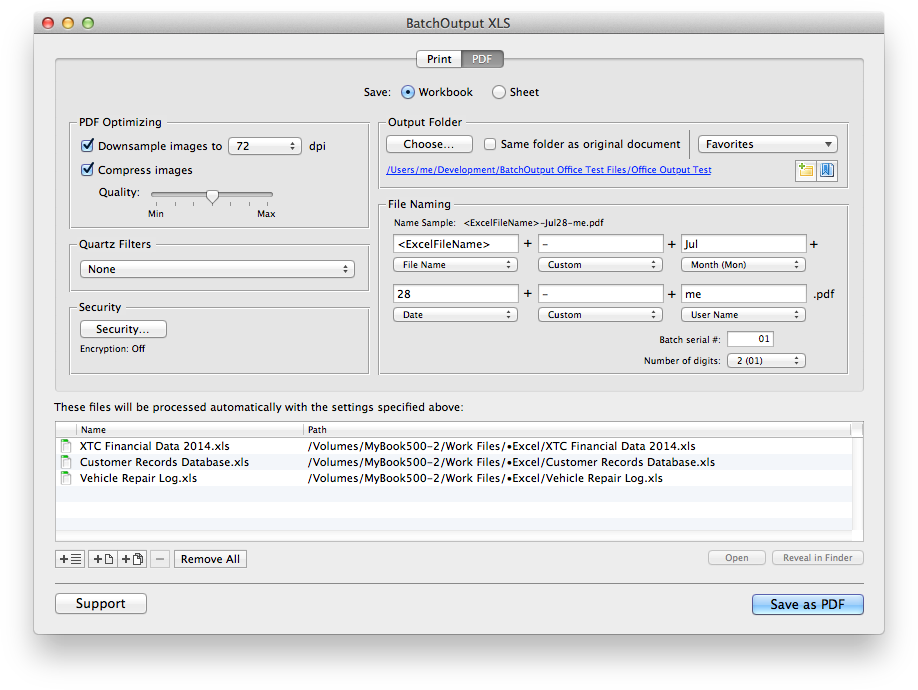
With BatchOutput XLS, users only need to select Excel files and adjust output settings, and the software will do the rest automatically. BatchOutput XLS is the only program that brings advanced PDF creation options right to Excel user's fingertips:
* Print and export batches of Excel files to PDF with a click of a button
* Compose variable output file names based on page number, user name, date and other values
* Reduce PDF file size and optimize documents for web, print or electronic publishing
* Encrypt and password-protect PDF from unauthorized copying, printing and viewing
* Apply Quartz filters to change PDF colors, brightness and other qualities
BatchOutput XLS is a part of the Zevrix BatchOutput family which also includes output automation solutions for Microsoft Word, PowerPoint, Adobe InDesign and PDF workflows.
Pricing and Availability:
BatchOutput XLS can be purchased for $39.95 (USD) from Zevrix website, as well as from authorized resellers. Trial is also available for download. BatchOutput XLS requires Mac OS X 10.5 - 10.9 Microsoft Excel 2008 or 2011.
Zevrix Solutions: http://zevrix.com
BatchOutput XLS 2.2: http://zevrix.com/BatchOutputOffice.php
Download BatchOutput XLS: http://zevrix.com/BatchOutputOffice.dmg
Purchase: http://zevrix.com/store.php
Screenshot: http://zevrix.com/screenshots/bo-office/box-2asoc-pdf.png
Located in Toronto, Canada, Zevrix Solutions provides automation and productivity solutions for Adobe Creative Suite software, PDF and graphic file diagnostics and Microsoft Office on Mac OS. Zevrix is dedicated to help professionals increase their profits through automating everyday tasks, producing error-free documents, saving disk space and cutting production costs. For more information, visit their website. Copyright (C) 2014 Zevrix Solutions. All Rights Reserved.
*******
Link To Article: http://prmac.com/release-id-69481.htm
*******
---------------------------------------------------------------------------------
Note that you can alter delivered distributions at any time.
Login to your account on prMac to alter your channel selection, or to opt-out at any time.
BatchOutput for Microsoft Excel Offers Core Engine Upgrade, CSV Support - Published on 07/28/14
Zevrix Solutions announces BatchOutput XLS 2.2, a major maintenance update to its output automation solution for Microsoft Excel on Mac OS X. In addition to batch printing and exporting, the software lets users carry out professional PDF production directly from Excel eliminating the need for time consuming post-processing. The new version introduces a major upgrade to the app's core engine, which allows BatchOutput XLS to support latest advanced Apple technologies and future system releases.
Toronto (ON) Canada - Zevrix Solutions today is proud to announce the release of BatchOutput XLS 2.2, a major maintenance update to its popular output automation solution for Microsoft Excel on Mac OS X. The software provides advanced solutions for demanding enterprise and office publishing environments through automation of printing and professional PDF output. For example, users can export dozens of Excel files to PDF with just a click of a button, or leave BatchOutput to print hundreds of files overnight and pick up the completed job next morning.
The new version introduces a major upgrade to the application's core processing engine, which allows BatchOutput XML to support latest advanced software technologies and future system releases. The updates also improves the software performance and stability and lets users process CSV files in addition to the native Excel formats.
With BatchOutput XLS, users only need to select Excel files and adjust output settings, and the software will do the rest automatically. BatchOutput XLS is the only program that brings advanced PDF creation options right to Excel user's fingertips:
* Print and export batches of Excel files to PDF with a click of a button
* Compose variable output file names based on page number, user name, date and other values
* Reduce PDF file size and optimize documents for web, print or electronic publishing
* Encrypt and password-protect PDF from unauthorized copying, printing and viewing
* Apply Quartz filters to change PDF colors, brightness and other qualities
BatchOutput XLS is a part of the Zevrix BatchOutput family which also includes output automation solutions for Microsoft Word, PowerPoint, Adobe InDesign and PDF workflows.
Pricing and Availability:
BatchOutput XLS can be purchased for $39.95 (USD) from Zevrix website, as well as from authorized resellers. Trial is also available for download. BatchOutput XLS requires Mac OS X 10.5 - 10.9 Microsoft Excel 2008 or 2011.
Zevrix Solutions: http://zevrix.com
BatchOutput XLS 2.2: http://zevrix.com/BatchOutputOffice.php
Download BatchOutput XLS: http://zevrix.com/BatchOutputOffice.dmg
Purchase: http://zevrix.com/store.php
Screenshot: http://zevrix.com/screenshots/bo-office/box-2asoc-pdf.png
Located in Toronto, Canada, Zevrix Solutions provides automation and productivity solutions for Adobe Creative Suite software, PDF and graphic file diagnostics and Microsoft Office on Mac OS. Zevrix is dedicated to help professionals increase their profits through automating everyday tasks, producing error-free documents, saving disk space and cutting production costs. For more information, visit their website. Copyright (C) 2014 Zevrix Solutions. All Rights Reserved.
*******
Link To Article: http://prmac.com/release-id-69481.htm
*******
---------------------------------------------------------------------------------
Note that you can alter delivered distributions at any time.
Login to your account on prMac to alter your channel selection, or to opt-out at any time.
Beezwax's Universe of Development at FileMaker DevCon
A new article has been published at prMac.
Beezwax's Universe of Development at FileMaker DevCon - Published on 07/28/14
Texas based leader in FileMaker development, Beezwax today began highlighting a universe of new tools, technologies, and techniques that professional developers can use in building FileMaker solutions, as part of the company's participation in the 2014 FileMaker Developer Conference. This includes presentations on FileMaker-native features such as Perform Script on Server, FileMaker Go, Database Design Report and ExecuteSQL as well as external technologies like Git, Siri, Twilio and much more.
San Antonio, Texas - Beezwax today began highlighting a universe of new tools, technologies, and techniques that professional developers can use in building FileMaker solutions, as part of the company's participation in the 2014 FileMaker Developer Conference (aka "FileMaker DevCon"). This includes presentations on FileMaker-native features such as Perform Script on Server (PSoS), FileMaker Go, Database Design Report (DDR) and ExecuteSQL as well as external technologies like Git, Siri, Twilio and JavaScript libraries like AngularJS and d3.js.
"We look forward every year to meeting up at DevCon with our peers in the FileMaker Developer community," said Julian Nadel, president and founder of Beezwax. "This is our chance to share development technologies that we use, and learn about the techniques that other developers have successfully adopted."
In their exhibitor booth at FileMaker DevCon, Beezwax is offering a "technology preview" of InspectorPro 5, the leading tool for analysis into FileMaker 13 databases. InspectorPro's unique data visualizations enable developers to discover more about their FileMaker solutions, via the software's Script Universe, Field Index plotting, and Script Tree features.
Several members of Beezwax's development team will be featured presenters at this year's FileMaker DevCon, in the following scheduled conference sessions:
* FileMaker Platform Performance Panel - Vince Menanno, director of FileMaker development at Beezwax, joins industry experts and members of the FileMaker engineering team. (Thursday, July 31, 9:00am)
* Location in Depth - Jeremy Bante, senior FileMaker developer, Beezwax. (Thursday, July 31, 3:45pm)
* Engaging Design, Snappy UX and Creative User Interaction - Vince Menanno, Beezwax. (Wednesday, July 30, 9:00am)
* Security Fundamentals - Alexei Folger, developer and system engineer, Beezwax/Outside Edge (Monday, July 28, 8:00am)
* InspectorPro, A Behind The Scenes Look - Vince Menanno and Beezwax product team. (Wednesday, July 30, 9:00am)
Also, this year several members of Beezwax's development team are presenting and facilitating sessions as "Unconference Workshops", an official program at FileMaker DevCon that enables presentations and group discussions to be organized by conference attendees. In San Antonio this year, these sessions are:
* Git: Version Control for FileMaker Developers - co-hosted by Brian Schick, senior application developer, Beezwax. (Wednesday, July 30, 10:45am)
* #Agile: An Open Discussion - facilitated by Jay Gonzales, development manager and Ryan Simms, application developer, Beezwax. (Wednesday, July 30, 2:00pm)
* Idiomatic FileMaker - co-hosted by Perren Smith, senior FileMaker developer, Beezwax. (Thursday, July 31, 10:45am)
Beezwax: http://www.beezwax.net
Client List: http://beezwax.net/clients
Inspector Pro: http://www.beezwax.net/solutions/inspectorPro
Purchase: http://store.beezwax.net
A recognized industry leader in FileMaker development, Beezwax has completed more than 1,000 successful custom database, web and mobile software development projects for over 500 satisfied clients. Beezwax distributes widely-used products and tools for developers, and is a Platinum-level member of the FileMaker Business Alliance. Copyright (C) 2014 Beezwax Datatools, Inc. All Rights Reserved. FileMaker, and the FileMaker logo are trademarks or registered trademarks of FileMaker Inc. in the U.S. and/or other countries.
*******
Link To Article: http://prmac.com/release-id-69480.htm
*******
---------------------------------------------------------------------------------
Note that you can alter delivered distributions at any time.
Login to your account on prMac to alter your channel selection, or to opt-out at any time.
Beezwax's Universe of Development at FileMaker DevCon - Published on 07/28/14
Texas based leader in FileMaker development, Beezwax today began highlighting a universe of new tools, technologies, and techniques that professional developers can use in building FileMaker solutions, as part of the company's participation in the 2014 FileMaker Developer Conference. This includes presentations on FileMaker-native features such as Perform Script on Server, FileMaker Go, Database Design Report and ExecuteSQL as well as external technologies like Git, Siri, Twilio and much more.
San Antonio, Texas - Beezwax today began highlighting a universe of new tools, technologies, and techniques that professional developers can use in building FileMaker solutions, as part of the company's participation in the 2014 FileMaker Developer Conference (aka "FileMaker DevCon"). This includes presentations on FileMaker-native features such as Perform Script on Server (PSoS), FileMaker Go, Database Design Report (DDR) and ExecuteSQL as well as external technologies like Git, Siri, Twilio and JavaScript libraries like AngularJS and d3.js.
"We look forward every year to meeting up at DevCon with our peers in the FileMaker Developer community," said Julian Nadel, president and founder of Beezwax. "This is our chance to share development technologies that we use, and learn about the techniques that other developers have successfully adopted."
In their exhibitor booth at FileMaker DevCon, Beezwax is offering a "technology preview" of InspectorPro 5, the leading tool for analysis into FileMaker 13 databases. InspectorPro's unique data visualizations enable developers to discover more about their FileMaker solutions, via the software's Script Universe, Field Index plotting, and Script Tree features.
Several members of Beezwax's development team will be featured presenters at this year's FileMaker DevCon, in the following scheduled conference sessions:
* FileMaker Platform Performance Panel - Vince Menanno, director of FileMaker development at Beezwax, joins industry experts and members of the FileMaker engineering team. (Thursday, July 31, 9:00am)
* Location in Depth - Jeremy Bante, senior FileMaker developer, Beezwax. (Thursday, July 31, 3:45pm)
* Engaging Design, Snappy UX and Creative User Interaction - Vince Menanno, Beezwax. (Wednesday, July 30, 9:00am)
* Security Fundamentals - Alexei Folger, developer and system engineer, Beezwax/Outside Edge (Monday, July 28, 8:00am)
* InspectorPro, A Behind The Scenes Look - Vince Menanno and Beezwax product team. (Wednesday, July 30, 9:00am)
Also, this year several members of Beezwax's development team are presenting and facilitating sessions as "Unconference Workshops", an official program at FileMaker DevCon that enables presentations and group discussions to be organized by conference attendees. In San Antonio this year, these sessions are:
* Git: Version Control for FileMaker Developers - co-hosted by Brian Schick, senior application developer, Beezwax. (Wednesday, July 30, 10:45am)
* #Agile: An Open Discussion - facilitated by Jay Gonzales, development manager and Ryan Simms, application developer, Beezwax. (Wednesday, July 30, 2:00pm)
* Idiomatic FileMaker - co-hosted by Perren Smith, senior FileMaker developer, Beezwax. (Thursday, July 31, 10:45am)
Beezwax: http://www.beezwax.net
Client List: http://beezwax.net/clients
Inspector Pro: http://www.beezwax.net/solutions/inspectorPro
Purchase: http://store.beezwax.net
A recognized industry leader in FileMaker development, Beezwax has completed more than 1,000 successful custom database, web and mobile software development projects for over 500 satisfied clients. Beezwax distributes widely-used products and tools for developers, and is a Platinum-level member of the FileMaker Business Alliance. Copyright (C) 2014 Beezwax Datatools, Inc. All Rights Reserved. FileMaker, and the FileMaker logo are trademarks or registered trademarks of FileMaker Inc. in the U.S. and/or other countries.
*******
Link To Article: http://prmac.com/release-id-69480.htm
*******
---------------------------------------------------------------------------------
Note that you can alter delivered distributions at any time.
Login to your account on prMac to alter your channel selection, or to opt-out at any time.
Bitsoup 1.0 - Real-Time Bitcoin Price Ticker and News Tracking App
A new article has been published at prMac.
Bitsoup 1.0 - Real-Time Bitcoin Price Ticker and News Tracking App - Published on 07/28/14
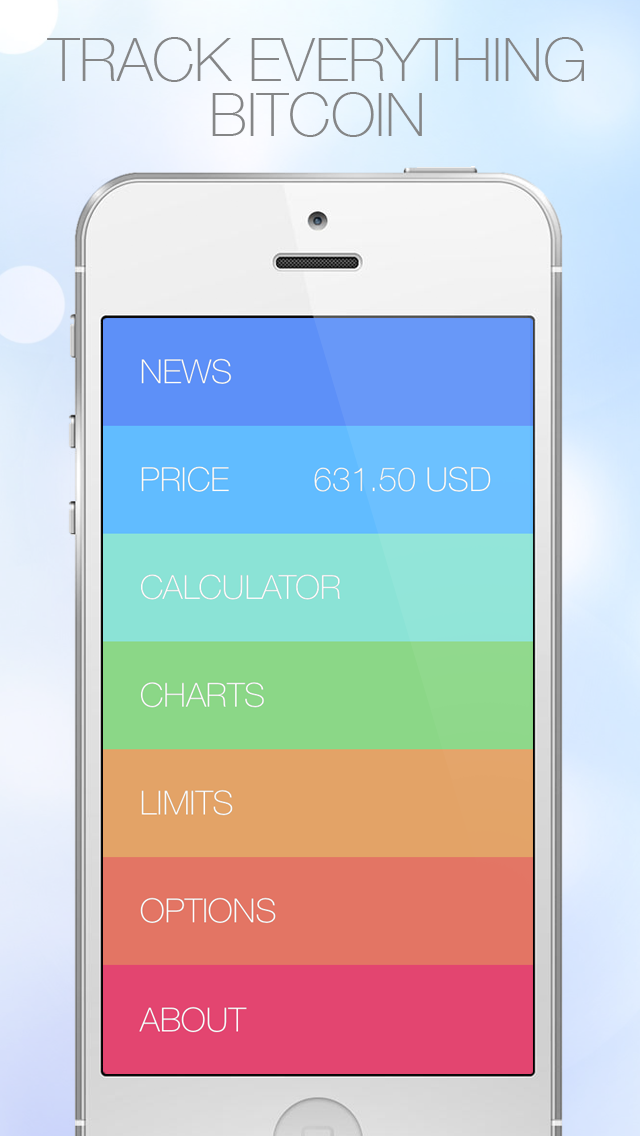
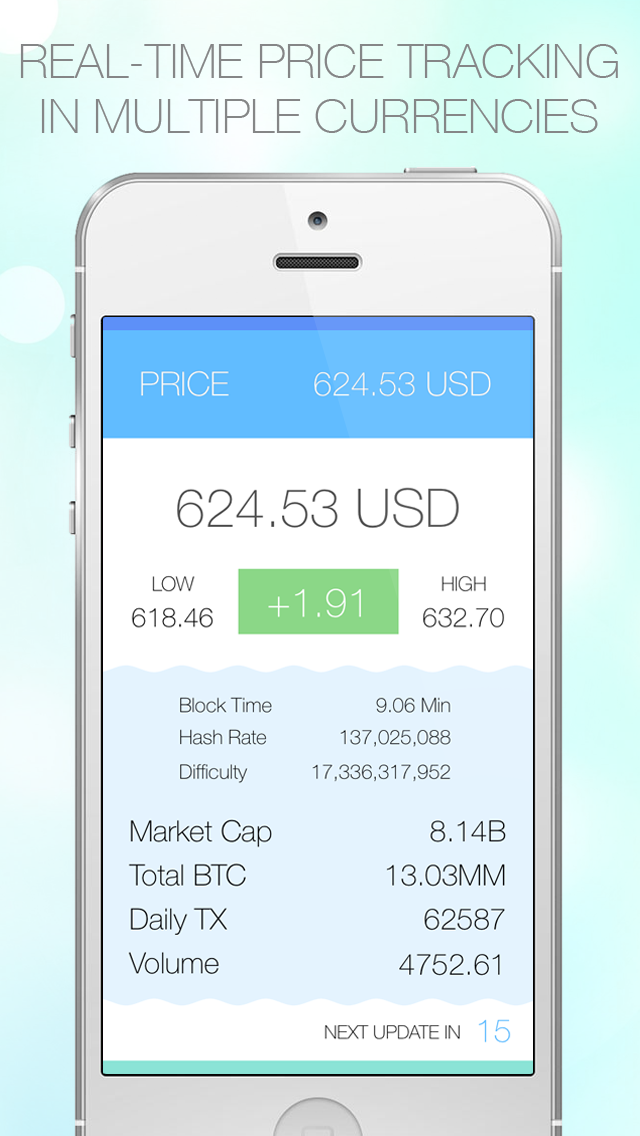
RedWagon today introduces Bitsoup 1.0, a real-time Bitcoin price and news tracking app developed for iOS devices. Bitsoup gives you instant access to everything Bitcoin! Get auto-refreshing price updates across multiple exchanges in multiple currencies. Stay up-to-date with aggregated news feeds from top BTC sources and always be informed of the latest Bitcoin news as it's happening. Complete with push notification price alerts, Bitsoup is the #1 app for anything and everything Bitcoin.
San Francisco, California - RedWagon today is proud to announce the release and immediate availability of Bitsoup 1.0, a real-time Bitcoin price and news tracking app developed exclusively for iPhone and iPad. Bitsoup gives you instant access to everything Bitcoin! Get auto-refreshing price updates across multiple exchanges in multiple currencies. Stay up-to-date with aggregated news feeds from top BTC sources and always be informed of the latest Bitcoin news as it's happening. Complete with push notification price alerts and high-res candlestick charts, Bitsoup is the #1 app for anything and everything Bitcoin.
Features Include:
* Real-Time Auto Updating BTC Ticker
* Aggregated News Stories Across Top News Outlets
* High Res Color Charts (Day, Week, Month, & Year)
* App Icon Shows Bitcoin Price on Homescreen
* Buy/Sell Limit Push Notifications Let you Never Miss a Price Swing
* BTC Calculator for Easy Fiat to BTC Conversion
* Fully Customizable Beautifully Designed UI
* Optional Grayscale Mode
* Share News Stories via SMS, Email, Facebook, and Twitter
* Support for Multiple Currencies & Exchanges
Device Requirements:
* iPhone, iPad, or iPod touch
* Requires iOS 7.0 or later
* Universal app optimized for display on all iOS devices
* 4 MB
Pricing and Availability:
Bitsoup 1.0 is a Free download available worldwide through the App Store in the Finance and Utilities categories and is rated for all ages.
Bitsoup 1.0: http://redwagontech.com/app/bitsoup
Download from iTunes: https://itunes.apple.com/app/bitsoup-real-time-bitcoin/id898815558
Screenshot 1: https://s4.mzstatic.com/us/r30/Purple4/v4/b9/f0/65/b9f065ad-ddb9-87f0-3e55-d624f33f597c/mzl.nuogfffw.png?downloadKey=1406909965_23638d57418fb3c84fa21d2670206151
Screenshot 2: https://s3.mzstatic.com/us/r30/Purple3/v4/8b/ce/1c/8bce1ceb-96fd-00ea-a582-43bfc725961b/mzl.trkngxfq.png?downloadKey=1406909965_bb48f56ed8a43795863c7f81617b9205
App Icon: https://s3.mzstatic.com/us/r30/Purple4/v4/3a/4b/f8/3a4bf849-4c5e-36b8-a18c-f903e4847a35/mzl.qqexfpiz.png?downloadKey=1406910529_d2287e34a822d43772b7cc701090086f
RedWagon focuses on developing a wide variety of fun, entertaining, and educational iOS applications and games. RedWagon strives to make each app as enjoyable and functional as possible. Copyright 2013-2014 RedWagon. All Rights Reserved. Apple, the Apple logo, iPhone, iPad, iPad mini, iPod touch, and Mac are registered trademarks of Apple Inc. in the U.S. and/or other countries. Other trademarks and registered trademarks may be the property of their respective owners.
*******
Link To Article: http://prmac.com/release-id-69439.htm
*******
---------------------------------------------------------------------------------
Note that you can alter delivered distributions at any time.
Login to your account on prMac to alter your channel selection, or to opt-out at any time.
Bitsoup 1.0 - Real-Time Bitcoin Price Ticker and News Tracking App - Published on 07/28/14
RedWagon today introduces Bitsoup 1.0, a real-time Bitcoin price and news tracking app developed for iOS devices. Bitsoup gives you instant access to everything Bitcoin! Get auto-refreshing price updates across multiple exchanges in multiple currencies. Stay up-to-date with aggregated news feeds from top BTC sources and always be informed of the latest Bitcoin news as it's happening. Complete with push notification price alerts, Bitsoup is the #1 app for anything and everything Bitcoin.
San Francisco, California - RedWagon today is proud to announce the release and immediate availability of Bitsoup 1.0, a real-time Bitcoin price and news tracking app developed exclusively for iPhone and iPad. Bitsoup gives you instant access to everything Bitcoin! Get auto-refreshing price updates across multiple exchanges in multiple currencies. Stay up-to-date with aggregated news feeds from top BTC sources and always be informed of the latest Bitcoin news as it's happening. Complete with push notification price alerts and high-res candlestick charts, Bitsoup is the #1 app for anything and everything Bitcoin.
Features Include:
* Real-Time Auto Updating BTC Ticker
* Aggregated News Stories Across Top News Outlets
* High Res Color Charts (Day, Week, Month, & Year)
* App Icon Shows Bitcoin Price on Homescreen
* Buy/Sell Limit Push Notifications Let you Never Miss a Price Swing
* BTC Calculator for Easy Fiat to BTC Conversion
* Fully Customizable Beautifully Designed UI
* Optional Grayscale Mode
* Share News Stories via SMS, Email, Facebook, and Twitter
* Support for Multiple Currencies & Exchanges
Device Requirements:
* iPhone, iPad, or iPod touch
* Requires iOS 7.0 or later
* Universal app optimized for display on all iOS devices
* 4 MB
Pricing and Availability:
Bitsoup 1.0 is a Free download available worldwide through the App Store in the Finance and Utilities categories and is rated for all ages.
Bitsoup 1.0: http://redwagontech.com/app/bitsoup
Download from iTunes: https://itunes.apple.com/app/bitsoup-real-time-bitcoin/id898815558
Screenshot 1: https://s4.mzstatic.com/us/r30/Purple4/v4/b9/f0/65/b9f065ad-ddb9-87f0-3e55-d624f33f597c/mzl.nuogfffw.png?downloadKey=1406909965_23638d57418fb3c84fa21d2670206151
Screenshot 2: https://s3.mzstatic.com/us/r30/Purple3/v4/8b/ce/1c/8bce1ceb-96fd-00ea-a582-43bfc725961b/mzl.trkngxfq.png?downloadKey=1406909965_bb48f56ed8a43795863c7f81617b9205
App Icon: https://s3.mzstatic.com/us/r30/Purple4/v4/3a/4b/f8/3a4bf849-4c5e-36b8-a18c-f903e4847a35/mzl.qqexfpiz.png?downloadKey=1406910529_d2287e34a822d43772b7cc701090086f

RedWagon focuses on developing a wide variety of fun, entertaining, and educational iOS applications and games. RedWagon strives to make each app as enjoyable and functional as possible. Copyright 2013-2014 RedWagon. All Rights Reserved. Apple, the Apple logo, iPhone, iPad, iPad mini, iPod touch, and Mac are registered trademarks of Apple Inc. in the U.S. and/or other countries. Other trademarks and registered trademarks may be the property of their respective owners.
*******
Link To Article: http://prmac.com/release-id-69439.htm
*******
---------------------------------------------------------------------------------
Note that you can alter delivered distributions at any time.
Login to your account on prMac to alter your channel selection, or to opt-out at any time.
YooSEND - Transfer, Share Files of Any Type or Size for iOS and Android
A new article has been published at prMac.
YooSEND - Transfer, Share Files of Any Type or Size for iOS and Android - Published on 07/28/14
YOOSEND, Ltd today announces yooSEND 2.0, its new free, user-friendly business app for iOS. Featuring an intuitive and easy to use, yooSEND offers the user a new experience and a new way to send files of any size and any type by means of the simple idea "select and send." With a tab-based friendly interface, users can easily attach a Dropbox account to easily access and manage their cloud based files as well as directly send files to other users. Share multiple files with multiple users at once.
San Diego, California - YOOSEND, Ltd today is very proud to announce the release and immediate availability of yooSEND 2.0, its new free, user-friendly business app for iPhone, iPad and iPod touch. Featuring an intuitive and easy to use, yooSEND offers the user a new experience and a new way to send files of any size and any type by means of the simple idea "select and send." With a tab-based friendly interface, users can easily attach a Dropbox account to easily access and manage their cloud based files as well as directly send files to other users. Users can also attach a device like iPad, iPod, or Android tablet and share files between them or to other users from contact list.
yooSEND's strong points are:
* Browsing and File Management abilities
* Send one or multiple files of any size and any type at the same time to multiple users at once (No other mobile apps in the world has this function)
* One of the most important features of yooSEND is that no copy of the sent files will be saved anywhere (server, cloud services etc.)
* Fast download and upload speed
* Can attach multiple personal devices (tablets, iPod 's and other phone's), this is a novelty which we boast with. The user can attach the tablet , which can be either iOS or Android and many other devices in the future, even PC and MAC , so that other users can send them files exactly to the specific device they need to. Also, if you want some of your devices to be invisible to the users in your list, you can choose to unshare them by simply selecting an option. (No other mobile apps in the world has this function)
* Push Notification receive messages even when the application is close. When you receive one or more files you will be notified on the screen, even if users are in different cities or countries
* Pending mode: now you don't necessarily need a very good internet connection to receive (large) files from one or more users, you can wait until you get home, at the office, back from holidays or you have a high speed 4G/WiFi with unlimited traffic connection to accept the transfer. Also you can reject incoming files
* Activity tab: you can drop off to one or more contacts, or one or more files if you change your mind, without having to go back and look for them in the main folder or contact list, but by simply unchecking them one by one on the main screen
Other Features Included:
* Send to multiple contacts
* Send to personal devices
* Send more then 1GB per file
* Possibility to Accept or Deny incoming files
* Folders support (only Android)
* No file comprimation (as other free apps, like WhatsApp, Viber, iMessage. do)
* Reliably supports resuming, retrying or cancelling downloads (No other mobile apps in the world has this function)
* Live download progress bar
* Badge number when select files and contacts
* Search by file name
* Photos preview before sending
* Document viewer that supports .pdf, .doc, .xls, .ppt, .txt, .html and .rtf file formats
* Music playback of .aac, .mp3 and .m4a formats
* Video playback of .m4v, .mp4, .avi and .mov formats
* Background downloading and files sending
* Allows to "open in..."
* And more features are waiting for you when you get the app
Device Requirements:
* iPhone, iPad, and iPod touch
* Requires iOS 6.1 or later
* 12.7 MB
Pricing and Availability:
yooSEND 2.0 is Free and available worldwide exclusively through the App Store in the Business category.
yooSEND 2.0: http://www.yoosend.com
Download from iTunes: https://itunes.apple.com/app/yoosend/id780622741
Screenshot 1: http://www.pinterest.com/pin/572238696376189275/
Screenshot 2: http://www.pinterest.com/pin/572238696376189255/
App Icon: http://a5.mzstatic.com/us/r30/Purple4/v4/8a/a9/1c/8aa91c64-1543-a6f0-5ddd-b21a0fbe7c7d/mzl.hivpwaec.175x175-75.jpg
Located in San Diego, California, YOOSEND LTD It was founded in 2013. As a necessity for people to send files of all types from all over the world in real size, the company has built yooSEND app for iOS and Android platforms. In the future will expand to the rest of the mobile platforms but also on Windows PC and MacOSX. We hope this yooSEND to grow rapidly and to serve our customers the best quality. Copyright (C) 2014 YOOSEND LTD. All Rights Reserved. Apple, the Apple logo, iPhone, iPad, iPad mini, iPod touch, and Mac are registered trademarks of Apple Inc. in the U.S. and/or other countries. Other trademarks and registered trademarks may be the property of their respective owners.
*******
Link To Article: http://prmac.com/release-id-69437.htm
*******
---------------------------------------------------------------------------------
Note that you can alter delivered distributions at any time.
Login to your account on prMac to alter your channel selection, or to opt-out at any time.
YooSEND - Transfer, Share Files of Any Type or Size for iOS and Android - Published on 07/28/14
YOOSEND, Ltd today announces yooSEND 2.0, its new free, user-friendly business app for iOS. Featuring an intuitive and easy to use, yooSEND offers the user a new experience and a new way to send files of any size and any type by means of the simple idea "select and send." With a tab-based friendly interface, users can easily attach a Dropbox account to easily access and manage their cloud based files as well as directly send files to other users. Share multiple files with multiple users at once.
San Diego, California - YOOSEND, Ltd today is very proud to announce the release and immediate availability of yooSEND 2.0, its new free, user-friendly business app for iPhone, iPad and iPod touch. Featuring an intuitive and easy to use, yooSEND offers the user a new experience and a new way to send files of any size and any type by means of the simple idea "select and send." With a tab-based friendly interface, users can easily attach a Dropbox account to easily access and manage their cloud based files as well as directly send files to other users. Users can also attach a device like iPad, iPod, or Android tablet and share files between them or to other users from contact list.
yooSEND's strong points are:
* Browsing and File Management abilities
* Send one or multiple files of any size and any type at the same time to multiple users at once (No other mobile apps in the world has this function)
* One of the most important features of yooSEND is that no copy of the sent files will be saved anywhere (server, cloud services etc.)
* Fast download and upload speed
* Can attach multiple personal devices (tablets, iPod 's and other phone's), this is a novelty which we boast with. The user can attach the tablet , which can be either iOS or Android and many other devices in the future, even PC and MAC , so that other users can send them files exactly to the specific device they need to. Also, if you want some of your devices to be invisible to the users in your list, you can choose to unshare them by simply selecting an option. (No other mobile apps in the world has this function)
* Push Notification receive messages even when the application is close. When you receive one or more files you will be notified on the screen, even if users are in different cities or countries
* Pending mode: now you don't necessarily need a very good internet connection to receive (large) files from one or more users, you can wait until you get home, at the office, back from holidays or you have a high speed 4G/WiFi with unlimited traffic connection to accept the transfer. Also you can reject incoming files
* Activity tab: you can drop off to one or more contacts, or one or more files if you change your mind, without having to go back and look for them in the main folder or contact list, but by simply unchecking them one by one on the main screen
Other Features Included:
* Send to multiple contacts
* Send to personal devices
* Send more then 1GB per file
* Possibility to Accept or Deny incoming files
* Folders support (only Android)
* No file comprimation (as other free apps, like WhatsApp, Viber, iMessage. do)
* Reliably supports resuming, retrying or cancelling downloads (No other mobile apps in the world has this function)
* Live download progress bar
* Badge number when select files and contacts
* Search by file name
* Photos preview before sending
* Document viewer that supports .pdf, .doc, .xls, .ppt, .txt, .html and .rtf file formats
* Music playback of .aac, .mp3 and .m4a formats
* Video playback of .m4v, .mp4, .avi and .mov formats
* Background downloading and files sending
* Allows to "open in..."
* And more features are waiting for you when you get the app
Device Requirements:
* iPhone, iPad, and iPod touch
* Requires iOS 6.1 or later
* 12.7 MB
Pricing and Availability:
yooSEND 2.0 is Free and available worldwide exclusively through the App Store in the Business category.
yooSEND 2.0: http://www.yoosend.com
Download from iTunes: https://itunes.apple.com/app/yoosend/id780622741
Screenshot 1: http://www.pinterest.com/pin/572238696376189275/
Screenshot 2: http://www.pinterest.com/pin/572238696376189255/
App Icon: http://a5.mzstatic.com/us/r30/Purple4/v4/8a/a9/1c/8aa91c64-1543-a6f0-5ddd-b21a0fbe7c7d/mzl.hivpwaec.175x175-75.jpg

Located in San Diego, California, YOOSEND LTD It was founded in 2013. As a necessity for people to send files of all types from all over the world in real size, the company has built yooSEND app for iOS and Android platforms. In the future will expand to the rest of the mobile platforms but also on Windows PC and MacOSX. We hope this yooSEND to grow rapidly and to serve our customers the best quality. Copyright (C) 2014 YOOSEND LTD. All Rights Reserved. Apple, the Apple logo, iPhone, iPad, iPad mini, iPod touch, and Mac are registered trademarks of Apple Inc. in the U.S. and/or other countries. Other trademarks and registered trademarks may be the property of their respective owners.
*******
Link To Article: http://prmac.com/release-id-69437.htm
*******
---------------------------------------------------------------------------------
Note that you can alter delivered distributions at any time.
Login to your account on prMac to alter your channel selection, or to opt-out at any time.
Subscribe to:
Posts (Atom)