A new article has been published at prMac.
Practice Words with Crazy Balloons - First Sight Words Recognition Game - Published on 08/04/14
PKCLsoft today announces Crazy Balloons - First Sight Words Recognition Game 1.1, their new educational app for iOS devices. Specifically designed to help kids practice word recognition, Crazy Balloons - First Sight Words helps children learn high-frequency words while playing a fun and challenging balloon-popping game. Customizable word lists can be created in any language supported by iOS 7's voiceover feature. Multiple student profiles can also be configured to maximize learning potential.
Melbourne, Australia - PKCLsoft has announced the release of Crazy Balloons - First Sight Words Recognition Game 1.1, their new educational app for iPhone, iPad, and iPod touch devices. Specifically designed to help kids practice word recognition, Crazy Balloons - First Sight Words helps children learn high-frequency words while playing a fun and challenging balloon-popping game.
Crazy Balloons - First Sight Words was created with input from kids, parents, teachers, and therapists as a switch-accessible app that helps teach and reinforce how to speak, read, and spell words. Benefits of playing Crazy Balloons - First Sight Words include:
* Increases sight word recognition skills
* Increases proficiency and fluency in reading with visual cues
* Practices audio processing with audible cues
* Utilizes visual scanning and discrimination skills
Crazy Balloons - First Sight Words allows users to create customizable word lists in any language supported by iOS 7's voiceover feature. Two English, one Spanish, and one French word list come standard in the app. Word lists can be created and shared via E-mail, Messages, or Airdrop. Word lists can also be created and shared with the Crazy Balloons community via the website.
Feature Highlights:
* Comfortable and colorful User Interface
* Configure student profiles to maximize learning potential
* Switch access available for those with special needs
* Create and customize word lists in any language supported by iOS 7 voiceover feature
* Supports multiple student profiles
* Select speed of gameplay, how many questions per game, and how many balloons are displayed
* Turn on/off and adjust pitch and speed of audio prompts
* Share wordlists via E-mail, Messages, or Airdrop
* Can be played with a compatible switch interface or bluetooth keyboard
* Detailed reports of gameplay statistics for educators
* 100% kid-friendly
* Game Center-supported
Crazy Balloons - First Sight Words supports multiple student profiles for educators or families with more than one child. Each profile can be configured in settings to maximize learning potential. Crazy Balloons - First Sight Words also provides detailed reports of gameplay statistics on each child so the game can be further tailored to suit each child's developing strengths and challenges.
Crazy Balloons - First Sight Words is fully customizable. Users can select the speed of gameplay, determine how many balloons are displayed, and decide how many questions should be asked per game. Audio and visual cues and sounds can also be turned off to make the game more challenging. Crazy Balloons - First Sight Words can be played with a compatible switch interface or bluetooth keyboard whose settings can also be configured.
"Crazy Balloons - First Sight Words Recognition Game 1.1 is actually the second of a series of apps I've recently developed," explains Peter Easdown, founder of PKCLsoft. "The first in the series, Crazy Balloons Fun, uses some of the same visuals and game mechanics. However, with Crazy Balloons - First Sight Words, I've more fully developed the educational aspect, since I believe all children deserve to learn and become proficient communicators and readers. Like Dollar Up, my previously released educational app, Crazy Balloons - First Sight Words provides lots of options and a way to play the game for people with special needs, including those requiring the use of accessibility switches."
Easdown adds, "Furthermore, I am a proud member of the 'MOMs with apps' developer community and a contributor to the 'Know What's Inside' program. Therefore, all of my kids apps will clearly state what (if any) data is collected and for what purpose. I do not include advertising or social media links in any of my educational apps that are written for use by young children."
Languages:
* English, French, Spanish
Device Requirements:
* iPhone, iPad, and iPod touch
* Requires iOS 7.0 or later
* 36.2 MB
Pricing and Availability:
Crazy Balloons - First Sight Words Recognition Game 1.1 is only $2.99 (USD) and available worldwide exclusively through the App Store in the Education category. Review copies are available upon request.
PKCLsoft: http://www.pkclsoft.com
Crazy Balloons - First Sight Words Recognition Game 1.1: http://www.pkclsoft.com/wp/app/crazy-balloons-first-sight-words/
Purchase and Download: https://itunes.apple.com/app/crazy-balloons-first-sight/id892122400
YouTube video 1 (Switch Access Demonstration): https://www.youtube.com/watch?v=c4zwzh5BDus
YouTube video 2 (Languages Demonstration): https://www.youtube.com/watch?v=A90WydyCbDs
App icon: http://a5.mzstatic.com/us/r30/Purple4/v4/d5/31/45/d531459c-be7c-f610-571f-19d6c394d4e7/mzl.mfhrccsz.175x175-75.jpg
Based in Melbourne, Australia, PKCLsoft is a small, independent developer of iOS apps that was founded in 2011 by Peter Easdown. Copyright (C) 2014 PKCLsoft. All Rights Reserved. Apple, the Apple logo, iPhone and iPod are registered trademarks of Apple Inc. in the U.S. and/or other countries.
*******
Link To Article: http://prmac.com/release-id-69614.htm
*******
---------------------------------------------------------------------------------
Note that you can alter delivered distributions at any time.
Login to your account on prMac to alter your channel selection, or to opt-out at any time.


Teachers With Apps announces Newest Recipients of TWA Certification
A new article has been published at prMac.
Teachers With Apps announces Newest Recipients of TWA Certification - Published on 08/04/14
Teachers With Apps, the award winning, highly acclaimed educational app review and resource site, today is pleased to announce the newest inductees into the TWA Certification Program. This Certification Program was designed to acknowledge and commend outstanding Apps and App Developers in the education app industry. Teachers With Apps offers a treasure trove of app recommendations, as well as the latest trends and insights on education and technology.
Southampton, New York - Teachers With Apps today is excited to announce the newest inductees into their Certification Program. This Certification was designed to recognize and applaud outstanding Apps and App Developers in the education app industry. Certified recipients are selected on a tri-annual basis; this time Teachers With Apps is honoring 5 Apps that are exemplary in the following areas: content, presentation, execution, and overall user experience and 1 Developer whose app not only meets the above criteria but consistently brings superior education apps to the mobile platform.
Mobile devices have become commonplace in learning spaces throughout the world. Curiously, reports continue to show mobile developers struggling to monetize their apps. It's important to note, iPads and other mobile devices are only as good as the content on them. Anne Rachel states, "Now more than ever, we need to bring attention to the developers bringing engaging and educationally sound products to the market. We aim to continue recognizing the finest in the educational app industry." Jayne Clare adds, "TWA Certified apps are exemplary educational applications, they have withstood intensive field-testing with kids and are both teacher and child approved."
Congratulations and welcome to the TWA Certification Program:
TWA Certified Apps:
* 1000 Adventures by DADA Company
* ABC-X-Plorer: Fun with Alphabets by HM Direct
* The Adventures of Ash & Ollie: ScreenTime - A Fingerprint Network App
* Big Bang Patterns by Inclusive Technology
* Field Day: Project-Based Learning Think & Do Tool by Pivotl
TWA Certified Developers:
* Sago Sago - This team creates apps that children love and parents trust. Building on kids' natural sense of wonder, creativity and curiosity, their apps empower kids through play. Sago Mini apps are charming and playful; the ideal first apps for little ones.
For additional information about the TWA Certification Program visit Teachers With Apps online. Teachers With Apps offers a treasure trove of education app recommendations, as well as the latest trends and insights on education and technology.
Teachers With Apps: http://teacherswithapps.com/
TWA Certified Apps: http://teacherswithapps.com/apps/
TWA Certified Developers: http://teacherswithapps.com/developers/
Submission Form: http://teacherswithapps.com/twa-certification-program-submission-form/
Located in Southampton, New York, Teachers With Apps, a subsidiary of i-Itch Inc, was co-founded in 2010 by Jayne Clare and Anne Rachel. Teachers With Apps is a teacher vetted educational app discovery and review site, who's mission is to help teachers, therapist, parents and students find quality education apps. Teachers With Apps is dedicated to the idea that mobile education apps are the tools of the future but they need to be used responsibly. Copyright 2009-2014 i-Itch Inc. All other trademarks and trade names are the property of their respective owners.
*******
Link To Article: http://prmac.com/release-id-69613.htm
*******
---------------------------------------------------------------------------------
Note that you can alter delivered distributions at any time.
Login to your account on prMac to alter your channel selection, or to opt-out at any time.
Teachers With Apps announces Newest Recipients of TWA Certification - Published on 08/04/14
Teachers With Apps, the award winning, highly acclaimed educational app review and resource site, today is pleased to announce the newest inductees into the TWA Certification Program. This Certification Program was designed to acknowledge and commend outstanding Apps and App Developers in the education app industry. Teachers With Apps offers a treasure trove of app recommendations, as well as the latest trends and insights on education and technology.
Southampton, New York - Teachers With Apps today is excited to announce the newest inductees into their Certification Program. This Certification was designed to recognize and applaud outstanding Apps and App Developers in the education app industry. Certified recipients are selected on a tri-annual basis; this time Teachers With Apps is honoring 5 Apps that are exemplary in the following areas: content, presentation, execution, and overall user experience and 1 Developer whose app not only meets the above criteria but consistently brings superior education apps to the mobile platform.
Mobile devices have become commonplace in learning spaces throughout the world. Curiously, reports continue to show mobile developers struggling to monetize their apps. It's important to note, iPads and other mobile devices are only as good as the content on them. Anne Rachel states, "Now more than ever, we need to bring attention to the developers bringing engaging and educationally sound products to the market. We aim to continue recognizing the finest in the educational app industry." Jayne Clare adds, "TWA Certified apps are exemplary educational applications, they have withstood intensive field-testing with kids and are both teacher and child approved."
Congratulations and welcome to the TWA Certification Program:
TWA Certified Apps:
* 1000 Adventures by DADA Company
* ABC-X-Plorer: Fun with Alphabets by HM Direct
* The Adventures of Ash & Ollie: ScreenTime - A Fingerprint Network App
* Big Bang Patterns by Inclusive Technology
* Field Day: Project-Based Learning Think & Do Tool by Pivotl
TWA Certified Developers:
* Sago Sago - This team creates apps that children love and parents trust. Building on kids' natural sense of wonder, creativity and curiosity, their apps empower kids through play. Sago Mini apps are charming and playful; the ideal first apps for little ones.
For additional information about the TWA Certification Program visit Teachers With Apps online. Teachers With Apps offers a treasure trove of education app recommendations, as well as the latest trends and insights on education and technology.
Teachers With Apps: http://teacherswithapps.com/
TWA Certified Apps: http://teacherswithapps.com/apps/
TWA Certified Developers: http://teacherswithapps.com/developers/
Submission Form: http://teacherswithapps.com/twa-certification-program-submission-form/
Located in Southampton, New York, Teachers With Apps, a subsidiary of i-Itch Inc, was co-founded in 2010 by Jayne Clare and Anne Rachel. Teachers With Apps is a teacher vetted educational app discovery and review site, who's mission is to help teachers, therapist, parents and students find quality education apps. Teachers With Apps is dedicated to the idea that mobile education apps are the tools of the future but they need to be used responsibly. Copyright 2009-2014 i-Itch Inc. All other trademarks and trade names are the property of their respective owners.
*******
Link To Article: http://prmac.com/release-id-69613.htm
*******
---------------------------------------------------------------------------------
Note that you can alter delivered distributions at any time.
Login to your account on prMac to alter your channel selection, or to opt-out at any time.
Automatically Create Action Shot Videos with Clipstro 1.0 for iOS
A new article has been published at prMac.
Automatically Create Action Shot Videos with Clipstro 1.0 for iOS - Published on 08/04/14
Japan-based SPLYZA today introduces Clipstro 1.0, their new video editor for iOS devices. Clipstro creates action shot videos that require no advanced editing software. With Clipstro, users record 4 seconds of video which is automatically converted into a 6-second action shot. Similar to motion sequence images, only the largest moving object's actions are recognized and stacked. Clipstro videos can be posted Facebook, shared through messaging and E-mail, or saved to the user's photo library.
Shizuoka, Japan - SPLYZA today introduces Clipstro 1.0, their new video editor for iPhone, iPad, and iPod touch devices. Clipstro creates action shot videos that require no advanced editing software. Users can record 4 seconds of video that is automatically converted into a 6-second action shot video that reflects motion sequence images.
Only the largest moving object's actions are recognized and stacked during Clipstro's video capture sequence. To get the best results, users need to keep the camera as still as possible and avoid dark places. Backgrounds should be distinctive and actions performed should move across the video frame to avoid overlapping.
Feature Highlights:
* Simple and easy-to-operate User Interface
* Automatically converts 4 seconds of video to a 6-second slow motion action shot
* Displays smooth trajectory and flow of movement
* Ability to post to Facebook and share via Messaging and E-mail
* Ability to save video to photo library for upload later
* Includes video recording tips
* Ability to turn on/off camera flash function
Clipstro videos are automatically converted once the video is captured. Conversion times vary depending on the device but range from 25 seconds to 115 seconds. Although Clipstro supports iOS 7 and later, the resolution of the video may vary depending on the memory capacity of the device. Devices with less than 512 MB of RAM will feature 640 x 360 resolution. Devices with more than 1GB of RAM will feature a 1024 x 576 resolution.
"This iOS App actually came in handy for one of our team members when they went on a boating vacation," reports The Pocket Tech Guide. "It works quite well but as stated above, you need to hold the device steady!" (30 July 2014)
Clipstro videos can be easily posted Facebook or shared through messaging and E-mail upon completion. Users may also save Clipstro videos to their photo library so they may be uploaded later on video-sharing apps such as Instagram, LINE, Viddy, and Socialcam.
"Enjoy using Clipstro for sports, dancing, riding bikes, or even checking your posture!" says Hiroyuki Doi, founder of SPLYZA. "Clipstro is an easy-to-use app that uses special effects to create fun and unique videos. Clipstro is only one of the many projects from our mobile/web application development team. Keep up with our exciting new developments in our projects because there will be more releases coming soon."
Language Support:
* English, German, French, Japanese, Italian, Spanish, Dutch, Russian, Portuguese, Korean, Simplified Chinese, Traditional Chinese
Device Requirements:
* iPhone, iPad, and iPod touch
* Requires iOS 7.0 or later
* 8.3 MB
Pricing and Availability:
Clipstro 1.0 is $2.99 (USD) and available worldwide exclusively through the App Store in the Photo & Video category. Review copies are available upon request.
SPLYZA: http://www.splyza.com
Clipstro 1.0: http://www.splyza.com/clipstro/
Purchase and Download: https://itunes.apple.com/app/id898788946
YouTube Video: https://www.youtube.com/watch?v=9xk7O4yrEvc
Screenshot: http://www.splyza.com/clipstro/img/clipstro_screenshot.jpg
App icon: http://www.splyza.com/clipstro/img/clipstroIcon_icn@2x.png
Located in Shizuoka, Japan, SPLYZA is comprised of a group of developers working on the principle of bringing excitement to customers and friends. Copyright (C) 2014 SPLYZA. All Rights Reserved. Apple, the Apple logo, iPhone and iPod are registered trademarks of Apple Inc. in the U.S. and/or other countries.
*******
Link To Article: http://prmac.com/release-id-69591.htm
*******
---------------------------------------------------------------------------------
Note that you can alter delivered distributions at any time.
Login to your account on prMac to alter your channel selection, or to opt-out at any time.
Automatically Create Action Shot Videos with Clipstro 1.0 for iOS - Published on 08/04/14
Japan-based SPLYZA today introduces Clipstro 1.0, their new video editor for iOS devices. Clipstro creates action shot videos that require no advanced editing software. With Clipstro, users record 4 seconds of video which is automatically converted into a 6-second action shot. Similar to motion sequence images, only the largest moving object's actions are recognized and stacked. Clipstro videos can be posted Facebook, shared through messaging and E-mail, or saved to the user's photo library.
Shizuoka, Japan - SPLYZA today introduces Clipstro 1.0, their new video editor for iPhone, iPad, and iPod touch devices. Clipstro creates action shot videos that require no advanced editing software. Users can record 4 seconds of video that is automatically converted into a 6-second action shot video that reflects motion sequence images.
Only the largest moving object's actions are recognized and stacked during Clipstro's video capture sequence. To get the best results, users need to keep the camera as still as possible and avoid dark places. Backgrounds should be distinctive and actions performed should move across the video frame to avoid overlapping.
Feature Highlights:
* Simple and easy-to-operate User Interface
* Automatically converts 4 seconds of video to a 6-second slow motion action shot
* Displays smooth trajectory and flow of movement
* Ability to post to Facebook and share via Messaging and E-mail
* Ability to save video to photo library for upload later
* Includes video recording tips
* Ability to turn on/off camera flash function
Clipstro videos are automatically converted once the video is captured. Conversion times vary depending on the device but range from 25 seconds to 115 seconds. Although Clipstro supports iOS 7 and later, the resolution of the video may vary depending on the memory capacity of the device. Devices with less than 512 MB of RAM will feature 640 x 360 resolution. Devices with more than 1GB of RAM will feature a 1024 x 576 resolution.
"This iOS App actually came in handy for one of our team members when they went on a boating vacation," reports The Pocket Tech Guide. "It works quite well but as stated above, you need to hold the device steady!" (30 July 2014)
Clipstro videos can be easily posted Facebook or shared through messaging and E-mail upon completion. Users may also save Clipstro videos to their photo library so they may be uploaded later on video-sharing apps such as Instagram, LINE, Viddy, and Socialcam.
"Enjoy using Clipstro for sports, dancing, riding bikes, or even checking your posture!" says Hiroyuki Doi, founder of SPLYZA. "Clipstro is an easy-to-use app that uses special effects to create fun and unique videos. Clipstro is only one of the many projects from our mobile/web application development team. Keep up with our exciting new developments in our projects because there will be more releases coming soon."
Language Support:
* English, German, French, Japanese, Italian, Spanish, Dutch, Russian, Portuguese, Korean, Simplified Chinese, Traditional Chinese
Device Requirements:
* iPhone, iPad, and iPod touch
* Requires iOS 7.0 or later
* 8.3 MB
Pricing and Availability:
Clipstro 1.0 is $2.99 (USD) and available worldwide exclusively through the App Store in the Photo & Video category. Review copies are available upon request.
SPLYZA: http://www.splyza.com
Clipstro 1.0: http://www.splyza.com/clipstro/
Purchase and Download: https://itunes.apple.com/app/id898788946
YouTube Video: https://www.youtube.com/watch?v=9xk7O4yrEvc
Screenshot: http://www.splyza.com/clipstro/img/clipstro_screenshot.jpg

App icon: http://www.splyza.com/clipstro/img/clipstroIcon_icn@2x.png

Located in Shizuoka, Japan, SPLYZA is comprised of a group of developers working on the principle of bringing excitement to customers and friends. Copyright (C) 2014 SPLYZA. All Rights Reserved. Apple, the Apple logo, iPhone and iPod are registered trademarks of Apple Inc. in the U.S. and/or other countries.
*******
Link To Article: http://prmac.com/release-id-69591.htm
*******
---------------------------------------------------------------------------------
Note that you can alter delivered distributions at any time.
Login to your account on prMac to alter your channel selection, or to opt-out at any time.
+Cue 1.0.1 Music Sequencer for iOS - Compose Music Just By Shaking
A new article has been published at prMac.
+Cue 1.0.1 Music Sequencer for iOS - Compose Music Just By Shaking - Published on 08/04/14
Tokyo based Bricks inc. today introduces +Cue 1.0.1, its new music creation app developed exclusively for iOS. Created so that anyone can create their own original music, +Cue 1.0.1 is a new kind of app that can compose music just by shaking the device. Even those who cannot play an instrument can enjoy music by just shaking and adding new sounds to make their own music. The music can also be shared among family and friends and it can be played through your friend's iPhone at the same time.
Tokyo, Japan - Bricks inc. today is proud to announce the release and immediate availability of +Cue 1.0.1, its new music creation app developed exclusively for iPhone, iPad and iPod touch. Created so that anyone can create their own original music, +Cue 1.0.1 is a new kind of application that can compose music just by shaking. Even those who cannot play an instrument can enjoy music by just shaking their device and adding new sounds from 4 different instruments to make their own music. The music can also be shared among family and friends and it can be played through your friend's iPhone at the same time.
Features:
* 4 types of instruments can be played; drums, base. instrument 1 and instrument 2
* New sounds will be added by shaking an instrument
* Melody can be made since the sound is fixed by the direction being shaken
* A nice piece can be made even if it is randomly shaken
* The tone can be changed in each instrument
* It can also be enjoyed by its sharing function
* The number of people it can be shared with is not limited so it can be shared with 100 people or even 1000
* The screen will flash with the beat and the LED light can also be set so that it flashes with the beat
Device Requirements:
* iPhone, iPad, and iPod touch
* Requires iOS 7.0 or later
* 4.3 MB
Pricing and Availability:
For a limited time, ++Cue 1.0.1 is Free until August 3rd 2014 (Reg $0.99 USD) and available worldwide exclusively through the App Store in the Music category.
+Cue 1.0.1: http://www.c-ue.com/
Download from iTunes: https://itunes.apple.com/us/app/+cue/id895677846
YouTube Video (How To): https://www.youtube.com/channel/UCwTrDV_nppWUy37KnaaebPA
Promotional image: http://www.c-ue.com/image/homepage.jpg
Screenshot (iPhone): http://www.c-ue.com/image/iPhone.jpg
Logo: http://www.c-ue.com/image/logo.jpg
Headquartered in Tokyo, Japan, Bricks inc. was established in 2012 and founded by Masatoshi Ishida, the driving force behind Bricks. The company is focused on system and mobile development for the iPhone and iPad platforms. Brick's main offices are located at 4-7-5-309, Chitosedai, Setagaya-ku, Tokyo, 157-0071. All Material and Software (C) Copyright 2012-2014 Bricks inc.. All Rights Reserved. Apple, the Apple logo, iPhone, iPod and iPad are registered trademarks of Apple Inc. in the U.S. and/or other countries. Other trademarks and registered trademarks may be the property of their respective owners.
*******
Link To Article: http://prmac.com/release-id-69578.htm
*******
---------------------------------------------------------------------------------
Note that you can alter delivered distributions at any time.
Login to your account on prMac to alter your channel selection, or to opt-out at any time.
+Cue 1.0.1 Music Sequencer for iOS - Compose Music Just By Shaking - Published on 08/04/14
Tokyo based Bricks inc. today introduces +Cue 1.0.1, its new music creation app developed exclusively for iOS. Created so that anyone can create their own original music, +Cue 1.0.1 is a new kind of app that can compose music just by shaking the device. Even those who cannot play an instrument can enjoy music by just shaking and adding new sounds to make their own music. The music can also be shared among family and friends and it can be played through your friend's iPhone at the same time.
Tokyo, Japan - Bricks inc. today is proud to announce the release and immediate availability of +Cue 1.0.1, its new music creation app developed exclusively for iPhone, iPad and iPod touch. Created so that anyone can create their own original music, +Cue 1.0.1 is a new kind of application that can compose music just by shaking. Even those who cannot play an instrument can enjoy music by just shaking their device and adding new sounds from 4 different instruments to make their own music. The music can also be shared among family and friends and it can be played through your friend's iPhone at the same time.
Features:
* 4 types of instruments can be played; drums, base. instrument 1 and instrument 2
* New sounds will be added by shaking an instrument
* Melody can be made since the sound is fixed by the direction being shaken
* A nice piece can be made even if it is randomly shaken
* The tone can be changed in each instrument
* It can also be enjoyed by its sharing function
* The number of people it can be shared with is not limited so it can be shared with 100 people or even 1000
* The screen will flash with the beat and the LED light can also be set so that it flashes with the beat
Device Requirements:
* iPhone, iPad, and iPod touch
* Requires iOS 7.0 or later
* 4.3 MB
Pricing and Availability:
For a limited time, ++Cue 1.0.1 is Free until August 3rd 2014 (Reg $0.99 USD) and available worldwide exclusively through the App Store in the Music category.
+Cue 1.0.1: http://www.c-ue.com/
Download from iTunes: https://itunes.apple.com/us/app/+cue/id895677846
YouTube Video (How To): https://www.youtube.com/channel/UCwTrDV_nppWUy37KnaaebPA
Promotional image: http://www.c-ue.com/image/homepage.jpg

Screenshot (iPhone): http://www.c-ue.com/image/iPhone.jpg

Logo: http://www.c-ue.com/image/logo.jpg

Headquartered in Tokyo, Japan, Bricks inc. was established in 2012 and founded by Masatoshi Ishida, the driving force behind Bricks. The company is focused on system and mobile development for the iPhone and iPad platforms. Brick's main offices are located at 4-7-5-309, Chitosedai, Setagaya-ku, Tokyo, 157-0071. All Material and Software (C) Copyright 2012-2014 Bricks inc.. All Rights Reserved. Apple, the Apple logo, iPhone, iPod and iPad are registered trademarks of Apple Inc. in the U.S. and/or other countries. Other trademarks and registered trademarks may be the property of their respective owners.
*******
Link To Article: http://prmac.com/release-id-69578.htm
*******
---------------------------------------------------------------------------------
Note that you can alter delivered distributions at any time.
Login to your account on prMac to alter your channel selection, or to opt-out at any time.
fScanX Update for Mac OS X - Software for High-Speed Fujitsu Scanners
A new article has been published at prMac.
fScanX Update for Mac OS X - Software for High-Speed Fujitsu Scanners - Published on 08/04/14
Colorado-based ESD has announced fScanX 1.8.4 for Mac OS X, an update to their popular scanning application adding support for the Fujitsu fi-7160, fi-7260, fi-7180 & fi-7280 document scanners. fScanX provides the ability to scan single or double-sided documents in color, grayscale or monochrome at up to 135 pages per minute. In addition, the package includes an Automator action for easy workflow development, and a command-line utility for complete scripted control of scanning functions.
Golden, Colorado - Elevated Software Development, Inc. has announced the release of fScanX 1.8.4 for Mac OS X, adding support for the Fujitsu fi-7160, fi-7260, fi-7180 & fi-7280 document scanners to their popular scanning application designed exclusively for use with the Fujitsu fi-series of high-speed scanners. This release keeps fScanX's broad support for Fujitsu's fi-series document scanners up to date with Fujitsu's latest scanners.
"These latest models from Fujitsu are the greatest advance ever in desktop document scanning. They offer 60-80 pages/minute scanning at an incredibly lower price point than before, and so bring production-level scanning within reach of individuals and small businesses. We are delighted to now deliver this level of scanning performance to Mac users at these prices", said Scott Ribe, founder of Elevated Software Development, Inc. "In 2002 there was no support available for integrating high-speed scanning into Macintosh applications, so I started developing my own drivers as part of an extensive electronic medical records system. In 2004, I distilled the essential scanning support into the standalone product fScanX. Over the past 12 years Fujitsu steadily increased the speed, reliability & quality of their scanners, and now they have taken an unmatched leap forward."
Developed from the ground up utilizing the latest OS X technologies, fScanX is best known for its agility, speed, and simplicity. It provides the ability to scan single or double-sided documents in color, grayscale or monochrome directly into multi-page TIFF or PDF files at up to 135 pages per minute.
fScanX's simple-to-use scanning utility offers a natural, easy user interface and is aimed at scanning documents into files quickly with no fuss. fScanX also ships with a handy Automator action which enables very easy creation of scanning workflows without scripting. This opens up a host of possibilities for prepress operators, developers and graphic designers alike to build custom workflows involving scanning.
In addition fScanX includes a command-line utility for complete scripted control of scanning functions--because it does not require the application to launch in order to perform scanning, it gives developers the ability to control the user interface completely. This enables a host of alternative automation options. It takes only three lines of script code in FileMaker to scan a document, with similar setups available in 4D. And it's just as easy to scan from AppleScript, shell scripts, Ruby, Python, and more.
"We've used the ease of FileMaker, the flexibility of AppleScript, and the ever-growing features of fScanX to create what I consider the ultimate in business automation," said Ryan Thorpe, 24-Hour Record Retriever & Abstract, Inc. "Fujitsu's great scanners coupled with Scott's excellent software, service, and support makes it a no-brainer. Anyone serious about running a business on a Mac needs fScanX."
Current supported scanners include the Fujitsu fi-7160, fi-7260, fi-7180, fi-7260, fi-5530C2, fi-4340C, fi-6670, fi-6770, fi-5950C and fi-6800 models. (fScanX also supports numerous older Fujitsu scanner models; see the website for the full list.) Using the top-of-the-line fi-5950C, and running fScanX 1.8 on a current Mac Quad-Core or better, delivers maximum throughput of 135 pages/minute single-sided, and 270 images/minute double sided, scanning at 200 or 300 dpi (color, grayscale or monochrome).
Feature Highlights:
* Comfortable and simple user interface aimed strictly at scanning documents into files
* Simple installation (Standard package: double-click to install, install via ARD, etc.)
* From download to first scan potentially in about a minute
* Up to 135 pages per minute throughput
* Unlimited automation possibilities
* Single-sided and double-sided scanning, black & white, grayscale, color
Minimum Requirements:
* Mac OS X 10.7.5 Lion, 10.8.5 Mountain Lion, or 10.9.3 Mavericks
* 64-bit Intel Mac
* 4.5 MB Hard Drive space plus storage for scanned documents
* Compatible fi-series Fujitsu scanner
Pricing and Availability:
fScanX is licensed on a per-scanner basis, $149 - $1,999 (USD) depending on model. Before buying please see the fScanX product page for more information about which scanners and features are supported by the current version. In addition to support for new scanner models, version 1.8.4 has several bug fixes and is a recommended update for all customers using 64-bit Intel Mac models and OS X 10.7 (Lion) or later.
Elevated Software Development: http://www.elevated-dev.com/
fScanX: http://www.elevated-dev.com/Products/fScanX/
Download fScanX: http://www.elevated-dev.com/Products/fScanX/releases/fScanX%201.8.4.dmg
Purchase fScanX: http://sites.fastspring.com/elevateddev/product/fscanx-all
Screenshot: http://www.elevated-dev.com/Products/fScanX/images/fScanX.png
App Icon: http://www.elevated-dev.com/Products/fScanX/images/fscanx-icon-256.png
Headquartered in Golden, Colorado, Elevated Software Development, Inc. is a privately held corporation founded in 2008 by independent software engineer Scott Ribe. With over 28 years of experience as a software engineer, Scott's aim is developing unique and effective solutions using the most effective languages and tools and complemented by first-class customer support. Copyright (C) 2008-2014 Elevated Software Development, Inc. fScanX is a registered trademark of Elevated Software Development, Inc. All Rights Reserved. Apple, the Apple logo, and Macintosh are registered trademarks of Apple Inc. in the U.S. and/or other countries. FileMaker is a trademark of FileMaker, Inc. Fujitsu and the Fujitsu logo are registered trademarks. All other trademarks or registered trademarks are the property of their respective owners.
*******
Link To Article: http://prmac.com/release-id-69612.htm
*******
---------------------------------------------------------------------------------
Note that you can alter delivered distributions at any time.
Login to your account on prMac to alter your channel selection, or to opt-out at any time.
fScanX Update for Mac OS X - Software for High-Speed Fujitsu Scanners - Published on 08/04/14
Colorado-based ESD has announced fScanX 1.8.4 for Mac OS X, an update to their popular scanning application adding support for the Fujitsu fi-7160, fi-7260, fi-7180 & fi-7280 document scanners. fScanX provides the ability to scan single or double-sided documents in color, grayscale or monochrome at up to 135 pages per minute. In addition, the package includes an Automator action for easy workflow development, and a command-line utility for complete scripted control of scanning functions.
Golden, Colorado - Elevated Software Development, Inc. has announced the release of fScanX 1.8.4 for Mac OS X, adding support for the Fujitsu fi-7160, fi-7260, fi-7180 & fi-7280 document scanners to their popular scanning application designed exclusively for use with the Fujitsu fi-series of high-speed scanners. This release keeps fScanX's broad support for Fujitsu's fi-series document scanners up to date with Fujitsu's latest scanners.
"These latest models from Fujitsu are the greatest advance ever in desktop document scanning. They offer 60-80 pages/minute scanning at an incredibly lower price point than before, and so bring production-level scanning within reach of individuals and small businesses. We are delighted to now deliver this level of scanning performance to Mac users at these prices", said Scott Ribe, founder of Elevated Software Development, Inc. "In 2002 there was no support available for integrating high-speed scanning into Macintosh applications, so I started developing my own drivers as part of an extensive electronic medical records system. In 2004, I distilled the essential scanning support into the standalone product fScanX. Over the past 12 years Fujitsu steadily increased the speed, reliability & quality of their scanners, and now they have taken an unmatched leap forward."
Developed from the ground up utilizing the latest OS X technologies, fScanX is best known for its agility, speed, and simplicity. It provides the ability to scan single or double-sided documents in color, grayscale or monochrome directly into multi-page TIFF or PDF files at up to 135 pages per minute.
fScanX's simple-to-use scanning utility offers a natural, easy user interface and is aimed at scanning documents into files quickly with no fuss. fScanX also ships with a handy Automator action which enables very easy creation of scanning workflows without scripting. This opens up a host of possibilities for prepress operators, developers and graphic designers alike to build custom workflows involving scanning.
In addition fScanX includes a command-line utility for complete scripted control of scanning functions--because it does not require the application to launch in order to perform scanning, it gives developers the ability to control the user interface completely. This enables a host of alternative automation options. It takes only three lines of script code in FileMaker to scan a document, with similar setups available in 4D. And it's just as easy to scan from AppleScript, shell scripts, Ruby, Python, and more.
"We've used the ease of FileMaker, the flexibility of AppleScript, and the ever-growing features of fScanX to create what I consider the ultimate in business automation," said Ryan Thorpe, 24-Hour Record Retriever & Abstract, Inc. "Fujitsu's great scanners coupled with Scott's excellent software, service, and support makes it a no-brainer. Anyone serious about running a business on a Mac needs fScanX."
Current supported scanners include the Fujitsu fi-7160, fi-7260, fi-7180, fi-7260, fi-5530C2, fi-4340C, fi-6670, fi-6770, fi-5950C and fi-6800 models. (fScanX also supports numerous older Fujitsu scanner models; see the website for the full list.) Using the top-of-the-line fi-5950C, and running fScanX 1.8 on a current Mac Quad-Core or better, delivers maximum throughput of 135 pages/minute single-sided, and 270 images/minute double sided, scanning at 200 or 300 dpi (color, grayscale or monochrome).
Feature Highlights:
* Comfortable and simple user interface aimed strictly at scanning documents into files
* Simple installation (Standard package: double-click to install, install via ARD, etc.)
* From download to first scan potentially in about a minute
* Up to 135 pages per minute throughput
* Unlimited automation possibilities
* Single-sided and double-sided scanning, black & white, grayscale, color
Minimum Requirements:
* Mac OS X 10.7.5 Lion, 10.8.5 Mountain Lion, or 10.9.3 Mavericks
* 64-bit Intel Mac
* 4.5 MB Hard Drive space plus storage for scanned documents
* Compatible fi-series Fujitsu scanner
Pricing and Availability:
fScanX is licensed on a per-scanner basis, $149 - $1,999 (USD) depending on model. Before buying please see the fScanX product page for more information about which scanners and features are supported by the current version. In addition to support for new scanner models, version 1.8.4 has several bug fixes and is a recommended update for all customers using 64-bit Intel Mac models and OS X 10.7 (Lion) or later.
Elevated Software Development: http://www.elevated-dev.com/
fScanX: http://www.elevated-dev.com/Products/fScanX/
Download fScanX: http://www.elevated-dev.com/Products/fScanX/releases/fScanX%201.8.4.dmg
Purchase fScanX: http://sites.fastspring.com/elevateddev/product/fscanx-all
Screenshot: http://www.elevated-dev.com/Products/fScanX/images/fScanX.png

App Icon: http://www.elevated-dev.com/Products/fScanX/images/fscanx-icon-256.png

Headquartered in Golden, Colorado, Elevated Software Development, Inc. is a privately held corporation founded in 2008 by independent software engineer Scott Ribe. With over 28 years of experience as a software engineer, Scott's aim is developing unique and effective solutions using the most effective languages and tools and complemented by first-class customer support. Copyright (C) 2008-2014 Elevated Software Development, Inc. fScanX is a registered trademark of Elevated Software Development, Inc. All Rights Reserved. Apple, the Apple logo, and Macintosh are registered trademarks of Apple Inc. in the U.S. and/or other countries. FileMaker is a trademark of FileMaker, Inc. Fujitsu and the Fujitsu logo are registered trademarks. All other trademarks or registered trademarks are the property of their respective owners.
*******
Link To Article: http://prmac.com/release-id-69612.htm
*******
---------------------------------------------------------------------------------
Note that you can alter delivered distributions at any time.
Login to your account on prMac to alter your channel selection, or to opt-out at any time.
MIT Student Ben Reynolds Unveils his Award-Winning iOS game, Got Light?
A new article has been published at prMac.
MIT Student Ben Reynolds Unveils his Award-Winning iOS game, Got Light? - Published on 08/04/14
Ben Reynolds is a 20-year-old MIT student who just released his award-winning first iOS game, Got Light?, published by MakeGamesWithUs. Got Light? is a clever puzzle game about playing with colored light and shadows. After 18 months of development, Got Light? is finally on the App Store and an Android version is set to release in the coming months. Reynolds won a $6670 Grand Prize for his game at MIT, and has surely made a name for himself in the indie game community.
New York, New York - When Ben Reynolds taught himself to code in high school, he never imagined the skills would land him in a job in New York City five years later with a name for himself in the industry. Heading into his junior year at Massachusetts Institute of Technology majoring in computer science, Reynolds is celebrating the launch of his first mobile game called Got Light?, published by indie startup company MakeGamesWithUs. The award-winning project, an interplanetary light, shadow, and color mixing puzzle game with over 70 levels, is now available for free download on the App Store for iPad and iPhone. An Android version is scheduled for release in the next few months.
For the past 18 months, Reynolds has been hard at work spending hundreds of hours polishing and adding content to Got Light?, which has been first released for the iPhone and iPad. The iOS version of the game is available for free download and offers 28 levels of free gameplay while the full 73 levels of gameplay are available for a $1.99 in-app purchase.
Got Light? offers a unique puzzle experience that blends striking artistic visuals and challenging, simple gameplay. As the game progresses, levels become more complex in design and difficulty, resulting in hours of engaging playtime.
Of course, the story of Got Light?'s development goes far back before this summer and has impressed many others. While still in middle school, Reynolds cut his teeth designing original games using MITng Scratch event-based programming language. Then as a high school student, he taught himself to code Flash games using online tutorials and first began posting his work onto Kongregate at the age of 15.
Eventually, Reynolds moved on to pursue developing iOS apps including The North Star Smart Stars Survey. He programmed & designed this educational app, which encourages megacognitive reflection in young students, in partnership with his uncle and NY Times #1 bestselling author and illustrator, Peter H. Reynolds. The iPad app is published by FableVision Learning.
Reynolds' love of programming and award-winning art & photography served him well in his application for MIT. As it turns out, he was the only student from his high school class who was accepted to attend. And, it was at MIT that Got Light? was born.
As a college freshman, Reynolds entered the first annual MIT iOS Game Development Competition, a student competition in which over 25 teams of 1-3 students participated. The competition's judging panel of industry giants included, among others, Gameloft, Entertainment Arts, and Zynga. Taking the challenge on as a solo effort, Reynolds created the first build of Got Light? in a matter of three weeks ended up walking away with the Grand Prize, which included a $6670 cash prize (a quirky nod to the MIT coursey with the Grand Prize,,) a new iPad, and several job offers.
Accepting one of these offers, last summer Reynolds went to work in New York City as a programmer at Gameloft, one of the most successful mobile game developers in the industry. All the while, development of Got Light? continued in Reynolds' free time.
In late 2013, competition sponsor MakeGamesWithUs offered Reynolds a publishing deal for Got Light?, and were so impressed by his work he was offered a faculty position at the MakeGamesWithUs Summer Academy teaching iPhone game programming to young people. The MakeGamesWithUs Summer Academy gives high school and college students the tools and knowledge to build iOS games. After students develop the games, MakeGamesWithUs offers to handle the often-difficult production aspects, including providing professional art, graphics and music, and then splitting revenues.
MakeGamesWithUs co-founder Ashu Desai states, "This type of practical education is lacking from the traditional education system. Having built and shipped a product at an early age can really impact your outlook on life. We hope to inspire people to invest their time in both computer science as well as entrepreneurship."
Reynolds returns to MIT in early September to continue his studies in computer science, and carry on his work doing undergraduate research at the MIT Media Lab.
Device Requirements:
* iPhone, iPad, and iPod touch
* Requires iOS 5.0 or later
* 38.1 MB
Pricing and Availability:
Got Light? 1.0 is Free and available worldwide exclusively through the App Store in the Games category.
Got Light? 1.0: http://gotlightgame.com
Download from iTunes: https://itunes.apple.com/app/got-light/id900957568
Vimeo Video (Gameplay Trailer): https://vimeo.com/101588537
Selected Graphics: http://gotlightgame.com/press-images.html
Media Assets: http://gotlightgame.com/press/sheet.php?p=got_light
MakeGamesWithUs is an iOS game publisher that teaches high school and college students to build iPhone games. MakeGamesWithUs is funded by Y Combinator, 500 Startups and a variety of top tier VC's and angel investors. All Material and Software (C) Copyright 2014 Ben Reynolds. All Rights Reserved. Apple, the Apple logo, iPhone, iPod and iPad are registered trademarks of Apple Inc. in the U.S. and/or other countries. Other trademarks and registered trademarks may be the property of their respective owners.
*******
Link To Article: http://prmac.com/release-id-69611.htm
*******
---------------------------------------------------------------------------------
Note that you can alter delivered distributions at any time.
Login to your account on prMac to alter your channel selection, or to opt-out at any time.
MIT Student Ben Reynolds Unveils his Award-Winning iOS game, Got Light? - Published on 08/04/14
Ben Reynolds is a 20-year-old MIT student who just released his award-winning first iOS game, Got Light?, published by MakeGamesWithUs. Got Light? is a clever puzzle game about playing with colored light and shadows. After 18 months of development, Got Light? is finally on the App Store and an Android version is set to release in the coming months. Reynolds won a $6670 Grand Prize for his game at MIT, and has surely made a name for himself in the indie game community.
New York, New York - When Ben Reynolds taught himself to code in high school, he never imagined the skills would land him in a job in New York City five years later with a name for himself in the industry. Heading into his junior year at Massachusetts Institute of Technology majoring in computer science, Reynolds is celebrating the launch of his first mobile game called Got Light?, published by indie startup company MakeGamesWithUs. The award-winning project, an interplanetary light, shadow, and color mixing puzzle game with over 70 levels, is now available for free download on the App Store for iPad and iPhone. An Android version is scheduled for release in the next few months.
For the past 18 months, Reynolds has been hard at work spending hundreds of hours polishing and adding content to Got Light?, which has been first released for the iPhone and iPad. The iOS version of the game is available for free download and offers 28 levels of free gameplay while the full 73 levels of gameplay are available for a $1.99 in-app purchase.
Got Light? offers a unique puzzle experience that blends striking artistic visuals and challenging, simple gameplay. As the game progresses, levels become more complex in design and difficulty, resulting in hours of engaging playtime.
Of course, the story of Got Light?'s development goes far back before this summer and has impressed many others. While still in middle school, Reynolds cut his teeth designing original games using MITng Scratch event-based programming language. Then as a high school student, he taught himself to code Flash games using online tutorials and first began posting his work onto Kongregate at the age of 15.
Eventually, Reynolds moved on to pursue developing iOS apps including The North Star Smart Stars Survey. He programmed & designed this educational app, which encourages megacognitive reflection in young students, in partnership with his uncle and NY Times #1 bestselling author and illustrator, Peter H. Reynolds. The iPad app is published by FableVision Learning.
Reynolds' love of programming and award-winning art & photography served him well in his application for MIT. As it turns out, he was the only student from his high school class who was accepted to attend. And, it was at MIT that Got Light? was born.
As a college freshman, Reynolds entered the first annual MIT iOS Game Development Competition, a student competition in which over 25 teams of 1-3 students participated. The competition's judging panel of industry giants included, among others, Gameloft, Entertainment Arts, and Zynga. Taking the challenge on as a solo effort, Reynolds created the first build of Got Light? in a matter of three weeks ended up walking away with the Grand Prize, which included a $6670 cash prize (a quirky nod to the MIT coursey with the Grand Prize,,) a new iPad, and several job offers.
Accepting one of these offers, last summer Reynolds went to work in New York City as a programmer at Gameloft, one of the most successful mobile game developers in the industry. All the while, development of Got Light? continued in Reynolds' free time.
In late 2013, competition sponsor MakeGamesWithUs offered Reynolds a publishing deal for Got Light?, and were so impressed by his work he was offered a faculty position at the MakeGamesWithUs Summer Academy teaching iPhone game programming to young people. The MakeGamesWithUs Summer Academy gives high school and college students the tools and knowledge to build iOS games. After students develop the games, MakeGamesWithUs offers to handle the often-difficult production aspects, including providing professional art, graphics and music, and then splitting revenues.
MakeGamesWithUs co-founder Ashu Desai states, "This type of practical education is lacking from the traditional education system. Having built and shipped a product at an early age can really impact your outlook on life. We hope to inspire people to invest their time in both computer science as well as entrepreneurship."
Reynolds returns to MIT in early September to continue his studies in computer science, and carry on his work doing undergraduate research at the MIT Media Lab.
Device Requirements:
* iPhone, iPad, and iPod touch
* Requires iOS 5.0 or later
* 38.1 MB
Pricing and Availability:
Got Light? 1.0 is Free and available worldwide exclusively through the App Store in the Games category.
Got Light? 1.0: http://gotlightgame.com
Download from iTunes: https://itunes.apple.com/app/got-light/id900957568
Vimeo Video (Gameplay Trailer): https://vimeo.com/101588537
Selected Graphics: http://gotlightgame.com/press-images.html
Media Assets: http://gotlightgame.com/press/sheet.php?p=got_light
MakeGamesWithUs is an iOS game publisher that teaches high school and college students to build iPhone games. MakeGamesWithUs is funded by Y Combinator, 500 Startups and a variety of top tier VC's and angel investors. All Material and Software (C) Copyright 2014 Ben Reynolds. All Rights Reserved. Apple, the Apple logo, iPhone, iPod and iPad are registered trademarks of Apple Inc. in the U.S. and/or other countries. Other trademarks and registered trademarks may be the property of their respective owners.
*******
Link To Article: http://prmac.com/release-id-69611.htm
*******
---------------------------------------------------------------------------------
Note that you can alter delivered distributions at any time.
Login to your account on prMac to alter your channel selection, or to opt-out at any time.
Two New Beta Client Updates for Haypi Kingdom: The Return of The King
A new article has been published at prMac.
Two New Beta Client Updates for Haypi Kingdom: The Return of The King - Published on 08/04/14
Haypi Co., Ltd has proved to be extremely productive, with new game releases and updates coming one after the other. For a really short period, the mobile developer has released two more updates 0.9.10 and 0.9.11 for the client beta of Haypi Kingdom: The Return of the King. That is Haypi's new strategic war game, which is under closed beta test at the moment. Haypi has also prepared a full update of another game - Haypi Adventure: Kingdom of Glory - an MMO of the war strategic genre.
Shanghai, China - Haypi Co., Ltd has proved to be extremely productive, with new game releases and updates coming one after the other. For a really short period, the mobile developer has released two more updates 0.9.10 and 0.9.11 for the client beta of Haypi Kingdom: The Return of the King. That is Haypi's new strategic war game, which is under closed beta test at the moment.
Haypi has also prepared a full update of another game - Haypi Adventure: Kingdom of Glory. It is an MMO of the war strategic genre. Haypi's team has now reached the final development phase of the 1.1 update for the game, and it will be released in the nearest future! When this iOS game was first released, Haypi Adventure: Kingdom of Glory was included in the "Featured" part of the AppStore in over 20 countries/regions (at AppStore> Categories> Games> Simulation or Strategy> New). This was an amazing appreciation of Haypi's fervor to create exciting games for their numerous fans. Haypi is grateful for the love and support of the players.
There are lots of useful modifications made to client beta version of Haypi Kingdom: The Return of the King. The developer has been improving it constantly. The optimizations in both of the latest updates (versions 0.9.10 and 0.9.11) are made on the basis of the players' feedback. Haypi would like to share 'What's New'.
There were a lot of improvements made in the 0.9.10 update. For example, Optimizations have been made to the interface for the Activities, the Heroes, and the Shop. Display adjustment has been made to the Defense section of the Barracks. Reminding indicators have been added and players can immediately take notice of the available activities or events. Info and details about Resource Transport amongst cities are now viewable. Chat feature has been optimized. Bugle icon has been beautified. Tips have been added to the loading pages. And of course, General improvements and display optimizations have been made.
Concerning the newly released 0.9.11 update of Haypi Kingdom:The Return of the King, there are even more additional improvements. Again, they are made according to the players' feedback. In the latest version, players are able to search and locate a player in the World Map by username. They can now quick-return to the last site that they were located at. Neutral sites, Allies, Enemies and places belonging to a certain player are now distinguished by colors on the World Map.
Of course there are also General display optimizations and improvements made in the 0.9.11 update of Haypi Kingdom: The Return of the King. Among the other changes, players will notice that Coordinates are now viewable in combat reports. Players can now quick-locate the site by tapping its icon in the report. In addition, now players can see all building site grids around the outer area of the city. Fortunately, the game is much smoother now, especially when it comes to using Speed Up cards, making Hero refresh, or when equipment is selected. Now it is easier to check the level of the buildings in the city (Town Hall, Stable, University and Warehouse). In addition, the input function of the typing window has been improved, including composing of messages, editing of profiles, introducing alliances, and more.
It's amazing that Haypi fans have formed such a well-united community. Their love for Haypi is returned and their voice does make a difference.
Haypi: http://haypi.com/
Haypi Kingdom: The Return of The King Beta Test: http://www.haypi.com/rotksupport/quicksupport_rotk/index.php?aut=&tem=en&tem=586
Beta Test Forum: http://www.haypi.com/forum/viewforum.php?f=850
Screenshot (Start Screen): http://www.haypi.com/images/start_1.jpg
Screenshot (Game): http://www.haypi.com/images/ingame_1.jpg
App Icon: http://www.haypi.com/images/heroicon.png
Haypi Co., Ltd. is a private company founded in 2008 and based in China. Haypi is the creator of Haypi Kingdom, Haypi Dragon, Haypi Pirates, Haypi Monster, and Haypi Monster: The Lost Tower - all popular MMORPGs downloaded over several million times by players from around the world. Copyright (C) 2014 Haypi Inc. All Rights Reserved. Apple, the Apple logo, iPhone, iPod and iPad are registered trademarks of Apple Inc. in the U.S. and/or other countries.
*******
Link To Article: http://prmac.com/release-id-69608.htm
*******
---------------------------------------------------------------------------------
Note that you can alter delivered distributions at any time.
Login to your account on prMac to alter your channel selection, or to opt-out at any time.
Two New Beta Client Updates for Haypi Kingdom: The Return of The King - Published on 08/04/14
Haypi Co., Ltd has proved to be extremely productive, with new game releases and updates coming one after the other. For a really short period, the mobile developer has released two more updates 0.9.10 and 0.9.11 for the client beta of Haypi Kingdom: The Return of the King. That is Haypi's new strategic war game, which is under closed beta test at the moment. Haypi has also prepared a full update of another game - Haypi Adventure: Kingdom of Glory - an MMO of the war strategic genre.
Shanghai, China - Haypi Co., Ltd has proved to be extremely productive, with new game releases and updates coming one after the other. For a really short period, the mobile developer has released two more updates 0.9.10 and 0.9.11 for the client beta of Haypi Kingdom: The Return of the King. That is Haypi's new strategic war game, which is under closed beta test at the moment.
Haypi has also prepared a full update of another game - Haypi Adventure: Kingdom of Glory. It is an MMO of the war strategic genre. Haypi's team has now reached the final development phase of the 1.1 update for the game, and it will be released in the nearest future! When this iOS game was first released, Haypi Adventure: Kingdom of Glory was included in the "Featured" part of the AppStore in over 20 countries/regions (at AppStore> Categories> Games> Simulation or Strategy> New). This was an amazing appreciation of Haypi's fervor to create exciting games for their numerous fans. Haypi is grateful for the love and support of the players.
There are lots of useful modifications made to client beta version of Haypi Kingdom: The Return of the King. The developer has been improving it constantly. The optimizations in both of the latest updates (versions 0.9.10 and 0.9.11) are made on the basis of the players' feedback. Haypi would like to share 'What's New'.
There were a lot of improvements made in the 0.9.10 update. For example, Optimizations have been made to the interface for the Activities, the Heroes, and the Shop. Display adjustment has been made to the Defense section of the Barracks. Reminding indicators have been added and players can immediately take notice of the available activities or events. Info and details about Resource Transport amongst cities are now viewable. Chat feature has been optimized. Bugle icon has been beautified. Tips have been added to the loading pages. And of course, General improvements and display optimizations have been made.
Concerning the newly released 0.9.11 update of Haypi Kingdom:The Return of the King, there are even more additional improvements. Again, they are made according to the players' feedback. In the latest version, players are able to search and locate a player in the World Map by username. They can now quick-return to the last site that they were located at. Neutral sites, Allies, Enemies and places belonging to a certain player are now distinguished by colors on the World Map.
Of course there are also General display optimizations and improvements made in the 0.9.11 update of Haypi Kingdom: The Return of the King. Among the other changes, players will notice that Coordinates are now viewable in combat reports. Players can now quick-locate the site by tapping its icon in the report. In addition, now players can see all building site grids around the outer area of the city. Fortunately, the game is much smoother now, especially when it comes to using Speed Up cards, making Hero refresh, or when equipment is selected. Now it is easier to check the level of the buildings in the city (Town Hall, Stable, University and Warehouse). In addition, the input function of the typing window has been improved, including composing of messages, editing of profiles, introducing alliances, and more.
It's amazing that Haypi fans have formed such a well-united community. Their love for Haypi is returned and their voice does make a difference.
Haypi: http://haypi.com/
Haypi Kingdom: The Return of The King Beta Test: http://www.haypi.com/rotksupport/quicksupport_rotk/index.php?aut=&tem=en&tem=586
Beta Test Forum: http://www.haypi.com/forum/viewforum.php?f=850
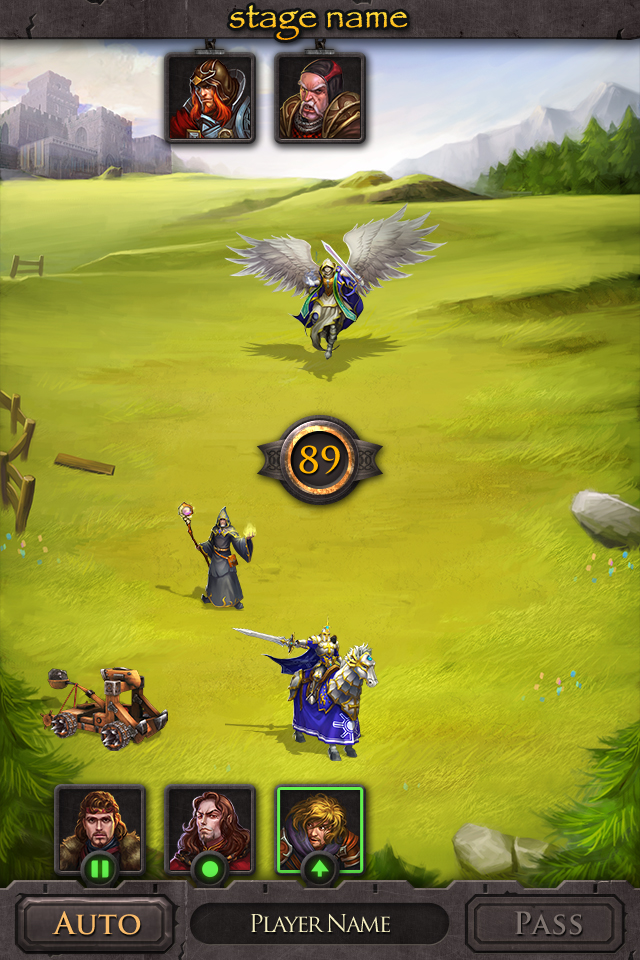
Screenshot (Start Screen): http://www.haypi.com/images/start_1.jpg
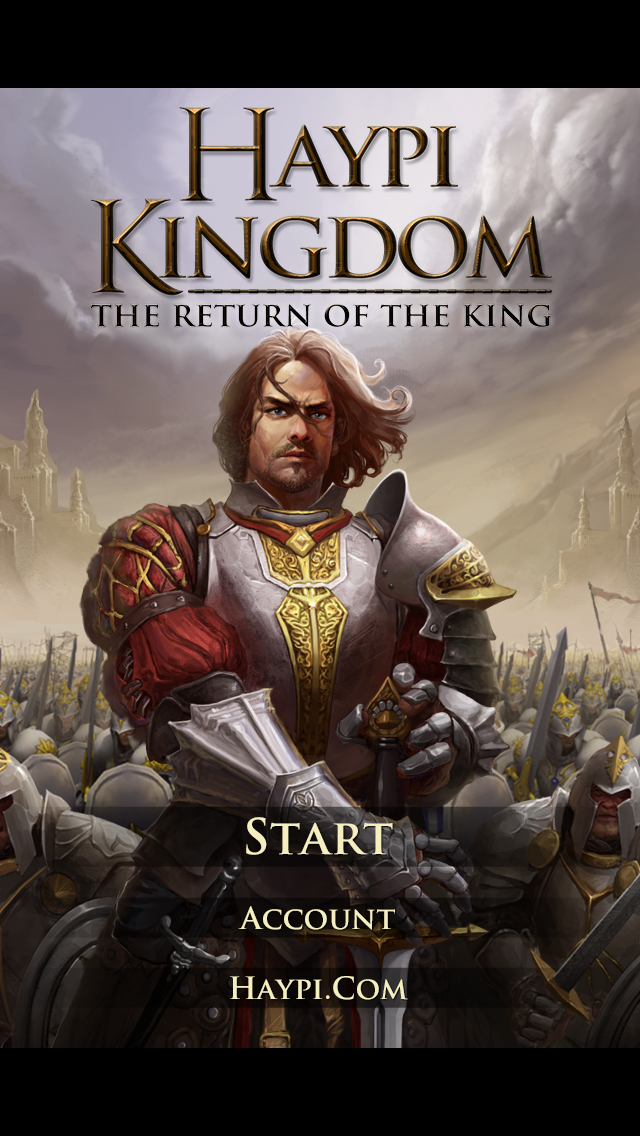
Screenshot (Game): http://www.haypi.com/images/ingame_1.jpg
App Icon: http://www.haypi.com/images/heroicon.png

Haypi Co., Ltd. is a private company founded in 2008 and based in China. Haypi is the creator of Haypi Kingdom, Haypi Dragon, Haypi Pirates, Haypi Monster, and Haypi Monster: The Lost Tower - all popular MMORPGs downloaded over several million times by players from around the world. Copyright (C) 2014 Haypi Inc. All Rights Reserved. Apple, the Apple logo, iPhone, iPod and iPad are registered trademarks of Apple Inc. in the U.S. and/or other countries.
*******
Link To Article: http://prmac.com/release-id-69608.htm
*******
---------------------------------------------------------------------------------
Note that you can alter delivered distributions at any time.
Login to your account on prMac to alter your channel selection, or to opt-out at any time.
Subscribe to:
Posts (Atom)