A new article has been published at prMac.
USDA National Nutrient Database: Calories to Vitamin K - iNutrients - Published on 08/11/14
Indie developer James Hollender's version 2.1 of his iNutrients app contains the entire USDA National Nutrient Database (Internet access not required) for: Calories, Carbohydrates, Dietary Cholesterol, Fiber, Potassium, Proteins, Saturated Fat, Sodium, Sugars and Vitamin K. The database now includes 8,463 different foods and 15,135 food servings. Even with this large quantity it may still not be enough. Users can now add their own custom foods and food servings to help fill that gap.
Revere, Massachusetts - Indie developer James Hollender's version 2.1 of his iNutrients app contains the latest USDA National Nutrient Database (SR-26), which requires no Internet access, for 10 nutrients: Calories, Carbohydrates, Dietary Cholesterol, Fiber, Potassium, Proteins, Saturated Fat, Sodium, Sugars and Vitamin K. The database now includes 8,463 different foods and 15,135 food servings.
Despite the enormous number of foods and food servings in the USDA National Nutrient Database, there are still many which aren't included, especially most name brands. Having the capability of defining Custom Foods that are missing fills this gap, which then makes keeping track of daily nutritional intake more complete.
It's extremely slick to be able to input the information from a packaged food's nutrition label and moments later see color codings for all ten nutrients indicating the ranking of their concentration. As an example the developer talks about a popular brand name frozen dinner. Once the data from the nutrition label is input and saved, the color rankings show up for the Custom Food indicating Carbohydrates are Extremely High (Black); Sodium is Very High (Dark Red); Calories are High (Red); Potassium, Saturated Fat & Sugars are Moderately High (Orange); Proteins are Moderate (Yellow); Cholesterol & Fiber are Moderately Low (Light Green); and Vitamin K is Unknown (Gray) because data wasn't available. This immediately points out that maybe this small meal, eaten frequently, isn't as nutritionally good as originally thought.
Each Custom Food Definition has one main Serving Size and an allowance to add up to three additional ones. Nutrient data is extrapolated for each of the additional Serving Sizes based on their weight compared to the main Serving Size.
There is nothing that prevents the user from collecting nutritional information for a complete meal and then creating a single Custom Food for that meal. This provides the capability to speed input of the same meal eaten frequently.
All Custom Food Definitions are automatically included in searches of the entire USDA database.
If for some reason the user doesn't agree with the developer's default Color Scales for the ten nutrients covered, each individual scale can be customized. Making a change will be reflected for all previously recorded data when next presented.
The iNutrients app provides information based on the USDA National Nutrient Database for Standard Reference concerning ten key nutrients:
* Calories - Great for anyone concerned about weight management
* Carbohydrates - Used to make glucose which is the fuel that gives you energy
* Cholesterol - Dietary Cholesterol - Aids in the production of Vitamin D
* Fiber - Essential for cardiovascular health; prevents constipation; improves control of diabetes
* Potassium - Helps with anxiety and stress; blood pressure; brain function; cramps, etc.
* Proteins - Important for Bodybuilders, Vegetarians or Vegans
* Saturated Fat - Eat only moderate amounts to keep healthy
* Sodium - Would you believe there's sodium in water?
* Sugars - Help keep your sugar intake under control
* Vitamin K - Vitamins K1, K1D & K2 - Extremely important for anyone taking Blood Thinning Medications like Coumadin or Warfarin
These nutrients are listed and presented throughout the app in alphabetical order. Icons used to help easily identify the nutrients are from other apps by the developer, each covering a single nutrient corresponding to the nutrients in this app are used throughout.
For the price of 2 individual nutrient apps, users can get all 10 nutrients in a single app.
iNutrients utilizes information taken from 100% of the USDA National Nutrient Database for each of these ten nutrients, unlike the individual apps which only cover less than 10% of what's available. Users will find the Search functionality lightning fast as all needed infromation from the USDA database is local to the app - no internet connectivity is required.
From the Search functionality the user can save information for the foods they eat each day. They are able to pick a serving size and then either record a multiple of 0.1 - 9.9 servings; or optionally create a custom serving size from 1 to 500 grams. As they change the serving size they can graphically see the the effect on the various nutrients via color coding ranging from white to black:
* Black - Extremely High
* Dark Red - Very High
* Red - High
* Orange - Moderately High
* Yellow - Moderate
* Light Green - Moderately Low
* Green - Low
* Light Blue - Very Low
* White - Extremely Low
The My Data section allows users to access up to a full year's worth of Food Serving Intake Items stored in their Personal iNutrients Database. Select any Intake Item to get the complete information available. From the display users can tap the Action button in the upper right corner to:
* Delete - Delete the current Food Serving.
* Change Number of Servings - Change the number of Servings for the current Food Intake Item.
* Change the Intake Date - Move the current Food Serving to another day. - This is extremely useful if the user wasn't able to enter what they've eaten on the day it occurred; just simply enter it and then use this function to change to the date needed.
* Copy the Intake Item to Today - This allows the user to copy an individual Food Intake Item from any day, making a copy for the current day.
Also available is an allowance to copy all the Food Intake Items from a single day to the current day. This is extremely handy for people who eat the same foods on a regular basis.
The Customize section provides a means for users to create their own Custom Color Scale for each nutrient if desired in addition to the new feature of creating or updating Custom Food Definitions.
This universal app shows rotating images occasionally on the right, when run on an iPad, that are representative of the 25 different Food Groups designated by the USDA. Versions of these images will typically be seen whenever a food group is identified on iPad, iPhone or iPod touch. More features are planned for upcoming future releases, especially in the areas of customization and reporting.
Device Requirements:
* iPhone, iPad or iPod touch
* iOS 6.0 or later
* Universal Application
* 31 MB
James Hollender is also the creator of the Life Inventory apps which allow users to discover more about themselves than they ever thought possible, and at just a small fraction the cost of a single visit to a therapist.
Pricing and Availability:
iNutrients 1.2 is $3.99 (USD) and available worldwide exclusively through the iTunes App Store in the Health & Fitness and Medical categories. Review copies are available on request to qualified organizations.
iNutrients 2.1: http://www.hollender.com/iNutrients.html
Purchase and Download: https://itunes.apple.com/app/id580660547
YouTube Video: http://www.youtube.com/watch?v=iHpa9hmy8IA
Screenshots 1: http://www.hollender.com/iNutrients.html#screenshots1
Screenshots 2: http://www.hollender.com/iNutrients.html#screenshots2
App Icon: http://www.hollender.com/images/iNutrients256.png
Based in Revere, Massachusetts, Indie developer James Hollender is a well seasoned Information Technology professional who has been familiar with Apple products since the days of the first Macintosh computer and has been involved with object oriented programming since the introduction of Java, culminating most recently in writing apps in Objective C for the iPhone, iPod touch and iPad. His innovative ideas have resulted in numerous suggestions and other awards including a commendation from The President of the United States. James Hollender has been involved writing iPad apps with Foliage, Kronos, Olympus, Agero and now Valmarc. Copyright (C) 2010-2014 James Hollender. All Rights Reserved. Apple, the Apple logo, iPhone, and iPod are registered trademarks of Apple Inc. in the U.S. and/or other countries. Other trademarks and registered trademarks may be the property of their respective owners.
*******
Link To Article: http://prmac.com/release-id-69766.htm
*******
---------------------------------------------------------------------------------
Note that you can alter delivered distributions at any time.
Login to your account on prMac to alter your channel selection, or to opt-out at any time.


Night Night Train - Interactive Bedtime Story - In App Store Now
A new article has been published at prMac.
Night Night Train - Interactive Bedtime Story - In App Store Now - Published on 08/11/14
Jeremy Horton today announces iOS app "Night Night Train". A charming, interactive bedtime story, the app should help young children relax and unwind. Following "Alpine Train 3D" the studio has stuck with a railroad theme but introduces animal characters, voice narration, musical box soundtrack and a greater sense of journey to make an appealing formula for younger iOS users. Each game finishes within an adjustable length of time, and so could be incorporated into a bedtime routine.
Bristol, United Kingdom - Night Night Train revolves around seven appealing animal characters. Each character has his own home and work station. The player helps Wolfie the train driver collect each character from work and drop each back home before bedtime. Play is interactive by steering the train at track junctions and controlling the speed.
The app cleverly manages the maximum game time set in the options panel. If the player steers and keeps to time well enough then all characters will be returned to bed on time and the story draws to an end. If not then verbal and visual hints begin as necessary, followed by automatic control of steering and finally speed in order to choose the quickest route home and keep to time. Wolfie the train driver keeps all this under his watchful eye.
Detailed attention is given to nuances in the animation and sound effects such as musical tempo which changes based on train speed, variations in the voice narration, subtle character movements and quirky train dynamics. The aim is to convey a feeling of relaxation but with a sense of humour and involvement in the story - all the time-honoured ingredients for a good bedtime story but reinvented for the iPad generation and aimed at younger children.
In version 1.0:
* Seven cute little animals which ride the train
* Adjustable length experience. Set a maximum time for the game
* Idyllic island countryside setting
* 3D graphics appealing to young children
* Narration in English. Can be muted
* Soundtrack which changes tempo based on train speed. Can be muted
* Designed for you child's relaxation near bedtime
Honest Price:
* 5.99 USD and no in-app purchases
* No third-party advertising
* No social media
Device Requirements:
* iPhone, iPad, iPad mini and iPod touch
* Requires iOS 4.0 or later
* 56.1 MB
Pricing and Availability:
Night Night Train 1.0 is $5.99 USD (or equivalent amount in other currencies) and available worldwide exclusively through the App Store in the Games category. There are no no in-app purchases or third-party advertising.
Night Night Train 1.0: http://www.vector3up.co.uk/nightnighttrain.html
Purchase and Download: https://itunes.apple.com/app/nightnighttrain/id894397513
Screenshots: https://onedrive.live.com/?cid=9fe79525d482bdc3&id=9FE79525D482BDC3!180&Bsrc=Share&Bpub=SDX.SkyDrive&authkey=!
App Icon: https://onedrive.live.com/?cid=9fe79525d482bdc3&id=9FE79525D482BDC3!181&Bsrc=Share&Bpub=SDX.SkyDrive&authkey=!
Jeremy Horton is a freelance 3D animator with extensive experience in film, exhibitions and gaming. His recent credits include content for the BBC series How to Grow a Planet for which he jointly collected an RTS award for his client. Dave Wolff is a self-employed software developer with experience in software testing, test framework development and multimedia. All Material and Software (C) Copyright 2014 Jeremy Horton. All Rights Reserved. Apple, the Apple logo, iPhone, iPod and iPad are registered trademarks of Apple Inc. in the U.S. and/or other countries. Other trademarks and registered trademarks may be the property of their respective owners.
*******
Link To Article: http://prmac.com/release-id-69763.htm
*******
---------------------------------------------------------------------------------
Note that you can alter delivered distributions at any time.
Login to your account on prMac to alter your channel selection, or to opt-out at any time.
Night Night Train - Interactive Bedtime Story - In App Store Now - Published on 08/11/14
Jeremy Horton today announces iOS app "Night Night Train". A charming, interactive bedtime story, the app should help young children relax and unwind. Following "Alpine Train 3D" the studio has stuck with a railroad theme but introduces animal characters, voice narration, musical box soundtrack and a greater sense of journey to make an appealing formula for younger iOS users. Each game finishes within an adjustable length of time, and so could be incorporated into a bedtime routine.
Bristol, United Kingdom - Night Night Train revolves around seven appealing animal characters. Each character has his own home and work station. The player helps Wolfie the train driver collect each character from work and drop each back home before bedtime. Play is interactive by steering the train at track junctions and controlling the speed.
The app cleverly manages the maximum game time set in the options panel. If the player steers and keeps to time well enough then all characters will be returned to bed on time and the story draws to an end. If not then verbal and visual hints begin as necessary, followed by automatic control of steering and finally speed in order to choose the quickest route home and keep to time. Wolfie the train driver keeps all this under his watchful eye.
Detailed attention is given to nuances in the animation and sound effects such as musical tempo which changes based on train speed, variations in the voice narration, subtle character movements and quirky train dynamics. The aim is to convey a feeling of relaxation but with a sense of humour and involvement in the story - all the time-honoured ingredients for a good bedtime story but reinvented for the iPad generation and aimed at younger children.
In version 1.0:
* Seven cute little animals which ride the train
* Adjustable length experience. Set a maximum time for the game
* Idyllic island countryside setting
* 3D graphics appealing to young children
* Narration in English. Can be muted
* Soundtrack which changes tempo based on train speed. Can be muted
* Designed for you child's relaxation near bedtime
Honest Price:
* 5.99 USD and no in-app purchases
* No third-party advertising
* No social media
Device Requirements:
* iPhone, iPad, iPad mini and iPod touch
* Requires iOS 4.0 or later
* 56.1 MB
Pricing and Availability:
Night Night Train 1.0 is $5.99 USD (or equivalent amount in other currencies) and available worldwide exclusively through the App Store in the Games category. There are no no in-app purchases or third-party advertising.
Night Night Train 1.0: http://www.vector3up.co.uk/nightnighttrain.html
Purchase and Download: https://itunes.apple.com/app/nightnighttrain/id894397513
Screenshots: https://onedrive.live.com/?cid=9fe79525d482bdc3&id=9FE79525D482BDC3!180&Bsrc=Share&Bpub=SDX.SkyDrive&authkey=!
App Icon: https://onedrive.live.com/?cid=9fe79525d482bdc3&id=9FE79525D482BDC3!181&Bsrc=Share&Bpub=SDX.SkyDrive&authkey=!
Jeremy Horton is a freelance 3D animator with extensive experience in film, exhibitions and gaming. His recent credits include content for the BBC series How to Grow a Planet for which he jointly collected an RTS award for his client. Dave Wolff is a self-employed software developer with experience in software testing, test framework development and multimedia. All Material and Software (C) Copyright 2014 Jeremy Horton. All Rights Reserved. Apple, the Apple logo, iPhone, iPod and iPad are registered trademarks of Apple Inc. in the U.S. and/or other countries. Other trademarks and registered trademarks may be the property of their respective owners.
*******
Link To Article: http://prmac.com/release-id-69763.htm
*******
---------------------------------------------------------------------------------
Note that you can alter delivered distributions at any time.
Login to your account on prMac to alter your channel selection, or to opt-out at any time.
+Cue 1.0.2 Music Sequencer for iOS - Compose Music Just By Shaking
A new article has been published at prMac.
+Cue 1.0.2 Music Sequencer for iOS - Compose Music Just By Shaking - Published on 08/11/14
Tokyo based Bricks inc. today announces +Cue 1.0.2, an update to its music creation app developed exclusively for iOS. Created so that anyone can create their own original music, +Cue 1.0.2 allows anyone to compose music just by shaking the device. Even those who cannot play an instrument can enjoy music by just shaking and adding new sounds to make their own music. The music can also be shared among family and friends and it can be played through your friend's iPhone at the same time.
Tokyo, Japan - Bricks inc. today is proud to announce the release and immediate availability of +Cue 1.0.2, an update to its music creation app developed exclusively for iPhone and iPod touch. Created so that anyone can create their own original music, +Cue 1.0.2 is a new kind of application that can compose music just by shaking. Even those who cannot play an instrument can enjoy music by just shaking their device and adding new sounds from 4 different instruments to make their own music. The music can also be shared among family and friends and it can be played through your friend's iPhone at the same time.
Features:
* 4 types of instruments can be played; drums, base. instrument 1 and instrument 2
* New sounds will be added by shaking an instrument
* The screen will flash with the beat and the LED light can also be set so that it flashes with the beat
* Melody can be made since the sound is fixed by the direction being shaken
* A nice piece can be made even if it is randomly shaken
* The tone can be changed in each instrument
* It can also be enjoyed by its sharing function
* The number of people it can be shared with is not limited so it can be shared with 100 people or even 1000
+Cue version 1.0.2 includes a minor bug fix where Techno did not sound.
Device Requirements:
* iPhone and iPod touch
* Requires iOS 7.0 or later
* 4.3 MB
Pricing and Availability:
+Cue 1.0.2 is $0.99 USD and available worldwide exclusively through the App Store in the Music category.
+Cue 1.0.2: http://www.c-ue.com/
Download from iTunes: https://itunes.apple.com/us/app/+cue/id895677846
YouTube Video (How To): https://www.youtube.com/channel/UCwTrDV_nppWUy37KnaaebPA
Promotional image: http://www.c-ue.com/image/homepage.jpg
Screenshot (iPhone): http://www.c-ue.com/image/iPhone.jpg
Logo: http://www.c-ue.com/image/logo.jpg
Headquartered in Tokyo, Japan, Bricks inc. was established in 2012 and founded by Masatoshi Ishida, the driving force behind Bricks. The company is focused on system and mobile development for the iPhone and iPad platforms. Brick's main offices are located at 4-7-5-309, Chitosedai, Setagaya-ku, Tokyo, 157-0071. All Material and Software (C) Copyright 2012-2014 Bricks inc.. All Rights Reserved. Apple, the Apple logo, iPhone, iPod and iPad are registered trademarks of Apple Inc. in the U.S. and/or other countries. Other trademarks and registered trademarks may be the property of their respective owners.
*******
Link To Article: http://prmac.com/release-id-69732.htm
*******
---------------------------------------------------------------------------------
Note that you can alter delivered distributions at any time.
Login to your account on prMac to alter your channel selection, or to opt-out at any time.
+Cue 1.0.2 Music Sequencer for iOS - Compose Music Just By Shaking - Published on 08/11/14
Tokyo based Bricks inc. today announces +Cue 1.0.2, an update to its music creation app developed exclusively for iOS. Created so that anyone can create their own original music, +Cue 1.0.2 allows anyone to compose music just by shaking the device. Even those who cannot play an instrument can enjoy music by just shaking and adding new sounds to make their own music. The music can also be shared among family and friends and it can be played through your friend's iPhone at the same time.
Tokyo, Japan - Bricks inc. today is proud to announce the release and immediate availability of +Cue 1.0.2, an update to its music creation app developed exclusively for iPhone and iPod touch. Created so that anyone can create their own original music, +Cue 1.0.2 is a new kind of application that can compose music just by shaking. Even those who cannot play an instrument can enjoy music by just shaking their device and adding new sounds from 4 different instruments to make their own music. The music can also be shared among family and friends and it can be played through your friend's iPhone at the same time.
Features:
* 4 types of instruments can be played; drums, base. instrument 1 and instrument 2
* New sounds will be added by shaking an instrument
* The screen will flash with the beat and the LED light can also be set so that it flashes with the beat
* Melody can be made since the sound is fixed by the direction being shaken
* A nice piece can be made even if it is randomly shaken
* The tone can be changed in each instrument
* It can also be enjoyed by its sharing function
* The number of people it can be shared with is not limited so it can be shared with 100 people or even 1000
+Cue version 1.0.2 includes a minor bug fix where Techno did not sound.
Device Requirements:
* iPhone and iPod touch
* Requires iOS 7.0 or later
* 4.3 MB
Pricing and Availability:
+Cue 1.0.2 is $0.99 USD and available worldwide exclusively through the App Store in the Music category.
+Cue 1.0.2: http://www.c-ue.com/
Download from iTunes: https://itunes.apple.com/us/app/+cue/id895677846
YouTube Video (How To): https://www.youtube.com/channel/UCwTrDV_nppWUy37KnaaebPA
Promotional image: http://www.c-ue.com/image/homepage.jpg

Screenshot (iPhone): http://www.c-ue.com/image/iPhone.jpg

Logo: http://www.c-ue.com/image/logo.jpg

Headquartered in Tokyo, Japan, Bricks inc. was established in 2012 and founded by Masatoshi Ishida, the driving force behind Bricks. The company is focused on system and mobile development for the iPhone and iPad platforms. Brick's main offices are located at 4-7-5-309, Chitosedai, Setagaya-ku, Tokyo, 157-0071. All Material and Software (C) Copyright 2012-2014 Bricks inc.. All Rights Reserved. Apple, the Apple logo, iPhone, iPod and iPad are registered trademarks of Apple Inc. in the U.S. and/or other countries. Other trademarks and registered trademarks may be the property of their respective owners.
*******
Link To Article: http://prmac.com/release-id-69732.htm
*******
---------------------------------------------------------------------------------
Note that you can alter delivered distributions at any time.
Login to your account on prMac to alter your channel selection, or to opt-out at any time.
Follow La Liga 2014-2015 and Play with Prediction
A new article has been published at prMac.
Follow La Liga 2014-2015 and Play with Prediction - Published on 08/11/14
Rifra Mobile Apps is proud to announce the release of La Liga Live 2014-2015 (on iOS and Android), the ideal companion for following the Primera Division of the Liga Nacional de Futbol Profesional, one of the most anticipated sporting events of the year, and for being the hero through the exciting game of predictions. The user can also actively participate in the strongest league in Europe through the game of predictions by trying to predict the outcome of each match.
Livorno, Italy - Rifra Mobile Apps is proud to announce the release of its new application "La Liga Live 2014-2015" for Android and iOS. La Liga Live 2014-2015 is the ideal companion for following the season 2014-2015 of First Division of Spanish League, one of the most anticipated sporting events of the year, and for being the hero through the exciting game of predictions. La Liga Live 2014-2015 provides a complete guide, updated in real time, which provides the user with the following information:
* Calendar of season 2014-2015
* Information on the 20 participating teams
* Tables, results, scorers and yellow/red cards updated in real time
The user can also actively participate in the Primera Division through the game of predictions by trying to predict the outcome of each match. Support from the Game Center (for iOS) will allow the user to compare results with friends and all the users of the Game Center. Finally, La Liga Live 2014-2015 will provide detailed statistics on what were the most predicted results in the world on every single match.
Other functionality:
* (iOS) Customize your application by selecting the graphics of your favorite team
* (iOS) Comment live all matches
Device Requirements:
* iPhone, iPad, or iPod touch with iOS 5.0 or later
* Android Phones & Tablets with operating systems v. 2.3.3 or later
* 10.3 MB
Price and Availability:
La Liga Live 2014-2015 (v3.5.0) is available free of charge through the App Store and Google Play around the world.
La Liga Live 2014-2015 (v3.5.0): https://www.facebook.com/rifra.mobile.apps
Download from iTunes: https://itunes.apple.com/app/la-liga-live-2014-2015/id897456770
Download from Google Play: https://play.google.com/store/apps/details?id=it.rifranet.SPALL2014
Screenshot: http://a2.mzstatic.com/us/r30/Purple3/v4/cc/7f/cc/cc7fcc8c-229e-d10e-fbb5-ac5a54243418/screen322x572.jpeg
App Icon: http://a5.mzstatic.com/us/r30/Purple4/v4/1e/71/9b/1e719b8c-1570-4bf9-3eaf-237d0c016bd5/mzl.cjxbfayk.175x175-75.jpg
Press Kit (zip): http://www.rifranet.it/MobileApps/Press/La_Liga_Live_2014-2015_PressKit
Rifra S.r.l. is a company based in Livorno, Italy, and has 22 years of experience in the IT industry. Among other applications developed by the company, there are: Champions Live 2014-2015, Europa League Live 2014-2015, Premier Live 2014-2015, Bundesliga Live 2014-2015, Serie A 2014-2015, Ligue 1 Live 2014-2015 and so others. Every years Rifra S.r.l. distributes free complete guides for many european football championships. Copyright (C) 2014 Rifra S.r.l.. All Rights Reserved. Other trademarks and registered trademarks may be the property of their respective owners.
*******
Link To Article: http://prmac.com/release-id-69765.htm
*******
---------------------------------------------------------------------------------
Note that you can alter delivered distributions at any time.
Login to your account on prMac to alter your channel selection, or to opt-out at any time.
Follow La Liga 2014-2015 and Play with Prediction - Published on 08/11/14
Rifra Mobile Apps is proud to announce the release of La Liga Live 2014-2015 (on iOS and Android), the ideal companion for following the Primera Division of the Liga Nacional de Futbol Profesional, one of the most anticipated sporting events of the year, and for being the hero through the exciting game of predictions. The user can also actively participate in the strongest league in Europe through the game of predictions by trying to predict the outcome of each match.
Livorno, Italy - Rifra Mobile Apps is proud to announce the release of its new application "La Liga Live 2014-2015" for Android and iOS. La Liga Live 2014-2015 is the ideal companion for following the season 2014-2015 of First Division of Spanish League, one of the most anticipated sporting events of the year, and for being the hero through the exciting game of predictions. La Liga Live 2014-2015 provides a complete guide, updated in real time, which provides the user with the following information:
* Calendar of season 2014-2015
* Information on the 20 participating teams
* Tables, results, scorers and yellow/red cards updated in real time
The user can also actively participate in the Primera Division through the game of predictions by trying to predict the outcome of each match. Support from the Game Center (for iOS) will allow the user to compare results with friends and all the users of the Game Center. Finally, La Liga Live 2014-2015 will provide detailed statistics on what were the most predicted results in the world on every single match.
Other functionality:
* (iOS) Customize your application by selecting the graphics of your favorite team
* (iOS) Comment live all matches
Device Requirements:
* iPhone, iPad, or iPod touch with iOS 5.0 or later
* Android Phones & Tablets with operating systems v. 2.3.3 or later
* 10.3 MB
Price and Availability:
La Liga Live 2014-2015 (v3.5.0) is available free of charge through the App Store and Google Play around the world.
La Liga Live 2014-2015 (v3.5.0): https://www.facebook.com/rifra.mobile.apps
Download from iTunes: https://itunes.apple.com/app/la-liga-live-2014-2015/id897456770
Download from Google Play: https://play.google.com/store/apps/details?id=it.rifranet.SPALL2014
Screenshot: http://a2.mzstatic.com/us/r30/Purple3/v4/cc/7f/cc/cc7fcc8c-229e-d10e-fbb5-ac5a54243418/screen322x572.jpeg

App Icon: http://a5.mzstatic.com/us/r30/Purple4/v4/1e/71/9b/1e719b8c-1570-4bf9-3eaf-237d0c016bd5/mzl.cjxbfayk.175x175-75.jpg

Press Kit (zip): http://www.rifranet.it/MobileApps/Press/La_Liga_Live_2014-2015_PressKit
Rifra S.r.l. is a company based in Livorno, Italy, and has 22 years of experience in the IT industry. Among other applications developed by the company, there are: Champions Live 2014-2015, Europa League Live 2014-2015, Premier Live 2014-2015, Bundesliga Live 2014-2015, Serie A 2014-2015, Ligue 1 Live 2014-2015 and so others. Every years Rifra S.r.l. distributes free complete guides for many european football championships. Copyright (C) 2014 Rifra S.r.l.. All Rights Reserved. Other trademarks and registered trademarks may be the property of their respective owners.
*******
Link To Article: http://prmac.com/release-id-69765.htm
*******
---------------------------------------------------------------------------------
Note that you can alter delivered distributions at any time.
Login to your account on prMac to alter your channel selection, or to opt-out at any time.
Retro Gaming iBook: Ocean The History Hits Number 1 In iTunes Chart
A new article has been published at prMac.
Retro Gaming iBook: Ocean The History Hits Number 1 In iTunes Chart - Published on 08/11/14
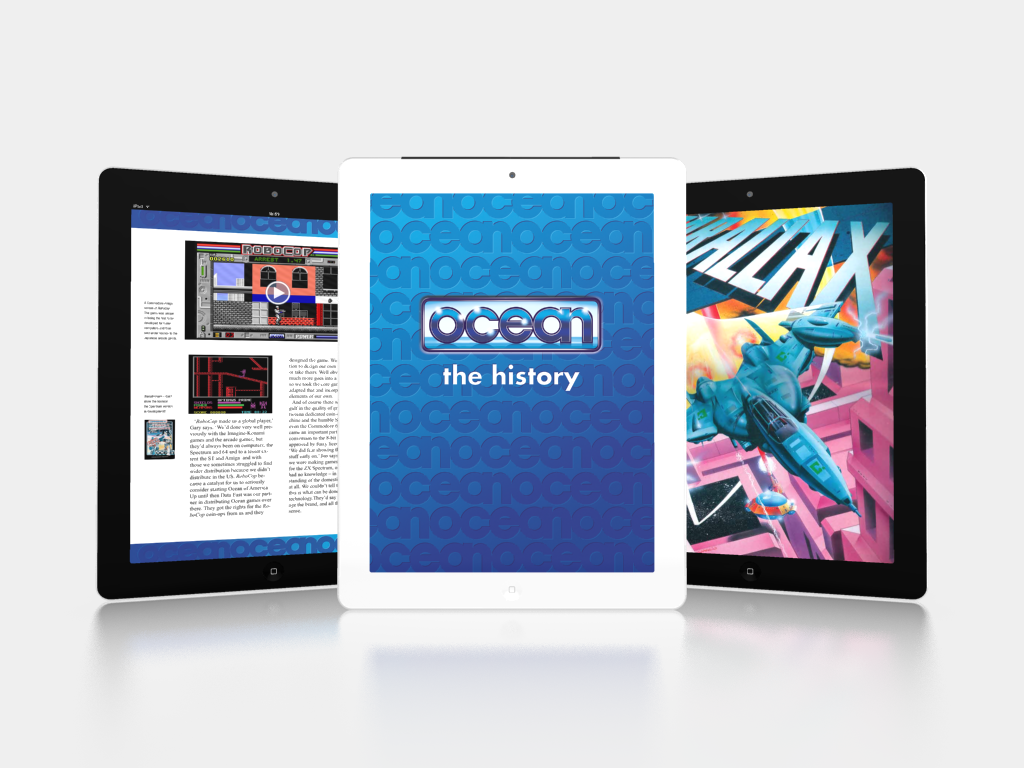
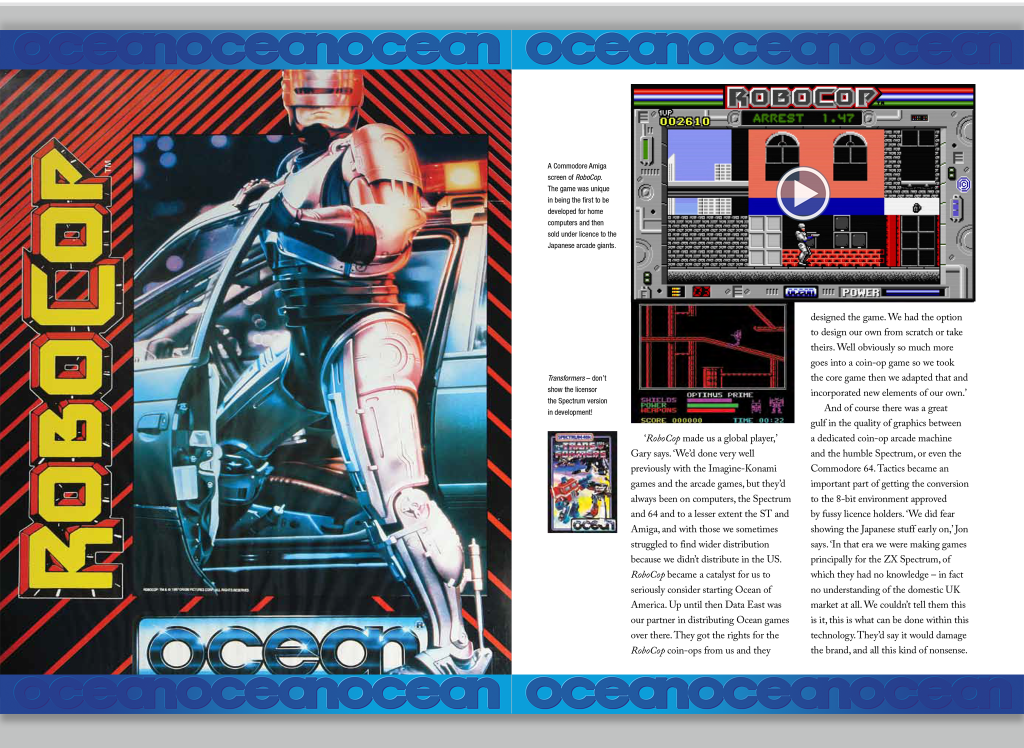
Only one week after its release, the Retro Gaming iBook about Ocean Software, the company behind classic 80s and 90s games like Double Dragon, Robocop and Batman the Movie, has stormed up the iTunes charts to reach the number 1 spot in both the gaming and arts & entertainment categories. This iBook features 264 pages of interviews and anecdotes from the people who built Ocean Software and created the games, including full screen images, classic TV commercials, in-game video footage and audio.
Liverpool, United Kingdom - Classic gaming fans have proven that old school gaming is still equally as popular as its modern day counterpart by catapulting Ocean the History to the top of the iTunes book chart overtaking the regular chart leading Minecraft and World of Warcraft guides.
'Ocean The History' tells the story of Ocean Software - the UK's most successful games company and the software house behind some of the most well loved games of the 80s and 90s including Terminator 2 and Batman the Movie; exploring the company's origins, its employees, their games, their music and the iconic artwork that placed the company at the forefront of the games industry for over a decade.
Features
* 264 pages of interviews and anecdotes from the people who built Ocean Software and created the games
* Additional writing from Roger Kean - Owner of Newsfield Publications and editor of classic 80s games magazines ZZAP!64 and Crash
* Illustrated by world famous games artist Oliver Frey
* Behind the scenes photos, concept graphics and never before seen memorabilia
* Game concept artwork and sprite design
Bonus Content:
All new exclusive iPad content features in-game videos, music, audio, full screen images and vintage TV commercials.
Device Requirements:
* iPad with iBooks 3
* iOS 5.1 or later
System Requirements:
* Mac with iBooks 1.0
* OS X 10.9 or later
Pricing and Availability:
For a limited period, Ocean The History 1.0 is currently on sale for $6.99 USD (a 33% discount) or equivalent amount in other currencies, and available worldwide exclusively through the App Store in the Games category. The book is available on iPad and Mac.
Fizzy Pop Digital: http://www.fizzypopdigital.com
Ocean The History 1.0: http://www.fizzypopdigital.com/#!ocean-the-history/c6i
Purchase and Download: https://itunes.apple.com/book/ocean-the-history/id897125362
Screenshot 1: http://i1372.photobucket.com/albums/ag324/fizzypopdigital/OceaniBook3iPads_zps9a6feb51.png
Screenshot 2: http://i1372.photobucket.com/albums/ag324/fizzypopdigital/ScreenShot_2_zpsc8be1904.png
Screenshot 3: http://i1372.photobucket.com/albums/ag324/fizzypopdigital/ScreenShot_3_zps8d982fca.png
Fizzy Pop Digital is a UK based app developer and digital media publisher. All Material and Software (C) Copyright 2014 Fizzy Pop Digital. All Rights Reserved. Apple, the Apple logo, iPhone, iPod and iPad are registered trademarks of Apple Inc. in the U.S. and/or other countries. Other trademarks and registered trademarks may be the property of their respective owners.
*******
Link To Article: http://prmac.com/release-id-69764.htm
*******
---------------------------------------------------------------------------------
Note that you can alter delivered distributions at any time.
Login to your account on prMac to alter your channel selection, or to opt-out at any time.
Retro Gaming iBook: Ocean The History Hits Number 1 In iTunes Chart - Published on 08/11/14
Only one week after its release, the Retro Gaming iBook about Ocean Software, the company behind classic 80s and 90s games like Double Dragon, Robocop and Batman the Movie, has stormed up the iTunes charts to reach the number 1 spot in both the gaming and arts & entertainment categories. This iBook features 264 pages of interviews and anecdotes from the people who built Ocean Software and created the games, including full screen images, classic TV commercials, in-game video footage and audio.
Liverpool, United Kingdom - Classic gaming fans have proven that old school gaming is still equally as popular as its modern day counterpart by catapulting Ocean the History to the top of the iTunes book chart overtaking the regular chart leading Minecraft and World of Warcraft guides.
'Ocean The History' tells the story of Ocean Software - the UK's most successful games company and the software house behind some of the most well loved games of the 80s and 90s including Terminator 2 and Batman the Movie; exploring the company's origins, its employees, their games, their music and the iconic artwork that placed the company at the forefront of the games industry for over a decade.
Features
* 264 pages of interviews and anecdotes from the people who built Ocean Software and created the games
* Additional writing from Roger Kean - Owner of Newsfield Publications and editor of classic 80s games magazines ZZAP!64 and Crash
* Illustrated by world famous games artist Oliver Frey
* Behind the scenes photos, concept graphics and never before seen memorabilia
* Game concept artwork and sprite design
Bonus Content:
All new exclusive iPad content features in-game videos, music, audio, full screen images and vintage TV commercials.
Device Requirements:
* iPad with iBooks 3
* iOS 5.1 or later
System Requirements:
* Mac with iBooks 1.0
* OS X 10.9 or later
Pricing and Availability:
For a limited period, Ocean The History 1.0 is currently on sale for $6.99 USD (a 33% discount) or equivalent amount in other currencies, and available worldwide exclusively through the App Store in the Games category. The book is available on iPad and Mac.
Fizzy Pop Digital: http://www.fizzypopdigital.com
Ocean The History 1.0: http://www.fizzypopdigital.com/#!ocean-the-history/c6i
Purchase and Download: https://itunes.apple.com/book/ocean-the-history/id897125362
Screenshot 1: http://i1372.photobucket.com/albums/ag324/fizzypopdigital/OceaniBook3iPads_zps9a6feb51.png
Screenshot 2: http://i1372.photobucket.com/albums/ag324/fizzypopdigital/ScreenShot_2_zpsc8be1904.png

Screenshot 3: http://i1372.photobucket.com/albums/ag324/fizzypopdigital/ScreenShot_3_zps8d982fca.png
Fizzy Pop Digital is a UK based app developer and digital media publisher. All Material and Software (C) Copyright 2014 Fizzy Pop Digital. All Rights Reserved. Apple, the Apple logo, iPhone, iPod and iPad are registered trademarks of Apple Inc. in the U.S. and/or other countries. Other trademarks and registered trademarks may be the property of their respective owners.
*******
Link To Article: http://prmac.com/release-id-69764.htm
*******
---------------------------------------------------------------------------------
Note that you can alter delivered distributions at any time.
Login to your account on prMac to alter your channel selection, or to opt-out at any time.
Play Trivia 4 Friends Without Logging In
A new article has been published at prMac.
Play Trivia 4 Friends Without Logging In - Published on 08/11/14
Tulsa based iSolution Services announces the release of Trivia 4 Friends, a free quiz game app for iOS devices. The game can now be played without logging into Facebook. The game has five categories with questions. If the question is answered correctly, points are earned. If incorrectly, the catagory is unavailable. Play continues until only one player has categories. The player with the highest point value wins Trivia 4 Friends.
Tulsa, Oklahoma - Trivia 4 Friends, a free mobile quiz game app, can now be played without logging into Facebook. Without logging in, a game session is played against a non-real player in the same way as logging in using Facebook credentials and playing against up to 4 others that have logged in via Facebook.
Larry Poor, co-founder, said, "We found that many potential players either did not have a Facebook account or did not want to use Facebook in order to log in and play the Trivia 4 Friends app. Even though we have always assured players that we would not post anything to their Facebook timeline without their express permission, some were still reluctant. So we have now added the ability to play the game without having to log in at all."
No-login play consists of playing one game session against a non-real person. This not only allows new players an easy way to evaluate the game before logging in via Facebook but allows any player to play continuously without waiting on another real player to play their turn. Login play allows multiple game sessions with different players to be going on at the same time. Another advantage of logging in is that points earned are accumulated for obtaining awards.
Each game session has five different categories. As each question is answered correctly, points are earned. If a question is answered incorrectly, that category is no longer available. A game is over when only one game player still has available categories. The player with the highest point value wins the game.
Device Requirements:
* iPhone, iPad, and iPod touch
* Requires iOS 5.1 or later
* 11.5 MB
Pricing and Availability:
Trivia 4 Friends 1.28 is free and available worldwide exclusively through the App Store in the Games category. The game is also available from the Google Play store for Android smartphones and tablets.
Trivia 4 Friends 1.28: http://www.trivia4friends.com
Download from iTunes: https://itunes.apple.com/app/trivia-4-friends/id586675964
YouTube Channel: http://www.youtube.com/trivia4friends
Screenshot: http://www.trivia4friends.com/t4fapi/help/help_category_6_boxes.jpg
App Icon: http://www.trivia4friends.com/t4fapi/images/icon114.png
iSolution Services was founded in 2009. The company develops mobile apps and provides various technology services. All Material and Software (C) Copyright 2014 iSolution Services. All Rights Reserved. Apple, the Apple logo, iPhone, iPod and iPad are registered trademarks of Apple Inc. in the U.S. and/or other countries. Other trademarks and registered trademarks may be the property of their respective owners.
*******
Link To Article: http://prmac.com/release-id-69745.htm
*******
---------------------------------------------------------------------------------
Note that you can alter delivered distributions at any time.
Login to your account on prMac to alter your channel selection, or to opt-out at any time.
Play Trivia 4 Friends Without Logging In - Published on 08/11/14
Tulsa based iSolution Services announces the release of Trivia 4 Friends, a free quiz game app for iOS devices. The game can now be played without logging into Facebook. The game has five categories with questions. If the question is answered correctly, points are earned. If incorrectly, the catagory is unavailable. Play continues until only one player has categories. The player with the highest point value wins Trivia 4 Friends.
Tulsa, Oklahoma - Trivia 4 Friends, a free mobile quiz game app, can now be played without logging into Facebook. Without logging in, a game session is played against a non-real player in the same way as logging in using Facebook credentials and playing against up to 4 others that have logged in via Facebook.
Larry Poor, co-founder, said, "We found that many potential players either did not have a Facebook account or did not want to use Facebook in order to log in and play the Trivia 4 Friends app. Even though we have always assured players that we would not post anything to their Facebook timeline without their express permission, some were still reluctant. So we have now added the ability to play the game without having to log in at all."
No-login play consists of playing one game session against a non-real person. This not only allows new players an easy way to evaluate the game before logging in via Facebook but allows any player to play continuously without waiting on another real player to play their turn. Login play allows multiple game sessions with different players to be going on at the same time. Another advantage of logging in is that points earned are accumulated for obtaining awards.
Each game session has five different categories. As each question is answered correctly, points are earned. If a question is answered incorrectly, that category is no longer available. A game is over when only one game player still has available categories. The player with the highest point value wins the game.
Device Requirements:
* iPhone, iPad, and iPod touch
* Requires iOS 5.1 or later
* 11.5 MB
Pricing and Availability:
Trivia 4 Friends 1.28 is free and available worldwide exclusively through the App Store in the Games category. The game is also available from the Google Play store for Android smartphones and tablets.
Trivia 4 Friends 1.28: http://www.trivia4friends.com
Download from iTunes: https://itunes.apple.com/app/trivia-4-friends/id586675964
YouTube Channel: http://www.youtube.com/trivia4friends
Screenshot: http://www.trivia4friends.com/t4fapi/help/help_category_6_boxes.jpg

App Icon: http://www.trivia4friends.com/t4fapi/images/icon114.png

iSolution Services was founded in 2009. The company develops mobile apps and provides various technology services. All Material and Software (C) Copyright 2014 iSolution Services. All Rights Reserved. Apple, the Apple logo, iPhone, iPod and iPad are registered trademarks of Apple Inc. in the U.S. and/or other countries. Other trademarks and registered trademarks may be the property of their respective owners.
*******
Link To Article: http://prmac.com/release-id-69745.htm
*******
---------------------------------------------------------------------------------
Note that you can alter delivered distributions at any time.
Login to your account on prMac to alter your channel selection, or to opt-out at any time.
Animoji - Create animated talking pictures
A new article has been published at prMac.
Animoji - Create animated talking pictures - Published on 08/11/14
Digitalists Interactive Agency Ltd has introduced Animoji, an iOS exclusive entertainment app that creates talking animated pictures from photos and recorded sounds. In 3 easy steps anyone can create short animated messages from selfies, photos of pets, friends, your moms and dads, your grandpas and grandmas, presidents, vice-presidents and ex-presidents. Easily share on your Facebook page, video from the Camera Roll, send it via e-mail, share on YouTube, Vimeo, Instagram and any messenger app.
London, United Kingdom - Digitalists Interactive Agency Ltd has introduced Animoji, an iOS exclusive entertainment app that creates animated talking pictures from photos and recorded sounds. In 3 easy steps anyone can create short animated messages from selfies, photos of pets, friends, yourself, your moms and dads, your grandpas and grandmas, presidents, vice-presidents and ex-presidents.
Animoji can make any picture come alive with 3 simple steps:
* First, snap a photo, or select a photo from camera roll, or select a photo from your Facebook account.
* Second, record your voice or any kind of sound or music.
* And third, choose one of the animoji templates and sound filters.
Tap on GO button, and, in a few moments, watch a complete animation of your photo. You can post animation to your Facebook page or share the video from the Camera Roll: send it via e-mail, share on YouTube, Vimeo, Instagram and any messenger app: WhatsApp, Line, Kakao Talk, Skype.
The app also makes it easy to make changes to the animation. Just go back from play screen and change an ingredient without changing the other two: just change either photo, recorded voice or animoji smile or sound filter.
Device Requirements:
* iPhone, iPad, and iPod touch
* Requires iOS 4.3 or later
* Universal Application
* 20.4 MB
Pricing and Availability:
Animoji is Free and available worldwide exclusively through the App Store in the Entertainment category.
Animoji 1.1.0: http://apps.thedigitalists.net/app/animoji
Download from iTunes: https://itunes.apple.com/app/animoji-create-talking-pictures/id868307692
Screenshot 1: http://apps.thedigitalists.net/wp-content/uploads/2014/06/scrn640x1136-2-209x371.jpg
Screenshot 2: http://apps.thedigitalists.net/wp-content/uploads/2014/06/scrn640x1136-1-209x371.jpg
Screenshot 3: http://apps.thedigitalists.net/wp-content/uploads/2014/06/scrn640x1136-0-209x371.jpg
App Icon: http://apps.thedigitalists.net/wp-content/uploads/2014/06/icon1024rounded-300x300-120x120.png
Digitalists Interactive Agency Ltd (Digitalists IA Ltd) is a London-based digital production company that provides cross-platform mobile and web application development services. With its own development lab, geeks are encouraged to play with different technologies and devices and develop in-house applications. Copyright (C) 2014 Digitalists IA Ltd. All Rights Reserved. Apple, the Apple logo, iPhone, iPod and iPad are registered trademarks of Apple Inc. in the U.S. and/or other countries.
*******
Link To Article: http://prmac.com/release-id-69716.htm
*******
---------------------------------------------------------------------------------
Note that you can alter delivered distributions at any time.
Login to your account on prMac to alter your channel selection, or to opt-out at any time.
Animoji - Create animated talking pictures - Published on 08/11/14
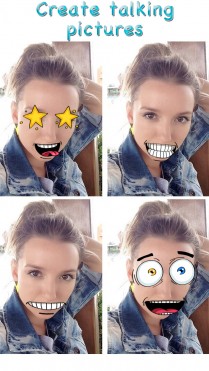
Digitalists Interactive Agency Ltd has introduced Animoji, an iOS exclusive entertainment app that creates talking animated pictures from photos and recorded sounds. In 3 easy steps anyone can create short animated messages from selfies, photos of pets, friends, your moms and dads, your grandpas and grandmas, presidents, vice-presidents and ex-presidents. Easily share on your Facebook page, video from the Camera Roll, send it via e-mail, share on YouTube, Vimeo, Instagram and any messenger app.
London, United Kingdom - Digitalists Interactive Agency Ltd has introduced Animoji, an iOS exclusive entertainment app that creates animated talking pictures from photos and recorded sounds. In 3 easy steps anyone can create short animated messages from selfies, photos of pets, friends, yourself, your moms and dads, your grandpas and grandmas, presidents, vice-presidents and ex-presidents.
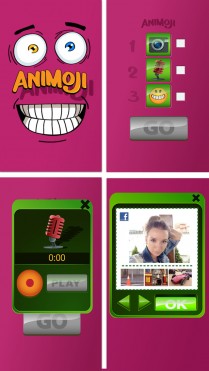
Animoji can make any picture come alive with 3 simple steps:
* First, snap a photo, or select a photo from camera roll, or select a photo from your Facebook account.
* Second, record your voice or any kind of sound or music.
* And third, choose one of the animoji templates and sound filters.
Tap on GO button, and, in a few moments, watch a complete animation of your photo. You can post animation to your Facebook page or share the video from the Camera Roll: send it via e-mail, share on YouTube, Vimeo, Instagram and any messenger app: WhatsApp, Line, Kakao Talk, Skype.
The app also makes it easy to make changes to the animation. Just go back from play screen and change an ingredient without changing the other two: just change either photo, recorded voice or animoji smile or sound filter.
Device Requirements:
* iPhone, iPad, and iPod touch
* Requires iOS 4.3 or later
* Universal Application
* 20.4 MB
Pricing and Availability:
Animoji is Free and available worldwide exclusively through the App Store in the Entertainment category.
Animoji 1.1.0: http://apps.thedigitalists.net/app/animoji
Download from iTunes: https://itunes.apple.com/app/animoji-create-talking-pictures/id868307692
Screenshot 1: http://apps.thedigitalists.net/wp-content/uploads/2014/06/scrn640x1136-2-209x371.jpg

Screenshot 2: http://apps.thedigitalists.net/wp-content/uploads/2014/06/scrn640x1136-1-209x371.jpg
Screenshot 3: http://apps.thedigitalists.net/wp-content/uploads/2014/06/scrn640x1136-0-209x371.jpg
App Icon: http://apps.thedigitalists.net/wp-content/uploads/2014/06/icon1024rounded-300x300-120x120.png

Digitalists Interactive Agency Ltd (Digitalists IA Ltd) is a London-based digital production company that provides cross-platform mobile and web application development services. With its own development lab, geeks are encouraged to play with different technologies and devices and develop in-house applications. Copyright (C) 2014 Digitalists IA Ltd. All Rights Reserved. Apple, the Apple logo, iPhone, iPod and iPad are registered trademarks of Apple Inc. in the U.S. and/or other countries.
*******
Link To Article: http://prmac.com/release-id-69716.htm
*******
---------------------------------------------------------------------------------
Note that you can alter delivered distributions at any time.
Login to your account on prMac to alter your channel selection, or to opt-out at any time.
Subscribe to:
Posts (Atom)