A new article has been published at prMac.
Word Mess goes Back To School - Over 25,000 Copies used in Classrooms - Published on 09/01/14
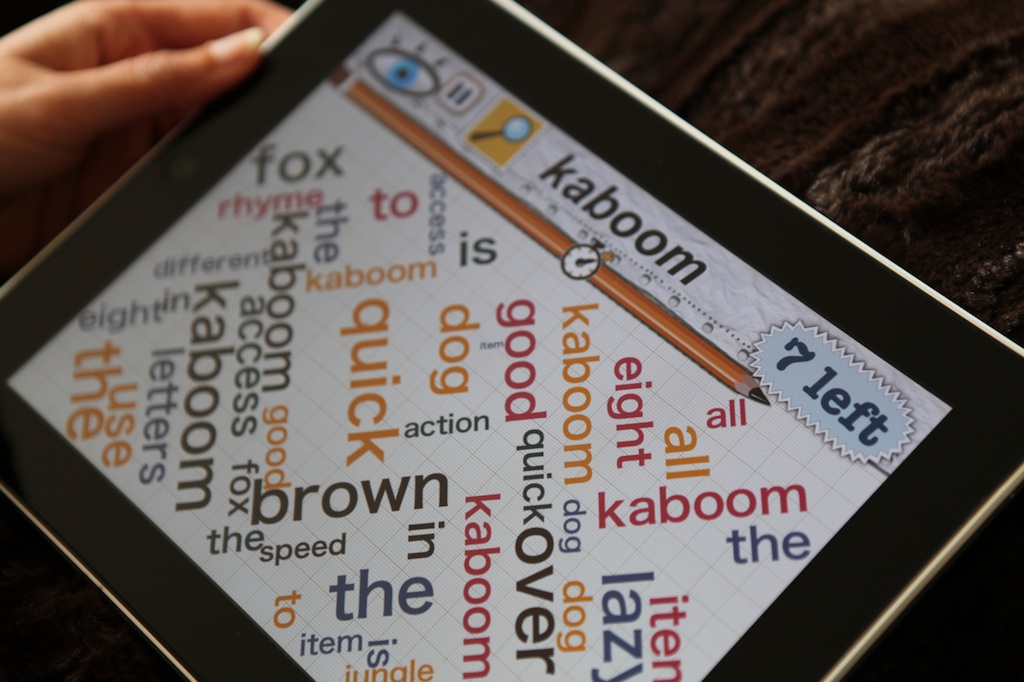
Masala Games announced today that over 25,000 copies of their game Word Mess have been sold to schools at a 50% educational discount. Loved by kids, educators and parents alike, Word Mess is a game about finding words in beautifully designed word clouds. This popular children's game improves your visual scanning abilities and vocabulary through engaging and fun gameplay. To celebrate Back To School week, the game will be on sale with a price drop for the first week of September.
Ahmedabad, India - Masala Games announced today that over 25,000 copies of their game Word Mess have been sold to schools at a 50% educational discount. To celebrate Back To School week, the game will be on sale with a price drop at $0.99 (usually $2.99) for the first week of September.
Word Mess is fun for word enthusiasts of all ages. Find words in beautifully designed word clouds. Improve your visual scanning abilities and vocabulary through engaging and fun gameplay. Word Mess was specifically developed for middle school kids to help them boost spelling, word recognition and general knowledge. The app is also being used in special education programs and by occupational therapists.
Word Mess has four different modes:
* Find Mode - simple word finding, boosts visual scanning
* Rhymes - find words that rhyme together - Great for little kids
* Categories - boost your general knowledge with endless combinations of hundreds of categories
* Bonus Round - Odd one out
Word Mess creator Masala Games originally released the game in 2012. Ever since, it has been a huge hit especially with parents and teachers. Kids love the game and can't stop playing it. Without knowing it, they pick up new words through word searches, rhymes and categories. It also helps with visual scanning skills as players search for words in beautifully generated word clouds. Word Mess has also been used for occupational therapy.
Back To School week is the perfect time to celebrate it's success in the educational domain. So Word Mess has been put on sale. Masala Games also participates in Apple's educational volume purchase program. So volume orders of 20 or more get an additional 50% off. Word Mess has had great critical success as well. USAToday featured it as a top Back To School App. Apple featured it as a Staff Favorite in Education. It has scores of 5 star reviews from top kids websites like SmartAppsForKids and Famigo. Overall Word Mess downloads have crossed 350,000 copies!
Device Requirements:
* iPhone, iPad, and iPod touch
* Requires iOS 6.0 or later
* 13.1 MB
Pricing and Availability:
For the first week of September, Word Mess 2.0 is only $0.99 USD (reg $2.99) or equivalent amount in other currencies, and available worldwide exclusively through the App Store in the Games category.
Word Mess 2.0: http://www.masalagames.com
Download from iTunes: https://itunes.apple.com/app/word-mess/id504739597
Screenshot: http://www.masalagames.com/WordMess1.jpg
App Icon: http://www.masalagames.com/iTunesArtwork.png
Masala Games Private Limited is an indie games studio based in Ahmedabad, India. The company is all about making original and experimental games with high production values and engaging gameplay. All Material and Software (C) Copyright 2014 Masala Games Private Limited. All Rights Reserved. Apple, the Apple logo, iPhone, iPod and iPad are registered trademarks of Apple Inc. in the U.S. and/or other countries. Other trademarks and registered trademarks may be the property of their respective owners.
*******
Link To Article: http://prmac.com/release-id-70251.htm
*******
---------------------------------------------------------------------------------
Note that you can alter delivered distributions at any time.
Login to your account on prMac to alter your channel selection, or to opt-out at any time.


New Folx downloader with torrent client functionality is released
A new article has been published at prMac.
New Folx downloader with torrent client functionality is released - Published on 09/01/14
By popular demand, Eltima Software today releases Folx 3.2, a new version of their popular download manager that includes much anticipated torrents downloading features. The new Folx is expected to better suit the needs of those who extensively use torrent trackers to find and download new data. The free version of the application offers basic torrent client options, while the PRO version allows users to search through the vast list of torrents without leaving the application.
Frankfurt, Germany - Eltima Software today releases a new version of their Folx download manager that includes much anticipated torrents downloading features. The new Folx is expected to suit better the needs of those who extensively use torrent trackers to find and download new data. The free version of the application offers basic torrent client options, while the PRO version allows users to search through the vast list of torrents without leaving the application.
Folx is a popular download manager and torrent client for Mac. The application is available as a free and PRO version. Free Folx gives its users the essential functionality, including the ability to split the downloads into two threads, auto-resuming broken downloads, basic torrent client feature set, control of download and upload speed, and more.
System Requirements:
* OS X 10.7 or later
* 64-bit processor
Pricing and Availability:
Folx PRO is available for a reasonable fee of $19.95 (USD). It includes more advanced features such as splitting downloads in up to ten threads which dramatically speeds up the download process; scheduling the download tasks according to your convenience; built-in torrent search through the extensive list of trackers, automatic speed control, iTunes integration, and more. Upgrading from the current Folx 3.0 PRO version is free, Folx PRO 2.0 users get 50% discount.
Eltima Software: http://mac.eltima.com/
Folx 3.2: http://mac.eltima.com/download-manager.html
Download Folx: http://mac.eltima.com/download/downloader_mac.dmg
Purchase Folx PRO: http://mac.eltima.com/downloader.html
Screenshot: http://www.mac-downloader.com/images/screenshots/download-manager.jpg
Application Icon: http://mac.eltima.com/submit/folx256.png
Eltima Software is a global software Development Company, specializing primarily in serial communication, mobile and flash software for Mac OS and Windows. Eltima Software delivers top-notch solutions having a friendly team of 40 professionals. Copyright (C) 2014 Eltima Software. All Rights Reserved. Apple, the Apple logo and Macintosh are registered trademarks of Apple Inc. in the U.S. and/or other countries.
*******
Link To Article: http://prmac.com/release-id-70252.htm
*******
---------------------------------------------------------------------------------
Note that you can alter delivered distributions at any time.
Login to your account on prMac to alter your channel selection, or to opt-out at any time.
New Folx downloader with torrent client functionality is released - Published on 09/01/14
By popular demand, Eltima Software today releases Folx 3.2, a new version of their popular download manager that includes much anticipated torrents downloading features. The new Folx is expected to better suit the needs of those who extensively use torrent trackers to find and download new data. The free version of the application offers basic torrent client options, while the PRO version allows users to search through the vast list of torrents without leaving the application.
Frankfurt, Germany - Eltima Software today releases a new version of their Folx download manager that includes much anticipated torrents downloading features. The new Folx is expected to suit better the needs of those who extensively use torrent trackers to find and download new data. The free version of the application offers basic torrent client options, while the PRO version allows users to search through the vast list of torrents without leaving the application.
Folx is a popular download manager and torrent client for Mac. The application is available as a free and PRO version. Free Folx gives its users the essential functionality, including the ability to split the downloads into two threads, auto-resuming broken downloads, basic torrent client feature set, control of download and upload speed, and more.
System Requirements:
* OS X 10.7 or later
* 64-bit processor
Pricing and Availability:
Folx PRO is available for a reasonable fee of $19.95 (USD). It includes more advanced features such as splitting downloads in up to ten threads which dramatically speeds up the download process; scheduling the download tasks according to your convenience; built-in torrent search through the extensive list of trackers, automatic speed control, iTunes integration, and more. Upgrading from the current Folx 3.0 PRO version is free, Folx PRO 2.0 users get 50% discount.
Eltima Software: http://mac.eltima.com/
Folx 3.2: http://mac.eltima.com/download-manager.html
Download Folx: http://mac.eltima.com/download/downloader_mac.dmg
Purchase Folx PRO: http://mac.eltima.com/downloader.html
Screenshot: http://www.mac-downloader.com/images/screenshots/download-manager.jpg

Application Icon: http://mac.eltima.com/submit/folx256.png

Eltima Software is a global software Development Company, specializing primarily in serial communication, mobile and flash software for Mac OS and Windows. Eltima Software delivers top-notch solutions having a friendly team of 40 professionals. Copyright (C) 2014 Eltima Software. All Rights Reserved. Apple, the Apple logo and Macintosh are registered trademarks of Apple Inc. in the U.S. and/or other countries.
*******
Link To Article: http://prmac.com/release-id-70252.htm
*******
---------------------------------------------------------------------------------
Note that you can alter delivered distributions at any time.
Login to your account on prMac to alter your channel selection, or to opt-out at any time.
The Iddly Widdly Piddly Pop-off blasts into the app store
A new article has been published at prMac.
The Iddly Widdly Piddly Pop-off blasts into the app store - Published on 09/01/14
Box of Frogs Media today introduces The Iddly Widdly Piddly Pop-off 1.0, their delightful children's book for iPad. Written by Daniel Corcoran and read by Dave Benson-Phillips, The Iddly Widdly Piddly Pop-off is an infectious tale that follows a barn full of animals plagued by a pongy pop-off that has dangerous consequences. It's not just a simple case of whoever smelt it dealt it. In the story kids are taken on a hilarious journey to discover who's at the bottom of the stinky fart attack.
Brighton, United Kingdom - Box of Frogs Media are delighted to announce the launch of The Iddly Widdly Piddly Pop-off, an infectious tale that follows a barn full of animals plagued by a pongy pop-off that has dangerous consequences. It's not just a simple case of whoever smelt it dealt it - in the story kids are taken on a deliriously hilarious journey to discover who's at the bottom of the stinky fart attack!
Author Daniel Corcoran's brilliant and bold characters are vividly brought to life by the zany narration from Dave Benson Philips (Get your Own Back and Playdays) that promises to have kids giggling all the way to bedtime.
Silent but violent, this book is not and the Box of Frogs sound effects team had much fun creating some joyous bottom burping bellows! In the mini game that compliments the story, kids can let rip and play along by tapping the gloriously animated mischievous toxic fart, to create infectious laughter inducing noises.
App features include:
* Narrated by Dave Benson-Phillips
* Hand drawn illustrations
* Hilarious animations
* Interactive moments hidden on each page
* Mini-games
* Read to Me and Read by Myself options with individual word highlights
Box Of Frogs Media have provided production management, art services (interpretation and animation), technical build and is the publisher on behalf of Daniel. This book is culmination of many months of work and Box Of Frogs Media is thrilled to have been involved in such an exciting collaboration. The Iddly Widdly Pop-Off has been converted into an interactive digital app book format and rebuilt using Box Of Tricks, BoF's collection of appbook goodies.
Device Requirements:
* Compatible with iPad
* Requires iOS 4.3 or later
* 103 MB
Pricing and Availability:
The Iddly Widdly Piddly Pop-off 1.0 is $2.99 USD (or equivalent amount in other currencies) and available worldwide exclusively through the App Store in the Books category.
Box Of Frogs Media: http://www.boxoffrogsmedia.com/
The Iddly Widdly Piddly Pop-off 1.0: http://www.boxoffrogsmedia.com/sk_portfolio/iddly-widdly-piddly-pop-off/
Purchase and Download: https://itunes.apple.com/app/iddly-widdly-piddly-pop-off/id830332888
Screenshot: http://a2.mzstatic.com/us/r30/Purple3/v4/9e/eb/e2/9eebe263-9b83-49fd-f779-8d4a6a80aa01/screen480x480.jpeg
App Icon: http://a4.mzstatic.com/us/r30/Purple3/v4/8a/2f/50/8a2f501d-d21d-655a-0b4e-38cb17210569/mzl.esthbfxj.175x175-75.jpg
Box Of Frogs Media is an independent company based in the exciting seaside city of Brighton developing and publishing appbooks across multiple platforms, primarily for the children's storybook market. We believe in the power of stories to fuel imagination and exploration of the wonderful world we live in; specialising in delivering these stories through the digital format of appbooks. Our team develop and publish iOS interactive appbooks from our studio - bringing together talent from all over the globe to tell wonderful digital stories. We have developed our own core technology to build appbooks and we continue to invest in new and groundbreaking features to expand our growing portfolio of books. All Material and Software (C) Copyright 2014 Box Of Frogs Media Ltd. All Rights Reserved. Apple, the Apple logo, iPhone, iPod and iPad are registered trademarks of Apple Inc. in the U.S. and/or other countries. Other trademarks and registered trademarks may be the property of their
respective owners.
*******
Link To Article: http://prmac.com/release-id-70249.htm
*******
---------------------------------------------------------------------------------
Note that you can alter delivered distributions at any time.
Login to your account on prMac to alter your channel selection, or to opt-out at any time.
The Iddly Widdly Piddly Pop-off blasts into the app store - Published on 09/01/14
Box of Frogs Media today introduces The Iddly Widdly Piddly Pop-off 1.0, their delightful children's book for iPad. Written by Daniel Corcoran and read by Dave Benson-Phillips, The Iddly Widdly Piddly Pop-off is an infectious tale that follows a barn full of animals plagued by a pongy pop-off that has dangerous consequences. It's not just a simple case of whoever smelt it dealt it. In the story kids are taken on a hilarious journey to discover who's at the bottom of the stinky fart attack.
Brighton, United Kingdom - Box of Frogs Media are delighted to announce the launch of The Iddly Widdly Piddly Pop-off, an infectious tale that follows a barn full of animals plagued by a pongy pop-off that has dangerous consequences. It's not just a simple case of whoever smelt it dealt it - in the story kids are taken on a deliriously hilarious journey to discover who's at the bottom of the stinky fart attack!
Author Daniel Corcoran's brilliant and bold characters are vividly brought to life by the zany narration from Dave Benson Philips (Get your Own Back and Playdays) that promises to have kids giggling all the way to bedtime.
Silent but violent, this book is not and the Box of Frogs sound effects team had much fun creating some joyous bottom burping bellows! In the mini game that compliments the story, kids can let rip and play along by tapping the gloriously animated mischievous toxic fart, to create infectious laughter inducing noises.
App features include:
* Narrated by Dave Benson-Phillips
* Hand drawn illustrations
* Hilarious animations
* Interactive moments hidden on each page
* Mini-games
* Read to Me and Read by Myself options with individual word highlights
Box Of Frogs Media have provided production management, art services (interpretation and animation), technical build and is the publisher on behalf of Daniel. This book is culmination of many months of work and Box Of Frogs Media is thrilled to have been involved in such an exciting collaboration. The Iddly Widdly Pop-Off has been converted into an interactive digital app book format and rebuilt using Box Of Tricks, BoF's collection of appbook goodies.
Device Requirements:
* Compatible with iPad
* Requires iOS 4.3 or later
* 103 MB
Pricing and Availability:
The Iddly Widdly Piddly Pop-off 1.0 is $2.99 USD (or equivalent amount in other currencies) and available worldwide exclusively through the App Store in the Books category.
Box Of Frogs Media: http://www.boxoffrogsmedia.com/
The Iddly Widdly Piddly Pop-off 1.0: http://www.boxoffrogsmedia.com/sk_portfolio/iddly-widdly-piddly-pop-off/
Purchase and Download: https://itunes.apple.com/app/iddly-widdly-piddly-pop-off/id830332888
Screenshot: http://a2.mzstatic.com/us/r30/Purple3/v4/9e/eb/e2/9eebe263-9b83-49fd-f779-8d4a6a80aa01/screen480x480.jpeg

App Icon: http://a4.mzstatic.com/us/r30/Purple3/v4/8a/2f/50/8a2f501d-d21d-655a-0b4e-38cb17210569/mzl.esthbfxj.175x175-75.jpg

Box Of Frogs Media is an independent company based in the exciting seaside city of Brighton developing and publishing appbooks across multiple platforms, primarily for the children's storybook market. We believe in the power of stories to fuel imagination and exploration of the wonderful world we live in; specialising in delivering these stories through the digital format of appbooks. Our team develop and publish iOS interactive appbooks from our studio - bringing together talent from all over the globe to tell wonderful digital stories. We have developed our own core technology to build appbooks and we continue to invest in new and groundbreaking features to expand our growing portfolio of books. All Material and Software (C) Copyright 2014 Box Of Frogs Media Ltd. All Rights Reserved. Apple, the Apple logo, iPhone, iPod and iPad are registered trademarks of Apple Inc. in the U.S. and/or other countries. Other trademarks and registered trademarks may be the property of their
respective owners.
*******
Link To Article: http://prmac.com/release-id-70249.htm
*******
---------------------------------------------------------------------------------
Note that you can alter delivered distributions at any time.
Login to your account on prMac to alter your channel selection, or to opt-out at any time.
SMS Export for iPhone - Backup SMS to Excel file using SMS Export Plus
A new article has been published at prMac.
SMS Export for iPhone - Backup SMS to Excel file using SMS Export Plus - Published on 09/01/14
mTouchLabs today announces SMS Export Plus 1.6, their productivity app exclusively for iPhone and iPod touch. SMS Export Plus allows you to backup iMessages and SMS from your device to a Mac in .xls format. Using SMS Export Plus, you can archive and maintain records of all your messages at a single location in Excel file. Browse all backup messages in the .xls file very easily. You can filter messages by sender or sort messages by time and date.
Hyderabad, India - mTouchLabs today is proud to announce the release of SMS Export Plus 1.6, their productivity app exclusively for iPhone and iPod touch. The texts on your iPhone are now one of your most important forms of communication with your friends, family, loved ones. Maybe a friend sent you a funny joke that you want to save or maybe you need to make a backup of a text for legal purposes or may be running low on storage space?. Whatever the reason, SMS Export Plus lets you access and save your iPhone's messages on your Mac or PC in most widely used excel format.
No need to worry about loosing important messages of your iPhone. By using SMS export plus app anyone can preserve all messages in Excel file. SMS Export Plus gives you the ease of a tabular format to scan through your messages quicker. You can sort your messages based on multiple criteria, leveraging the sorting feature of a tabular format. With SMS Export Plus, you can now save your messages rather than delete them to free up some memory on your iOS devices.
Feature Highlights:
* Save exported messages directly to your computer
* Backup messages are saved in .xls format
* Email the backup messages in excel file format
* Browse all backup messages in the .xls file very easily - You can filter messages by sender or sort messages by time & date
* Easy to search for any message in your backup file
* You can export SMS or iMessages of Multiple devices into multiple excel files
* Detailed help guide available within the app
SMS Export plus is listed in Top 100 charts of Productivity category in the US.
Device Requirements:
* iPhone, iPad and iPod touch
* Requires iOS 6.0 or later
* This app is optimized for iPhone 5
* 4.9 MB
Pricing and Availability:
Available the wonderful feature-rich SMS Export Plus 1.6 at just $3.99 (USD) worldwide from the App Store under the Productivity category. SMS Export Plus has been rated 4 by many of its existing users.
SMS Export Plus 1.6: http://www.smsexportplus.com
Purchase and Download: https://itunes.apple.com/app/sms-export-plus-backup-sms/id766405351
Screenshot 1: http://a1.mzstatic.com/us/r30/Purple/v4/98/78/85/987885ef-e576-0c6b-e1d6-d94f5504eb9a/screen568x568.jpeg
Screenshot 2: http://a5.mzstatic.com/us/r30/Purple4/v4/7b/17/cf/7b17cf14-6b86-d580-0add-e44b1ef13b5b/screen568x568.jpeg
App Icon: http://a3.mzstatic.com/us/r30/Purple6/v4/96/32/8f/96328f0b-d772-6764-b6c6-5e877f065eb4/mzl.vljbqoob.175x175-75.jpg
mTouchLabs is a pioneer in the mobile development arena, releasing applications that are swift, visually appealing, and highly intuitive. Copyright (C) 2014 mTouchLabs. All Rights Reserved. Apple, the Apple logo, iPhone, iPad, iPad mini, iPod touch, and Mac are registered trademarks of Apple Inc. in the U.S. and/or other countries. Other trademarks and registered trademarks may be the property of their respective owners.
*******
Link To Article: http://prmac.com/release-id-70248.htm
*******
---------------------------------------------------------------------------------
Note that you can alter delivered distributions at any time.
Login to your account on prMac to alter your channel selection, or to opt-out at any time.
SMS Export for iPhone - Backup SMS to Excel file using SMS Export Plus - Published on 09/01/14
mTouchLabs today announces SMS Export Plus 1.6, their productivity app exclusively for iPhone and iPod touch. SMS Export Plus allows you to backup iMessages and SMS from your device to a Mac in .xls format. Using SMS Export Plus, you can archive and maintain records of all your messages at a single location in Excel file. Browse all backup messages in the .xls file very easily. You can filter messages by sender or sort messages by time and date.
Hyderabad, India - mTouchLabs today is proud to announce the release of SMS Export Plus 1.6, their productivity app exclusively for iPhone and iPod touch. The texts on your iPhone are now one of your most important forms of communication with your friends, family, loved ones. Maybe a friend sent you a funny joke that you want to save or maybe you need to make a backup of a text for legal purposes or may be running low on storage space?. Whatever the reason, SMS Export Plus lets you access and save your iPhone's messages on your Mac or PC in most widely used excel format.
No need to worry about loosing important messages of your iPhone. By using SMS export plus app anyone can preserve all messages in Excel file. SMS Export Plus gives you the ease of a tabular format to scan through your messages quicker. You can sort your messages based on multiple criteria, leveraging the sorting feature of a tabular format. With SMS Export Plus, you can now save your messages rather than delete them to free up some memory on your iOS devices.
Feature Highlights:
* Save exported messages directly to your computer
* Backup messages are saved in .xls format
* Email the backup messages in excel file format
* Browse all backup messages in the .xls file very easily - You can filter messages by sender or sort messages by time & date
* Easy to search for any message in your backup file
* You can export SMS or iMessages of Multiple devices into multiple excel files
* Detailed help guide available within the app
SMS Export plus is listed in Top 100 charts of Productivity category in the US.
Device Requirements:
* iPhone, iPad and iPod touch
* Requires iOS 6.0 or later
* This app is optimized for iPhone 5
* 4.9 MB
Pricing and Availability:
Available the wonderful feature-rich SMS Export Plus 1.6 at just $3.99 (USD) worldwide from the App Store under the Productivity category. SMS Export Plus has been rated 4 by many of its existing users.
SMS Export Plus 1.6: http://www.smsexportplus.com
Purchase and Download: https://itunes.apple.com/app/sms-export-plus-backup-sms/id766405351
Screenshot 1: http://a1.mzstatic.com/us/r30/Purple/v4/98/78/85/987885ef-e576-0c6b-e1d6-d94f5504eb9a/screen568x568.jpeg

Screenshot 2: http://a5.mzstatic.com/us/r30/Purple4/v4/7b/17/cf/7b17cf14-6b86-d580-0add-e44b1ef13b5b/screen568x568.jpeg

App Icon: http://a3.mzstatic.com/us/r30/Purple6/v4/96/32/8f/96328f0b-d772-6764-b6c6-5e877f065eb4/mzl.vljbqoob.175x175-75.jpg

mTouchLabs is a pioneer in the mobile development arena, releasing applications that are swift, visually appealing, and highly intuitive. Copyright (C) 2014 mTouchLabs. All Rights Reserved. Apple, the Apple logo, iPhone, iPad, iPad mini, iPod touch, and Mac are registered trademarks of Apple Inc. in the U.S. and/or other countries. Other trademarks and registered trademarks may be the property of their respective owners.
*******
Link To Article: http://prmac.com/release-id-70248.htm
*******
---------------------------------------------------------------------------------
Note that you can alter delivered distributions at any time.
Login to your account on prMac to alter your channel selection, or to opt-out at any time.
TranquilityTV - Beautiful film with music
A new article has been published at prMac.
TranquilityTV - Beautiful film with music - Published on 09/01/14
TranquilityTV, LLC announces TranquilityTV 1.0.3, its relaxation and stress relief app for iPhone, iPad and iPod touch. Intended for general consumers as a tool to reduce stress and create a positive mental state, TranquiltityTV is a solution to the universal human problem, stress. The mobile app is a product of seven years of research gathered from top hospitals around the nation. What was once only available to a very select audience is now broadly available for stress relief and relaxation.
Nashville Tennessee - TranquilityTV, LLC is proud to announce the worldwide release of its mobile application TranquilityTV App. Intended for general consumers as a tool to reduce stress and create a positive mental state, TranquiltityTV is a solution to the universal human problem, stress.
Previously, TranquilityTV has only been available to the healthcare industry within hospitals, clinics, rehabilitation centers and other facilities where relaxation is a proven benefit to healing and recovery. Due to overwhelming positive feedback by healthcare professionals, patients and their families, the app has been developed to be available anywhere at any time to anyone.
Founded in 2005, Tranquility TV is an evidence-based 24/7 TV channel of captivating relaxation film with customized music. The mobile app is a product of seven years of research gathered from top hospitals around the nation. What was once only available to a very select audience is now broadly available for stress relief and relaxation.
"The scenes and music are carefully crafted based on scientific testing to deliver the highest possible level of relaxation," said President of TranquilityTV, Robby Lee Feldman. "It can lower blood pressure, reduce muscle tension, slow heart rate, and induce theta brain waves
that indicate tranquility- acting almost like a massage for the brain."
There is no better time than now to make personal relaxation a priority. With the availability of the mobile app, stress relief can be obtained at any time or place.
Device Requirements:
* iPhone, iPad, and iPod touch
* Requires iOS 6.0 or later
* 79.7 MB
Pricing and Availability:
TranquilityTV 1.0.3 is Free and available worldwide exclusively through the App Store in the Health & Fitness category. The fapp allows users to choose from four 15-minute shows in its library. The individual shows will be offered at a special introductory price of $1.99 (USD) per show for a limited time. There is also an Android version available on Google Play.
TranquilityTV 1.0.3: http://tranquilitytv.com/#+/app/
Download from iTunes: https://itunes.apple.com/app/tranquilitytv-beautiful-film/id642048843
Vimeo Video: http://vimeo.com/ondemand/tranquilitytv
Screenshot 1: http://a5.mzstatic.com/us/r30/Purple6/v4/42/69/90/42699063-1e06-1b9a-54b9-5fa5b3b0a9ee/screen568x568.jpeg
Screenshot 2: http://a1.mzstatic.com/us/r30/Purple4/v4/f9/04/35/f904359d-fa9a-8579-3c97-a850d1068946/screen568x568.jpeg
App Icon: http://a1.mzstatic.com/us/r30/Purple4/v4/45/94/59/459459fe-0725-3b05-663f-1e66eb70624a/mzl.xptdftzl.175x175-75.jpg
TranquilityTV is a 24/7 TV channel of captivating relaxation film with custom music. It's a powerful evidence-based therapeutic tool that soothes patients and makes them easier to treat, thus taking less time from caregivers. It also masks ambient sounds, which helps people fall asleep. Because TTV is based on scientific research and has been used by hospitals across the U.S. for nine years, it's a proven method to reduce stress, soothe patients, and make them more comfortable. All Material and Software (C) Copyright 2013 TranquilityTV, LLC. All Rights Reserved. Apple, the Apple logo, iPhone, iPod and iPad are registered trademarks of Apple Inc. in the U.S. and/or other countries. Other trademarks and registered trademarks may be the property of their respective owners.
*******
Link To Article: http://prmac.com/release-id-70247.htm
*******
---------------------------------------------------------------------------------
Note that you can alter delivered distributions at any time.
Login to your account on prMac to alter your channel selection, or to opt-out at any time.
TranquilityTV - Beautiful film with music - Published on 09/01/14
TranquilityTV, LLC announces TranquilityTV 1.0.3, its relaxation and stress relief app for iPhone, iPad and iPod touch. Intended for general consumers as a tool to reduce stress and create a positive mental state, TranquiltityTV is a solution to the universal human problem, stress. The mobile app is a product of seven years of research gathered from top hospitals around the nation. What was once only available to a very select audience is now broadly available for stress relief and relaxation.
Nashville Tennessee - TranquilityTV, LLC is proud to announce the worldwide release of its mobile application TranquilityTV App. Intended for general consumers as a tool to reduce stress and create a positive mental state, TranquiltityTV is a solution to the universal human problem, stress.
Previously, TranquilityTV has only been available to the healthcare industry within hospitals, clinics, rehabilitation centers and other facilities where relaxation is a proven benefit to healing and recovery. Due to overwhelming positive feedback by healthcare professionals, patients and their families, the app has been developed to be available anywhere at any time to anyone.
Founded in 2005, Tranquility TV is an evidence-based 24/7 TV channel of captivating relaxation film with customized music. The mobile app is a product of seven years of research gathered from top hospitals around the nation. What was once only available to a very select audience is now broadly available for stress relief and relaxation.
"The scenes and music are carefully crafted based on scientific testing to deliver the highest possible level of relaxation," said President of TranquilityTV, Robby Lee Feldman. "It can lower blood pressure, reduce muscle tension, slow heart rate, and induce theta brain waves
that indicate tranquility- acting almost like a massage for the brain."
There is no better time than now to make personal relaxation a priority. With the availability of the mobile app, stress relief can be obtained at any time or place.
Device Requirements:
* iPhone, iPad, and iPod touch
* Requires iOS 6.0 or later
* 79.7 MB
Pricing and Availability:
TranquilityTV 1.0.3 is Free and available worldwide exclusively through the App Store in the Health & Fitness category. The fapp allows users to choose from four 15-minute shows in its library. The individual shows will be offered at a special introductory price of $1.99 (USD) per show for a limited time. There is also an Android version available on Google Play.
TranquilityTV 1.0.3: http://tranquilitytv.com/#+/app/
Download from iTunes: https://itunes.apple.com/app/tranquilitytv-beautiful-film/id642048843
Vimeo Video: http://vimeo.com/ondemand/tranquilitytv
Screenshot 1: http://a5.mzstatic.com/us/r30/Purple6/v4/42/69/90/42699063-1e06-1b9a-54b9-5fa5b3b0a9ee/screen568x568.jpeg

Screenshot 2: http://a1.mzstatic.com/us/r30/Purple4/v4/f9/04/35/f904359d-fa9a-8579-3c97-a850d1068946/screen568x568.jpeg

App Icon: http://a1.mzstatic.com/us/r30/Purple4/v4/45/94/59/459459fe-0725-3b05-663f-1e66eb70624a/mzl.xptdftzl.175x175-75.jpg

TranquilityTV is a 24/7 TV channel of captivating relaxation film with custom music. It's a powerful evidence-based therapeutic tool that soothes patients and makes them easier to treat, thus taking less time from caregivers. It also masks ambient sounds, which helps people fall asleep. Because TTV is based on scientific research and has been used by hospitals across the U.S. for nine years, it's a proven method to reduce stress, soothe patients, and make them more comfortable. All Material and Software (C) Copyright 2013 TranquilityTV, LLC. All Rights Reserved. Apple, the Apple logo, iPhone, iPod and iPad are registered trademarks of Apple Inc. in the U.S. and/or other countries. Other trademarks and registered trademarks may be the property of their respective owners.
*******
Link To Article: http://prmac.com/release-id-70247.htm
*******
---------------------------------------------------------------------------------
Note that you can alter delivered distributions at any time.
Login to your account on prMac to alter your channel selection, or to opt-out at any time.
Pagico for Desktop 6.7: Planner for Professionals, adds HiDPI support
A new article has been published at prMac.
Pagico for Desktop 6.7: Planner for Professionals, adds HiDPI support - Published on 09/01/14
Indianapolis based NOTES17 LLC today announces Pagico for Desktop 6.7, an update to their popular information and task manager app for Mac OS X. Pagico for Desktop is a feature-rich planner app that manages all types of data, including notes, tasks, files, projects and contacts. The application has numerous innovative features that helps users be productive and stay organized in the long run. Version 6.7 adds HiDPI support for computers with high resolution monitors.
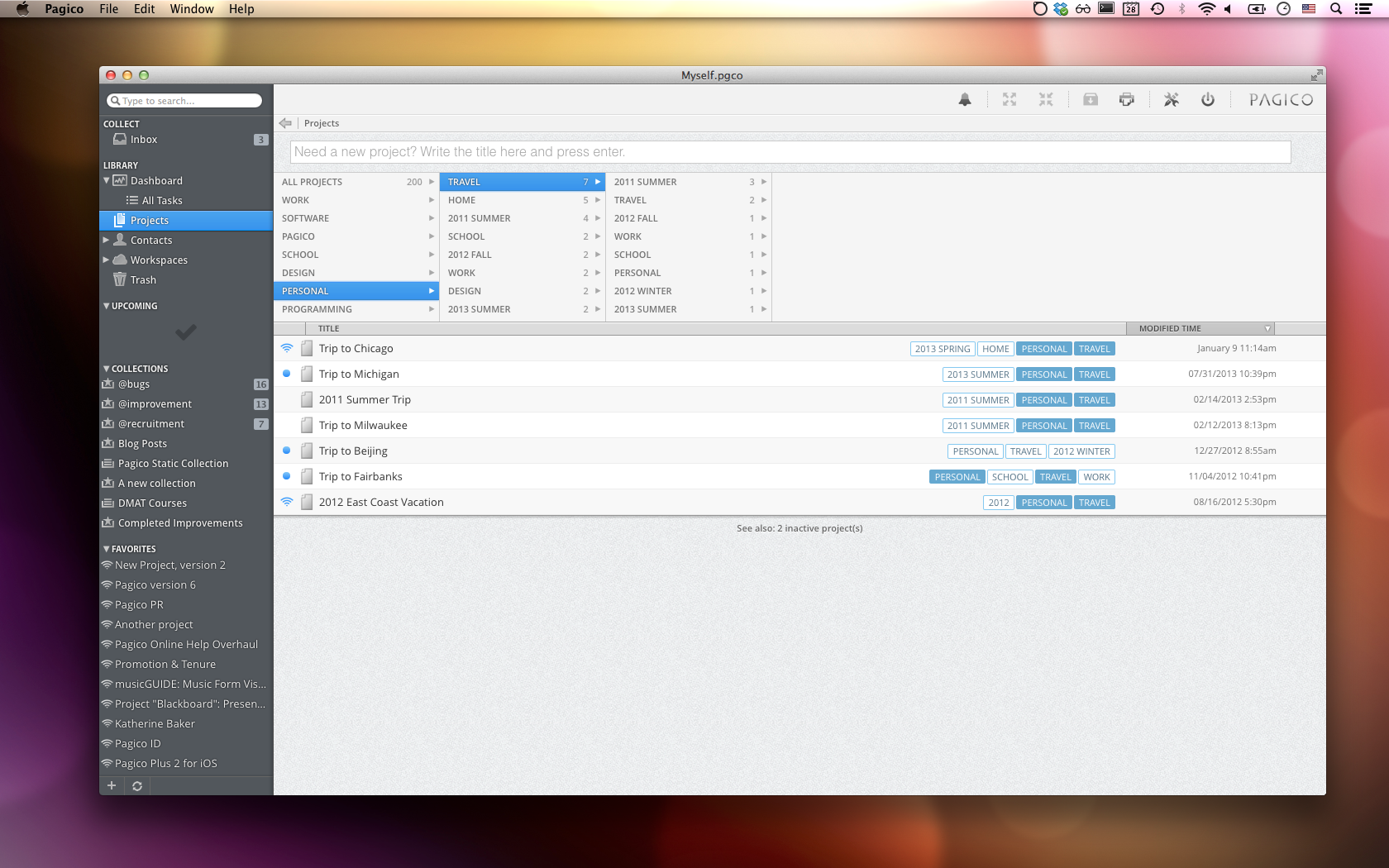
Indianapolis, Indiana - NOTES17 LLC today is proud to announce the release of Pagico for Desktop 6.7, an update that brings improved HiDPI support and a number of other improvements. Pagico for Desktop is an innovative information manager that manages all types of data, including notes, lists, files, projects and clients.
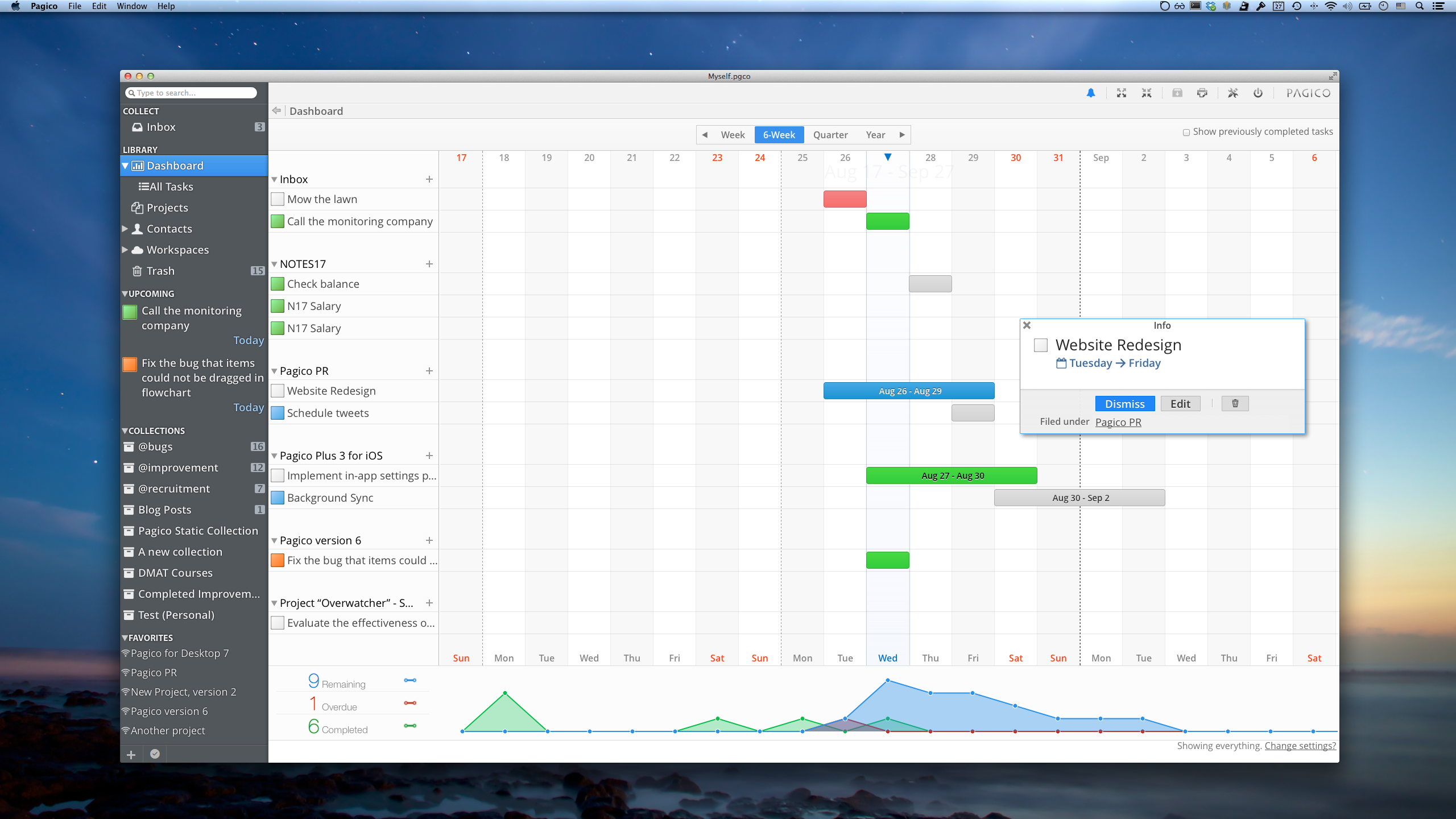
On top of the project and contact management features, Pagico also has a powerful set of scheduling features, assisting users to keep track of their tasks and appointments among projects and clients. Compared to other organizer apps on the market, Pagico's biggest strengths are its ability to manage all types of data by projects & contacts, and its intuitive visualization of users' schedule through its interactive flowchart feature.
Pagico for Desktop is a powerful information manager with built-in task management features. Compared to other organizer apps on the market, Pagico's biggest strengths are its ability to manage all types of data by projects & contacts, and its intuitive visualization of users' schedule through its interactive flowchart feature. With the 6.7 update, Pagico's graphics will look even better on those large displays.
"Today, pure todo management is not enough. For every task, there's a ton of related items, such as notes, file attachments, and related projects, etc. In order to be truly organized and therefore productive, you need a system that combines task management with data management. Pagico is designed to do just that," comments Lesley Liu, founder of NOTES17, "and with the release of version 6.7, Pagico will look even better on large displays. It will be one of the best-looking and easiest-to-use organizer app for Mac".
Pricing and Availability:
Pagico for Desktop is compatible with Intel-based Macs with OS X 10.5 or later, and Windows PCs running Windows XP or later. This update is free and recommended for all users. The software package can be downloaded from Pagico online with 15-day free trial option available. Pagico for Desktop has a regular price of $50 (USD). From August 27 to September 15, it is on sale for just $30 thanks to the 40%-Off Back-to-School promotion.
Pagico for Desktop 6.7: http://www.pagico.com/
Download Pagico: http://www.pagico.com/downloads/latest/Pagico_Desktop.dmg
Beacon Purchase: http://www.pagico.com/store/
Screenshot (Dashboard): http://www.pagico.com/img/screenshot_dashboard.png
Screenshot (Project Library with Tag Browser): http://www.pagico.com/img/screenshot_projects.png
Application Icon: http://www.pagico.com/img/appIcon_PagicoDesktop.png
Based in Indianapolis, NOTES17 LLC is an independent software company that develops applications for Mac, Windows, iOS and Android platforms that enhance productivity and user experience with innovative designs. Its current products include the productivity suite Pagico, presentation app Presentics for iPad, and server monitoring app SiteTrac for iPhone. All Material and Software (C) 2014 / NOTES17 LLC. All Rights Reserved. Apple, the Apple logo, iPhone, iPod and iPad are registered trademarks of Apple Inc. in the U.S. and/or other countries. Other trademarks and registered trademarks may be the property of their respective owners.
*******
Link To Article: http://prmac.com/release-id-70246.htm
*******
---------------------------------------------------------------------------------
Note that you can alter delivered distributions at any time.
Login to your account on prMac to alter your channel selection, or to opt-out at any time.
Pagico for Desktop 6.7: Planner for Professionals, adds HiDPI support - Published on 09/01/14
Indianapolis based NOTES17 LLC today announces Pagico for Desktop 6.7, an update to their popular information and task manager app for Mac OS X. Pagico for Desktop is a feature-rich planner app that manages all types of data, including notes, tasks, files, projects and contacts. The application has numerous innovative features that helps users be productive and stay organized in the long run. Version 6.7 adds HiDPI support for computers with high resolution monitors.
Indianapolis, Indiana - NOTES17 LLC today is proud to announce the release of Pagico for Desktop 6.7, an update that brings improved HiDPI support and a number of other improvements. Pagico for Desktop is an innovative information manager that manages all types of data, including notes, lists, files, projects and clients.
On top of the project and contact management features, Pagico also has a powerful set of scheduling features, assisting users to keep track of their tasks and appointments among projects and clients. Compared to other organizer apps on the market, Pagico's biggest strengths are its ability to manage all types of data by projects & contacts, and its intuitive visualization of users' schedule through its interactive flowchart feature.
Pagico for Desktop is a powerful information manager with built-in task management features. Compared to other organizer apps on the market, Pagico's biggest strengths are its ability to manage all types of data by projects & contacts, and its intuitive visualization of users' schedule through its interactive flowchart feature. With the 6.7 update, Pagico's graphics will look even better on those large displays.
"Today, pure todo management is not enough. For every task, there's a ton of related items, such as notes, file attachments, and related projects, etc. In order to be truly organized and therefore productive, you need a system that combines task management with data management. Pagico is designed to do just that," comments Lesley Liu, founder of NOTES17, "and with the release of version 6.7, Pagico will look even better on large displays. It will be one of the best-looking and easiest-to-use organizer app for Mac".
Pricing and Availability:
Pagico for Desktop is compatible with Intel-based Macs with OS X 10.5 or later, and Windows PCs running Windows XP or later. This update is free and recommended for all users. The software package can be downloaded from Pagico online with 15-day free trial option available. Pagico for Desktop has a regular price of $50 (USD). From August 27 to September 15, it is on sale for just $30 thanks to the 40%-Off Back-to-School promotion.
Pagico for Desktop 6.7: http://www.pagico.com/
Download Pagico: http://www.pagico.com/downloads/latest/Pagico_Desktop.dmg
Beacon Purchase: http://www.pagico.com/store/
Screenshot (Dashboard): http://www.pagico.com/img/screenshot_dashboard.png
Screenshot (Project Library with Tag Browser): http://www.pagico.com/img/screenshot_projects.png
Application Icon: http://www.pagico.com/img/appIcon_PagicoDesktop.png

Based in Indianapolis, NOTES17 LLC is an independent software company that develops applications for Mac, Windows, iOS and Android platforms that enhance productivity and user experience with innovative designs. Its current products include the productivity suite Pagico, presentation app Presentics for iPad, and server monitoring app SiteTrac for iPhone. All Material and Software (C) 2014 / NOTES17 LLC. All Rights Reserved. Apple, the Apple logo, iPhone, iPod and iPad are registered trademarks of Apple Inc. in the U.S. and/or other countries. Other trademarks and registered trademarks may be the property of their respective owners.
*******
Link To Article: http://prmac.com/release-id-70246.htm
*******
---------------------------------------------------------------------------------
Note that you can alter delivered distributions at any time.
Login to your account on prMac to alter your channel selection, or to opt-out at any time.
friedEgg Touch 1.7 Upgrade Improves Usability and Performance
A new article has been published at prMac.
friedEgg Touch 1.7 Upgrade Improves Usability and Performance - Published on 09/01/14
friedEgg Limited today announced friedEgg Touch 1.7, an upgrade to their interactive data analysis tool for Mac OS X. friedEgg Touch allows the user to interact with their data by directly manipulating a chart. This enables complex analysis, across many dimensions, in easy steps. This latest release focuses on improving usability and increasing the reliability of the analysis process. In addition, newer technologies have improved performance and support higher resolution displays.
London, United Kingdom - friedEgg Limited today announced the release of version 1.7 of friedEgg Touch, an interactive data analysis tool for Mac OS X. The major focus of this update is to improve usability. Charts can now be created by just assigning three data columns as dimensions, at any level, as the label dimension is now optional. The data view, key panel, printed reports and exported data are automatically configured to include the label if present, but ignore it when not available.
Changes in chart objects selected at one step are now automatically reflected in subsequent steps and Quicklook automatically displays a summary of the greatest valid step within the saved file icon. Chart objects and images have been updated to higher resolution, for clearer presentation on Retina displays. Gesture support has also been enhanced, including pinch to zoom and swiping left/right through the analysis steps.
The reliability of the analysis process has been improved by ensuring that files are always saved as packages. The files containing data tables can be linked using bookmarks, which maintains the links even when files are moved, or they can be copied into the package. Furthermore, files created in earlier versions are automatically migrated to be saved as packages when first used.
In addition, there have been several improvements to focus on increasing performance plus supporting modern technologies including 64 bit, ARC memory management and the use of SQLite in place of binary file formats. This is reflected in the increase of the minimum system requirement to OS X 10.8. The input tables are now expected to be CSV format (easily exported from Numbers or Excel). Further improvements include the updating of the Automator actions and Applescript dictionary to work within the Sandbox.
friedEgg Touch differs from other basic charting tools in that it allows the user to interact with their data by directly manipulating a chart. This enables complex analysis, across many dimensions, in a few simple steps. Using the provided Automator actions, friedEgg Touch is easily integrated into an analysis workflow.
Consider an analysis process with a traditional spreadsheet - A table of data is prepared and filtered with expressions or by selecting items from a list. This is either presented as another table of numbers or as a simple chart. If the user wants to change the chart, this requires changes to either the expressions or items selected in the lists, followed by the re-generation of the chart.
friedEgg Touch revolutionises this process. Charts are created and changed by simply dragging symbols representing the data columns to the chart dimensions. The user changes the filters directly in the charts, by either clicking on objects or by dragging a filter panel across either of the three chart dimensions. The selected data is then available for another step of the analysis, maybe applying different data columns to the chart dimensions. By visually indicating when an item is selected, the user has more control over what is being filtered.
Large multi-column data tables can be viewed and analysed. By using additional analysis steps, maybe assigning different data columns to a chart dimension, the user can drill down on the information they need. This simple approach allows non-technical users to mine their data on their own desktop, without the the overhead of more complex and expensive tools.
Common analysis steps can be saved as templates, to apply against similar structured data tables. Both the selected data and the chart image can then be exported to other applications.
The major activities in creating and saving an analysis, together with the exporting of data and chart images, are supported by a number of Automator actions that are provided with friedEgg Touch. These, together with the AppleScript support, make it even easier to integrate friedEgg Touch in an analysis workflow.
System Requirements:
* Mac OS X 10.8 or later
* 14.8 MB
Pricing and Availability:
friedEgg Touch 1.7 is $14.99 USD (or equivalent amount in other currencies) and available worldwide exclusively through the Mac App Store in the Business category. A sample data table is included with the application to enable users to explore the key features.
friedEgg Touch 1.7: http://www.friedegg.com
Purchase and Download: http://itunes.apple.com/us/app/friedegg-touch/id411901849?mt=12&ls=1
Screenshot: http://www.friedegg.com/images/friedEggTouchFullScreenPanels.png
Application Icon: http://a1.phobos.apple.com/us/r1000/029/Purple/e4/2f/24/mzi.ukputvor.175x175-75.png
friedEgg Limited is a UK based Mac developer, dedicated to providing the most easy to use data analysis tools for non-technical small business and educational users. Copyright 2014 friedEgg Limited All Rights Reserved. Apple, and the Apple logo are registered trademarks of Apple Computer in the U.S. and/or other countries.
*******
Link To Article: http://prmac.com/release-id-70245.htm
*******
---------------------------------------------------------------------------------
Note that you can alter delivered distributions at any time.
Login to your account on prMac to alter your channel selection, or to opt-out at any time.
friedEgg Touch 1.7 Upgrade Improves Usability and Performance - Published on 09/01/14
friedEgg Limited today announced friedEgg Touch 1.7, an upgrade to their interactive data analysis tool for Mac OS X. friedEgg Touch allows the user to interact with their data by directly manipulating a chart. This enables complex analysis, across many dimensions, in easy steps. This latest release focuses on improving usability and increasing the reliability of the analysis process. In addition, newer technologies have improved performance and support higher resolution displays.
London, United Kingdom - friedEgg Limited today announced the release of version 1.7 of friedEgg Touch, an interactive data analysis tool for Mac OS X. The major focus of this update is to improve usability. Charts can now be created by just assigning three data columns as dimensions, at any level, as the label dimension is now optional. The data view, key panel, printed reports and exported data are automatically configured to include the label if present, but ignore it when not available.
Changes in chart objects selected at one step are now automatically reflected in subsequent steps and Quicklook automatically displays a summary of the greatest valid step within the saved file icon. Chart objects and images have been updated to higher resolution, for clearer presentation on Retina displays. Gesture support has also been enhanced, including pinch to zoom and swiping left/right through the analysis steps.
The reliability of the analysis process has been improved by ensuring that files are always saved as packages. The files containing data tables can be linked using bookmarks, which maintains the links even when files are moved, or they can be copied into the package. Furthermore, files created in earlier versions are automatically migrated to be saved as packages when first used.
In addition, there have been several improvements to focus on increasing performance plus supporting modern technologies including 64 bit, ARC memory management and the use of SQLite in place of binary file formats. This is reflected in the increase of the minimum system requirement to OS X 10.8. The input tables are now expected to be CSV format (easily exported from Numbers or Excel). Further improvements include the updating of the Automator actions and Applescript dictionary to work within the Sandbox.
friedEgg Touch differs from other basic charting tools in that it allows the user to interact with their data by directly manipulating a chart. This enables complex analysis, across many dimensions, in a few simple steps. Using the provided Automator actions, friedEgg Touch is easily integrated into an analysis workflow.
Consider an analysis process with a traditional spreadsheet - A table of data is prepared and filtered with expressions or by selecting items from a list. This is either presented as another table of numbers or as a simple chart. If the user wants to change the chart, this requires changes to either the expressions or items selected in the lists, followed by the re-generation of the chart.
friedEgg Touch revolutionises this process. Charts are created and changed by simply dragging symbols representing the data columns to the chart dimensions. The user changes the filters directly in the charts, by either clicking on objects or by dragging a filter panel across either of the three chart dimensions. The selected data is then available for another step of the analysis, maybe applying different data columns to the chart dimensions. By visually indicating when an item is selected, the user has more control over what is being filtered.
Large multi-column data tables can be viewed and analysed. By using additional analysis steps, maybe assigning different data columns to a chart dimension, the user can drill down on the information they need. This simple approach allows non-technical users to mine their data on their own desktop, without the the overhead of more complex and expensive tools.
Common analysis steps can be saved as templates, to apply against similar structured data tables. Both the selected data and the chart image can then be exported to other applications.
The major activities in creating and saving an analysis, together with the exporting of data and chart images, are supported by a number of Automator actions that are provided with friedEgg Touch. These, together with the AppleScript support, make it even easier to integrate friedEgg Touch in an analysis workflow.
System Requirements:
* Mac OS X 10.8 or later
* 14.8 MB
Pricing and Availability:
friedEgg Touch 1.7 is $14.99 USD (or equivalent amount in other currencies) and available worldwide exclusively through the Mac App Store in the Business category. A sample data table is included with the application to enable users to explore the key features.
friedEgg Touch 1.7: http://www.friedegg.com
Purchase and Download: http://itunes.apple.com/us/app/friedegg-touch/id411901849?mt=12&ls=1
Screenshot: http://www.friedegg.com/images/friedEggTouchFullScreenPanels.png

Application Icon: http://a1.phobos.apple.com/us/r1000/029/Purple/e4/2f/24/mzi.ukputvor.175x175-75.png

friedEgg Limited is a UK based Mac developer, dedicated to providing the most easy to use data analysis tools for non-technical small business and educational users. Copyright 2014 friedEgg Limited All Rights Reserved. Apple, and the Apple logo are registered trademarks of Apple Computer in the U.S. and/or other countries.
*******
Link To Article: http://prmac.com/release-id-70245.htm
*******
---------------------------------------------------------------------------------
Note that you can alter delivered distributions at any time.
Login to your account on prMac to alter your channel selection, or to opt-out at any time.
Subscribe to:
Posts (Atom)