A new article has been published at prMac.
Do Up - Free Hidden Object Games Features Great Graphics and 400 Objects - Published on 09/02/14
PlayHOG has introduced Do Up - Free Hidden Object Games 1.0.0, their new game title for iOS and Android devices. Featuring richly detailed, stunningly realistic graphics, Do Up lets players fix up a house by making their way through 10 unique and challenging levels. Each level features 10 unique achievements to unlock, and 40 well-hidden objects to find (400 in total). The game offers a level map which will remember progress, a hint feature that will help find those difficult objects and more.
Cupertino, California - People in search of a delightfully challenging hidden object game that features spectacular graphics and delivers hour after hour of fun, can head to the App Store or Google Play and download the unique new no-cost app Do Up - Free Hidden Object Games from PlayHOG. Unlike other no-cost hidden object games that offer one or two "teaser" levels before prompting users to pay for more, with Do Up there are no in-app purchases to unlock more levels. So instead of having to pull out their credit card, users can enjoyably focus on "doing up" - a.k.a. fixing up - a house by making their way through 10 ultra-fun levels. Each level features 10 distinct achievements to unlock (100 in total for the app), and 40 meticulously well-hidden objects to find (400 in total for the app).
In addition to the aforementioned spectacular graphics - which are richly detailed, stunningly realistic and crafted in vibrant colors - Do Up has been designed with a number of special features that hidden object game addicts will truly appreciate, including:
* Pinch and zoom functionality to spot objects that are particularly difficult to find
* A handy hint feature that even the most experienced gamer will find invaluable from time to time
* An excellent help screen that lays out the achievements and other level details
* A level map that remembers progress and high scores
* The ability to earn stars by completing achievements
* Great sound effects that can be toggled on/off (perfect for late-night sessions, on a flight, etc.)
"Do Up doesn't bore users with pointless stories that distract them from the goal of unlocking achievements and finding hidden objects," commented Vikram Jhaveri of PlayHOG. "And of course, we don't force users to make in-app purchases in order to keep playing. Furthermore, while Do Up is difficult, challenging and therefore more suitable for adults, we are extremely careful about the type of objects and props that we use. Everything is child-friendly, and users never have to worry about their children accidentally stumbling across the app and encountering something age-inappropriate."
Device Requirements:
* iPhone, iPad, and iPod touch
* Requires iOS 4.3 or later
* 42.0 MB
Pricing and Availability:
Do Up - Free Hidden Object Games 1.0.0, the delightfully challenging new app from PlayHOG that features spectacular graphics, 10 unique levels, 100 achievements and 400 hidden objects, is Free and available worldwide through the App Store in the Games category. There is also an Android version available on Google Play.
PlayHOG: http://playhog.com/
Do Up - Free Hidden Object Games 1.0.0: http://apps.appshout.com/do-up-free-hidden-object-games/
Download from iTunes: https://itunes.apple.com/app/do-up-free-hidden-object-games/id907067173
Download from Google Play: https://play.google.com/store/apps/details?id=com.bigleapstudios.doupfree
YouTube Video (Demo): http://www.youtube.com/watch?v=Lc5MwUtCBsk
App Icon: http://apps.appshout.com/do-up-free-hidden-object-games/images/icon.png
PlayHOG is a team of professionals with extensive experience in game programming, game designing and game graphics. To date, the company has developed over 500 games, and is driven by the mission of maintaining world-class standards of quality at all levels, and never losing sight of the needs of gamers. All Material and Software (C) Copyright 2014 PlayHOG. All Rights Reserved. Apple, the Apple logo, iPhone, iPod and iPad are registered trademarks of Apple Inc. in the U.S. and/or other countries. Other trademarks and registered trademarks may be the property of their respective owners.
*******
Link To Article: http://prmac.com/release-id-70218.htm
*******
---------------------------------------------------------------------------------
Note that you can alter delivered distributions at any time.
Login to your account on prMac to alter your channel selection, or to opt-out at any time.


Stay healthy - Get the best from your diet with the app FoodGuide
A new article has been published at prMac.
Stay healthy - Get the best from your diet with the app FoodGuide - Published on 09/02/14
Which foods are rich in protein, but low in fat? Which fruits provide adequate amounts of vitamins? How do certain foods affect my blood sugar level? With the app "FoodGuide - Vitamins & Nutrients" for iPhone and iPad from Baliza GmbH, it is possible to take a closer look at the nutritional value of over 700 foods, allowing you to compensate for any natural nutrient imbalances. The new version includes a glycemic index and glycemic load and more foods and thumbnails.
Nuremberg, Germany - Nutritional habits have changed dramatically in the last 150 years, a period in which more and more industrially processed, fatty foods are being consumed. Humans are eating fewer and fewer fruit and vegetables, while the consumption of sugar has increased almost tenfold, and a human being's metabolism is simply not prepared for these extremely high levels of fats and carbohydrates. This change in diet can sometimes have fatal consequences. Obesity and diabetes have become common diseases, and an unhealthy diet can result in bodily shortages of vital vitamins and minerals.
Brief summary:
* Updated version 1.3: FoodGuide - Vitamins & Nutrients
* New: Glycemic index and glycemic load
* Nutritional information database for food
* Recommended daily intake of nutritives
* Search criteria for specific analyses
* Extra functions for vegetarians
* Links to wikipedia articles
* Shopping list and function for adding comments
* Supported languages: English, German, Dutch, Spanish
* Price: $1.99
Dieticians recommend a high-fiber diet that raises blood sugar levels gradually, and the app FoodGuide is a valuable aid in this regard. In addition to displaying the nutritional values of sugar, carbohydrates and fiber, it can also, with the help of the glycemic index and glycemic load, be used to estimate the degree to which certain foods cause blood sugar levels to rise. The data is then rounded off by the vitamin and mineral content of foods and their corresponding daily requirement.
Numerous additional functions:
Foods can be conveniently sorted according to certain nutritional characteristics. In this way, foods can be found and listed with, for example, high protein or vitamin content. Using the function "Find based on requirements", you can create your own criteria, in order to identify products that fall into these categories. The search criteria can also be easily mixed and matched, allowing you to, for instance, search for foods high in zinc but low in cholesterol. An important additional feature for vegetarians and vegans is the option to exclude meat, fish, milk and eggs from the search entirely.
"FoodGuide - Vitamins & Nutrients" contains the following nutritional values:
* General nutrition facts: calories, protein, carbohydrates, dietary fiber, total sugar content, glycemic index, glycemic load, fat, saturated fat, monounsaturated fat, polyunsaturated fat, cholesterol
* Minerals and trace elements: calcium, iron, magnesium, phosphorus, potassium, sodium, zinc, copper, manganese, selenium
* Vitamins: vitamin A, vitamin B1, vitamin B2, vitamin B3, vitamin B5, vitamin B6, folic acid, vitamin B12, vitamin C, vitamin D, vitamin E, vitamin K
Device Requirements:
* iPhone, iPod touch, and iPad
* Requires iOS 5.0 or later
* Universal Application
* 10.1 MB
Pricing and Availability:
"FoodGuide - Vitamins & Nutrients" 1.3 is $1.99 USD (or equivalent in other currencies) and is available as an universal app in the iTunes AppStore under the category Foods & Drinks. Anyone that would like to test the app may request a promotional code. By using the promotional code the app can be installed free of charge.
FoodGuide - Vitamins & Nutrients 1.3: http://www.baliza.de/en/apps/nutrients.html
Purchase and Download from iTunes: https://itunes.apple.com/app/foodguide-vitamins-nutrients/id621496642
Screenshot 1 (iPhone): http://www.baliza.de/_pics/Screen1-en-i5.png
Screenshot 2 i(Phone) : http://www.baliza.de/_pics/Screen2-en-i5.png
Screenshot 3 (iPad): http://www.baliza.de/_pics/Screen1-en-Pad.png
App Icon: http://www.baliza.de/_pics/vitamins_nutrients_logo.png
Baliza GmbH specializes in the development of apps for the iPhone and iPad. Apps are produced in direct responsibility and upon customers' requests. Founder and CEO Tanja Credner has been working on the conception and development of mobile apps since 2009. All Material and Software (C) Copyright 2014 Baliza GmbH. All Rights Reserved. Apple, the Apple logo, iPhone, iPod and iPad are registered trademarks of Apple Inc. in the U.S. and/or other countries. Other trademarks and registered trademarks may be the property of their respective owners.
*******
Link To Article: http://prmac.com/release-id-70217.htm
*******
---------------------------------------------------------------------------------
Note that you can alter delivered distributions at any time.
Login to your account on prMac to alter your channel selection, or to opt-out at any time.
Stay healthy - Get the best from your diet with the app FoodGuide - Published on 09/02/14
Which foods are rich in protein, but low in fat? Which fruits provide adequate amounts of vitamins? How do certain foods affect my blood sugar level? With the app "FoodGuide - Vitamins & Nutrients" for iPhone and iPad from Baliza GmbH, it is possible to take a closer look at the nutritional value of over 700 foods, allowing you to compensate for any natural nutrient imbalances. The new version includes a glycemic index and glycemic load and more foods and thumbnails.
Nuremberg, Germany - Nutritional habits have changed dramatically in the last 150 years, a period in which more and more industrially processed, fatty foods are being consumed. Humans are eating fewer and fewer fruit and vegetables, while the consumption of sugar has increased almost tenfold, and a human being's metabolism is simply not prepared for these extremely high levels of fats and carbohydrates. This change in diet can sometimes have fatal consequences. Obesity and diabetes have become common diseases, and an unhealthy diet can result in bodily shortages of vital vitamins and minerals.
Brief summary:
* Updated version 1.3: FoodGuide - Vitamins & Nutrients
* New: Glycemic index and glycemic load
* Nutritional information database for food
* Recommended daily intake of nutritives
* Search criteria for specific analyses
* Extra functions for vegetarians
* Links to wikipedia articles
* Shopping list and function for adding comments
* Supported languages: English, German, Dutch, Spanish
* Price: $1.99
Dieticians recommend a high-fiber diet that raises blood sugar levels gradually, and the app FoodGuide is a valuable aid in this regard. In addition to displaying the nutritional values of sugar, carbohydrates and fiber, it can also, with the help of the glycemic index and glycemic load, be used to estimate the degree to which certain foods cause blood sugar levels to rise. The data is then rounded off by the vitamin and mineral content of foods and their corresponding daily requirement.
Numerous additional functions:
Foods can be conveniently sorted according to certain nutritional characteristics. In this way, foods can be found and listed with, for example, high protein or vitamin content. Using the function "Find based on requirements", you can create your own criteria, in order to identify products that fall into these categories. The search criteria can also be easily mixed and matched, allowing you to, for instance, search for foods high in zinc but low in cholesterol. An important additional feature for vegetarians and vegans is the option to exclude meat, fish, milk and eggs from the search entirely.
"FoodGuide - Vitamins & Nutrients" contains the following nutritional values:
* General nutrition facts: calories, protein, carbohydrates, dietary fiber, total sugar content, glycemic index, glycemic load, fat, saturated fat, monounsaturated fat, polyunsaturated fat, cholesterol
* Minerals and trace elements: calcium, iron, magnesium, phosphorus, potassium, sodium, zinc, copper, manganese, selenium
* Vitamins: vitamin A, vitamin B1, vitamin B2, vitamin B3, vitamin B5, vitamin B6, folic acid, vitamin B12, vitamin C, vitamin D, vitamin E, vitamin K
Device Requirements:
* iPhone, iPod touch, and iPad
* Requires iOS 5.0 or later
* Universal Application
* 10.1 MB
Pricing and Availability:
"FoodGuide - Vitamins & Nutrients" 1.3 is $1.99 USD (or equivalent in other currencies) and is available as an universal app in the iTunes AppStore under the category Foods & Drinks. Anyone that would like to test the app may request a promotional code. By using the promotional code the app can be installed free of charge.
FoodGuide - Vitamins & Nutrients 1.3: http://www.baliza.de/en/apps/nutrients.html
Purchase and Download from iTunes: https://itunes.apple.com/app/foodguide-vitamins-nutrients/id621496642
Screenshot 1 (iPhone): http://www.baliza.de/_pics/Screen1-en-i5.png

Screenshot 2 i(Phone) : http://www.baliza.de/_pics/Screen2-en-i5.png

Screenshot 3 (iPad): http://www.baliza.de/_pics/Screen1-en-Pad.png

App Icon: http://www.baliza.de/_pics/vitamins_nutrients_logo.png

Baliza GmbH specializes in the development of apps for the iPhone and iPad. Apps are produced in direct responsibility and upon customers' requests. Founder and CEO Tanja Credner has been working on the conception and development of mobile apps since 2009. All Material and Software (C) Copyright 2014 Baliza GmbH. All Rights Reserved. Apple, the Apple logo, iPhone, iPod and iPad are registered trademarks of Apple Inc. in the U.S. and/or other countries. Other trademarks and registered trademarks may be the property of their respective owners.
*******
Link To Article: http://prmac.com/release-id-70217.htm
*******
---------------------------------------------------------------------------------
Note that you can alter delivered distributions at any time.
Login to your account on prMac to alter your channel selection, or to opt-out at any time.
Life Inventory iOS Apps - Learn to Know Thyself - 20% Off Thru Labor Day
A new article has been published at prMac.
Life Inventory iOS Apps - Learn to Know Thyself - 20% Off Thru Labor Day - Published on 09/02/14
James Hollender's Life Inventory apps are on sale with 20% off thru Labor Day, 09/01/2014. These apps, once understood are amazing and built-in instructions are a great help. They guide users step by step in creating their own Moral Inventory which can provide greater self understanding of personality, strengths and weaknesses, leading to a better knowledge of self than they ever thought possible. Know not only what happened, but also why it happened.
Revere, Massachusetts - James Hollender's Life Inventory apps are on sale with 20% off thru Labor Day, 09/01/2014. This is a great opportunity to get started on that Moral Inventory you've been putting off doing for so long! These Life Inventory apps, once understood are amazing and built-in instructions are a great help. They guide users step by step in creating an inventory of events in their life, which can provide greater self understanding of personality, strengths and weaknesses leading to a better knowledge of themselves. These apps allow any user to learn more about themselves than they ever thought possible and at only a small fraction the cost of a single visit to a therapist. A Life Inventory can also function as a Moral Inventory for those in 12-step programs.
The Canadian Reviewer has suggested Life Inventory may even become your always available digital therapist: "If your smartphone has become your personal trainer, assistant, and even financial advisor, why not turn it into your therapist as well? Life Inventory app for iOS is here to help you understand what makes you tick. This app helps you create your own Life Inventory or Moral Inventory to provide you with better understanding of your personality, strengths, and weaknesses to help you live a better life."
Both the iPad and iPhone/iPod touch versions accomplish exactly the same thing, only the interface is considerably different for each because of the significant differences in screen size.
The process of completing a Life Inventory does not directly address anyone's specific problems, habits or addictions, but rather helps the user examine in detail events that have transpired in their life. The Life Inventory apps gently assists the user in probing into not only what happened, but also why it happened. The questions asked help the user delve into areas often never considered before, like:
* What did I want?
* Why did I want it?
* What am I not admitting?
* What lie did I tell myself?
* What did I leave out or not say?
* What lie did I tell others?
* Have I ever done the same thing?
* Was it any of my business?
* Were my expectations reasonable?
* What was the real truth?
* What was I not seeing?
* Did I fail to see the facts of the situation?
* What actions did I take to get what I wanted?
* What actions did I omit to get what I wanted?
Life Inventory guides the user through six different steps, each with its own activity grouping, for making a Life Inventory:
* Build Lists
* Causes and Effects
* My Part
* Fears Analysis
* Fear Questions
* Sex Relations
Throughout the process, users are encouraged to enter data into their Inventory, be completely honest about themselves and take advantage of encouragement and support from others.
The Inventory begins by making one simple list, which defines four fixed Categories in which to file away what are broadly categorized as Incidents:
* People
* Institutions and Organizations
* Principles, Ideals and Beliefs
* Sources of Anxiety and Excitement
Each of the four Categories will contain hierarchical sub-categories. From there, users outline Entities and then individual Incidents related each Entity.
Step-by-step, users complete the Causes and Effects of each Incident. Next, users determine the part they played in each Incident listed. It is not unusual to create hundreds of Incident forms, each devoted to a single incident. The app includes the ability to create and save all written lists and forms with password protection. Having completed all their Incident forms, users can refer to these forms to help list all their Fears. The app includes the following eight pre-defined fears, to which the user is free to add more if desired:
* Other people's opinions
* Not getting what I want
* Not having control of the situation
* Financial insecurity
* Abandonment
* Physical harm
* Failure
* Success
The fifth step is examining each Fear category and answering the following key questions:
* Why did I have this fear?
* When did I first notice this fear in my life?
* How did I hold on to this fear?
* What did this fear make me do?
* What chain of circumstances did this fear set in motion in my life?
* How did I react to this fear?
* What decision did this fear cause me to make?
* How did self-reliance fail me?
* What should I have done instead?
And the sixth and final step is examining Sex Relations, where users answer all the following questions regarding each of their sexual relationships:
* How was I selfish?
* Where was I dishonest?
* Where was I inconsiderate?
* Who was hurt in this situation?
* Did I arouse jealousy, suspicion, or bitterness?
* Where was I at fault?
* What should I have done instead?
* What will I do in the future?
* Did I pray or have spiritual conversations with him/her?
* Did I pray for him/her?
* Did I enjoy his/her company?
* Did we bring each other closer to God?
"The process of completing a Life Inventory doesn't directly address anyone's specific problems, habits or addictions, but rather helps the user examine in detail events that have transpired in their life," stated indie developer James Hollender. "The Life Inventory app gently assists the user in probing into not only what happened, but also why it happened."
The Life Inventory for iPad app was rated as the 3rd Top iOS App for 2012: "Life Inventory for iPad: This iPad top iOs apps 2012 has the potential to let users create their very own Life Stock, which may present higher self-understanding of their character, strengths, and weaknesses. Life Stock is geared towards folks working by manner of a 12 step AA program and has quite quite a bit of spiritual connotations as faith and fellowship is the cornerstone of these kinds of programs. It assists customers in probing into not solely what happened, but in addition why it happened. Life Stock is certainly equivalent to moral inventory. Because the idea behind the app is advanced, new users might wrestle a bit with it. Life Stock is suitable with iPad and requires iOS 5.0 or later. This app costs USD 9.99. There may be additionally an iPhone version available." James Hollender is also the author of a suite of Nutrient apps based on the USDA National Nutrient Database:
* iCarbs (Carbohydrates)
* iCholesterol (Dietary Cholesterol)
* iFiber (Fiber)
* iKals (Calories)
* iPotassium (Potassium)
* iProteins (Proteins)
* iSatFat (Saturated Fat)
* iSodium (Sodium)
* iSugars (Sugars)
* Vitamin K (Vitamins K1, K1D & K2)
* iNutrients (encompasses all ten nutrients listed above)
Device Requirements:
* "Life Inventory" - iPhone and iPod touch
* "Life Inventory for iPad" - iPad only
* Requires iOS 5.0 or later
Pricing and Availability:
Life Inventory and Life Inventory for iPad are normally each $9.99 (USD), but are now reduced to $7.99 thru Labor Day 09/01/2014. and available worldwide exclusively through the iTunes App Store in the Lifestyle category. A Lite version of each app is $1.99, which supplement the main app by providing a mock Moral Inventory from which the user can learn by example and experimentation, but is limited as to the number of records created so it's not sufficient to complete a full Life Inventory. Review copies are available on request.
James Hollender: http://www.hollender.com/index.html
Life Inventory: http://www.hollender.com/MoralInventory.html
Purchase and Download: https://search.itunes.apple.com/WebObjects/MZSearch.woa/wa/search?media=all&term=James+Hollender+%2B+Life+Inventory
YouTube Video: http://www.youtube.com/watch?v=_y6DhrEY_Kg
Screenshots: http://www.hollender.com/MoralInventory.html#screenshots1
Based in Revere, Massachusetts, Indie developer James Hollender is a well seasoned Information Technology professional who has been familiar with Apple products since the days of the first Macintosh computer and has been involved with object oriented programming since the introduction of Java, culminating most recently in writing apps in Objective C for the iPhone, iPod touch and iPad. Hollender now has 20 apps in the iTunes App Store. His innovative ideas have resulted in numerous suggestions and other awards including a commendation from The President of the United States. James Hollender has been involved writing iPad apps with Foliage, Kronos, Olympus, Agero (formerly Cross Country Automotive Services), and now Valmarc Corp. Copyright (C) 2010-2014 James Hollender. All Rights Reserved. Apple, the Apple logo, iPhone, and iPod are registered trademarks of Apple Inc. in the U.S. and/or other countries. Other trademarks and registered trademarks may be the property of their
respective owners.
*******
Link To Article: http://prmac.com/release-id-70216.htm
*******
---------------------------------------------------------------------------------
Note that you can alter delivered distributions at any time.
Login to your account on prMac to alter your channel selection, or to opt-out at any time.
Life Inventory iOS Apps - Learn to Know Thyself - 20% Off Thru Labor Day - Published on 09/02/14
James Hollender's Life Inventory apps are on sale with 20% off thru Labor Day, 09/01/2014. These apps, once understood are amazing and built-in instructions are a great help. They guide users step by step in creating their own Moral Inventory which can provide greater self understanding of personality, strengths and weaknesses, leading to a better knowledge of self than they ever thought possible. Know not only what happened, but also why it happened.
Revere, Massachusetts - James Hollender's Life Inventory apps are on sale with 20% off thru Labor Day, 09/01/2014. This is a great opportunity to get started on that Moral Inventory you've been putting off doing for so long! These Life Inventory apps, once understood are amazing and built-in instructions are a great help. They guide users step by step in creating an inventory of events in their life, which can provide greater self understanding of personality, strengths and weaknesses leading to a better knowledge of themselves. These apps allow any user to learn more about themselves than they ever thought possible and at only a small fraction the cost of a single visit to a therapist. A Life Inventory can also function as a Moral Inventory for those in 12-step programs.
The Canadian Reviewer has suggested Life Inventory may even become your always available digital therapist: "If your smartphone has become your personal trainer, assistant, and even financial advisor, why not turn it into your therapist as well? Life Inventory app for iOS is here to help you understand what makes you tick. This app helps you create your own Life Inventory or Moral Inventory to provide you with better understanding of your personality, strengths, and weaknesses to help you live a better life."
Both the iPad and iPhone/iPod touch versions accomplish exactly the same thing, only the interface is considerably different for each because of the significant differences in screen size.
The process of completing a Life Inventory does not directly address anyone's specific problems, habits or addictions, but rather helps the user examine in detail events that have transpired in their life. The Life Inventory apps gently assists the user in probing into not only what happened, but also why it happened. The questions asked help the user delve into areas often never considered before, like:
* What did I want?
* Why did I want it?
* What am I not admitting?
* What lie did I tell myself?
* What did I leave out or not say?
* What lie did I tell others?
* Have I ever done the same thing?
* Was it any of my business?
* Were my expectations reasonable?
* What was the real truth?
* What was I not seeing?
* Did I fail to see the facts of the situation?
* What actions did I take to get what I wanted?
* What actions did I omit to get what I wanted?
Life Inventory guides the user through six different steps, each with its own activity grouping, for making a Life Inventory:
* Build Lists
* Causes and Effects
* My Part
* Fears Analysis
* Fear Questions
* Sex Relations
Throughout the process, users are encouraged to enter data into their Inventory, be completely honest about themselves and take advantage of encouragement and support from others.
The Inventory begins by making one simple list, which defines four fixed Categories in which to file away what are broadly categorized as Incidents:
* People
* Institutions and Organizations
* Principles, Ideals and Beliefs
* Sources of Anxiety and Excitement
Each of the four Categories will contain hierarchical sub-categories. From there, users outline Entities and then individual Incidents related each Entity.
Step-by-step, users complete the Causes and Effects of each Incident. Next, users determine the part they played in each Incident listed. It is not unusual to create hundreds of Incident forms, each devoted to a single incident. The app includes the ability to create and save all written lists and forms with password protection. Having completed all their Incident forms, users can refer to these forms to help list all their Fears. The app includes the following eight pre-defined fears, to which the user is free to add more if desired:
* Other people's opinions
* Not getting what I want
* Not having control of the situation
* Financial insecurity
* Abandonment
* Physical harm
* Failure
* Success
The fifth step is examining each Fear category and answering the following key questions:
* Why did I have this fear?
* When did I first notice this fear in my life?
* How did I hold on to this fear?
* What did this fear make me do?
* What chain of circumstances did this fear set in motion in my life?
* How did I react to this fear?
* What decision did this fear cause me to make?
* How did self-reliance fail me?
* What should I have done instead?
And the sixth and final step is examining Sex Relations, where users answer all the following questions regarding each of their sexual relationships:
* How was I selfish?
* Where was I dishonest?
* Where was I inconsiderate?
* Who was hurt in this situation?
* Did I arouse jealousy, suspicion, or bitterness?
* Where was I at fault?
* What should I have done instead?
* What will I do in the future?
* Did I pray or have spiritual conversations with him/her?
* Did I pray for him/her?
* Did I enjoy his/her company?
* Did we bring each other closer to God?
"The process of completing a Life Inventory doesn't directly address anyone's specific problems, habits or addictions, but rather helps the user examine in detail events that have transpired in their life," stated indie developer James Hollender. "The Life Inventory app gently assists the user in probing into not only what happened, but also why it happened."
The Life Inventory for iPad app was rated as the 3rd Top iOS App for 2012: "Life Inventory for iPad: This iPad top iOs apps 2012 has the potential to let users create their very own Life Stock, which may present higher self-understanding of their character, strengths, and weaknesses. Life Stock is geared towards folks working by manner of a 12 step AA program and has quite quite a bit of spiritual connotations as faith and fellowship is the cornerstone of these kinds of programs. It assists customers in probing into not solely what happened, but in addition why it happened. Life Stock is certainly equivalent to moral inventory. Because the idea behind the app is advanced, new users might wrestle a bit with it. Life Stock is suitable with iPad and requires iOS 5.0 or later. This app costs USD 9.99. There may be additionally an iPhone version available." James Hollender is also the author of a suite of Nutrient apps based on the USDA National Nutrient Database:
* iCarbs (Carbohydrates)
* iCholesterol (Dietary Cholesterol)
* iFiber (Fiber)
* iKals (Calories)
* iPotassium (Potassium)
* iProteins (Proteins)
* iSatFat (Saturated Fat)
* iSodium (Sodium)
* iSugars (Sugars)
* Vitamin K (Vitamins K1, K1D & K2)
* iNutrients (encompasses all ten nutrients listed above)
Device Requirements:
* "Life Inventory" - iPhone and iPod touch
* "Life Inventory for iPad" - iPad only
* Requires iOS 5.0 or later
Pricing and Availability:
Life Inventory and Life Inventory for iPad are normally each $9.99 (USD), but are now reduced to $7.99 thru Labor Day 09/01/2014. and available worldwide exclusively through the iTunes App Store in the Lifestyle category. A Lite version of each app is $1.99, which supplement the main app by providing a mock Moral Inventory from which the user can learn by example and experimentation, but is limited as to the number of records created so it's not sufficient to complete a full Life Inventory. Review copies are available on request.
James Hollender: http://www.hollender.com/index.html
Life Inventory: http://www.hollender.com/MoralInventory.html
Purchase and Download: https://search.itunes.apple.com/WebObjects/MZSearch.woa/wa/search?media=all&term=James+Hollender+%2B+Life+Inventory
YouTube Video: http://www.youtube.com/watch?v=_y6DhrEY_Kg
Screenshots: http://www.hollender.com/MoralInventory.html#screenshots1
Based in Revere, Massachusetts, Indie developer James Hollender is a well seasoned Information Technology professional who has been familiar with Apple products since the days of the first Macintosh computer and has been involved with object oriented programming since the introduction of Java, culminating most recently in writing apps in Objective C for the iPhone, iPod touch and iPad. Hollender now has 20 apps in the iTunes App Store. His innovative ideas have resulted in numerous suggestions and other awards including a commendation from The President of the United States. James Hollender has been involved writing iPad apps with Foliage, Kronos, Olympus, Agero (formerly Cross Country Automotive Services), and now Valmarc Corp. Copyright (C) 2010-2014 James Hollender. All Rights Reserved. Apple, the Apple logo, iPhone, and iPod are registered trademarks of Apple Inc. in the U.S. and/or other countries. Other trademarks and registered trademarks may be the property of their
respective owners.
*******
Link To Article: http://prmac.com/release-id-70216.htm
*******
---------------------------------------------------------------------------------
Note that you can alter delivered distributions at any time.
Login to your account on prMac to alter your channel selection, or to opt-out at any time.
Get More Likes on Instagram with Get Likes on Instagram from Netstick
A new article has been published at prMac.
Get More Likes on Instagram with Get Likes on Instagram from Netstick - Published on 09/02/14
Netstick Interactive has introduced Get Likes on Instagram 1.04, their long awaited Instagram app for iPhone and iPad. The app helps Instagram users get more likes on photos and videos. It is completely free and is the easiest and fastest way to get popular on Instagram. Get hundreds of Likes on your pictures and videos in minutes. For every picture or video you like you earn a coin for use inside the app. Coins earned can be spent to get Likes on Instagram on your photos and videos.
Los Angeles, California - Netstick Interactive has announced the release of Get Likes on Instagram 1.04, their long awaited Instagram app for iPhone and iPad. The app helps Instagram users get more likes on photos and videos. It is completely free and is the easiest and fastest way to get popular on Instagram. Get hundreds of Likes on your pictures and videos in minutes.
Login with your Instagram account after installing the app. You will be shown photos and videos from other Get Likes on Instagram users. You can either like or skip each photo or video. For every picture or video you like you earn a coin for use inside the app. The coins earned can be spent to Get Likes on Instagram on your photos and videos (2 coins = 1 like). You can also purchase coins directly if you do not wish to spend time liking photos and videos from other users.
If you spend 100 coins on one of your Instagram photo or video , it will be shown to all other Get Likes on Instagram users until you have received 50 likes. What makes Get Likes on Instagram unique from other similar apps such as GainLikes, WoWLikes, Instalike and others is:
* Completely Ad free
* We never save your account information unlike others
* No Limitations on Getting Likes on your photos and videos
* Simple and Clean UI
* Lightweight
* Get Free likes on Instagram by just installing
How does it work ?
After ordering Likes on your Photos and Videos, it is displayed to other users of Get Likes on Instagram and is displayed continuously until you have received the set number of likes.
Device Requirements:
* iPhone, iPad and iPod touch
* iOS 6.0 and above supported
* 4.0 MB
Pricing and Availability:
Get Likes on Instagram 1.04 is 100% free and available worldwide exclusively through App store in Photo and Video Category.
Get Likes on Instagram 1.04: http://www.netstick.com
Download from iTunes: https://itunes.apple.com/app/get-likes-on-instagram/id884935537
Screenshot: http://netstick.com/wp-content/uploads/2014/06/slide-landing-1.png
App Icon: http://netstick.com/wp-content/uploads/2014/05/GetLikesIcon.png
Based in Los Angeles, California. Netstick is an award winning developer of Mobile Apps for iOS and Android devices. Copyright (C) 2013-2014 Netstick Interactive Pvt Ltd.. All Rights Reserved. Apple, the Apple logo, iPhone, and iPod are registered trademarks of Apple Inc. in the U.S. and/or other countries. Other trademarks and registered trademarks may be the property of their respective owners.
*******
Link To Article: http://prmac.com/release-id-70215.htm
*******
---------------------------------------------------------------------------------
Note that you can alter delivered distributions at any time.
Login to your account on prMac to alter your channel selection, or to opt-out at any time.
Get More Likes on Instagram with Get Likes on Instagram from Netstick - Published on 09/02/14
Netstick Interactive has introduced Get Likes on Instagram 1.04, their long awaited Instagram app for iPhone and iPad. The app helps Instagram users get more likes on photos and videos. It is completely free and is the easiest and fastest way to get popular on Instagram. Get hundreds of Likes on your pictures and videos in minutes. For every picture or video you like you earn a coin for use inside the app. Coins earned can be spent to get Likes on Instagram on your photos and videos.
Los Angeles, California - Netstick Interactive has announced the release of Get Likes on Instagram 1.04, their long awaited Instagram app for iPhone and iPad. The app helps Instagram users get more likes on photos and videos. It is completely free and is the easiest and fastest way to get popular on Instagram. Get hundreds of Likes on your pictures and videos in minutes.
Login with your Instagram account after installing the app. You will be shown photos and videos from other Get Likes on Instagram users. You can either like or skip each photo or video. For every picture or video you like you earn a coin for use inside the app. The coins earned can be spent to Get Likes on Instagram on your photos and videos (2 coins = 1 like). You can also purchase coins directly if you do not wish to spend time liking photos and videos from other users.
If you spend 100 coins on one of your Instagram photo or video , it will be shown to all other Get Likes on Instagram users until you have received 50 likes. What makes Get Likes on Instagram unique from other similar apps such as GainLikes, WoWLikes, Instalike and others is:
* Completely Ad free
* We never save your account information unlike others
* No Limitations on Getting Likes on your photos and videos
* Simple and Clean UI
* Lightweight
* Get Free likes on Instagram by just installing
How does it work ?
After ordering Likes on your Photos and Videos, it is displayed to other users of Get Likes on Instagram and is displayed continuously until you have received the set number of likes.
Device Requirements:
* iPhone, iPad and iPod touch
* iOS 6.0 and above supported
* 4.0 MB
Pricing and Availability:
Get Likes on Instagram 1.04 is 100% free and available worldwide exclusively through App store in Photo and Video Category.
Get Likes on Instagram 1.04: http://www.netstick.com
Download from iTunes: https://itunes.apple.com/app/get-likes-on-instagram/id884935537
Screenshot: http://netstick.com/wp-content/uploads/2014/06/slide-landing-1.png

App Icon: http://netstick.com/wp-content/uploads/2014/05/GetLikesIcon.png

Based in Los Angeles, California. Netstick is an award winning developer of Mobile Apps for iOS and Android devices. Copyright (C) 2013-2014 Netstick Interactive Pvt Ltd.. All Rights Reserved. Apple, the Apple logo, iPhone, and iPod are registered trademarks of Apple Inc. in the U.S. and/or other countries. Other trademarks and registered trademarks may be the property of their respective owners.
*******
Link To Article: http://prmac.com/release-id-70215.htm
*******
---------------------------------------------------------------------------------
Note that you can alter delivered distributions at any time.
Login to your account on prMac to alter your channel selection, or to opt-out at any time.
deej, the DJ mixer for social DJs comes up with a futuristic design
A new article has been published at prMac.
deej, the DJ mixer for social DJs comes up with a futuristic design - Published on 09/01/14
InQBarna announces a new version of this DJ mixer is out on the App Store and with a powerful new design. After three years of a clear and technical design, Inqbarna, the app development company behind the successful deej app, brings this futuristic and colorful new skin for this great tool for DJing. Users can continue to mix, record and share their own music sessions to Mixcloud, Soundcloud and Dropbox, with one of the top iOS turntables.
Barcelona, Spain - InQBarna is thrilled to announce that a new version of this DJ mixer is out on the App Store and with a powerful new design. After three years of a clear and technical design, Inqbarna, the app development company behind the successful deej app, brings this futuristic and colorful new skin for this great tool for DJing. Users can continue to mix, record and share their own music sessions to Mixcloud, Soundcloud and Dropbox, with one of the top iOS turntables. deej 5.0 is the most professional, reliable and easy to use mixer for DJing on the App Store and wants to offer its users a world of opportunities by integrating with the best DJ music service
After a major release on version 4.0 adding Loops & Effects to the mixer, Inqbarna listened to its faithful users that demanded the Mixcloud integration because "it is the best way to share DJ sets on the cloud". deej is the first DJ app integrated with Mixcloud cloudcast services and, as Inqbarna's CEO Nacho Sanchez says, "There are plenty of things to improve in the near future regarding this Mixcloud integration. We have just performed the first step of this integration and our aim is to collaborate with the Mixcloud team and create the best DJ music app ever, empowering its social skills."
Mixcloud is the leading cloud service for music lovers. They offer stream of curated content in their Cloudcasts that allow you to listen to endless hours of music and radio for free. It is the most valued services for DJs and EDM enthusiasts because they offer great curated content with no limitations when you want to upload your own mixes. And, of course, it is free.
This 5.0 version of deej also includes iOS 8 support and a new sound effect: High-Low filter. "We keep improving the app and users keep supporting it because it saves them money (around $500 for a mid-range DJ set) and time (DJs can mix everywhere. Is as portable as an iPad/iPhone). And we want to empower those benefits by improving the app technically and adding new social skills for DJs to spread the word with their own music," Nacho says.
"deej" turns your iPhone or iPad into an interactive and addictive mixing table with the music of your library. "deej" has been designed encompassing both amateur, as well as, professional DJs. deej is known for being one of the most reliable tools on the App Store for DJ's, and developers want to keep that position in the market. "When you offer a tool, all the user wants is for it to be reliable. We want deej to keep an easy UI, everything can be seen on screen, no navigation needed. That's basic when you are focused on creating music, all your attention must be on the music, not on the tool," adds Mr. Sanchez. "Keeping it simple is one of the hardest tasks they face when adding new features to the app, but users feedback seem to reinforce their vision of the mobile music apps."
With over 1 million unique users within all versions of deej, the development team is now ready for new challenges, and they want to explore the social part of the mobile world. The first step was taken with this Mixcloud integration but they think that communicating with other users with the same interests will be the future of mobile apps and they want to go one step further. "We are working both in the social part of music and developing new technical features for DJs to improve their music experience" says Nacho. deej will also be present at the coming Mobile World Congress in Barcelona during the last week of February 2014. "Last year it generated a great buzz because people realized that they were able to mix their own music like if they were using pro hardware and that it could be played everywhere. We added some lighting and the 80K visitors became enthusiasts of the mixing app", says Inqbarna CEO.
Testimonials:
* It changed my life by K rabit
I have always wanted to be a dj when I grew up.I listen to skrillix and all of those people who do dubstep.i have thought about doing that for my whole life.this app made it happen.I am being invited to party's,people hang around me,it.....just....wow.......its the best app
* Simple and effective by Amol Dani
Very easy to use. Great value for money. Highly recommended.
* Deej App by Jazheljon
Just started getting into Dj stuff, this app is awesome.
Feature Highlights:
* Loops & effects: echo, flanger, phaser, filter
* Record your sessions
* Upload your recordings to SoundCloud (R) and MixCloud (R)
* Universal app for iPhone and iPad
* Support for iPhone 5 and iPad retina displays
* Waveform control
* Save CUE points
* Interactive tutorial for beginners
* All-on-screen interface
* 2 simultaneous tracks
* Pitch ( /-20%)
* BPM calculation
* Autosync
* Single CUE point
* Visible CUE point position
* 3 band equalizer
* Main crossfader
* Scratch/seek spinner
* Playlist support
* Copy & Paste audio
* Dropbox integration that allow you to export your mixes directly to your Dropbox account
Device Requirements:
* iPhone, iPad, and iPod touch
* Requires iOS 7.0 or later
* 32.3 MB
Pricing and Availability:
deej - DJ turntable. Mix, record & share your music 5.0 is $5.99 USD (or equivalent amount in other currencies) and available worldwide exclusively through the App Store in the Music category.
InQBarna: http://www.inqbarna.com
deej - DJ turntable 5.0: http://deej.inqbarna.com/
Purchase and Download from iTunes: https://itunes.apple.com/app/id377848312
Screenshot 1: https://www.dropbox.com/s/217v26znbnf3w9o/screen1-i5.jpg?dl=0
Screenshot 2: https://www.dropbox.com/s/kuyb75453b6eamh/screen2-i5.jpg?dl=0
App Icon: https://www.dropbox.com/s/fcsac9jnmieyx38/deej_icon.jpg?dl=0
InQBarna is a start-up founded in 2008 specialized in mobile music apps with headquarters in the 22@ district in Barcelona and partners in Los Angeles and Tokyo. InQBarna has a large experience in developing complex music apps, with a depth knowledge of music engineering focused on Android and iOS platforms. InQBarna has reached the sky of the App Store with its music apps Splyce and deej, being ranked #1 in over 50 countries including US, UK, Canada, Australia, Japan, South Korea, Germany, Spain, Italy. InQBarna works the whole process of app creation, from its very first phase, including design, development and the publication of the app on the stores. InQBarna's list of clients include FC Barcelona, Labtrip, Grupo Godo, Eagle, Moxair, Inferret, On2 Technologies and Collectrium, among others. Copyright (C) 2014 InQBarna. All Rights Reserved. Apple, the Apple logo, iPhone, iPod and iPad are registered trademarks of Apple Inc. in the U.S. and/or other countries.
*******
Link To Article: http://prmac.com/release-id-70279.htm
*******
---------------------------------------------------------------------------------
Note that you can alter delivered distributions at any time.
Login to your account on prMac to alter your channel selection, or to opt-out at any time.
deej, the DJ mixer for social DJs comes up with a futuristic design - Published on 09/01/14
InQBarna announces a new version of this DJ mixer is out on the App Store and with a powerful new design. After three years of a clear and technical design, Inqbarna, the app development company behind the successful deej app, brings this futuristic and colorful new skin for this great tool for DJing. Users can continue to mix, record and share their own music sessions to Mixcloud, Soundcloud and Dropbox, with one of the top iOS turntables.
Barcelona, Spain - InQBarna is thrilled to announce that a new version of this DJ mixer is out on the App Store and with a powerful new design. After three years of a clear and technical design, Inqbarna, the app development company behind the successful deej app, brings this futuristic and colorful new skin for this great tool for DJing. Users can continue to mix, record and share their own music sessions to Mixcloud, Soundcloud and Dropbox, with one of the top iOS turntables. deej 5.0 is the most professional, reliable and easy to use mixer for DJing on the App Store and wants to offer its users a world of opportunities by integrating with the best DJ music service
After a major release on version 4.0 adding Loops & Effects to the mixer, Inqbarna listened to its faithful users that demanded the Mixcloud integration because "it is the best way to share DJ sets on the cloud". deej is the first DJ app integrated with Mixcloud cloudcast services and, as Inqbarna's CEO Nacho Sanchez says, "There are plenty of things to improve in the near future regarding this Mixcloud integration. We have just performed the first step of this integration and our aim is to collaborate with the Mixcloud team and create the best DJ music app ever, empowering its social skills."
Mixcloud is the leading cloud service for music lovers. They offer stream of curated content in their Cloudcasts that allow you to listen to endless hours of music and radio for free. It is the most valued services for DJs and EDM enthusiasts because they offer great curated content with no limitations when you want to upload your own mixes. And, of course, it is free.
This 5.0 version of deej also includes iOS 8 support and a new sound effect: High-Low filter. "We keep improving the app and users keep supporting it because it saves them money (around $500 for a mid-range DJ set) and time (DJs can mix everywhere. Is as portable as an iPad/iPhone). And we want to empower those benefits by improving the app technically and adding new social skills for DJs to spread the word with their own music," Nacho says.
"deej" turns your iPhone or iPad into an interactive and addictive mixing table with the music of your library. "deej" has been designed encompassing both amateur, as well as, professional DJs. deej is known for being one of the most reliable tools on the App Store for DJ's, and developers want to keep that position in the market. "When you offer a tool, all the user wants is for it to be reliable. We want deej to keep an easy UI, everything can be seen on screen, no navigation needed. That's basic when you are focused on creating music, all your attention must be on the music, not on the tool," adds Mr. Sanchez. "Keeping it simple is one of the hardest tasks they face when adding new features to the app, but users feedback seem to reinforce their vision of the mobile music apps."
With over 1 million unique users within all versions of deej, the development team is now ready for new challenges, and they want to explore the social part of the mobile world. The first step was taken with this Mixcloud integration but they think that communicating with other users with the same interests will be the future of mobile apps and they want to go one step further. "We are working both in the social part of music and developing new technical features for DJs to improve their music experience" says Nacho. deej will also be present at the coming Mobile World Congress in Barcelona during the last week of February 2014. "Last year it generated a great buzz because people realized that they were able to mix their own music like if they were using pro hardware and that it could be played everywhere. We added some lighting and the 80K visitors became enthusiasts of the mixing app", says Inqbarna CEO.
Testimonials:
* It changed my life by K rabit
I have always wanted to be a dj when I grew up.I listen to skrillix and all of those people who do dubstep.i have thought about doing that for my whole life.this app made it happen.I am being invited to party's,people hang around me,it.....just....wow.......its the best app
* Simple and effective by Amol Dani
Very easy to use. Great value for money. Highly recommended.
* Deej App by Jazheljon
Just started getting into Dj stuff, this app is awesome.
Feature Highlights:
* Loops & effects: echo, flanger, phaser, filter
* Record your sessions
* Upload your recordings to SoundCloud (R) and MixCloud (R)
* Universal app for iPhone and iPad
* Support for iPhone 5 and iPad retina displays
* Waveform control
* Save CUE points
* Interactive tutorial for beginners
* All-on-screen interface
* 2 simultaneous tracks
* Pitch ( /-20%)
* BPM calculation
* Autosync
* Single CUE point
* Visible CUE point position
* 3 band equalizer
* Main crossfader
* Scratch/seek spinner
* Playlist support
* Copy & Paste audio
* Dropbox integration that allow you to export your mixes directly to your Dropbox account
Device Requirements:
* iPhone, iPad, and iPod touch
* Requires iOS 7.0 or later
* 32.3 MB
Pricing and Availability:
deej - DJ turntable. Mix, record & share your music 5.0 is $5.99 USD (or equivalent amount in other currencies) and available worldwide exclusively through the App Store in the Music category.
InQBarna: http://www.inqbarna.com
deej - DJ turntable 5.0: http://deej.inqbarna.com/
Purchase and Download from iTunes: https://itunes.apple.com/app/id377848312
Screenshot 1: https://www.dropbox.com/s/217v26znbnf3w9o/screen1-i5.jpg?dl=0

Screenshot 2: https://www.dropbox.com/s/kuyb75453b6eamh/screen2-i5.jpg?dl=0

App Icon: https://www.dropbox.com/s/fcsac9jnmieyx38/deej_icon.jpg?dl=0

InQBarna is a start-up founded in 2008 specialized in mobile music apps with headquarters in the 22@ district in Barcelona and partners in Los Angeles and Tokyo. InQBarna has a large experience in developing complex music apps, with a depth knowledge of music engineering focused on Android and iOS platforms. InQBarna has reached the sky of the App Store with its music apps Splyce and deej, being ranked #1 in over 50 countries including US, UK, Canada, Australia, Japan, South Korea, Germany, Spain, Italy. InQBarna works the whole process of app creation, from its very first phase, including design, development and the publication of the app on the stores. InQBarna's list of clients include FC Barcelona, Labtrip, Grupo Godo, Eagle, Moxair, Inferret, On2 Technologies and Collectrium, among others. Copyright (C) 2014 InQBarna. All Rights Reserved. Apple, the Apple logo, iPhone, iPod and iPad are registered trademarks of Apple Inc. in the U.S. and/or other countries.
*******
Link To Article: http://prmac.com/release-id-70279.htm
*******
---------------------------------------------------------------------------------
Note that you can alter delivered distributions at any time.
Login to your account on prMac to alter your channel selection, or to opt-out at any time.
Bigfish Publications Sees Big Wins With TruEdit
A new article has been published at prMac.
Bigfish Publications Sees Big Wins With TruEdit - Published on 09/01/14
Managing Editor Inc. announced that it is providing the workflow software for Bigfish Publications, the publisher of multiple trade magazines in the luxury leisure market. As a cloud-based workflow solution for content creators, MEI's TruEdit is ideally suited for Bigfish Publications. TruEdit provides a shared, central location for teams to manage projects and digital assets from start to finish using three key components.
Jenkintown, Pennsylvania - Managing Editor Inc. (MEI), a leading provider of digital publishing and workflow solutions, announced that it is providing the workflow software for Bigfish Publications, the publisher of multiple trade magazines in the luxury leisure market.
Bigfish Publications wanted to streamline its production process with a workflow solution ideally suited for their unique remote office infrastructure. Bigfish faced challenges common to most mid-sized publishers: employees and freelancers scattered across several states, the lack of an IT department, and the need for seamless implementation.
"All of the publishing workflow solutions we considered were a huge investment in terms of installing and implementing," said David T. Wood, publisher and CEO. "Our needs just didn't mesh with other companies. MEI instantly got who we are and what we do."
As a cloud-based workflow solution for content creators, MEI's TruEdit is ideally suited for Bigfish Publications. TruEdit provides a shared, central location for teams to manage projects and digital assets from start to finish using three key components: the web client, Adobe InDesign(R) Plug-in and Admin portal. Additionally, TruEdit comes equipped with powerful automations for streamlined output to PDF and the Adobe(R) Digital Publishing Suite(TM) (DPS), enhancing the process of creating digital publications for tablet and mobile.
In less than two months, Bigfish has seen a change for the better. "TruEdit eliminates the potential for human error," said Megan Kendrick, editorial director. "Before, things would get missed or added twice. Now things are a lot cleaner."
TruEdit has also positioned Bigfish for future growth. "We're talking about expanding next year," said Wood. "TruEdit makes us more nimble. The platform gives us more time to focus on growth instead of workflow."
"We're very excited to partner with Bigfish Publications to streamline their production processes," said Craig Roth, senior vice president of sales at MEI. "TruEdit will enable Bigfish's remote creative team to seamlessly collaborate in the cloud and keep delivering quality content to its client base."
About Bigfish Publications
Bigfish Publications is the industry leader in trade magazines for business owners in the luxury leisure market. In the 13 years since its inception, Bigfish has expanded to comprise a stable of four magazines: SpaRetailer, Spasearch, Poolsearch and PoolPro. In 2006, Bigfish launched TradeCertified, the only independent endorsement program in the swimming pool and hot tub industry. Visit Bigfish at the website for more information.
maned.com: http://www.maned.com
TruEdit: http://www.maned.com/software/truedit/
Managing Editor Inc. (MEI), an Adobe(R) premier development partner, specializes in solutions and tools that manage content for any channel - print, online, tablets, mobile devices and more. Systems include the Page Director(R) Series of Layout Systems, vjoon K4 Cross-Media Publishing Platform, TruEdit(R), Adobe Digital Publishing Suite (DPS), MEI Portico, Integrated Production Suite (IPS) and IPS AdTrac. Visit the website for more information. All Material and Software (C) Copyright 2014 Managing Editor Inc. (MEI). All Rights Reserved. Apple, the Apple logo, iPhone, iPod and iPad are registered trademarks of Apple Inc. in the U.S. and/or other countries. Other trademarks and registered trademarks may be the property of their respective owners.
*******
Link To Article: http://prmac.com/release-id-70278.htm
*******
---------------------------------------------------------------------------------
Note that you can alter delivered distributions at any time.
Login to your account on prMac to alter your channel selection, or to opt-out at any time.
Bigfish Publications Sees Big Wins With TruEdit - Published on 09/01/14
Managing Editor Inc. announced that it is providing the workflow software for Bigfish Publications, the publisher of multiple trade magazines in the luxury leisure market. As a cloud-based workflow solution for content creators, MEI's TruEdit is ideally suited for Bigfish Publications. TruEdit provides a shared, central location for teams to manage projects and digital assets from start to finish using three key components.
Jenkintown, Pennsylvania - Managing Editor Inc. (MEI), a leading provider of digital publishing and workflow solutions, announced that it is providing the workflow software for Bigfish Publications, the publisher of multiple trade magazines in the luxury leisure market.
Bigfish Publications wanted to streamline its production process with a workflow solution ideally suited for their unique remote office infrastructure. Bigfish faced challenges common to most mid-sized publishers: employees and freelancers scattered across several states, the lack of an IT department, and the need for seamless implementation.
"All of the publishing workflow solutions we considered were a huge investment in terms of installing and implementing," said David T. Wood, publisher and CEO. "Our needs just didn't mesh with other companies. MEI instantly got who we are and what we do."
As a cloud-based workflow solution for content creators, MEI's TruEdit is ideally suited for Bigfish Publications. TruEdit provides a shared, central location for teams to manage projects and digital assets from start to finish using three key components: the web client, Adobe InDesign(R) Plug-in and Admin portal. Additionally, TruEdit comes equipped with powerful automations for streamlined output to PDF and the Adobe(R) Digital Publishing Suite(TM) (DPS), enhancing the process of creating digital publications for tablet and mobile.
In less than two months, Bigfish has seen a change for the better. "TruEdit eliminates the potential for human error," said Megan Kendrick, editorial director. "Before, things would get missed or added twice. Now things are a lot cleaner."
TruEdit has also positioned Bigfish for future growth. "We're talking about expanding next year," said Wood. "TruEdit makes us more nimble. The platform gives us more time to focus on growth instead of workflow."
"We're very excited to partner with Bigfish Publications to streamline their production processes," said Craig Roth, senior vice president of sales at MEI. "TruEdit will enable Bigfish's remote creative team to seamlessly collaborate in the cloud and keep delivering quality content to its client base."
About Bigfish Publications
Bigfish Publications is the industry leader in trade magazines for business owners in the luxury leisure market. In the 13 years since its inception, Bigfish has expanded to comprise a stable of four magazines: SpaRetailer, Spasearch, Poolsearch and PoolPro. In 2006, Bigfish launched TradeCertified, the only independent endorsement program in the swimming pool and hot tub industry. Visit Bigfish at the website for more information.
maned.com: http://www.maned.com
TruEdit: http://www.maned.com/software/truedit/
Managing Editor Inc. (MEI), an Adobe(R) premier development partner, specializes in solutions and tools that manage content for any channel - print, online, tablets, mobile devices and more. Systems include the Page Director(R) Series of Layout Systems, vjoon K4 Cross-Media Publishing Platform, TruEdit(R), Adobe Digital Publishing Suite (DPS), MEI Portico, Integrated Production Suite (IPS) and IPS AdTrac. Visit the website for more information. All Material and Software (C) Copyright 2014 Managing Editor Inc. (MEI). All Rights Reserved. Apple, the Apple logo, iPhone, iPod and iPad are registered trademarks of Apple Inc. in the U.S. and/or other countries. Other trademarks and registered trademarks may be the property of their respective owners.
*******
Link To Article: http://prmac.com/release-id-70278.htm
*******
---------------------------------------------------------------------------------
Note that you can alter delivered distributions at any time.
Login to your account on prMac to alter your channel selection, or to opt-out at any time.
Create Innovative Photo Albums and Organize Them on Your iPad
A new article has been published at prMac.
Create Innovative Photo Albums and Organize Them on Your iPad - Published on 09/01/14
Appsicum introduces Photos to Albums for the iPad. This app comprises all features that you expect from any photo album app. This app is the most unique and advanced photo book and album making app. You can then share your pictures on Facebook, Twitter, Pinterest, & more. From now, whenever you are on a tour and clicking some photos via your iPad, then you can create albums easily, add borders and layers to albums, add a tag on albums and more just via one app named as Photos to Albums.
Jaipur, India - Creating a photo book and photo album is a good idea as you can gather all relevant photos in a single album. You can create these albums according to functions such as wedding, anniversary, birthday party and office hangout. However, it is not sensible to carry these albums with you always. You can keep these albums for your memories but can't share with others. It is a good idea to create photo albums on the iPad as you can carry the iPad with you and can always share photo albums with your friends by cloud services, email and social media sites.
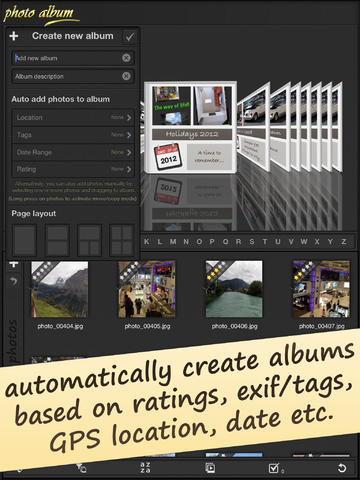
Photos to Albums is the photo album book which helps you create albums and folders according to location, data, date and tags. This is the only app that work as a fully photo organizer app as you can add photos in existing albums, edit photos and share photo albums with your friends via social media, photo sharing sites and Emails. Just imagine how great that would be if you could create photo albums on your iPad and share it with your friends and relatives. It could be a nice memory for your friends and loved ones if you give them photo album of your special memories. Photos to Albums app lets you add smiles and different icons like Thanksgiving Day, Birthday, Christmas, New Year and Halloween. So, create innovative photo albums with Photos to Albums app and share it with your loved ones and remember them in your special memories. This app is easily available in iTunes store and you can download this app without any problems.
Features:
* Allows you to add clipart and shapes to albums
* This is the only app that works as full- fledged photo organizer with all folders
* Can add text layers to give a different look your albums by adding caption
* Will have access of free drawing tool so that you can add creativity in to your albums
* Have an option to export high resolution PDF files to your albums
* Can manage individual layers on album page
* Supports EXIF/ Meta tag to filter photos easily
* Control shadow, color scheme for various elements in albums
* Have controller option for Undo/Redo for ease of use
* Can add borders/frames to photos
* If you want to make any folder private, then you can lock individual element
* Can add background image or desired color for albums
* Allows you to share your creation on social media
* Can share your creation to your email contacts or you can save it in your library for later use
* Also allows you to let import photos wirelessly from PC or Mac or add from library/ camera
* Can create separate folders to organize photos
* Provides you facility to sort photos on multiple parameters
* Can show photos on map with location data
Device Requirements:
* Compatible with iPad
* Requires iOS 5.0 or later
* 19.0 MB
Pricing and Availability:
Photos to Albums 1.1 is $4.99 USD (or equivalent amount in other currencies) and available worldwide exclusively through the App Store in the Photo & Video category.
Photos to Albums 1.1: http://photoalbum.appsicum.com/
Purchase and Download from iTunes: https://itunes.apple.com/us/app/photo-album-photobook/id586997137?ls=1&mt=8
Screenshot 1: http://a2.mzstatic.com/us/r30/Purple/v4/c0/f1/dd/c0f1ddf4-7851-6a2b-1036-7eee05829e4b/screen480x480.jpeg
Screenshot 2: http://a5.mzstatic.com/us/r30/Purple/v4/c8/56/be/c856beab-fbb2-da9f-6279-9e0c276f5413/screen480x480.jpeg
App Icon: http://a3.mzstatic.com/us/r30/Purple4/v4/4e/7b/f7/4e7bf786-39ae-6d98-cb68-85a2954d2e51/mzl.ngmaoqrd.175x175-75.jpg
Appsicum is a crew of talented and skilled app developers who constantly work hard to bring the smile on your face through some innovative, cool and unique apps for your smart-phones like iPhone, iPad, iPod touch, Android and Blackberry. As a team, we put the best of our efforts to simplify your life with our apps. Recently we released Files-Finder Edition App for iPad users. For more information please visit the Appsicum website. All Material and Software (C) Copyright 2014 Appsicum. All Rights Reserved. Apple, the Apple logo, iPhone, iPod and iPad are registered trademarks of Apple Inc. in the U.S. and/or other countries. Other trademarks and registered trademarks may be the property of their respective owners.
*******
Link To Article: http://prmac.com/release-id-70277.htm
*******
---------------------------------------------------------------------------------
Note that you can alter delivered distributions at any time.
Login to your account on prMac to alter your channel selection, or to opt-out at any time.
Create Innovative Photo Albums and Organize Them on Your iPad - Published on 09/01/14
Appsicum introduces Photos to Albums for the iPad. This app comprises all features that you expect from any photo album app. This app is the most unique and advanced photo book and album making app. You can then share your pictures on Facebook, Twitter, Pinterest, & more. From now, whenever you are on a tour and clicking some photos via your iPad, then you can create albums easily, add borders and layers to albums, add a tag on albums and more just via one app named as Photos to Albums.
Jaipur, India - Creating a photo book and photo album is a good idea as you can gather all relevant photos in a single album. You can create these albums according to functions such as wedding, anniversary, birthday party and office hangout. However, it is not sensible to carry these albums with you always. You can keep these albums for your memories but can't share with others. It is a good idea to create photo albums on the iPad as you can carry the iPad with you and can always share photo albums with your friends by cloud services, email and social media sites.
Photos to Albums is the photo album book which helps you create albums and folders according to location, data, date and tags. This is the only app that work as a fully photo organizer app as you can add photos in existing albums, edit photos and share photo albums with your friends via social media, photo sharing sites and Emails. Just imagine how great that would be if you could create photo albums on your iPad and share it with your friends and relatives. It could be a nice memory for your friends and loved ones if you give them photo album of your special memories. Photos to Albums app lets you add smiles and different icons like Thanksgiving Day, Birthday, Christmas, New Year and Halloween. So, create innovative photo albums with Photos to Albums app and share it with your loved ones and remember them in your special memories. This app is easily available in iTunes store and you can download this app without any problems.
Features:
* Allows you to add clipart and shapes to albums
* This is the only app that works as full- fledged photo organizer with all folders
* Can add text layers to give a different look your albums by adding caption
* Will have access of free drawing tool so that you can add creativity in to your albums
* Have an option to export high resolution PDF files to your albums
* Can manage individual layers on album page
* Supports EXIF/ Meta tag to filter photos easily
* Control shadow, color scheme for various elements in albums
* Have controller option for Undo/Redo for ease of use
* Can add borders/frames to photos
* If you want to make any folder private, then you can lock individual element
* Can add background image or desired color for albums
* Allows you to share your creation on social media
* Can share your creation to your email contacts or you can save it in your library for later use
* Also allows you to let import photos wirelessly from PC or Mac or add from library/ camera
* Can create separate folders to organize photos
* Provides you facility to sort photos on multiple parameters
* Can show photos on map with location data
Device Requirements:
* Compatible with iPad
* Requires iOS 5.0 or later
* 19.0 MB
Pricing and Availability:
Photos to Albums 1.1 is $4.99 USD (or equivalent amount in other currencies) and available worldwide exclusively through the App Store in the Photo & Video category.
Photos to Albums 1.1: http://photoalbum.appsicum.com/
Purchase and Download from iTunes: https://itunes.apple.com/us/app/photo-album-photobook/id586997137?ls=1&mt=8
Screenshot 1: http://a2.mzstatic.com/us/r30/Purple/v4/c0/f1/dd/c0f1ddf4-7851-6a2b-1036-7eee05829e4b/screen480x480.jpeg
Screenshot 2: http://a5.mzstatic.com/us/r30/Purple/v4/c8/56/be/c856beab-fbb2-da9f-6279-9e0c276f5413/screen480x480.jpeg

App Icon: http://a3.mzstatic.com/us/r30/Purple4/v4/4e/7b/f7/4e7bf786-39ae-6d98-cb68-85a2954d2e51/mzl.ngmaoqrd.175x175-75.jpg

Appsicum is a crew of talented and skilled app developers who constantly work hard to bring the smile on your face through some innovative, cool and unique apps for your smart-phones like iPhone, iPad, iPod touch, Android and Blackberry. As a team, we put the best of our efforts to simplify your life with our apps. Recently we released Files-Finder Edition App for iPad users. For more information please visit the Appsicum website. All Material and Software (C) Copyright 2014 Appsicum. All Rights Reserved. Apple, the Apple logo, iPhone, iPod and iPad are registered trademarks of Apple Inc. in the U.S. and/or other countries. Other trademarks and registered trademarks may be the property of their respective owners.
*******
Link To Article: http://prmac.com/release-id-70277.htm
*******
---------------------------------------------------------------------------------
Note that you can alter delivered distributions at any time.
Login to your account on prMac to alter your channel selection, or to opt-out at any time.
Subscribe to:
Posts (Atom)