A new article has been published at prMac.
Nexscience LLC Announced a Major Update - Document Maker Version 2.1 - Published on 09/02/14
California based Nexscience LLC announces the update of its latest application, Document Maker 2.1 for iPhone, iPad and iPod touch. The app is the latest in a series of innovative products introduced to the Apple user. This business app features a rich text editor, PDF converter, file manager and a Cloud Sharing framework through which users can seamlessly work with cloud based storage systems like Dropbox and Google Drive. Version 2.1 is optimized for iOS 7.
Santa Clara, Calfornia - Nexscience LLC, the leader in mobile consumer apps, announces the update of its latest application, Document Maker 2.1 for iPhone, iPad and iPod touch. Looking to create and edit rich text documents on your iPhone or iPad? There is an inexpensive alternative: Document Maker - Create & Edit Rich Text Docs and Generate PDF. The app is the latest in the series of innovative products introduced to the iTunes App Store by Nexscience LLC .
Major Features:
* Optimized for iOS 7
* A rich text editor
* PDF Converter, PDF Annotate Features
* File manager with folders & sub folders
* Lightweight office work on the go
* Backup of documents
* Quick access to Documents, Spread sheets, Presentations, notes and memos
* Pocket spreadsheet
* Pocket Presentation
* Cloud Sharing Framework through which users can seamlessly work with cloud based storage systems like Dropbox and Google Drive
Users can create professional quality documents in open standard format that can be viewed or edited in Adobe PDF, Microsoft Word or any other standard Word Processing Application. Document Maker also features a high quality viewer for Microsoft Word, Excel, Power Point, PDF, Text and a wide variety of image file formats. Users can download files from virtually anywhere: from the internet, from a computer through a USB cable or from an external file management system like Dropbox or Google Docs.
"Everyone uses the Business apps for their ease of managing their files and sharing Documents with others regularly. It is focused on these business apps. The use of these apps is beneficial as they over on a quantity of their everyday tasks. These plenty of include apps for editing photographs health and fitness apps like calorie counter. Whether you're a large company with employees who have access to iPhones for work, or you're a small business - the iPhone has the potential to help boost your productivity levels. Needless to say, you'll need the right apps to be able to do so, which is exactly why we've highlighted one of our best offering here," said Faisal Farooqi, CEO Nexscience LLC.
Device Requirements:
* iPhone 3GS or later, iPad, iPod touch (3rd generation) or later
* Requires iOS 4.0 or later
* 19.2 MB
Pricing and Availability:
Document Maker - Create & Edit Rich Text Docs and Generate PDF 2.1 is $4.99 USD (or equivalent amount in other currencies) and available worldwide exclusively through the App Store in the Business category.
Nexscience: http://nexscience.com
Document Maker 2.1: https://itunes.apple.com/app/document-maker-create-edit/id597284270
Screenshot: http://a2.mzstatic.com/us/r30/Purple4/v4/d9/54/67/d95467ad-236a-8c01-910f-096fed3bfe0c/screen568x568.jpeg
App Icon: http://a182.phobos.apple.com/us/r30/Purple/v4/9a/92/df/9a92df5f-a6b5-bb0f-3370-934e55e99326/mzl.uxwcaejx.png
At Nexscience we develop some of the coolest and most popular applications for mobile platform. With more than fifty mobile apps and nearly a million strong user community, Nexscience is one of the fastest growing mobile apps development company based in Silicon Valley. All Material and Software (C) Copyright 2014 Nexscience. All Rights Reserved. Apple, the Apple logo, iPhone, iPod and iPad are registered trademarks of Apple Inc. in the U.S. and/or other countries. Other trademarks and registered trademarks may be the property of their respective owners.
*******
Link To Article: http://prmac.com/release-id-70280.htm
*******
---------------------------------------------------------------------------------
Note that you can alter delivered distributions at any time.
Login to your account on prMac to alter your channel selection, or to opt-out at any time.


FmPro Migrator 7.34 Enhanced with FileMaker 13 to LiveCode Conversion
A new article has been published at prMac.
FmPro Migrator 7.34 Enhanced with FileMaker 13 to LiveCode Conversion - Published on 09/02/14
.com Solutions Inc. announced today that they will be holding 2 workshop sessions featuring FmPro Migrator at the RunRevLive.14 conference. FmPro Migrator reads the metadata from FileMaker 11, 12, 13 database files, then in a matter of seconds generates cards for the layouts in a LiveCode stack file. LiveCode object, card and stack level scripts are written into the new stack file during the conversion process to provide application functionality.
San Diego, California - At the RunRevLive.14 conference, .com Solutions Inc. has released FmPro Migrator Platinum Edition 7.34 with support for FileMaker Pro Advanced 13 to LiveCode conversions. During the RunRevLive.14 conference David Simpson, President of .com Solutions Inc. will be holding 2 workshop sessions featuring this new FileMaker 13 to LiveCode conversion feature. These workshops are scheduled for Wednesday September 3rd at 2:00pm and Thursday September 4th at 11:30am.
FmPro Migrator reads the metadata from FileMaker 11, 12, 13 database files, then in a matter of seconds generates cards for the layouts in a LiveCode 5.5 compatible stack file. LiveCode object, card and stack level scripts are written into the new stack file during the conversion process to provide application functionality.
In addition to supporting the new FileMaker 13 database format, FmPro Migrator LiveCode conversions now include Save Records as PDF and Save Records as Excel features within the generated stack file.
FmPro Migrator 7.34 has been built with LiveCode 7.0, to enhance Unicode compatibility and improve the display of application GUI elements on Hi-DPI displays for MacOSX and Windows operating systems.
Currently in developer preview release status, LiveCode 7 represents the first major release of LiveCode after completion of the engine refactoring project. This major engine refactoring project lays the foundation for all of the KickStarter project goals, and future LiveCode releases including the addition of HTML5 deployment.
David Simpson states, "Realizing the importance of the LiveCode 7 development cycle, I have been diligently testing FmPro Migrator with LiveCode 7 releases since early 2014. I am making use of the new Unicode and Hi-DPI features of LiveCode 7. My app now looks razor sharp on MacOSX and Windows Hi-DPI displays, improving the professional look of FmPro Migrator."
The detailed list of enhancements to the LiveCode conversion feature includes:
* Added support for converting FileMaker Pro Advanced 12 and FileMaker Pro Advanced 13 files into a LiveCode application stack file.
* Added support for converting FileMaker 12 and FileMaker 13 script steps into LiveCode scripts. Also improved the conversion of previous script steps.
* FileMaker Tab Controls are now supported 2 levels deep during FileMaker 12 layout processing.
* The latest DataGrid object from LiveCode 6.5.2 has been added to the LiveCode template stack embedded within FmPro Migrator.
* Diagonal line objects are now created by using a polygon object, in order to more accurately draw the object compared to the rectangle object previously used.
* Added a new resizeStack handler to automatically resize the enclosing object group to provide automatic display of scrollbars. This handler is also called each time the Layout Menu is used to switch between cards.
* Improved support for FileMaker scrip steps having script parameters assigned to buttons on layouts. These script steps include: Go to Layout, Perform Script, Open URL, Show Custom Dialog and Go to Record/Request/Page, Save Records as PDF, Save Records as Excel.
* Added Save Records as PDF script step implementation, supporting CurrentRecord, RecordsBeingBrowsed and BlankRecord parameters. The RecordsBeingBrowsed option uses the current Foundset of records to create multi-page PDF files. Setting the printScale parameter before calling the saveRecordsAsPDF stack handler enables LiveCode developers to easily customize the amount of info placed onto a single PDF page.
* Added Save Records as Excel script step implementation, supporting CurrentRecord and BrowsedRecords options. This code is generated for the specific fields located on each card of the stack. Spreadsheet column titles and column ordering are easily customizable within the saveRecordsAsExcel card handler.
* Added cursor changing code to each layout object having an attached script step.
* Improved merge field processing to display the field name within chevrons within the text label object.
Pricing and Availability:
FmPro Migrator Platinum Edition is priced at ($600) per developer, with support for the conversion of up to 250 forms/reports/layouts per project during the 1 year term of the license key.
FmPro Migrator Developer Edition 7.34: http://www.fmpromigrator.com/products/fmpro_migrator/index.html
FileMaker to LiveCode Conversion Feature: http://www.fmpromigrator.com/services/dbtolivecode_service.html
Download FmPro Migrator: http://www.fmpromigrator.com/downloads/demo_software/index.html#fmpro_migrator_demo
Purchase: http://www.fmpromigrator.com/order/index.html#fmpro_migrator
Save Records as PDF Feature: http://www.fmpromigrator.com/services/dbtolivecode_service.html#save_records_as_pdf
Save Records as Excel Feature: http://www.fmpromigrator.com/services/dbtolivecode_service.html#save_records_as_excel
Founded in 1999 by David Simpson in Sunny California, .com Solutions Inc. develops multi-platform graphical applications supporting FileMaker Pro, SQLite, Oracle, MySQL, Access, SQL Server, Sybase, DB2, OpenBase, PostgreSQL, FrontBase, Valentina, VB6, LiveCode and Visual FoxPro developers. FmPro Script Diff, compares and edits FileMaker Pro scripts. SQLite Diff compares SQLite database schema and data. Copyright (C) 1999-2014 .com Solutions Inc. All Rights Reserved. Apple, the Apple logo and Mac OS X platforms are trademarks of Apple Inc. in the U.S. and/or other countries.
*******
Link To Article: http://prmac.com/release-id-70281.htm
*******
---------------------------------------------------------------------------------
Note that you can alter delivered distributions at any time.
Login to your account on prMac to alter your channel selection, or to opt-out at any time.
FmPro Migrator 7.34 Enhanced with FileMaker 13 to LiveCode Conversion - Published on 09/02/14
.com Solutions Inc. announced today that they will be holding 2 workshop sessions featuring FmPro Migrator at the RunRevLive.14 conference. FmPro Migrator reads the metadata from FileMaker 11, 12, 13 database files, then in a matter of seconds generates cards for the layouts in a LiveCode stack file. LiveCode object, card and stack level scripts are written into the new stack file during the conversion process to provide application functionality.
San Diego, California - At the RunRevLive.14 conference, .com Solutions Inc. has released FmPro Migrator Platinum Edition 7.34 with support for FileMaker Pro Advanced 13 to LiveCode conversions. During the RunRevLive.14 conference David Simpson, President of .com Solutions Inc. will be holding 2 workshop sessions featuring this new FileMaker 13 to LiveCode conversion feature. These workshops are scheduled for Wednesday September 3rd at 2:00pm and Thursday September 4th at 11:30am.
FmPro Migrator reads the metadata from FileMaker 11, 12, 13 database files, then in a matter of seconds generates cards for the layouts in a LiveCode 5.5 compatible stack file. LiveCode object, card and stack level scripts are written into the new stack file during the conversion process to provide application functionality.
In addition to supporting the new FileMaker 13 database format, FmPro Migrator LiveCode conversions now include Save Records as PDF and Save Records as Excel features within the generated stack file.
FmPro Migrator 7.34 has been built with LiveCode 7.0, to enhance Unicode compatibility and improve the display of application GUI elements on Hi-DPI displays for MacOSX and Windows operating systems.
Currently in developer preview release status, LiveCode 7 represents the first major release of LiveCode after completion of the engine refactoring project. This major engine refactoring project lays the foundation for all of the KickStarter project goals, and future LiveCode releases including the addition of HTML5 deployment.
David Simpson states, "Realizing the importance of the LiveCode 7 development cycle, I have been diligently testing FmPro Migrator with LiveCode 7 releases since early 2014. I am making use of the new Unicode and Hi-DPI features of LiveCode 7. My app now looks razor sharp on MacOSX and Windows Hi-DPI displays, improving the professional look of FmPro Migrator."
The detailed list of enhancements to the LiveCode conversion feature includes:
* Added support for converting FileMaker Pro Advanced 12 and FileMaker Pro Advanced 13 files into a LiveCode application stack file.
* Added support for converting FileMaker 12 and FileMaker 13 script steps into LiveCode scripts. Also improved the conversion of previous script steps.
* FileMaker Tab Controls are now supported 2 levels deep during FileMaker 12 layout processing.
* The latest DataGrid object from LiveCode 6.5.2 has been added to the LiveCode template stack embedded within FmPro Migrator.
* Diagonal line objects are now created by using a polygon object, in order to more accurately draw the object compared to the rectangle object previously used.
* Added a new resizeStack handler to automatically resize the enclosing object group to provide automatic display of scrollbars. This handler is also called each time the Layout Menu is used to switch between cards.
* Improved support for FileMaker scrip steps having script parameters assigned to buttons on layouts. These script steps include: Go to Layout, Perform Script, Open URL, Show Custom Dialog and Go to Record/Request/Page, Save Records as PDF, Save Records as Excel.
* Added Save Records as PDF script step implementation, supporting CurrentRecord, RecordsBeingBrowsed and BlankRecord parameters. The RecordsBeingBrowsed option uses the current Foundset of records to create multi-page PDF files. Setting the printScale parameter before calling the saveRecordsAsPDF stack handler enables LiveCode developers to easily customize the amount of info placed onto a single PDF page.
* Added Save Records as Excel script step implementation, supporting CurrentRecord and BrowsedRecords options. This code is generated for the specific fields located on each card of the stack. Spreadsheet column titles and column ordering are easily customizable within the saveRecordsAsExcel card handler.
* Added cursor changing code to each layout object having an attached script step.
* Improved merge field processing to display the field name within chevrons within the text label object.
Pricing and Availability:
FmPro Migrator Platinum Edition is priced at ($600) per developer, with support for the conversion of up to 250 forms/reports/layouts per project during the 1 year term of the license key.
FmPro Migrator Developer Edition 7.34: http://www.fmpromigrator.com/products/fmpro_migrator/index.html
FileMaker to LiveCode Conversion Feature: http://www.fmpromigrator.com/services/dbtolivecode_service.html
Download FmPro Migrator: http://www.fmpromigrator.com/downloads/demo_software/index.html#fmpro_migrator_demo
Purchase: http://www.fmpromigrator.com/order/index.html#fmpro_migrator
Save Records as PDF Feature: http://www.fmpromigrator.com/services/dbtolivecode_service.html#save_records_as_pdf
Save Records as Excel Feature: http://www.fmpromigrator.com/services/dbtolivecode_service.html#save_records_as_excel
Founded in 1999 by David Simpson in Sunny California, .com Solutions Inc. develops multi-platform graphical applications supporting FileMaker Pro, SQLite, Oracle, MySQL, Access, SQL Server, Sybase, DB2, OpenBase, PostgreSQL, FrontBase, Valentina, VB6, LiveCode and Visual FoxPro developers. FmPro Script Diff, compares and edits FileMaker Pro scripts. SQLite Diff compares SQLite database schema and data. Copyright (C) 1999-2014 .com Solutions Inc. All Rights Reserved. Apple, the Apple logo and Mac OS X platforms are trademarks of Apple Inc. in the U.S. and/or other countries.
*******
Link To Article: http://prmac.com/release-id-70281.htm
*******
---------------------------------------------------------------------------------
Note that you can alter delivered distributions at any time.
Login to your account on prMac to alter your channel selection, or to opt-out at any time.
Valuta+ 1.5 released for iOS - Simple Currency Converter
A new article has been published at prMac.
Valuta+ 1.5 released for iOS - Simple Currency Converter - Published on 09/02/14
Indie developer, Daniel Noehr has released Valuta+ 1.5, an update to his popular currency converter for iOS devices. With a database of over 160 up-to-date currencies, Valuta+ allows anyone to easily look up local exchange rates, no matter where they are in the world. These include commodities like gold, silver and crypto-currencies. Adding support for iPad and iPad Mini, with version 1.5 users can now find the local currency based on location as well as minor bug fixes and performance enhancements.
Bangkok, Thailand - Independent developer, Daniel Noehr has announced the release of Valuta+ 1.5, an update to his popular currency converter developed for iPhone, iPad and iPod touch devices. The value of any country's currency constantly fluctuates. It can be affected by many factors, including the value of imports and exports, political stability, war, natural disasters, public debts with other countries, regulatory policies of the central bank and the change in inflation rates. This is where Valuta+ can come in handy.
Valuta+ is a super simple and free currency converter. With a database of over 160 up-to-date currencies, Valuta+ allows anyone to easily look up local exchange rates, no matter where they are in the world. These include commodities like gold, silver and crypto-currencies like Bitcoin. The app is designed to be intuitively easy-to-use, and works offline.
Features:
* Simplicity design
* 160 currencies
* Favorite list
* Works offline
* Always up to date
Adding support for iPad and iPad Mini, with version 1.5 users can now find the local currency based on location as well as minor bug fixes and performance enhancements.
"Tourism in Europe reaches a peak during the summer months of July and August and some destinations, such as the UK and Scandinavia, are best experienced during this time," said Daniel Noehr, indie developer. "When armed with the actual rate of exchange accessible through apps like Valuta+, travellers can accomplish a better deal when exchanging money at home or abroad. Additionally, entrepreneurs can benefit from good currency converter apps when going accounting I'm passionate about simplicity in apps as well as online services, which led me to create Valuta+."
Customers say - "Simple, User friendly & Fast Currency Converter"
Supported Languages:
Valuta+ supports English, Arabic, Bokm�l, Norwegian, Danish, Dutch, Finnish, French, German, Italian, Japanese, Korean, Portuguese, Russian, Simplified Chinese, Spanish, Swedish, Thai, Traditional Chinese and Vietnamese languages.
Device Requirements:
* iPhone, iPad, and iPod touch
* Requires iOS 7.0 or later
* 5.4 MB
Pricing and Availability:
Valuta+ 1.5 is free and available worldwide exclusively through the App Store in the Finance category.
Valuta+ 1.5: http://app.valutaomregneren.dk/
Download from iTunes: https://itunes.apple.com/app/id646925682
Screenshot: http://a5.mzstatic.com/us/r30/Purple/v4/fa/5a/3a/fa5a3ae1-7720-2cbd-07dc-2fc74820b31b/screen480x480.jpeg
App Icon: http://a1.mzstatic.com/us/r30/Purple6/v4/e0/8b/70/e08b70bd-0aea-7daa-2734-31decaf07a4c/mzl.njtsfbws.175x175-75.jpg
Press Kit (zip): http://danielnoehr.com/ValutaPressKit.zip
Daniel Noehr is a Danish concept developer located in Bangkok, Thailand. Daniel is specialist in optimising services for performance, simplicity and scalability. He creates simple to use and highly effective online and app concepts. All Material and Software (C) Copyright 2014 Daniel Noehr. All Rights Reserved. Apple, the Apple logo, iPhone, iPod and iPad are registered trademarks of Apple Inc. in the U.S. and/or other countries. Other trademarks and registered trademarks may be the property of their respective owners.
*******
Link To Article: http://prmac.com/release-id-70231.htm
*******
---------------------------------------------------------------------------------
Note that you can alter delivered distributions at any time.
Login to your account on prMac to alter your channel selection, or to opt-out at any time.
Valuta+ 1.5 released for iOS - Simple Currency Converter - Published on 09/02/14
Indie developer, Daniel Noehr has released Valuta+ 1.5, an update to his popular currency converter for iOS devices. With a database of over 160 up-to-date currencies, Valuta+ allows anyone to easily look up local exchange rates, no matter where they are in the world. These include commodities like gold, silver and crypto-currencies. Adding support for iPad and iPad Mini, with version 1.5 users can now find the local currency based on location as well as minor bug fixes and performance enhancements.
Bangkok, Thailand - Independent developer, Daniel Noehr has announced the release of Valuta+ 1.5, an update to his popular currency converter developed for iPhone, iPad and iPod touch devices. The value of any country's currency constantly fluctuates. It can be affected by many factors, including the value of imports and exports, political stability, war, natural disasters, public debts with other countries, regulatory policies of the central bank and the change in inflation rates. This is where Valuta+ can come in handy.
Valuta+ is a super simple and free currency converter. With a database of over 160 up-to-date currencies, Valuta+ allows anyone to easily look up local exchange rates, no matter where they are in the world. These include commodities like gold, silver and crypto-currencies like Bitcoin. The app is designed to be intuitively easy-to-use, and works offline.
Features:
* Simplicity design
* 160 currencies
* Favorite list
* Works offline
* Always up to date
Adding support for iPad and iPad Mini, with version 1.5 users can now find the local currency based on location as well as minor bug fixes and performance enhancements.
"Tourism in Europe reaches a peak during the summer months of July and August and some destinations, such as the UK and Scandinavia, are best experienced during this time," said Daniel Noehr, indie developer. "When armed with the actual rate of exchange accessible through apps like Valuta+, travellers can accomplish a better deal when exchanging money at home or abroad. Additionally, entrepreneurs can benefit from good currency converter apps when going accounting I'm passionate about simplicity in apps as well as online services, which led me to create Valuta+."
Customers say - "Simple, User friendly & Fast Currency Converter"
Supported Languages:
Valuta+ supports English, Arabic, Bokm�l, Norwegian, Danish, Dutch, Finnish, French, German, Italian, Japanese, Korean, Portuguese, Russian, Simplified Chinese, Spanish, Swedish, Thai, Traditional Chinese and Vietnamese languages.
Device Requirements:
* iPhone, iPad, and iPod touch
* Requires iOS 7.0 or later
* 5.4 MB
Pricing and Availability:
Valuta+ 1.5 is free and available worldwide exclusively through the App Store in the Finance category.
Valuta+ 1.5: http://app.valutaomregneren.dk/
Download from iTunes: https://itunes.apple.com/app/id646925682
Screenshot: http://a5.mzstatic.com/us/r30/Purple/v4/fa/5a/3a/fa5a3ae1-7720-2cbd-07dc-2fc74820b31b/screen480x480.jpeg

App Icon: http://a1.mzstatic.com/us/r30/Purple6/v4/e0/8b/70/e08b70bd-0aea-7daa-2734-31decaf07a4c/mzl.njtsfbws.175x175-75.jpg

Press Kit (zip): http://danielnoehr.com/ValutaPressKit.zip
Daniel Noehr is a Danish concept developer located in Bangkok, Thailand. Daniel is specialist in optimising services for performance, simplicity and scalability. He creates simple to use and highly effective online and app concepts. All Material and Software (C) Copyright 2014 Daniel Noehr. All Rights Reserved. Apple, the Apple logo, iPhone, iPod and iPad are registered trademarks of Apple Inc. in the U.S. and/or other countries. Other trademarks and registered trademarks may be the property of their respective owners.
*******
Link To Article: http://prmac.com/release-id-70231.htm
*******
---------------------------------------------------------------------------------
Note that you can alter delivered distributions at any time.
Login to your account on prMac to alter your channel selection, or to opt-out at any time.
A Hungry Mouse updated with New Timing Game Mode and iOS 8 Support
A new article has been published at prMac.
A Hungry Mouse updated with New Timing Game Mode and iOS 8 Support - Published on 09/02/14
Game Fish has announced A Hungry Mouse 3.0, an update to their fun, unique and addictive game for iOS. Easy to understand and virtually impossible to stop playing, users drop one delicious cake after another in order to feed the world's hungriest mouse, and all while they collect coins and avoid fireworks. This fabulous new no-cost app has been updated with a new timing game mode and support for iOS 8, and available now for iPad and iPhone in the App Store.
Cupertino, California - People of all ages in search of a cute and casual game for their iPad or iPhone that features super addictive gameplay, delightful graphics, and the joy that only comes from feeding a happy little mouse all of the cakes he can possibly eat (and then a many more cakes after that), can head to the App Store and download the released version 3.0 of Game's Fish's unique new no-cost app A Hungry Mouse.
A Hungry Mouse is easy to understand and virtually impossible to stop playing. The gameplay centers around (what else?) a ravenously hungry mouse who has a never-ending craving for delicious cakes. Users drop one tasty cake on top of another, while they tap the left or right half of their screen to navigate the mouse as he cheerfully munches away.
Users earn bonus points for deftly stacking falling cakes perilously close to the edge of the cake below, and they lose points - and might need to start over - if they fail to dodge a flying firecracker. And throughout their cake-eating adventure, users can collect coins to purchase in-game items and fun powerups. In terms of game modes, users have three fun options to choose from - each with their own unique challenges and dynamics:
* The "Classic Mode" lets users keep playing until they miss stacking three cakes
* The "Limited Cake Mode" gives users 60 cakes to stack
* The "Timing Mode" gives users 60 seconds in which they must hurry and stack as many cakes as possible (new in version 3.0)
Plus, A Hungry Mouse features Game Center integration, so that users can see how their cake-staking talents "stack up" against their friends, and other users worldwide.
"So many iOS games are ultra-complicated and take hours to understand, or they're full of violence and drama, and fail to deliver an endlessly fun experience that makes people smile and reflect on a simpler, happier time," commented Bill Yang of Game Fish. "We created A Hungry Mouse to fill that need, and to give people of all ages the gaming experience they want - and, of course, the opportunity to feed the world's hungriest mouse!"
Device Requirements:
* iPhone, iPad, and iPod touch
* Requires iOS 4.3 or later
* Support for iOS 7 and iOS 8
* 18.1 MB
Pricing and Availability:
Suitable for all ages, A Hungry Mouse 3.0 is no-cost and available worldwide exclusively through the App Store in the Games category.
Game Fish: http://www.html5game.com
A Hungry Mouse 3.0: http://apps.appshout.com/a-hungry-mouse/
Download from iTunes: https://itunes.apple.com/app/a-hungry-mouse/id522583944
YouTube Video (Demo): http://www.youtube.com/watch?v=EW0V8eTo6LI
Screenshot: http://a3.mzstatic.com/us/r30/Purple6/v4/11/bb/54/11bb5416-f9f4-0b11-d788-def2b720cfa6/screen480x480.jpeg
App Icon: http://apps.appshout.com/a-hungry-mouse/images/icon.png
Game Fish is an independent development studio based in Beijing, China. The company's goal is to create exceptional and memorable iOS, Android and HTML5 games. All Material and Software (C) Copyright 2014 Game Fish. All Rights Reserved. Apple, the Apple logo, iPhone, iPod and iPad are registered trademarks of Apple Inc. in the U.S. and/or other countries. Other trademarks and registered trademarks may be the property of their respective owners.
*******
Link To Article: http://prmac.com/release-id-70230.htm
*******
---------------------------------------------------------------------------------
Note that you can alter delivered distributions at any time.
Login to your account on prMac to alter your channel selection, or to opt-out at any time.
A Hungry Mouse updated with New Timing Game Mode and iOS 8 Support - Published on 09/02/14
Game Fish has announced A Hungry Mouse 3.0, an update to their fun, unique and addictive game for iOS. Easy to understand and virtually impossible to stop playing, users drop one delicious cake after another in order to feed the world's hungriest mouse, and all while they collect coins and avoid fireworks. This fabulous new no-cost app has been updated with a new timing game mode and support for iOS 8, and available now for iPad and iPhone in the App Store.
Cupertino, California - People of all ages in search of a cute and casual game for their iPad or iPhone that features super addictive gameplay, delightful graphics, and the joy that only comes from feeding a happy little mouse all of the cakes he can possibly eat (and then a many more cakes after that), can head to the App Store and download the released version 3.0 of Game's Fish's unique new no-cost app A Hungry Mouse.
A Hungry Mouse is easy to understand and virtually impossible to stop playing. The gameplay centers around (what else?) a ravenously hungry mouse who has a never-ending craving for delicious cakes. Users drop one tasty cake on top of another, while they tap the left or right half of their screen to navigate the mouse as he cheerfully munches away.
Users earn bonus points for deftly stacking falling cakes perilously close to the edge of the cake below, and they lose points - and might need to start over - if they fail to dodge a flying firecracker. And throughout their cake-eating adventure, users can collect coins to purchase in-game items and fun powerups. In terms of game modes, users have three fun options to choose from - each with their own unique challenges and dynamics:
* The "Classic Mode" lets users keep playing until they miss stacking three cakes
* The "Limited Cake Mode" gives users 60 cakes to stack
* The "Timing Mode" gives users 60 seconds in which they must hurry and stack as many cakes as possible (new in version 3.0)
Plus, A Hungry Mouse features Game Center integration, so that users can see how their cake-staking talents "stack up" against their friends, and other users worldwide.
"So many iOS games are ultra-complicated and take hours to understand, or they're full of violence and drama, and fail to deliver an endlessly fun experience that makes people smile and reflect on a simpler, happier time," commented Bill Yang of Game Fish. "We created A Hungry Mouse to fill that need, and to give people of all ages the gaming experience they want - and, of course, the opportunity to feed the world's hungriest mouse!"
Device Requirements:
* iPhone, iPad, and iPod touch
* Requires iOS 4.3 or later
* Support for iOS 7 and iOS 8
* 18.1 MB
Pricing and Availability:
Suitable for all ages, A Hungry Mouse 3.0 is no-cost and available worldwide exclusively through the App Store in the Games category.
Game Fish: http://www.html5game.com
A Hungry Mouse 3.0: http://apps.appshout.com/a-hungry-mouse/
Download from iTunes: https://itunes.apple.com/app/a-hungry-mouse/id522583944
YouTube Video (Demo): http://www.youtube.com/watch?v=EW0V8eTo6LI
Screenshot: http://a3.mzstatic.com/us/r30/Purple6/v4/11/bb/54/11bb5416-f9f4-0b11-d788-def2b720cfa6/screen480x480.jpeg

App Icon: http://apps.appshout.com/a-hungry-mouse/images/icon.png

Game Fish is an independent development studio based in Beijing, China. The company's goal is to create exceptional and memorable iOS, Android and HTML5 games. All Material and Software (C) Copyright 2014 Game Fish. All Rights Reserved. Apple, the Apple logo, iPhone, iPod and iPad are registered trademarks of Apple Inc. in the U.S. and/or other countries. Other trademarks and registered trademarks may be the property of their respective owners.
*******
Link To Article: http://prmac.com/release-id-70230.htm
*******
---------------------------------------------------------------------------------
Note that you can alter delivered distributions at any time.
Login to your account on prMac to alter your channel selection, or to opt-out at any time.
Biggest Carp iPhone App Used By The Pros
A new article has been published at prMac.
Biggest Carp iPhone App Used By The Pros - Published on 09/02/14
Biggest Carp is the latest iPhone app released by SkyElla Tech. Designed specifically for Carp Anglers. Its being used by Pro Anglers, such as Ben O'Connor, Tom Maker, Chris Rose & Ian Chillcott. The app creates a little more fun on the bank. Users simply have to take a snap of their catch and enter the weight. Players can search and follow their friends and create custom competitions. Biggest Carp is the first of its kind and a must have for Carp anglers.
London, United Kingdom - Biggest Carp is the latest iPhone app from SkyElla Tech. Designed specifically for Carp Anglers. Its being used by Pro Anglers, such as 'Ben O'Connor, Tom Maker, Chris Rose & Ian Chillcott'.
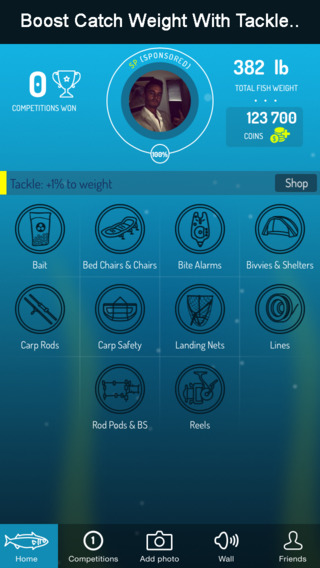
Biggest Carp has been released and will only get better and more and more users join in. A place to keep a track of all your Carp catches and compete against other anglers. Biggest Carp, has been created by anglers for anglers. Creating a little more fun on the bank. Users simply have to take a snap of their catch and enter the weight. The weight will give the player a score and raise their angling Level. Starting at 'Noddy' all the way to 'Sponsored Angler'.
In a simliar style to certain social networking sites, players can search and follow their friends and create custom competitions. There is even a feature to bet coins against other players making the competitions even more exciting. Users can create real competitions against real anglers.
Competitions can be created totally custom and features include: Competition length, number of players, public or private and bet amount. Players also have the option to boost their Carp weight by adding Tackle from the 'Tackle Shop'. Biggest Carp is the first of its kind and a must have for Carp anglers. Check it out today and join the competition.
Device Requirements:
* iPhone, iPad, and iPod touch
* Requires iOS 7.1 or later
* 7.9 MB
Pricing and Availability:
Biggest Carp 1.0 is $1.99 USD (or equivalent amount in other currencies) and available worldwide exclusively through the App Store in the Sports category.
Biggest Carp 1.0: http://www.biggestcarp.uk/demo
Purchase and Download from iTunes: https://itunes.apple.com/app/biggest-carp/id849665740
Screenshot 1: http://a4.mzstatic.com/us/r30/Purple2/v4/ef/0f/c2/ef0fc2e8-ece0-0110-cc07-edb149f92ef5/screen568x568.jpeg
Screenshot 2: http://a2.mzstatic.com/us/r30/Purple1/v4/cb/7b/19/cb7b1901-f24c-6853-8275-d008f7079d36/screen568x568.jpeg
Located in London, United Kingdom, SkyElla Tech is an indie development company founded by brothers Brett & Billy in 2014. The team focuses on developing fun mobile apps. Copyright (C) 2014 SkyElla Tech. All Rights Reserved. Apple, the Apple logo, iPhone, iPod and iPad are registered trademarks of Apple Inc. in the U.S. and/or other countries. Other trademarks and registered trademarks may be the property of their respective owners.
*******
Link To Article: http://prmac.com/release-id-70229.htm
*******
---------------------------------------------------------------------------------
Note that you can alter delivered distributions at any time.
Login to your account on prMac to alter your channel selection, or to opt-out at any time.
Biggest Carp iPhone App Used By The Pros - Published on 09/02/14
Biggest Carp is the latest iPhone app released by SkyElla Tech. Designed specifically for Carp Anglers. Its being used by Pro Anglers, such as Ben O'Connor, Tom Maker, Chris Rose & Ian Chillcott. The app creates a little more fun on the bank. Users simply have to take a snap of their catch and enter the weight. Players can search and follow their friends and create custom competitions. Biggest Carp is the first of its kind and a must have for Carp anglers.
London, United Kingdom - Biggest Carp is the latest iPhone app from SkyElla Tech. Designed specifically for Carp Anglers. Its being used by Pro Anglers, such as 'Ben O'Connor, Tom Maker, Chris Rose & Ian Chillcott'.
Biggest Carp has been released and will only get better and more and more users join in. A place to keep a track of all your Carp catches and compete against other anglers. Biggest Carp, has been created by anglers for anglers. Creating a little more fun on the bank. Users simply have to take a snap of their catch and enter the weight. The weight will give the player a score and raise their angling Level. Starting at 'Noddy' all the way to 'Sponsored Angler'.
In a simliar style to certain social networking sites, players can search and follow their friends and create custom competitions. There is even a feature to bet coins against other players making the competitions even more exciting. Users can create real competitions against real anglers.
Competitions can be created totally custom and features include: Competition length, number of players, public or private and bet amount. Players also have the option to boost their Carp weight by adding Tackle from the 'Tackle Shop'. Biggest Carp is the first of its kind and a must have for Carp anglers. Check it out today and join the competition.
Device Requirements:
* iPhone, iPad, and iPod touch
* Requires iOS 7.1 or later
* 7.9 MB
Pricing and Availability:
Biggest Carp 1.0 is $1.99 USD (or equivalent amount in other currencies) and available worldwide exclusively through the App Store in the Sports category.
Biggest Carp 1.0: http://www.biggestcarp.uk/demo
Purchase and Download from iTunes: https://itunes.apple.com/app/biggest-carp/id849665740
Screenshot 1: http://a4.mzstatic.com/us/r30/Purple2/v4/ef/0f/c2/ef0fc2e8-ece0-0110-cc07-edb149f92ef5/screen568x568.jpeg

Screenshot 2: http://a2.mzstatic.com/us/r30/Purple1/v4/cb/7b/19/cb7b1901-f24c-6853-8275-d008f7079d36/screen568x568.jpeg
Located in London, United Kingdom, SkyElla Tech is an indie development company founded by brothers Brett & Billy in 2014. The team focuses on developing fun mobile apps. Copyright (C) 2014 SkyElla Tech. All Rights Reserved. Apple, the Apple logo, iPhone, iPod and iPad are registered trademarks of Apple Inc. in the U.S. and/or other countries. Other trademarks and registered trademarks may be the property of their respective owners.
*******
Link To Article: http://prmac.com/release-id-70229.htm
*******
---------------------------------------------------------------------------------
Note that you can alter delivered distributions at any time.
Login to your account on prMac to alter your channel selection, or to opt-out at any time.
iNutrients App Now on Sale Thru Labor Day - Covers 10 USDA Nutrients
A new article has been published at prMac.
iNutrients App Now on Sale Thru Labor Day - Covers 10 USDA Nutrients - Published on 09/02/14
Indie developer James Hollender's version 2.1 of his iNutrients app contains the entire USDA National Nutrient Database for: Calories, Carbohydrates, Dietary Cholesterol, Fiber, Potassium, Proteins, Saturated Fat, Sodium, Sugars and Vitamin K, is now on sale with 25% off thru 9/1. The database includes 8,463 different foods and 15,135 food servings. Even with this large quantity it may still not be enough. Users can now add their own custom foods and food servings to help fill that gap.
Revere, Massachusetts - Indie developer James Hollender's version 2.1 of his iNutrients app contains the latest USDA National Nutrient Database (SR-26), which requires no Internet access, for 10 nutrients: Calories, Carbohydrates, Dietary Cholesterol, Fiber, Potassium, Proteins, Saturated Fat, Sodium, Sugars and Vitamin K, is now on sale with 25% off thru Labor Day, September 1st, 2014. The database includes 8,463 different foods and 15,135 food servings.
Despite the enormous number of foods and food servings in the USDA National Nutrient Database, there are still many which aren't included, especially most name brands. Having the capability of defining Custom Foods that are missing fills this gap, which then makes keeping track of daily nutritional intake more complete.
It's extremely slick to be able to input the information from a packaged food's nutrition label and moments later see color codings for all ten nutrients indicating the ranking of their concentration. As an example the developer talks about a popular brand name frozen dinner. Once the data from the nutrition label is input and saved, the color rankings show up for the Custom Food indicating Carbohydrates are Extremely High (Black); Sodium is Very High (Dark Red); Calories are High (Red); Potassium, Saturated Fat & Sugars are Moderately High (Orange); Proteins are Moderate (Yellow); Cholesterol & Fiber are Moderately Low (Light Green); and Vitamin K is Unknown (Gray) because data wasn't available. This immediately points out that maybe this small meal, eaten frequently, isn't as nutritionally good as originally thought.
Each Custom Food Definition has one main Serving Size and an allowance to add up to three additional ones. Nutrient data is extrapolated for each of the additional Serving Sizes based on their weight compared to the main Serving Size.
There is nothing that prevents the user from collecting nutritional information for a complete meal and then creating a single Custom Food for that meal. This provides the capability to speed input of the same meal eaten frequently.
All Custom Food Definitions are automatically included in searches of the entire USDA database.
If for some reason the user doesn't agree with the developer's default Color Scales for the ten nutrients covered, each individual scale can be customized. Making a change will be reflected for all previously recorded data when next presented.
The iNutrients app provides information based on the USDA National Nutrient Database for Standard Reference concerning ten key nutrients:
* Calories - Great for anyone concerned about weight management
* Carbohydrates - Used to make glucose which is the fuel that gives you energy
* Cholesterol - Dietary Cholesterol - Aids in the production of Vitamin D
* Fiber - Essential for cardiovascular health; prevents constipation; improves control of diabetes
* Potassium - Helps with anxiety and stress; blood pressure; brain function; cramps, etc.
* Proteins - Important for Bodybuilders, Vegetarians or Vegans
* Saturated Fat - Eat only moderate amounts to keep healthy
* Sodium - Would you believe there's sodium in water?
* Sugars - Help keep your sugar intake under control
* Vitamin K - Vitamins K1, K1D & K2 - Extremely important for anyone taking Blood Thinning Medications like Coumadin or Warfarin
These nutrients are listed and presented throughout the app in alphabetical order. Icons used to help easily identify the nutrients are from other apps by the developer, each covering a single nutrient corresponding to the nutrients in this app are used throughout.
For the price of 2 individual nutrient apps, users can get all 10 nutrients in a single app.
iNutrients utilizes information taken from 100% of the USDA National Nutrient Database for each of these ten nutrients, unlike the individual apps which only cover less than 10% of what's available. Users will find the Search functionality lightning fast as all needed infromation from the USDA database is local to the app - no internet connectivity is required.
From the Search functionality the user can save information for the foods they eat each day. They are able to pick a serving size and then either record a multiple of 0.1 - 9.9 servings; or optionally create a custom serving size from 1 to 500 grams. As they change the serving size they can graphically see the the effect on the various nutrients via color coding ranging from white to black:
* Black - Extremely High
* Dark Red - Very High
* Red - High
* Orange - Moderately High
* Yellow - Moderate
* Light Green - Moderately Low
* Green - Low
* Light Blue - Very Low
* White - Extremely Low
The My Data section allows users to access up to a full year's worth of Food Serving Intake Items stored in their Personal iNutrients Database. Select any Intake Item to get the complete information available. From the display users can tap the Action button in the upper right corner to:
* Delete - Delete the current Food Serving.
* Change Number of Servings - Change the number of Servings for the current Food Intake Item.
* Change the Intake Date - Move the current Food Serving to another day. - This is extremely useful if the user wasn't able to enter what they've eaten on the day it occurred; just simply enter it and then use this function to change to the date needed.
* Copy the Intake Item to Today - This allows the user to copy an individual Food Intake Item from any day, making a copy for the current day.
Also available is an allowance to copy all the Food Intake Items from a single day to the current day. This is extremely handy for people who eat the same foods on a regular basis.
The Customize section provides a means for users to create their own Custom Color Scale for each nutrient if desired in addition to the new feature of creating or updating Custom Food Definitions.
This universal app shows rotating images occasionally on the right, when run on an iPad, that are representative of the 25 different Food Groups designated by the USDA. Versions of these images will typically be seen whenever a food group is identified on iPad, iPhone or iPod touch. More features are planned for upcoming future releases, especially in the areas of customization and reporting.
Device Requirements:
* iPhone, iPad or iPod touch
* iOS 6.0 or later
* Universal Application
* 31 MB
James Hollender is also the creator of the Life Inventory apps which allow users to discover more about themselves than they ever thought possible, and at just a small fraction the cost of a single visit to a therapist.
Pricing and Availability:
iNutrients 1.2 is normally $3.99 (USD), but is on sale for $2.99 thru Labor Day, 09/01/2014 and available worldwide exclusively through the iTunes App Store in the Health & Fitness and Medical categories. Review copies are available on request to qualified organizations.
iNutrients 2.1: http://www.hollender.com/iNutrients.html
Purchase and Download: https://itunes.apple.com/app/id580660547
YouTube Video: http://www.youtube.com/watch?v=iHpa9hmy8IA
Screenshots 1: http://www.hollender.com/iNutrients.html#screenshots1
Screenshots 2: http://www.hollender.com/iNutrients.html#screenshots2
App Icon: http://www.hollender.com/images/iNutrients256.png
Based in Revere, Massachusetts, Indie developer James Hollender is a well seasoned Information Technology professional who has been familiar with Apple products since the days of the first Macintosh computer and has been involved with object oriented programming since the introduction of Java, culminating most recently in writing apps in Objective C for the iPhone, iPod touch and iPad. His innovative ideas have resulted in numerous suggestions and other awards including a commendation from The President of the United States. James Hollender has been involved writing iPad apps with Foliage, Kronos, Olympus, Agero and now Valmarc. Copyright (C) 2010-2014 James Hollender. All Rights Reserved. Apple, the Apple logo, iPhone, and iPod are registered trademarks of Apple Inc. in the U.S. and/or other countries. Other trademarks and registered trademarks may be the property of their respective owners.
*******
Link To Article: http://prmac.com/release-id-70228.htm
*******
---------------------------------------------------------------------------------
Note that you can alter delivered distributions at any time.
Login to your account on prMac to alter your channel selection, or to opt-out at any time.
iNutrients App Now on Sale Thru Labor Day - Covers 10 USDA Nutrients - Published on 09/02/14
Indie developer James Hollender's version 2.1 of his iNutrients app contains the entire USDA National Nutrient Database for: Calories, Carbohydrates, Dietary Cholesterol, Fiber, Potassium, Proteins, Saturated Fat, Sodium, Sugars and Vitamin K, is now on sale with 25% off thru 9/1. The database includes 8,463 different foods and 15,135 food servings. Even with this large quantity it may still not be enough. Users can now add their own custom foods and food servings to help fill that gap.
Revere, Massachusetts - Indie developer James Hollender's version 2.1 of his iNutrients app contains the latest USDA National Nutrient Database (SR-26), which requires no Internet access, for 10 nutrients: Calories, Carbohydrates, Dietary Cholesterol, Fiber, Potassium, Proteins, Saturated Fat, Sodium, Sugars and Vitamin K, is now on sale with 25% off thru Labor Day, September 1st, 2014. The database includes 8,463 different foods and 15,135 food servings.
Despite the enormous number of foods and food servings in the USDA National Nutrient Database, there are still many which aren't included, especially most name brands. Having the capability of defining Custom Foods that are missing fills this gap, which then makes keeping track of daily nutritional intake more complete.
It's extremely slick to be able to input the information from a packaged food's nutrition label and moments later see color codings for all ten nutrients indicating the ranking of their concentration. As an example the developer talks about a popular brand name frozen dinner. Once the data from the nutrition label is input and saved, the color rankings show up for the Custom Food indicating Carbohydrates are Extremely High (Black); Sodium is Very High (Dark Red); Calories are High (Red); Potassium, Saturated Fat & Sugars are Moderately High (Orange); Proteins are Moderate (Yellow); Cholesterol & Fiber are Moderately Low (Light Green); and Vitamin K is Unknown (Gray) because data wasn't available. This immediately points out that maybe this small meal, eaten frequently, isn't as nutritionally good as originally thought.
Each Custom Food Definition has one main Serving Size and an allowance to add up to three additional ones. Nutrient data is extrapolated for each of the additional Serving Sizes based on their weight compared to the main Serving Size.
There is nothing that prevents the user from collecting nutritional information for a complete meal and then creating a single Custom Food for that meal. This provides the capability to speed input of the same meal eaten frequently.
All Custom Food Definitions are automatically included in searches of the entire USDA database.
If for some reason the user doesn't agree with the developer's default Color Scales for the ten nutrients covered, each individual scale can be customized. Making a change will be reflected for all previously recorded data when next presented.
The iNutrients app provides information based on the USDA National Nutrient Database for Standard Reference concerning ten key nutrients:
* Calories - Great for anyone concerned about weight management
* Carbohydrates - Used to make glucose which is the fuel that gives you energy
* Cholesterol - Dietary Cholesterol - Aids in the production of Vitamin D
* Fiber - Essential for cardiovascular health; prevents constipation; improves control of diabetes
* Potassium - Helps with anxiety and stress; blood pressure; brain function; cramps, etc.
* Proteins - Important for Bodybuilders, Vegetarians or Vegans
* Saturated Fat - Eat only moderate amounts to keep healthy
* Sodium - Would you believe there's sodium in water?
* Sugars - Help keep your sugar intake under control
* Vitamin K - Vitamins K1, K1D & K2 - Extremely important for anyone taking Blood Thinning Medications like Coumadin or Warfarin
These nutrients are listed and presented throughout the app in alphabetical order. Icons used to help easily identify the nutrients are from other apps by the developer, each covering a single nutrient corresponding to the nutrients in this app are used throughout.
For the price of 2 individual nutrient apps, users can get all 10 nutrients in a single app.
iNutrients utilizes information taken from 100% of the USDA National Nutrient Database for each of these ten nutrients, unlike the individual apps which only cover less than 10% of what's available. Users will find the Search functionality lightning fast as all needed infromation from the USDA database is local to the app - no internet connectivity is required.
From the Search functionality the user can save information for the foods they eat each day. They are able to pick a serving size and then either record a multiple of 0.1 - 9.9 servings; or optionally create a custom serving size from 1 to 500 grams. As they change the serving size they can graphically see the the effect on the various nutrients via color coding ranging from white to black:
* Black - Extremely High
* Dark Red - Very High
* Red - High
* Orange - Moderately High
* Yellow - Moderate
* Light Green - Moderately Low
* Green - Low
* Light Blue - Very Low
* White - Extremely Low
The My Data section allows users to access up to a full year's worth of Food Serving Intake Items stored in their Personal iNutrients Database. Select any Intake Item to get the complete information available. From the display users can tap the Action button in the upper right corner to:
* Delete - Delete the current Food Serving.
* Change Number of Servings - Change the number of Servings for the current Food Intake Item.
* Change the Intake Date - Move the current Food Serving to another day. - This is extremely useful if the user wasn't able to enter what they've eaten on the day it occurred; just simply enter it and then use this function to change to the date needed.
* Copy the Intake Item to Today - This allows the user to copy an individual Food Intake Item from any day, making a copy for the current day.
Also available is an allowance to copy all the Food Intake Items from a single day to the current day. This is extremely handy for people who eat the same foods on a regular basis.
The Customize section provides a means for users to create their own Custom Color Scale for each nutrient if desired in addition to the new feature of creating or updating Custom Food Definitions.
This universal app shows rotating images occasionally on the right, when run on an iPad, that are representative of the 25 different Food Groups designated by the USDA. Versions of these images will typically be seen whenever a food group is identified on iPad, iPhone or iPod touch. More features are planned for upcoming future releases, especially in the areas of customization and reporting.
Device Requirements:
* iPhone, iPad or iPod touch
* iOS 6.0 or later
* Universal Application
* 31 MB
James Hollender is also the creator of the Life Inventory apps which allow users to discover more about themselves than they ever thought possible, and at just a small fraction the cost of a single visit to a therapist.
Pricing and Availability:
iNutrients 1.2 is normally $3.99 (USD), but is on sale for $2.99 thru Labor Day, 09/01/2014 and available worldwide exclusively through the iTunes App Store in the Health & Fitness and Medical categories. Review copies are available on request to qualified organizations.
iNutrients 2.1: http://www.hollender.com/iNutrients.html
Purchase and Download: https://itunes.apple.com/app/id580660547
YouTube Video: http://www.youtube.com/watch?v=iHpa9hmy8IA
Screenshots 1: http://www.hollender.com/iNutrients.html#screenshots1
Screenshots 2: http://www.hollender.com/iNutrients.html#screenshots2
App Icon: http://www.hollender.com/images/iNutrients256.png

Based in Revere, Massachusetts, Indie developer James Hollender is a well seasoned Information Technology professional who has been familiar with Apple products since the days of the first Macintosh computer and has been involved with object oriented programming since the introduction of Java, culminating most recently in writing apps in Objective C for the iPhone, iPod touch and iPad. His innovative ideas have resulted in numerous suggestions and other awards including a commendation from The President of the United States. James Hollender has been involved writing iPad apps with Foliage, Kronos, Olympus, Agero and now Valmarc. Copyright (C) 2010-2014 James Hollender. All Rights Reserved. Apple, the Apple logo, iPhone, and iPod are registered trademarks of Apple Inc. in the U.S. and/or other countries. Other trademarks and registered trademarks may be the property of their respective owners.
*******
Link To Article: http://prmac.com/release-id-70228.htm
*******
---------------------------------------------------------------------------------
Note that you can alter delivered distributions at any time.
Login to your account on prMac to alter your channel selection, or to opt-out at any time.
The Zones of Regulation - Update Featuring Interactive Picture Studio
A new article has been published at prMac.
The Zones of Regulation - Update Featuring Interactive Picture Studio - Published on 09/02/14
Zones Picture Studio - Team up and learn emotional awareness by taking pictures with your iPad, iPhone or iPod touch. Scenarios are presented to students providing them the opportunity to reflect on how the scenario would make their body feel. Thinking about the cues from their body and brain, students use the app to capture what the feeling looks like on them, gaining insights on the physiological cues that accompany emotions.
Lafayette, California - Selosoft, Inc. has introduced an update to The Zones of Regulation, an educational app for iPhone(R), iPad(R), iPod touch(R), Mac(R) and Android(TM). The Zones of Regulation is a framework for thinking as well as a curriculum geared toward helping students gain skills in consciously regulating their behaviors, including the management of their emotions and level of alertness. This, in turn, leads to increased self-control and problem solving abilities.
The highlight of the new update is the Zones Picture Studio. Students will team up and learn emotional awareness by taking pictures with their iPad(R), iPhone(R) or iPod touch(R). Scenarios are presented to students providing them the opportunity to reflect on how the scenario would make their body feel. Thinking about the cues from their body and brain, students use the app to capture what the feeling looks like on them, gaining insights on the physiological cues that accompany emotions. All pictures will be taken with the device's camera, stored on the device, and displayed directly in the app for easy review. Students can even create their own scenarios. The new Zones Picture Studio offers hours upon hours of fun and education.
Leah Kuypers is the author of the book, The Zones of Regulation (2011, Social Thinking Publishing). The Zones of Regulation was featured as a promising practice in Attention Magazine and is being implemented school wide in districts across the United States and Canada.
The Zones of Regulation App has been seen on the History Channel and Bio Network and has been featured in over a dozen countries in the iTunes Store.
The Zones assists students in conceptualizing how they are feeling by creating a system to categorize their emotions and levels of alertness into one of four zones. Using a cognitive behavior approach, the App's learning activities are designed to help students recognize when they are in different zones, with each of the four zones represented by a different color.
The Zones is designed to be used with elementary students, secondary students, and adults.
Throughout the App, students learn how to use strategies or tools to manage their feelings and behaviors in each zone. Given each student's needs and preferences are unique, students explore various calming techniques, cognitive strategies, and sensory supports, building a toolbox of methods to use to regulate and move between zones.
However, self-regulation takes a lot more than knowing about tools. To deepen students' understanding of how to self-regulate, the App also explores how triggers or different events can impact how they are feeling.
The App highlights how to read others' facial expressions and recognize a broader range of emotions and perspectives about how others see and react to their behavior, insight into events that trigger their different zones, and when and how to use tools and problem solving skills to change the way they are thinking and feeling.
The Zones of Regulation provides a fun, and engaging experience while learning and gaining valuable knowledge to assist in developing real-life skills. Students will be taken on an adventure throughout a town filled with excitement, rewards, and mini games.
Device Requirements:
* iPad(R), iPhone(R), iPod touch(R)
* Requires iOS 5.0 or later
* Universal app optimized for display on all iOS devices and most Android devices
* Download size : Approximately 30.0 MB
Pricing and Availability:
The Zones of Regulation 1.3.0 is available worldwide for a Back to School promotional price of $3.99 (USD) through the App Store in the Education category. An enhanced version of the app is available in the Mac(R) App Store. The Android(TM) version is available for $3.99 on Google Play and the Amazon App Store for Android. After the promotional period the price for the app will be $5.99 (USD). For Promo Codes please email Selosoft, Inc.
The Zones of Regulation 1.3.0: http://www.selosoft.com/zones.html
Purchase and Download: https://itunes.apple.com/app/the-zones-of-regulation/id610272864
YouTube Video: https://www.youtube.com/watch?v=cjfdOmt_kAg
Promotional Image: http://www.selosoft.com/ZonesPhotos/ZONES_PromoFlyer_1.3.0.jpg
App Icon: http://www.selosoft.com/ZonesPhotos/Icon_512x512.png
Based in Lafayette, California, Selosoft, Inc. was founded by Sterling Selover in July, 2012. Selosoft, Inc. is a software company focusing on mobile game development for the iOS and Android Platforms. Copyright (C) 2014 Selosoft, Inc. All Rights Reserved. Apple, the Apple logo, iPhone, and iPod are registered trademarks of Apple Inc. in the U.S. and/or other countries. Other trademarks and registered trademarks may be the property of their respective owners.
*******
Link To Article: http://prmac.com/release-id-70227.htm
*******
---------------------------------------------------------------------------------
Note that you can alter delivered distributions at any time.
Login to your account on prMac to alter your channel selection, or to opt-out at any time.
The Zones of Regulation - Update Featuring Interactive Picture Studio - Published on 09/02/14
Zones Picture Studio - Team up and learn emotional awareness by taking pictures with your iPad, iPhone or iPod touch. Scenarios are presented to students providing them the opportunity to reflect on how the scenario would make their body feel. Thinking about the cues from their body and brain, students use the app to capture what the feeling looks like on them, gaining insights on the physiological cues that accompany emotions.
Lafayette, California - Selosoft, Inc. has introduced an update to The Zones of Regulation, an educational app for iPhone(R), iPad(R), iPod touch(R), Mac(R) and Android(TM). The Zones of Regulation is a framework for thinking as well as a curriculum geared toward helping students gain skills in consciously regulating their behaviors, including the management of their emotions and level of alertness. This, in turn, leads to increased self-control and problem solving abilities.
The highlight of the new update is the Zones Picture Studio. Students will team up and learn emotional awareness by taking pictures with their iPad(R), iPhone(R) or iPod touch(R). Scenarios are presented to students providing them the opportunity to reflect on how the scenario would make their body feel. Thinking about the cues from their body and brain, students use the app to capture what the feeling looks like on them, gaining insights on the physiological cues that accompany emotions. All pictures will be taken with the device's camera, stored on the device, and displayed directly in the app for easy review. Students can even create their own scenarios. The new Zones Picture Studio offers hours upon hours of fun and education.
Leah Kuypers is the author of the book, The Zones of Regulation (2011, Social Thinking Publishing). The Zones of Regulation was featured as a promising practice in Attention Magazine and is being implemented school wide in districts across the United States and Canada.
The Zones of Regulation App has been seen on the History Channel and Bio Network and has been featured in over a dozen countries in the iTunes Store.
The Zones assists students in conceptualizing how they are feeling by creating a system to categorize their emotions and levels of alertness into one of four zones. Using a cognitive behavior approach, the App's learning activities are designed to help students recognize when they are in different zones, with each of the four zones represented by a different color.
The Zones is designed to be used with elementary students, secondary students, and adults.
Throughout the App, students learn how to use strategies or tools to manage their feelings and behaviors in each zone. Given each student's needs and preferences are unique, students explore various calming techniques, cognitive strategies, and sensory supports, building a toolbox of methods to use to regulate and move between zones.
However, self-regulation takes a lot more than knowing about tools. To deepen students' understanding of how to self-regulate, the App also explores how triggers or different events can impact how they are feeling.
The App highlights how to read others' facial expressions and recognize a broader range of emotions and perspectives about how others see and react to their behavior, insight into events that trigger their different zones, and when and how to use tools and problem solving skills to change the way they are thinking and feeling.
The Zones of Regulation provides a fun, and engaging experience while learning and gaining valuable knowledge to assist in developing real-life skills. Students will be taken on an adventure throughout a town filled with excitement, rewards, and mini games.
Device Requirements:
* iPad(R), iPhone(R), iPod touch(R)
* Requires iOS 5.0 or later
* Universal app optimized for display on all iOS devices and most Android devices
* Download size : Approximately 30.0 MB
Pricing and Availability:
The Zones of Regulation 1.3.0 is available worldwide for a Back to School promotional price of $3.99 (USD) through the App Store in the Education category. An enhanced version of the app is available in the Mac(R) App Store. The Android(TM) version is available for $3.99 on Google Play and the Amazon App Store for Android. After the promotional period the price for the app will be $5.99 (USD). For Promo Codes please email Selosoft, Inc.
The Zones of Regulation 1.3.0: http://www.selosoft.com/zones.html
Purchase and Download: https://itunes.apple.com/app/the-zones-of-regulation/id610272864
YouTube Video: https://www.youtube.com/watch?v=cjfdOmt_kAg
Promotional Image: http://www.selosoft.com/ZonesPhotos/ZONES_PromoFlyer_1.3.0.jpg

App Icon: http://www.selosoft.com/ZonesPhotos/Icon_512x512.png
Based in Lafayette, California, Selosoft, Inc. was founded by Sterling Selover in July, 2012. Selosoft, Inc. is a software company focusing on mobile game development for the iOS and Android Platforms. Copyright (C) 2014 Selosoft, Inc. All Rights Reserved. Apple, the Apple logo, iPhone, and iPod are registered trademarks of Apple Inc. in the U.S. and/or other countries. Other trademarks and registered trademarks may be the property of their respective owners.
*******
Link To Article: http://prmac.com/release-id-70227.htm
*******
---------------------------------------------------------------------------------
Note that you can alter delivered distributions at any time.
Login to your account on prMac to alter your channel selection, or to opt-out at any time.
Subscribe to:
Posts (Atom)