A new article has been published at prMac.
Mindspeak Software Announced Document Writer Update 4.3 - Published on 09/05/14
Mindspeak Software has announced Document Writer 4.3, an update to its latest productivity application for iPhone, iPad and iPod touch. The latest in a series of innovative products introduced to the Apple users by Mindspeak Software, Document Writer is a word processor and reader for Microsoft Office. Version 4.3 introduces new settings to customize look and feel, Box integration, new PDF features, and users may now Fax documents from within the app, and much more.
Karachi, Pakistan - Mindspeak Software, the leader in mobile consumer apps, has announced the release of Document Writer 4.3, an update to its latest productivity application for iPhone, iPad and iPod touch. The latest in a series of innovative products introduced to the Apple users by Mindspeak Software, Document Writer is a word processor and reader for Microsoft Office. The current updated version of Document Writer 4.3 featuring:
* Box Integration
* Fax Documents from within the app
* New PDF Features: Annotate, Sign and Send, Fill Forms
* Settings to Customize Look & Feel
* Fixed the app launch issue reported by iOS 5.1 users
* Fixed a bug on PDF annotation screen, reported by iOS 6 users
"Almost Everyone uses the iPhone apps for utility and productivity. It is focused on these utility apps. The use of these apps is beneficial as they over on a quantity of their everyday tasks. These plenty of include apps for editing photographs health and fitness apps like calorie counter. These iPhone apps are beneficial for individuals who travel to various places around the globe and require getting directions or other information in translated language. Thus, productivity apps have actual benefits for all age groups. e.g. Students, Parents, Teachers, Lawyers, Businessmen, Writers, Editors or Reviewers" said Mr. Farooqi, VP. Corporate Strategy and Marketing for Mindspeak Software. "Our next generation of mobile business apps aim to take the burden of content management off from the users by creating amazingly simple mobile interfaces for our customers."
Device Requirements:
* iPhone, iPad, and iPod touch
* Requires iOS 5.0 or later
* 18.0 MB
Pricing and Availability:
Document Writer 4.3 is $5.99 USD (or equivalent amount in other currencies) and available worldwide exclusively through the App Store in the Productivity category.
Mindspeak Software: http://mindspeaksoftware.com
Document Writer 4.3: https://itunes.apple.com/app/document-writer-word-processor/id595073719
Screenshot: http://a2.mzstatic.com/us/r30/Purple4/v4/ab/9b/ec/ab9bec27-3267-2faa-cbad-17ea636b4052/screen568x568.jpeg
App Icon: https://blogger.googleusercontent.com/img/b/R29vZ2xl/AVvXsEhq5Wh_JZ9eUmroaoLHBxAJVAuc_ehlTNhxj9QTSotbBRGo9OFv7xOt9yNUJIfwTqJRloYZfmUe-US6-nfSiqTB_R4HLwjmMeGHPqESc6oEvuhcjvRq94d_IpR4936hZW53B52CQZ98KUw/s1600/writer.png
Mindspeak Software is a software development and IT consulting firm dedicated to helping customers effectively execute, manage and support their Product Lifecycle Management, Engineering Services and Enterprise Applications. Our consultants have delivered winning integration solutions for Telecommunication, Energy and Semiconductor industries in US, Europe and Middle East. All Material and Software (C) Copyright 2014 Mindspeak Software (Pvt) Limited. All Rights Reserved. Apple, the Apple logo, iPhone, iPod and iPad are registered trademarks of Apple Inc. in the U.S. and/or other countries. Other trademarks and registered trademarks may be the property of their respective owners.
*******
Link To Article: http://prmac.com/release-id-70295.htm
*******
---------------------------------------------------------------------------------
Note that you can alter delivered distributions at any time.
Login to your account on prMac to alter your channel selection, or to opt-out at any time.


SaySelfiee App- Android's Selfie Mode Invades iPhone
A new article has been published at prMac.
SaySelfiee App- Android's Selfie Mode Invades iPhone - Published on 09/05/14
Ever since the first mobile phone with a camera was available, there were Selfies. The SaySelfiee app makes taking selfies easy with voice guidance to tell the user what to do. The app offers features not found in other apps including the iPhone camera itself. SaySelfiee sets the standard for taking the highest quality selfies via "Face Detection" and "Auto Snap"; plus it has editing features. After the image is cleaned-up and beautified, it can be shared with social media.
Singapore - Taking Selfies using the iPhone will never be the same now that "SaySelfiee" has been released. The iPhone camera app doesn't have "Selfie" mode preset like all Android phones. SaySelfiee is the answer to that. This is the first mobile app that makes Selfies look like they were done in a professional studio setting. Ever since the app was released, the Mobile App Forums and Blogs have been seeing quite a lot of activity around it.
Ever since the first mobile phone with a camera was available, there were Selfies. Those were the days of standing in front of mirrors hoping to get a clear shot. When mobile phones came out with double-cameras it was a matter of how long a person's arm was. Imagine an app that will allow the user to take a hands-free photo, with voice guidance to tell the user to: "Tilt Left or Right" or "Tilt-up or Down." Now it is an easy matter to take "Couple" shots. Select a good distance for a great photo and this app will tell you when it is about to take the "Automatic Selfie" with an audio cue.
"SaySelfiee" is rocking the world of taking Selfies. It will do all of the above, plus it has editing features. Accurate face detection ensures the Selfie is taken at its best angle. After the image is cleaned-up and beautified, it can be shared with social media with just 1 click. Without a doubt, "SaySelfiee" is a game-changer in the crowded Mobile App arena. Of note is the fact that it is the first camera app that has crystal clear voice guidance to guide users to the perfect Selfie. This is Selfies made simple: Open the app, turn the phone around, follow voice directions and the Selfie gets auto-taken. Users will find 4 Camera Presets: Single & Portrait, Single & Landscape, Couple & Portrait, and Couple & Landscape.
Device Requirements:
* iPhone, iPad, and iPod touch
* Requires iOS 7.0 or later
* 18.7 MB
Pricing and Availability:
SaySelfiee � Selfie camera with editing tools to auto snap perfect, gorgeous, stunning and flawless photos 1.1 is free and available worldwide exclusively through the App Store in the Photo & Video category.
SaySelfiee 1.1: http://www.sayselfiee.com
Download from iTunes: https://itunes.apple.com/app/sayselfiee-selfie-camera-editing/id894488315
Media Press Kit: http://www.sayselfiee.com/press
Located in Singapore, SaySelfiee Ltd was founded in 2014 by Dave Chue and Joel Chue. SaySelfiee app is born out from a school project that caught fire and traction. It has won the praises of many tech innovators and beta users. All Material and Software (C) 2014 SaySelfiee Ltd. All Rights Reserved. Apple, the Apple logo, iPhone, iPod and iPad are registered trademarks of Apple Inc. in the U.S. and/or other countries. Other trademarks and registered trademarks may be the property of their respective owners.
*******
Link To Article: http://prmac.com/release-id-70294.htm
*******
---------------------------------------------------------------------------------
Note that you can alter delivered distributions at any time.
Login to your account on prMac to alter your channel selection, or to opt-out at any time.
SaySelfiee App- Android's Selfie Mode Invades iPhone - Published on 09/05/14
Ever since the first mobile phone with a camera was available, there were Selfies. The SaySelfiee app makes taking selfies easy with voice guidance to tell the user what to do. The app offers features not found in other apps including the iPhone camera itself. SaySelfiee sets the standard for taking the highest quality selfies via "Face Detection" and "Auto Snap"; plus it has editing features. After the image is cleaned-up and beautified, it can be shared with social media.
Singapore - Taking Selfies using the iPhone will never be the same now that "SaySelfiee" has been released. The iPhone camera app doesn't have "Selfie" mode preset like all Android phones. SaySelfiee is the answer to that. This is the first mobile app that makes Selfies look like they were done in a professional studio setting. Ever since the app was released, the Mobile App Forums and Blogs have been seeing quite a lot of activity around it.
Ever since the first mobile phone with a camera was available, there were Selfies. Those were the days of standing in front of mirrors hoping to get a clear shot. When mobile phones came out with double-cameras it was a matter of how long a person's arm was. Imagine an app that will allow the user to take a hands-free photo, with voice guidance to tell the user to: "Tilt Left or Right" or "Tilt-up or Down." Now it is an easy matter to take "Couple" shots. Select a good distance for a great photo and this app will tell you when it is about to take the "Automatic Selfie" with an audio cue.
"SaySelfiee" is rocking the world of taking Selfies. It will do all of the above, plus it has editing features. Accurate face detection ensures the Selfie is taken at its best angle. After the image is cleaned-up and beautified, it can be shared with social media with just 1 click. Without a doubt, "SaySelfiee" is a game-changer in the crowded Mobile App arena. Of note is the fact that it is the first camera app that has crystal clear voice guidance to guide users to the perfect Selfie. This is Selfies made simple: Open the app, turn the phone around, follow voice directions and the Selfie gets auto-taken. Users will find 4 Camera Presets: Single & Portrait, Single & Landscape, Couple & Portrait, and Couple & Landscape.
Device Requirements:
* iPhone, iPad, and iPod touch
* Requires iOS 7.0 or later
* 18.7 MB
Pricing and Availability:
SaySelfiee � Selfie camera with editing tools to auto snap perfect, gorgeous, stunning and flawless photos 1.1 is free and available worldwide exclusively through the App Store in the Photo & Video category.
SaySelfiee 1.1: http://www.sayselfiee.com
Download from iTunes: https://itunes.apple.com/app/sayselfiee-selfie-camera-editing/id894488315
Media Press Kit: http://www.sayselfiee.com/press
Located in Singapore, SaySelfiee Ltd was founded in 2014 by Dave Chue and Joel Chue. SaySelfiee app is born out from a school project that caught fire and traction. It has won the praises of many tech innovators and beta users. All Material and Software (C) 2014 SaySelfiee Ltd. All Rights Reserved. Apple, the Apple logo, iPhone, iPod and iPad are registered trademarks of Apple Inc. in the U.S. and/or other countries. Other trademarks and registered trademarks may be the property of their respective owners.
*******
Link To Article: http://prmac.com/release-id-70294.htm
*******
---------------------------------------------------------------------------------
Note that you can alter delivered distributions at any time.
Login to your account on prMac to alter your channel selection, or to opt-out at any time.
Anime Stickers App Brings Conversations To Life With Stickers
A new article has been published at prMac.
Anime Stickers App Brings Conversations To Life With Stickers - Published on 09/05/14
Czech based indie developer, Joseph Liu has introduced Anime Stickers 1.0, his new social networking app for iOS devices. Offering a much more personal way of communicating than plain words, Anime Stickers helps people express their emotions with stickers. When chatting with a friend, the user simply picks the emoticon he feels closest to at a particular moment and sends it. The app features 160 stickers organized into 8 categories of 20 stickers each.
Prague, Czech Republic - The new Anime Stickers app helps people express their emotions with stickers. Joseph Liu and his team bring a whole new experience to messaging. The app offers a vast variety of anime stickers with each of them showing a different emotion, personality, pose, or activity. When chatting with a friend, instead of writing the user simply picks the emoticon he feels closest to at a particular moment and sends it. It is a much more personal way of communicating than plain words.
"When you look at the App Store, you'll see that the majority of emoji and sticker apps uses the same stickers and similar graphics which isn't really great for the user. That was the reason to develop the app - to make a better product which people will love to use.", said Joseph Liu, Anime Stickers cocreator.
Being developed since April, Anime Stickers is the product of Liu's desire to change the user experience of emoji & stickers apps and his teams' passion for Japanese anime art and culture. During the brainstorming process the Czech-born developer noticed the low quality of high ranked emoji apps in the Apple App Store. That was the motivation behind making every detail of the app perfect.
Altogether the app features 160 stickers organized into 8 categories of 20 stickers each. Each category contains emotions and poses of one character which means that there are 8 different anime characters in the app. It's also very easy to share the stickers with friends by various social messaging apps such as iMessages, Whatsapp, Twitter, or Facebook.
People who cannot find the right words to say can use anime stickers. This app can make online chat more personal and users can have fun exchanging stickers with their friends, family, and colleagues.
Device Requirements:
* iPhone, iPad, and iPod touch
* Requires iOS 7.0 or later
* 30.3 MB
Pricing and Availability:
Anime Stickers 1.0 is Free with in-app purchases and available worldwide exclusively through the App Store in the Social Networking category. Every user has access to 2 free categories and has the option to unlock one more by sharing the app on Facebook. The remaining 5 categories can be unlocked via in-app purchases for just $0.99 USD (or the same value in a different currency depending on the region). The ads may be removed for another $0.99 USD.
Anime Stickers 1.0: http://www.animestickersapp.com
Download from iTunes: https://itunes.apple.com/app/anime-stickers-emoji-emoticons/id908044143
Screenshot: http://a5.mzstatic.com/us/r30/Purple4/v4/17/3d/01/173d0140-f12f-1855-8073-91d291890478/screen568x568.jpeg
App Icon: http://a2.mzstatic.com/us/r30/Purple4/v4/31/f6/d1/31f6d16d-b6a3-b3f1-107e-fb33a959e744/mzl.oigyiqvw.175x175-75.jpg
Press Kit (zip): https://www.dropbox.com/sh/xkmqykw2d80gj2k/AADLl28sSuJ4xvKRPaCwzc0ma/press_kit.zip?dl=1
Anime Stickers is an app created by Joseph Liu and his team to provide users with stickers and emoticons for chatting. The iOS app includes various anime themed characters each representing a different emotion. All Material and Software (C) Copyright 2014 Joseph Liu. All Rights Reserved. Apple, the Apple logo, iPhone, iPod and iPad are registered trademarks of Apple Inc. in the U.S. and/or other countries. Other trademarks and registered trademarks may be the property of their respective owners.
*******
Link To Article: http://prmac.com/release-id-70293.htm
*******
---------------------------------------------------------------------------------
Note that you can alter delivered distributions at any time.
Login to your account on prMac to alter your channel selection, or to opt-out at any time.
Anime Stickers App Brings Conversations To Life With Stickers - Published on 09/05/14
Czech based indie developer, Joseph Liu has introduced Anime Stickers 1.0, his new social networking app for iOS devices. Offering a much more personal way of communicating than plain words, Anime Stickers helps people express their emotions with stickers. When chatting with a friend, the user simply picks the emoticon he feels closest to at a particular moment and sends it. The app features 160 stickers organized into 8 categories of 20 stickers each.
Prague, Czech Republic - The new Anime Stickers app helps people express their emotions with stickers. Joseph Liu and his team bring a whole new experience to messaging. The app offers a vast variety of anime stickers with each of them showing a different emotion, personality, pose, or activity. When chatting with a friend, instead of writing the user simply picks the emoticon he feels closest to at a particular moment and sends it. It is a much more personal way of communicating than plain words.
"When you look at the App Store, you'll see that the majority of emoji and sticker apps uses the same stickers and similar graphics which isn't really great for the user. That was the reason to develop the app - to make a better product which people will love to use.", said Joseph Liu, Anime Stickers cocreator.
Being developed since April, Anime Stickers is the product of Liu's desire to change the user experience of emoji & stickers apps and his teams' passion for Japanese anime art and culture. During the brainstorming process the Czech-born developer noticed the low quality of high ranked emoji apps in the Apple App Store. That was the motivation behind making every detail of the app perfect.
Altogether the app features 160 stickers organized into 8 categories of 20 stickers each. Each category contains emotions and poses of one character which means that there are 8 different anime characters in the app. It's also very easy to share the stickers with friends by various social messaging apps such as iMessages, Whatsapp, Twitter, or Facebook.
People who cannot find the right words to say can use anime stickers. This app can make online chat more personal and users can have fun exchanging stickers with their friends, family, and colleagues.
Device Requirements:
* iPhone, iPad, and iPod touch
* Requires iOS 7.0 or later
* 30.3 MB
Pricing and Availability:
Anime Stickers 1.0 is Free with in-app purchases and available worldwide exclusively through the App Store in the Social Networking category. Every user has access to 2 free categories and has the option to unlock one more by sharing the app on Facebook. The remaining 5 categories can be unlocked via in-app purchases for just $0.99 USD (or the same value in a different currency depending on the region). The ads may be removed for another $0.99 USD.
Anime Stickers 1.0: http://www.animestickersapp.com
Download from iTunes: https://itunes.apple.com/app/anime-stickers-emoji-emoticons/id908044143
Screenshot: http://a5.mzstatic.com/us/r30/Purple4/v4/17/3d/01/173d0140-f12f-1855-8073-91d291890478/screen568x568.jpeg

App Icon: http://a2.mzstatic.com/us/r30/Purple4/v4/31/f6/d1/31f6d16d-b6a3-b3f1-107e-fb33a959e744/mzl.oigyiqvw.175x175-75.jpg

Press Kit (zip): https://www.dropbox.com/sh/xkmqykw2d80gj2k/AADLl28sSuJ4xvKRPaCwzc0ma/press_kit.zip?dl=1
Anime Stickers is an app created by Joseph Liu and his team to provide users with stickers and emoticons for chatting. The iOS app includes various anime themed characters each representing a different emotion. All Material and Software (C) Copyright 2014 Joseph Liu. All Rights Reserved. Apple, the Apple logo, iPhone, iPod and iPad are registered trademarks of Apple Inc. in the U.S. and/or other countries. Other trademarks and registered trademarks may be the property of their respective owners.
*******
Link To Article: http://prmac.com/release-id-70293.htm
*******
---------------------------------------------------------------------------------
Note that you can alter delivered distributions at any time.
Login to your account on prMac to alter your channel selection, or to opt-out at any time.
Floaty Hamster - An Addictive Game Featuring Physics Now Available
A new article has been published at prMac.
Floaty Hamster - An Addictive Game Featuring Physics Now Available - Published on 09/05/14
Daygames has released Floaty Hamster 1.1.0, their new game title for iOS & Android devices. Floaty Hamster features an adventurous hamster trying to make his way through the river. Only there's a maze of infinite beaver-constructed obstacles to navigate. This simple yet tricky game uses an innovative "flinging" system and combines it with the force of gravity for a maddening yet addictive result. The game features hand-drawn graphics, unlockable characters & unlockable story, both via score points.
Zagreb, Croatia - Flappy Bird captured the world's attention with its deceptively simple-looking design and gameplay. Now a new animal has emerged to claim the title of must-play game from that particular bird. Mobile game developer Daygames has announced their new mobile game, Floaty Hamster, a maddening addictive title for Apple and Android devices. Floaty Hamster is now available for download in the iTunes and Google Play stores.
Floaty Hamster features an adventurous hamster trying to make his way through the river. Only there's a maze of infinite beaver-constructed obstacles to navigate. The design relies on an innovative "flicking" control, requiring the user to pull the hamster at the speed and angle they desire, then let go of the screen to fling the hamster into the desired direction. Sometimes the hamster hits the target, sometimes he falls completely flat, leaving the player to cry out, and try yet again. This is the simple yet complex beauty of Floaty Hamster, which lies on double physics throughout its design. The combination of water and gravity makes Floaty Hamster as addictive as Flappy Bird, as players try repeatedly to get the hamster through the obstacles.
"These games that look simple yet are hard to master are the best type to work on," says Kristian Markovi, a representative of Daygames. "Floaty Hamster is the game that we hope you'll be obsessed with, in a quest to beat your friends' highest score."
Floaty Hamster features hand-drawn graphics, unlockable characters and unlockable story, both via score points. Players can submit their score - low or high as it is - to the worldwide leaderboard with the click of a button, and quickly feel the agony of defeat or the glow of pride that comes with playing Floaty Hamster. With glowing first reviews on App Store, Floaty Hamster is sure to become the next big time waster for mobile gamers.
Device Requirements:
* iPhone, iPad, and iPod touch
* Requires iOS 5.1.1 or later
* 14.4 MB
Pricing and Availability:
Floaty Hamster 1.1.0 is Free and available worldwide exclusively through the App Store in the Games category.
Floaty Hamster 1.1.0: http://day-games.com/games/hamster
Download from iTunes: https://itunes.apple.com/app/id873917956
YouTube Video (Trailer): https://www.youtube.com/watch?v=upDz-tg0TMk
Screenshot 1: http://i1276.photobucket.com/albums/y476/daygames/35retina-4_zpsfd4437c7.png
Screenshot 2: http://i1276.photobucket.com/albums/y476/daygames/35retina-1_zpsc56c097c.png
App Icon: http://i1276.photobucket.com/albums/y476/daygames/hamster_icon_android_zpsb34623b8.png
Stationed out of Zagreb, Croatia, Daygames is driven to make games that make people scream at their phone and keep coming back for more. As the creator of King of Booze, Aladdin: Magic Carpet Racing, Star Doge: Much Message, Very Internet, and Word Cloud World: Internet Mind, Daygames makes fun, enjoyable games for a variety of audiences. All Material and Software (C) Copyright 2014 Daygames. All Rights Reserved. Apple, the Apple logo, iPhone, iPod and iPad are registered trademarks of Apple Inc. in the U.S. and/or other countries. Other trademarks and registered trademarks may be the property of their respective owners.
*******
Link To Article: http://prmac.com/release-id-70292.htm
*******
---------------------------------------------------------------------------------
Note that you can alter delivered distributions at any time.
Login to your account on prMac to alter your channel selection, or to opt-out at any time.
Floaty Hamster - An Addictive Game Featuring Physics Now Available - Published on 09/05/14
Daygames has released Floaty Hamster 1.1.0, their new game title for iOS & Android devices. Floaty Hamster features an adventurous hamster trying to make his way through the river. Only there's a maze of infinite beaver-constructed obstacles to navigate. This simple yet tricky game uses an innovative "flinging" system and combines it with the force of gravity for a maddening yet addictive result. The game features hand-drawn graphics, unlockable characters & unlockable story, both via score points.
Zagreb, Croatia - Flappy Bird captured the world's attention with its deceptively simple-looking design and gameplay. Now a new animal has emerged to claim the title of must-play game from that particular bird. Mobile game developer Daygames has announced their new mobile game, Floaty Hamster, a maddening addictive title for Apple and Android devices. Floaty Hamster is now available for download in the iTunes and Google Play stores.
Floaty Hamster features an adventurous hamster trying to make his way through the river. Only there's a maze of infinite beaver-constructed obstacles to navigate. The design relies on an innovative "flicking" control, requiring the user to pull the hamster at the speed and angle they desire, then let go of the screen to fling the hamster into the desired direction. Sometimes the hamster hits the target, sometimes he falls completely flat, leaving the player to cry out, and try yet again. This is the simple yet complex beauty of Floaty Hamster, which lies on double physics throughout its design. The combination of water and gravity makes Floaty Hamster as addictive as Flappy Bird, as players try repeatedly to get the hamster through the obstacles.
"These games that look simple yet are hard to master are the best type to work on," says Kristian Markovi, a representative of Daygames. "Floaty Hamster is the game that we hope you'll be obsessed with, in a quest to beat your friends' highest score."
Floaty Hamster features hand-drawn graphics, unlockable characters and unlockable story, both via score points. Players can submit their score - low or high as it is - to the worldwide leaderboard with the click of a button, and quickly feel the agony of defeat or the glow of pride that comes with playing Floaty Hamster. With glowing first reviews on App Store, Floaty Hamster is sure to become the next big time waster for mobile gamers.
Device Requirements:
* iPhone, iPad, and iPod touch
* Requires iOS 5.1.1 or later
* 14.4 MB
Pricing and Availability:
Floaty Hamster 1.1.0 is Free and available worldwide exclusively through the App Store in the Games category.
Floaty Hamster 1.1.0: http://day-games.com/games/hamster
Download from iTunes: https://itunes.apple.com/app/id873917956
YouTube Video (Trailer): https://www.youtube.com/watch?v=upDz-tg0TMk
Screenshot 1: http://i1276.photobucket.com/albums/y476/daygames/35retina-4_zpsfd4437c7.png

Screenshot 2: http://i1276.photobucket.com/albums/y476/daygames/35retina-1_zpsc56c097c.png

App Icon: http://i1276.photobucket.com/albums/y476/daygames/hamster_icon_android_zpsb34623b8.png

Stationed out of Zagreb, Croatia, Daygames is driven to make games that make people scream at their phone and keep coming back for more. As the creator of King of Booze, Aladdin: Magic Carpet Racing, Star Doge: Much Message, Very Internet, and Word Cloud World: Internet Mind, Daygames makes fun, enjoyable games for a variety of audiences. All Material and Software (C) Copyright 2014 Daygames. All Rights Reserved. Apple, the Apple logo, iPhone, iPod and iPad are registered trademarks of Apple Inc. in the U.S. and/or other countries. Other trademarks and registered trademarks may be the property of their respective owners.
*******
Link To Article: http://prmac.com/release-id-70292.htm
*******
---------------------------------------------------------------------------------
Note that you can alter delivered distributions at any time.
Login to your account on prMac to alter your channel selection, or to opt-out at any time.
myTuner Relax Pro - A new relaxation app released on the Mac App Store
A new article has been published at prMac.
myTuner Relax Pro - A new relaxation app released on the Mac App Store - Published on 09/05/14
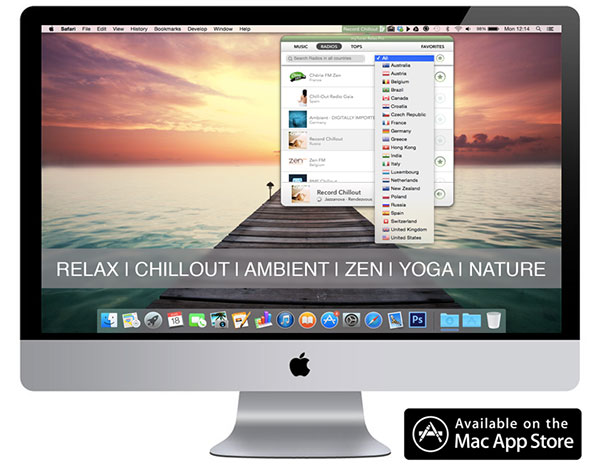
AppGeneration has introduced myTuner Relax Pro for Mac OS X. Featuring a minimal yet easy-to-use interface, myTuner Relax Pro offers more than 5 hours of the most relaxing songs encoded at 320 Kbps to listen whenever you want. The app also allows users to tune the best 85 radio stations that feature relaxing music from all around the globe and to record their favorite songs. Additionally, they can check the top selling relaxing songs in any country.
Porto, Portugal - Following the success of myTuner Classical and myTuner Jazz, AppGeneration has launched myTuner Relax Pro for Mac OS X. The app features more than 5 hours of the most relaxing songs encoded at 320 Kbps to listen whenever you want! The app also allows users to tune the best 85 radio stations that feature relaxing music from all around the globe and to record their favorite songs. Additionally, they can check the top selling relaxing songs in any country.
Feature Highlights:
* 5 hours of the most relaxing songs, encoded at 320kbps, to listen whenever you want
* Select and listen to more than 85 different radio stations, searchable by country
* Check the top selling relaxing songs per country each day and listen to a preview
* Add your favorite songs and radios to favorites for faster access
* Record a music playing on the radio in real time, so you can listen to it later
* Listen to music in the background
* Minimal interface, always available so you can change music whenever you want
Language Support:
* English
Device Requirements:
* OS X 10.9 or later
* 582 MB
Pricing and Availability:
myTuner Relax Pro 1.4 is available at $4.99 USD for Mac OS X in the Mac App Store in the Health & Fitness category (50% promotional price).
myTuner Software: http://www.mytuner.mobi
myTuner Relax Pro 1.4: https://itunes.apple.com/app/id905223376
Screenshot 1: http://a4.mzstatic.com/eu/r30/Purple4/v4/db/68/d7/db68d716-e4e1-37b8-f8f6-3b8ab8352348/screen800x500.jpeg
Screenshot 2: http://a4.mzstatic.com/eu/r30/Purple3/v4/74/2e/f6/742ef6ba-8d8a-e3f9-b5aa-054d3f913da8/screen800x500.jpeg
Promo Image: http://sendy.appgeneration.com//uploads/1409155370.jpg
Application Icon: http://sendy.appgeneration.com//uploads/1409223272.jpg
Based in Porto, Portugal, AppGeneration Software specializes in software development and editorial content to provide a unique experience centered on smartphones and tablets. Copyright (C) 2014 AppGeneration. All Rights Reserved. Apple, the Apple logo, iPhone, iPod, and iPad are registered trademarks of Apple Inc. in the U.S. and/or other countries.
*******
Link To Article: http://prmac.com/release-id-70291.htm
*******
---------------------------------------------------------------------------------
Note that you can alter delivered distributions at any time.
Login to your account on prMac to alter your channel selection, or to opt-out at any time.
myTuner Relax Pro - A new relaxation app released on the Mac App Store - Published on 09/05/14
AppGeneration has introduced myTuner Relax Pro for Mac OS X. Featuring a minimal yet easy-to-use interface, myTuner Relax Pro offers more than 5 hours of the most relaxing songs encoded at 320 Kbps to listen whenever you want. The app also allows users to tune the best 85 radio stations that feature relaxing music from all around the globe and to record their favorite songs. Additionally, they can check the top selling relaxing songs in any country.
Porto, Portugal - Following the success of myTuner Classical and myTuner Jazz, AppGeneration has launched myTuner Relax Pro for Mac OS X. The app features more than 5 hours of the most relaxing songs encoded at 320 Kbps to listen whenever you want! The app also allows users to tune the best 85 radio stations that feature relaxing music from all around the globe and to record their favorite songs. Additionally, they can check the top selling relaxing songs in any country.
Feature Highlights:
* 5 hours of the most relaxing songs, encoded at 320kbps, to listen whenever you want
* Select and listen to more than 85 different radio stations, searchable by country
* Check the top selling relaxing songs per country each day and listen to a preview
* Add your favorite songs and radios to favorites for faster access
* Record a music playing on the radio in real time, so you can listen to it later
* Listen to music in the background
* Minimal interface, always available so you can change music whenever you want
Language Support:
* English
Device Requirements:
* OS X 10.9 or later
* 582 MB
Pricing and Availability:
myTuner Relax Pro 1.4 is available at $4.99 USD for Mac OS X in the Mac App Store in the Health & Fitness category (50% promotional price).
myTuner Software: http://www.mytuner.mobi
myTuner Relax Pro 1.4: https://itunes.apple.com/app/id905223376
Screenshot 1: http://a4.mzstatic.com/eu/r30/Purple4/v4/db/68/d7/db68d716-e4e1-37b8-f8f6-3b8ab8352348/screen800x500.jpeg

Screenshot 2: http://a4.mzstatic.com/eu/r30/Purple3/v4/74/2e/f6/742ef6ba-8d8a-e3f9-b5aa-054d3f913da8/screen800x500.jpeg

Promo Image: http://sendy.appgeneration.com//uploads/1409155370.jpg
Application Icon: http://sendy.appgeneration.com//uploads/1409223272.jpg

Based in Porto, Portugal, AppGeneration Software specializes in software development and editorial content to provide a unique experience centered on smartphones and tablets. Copyright (C) 2014 AppGeneration. All Rights Reserved. Apple, the Apple logo, iPhone, iPod, and iPad are registered trademarks of Apple Inc. in the U.S. and/or other countries.
*******
Link To Article: http://prmac.com/release-id-70291.htm
*******
---------------------------------------------------------------------------------
Note that you can alter delivered distributions at any time.
Login to your account on prMac to alter your channel selection, or to opt-out at any time.
Fuzel Collage 3.0 - Now available on both iPhone and iPad
A new article has been published at prMac.
Fuzel Collage 3.0 - Now available on both iPhone and iPad - Published on 09/04/14
Viet Nam based, Not A Basement Studio today proudly announces the launch of Fuzel Collage 3.0, the next version of the 2013 Editor Choice App for iPhone. This major update brings you a brand new design, many new features and improvements, including templates, animation and sharing. Users can also create a fun animated collage from your photos with music. Fuzel Collage also has iPad support as a Universal app.
Ho Chi Minh, Viet Nam - Today, Not A Basement Studio proudly announces the launch of Fuzel Collage 3.0, the next version of the 2013 Editor Choice App for iPhone. This major update brings you a brand new design, many new features and improvements, and for the first time ever, iPad support as a Universal app.
Features:
* Photos:
There's no rule to how many photos in a collage, so choose from just 1, or 100 - it's up to you
Pick photos from your Camera Roll, Facebook, Instagram, Flickr, or snap a new photo right in the app
* Templates:
See your photos beautifully lay out in hundreds of auto-generated templates
* Decoration:
Have fun with your photos - add photo effects, stickers, frames, labels & frames. Download new decor packs weekly
* Animated:
Create a fun animated collage from your photos with music & beautiful transition. Customize with your own music & watermark
* Sharing:
Once you're done, just tap on "Save to device"
Share online via Instagram, Facebook, Twitter, Tumblr and more
Device Requirements:
* iPhone 4/4S/5/5C/5S, iPod touch 5th Generation
* All iPad devices (except iPad 1)
* Require iOS 7.0 or later
* 62 MB
Pricing and Availability:
Fuzel Collage 3.0 is free to download as a Universal app and available worldwide in the iTunes App Store in the Photo & Video category.
Fuzel 3.0: http://fuzel.com/
Download from iTunes: https://itunes.apple.com/us/app/fuzel-collages.-made-by-you/id735929423?mt=8
Press Kit (zip): https://www.dropbox.com/s/ia09dsul8mkov6s/Fuzel%20Collage%203.0_Press%20Kit.zip?dl=1
Instagram Gallery: http://instagram.com/fuzelapp
Not A Basement Studio is a team of passionate, twenty-something designers & developers based in sunny Vietnam - a country best known for its Pho, Coffee, and home to the almost-extinct "Flappy Bird". Our job is simple: build the very best products we could, with love. All of us want to capture unforgettable moments, some are better as collages, others as video clips, or at time just a single photo is more than enough to share with friends. That's why we've built Fuzel, a suite of fun, simple photo apps catered for different moments in your life. All Material and Software (C) Copyright 2014 Not A Basement Studio. All Rights Reserved. Apple, the Apple logo, iPhone, iPod and iPad are registered trademarks of Apple Inc. in the U.S. and/or other countries. Other trademarks and registered trademarks may be the property of their respective owners.
*******
Link To Article: http://prmac.com/release-id-70345.htm
*******
---------------------------------------------------------------------------------
Note that you can alter delivered distributions at any time.
Login to your account on prMac to alter your channel selection, or to opt-out at any time.
Fuzel Collage 3.0 - Now available on both iPhone and iPad - Published on 09/04/14
Viet Nam based, Not A Basement Studio today proudly announces the launch of Fuzel Collage 3.0, the next version of the 2013 Editor Choice App for iPhone. This major update brings you a brand new design, many new features and improvements, including templates, animation and sharing. Users can also create a fun animated collage from your photos with music. Fuzel Collage also has iPad support as a Universal app.
Ho Chi Minh, Viet Nam - Today, Not A Basement Studio proudly announces the launch of Fuzel Collage 3.0, the next version of the 2013 Editor Choice App for iPhone. This major update brings you a brand new design, many new features and improvements, and for the first time ever, iPad support as a Universal app.
Features:
* Photos:
There's no rule to how many photos in a collage, so choose from just 1, or 100 - it's up to you
Pick photos from your Camera Roll, Facebook, Instagram, Flickr, or snap a new photo right in the app
* Templates:
See your photos beautifully lay out in hundreds of auto-generated templates
* Decoration:
Have fun with your photos - add photo effects, stickers, frames, labels & frames. Download new decor packs weekly
* Animated:
Create a fun animated collage from your photos with music & beautiful transition. Customize with your own music & watermark
* Sharing:
Once you're done, just tap on "Save to device"
Share online via Instagram, Facebook, Twitter, Tumblr and more
Device Requirements:
* iPhone 4/4S/5/5C/5S, iPod touch 5th Generation
* All iPad devices (except iPad 1)
* Require iOS 7.0 or later
* 62 MB
Pricing and Availability:
Fuzel Collage 3.0 is free to download as a Universal app and available worldwide in the iTunes App Store in the Photo & Video category.
Fuzel 3.0: http://fuzel.com/
Download from iTunes: https://itunes.apple.com/us/app/fuzel-collages.-made-by-you/id735929423?mt=8
Press Kit (zip): https://www.dropbox.com/s/ia09dsul8mkov6s/Fuzel%20Collage%203.0_Press%20Kit.zip?dl=1
Instagram Gallery: http://instagram.com/fuzelapp
Not A Basement Studio is a team of passionate, twenty-something designers & developers based in sunny Vietnam - a country best known for its Pho, Coffee, and home to the almost-extinct "Flappy Bird". Our job is simple: build the very best products we could, with love. All of us want to capture unforgettable moments, some are better as collages, others as video clips, or at time just a single photo is more than enough to share with friends. That's why we've built Fuzel, a suite of fun, simple photo apps catered for different moments in your life. All Material and Software (C) Copyright 2014 Not A Basement Studio. All Rights Reserved. Apple, the Apple logo, iPhone, iPod and iPad are registered trademarks of Apple Inc. in the U.S. and/or other countries. Other trademarks and registered trademarks may be the property of their respective owners.
*******
Link To Article: http://prmac.com/release-id-70345.htm
*******
---------------------------------------------------------------------------------
Note that you can alter delivered distributions at any time.
Login to your account on prMac to alter your channel selection, or to opt-out at any time.
Answers 1.0.2 - Making Help Documents Just Got Updated
A new article has been published at prMac.
Answers 1.0.2 - Making Help Documents Just Got Updated - Published on 09/04/14
Indie developer, Tim Parnell today announces Answers 1.0.2, an update to his FAQ and Help documentation tool for Mac OS X. Versatile and easy to use, Answers uses a content-based approach to enable users to create better documents faster. Effortlessly build documents for local software help books, or publish to the web. This update comes just days after its initial launch and offers new tools for theme creators, fixes for Windows, and preparations for launch in the Mac App Store.
Rochester, New York - Independent developer, Tim Parnell today is proud to announce the release of Answers 1.0.2, an update to his FAQ and Help documentation tool for Mac OS X. Help documents are vital to customer support, and making them is no longer a challenging task. Answers makes creating and organizing help documents simple. By allowing users to focus on the content, not the code, anyone can quickly create help documents like software help books or website FAQs.
"Making the software is only one aspect," said developer Tim Parnell. "I pride myself on maintaining great software, and I stand behind its quality." This update comes just days after its launch and offers new tools for theme creators, fixes for Windows, and preparations for launch in the Mac App Store.
Answers uses a content-based approach to enable users to create better documents faster. Users no longer have to maintain links, create a design, or organize files to share documents. Answers handles these difficult parts, so the user can help their customers.
Answers touts several export styles that cover a range of uses:
* Export to individual HTML files to compile as a help book to include with software
* Export to PHP to use significantly fewer files online
* Export to Anchor Tags for a classic FAQ feel
* Export to Collapsible Items for a sleek twist on the classic feel
* Add animations with output types that support jQuery
Pricing and Availability:
Answers 1.0.2 is available now for Mac and Windows. Download it now from the website for free. Answers is free to use and build with. Some options and build types are limited to Pro users. Upgrading to a Pro license is $29 (USD).
Answers 1.0.2: http://nswrs.com
Download Answers: http://nswrs.com/download
Purchase: http://nswrs.com/buy
Media Assets: http://nswrs.com/pk
Based in Rochester, New York, Tim Parnell has been making software since his high-school career 2007. Tim has worked on several popular products, including TinyGrab, and his own creation MacDust. Now, armed with a customer service background he is back in the game making software for Mac and Windows users alike. All Material and Software (C) Copyright 2014 Tim Parnell. All Rights Reserved. Other trademarks and registered trademarks may be the property of their respective owners.
*******
Link To Article: http://prmac.com/release-id-70339.htm
*******
---------------------------------------------------------------------------------
Note that you can alter delivered distributions at any time.
Login to your account on prMac to alter your channel selection, or to opt-out at any time.
Answers 1.0.2 - Making Help Documents Just Got Updated - Published on 09/04/14
Indie developer, Tim Parnell today announces Answers 1.0.2, an update to his FAQ and Help documentation tool for Mac OS X. Versatile and easy to use, Answers uses a content-based approach to enable users to create better documents faster. Effortlessly build documents for local software help books, or publish to the web. This update comes just days after its initial launch and offers new tools for theme creators, fixes for Windows, and preparations for launch in the Mac App Store.
Rochester, New York - Independent developer, Tim Parnell today is proud to announce the release of Answers 1.0.2, an update to his FAQ and Help documentation tool for Mac OS X. Help documents are vital to customer support, and making them is no longer a challenging task. Answers makes creating and organizing help documents simple. By allowing users to focus on the content, not the code, anyone can quickly create help documents like software help books or website FAQs.
"Making the software is only one aspect," said developer Tim Parnell. "I pride myself on maintaining great software, and I stand behind its quality." This update comes just days after its launch and offers new tools for theme creators, fixes for Windows, and preparations for launch in the Mac App Store.
Answers uses a content-based approach to enable users to create better documents faster. Users no longer have to maintain links, create a design, or organize files to share documents. Answers handles these difficult parts, so the user can help their customers.
Answers touts several export styles that cover a range of uses:
* Export to individual HTML files to compile as a help book to include with software
* Export to PHP to use significantly fewer files online
* Export to Anchor Tags for a classic FAQ feel
* Export to Collapsible Items for a sleek twist on the classic feel
* Add animations with output types that support jQuery
Pricing and Availability:
Answers 1.0.2 is available now for Mac and Windows. Download it now from the website for free. Answers is free to use and build with. Some options and build types are limited to Pro users. Upgrading to a Pro license is $29 (USD).
Answers 1.0.2: http://nswrs.com
Download Answers: http://nswrs.com/download
Purchase: http://nswrs.com/buy
Media Assets: http://nswrs.com/pk
Based in Rochester, New York, Tim Parnell has been making software since his high-school career 2007. Tim has worked on several popular products, including TinyGrab, and his own creation MacDust. Now, armed with a customer service background he is back in the game making software for Mac and Windows users alike. All Material and Software (C) Copyright 2014 Tim Parnell. All Rights Reserved. Other trademarks and registered trademarks may be the property of their respective owners.
*******
Link To Article: http://prmac.com/release-id-70339.htm
*******
---------------------------------------------------------------------------------
Note that you can alter delivered distributions at any time.
Login to your account on prMac to alter your channel selection, or to opt-out at any time.
Subscribe to:
Posts (Atom)