A new article has been published at prMac.
Future Scheduler - An App That Never Lets You Forget Anything - Published on 09/05/14
Sometimes it happens that we forgot to make an important call or message to our loved ones. This entire problem occurs when we get busy with our jobs. Appsicum developer team introduces Future Scheduler for iOS, Android and Blackberry devices. This app schedules calls, text messages, emails and social media posts for future date and time. Its operating function is very easy and you makes it simple to schedule important business meetings, wishing anniversary/birthday and more.
Delhi, India - Nowadays there are tons of apps being developed and released everyday for iOS devices. It becomes a really daunting task to pick such apps that really can bring some level of comfort in your life or that can really make your living better. Most of the apps though claim to find a real use in your life but unfortunately most of these are just for special situations. For example health apps are for those who work out on a daily basis, business apps are for those who are involved in any kind of business, kids apps are for those who have toddlers while very few of the apps are for everyone that can use in almost every situation.
We, humans have a tendency to forget the important things most of the time. Whether it's about our own marriage anniversary or it's about our friend's birthday, we tend to forget these things and thus feel guilty later once we realized that we have forgotten to wish our partner or friends. Team Appsicum has come up with such a brilliant app for your smart phones that can change your world. How? See below:-
Future Scheduler: As a Call, Text, Email and Social Media Post Scheduler:
Future Scheduler is an application developed by the Appsicum Team for Android, Blackberry, and iPhone. The app can schedule your phone calls, emails, text messages and social posts on future dates and times quite easily. This feature of Future Scheduler is quite unique as till now there is not any single app that can do these things. This feature is pretty useful in such scenarios when we have the habit of forgetting the important dates of our family, birth-dates of our friends and relative and other social contacts. Suppose if you know your best friend's birthday is just about to come on 8th Oct, you can both schedule call or text on your friend's contact number. Think how good it would be if a best friend of yours will be getting a call or a birthday greeting text message from you at 12 o'clock midnight. Think how good It would be if your wife gets a greeting text on her birthday and you can continue pretending as if you didn't know that birthday was about to come. In the
business world, most of the time people deal in sending crucial emails to clients in which delay is not desired. In that case you can schedule your own emails also.
Future Scheduler: As Your Very Own PA:
You can carry your routine schedules around with you on Future Scheduler and it will work like your own personal assistant or private secretary which will notify you about your each and every event once all the routine work is scheduled. Future scheduler syncs with device calendar, snooze function for reminders, you can also import contacts from your Facebook account, you can see log of scheduled activities and much more.
Device Requirements:
* iPhone, iPad, and iPod touch
* Requires iOS 4.0 or later
* 3.5 MB
Pricing and Availability:
Future Scheduler 1.5.2 is $1.99 USD (or equivalent amount in other currencies) and available worldwide exclusively through the App Store in the Productivity category.
Appsicum: http://appsicum.com/
Future Scheduler 1.5.2: http://futurescheduler.appsicum.com/
Purchase and Download from iTunes: http://itunes.apple.com/app/future-scheduler/id515936774
Screenshot 1: http://a2.mzstatic.com/us/r30/Purple/v4/8d/12/8d/8d128d91-79c5-7076-4342-bfa3cd7d88c5/screen320x480.jpeg
Screenshot 2: http://a3.mzstatic.com/us/r30/Purple/v4/3f/5a/46/3f5a46dd-a478-1340-9833-22053c08ddf3/screen320x480.jpeg
App Icon: http://a1.mzstatic.com/us/r30/Purple/v4/15/82/b4/1582b4d1-b578-a0a4-dc9e-839f4a0fc2ee/mzl.gmaowrjj.175x175-75.jpg
Appsicum is a crew of talented and skilled app developers who constantly work hard to bring the smile on your face through some innovative, cool and unique apps for your smart-phones like iPhone, iPad, iPod touch, Android and Blackberry. We put the best of our efforts to simplify your life with our apps. Some of our popular apps released so far are Files-Finder Edition, Location Alert, Future Scheduler, Photo Effect Plus, Photos To Albums, Text Disaster, Location Alert, Photo Effect Plus, etc. Recently We released Files-Finder Edition App for iPad users. Stay tuned with us for more updates on apps that can change your life. All Material and Software (C) Copyright 2014 Appsicum. All Rights Reserved. Apple, the Apple logo, iPhone, iPod and iPad are registered trademarks of Apple Inc. in the U.S. and/or other countries. Other trademarks and registered trademarks may be the property of their respective owners.
*******
Link To Article: http://prmac.com/release-id-70361.htm
*******
---------------------------------------------------------------------------------
Note that you can alter delivered distributions at any time.
Login to your account on prMac to alter your channel selection, or to opt-out at any time.


Addo Label releases Counters* Version 2.3 for iOS
A new article has been published at prMac.
Addo Label releases Counters* Version 2.3 for iOS - Published on 09/05/14
Addo Label has just released their seventh update to Counters*, the most beautiful and polished tally counter app for iOS! Version 2.3 is packed with user requested features, including spoken count numbers, fully localized dates, times, and count numbers. The app also includes an enhanced app badge functionality, AirDrop sharing, and much more. Create multiple counters and easily count with multi-finger gestures as you track habits and other things in your daily life with Counters*.
San Francisco, California - Addo Label announces the recent release of their seventh update to Counters* iOS app, the most beautiful and polished tally counter app for iOS! Create multiple counters and easily count up, down, or reset to zero with multi-finger gestures as you track habits and other things in your daily life. Version 2.3 is packed with user requested features.
New Features:
* Spoken Numbers - Introducing a Sounds section to app Settings. Switch between the default keyboard click sounds, a new spoken numbers option (each number is read out loud as you count up, down and reset), and no sounds at all. Note that regardless of sound setting, our app is always silent when the iOS mute switch is activated.
* Internationalization - The formatting of dates, times and numbers everywhere in our app are now localized for every language iOS supports by honoring Region Formats and 24-Hour Time settings on your iOS device
* Enhanced App Badge - Now you can select multiple counters to have several count numbers be summed together as a total number on the app badge! Previously you could only select one counter, but now you can select any number of counters, even all your counters if you'd like to display an overall total
* English Localizations - We localized the app for various English-speaking countries outside the United States, including Australia, Canada, Hong Kong, Ireland, New Zealand and United Kingdom
* Airdrop Sharing - In addition to all the previously implemented sharing options (Mail, Messages and social media using screenshots, text and CSV files), now quickly share screenshots of your counts via AirDrop.
Improvements:
* Reset Gesture - When iOS Settings > General > Accessibility > Zoom is turned ON (it's OFF by default), iOS hijacks all 3 finger gestures from apps. We created Single Finger Mode in v2.2 to allow users with Accessibility Zoom on to still do reset gestures, and now in v2.3 we changed Multi-Finger Mode's reset to use 2 finger tap and hold
* Flexible Counter Title Lengths - List view of counters now shows more or less characters of counter titles based on the number of digits of count numbers
* Numbers When Reordering - Now when you go into Counters List View's edit mode to reorder and delete counters, the counter titles and count numbers are displayed (previously only titles were shown)
* Up & Down Steps - The Up Step and Down Step controls have swapped positions with each other in New & Edit Counter Views for better UI consistency
Device Requirements:
* iPhone, iPad, and iPod touch
* Requires iOS 7.0 or later
* 1.4 MB
Pricing and Availability:
Counters* - Colorful Tally Counter for Simply Keeping Count of Things 2.3 is $1.99 USD (or equivalent amount in other currencies) and available worldwide exclusively through the App Store in the Productivity category.
Addo Label: http://addolabel.com
Counters 2.3: http://addolabel.com/counters
Purchase and Download from iTunes: https://itunes.apple.com/app/id722416562
Media Assets: https://www.dropbox.com/sh/3f3rdeksfoofogb/pk_2XOicOf
Addo Label is an indie software company that consists of two people (design by Kyung Min in SF and code by Kyle Weiner in NY) dedicated to handcrafting quality iOS and OS X apps. We make iOS apps that are useful and delightful. All Material and Software (C) Copyright 2014 Addo Label. All Rights Reserved. Apple, the Apple logo, iPhone, iPod and iPad are registered trademarks of Apple Inc. in the U.S. and/or other countries. Other trademarks and registered trademarks may be the property of their respective owners.
*******
Link To Article: http://prmac.com/release-id-70346.htm
*******
---------------------------------------------------------------------------------
Note that you can alter delivered distributions at any time.
Login to your account on prMac to alter your channel selection, or to opt-out at any time.
Addo Label releases Counters* Version 2.3 for iOS - Published on 09/05/14
Addo Label has just released their seventh update to Counters*, the most beautiful and polished tally counter app for iOS! Version 2.3 is packed with user requested features, including spoken count numbers, fully localized dates, times, and count numbers. The app also includes an enhanced app badge functionality, AirDrop sharing, and much more. Create multiple counters and easily count with multi-finger gestures as you track habits and other things in your daily life with Counters*.
San Francisco, California - Addo Label announces the recent release of their seventh update to Counters* iOS app, the most beautiful and polished tally counter app for iOS! Create multiple counters and easily count up, down, or reset to zero with multi-finger gestures as you track habits and other things in your daily life. Version 2.3 is packed with user requested features.
New Features:
* Spoken Numbers - Introducing a Sounds section to app Settings. Switch between the default keyboard click sounds, a new spoken numbers option (each number is read out loud as you count up, down and reset), and no sounds at all. Note that regardless of sound setting, our app is always silent when the iOS mute switch is activated.
* Internationalization - The formatting of dates, times and numbers everywhere in our app are now localized for every language iOS supports by honoring Region Formats and 24-Hour Time settings on your iOS device
* Enhanced App Badge - Now you can select multiple counters to have several count numbers be summed together as a total number on the app badge! Previously you could only select one counter, but now you can select any number of counters, even all your counters if you'd like to display an overall total
* English Localizations - We localized the app for various English-speaking countries outside the United States, including Australia, Canada, Hong Kong, Ireland, New Zealand and United Kingdom
* Airdrop Sharing - In addition to all the previously implemented sharing options (Mail, Messages and social media using screenshots, text and CSV files), now quickly share screenshots of your counts via AirDrop.
Improvements:
* Reset Gesture - When iOS Settings > General > Accessibility > Zoom is turned ON (it's OFF by default), iOS hijacks all 3 finger gestures from apps. We created Single Finger Mode in v2.2 to allow users with Accessibility Zoom on to still do reset gestures, and now in v2.3 we changed Multi-Finger Mode's reset to use 2 finger tap and hold
* Flexible Counter Title Lengths - List view of counters now shows more or less characters of counter titles based on the number of digits of count numbers
* Numbers When Reordering - Now when you go into Counters List View's edit mode to reorder and delete counters, the counter titles and count numbers are displayed (previously only titles were shown)
* Up & Down Steps - The Up Step and Down Step controls have swapped positions with each other in New & Edit Counter Views for better UI consistency
Device Requirements:
* iPhone, iPad, and iPod touch
* Requires iOS 7.0 or later
* 1.4 MB
Pricing and Availability:
Counters* - Colorful Tally Counter for Simply Keeping Count of Things 2.3 is $1.99 USD (or equivalent amount in other currencies) and available worldwide exclusively through the App Store in the Productivity category.
Addo Label: http://addolabel.com
Counters 2.3: http://addolabel.com/counters
Purchase and Download from iTunes: https://itunes.apple.com/app/id722416562
Media Assets: https://www.dropbox.com/sh/3f3rdeksfoofogb/pk_2XOicOf
Addo Label is an indie software company that consists of two people (design by Kyung Min in SF and code by Kyle Weiner in NY) dedicated to handcrafting quality iOS and OS X apps. We make iOS apps that are useful and delightful. All Material and Software (C) Copyright 2014 Addo Label. All Rights Reserved. Apple, the Apple logo, iPhone, iPod and iPad are registered trademarks of Apple Inc. in the U.S. and/or other countries. Other trademarks and registered trademarks may be the property of their respective owners.
*******
Link To Article: http://prmac.com/release-id-70346.htm
*******
---------------------------------------------------------------------------------
Note that you can alter delivered distributions at any time.
Login to your account on prMac to alter your channel selection, or to opt-out at any time.
Hello Vino Launches New Wine Expert On-Demand App
A new article has been published at prMac.
Hello Vino Launches New Wine Expert On-Demand App - Published on 09/05/14
Hello Vino, Inc. today announces a brand new "vintage 4.0" of the Hello Vino Wine Assistant app. The Hello Vino app connects wine drinkers to a personal wine concierge service powered by VinoPRO, a leading wine industry technology provider. The app features include personalized recommendations, a wine label scanner using image recognition, and a wine notebook. The brand new version now also includes a comprehensive "Wine Guide" that lists hundreds of varieties of wine.
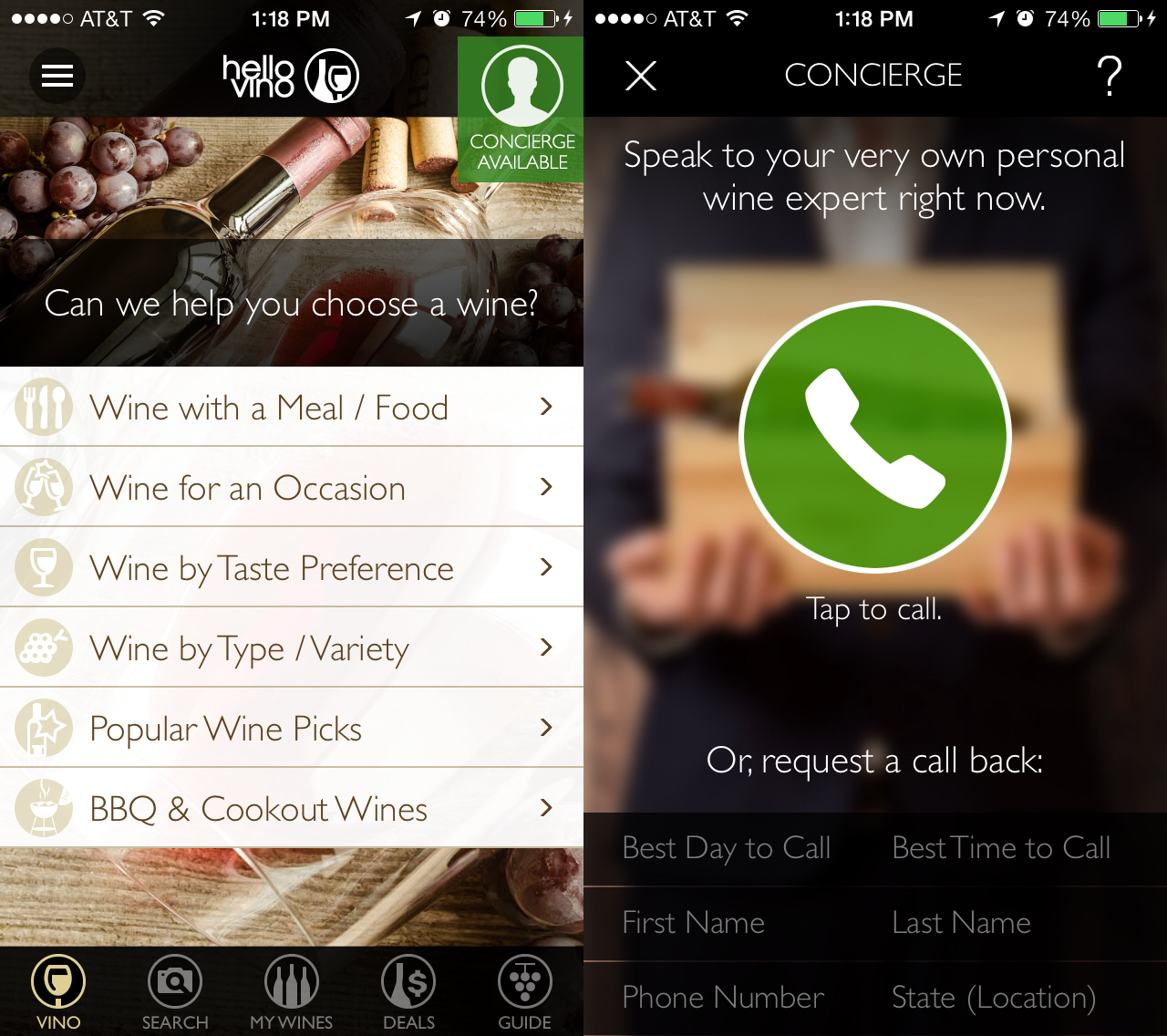
San Francisco, California - Hello Vino, Inc. today announced the release of a brand new "vintage 4.0" of the Hello Vino Wine Assistant app, adding a revolutionary tap-to-call feature that connects app users with a personal wine concierge based in California wine country.
"We are excited to be the only app to deliver a truly personal experience to wine drinkers," remarks Rick Breslin, Founder of Hello Vino. "It's like having your very own wine expert on-call."
The Hello Vino app connects wine drinkers to a personal wine concierge service powered by VinoPRO, a leading wine industry technology provider and two-time Inc.500 award recipient of Inc. Magazine's list of America's fastest growing companies. VinoPRO's patent-pending "Click-to-Call" technology identifies mobile users in order to deliver a personalized call experience within the Hello Vino app.
In addition to the new on-demand service, the Hello Vino app features include personalized recommendations, a wine label scanner using image recognition, and a wine notebook to keep track of purchases and build wish lists. As the category-leading wine app, Hello Vino has reached an installed base of nearly 2 million wine drinkers.
"The on-demand economy is exploding and we are thrilled to be leading innovation in this partnership with Hello Vino, especially within the wine industry's fastest-growing Direct to Consumer sales channel," said VinoPRO CEO Jeff Stevenson. "The personalized recommendations provided by our expert staff are backed by extensive training and years of experience in the wine industry."
The brand new version of the Hello Vino Wine Assistant app now also includes a comprehensive "Wine Guide" that lists hundreds of varieties of wine with audio pronunciations and food pairing suggestions. The app for is available for free on both the Apple App Store and Google Play. A complete list of app features with visuals and downloads are available at the website.
About VinoPRO:
VinoPRO of Santa Rosa sells ultra-premium wine, wine club memberships, data collection kiosks and technology solutions for companies such as Trefethen Winery, Iron Horse Winery, Benziger Family Winery, Gloria Ferrer, Ferrari-Carano, WineTasting.com, Treasury Wine Estates, Loudmouth Golf and dozens of other high-end wine brands, and has the only real-time FCC/TPCA compliant DTC sales platform in the wine industry.
Device Requirements:
* iPhone, iPad, and iPod touch
* Requires iOS 6.0 or later
* 18.5 MB
Pricing and Availability:
Hello Vino - Wine Assistant 4.0 is free and available worldwide exclusively through the App Store in the Food & Drink category. The app is also available on Google Play. More information, including video demonstrations and features, are available at the website.
Hello Vino - Wine Assistant 4.0: http://hellovino.com
Download from iTunes: https://itunes.apple.com/us/app/hello-vino-wine-assistant/id318447346
App Features and Screenshots: http://hellovino.com/update
Screenshot: http://www.hellovino.com/img/v4/Hello-Vino-4.0-Wine-App-Concierge.jpg
App Icon: http://hellovino.com/img/v4/Hello.Vino.AppIcon.512x512.corners.png
Hello Vino delivers wine recommendations to mobile devices, assisting consumers with the perfect bottle of wine for a meal, a specific occasion, or according to personal taste preference. The app is a free download on the App Store. More information, including screenshots and features, are available at the HelloVino website. All Material and Software (C) Copyright 2014 Hello Vino. All Rights Reserved. Apple, the Apple logo, iPhone, iPod and iPad are registered trademarks of Apple Inc. in the U.S. and/or other countries. Other trademarks and registered trademarks may be the property of their respective owners.
*******
Link To Article: http://prmac.com/release-id-70359.htm
*******
---------------------------------------------------------------------------------
Note that you can alter delivered distributions at any time.
Login to your account on prMac to alter your channel selection, or to opt-out at any time.
Hello Vino Launches New Wine Expert On-Demand App - Published on 09/05/14
Hello Vino, Inc. today announces a brand new "vintage 4.0" of the Hello Vino Wine Assistant app. The Hello Vino app connects wine drinkers to a personal wine concierge service powered by VinoPRO, a leading wine industry technology provider. The app features include personalized recommendations, a wine label scanner using image recognition, and a wine notebook. The brand new version now also includes a comprehensive "Wine Guide" that lists hundreds of varieties of wine.
San Francisco, California - Hello Vino, Inc. today announced the release of a brand new "vintage 4.0" of the Hello Vino Wine Assistant app, adding a revolutionary tap-to-call feature that connects app users with a personal wine concierge based in California wine country.
"We are excited to be the only app to deliver a truly personal experience to wine drinkers," remarks Rick Breslin, Founder of Hello Vino. "It's like having your very own wine expert on-call."
The Hello Vino app connects wine drinkers to a personal wine concierge service powered by VinoPRO, a leading wine industry technology provider and two-time Inc.500 award recipient of Inc. Magazine's list of America's fastest growing companies. VinoPRO's patent-pending "Click-to-Call" technology identifies mobile users in order to deliver a personalized call experience within the Hello Vino app.
In addition to the new on-demand service, the Hello Vino app features include personalized recommendations, a wine label scanner using image recognition, and a wine notebook to keep track of purchases and build wish lists. As the category-leading wine app, Hello Vino has reached an installed base of nearly 2 million wine drinkers.
"The on-demand economy is exploding and we are thrilled to be leading innovation in this partnership with Hello Vino, especially within the wine industry's fastest-growing Direct to Consumer sales channel," said VinoPRO CEO Jeff Stevenson. "The personalized recommendations provided by our expert staff are backed by extensive training and years of experience in the wine industry."
The brand new version of the Hello Vino Wine Assistant app now also includes a comprehensive "Wine Guide" that lists hundreds of varieties of wine with audio pronunciations and food pairing suggestions. The app for is available for free on both the Apple App Store and Google Play. A complete list of app features with visuals and downloads are available at the website.
About VinoPRO:
VinoPRO of Santa Rosa sells ultra-premium wine, wine club memberships, data collection kiosks and technology solutions for companies such as Trefethen Winery, Iron Horse Winery, Benziger Family Winery, Gloria Ferrer, Ferrari-Carano, WineTasting.com, Treasury Wine Estates, Loudmouth Golf and dozens of other high-end wine brands, and has the only real-time FCC/TPCA compliant DTC sales platform in the wine industry.
Device Requirements:
* iPhone, iPad, and iPod touch
* Requires iOS 6.0 or later
* 18.5 MB
Pricing and Availability:
Hello Vino - Wine Assistant 4.0 is free and available worldwide exclusively through the App Store in the Food & Drink category. The app is also available on Google Play. More information, including video demonstrations and features, are available at the website.
Hello Vino - Wine Assistant 4.0: http://hellovino.com
Download from iTunes: https://itunes.apple.com/us/app/hello-vino-wine-assistant/id318447346
App Features and Screenshots: http://hellovino.com/update
Screenshot: http://www.hellovino.com/img/v4/Hello-Vino-4.0-Wine-App-Concierge.jpg
App Icon: http://hellovino.com/img/v4/Hello.Vino.AppIcon.512x512.corners.png

Hello Vino delivers wine recommendations to mobile devices, assisting consumers with the perfect bottle of wine for a meal, a specific occasion, or according to personal taste preference. The app is a free download on the App Store. More information, including screenshots and features, are available at the HelloVino website. All Material and Software (C) Copyright 2014 Hello Vino. All Rights Reserved. Apple, the Apple logo, iPhone, iPod and iPad are registered trademarks of Apple Inc. in the U.S. and/or other countries. Other trademarks and registered trademarks may be the property of their respective owners.
*******
Link To Article: http://prmac.com/release-id-70359.htm
*******
---------------------------------------------------------------------------------
Note that you can alter delivered distributions at any time.
Login to your account on prMac to alter your channel selection, or to opt-out at any time.
Beautiful Wallpapers HD 3,000+ sheets for iPhone 5s/5c/5 (Free)
A new article has been published at prMac.
Beautiful Wallpapers HD 3,000+ sheets for iPhone 5s/5c/5 (Free) - Published on 09/05/14
Tokyo based developer, Dolice today announces the updated Beautiful Wallpapers HD 3,000+ sheets for iPhone 5s/5c/5 Free. Over 4,000 beautiful wallpapers available for free download. iPhone 5s/5c/5/4s/4 compatible. Wallpapers will be added and updated daily. Each wallpaper is made to be compatible with iOS 7's parallax effect. Save your favorite wallpapers and set them as your home screen or lock screen with the touch of a button. See all of the latest and most popular wallpapers.
Tokyo, Japan - Dolice today is proud to announce the updated Beautiful Wallpapers HD 3,000+ sheets for iPhone 5s/5c/5 Free. Over 4,000 beautiful wallpapers available for free download. iPhone 5s/5c/5/4s/4 compatible. Wallpapers will be added and updated daily. Each wallpaper is made to be compatible with iOS 7's parallax effect.
Save your favorite wallpapers and set them as your home screen or lock screen with the touch of a button. See all of the latest and most popular wallpapers. Access over 13 categories of wallpaper including human, illustrations, and simple. Moreover, you can add wallpapers to your favorites folder and browse through them at leisure.
There is a gallery function which generates wallpaper slideshows and displays wallpapers full screen. Additionally, the app is equipped with a gift function that allows you to share wallpapers via Facebook, Twitter, Instagram, and email. Give this app a try if you are searching for iPhone wallpapers. Browse beautiful and high quality wallpapers from our selection and you will certainly find something to your liking. Spruce up your regular home screen with this app. It is a must-have for the iPhone.
Main functions:
* Browse pages and save wallpapers
* Wallpapers are added and updated daily
* List functions for the latest and popular wallpapers
* Display over 13 wallpaper categories
* Wallpaper favorites function
* View a list of wallpaper thumbnails
* Display wallpapers full screen
* Wallpaper slideshow function
* Share wallpapers via Facebook / Twitter / Instagram / email
* Learn about wallpaper updates through push notifications
Wallpaper sizes:
* iPhone 5s/5c/5: 744 * 1392 pixel
Important Notes:
If you are unable to save wallpapers, please check your access permissions for this application by opening "Settings" >> "Privacy" >> "Photos" from your home screen.
Copyright display:
This app is a wallpaper download app. The wallpaper copyrights belong to the content providers.
Device Requirements:
* iPhone, iPad, and iPod touch
* Requires iOS 6.1 or later
* 9.3 MB
Pricing and Availability:
Beautiful Wallpapers HD 3,000+ sheets for iPhone 5s/5c/5 (Free) (v4.1.0) is available worldwide exclusively through the App Store in the Entertainment category.
Dolice: http://dolice.net/mb/
Beautiful Wallpapers HD 3,000+ sheets for iPhone 5s/5c/5 Free (v4.1.0): https://itunes.apple.com/us/app/beautiful-wallpaper-500-sheets/id706533906
Screenshot 1: http://storage.dolice.jp/ios/wallpaper_apps/beautiful_wallpapers/promotion/screenshot1.jpg
Screenshot 2: http://storage.dolice.jp/ios/wallpaper_apps/beautiful_wallpapers/promotion/screenshot2.jpg
Screenshot 3: http://storage.dolice.jp/ios/wallpaper_apps/beautiful_wallpapers/promotion/screenshot3.jpg
App Icon: http://storage.dolice.jp/ios/wallpaper_apps/beautiful_wallpapers/promotion/app_icon.png
Located in Tokyo, Japan, Dolice was founded by Masaki Hirokawa on Oct 17, 2013. Dolice is a company that develops apps and games. That one role of everyone is the policy. Copyright (C) 2013-2014 Dolice Co., Ltd. All Rights Reserved. Apple, the Apple logo, iPhone, iPad, iPad mini, iPod touch, and Mac are registered trademarks of Apple Inc. in the U.S. and/or other countries. Other trademarks and registered trademarks may be the property of their respective owners.
*******
Link To Article: http://prmac.com/release-id-70352.htm
*******
---------------------------------------------------------------------------------
Note that you can alter delivered distributions at any time.
Login to your account on prMac to alter your channel selection, or to opt-out at any time.
Beautiful Wallpapers HD 3,000+ sheets for iPhone 5s/5c/5 (Free) - Published on 09/05/14
Tokyo based developer, Dolice today announces the updated Beautiful Wallpapers HD 3,000+ sheets for iPhone 5s/5c/5 Free. Over 4,000 beautiful wallpapers available for free download. iPhone 5s/5c/5/4s/4 compatible. Wallpapers will be added and updated daily. Each wallpaper is made to be compatible with iOS 7's parallax effect. Save your favorite wallpapers and set them as your home screen or lock screen with the touch of a button. See all of the latest and most popular wallpapers.
Tokyo, Japan - Dolice today is proud to announce the updated Beautiful Wallpapers HD 3,000+ sheets for iPhone 5s/5c/5 Free. Over 4,000 beautiful wallpapers available for free download. iPhone 5s/5c/5/4s/4 compatible. Wallpapers will be added and updated daily. Each wallpaper is made to be compatible with iOS 7's parallax effect.
Save your favorite wallpapers and set them as your home screen or lock screen with the touch of a button. See all of the latest and most popular wallpapers. Access over 13 categories of wallpaper including human, illustrations, and simple. Moreover, you can add wallpapers to your favorites folder and browse through them at leisure.
There is a gallery function which generates wallpaper slideshows and displays wallpapers full screen. Additionally, the app is equipped with a gift function that allows you to share wallpapers via Facebook, Twitter, Instagram, and email. Give this app a try if you are searching for iPhone wallpapers. Browse beautiful and high quality wallpapers from our selection and you will certainly find something to your liking. Spruce up your regular home screen with this app. It is a must-have for the iPhone.
Main functions:
* Browse pages and save wallpapers
* Wallpapers are added and updated daily
* List functions for the latest and popular wallpapers
* Display over 13 wallpaper categories
* Wallpaper favorites function
* View a list of wallpaper thumbnails
* Display wallpapers full screen
* Wallpaper slideshow function
* Share wallpapers via Facebook / Twitter / Instagram / email
* Learn about wallpaper updates through push notifications
Wallpaper sizes:
* iPhone 5s/5c/5: 744 * 1392 pixel
Important Notes:
If you are unable to save wallpapers, please check your access permissions for this application by opening "Settings" >> "Privacy" >> "Photos" from your home screen.
Copyright display:
This app is a wallpaper download app. The wallpaper copyrights belong to the content providers.
Device Requirements:
* iPhone, iPad, and iPod touch
* Requires iOS 6.1 or later
* 9.3 MB
Pricing and Availability:
Beautiful Wallpapers HD 3,000+ sheets for iPhone 5s/5c/5 (Free) (v4.1.0) is available worldwide exclusively through the App Store in the Entertainment category.
Dolice: http://dolice.net/mb/
Beautiful Wallpapers HD 3,000+ sheets for iPhone 5s/5c/5 Free (v4.1.0): https://itunes.apple.com/us/app/beautiful-wallpaper-500-sheets/id706533906
Screenshot 1: http://storage.dolice.jp/ios/wallpaper_apps/beautiful_wallpapers/promotion/screenshot1.jpg

Screenshot 2: http://storage.dolice.jp/ios/wallpaper_apps/beautiful_wallpapers/promotion/screenshot2.jpg

Screenshot 3: http://storage.dolice.jp/ios/wallpaper_apps/beautiful_wallpapers/promotion/screenshot3.jpg

App Icon: http://storage.dolice.jp/ios/wallpaper_apps/beautiful_wallpapers/promotion/app_icon.png

Located in Tokyo, Japan, Dolice was founded by Masaki Hirokawa on Oct 17, 2013. Dolice is a company that develops apps and games. That one role of everyone is the policy. Copyright (C) 2013-2014 Dolice Co., Ltd. All Rights Reserved. Apple, the Apple logo, iPhone, iPad, iPad mini, iPod touch, and Mac are registered trademarks of Apple Inc. in the U.S. and/or other countries. Other trademarks and registered trademarks may be the property of their respective owners.
*******
Link To Article: http://prmac.com/release-id-70352.htm
*******
---------------------------------------------------------------------------------
Note that you can alter delivered distributions at any time.
Login to your account on prMac to alter your channel selection, or to opt-out at any time.
Acronis Launches Acronis ExtremeZ-IP 9
A new article has been published at prMac.
Acronis Launches Acronis ExtremeZ-IP 9 - Published on 09/05/14
Acronis ExtremeZ-IP 9.0 delivers super fast file search in NAS and large-scale server environments. The app is the only enterprise-class software that solves network performance degradation, file corruption, and other incompatibility-related issues. By resolving these issues, Acronis ExtremeZ-IP seamlessly integrates Macs in a Windows-based enterprise infrastructure. These new updates ensure employees can access files they need in record time.
Woburn, Massachusetts - Acronis(R), the global leader in new generation data protection, today announced the release of Acronis ExtremeZ-IP(R) 9.0, the latest version of its enterprise software that seamlessly integrates Macs for use in a Windows based environment. This new version continues to provide access to file servers and NAS via trouble-free Apple Filing Protocol (AFP), now with Spotlight Search full-content searching of NAS volumes. This integration drastically reduces search times to just seconds, increasing employee productivity.
Acronis ExtremeZ-IP, which is used by more than 8,000 companies, is the only enterprise-class software that solves network performance degradation, file corruption, and other incompatibility-related issues caused by the different communication protocols used when accessing Windows file, and NAS servers from Apple Macintosh computers running Mac OS X. By resolving these incompatibilities, Acronis ExtremeZ-IP seamlessly integrates Macs in a Windows-based enterprise infrastructure, allowing employees greater flexibility with their professional devices.
Acronis ExtremeZ-IP Version 9 features:
* New Acronis Content Indexing option - Enabling nearly instantaneous Mac OS X Network Spotlight search for file-name and content- reducing speeds from minutes to just seconds, even on remote servers and NAS
* Enhanced configuration and performance for popular network attached storage (NAS) solutions from EMC, NetApp, Isilon, Western Digital, HP
* Important updates for the latest versions Mac OS X and Windows Server
* Support for Network Spotlight search of StorNext(R) file shares
* Certified for StorNext 5, a new version of Quantum StorNext filesystem, which is a popular migration path for XSAN customers
"Acronis ExtremeZ-IP has been a trusted enterprise solution for over 15 years," says Anders Lofgren, VP Product Management of Acronis. "By connecting to NAS via trouble-free Apple Filing Protocol (AFP) now with Spotlight Search compatible searching of NAS volumes, we can provide Mac users with the best experience possible."
In today's work environment, technology is more important than ever and employees expect seamless integration with the devices they choose. IT managers know they can trust Acronis ExtremeZ-IP to run Mac devices over their Windows based environment and provide all employees with the devices best suited to their individual needs to increase overall employee satisfaction and productivity.
Acronis ExtremeZ-IP: http://www.acronis.com/en-us/mobility/mac-windows-compatibility/
Download (Free Trial) : http://www.acronis.com/en-eu/enterprise/products/extremez-ip/trial/
Purchase : http://www.acronis.com/en-eu/enterprise/products/extremez-ip/purchasing/
Screenshot: http://www.acronis.com/sites/default/public_files/styles/product_top_image/public/product_image/Extreme-Z-IP_03.png?itok=LPic_RAB
Acronis is a global provider of leading backup, disaster recovery, and secure file sharing and file access solutions. Founded in 2002 Acronis has established itself as a fast-growing international company with more than 700 employees in 18 countries and partners in almost every country in the world. Acronis provides complete, efficient and reliable backup solutions for desktop, server, virtual and cloud environments as well as leading file sharing and sync solutions for mobile devices. Acronis(R), ExtremeZ-IP(R) and the Acronis logo are registered trademarks or trademarks of Acronis International GmbH in the United States and/or other countries. All Material and Software (C) Copyright 2014 Acronis. All Rights Reserved. Apple, the Apple logo, Macintosh and Mac OS X are registered trademarks of Apple Inc. in the U.S. and/or other countries. Other trademarks and registered trademarks may be the property of their respective owners.
*******
Link To Article: http://prmac.com/release-id-70355.htm
*******
---------------------------------------------------------------------------------
Note that you can alter delivered distributions at any time.
Login to your account on prMac to alter your channel selection, or to opt-out at any time.
Acronis Launches Acronis ExtremeZ-IP 9 - Published on 09/05/14
Acronis ExtremeZ-IP 9.0 delivers super fast file search in NAS and large-scale server environments. The app is the only enterprise-class software that solves network performance degradation, file corruption, and other incompatibility-related issues. By resolving these issues, Acronis ExtremeZ-IP seamlessly integrates Macs in a Windows-based enterprise infrastructure. These new updates ensure employees can access files they need in record time.
Woburn, Massachusetts - Acronis(R), the global leader in new generation data protection, today announced the release of Acronis ExtremeZ-IP(R) 9.0, the latest version of its enterprise software that seamlessly integrates Macs for use in a Windows based environment. This new version continues to provide access to file servers and NAS via trouble-free Apple Filing Protocol (AFP), now with Spotlight Search full-content searching of NAS volumes. This integration drastically reduces search times to just seconds, increasing employee productivity.
Acronis ExtremeZ-IP, which is used by more than 8,000 companies, is the only enterprise-class software that solves network performance degradation, file corruption, and other incompatibility-related issues caused by the different communication protocols used when accessing Windows file, and NAS servers from Apple Macintosh computers running Mac OS X. By resolving these incompatibilities, Acronis ExtremeZ-IP seamlessly integrates Macs in a Windows-based enterprise infrastructure, allowing employees greater flexibility with their professional devices.
Acronis ExtremeZ-IP Version 9 features:
* New Acronis Content Indexing option - Enabling nearly instantaneous Mac OS X Network Spotlight search for file-name and content- reducing speeds from minutes to just seconds, even on remote servers and NAS
* Enhanced configuration and performance for popular network attached storage (NAS) solutions from EMC, NetApp, Isilon, Western Digital, HP
* Important updates for the latest versions Mac OS X and Windows Server
* Support for Network Spotlight search of StorNext(R) file shares
* Certified for StorNext 5, a new version of Quantum StorNext filesystem, which is a popular migration path for XSAN customers
"Acronis ExtremeZ-IP has been a trusted enterprise solution for over 15 years," says Anders Lofgren, VP Product Management of Acronis. "By connecting to NAS via trouble-free Apple Filing Protocol (AFP) now with Spotlight Search compatible searching of NAS volumes, we can provide Mac users with the best experience possible."
In today's work environment, technology is more important than ever and employees expect seamless integration with the devices they choose. IT managers know they can trust Acronis ExtremeZ-IP to run Mac devices over their Windows based environment and provide all employees with the devices best suited to their individual needs to increase overall employee satisfaction and productivity.
Acronis ExtremeZ-IP: http://www.acronis.com/en-us/mobility/mac-windows-compatibility/
Download (Free Trial) : http://www.acronis.com/en-eu/enterprise/products/extremez-ip/trial/
Purchase : http://www.acronis.com/en-eu/enterprise/products/extremez-ip/purchasing/
Screenshot: http://www.acronis.com/sites/default/public_files/styles/product_top_image/public/product_image/Extreme-Z-IP_03.png?itok=LPic_RAB

Acronis is a global provider of leading backup, disaster recovery, and secure file sharing and file access solutions. Founded in 2002 Acronis has established itself as a fast-growing international company with more than 700 employees in 18 countries and partners in almost every country in the world. Acronis provides complete, efficient and reliable backup solutions for desktop, server, virtual and cloud environments as well as leading file sharing and sync solutions for mobile devices. Acronis(R), ExtremeZ-IP(R) and the Acronis logo are registered trademarks or trademarks of Acronis International GmbH in the United States and/or other countries. All Material and Software (C) Copyright 2014 Acronis. All Rights Reserved. Apple, the Apple logo, Macintosh and Mac OS X are registered trademarks of Apple Inc. in the U.S. and/or other countries. Other trademarks and registered trademarks may be the property of their respective owners.
*******
Link To Article: http://prmac.com/release-id-70355.htm
*******
---------------------------------------------------------------------------------
Note that you can alter delivered distributions at any time.
Login to your account on prMac to alter your channel selection, or to opt-out at any time.
Theme Inn presents a Suite for MS Office - Templates
A new article has been published at prMac.
Theme Inn presents a Suite for MS Office - Templates - Published on 09/05/14
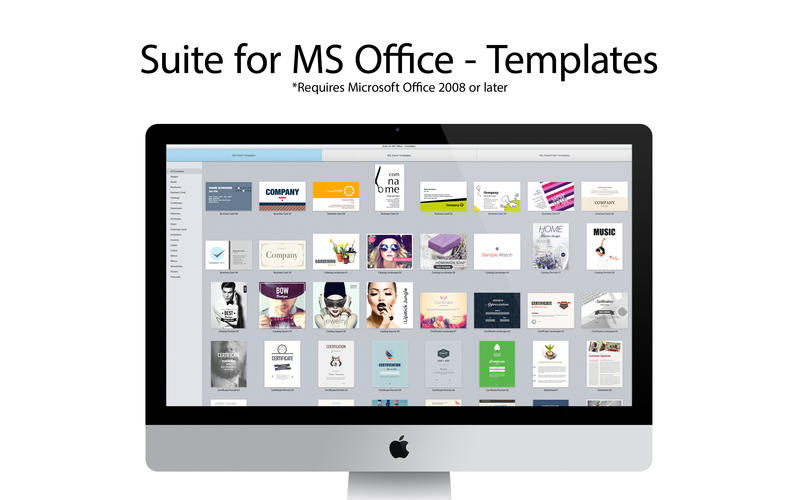
Graphic design company, Theme Inn today announces Suite for MS Office - Templates, another special bundle of templates for MS Office for Mac. The new pack contains over 300 selected high-quality templates for Excel, PowerPoint and Word. It allows users to find designs for any business or personal occasion, providing a stylish backdrop for their content. The new product offers 262 templates for Word, 30 spreadsheets for Excel, and 10 themes for PowerPoint presentations.
Sakiai, Lithuania - Theme Inn, a graphic design company that specializes in creating high-quality templates for Microsoft Office for Mac, today is thrilled to announce Suite for MS Office - Templates, another special bundle of templates for MS Office for Mac. The new pack contains over 300 selected high-quality templates for Excel, PowerPoint, and Word. It allows users to find designs for any business or personal occasion, providing a stylish backdrop for their content and saving their time.
The new product offers three types of designs: 262 templates for Word, 30 spreadsheets for Excel, and 10 themes for PowerPoint presentations. The designs are optimized for both business and home users, from academics to sports fans and from publishers to high school students.
"The Suite for MS Office - Templates app was created to help you make the best out of your MS Office for Mac experience," says Jolita Unguvaitiene, Graphic Node's General manager. "We are also happy to announce that the application will be continuously updated with new templates."
The designs range from traditional and formal to friendly and unconventional. Business-oriented users can easily find professional brochure, business card, and slideshow templates for their projects. All templates easy to edit and available in the US and international paper sizes.
System Requirements
* OS X 10.6.6 or later
* MS Office for Mac 2011
Pricing and Availability:
Suite for MS Office - Templates 1.0 is $19.99 (USD) Limited special offer: 50% off. This week only. For more information and design samples, users can visit Graphic Node's web site.
Theme Inn: http://themeinn.com/
Suite for MS Office - Templates 1.0: http://www.themeinn.com/projects/suite-for-ms-office/
Purchase and Download (MAS): https://itunes.apple.com/us/app/suite-for-ms-office-templates/id913986959?ls=1&mt=12
Screenshot: http://a3.mzstatic.com/us/r30/Purple1/v4/b1/8a/c7/b18ac775-4ece-3661-48ee-cb1d091cbd24/screen800x500.jpeg
Application Icon: http://a2.mzstatic.com/us/r30/Purple3/v4/06/46/ab/0646ab21-d93b-af37-8311-69f1ba97effd/suite_office_icon_new.175x175-75.png
Theme Inn is a team of professional Mac designers who specialize in developing high-quality templates for Microsoft Office for Mac. The company defines its work through careful attention to rich visuals, ease of use and wide adaptability. Theme Inn's products are designed to save users time and help them achieve the best results. Copyright (C) 2014 Theme Inn. All Rights Reserved. Apple, the Apple logo, and Macintosh are registered trademarks of Apple Inc. in the U.S. and/or other countries. Other trademarks and registered trademarks may be the property of their respective owners.
*******
Link To Article: http://prmac.com/release-id-70358.htm
*******
---------------------------------------------------------------------------------
Note that you can alter delivered distributions at any time.
Login to your account on prMac to alter your channel selection, or to opt-out at any time.
Theme Inn presents a Suite for MS Office - Templates - Published on 09/05/14
Graphic design company, Theme Inn today announces Suite for MS Office - Templates, another special bundle of templates for MS Office for Mac. The new pack contains over 300 selected high-quality templates for Excel, PowerPoint and Word. It allows users to find designs for any business or personal occasion, providing a stylish backdrop for their content. The new product offers 262 templates for Word, 30 spreadsheets for Excel, and 10 themes for PowerPoint presentations.
Sakiai, Lithuania - Theme Inn, a graphic design company that specializes in creating high-quality templates for Microsoft Office for Mac, today is thrilled to announce Suite for MS Office - Templates, another special bundle of templates for MS Office for Mac. The new pack contains over 300 selected high-quality templates for Excel, PowerPoint, and Word. It allows users to find designs for any business or personal occasion, providing a stylish backdrop for their content and saving their time.
The new product offers three types of designs: 262 templates for Word, 30 spreadsheets for Excel, and 10 themes for PowerPoint presentations. The designs are optimized for both business and home users, from academics to sports fans and from publishers to high school students.
"The Suite for MS Office - Templates app was created to help you make the best out of your MS Office for Mac experience," says Jolita Unguvaitiene, Graphic Node's General manager. "We are also happy to announce that the application will be continuously updated with new templates."
The designs range from traditional and formal to friendly and unconventional. Business-oriented users can easily find professional brochure, business card, and slideshow templates for their projects. All templates easy to edit and available in the US and international paper sizes.
System Requirements
* OS X 10.6.6 or later
* MS Office for Mac 2011
Pricing and Availability:
Suite for MS Office - Templates 1.0 is $19.99 (USD) Limited special offer: 50% off. This week only. For more information and design samples, users can visit Graphic Node's web site.
Theme Inn: http://themeinn.com/
Suite for MS Office - Templates 1.0: http://www.themeinn.com/projects/suite-for-ms-office/
Purchase and Download (MAS): https://itunes.apple.com/us/app/suite-for-ms-office-templates/id913986959?ls=1&mt=12
Screenshot: http://a3.mzstatic.com/us/r30/Purple1/v4/b1/8a/c7/b18ac775-4ece-3661-48ee-cb1d091cbd24/screen800x500.jpeg
Application Icon: http://a2.mzstatic.com/us/r30/Purple3/v4/06/46/ab/0646ab21-d93b-af37-8311-69f1ba97effd/suite_office_icon_new.175x175-75.png

Theme Inn is a team of professional Mac designers who specialize in developing high-quality templates for Microsoft Office for Mac. The company defines its work through careful attention to rich visuals, ease of use and wide adaptability. Theme Inn's products are designed to save users time and help them achieve the best results. Copyright (C) 2014 Theme Inn. All Rights Reserved. Apple, the Apple logo, and Macintosh are registered trademarks of Apple Inc. in the U.S. and/or other countries. Other trademarks and registered trademarks may be the property of their respective owners.
*******
Link To Article: http://prmac.com/release-id-70358.htm
*******
---------------------------------------------------------------------------------
Note that you can alter delivered distributions at any time.
Login to your account on prMac to alter your channel selection, or to opt-out at any time.
R3app Launched Convertr Lite Free Unit & Currency Conversion App
A new article has been published at prMac.
R3app Launched Convertr Lite Free Unit & Currency Conversion App - Published on 09/05/14
R3app announces their new conversion app, Convertr Lite for iOS devices. Simple and gesture-based interface ensure that users just Tap, Pinch, Scroll and Swipe through the most complex conversions effortlessly. The app converts most practically used categories such as: Currency, Area, Length, Mass, Temperature, Time and more. Convertr Lite remembers the users most recent and extensively used conversions, as well as lets users save conversions for quick future use.
Hollywood, California - R3app is pleased to introduce their new app for conversions, Convertr Lite. Convertr Lite gets the conversion done amazingly fast. The company paid major attention to the usability of the program and hope that you'll find it helpful in your daily work, travel and leisure. Simple and gesture-based interface ensure that users just Tap, Pinch, Scroll and Swipe through the most complex conversions effortlessly.
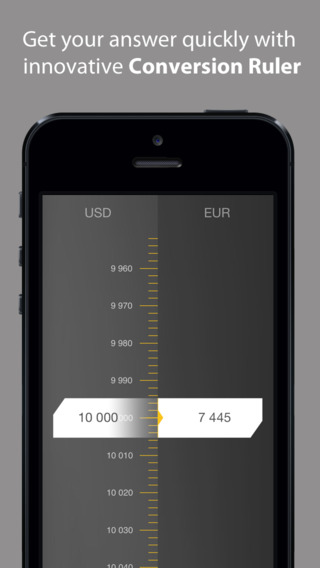
Simple and free unit and currency converter that converts most practically used categories such as: Currency, Area, Length, Mass, Temperature, Time, Data, Volume, Power, Angle, Energy and Fuel. Convertr Lite offers scroll and zoom features that allows effortless navigation between the ranges. This is one app that knows exactly what one is looking for. Convertr Lite remembers the users most recent and extensively used conversions, as well as lets users save conversions for quick future use.Whether one wants to convert currency or figure out power, Convertr Lite gets the conversion done at an extremely fast pace. Users can perform conversion in 7 different languages - English, Spanish, French, Italian, German, Portuguese and Russian.
Features include:
* Fast unit and currency conversion interface requiring least number of clicks
* Enjoy most accurate currency conversion*. Supports 157 world currencies
* Save your conversions for quick use in future*
* Choose your preferred app background. Enjoy elegant, contemporary and vibrant custom themes*
* Get "All-in-one-pack" which includes no ads, custom themes, currency conversions, and option to save conversions at one go*
* Manage different app operations from 'Settings' screen
* (In-app required)
Device Requirements:
* Compatible with iPhone, iPad, and iPod touch
* Optimized for iPhone�5
* Requires iOS 7.0 or later.
* 6.9 MB
Pricing and Availability:
Convertr Lite: Smart Unit & Currency Conversion 1.0 is free and available worldwide exclusively through the App Store in the Utilities category.
R3app: http://www.r3app.com/
Convertr Lite 1.0: http://www.r3app.com/convertr
Download from iTunes: https://itunes.apple.com/app/convertr-lite-smart-unit-currency/id895421622
Screenshot 1: http://a4.mzstatic.com/us/r30/Purple5/v4/58/7d/dc/587ddc59-9f0b-c8f7-2bb9-6fbeeaf367ba/screen568x568.jpeg
Screenshot 2: http://a2.mzstatic.com/us/r30/Purple3/v4/8c/16/10/8c16106e-d193-8875-5e06-6357a785483f/screen568x568.jpeg
App Icon: http://a4.mzstatic.com/us/r30/Purple5/v4/65/70/59/6570594f-062f-57da-6487-f8cad86a592b/mzl.xqwbkgey.175x175-75.jpg
R3app, is a generation-next company specializing in creating intuitive apps for iPhone, iPad, and Android. Driven by passion to redefine the way people interact with their mobile devices, r3app's cutting-edge range of apps improve productivity and provide insight to users. All Material and Software (C) Copyright 2014 R3app. All Rights Reserved. Apple, the Apple logo, iPhone, iPod and iPad are registered trademarks of Apple Inc. in the U.S. and/or other countries. Other trademarks and registered trademarks may be the property of their respective owners.
*******
Link To Article: http://prmac.com/release-id-70357.htm
*******
---------------------------------------------------------------------------------
Note that you can alter delivered distributions at any time.
Login to your account on prMac to alter your channel selection, or to opt-out at any time.
R3app Launched Convertr Lite Free Unit & Currency Conversion App - Published on 09/05/14
R3app announces their new conversion app, Convertr Lite for iOS devices. Simple and gesture-based interface ensure that users just Tap, Pinch, Scroll and Swipe through the most complex conversions effortlessly. The app converts most practically used categories such as: Currency, Area, Length, Mass, Temperature, Time and more. Convertr Lite remembers the users most recent and extensively used conversions, as well as lets users save conversions for quick future use.
Hollywood, California - R3app is pleased to introduce their new app for conversions, Convertr Lite. Convertr Lite gets the conversion done amazingly fast. The company paid major attention to the usability of the program and hope that you'll find it helpful in your daily work, travel and leisure. Simple and gesture-based interface ensure that users just Tap, Pinch, Scroll and Swipe through the most complex conversions effortlessly.
Simple and free unit and currency converter that converts most practically used categories such as: Currency, Area, Length, Mass, Temperature, Time, Data, Volume, Power, Angle, Energy and Fuel. Convertr Lite offers scroll and zoom features that allows effortless navigation between the ranges. This is one app that knows exactly what one is looking for. Convertr Lite remembers the users most recent and extensively used conversions, as well as lets users save conversions for quick future use.Whether one wants to convert currency or figure out power, Convertr Lite gets the conversion done at an extremely fast pace. Users can perform conversion in 7 different languages - English, Spanish, French, Italian, German, Portuguese and Russian.
Features include:
* Fast unit and currency conversion interface requiring least number of clicks
* Enjoy most accurate currency conversion*. Supports 157 world currencies
* Save your conversions for quick use in future*
* Choose your preferred app background. Enjoy elegant, contemporary and vibrant custom themes*
* Get "All-in-one-pack" which includes no ads, custom themes, currency conversions, and option to save conversions at one go*
* Manage different app operations from 'Settings' screen
* (In-app required)
Device Requirements:
* Compatible with iPhone, iPad, and iPod touch
* Optimized for iPhone�5
* Requires iOS 7.0 or later.
* 6.9 MB
Pricing and Availability:
Convertr Lite: Smart Unit & Currency Conversion 1.0 is free and available worldwide exclusively through the App Store in the Utilities category.
R3app: http://www.r3app.com/
Convertr Lite 1.0: http://www.r3app.com/convertr
Download from iTunes: https://itunes.apple.com/app/convertr-lite-smart-unit-currency/id895421622
Screenshot 1: http://a4.mzstatic.com/us/r30/Purple5/v4/58/7d/dc/587ddc59-9f0b-c8f7-2bb9-6fbeeaf367ba/screen568x568.jpeg
Screenshot 2: http://a2.mzstatic.com/us/r30/Purple3/v4/8c/16/10/8c16106e-d193-8875-5e06-6357a785483f/screen568x568.jpeg

App Icon: http://a4.mzstatic.com/us/r30/Purple5/v4/65/70/59/6570594f-062f-57da-6487-f8cad86a592b/mzl.xqwbkgey.175x175-75.jpg

R3app, is a generation-next company specializing in creating intuitive apps for iPhone, iPad, and Android. Driven by passion to redefine the way people interact with their mobile devices, r3app's cutting-edge range of apps improve productivity and provide insight to users. All Material and Software (C) Copyright 2014 R3app. All Rights Reserved. Apple, the Apple logo, iPhone, iPod and iPad are registered trademarks of Apple Inc. in the U.S. and/or other countries. Other trademarks and registered trademarks may be the property of their respective owners.
*******
Link To Article: http://prmac.com/release-id-70357.htm
*******
---------------------------------------------------------------------------------
Note that you can alter delivered distributions at any time.
Login to your account on prMac to alter your channel selection, or to opt-out at any time.
Subscribe to:
Posts (Atom)