A new article has been published at prMac.
Lazy? Stop scrolling for ages to access your best iPhone pictures - Published on 09/06/14
Zurich based Roundsight LLC has released Photohook 1.0.0, their new app that lets you choose which photos on your iOS device should remain directly accessible, no matter how many other pictures you shot in the meantime. And the best is that you also get access to all the pictures taken just before or just after the selected special photos. Don't scroll or search endlessly. Instead, jump directly to the pictures you took at your most special moments.
Zurich, Switzerland - Are you tired of scrolling and searching to access your special iPhone photos again? Do you think it is not fun to create lots of albums? Use Photohook, the app giving you the simplest and fastest access to your preferred photos and to the ones that were taken at the same time. When something special happens and you take pictures, as time goes they sink deeper and deeper among all the others stored on your device. Developed by Roundsight LLC, Photohook lets you jump directly to the photos you want to preserve. No matter how long ago they have been shot. With Photohook, you organize your few very best photos without feeling it.
Simply and quickly decide which photos should be saved from slow disappearance through sinking at the bottom of the library:
1. In the Photohook app, tap on a picture to preserve it
2. Later, easily jump back to that picture any time you want
3. Access the pictures taken before or after the destination picture too
When looking at photos, Photohook lets you move your device to the left or to the right in front of your eyes to see other parts of the picture, thereby simulating a bigger virtual image (gyroscope-based movement tracking). If you do not want to move the iPhone in front of your eyes, you can choose to rely on the usual pinch and drag gestures to decide which parts of the picture you want to see. Direct map access is provided for geotagged photos.
Device Requirements:
* iPhone, iPad, and iPod touch
* Requires iOS 7.0 or later
* 3.4 MB
Pricing and Availability:
Photohook 1.0.0 is Free and available worldwide exclusively through the App Store in the Photo & Video category.
Photohook 1.0.0: http://photohookapp.com
Download from iTunes: https://itunes.apple.com/app/photohook-jump-to-your-favourite/id879491067
Screenshot: http://photohookapp.com/wp-content/uploads/3_Watching.png
App Icon: http://photohookapp.com/wp-content/uploads/appIcon-256.png
Roundsight is a company located in Zurich, Switzerland. Working at the intersection of emotions and technology, its mobile software products primarily aim at capturing the beautiful moments in life. All Material and Software (C) Copyright 2014 Roundsight LLC. All Rights Reserved. Apple, the Apple logo, iPhone, iPod and iPad are registered trademarks of Apple Inc. in the U.S. and/or other countries. Other trademarks and registered trademarks may be the property of their respective owners.
*******
Link To Article: http://prmac.com/release-id-70315.htm
*******
---------------------------------------------------------------------------------
Note that you can alter delivered distributions at any time.
Login to your account on prMac to alter your channel selection, or to opt-out at any time.


Wonster Words Spelling with Phonics App releases today
A new article has been published at prMac.
Wonster Words Spelling with Phonics App releases today - Published on 09/06/14
77SPARX Studio has released Wonster Words Spelling with Phonics 1.68, their new educational title for iOS and Android devices. Wonster Words helps children build phonological awareness by introducing the 44 most common English phonemes, basic word families, common diphthongs, and digraphs. The app starts with short letter mini games where kids can put together words using its parts. Once the words are completed, the lovable wonsters will come on screen and perform funny skits.
Sunnyvale, California - 77SPARX Studio, maker of the award winning Puzzingo Kids Puzzles game, has released Wonster Words Spelling with Phonics for iOS and Android. Unlike the numerous ABC apps targeting young kids, Wonster Words focuses on kids who already know their alphabets, and are starting to learn to recognize and sound-out words that they encounter.
Wonster Words helps kids build phonological awareness by introducing the 44 most common English phonemes, basic word families, common diphthongs, and digraphs. The app starts with short letter mini games where kids can put together words using its parts. Once the words are completed, the lovable wonsters will come on screen and perform funny skits that illustrate the meaning of the words, much like the way the Sesame Street puppets do on TV.
"One pervasive problem Wonster Words address is that, while these academic topics are typically taught to 5 year olds, most apps targeting these skills have game plays that don't engage 5 year olds," said Andrew Kao, Co-founder, 77SPARX Studio. "In Wonster Words, we have spent considerable time tuning both the game play and the animations to ensure that they are entertaining and fun for kids aged from 2 to 6."
Device Requirements:
* iPhone, iPad, and iPod touch
* Requires iOS 6.0 or later
* 19.8 MB
Pricing and Availability:
Wonster Words Spelling with Phonics 1.68 is Free to download, with option to purchase additional content or subscription from within the app, and available worldwide through the App Store in the Education category. Wonster Words is also available on the Google Play, and Amazon market. For more information about the company and its philosophies, please visit 77SPARX Studio online.
77SPARX Studio: http://www.77sparx.com
Wonster Words Spelling with Phonics 1.68: http://www.77sparx.com/wonsterwords
Download from iTunes: https://itunes.apple.com/app/id881119321
YouTube Video (Preview): https://www.youtube.com/watch?v=Y-ZETgI4jdo
App Icon: http://www.77sparx.com/wp-content/uploads/2014/08/AppIconv2-512-Alpha.png
Press Kit (zip): http://www.77sparx.com/wp-content/uploads/2014/08/WonsterWordsMediaKit.zip
Located in Sunnyale, California, 77SPARX Studio was founded in 2012 by parents who saw a need for quality kid's games and "digital toys." 77SPARX Studio has since built a small talented team with members who are experts in game design, mobile technology, art, sound, and children's development. 77SPARX's award-winning products have been played over 100 million times by kids all over the world. Copyright (C) 2014 77SPARX Studio, Inc. All Rights Reserved. Apple, the Apple logo, iPhone, iPod and iPad are registered trademarks of Apple Inc. in the U.S. and/or other countries.
*******
Link To Article: http://prmac.com/release-id-70314.htm
*******
---------------------------------------------------------------------------------
Note that you can alter delivered distributions at any time.
Login to your account on prMac to alter your channel selection, or to opt-out at any time.
Wonster Words Spelling with Phonics App releases today - Published on 09/06/14
77SPARX Studio has released Wonster Words Spelling with Phonics 1.68, their new educational title for iOS and Android devices. Wonster Words helps children build phonological awareness by introducing the 44 most common English phonemes, basic word families, common diphthongs, and digraphs. The app starts with short letter mini games where kids can put together words using its parts. Once the words are completed, the lovable wonsters will come on screen and perform funny skits.
Sunnyvale, California - 77SPARX Studio, maker of the award winning Puzzingo Kids Puzzles game, has released Wonster Words Spelling with Phonics for iOS and Android. Unlike the numerous ABC apps targeting young kids, Wonster Words focuses on kids who already know their alphabets, and are starting to learn to recognize and sound-out words that they encounter.
Wonster Words helps kids build phonological awareness by introducing the 44 most common English phonemes, basic word families, common diphthongs, and digraphs. The app starts with short letter mini games where kids can put together words using its parts. Once the words are completed, the lovable wonsters will come on screen and perform funny skits that illustrate the meaning of the words, much like the way the Sesame Street puppets do on TV.
"One pervasive problem Wonster Words address is that, while these academic topics are typically taught to 5 year olds, most apps targeting these skills have game plays that don't engage 5 year olds," said Andrew Kao, Co-founder, 77SPARX Studio. "In Wonster Words, we have spent considerable time tuning both the game play and the animations to ensure that they are entertaining and fun for kids aged from 2 to 6."
Device Requirements:
* iPhone, iPad, and iPod touch
* Requires iOS 6.0 or later
* 19.8 MB
Pricing and Availability:
Wonster Words Spelling with Phonics 1.68 is Free to download, with option to purchase additional content or subscription from within the app, and available worldwide through the App Store in the Education category. Wonster Words is also available on the Google Play, and Amazon market. For more information about the company and its philosophies, please visit 77SPARX Studio online.
77SPARX Studio: http://www.77sparx.com
Wonster Words Spelling with Phonics 1.68: http://www.77sparx.com/wonsterwords
Download from iTunes: https://itunes.apple.com/app/id881119321
YouTube Video (Preview): https://www.youtube.com/watch?v=Y-ZETgI4jdo
App Icon: http://www.77sparx.com/wp-content/uploads/2014/08/AppIconv2-512-Alpha.png

Press Kit (zip): http://www.77sparx.com/wp-content/uploads/2014/08/WonsterWordsMediaKit.zip
Located in Sunnyale, California, 77SPARX Studio was founded in 2012 by parents who saw a need for quality kid's games and "digital toys." 77SPARX Studio has since built a small talented team with members who are experts in game design, mobile technology, art, sound, and children's development. 77SPARX's award-winning products have been played over 100 million times by kids all over the world. Copyright (C) 2014 77SPARX Studio, Inc. All Rights Reserved. Apple, the Apple logo, iPhone, iPod and iPad are registered trademarks of Apple Inc. in the U.S. and/or other countries.
*******
Link To Article: http://prmac.com/release-id-70314.htm
*******
---------------------------------------------------------------------------------
Note that you can alter delivered distributions at any time.
Login to your account on prMac to alter your channel selection, or to opt-out at any time.
iPad Air Counter-Top and Wall Mounts With Apple Store Look
A new article has been published at prMac.
iPad Air Counter-Top and Wall Mounts With Apple Store Look - Published on 09/06/14
newMacgadgets has announced an all acrylic counter-top and wall mount displays for the iPad Air. Both are designed in clear acrylic to enhance the look and feel of the new iPad Air. Full-access is available to the touch screen, on/off switch and charging port. The charging cable secures underneath the base and routes out the back for a professional look. The displays are now available in both secure for business and non-secure for the home.
San Diego, California - newMacgadgets has announced their new Apple Store Displays for the iPad Air. Available in two models; a secure and non-secure (for home use) counter-top model, which replicates the Apple store acrylic display, and a stylish wall mount frame. Both are designed in clear acrylic to enhance the look and feel of the new iPad Air.
Counter-Top Model:
Designed for places where security is a concern, the all acrylic tapered counter-top display combines security with the elegance of the Apple store. Newly designed miniature stainless steel brackets secure the iPad Air within the pocket allowing for better security and a cleaner look. They have also included a home-button guard bracket for applications that require continuous running. Our iPad Air Mount secures to any counter-top with either clear adhesive strips or screws (both included).
Full-access is available to the touch screen, on/off switch and charging port. The charging cable secures underneath the base and routes out the back for a professional look. We also offer a non-secure version of this Base for home use.
Wall Mount Model:
newMacgadgets iPad Air Wall Mount model is similar in design to their acrylic Counter-Top Mount but without the taper. The iPad Air is secured with the same stainless steel brackets and also includes an optional home-button guard bracket for continuous running applications.
When secured to the wall the iPad Air conceals the mounting screws to prevent removal (mounting hardware is included). Depending on the user's preference, the mounting frame can be positioned in either the landscape or portrait position.
When mounted to the wall full-access is available to the touch screen, on/off switch and charging port. The charging cable secures behind the base for a clean look. Visit newMacgadgets today for additional information on their latest iPad Air products.
iPad Air Mounts: http://newpcgadgets.com/products/ipad_air_deluxe_series/
Image (iPad Air Counter-Top Acrylic Mount): http://newpcgadgets.com/products/ipad_air_deluxe_series/images/lrg_4.jpg
Image (iPad Air Secure Counter Top Mount): http://newpcgadgets.com/products/ipad_air_deluxe_series/images/lrg_2.jpg
Image (iPad Air Wall Mount): http://newpcgadgets.com/products/ipad_air_deluxe_series/images/lrg_5.jpg
Image (iPad Air Wall Mount Portrait): http://newpcgadgets.com/products/ipad_air_deluxe_series/images/lrg_6.jpg
Image (Non-Secure iPad Air & iPad mini Counter-Top Mount)ts: http://newpcgadgets.com/products/ipad_air_deluxe_series/images/non-secure.jpg
newMacgadgets a division of newPCgadgets, designs innovative products and accessories for Apple and PC computers, laptops and mobile devices. With over 20 years of experience they have designed over 150 products for large companies like Apple, IBM and Epson. Copyright (C) 2014 newMacgadgets. All Rights Reserved. Apple, the Apple logo, iPhone, iPod and iPad are registered trademarks of Apple Inc. in the U.S. and/or other countries.
*******
Link To Article: http://prmac.com/release-id-70313.htm
*******
---------------------------------------------------------------------------------
Note that you can alter delivered distributions at any time.
Login to your account on prMac to alter your channel selection, or to opt-out at any time.
iPad Air Counter-Top and Wall Mounts With Apple Store Look - Published on 09/06/14
newMacgadgets has announced an all acrylic counter-top and wall mount displays for the iPad Air. Both are designed in clear acrylic to enhance the look and feel of the new iPad Air. Full-access is available to the touch screen, on/off switch and charging port. The charging cable secures underneath the base and routes out the back for a professional look. The displays are now available in both secure for business and non-secure for the home.
San Diego, California - newMacgadgets has announced their new Apple Store Displays for the iPad Air. Available in two models; a secure and non-secure (for home use) counter-top model, which replicates the Apple store acrylic display, and a stylish wall mount frame. Both are designed in clear acrylic to enhance the look and feel of the new iPad Air.
Counter-Top Model:
Designed for places where security is a concern, the all acrylic tapered counter-top display combines security with the elegance of the Apple store. Newly designed miniature stainless steel brackets secure the iPad Air within the pocket allowing for better security and a cleaner look. They have also included a home-button guard bracket for applications that require continuous running. Our iPad Air Mount secures to any counter-top with either clear adhesive strips or screws (both included).
Full-access is available to the touch screen, on/off switch and charging port. The charging cable secures underneath the base and routes out the back for a professional look. We also offer a non-secure version of this Base for home use.
Wall Mount Model:
newMacgadgets iPad Air Wall Mount model is similar in design to their acrylic Counter-Top Mount but without the taper. The iPad Air is secured with the same stainless steel brackets and also includes an optional home-button guard bracket for continuous running applications.
When secured to the wall the iPad Air conceals the mounting screws to prevent removal (mounting hardware is included). Depending on the user's preference, the mounting frame can be positioned in either the landscape or portrait position.
When mounted to the wall full-access is available to the touch screen, on/off switch and charging port. The charging cable secures behind the base for a clean look. Visit newMacgadgets today for additional information on their latest iPad Air products.
iPad Air Mounts: http://newpcgadgets.com/products/ipad_air_deluxe_series/
Image (iPad Air Counter-Top Acrylic Mount): http://newpcgadgets.com/products/ipad_air_deluxe_series/images/lrg_4.jpg

Image (iPad Air Secure Counter Top Mount): http://newpcgadgets.com/products/ipad_air_deluxe_series/images/lrg_2.jpg

Image (iPad Air Wall Mount): http://newpcgadgets.com/products/ipad_air_deluxe_series/images/lrg_5.jpg

Image (iPad Air Wall Mount Portrait): http://newpcgadgets.com/products/ipad_air_deluxe_series/images/lrg_6.jpg

Image (Non-Secure iPad Air & iPad mini Counter-Top Mount)ts: http://newpcgadgets.com/products/ipad_air_deluxe_series/images/non-secure.jpg

newMacgadgets a division of newPCgadgets, designs innovative products and accessories for Apple and PC computers, laptops and mobile devices. With over 20 years of experience they have designed over 150 products for large companies like Apple, IBM and Epson. Copyright (C) 2014 newMacgadgets. All Rights Reserved. Apple, the Apple logo, iPhone, iPod and iPad are registered trademarks of Apple Inc. in the U.S. and/or other countries.
*******
Link To Article: http://prmac.com/release-id-70313.htm
*******
---------------------------------------------------------------------------------
Note that you can alter delivered distributions at any time.
Login to your account on prMac to alter your channel selection, or to opt-out at any time.
SnapsShut 2: Don't Stop The Beat - Addictive reaction time game for iOS
A new article has been published at prMac.
SnapsShut 2: Don't Stop The Beat - Addictive reaction time game for iOS - Published on 09/06/14
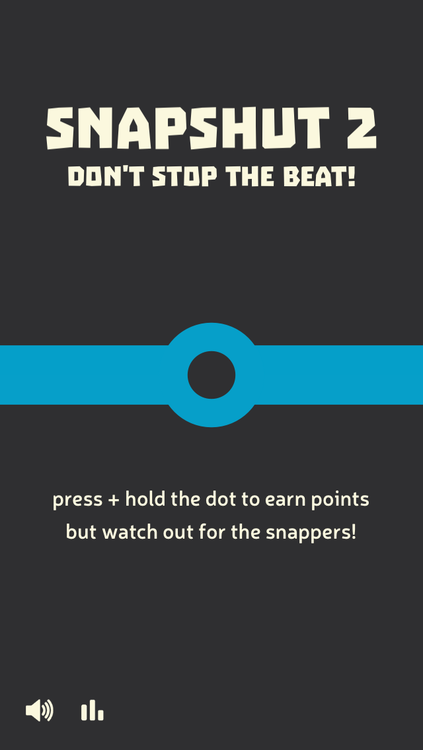
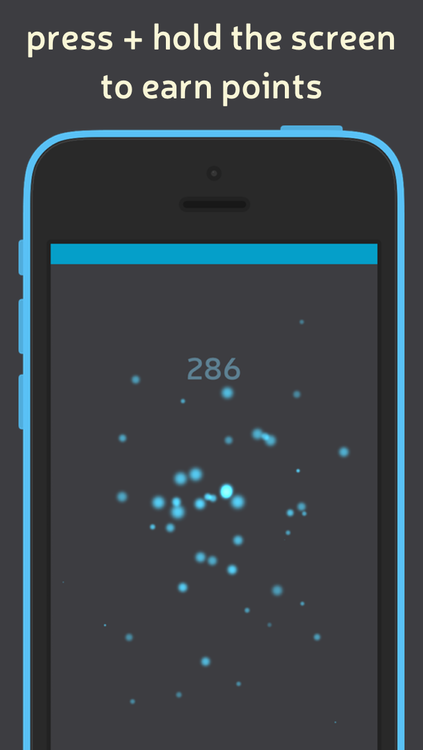
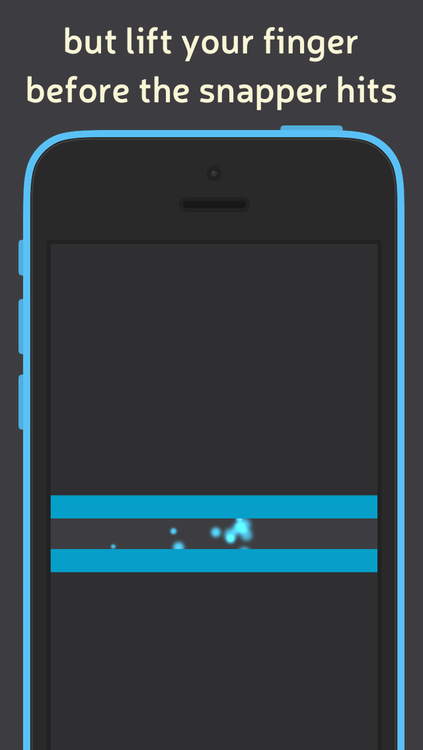
UK based independent developer, Jay Harvey has released SnapShut 2: Don't Stop The Beat 1.0, a simple yet addictive game exclusively available for iOS. Hold the screen and watch your points grow, however watch out for the sneaky Snappers waiting to hit your finger. If they succeed, it's game over. However take your finger off the screen and you miss out on all those precious points! Every second counts in this game of skill where your lightening-fast reaction time is the key to success.
London, United Kingdom - Independent developer, Jay Harvey has released SnapShut 2: Don't Stop The Beat 1.0, a simple yet addictive game exclusively available for iPhone, iPad and iPod touch. Hold the screen and watch your points grow, however watch out for the sneaky Snappers waiting to hit your finger. If they succeed, it's game over, however take your finger off the screen and you miss out on all those precious points! Every second counts in this game of skill where your lightening-fast reaction time is the key to success.
SnapShut 2 was developed following feedback on the original SnapShut. By removing the fundamental aim of "leveling up," SnapShut 2 becomes a run-away game with ONE aim... to achieve the highest score! The game is integrated with Game Center so you can compare yourself to friends, family and the global leader board. Alternatively challenge you friends a family to beat your score.
Language Support:
SnapShut 2 is built exclusively for iOS using Sprite Kit with support for 9 languages, including English, Chinese (Simplified & Traditional), Japanese, Korean, French, Spanish, Portuguese, Indonesian and Thai.
Device Requirements:
* iPhone, iPad, and iPod touch
* Requires iOS 7.0 or later
* 9.0 MB
Pricing and Availability:
SnapShut 2: Don't Stop The Beat 1.0 is Free and available worldwide exclusively through the App Store in the Games category.
SnapShut 2: Don't Stop The Beat 1.0: http://jdapps.co.uk/SnapShut2
Download from iTunes: https://itunes.apple.com/app/snapshut-2-dont-stop-the-beat/id896418606
Screenshot 1: http://media.tumblr.com/4ce3a7b962c1d35be0dccb2767f9fb48/tumblr_inline_nb0xps1eKc1sgvllz.png
Screenshot 2: http://media.tumblr.com/193e8a939ab46a8d86f54420cdce76ec/tumblr_inline_nb0xq4BjxL1sgvllz.png
Screenshot 3: http://media.tumblr.com/52438d0e183c809279a8cb6b33ed4c28/tumblr_inline_nb0xqb6G8N1sgvllz.png
App Icon: http://media.tumblr.com/af88ffe647ff7f79c0697bdb380090aa/tumblr_inline_n9qvux25S91sgvllz.png
Jay Harvey is an independent developer from London, United Kingdom. All Material and Software (C) Copyright 2014 Jay Harvey. All Rights Reserved. Apple, iPhone and iPod are registered trademarks of Apple Inc. in the U.S. and/or other countries. App Store is a service mark of Apple Inc. Other trademarks and registered trademarks may be the property of their respective owners.
*******
Link To Article: http://prmac.com/release-id-70312.htm
*******
---------------------------------------------------------------------------------
Note that you can alter delivered distributions at any time.
Login to your account on prMac to alter your channel selection, or to opt-out at any time.
SnapsShut 2: Don't Stop The Beat - Addictive reaction time game for iOS - Published on 09/06/14
UK based independent developer, Jay Harvey has released SnapShut 2: Don't Stop The Beat 1.0, a simple yet addictive game exclusively available for iOS. Hold the screen and watch your points grow, however watch out for the sneaky Snappers waiting to hit your finger. If they succeed, it's game over. However take your finger off the screen and you miss out on all those precious points! Every second counts in this game of skill where your lightening-fast reaction time is the key to success.
London, United Kingdom - Independent developer, Jay Harvey has released SnapShut 2: Don't Stop The Beat 1.0, a simple yet addictive game exclusively available for iPhone, iPad and iPod touch. Hold the screen and watch your points grow, however watch out for the sneaky Snappers waiting to hit your finger. If they succeed, it's game over, however take your finger off the screen and you miss out on all those precious points! Every second counts in this game of skill where your lightening-fast reaction time is the key to success.
SnapShut 2 was developed following feedback on the original SnapShut. By removing the fundamental aim of "leveling up," SnapShut 2 becomes a run-away game with ONE aim... to achieve the highest score! The game is integrated with Game Center so you can compare yourself to friends, family and the global leader board. Alternatively challenge you friends a family to beat your score.
Language Support:
SnapShut 2 is built exclusively for iOS using Sprite Kit with support for 9 languages, including English, Chinese (Simplified & Traditional), Japanese, Korean, French, Spanish, Portuguese, Indonesian and Thai.
Device Requirements:
* iPhone, iPad, and iPod touch
* Requires iOS 7.0 or later
* 9.0 MB
Pricing and Availability:
SnapShut 2: Don't Stop The Beat 1.0 is Free and available worldwide exclusively through the App Store in the Games category.
SnapShut 2: Don't Stop The Beat 1.0: http://jdapps.co.uk/SnapShut2
Download from iTunes: https://itunes.apple.com/app/snapshut-2-dont-stop-the-beat/id896418606
Screenshot 1: http://media.tumblr.com/4ce3a7b962c1d35be0dccb2767f9fb48/tumblr_inline_nb0xps1eKc1sgvllz.png
Screenshot 2: http://media.tumblr.com/193e8a939ab46a8d86f54420cdce76ec/tumblr_inline_nb0xq4BjxL1sgvllz.png
Screenshot 3: http://media.tumblr.com/52438d0e183c809279a8cb6b33ed4c28/tumblr_inline_nb0xqb6G8N1sgvllz.png
App Icon: http://media.tumblr.com/af88ffe647ff7f79c0697bdb380090aa/tumblr_inline_n9qvux25S91sgvllz.png

Jay Harvey is an independent developer from London, United Kingdom. All Material and Software (C) Copyright 2014 Jay Harvey. All Rights Reserved. Apple, iPhone and iPod are registered trademarks of Apple Inc. in the U.S. and/or other countries. App Store is a service mark of Apple Inc. Other trademarks and registered trademarks may be the property of their respective owners.
*******
Link To Article: http://prmac.com/release-id-70312.htm
*******
---------------------------------------------------------------------------------
Note that you can alter delivered distributions at any time.
Login to your account on prMac to alter your channel selection, or to opt-out at any time.
Eddy - cloud music player for iPhone/iPad is free for a limited time
A new article has been published at prMac.
Eddy - cloud music player for iPhone/iPad is free for a limited time - Published on 09/06/14
Ukraine based CapableBits has released Eddy, its popular cloud music player for iPhone and iPad that allows users to stream or download music directly from popular cloud storages. The app professional file manager, so you can manage, copy and move files. Share your favourite audio tracks with Eddy and get the most from your audio library. The app is the one of the most powerful cloud music players on the App Store. Eddy is available free of charge for four days (till 09/03/2014).
Odessa, Ukraine - CapableBits has released Eddy, a tiny, but smart and powerful cloud music player for iOS devices. He can stream music directly from your cloud storage like Dropbox, GoogleDrive, OneDrive and Box. Also Eddy will help you to download your beloved songs and audio books for offline playback as well as play them. The app is available free of charge until 9/3/2014.
Eddy was selected as "one of the awesome paid iPhone apps that are now free downloads" on BGR. Eddy has professional file manager, so you can manage, copy and move files between your cloud storages. Also you can create playlist with Eddy and add not only local files, but files from the cloud and even from your local music library.
Eddy loves music, he doesn't play music, he is playing With it. Share your favourite audio tracks with Eddy and get the most from your audio library. Eddy is the one of the most powerful cloud music players on the App Store.
Features:
Play:
* Play mp3, aac, m4a, wav, aiff, m4r
* Repeat and shuffle
* Airplay is supported
Download :
* Download your favorite songs on device for listening without internet connection
Manage:
* Manage, copy, move, rename and transfer files between cloud storage
* Create playlists from music in cloud storage
View:
* High quality album art
Search:
* Music in your library
Device Requirements:
* iPhone, iPad, and iPod touch
* Requires iOS 7.0 or later
* 7.1 MB
Pricing and Availability:
Eddy - cloud music player & downloader, audio books from Dropbox, OneDrive, Box and more 1.0 is free and available worldwide exclusively through the App Store in the Music category.
CapableBits: http://capablebits.com
Eddy 1.0: https://itunes.apple.com/app/id903653828
Free version of Eddy with in-app purchases: https://itunes.apple.com/app/id903655975
More info: https://itunes.apple.com/us/artist/capable-bits/id569846336
Press Kit (zip): http://capablebits.com/Eddy_cloud_player/art_pack_en.zip
CapableBits developes apps for the iOS platform. The team is based in Ukraine and has created apps which were downloaded more than 9 millions times. All Material and Software (C) Copyright 2014 CapableBits. All Rights Reserved. Apple, the Apple logo, iPhone, iPod and iPad are registered trademarks of Apple Inc. in the U.S. and/or other countries. Other trademarks and registered trademarks may be the property of their respective owners.
*******
Link To Article: http://prmac.com/release-id-70311.htm
*******
---------------------------------------------------------------------------------
Note that you can alter delivered distributions at any time.
Login to your account on prMac to alter your channel selection, or to opt-out at any time.
Eddy - cloud music player for iPhone/iPad is free for a limited time - Published on 09/06/14
Ukraine based CapableBits has released Eddy, its popular cloud music player for iPhone and iPad that allows users to stream or download music directly from popular cloud storages. The app professional file manager, so you can manage, copy and move files. Share your favourite audio tracks with Eddy and get the most from your audio library. The app is the one of the most powerful cloud music players on the App Store. Eddy is available free of charge for four days (till 09/03/2014).
Odessa, Ukraine - CapableBits has released Eddy, a tiny, but smart and powerful cloud music player for iOS devices. He can stream music directly from your cloud storage like Dropbox, GoogleDrive, OneDrive and Box. Also Eddy will help you to download your beloved songs and audio books for offline playback as well as play them. The app is available free of charge until 9/3/2014.
Eddy was selected as "one of the awesome paid iPhone apps that are now free downloads" on BGR. Eddy has professional file manager, so you can manage, copy and move files between your cloud storages. Also you can create playlist with Eddy and add not only local files, but files from the cloud and even from your local music library.
Eddy loves music, he doesn't play music, he is playing With it. Share your favourite audio tracks with Eddy and get the most from your audio library. Eddy is the one of the most powerful cloud music players on the App Store.
Features:
Play:
* Play mp3, aac, m4a, wav, aiff, m4r
* Repeat and shuffle
* Airplay is supported
Download :
* Download your favorite songs on device for listening without internet connection
Manage:
* Manage, copy, move, rename and transfer files between cloud storage
* Create playlists from music in cloud storage
View:
* High quality album art
Search:
* Music in your library
Device Requirements:
* iPhone, iPad, and iPod touch
* Requires iOS 7.0 or later
* 7.1 MB
Pricing and Availability:
Eddy - cloud music player & downloader, audio books from Dropbox, OneDrive, Box and more 1.0 is free and available worldwide exclusively through the App Store in the Music category.
CapableBits: http://capablebits.com
Eddy 1.0: https://itunes.apple.com/app/id903653828
Free version of Eddy with in-app purchases: https://itunes.apple.com/app/id903655975
More info: https://itunes.apple.com/us/artist/capable-bits/id569846336
Press Kit (zip): http://capablebits.com/Eddy_cloud_player/art_pack_en.zip
CapableBits developes apps for the iOS platform. The team is based in Ukraine and has created apps which were downloaded more than 9 millions times. All Material and Software (C) Copyright 2014 CapableBits. All Rights Reserved. Apple, the Apple logo, iPhone, iPod and iPad are registered trademarks of Apple Inc. in the U.S. and/or other countries. Other trademarks and registered trademarks may be the property of their respective owners.
*******
Link To Article: http://prmac.com/release-id-70311.htm
*******
---------------------------------------------------------------------------------
Note that you can alter delivered distributions at any time.
Login to your account on prMac to alter your channel selection, or to opt-out at any time.
PearlMountain Autumn Special Offer - Picture Collage Maker 50% off
A new article has been published at prMac.
PearlMountain Autumn Special Offer - Picture Collage Maker 50% off - Published on 09/05/14
September days are here with autumn's best of cheer. There is a good news that PearlMountain is going to hold an autumn promotion for its versatile and user-friendly collage maker tools at 50% Off, including Picture Collage Maker Pro, Picture Collage Maker and Picture Collage Maker for Mac. Picture Collage Maker is the quick and easy to use a collage maker tool that allows anyone to create eye-catching photo collages. No precious moment will be lost using the Picture Collage Maker.
Chengdu, China - PearlMountain announced a 50% discount promotion of Picture Collage Maker Pro, Picture Collage Maker and Picture Collage Maker for Mac as the great autumn treat to appreciate the constant trust and support from all customers, with which users can easily and quickly create stunning photo collages in creative ways at a big sale, saving up to $54.85 USD.
Photo collages can be a great way to tell a story, keep memories and simply have fun. This 50% off autumn promotion of Picture Collage Maker tools will save as much as $54.85 in total for each customer from the whole world. No precious moment will be lost since these collage creator applications are able to record memories forever. With the good chance sponsored by PearlMounain, users can not only save big money, but create something more personal by whipping up their own creative DIY ideas.
Picture Collage Maker is the quick and easy to use a collage maker tool that allows users from novices to photography professionals to create eye-catching photo collages on Windows and Macintosh computers. With just a few clicks, users can a create photo collage, scrapbook, calendar, greeting card, invitation card, poster, and any photo-related artworks that they can imagine for all the memorable occasions such as Wedding, Birthday, Party, Holidays, and more.
Key features:
* Numerous templates about different styles, various occasions included
* Customize photos with powerful editing features
* Decorate photos with text or a handful of diverse embellishments: clipart, frame, mask and more
* Export collage as different image format or print it out directly to share it with friends or families
Is there anyone looking for a perfect DIY gift for the special people in life? Welcome to enjoy the great deal of Picture Collage Maker to memorize precious moments in the most colorful season of the year with the most creative style! Just visit the promotional page and get the very own collage maker tool at 50% off.
Device Requirements:
Both Picture Collage Maker and Picture Collage Maker Pro support Windows 8/7/2000/XP/Vista while Picture Collage Maker for Mac is compatible with Mac OS X 10.6 or later.
Pricing and Availability:
Picture Collage Maker, Picture Collage Maker Pro, Picture Collage Maker for Mac are respectively priced at $29.90, $39.90, $39.90, now all 50% off during the autumn sales at the website. For more information please contact David Lin at the website.
PearlMountain Technology: http://www.pearlmountainsoft.com
Picture Collage Maker: http://www.picturecollagesoftware.com/promotion/specialoffer.html
PearlMountain Technology Co., Ltd is a dedicated graphics and software development company founded in 2006. Its products have already been well received all through North America, Europe and Asia software markets for their ease of use, reliability and superior performance. All Material and Software (C) Copyright 2014 PearlMountain Technology Co., Ltd. All Rights Reserved. Apple, the Apple logo, Macintosh and Mac OS X are registered trademarks of Apple Inc. in the U.S. and/or other countries. Other trademarks and registered trademarks may be the property of their respective owners.
*******
Link To Article: http://prmac.com/release-id-70360.htm
*******
---------------------------------------------------------------------------------
Note that you can alter delivered distributions at any time.
Login to your account on prMac to alter your channel selection, or to opt-out at any time.
PearlMountain Autumn Special Offer - Picture Collage Maker 50% off - Published on 09/05/14
September days are here with autumn's best of cheer. There is a good news that PearlMountain is going to hold an autumn promotion for its versatile and user-friendly collage maker tools at 50% Off, including Picture Collage Maker Pro, Picture Collage Maker and Picture Collage Maker for Mac. Picture Collage Maker is the quick and easy to use a collage maker tool that allows anyone to create eye-catching photo collages. No precious moment will be lost using the Picture Collage Maker.
Chengdu, China - PearlMountain announced a 50% discount promotion of Picture Collage Maker Pro, Picture Collage Maker and Picture Collage Maker for Mac as the great autumn treat to appreciate the constant trust and support from all customers, with which users can easily and quickly create stunning photo collages in creative ways at a big sale, saving up to $54.85 USD.
Photo collages can be a great way to tell a story, keep memories and simply have fun. This 50% off autumn promotion of Picture Collage Maker tools will save as much as $54.85 in total for each customer from the whole world. No precious moment will be lost since these collage creator applications are able to record memories forever. With the good chance sponsored by PearlMounain, users can not only save big money, but create something more personal by whipping up their own creative DIY ideas.
Picture Collage Maker is the quick and easy to use a collage maker tool that allows users from novices to photography professionals to create eye-catching photo collages on Windows and Macintosh computers. With just a few clicks, users can a create photo collage, scrapbook, calendar, greeting card, invitation card, poster, and any photo-related artworks that they can imagine for all the memorable occasions such as Wedding, Birthday, Party, Holidays, and more.
Key features:
* Numerous templates about different styles, various occasions included
* Customize photos with powerful editing features
* Decorate photos with text or a handful of diverse embellishments: clipart, frame, mask and more
* Export collage as different image format or print it out directly to share it with friends or families
Is there anyone looking for a perfect DIY gift for the special people in life? Welcome to enjoy the great deal of Picture Collage Maker to memorize precious moments in the most colorful season of the year with the most creative style! Just visit the promotional page and get the very own collage maker tool at 50% off.
Device Requirements:
Both Picture Collage Maker and Picture Collage Maker Pro support Windows 8/7/2000/XP/Vista while Picture Collage Maker for Mac is compatible with Mac OS X 10.6 or later.
Pricing and Availability:
Picture Collage Maker, Picture Collage Maker Pro, Picture Collage Maker for Mac are respectively priced at $29.90, $39.90, $39.90, now all 50% off during the autumn sales at the website. For more information please contact David Lin at the website.
PearlMountain Technology: http://www.pearlmountainsoft.com
Picture Collage Maker: http://www.picturecollagesoftware.com/promotion/specialoffer.html
PearlMountain Technology Co., Ltd is a dedicated graphics and software development company founded in 2006. Its products have already been well received all through North America, Europe and Asia software markets for their ease of use, reliability and superior performance. All Material and Software (C) Copyright 2014 PearlMountain Technology Co., Ltd. All Rights Reserved. Apple, the Apple logo, Macintosh and Mac OS X are registered trademarks of Apple Inc. in the U.S. and/or other countries. Other trademarks and registered trademarks may be the property of their respective owners.
*******
Link To Article: http://prmac.com/release-id-70360.htm
*******
---------------------------------------------------------------------------------
Note that you can alter delivered distributions at any time.
Login to your account on prMac to alter your channel selection, or to opt-out at any time.
Files -Finder Edition: Top 5 Features Making it an Ultimate File Manager
A new article has been published at prMac.
Files -Finder Edition: Top 5 Features Making it an Ultimate File Manager - Published on 09/05/14
Appsicum brings Files-Finder Edition 1.0 to the iPad. It doesn't matter in which field you are working or belongs to; you always need software and apps to make your work easier. Files � Finder Edition is a complete file organization tool which provides capabilities of document and excels editing. This app will make your work easier as if a you never had problem of file management. Files � Finder Edition will help you when you are out of the office and need to complete office work.
Delhi, India - Files-Finder Edition has been developed by Team Appsicum where efforts take place to simply your life. Earlier, there was no such app that offered this kind of functioning and that too in an iPad app. When Files-Finder Edition was launched, it was probably the first app which had some unique feature like built -in browser and sorting based on multiple parameters.Here are the features which made Files-Finder Edition an ultimate file manager iPad app for users.
* Familiar Finder and Explorer like Interface:
Most of the iPad users find document management on their iPad one of the most difficult tasks on their own. It's because first there are not many apps that allow them to manage edit files on their own. While some apps in the App Store are so typical to handle that users are not able to find themselves familiar with those. Files-Finder Edition removes such constraints as it's been developed specially for such users who have switched on their iPad from their Windows or Mac. To users who are switching from Windows, its interface will look much like "Explorer" and for those who are coming from MacWorld it will look like old good "Finder" of Mac.
* Vast Variety of Supported iPad File Formats:
It's also a matter of advantage with Files-Finder Edition that with it you get a vast variety of file formats supported by the app. To name some there are Doc, Docx, RTF, TXT, PNG, JPEG, MP4, MOV, PDF, Web Pages, WAV, 3GP, Zip, and many more others.
* Advanced Features for Managing Files and Folders:
There are many advanced features in Files-Finder Edition that make it a complete file manager for iPad. For example sync facility is given to users and through it they can sync their iPad files with any of cloud storage networks like GoogleDrive, Dropbox and Sugarsync and more. There is a built-in file-previewer for most of the file formats. Users can edit Excel and other documents using GoogleDrive right in the app. Users can create custom shortcuts for frequently used files, can create filters, save as shortcuts, search sort and filter files based on multiple parameters like file name, file size, file type, date, categories and more and most importantly users can categorize items like in Microsoft outlook.
* Built in Browser with Download Manager:
It's not necessary that every file manager should give the power of internet to users where they can browse internet and can download their favorite music, videos and other files using a download manager, but Files-Finder Edition has it all. It has a built-in browser where users can enjoy the seamless net browsing. This browser has a built-in download manager also which support background downloads also. To give users an edge, search feature of browser is integrated with sites like Wikipedia, Google and Twitter so you can directly search on them.
* Additional Features like Voice Note creation and Air Print Support:
Though Files-finder Edition is fully equipped with many file editing and file management features yet it has some splendid features which come like a bonus. For example users can create voice notes easily with Files-Finder Edition; they can transfer their files through password protected Wifi mode. Air print support is included too through which you can take print out of your files through a printer attached through WiFi. Gesture based copy/paste/move, sharing of files via email, Facebook, Twitter and many more, and desktop like status bar; they all come with Files-Finder Edition and this is what makes an app complete.
Device Requirements:
* Compatible with iPad
* Requires iOS 5.0 or later.
* 5.3 MB
Pricing and Availability:
Files � Finder Edition 1.0 is $5.99 USD (or equivalent amount in other currencies) and available worldwide exclusively through the App Store in the Productivity category.
Files � Finder Edition 1.0: http://appsicum.com/
Purchase and Download from iTunes: https://itunes.apple.com/app/files-finder-edition/id733259837
Screenshot 1: http://a2.mzstatic.com/us/r30/Purple4/v4/56/7b/ad/567bad7c-ede7-e530-b54f-ad1cd755fa19/screen480x480.jpeg
Screenshot 2: http://a1.mzstatic.com/us/r30/Purple4/v4/1d/2d/8e/1d2d8ee4-19cf-0a7b-7f6a-348b72314125/screen480x480.jpeg
App Icon: http://a3.mzstatic.com/us/r30/Purple6/v4/1e/ee/3b/1eee3b23-c009-6438-89e8-087f2482061f/mzl.zdlifktz.175x175-75.jpg
Appsicum is a crew of talented and skilled app developers who constantly work hard to bring the smile on your face through some innovative, cool and unique apps for your smart-phones like iPhone, iPad, iPod touch, Android and Blackberry. We put the best of our efforts to simplify your life with our apps. Some of our popular apps released so far are Files-Finder Edition, Location Alert, Future Scheduler, Photo Effect Plus, Photos To Albums, Text Disaster, Location Alert, Photo Effect Plus and more. Recently We released Files-Finder Edition App for iPad users. Stay tuned with us for more updates on apps that can change your life. All Material and Software (C) Copyright 2014 Appsicum. All Rights Reserved. Apple, the Apple logo, iPhone, iPod and iPad are registered trademarks of Apple Inc. in the U.S. and/or other countries. Other trademarks and registered trademarks may be the property of their respective owners.
*******
Link To Article: http://prmac.com/release-id-70362.htm
*******
---------------------------------------------------------------------------------
Note that you can alter delivered distributions at any time.
Login to your account on prMac to alter your channel selection, or to opt-out at any time.
Files -Finder Edition: Top 5 Features Making it an Ultimate File Manager - Published on 09/05/14
Appsicum brings Files-Finder Edition 1.0 to the iPad. It doesn't matter in which field you are working or belongs to; you always need software and apps to make your work easier. Files � Finder Edition is a complete file organization tool which provides capabilities of document and excels editing. This app will make your work easier as if a you never had problem of file management. Files � Finder Edition will help you when you are out of the office and need to complete office work.
Delhi, India - Files-Finder Edition has been developed by Team Appsicum where efforts take place to simply your life. Earlier, there was no such app that offered this kind of functioning and that too in an iPad app. When Files-Finder Edition was launched, it was probably the first app which had some unique feature like built -in browser and sorting based on multiple parameters.Here are the features which made Files-Finder Edition an ultimate file manager iPad app for users.
* Familiar Finder and Explorer like Interface:
Most of the iPad users find document management on their iPad one of the most difficult tasks on their own. It's because first there are not many apps that allow them to manage edit files on their own. While some apps in the App Store are so typical to handle that users are not able to find themselves familiar with those. Files-Finder Edition removes such constraints as it's been developed specially for such users who have switched on their iPad from their Windows or Mac. To users who are switching from Windows, its interface will look much like "Explorer" and for those who are coming from MacWorld it will look like old good "Finder" of Mac.
* Vast Variety of Supported iPad File Formats:
It's also a matter of advantage with Files-Finder Edition that with it you get a vast variety of file formats supported by the app. To name some there are Doc, Docx, RTF, TXT, PNG, JPEG, MP4, MOV, PDF, Web Pages, WAV, 3GP, Zip, and many more others.
* Advanced Features for Managing Files and Folders:
There are many advanced features in Files-Finder Edition that make it a complete file manager for iPad. For example sync facility is given to users and through it they can sync their iPad files with any of cloud storage networks like GoogleDrive, Dropbox and Sugarsync and more. There is a built-in file-previewer for most of the file formats. Users can edit Excel and other documents using GoogleDrive right in the app. Users can create custom shortcuts for frequently used files, can create filters, save as shortcuts, search sort and filter files based on multiple parameters like file name, file size, file type, date, categories and more and most importantly users can categorize items like in Microsoft outlook.
* Built in Browser with Download Manager:
It's not necessary that every file manager should give the power of internet to users where they can browse internet and can download their favorite music, videos and other files using a download manager, but Files-Finder Edition has it all. It has a built-in browser where users can enjoy the seamless net browsing. This browser has a built-in download manager also which support background downloads also. To give users an edge, search feature of browser is integrated with sites like Wikipedia, Google and Twitter so you can directly search on them.
* Additional Features like Voice Note creation and Air Print Support:
Though Files-finder Edition is fully equipped with many file editing and file management features yet it has some splendid features which come like a bonus. For example users can create voice notes easily with Files-Finder Edition; they can transfer their files through password protected Wifi mode. Air print support is included too through which you can take print out of your files through a printer attached through WiFi. Gesture based copy/paste/move, sharing of files via email, Facebook, Twitter and many more, and desktop like status bar; they all come with Files-Finder Edition and this is what makes an app complete.
Device Requirements:
* Compatible with iPad
* Requires iOS 5.0 or later.
* 5.3 MB
Pricing and Availability:
Files � Finder Edition 1.0 is $5.99 USD (or equivalent amount in other currencies) and available worldwide exclusively through the App Store in the Productivity category.
Files � Finder Edition 1.0: http://appsicum.com/
Purchase and Download from iTunes: https://itunes.apple.com/app/files-finder-edition/id733259837
Screenshot 1: http://a2.mzstatic.com/us/r30/Purple4/v4/56/7b/ad/567bad7c-ede7-e530-b54f-ad1cd755fa19/screen480x480.jpeg

Screenshot 2: http://a1.mzstatic.com/us/r30/Purple4/v4/1d/2d/8e/1d2d8ee4-19cf-0a7b-7f6a-348b72314125/screen480x480.jpeg

App Icon: http://a3.mzstatic.com/us/r30/Purple6/v4/1e/ee/3b/1eee3b23-c009-6438-89e8-087f2482061f/mzl.zdlifktz.175x175-75.jpg

Appsicum is a crew of talented and skilled app developers who constantly work hard to bring the smile on your face through some innovative, cool and unique apps for your smart-phones like iPhone, iPad, iPod touch, Android and Blackberry. We put the best of our efforts to simplify your life with our apps. Some of our popular apps released so far are Files-Finder Edition, Location Alert, Future Scheduler, Photo Effect Plus, Photos To Albums, Text Disaster, Location Alert, Photo Effect Plus and more. Recently We released Files-Finder Edition App for iPad users. Stay tuned with us for more updates on apps that can change your life. All Material and Software (C) Copyright 2014 Appsicum. All Rights Reserved. Apple, the Apple logo, iPhone, iPod and iPad are registered trademarks of Apple Inc. in the U.S. and/or other countries. Other trademarks and registered trademarks may be the property of their respective owners.
*******
Link To Article: http://prmac.com/release-id-70362.htm
*******
---------------------------------------------------------------------------------
Note that you can alter delivered distributions at any time.
Login to your account on prMac to alter your channel selection, or to opt-out at any time.
Subscribe to:
Posts (Atom)