A new article has been published at prMac.
Henge Docks Recognized as Emerging Vendor for its Apple Docking Solution - Published on 09/07/14
Henge Docks announced that it has been recognized as one of 2014's hottest emerging technology vendors by CRN. The annual Emerging Vendors list identifies up-and-coming technology vendors that have introduced innovative new products, creating opportunities for channel partners in North America. Henge Docks' suite of products is designed to streamline workspace, increase versatility, & more. As enterprise users are preferring Macs, Henge Docks looks to add solution providers for the business world.
San Francisco, California - Henge Docks, creator of the world's most comprehensive docking solutions for Apple's notebook computers, announced that it has been recognized as one of 2014's hottest emerging technology vendors by CRN, the top news source for solution providers and the IT channel. The annual Emerging Vendors list identifies up-and-coming technology vendors that have introduced innovative new products, creating opportunities for channel partners in North America to create high-margin, cutting-edge solutions for their customers. Henge Docks' suite of products is designed to streamline workspace, increase versatility, and maximize productivity. As enterprise users overwhelmingly are preferring Macs, Henge Docks is looking to add more solution providers for the business world.
"Most employees move from desk to meetings or conference rooms many times per day. Each time they have to reconnect their peripherals when they return back to their desks, which takes up valuable time. Using a dock slashes this time loss almost down to zero. The ROI on a Henge Dock docking station is barely one month," said Matthew Vroom, founder and CEO.
Henge Docks is looking to partner with companies in the consumer electronics industry, especially those interested in Apple Accessories. Apple Premium Resellers would be particularly interested in Henge Docks lineup of products to complement Apple devices. Henge Docks has also found success in corporate, government, and education settings, and would make an excellent addition to resellers and distributors in those areas. With increasing interest abroad, the company is hoping to bring on more international partners, focusing in Asia, Canada, and South America.
"Solution providers are always on the hunt for the next big technology trend so that they can bring new solutions to their customers before they even know they need them. These vendors are on the forefront of IT innovation and are offering products and services that channel partners can use to stay ahead of the competition," said Robert Faletra, CEO of The Channel Company, publisher of CRN. "We congratulate 2014's Emerging Vendors for creating the next wave of technology that will drive the IT industry forward and for opening the door to new, unique solutions from the IT channel."
Companies included in CRN's 2014 Emerging Vendors list were founded in 2008 or later and are actively working with channel partners in North America. The list, along with information about each vendor, is published in CRN's August 2014 issue and also available online at the website.
About The Channel Company
The Channel Company is the channel community's trusted authority for growth and innovation, with established brands including CRN, XChange Events, IPED, and SharedVue. For more than three decades, we have leveraged our proven and leading-edge platforms to deliver prescriptive sales and marketing solutions for the technology channel. The Channel Company provides Communication, Recruitment, Engagement, Enablement, Demand Generation and Intelligence services to drive technology partnerships. Learn more at website.
Henge Docks: http://hengedocks.com/
Henge Docks, LLC created the first and only line of truly comprehensive docking solutions for Apple MacBook, iPhone, and iPad. The company is based in San Francisco, California and is focused on designing the most elegant and effective homes for Apple devices. For more information regarding Henge Docks, please visit the website. All Material and Software (C) Copyright 2014 Henge Docks, LLC. All Rights Reserved. Apple, the Apple logo, iPhone, iPod and iPad are registered trademarks of Apple Inc. in the U.S. and/or other countries. Other trademarks and registered trademarks may be the property of their respective owners.
*******
Link To Article: http://prmac.com/release-id-70386.htm
*******
---------------------------------------------------------------------------------
Note that you can alter delivered distributions at any time.
Login to your account on prMac to alter your channel selection, or to opt-out at any time.

Bad Driver Database Allows Good Drivers to Voice their Frustration
A new article has been published at prMac.
Bad Driver Database Allows Good Drivers to Voice their Frustration - Published on 09/07/14
Bad Driver Database 1.4 by Facile Group is a new iOS and Android app that lets users instantly input and see how many times a careless, reckless or just plain stupid driver has been added to the database. Plus users can search their own license plate to see if they need to brush up on their driving skills. Users see how many times that particular bad driver has been flagged by other users; which is a good way to see if the mistake is just a one-off, or the act of a habitually terrible driver.
Cupertino, California - Guys who park their souped-up monster truck in two - sometimes three - parking spaces. Ladies who believe that their rear-view mirror is more useful for applying mascara than seeing what or who's behind them. Oblivious drivers that go 10 miles under the speed limit with cars stacking up behind them. And lest we forget: folks who might as well uninstall turn signals because they don't know how to use them. These are just a few examples of the many, many drivers out there whose days of carelessness, recklessness and sheer stupidity behind the wheel are numbered, thanks to the ingenious new iPhone an Android app Bad Driver Database by Facile Group.
Here's how Bad Driver Database works: rather than getting enraged or possibly putting themselves in harm's way, users who spot a bad driver simply input that bad driver's state and license plate number into the app. Absolutely no personal information is captured or transmitted (either the user's or the bad driver's), ensuring bad driver's can be reported without sharing sensitive data. Driver's should ensure they access Bad Driver Database safely when their vehicle is parked, or alternatively a passenger can enter details on-the-move.
Instantly, users see how many times that particular bad driver has been flagged by other users - which is a good way to see if the mistake is just a one-off, or the act of a habitually terrible driver. And even more importantly, users help the community of safe, sane and considerate drivers hold bad driver's accountable for their inconsiderate, or at worst dangerous, decision-making behind the wheel.
Plus, users can search their own license plate to see if they've been added to the database, which can help them see if it's time for a little - or perhaps a lot - of road re-education.
"We created the Bad Driver Database to give all of the good drivers out there a powerful way to voice their frustration with bad drivers, but in a way that avoids road rage incidents," commented Mitch Jansen. "Even good drivers can sometimes make mistakes, the app also helps them see how many times they were caught making bad driving decisions."
Device Requirements:
* iPhone, iPad, and iPod touch
* Requires iOS 6.0 or later
* 6.9 MB
Pricing and Availability:
Bad Driver Database 1.4, the ingenious new app from Facile Group, is Free and available worldwide through the App Store in the Reference category. There is also a version for Android-enabled smartphones on Google Play.
Bad Driver Database 1.4: http://www.baddriverdatabase.com
More Info: http://apps.appshout.com/bad-driver-database/
Download from iTunes: https://itunes.apple.com/app/bad-driver-database/id845247527
YouTube Video (Demo): http://www.youtube.com/watch?v=yw0GxZYDQmo
Screenshot: http://a5.mzstatic.com/us/r30/Purple3/v4/3a/dd/e5/3adde5b3-3806-6d44-642b-09b579842fcd/screen568x568.jpeg
App Icon: http://apps.appshout.com/bad-driver-database/images/icon.png
Headquartered in Davenport, Iowa, Facile Group is inspired to create products that everyone can and wants to use. The word "facile" is a synonym for simple, and keeping it simple is exactly what the company does by crafting fully functional products that are intuitive and feature-rich, yet elegant and efficient. Bad Driver Database is the company's first product, and it's expected that it will become so widely used that a driver's "Bad Driver" score will become just as important as their credit score. All Material and Software (C) Copyright 2014 Facile Group. All Rights Reserved. Apple, the Apple logo, iPhone, iPod and iPad are registered trademarks of Apple Inc. in the U.S. and/or other countries. Other trademarks and registered trademarks may be the property of their respective owners.
*******
Link To Article: http://prmac.com/release-id-70344.htm
*******
---------------------------------------------------------------------------------
Note that you can alter delivered distributions at any time.
Login to your account on prMac to alter your channel selection, or to opt-out at any time.
Bad Driver Database Allows Good Drivers to Voice their Frustration - Published on 09/07/14
Bad Driver Database 1.4 by Facile Group is a new iOS and Android app that lets users instantly input and see how many times a careless, reckless or just plain stupid driver has been added to the database. Plus users can search their own license plate to see if they need to brush up on their driving skills. Users see how many times that particular bad driver has been flagged by other users; which is a good way to see if the mistake is just a one-off, or the act of a habitually terrible driver.
Cupertino, California - Guys who park their souped-up monster truck in two - sometimes three - parking spaces. Ladies who believe that their rear-view mirror is more useful for applying mascara than seeing what or who's behind them. Oblivious drivers that go 10 miles under the speed limit with cars stacking up behind them. And lest we forget: folks who might as well uninstall turn signals because they don't know how to use them. These are just a few examples of the many, many drivers out there whose days of carelessness, recklessness and sheer stupidity behind the wheel are numbered, thanks to the ingenious new iPhone an Android app Bad Driver Database by Facile Group.
Here's how Bad Driver Database works: rather than getting enraged or possibly putting themselves in harm's way, users who spot a bad driver simply input that bad driver's state and license plate number into the app. Absolutely no personal information is captured or transmitted (either the user's or the bad driver's), ensuring bad driver's can be reported without sharing sensitive data. Driver's should ensure they access Bad Driver Database safely when their vehicle is parked, or alternatively a passenger can enter details on-the-move.
Instantly, users see how many times that particular bad driver has been flagged by other users - which is a good way to see if the mistake is just a one-off, or the act of a habitually terrible driver. And even more importantly, users help the community of safe, sane and considerate drivers hold bad driver's accountable for their inconsiderate, or at worst dangerous, decision-making behind the wheel.
Plus, users can search their own license plate to see if they've been added to the database, which can help them see if it's time for a little - or perhaps a lot - of road re-education.
"We created the Bad Driver Database to give all of the good drivers out there a powerful way to voice their frustration with bad drivers, but in a way that avoids road rage incidents," commented Mitch Jansen. "Even good drivers can sometimes make mistakes, the app also helps them see how many times they were caught making bad driving decisions."
Device Requirements:
* iPhone, iPad, and iPod touch
* Requires iOS 6.0 or later
* 6.9 MB
Pricing and Availability:
Bad Driver Database 1.4, the ingenious new app from Facile Group, is Free and available worldwide through the App Store in the Reference category. There is also a version for Android-enabled smartphones on Google Play.
Bad Driver Database 1.4: http://www.baddriverdatabase.com
More Info: http://apps.appshout.com/bad-driver-database/
Download from iTunes: https://itunes.apple.com/app/bad-driver-database/id845247527
YouTube Video (Demo): http://www.youtube.com/watch?v=yw0GxZYDQmo
Screenshot: http://a5.mzstatic.com/us/r30/Purple3/v4/3a/dd/e5/3adde5b3-3806-6d44-642b-09b579842fcd/screen568x568.jpeg

App Icon: http://apps.appshout.com/bad-driver-database/images/icon.png

Headquartered in Davenport, Iowa, Facile Group is inspired to create products that everyone can and wants to use. The word "facile" is a synonym for simple, and keeping it simple is exactly what the company does by crafting fully functional products that are intuitive and feature-rich, yet elegant and efficient. Bad Driver Database is the company's first product, and it's expected that it will become so widely used that a driver's "Bad Driver" score will become just as important as their credit score. All Material and Software (C) Copyright 2014 Facile Group. All Rights Reserved. Apple, the Apple logo, iPhone, iPod and iPad are registered trademarks of Apple Inc. in the U.S. and/or other countries. Other trademarks and registered trademarks may be the property of their respective owners.
*******
Link To Article: http://prmac.com/release-id-70344.htm
*******
---------------------------------------------------------------------------------
Note that you can alter delivered distributions at any time.
Login to your account on prMac to alter your channel selection, or to opt-out at any time.
The Vision Board App - Dream, Believe, Attract
A new article has been published at prMac.
The Vision Board App - Dream, Believe, Attract - Published on 09/07/14
Astraport has announced Vision Board 2, an update to their popular multi-functional collage maker program for iOS and Android devices. Vision Board serves as an excellent motivational tool that will help you set the right goals and prioritize your life. This visualization app uses images, pictures and affirmations of your dreams and all of the things that make you happy and motivated. Version 1.2.0 offers improved display of custom boards, introduces two video lessons, and more.
Astrakhan, Russian Federation - Astraport has announced the release of Vision Board 2 (v1.2.0), an update to their popular multi-functional collage maker program for iOS and Android devices. Vision Board serves as an excellent motivational tool that will help you set the right goals and prioritize your life. This visualization app uses images, pictures and affirmations of your dreams and all of the things that make you happy and motivated.
Vision Board can also be called a dream board, treasure map, goal board, goal map, or vision map. By focusing on the items on the board many people embody desired things in their lives. Vision Boards are very helpful when using the Law of Attraction which is the belief that "like thoughts attract like thoughts," or for just making you feel positive. The functionality of the "Vision Board" app contains:
* Over 450 high quality symbols of desires broken into categories with descriptions and search (the full list is available after the upgrade to PRO version)
* 6 built in templates to achieve the most popular goals new templates in the new versions
* More than 50 badges - special symbols with changeable layer colors
* Creating your own symbols based on photos from the gallery or images from the web by slicing them out in one of two modes
* Unlimited number of templates from our loyal users
* Daily motivational phrases and symbols from our active users - thank you friends
* Over 500 pre-made affirmations, positive and motivational phrases and famous quotes, categorized and searchable
* Lots of text editing options, 16 beautiful built-in fonts, text skewing
* Lots of object manipulation options: rotation, transformation, moving to background, locking, mirroring, etc.
* Over 40 different background images
* Saving the finished dream boards in the form of images or templates for further editing
* Posting the created boards to our website visualife.newmobapp.com, password protection, sharing in social networks, e-mailing
* "Wheel of Fortune" mini- game
* "Sky" mini- game
* Animation of symbols for meditation and relaxation to beautiful music
* Detailed instructions and guidance on compiling effective dream boards
With Improved display of custom boards, version 1.2.0 introduces two video lessons, and fixes a bug with the camera roll. Publication of vision boards on the site now remembers their state.
"The application has no analogues in the world both in functionality and the concept, which makes us very proud of our work," explained Vladimir Alyushin, owner of Astraport Inc. "Pull your dreams into reality. Activate the law of attraction. Create your first Vision Board and change your life for the better. It works!"
Device Requirements:
* iPhone, iPad, and iPod touch
* Requires iOS 4.3 or later
* 34.7 MB
Pricing and Availability:
Vision Board 2 (v1.2.0) is Free and available worldwide through the App Store in the Lifestyle category. There is a Pro version available. There is also an Android version of the app available on Google Play.
Vision Board 2 (v1.2.0): http://visualife.newmobapp.com/
Download from iTunes: https://itunes.apple.com/app/vision-board-2-visualife/id733788428
Download from Google Play: https://play.google.com/store/apps/details?id=air.com.astraport.visualife.en
Screenshot: http://visualife.newmobapp.com/wp-content/themes/progressapps/tmp/en/s1.jpg
App Icon: http://visualife.newmobapp.com/images/_512.png
Based in in Astrakhan, Russia, Astraport is a mobile software development company founded in 2009. The team consists of three developers, programmer, system administrator and designer. The company has released several apps for the mobile platform on psychology, self-knowledge and esoterica subjects. All applications are available for iOS and Android devices. Copyright (C) 2012 Astraport Inc. All Rights Reserved. Apple, the Apple logo, iPhone, iPod and iPad are registered trademarks of Apple Inc. in the U.S. and/or other countries.
*******
Link To Article: http://prmac.com/release-id-70343.htm
*******
---------------------------------------------------------------------------------
Note that you can alter delivered distributions at any time.
Login to your account on prMac to alter your channel selection, or to opt-out at any time.
The Vision Board App - Dream, Believe, Attract - Published on 09/07/14
Astraport has announced Vision Board 2, an update to their popular multi-functional collage maker program for iOS and Android devices. Vision Board serves as an excellent motivational tool that will help you set the right goals and prioritize your life. This visualization app uses images, pictures and affirmations of your dreams and all of the things that make you happy and motivated. Version 1.2.0 offers improved display of custom boards, introduces two video lessons, and more.
Astrakhan, Russian Federation - Astraport has announced the release of Vision Board 2 (v1.2.0), an update to their popular multi-functional collage maker program for iOS and Android devices. Vision Board serves as an excellent motivational tool that will help you set the right goals and prioritize your life. This visualization app uses images, pictures and affirmations of your dreams and all of the things that make you happy and motivated.
Vision Board can also be called a dream board, treasure map, goal board, goal map, or vision map. By focusing on the items on the board many people embody desired things in their lives. Vision Boards are very helpful when using the Law of Attraction which is the belief that "like thoughts attract like thoughts," or for just making you feel positive. The functionality of the "Vision Board" app contains:
* Over 450 high quality symbols of desires broken into categories with descriptions and search (the full list is available after the upgrade to PRO version)
* 6 built in templates to achieve the most popular goals new templates in the new versions
* More than 50 badges - special symbols with changeable layer colors
* Creating your own symbols based on photos from the gallery or images from the web by slicing them out in one of two modes
* Unlimited number of templates from our loyal users
* Daily motivational phrases and symbols from our active users - thank you friends
* Over 500 pre-made affirmations, positive and motivational phrases and famous quotes, categorized and searchable
* Lots of text editing options, 16 beautiful built-in fonts, text skewing
* Lots of object manipulation options: rotation, transformation, moving to background, locking, mirroring, etc.
* Over 40 different background images
* Saving the finished dream boards in the form of images or templates for further editing
* Posting the created boards to our website visualife.newmobapp.com, password protection, sharing in social networks, e-mailing
* "Wheel of Fortune" mini- game
* "Sky" mini- game
* Animation of symbols for meditation and relaxation to beautiful music
* Detailed instructions and guidance on compiling effective dream boards
With Improved display of custom boards, version 1.2.0 introduces two video lessons, and fixes a bug with the camera roll. Publication of vision boards on the site now remembers their state.
"The application has no analogues in the world both in functionality and the concept, which makes us very proud of our work," explained Vladimir Alyushin, owner of Astraport Inc. "Pull your dreams into reality. Activate the law of attraction. Create your first Vision Board and change your life for the better. It works!"
Device Requirements:
* iPhone, iPad, and iPod touch
* Requires iOS 4.3 or later
* 34.7 MB
Pricing and Availability:
Vision Board 2 (v1.2.0) is Free and available worldwide through the App Store in the Lifestyle category. There is a Pro version available. There is also an Android version of the app available on Google Play.
Vision Board 2 (v1.2.0): http://visualife.newmobapp.com/
Download from iTunes: https://itunes.apple.com/app/vision-board-2-visualife/id733788428
Download from Google Play: https://play.google.com/store/apps/details?id=air.com.astraport.visualife.en
Screenshot: http://visualife.newmobapp.com/wp-content/themes/progressapps/tmp/en/s1.jpg

App Icon: http://visualife.newmobapp.com/images/_512.png

Based in in Astrakhan, Russia, Astraport is a mobile software development company founded in 2009. The team consists of three developers, programmer, system administrator and designer. The company has released several apps for the mobile platform on psychology, self-knowledge and esoterica subjects. All applications are available for iOS and Android devices. Copyright (C) 2012 Astraport Inc. All Rights Reserved. Apple, the Apple logo, iPhone, iPod and iPad are registered trademarks of Apple Inc. in the U.S. and/or other countries.
*******
Link To Article: http://prmac.com/release-id-70343.htm
*******
---------------------------------------------------------------------------------
Note that you can alter delivered distributions at any time.
Login to your account on prMac to alter your channel selection, or to opt-out at any time.
Prompter - the Smat Snap App for iOS
A new article has been published at prMac.
Prompter - the Smat Snap App for iOS - Published on 09/06/14
Prompter today announces the release and immediate availability of Prompter. Prompter is an iOS freeware photo application that efficiently and instantly allows you to save your photos to your default albums to keep your camera roll perfectly organised. Key features include pre-set default albums for instant album filing, picture validation, duplication of albums to other iOS devices via cloud settings, intuitive settings options to customise user profiles and more.
Paris, France - Prompter today is proud to announce the release and immediate availability of Prompter for iOS. Capture snapshots and file them to your customisable and preset albums via the default album filing feature allowing for a pro-active approach for the organisation and filing of snapshots. No more sieving through hundreds of photos in your camera roll. With Prompter's default album feature any subsequent photo deletion, album creation and filing becomes obsolete!
Version 1.0 is designed from the ground up, keeping intuitive and practical snapshots handling in mind to create a hassle free and proactive application. Prompter is easy to use, intuitive and offers a solution for the everyday photo application. It's the smart snap app!
Photo Options:
* Auto flash, flash on/off options
* Front/Back camera selection option
* Camera speed - Thanks to a light version used to apply the camera feature with the app, the camera readiness becomes more reactive, helping to capture photos faster following a speedy app launch
Features:
* Snapshot confirmation option - allows the user to make sure that only those snapshots you would like to keep are retained in your albums
* Prompter mode on/off - stay in control if you would like your snapshots to be filed into your camera roll or into dedicated preset albums
* Default prompter - ensures to file your snapshots in the right folders
* Cloud push - when cloud settings are activated, all created folders and snapshots in your local iOS device get pushed over smoothly to your other iOS devices
Tip:
* Anticipate your events, gatherings, vacations by creating your albums. Select your album from the intuitive scroll wheel
Device Requirements:
* iPhone 4/4S/5/5S/5C
* iOS 7.0 or later
* Universal Application
* 1.8 MB
Pricing and Availability:
Prompter 1.0 is available for free for the first 50 snapshots through the App Store in the Photo & Video category. With the 51st snapshot an in-app purchase is available for the price of $0.99.
Prompter 1.0: http://prompter.weebly.com
Download from iTunes: https://itunes.apple.com/app/prompter-the-smart-snap-app!/id901796062
Screenshot 1: http://a1.mzstatic.com/us/r30/Purple5/v4/e8/f5/75/e8f575bc-39fb-156a-dc6c-c2650a4eb2d3/screen568x568.jpeg
Screenshot 2: http://a3.mzstatic.com/us/r30/Purple4/v4/1c/92/1c/1c921c0b-f8b6-0e24-827a-15ce405246df/screen568x568.jpeg
App Icon: http://a1.mzstatic.com/us/r30/Purple5/v4/b5/a6/f5/b5a6f540-584c-de33-819f-1aed2e9ce879/mzl.hjnzocpk.175x175-75.jpg
Located in Paris, France, Prompter is an independent software company founded by Frank Sdorf in June of 2014. With a focus on the iOS platform, Prompters mission is to provide their customers with efficiency and a pro-active solution to the everyday photo application. All Material and Software (C) Copyright 2014 Prompter. All Rights Reserved. Apple, the Apple logo, iPhone, iPod and iPad are registered trademarks of Apple Inc. in the U.S. and/or other countries. Other trademarks and registered trademarks may be the property of their respective owners.
*******
Link To Article: http://prmac.com/release-id-70372.htm
*******
---------------------------------------------------------------------------------
Note that you can alter delivered distributions at any time.
Login to your account on prMac to alter your channel selection, or to opt-out at any time.
Prompter - the Smat Snap App for iOS - Published on 09/06/14
Prompter today announces the release and immediate availability of Prompter. Prompter is an iOS freeware photo application that efficiently and instantly allows you to save your photos to your default albums to keep your camera roll perfectly organised. Key features include pre-set default albums for instant album filing, picture validation, duplication of albums to other iOS devices via cloud settings, intuitive settings options to customise user profiles and more.
Paris, France - Prompter today is proud to announce the release and immediate availability of Prompter for iOS. Capture snapshots and file them to your customisable and preset albums via the default album filing feature allowing for a pro-active approach for the organisation and filing of snapshots. No more sieving through hundreds of photos in your camera roll. With Prompter's default album feature any subsequent photo deletion, album creation and filing becomes obsolete!
Version 1.0 is designed from the ground up, keeping intuitive and practical snapshots handling in mind to create a hassle free and proactive application. Prompter is easy to use, intuitive and offers a solution for the everyday photo application. It's the smart snap app!
Photo Options:
* Auto flash, flash on/off options
* Front/Back camera selection option
* Camera speed - Thanks to a light version used to apply the camera feature with the app, the camera readiness becomes more reactive, helping to capture photos faster following a speedy app launch
Features:
* Snapshot confirmation option - allows the user to make sure that only those snapshots you would like to keep are retained in your albums
* Prompter mode on/off - stay in control if you would like your snapshots to be filed into your camera roll or into dedicated preset albums
* Default prompter - ensures to file your snapshots in the right folders
* Cloud push - when cloud settings are activated, all created folders and snapshots in your local iOS device get pushed over smoothly to your other iOS devices
Tip:
* Anticipate your events, gatherings, vacations by creating your albums. Select your album from the intuitive scroll wheel
Device Requirements:
* iPhone 4/4S/5/5S/5C
* iOS 7.0 or later
* Universal Application
* 1.8 MB
Pricing and Availability:
Prompter 1.0 is available for free for the first 50 snapshots through the App Store in the Photo & Video category. With the 51st snapshot an in-app purchase is available for the price of $0.99.
Prompter 1.0: http://prompter.weebly.com
Download from iTunes: https://itunes.apple.com/app/prompter-the-smart-snap-app!/id901796062
Screenshot 1: http://a1.mzstatic.com/us/r30/Purple5/v4/e8/f5/75/e8f575bc-39fb-156a-dc6c-c2650a4eb2d3/screen568x568.jpeg
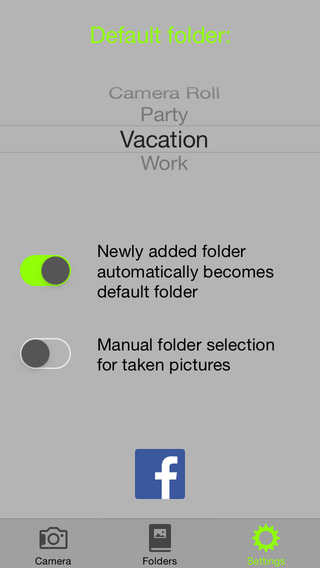
Screenshot 2: http://a3.mzstatic.com/us/r30/Purple4/v4/1c/92/1c/1c921c0b-f8b6-0e24-827a-15ce405246df/screen568x568.jpeg

App Icon: http://a1.mzstatic.com/us/r30/Purple5/v4/b5/a6/f5/b5a6f540-584c-de33-819f-1aed2e9ce879/mzl.hjnzocpk.175x175-75.jpg

Located in Paris, France, Prompter is an independent software company founded by Frank Sdorf in June of 2014. With a focus on the iOS platform, Prompters mission is to provide their customers with efficiency and a pro-active solution to the everyday photo application. All Material and Software (C) Copyright 2014 Prompter. All Rights Reserved. Apple, the Apple logo, iPhone, iPod and iPad are registered trademarks of Apple Inc. in the U.S. and/or other countries. Other trademarks and registered trademarks may be the property of their respective owners.
*******
Link To Article: http://prmac.com/release-id-70372.htm
*******
---------------------------------------------------------------------------------
Note that you can alter delivered distributions at any time.
Login to your account on prMac to alter your channel selection, or to opt-out at any time.
AUT puts student safety first with nationwide personal safety service
A new article has been published at prMac.
AUT puts student safety first with nationwide personal safety service - Published on 09/06/14
New Zealand university first to provide international students with nationwide continuous monitored personal safety service. Upon activation of the 2Life Help, users are linked to call centre operators who will know the caller's location, have access to their personal details, can initiate two-way communication, get them the help they need and more. 2Life Help was initiated by AUT to provide their international students with a safety solution and their parents with peace of mind.
Auckland, New Zealand - This week Auckland University of Technology launches a world first nationwide 24/7 monitored personal safety service for their international students. As international student mobility grows worldwide the number of reported attacks on students has been increasing and students are becoming more aware of the risks they may face when studying abroad. The recent fatal beating of a graduate student from China at a prominent university in California who was walking back to his dorm room after meeting with his study group has escalated concerns on the overall safety and security of international students studying abroad. While many institutions look to upgrade or improve their on campus safety little to nothing is offered to improve student safety off campus.
AUT becomes the first university in the world to offer its students a comprehensive 24/7 monitored, personal safety service both on and off-campus. The service, 2Life Help, is provided by 2Life, an Auckland based technology start-up, in collaboration with Skyhook Wireless (the global leader in location positioning) and First Security (New Zealand's largest security patrol fleet).
"Accurate location information is critical to ensuring a prompt notification, dispatch, arrival and delivery off what often is life-saving assistance," noted Glenn Chapman of First Security. 2Life's location network, software technology and suite of network providers satisfied us it offers the best solution in the market.
Upon activation of the service (by pressing the 2Life Help icon on their smartphone) users are linked to 2Life call centre operators who will know the caller's location, have access to their personal details, can initiate two-way communication, can track their location (even if they are on the move), can evaluate the situation and get them the help they need (Ambulance, Fire, Police, Campus Security, Security Guard Patrol, Vehicle Breakdown Assistance or a Safe Ride Home).
The service was initiated by AUT to provide their international students with a comprehensive personal safety solution during their stay in New Zealand, and their parents with the peace of mind in knowing that if their child requires assistance (of any kind) 2Life will provide it for them.
"For many families when deciding to send their child overseas or to a new town to study their biggest worry is, 'who will help my son or daughter in an emergency? Who can my child turn to for help, if they are lost, confused, frightened or simply find themselves in a distressing or unsafe situation?' Now whenever your child needs help, all they need do is press the 2Life Help icon and we'll get them the help they need," said Mike Hutcheson, Executive Director of 2Life.
In New Zealand 2Life Help is available across all network carriers with a monthly or annual subscription.
2Life Help: http://www.2Life.co.nz
2Life provides mobile safety apps and cloud communication infrastructure for individuals, schools, corporations, and healthcare organizations. 2Life Help is a personal safety service that provides effective health and personal safety protection in all situations by allowing users to connect with trained call centre operators with a touch of an icon from any iPhone, or Android smartphone. Now with the press of an icon users are linked to our call centre operators who will know their location, have access to their personal details, can initiate two-way communication, and track their location (even if they are on the move), evaluate the situation, and get them the help they need be it medical or personal safety. With our combined location technology we offer users the best location coverage outdoors and indoors. Our Indoor Positioning System (IPS) in mapped buildings provides call centre operators with an actionable location: building, floor and room-level location, in multi-story
buildings in dense urban environments. All Material and Software (C) Copyright 2014 2Life. All Rights Reserved. Apple, the Apple logo, iPhone, iPod and iPad are registered trademarks of Apple Inc. in the U.S. and/or other countries. Other trademarks and registered trademarks may be the property of their respective owners.
*******
Link To Article: http://prmac.com/release-id-70363.htm
*******
---------------------------------------------------------------------------------
Note that you can alter delivered distributions at any time.
Login to your account on prMac to alter your channel selection, or to opt-out at any time.
AUT puts student safety first with nationwide personal safety service - Published on 09/06/14
New Zealand university first to provide international students with nationwide continuous monitored personal safety service. Upon activation of the 2Life Help, users are linked to call centre operators who will know the caller's location, have access to their personal details, can initiate two-way communication, get them the help they need and more. 2Life Help was initiated by AUT to provide their international students with a safety solution and their parents with peace of mind.
Auckland, New Zealand - This week Auckland University of Technology launches a world first nationwide 24/7 monitored personal safety service for their international students. As international student mobility grows worldwide the number of reported attacks on students has been increasing and students are becoming more aware of the risks they may face when studying abroad. The recent fatal beating of a graduate student from China at a prominent university in California who was walking back to his dorm room after meeting with his study group has escalated concerns on the overall safety and security of international students studying abroad. While many institutions look to upgrade or improve their on campus safety little to nothing is offered to improve student safety off campus.
AUT becomes the first university in the world to offer its students a comprehensive 24/7 monitored, personal safety service both on and off-campus. The service, 2Life Help, is provided by 2Life, an Auckland based technology start-up, in collaboration with Skyhook Wireless (the global leader in location positioning) and First Security (New Zealand's largest security patrol fleet).
"Accurate location information is critical to ensuring a prompt notification, dispatch, arrival and delivery off what often is life-saving assistance," noted Glenn Chapman of First Security. 2Life's location network, software technology and suite of network providers satisfied us it offers the best solution in the market.
Upon activation of the service (by pressing the 2Life Help icon on their smartphone) users are linked to 2Life call centre operators who will know the caller's location, have access to their personal details, can initiate two-way communication, can track their location (even if they are on the move), can evaluate the situation and get them the help they need (Ambulance, Fire, Police, Campus Security, Security Guard Patrol, Vehicle Breakdown Assistance or a Safe Ride Home).
The service was initiated by AUT to provide their international students with a comprehensive personal safety solution during their stay in New Zealand, and their parents with the peace of mind in knowing that if their child requires assistance (of any kind) 2Life will provide it for them.
"For many families when deciding to send their child overseas or to a new town to study their biggest worry is, 'who will help my son or daughter in an emergency? Who can my child turn to for help, if they are lost, confused, frightened or simply find themselves in a distressing or unsafe situation?' Now whenever your child needs help, all they need do is press the 2Life Help icon and we'll get them the help they need," said Mike Hutcheson, Executive Director of 2Life.
In New Zealand 2Life Help is available across all network carriers with a monthly or annual subscription.
2Life Help: http://www.2Life.co.nz
2Life provides mobile safety apps and cloud communication infrastructure for individuals, schools, corporations, and healthcare organizations. 2Life Help is a personal safety service that provides effective health and personal safety protection in all situations by allowing users to connect with trained call centre operators with a touch of an icon from any iPhone, or Android smartphone. Now with the press of an icon users are linked to our call centre operators who will know their location, have access to their personal details, can initiate two-way communication, and track their location (even if they are on the move), evaluate the situation, and get them the help they need be it medical or personal safety. With our combined location technology we offer users the best location coverage outdoors and indoors. Our Indoor Positioning System (IPS) in mapped buildings provides call centre operators with an actionable location: building, floor and room-level location, in multi-story
buildings in dense urban environments. All Material and Software (C) Copyright 2014 2Life. All Rights Reserved. Apple, the Apple logo, iPhone, iPod and iPad are registered trademarks of Apple Inc. in the U.S. and/or other countries. Other trademarks and registered trademarks may be the property of their respective owners.
*******
Link To Article: http://prmac.com/release-id-70363.htm
*******
---------------------------------------------------------------------------------
Note that you can alter delivered distributions at any time.
Login to your account on prMac to alter your channel selection, or to opt-out at any time.
Innovative App Funky Bots Lets Kids Create Their Own Space Robot Dance
A new article has been published at prMac.
Innovative App Funky Bots Lets Kids Create Their Own Space Robot Dance - Published on 09/06/14
FB LLC has released its innovative new kids app that allows players to create their own space robot dances and set them to swipes and taps. Funky Bots creator Rosa Mei developed the app around the concept of open-ended play for kids. The robots are part of an interactive animated music video featuring eight original tracks by Ethan Beatz and French beatboxer Teddy Guilbaud. Perfect for all ages, the app lets kids play with dancing bots and create their own funky robot dances.
Raleigh, North Carolina - Funky Bots LLC has released its innovative new kids app that allows players to create their own space robot dances and set them to swipes and taps. Funky Bots creator Rosa Mei developed the app around the concept of open-ended play for kids. The robots are part of an interactive animated music video featuring eight original tracks by Ethan Beatz and French beatboxer Teddy Guilbaud. Perfect for all ages, the app lets kids play with dancing bots and create their own funky robot dances.
With this innovative new app, kids can explore the cool Funky Bots universe and play with dancing robots who know how to groove. They create their own dance moves for Kamky, Tekzilla, Uncle G and other members of the Funky Bots crew and set them to swipes and taps. They choose the perfect soundtrack to match their dances, all the while keeping it fresh and funky.
This new app by Funky Bots LLC is also called "Funky Bots." Choreographer Rosa Mei created the app and based all the eight members of the Funky Bots crew (cartoon space robots) on her real life dance company and family. "All the FB characters really are family to me. The guys in my dance company - poppers, bboys, beatboxers and rappers - have performed with me all over the world for 10 years now. Those are the characters Uncle G, Kamky, Champion and Boom Chak. They are my crazy bros. Tycho and Tekzilla are my twins who are now almost 2. My husband was a competitive skateboarder as a kid so I named his bot Thrasher in honor of the epic skate magazine. And I am Mz. Erratik because I am nothing but..."
Mei wanted to create an app with open-ended play. "I really hope the kids who play with Funky Bots will make up wild, crazy dances for every swipe and tap. They can make robot heads orbit around the body. The bots can move tai chi slow or spaz out and freak the beat. There are endless possibilities for play, and the kids can get so much effect by just rotating an arm angle, changing the movement of the hips or varying the tempo of the movements. They can also play with the monitors on the spaceships and make rockets fly. I hope kids have a lot of fun with this app."
Funky Bots features eight original sound tracks by French beatboxer Teddy Guildbaud and Congolese sound producer Ethan Beatz. The music is not the typical stuff you find in kids apps. The first track "Galactic Funk" for example, is a funkstyle remix of the kids classic "Twinkle, Twinkle, Little Star." Says Mei, "Kids like being cool and hip. Hip and funny is key."
As the Funky Bots hop from planet to planet, players can watch Uncle G practice his moves on his spaceship then zoom in the monitor to see Mz. Erratik dancing at the shopping mall in outer space. Tapping and swiping the screen triggers new robots dances in a cool, intergalactic playground.
Features:
* Cool, funky robots dancing in outer space
* A dance editor that lets you create your own dances for all the Funky Bots and set them to swipes and taps
* 8 original soundtracks featuring cool funk style music, beatbox, flute and sax
* Perfect for kids of all ages: toddlers can play with dancing robots and older kids can create new dances, endless possibilities
* No third party ads or in-app purchases
Funky Bots is the second app by Rosa Mei, whose goal is to create a suite of apps that show kids how to "feel the beat and dance forever." Their first app BoomKLAKers, made for toddlers, was featured in the App Store as Best New App in 108 countries and also went to #1 in 23 countries.
Device Requirements:
* iPhone, iPad, and iPod touch
* Requires iOS 6.0 or later
* Optimized for iPhone 5
* 46.0 MB
Pricing and Availability:
Funky Bots - Dancing Space Robots 1.0 is $2.99 USD (or equivalent amount in other currencies) and available worldwide exclusively through the App Store in the Entertainment category.
Funky Bots: http://www.funkybots.com
Funky Bots - Dancing Space Robots 1.0: https://itunes.apple.com/us/app/id909912210
Screenshot 1: http://a2.mzstatic.com/us/r30/Purple4/v4/34/4a/c6/344ac6cb-cd61-9c7f-3f69-9c927773b914/screen480x480.jpeg
Screenshot 2: http://a4.mzstatic.com/us/r30/Purple3/v4/3c/5a/aa/3c5aaae2-6295-d8c1-e658-a6024e4c2d20/screen480x480.jpeg
App Icon: http://a4.mzstatic.com/us/r30/Purple5/v4/89/0c/de/890cde61-ad72-a90e-e0f5-d5d982eb026e/mzl.xpkvjcex.175x175-75.jpg
Based in Antwerpen, Belgium and Los Angeles, USA, Funky Bots was founded in 2014 by Rosa Mei. The Funky Bots team is made up of professional performing artists who are also parents who want kids everywhere to know and love movement and music. Rosa Mei is a choreographer, dancer and martial artist. Artistic Director of Cie 13 (Belgium), she holds an MFA in dance and speaks seven languages. In New York, she created designs for the NBA, NY Knicks, MSG and MTV. In Europe, she has made over 30 pieces for stage and performed in 22 countries throughout the world. She is a proud mother of twins. Originally from Nantes, France, Teddy Guilbaud is a beatboxer extraordinaire, percussionist and jazz musician. He is also a mad slam and rap artist. In addition to his collaborations with Cie 13, he also creates music for Cirque Equinoctis (an equestrian circus). The programming team behind Funky Bots consists of Maya Milusheva and Mihail Minkov, founders of Plushie Games in Sofia, Bulgaria. They
are superstars in the underground hacking community. (C) 2014 Funky Bots LLC / All Rights Reserved. Apple, the Apple logo, iPod, the iPod logo, are registered trademarks of Apple Computer in the U.S. and/or other countries.
*******
Link To Article: http://prmac.com/release-id-70317.htm
*******
---------------------------------------------------------------------------------
Note that you can alter delivered distributions at any time.
Login to your account on prMac to alter your channel selection, or to opt-out at any time.
Innovative App Funky Bots Lets Kids Create Their Own Space Robot Dance - Published on 09/06/14
FB LLC has released its innovative new kids app that allows players to create their own space robot dances and set them to swipes and taps. Funky Bots creator Rosa Mei developed the app around the concept of open-ended play for kids. The robots are part of an interactive animated music video featuring eight original tracks by Ethan Beatz and French beatboxer Teddy Guilbaud. Perfect for all ages, the app lets kids play with dancing bots and create their own funky robot dances.
Raleigh, North Carolina - Funky Bots LLC has released its innovative new kids app that allows players to create their own space robot dances and set them to swipes and taps. Funky Bots creator Rosa Mei developed the app around the concept of open-ended play for kids. The robots are part of an interactive animated music video featuring eight original tracks by Ethan Beatz and French beatboxer Teddy Guilbaud. Perfect for all ages, the app lets kids play with dancing bots and create their own funky robot dances.
With this innovative new app, kids can explore the cool Funky Bots universe and play with dancing robots who know how to groove. They create their own dance moves for Kamky, Tekzilla, Uncle G and other members of the Funky Bots crew and set them to swipes and taps. They choose the perfect soundtrack to match their dances, all the while keeping it fresh and funky.
This new app by Funky Bots LLC is also called "Funky Bots." Choreographer Rosa Mei created the app and based all the eight members of the Funky Bots crew (cartoon space robots) on her real life dance company and family. "All the FB characters really are family to me. The guys in my dance company - poppers, bboys, beatboxers and rappers - have performed with me all over the world for 10 years now. Those are the characters Uncle G, Kamky, Champion and Boom Chak. They are my crazy bros. Tycho and Tekzilla are my twins who are now almost 2. My husband was a competitive skateboarder as a kid so I named his bot Thrasher in honor of the epic skate magazine. And I am Mz. Erratik because I am nothing but..."
Mei wanted to create an app with open-ended play. "I really hope the kids who play with Funky Bots will make up wild, crazy dances for every swipe and tap. They can make robot heads orbit around the body. The bots can move tai chi slow or spaz out and freak the beat. There are endless possibilities for play, and the kids can get so much effect by just rotating an arm angle, changing the movement of the hips or varying the tempo of the movements. They can also play with the monitors on the spaceships and make rockets fly. I hope kids have a lot of fun with this app."
Funky Bots features eight original sound tracks by French beatboxer Teddy Guildbaud and Congolese sound producer Ethan Beatz. The music is not the typical stuff you find in kids apps. The first track "Galactic Funk" for example, is a funkstyle remix of the kids classic "Twinkle, Twinkle, Little Star." Says Mei, "Kids like being cool and hip. Hip and funny is key."
As the Funky Bots hop from planet to planet, players can watch Uncle G practice his moves on his spaceship then zoom in the monitor to see Mz. Erratik dancing at the shopping mall in outer space. Tapping and swiping the screen triggers new robots dances in a cool, intergalactic playground.
Features:
* Cool, funky robots dancing in outer space
* A dance editor that lets you create your own dances for all the Funky Bots and set them to swipes and taps
* 8 original soundtracks featuring cool funk style music, beatbox, flute and sax
* Perfect for kids of all ages: toddlers can play with dancing robots and older kids can create new dances, endless possibilities
* No third party ads or in-app purchases
Funky Bots is the second app by Rosa Mei, whose goal is to create a suite of apps that show kids how to "feel the beat and dance forever." Their first app BoomKLAKers, made for toddlers, was featured in the App Store as Best New App in 108 countries and also went to #1 in 23 countries.
Device Requirements:
* iPhone, iPad, and iPod touch
* Requires iOS 6.0 or later
* Optimized for iPhone 5
* 46.0 MB
Pricing and Availability:
Funky Bots - Dancing Space Robots 1.0 is $2.99 USD (or equivalent amount in other currencies) and available worldwide exclusively through the App Store in the Entertainment category.
Funky Bots: http://www.funkybots.com
Funky Bots - Dancing Space Robots 1.0: https://itunes.apple.com/us/app/id909912210
Screenshot 1: http://a2.mzstatic.com/us/r30/Purple4/v4/34/4a/c6/344ac6cb-cd61-9c7f-3f69-9c927773b914/screen480x480.jpeg

Screenshot 2: http://a4.mzstatic.com/us/r30/Purple3/v4/3c/5a/aa/3c5aaae2-6295-d8c1-e658-a6024e4c2d20/screen480x480.jpeg

App Icon: http://a4.mzstatic.com/us/r30/Purple5/v4/89/0c/de/890cde61-ad72-a90e-e0f5-d5d982eb026e/mzl.xpkvjcex.175x175-75.jpg

Based in Antwerpen, Belgium and Los Angeles, USA, Funky Bots was founded in 2014 by Rosa Mei. The Funky Bots team is made up of professional performing artists who are also parents who want kids everywhere to know and love movement and music. Rosa Mei is a choreographer, dancer and martial artist. Artistic Director of Cie 13 (Belgium), she holds an MFA in dance and speaks seven languages. In New York, she created designs for the NBA, NY Knicks, MSG and MTV. In Europe, she has made over 30 pieces for stage and performed in 22 countries throughout the world. She is a proud mother of twins. Originally from Nantes, France, Teddy Guilbaud is a beatboxer extraordinaire, percussionist and jazz musician. He is also a mad slam and rap artist. In addition to his collaborations with Cie 13, he also creates music for Cirque Equinoctis (an equestrian circus). The programming team behind Funky Bots consists of Maya Milusheva and Mihail Minkov, founders of Plushie Games in Sofia, Bulgaria. They
are superstars in the underground hacking community. (C) 2014 Funky Bots LLC / All Rights Reserved. Apple, the Apple logo, iPod, the iPod logo, are registered trademarks of Apple Computer in the U.S. and/or other countries.
*******
Link To Article: http://prmac.com/release-id-70317.htm
*******
---------------------------------------------------------------------------------
Note that you can alter delivered distributions at any time.
Login to your account on prMac to alter your channel selection, or to opt-out at any time.
PhatWare releases WritePad Pro 1.4 - Featuring Improved Note-Taking
A new article has been published at prMac.
PhatWare releases WritePad Pro 1.4 - Featuring Improved Note-Taking - Published on 09/06/14
PhatWare Corporation has released WritePad Pro 1.4, the advanced word processing, note-taking, and handwriting recognition app for iPhone and iPad. Building upon WritePad's powerful handwriting recognition technology, version 1.4 features numerous improvements, including improved support for Adonit Jot stylus, improved handwriting recognition, updated spell checker dictionaries, custom date formats, dynamic word suggestions, and other performance and stability improvements.
Spokane, Washington - PhatWare Corporation, a leading professional software and application developer, has released WritePad Pro 1.4, the advanced word processing, note-taking, and handwriting recognition app for iPhone and iPad. WritePad Pro 1.4 features numerous improvements, all of which are based on feedback we received from WritePad users. These features include improved support for Adonit Jot stylus, improved handwriting recognition, updated spell checker dictionaries, custom date formats, dynamic word suggestions (when writing in the full screen mode), and other performance and stability improvements. Find out more about WritePad Pro by visiting PhatWare online.
WritePad Pro, which builds upon WritePad's powerful handwriting recognition technology, adds rich text editing which can be combined with images, custom drawings, and text. The app also integrates with various system resources such as email, contacts, maps, iCloud, social networks, and others. WritePad Pro creates HTML and PDF documents and can open text, Microsoft Word, RTF and HTML files for editing.
For those who collaborate with people in other countries, WritePad Pro offers superior integration with an online language translator. Notes can be written in English, for example, which can be automatically converted to Spanish or fifteen other common languages.
To speed-up note-taking, WritePad Pro offers advanced shorthand features, which enables users to format text using written commands. Users can scribble shorthand commands to change the font, paragraph, and other formatting options, insert emotions emoticons and user-defined text blocks, invoke translator, maps and other system resources, and much more. Documents can further be synchronized with Box, Dropbox, Evernote, Google Drive, iCloud, and Microsoft OneDrive.
WritePad Pro was featured today on NewsWatch on the History Channel. The video is available on YouTube.
Pricing and Availability:
WritePad Pro 1.4 is a universal app for both iPhone and iPad and is available now in the iTunes App Store and is priced at $9.99 (USD). However, is currently sold for only $0.99 as a part of PhatWare's Back to School offer (offer ends 9/1/2014). WritePad Pro 1.4 is a free update for existing WritePad Pro users. For more information about the app and to purchase or download the update, please visit the PhatWare website.
PhatWare: http://www.phatware.com/
WritePad Pro 1.4: http://www.phatware.com/index.php?q=page/writepadpro/ipad#
Purchase and Download: https://itunes.apple.com/app/writepad-pro./id797238295
YouTube Video: https://www.youtube.com/watch?v=WBalEksWvnA
Screenshot: http://www.phatware.com/_components/page/writepadpro/media/iPad1.png
App Icon: http://a5.mzstatic.com/us/r30/Purple5/v4/f1/b1/ed/f1b1ed52-c9f6-84d7-f279-10efe6b32dbd/mzl.exgkgoml.175x175-75.jpg
Founded in October 1997, PhatWare Corporation is a leading provider of easy to use powerful software products and professional services for the mobile and desktop computing marketplace. PhatWare specializes in handwriting recognition, digital ink, note taking and database, and network management software development. PhatWare's products include such popular titles as CalliGrapher(R), PenOffice(R), PhatNotes(TM), PhatPad(TM), WritePad(TM), and others. PhatWare Corporation is a Microsoft Certified Partner, and Intel Software Partner. Copyright (C) 1997-2014 PhatWare Corporation. All Rights Reserved. PhatWare, PhatPad, PenOffice, and WritePad are registered trademarks of PhatWare Corp. in the U.S. and/or other countries. Apple, the Apple logo, iPhone and iPod are registered trademarks of Apple Inc. in the U.S. and/or other countries.
*******
Link To Article: http://prmac.com/release-id-70316.htm
*******
---------------------------------------------------------------------------------
Note that you can alter delivered distributions at any time.
Login to your account on prMac to alter your channel selection, or to opt-out at any time.
PhatWare releases WritePad Pro 1.4 - Featuring Improved Note-Taking - Published on 09/06/14
PhatWare Corporation has released WritePad Pro 1.4, the advanced word processing, note-taking, and handwriting recognition app for iPhone and iPad. Building upon WritePad's powerful handwriting recognition technology, version 1.4 features numerous improvements, including improved support for Adonit Jot stylus, improved handwriting recognition, updated spell checker dictionaries, custom date formats, dynamic word suggestions, and other performance and stability improvements.
Spokane, Washington - PhatWare Corporation, a leading professional software and application developer, has released WritePad Pro 1.4, the advanced word processing, note-taking, and handwriting recognition app for iPhone and iPad. WritePad Pro 1.4 features numerous improvements, all of which are based on feedback we received from WritePad users. These features include improved support for Adonit Jot stylus, improved handwriting recognition, updated spell checker dictionaries, custom date formats, dynamic word suggestions (when writing in the full screen mode), and other performance and stability improvements. Find out more about WritePad Pro by visiting PhatWare online.
WritePad Pro, which builds upon WritePad's powerful handwriting recognition technology, adds rich text editing which can be combined with images, custom drawings, and text. The app also integrates with various system resources such as email, contacts, maps, iCloud, social networks, and others. WritePad Pro creates HTML and PDF documents and can open text, Microsoft Word, RTF and HTML files for editing.
For those who collaborate with people in other countries, WritePad Pro offers superior integration with an online language translator. Notes can be written in English, for example, which can be automatically converted to Spanish or fifteen other common languages.
To speed-up note-taking, WritePad Pro offers advanced shorthand features, which enables users to format text using written commands. Users can scribble shorthand commands to change the font, paragraph, and other formatting options, insert emotions emoticons and user-defined text blocks, invoke translator, maps and other system resources, and much more. Documents can further be synchronized with Box, Dropbox, Evernote, Google Drive, iCloud, and Microsoft OneDrive.
WritePad Pro was featured today on NewsWatch on the History Channel. The video is available on YouTube.
Pricing and Availability:
WritePad Pro 1.4 is a universal app for both iPhone and iPad and is available now in the iTunes App Store and is priced at $9.99 (USD). However, is currently sold for only $0.99 as a part of PhatWare's Back to School offer (offer ends 9/1/2014). WritePad Pro 1.4 is a free update for existing WritePad Pro users. For more information about the app and to purchase or download the update, please visit the PhatWare website.
PhatWare: http://www.phatware.com/
WritePad Pro 1.4: http://www.phatware.com/index.php?q=page/writepadpro/ipad#
Purchase and Download: https://itunes.apple.com/app/writepad-pro./id797238295
YouTube Video: https://www.youtube.com/watch?v=WBalEksWvnA
Screenshot: http://www.phatware.com/_components/page/writepadpro/media/iPad1.png

App Icon: http://a5.mzstatic.com/us/r30/Purple5/v4/f1/b1/ed/f1b1ed52-c9f6-84d7-f279-10efe6b32dbd/mzl.exgkgoml.175x175-75.jpg

Founded in October 1997, PhatWare Corporation is a leading provider of easy to use powerful software products and professional services for the mobile and desktop computing marketplace. PhatWare specializes in handwriting recognition, digital ink, note taking and database, and network management software development. PhatWare's products include such popular titles as CalliGrapher(R), PenOffice(R), PhatNotes(TM), PhatPad(TM), WritePad(TM), and others. PhatWare Corporation is a Microsoft Certified Partner, and Intel Software Partner. Copyright (C) 1997-2014 PhatWare Corporation. All Rights Reserved. PhatWare, PhatPad, PenOffice, and WritePad are registered trademarks of PhatWare Corp. in the U.S. and/or other countries. Apple, the Apple logo, iPhone and iPod are registered trademarks of Apple Inc. in the U.S. and/or other countries.
*******
Link To Article: http://prmac.com/release-id-70316.htm
*******
---------------------------------------------------------------------------------
Note that you can alter delivered distributions at any time.
Login to your account on prMac to alter your channel selection, or to opt-out at any time.
Subscribe to:
Posts (Atom)