A new article has been published at prMac.
The New Synopsis App Allows Users To Summarize Any PDF Document - Published on 10/02/14
The recently launched Synopsis app from Milestonepoint Technologies JLT, allows users to summarize documents as they read and easily create customized flash cards without any additional manual effort. All of these flashcards can be created on the go. Once each flashcard is saved, they can be viewed on any smartphone. Teachers and students can even share the flashcards they have created to make it easy for anyone to access and avoid duplication of work.
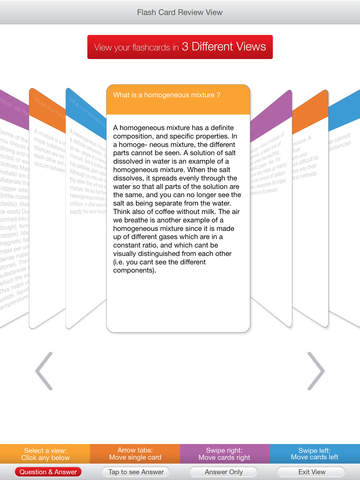
Cupertino, California - Milestonepoint Technologies JLT announces the recent launch of their Synopsis App, which aims at making the learning process more simple, less manual and more efficient. It's an iPad app for students that lets users open up and read any PDF document and create notes by highlighting different sections of the text. Users can then modify the notes they have created by adding their own text. This free app then helps users summarize the document that they have read, so that they won't need to go back to it again. Each individual note can be converted to its own flashcard and there is no need to buy flashcards or manually type and create flashcards.
All of these flashcards can be created on the go, as the user reads through their study material on an iPad. Once each flashcard is saved, they can be viewed on any smartphone, so it's easy to study from anywhere. Teachers and students can even share the flashcards they have created to make it easy for anyone to access and avoid duplication of work.
Here's a synopsis of 'Synopsis':
* A very simple reader with only the tools a user requires
* Read PDF Documents and highlight important points in the document
* All highlighted points from a PDF document are automatically copied into the Notes Module of Synopsis
* Access the Notes area and fine tune the highlighted notes
* Create manual Notes
* Modify notes
* Create a flow/structure for the notes created in any order of preference
* Creating Titles and Headings for the created Notes
* Export it as a PDF file
* Export it as a Notes file that can be shared with colleagues, friends or study mates
* Print a PDF Document directly
* Saving user created Notes as a PDF or as a raw XML file for future use
* All these Notes can be converted into Flash Cards which can be accessed from the Flash Cards module of Synopsis
* Review flash cards
* Edit Flash Cards
* Change the order of the Flash Cards
* Save Flash Cards and share it with anyone
* Review the Flash Cards in any latest generation mobile device via web browser
* All documents - PDF, Notes Files, Flash Card Files, Web URL's - are accessed using cloud services or the Internet. Considering the difficulty in remembering the location of all these links, Synopsis provides a Library to save all these cloud services links
* Open libraries and folders within these libraries
* Tag each library and folder
* Save all recently opened connections to the user created libraries and folders
* Create a backup of the library created
Device Requirements:
* Compatible with iPad
* Requires iOS 7.0 or later
* 24.1 MB
Pricing and Availability:
Synopsis 1.0.5 is free and available worldwide exclusively through the App Store in the Education category. The app is available in English but documents in other languages can also be opened.
Synopsis 1.0.5: http://apps.appshout.com/synopsis/
More info: https://www.mysynopsisapp.com/
Download from iTunes: https://itunes.apple.com/app/synopsis/id721350119
Screenshot: http://a4.mzstatic.com/us/r30/Purple1/v4/64/2f/b1/642fb1ad-17a2-6e72-2dc7-07e3cf34d015/screen480x480.jpeg
App Icon: http://apps.appshout.com/synopsis/images/icon.png
Headquartered in Dubai, United Arab Emirates, Milestonepoint Technologies JLT, is a startup mobile application developer and publisher of educational, productivity and social networking apps. All Material and Software (C) Copyright 2014 Milestonepoint Technologies JLT. All Rights Reserved. Apple, the Apple logo, iPhone, iPod and iPad are registered trademarks of Apple Inc. in the U.S. and/or other countries. Other trademarks and registered trademarks may be the property of their respective owners.
*******
Link To Article: http://prmac.com/release-id-70888.htm
*******
---------------------------------------------------------------------------------
Note that you can alter delivered distributions at any time.
Login to your account on prMac to alter your channel selection, or to opt-out at any time.


Tecworks And Comic Designers Sketch and Breakfast Launch Felinia's World
A new article has been published at prMac.
Tecworks And Comic Designers Sketch and Breakfast Launch Felinia's World - Published on 10/02/14
Tecworks announces the first game created in conjunction with the renowned Italian comic designers Sketch & Breakfast, authors of the comic characters Felinia and Ribosio, two controversial personalities, struggling with everyday life problems. Felinia must pass all the crazy traps and tricks and collect coins to unlock the final kitchen level to rescue her friend. Help her cross 5 incredible food worlds, full of magic, fantasy, and realistic physics in fun-to-play action arcade style.
Cupertino, California - Tecworks announces the first game created in conjunction with the renowned Italian comic designers Sketch & Breakfast, authors of the comic characters Felinia and Ribosio, two controversial personalities, struggling with everyday life problems. Simona Zulian and Andrea Ribaudo, two famous comic designers, published their first game, inspired to their comics characters Felinia and Ribosio.
With over 200.000 fans in Italy, loving Felina that young crazy girl; short, fat, with lot of cats around whilst bad acting and crazy with a disrespectful and weird personality. the game features a fully animated Felinia, where the genius of the two artist portrays Felina and Ribosio cooking the "perfect pizza", a pizza so perfect that it becomes alive and kidnaps Ribosio with the plan of cooking and eating him to avenge all world's pizzas. Felinia will encounter five incredible food-based worlds full of magic, fantasy, realistic physics, and including a wide range of puzzling strategy in pure action arcade style.
Each of the five incredible worlds features a rich detailed graphical environment, an arcade gameplay engine, mind breaking puzzles, course tracking, strategy levels, great theme music, amazing battles, spectacular food design and rich detailed cartoon graphics. Felinia must pass all the crazy traps and tricks and collect coins to unlock the final kitchen level to rescue her friend.
The main game features:
* Interactive touch controls to run, jump, cat shoot, super jump, turbo run super speed and use super vision with the magic eye view gadget
* 5 Levels each with unique game design and original food theme graphics: Food Land forest, Sea Food water river, Dark Roast creek, Sweet Fantasy farm and the Hell Kitchen for the final battle
* 25 Scenes of progressing difficulty for each level with great dynamic gameplay challenge and realistic gravity physics
* Use springs to jump across rivers, holes, pools, poles, puddles, caramel, houses, cracks, boats, trees, barrels, rocks, ice cream, sweets, salad, spoons, soups, candies, cliffs and automatic springs to jump across scenes
* Extremely funny battles with cats against living food
* Use chocolate to boost performance to fight sausages, parmesan and pizza enemies
* Funny dance sequences upon completion of each world with Felinia dancing with cats
* Collect coins to access the kitchen, fight the queen and rescue Ribosio
* Use the magic well to collect infinite coins
Device Requirements:
* iPhone, iPad, and iPod touch
* Requires iOS 5.0 or later
* 45.4 MB
Pricing and Availability:
Felinia's World Free 1.5 is available worldwide exclusively through the App Store in the Games category.
Tecworks: http://jined.ddns.net/
Felinia's World Free 1.5: http://apps.appshout.com/felinias-world/
Download from iTunes: https://itunes.apple.com/app/felinias-world-free/id917369841
Download from Google Play: https://play.google.com/store/apps/details?id=com.tecworks.feliniasworldfree
Screenshot: http://a5.mzstatic.com/us/r30/Purple4/v4/54/c1/9c/54c19c53-5b0b-9e8f-2460-43ce59c8a284/screen480x480.jpeg
App Icon: http://apps.appshout.com/felinias-world/images/icon.png
Based in Rome, Italy and founded by Karim Benaddi, Tecworks are an independent mobile development company focussing on the development of mobile games. Karim has an extensive background of software development producing software for Nokia, Android and iOS platforms as well as working as part of the development team for "Return to Castlerama," a 3D mobile fantasy game which uses the revolutionary Unreal graphics engine. All Material and Software (C) Copyright 2014 Karim Benaddi. All Rights Reserved. Apple, the Apple logo, iPhone, iPod and iPad are registered trademarks of Apple Inc. in the U.S. and/or other countries. Other trademarks and registered trademarks may be the property of their respective owners.
*******
Link To Article: http://prmac.com/release-id-70887.htm
*******
---------------------------------------------------------------------------------
Note that you can alter delivered distributions at any time.
Login to your account on prMac to alter your channel selection, or to opt-out at any time.
Tecworks And Comic Designers Sketch and Breakfast Launch Felinia's World - Published on 10/02/14
Tecworks announces the first game created in conjunction with the renowned Italian comic designers Sketch & Breakfast, authors of the comic characters Felinia and Ribosio, two controversial personalities, struggling with everyday life problems. Felinia must pass all the crazy traps and tricks and collect coins to unlock the final kitchen level to rescue her friend. Help her cross 5 incredible food worlds, full of magic, fantasy, and realistic physics in fun-to-play action arcade style.
Cupertino, California - Tecworks announces the first game created in conjunction with the renowned Italian comic designers Sketch & Breakfast, authors of the comic characters Felinia and Ribosio, two controversial personalities, struggling with everyday life problems. Simona Zulian and Andrea Ribaudo, two famous comic designers, published their first game, inspired to their comics characters Felinia and Ribosio.
With over 200.000 fans in Italy, loving Felina that young crazy girl; short, fat, with lot of cats around whilst bad acting and crazy with a disrespectful and weird personality. the game features a fully animated Felinia, where the genius of the two artist portrays Felina and Ribosio cooking the "perfect pizza", a pizza so perfect that it becomes alive and kidnaps Ribosio with the plan of cooking and eating him to avenge all world's pizzas. Felinia will encounter five incredible food-based worlds full of magic, fantasy, realistic physics, and including a wide range of puzzling strategy in pure action arcade style.
Each of the five incredible worlds features a rich detailed graphical environment, an arcade gameplay engine, mind breaking puzzles, course tracking, strategy levels, great theme music, amazing battles, spectacular food design and rich detailed cartoon graphics. Felinia must pass all the crazy traps and tricks and collect coins to unlock the final kitchen level to rescue her friend.
The main game features:
* Interactive touch controls to run, jump, cat shoot, super jump, turbo run super speed and use super vision with the magic eye view gadget
* 5 Levels each with unique game design and original food theme graphics: Food Land forest, Sea Food water river, Dark Roast creek, Sweet Fantasy farm and the Hell Kitchen for the final battle
* 25 Scenes of progressing difficulty for each level with great dynamic gameplay challenge and realistic gravity physics
* Use springs to jump across rivers, holes, pools, poles, puddles, caramel, houses, cracks, boats, trees, barrels, rocks, ice cream, sweets, salad, spoons, soups, candies, cliffs and automatic springs to jump across scenes
* Extremely funny battles with cats against living food
* Use chocolate to boost performance to fight sausages, parmesan and pizza enemies
* Funny dance sequences upon completion of each world with Felinia dancing with cats
* Collect coins to access the kitchen, fight the queen and rescue Ribosio
* Use the magic well to collect infinite coins
Device Requirements:
* iPhone, iPad, and iPod touch
* Requires iOS 5.0 or later
* 45.4 MB
Pricing and Availability:
Felinia's World Free 1.5 is available worldwide exclusively through the App Store in the Games category.
Tecworks: http://jined.ddns.net/
Felinia's World Free 1.5: http://apps.appshout.com/felinias-world/
Download from iTunes: https://itunes.apple.com/app/felinias-world-free/id917369841
Download from Google Play: https://play.google.com/store/apps/details?id=com.tecworks.feliniasworldfree
Screenshot: http://a5.mzstatic.com/us/r30/Purple4/v4/54/c1/9c/54c19c53-5b0b-9e8f-2460-43ce59c8a284/screen480x480.jpeg

App Icon: http://apps.appshout.com/felinias-world/images/icon.png

Based in Rome, Italy and founded by Karim Benaddi, Tecworks are an independent mobile development company focussing on the development of mobile games. Karim has an extensive background of software development producing software for Nokia, Android and iOS platforms as well as working as part of the development team for "Return to Castlerama," a 3D mobile fantasy game which uses the revolutionary Unreal graphics engine. All Material and Software (C) Copyright 2014 Karim Benaddi. All Rights Reserved. Apple, the Apple logo, iPhone, iPod and iPad are registered trademarks of Apple Inc. in the U.S. and/or other countries. Other trademarks and registered trademarks may be the property of their respective owners.
*******
Link To Article: http://prmac.com/release-id-70887.htm
*******
---------------------------------------------------------------------------------
Note that you can alter delivered distributions at any time.
Login to your account on prMac to alter your channel selection, or to opt-out at any time.
kEmoji brings themes, custom emoji, and more via iOS 8 keyboard
A new article has been published at prMac.
kEmoji brings themes, custom emoji, and more via iOS 8 keyboard - Published on 10/02/14
Boston based Atlantia Software today unveiled kEmoji 1.0.1, an all new iOS 8 Custom Emoji Keyboard. The app improves upon the default emoji keyboard by adding the ability to apply new color themes, a contextual search feature that produces suggested emoji based on text you've already typed, and even provides several packs of custom "kEmoji" (emoticons and GIFs that go above and beyond the Unicode emoji) that can be used in any app, directly from the keyboard.
Boston, Massachusetts - Atlantia Software today unveiled kEmoji, an all new iOS 8 Custom Emoji Keyboard. The app improves upon the default emoji keyboard by adding the ability to apply new color themes, a contextual search feature that produces suggested emoji based on text you've already typed, and even provides several packs of custom "kEmoji" (emoticons and GIFs that go above and beyond the Unicode emoji) that can be used in any app, directly from the keyboard. To round things out, users will find a new "Top Emoji" section that tracks the emoji you've used the most over time, a list view for seeing the short description of any emoji, and even standard alphanumeric keyboards that are also theme-able.
kEmoji was created by a two-person team consisting of developer Nick Bonatsakis and his counter-part product visionary, designer, and marketer, Will Philbrick. "As soon as we saw the announcement around custom keyboards in iOS 8, we knew we wanted to take the default emoji keyboard to the next level", said Philbrick when asked about the motivation behind the app. "We felt strongly that people would love personalizing their keyboard experience, so we built a really awesome theme builder and packed the app full of great pre-built themes as well.
Additionally, we saw how limiting the standard Unicode emoji set can be, so we created a very convenient system for using totally new emoji and GIFs that we're calling 'kEmojis' so that we can provide a virtually limitless number of new emoji over time." Regarding some of the usability improvements, Bonatsakis added, "I really love the contextual search and Top Emoji sections in particular. To me, its all about how we can make it easer for a user to find the emoji they want for a particular message and get out quickly."
Device Requirements:
* iPhone, iPad, and iPod touch
* Requires iOS 8.0 or later
* Optimized for iPhone 5, iPhone 6, and iPhone 6 Plus
* 19.1 MB
Pricing and Availability:
kEmoji 1.0.1 is only $0.99 USD (or equivalent amount in other currencies) and available worldwide exclusively through the App Store in the Utilities category.
kEmoji 1.0.1: http://kemojiapp.com
Download from iTunes: https://itunes.apple.com/app/id910383429
YouTube Video (Preview): https://www.youtube.com/watch?v=ulddHkFhAiA
Screenshot: http://kemojiapp.com/kemoji/img/main.png
App Icon: http://www.kemojiapp.com/img/kemojiapplarge.png
Press Kit (zip): http://www.kemojiapp.com/kemoji/press/kEmoji_PressKit.zip
Located in Boston, Massachusetts, Atlantia Software is a private development company dedicated to the creation of high quality software products, with a primary focus on iOS, OS X, and Web. The company strives to produce applications that are easy to use, and rich in functionality. Their position as a small organization allows them to interact with thir customers at a more intimate level, providing first rate support and an ever-open ear. Atlantia has released several highly acclaimed apps as well as countless beautifully designed websites. Check out their apps or hire them for your next software project. Copyright (C) 2014 Atlantia Software LLC. All Rights Reserved. Apple, the Apple logo, iPhone, iPad, iPad mini, iPod touch, and Mac are registered trademarks of Apple Inc. in the U.S. and/or other countries. Other trademarks and registered trademarks may be the property of their respective owners.
*******
Link To Article: http://prmac.com/release-id-70881.htm
*******
---------------------------------------------------------------------------------
Note that you can alter delivered distributions at any time.
Login to your account on prMac to alter your channel selection, or to opt-out at any time.
kEmoji brings themes, custom emoji, and more via iOS 8 keyboard - Published on 10/02/14
Boston based Atlantia Software today unveiled kEmoji 1.0.1, an all new iOS 8 Custom Emoji Keyboard. The app improves upon the default emoji keyboard by adding the ability to apply new color themes, a contextual search feature that produces suggested emoji based on text you've already typed, and even provides several packs of custom "kEmoji" (emoticons and GIFs that go above and beyond the Unicode emoji) that can be used in any app, directly from the keyboard.
Boston, Massachusetts - Atlantia Software today unveiled kEmoji, an all new iOS 8 Custom Emoji Keyboard. The app improves upon the default emoji keyboard by adding the ability to apply new color themes, a contextual search feature that produces suggested emoji based on text you've already typed, and even provides several packs of custom "kEmoji" (emoticons and GIFs that go above and beyond the Unicode emoji) that can be used in any app, directly from the keyboard. To round things out, users will find a new "Top Emoji" section that tracks the emoji you've used the most over time, a list view for seeing the short description of any emoji, and even standard alphanumeric keyboards that are also theme-able.
kEmoji was created by a two-person team consisting of developer Nick Bonatsakis and his counter-part product visionary, designer, and marketer, Will Philbrick. "As soon as we saw the announcement around custom keyboards in iOS 8, we knew we wanted to take the default emoji keyboard to the next level", said Philbrick when asked about the motivation behind the app. "We felt strongly that people would love personalizing their keyboard experience, so we built a really awesome theme builder and packed the app full of great pre-built themes as well.
Additionally, we saw how limiting the standard Unicode emoji set can be, so we created a very convenient system for using totally new emoji and GIFs that we're calling 'kEmojis' so that we can provide a virtually limitless number of new emoji over time." Regarding some of the usability improvements, Bonatsakis added, "I really love the contextual search and Top Emoji sections in particular. To me, its all about how we can make it easer for a user to find the emoji they want for a particular message and get out quickly."
Device Requirements:
* iPhone, iPad, and iPod touch
* Requires iOS 8.0 or later
* Optimized for iPhone 5, iPhone 6, and iPhone 6 Plus
* 19.1 MB
Pricing and Availability:
kEmoji 1.0.1 is only $0.99 USD (or equivalent amount in other currencies) and available worldwide exclusively through the App Store in the Utilities category.
kEmoji 1.0.1: http://kemojiapp.com
Download from iTunes: https://itunes.apple.com/app/id910383429
YouTube Video (Preview): https://www.youtube.com/watch?v=ulddHkFhAiA
Screenshot: http://kemojiapp.com/kemoji/img/main.png

App Icon: http://www.kemojiapp.com/img/kemojiapplarge.png

Press Kit (zip): http://www.kemojiapp.com/kemoji/press/kEmoji_PressKit.zip
Located in Boston, Massachusetts, Atlantia Software is a private development company dedicated to the creation of high quality software products, with a primary focus on iOS, OS X, and Web. The company strives to produce applications that are easy to use, and rich in functionality. Their position as a small organization allows them to interact with thir customers at a more intimate level, providing first rate support and an ever-open ear. Atlantia has released several highly acclaimed apps as well as countless beautifully designed websites. Check out their apps or hire them for your next software project. Copyright (C) 2014 Atlantia Software LLC. All Rights Reserved. Apple, the Apple logo, iPhone, iPad, iPad mini, iPod touch, and Mac are registered trademarks of Apple Inc. in the U.S. and/or other countries. Other trademarks and registered trademarks may be the property of their respective owners.
*******
Link To Article: http://prmac.com/release-id-70881.htm
*******
---------------------------------------------------------------------------------
Note that you can alter delivered distributions at any time.
Login to your account on prMac to alter your channel selection, or to opt-out at any time.
Imagineer Celebrates the Season with its Annual Halloween Video Contest
A new article has been published at prMac.
Imagineer Celebrates the Season with its Annual Halloween Video Contest - Published on 10/02/14
Imagineer Systems is again on the lookout for the year's most horrifying, or most hysterical, Halloween short film. Eligible videos must include the use of mocha Pro, mocha Plus, mocha AE, or mocha HitFilm features, such as planar tracking, rotoscoping, screen inserts, and more. The videos will win a number of software prizes from Imagineer Systems and several contest partners. Enter before Halloween (by midnight, Thursday, October 30th) for a chance to take part in the frightening fun!
Guildford, UK - Imagineer Systems, creators of the Academy Award-winning mocha(R) planar tracking technology, is again on the lookout for the year's most horrifying, or most hysterical, Halloween short film. The Halloween-inspired videos will win a number of software prizes from Imagineer Systems and contest partners Boris FX, FXHome, Rampant Design, Red Giant and Digital Anarchy.
Eligible videos must include the use of mocha Pro, mocha Plus, mocha AE, or mocha HitFilm features, such as planar tracking, rotoscoping, screen inserts, 3D camera solve and object removal - the more creative the use, the better. Submissions will be judged on creativity and quality of visual effects. Enter before Halloween (by midnight, Thursday, October 30th) for a chance to take part in the frightening fun! For more information, and for video inspiration and hints, please visit the Imagineer Systems Halloween Contest website.
How to Enter:
* Create a short Halloween-inspired video using mocha Pro, mocha Plus, mocha AE or mocha HitFilm, no longer than five minutes. Submissions can be scary, spooky or silly
* Upload the video to YouTube or Vimeo, and tag it with "mocha Halloween 2014"
* Email the video link, full name and email address to mocha@imagineersystems.com
* All submissions must be received by midnight on Thursday, October 30th, 2014
The Prizes:
* mocha Pro 4: Academy Award-winning visual effects tool (Imagineer Systems; retail: 1495 USD)
* Continuum Complete 9 AE: Adobe After Effects CC and Premiere Pro CC's most comprehensive VFX plug-in suite (Boris FX; retail: 995 USD)
* HitFilm 2 Ultimate: Essential editing package including 150 effects and groundbreaking 3D compositing (FXHome; retail: 399 USD)
* Rampant Design Tools: Simple drag-and-drop QuickTime-based effects (Rampant Design; retail: 399 USD)
* Beauty Box: Digital makeup artist quality skin retouching video plug-in for After Effects, Final Cut Pro, Premiere Pro and OpenFX (Digital Anarchy; retail: 199 USD)
* Red Giant Universe: One-year subscription. A community with access to an ever-expanding library of new FREE tools for filmmakers, editors, VFX artists, and motion designers. (Red Giant; retail $99 USD)
Imagineer: http://www.imagineersystems.com/
Imagineer Halloween Contest : http://www.imagineersystems.com/news-article/halloween-contest-2014/
Imagineer Systems Ltd is the Academy Award-winning developer of visual effects solutions for film, video and broadcast post-production markets. Imagineer Systems has made its mark on such marquee Hollywood blockbuster productions as "The Hobbit," "Black Swan," "The Wolf of Wall Street," "Transformers," and the "Harry Potter" series. Imagineer's desktop product line consists of mocha Pro(TM) - roto, planar tracking, compositing, and removal utility; mocha Plus(TM) - a planar tracking and roto utility designed for After Effects, Premiere and Final Cut Pro users. Imagineer Systems was founded in 2000 and its headquarters is located in Guildford, United Kingdom. All Material and Software (C) Copyright 2014 Imagineer Systems Ltd. All Rights Reserved. Apple, the Apple logo, Macintosh and Mac OS X are registered trademarks of Apple Inc. in the U.S. and/or other countries. Other trademarks and registered trademarks may be the property of their respective owners.
*******
Link To Article: http://prmac.com/release-id-70884.htm
*******
---------------------------------------------------------------------------------
Note that you can alter delivered distributions at any time.
Login to your account on prMac to alter your channel selection, or to opt-out at any time.
Imagineer Celebrates the Season with its Annual Halloween Video Contest - Published on 10/02/14
Imagineer Systems is again on the lookout for the year's most horrifying, or most hysterical, Halloween short film. Eligible videos must include the use of mocha Pro, mocha Plus, mocha AE, or mocha HitFilm features, such as planar tracking, rotoscoping, screen inserts, and more. The videos will win a number of software prizes from Imagineer Systems and several contest partners. Enter before Halloween (by midnight, Thursday, October 30th) for a chance to take part in the frightening fun!
Guildford, UK - Imagineer Systems, creators of the Academy Award-winning mocha(R) planar tracking technology, is again on the lookout for the year's most horrifying, or most hysterical, Halloween short film. The Halloween-inspired videos will win a number of software prizes from Imagineer Systems and contest partners Boris FX, FXHome, Rampant Design, Red Giant and Digital Anarchy.
Eligible videos must include the use of mocha Pro, mocha Plus, mocha AE, or mocha HitFilm features, such as planar tracking, rotoscoping, screen inserts, 3D camera solve and object removal - the more creative the use, the better. Submissions will be judged on creativity and quality of visual effects. Enter before Halloween (by midnight, Thursday, October 30th) for a chance to take part in the frightening fun! For more information, and for video inspiration and hints, please visit the Imagineer Systems Halloween Contest website.
How to Enter:
* Create a short Halloween-inspired video using mocha Pro, mocha Plus, mocha AE or mocha HitFilm, no longer than five minutes. Submissions can be scary, spooky or silly
* Upload the video to YouTube or Vimeo, and tag it with "mocha Halloween 2014"
* Email the video link, full name and email address to mocha@imagineersystems.com
* All submissions must be received by midnight on Thursday, October 30th, 2014
The Prizes:
* mocha Pro 4: Academy Award-winning visual effects tool (Imagineer Systems; retail: 1495 USD)
* Continuum Complete 9 AE: Adobe After Effects CC and Premiere Pro CC's most comprehensive VFX plug-in suite (Boris FX; retail: 995 USD)
* HitFilm 2 Ultimate: Essential editing package including 150 effects and groundbreaking 3D compositing (FXHome; retail: 399 USD)
* Rampant Design Tools: Simple drag-and-drop QuickTime-based effects (Rampant Design; retail: 399 USD)
* Beauty Box: Digital makeup artist quality skin retouching video plug-in for After Effects, Final Cut Pro, Premiere Pro and OpenFX (Digital Anarchy; retail: 199 USD)
* Red Giant Universe: One-year subscription. A community with access to an ever-expanding library of new FREE tools for filmmakers, editors, VFX artists, and motion designers. (Red Giant; retail $99 USD)
Imagineer: http://www.imagineersystems.com/
Imagineer Halloween Contest : http://www.imagineersystems.com/news-article/halloween-contest-2014/
Imagineer Systems Ltd is the Academy Award-winning developer of visual effects solutions for film, video and broadcast post-production markets. Imagineer Systems has made its mark on such marquee Hollywood blockbuster productions as "The Hobbit," "Black Swan," "The Wolf of Wall Street," "Transformers," and the "Harry Potter" series. Imagineer's desktop product line consists of mocha Pro(TM) - roto, planar tracking, compositing, and removal utility; mocha Plus(TM) - a planar tracking and roto utility designed for After Effects, Premiere and Final Cut Pro users. Imagineer Systems was founded in 2000 and its headquarters is located in Guildford, United Kingdom. All Material and Software (C) Copyright 2014 Imagineer Systems Ltd. All Rights Reserved. Apple, the Apple logo, Macintosh and Mac OS X are registered trademarks of Apple Inc. in the U.S. and/or other countries. Other trademarks and registered trademarks may be the property of their respective owners.
*******
Link To Article: http://prmac.com/release-id-70884.htm
*******
---------------------------------------------------------------------------------
Note that you can alter delivered distributions at any time.
Login to your account on prMac to alter your channel selection, or to opt-out at any time.
Wide Angle Software releases its Duplicate Remover software for Mac
A new article has been published at prMac.
Wide Angle Software releases its Duplicate Remover software for Mac - Published on 10/02/14
UK based Wide Angle Software is pleased to announce that its Windows duplicate file remover application, Duplicate Sweeper, is now also available on Mac OS X. Duplicate Sweeper makes finding, selecting and removing duplicate files on your Mac quick and easy. Duplicate Sweeper for Mac is available from Apple's Mac App Store as well as Wide Angle Software's website, where you can download a free trial version for evaluation before committing to a purchase.
Stafford, United Kingdom - It is not uncommon to amass duplicate files on your Mac. Maybe you have downloaded the same file multiple times or copied files but did not delete the originals. Maybe you had backed up your data then copied it back to your Mac only to find that some of your original files are still on there too. Either way, duplicate files are often not required and just end up taking up disk space. Duplicate Sweeper from Wide Angle Software locates these duplicates and helps to reclaim disk space.
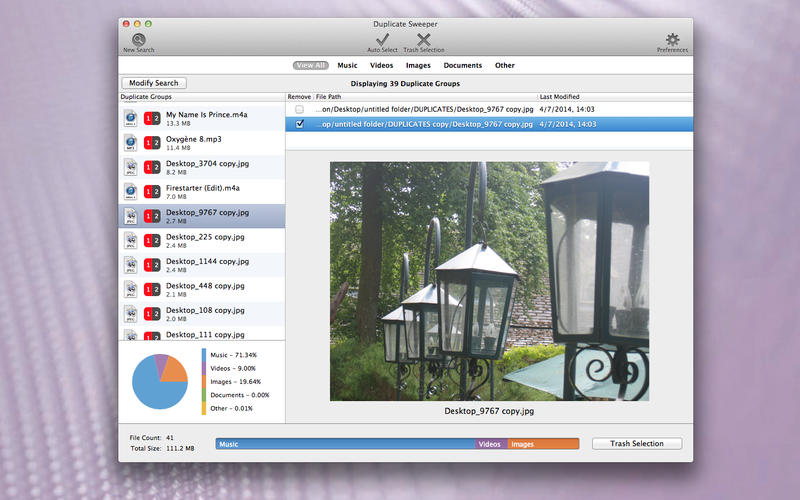
Duplicate Sweeper makes finding duplicate files easy. It enables you to search for duplicates of all file types, such as your photos, videos, music or documents and you can select which folders to search for duplicate files in. For even more control, search preferences can be added so that only files matching your given criteria are searched. Duplicate Sweeper can ignore files that are larger than and/or smaller than given sizes. It can also ignore files with the given file extensions so that any important file types can be left out of the search.
Once Duplicate Sweeper has found all of the duplicates in the given folders, it allows you to select which files from the duplicates you wish to remove. Duplicate Sweeper has a built in document viewer so that you can check a file is not important before selecting to remove it. To speed thing up, you can also choose to automatically select to keep the newest or oldest file. This selection can be made on individual groups of files, for file types or for all the duplicate groups found.
Before removing files, Duplicate Sweeper displays a quick list of all the files that will be removed. It will also display how much space you will save by removing those files as well as a small breakdown of the media types being removed. Once you are happy to remove those files, Duplicate Sweeper can send them all to your Trash with a single click. These files can then be emptied from your Trash to delete them permanently or restored should the need arise.
System Requirements:
* OS X 10.8 or later
* 2.4 MB
Pricing and Availability:
Duplicate Sweeper 1.0 is available for a special introductory price of $5.99 (normally $19.99) from the Mac App store in the Utilities category. It is also available from Wide Angle Software's website. The software license comes with lifetime of free updates and free customer support.
Duplicate Sweeper 1.0: http://www.wideanglesoftware.com/duplicatesweeper/
Purchase and Download (MAS): https://itunes.apple.com/app/duplicate-sweeper/id918160962
Screenshot: http://www.wideanglesoftware.com/images/screenshots/full/DS_photos_Mac.jpeg
Application icon: http://www.wideanglesoftware.com/images/prods/DuplicateSweeper64.jpg
Wide Angle Software believes software should be easy to use, look good and above all be useful to a wide range of consumers. The firm specialises in iOS, Windows and Mac software for managing digital media, specifically on portable media devices such as iPods, iPhones and iPads. All Material and Software (C) Copyright 2014 Wide Angle Software. All Rights Reserved. Apple, the Apple logo, Macintosh and Mac OS X are registered trademarks of Apple Inc. in the U.S. and/or other countries. Other trademarks and registered trademarks may be the property of their respective owners.
*******
Link To Article: http://prmac.com/release-id-70883.htm
*******
---------------------------------------------------------------------------------
Note that you can alter delivered distributions at any time.
Login to your account on prMac to alter your channel selection, or to opt-out at any time.
Wide Angle Software releases its Duplicate Remover software for Mac - Published on 10/02/14
UK based Wide Angle Software is pleased to announce that its Windows duplicate file remover application, Duplicate Sweeper, is now also available on Mac OS X. Duplicate Sweeper makes finding, selecting and removing duplicate files on your Mac quick and easy. Duplicate Sweeper for Mac is available from Apple's Mac App Store as well as Wide Angle Software's website, where you can download a free trial version for evaluation before committing to a purchase.
Stafford, United Kingdom - It is not uncommon to amass duplicate files on your Mac. Maybe you have downloaded the same file multiple times or copied files but did not delete the originals. Maybe you had backed up your data then copied it back to your Mac only to find that some of your original files are still on there too. Either way, duplicate files are often not required and just end up taking up disk space. Duplicate Sweeper from Wide Angle Software locates these duplicates and helps to reclaim disk space.
Duplicate Sweeper makes finding duplicate files easy. It enables you to search for duplicates of all file types, such as your photos, videos, music or documents and you can select which folders to search for duplicate files in. For even more control, search preferences can be added so that only files matching your given criteria are searched. Duplicate Sweeper can ignore files that are larger than and/or smaller than given sizes. It can also ignore files with the given file extensions so that any important file types can be left out of the search.
Once Duplicate Sweeper has found all of the duplicates in the given folders, it allows you to select which files from the duplicates you wish to remove. Duplicate Sweeper has a built in document viewer so that you can check a file is not important before selecting to remove it. To speed thing up, you can also choose to automatically select to keep the newest or oldest file. This selection can be made on individual groups of files, for file types or for all the duplicate groups found.
Before removing files, Duplicate Sweeper displays a quick list of all the files that will be removed. It will also display how much space you will save by removing those files as well as a small breakdown of the media types being removed. Once you are happy to remove those files, Duplicate Sweeper can send them all to your Trash with a single click. These files can then be emptied from your Trash to delete them permanently or restored should the need arise.
System Requirements:
* OS X 10.8 or later
* 2.4 MB
Pricing and Availability:
Duplicate Sweeper 1.0 is available for a special introductory price of $5.99 (normally $19.99) from the Mac App store in the Utilities category. It is also available from Wide Angle Software's website. The software license comes with lifetime of free updates and free customer support.
Duplicate Sweeper 1.0: http://www.wideanglesoftware.com/duplicatesweeper/
Purchase and Download (MAS): https://itunes.apple.com/app/duplicate-sweeper/id918160962
Screenshot: http://www.wideanglesoftware.com/images/screenshots/full/DS_photos_Mac.jpeg
Application icon: http://www.wideanglesoftware.com/images/prods/DuplicateSweeper64.jpg

Wide Angle Software believes software should be easy to use, look good and above all be useful to a wide range of consumers. The firm specialises in iOS, Windows and Mac software for managing digital media, specifically on portable media devices such as iPods, iPhones and iPads. All Material and Software (C) Copyright 2014 Wide Angle Software. All Rights Reserved. Apple, the Apple logo, Macintosh and Mac OS X are registered trademarks of Apple Inc. in the U.S. and/or other countries. Other trademarks and registered trademarks may be the property of their respective owners.
*******
Link To Article: http://prmac.com/release-id-70883.htm
*******
---------------------------------------------------------------------------------
Note that you can alter delivered distributions at any time.
Login to your account on prMac to alter your channel selection, or to opt-out at any time.
Airplane Race Math Games Just Reduced from $1.99 to Free
A new article has been published at prMac.
Airplane Race Math Games Just Reduced from $1.99 to Free - Published on 10/02/14
Cool Math Games for Fun, LLC announced that its educational title for iOS, Air Plane Race Multiplication 1.0 is now free. Ready to have some fun with multiplication? Air Plane Race Multiplication is a new set of math games that helps make learning and improving in addition, subtraction, mutliplication and division more fun. Your child or students will become better at primary level arithmetic when they're enjoying themselves while they do it, or even competing against friends or classmates.
St. Petersburg, Florida - Mastering grade school math takes lots of practice, and if children aren't enjoying themselves while they learn, they're not going to focus and gain the skills they need to success. Cool Math Games for Fun, LLC, a maker of a variety of math games for kids, has made learning and improving in addition, subtraction, mutliplication and division more fun by creating games with a fun plane race theme. This new plane racing games for iOS makes it fun for kids to learn elementary mathematics!
"Our games are a perfect mix of fun and education. They put your child's interest and attention into the equation, and that's the key to their success in math!" explained Ryan Wade, CEO of Cool Math Games for Fun, LLC. "Your child or students will become better at primary level arithmetic when they're enjoying themselves while they do it, or even competing against friends or classmates, so there's a "reward" for their effort. Our math plane races games were made with elementary school aged children in mind. They'll jump in their plane, start answering questions, and fly ahead of their competition by answering questions correctly."
Other planes will be hot on their trail, and they'll be motivated to get better at math so they can speed ahead to victory. Different difficulty levels help them progress in their learning until they've mastered addition, subtraction, multiplication and division with ease. Both boys and girls trying to improve in math enjoy these racing math games. It's not boring homework or worksheets, they're exciting plane race games that they'll have fun playing.
Our games are fun because we build them with the input of our own children. We want them to have fun while learning so they'll want to learn, and they're retain the knowledge they gain. While testing this game, an employee of Cool Math Games for Fun had the opportunity to let his 9-year old son who had been struggling with multiplication play one of our race games for a couple days:
"Jonah loves the Multiplication Race game. I had him play it to see how he liked it, and he was reluctant at first because he knew it was an educational game. But the racing aspect really appealed to him. After a couple races he decided that he was going to keep playing it until he got 100% of the questions correct. By the time he was done playing, he had decided that he can do multiplication and he's good at it. I noticed a huge boost in his confidence, and that's led to increased effort from him in math. Within a couple days he had achieved a 100% score on the advanced difficulty level and he was so proud of his accomplishment. I love this game. I can't wait to release the free version."
And it gets even better. Future updates will include social features that allow you to race against friends or classmates as you vie for the top spot on the Game Center leaderboard, making this an even more fun and interactive way to learn grade school math.
Device Requirements:
* iPhone, iPad, and iPod touch
* Requires iOS 6.0 or later
* Optimized for iPhone 5
* 56.1 MB
Pricing and Availability:
Air Plane Race Multiplication 1.0 is now Free and available worldwide exclusively through the App Store in the Education category. Be sure to check out our other fun math racing games, including cars and bikes fun math games.
Cool Math Games for Fun: http://coolmathgamesforfun.com
Air Plane Race Multiplication 1.0: https://itunes.apple.com/app/id914410057
Screenshot 1: http://a5.mzstatic.com/us/r30/Purple4/v4/2d/47/6c/2d476cf3-6554-d8b9-942f-31faa1e920ff/screen568x568.jpeg
Screenshot 2: http://a4.mzstatic.com/us/r30/Purple3/v4/0e/38/db/0e38db61-5e69-e4d8-f8cf-9c0ed3a5094d/screen568x568.jpeg
App Icon: http://a3.mzstatic.com/us/r30/Purple3/v4/d6/6a/e6/d66ae63a-afbb-3145-bebc-7e71d77b2297/pr_source.175x175-75.jpg
At Cool Math Games for Fun, we create the best free and fun games that you can take anywhere, and play anytime. Whether your stuck in a boring classroom, killing time on your lunch break, or just looking for a quick escape, evertap games are sure to entertain you. Cool Math Games for Fun is a division of evertap, creator of dozens of entertaining free games for iPod, iPhone and iPad. All Material and Software (C) Copyright 2014 At Cool Math Games for Fun, LLC. All Rights Reserved. Apple, the Apple logo, iPhone, iPod and iPad are registered trademarks of Apple Inc. in the U.S. and/or other countries. Other trademarks and registered trademarks may be the property of their respective owners.
*******
Link To Article: http://prmac.com/release-id-70878.htm
*******
---------------------------------------------------------------------------------
Note that you can alter delivered distributions at any time.
Login to your account on prMac to alter your channel selection, or to opt-out at any time.
Airplane Race Math Games Just Reduced from $1.99 to Free - Published on 10/02/14
Cool Math Games for Fun, LLC announced that its educational title for iOS, Air Plane Race Multiplication 1.0 is now free. Ready to have some fun with multiplication? Air Plane Race Multiplication is a new set of math games that helps make learning and improving in addition, subtraction, mutliplication and division more fun. Your child or students will become better at primary level arithmetic when they're enjoying themselves while they do it, or even competing against friends or classmates.
St. Petersburg, Florida - Mastering grade school math takes lots of practice, and if children aren't enjoying themselves while they learn, they're not going to focus and gain the skills they need to success. Cool Math Games for Fun, LLC, a maker of a variety of math games for kids, has made learning and improving in addition, subtraction, mutliplication and division more fun by creating games with a fun plane race theme. This new plane racing games for iOS makes it fun for kids to learn elementary mathematics!
"Our games are a perfect mix of fun and education. They put your child's interest and attention into the equation, and that's the key to their success in math!" explained Ryan Wade, CEO of Cool Math Games for Fun, LLC. "Your child or students will become better at primary level arithmetic when they're enjoying themselves while they do it, or even competing against friends or classmates, so there's a "reward" for their effort. Our math plane races games were made with elementary school aged children in mind. They'll jump in their plane, start answering questions, and fly ahead of their competition by answering questions correctly."
Other planes will be hot on their trail, and they'll be motivated to get better at math so they can speed ahead to victory. Different difficulty levels help them progress in their learning until they've mastered addition, subtraction, multiplication and division with ease. Both boys and girls trying to improve in math enjoy these racing math games. It's not boring homework or worksheets, they're exciting plane race games that they'll have fun playing.
Our games are fun because we build them with the input of our own children. We want them to have fun while learning so they'll want to learn, and they're retain the knowledge they gain. While testing this game, an employee of Cool Math Games for Fun had the opportunity to let his 9-year old son who had been struggling with multiplication play one of our race games for a couple days:
"Jonah loves the Multiplication Race game. I had him play it to see how he liked it, and he was reluctant at first because he knew it was an educational game. But the racing aspect really appealed to him. After a couple races he decided that he was going to keep playing it until he got 100% of the questions correct. By the time he was done playing, he had decided that he can do multiplication and he's good at it. I noticed a huge boost in his confidence, and that's led to increased effort from him in math. Within a couple days he had achieved a 100% score on the advanced difficulty level and he was so proud of his accomplishment. I love this game. I can't wait to release the free version."
And it gets even better. Future updates will include social features that allow you to race against friends or classmates as you vie for the top spot on the Game Center leaderboard, making this an even more fun and interactive way to learn grade school math.
Device Requirements:
* iPhone, iPad, and iPod touch
* Requires iOS 6.0 or later
* Optimized for iPhone 5
* 56.1 MB
Pricing and Availability:
Air Plane Race Multiplication 1.0 is now Free and available worldwide exclusively through the App Store in the Education category. Be sure to check out our other fun math racing games, including cars and bikes fun math games.
Cool Math Games for Fun: http://coolmathgamesforfun.com
Air Plane Race Multiplication 1.0: https://itunes.apple.com/app/id914410057
Screenshot 1: http://a5.mzstatic.com/us/r30/Purple4/v4/2d/47/6c/2d476cf3-6554-d8b9-942f-31faa1e920ff/screen568x568.jpeg

Screenshot 2: http://a4.mzstatic.com/us/r30/Purple3/v4/0e/38/db/0e38db61-5e69-e4d8-f8cf-9c0ed3a5094d/screen568x568.jpeg

App Icon: http://a3.mzstatic.com/us/r30/Purple3/v4/d6/6a/e6/d66ae63a-afbb-3145-bebc-7e71d77b2297/pr_source.175x175-75.jpg

At Cool Math Games for Fun, we create the best free and fun games that you can take anywhere, and play anytime. Whether your stuck in a boring classroom, killing time on your lunch break, or just looking for a quick escape, evertap games are sure to entertain you. Cool Math Games for Fun is a division of evertap, creator of dozens of entertaining free games for iPod, iPhone and iPad. All Material and Software (C) Copyright 2014 At Cool Math Games for Fun, LLC. All Rights Reserved. Apple, the Apple logo, iPhone, iPod and iPad are registered trademarks of Apple Inc. in the U.S. and/or other countries. Other trademarks and registered trademarks may be the property of their respective owners.
*******
Link To Article: http://prmac.com/release-id-70878.htm
*******
---------------------------------------------------------------------------------
Note that you can alter delivered distributions at any time.
Login to your account on prMac to alter your channel selection, or to opt-out at any time.
The Rubik's Cube of Word Search now in the iTunes Educational Store
A new article has been published at prMac.
The Rubik's Cube of Word Search now in the iTunes Educational Store - Published on 10/02/14
Word lovers will rejoice! Independent app developer, Andrew Kiger today announces Word Head (3D Word Search) - Educational for iOS, the "Rubik's Cube" of word search. Experience this highly innovative, 3 dimensional, mind sharpening, and vocabulary enriching iOS App. Players manipulate a 3-D cube floating in mid air looking for words that can wrap and twist around the sides of the cube. It's as if Word Search and 'Boggle' had a baby and made it in 3-D they'd call it 'Word Head.'
Sacramento, California - Word lovers will rejoice! Experience this highly innovative, 3 dimensional, mind sharpening, and vocabulary enriching iOS App today. Andrew Kiger today is proud to announce the release of Word Head (3D Word Search) - Educational for iOS, the 'Rubik's Cube' of word search. It's as if Word Search and 'Boggle' had a baby and made it in 3-D they'd call it 'Word Head.' Now available through the iTune Educational Volume Purchase Program.
"I wanted an educational app that both children and adults could enjoy and learn from, that provided lasting value, and that would help stimulate and improve their minds," says Andy Kiger, the developer. "There's nothing like it in the App Store, so I decided to create it myself."
Players manipulate a 3-D cube floating in mid air looking for words that can wrap and twist around the sides of the cube. Move the cube up, down, 180 degrees to the left, 90 degrees to the right, there's nothing like it. Word Head is highly addictive because its rotating 3 dimensional cube challenges players to quickly discover words from either a pre-selected or player-customized list.
Find the word, score points. Once you find them all there's one more hurdle to clear; you must discover a special 'hidden' word to solve the cube.
Word Head (3D Word Search) - Educational was developed by retired U.S. Army Lieutenant Colonel Andy Kiger who served in Alaska and CONUS, to include an operational deployment in the Philippines and two combat tours in Iraq during his 23 years of active duty. Says Kiger, "I've been a big fan of word games my entire life and thought the iOS platform offered a great way to revolutionize the word search genre into something much more compelling and exciting than the traditional flat paged puzzle."
Kiger personally created the 79 themed word lists to be "both challenging and vocabulary enriching." Word Head dares players to search for and discover select words. Players can also select their own custom word list from a provided word look-up in four languages - French, German, Spanish, and English totaling over 1.6 million words, which can be shared with friends on Apple's Game Center. Many word definitions are also provided through Apple's internal iOS dictionary for all four languages.
Many notable reviewers have awarded Word Head with several 4.5/5.0 star reviews:
* "If you are a lover of word puzzles, this one is not to be missed!" - Roshan of What's on iPhone
* "It has a unique theme and concept and would not only appeal to word lovers, but puzzle aficionados as well." - The iPhoneAppReview online
* "Highly recommended for adults and children from about 2nd grade up." - The iMum online Reviews by Mothers of Little Gadget Lovers
* "The graphics are neat and the gameplay concept is strong." - TheAppleGoogle online
Language Support:
English, French, German, Spanish
Device Requirements:
* iPhone 4, 4S, 5, 5S, 6, 6 Plus, iPod touch (5 gen), iPad 2, 3, 4, Air, mini, mini-retina
* Requires iOS 7.0 or later (Optimized for iOS8)
* 97 MB
Pricing and Availability:
Word Head (3D Word Search) - Educational 4.25 is $2.99 USD (or equivalent amount in other currencies) and is available worldwide exclusively through the App Store in the Educational category. Available through the iTune Educational Volume Purchase Program at a reduced cost.
JWACKAPPS: http://jwackapps.com
Word Head (3D Word Search) - Educational 4.25: https://itunes.apple.com/app/word-head/id918994296
YouTube Video (iPhone Preview): https://www.youtube.com/watch?v=bBQUsDoDXAw&list=UUJbESCX82s_-ctLE0ibVzmQ
YouTube Video (iPad Preview): https://www.youtube.com/watch?v=sNr-GR4zzuc&feature=youtu.be
Screenshot: http://jwackapps.com/images/a55f44d4fa1e3c65d3a2b9de04eb38f9_yv51.png
App Icon: http://jwackapps.com/images/925c9d1278f1da09265746c5ae8146b7_mc79.png
Andrew Kiger is a retired U.S. Army Lieutenant Colonel whose firm JWACK Apps is an independent application developer for the iPhone and iPad family of devices. Kiger began application development in 2012, following 23 years of active service to the United States of America. Copyright (C) 2014 Andrew Kiger. All Rights Reserved. Apple, the Apple logo, iPhone, iPod and iPad are registered trademarks of Apple Inc. in the U.S. and/or other countries.
*******
Link To Article: http://prmac.com/release-id-70877.htm
*******
---------------------------------------------------------------------------------
Note that you can alter delivered distributions at any time.
Login to your account on prMac to alter your channel selection, or to opt-out at any time.
The Rubik's Cube of Word Search now in the iTunes Educational Store - Published on 10/02/14
Word lovers will rejoice! Independent app developer, Andrew Kiger today announces Word Head (3D Word Search) - Educational for iOS, the "Rubik's Cube" of word search. Experience this highly innovative, 3 dimensional, mind sharpening, and vocabulary enriching iOS App. Players manipulate a 3-D cube floating in mid air looking for words that can wrap and twist around the sides of the cube. It's as if Word Search and 'Boggle' had a baby and made it in 3-D they'd call it 'Word Head.'
Sacramento, California - Word lovers will rejoice! Experience this highly innovative, 3 dimensional, mind sharpening, and vocabulary enriching iOS App today. Andrew Kiger today is proud to announce the release of Word Head (3D Word Search) - Educational for iOS, the 'Rubik's Cube' of word search. It's as if Word Search and 'Boggle' had a baby and made it in 3-D they'd call it 'Word Head.' Now available through the iTune Educational Volume Purchase Program.
"I wanted an educational app that both children and adults could enjoy and learn from, that provided lasting value, and that would help stimulate and improve their minds," says Andy Kiger, the developer. "There's nothing like it in the App Store, so I decided to create it myself."
Players manipulate a 3-D cube floating in mid air looking for words that can wrap and twist around the sides of the cube. Move the cube up, down, 180 degrees to the left, 90 degrees to the right, there's nothing like it. Word Head is highly addictive because its rotating 3 dimensional cube challenges players to quickly discover words from either a pre-selected or player-customized list.
Find the word, score points. Once you find them all there's one more hurdle to clear; you must discover a special 'hidden' word to solve the cube.
Word Head (3D Word Search) - Educational was developed by retired U.S. Army Lieutenant Colonel Andy Kiger who served in Alaska and CONUS, to include an operational deployment in the Philippines and two combat tours in Iraq during his 23 years of active duty. Says Kiger, "I've been a big fan of word games my entire life and thought the iOS platform offered a great way to revolutionize the word search genre into something much more compelling and exciting than the traditional flat paged puzzle."
Kiger personally created the 79 themed word lists to be "both challenging and vocabulary enriching." Word Head dares players to search for and discover select words. Players can also select their own custom word list from a provided word look-up in four languages - French, German, Spanish, and English totaling over 1.6 million words, which can be shared with friends on Apple's Game Center. Many word definitions are also provided through Apple's internal iOS dictionary for all four languages.
Many notable reviewers have awarded Word Head with several 4.5/5.0 star reviews:
* "If you are a lover of word puzzles, this one is not to be missed!" - Roshan of What's on iPhone
* "It has a unique theme and concept and would not only appeal to word lovers, but puzzle aficionados as well." - The iPhoneAppReview online
* "Highly recommended for adults and children from about 2nd grade up." - The iMum online Reviews by Mothers of Little Gadget Lovers
* "The graphics are neat and the gameplay concept is strong." - TheAppleGoogle online
Language Support:
English, French, German, Spanish
Device Requirements:
* iPhone 4, 4S, 5, 5S, 6, 6 Plus, iPod touch (5 gen), iPad 2, 3, 4, Air, mini, mini-retina
* Requires iOS 7.0 or later (Optimized for iOS8)
* 97 MB
Pricing and Availability:
Word Head (3D Word Search) - Educational 4.25 is $2.99 USD (or equivalent amount in other currencies) and is available worldwide exclusively through the App Store in the Educational category. Available through the iTune Educational Volume Purchase Program at a reduced cost.
JWACKAPPS: http://jwackapps.com
Word Head (3D Word Search) - Educational 4.25: https://itunes.apple.com/app/word-head/id918994296
YouTube Video (iPhone Preview): https://www.youtube.com/watch?v=bBQUsDoDXAw&list=UUJbESCX82s_-ctLE0ibVzmQ
YouTube Video (iPad Preview): https://www.youtube.com/watch?v=sNr-GR4zzuc&feature=youtu.be
Screenshot: http://jwackapps.com/images/a55f44d4fa1e3c65d3a2b9de04eb38f9_yv51.png

App Icon: http://jwackapps.com/images/925c9d1278f1da09265746c5ae8146b7_mc79.png

Andrew Kiger is a retired U.S. Army Lieutenant Colonel whose firm JWACK Apps is an independent application developer for the iPhone and iPad family of devices. Kiger began application development in 2012, following 23 years of active service to the United States of America. Copyright (C) 2014 Andrew Kiger. All Rights Reserved. Apple, the Apple logo, iPhone, iPod and iPad are registered trademarks of Apple Inc. in the U.S. and/or other countries.
*******
Link To Article: http://prmac.com/release-id-70877.htm
*******
---------------------------------------------------------------------------------
Note that you can alter delivered distributions at any time.
Login to your account on prMac to alter your channel selection, or to opt-out at any time.
Subscribe to:
Posts (Atom)