A new article has been published at prMac.
Launch of DeeDay - iOS countdown with a badge - Published on 11/21/14
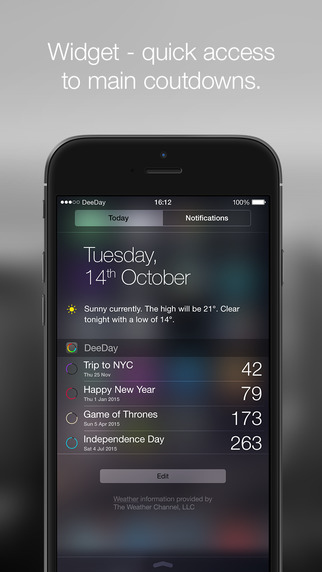
Calumaa introduces its new app, DeeDay for the iPhone, iPad and iPod touch. DeeDay is made for those who are overwhelmed by calendars and need a simpler solution for memorising important occasions and having them under control at all times. Creating an event is a matter of seconds. The dates are organized into 6 categories. The most important event can always be a glance away - on the badge of a home screen. Four events can be seen in a widget at one time.
Kranj, Slovenia - Calumaa is thrilled to announce its new app DeeDay, an iPhone app that counts down days to users special events. It is a great helper for people, who are overwhelmed by calendars complexity. It is obviously not a substitute for a calendar but can help out by memorising certain important occasions and keep them easily accessible at all times. Let it be big events such as a wedding, arrival of a new baby or more daily activities like visit at the dentist, kids play at school or a new release of a favourite game. It is a great tool to keep them neatly organised (by date of arrival) and always only a touch away.
Within DeeDay, creating an event is a matter of seconds. One can pimp it up with a background photo or leave the countdown nice and clean. For a romantic look go with the light theme, for a sleeker one set the dark mode. The most important event can always be a glance away - on the badge of a home screen. Four events can be seen in a widget at one time.
General Characteristics:
* iPhone countdown with a badge and a widget
* Optimised for iOS8 and iPhone 6 and 6 plus
* Freemium
Features:
* Supports countdown to chosen events and counting up after they go by
* Clean design, simple usage: a 3-screen app
* Prescheduled dates neatly organised in 6 categories: Holidays, Sports, Movies, TV shows, Events and Video Games
* Dark and light theme each with its own set of colours
* Easy importing of events from your Calendar and Facebook
* Push notifications to remind you of a certain event getting closer
* Personalized background for each countdown - take a photo/choose one from your photo gallery or search by keywords on Instagram, Flickr, 500px (optional)
* Number of days to your main event are shown on the badge (optional)
* 4 of your countdowns (main one and 3 upcoming) are seen in a widget (optional)
Device Requirements:
* iPhone, iPad, and iPod touch
* Optimized for iPhone�5, iPhone�6, and iPhone�6�Plus
* Requires iOS 7.0 or later
* 7.9 MB
Pricing and Availability:
DeeDay - Countdown with a Badge 1.3.1 is free and available worldwide exclusively through the App Store in the Productivity category. The app includes 5 free countdowns, 2 gratitude ones for sharing via Facebook, Twitter or Email and is free use of all prescheduled events. IAP unlocks unlimited number of countdowns ($1,99)
calumaa: http://www.calumaa.com
DeeDay 1.3.1: http://www.calumaa.com/deeday
Download from iTunes: https://itunes.apple.com/app/deeday-countdown-with-a-badge/id903862401
Video Demo: http://calumaa.com/content/videos/deeday_video.mp4
Screenshot: http://a3.mzstatic.com/us/r30/Purple5/v4/9d/27/9a/9d279adc-7c9b-9851-c8ac-365a95cd2efc/screen322x572.jpeg
Press Kit (zip): http://calumaa.com/deeday_presskit.zip
Calumaa is a company, which was founded a year ago. Andrej Mihelic is the leader of the project, he does the design, the UI and UX. Gasper Rebernak and Jernej Zorec are a set of great developers, who take on every code challenge. Katarina Lotric is there to help with the copy, press releases, costumer care and everything else connected to the public. Calumaa is specialised in iOS apps. You can recognize them by high effiency, extreme simplicity and thoughtful design. Creative process starts when we come across a need and no existing app manages to fully satisfy it. All Material and Software (C) Copyright 2014 Calumaa. All Rights Reserved. Apple, the Apple logo, iPhone, iPod and iPad are registered trademarks of Apple Inc. in the U.S. and/or other countries. Other trademarks and registered trademarks may be the property of their respective owners.
*******
Link To Article: http://prmac.com/release-id-71929.htm
*******
---------------------------------------------------------------------------------
Note that you can alter delivered distributions at any time.
Login to your account on prMac to alter your channel selection, or to opt-out at any time.

Graphic Design App Candy Apple Updated to Version 1.5
A new article has been published at prMac.
Graphic Design App Candy Apple Updated to Version 1.5 - Published on 11/21/14
California based 128bit Technologies announces an update to Candy Apple, a sweet vector based graphic design and illustration app designed for Mac OS. Perfect for novice or pros alike, Candy Apple lets anyone create drawings, logos, banners, buttons, icons and more. Version 1.5 adds new video tutorials, grid view options, enhancements that make it quicker to design, and fixes a bug related to adjusting the dimensions of the canvas. Users can save 50% during its Black Friday promotion.
San Francisco, California - 128bit Technologies introduces version 1.5 of Candy Apple for Mac OS X, a tasty vector based graphic design and illustration app available on the Mac App Store and the MacAppware website. Also, for a limited time this new version is offered at a special Black Friday price of only $14.99 to new customers, a savings of 50%. Current Candy Apple users can simply update for free through the Updates section of the App Store application on their Mac, or through the Check for Updates option in the Candy Apple menu.
"Candy Apple is steadily growing in popularity as one of the best new vector based graphic design apps that, according to one of our more enthusiastic App Store reviewers, draws rings around iDraw and is much easier to use," states Jason Hogrefe, President of 128bit Technologies. "We value the comments and suggestions of our Candy Apple customers, and work hard to continually provide regular bug fixes and feature enhancements to make this a best-in-class application."
The new features add two new Grid options to the View menu: Imperial and Metric. This allows the user to easily switch grid views either using millimeters, centimeters, meters, etc. (Metric), or inches (Imperial). The new enhancement streamlines functionality, allowing you to get to work faster: drawing on the canvas will now automatically select Fill or Stroke in the Edit Inspector to quickly make adjustments. Version 1.5 also fixes a bug in the Drawing Size & Grid window that would revert new width and height values if you tabbed between fields.
Even more important to many Candy Apple customers is the addition of a new tutorial section on the MacAppware website to quickly show users how to navigate through the application. Currently there are three videos, with more to come:
* Adding Text on a Path
* Using the Draw Tools and Adjusting the Fill and Stroke
* Converting Text to a Shape and Adding Strokes, Zigzags, and Patterns
Perfect for novice or pros alike, Candy Apple lets anyone create drawings, logos, banners, buttons, icons and more. You can also edit and enhance photos, or convert images to draw-able vector paths. Take a bite and treat yourself to a full featured vector drawing application packed with professional tools and dynamic effects that will make every design a polished work of art. Candy Apple features include:
* Full vector support (including SVG import)
* Enhance pictures and add effects
* Draw illustrations and graphics
* Draw Rectangle, Oval, Round Rectangle, Round End Rectangle, Line, Polygon, Path, Freehand, Ring, Speech Balloon, and Arc
* Use what you create royalty free
* Convert text to a shape or path
* Adjust freehand drawing to create smooth looking paths
* Vectorize images to turn any photo into an editable graphic
* Add strokes (regular, arrowed, rough, zig-zag)
* Add fills (solid, gradient, pattern, zig-zag, hatch)
* Add text on a path
* Add an image to text
* Blend and mask effects
* Over 130 filters and effects
* Full layer support
* Boolean operation support to combine shapes
* Easily align multiple items on your canvas
* Rulers and guides make it easy to place items in the right location
* Snap to grid, snap to guides, or snap to other objects
* Zoom in or out to get every detail pixel perfect
* Export in fully editable vector PDF
* Export as an image (JPEG, TIFF, PNG, BMP, GIF)
* Supports transparent backgrounds
* Extensive help file explains Candy Apple's tools in detail
* And more
Pricing and Availability:
Candy Apple is supported on Mac OS X 10.6.8 (Intel, 64-bit) and higher, including Yosemite and is available on both the Mac App Store and the MacAppware website, for a limited time discount of $14.99 (USD), a savings of 50% off the full price of $29.99.
MacAppware: http://www.macappware.com
Candy Apple 1.5: http://macappware.com/software/candy-apple/
Purchase and Download (MAS): https://itunes.apple.com/us/app/candy-apple-vector-graphic/id726792280
Black Friday Discount: http://sites.fastspring.com/macappware/product/candyapple?coupon=PRMAC14
Screenshot: http://macappware.com/images/candyapple/CandyAppleScreen_Drawing1.jpg
App Icon: http://macappware.com/images/candyapple/Candy-Apple-App-Icon-512.png
MacAppware is a division of 128bit Technologies and a dedicated Mac software developer currently offering design, image editing and disk utility applications; unique commercial use font collections; and a carefully curated rotation of bundles and deals. Copyright (C) 2014 128bit Technologies. All Rights Reserved. Apple, the Apple logo, Mac OS X, and Macintosh are registered trademarks of Apple Inc. in the U.S. and/or other countries. All other trademarks are the property of their respective owners.
*******
Link To Article: http://prmac.com/release-id-71934.htm
*******
---------------------------------------------------------------------------------
Note that you can alter delivered distributions at any time.
Login to your account on prMac to alter your channel selection, or to opt-out at any time.
Graphic Design App Candy Apple Updated to Version 1.5 - Published on 11/21/14
California based 128bit Technologies announces an update to Candy Apple, a sweet vector based graphic design and illustration app designed for Mac OS. Perfect for novice or pros alike, Candy Apple lets anyone create drawings, logos, banners, buttons, icons and more. Version 1.5 adds new video tutorials, grid view options, enhancements that make it quicker to design, and fixes a bug related to adjusting the dimensions of the canvas. Users can save 50% during its Black Friday promotion.
San Francisco, California - 128bit Technologies introduces version 1.5 of Candy Apple for Mac OS X, a tasty vector based graphic design and illustration app available on the Mac App Store and the MacAppware website. Also, for a limited time this new version is offered at a special Black Friday price of only $14.99 to new customers, a savings of 50%. Current Candy Apple users can simply update for free through the Updates section of the App Store application on their Mac, or through the Check for Updates option in the Candy Apple menu.
"Candy Apple is steadily growing in popularity as one of the best new vector based graphic design apps that, according to one of our more enthusiastic App Store reviewers, draws rings around iDraw and is much easier to use," states Jason Hogrefe, President of 128bit Technologies. "We value the comments and suggestions of our Candy Apple customers, and work hard to continually provide regular bug fixes and feature enhancements to make this a best-in-class application."
The new features add two new Grid options to the View menu: Imperial and Metric. This allows the user to easily switch grid views either using millimeters, centimeters, meters, etc. (Metric), or inches (Imperial). The new enhancement streamlines functionality, allowing you to get to work faster: drawing on the canvas will now automatically select Fill or Stroke in the Edit Inspector to quickly make adjustments. Version 1.5 also fixes a bug in the Drawing Size & Grid window that would revert new width and height values if you tabbed between fields.
Even more important to many Candy Apple customers is the addition of a new tutorial section on the MacAppware website to quickly show users how to navigate through the application. Currently there are three videos, with more to come:
* Adding Text on a Path
* Using the Draw Tools and Adjusting the Fill and Stroke
* Converting Text to a Shape and Adding Strokes, Zigzags, and Patterns
Perfect for novice or pros alike, Candy Apple lets anyone create drawings, logos, banners, buttons, icons and more. You can also edit and enhance photos, or convert images to draw-able vector paths. Take a bite and treat yourself to a full featured vector drawing application packed with professional tools and dynamic effects that will make every design a polished work of art. Candy Apple features include:
* Full vector support (including SVG import)
* Enhance pictures and add effects
* Draw illustrations and graphics
* Draw Rectangle, Oval, Round Rectangle, Round End Rectangle, Line, Polygon, Path, Freehand, Ring, Speech Balloon, and Arc
* Use what you create royalty free
* Convert text to a shape or path
* Adjust freehand drawing to create smooth looking paths
* Vectorize images to turn any photo into an editable graphic
* Add strokes (regular, arrowed, rough, zig-zag)
* Add fills (solid, gradient, pattern, zig-zag, hatch)
* Add text on a path
* Add an image to text
* Blend and mask effects
* Over 130 filters and effects
* Full layer support
* Boolean operation support to combine shapes
* Easily align multiple items on your canvas
* Rulers and guides make it easy to place items in the right location
* Snap to grid, snap to guides, or snap to other objects
* Zoom in or out to get every detail pixel perfect
* Export in fully editable vector PDF
* Export as an image (JPEG, TIFF, PNG, BMP, GIF)
* Supports transparent backgrounds
* Extensive help file explains Candy Apple's tools in detail
* And more
Pricing and Availability:
Candy Apple is supported on Mac OS X 10.6.8 (Intel, 64-bit) and higher, including Yosemite and is available on both the Mac App Store and the MacAppware website, for a limited time discount of $14.99 (USD), a savings of 50% off the full price of $29.99.
MacAppware: http://www.macappware.com
Candy Apple 1.5: http://macappware.com/software/candy-apple/
Purchase and Download (MAS): https://itunes.apple.com/us/app/candy-apple-vector-graphic/id726792280
Black Friday Discount: http://sites.fastspring.com/macappware/product/candyapple?coupon=PRMAC14
Screenshot: http://macappware.com/images/candyapple/CandyAppleScreen_Drawing1.jpg

App Icon: http://macappware.com/images/candyapple/Candy-Apple-App-Icon-512.png

MacAppware is a division of 128bit Technologies and a dedicated Mac software developer currently offering design, image editing and disk utility applications; unique commercial use font collections; and a carefully curated rotation of bundles and deals. Copyright (C) 2014 128bit Technologies. All Rights Reserved. Apple, the Apple logo, Mac OS X, and Macintosh are registered trademarks of Apple Inc. in the U.S. and/or other countries. All other trademarks are the property of their respective owners.
*******
Link To Article: http://prmac.com/release-id-71934.htm
*******
---------------------------------------------------------------------------------
Note that you can alter delivered distributions at any time.
Login to your account on prMac to alter your channel selection, or to opt-out at any time.
Acrosync LLC announces an rsync client that supports auto upload
A new article has been published at prMac.
Acrosync LLC announces an rsync client that supports auto upload - Published on 11/21/14
Acrosync LLC releases Acrosync for Mac, a new rsync client with an easy-to-use GUI that also supports Dropbox-like automatic upload and Time Machine style incremental backups. Acrosync for Mac is a powerful folder synchronization tool based on the rsync protocol, so it can sync with any computer or device that has rsync installed, such as Mac and Linux computers, NAS boxes, and VPS or dedicated servers, or even rsync storage providers. Users may connect via SSH or Rsyncd and much more.
Clifton Park, New York - Acrosync LLC, a software company developing rsync-based sync and backup solutions for desktops and mobile devices, has recently released Acrosync for Mac, a new rsync client with an easy-to-use GUI that also supports Dropbox-like automatic upload and Time Machine style incremental backups.
Acrosync for Mac is a powerful folder synchronization tool based on the rsync protocol, so it can sync with any computer or device that has rsync installed, such as Mac and Linux computers, NAS boxes, and VPS or dedicated servers, or even rsync storage providers such as rsync.net, HiDrive, and Strongspace. Acrosync for Mac comes with an intuitive graphical interface with which multiple sync or backup profiles can be easily set up. After the first sync, on subsequent syncs only the new and modified files will be transferred, and, for each modified file, only the changed parts will be transferred, thanks to the clever rsync algorithm.
Like Dropbox, Acrosync for Mac also integrates a built-in file system monitor which can constantly watch local folders and automatically start transferring new or modified files once they are detected. Full backups can be configured to be performed hourly, daily, or weekly at scheduled times.
In addition, when the snapshot option is enabled, Acrosync for Mac is capable of creating space-efficient incremental hourly backups on the server, taking advantage of the '--link-dest' option provided by rsync. As a result, Acrosync can also be deployed as a reliable and cost-effective backup solution similar to Time Machine, essentially turning most Mac/Linux/NAS computers into backup servers without the need to install extra server software.
The per-profile configuration page enables convenient setup of the following advanced options:
* Connect via ssh or rsyncd
* Select a different port other than the standard ssh or rsyncd port
* SSH login using public key authentication (with paraphrase or without paraphrase)
* Include or exclude files by patterns
* Propagate deletions to the server
* Limit download and upload speeds
System requirements:
* Mac OSX 10.8 and above
Pricing and Availability:
* 15 day fully functional trial
* Regular price is $49.99
* Available from the website for $29.99 until Nov 30, 2014.
* A commercial license can be installed on one computer while a personal license (at the same price) can be installed on 5 home computers for personal use
* Also available at the discounted price in the Mac App Store
Acrosync: https://acrosync.com
Acrosync for Mac: https://acrosync.com/mac.html
Purchase: https://acrosync.com/buy.html
Based in Clifton Park, New York, Acrosync LLC is a company focused on building reliable and robust cross-platform software solutions for efficient storage backup and synchronization. Copyright (C) 2014 Acrosync LLC. All Rights Reserved. Apple, the Apple logo, Mac OS X, iPhone, iPod, iPad and Macintosh are registered trademarks of Apple Inc. in the U.S. and/or other countries.
*******
Link To Article: http://prmac.com/release-id-71933.htm
*******
---------------------------------------------------------------------------------
Note that you can alter delivered distributions at any time.
Login to your account on prMac to alter your channel selection, or to opt-out at any time.
Acrosync LLC announces an rsync client that supports auto upload - Published on 11/21/14
Acrosync LLC releases Acrosync for Mac, a new rsync client with an easy-to-use GUI that also supports Dropbox-like automatic upload and Time Machine style incremental backups. Acrosync for Mac is a powerful folder synchronization tool based on the rsync protocol, so it can sync with any computer or device that has rsync installed, such as Mac and Linux computers, NAS boxes, and VPS or dedicated servers, or even rsync storage providers. Users may connect via SSH or Rsyncd and much more.
Clifton Park, New York - Acrosync LLC, a software company developing rsync-based sync and backup solutions for desktops and mobile devices, has recently released Acrosync for Mac, a new rsync client with an easy-to-use GUI that also supports Dropbox-like automatic upload and Time Machine style incremental backups.
Acrosync for Mac is a powerful folder synchronization tool based on the rsync protocol, so it can sync with any computer or device that has rsync installed, such as Mac and Linux computers, NAS boxes, and VPS or dedicated servers, or even rsync storage providers such as rsync.net, HiDrive, and Strongspace. Acrosync for Mac comes with an intuitive graphical interface with which multiple sync or backup profiles can be easily set up. After the first sync, on subsequent syncs only the new and modified files will be transferred, and, for each modified file, only the changed parts will be transferred, thanks to the clever rsync algorithm.
Like Dropbox, Acrosync for Mac also integrates a built-in file system monitor which can constantly watch local folders and automatically start transferring new or modified files once they are detected. Full backups can be configured to be performed hourly, daily, or weekly at scheduled times.
In addition, when the snapshot option is enabled, Acrosync for Mac is capable of creating space-efficient incremental hourly backups on the server, taking advantage of the '--link-dest' option provided by rsync. As a result, Acrosync can also be deployed as a reliable and cost-effective backup solution similar to Time Machine, essentially turning most Mac/Linux/NAS computers into backup servers without the need to install extra server software.
The per-profile configuration page enables convenient setup of the following advanced options:
* Connect via ssh or rsyncd
* Select a different port other than the standard ssh or rsyncd port
* SSH login using public key authentication (with paraphrase or without paraphrase)
* Include or exclude files by patterns
* Propagate deletions to the server
* Limit download and upload speeds
System requirements:
* Mac OSX 10.8 and above
Pricing and Availability:
* 15 day fully functional trial
* Regular price is $49.99
* Available from the website for $29.99 until Nov 30, 2014.
* A commercial license can be installed on one computer while a personal license (at the same price) can be installed on 5 home computers for personal use
* Also available at the discounted price in the Mac App Store
Acrosync: https://acrosync.com
Acrosync for Mac: https://acrosync.com/mac.html
Purchase: https://acrosync.com/buy.html
Based in Clifton Park, New York, Acrosync LLC is a company focused on building reliable and robust cross-platform software solutions for efficient storage backup and synchronization. Copyright (C) 2014 Acrosync LLC. All Rights Reserved. Apple, the Apple logo, Mac OS X, iPhone, iPod, iPad and Macintosh are registered trademarks of Apple Inc. in the U.S. and/or other countries.
*******
Link To Article: http://prmac.com/release-id-71933.htm
*******
---------------------------------------------------------------------------------
Note that you can alter delivered distributions at any time.
Login to your account on prMac to alter your channel selection, or to opt-out at any time.
A new app: educational fairy tale classics presented through fun
A new article has been published at prMac.
A new app: educational fairy tale classics presented through fun - Published on 11/21/14
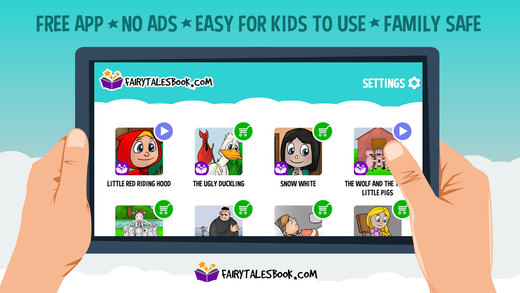
FairyTalesBook proudly presents a bookshelf app with 20 beautifully illustrated fairy tales with original storylines - without violence or scary scenes, and without annoying ads. While these stories were created with the preschooler in mind, elementary kids and their parents will love the techy features too. The App is available in three languages: English, Spanish and German. It comes with two unlocked stories and is available on iOS, Android and Kindle platforms.
London, United Kingdom - FairyTalesBook released a free bookshelf app with 20 beautifully illustrated children's stories this week. They proudly present the most popular fairy tales with original storylines - without violence or scary scenes, and without annoying ads. These favorite tales are dedicated to preschoolers, but older kids and parents also love to play with the techy features, like recordings and funny voices.
The FairyTalesBook App is available in three languages: English, Spanish and German. It comes with two unlocked stories, and is available on all three major platforms: iOS, Android and Kindle.
The FairyTalesBook App presents five premium features that both children and parents will love:
1. Parents can record and play their voice:
The narrations in their fairy tales are beautiful, soothing and mellow, but children who prefer to hear the voices of their mom, dad, grandmother, or even their own voice can have their wish come true.
2. Kids will love the funny voices narration:
The Ugly Duckling and Little Red Riding Hood can talk like a robot, and the Magic Mirror replies in a chipmunk's voice. Parents will have a great time and lots of laughs while trying all the funny voices out with their children.
3. Each fairy tale comes with educational message and three languages:
Kids identify with characters from books and cartoons and adopt good habits and values much more easily if their favorite characters are behaving the same way. All main characters in the FairyTalesBook App behave well.
4. The App is available on all three major platforms:
The App is available for iOS, Android and Kindle platforms. Once downloaded, its premium features can be restored on all Apple and Android devices.
5. Play fairy tales automatically:
FairyTalesBook has an auto-play feature that allows parents to play fairy tales to children, even when they're busy.
As Albert Einstein said: "If you want your children to be intelligent, read them fairy tales. If you want them to be more intelligent, read them more fairy tales."
Device Requirements:
* iPhone, iPad, and iPod touch
* Requires iOS 7.0 or later
* 3.1 MB
Pricing and Availability:
Fairy Tales Book 1.0.2 is Free and comes with two unlocked stories. It is available worldwide through the App Store in the Education category. It is also available on Android and Kindle platforms.
Fairy Tales Book 1.0.2: http://www.fairytalesbook.com
Download from iTunes: https://itunes.apple.com/app/fairy-tales-book/id905073229
Screenshot: http://a4.mzstatic.com/us/r30/Purple5/v4/75/41/72/7541724a-2211-8751-4f40-518d56ee994b/screen520x924.jpeg
App Icon: http://a1.mzstatic.com/us/r30/Purple3/v4/33/f2/90/33f290be-ca5a-0a2f-be1b-1d40a8784ddd/icon175x175.png
The App was created by Mediamatrix, engaged by a group of young enthusiastic parents (and their kids) who love connecting technology, art and the beautiful heritage of fairy tales through fun and education. All Material and Software (C) Copyright 2014 MediaMatrix DOO Beograd. All Rights Reserved. Apple, the Apple logo, iPhone, iPod and iPad are registered trademarks of Apple Inc. in the U.S. and/or other countries. Other trademarks and registered trademarks may be the property of their respective owners.
*******
Link To Article: http://prmac.com/release-id-71917.htm
*******
---------------------------------------------------------------------------------
Note that you can alter delivered distributions at any time.
Login to your account on prMac to alter your channel selection, or to opt-out at any time.
A new app: educational fairy tale classics presented through fun - Published on 11/21/14
FairyTalesBook proudly presents a bookshelf app with 20 beautifully illustrated fairy tales with original storylines - without violence or scary scenes, and without annoying ads. While these stories were created with the preschooler in mind, elementary kids and their parents will love the techy features too. The App is available in three languages: English, Spanish and German. It comes with two unlocked stories and is available on iOS, Android and Kindle platforms.
London, United Kingdom - FairyTalesBook released a free bookshelf app with 20 beautifully illustrated children's stories this week. They proudly present the most popular fairy tales with original storylines - without violence or scary scenes, and without annoying ads. These favorite tales are dedicated to preschoolers, but older kids and parents also love to play with the techy features, like recordings and funny voices.
The FairyTalesBook App is available in three languages: English, Spanish and German. It comes with two unlocked stories, and is available on all three major platforms: iOS, Android and Kindle.
The FairyTalesBook App presents five premium features that both children and parents will love:
1. Parents can record and play their voice:
The narrations in their fairy tales are beautiful, soothing and mellow, but children who prefer to hear the voices of their mom, dad, grandmother, or even their own voice can have their wish come true.
2. Kids will love the funny voices narration:
The Ugly Duckling and Little Red Riding Hood can talk like a robot, and the Magic Mirror replies in a chipmunk's voice. Parents will have a great time and lots of laughs while trying all the funny voices out with their children.
3. Each fairy tale comes with educational message and three languages:
Kids identify with characters from books and cartoons and adopt good habits and values much more easily if their favorite characters are behaving the same way. All main characters in the FairyTalesBook App behave well.
4. The App is available on all three major platforms:
The App is available for iOS, Android and Kindle platforms. Once downloaded, its premium features can be restored on all Apple and Android devices.
5. Play fairy tales automatically:
FairyTalesBook has an auto-play feature that allows parents to play fairy tales to children, even when they're busy.
As Albert Einstein said: "If you want your children to be intelligent, read them fairy tales. If you want them to be more intelligent, read them more fairy tales."
Device Requirements:
* iPhone, iPad, and iPod touch
* Requires iOS 7.0 or later
* 3.1 MB
Pricing and Availability:
Fairy Tales Book 1.0.2 is Free and comes with two unlocked stories. It is available worldwide through the App Store in the Education category. It is also available on Android and Kindle platforms.
Fairy Tales Book 1.0.2: http://www.fairytalesbook.com
Download from iTunes: https://itunes.apple.com/app/fairy-tales-book/id905073229
Screenshot: http://a4.mzstatic.com/us/r30/Purple5/v4/75/41/72/7541724a-2211-8751-4f40-518d56ee994b/screen520x924.jpeg
App Icon: http://a1.mzstatic.com/us/r30/Purple3/v4/33/f2/90/33f290be-ca5a-0a2f-be1b-1d40a8784ddd/icon175x175.png

The App was created by Mediamatrix, engaged by a group of young enthusiastic parents (and their kids) who love connecting technology, art and the beautiful heritage of fairy tales through fun and education. All Material and Software (C) Copyright 2014 MediaMatrix DOO Beograd. All Rights Reserved. Apple, the Apple logo, iPhone, iPod and iPad are registered trademarks of Apple Inc. in the U.S. and/or other countries. Other trademarks and registered trademarks may be the property of their respective owners.
*******
Link To Article: http://prmac.com/release-id-71917.htm
*******
---------------------------------------------------------------------------------
Note that you can alter delivered distributions at any time.
Login to your account on prMac to alter your channel selection, or to opt-out at any time.
Haypi Kingdom: The Return of the King 1.0.4 Will Come Out
A new article has been published at prMac.
Haypi Kingdom: The Return of the King 1.0.4 Will Come Out - Published on 11/21/14
Haypi Co., Ltd. announced today that a new version of Haypi Kingdom: The Return of the King has been submitted to Apple for review. This new Massive Multiplayer Online Strategy War Game is the sequel to Haypi Kingdom, which was ranked amongst the Top 10 Grossing for 3 consecutive years from 2010 to 2012. The Return of the King fulfills the genre to a further stage in gameplay, storyline, events and even art style. The new 1.0.4 patch is the result of the restless efforts of the developer Haypi.
Shanghai, China - A new version of the amazing Haypi Kingdom: The Return of the King has been submitted for review. The new update will be evaluated by Apple, and hopefully all players can enjoy the game very very soon. The new 1.0.4 patch is the result of the restless efforts of the developer Haypi.
Haypi Co., Ltd. is proud and happy to be such a productive developer. Haypi constantly offers new in-game content for their loving fans! Now players are celebrating the submission of Haypi Kingdom: The Return of the King Version 1.0.4. But soon they can celebrate the new versions of three more Haypi games: Haypi Adventure, Haypi Monster and Haypi Monster: The Lost Tower. The teams are working incessantly to provide great updates.
Haypi Kingdom: The Return of the King is an awesome game, which brings the players to a magic land of glory. Now, the new version is better than ever. It is so much smoother when it comes to Chat, Building Upgrades, Equipment Enhancing, Level Names, Coordinates, City Move, Troops Dispatching, Task Rewards, Crown Medals, Battlefield Distance, etc. All these sound like features of a real warfare kingdom, don't they?
Haypi Kingdom: The Return of the King Patch 1.0.4 is really fascinating. In the new version, there are some new features that would make the gameplay much more fun. VIP levels and privileges have been added, so that the best and most active players will be treated with privileges. The UI and other features have been improved, with City Management added to Town Hall, and a Task indicator activated in both home city and outer city. In addition, now players can check the coordinates of the city which is being attacked - this is a new feature added with the update. Concerning the Gold Sale page, its display level has been raised. What is more, The "Favorite" feature has been optimized in the new patch. But the change that makes a big difference is in connection to the Daily Activities. Now they will reward the players with more abundant resources. However, the EXP. acquired through them, will be reduced. There are more improvements in connection to the player interaction, too. Alliance
Help and Allies' Warfare have been added. Allies' warfare has been recorded in Alliance Events. Now the multiplayer experience is even more fun.
Haypi Kingdom: The Return of the King is an exciting and challenging game. As soon as it is approved, the new version 1.0.4 will be available for free download from iTunes. Everyone can have exciting fun, without having to spend a dime. This MMO is a world of challenge, bravery and magic!
Device Requirements:
* iPhone, iPad, and iPod touch
* Requires iOS 6.0 or later
* 46.2 MB
Pricing and Availability:
Haypi Kingdom: The Return of the King 1.0.3 is still available and continues to be Free, exclusively through the App Store in the Games category.
Haypi Kingdom: The Return of the King 1.0.3: http://www.haypi.com/rotk/index.htm
Download from iTunes: https://itunes.apple.com/app/haypi-kingdom-return-king/id904874944
Screenshot 1: http://a3.mzstatic.com/us/r30/Purple4/v4/06/97/71/06977195-7a77-3ca6-65de-0c817ac21559/screen480x480.jpeg
Screenshot 2: http://a2.mzstatic.com/us/r30/Purple3/v4/1e/17/f2/1e17f299-e887-191f-15fb-36a430a9c57d/screen480x480.jpeg
Screenshot 3: http://a2.mzstatic.com/us/r30/Purple3/v4/dd/3e/bb/dd3ebb54-6578-f06f-aa4c-6947ca8f0923/screen480x480.jpeg
App Icon: http://a1.mzstatic.com/us/r30/Purple5/v4/cc/b5/db/ccb5db78-8b48-bac7-e9c2-7456305e2d00/mzl.pzdethuw.175x175-75.jpg
Haypi Co., Ltd. is a private company founded in 2008 and based in China. Haypi is the creator of Haypi Kingdom, Haypi Dragon and Haypi Monster, three popular MMORPGs downloaded over several million times by players from around the world. Copyright (C) 2014 Haypi Inc. All Rights Reserved. Apple, the Apple logo, iPhone, iPod and iPad are registered trademarks of Apple Inc. in the U.S. and/or other countries.
*******
Link To Article: http://prmac.com/release-id-71932.htm
*******
---------------------------------------------------------------------------------
Note that you can alter delivered distributions at any time.
Login to your account on prMac to alter your channel selection, or to opt-out at any time.
Haypi Kingdom: The Return of the King 1.0.4 Will Come Out - Published on 11/21/14
Haypi Co., Ltd. announced today that a new version of Haypi Kingdom: The Return of the King has been submitted to Apple for review. This new Massive Multiplayer Online Strategy War Game is the sequel to Haypi Kingdom, which was ranked amongst the Top 10 Grossing for 3 consecutive years from 2010 to 2012. The Return of the King fulfills the genre to a further stage in gameplay, storyline, events and even art style. The new 1.0.4 patch is the result of the restless efforts of the developer Haypi.
Shanghai, China - A new version of the amazing Haypi Kingdom: The Return of the King has been submitted for review. The new update will be evaluated by Apple, and hopefully all players can enjoy the game very very soon. The new 1.0.4 patch is the result of the restless efforts of the developer Haypi.
Haypi Co., Ltd. is proud and happy to be such a productive developer. Haypi constantly offers new in-game content for their loving fans! Now players are celebrating the submission of Haypi Kingdom: The Return of the King Version 1.0.4. But soon they can celebrate the new versions of three more Haypi games: Haypi Adventure, Haypi Monster and Haypi Monster: The Lost Tower. The teams are working incessantly to provide great updates.
Haypi Kingdom: The Return of the King is an awesome game, which brings the players to a magic land of glory. Now, the new version is better than ever. It is so much smoother when it comes to Chat, Building Upgrades, Equipment Enhancing, Level Names, Coordinates, City Move, Troops Dispatching, Task Rewards, Crown Medals, Battlefield Distance, etc. All these sound like features of a real warfare kingdom, don't they?
Haypi Kingdom: The Return of the King Patch 1.0.4 is really fascinating. In the new version, there are some new features that would make the gameplay much more fun. VIP levels and privileges have been added, so that the best and most active players will be treated with privileges. The UI and other features have been improved, with City Management added to Town Hall, and a Task indicator activated in both home city and outer city. In addition, now players can check the coordinates of the city which is being attacked - this is a new feature added with the update. Concerning the Gold Sale page, its display level has been raised. What is more, The "Favorite" feature has been optimized in the new patch. But the change that makes a big difference is in connection to the Daily Activities. Now they will reward the players with more abundant resources. However, the EXP. acquired through them, will be reduced. There are more improvements in connection to the player interaction, too. Alliance
Help and Allies' Warfare have been added. Allies' warfare has been recorded in Alliance Events. Now the multiplayer experience is even more fun.
Haypi Kingdom: The Return of the King is an exciting and challenging game. As soon as it is approved, the new version 1.0.4 will be available for free download from iTunes. Everyone can have exciting fun, without having to spend a dime. This MMO is a world of challenge, bravery and magic!
Device Requirements:
* iPhone, iPad, and iPod touch
* Requires iOS 6.0 or later
* 46.2 MB
Pricing and Availability:
Haypi Kingdom: The Return of the King 1.0.3 is still available and continues to be Free, exclusively through the App Store in the Games category.
Haypi Kingdom: The Return of the King 1.0.3: http://www.haypi.com/rotk/index.htm
Download from iTunes: https://itunes.apple.com/app/haypi-kingdom-return-king/id904874944
Screenshot 1: http://a3.mzstatic.com/us/r30/Purple4/v4/06/97/71/06977195-7a77-3ca6-65de-0c817ac21559/screen480x480.jpeg

Screenshot 2: http://a2.mzstatic.com/us/r30/Purple3/v4/1e/17/f2/1e17f299-e887-191f-15fb-36a430a9c57d/screen480x480.jpeg

Screenshot 3: http://a2.mzstatic.com/us/r30/Purple3/v4/dd/3e/bb/dd3ebb54-6578-f06f-aa4c-6947ca8f0923/screen480x480.jpeg

App Icon: http://a1.mzstatic.com/us/r30/Purple5/v4/cc/b5/db/ccb5db78-8b48-bac7-e9c2-7456305e2d00/mzl.pzdethuw.175x175-75.jpg

Haypi Co., Ltd. is a private company founded in 2008 and based in China. Haypi is the creator of Haypi Kingdom, Haypi Dragon and Haypi Monster, three popular MMORPGs downloaded over several million times by players from around the world. Copyright (C) 2014 Haypi Inc. All Rights Reserved. Apple, the Apple logo, iPhone, iPod and iPad are registered trademarks of Apple Inc. in the U.S. and/or other countries.
*******
Link To Article: http://prmac.com/release-id-71932.htm
*******
---------------------------------------------------------------------------------
Note that you can alter delivered distributions at any time.
Login to your account on prMac to alter your channel selection, or to opt-out at any time.
SmartQuit Launch: Quit Smoking App Proven Effective in Clinical Trial
A new article has been published at prMac.
SmartQuit Launch: Quit Smoking App Proven Effective in Clinical Trial - Published on 11/21/14
With SmartQuit, 2Morrow offers an ACT-based approach to quitting that is proven to be more effective than other approaches. 2Morrow collaborated with Fred Hutch to create SmartQuit for the first ever randomized controlled trial of an app for quitting smoking. SmartQuit is delivered completely over a smartphone, which is attractive to four out of five smokers who say they prefer the privacy and convenience of an app-based program over telephone or in-person coaching.
Seattle, Washington - Last week, 2Morrow Inc. announced the launch of SmartQuit, the first app proven effective in helping smokers quit. The Acceptance and Commitment Therapy, or ACT-based program, was created at Fred Hutchinson Cancer Research Center and is different from other smoking cessation programs in both approach and delivery. Last year, 2Morrow collaborated with Fred Hutch to create SmartQuit for the first ever randomized controlled trial of an app for quitting smoking. The study found that users of SmartQuit were 2.5 - 3 times more likely to quit than those who try to quit on their own. After seeing the results, 2Morrow obtained an exclusive license to technology from Fred Hutch with the goal of getting the program into the hands of millions of smokers who want to quit.
"This is a big deal," explains Brandon Masterson, CEO of 2Morrow. "mHealth (mobile health) has a challenge because the technology has outpaced the research. With SmartQuit we were able to prove the efficacy as well as discover what really works. Collaborating with scientists like Dr. Jonathan Bricker, a psychologist and smoking-cessation researcher from The Hutch, has forced us to up our game, and we couldn't be happier. Now it is our job to get this program from the lab to the public."
With SmartQuit, 2Morrow offers an ACT-based approach to quitting that is proven to be more effective than other approaches.* SmartQuit is delivered completely over a smartphone, which is attractive to four out of five smokers who say they prefer the privacy and convenience of an app-based program over telephone or in person coaching. Participants can also earn a Certificate of Completion that may save them money on healthcare premiums with some employers. Currently less than 5% of smokers use evidence-based programs. The potential to reach more smokers with a mobile app is appealing to state programs, heath plans and employers.
"We are always seeking innovative consumer tools that help people live healthier lives," said David Young, Vivacity CEO and Vice President & General Manager of Wellness and Consumerism at Premera Blue Cross. "With SmartQuit, 2Morrow is using mobile technology to put evidence-based programs directly into the hands of smokers who are trying to quit. The best part is that it has been clinically tested and proven effective, which is rare in mHealth tools today."
Funding of SmartQuit comes in part from a $250K Washington State Life Sciences Discovery Fund (LSDF) Grant received by 2Morrow last May. The grant helped fund the evidence-based improvements, back-end reporting website and security infrastructure needed for real-world distribution. The grant also funds a study to evaluate the updated program in a real-world setting when distributed though select Washington employers including Premera Blue Cross who plans to run a pilot in Jan 2015.
The SmartQuit program will be offered through employers, health plans and states, but can also be downloaded by individuals from the iTunes and Android App Stores. There is a light version available for free, and the full program will retail for $49.99. For groups, real-time aggregate engagement data and/or program completion data will be available. This is useful if an employer wants to offer incentives (like lower premiums) tied to completion of an evidence-based program. To assure privacy, the program has been designed so that users do not need to enter their name or contact info into the app.
SmartQuit is a mobile version of Dr. Bricker's ACT-based smoking cessation program, which has received over $10M in National Institutes of Health funding for clinical trials. The SmartQuit study results were recently published in the Journal of Drug and Alcohol Dependence. This study followed 200 smokers and found that SmartQuit users were 60 percent more likely to quit than those using the control app from smokefree.gov. This equates to being two and a half to three times more effective than trying to quit on one's own or about the same effectiveness as standard nicotine replacement therapy, texting programs or telephone coaching efficiency reported in previous published studies.
With SmartQuit, 2Morrow has collaborated with an internationally renowned cancer research institute to address nicotine addiction. Our mobile smoking cessation program is the only smartphone-based program proven effective in a randomized control trial. SmartQuit offers expanded reach, comparable efficacy and a much lower cost per quit compared to more costly traditional coaching programs. In 2012 2Morrow won the U.S. Surgeon General's Healthy App Challenge for their Healthy Habits app used by wellness programs or community organizations.
2Morrow: http://www.2morrowinc.com/
SmartQuit 1.0: http://2morrowinc.com/smoking-cessation.php
Download from iTunes: https://itunes.apple.com/app/smartquit-proven-act-based/id913032892
Download from Google Play: https://play.google.com/store/apps/details?id=com.a2morrowinc.hSQ1
YouTube Video: https://www.youtube.com/watch?v=JtfSsgVfF7o
Screenshot: http://a5.mzstatic.com/us/r30/Purple3/v4/da/00/5b/da005bca-e78f-6aeb-4e20-da304c0734d6/screen568x568.jpeg
2Morrow is a Seattle-area mHealth company focused on helping millions of people improve their lives with the use of evidence-based, behavioral change programs that they can access on their smartphones. 2Morrow's mission is to help millions improve their lives with the use of evidence-based, behavioral change programs. We do this by creating and distributing leading-edge programs based on the work of respected researchers and thought leaders. 2Morrow delivers these programs directly into the hands of people, whenever and wherever they need them via their smartphone. All Material and Software (C) Copyright 2014 2Morrow Inc. All Rights Reserved. Apple, the Apple logo, iPhone, iPod and iPad are registered trademarks of Apple Inc. in the U.S. and/or other countries. Other trademarks and registered trademarks may be the property of their respective owners.
*******
Link To Article: http://prmac.com/release-id-71931.htm
*******
---------------------------------------------------------------------------------
Note that you can alter delivered distributions at any time.
Login to your account on prMac to alter your channel selection, or to opt-out at any time.
SmartQuit Launch: Quit Smoking App Proven Effective in Clinical Trial - Published on 11/21/14
With SmartQuit, 2Morrow offers an ACT-based approach to quitting that is proven to be more effective than other approaches. 2Morrow collaborated with Fred Hutch to create SmartQuit for the first ever randomized controlled trial of an app for quitting smoking. SmartQuit is delivered completely over a smartphone, which is attractive to four out of five smokers who say they prefer the privacy and convenience of an app-based program over telephone or in-person coaching.
Seattle, Washington - Last week, 2Morrow Inc. announced the launch of SmartQuit, the first app proven effective in helping smokers quit. The Acceptance and Commitment Therapy, or ACT-based program, was created at Fred Hutchinson Cancer Research Center and is different from other smoking cessation programs in both approach and delivery. Last year, 2Morrow collaborated with Fred Hutch to create SmartQuit for the first ever randomized controlled trial of an app for quitting smoking. The study found that users of SmartQuit were 2.5 - 3 times more likely to quit than those who try to quit on their own. After seeing the results, 2Morrow obtained an exclusive license to technology from Fred Hutch with the goal of getting the program into the hands of millions of smokers who want to quit.
"This is a big deal," explains Brandon Masterson, CEO of 2Morrow. "mHealth (mobile health) has a challenge because the technology has outpaced the research. With SmartQuit we were able to prove the efficacy as well as discover what really works. Collaborating with scientists like Dr. Jonathan Bricker, a psychologist and smoking-cessation researcher from The Hutch, has forced us to up our game, and we couldn't be happier. Now it is our job to get this program from the lab to the public."
With SmartQuit, 2Morrow offers an ACT-based approach to quitting that is proven to be more effective than other approaches.* SmartQuit is delivered completely over a smartphone, which is attractive to four out of five smokers who say they prefer the privacy and convenience of an app-based program over telephone or in person coaching. Participants can also earn a Certificate of Completion that may save them money on healthcare premiums with some employers. Currently less than 5% of smokers use evidence-based programs. The potential to reach more smokers with a mobile app is appealing to state programs, heath plans and employers.
"We are always seeking innovative consumer tools that help people live healthier lives," said David Young, Vivacity CEO and Vice President & General Manager of Wellness and Consumerism at Premera Blue Cross. "With SmartQuit, 2Morrow is using mobile technology to put evidence-based programs directly into the hands of smokers who are trying to quit. The best part is that it has been clinically tested and proven effective, which is rare in mHealth tools today."
Funding of SmartQuit comes in part from a $250K Washington State Life Sciences Discovery Fund (LSDF) Grant received by 2Morrow last May. The grant helped fund the evidence-based improvements, back-end reporting website and security infrastructure needed for real-world distribution. The grant also funds a study to evaluate the updated program in a real-world setting when distributed though select Washington employers including Premera Blue Cross who plans to run a pilot in Jan 2015.
The SmartQuit program will be offered through employers, health plans and states, but can also be downloaded by individuals from the iTunes and Android App Stores. There is a light version available for free, and the full program will retail for $49.99. For groups, real-time aggregate engagement data and/or program completion data will be available. This is useful if an employer wants to offer incentives (like lower premiums) tied to completion of an evidence-based program. To assure privacy, the program has been designed so that users do not need to enter their name or contact info into the app.
SmartQuit is a mobile version of Dr. Bricker's ACT-based smoking cessation program, which has received over $10M in National Institutes of Health funding for clinical trials. The SmartQuit study results were recently published in the Journal of Drug and Alcohol Dependence. This study followed 200 smokers and found that SmartQuit users were 60 percent more likely to quit than those using the control app from smokefree.gov. This equates to being two and a half to three times more effective than trying to quit on one's own or about the same effectiveness as standard nicotine replacement therapy, texting programs or telephone coaching efficiency reported in previous published studies.
With SmartQuit, 2Morrow has collaborated with an internationally renowned cancer research institute to address nicotine addiction. Our mobile smoking cessation program is the only smartphone-based program proven effective in a randomized control trial. SmartQuit offers expanded reach, comparable efficacy and a much lower cost per quit compared to more costly traditional coaching programs. In 2012 2Morrow won the U.S. Surgeon General's Healthy App Challenge for their Healthy Habits app used by wellness programs or community organizations.
2Morrow: http://www.2morrowinc.com/
SmartQuit 1.0: http://2morrowinc.com/smoking-cessation.php
Download from iTunes: https://itunes.apple.com/app/smartquit-proven-act-based/id913032892
Download from Google Play: https://play.google.com/store/apps/details?id=com.a2morrowinc.hSQ1
YouTube Video: https://www.youtube.com/watch?v=JtfSsgVfF7o
Screenshot: http://a5.mzstatic.com/us/r30/Purple3/v4/da/00/5b/da005bca-e78f-6aeb-4e20-da304c0734d6/screen568x568.jpeg

2Morrow is a Seattle-area mHealth company focused on helping millions of people improve their lives with the use of evidence-based, behavioral change programs that they can access on their smartphones. 2Morrow's mission is to help millions improve their lives with the use of evidence-based, behavioral change programs. We do this by creating and distributing leading-edge programs based on the work of respected researchers and thought leaders. 2Morrow delivers these programs directly into the hands of people, whenever and wherever they need them via their smartphone. All Material and Software (C) Copyright 2014 2Morrow Inc. All Rights Reserved. Apple, the Apple logo, iPhone, iPod and iPad are registered trademarks of Apple Inc. in the U.S. and/or other countries. Other trademarks and registered trademarks may be the property of their respective owners.
*******
Link To Article: http://prmac.com/release-id-71931.htm
*******
---------------------------------------------------------------------------------
Note that you can alter delivered distributions at any time.
Login to your account on prMac to alter your channel selection, or to opt-out at any time.
Saloote Lets Users Form Virtual Bands, Record, Mashup and Share Videos
A new article has been published at prMac.
Saloote Lets Users Form Virtual Bands, Record, Mashup and Share Videos - Published on 11/21/14
Saloote is the world's first collaborative community of music lovers, musicians & other performance artists, and allows users of all skill and experience levels to connect with musicians to record, mashup, and share their cover videos of their favorite idols' songs across social media. Bolstered by a strategic partnership with Sony Music, Saloote is available now from the App Store. Users record a performance using their own talent whether it's a guitar, drums, keyboard, dance, voice and more.
Cupertino, California - Music lovers around the world who want an easy and fun way to perform, record, mashup and share videos across social media, can now head to the App Store and grab the free app that is generating tons of buzz and re-inventing the social music experience: Saloote. Hailed as the world's first collaborative community of music lovers, musicians and other performance artists, whether they're enthusiasts, indie artists or professionals, Saloote lets anyone perform and mashup with a virtual band anytime and anywhere. Here's how:
* Select a favorite hit song from the app's growing library, which includes tracks from Pharrell Williams, Calvin Harris, Sia, Marvin Gaye, and many other established and emerging artists - New songs are added to the app each week
* Users record a performance using their own talent whether it's a guitar, drums, keyboard, dance, voice, etc.
* Browse and choose other performers (virtual band members) from among other Saloote users nationwide
* Create an unique mashup that could be an over-the-top creation, a must-watch event, or anything else
* We make it super easy to edit a mashup to add a professional touch, such as highlighting various performers at different times
* Share the video across social media with friends, followers, fans, and anyone else
Users will also appreciate that the app has been designed to be extremely user-friendly, in that no equipment or video processing software or know-how is required. Users simply need their mobile device, and the app's intuitive interface makes it easy to turn a cool idea into a captivating video.
"We designed Saloote to revolutionize the way that music is made online," commented Walter Bernacca, CEO of Saloote. "Now, anyone regardless of where they live, who they know, how talented they are, or how much money they have, can unite with other music lovers, musicians and artists, and create music videos for the masses. The future of social music is finally here!"
In addition to celebrating their launch, Saloote has also been chosen as one of the Best New Startups by Venture in LA: Startup Trade Mission. Saloote will also be participating in several music industry meetups in the South Florida area, with plans to expand to Austin, New Orleans, and California to further connect people through music. They are preparing a sizable presence at SXSW next year with a major attraction.
"Music is one of the world's most powerful, expressive mediums that directly affects people's hearts. We want to revitalize the community built by the first MySpace, fill the gap that was left and ideally, become the Facebook of music," said Danilo Pires, CMO of Saloote. "Saloote is much more than an online recording tool; it enables music lovers and artists to collaborate in a "virtual band", synchronizing and mashing up several individual performances into a single music video."
Device Requirements:
* iPhone, iPad, and iPod touch
* Requires iOS 7.0 or later
* 13.1 MB
Pricing and Availability:
Saloote 1.5, the new free app that has reinvented social music by letting anyone record, mashup and share videos, is available worldwide exclusively through the App Store in the Music category.
Saloote 1.5: http://www.saloote.com/
More Info: http://apps.appshout.com/saloote/
Download from iTunes : https://itunes.apple.com/app/path/id806345340
Blip Video (Demo): http://blip.tv/dailyappshow/saloote-iphone-app-demo-dailyappshow-7099405
Screenshot : http://a2.mzstatic.com/us/r30/Purple3/v4/a2/9f/3a/a29f3aaf-9f06-22bf-5e19-a4f0ee556191/screen568x568.jpeg
App Icon : http://apps.appshout.com/saloote/images/icon.png
Based in Fort Lauderdale, FL and founded in 2011, Saloote Inc. has invested three years of development to create an advanced, cloud-based media platform. The proprietary technology of this platform supports recording and mashup of high quality streaming video and audio with mobile and web clients. All Material and Software (C) Copyright 2014 Saloote Inc. All Rights Reserved. Apple, the Apple logo, iPhone, iPod and iPad are registered trademarks of Apple Inc. in the U.S. and/or other countries. Other trademarks and registered trademarks may be the property of their respective owners.
*******
Link To Article: http://prmac.com/release-id-71930.htm
*******
---------------------------------------------------------------------------------
Note that you can alter delivered distributions at any time.
Login to your account on prMac to alter your channel selection, or to opt-out at any time.
Saloote Lets Users Form Virtual Bands, Record, Mashup and Share Videos - Published on 11/21/14
Saloote is the world's first collaborative community of music lovers, musicians & other performance artists, and allows users of all skill and experience levels to connect with musicians to record, mashup, and share their cover videos of their favorite idols' songs across social media. Bolstered by a strategic partnership with Sony Music, Saloote is available now from the App Store. Users record a performance using their own talent whether it's a guitar, drums, keyboard, dance, voice and more.
Cupertino, California - Music lovers around the world who want an easy and fun way to perform, record, mashup and share videos across social media, can now head to the App Store and grab the free app that is generating tons of buzz and re-inventing the social music experience: Saloote. Hailed as the world's first collaborative community of music lovers, musicians and other performance artists, whether they're enthusiasts, indie artists or professionals, Saloote lets anyone perform and mashup with a virtual band anytime and anywhere. Here's how:
* Select a favorite hit song from the app's growing library, which includes tracks from Pharrell Williams, Calvin Harris, Sia, Marvin Gaye, and many other established and emerging artists - New songs are added to the app each week
* Users record a performance using their own talent whether it's a guitar, drums, keyboard, dance, voice, etc.
* Browse and choose other performers (virtual band members) from among other Saloote users nationwide
* Create an unique mashup that could be an over-the-top creation, a must-watch event, or anything else
* We make it super easy to edit a mashup to add a professional touch, such as highlighting various performers at different times
* Share the video across social media with friends, followers, fans, and anyone else
Users will also appreciate that the app has been designed to be extremely user-friendly, in that no equipment or video processing software or know-how is required. Users simply need their mobile device, and the app's intuitive interface makes it easy to turn a cool idea into a captivating video.
"We designed Saloote to revolutionize the way that music is made online," commented Walter Bernacca, CEO of Saloote. "Now, anyone regardless of where they live, who they know, how talented they are, or how much money they have, can unite with other music lovers, musicians and artists, and create music videos for the masses. The future of social music is finally here!"
In addition to celebrating their launch, Saloote has also been chosen as one of the Best New Startups by Venture in LA: Startup Trade Mission. Saloote will also be participating in several music industry meetups in the South Florida area, with plans to expand to Austin, New Orleans, and California to further connect people through music. They are preparing a sizable presence at SXSW next year with a major attraction.
"Music is one of the world's most powerful, expressive mediums that directly affects people's hearts. We want to revitalize the community built by the first MySpace, fill the gap that was left and ideally, become the Facebook of music," said Danilo Pires, CMO of Saloote. "Saloote is much more than an online recording tool; it enables music lovers and artists to collaborate in a "virtual band", synchronizing and mashing up several individual performances into a single music video."
Device Requirements:
* iPhone, iPad, and iPod touch
* Requires iOS 7.0 or later
* 13.1 MB
Pricing and Availability:
Saloote 1.5, the new free app that has reinvented social music by letting anyone record, mashup and share videos, is available worldwide exclusively through the App Store in the Music category.
Saloote 1.5: http://www.saloote.com/
More Info: http://apps.appshout.com/saloote/
Download from iTunes : https://itunes.apple.com/app/path/id806345340
Blip Video (Demo): http://blip.tv/dailyappshow/saloote-iphone-app-demo-dailyappshow-7099405
Screenshot : http://a2.mzstatic.com/us/r30/Purple3/v4/a2/9f/3a/a29f3aaf-9f06-22bf-5e19-a4f0ee556191/screen568x568.jpeg

App Icon : http://apps.appshout.com/saloote/images/icon.png

Based in Fort Lauderdale, FL and founded in 2011, Saloote Inc. has invested three years of development to create an advanced, cloud-based media platform. The proprietary technology of this platform supports recording and mashup of high quality streaming video and audio with mobile and web clients. All Material and Software (C) Copyright 2014 Saloote Inc. All Rights Reserved. Apple, the Apple logo, iPhone, iPod and iPad are registered trademarks of Apple Inc. in the U.S. and/or other countries. Other trademarks and registered trademarks may be the property of their respective owners.
*******
Link To Article: http://prmac.com/release-id-71930.htm
*******
---------------------------------------------------------------------------------
Note that you can alter delivered distributions at any time.
Login to your account on prMac to alter your channel selection, or to opt-out at any time.
Subscribe to:
Posts (Atom)