A new article has been published at prMac.
MammaBaby Reaches New Milestone - Over 10 Million Logs and counting - Published on 12/11/14
California based Life'n Stats has announced that MammaBaby, their popular baby data logging App for iOS devices, has reached another milestone, surpassing 10 million logs. MammaBaby provides a fully-synchronized App-Web environment to help parents record baby logs quick and easy, monitor them via interactive charts, and provide summary, data analysis and relevant parenting information. MammaBaby has also been featured by Apple as one of the best apps to help new parents.
San Diego, California - MammaBaby is an iOS baby logging App, designed to help new parents raise their newborns. Since its formal release in April 2012, the App has seen tremendous growth with usage growing by 30% every month. In Oct 2014, the total number of baby logs stored in the server exceeded 10 million, on track for over 1 million logs alone in September.
MammaBaby provides a fully-synchronized App-Web environment to help parents record baby logs quick and easy, monitor them via interactive charts, and provide summary, data analysis and relevant parenting information. Although there are a number of baby data logging Apps available at Apple App Store, MammaBaby differentiates itself from them by aiming for "Meaningful Use" of baby logs, rather than just being a logging tool. Instead of trying to log every baby activity in detail, MammaBaby focuses on essential baby logs and practical benefits in parenting experiences with the following key features:
* Simple and intuitive user interface to minimize the number of user actions per logging and ensure that logging does not become additional burden for busy parents.
* Baby logs are synchronized between multiple devices and MammaBaby website. Parents can always check the latest updates on their baby's activities anytime anywhere.
* Timely parenting tips provided for every milestone recorded. Baby tips that are relevant to various stages of baby development help parents get prepared for the next milestone.
* User-interactive charts to monitor trends in baby logs. In particular, four interactive growth charts allow parents to easily track their babies' growth in comparison to WHO reference data.
"We have improved our App significantly, since its release, through constructive feedback received from our users," explained Shawn Min, co-founder of Life'n Stats. "With additional functions and worldwide localization in the near future, we expect to see stronger growth by H2 of 2015."
Device Requirements:
* iPhone, iPad, and iPod touch
* Requires iOS 5.1.1 or later
* 35.4 MB
Pricing and Availability:
MammaBaby 1.4.7 is Free and available worldwide exclusively through the App Store in the Medical category.
MammaBaby 1.4.7: http://lifenstats.com/main/
MammaBaby Features : http://lifenstats.com/main/features/
More Info: http://lifenstats.com/wp/
Download from iTunes: https://itunes.apple.com/app/mammababy-breastfeeding-nursing/id618601202
Media Assets: http://mammababy.lifenstats.com/support/press.do
Life'n Stats is a mobile application development company based in San Diego, California. Copyright (C) 2014 Life'n Stats. All Rights Reserved. Apple, the Apple logo, iPhone, iPad, iPad mini, iPod touch, and Mac are registered trademarks of Apple Inc. in the U.S. and/or other countries. Other trademarks and registered trademarks may be the property of their respective owners.
*******
Link To Article: http://prmac.com/release-id-72235.htm
*******
---------------------------------------------------------------------------------
Note that you can alter delivered distributions at any time.
Login to your account on prMac to alter your channel selection, or to opt-out at any time.

ZipZapMac Releases Periscope Pro Compatible With OS X 10.10 Yosemite
A new article has been published at prMac.
ZipZapMac Releases Periscope Pro Compatible With OS X 10.10 Yosemite - Published on 12/11/14
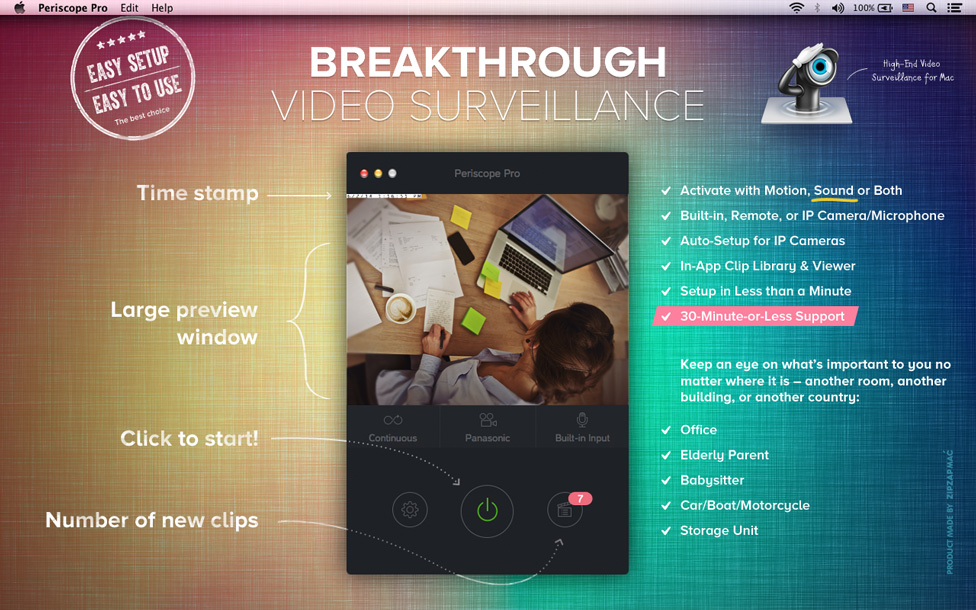
ZipZapMac has announced Periscope Pro 2.3, a major upgrade of its flagship video surveillance program for Mac OS X. Use your built-in camera/microphone, USB remote camera/microphone, or an IP Camera to monitor and record anything. Version 2.3 is fully compatible with Apple's new operating system, and ensures that those who upgrade to OS X 10.10 Yosemite have a fully-featured, easy-to-use video surveillance suite that satisfies all of their needs.
Novosibirsk, Russian Federation - In a move sure to delight Apple customers worldwide, ZipZapMac has announced the release and availability of Periscope Pro 2.3, an important update to the developer's flagship video surveillance program for Mac OS X. The new version (2.3) of the video surveillance application is fully compatible with Apple's new operating system, and ensures that those who upgrade to OS X 10.10 Yosemite have a fully-featured, easy-to-use video surveillance suite that satisfies all of their needs.
"We're really excited to not only improve the software, but also ensure that it's fully compatible with the new operating system" said Stanislav Kuptsov, CEO of ZipZapMac. "We've received glowing reviews from our previous version, from both the press and thousands of end users, and we're pleased that Mac users who use IP cameras and Apple's video features will have a robust surveillance application for the new system on day one."
The original Periscope Pro received 4 out of 5 stars from Macworld. Reviewers particularly liked the motion sensing capability, the audio features, and the option of saving of clips to an outside source, such as dropbox. End users were fond of the ease of camera setup, and the intuitive interface that made setting up a professional-level surveillance system a matter of a few simple clicks.
"Mac users love the fact that everything Mac is simple, and our application is no different" stated Kuptsov. "We've made setting up a camera, whether it's the Mac's camera or a third-party IP camera, a breeze. This version improves the motion and sound detection, and is also very small in terms of resource footprint. You won't even know it's running - until something walks across the room your camera is monitoring, of course!" he added.
Pricing and Availability:
Periscope Pro has previously sold for $50, but in celebration of the new version, the company is lowering the price to $20 (USD). They also offer a free trial version, available on ZipZapMac site.
ZipZapMac: http://zipzapmac.com/
Periscope Pro 2.3: http://zipzapmac.com/PeriscopePro
Download Periscope Pro: http://zipzapmac.com/download/PeriscopePro
Buy Periscope Pro: https://secure.avangate.com/order/checkout.php?PRODS=4631332&QTY=1&CART=1&CARD=2&SHORT_FORM=1
Screenshot: http://zipzapmac.com/system/datas/399/original/screen-1.jpg
Application Icon: http://shared.zipzapmac.com/52/original/256.png
With offices in the Czech Republic and Russia, ZipZapMac is a leading Mac developer that creates incredibly useful apps that enhance the user experience. Their apps have been App Store best-in-category products 18 times, across 10 countries. Their flagship product, Periscope Pro, is one of the leading Mac video surveillance applications on the market. Copyright (C) 2010-2014 ZipZapMac. All Rights Reserved. Apple, the Apple logo, Mac OS X, Macintosh, iPhone, iPod, and iPad are registered trademarks of Apple Inc. in the U.S. and/or other countries. Other trademarks and registered trademarks may be the property of their respective owners.
*******
Link To Article: http://prmac.com/release-id-72234.htm
*******
---------------------------------------------------------------------------------
Note that you can alter delivered distributions at any time.
Login to your account on prMac to alter your channel selection, or to opt-out at any time.
ZipZapMac Releases Periscope Pro Compatible With OS X 10.10 Yosemite - Published on 12/11/14
ZipZapMac has announced Periscope Pro 2.3, a major upgrade of its flagship video surveillance program for Mac OS X. Use your built-in camera/microphone, USB remote camera/microphone, or an IP Camera to monitor and record anything. Version 2.3 is fully compatible with Apple's new operating system, and ensures that those who upgrade to OS X 10.10 Yosemite have a fully-featured, easy-to-use video surveillance suite that satisfies all of their needs.
Novosibirsk, Russian Federation - In a move sure to delight Apple customers worldwide, ZipZapMac has announced the release and availability of Periscope Pro 2.3, an important update to the developer's flagship video surveillance program for Mac OS X. The new version (2.3) of the video surveillance application is fully compatible with Apple's new operating system, and ensures that those who upgrade to OS X 10.10 Yosemite have a fully-featured, easy-to-use video surveillance suite that satisfies all of their needs.
"We're really excited to not only improve the software, but also ensure that it's fully compatible with the new operating system" said Stanislav Kuptsov, CEO of ZipZapMac. "We've received glowing reviews from our previous version, from both the press and thousands of end users, and we're pleased that Mac users who use IP cameras and Apple's video features will have a robust surveillance application for the new system on day one."
The original Periscope Pro received 4 out of 5 stars from Macworld. Reviewers particularly liked the motion sensing capability, the audio features, and the option of saving of clips to an outside source, such as dropbox. End users were fond of the ease of camera setup, and the intuitive interface that made setting up a professional-level surveillance system a matter of a few simple clicks.
"Mac users love the fact that everything Mac is simple, and our application is no different" stated Kuptsov. "We've made setting up a camera, whether it's the Mac's camera or a third-party IP camera, a breeze. This version improves the motion and sound detection, and is also very small in terms of resource footprint. You won't even know it's running - until something walks across the room your camera is monitoring, of course!" he added.
Pricing and Availability:
Periscope Pro has previously sold for $50, but in celebration of the new version, the company is lowering the price to $20 (USD). They also offer a free trial version, available on ZipZapMac site.
ZipZapMac: http://zipzapmac.com/
Periscope Pro 2.3: http://zipzapmac.com/PeriscopePro
Download Periscope Pro: http://zipzapmac.com/download/PeriscopePro
Buy Periscope Pro: https://secure.avangate.com/order/checkout.php?PRODS=4631332&QTY=1&CART=1&CARD=2&SHORT_FORM=1
Screenshot: http://zipzapmac.com/system/datas/399/original/screen-1.jpg
Application Icon: http://shared.zipzapmac.com/52/original/256.png

With offices in the Czech Republic and Russia, ZipZapMac is a leading Mac developer that creates incredibly useful apps that enhance the user experience. Their apps have been App Store best-in-category products 18 times, across 10 countries. Their flagship product, Periscope Pro, is one of the leading Mac video surveillance applications on the market. Copyright (C) 2010-2014 ZipZapMac. All Rights Reserved. Apple, the Apple logo, Mac OS X, Macintosh, iPhone, iPod, and iPad are registered trademarks of Apple Inc. in the U.S. and/or other countries. Other trademarks and registered trademarks may be the property of their respective owners.
*******
Link To Article: http://prmac.com/release-id-72234.htm
*******
---------------------------------------------------------------------------------
Note that you can alter delivered distributions at any time.
Login to your account on prMac to alter your channel selection, or to opt-out at any time.
Set Your Alarm Clock To The Weather With WakeApp Weather 2.0 for iOS
A new article has been published at prMac.
Set Your Alarm Clock To The Weather With WakeApp Weather 2.0 for iOS - Published on 12/11/14
Smart Solutions Apps has announced WakeApp Weather 2.0, an update to their top-ranking app for iOS devices. Named an Editor's Choice by Apple, WakeApp Weather is an intelligent alarm clock that allows users to set up alarms according to the ideal climate for their scheduled activity. If the weather conditions are not ideal for the scheduled activity in the selected location, WakeApp Weather allows the user to sleep in. Users can also share activities with friends via social media.
Rio de Janeiro, Brazil - Smart Solutions Apps has announced the release and availability of WakeApp Weather 2.0, an update to their top-ranking app for iPhone, iPad, and iPod touch devices. Named an Editor's Choice by Apple, WakeApp Weather is an intelligent alarm clock that allows users to set up alarms according to the ideal climate for their scheduled activity. If the weather conditions do not correspond with the user's set preferences for the scheduled activity, WakeApp Weather allows the user to sleep in.
"WakeApp Weather by Smart Solutions Apps is a new approach to looking at the weather and alarms in one," says Christine Chan of App Advice (7 Jan 2014). "The thing that drew me in to the app in the first place was the fact that it looks clean and elegant. Like most apps nowadays, the design is flat, with simple iconography to represent activities. If you need a conditional weather alarm, then WakeApp Weather is definitely one to consider looking at."
Feature Highlights:
* Elegant and intuitive User Interface
* More than 20 different outdoor activities
* Climate condition selections include Clear, Cloudy, Drizzle, Rain, Snow, and All
* Many locations worldwide
* Ability to save alarm settings
* Displays weather forecast for four days in advance
* Select the ideal temperature range for scheduled activity (full version only)
* 25 different alarm sounds
* Share activities through Facebook and Twitter
* iOS 8 and iPhone 6-compatible
With a clean and intuitive interface, WakeApp Weather helps users make the best use of their time by displaying a 4-day forecast of their local weather as soon as they open the app. To set up the alarm, users first choose from over 20 different outdoor activities or they can designate their own under "Do Another Activity." There are several options to set the ideal weather for their activity including Clear, Cloudy, Drizzle, Rain, and Snow. Users can choose up to three weather options or simply select All and the WakeApp Weather alarm will sound at the set dates and time. he full version of WakeApp Weather also includes the ability to select an ideal temperature range for the scheduled activity.
WakeApp Weather uses the device's GPS function to help users plan ahead. When setting the WakeApp Weather alarm, users can either use the default current location or choose a specific location based on city name or zip code. WakeApp Weather also allows the user to select from 25 different sounds to wake up to. To assist in the planning of activities as a group, users can easily share their alarms through Facebook and Twitter.
"WakeApp Weather is the only app that synchronizes a clock alarm to real-time forecasted weather conditions in the user's designated location," says Rodrigo Maranini of Smart Solutions Apps. "Ideal for sports enthusiasts, executives, and students, this app works perfectly to warn you only when your chosen weather condition is present. Thus, WakeApp Weather makes it possible for you to better plan your day and get a few extra winks of sleep when the weather is inclement. Or if it's raining or snowing, you can set WakeApp Weather to wake you up at an earlier time so you can beat the morning rush. WakeApp Weather the #1 Health and Fitness app in the Brazilian App Store and has been named Best New App in more than 20 different countries.
"In this new free version," he adds, "Users can activate two more alarms in exchange for sharing on Facebook and leaving an App Store rating. Additionally, the temperature module can be purchased for $0.99 (USD) or acquired by the user sharing on Facebook. The update also has also fixed minor bugs, improved overall functionality, and includes several new buttons for sharing activities with friends. Try it today and enjoy the endless possibilities."
Language Support:
* English, Portuguese, Spanish
Device Requirements:
* iPhone, iPad or iPod touch
* Requires iOS 6.0 or later
* 17.9 MB
Pricing and Availability:
For a limited time, WakeApp Weather 2.0 is free and available worldwide exclusively through the App Store in the Health & Fitness category. Additional features are available as in-app purchases for $0.99 (USD).
WakeApp Weather 2.0: http://www.wakeappweather.com/
Download from iTunes (free version): https://itunes.apple.com/app/wakeapp-weather-lite-alarm/id860008083
Purchase and Download (full version): https://itunes.apple.com/app/wakeapp-weather/id787441004
YouTube Video: https://www.youtube.com/watch?v=G6rQTxrj2fY
Screenshot: http://static.squarespace.com/static/53fbe4f7e4b01f04026bccbf/t/547d1968e4b072443870d6a8/1417484648899/?format=300w
App Icon: http://a4.mzstatic.com/us/r30/Purple/v4/f5/c4/f8/f5c4f88d-db48-2a87-fd0f-3a5aaf120d34/mzl.erfkdhau.175x175-75.jpg
Based in Rio de Janeiro, Brazil, Smart Solutions Apps was launched in 2014 by Marcus Fraga and Rodrigo Maranini. Smart Solutions Apps develops creative, stylish, and practical apps to make life easier for their users in their most important activities. Copyright (C) 2014 Smart Solutions Apps. All Rights Reserved. Apple, the Apple logo, iPhone and iPod are registered trademarks of Apple Inc. in the U.S. and/or other countries.
*******
Link To Article: http://prmac.com/release-id-72233.htm
*******
---------------------------------------------------------------------------------
Note that you can alter delivered distributions at any time.
Login to your account on prMac to alter your channel selection, or to opt-out at any time.
Set Your Alarm Clock To The Weather With WakeApp Weather 2.0 for iOS - Published on 12/11/14
Smart Solutions Apps has announced WakeApp Weather 2.0, an update to their top-ranking app for iOS devices. Named an Editor's Choice by Apple, WakeApp Weather is an intelligent alarm clock that allows users to set up alarms according to the ideal climate for their scheduled activity. If the weather conditions are not ideal for the scheduled activity in the selected location, WakeApp Weather allows the user to sleep in. Users can also share activities with friends via social media.
Rio de Janeiro, Brazil - Smart Solutions Apps has announced the release and availability of WakeApp Weather 2.0, an update to their top-ranking app for iPhone, iPad, and iPod touch devices. Named an Editor's Choice by Apple, WakeApp Weather is an intelligent alarm clock that allows users to set up alarms according to the ideal climate for their scheduled activity. If the weather conditions do not correspond with the user's set preferences for the scheduled activity, WakeApp Weather allows the user to sleep in.
"WakeApp Weather by Smart Solutions Apps is a new approach to looking at the weather and alarms in one," says Christine Chan of App Advice (7 Jan 2014). "The thing that drew me in to the app in the first place was the fact that it looks clean and elegant. Like most apps nowadays, the design is flat, with simple iconography to represent activities. If you need a conditional weather alarm, then WakeApp Weather is definitely one to consider looking at."
Feature Highlights:
* Elegant and intuitive User Interface
* More than 20 different outdoor activities
* Climate condition selections include Clear, Cloudy, Drizzle, Rain, Snow, and All
* Many locations worldwide
* Ability to save alarm settings
* Displays weather forecast for four days in advance
* Select the ideal temperature range for scheduled activity (full version only)
* 25 different alarm sounds
* Share activities through Facebook and Twitter
* iOS 8 and iPhone 6-compatible
With a clean and intuitive interface, WakeApp Weather helps users make the best use of their time by displaying a 4-day forecast of their local weather as soon as they open the app. To set up the alarm, users first choose from over 20 different outdoor activities or they can designate their own under "Do Another Activity." There are several options to set the ideal weather for their activity including Clear, Cloudy, Drizzle, Rain, and Snow. Users can choose up to three weather options or simply select All and the WakeApp Weather alarm will sound at the set dates and time. he full version of WakeApp Weather also includes the ability to select an ideal temperature range for the scheduled activity.
WakeApp Weather uses the device's GPS function to help users plan ahead. When setting the WakeApp Weather alarm, users can either use the default current location or choose a specific location based on city name or zip code. WakeApp Weather also allows the user to select from 25 different sounds to wake up to. To assist in the planning of activities as a group, users can easily share their alarms through Facebook and Twitter.
"WakeApp Weather is the only app that synchronizes a clock alarm to real-time forecasted weather conditions in the user's designated location," says Rodrigo Maranini of Smart Solutions Apps. "Ideal for sports enthusiasts, executives, and students, this app works perfectly to warn you only when your chosen weather condition is present. Thus, WakeApp Weather makes it possible for you to better plan your day and get a few extra winks of sleep when the weather is inclement. Or if it's raining or snowing, you can set WakeApp Weather to wake you up at an earlier time so you can beat the morning rush. WakeApp Weather the #1 Health and Fitness app in the Brazilian App Store and has been named Best New App in more than 20 different countries.
"In this new free version," he adds, "Users can activate two more alarms in exchange for sharing on Facebook and leaving an App Store rating. Additionally, the temperature module can be purchased for $0.99 (USD) or acquired by the user sharing on Facebook. The update also has also fixed minor bugs, improved overall functionality, and includes several new buttons for sharing activities with friends. Try it today and enjoy the endless possibilities."
Language Support:
* English, Portuguese, Spanish
Device Requirements:
* iPhone, iPad or iPod touch
* Requires iOS 6.0 or later
* 17.9 MB
Pricing and Availability:
For a limited time, WakeApp Weather 2.0 is free and available worldwide exclusively through the App Store in the Health & Fitness category. Additional features are available as in-app purchases for $0.99 (USD).
WakeApp Weather 2.0: http://www.wakeappweather.com/
Download from iTunes (free version): https://itunes.apple.com/app/wakeapp-weather-lite-alarm/id860008083
Purchase and Download (full version): https://itunes.apple.com/app/wakeapp-weather/id787441004
YouTube Video: https://www.youtube.com/watch?v=G6rQTxrj2fY
Screenshot: http://static.squarespace.com/static/53fbe4f7e4b01f04026bccbf/t/547d1968e4b072443870d6a8/1417484648899/?format=300w
App Icon: http://a4.mzstatic.com/us/r30/Purple/v4/f5/c4/f8/f5c4f88d-db48-2a87-fd0f-3a5aaf120d34/mzl.erfkdhau.175x175-75.jpg

Based in Rio de Janeiro, Brazil, Smart Solutions Apps was launched in 2014 by Marcus Fraga and Rodrigo Maranini. Smart Solutions Apps develops creative, stylish, and practical apps to make life easier for their users in their most important activities. Copyright (C) 2014 Smart Solutions Apps. All Rights Reserved. Apple, the Apple logo, iPhone and iPod are registered trademarks of Apple Inc. in the U.S. and/or other countries.
*******
Link To Article: http://prmac.com/release-id-72233.htm
*******
---------------------------------------------------------------------------------
Note that you can alter delivered distributions at any time.
Login to your account on prMac to alter your channel selection, or to opt-out at any time.
iSlide Puzzle - challenging your mind
A new article has been published at prMac.
iSlide Puzzle - challenging your mind - Published on 12/10/14
Lisbon based Warpbox Solutions announces its new game for iOS devices, iSlide Puzzle. Solve slide puzzles of several themes and track your classification in Game Center tables (Finished puzzles, Best time and Moves). The game has several themes; animals, cities, nature and more. Solve the puzzle in the fastest time with minimum moves. Challenge your friends to play; who will be the first to solve all the puzzles?
Lisbon, Portugal - Warpbox Solutions is thrilled to introduce iSlide Puzzle, a game that will challenge your mind. Solve slide puzzles of several themes and track your classification in Game Center tables (Finished puzzles, Best time and Moves).Challenge your friends that have iPhone to play; who will be the first to solve all the puzzles?
A puzzle is a game that tests a person's skills. In a puzzle, one is required to put pieces together, in a logical way, in order to arrive at the correct solution of the puzzle. Solutions of puzzles often require the recognition of patterns and the creation of a particular kind of order.
The first puzzle was created around 1760, when John Spilsbury, a British engraver and cartographer, mounted a map on a sheet of wood, which he then sawed around the outline of each individual country on the map. He then used the resulting pieces as an aid to the teaching of geography. After becoming popular among the public, this kind of teaching aid remained the primary use of puzzles until about 1820. By the early 20th century, magazines and newspapers had found that they could increase their readership by publishing puzzle contests.
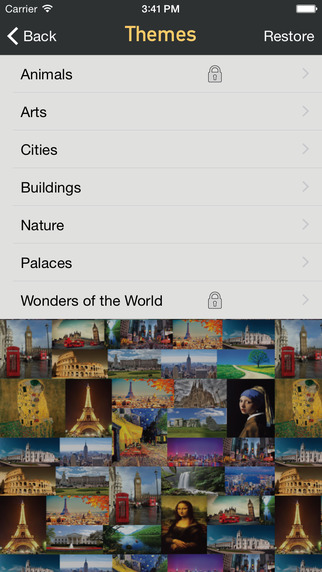
The iSlide Puzzle game brings you several puzzles items to solve. They are related with the following themes: animals, arts, cities, buildings, nature, palaces and wonders of the world. The main goal of the game is to solve the puzzle in the minimum possible time and with minimum moves. You can compare your results with other players using the Game Center feature. Download this game for free at the App Store.
Device Requirements:
* iPhone, iPad, and iPod touch
* Optimized for iPhone�5, iPhone�6, and iPhone�6�Plus
* Requires iOS 8.0 or later
* 198 MB
Pricing and Availability:
iSlide Puzzle 1.0.1 is free and available worldwide exclusively through the App Store in the Games category.
iSlide Puzzle 1.0.0: https://itunes.apple.com/app/islide-puzzle/id940461299
Screenshot 1: http://a5.mzstatic.com/us/r30/Purple3/v4/e3/0a/17/e30a1787-d209-32ed-4ddb-c028be18cd34/screen322x572.jpeg
Screenshot 2: http://a5.mzstatic.com/us/r30/Purple5/v4/f3/ae/ae/f3aeae08-9162-eb05-3f09-2761f9e93d31/screen322x572.jpeg
App Icon: http://a1.mzstatic.com/us/r30/Purple1/v4/45/2c/6c/452c6c35-341d-fb75-6ada-3134e98fc764/icon175x175.jpeg
Warpbox Solutions is an IT Company that develops mobile applications for iOS and Android. We create, design and implement complete applications and systems. All Material and Software (C) Copyright 2014 Warpbox. All Rights Reserved. Apple, the Apple logo, iPhone, iPod and iPad are registered trademarks of Apple Inc. in the U.S. and/or other countries. Other trademarks and registered trademarks may be the property of their respective owners.
*******
Link To Article: http://prmac.com/release-id-72312.htm
*******
---------------------------------------------------------------------------------
Note that you can alter delivered distributions at any time.
Login to your account on prMac to alter your channel selection, or to opt-out at any time.
iSlide Puzzle - challenging your mind - Published on 12/10/14
Lisbon based Warpbox Solutions announces its new game for iOS devices, iSlide Puzzle. Solve slide puzzles of several themes and track your classification in Game Center tables (Finished puzzles, Best time and Moves). The game has several themes; animals, cities, nature and more. Solve the puzzle in the fastest time with minimum moves. Challenge your friends to play; who will be the first to solve all the puzzles?
Lisbon, Portugal - Warpbox Solutions is thrilled to introduce iSlide Puzzle, a game that will challenge your mind. Solve slide puzzles of several themes and track your classification in Game Center tables (Finished puzzles, Best time and Moves).Challenge your friends that have iPhone to play; who will be the first to solve all the puzzles?
A puzzle is a game that tests a person's skills. In a puzzle, one is required to put pieces together, in a logical way, in order to arrive at the correct solution of the puzzle. Solutions of puzzles often require the recognition of patterns and the creation of a particular kind of order.
The first puzzle was created around 1760, when John Spilsbury, a British engraver and cartographer, mounted a map on a sheet of wood, which he then sawed around the outline of each individual country on the map. He then used the resulting pieces as an aid to the teaching of geography. After becoming popular among the public, this kind of teaching aid remained the primary use of puzzles until about 1820. By the early 20th century, magazines and newspapers had found that they could increase their readership by publishing puzzle contests.
The iSlide Puzzle game brings you several puzzles items to solve. They are related with the following themes: animals, arts, cities, buildings, nature, palaces and wonders of the world. The main goal of the game is to solve the puzzle in the minimum possible time and with minimum moves. You can compare your results with other players using the Game Center feature. Download this game for free at the App Store.
Device Requirements:
* iPhone, iPad, and iPod touch
* Optimized for iPhone�5, iPhone�6, and iPhone�6�Plus
* Requires iOS 8.0 or later
* 198 MB
Pricing and Availability:
iSlide Puzzle 1.0.1 is free and available worldwide exclusively through the App Store in the Games category.
iSlide Puzzle 1.0.0: https://itunes.apple.com/app/islide-puzzle/id940461299
Screenshot 1: http://a5.mzstatic.com/us/r30/Purple3/v4/e3/0a/17/e30a1787-d209-32ed-4ddb-c028be18cd34/screen322x572.jpeg

Screenshot 2: http://a5.mzstatic.com/us/r30/Purple5/v4/f3/ae/ae/f3aeae08-9162-eb05-3f09-2761f9e93d31/screen322x572.jpeg
App Icon: http://a1.mzstatic.com/us/r30/Purple1/v4/45/2c/6c/452c6c35-341d-fb75-6ada-3134e98fc764/icon175x175.jpeg

Warpbox Solutions is an IT Company that develops mobile applications for iOS and Android. We create, design and implement complete applications and systems. All Material and Software (C) Copyright 2014 Warpbox. All Rights Reserved. Apple, the Apple logo, iPhone, iPod and iPad are registered trademarks of Apple Inc. in the U.S. and/or other countries. Other trademarks and registered trademarks may be the property of their respective owners.
*******
Link To Article: http://prmac.com/release-id-72312.htm
*******
---------------------------------------------------------------------------------
Note that you can alter delivered distributions at any time.
Login to your account on prMac to alter your channel selection, or to opt-out at any time.
It's Never Too Early For Love - Small Potatoes Magic Toy Maker App
A new article has been published at prMac.
It's Never Too Early For Love - Small Potatoes Magic Toy Maker App - Published on 12/10/14
Fat Red Couch, Inc. today announces Small Potatoes Magic Toymaker 1.2.06, their playful entertainment app for iOS and Android devices. Dress up your own Small Potatoes Plush Toy for that special someone for Valentine's Day! Choose from hundreds of fun, colorful, and lively costume variations. Using the tools in this interactive app, anyone can customize a high quality Small Potatoes plush toy, design and personalize a hang tag, and have it delivered right to their door, with free shipping.
San Rafael, California - As "last minute gifts" trends on Twitter for the holidays - Small Potatoes Magic Toymaker releases an App that will deliver the love just in time for Valentine's Day. Featuring the wildly successful potatoes based on the television show and movie, Small Potatoes, created and produced by Little Airplane Productions, the app is an interactive experience that ends with a physical, customized toy arriving on your doorstep.
Easy-to-navigate and enhanced with music, animation, and a magic box for spontaneous dress-up, customers enter the Magic Toy Factory and follow their potato through the customization, including:
* Mix-and-match with hundreds of costume combinations like boas, tuxedos, hats and headwear, pink satin sashes, and more lovable clothes
* Design and Personalize the Small Potatoes plush toy hangtag
* Order by December 15, 2014 for an on-time Valentine's Day arrival
Manufactured by Animal Magic, one of the most reputable plush toy companies in the world, the personalized Valentine's Small Potatoes are the second product to be released through the Company's newly formed Factory-to-Consumer division called F2C Ltd. The Company ships throughout the US and will expand to international shipping in Q2 2015.
The Small Potatoes Magic Toy Maker app is produced by Bay Area mobile publisher FatRedCouch, which develops proprietary front-end mobile entertainment experiences for Animal Magic's newly launched F2C division. "We are very excited to expand our Digital Durable initiative with Animal Magic," says FRC founder Nicole Lundeen. "We are innovating the mobile app category and taking creativity to a new level for our clients and customers."
Device Requirements:
* iPhone, iPad, and iPod touch
* Requires iOS 6.0 or later
* 218 MB
Pricing and Availability:
Small Potatoes Magic Toymaker 1.2.06 (app) is Free and available worldwide through the App Store in the Entertainment category. There is also an Android version available on Google Play. The six-inch and nine-inch high characters are made from chenille-style fabric for extra softness and retail for $19.99 (USD) including shipping, with discounts on multiple orders. To learn more, or see the complete library of FRC products, please visit FatRedCouch online.
FatRedCouch: http://fatredcouch.com/
Small Potatoes Magic Toymaker 1.2.06: http://fatredcouch.com/products/small-potatoes-magic-toy-maker/
Download from iTunes: http://itunes.apple.com/app/id923823040
Download from Google Play: https://play.google.com/store/apps/details?id=com.fatredcouch.animalmagic.magictoymaker.smallpotatoes.android
Screenshot: https://www.flickr.com/photos/fatredcouch/15986089012/
App Icon: https://www.flickr.com/photos/fatredcouch/15799492960/
Fat Red Couch, Inc. blends brands and technologies to create innovative entertainment, publishing, and educational experiences using digital platforms and physical goods. In 2014, the company has launched multiple products based on Puff, the Magic Dragon and Appisodes for WordWorld, the long-running and award-winning PBS series. FatRedCouch is also slated to launch 12 new titles on at least six different distribution platforms covering: creative content, games, health, interactive TV, Appisodes, and interactive/connected toys. All Material and Software (C) Copyright 2014 Fat Red Couch, Inc. All Rights Reserved. Apple, the Apple logo, iPhone, iPod and iPad are registered trademarks of Apple Inc. in the U.S. and/or other countries. Other trademarks and registered trademarks may be the property of their respective owners.
*******
Link To Article: http://prmac.com/release-id-72309.htm
*******
---------------------------------------------------------------------------------
Note that you can alter delivered distributions at any time.
Login to your account on prMac to alter your channel selection, or to opt-out at any time.
It's Never Too Early For Love - Small Potatoes Magic Toy Maker App - Published on 12/10/14
Fat Red Couch, Inc. today announces Small Potatoes Magic Toymaker 1.2.06, their playful entertainment app for iOS and Android devices. Dress up your own Small Potatoes Plush Toy for that special someone for Valentine's Day! Choose from hundreds of fun, colorful, and lively costume variations. Using the tools in this interactive app, anyone can customize a high quality Small Potatoes plush toy, design and personalize a hang tag, and have it delivered right to their door, with free shipping.
San Rafael, California - As "last minute gifts" trends on Twitter for the holidays - Small Potatoes Magic Toymaker releases an App that will deliver the love just in time for Valentine's Day. Featuring the wildly successful potatoes based on the television show and movie, Small Potatoes, created and produced by Little Airplane Productions, the app is an interactive experience that ends with a physical, customized toy arriving on your doorstep.
Easy-to-navigate and enhanced with music, animation, and a magic box for spontaneous dress-up, customers enter the Magic Toy Factory and follow their potato through the customization, including:
* Mix-and-match with hundreds of costume combinations like boas, tuxedos, hats and headwear, pink satin sashes, and more lovable clothes
* Design and Personalize the Small Potatoes plush toy hangtag
* Order by December 15, 2014 for an on-time Valentine's Day arrival
Manufactured by Animal Magic, one of the most reputable plush toy companies in the world, the personalized Valentine's Small Potatoes are the second product to be released through the Company's newly formed Factory-to-Consumer division called F2C Ltd. The Company ships throughout the US and will expand to international shipping in Q2 2015.
The Small Potatoes Magic Toy Maker app is produced by Bay Area mobile publisher FatRedCouch, which develops proprietary front-end mobile entertainment experiences for Animal Magic's newly launched F2C division. "We are very excited to expand our Digital Durable initiative with Animal Magic," says FRC founder Nicole Lundeen. "We are innovating the mobile app category and taking creativity to a new level for our clients and customers."
Device Requirements:
* iPhone, iPad, and iPod touch
* Requires iOS 6.0 or later
* 218 MB
Pricing and Availability:
Small Potatoes Magic Toymaker 1.2.06 (app) is Free and available worldwide through the App Store in the Entertainment category. There is also an Android version available on Google Play. The six-inch and nine-inch high characters are made from chenille-style fabric for extra softness and retail for $19.99 (USD) including shipping, with discounts on multiple orders. To learn more, or see the complete library of FRC products, please visit FatRedCouch online.
FatRedCouch: http://fatredcouch.com/
Small Potatoes Magic Toymaker 1.2.06: http://fatredcouch.com/products/small-potatoes-magic-toy-maker/
Download from iTunes: http://itunes.apple.com/app/id923823040
Download from Google Play: https://play.google.com/store/apps/details?id=com.fatredcouch.animalmagic.magictoymaker.smallpotatoes.android
Screenshot: https://www.flickr.com/photos/fatredcouch/15986089012/
App Icon: https://www.flickr.com/photos/fatredcouch/15799492960/
Fat Red Couch, Inc. blends brands and technologies to create innovative entertainment, publishing, and educational experiences using digital platforms and physical goods. In 2014, the company has launched multiple products based on Puff, the Magic Dragon and Appisodes for WordWorld, the long-running and award-winning PBS series. FatRedCouch is also slated to launch 12 new titles on at least six different distribution platforms covering: creative content, games, health, interactive TV, Appisodes, and interactive/connected toys. All Material and Software (C) Copyright 2014 Fat Red Couch, Inc. All Rights Reserved. Apple, the Apple logo, iPhone, iPod and iPad are registered trademarks of Apple Inc. in the U.S. and/or other countries. Other trademarks and registered trademarks may be the property of their respective owners.
*******
Link To Article: http://prmac.com/release-id-72309.htm
*******
---------------------------------------------------------------------------------
Note that you can alter delivered distributions at any time.
Login to your account on prMac to alter your channel selection, or to opt-out at any time.
PageMeUp 1.1 updated for OS X - Easily lay out magazines & web sites
A new article has been published at prMac.
PageMeUp 1.1 updated for OS X - Easily lay out magazines & web sites - Published on 12/10/14
Softobe has released PageMeUp 1.1, an update to their easy-to-use layout maker for OS X. PageMeUp lets you quickly lay out your text & images with the utmost simpicity and get a professional PDF document or build your web site. Create a document, choose its page format, size & background color, set the margins, bleed, custom guides, rows and columns and even apply RGB or CMYK ICC color profiles. Then drag, import or paste images & text onto the PageMeUp document and place/resize them.
Paris, France - Softobe has announced the release of PageMeUp 1.1, their easy-to-use page layout maker for OS X to create web sites, magazines, brochures, flyers, business cards and more. PageMeUp lets you quickly lay out your text and images with the utmost simplicity and get a professional PDF document or build your web site.
Simply drag, import or paste images and text onto the PageMeUp document then resize and place them on the page. A powerful snap assistant will help you at aligning the boxes on the page. Edit and format your text, scale the images (custom, fit, fill), apply the color profile, shadow, fill or gradient background, border, mask, rotation, opacity, flip, web links, page HTML metadata; then print or export as PDF, HTML, TIFF, PNG or JPG using your ICC Color Profile (CMYK or RGB), compressions, quality and resolution.
Version 1.1 is a recommended update for all customers, offering a number of bug fixes and improvements.
Features:
* Added the Mask Polygon. Set the mask of text boxes and image boxes to "Polygon" then choose the number of the sides
* Added the Mask Star. Set the mask of text boxes and image boxes to "Star" then choose the number of the vertices and the inset value
* PageMeUp properly exports rects, rounded-corner rects, ovals, polygons and stars to PDF and HTML. When exporting to HTML, PageMeUp exports the boxes either as HTML with selectable text, or as a fixed image at the resolution chosen (mark the check box Export As Image on the Inspector/Web/HTML panel)
* PageMeUP can now import EPS image files. As per any other image (TIF, GIF, PNG, JPG, PDF...) drag the EPS image file onto the page to import it into the document. Also you can drag the EPS file onto an existing image box on the page to import that image within that image box. Last, you can import the image file by selecting the menu item File:Import or by pressing Command-D. If no image box is selected, PageMeUp up will import that image within a brand new image box. If an image box is selected, PageMeUp will import that image within the selected image box
* Added the Page Icon Preview to the page list on the left side of the document window
* Added the Existing URLs pop-up menu to the Inspector/Web/Link panel. Select an image box or a text box, mark the check box Link on the panel Inspector/Web/Link then select the item External URL from the Link pop-up menu. Now you can quickly pick your previously defined External URLs from the pop-up at the right of the field URL
* You can now get a multiple page PDF preview. On the page list at the left side of the document window, set BOOK mode, then select several pages by clicking on the page icons while holding down the Command key. Then click on the Preview button to get a multiple page PDF preview
* If you click on the Preview button (eye icon) while holding down the Option key, you will be shown the Preview Settings panel on which you can set the PPI, compression, and output file format
* PageMeUp now lets you define a different page size for each page. On the Inspector panel we added a new panel called Page where you can easily set a page style by the Style pop-up menu. The default, As Document, uses the settings defined in the Inspector/Document panel. If you choose the item Custom from the pop-up menu Style you can customize the page size, Background Color and the Stage (pasteboard) Color of the currently-selected page
* The Print panel always prints the pages of the document (or creates a PDF file) using the current page size chosen. If your document contains pages with different page sizes and you need to get a PDF with a different page size, your should export your document to PDF by selecting the menu item File: Export. Then select PDF from the popup menu Format, select the radio button To File: Unique then press Export
* Added the paper Orientation option to the Print panel
* Added the custom page Scale option to the Print panel
* Added the Scale to fit page check box to the Print panel. Select the item "PageMeUp" from the popup menu, then mark/unmark this check box
* Added the Print Header check box to the Print panel. When this option is selected, PageMeUp will print the name of the document, the page number, the total number of pages, the print date, the print time and the user name on the header of each page. e.g. "MyDocument - Page 6 of 14 - Printed on 2014.11.20 16:52 by john"
* Added the Print Header check box to the Preview panel. See above
* Fixed a bug when undoing "Delete Page"
* Fixed a bug when choosing a color from a Color Panel different than Gray, RGB, CMYK and HSB
* Fixed a rare bug that caused a crash when printing-previewing a document
* Fixed a rare bug that caused a crash when saving a document
* Addressed an issue when selecting a box on top of the selected box
* Addressed an issue on the HTML Compatibility Test
* Addressed an issue on the HTML code when the decimal separator on the System Preferences panel is different than a dot (".").
* Addressed an issue on the HTML Opacity parameter
* Addressed an issue on the HTML Shadow parameter
* Addressed an issue on the HTML Border parameter of rotated boxes.
* Addressed an issue at changing the RGB or CMYK Color Profile and display the change on the page
* Addressed an issue at preserving the shape of the buttons (boxes with clickable URL links) when exporting to PDF. Clicking on a button on the exported PDF will properly open your default browser at the linked page
* Other minor fixes and improvements
System Requirements:
* Requires OS X Version 10.8 or higher
* For Intel
Pricing and Availability:
PageMeUp 1.1 is available as a full-featured demo. A single user license is $30.00 USD. Registered 1.x.x customers may upgrade for free to all the next 1.x.x releases.
PageMeUp 1.1: http://www.softobe.com/pagemeup.html
Download PageMeUp: http://www.softobe.com/download/pmup.dmg
YouTube Video: http://www.youtube.com/watch?v=Owc5o843Bv4
Purchase: http://www.softobe.com/sb_store.html
Screenshot: http://www.softobe.com/pagemeup_files/pagemeup_screenshot.jpg
App Icon: http://www.softobe.com/pagemeup_files/pagemeup_app_icon.png
Located in Paris, France, Softobe is a software development company for OS X and iOS. Copyright (C) 2014 Softobe. All Rights Reserved. Apple, the Apple logo and Mac OS X platforms are trademarks of Apple Inc. in the U.S. and/or other countries. Other trademarks and registered trademarks may be the property of their respective owners.
*******
Link To Article: http://prmac.com/release-id-72311.htm
*******
---------------------------------------------------------------------------------
Note that you can alter delivered distributions at any time.
Login to your account on prMac to alter your channel selection, or to opt-out at any time.
PageMeUp 1.1 updated for OS X - Easily lay out magazines & web sites - Published on 12/10/14
Softobe has released PageMeUp 1.1, an update to their easy-to-use layout maker for OS X. PageMeUp lets you quickly lay out your text & images with the utmost simpicity and get a professional PDF document or build your web site. Create a document, choose its page format, size & background color, set the margins, bleed, custom guides, rows and columns and even apply RGB or CMYK ICC color profiles. Then drag, import or paste images & text onto the PageMeUp document and place/resize them.
Paris, France - Softobe has announced the release of PageMeUp 1.1, their easy-to-use page layout maker for OS X to create web sites, magazines, brochures, flyers, business cards and more. PageMeUp lets you quickly lay out your text and images with the utmost simplicity and get a professional PDF document or build your web site.
Simply drag, import or paste images and text onto the PageMeUp document then resize and place them on the page. A powerful snap assistant will help you at aligning the boxes on the page. Edit and format your text, scale the images (custom, fit, fill), apply the color profile, shadow, fill or gradient background, border, mask, rotation, opacity, flip, web links, page HTML metadata; then print or export as PDF, HTML, TIFF, PNG or JPG using your ICC Color Profile (CMYK or RGB), compressions, quality and resolution.
Version 1.1 is a recommended update for all customers, offering a number of bug fixes and improvements.
Features:
* Added the Mask Polygon. Set the mask of text boxes and image boxes to "Polygon" then choose the number of the sides
* Added the Mask Star. Set the mask of text boxes and image boxes to "Star" then choose the number of the vertices and the inset value
* PageMeUp properly exports rects, rounded-corner rects, ovals, polygons and stars to PDF and HTML. When exporting to HTML, PageMeUp exports the boxes either as HTML with selectable text, or as a fixed image at the resolution chosen (mark the check box Export As Image on the Inspector/Web/HTML panel)
* PageMeUP can now import EPS image files. As per any other image (TIF, GIF, PNG, JPG, PDF...) drag the EPS image file onto the page to import it into the document. Also you can drag the EPS file onto an existing image box on the page to import that image within that image box. Last, you can import the image file by selecting the menu item File:Import or by pressing Command-D. If no image box is selected, PageMeUp up will import that image within a brand new image box. If an image box is selected, PageMeUp will import that image within the selected image box
* Added the Page Icon Preview to the page list on the left side of the document window
* Added the Existing URLs pop-up menu to the Inspector/Web/Link panel. Select an image box or a text box, mark the check box Link on the panel Inspector/Web/Link then select the item External URL from the Link pop-up menu. Now you can quickly pick your previously defined External URLs from the pop-up at the right of the field URL
* You can now get a multiple page PDF preview. On the page list at the left side of the document window, set BOOK mode, then select several pages by clicking on the page icons while holding down the Command key. Then click on the Preview button to get a multiple page PDF preview
* If you click on the Preview button (eye icon) while holding down the Option key, you will be shown the Preview Settings panel on which you can set the PPI, compression, and output file format
* PageMeUp now lets you define a different page size for each page. On the Inspector panel we added a new panel called Page where you can easily set a page style by the Style pop-up menu. The default, As Document, uses the settings defined in the Inspector/Document panel. If you choose the item Custom from the pop-up menu Style you can customize the page size, Background Color and the Stage (pasteboard) Color of the currently-selected page
* The Print panel always prints the pages of the document (or creates a PDF file) using the current page size chosen. If your document contains pages with different page sizes and you need to get a PDF with a different page size, your should export your document to PDF by selecting the menu item File: Export. Then select PDF from the popup menu Format, select the radio button To File: Unique then press Export
* Added the paper Orientation option to the Print panel
* Added the custom page Scale option to the Print panel
* Added the Scale to fit page check box to the Print panel. Select the item "PageMeUp" from the popup menu, then mark/unmark this check box
* Added the Print Header check box to the Print panel. When this option is selected, PageMeUp will print the name of the document, the page number, the total number of pages, the print date, the print time and the user name on the header of each page. e.g. "MyDocument - Page 6 of 14 - Printed on 2014.11.20 16:52 by john"
* Added the Print Header check box to the Preview panel. See above
* Fixed a bug when undoing "Delete Page"
* Fixed a bug when choosing a color from a Color Panel different than Gray, RGB, CMYK and HSB
* Fixed a rare bug that caused a crash when printing-previewing a document
* Fixed a rare bug that caused a crash when saving a document
* Addressed an issue when selecting a box on top of the selected box
* Addressed an issue on the HTML Compatibility Test
* Addressed an issue on the HTML code when the decimal separator on the System Preferences panel is different than a dot (".").
* Addressed an issue on the HTML Opacity parameter
* Addressed an issue on the HTML Shadow parameter
* Addressed an issue on the HTML Border parameter of rotated boxes.
* Addressed an issue at changing the RGB or CMYK Color Profile and display the change on the page
* Addressed an issue at preserving the shape of the buttons (boxes with clickable URL links) when exporting to PDF. Clicking on a button on the exported PDF will properly open your default browser at the linked page
* Other minor fixes and improvements
System Requirements:
* Requires OS X Version 10.8 or higher
* For Intel
Pricing and Availability:
PageMeUp 1.1 is available as a full-featured demo. A single user license is $30.00 USD. Registered 1.x.x customers may upgrade for free to all the next 1.x.x releases.
PageMeUp 1.1: http://www.softobe.com/pagemeup.html
Download PageMeUp: http://www.softobe.com/download/pmup.dmg
YouTube Video: http://www.youtube.com/watch?v=Owc5o843Bv4
Purchase: http://www.softobe.com/sb_store.html
Screenshot: http://www.softobe.com/pagemeup_files/pagemeup_screenshot.jpg

App Icon: http://www.softobe.com/pagemeup_files/pagemeup_app_icon.png

Located in Paris, France, Softobe is a software development company for OS X and iOS. Copyright (C) 2014 Softobe. All Rights Reserved. Apple, the Apple logo and Mac OS X platforms are trademarks of Apple Inc. in the U.S. and/or other countries. Other trademarks and registered trademarks may be the property of their respective owners.
*******
Link To Article: http://prmac.com/release-id-72311.htm
*******
---------------------------------------------------------------------------------
Note that you can alter delivered distributions at any time.
Login to your account on prMac to alter your channel selection, or to opt-out at any time.
Advice From the Gods puts World's Religions in the Palm of Your Hands
A new article has been published at prMac.
Advice From the Gods puts World's Religions in the Palm of Your Hands - Published on 12/10/14
Mobile application development company, Monster Code Corporation today introduces Advice From the Gods 1.0.4, the company's flagship reference for iOS and Android devices. Advice From the Gods allows anyone to gain knowledge and deepen their understanding of other cultures and religions. Users can search, bookmark and share a multitude of religious teachings from around the world, including teachings from The Bible, The Quran and The Vedas.
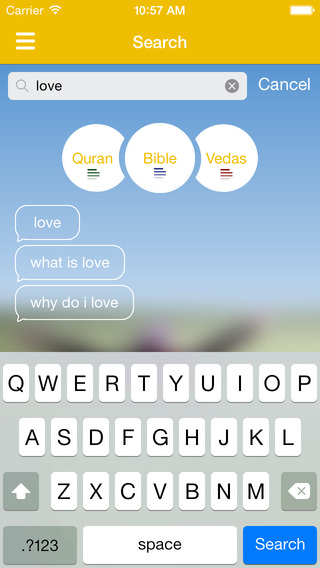
Half Moon Bay, California - Today, mobile application development company, Monster Code Corporation announced the launch of the company's flagship app: Advice From the Gods. Advice From the Gods allows users to search, bookmark and share a multitude of religious teachings from around the world, including teachings from The Bible, The Quran and The Vedas.
Advice From the Gods provides users with an educational journey in many ways. It is a great resource to find answers to a wide variety of religious questions by comparing the teachings of all three holy books. Acquire awareness and grasp intelligence from the religions of Hinduism, Christianity and Islam with this easy to use app. As users come across important pieces throughout the text, Advice From the Gods features the capability to bookmark and highlight specific pieces of context for future reference as well as the ability to share the most powerful teachings with friends and family.
The feeling of holding the power of God right in your hands is incredibly powerful. Advice From the Gods allows users to access the information regarding how billions of people think about God and teaches how it can help fill user's minds with words of inspiration and encouragement. Among many important features to highlight, users can absorb broad, unbiased information from the Hindu, Christian and the Islamic people in order to learn about other cultures as well as their own.
Device Requirements:
* iPhone, iPad, and iPod touch
* Requires iOS 7.1 or later
* 15.4 MB
Pricing and Availability:
Advice From the Gods 1.0.4 is Free and available worldwide through the App Store in the Reference category. There is also an Android version available on Google Play.
Advice From the Gods 1.0.4: http://advicefromthegods.com/
Download on iTunes: https://itunes.apple.com/app/advice-from-the-gods/id917176968
Download on Google Play: https://play.google.com/store/apps/details?id=com.monstercode.advicefrom
Screenshot 1: http://a5.mzstatic.com/us/r30/Purple1/v4/09/18/a8/0918a847-7562-8a0c-12a9-5a78033912f5/screen568x568.jpeg
Screenshot 2: http://a4.mzstatic.com/us/r30/Purple1/v4/43/c9/c8/43c9c87a-5a3c-0cf5-ad9b-dfd512f415bb/screen568x568.jpeg
App Icon: http://a5.mzstatic.com/us/r30/Purple3/v4/18/36/9f/18369fd7-6b7e-8d16-1240-79cc956b05b7/icon175x175.png
Monster Code Corporation is an innovative software development, mobile and web design company located in the San Francisco Bay Area of California. Monster Code specializes in 3 things: Software development (monster code), Development Off Shoring (monster talent) and Start Up Incubation (monster ideas). The team consists of software engineers, mobile and web developers, graphic designers, business development specialists and project managers, located in California and Europe, bringing big ideas and big talent together. All Material and Software (C) Monster Code Corporation 2014 - All Rights Reserved. Apple, the Apple logo, iPhone, iPod and iPad are registered trademarks of Apple Inc. in the U.S. and/or other countries. Google and Google Play are registered trademarks of Google, Inc. in the U.S. and/or other countries.
*******
Link To Article: http://prmac.com/release-id-72308.htm
*******
---------------------------------------------------------------------------------
Note that you can alter delivered distributions at any time.
Login to your account on prMac to alter your channel selection, or to opt-out at any time.
Advice From the Gods puts World's Religions in the Palm of Your Hands - Published on 12/10/14
Mobile application development company, Monster Code Corporation today introduces Advice From the Gods 1.0.4, the company's flagship reference for iOS and Android devices. Advice From the Gods allows anyone to gain knowledge and deepen their understanding of other cultures and religions. Users can search, bookmark and share a multitude of religious teachings from around the world, including teachings from The Bible, The Quran and The Vedas.
Half Moon Bay, California - Today, mobile application development company, Monster Code Corporation announced the launch of the company's flagship app: Advice From the Gods. Advice From the Gods allows users to search, bookmark and share a multitude of religious teachings from around the world, including teachings from The Bible, The Quran and The Vedas.
Advice From the Gods provides users with an educational journey in many ways. It is a great resource to find answers to a wide variety of religious questions by comparing the teachings of all three holy books. Acquire awareness and grasp intelligence from the religions of Hinduism, Christianity and Islam with this easy to use app. As users come across important pieces throughout the text, Advice From the Gods features the capability to bookmark and highlight specific pieces of context for future reference as well as the ability to share the most powerful teachings with friends and family.
The feeling of holding the power of God right in your hands is incredibly powerful. Advice From the Gods allows users to access the information regarding how billions of people think about God and teaches how it can help fill user's minds with words of inspiration and encouragement. Among many important features to highlight, users can absorb broad, unbiased information from the Hindu, Christian and the Islamic people in order to learn about other cultures as well as their own.
Device Requirements:
* iPhone, iPad, and iPod touch
* Requires iOS 7.1 or later
* 15.4 MB
Pricing and Availability:
Advice From the Gods 1.0.4 is Free and available worldwide through the App Store in the Reference category. There is also an Android version available on Google Play.
Advice From the Gods 1.0.4: http://advicefromthegods.com/
Download on iTunes: https://itunes.apple.com/app/advice-from-the-gods/id917176968
Download on Google Play: https://play.google.com/store/apps/details?id=com.monstercode.advicefrom
Screenshot 1: http://a5.mzstatic.com/us/r30/Purple1/v4/09/18/a8/0918a847-7562-8a0c-12a9-5a78033912f5/screen568x568.jpeg
Screenshot 2: http://a4.mzstatic.com/us/r30/Purple1/v4/43/c9/c8/43c9c87a-5a3c-0cf5-ad9b-dfd512f415bb/screen568x568.jpeg

App Icon: http://a5.mzstatic.com/us/r30/Purple3/v4/18/36/9f/18369fd7-6b7e-8d16-1240-79cc956b05b7/icon175x175.png

Monster Code Corporation is an innovative software development, mobile and web design company located in the San Francisco Bay Area of California. Monster Code specializes in 3 things: Software development (monster code), Development Off Shoring (monster talent) and Start Up Incubation (monster ideas). The team consists of software engineers, mobile and web developers, graphic designers, business development specialists and project managers, located in California and Europe, bringing big ideas and big talent together. All Material and Software (C) Monster Code Corporation 2014 - All Rights Reserved. Apple, the Apple logo, iPhone, iPod and iPad are registered trademarks of Apple Inc. in the U.S. and/or other countries. Google and Google Play are registered trademarks of Google, Inc. in the U.S. and/or other countries.
*******
Link To Article: http://prmac.com/release-id-72308.htm
*******
---------------------------------------------------------------------------------
Note that you can alter delivered distributions at any time.
Login to your account on prMac to alter your channel selection, or to opt-out at any time.
Subscribe to:
Posts (Atom)