A new article has been published at prMac.
Flying Frames - New Photo Album and Slideshow Editor for iPad - Published on 01/20/15
Cursor Plus MB today introduces Flying Frames, their new Photo Album And Slideshow Editor for iPad. Offering an array of user-friendly tools, features and options, Flying Frames is an impressive photo collage album editor in the form of a compelling storyline as the final result. Creating the photo collage and editing a slideshow was never as easy as it is with this app. iPad users can make any number of great slideshows in a few swipes and touches.
Kaunas, Lithuania - Cursor Plus MB today is proud to announce the release of Flying Frames - Photo Album And Slideshow Editor, their new iPad application that comes with an array of user-friendly tools, features and options to offer an impressive photo collage album editor in the form of a storyline as the final result.
People always tend to capture happy memories as photos and create albums to cherish a lifetime. Creating photo collage and editing a slideshow was never as easy as it is with this app. iPad users could make any number of exciting slideshows in a few swipes and touches. Just set the background, add pictures and texts to the slide. Use frames for the pictures and your photo collages are ready to be shown or shared to your friends. To make the slideshow more appealing you can add songs from iPads library.
The benefits of Flying Frames over the other common album editing applications are its extreme simplicity. It does not require sitting hours in front of a screen. Users could create all the slideshows while on the move or relaxing on a couch. Cursor Plus MB team invites all the creative iPad users to try out this highly efficient and effective photo album and slideshow editor for free.
Flying Frames features:
* Capture every special moment and put the photos together to create a beautiful collage storybook in minutes using this application
* Store a bunch of the photos in one slideshow. Rotate, resize and add frames to the pictures
* Add a title to the slide, descriptions of moments, change text and paragraph style easily
* Add background music to the slideshow to make it more appealing
* Share slides via Email, Facebook, Twitter, Pinterest and other sharing services
* "Flying frames" works in both latest iPads operating systems - iOS7 and iOS8
* Use this application as a screensaver to represent something important in your home or in the company
Device Requirements:
* Compatible with iPad
* Requires iOS 7.0 or later
* 2.7 MB
Pricing and Availability:
Flying Frames 1.1 is Free and available worldwide exclusively through the App Store in the Photo & Video category.
Cursor Plus: http://www.cursorplus.com
Flying Frames 1.1: http://www.cursorplus.com/flying-frames/support.php
Download from iTunes: https://itunes.apple.com/app/id934715853
Screenshots: http://cursorplus.com/flying-frames/press/
App Icon: http://cursorplus.com/flying-frames/press/icon-1024.png
Located in Kaunas, Lithuania, Cursor Plus MB was founded in 2014 by Edvardas Damusis. All the people in company have experience in programming and website design for more than 10 years. Our goal is to create useful and stylish iPhone apps for daily usage. We love what we do, we work with passion for the people, who like smart phones, smart watches and other smart devices. All Material and Software (C) 2007-2015 Cursor Plus MB / All Rights Reserved. Apple, the Apple logo, iPod, the iPod logo, are registered trademarks of Apple Computer in the U.S. and/or other countries.
*******
Link To Article: http://prmac.com/release-id-73006.htm
*******
---------------------------------------------------------------------------------
Note that you can alter delivered distributions at any time.
Login to your account on prMac to alter your channel selection, or to opt-out at any time.


Elmedia Player is now available for free on the Mac App Store
A new article has been published at prMac.
Elmedia Player is now available for free on the Mac App Store - Published on 01/20/15
Eltima Software today announced that one of its most popular products, Elmedia Player, can now be downloaded from the Mac App Store. Elmedia Player offers standard video playback controls, such as Play, Pause, Fast Forward, etc., as well as a number of additional options. The latter include watching videos full-screen, pinning the player window so it floats on the top of other running applications, editing subtitles and its own volume control independent from the system volume regulator.
Frankfurt, Germany - Eltima Software is proud to announce that one of its most popular products, Elmedia Player, can now be downloaded from the Mac App Store. Two days after it was made available there, the app is #2 in the category of the Top Free Video Apps. Elmedia is a multifunctional video player that can playback virtually all commonly used video & audio formats.
Elmedia Player offers standard video playback controls, such as Play, Pause, Fast Forward, etc., as well as a number of additional options. The latter include watching videos full-screen, pinning the player window so it floats on the top of other running applications, editing subtitles and its own volume control independent from the system volume regulator.
With Elmedia Player you can browse web and watch online videos directly from the app, thanks to the built-in web-browser. Open URL option - if you have a link to the video - will play the online video in the app window without online ads. All functionalities essential for video playback are free, and the extra benefits offered by PRO version cost $9.99. The PRO version can be purchased in-app. Its additional features include:
* Downloading online videos - embedded via HTML, streamed over RTMP. Please note that this does not include YouTube videos
* Saving various online media files, such as music, pictures, etc. to your hard drive
* Taking a still from a video; The app can do it automatically, so once you set an interval between the snapshots, it can convert an entire video into a series of images
System Requirements:
* OS X 10.7 or later
* 23.1 MB
Pricing and Availability:
Elmedia Player (v5.0.458) is Free (with in-app purchases) and available worldwide through the Mac App Store in the Video category. All functionalities essential for video playback are free, and the extra benefits offered by PRO version cost $9.99 (USD).
Eltima Software: http://mac.eltima.com/
Elmedia Player 5.0.458: http://mac.eltima.com/media-player.html
Download from the Mac App Store: https://itunes.apple.com/us/app/elmedia-player-free-video/id937759555?mt=12
Screenshot: http://mac.eltima.com/submit/elmedia/elmedia_video_player.jpeg
Application Icon: http://mac.eltima.com/images/elmedia/elmedia_icon.png
Eltima Software is a global software Development Company, specializing primarily in serial communication, mobile and flash software for Mac OS and Windows. Eltima Software delivers top-notch solutions having a friendly team of 40 professionals. Copyright (C) 2015 Eltima Software. All Rights Reserved. Apple, the Apple logo and Macintosh are registered trademarks of Apple Inc. in the U.S. and/or other countries.
*******
Link To Article: http://prmac.com/release-id-73005.htm
*******
---------------------------------------------------------------------------------
Note that you can alter delivered distributions at any time.
Login to your account on prMac to alter your channel selection, or to opt-out at any time.
Elmedia Player is now available for free on the Mac App Store - Published on 01/20/15
Eltima Software today announced that one of its most popular products, Elmedia Player, can now be downloaded from the Mac App Store. Elmedia Player offers standard video playback controls, such as Play, Pause, Fast Forward, etc., as well as a number of additional options. The latter include watching videos full-screen, pinning the player window so it floats on the top of other running applications, editing subtitles and its own volume control independent from the system volume regulator.
Frankfurt, Germany - Eltima Software is proud to announce that one of its most popular products, Elmedia Player, can now be downloaded from the Mac App Store. Two days after it was made available there, the app is #2 in the category of the Top Free Video Apps. Elmedia is a multifunctional video player that can playback virtually all commonly used video & audio formats.
Elmedia Player offers standard video playback controls, such as Play, Pause, Fast Forward, etc., as well as a number of additional options. The latter include watching videos full-screen, pinning the player window so it floats on the top of other running applications, editing subtitles and its own volume control independent from the system volume regulator.
With Elmedia Player you can browse web and watch online videos directly from the app, thanks to the built-in web-browser. Open URL option - if you have a link to the video - will play the online video in the app window without online ads. All functionalities essential for video playback are free, and the extra benefits offered by PRO version cost $9.99. The PRO version can be purchased in-app. Its additional features include:
* Downloading online videos - embedded via HTML, streamed over RTMP. Please note that this does not include YouTube videos
* Saving various online media files, such as music, pictures, etc. to your hard drive
* Taking a still from a video; The app can do it automatically, so once you set an interval between the snapshots, it can convert an entire video into a series of images
System Requirements:
* OS X 10.7 or later
* 23.1 MB
Pricing and Availability:
Elmedia Player (v5.0.458) is Free (with in-app purchases) and available worldwide through the Mac App Store in the Video category. All functionalities essential for video playback are free, and the extra benefits offered by PRO version cost $9.99 (USD).
Eltima Software: http://mac.eltima.com/
Elmedia Player 5.0.458: http://mac.eltima.com/media-player.html
Download from the Mac App Store: https://itunes.apple.com/us/app/elmedia-player-free-video/id937759555?mt=12
Screenshot: http://mac.eltima.com/submit/elmedia/elmedia_video_player.jpeg

Application Icon: http://mac.eltima.com/images/elmedia/elmedia_icon.png

Eltima Software is a global software Development Company, specializing primarily in serial communication, mobile and flash software for Mac OS and Windows. Eltima Software delivers top-notch solutions having a friendly team of 40 professionals. Copyright (C) 2015 Eltima Software. All Rights Reserved. Apple, the Apple logo and Macintosh are registered trademarks of Apple Inc. in the U.S. and/or other countries.
*******
Link To Article: http://prmac.com/release-id-73005.htm
*******
---------------------------------------------------------------------------------
Note that you can alter delivered distributions at any time.
Login to your account on prMac to alter your channel selection, or to opt-out at any time.
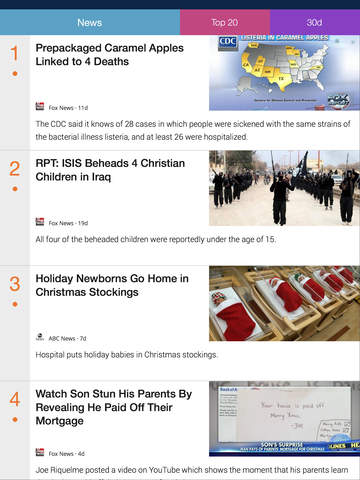
So much to read, so little time? BusyReader app will help
A new article has been published at prMac.
So much to read, so little time? BusyReader app will help - Published on 01/20/15
APP Studio Technology, a leading software development company, is proud to announce the release of BusyReader 1.30, their newsreader app developed for iOS and Android devices. BusyReader was designed exclusively to make it easier for anyone to keep up with the latest news topics that are important to them. Users can choose one or more categories, decide the number of top news stories to be covered, select the time frame, and the app will do the rest.
Taipei, Taiwan - APP Studio Technology, a leading software development company, is proud to announce the release of BusyReader 1.30, their newsreader app developed for iOS and Android devices. BusyReader was designed exclusively to make it easier for anyone to keep up with the latest news topics that are important to them.
Users can choose one or more categories; Decide the number of top news stories to be covered and select the time frame, the next 24 hours or several days, set the app and it will do the rest. BusyReader is lightweight and quick to setup, with no complicated operations and no log-ins. It only takes one tap to change the number of top news stories to display, and one tap to change the time frame.
With more and more excellent content appearing on the Internet every day, the challenge to keep up grows harder to handle for business professionals," said Joe Huang, CTO at APP Studio Technology. "BusyReader was designed to make life easier for all those readers who don't want to miss anything important."
There are 16 categories covering all the interests most users would care about, including Tech, News, Business, Life and Fun, Fashion, Celebrity, Finance, Sports, Photography, Movies, Cars, Travel, Design, Food, Music and Games. The app's flexibility and broad scope provides those in business with a unique and efficient way to stay with or ahead of the curve, offering an easy way to stay current when they don't have enough time to skim through the sea of Internet articles.
Device Requirements:
* iPhone, iPad, and iPod touch
* Requires iOS 6.0 or later
* Optimized for iPhone 5, 6/6 Plus
* 7.1 MB
Pricing and Availability:
BusyReader 1.30 is Free and available worldwide through the App Store in the News category. There is also an Android version available on Google Play.
APP Studio Technology: http://www.appstudio.technology/
BusyReader 1.30: https://itunes.apple.com/app/busyreader-news-for-busy-readers/id953699911
Download from Google Play: https://play.google.com/store/apps/details?id=technology.appstudio.busyreader
Screenshot: http://a2.mzstatic.com/us/r30/Purple5/v4/15/e8/9d/15e89d43-f59c-d899-daea-1dfe2637e8cf/screen480x480.jpeg
App Icon: http://a3.mzstatic.com/us/r30/Purple3/v4/cd/57/ce/cd57ce19-9cdf-62f3-cc54-42dd2590595a/icon175x175.png
APP Studio Technology is a leading software development company engaged in creating mobile applications and software systems with our solid technology foundations and innovations. With over 20 years of experience in software industry, our team has vast knowledge and experience to create world-class software applications and systems. All Material and Software (C) Copyright 2015 APP Studio Technology. All Rights Reserved. Apple, the Apple logo, iPhone, iPod and iPad are registered trademarks of Apple Inc. in the U.S. and/or other countries. Other trademarks and registered trademarks may be the property of their respective owners.
*******
Link To Article: http://prmac.com/release-id-73004.htm
*******
---------------------------------------------------------------------------------
Note that you can alter delivered distributions at any time.
Login to your account on prMac to alter your channel selection, or to opt-out at any time.
So much to read, so little time? BusyReader app will help - Published on 01/20/15
APP Studio Technology, a leading software development company, is proud to announce the release of BusyReader 1.30, their newsreader app developed for iOS and Android devices. BusyReader was designed exclusively to make it easier for anyone to keep up with the latest news topics that are important to them. Users can choose one or more categories, decide the number of top news stories to be covered, select the time frame, and the app will do the rest.
Taipei, Taiwan - APP Studio Technology, a leading software development company, is proud to announce the release of BusyReader 1.30, their newsreader app developed for iOS and Android devices. BusyReader was designed exclusively to make it easier for anyone to keep up with the latest news topics that are important to them.
Users can choose one or more categories; Decide the number of top news stories to be covered and select the time frame, the next 24 hours or several days, set the app and it will do the rest. BusyReader is lightweight and quick to setup, with no complicated operations and no log-ins. It only takes one tap to change the number of top news stories to display, and one tap to change the time frame.
With more and more excellent content appearing on the Internet every day, the challenge to keep up grows harder to handle for business professionals," said Joe Huang, CTO at APP Studio Technology. "BusyReader was designed to make life easier for all those readers who don't want to miss anything important."
There are 16 categories covering all the interests most users would care about, including Tech, News, Business, Life and Fun, Fashion, Celebrity, Finance, Sports, Photography, Movies, Cars, Travel, Design, Food, Music and Games. The app's flexibility and broad scope provides those in business with a unique and efficient way to stay with or ahead of the curve, offering an easy way to stay current when they don't have enough time to skim through the sea of Internet articles.
Device Requirements:
* iPhone, iPad, and iPod touch
* Requires iOS 6.0 or later
* Optimized for iPhone 5, 6/6 Plus
* 7.1 MB
Pricing and Availability:
BusyReader 1.30 is Free and available worldwide through the App Store in the News category. There is also an Android version available on Google Play.
APP Studio Technology: http://www.appstudio.technology/
BusyReader 1.30: https://itunes.apple.com/app/busyreader-news-for-busy-readers/id953699911
Download from Google Play: https://play.google.com/store/apps/details?id=technology.appstudio.busyreader
Screenshot: http://a2.mzstatic.com/us/r30/Purple5/v4/15/e8/9d/15e89d43-f59c-d899-daea-1dfe2637e8cf/screen480x480.jpeg
App Icon: http://a3.mzstatic.com/us/r30/Purple3/v4/cd/57/ce/cd57ce19-9cdf-62f3-cc54-42dd2590595a/icon175x175.png

APP Studio Technology is a leading software development company engaged in creating mobile applications and software systems with our solid technology foundations and innovations. With over 20 years of experience in software industry, our team has vast knowledge and experience to create world-class software applications and systems. All Material and Software (C) Copyright 2015 APP Studio Technology. All Rights Reserved. Apple, the Apple logo, iPhone, iPod and iPad are registered trademarks of Apple Inc. in the U.S. and/or other countries. Other trademarks and registered trademarks may be the property of their respective owners.
*******
Link To Article: http://prmac.com/release-id-73004.htm
*******
---------------------------------------------------------------------------------
Note that you can alter delivered distributions at any time.
Login to your account on prMac to alter your channel selection, or to opt-out at any time.
Head Gear for iOS - Augmented Reality Video Messenger
A new article has been published at prMac.
Head Gear for iOS - Augmented Reality Video Messenger - Published on 01/20/15
Chicago based Bigger Fish, LLC introduces Head Gear - Augmented Reality Video Messenger version 1.0 for iOS. An amazing and playful experience, Head Gear allows you to create stunning special effect videos and photos to share with your friends. Transforming yourself is simple: Just choose a overlay, take your video or photo selfie and send to a friend. Share photos and videos with friends via Facebook, Twitter, YouTube, email, SMS, and iMessage.
Chicago, Illinois - Announcing that BIgger Fish LLC have released version 1.0 of their revolutionary new Augmented Reality Video Messenger, Head Gear for iOS devices. Head Gear allows you to create stunning special effect videos and photos to share with your friends. Change your face in real-time with special effects and 3D overlays. Head Gear lets you explore your favorite characters and create amazing videos to save and share with your friends.
Transforming yourself is simple: Just choose a overlay, take your video or photo selfie and send to a friend. Share photos and videos with friends via Facebook, Twitter, YouTube, email, SMS, and iMessage. Head Gear rigid face tracking is best in class technology and a triumph in mobile computer vision.
Amazing Face overlays:
* Science Fiction - Be an astronaut, alien, soldier, or hero in this awesome pack
* Sports - Baseball, Hockey, Football, and Race car driver available
* Horror - Great fun for Halloween or to scare your friends
* Glasses - Try on cool and funny glasses
* Humor - Fun Head Gear to share a laugh - your friends will never forget these
* More categories and Head Gear added all the time
Device Requirements:
* iPhone, iPad, and iPod touch
* Requires iOS 8.0 or later
* 115 MB
Pricing and Availability:
Head Gear 1.0 is Free and available worldwide exclusively through the Apple App Store in the Entertainment category.
Head Gear 1.0: http://www.biggerfi.sh
Download from iTunes: https://itunes.apple.com/app/id931505590
Vimeo Video: https://vimeo.com/116455615
Media Assets: https://drive.google.com/folderview?id=0B0R0tMGJ8e48dVREUTRnMS1ZUlk&usp=sharing
Bigger Fish, LLC makes unique apps for unique people. As an indie dev shop, we believe that all apps are not created equal, and our passion for design and utility shows through in our products. Copyright (C) 2015 Bigger Fish, LLC. All Rights Reserved. Apple, the Apple logo, iPhone, iPod and iPad are registered trademarks of Apple Inc. in the U.S. and/or other countries.
*******
Link To Article: http://prmac.com/release-id-73003.htm
*******
---------------------------------------------------------------------------------
Note that you can alter delivered distributions at any time.
Login to your account on prMac to alter your channel selection, or to opt-out at any time.
Head Gear for iOS - Augmented Reality Video Messenger - Published on 01/20/15
Chicago based Bigger Fish, LLC introduces Head Gear - Augmented Reality Video Messenger version 1.0 for iOS. An amazing and playful experience, Head Gear allows you to create stunning special effect videos and photos to share with your friends. Transforming yourself is simple: Just choose a overlay, take your video or photo selfie and send to a friend. Share photos and videos with friends via Facebook, Twitter, YouTube, email, SMS, and iMessage.
Chicago, Illinois - Announcing that BIgger Fish LLC have released version 1.0 of their revolutionary new Augmented Reality Video Messenger, Head Gear for iOS devices. Head Gear allows you to create stunning special effect videos and photos to share with your friends. Change your face in real-time with special effects and 3D overlays. Head Gear lets you explore your favorite characters and create amazing videos to save and share with your friends.
Transforming yourself is simple: Just choose a overlay, take your video or photo selfie and send to a friend. Share photos and videos with friends via Facebook, Twitter, YouTube, email, SMS, and iMessage. Head Gear rigid face tracking is best in class technology and a triumph in mobile computer vision.
Amazing Face overlays:
* Science Fiction - Be an astronaut, alien, soldier, or hero in this awesome pack
* Sports - Baseball, Hockey, Football, and Race car driver available
* Horror - Great fun for Halloween or to scare your friends
* Glasses - Try on cool and funny glasses
* Humor - Fun Head Gear to share a laugh - your friends will never forget these
* More categories and Head Gear added all the time
Device Requirements:
* iPhone, iPad, and iPod touch
* Requires iOS 8.0 or later
* 115 MB
Pricing and Availability:
Head Gear 1.0 is Free and available worldwide exclusively through the Apple App Store in the Entertainment category.
Head Gear 1.0: http://www.biggerfi.sh
Download from iTunes: https://itunes.apple.com/app/id931505590
Vimeo Video: https://vimeo.com/116455615
Media Assets: https://drive.google.com/folderview?id=0B0R0tMGJ8e48dVREUTRnMS1ZUlk&usp=sharing
Bigger Fish, LLC makes unique apps for unique people. As an indie dev shop, we believe that all apps are not created equal, and our passion for design and utility shows through in our products. Copyright (C) 2015 Bigger Fish, LLC. All Rights Reserved. Apple, the Apple logo, iPhone, iPod and iPad are registered trademarks of Apple Inc. in the U.S. and/or other countries.
*******
Link To Article: http://prmac.com/release-id-73003.htm
*******
---------------------------------------------------------------------------------
Note that you can alter delivered distributions at any time.
Login to your account on prMac to alter your channel selection, or to opt-out at any time.
New Relaxation App Helps Combat The Post-Holiday Blues
A new article has been published at prMac.
New Relaxation App Helps Combat The Post-Holiday Blues - Published on 01/20/15
Product Designer, Tim de Jardine today introduces Inner Citadel 1.0, his new lifestyle app for iOS devices. Inner Citadel features a program thats gets users into the habit of daily focused relaxation. In just a few minutes a day, anyone can dramatically improve their well being, focus, calm, energy levels and emerge feeling refreshed. The app was designed to help busy executives de-stress during the often frantic return to work after the holiday period.
Wellington, New Zealand - Product Designer and Entrepreneur Tim de Jardine has launched a unique app designed to help executives make a transition back into work and manage stress through a daily mindful relaxation practice. The app "Inner Citadel" is available on the iTunes App Store and features a program thats gets users into the habit of daily focused relaxation in just a few minutes a day.
de Jardine said, "The holiday season is over and as workers return to their jobs, they need to think about their stress levels. Too often, workers find themselves tired and burnt out before the first quarter ends. One of the best ways to manage and reduce stress is through daily focused relaxation".
"There are already dozens of relaxation apps, and most of them quite honestly are too complicated and uninspiring. Users have to get through the hurdles of too many options, levels and settings. What makes Inner Citadel stand out is its simplicity, focus on habit formation and continuous improvement. It is suitable for users of all levels."
de Jardine says that he got frustrated with all the unnecessary complexity in many other relaxation apps. He wanted an executive focused app to help manage his own stress levels. Something to just "open and go" and then to want to do it again, so he created Inner Citadel.
The app is easy to use, with users selecting a relaxation soundtrack, setting a duration and tapping play. After each session they provide one tap feedback on how it went. The app automatically reminds the user to relax, helping the creation of a new relaxation habit. Users can then view their results from each session and improve through the guide within the app.
The App includes:
* 10 relaxation soundtracks
* Weekly / Monthly Progress graphs
* 'Nirvana Score' a metric to record the quality of each relaxation session
* A reminder system, set by the user, to create a relaxation habit
Device Requirements:
* iPhone, iPad, and iPod touch
* Requires iOS 7.0 or later
* 73.7 MB
Pricing and Availability:
Inner Citadel 1.0, marketed by de Jardines TUTO company, is free to download and use with one soundtrack for sessions of up to 20 minutes, and then for just $2.99 (USD) access the full program. It is available worldwide exclusively through the App Store in the Lifestyle category.
Inner Citadel 1.0: http://innercitadel.co
Download from iTunes: https://itunes.apple.com/app/inner-citadel-relax-feel-good/id946643181
Video Preview: http://innercitadel.co/press/AppPreview.mp4
Screenshot 1: http://innercitadel.co/press/InnerCitadel.png
Screenshot 2: http://innercitadel.co/press/InnerCitadel2.png
App Icon: http://innercitadel.co/press/AppIcon.jpg
TUTO is a leading iOS App design company. Lead by Tim de Jardine a product designer and entrepreneur. Tim has designed several habit forming apps include Read Me Stories, a popular kids reading program with 6 Million users that teaches the habit of reading and 6 Pack Promise Plus, an app that gets users in the habit of working out. All Material and Software (C) Copyright 2015 TUTO Limited. All Rights Reserved. Apple, the Apple logo, iPhone, iPod and iPad are registered trademarks of Apple Inc. in the U.S. and/or other countries. Other trademarks and registered trademarks may be the property of their respective owners.
*******
Link To Article: http://prmac.com/release-id-72989.htm
*******
---------------------------------------------------------------------------------
Note that you can alter delivered distributions at any time.
Login to your account on prMac to alter your channel selection, or to opt-out at any time.
New Relaxation App Helps Combat The Post-Holiday Blues - Published on 01/20/15
Product Designer, Tim de Jardine today introduces Inner Citadel 1.0, his new lifestyle app for iOS devices. Inner Citadel features a program thats gets users into the habit of daily focused relaxation. In just a few minutes a day, anyone can dramatically improve their well being, focus, calm, energy levels and emerge feeling refreshed. The app was designed to help busy executives de-stress during the often frantic return to work after the holiday period.
Wellington, New Zealand - Product Designer and Entrepreneur Tim de Jardine has launched a unique app designed to help executives make a transition back into work and manage stress through a daily mindful relaxation practice. The app "Inner Citadel" is available on the iTunes App Store and features a program thats gets users into the habit of daily focused relaxation in just a few minutes a day.
de Jardine said, "The holiday season is over and as workers return to their jobs, they need to think about their stress levels. Too often, workers find themselves tired and burnt out before the first quarter ends. One of the best ways to manage and reduce stress is through daily focused relaxation".
"There are already dozens of relaxation apps, and most of them quite honestly are too complicated and uninspiring. Users have to get through the hurdles of too many options, levels and settings. What makes Inner Citadel stand out is its simplicity, focus on habit formation and continuous improvement. It is suitable for users of all levels."
de Jardine says that he got frustrated with all the unnecessary complexity in many other relaxation apps. He wanted an executive focused app to help manage his own stress levels. Something to just "open and go" and then to want to do it again, so he created Inner Citadel.
The app is easy to use, with users selecting a relaxation soundtrack, setting a duration and tapping play. After each session they provide one tap feedback on how it went. The app automatically reminds the user to relax, helping the creation of a new relaxation habit. Users can then view their results from each session and improve through the guide within the app.
The App includes:
* 10 relaxation soundtracks
* Weekly / Monthly Progress graphs
* 'Nirvana Score' a metric to record the quality of each relaxation session
* A reminder system, set by the user, to create a relaxation habit
Device Requirements:
* iPhone, iPad, and iPod touch
* Requires iOS 7.0 or later
* 73.7 MB
Pricing and Availability:
Inner Citadel 1.0, marketed by de Jardines TUTO company, is free to download and use with one soundtrack for sessions of up to 20 minutes, and then for just $2.99 (USD) access the full program. It is available worldwide exclusively through the App Store in the Lifestyle category.
Inner Citadel 1.0: http://innercitadel.co
Download from iTunes: https://itunes.apple.com/app/inner-citadel-relax-feel-good/id946643181
Video Preview: http://innercitadel.co/press/AppPreview.mp4
Screenshot 1: http://innercitadel.co/press/InnerCitadel.png

Screenshot 2: http://innercitadel.co/press/InnerCitadel2.png

App Icon: http://innercitadel.co/press/AppIcon.jpg

TUTO is a leading iOS App design company. Lead by Tim de Jardine a product designer and entrepreneur. Tim has designed several habit forming apps include Read Me Stories, a popular kids reading program with 6 Million users that teaches the habit of reading and 6 Pack Promise Plus, an app that gets users in the habit of working out. All Material and Software (C) Copyright 2015 TUTO Limited. All Rights Reserved. Apple, the Apple logo, iPhone, iPod and iPad are registered trademarks of Apple Inc. in the U.S. and/or other countries. Other trademarks and registered trademarks may be the property of their respective owners.
*******
Link To Article: http://prmac.com/release-id-72989.htm
*******
---------------------------------------------------------------------------------
Note that you can alter delivered distributions at any time.
Login to your account on prMac to alter your channel selection, or to opt-out at any time.
Timeline 3D for Mac - Award-Winning Software Redesigned For Yosemite
A new article has been published at prMac.
Timeline 3D for Mac - Award-Winning Software Redesigned For Yosemite - Published on 01/20/15
BeeDocs today announces Timeline 3D for Mac (v5), a significant update to their award-winning timeline software for Mac OS X. Completely redesigned for Yosemite, Timeline 3D provides a new interface to support the creation of larger, more complex timelines that can be presented in full screen and with a 3D perspective. Users can create timeline charts of world history, family trees, business deadlines, or other multimedia projects with Timeline 3D by simply entering the event and adding media.
Seattle, Washington - BeeDocs today is pleased to announce the release and immediate availability of Timeline 3D for Mac (v5), a significant update to their award-winning timeline software for Mac OS X. Completely redesigned for OS X Yosemite, Timeline 3D provides a new interface to support the creation of larger and more complex timelines. Timeline 3D helps present chronologies and historical events in full screen and with a 3D perspective.
"Timeline 3D is an app that every teacher, educator, writer, or presenter should check out out, because it is a quick and simple way to make well designed multimedia timelines that can be shared at meetings, in classrooms, and more," says reviewer Juli of Pad Gadget. "You won't find a better solution than Timeline 3D. And trust me, you almost certainly have a need for this, from creating a timeline of a vacation to explaining an event to a group of students. There are so many uses for this app!" (23 Jan 2013)
Users can begin creating timeline charts of world history, family trees, fictional stories, business deadlines, or other multimedia projects with Timeline 3D by simply adding an event by pressing the (+) button. Users can include an embedded image, movie, or PDF file by using drag-and-drop. Additional media is automatically resized based on the presentation medium. Timeline 3D also supports the inclusion of notes and web links to timelines and allows users to categorize events with colors codes and tags.
"Timeline 3D is a powerful and complete tool for "drawing" and viewing events, historical facts, connections and relationships." says Dave Hattey of Mac Informer, which awarded Timeline 3D their Editor's Pick Award. Timeline 3D has also been recognized with an Apple Design Award.
Feature Highlights:
* Designed for Mac OS X Yosemite
* Present timelines full screen and with 3D perspective
* Add images, movies, or PDFs to events
* Quickly enter events with dates and times in any global format
* Include optional information such as notes and web links
* Choose from different background themes
* Categorize events with color codes and tags
* Import timelines from previous versions of Timeline 3D and Easy Timeline
"(Timeline 3D) helps a student create a polished timeline for a project," Gordon Shupe of Appo Learning reviewed. "More than that, its interface is easy to use, edit, and publish. The app also has mirroring capability that allows the presenter to see the timeline on their phone while projecting from or presenting from another device if they chose. Students will love the app because it"s easy and fun to use, and the final product looks equally cool as it is presented in 3-D."
In addition to its completely redesigned interface, there have been several upgrades and new features added to the latest version of Timeline 3D. These new features include:
* Optimized interface and timeline presentations for retina displays
* Auto-save and versioning added
* Smarter date parsing
* Ability to manually control font and image sizes replaced by auto-layout
* "Allow Information Hiding" intelligently trims notes and media to keep the text readable on complex timelines
* Date range formatting for international dates
* Ability to have a timeline localization different from system's localization
* Ability to separate themes for screen display and printing
* Printing uses font weights instead of alpha shading for crisp text
* Movie, slideshow, and image sequence export sizes up to 4k
* 3D timelines can be displayed within a window (or full screen)
* Improved lighting and animations in 3D mode
* Images, PDFs, and movies can be zoomed to full screen during a presentation
* Ability to click an event in a 2D presentation to zoom into it with a 3D twist
Timeline 3D provides a host of additional features that are available for in-app purchase, either individually or in bulk. Users can print timelines on a single page, formatted for their specified paper size. Timelines can also be exported and shared as a PDF file or a slideshow that can be viewed in Powerpoint and Keynote. Animated timelines at sizes up to 4K can be exported as movies from Timeline 3D. Timeline 3D also features advanced browser technology with WebGL that allows users to export and publish interactive 3D timelines to their websites.
"Timeline 3D is the simplest and easiest way to create beautiful multimedia timelines," says Adam Behringer, founder of BeeDocs. "Perfect for school, work, or home projects, Timeline 3D uses award-winning visual design to help you understand and present chronologies and historical events in a new and engaging perspective. And it's so simple to use! Tell your story and wow your audience with interactive motion graphics that let you fly over your timeline with a 3D perspective!"
Device Requirements:
* OS X Yosemite 10.10 or later
* 64-bit processor
* 14.7 MB
Pricing and Availability:
Timeline 3D for Mac (v5) is free and available worldwide through the Mac App Store in the Productivity category. The complete set of all professional Timeline 3D features is available as an in-app purchase of $24.99 (USD).
BeeDocs: https://www.beedocs.com/aboutus/
Timeline 3D for Mac (v5): https://www.beedocs.com/timeline3D/mac
Download from MAS: https://itunes.apple.com/us/app/timeline-3d/id929188617?ls=1&mt=12&at=10l7rN
Screenshot 1: http://i.interactivetimeline.com/web_v5/Lion3D_2x.jpg
Screenshot 2: http://i.interactivetimeline.com/web_v5/iMac1_2x.png
Application Icon: http://i.interactivetimeline.com/web_v5/Timeline3DMacIcon_2x.png
Based in Seattle, Washington, BeeDocs, Inc. is an independent software company that is inspired by its customers. Founded in 2002 by Adam Behringer, BeeDocs focuses on bringing useful and elegant products for the iOS and OS X platforms to life. All Material and Software (C) Copyright 2015 BeeDocs, Inc. All Rights Reserved. Apple, the Apple logo, Macintosh and Mac OS X are registered trademarks of Apple Inc. in the U.S. and/or other countries. Other trademarks and registered trademarks may be the property of their respective owners.
*******
Link To Article: http://prmac.com/release-id-72988.htm
*******
---------------------------------------------------------------------------------
Note that you can alter delivered distributions at any time.
Login to your account on prMac to alter your channel selection, or to opt-out at any time.
Timeline 3D for Mac - Award-Winning Software Redesigned For Yosemite - Published on 01/20/15
BeeDocs today announces Timeline 3D for Mac (v5), a significant update to their award-winning timeline software for Mac OS X. Completely redesigned for Yosemite, Timeline 3D provides a new interface to support the creation of larger, more complex timelines that can be presented in full screen and with a 3D perspective. Users can create timeline charts of world history, family trees, business deadlines, or other multimedia projects with Timeline 3D by simply entering the event and adding media.
Seattle, Washington - BeeDocs today is pleased to announce the release and immediate availability of Timeline 3D for Mac (v5), a significant update to their award-winning timeline software for Mac OS X. Completely redesigned for OS X Yosemite, Timeline 3D provides a new interface to support the creation of larger and more complex timelines. Timeline 3D helps present chronologies and historical events in full screen and with a 3D perspective.
"Timeline 3D is an app that every teacher, educator, writer, or presenter should check out out, because it is a quick and simple way to make well designed multimedia timelines that can be shared at meetings, in classrooms, and more," says reviewer Juli of Pad Gadget. "You won't find a better solution than Timeline 3D. And trust me, you almost certainly have a need for this, from creating a timeline of a vacation to explaining an event to a group of students. There are so many uses for this app!" (23 Jan 2013)
Users can begin creating timeline charts of world history, family trees, fictional stories, business deadlines, or other multimedia projects with Timeline 3D by simply adding an event by pressing the (+) button. Users can include an embedded image, movie, or PDF file by using drag-and-drop. Additional media is automatically resized based on the presentation medium. Timeline 3D also supports the inclusion of notes and web links to timelines and allows users to categorize events with colors codes and tags.
"Timeline 3D is a powerful and complete tool for "drawing" and viewing events, historical facts, connections and relationships." says Dave Hattey of Mac Informer, which awarded Timeline 3D their Editor's Pick Award. Timeline 3D has also been recognized with an Apple Design Award.
Feature Highlights:
* Designed for Mac OS X Yosemite
* Present timelines full screen and with 3D perspective
* Add images, movies, or PDFs to events
* Quickly enter events with dates and times in any global format
* Include optional information such as notes and web links
* Choose from different background themes
* Categorize events with color codes and tags
* Import timelines from previous versions of Timeline 3D and Easy Timeline
"(Timeline 3D) helps a student create a polished timeline for a project," Gordon Shupe of Appo Learning reviewed. "More than that, its interface is easy to use, edit, and publish. The app also has mirroring capability that allows the presenter to see the timeline on their phone while projecting from or presenting from another device if they chose. Students will love the app because it"s easy and fun to use, and the final product looks equally cool as it is presented in 3-D."
In addition to its completely redesigned interface, there have been several upgrades and new features added to the latest version of Timeline 3D. These new features include:
* Optimized interface and timeline presentations for retina displays
* Auto-save and versioning added
* Smarter date parsing
* Ability to manually control font and image sizes replaced by auto-layout
* "Allow Information Hiding" intelligently trims notes and media to keep the text readable on complex timelines
* Date range formatting for international dates
* Ability to have a timeline localization different from system's localization
* Ability to separate themes for screen display and printing
* Printing uses font weights instead of alpha shading for crisp text
* Movie, slideshow, and image sequence export sizes up to 4k
* 3D timelines can be displayed within a window (or full screen)
* Improved lighting and animations in 3D mode
* Images, PDFs, and movies can be zoomed to full screen during a presentation
* Ability to click an event in a 2D presentation to zoom into it with a 3D twist
Timeline 3D provides a host of additional features that are available for in-app purchase, either individually or in bulk. Users can print timelines on a single page, formatted for their specified paper size. Timelines can also be exported and shared as a PDF file or a slideshow that can be viewed in Powerpoint and Keynote. Animated timelines at sizes up to 4K can be exported as movies from Timeline 3D. Timeline 3D also features advanced browser technology with WebGL that allows users to export and publish interactive 3D timelines to their websites.
"Timeline 3D is the simplest and easiest way to create beautiful multimedia timelines," says Adam Behringer, founder of BeeDocs. "Perfect for school, work, or home projects, Timeline 3D uses award-winning visual design to help you understand and present chronologies and historical events in a new and engaging perspective. And it's so simple to use! Tell your story and wow your audience with interactive motion graphics that let you fly over your timeline with a 3D perspective!"
Device Requirements:
* OS X Yosemite 10.10 or later
* 64-bit processor
* 14.7 MB
Pricing and Availability:
Timeline 3D for Mac (v5) is free and available worldwide through the Mac App Store in the Productivity category. The complete set of all professional Timeline 3D features is available as an in-app purchase of $24.99 (USD).
BeeDocs: https://www.beedocs.com/aboutus/
Timeline 3D for Mac (v5): https://www.beedocs.com/timeline3D/mac
Download from MAS: https://itunes.apple.com/us/app/timeline-3d/id929188617?ls=1&mt=12&at=10l7rN
Screenshot 1: http://i.interactivetimeline.com/web_v5/Lion3D_2x.jpg

Screenshot 2: http://i.interactivetimeline.com/web_v5/iMac1_2x.png

Application Icon: http://i.interactivetimeline.com/web_v5/Timeline3DMacIcon_2x.png

Based in Seattle, Washington, BeeDocs, Inc. is an independent software company that is inspired by its customers. Founded in 2002 by Adam Behringer, BeeDocs focuses on bringing useful and elegant products for the iOS and OS X platforms to life. All Material and Software (C) Copyright 2015 BeeDocs, Inc. All Rights Reserved. Apple, the Apple logo, Macintosh and Mac OS X are registered trademarks of Apple Inc. in the U.S. and/or other countries. Other trademarks and registered trademarks may be the property of their respective owners.
*******
Link To Article: http://prmac.com/release-id-72988.htm
*******
---------------------------------------------------------------------------------
Note that you can alter delivered distributions at any time.
Login to your account on prMac to alter your channel selection, or to opt-out at any time.
Tasa Graphic Arts Releases Earth's Rocks and the Rock Cycle app for iPad
A new article has been published at prMac.
Tasa Graphic Arts Releases Earth's Rocks and the Rock Cycle app for iPad - Published on 01/20/15
Tasa Graphic Arts, Inc. today introduces Earth's Rocks and the Rock Cycle, a new educational Earth Science app for iPad. Explore the three types of rock found on Earth and understand the geologic processes that create and transform them. View high resolution photos and animations that show the geologic processes in action. Learn how the rock cycle illustrates the geologic processes as they change one type of rock into another. Test your knowledge with activities, quizzes, and essay questions.
Taos, New Mexico - Tasa Graphic Arts, Inc. is pleased to announce the release of Earth's Rocks and the Rock Cycle, a new educational Earth Science app for iPad. Explore the three types of rock found on Earth and understand the geologic processes that create and transform them. View high resolution photos of rocks and explore the environments in which they are found. Use what you have learned about composition, texture, and color to identify rocks. Animations show the geologic processes in action: volcanic eruptions, flowing lava, weathering of rocks, streams transporting sediment, glaciers moving, caverns being formed by water, rocks being deformed by intense heat and pressure deep underground.
Learn how the rock cycle illustrates the geologic processes as they change one type of rock into another. Investigate how the hydrologic cycle interacts with the rock cycle. In the Rock Builder activity, use what you learned about the rock cycle to build new rocks from existing ones.
Features of this app include:
* Hundreds of photos and animations by Dennis Tasa, with additional photos by Michael Collier and Ed Tarbuck;
* High resolution photos of rocks and their environments that can be enlarged;
* An intuitive navigation style: swipe, drop-down menu, thumbnail gallery;
* A drop-down menu with audio controls, access to a glossary and the table of contents;
* Narration that can be turned off/on;
* Interactive quizzes that are scored and optional essay questions that are not;
* Quiz results that can be copied, printed, or shared.
Table of Contents:
The Rocks -
* Igneous Rocks
* Sedimentary Rocks
* Metamorphic Rocks
The Processes -
* Cooling and Crystallization
* Weathering
* Lithification
* Metamorphism
* Melting
The Rock Cycle -
Grade levels: 7-13
Device Requirements:
* Compatible with iPad.
* Requires iOS 7.1 or later
* 694 MB
Pricing and Availability:
Earth's Rocks and the Rock Cycle is $7.99 USD (or equivalent amount in other currencies) and available worldwide exclusively through the App Store in the Education category.
Tasa Graphic Arts: http://www.tasagraphicarts.com/
Earth�s Rocks and the Rock Cycle 1.0: http://www.tasagraphicarts.com/rocksapp.html
Purchase and Download: https://itunes.apple.com/app/earths-rocks-rock-cycle/id956263094
YouTube Video: https://www.youtube.com/watch?v=5VFl8KbHvTc
Screenshot : http://www.tasagraphicarts.com/rocksappimages/earthsRocksSS.jpg
App Icon: http://www.tasagraphicarts.com/rocksappimages/earthsRocksIcon.png
In addition to producing iOS apps and multi-touch books, Tasa Graphic Arts, Inc. produces award-winning interactive, educational CD-ROMs covering planetary geology, plate tectonics, topographic maps, rocks and minerals, weather and climate, the processes that shape Earth's surface, and more. Copyright (C) 2015 Tasa Graphic Arts, Inc. All Rights Reserved. All other trademarks and trade names are the property of their respective owners.
*******
Link To Article: http://prmac.com/release-id-72987.htm
*******
---------------------------------------------------------------------------------
Note that you can alter delivered distributions at any time.
Login to your account on prMac to alter your channel selection, or to opt-out at any time.
Tasa Graphic Arts Releases Earth's Rocks and the Rock Cycle app for iPad - Published on 01/20/15
Tasa Graphic Arts, Inc. today introduces Earth's Rocks and the Rock Cycle, a new educational Earth Science app for iPad. Explore the three types of rock found on Earth and understand the geologic processes that create and transform them. View high resolution photos and animations that show the geologic processes in action. Learn how the rock cycle illustrates the geologic processes as they change one type of rock into another. Test your knowledge with activities, quizzes, and essay questions.
Taos, New Mexico - Tasa Graphic Arts, Inc. is pleased to announce the release of Earth's Rocks and the Rock Cycle, a new educational Earth Science app for iPad. Explore the three types of rock found on Earth and understand the geologic processes that create and transform them. View high resolution photos of rocks and explore the environments in which they are found. Use what you have learned about composition, texture, and color to identify rocks. Animations show the geologic processes in action: volcanic eruptions, flowing lava, weathering of rocks, streams transporting sediment, glaciers moving, caverns being formed by water, rocks being deformed by intense heat and pressure deep underground.
Learn how the rock cycle illustrates the geologic processes as they change one type of rock into another. Investigate how the hydrologic cycle interacts with the rock cycle. In the Rock Builder activity, use what you learned about the rock cycle to build new rocks from existing ones.
Features of this app include:
* Hundreds of photos and animations by Dennis Tasa, with additional photos by Michael Collier and Ed Tarbuck;
* High resolution photos of rocks and their environments that can be enlarged;
* An intuitive navigation style: swipe, drop-down menu, thumbnail gallery;
* A drop-down menu with audio controls, access to a glossary and the table of contents;
* Narration that can be turned off/on;
* Interactive quizzes that are scored and optional essay questions that are not;
* Quiz results that can be copied, printed, or shared.
Table of Contents:
The Rocks -
* Igneous Rocks
* Sedimentary Rocks
* Metamorphic Rocks
The Processes -
* Cooling and Crystallization
* Weathering
* Lithification
* Metamorphism
* Melting
The Rock Cycle -
Grade levels: 7-13
Device Requirements:
* Compatible with iPad.
* Requires iOS 7.1 or later
* 694 MB
Pricing and Availability:
Earth's Rocks and the Rock Cycle is $7.99 USD (or equivalent amount in other currencies) and available worldwide exclusively through the App Store in the Education category.
Tasa Graphic Arts: http://www.tasagraphicarts.com/
Earth�s Rocks and the Rock Cycle 1.0: http://www.tasagraphicarts.com/rocksapp.html
Purchase and Download: https://itunes.apple.com/app/earths-rocks-rock-cycle/id956263094
YouTube Video: https://www.youtube.com/watch?v=5VFl8KbHvTc
Screenshot : http://www.tasagraphicarts.com/rocksappimages/earthsRocksSS.jpg

App Icon: http://www.tasagraphicarts.com/rocksappimages/earthsRocksIcon.png

In addition to producing iOS apps and multi-touch books, Tasa Graphic Arts, Inc. produces award-winning interactive, educational CD-ROMs covering planetary geology, plate tectonics, topographic maps, rocks and minerals, weather and climate, the processes that shape Earth's surface, and more. Copyright (C) 2015 Tasa Graphic Arts, Inc. All Rights Reserved. All other trademarks and trade names are the property of their respective owners.
*******
Link To Article: http://prmac.com/release-id-72987.htm
*******
---------------------------------------------------------------------------------
Note that you can alter delivered distributions at any time.
Login to your account on prMac to alter your channel selection, or to opt-out at any time.
Subscribe to:
Posts (Atom)