A new article has been published at prMac.
New iOS keyboard Doodle Doodle provides great stickers for chatting - Published on 02/02/15
Bulgaria based Underplot Apps announces its debut app, Doodle Doodle for the iPhone, iPad and iPod touch. The Sticker Custom Keyboard features 300 hand drawn stickers arranged in categories, a number of predefined sticker colors and an accompanying app that offers sharing on social networks and other platforms. Additionally for St. Valentine's Day Underplot Apps offers a free version of Doodle Doodle called Doodle Valentine.
Sofia, Bulgaria - Underplot Apps is pleased to announce the release of a new application " Doodle Doodle" which is available for download exclusively on the App Store. Doodle Doodle offers a custom iOS 8.1+ keyboard that can be used in chat apps like iMessage, Facebook Messenger, WhatsApp, CocoaTalk, and more.
Doodle Doodle includes hand drawn emoticon stickers that are more fun than plain old emoji, but aren't as annoying as animated GIFs. The custom keyboard fits meticulously into chatting with friends or writing an email - it's always just a tap away while you type and works in a number of chat apps.
The Doodle Doodle keyboard comes with:
* 300+ hand drawn stickers arranged in categories for easier access
* A number of predefined sticker colors that users can choose from
* An accompanying app that offers even wider integration - Facebook, Twitter, Viber, and other platforms
Additionally for St. Valentine's Day Underplot Apps offers a free version of Doodle Doodle called Doodle Valentine.
With Doodle Doodle Underplot Apps brings its experience in building iOS apps to the recently released iOS 8. The app is developed using only the latest Apple technology - Apple's new language Swift, iOS 8 extensions, and a visual design thats looks great on iPhone 6+ , 6 and 5s as well as all iPad devices.
Doodle Doodle has been created by the independent Underplot Apps dynamic duo - Marin Todorov and Nikolay Petkov. The brand is known for the release of the early App Store success Doodle Booth. In total they have been on the App Store for just over 5 years.
Device Requirements:
* iPhone, iPad, and iPod touch
* Optimized for iPhone 5, 6/6 plus
* Requires iOS 8.1
* 31.4 MB
Pricing and Availability:
Doodle Doodle - Sticker keyboard to chat in Messages, WhatsApp, Facebook Messenger, KakaoTalk, and more 1.1 is only $0.99 USD (or equivalent amount in other currencies) and available worldwide exclusively through the App Store in the Utilities category.
Doodle Doodle 1.1: http://doodledoodle.io
Purchase and Download: https://itunes.apple.com/app/doodle-doodle-sticker-keyboard/id937140249?mt=8
Doodle Valentine 1.1: https://itunes.apple.com/app/doodle-valentine-sticker-keyboard/id954784384
Screenshot 1: http://doodledoodle.io/doodledoodle-iPhone6-clean.jpg
Screenshot 2: http://doodledoodle.io/doodledoodle-3devices-framed.png
App Icon: http://a5.mzstatic.com/us/r30/Purple3/v4/da/b3/ac/dab3ac37-0ad1-33ad-2679-c26ce9404cf9/icon175x175.png
Underplot Apps is owned by Marin Todorov and is located in Sofia, Bulgaria. All Material and Software (C) Copyright 2015 Underplot Apps. All Rights Reserved. Apple, the Apple logo, iPhone, iPod and iPad are registered trademarks of Apple Inc. in the U.S. and/or other countries. Other trademarks and registered trademarks may be the property of their respective owners.
*******
Link To Article: http://prmac.com/release-id-73210.htm
*******
---------------------------------------------------------------------------------
Note that you can alter delivered distributions at any time.
Login to your account on prMac to alter your channel selection, or to opt-out at any time.


Eddy Music - save up to 40% of your iDevice storage without monthly fee
A new article has been published at prMac.
Eddy Music - save up to 40% of your iDevice storage without monthly fee - Published on 02/02/15
Ukraine based CapableBits announces the release of Eddy, its popular cloud music player for iPhone and iPad that allows users to stream or download music and audio books directly from popular cloud storages: Dropbox, box, WebDav, OneDrive and more for free. The app professional file manager, so you can manage, copy and move files. Share your favourite audio tracks with Eddy and get the most from your audio library. The app is the one of the most powerful cloud music players on the App Store.
Odessa, Ukraine - CapableBits today is proud to introduce Eddy update, a tiny, but smart and powerful cloud music player for iOS devices. It can stream music directly from your cloud storage like Dropbox, GoogleDrive, OneDrive and Box. And now we are proud to announce WebDAV and Yandeks.Disk support. Also Eddy will help you to download your beloved songs and audio books for offline playback as well as stream them.
Over 60 GB cloud storage space for your music library and audio books will be available with Eddy! And all this without any monthly fee.
Eddy is an cloud music player for iPhone and iPad that allows users to link their various cloud services to a single app. Here you can transfer tracks between the different providers, stream music and audio books, and download it for offline playback. Many people have multiple cloud storage accounts - Dropbox, OneDrive, Google Drive, Box, Yandex.Disk - but managing them all separately can be a chore. Here's how to stream all your music on services from a single interface using Eddy.
Eddy is a new cloud music player for iPhone and iPad that provides a convenient way for you to stream music from any cloud storage accounts that you have and keep your device storage clear. It saves up to 40% of your device storage! It allows you to easily manage tracks across cloud drives, directly from one interface. In other words, instead of having to login to each account to listen you music, you just need to download Eddy from the App Store and stream (or download) music or audio books from all your cloud drivers.
Eddy is quite easy to configure, and takes only a couple of minutes for setting things up. Anyone that's tired of managing multiple, separate cloud storage services to keep music library will benefit from Eddy cloud music player. It's also good for users with multiple accounts on a single service. Eddy was originally developed following the principles of clarity, simplicity and versatility. Thus, the minimalistic interface incorporates both essential and unique features, which let you:
* Listen to your music regardless of the cloud storage service: Dropbox, OneDrive, WebDAV, box, Yandex.Disk, Google Drive
* Play numerous audio formats
* Play audio files stored on NAS devices and other network drives with WebDAV
* Take full advantage of AirPlay (10.8+) to listen from any of your wireless output devices
* Pause playback automatically on headphones disconnection
* Gapless playback support
* Preview album artwork from Lock Screen
Audio Books Support:
* Playback speed controller.
* Bookmarks inside audio book track
* Sleep temer and more features.
Keep your iPhone/iPad storage clear and stream your music with Eddy. It allows you to save up to 40% of your device storage without any monthly fee.
Eddy was selected as "one of the awesome iPhone apps" on BGR. Eddy has professional file manager, so you can manage, copy and move files between your cloud storages. Also you can create playlist with Eddy and add not only local files, but files from the cloud and even from your local music library. Eddy is the one of the most powerful cloud music players on the App Store. Some features for you:
Play:
* Play mp3, aac, m4a, wav, aiff, m4r
* Repeat and shuffle
* Airplay support
* Pause playback automatically on headphones disconnection
* Sleep timer
* Playback speed
* Bookmarks in tracks
Download :
* Download your favorite songs on device for listening without internet connection
* Select preferred connection (Cellular or Cellular WiFi)
Manage:
* Manage, copy, move, rename and transfer files between cloud storage
* Create playlists from music in cloud storage
View:
* High quality album art
* Preview album artwork from Lock Screen
* Use native iPhone and iPad controls
Search:
* Music in your library by different parameters
Device Requirements:
* iPhone, iPad, and iPod touch
* Requires iOS 7.0 or later
* 7.1 MB
Pricing and Availability:
Eddy - cloud music player & downloader, audio books from Dropbox, OneDrive, Box, Google Drive, WebDAV and more 1.0 is free and available worldwide exclusively through the App Store in the Music category.
CapableBits: http://capablebits.com
Eddy 1.1 (Free): https://itunes.apple.com/app/id903655975
Purchase and Download: https://itunes.apple.com/app/id903653828
Screenshot: http://a4.mzstatic.com/us/r30/Purple3/v4/0c/c9/9e/0cc99ef4-22d3-8928-1720-50656288c412/screen322x572.jpeg
App Icon: http://a1.mzstatic.com/us/r30/Purple3/v4/1e/22/30/1e223051-0d44-0182-c190-ef4b16a61209/icon175x175.jpeg
Press Kit (zip): http://capablebits.com/Eddy_cloud_player/press_kit.zip
CapableBits develops apps for the iOS platform. The team is based in Ukraine and has created apps which were downloaded more than 9 millions times. All Material and Software (C) Copyright 2015 CapableBits. All Rights Reserved. Apple, the Apple logo, iPhone, iPod and iPad are registered trademarks of Apple Inc. in the U.S. and/or other countries. Other trademarks and registered trademarks may be the property of their respective owners.
*******
Link To Article: http://prmac.com/release-id-73208.htm
*******
---------------------------------------------------------------------------------
Note that you can alter delivered distributions at any time.
Login to your account on prMac to alter your channel selection, or to opt-out at any time.
Eddy Music - save up to 40% of your iDevice storage without monthly fee - Published on 02/02/15
Ukraine based CapableBits announces the release of Eddy, its popular cloud music player for iPhone and iPad that allows users to stream or download music and audio books directly from popular cloud storages: Dropbox, box, WebDav, OneDrive and more for free. The app professional file manager, so you can manage, copy and move files. Share your favourite audio tracks with Eddy and get the most from your audio library. The app is the one of the most powerful cloud music players on the App Store.
Odessa, Ukraine - CapableBits today is proud to introduce Eddy update, a tiny, but smart and powerful cloud music player for iOS devices. It can stream music directly from your cloud storage like Dropbox, GoogleDrive, OneDrive and Box. And now we are proud to announce WebDAV and Yandeks.Disk support. Also Eddy will help you to download your beloved songs and audio books for offline playback as well as stream them.
Over 60 GB cloud storage space for your music library and audio books will be available with Eddy! And all this without any monthly fee.
Eddy is an cloud music player for iPhone and iPad that allows users to link their various cloud services to a single app. Here you can transfer tracks between the different providers, stream music and audio books, and download it for offline playback. Many people have multiple cloud storage accounts - Dropbox, OneDrive, Google Drive, Box, Yandex.Disk - but managing them all separately can be a chore. Here's how to stream all your music on services from a single interface using Eddy.
Eddy is a new cloud music player for iPhone and iPad that provides a convenient way for you to stream music from any cloud storage accounts that you have and keep your device storage clear. It saves up to 40% of your device storage! It allows you to easily manage tracks across cloud drives, directly from one interface. In other words, instead of having to login to each account to listen you music, you just need to download Eddy from the App Store and stream (or download) music or audio books from all your cloud drivers.
Eddy is quite easy to configure, and takes only a couple of minutes for setting things up. Anyone that's tired of managing multiple, separate cloud storage services to keep music library will benefit from Eddy cloud music player. It's also good for users with multiple accounts on a single service. Eddy was originally developed following the principles of clarity, simplicity and versatility. Thus, the minimalistic interface incorporates both essential and unique features, which let you:
* Listen to your music regardless of the cloud storage service: Dropbox, OneDrive, WebDAV, box, Yandex.Disk, Google Drive
* Play numerous audio formats
* Play audio files stored on NAS devices and other network drives with WebDAV
* Take full advantage of AirPlay (10.8+) to listen from any of your wireless output devices
* Pause playback automatically on headphones disconnection
* Gapless playback support
* Preview album artwork from Lock Screen
Audio Books Support:
* Playback speed controller.
* Bookmarks inside audio book track
* Sleep temer and more features.
Keep your iPhone/iPad storage clear and stream your music with Eddy. It allows you to save up to 40% of your device storage without any monthly fee.
Eddy was selected as "one of the awesome iPhone apps" on BGR. Eddy has professional file manager, so you can manage, copy and move files between your cloud storages. Also you can create playlist with Eddy and add not only local files, but files from the cloud and even from your local music library. Eddy is the one of the most powerful cloud music players on the App Store. Some features for you:
Play:
* Play mp3, aac, m4a, wav, aiff, m4r
* Repeat and shuffle
* Airplay support
* Pause playback automatically on headphones disconnection
* Sleep timer
* Playback speed
* Bookmarks in tracks
Download :
* Download your favorite songs on device for listening without internet connection
* Select preferred connection (Cellular or Cellular WiFi)
Manage:
* Manage, copy, move, rename and transfer files between cloud storage
* Create playlists from music in cloud storage
View:
* High quality album art
* Preview album artwork from Lock Screen
* Use native iPhone and iPad controls
Search:
* Music in your library by different parameters
Device Requirements:
* iPhone, iPad, and iPod touch
* Requires iOS 7.0 or later
* 7.1 MB
Pricing and Availability:
Eddy - cloud music player & downloader, audio books from Dropbox, OneDrive, Box, Google Drive, WebDAV and more 1.0 is free and available worldwide exclusively through the App Store in the Music category.
CapableBits: http://capablebits.com
Eddy 1.1 (Free): https://itunes.apple.com/app/id903655975
Purchase and Download: https://itunes.apple.com/app/id903653828
Screenshot: http://a4.mzstatic.com/us/r30/Purple3/v4/0c/c9/9e/0cc99ef4-22d3-8928-1720-50656288c412/screen322x572.jpeg

App Icon: http://a1.mzstatic.com/us/r30/Purple3/v4/1e/22/30/1e223051-0d44-0182-c190-ef4b16a61209/icon175x175.jpeg

Press Kit (zip): http://capablebits.com/Eddy_cloud_player/press_kit.zip
CapableBits develops apps for the iOS platform. The team is based in Ukraine and has created apps which were downloaded more than 9 millions times. All Material and Software (C) Copyright 2015 CapableBits. All Rights Reserved. Apple, the Apple logo, iPhone, iPod and iPad are registered trademarks of Apple Inc. in the U.S. and/or other countries. Other trademarks and registered trademarks may be the property of their respective owners.
*******
Link To Article: http://prmac.com/release-id-73208.htm
*******
---------------------------------------------------------------------------------
Note that you can alter delivered distributions at any time.
Login to your account on prMac to alter your channel selection, or to opt-out at any time.
Skip, LLC introduces PhotoVary 1.0 for iOS - New Image Viewer
A new article has been published at prMac.
Skip, LLC introduces PhotoVary 1.0 for iOS - New Image Viewer - Published on 02/02/15
Skip, LLC introduces PhotoVary 1.0, its new image viewer developed exclusively for iOS devices. The idea behind PhotoVary is to enjoy photos as watching artwork in books or exhibitions. Offering a myriad of ways to enjoy viewing photography, PhotoVary makes it possible to view photos like flipping a book. The app offers several styles to discover pictures. Featuring two viewing effects, 9 photographic effects and 6 painting effects, these styles are applied on-the-fly while watching pictures.
Taipei, Taiwan - Skip, LLC today is proud to announce the release of PhotoVary 1.0, its new image viewer developed exclusively for iPhone, iPad and iPod touch devices. PhotoVary offers various ways to enjoy photographs. It is possible to view photos like flipping a book. The app offers several styles to discover pictures. These styles are applied on the fly while watching pictures.
The idea behind PhotoVary is to enjoy photos as watching artwork in books or exhibitions. People don't have to require art and photography training, but can turn daily photos into creative paintings with advanced photographic effects. PhotoVary offers two viewing effects, 9 photographic effects and 6 painting effects. The user experience is fast and fun.
These 17 effects are
* Book - Navigate photos like flipping a picture book
* Water ripple - Play photos fluidly
* Crystal ball- Crystal ball photography emulation
* Lomography - Film roll development with cross-processing
* Vintage - Look like old films from the 50's, 60's or 70's.
* Black & White - Get classic black / white look on the photos
* Infrared - Infrared photography emulation
* Lens color - Adjust photo's color temperature like taking a shot with colorful lens
* Epic - A preset to enhance the picture's contrast and saturation
* Selective-color - Isolating colors to enhance attention of the subject
* HDR - Enhance photo's highlight / shadow. See everything in detail
* Pencil sketch - Transform photos to pencil sketches
* Watercolor painting - Turn photos to watercolor paintings
* Charcoal sketch - Transform photos to charcoal sketches
* Pastel painting - Turn photos to pastel paintings
* Ink painting - Turn photos to oriental ink paintings
* Freehand sketch - Transform photos to urban sketches
Device Requirements:
* iPhone, iPad, and iPod touch
* Optimized for iPhone 5, iPhone 6/6 Plus
* Requires iOS 7.0 or later
* 12.4 MB
Pricing and Availability:
See how PhotoVary offers a new way to enjoy photography. PhotoVary 1.0 is $4.99 USD (or equivalent amount in other currencies) and available worldwide exclusively through the App Store in the Photo & Video category.
PhotoVary 1.0: http://photovary.wordpress.com
Purchase and Download: http://itunes.apple.com/app/photovary/id953117939
Screenshots: http://www.flickr.com/photos/129830962@N07/15353673464
App Icon: http://photovary.files.wordpress.com/2014/12/appicon320.jpg
Located in Taipei, Taiwan, Skip, LLC was established in 2015 with a focus on photographic and non-photorealistic technology. All Material and Software (C) Copyright 2015 Skip, LLC. All Rights Reserved. Apple, the Apple logo, iPhone, iPod and iPad are registered trademarks of Apple Inc. in the U.S. and/or other countries. Other trademarks and registered trademarks may be the property of their respective owners.
*******
Link To Article: http://prmac.com/release-id-73207.htm
*******
---------------------------------------------------------------------------------
Note that you can alter delivered distributions at any time.
Login to your account on prMac to alter your channel selection, or to opt-out at any time.
Skip, LLC introduces PhotoVary 1.0 for iOS - New Image Viewer - Published on 02/02/15
Skip, LLC introduces PhotoVary 1.0, its new image viewer developed exclusively for iOS devices. The idea behind PhotoVary is to enjoy photos as watching artwork in books or exhibitions. Offering a myriad of ways to enjoy viewing photography, PhotoVary makes it possible to view photos like flipping a book. The app offers several styles to discover pictures. Featuring two viewing effects, 9 photographic effects and 6 painting effects, these styles are applied on-the-fly while watching pictures.
Taipei, Taiwan - Skip, LLC today is proud to announce the release of PhotoVary 1.0, its new image viewer developed exclusively for iPhone, iPad and iPod touch devices. PhotoVary offers various ways to enjoy photographs. It is possible to view photos like flipping a book. The app offers several styles to discover pictures. These styles are applied on the fly while watching pictures.
The idea behind PhotoVary is to enjoy photos as watching artwork in books or exhibitions. People don't have to require art and photography training, but can turn daily photos into creative paintings with advanced photographic effects. PhotoVary offers two viewing effects, 9 photographic effects and 6 painting effects. The user experience is fast and fun.
These 17 effects are
* Book - Navigate photos like flipping a picture book
* Water ripple - Play photos fluidly
* Crystal ball- Crystal ball photography emulation
* Lomography - Film roll development with cross-processing
* Vintage - Look like old films from the 50's, 60's or 70's.
* Black & White - Get classic black / white look on the photos
* Infrared - Infrared photography emulation
* Lens color - Adjust photo's color temperature like taking a shot with colorful lens
* Epic - A preset to enhance the picture's contrast and saturation
* Selective-color - Isolating colors to enhance attention of the subject
* HDR - Enhance photo's highlight / shadow. See everything in detail
* Pencil sketch - Transform photos to pencil sketches
* Watercolor painting - Turn photos to watercolor paintings
* Charcoal sketch - Transform photos to charcoal sketches
* Pastel painting - Turn photos to pastel paintings
* Ink painting - Turn photos to oriental ink paintings
* Freehand sketch - Transform photos to urban sketches
Device Requirements:
* iPhone, iPad, and iPod touch
* Optimized for iPhone 5, iPhone 6/6 Plus
* Requires iOS 7.0 or later
* 12.4 MB
Pricing and Availability:
See how PhotoVary offers a new way to enjoy photography. PhotoVary 1.0 is $4.99 USD (or equivalent amount in other currencies) and available worldwide exclusively through the App Store in the Photo & Video category.
PhotoVary 1.0: http://photovary.wordpress.com
Purchase and Download: http://itunes.apple.com/app/photovary/id953117939
Screenshots: http://www.flickr.com/photos/129830962@N07/15353673464
App Icon: http://photovary.files.wordpress.com/2014/12/appicon320.jpg

Located in Taipei, Taiwan, Skip, LLC was established in 2015 with a focus on photographic and non-photorealistic technology. All Material and Software (C) Copyright 2015 Skip, LLC. All Rights Reserved. Apple, the Apple logo, iPhone, iPod and iPad are registered trademarks of Apple Inc. in the U.S. and/or other countries. Other trademarks and registered trademarks may be the property of their respective owners.
*******
Link To Article: http://prmac.com/release-id-73207.htm
*******
---------------------------------------------------------------------------------
Note that you can alter delivered distributions at any time.
Login to your account on prMac to alter your channel selection, or to opt-out at any time.
Cute Evil Strange 1.01 available free now on iOS and Android
A new article has been published at prMac.
Cute Evil Strange 1.01 available free now on iOS and Android - Published on 02/02/15
Mars On A Stick Limited today announces Cute Evil Strange 1.01, an update to their casual, social-battle title for iOS and Android devices. Cute, Evil & Strange allows you to challenge friends and other players around the world in a cartoon-style duel of wits. Featuring 69 unique customization options to create your own style, adopt and customise crazy creatures and pit them against other players in order to win prizes and advance up the rankings. Who will reign supreme? Cute, Evil or Strange?
Sheffield, United Kingdom - Mars On A Stick Limited today is proud to announce the release of Cute Evil Strange 1.01, an update to their casual, social-battle title for iOS and Android devices. Cute, Evil & Strange allows you to challenge friends and other players around the world in a cartoon-style duel of wits. Adopt and customise crazy creatures and pit them against other players in order to win prizes and advance up the rankings. Who will reign supreme? Cute, Evil or Strange?
Features:
* Free to play
* Send challenges to friends and other players around the globe
* Maintain a winning streak to earn larger prizes
* 69 unique customization items options to create your own style
* Time of day - visuals change as you play at different times
* Unique cartoon visuals
* Learn other players' tactics in order to beat them
Cute Evil Strange version 1.01 includes very minor changes and performance improvements.
Device Requirements:
* A network connection is required to play
* iPhone, iPad, and iPod touch
* Requires iOS 4.3 or later
* 52.6 MB
Pricing and Availability:
Cute Evil Strange 1.01 is Free and available worldwide through the App Store in the Games category. There is also an Android version available on Google Play. For further information please contact Martyn Bramall, managing director, or visit Mars on a Stick online to find out more about the company, products and services offered.
Mars on a Stick: http://marsonastick.com/
Cute Evil Strange 1.01: http://cuteevilstrange.com/
Download from iTunes: https://itunes.apple.com/app/cute-evil-strange/id927950422
Download from Google Play: https://play.google.com/store/apps/details?id=com.MarsOnAStick.CuteEvilStrange
YouTube Video (Gameplay Trailer): https://www.youtube.com/watch?v=fPH6OmCDhhk
App Icon: http://a2.mzstatic.com/us/r30/Purple3/v4/9a/7a/bf/9a7abf5b-ec5f-6620-b861-5d1ce21ab65b/icon175x175.png
Founded in 2014 by former senior employees of such studios as Rockstar, Criterion, Activision and Core, the team at Mars on a Stick has worked on some of the biggest and most successful AAA titles released. All Material and Software (C) Copyright 2015 Mars on a Stick Ltd. All Rights Reserved. Apple, the Apple logo, iPhone, iPod and iPad are registered trademarks of Apple Inc. in the U.S. and/or other countries. Other trademarks and registered trademarks may be the property of their respective owners.
*******
Link To Article: http://prmac.com/release-id-73206.htm
*******
---------------------------------------------------------------------------------
Note that you can alter delivered distributions at any time.
Login to your account on prMac to alter your channel selection, or to opt-out at any time.
Cute Evil Strange 1.01 available free now on iOS and Android - Published on 02/02/15
Mars On A Stick Limited today announces Cute Evil Strange 1.01, an update to their casual, social-battle title for iOS and Android devices. Cute, Evil & Strange allows you to challenge friends and other players around the world in a cartoon-style duel of wits. Featuring 69 unique customization options to create your own style, adopt and customise crazy creatures and pit them against other players in order to win prizes and advance up the rankings. Who will reign supreme? Cute, Evil or Strange?
Sheffield, United Kingdom - Mars On A Stick Limited today is proud to announce the release of Cute Evil Strange 1.01, an update to their casual, social-battle title for iOS and Android devices. Cute, Evil & Strange allows you to challenge friends and other players around the world in a cartoon-style duel of wits. Adopt and customise crazy creatures and pit them against other players in order to win prizes and advance up the rankings. Who will reign supreme? Cute, Evil or Strange?
Features:
* Free to play
* Send challenges to friends and other players around the globe
* Maintain a winning streak to earn larger prizes
* 69 unique customization items options to create your own style
* Time of day - visuals change as you play at different times
* Unique cartoon visuals
* Learn other players' tactics in order to beat them
Cute Evil Strange version 1.01 includes very minor changes and performance improvements.
Device Requirements:
* A network connection is required to play
* iPhone, iPad, and iPod touch
* Requires iOS 4.3 or later
* 52.6 MB
Pricing and Availability:
Cute Evil Strange 1.01 is Free and available worldwide through the App Store in the Games category. There is also an Android version available on Google Play. For further information please contact Martyn Bramall, managing director, or visit Mars on a Stick online to find out more about the company, products and services offered.
Mars on a Stick: http://marsonastick.com/
Cute Evil Strange 1.01: http://cuteevilstrange.com/
Download from iTunes: https://itunes.apple.com/app/cute-evil-strange/id927950422
Download from Google Play: https://play.google.com/store/apps/details?id=com.MarsOnAStick.CuteEvilStrange
YouTube Video (Gameplay Trailer): https://www.youtube.com/watch?v=fPH6OmCDhhk
App Icon: http://a2.mzstatic.com/us/r30/Purple3/v4/9a/7a/bf/9a7abf5b-ec5f-6620-b861-5d1ce21ab65b/icon175x175.png

Founded in 2014 by former senior employees of such studios as Rockstar, Criterion, Activision and Core, the team at Mars on a Stick has worked on some of the biggest and most successful AAA titles released. All Material and Software (C) Copyright 2015 Mars on a Stick Ltd. All Rights Reserved. Apple, the Apple logo, iPhone, iPod and iPad are registered trademarks of Apple Inc. in the U.S. and/or other countries. Other trademarks and registered trademarks may be the property of their respective owners.
*******
Link To Article: http://prmac.com/release-id-73206.htm
*******
---------------------------------------------------------------------------------
Note that you can alter delivered distributions at any time.
Login to your account on prMac to alter your channel selection, or to opt-out at any time.
Double Candy now launches on the App Store
A new article has been published at prMac.
Double Candy now launches on the App Store - Published on 02/02/15
ZuMedia Games announces Double Candy 1.3, a minor update to their super-addictive game title for iOS and Android. Designed to put a smile on people's faces as they have hours and hours of fun, Double Candy is a new game with a brand new concept and very complicated in the same time. The gameplay is simple: Tap to rotate double candy. Match with coming red and yellow candies. Maybe sounds simple, but Double Candy is a very difficult game that make everyone addictive.
Cupertino, California - Developed by ZuMedia Games and available at no-cost, Double Candy is putting the brain in action and makes users feel nervous because they can't make a higher score than their friends. It works on the same principle as Flappy Bird. Matching candies is not as easy as it looks. Everyone knows about Flappy Bird that was most annoying and addictive game. After being removed from store, Double Candy takes things further and it continues this story.
Double Candy is a simple and super-addictive app that is designed to put a smile on people's faces as they have hours and hours of fun. This is a new game with a brand new concept and very complicated at the same time. And because players are always in the challenge to beat friends score, people will never have to worry about getting bored.
How to play:
* Tap to rotate double candy
* Match with coming red and yellow candies
Maybe sounds simple, but Double Candy is a very difficult game that make everyone addictive.
* Find out more about the never seen before simple game concept of Double Candy
* Watch the game in action in video presentation and enjoy the challenge
* Is this a feature or an ad? Meet team ZuMedia Games and experience the birth of Double Candy
Device Requirements:
* iPhone, iPad, and iPod touch
* Requires iOS 4.3 or later
* 37.6 MB
Pricing and Availability:
Double Candy 1.3 is Free and available worldwide through the App Store in the Games category. There is also an Android version available on Google Play. Contact ZuMedia Games for further information.
Double Candy 1.3: http://apps.appshout.com/double-candy/
More Info: http://doublecandy.net/
Download from iTunes: https://itunes.apple.com/app/double-candy/id953777878
Download from Google Play: https://play.google.com/store/apps/details?id=com.zumediagames.doublecandy
Screenshot: http://a1.mzstatic.com/us/r30/Purple3/v4/2b/bb/b3/2bbbb3cc-b25e-c5e6-a803-e3711bbf9a2c/screen568x568.jpeg
App Icon: http://apps.appshout.com/double-candy/images/icon.png
ZuMedia Games is an entertainment media and app develop company from Romania, with millions of fans worldwide. The company's flagship app "Double Candy" has been described as "Better than flappy bird." All Material and Software (C) Copyright 2015 ZuMedia Games. All Rights Reserved. Apple, the Apple logo, iPhone, iPod and iPad are registered trademarks of Apple Inc. in the U.S. and/or other countries. Other trademarks and registered trademarks may be the property of their respective owners.
*******
Link To Article: http://prmac.com/release-id-73205.htm
*******
---------------------------------------------------------------------------------
Note that you can alter delivered distributions at any time.
Login to your account on prMac to alter your channel selection, or to opt-out at any time.
Double Candy now launches on the App Store - Published on 02/02/15
ZuMedia Games announces Double Candy 1.3, a minor update to their super-addictive game title for iOS and Android. Designed to put a smile on people's faces as they have hours and hours of fun, Double Candy is a new game with a brand new concept and very complicated in the same time. The gameplay is simple: Tap to rotate double candy. Match with coming red and yellow candies. Maybe sounds simple, but Double Candy is a very difficult game that make everyone addictive.
Cupertino, California - Developed by ZuMedia Games and available at no-cost, Double Candy is putting the brain in action and makes users feel nervous because they can't make a higher score than their friends. It works on the same principle as Flappy Bird. Matching candies is not as easy as it looks. Everyone knows about Flappy Bird that was most annoying and addictive game. After being removed from store, Double Candy takes things further and it continues this story.
Double Candy is a simple and super-addictive app that is designed to put a smile on people's faces as they have hours and hours of fun. This is a new game with a brand new concept and very complicated at the same time. And because players are always in the challenge to beat friends score, people will never have to worry about getting bored.
How to play:
* Tap to rotate double candy
* Match with coming red and yellow candies
Maybe sounds simple, but Double Candy is a very difficult game that make everyone addictive.
* Find out more about the never seen before simple game concept of Double Candy
* Watch the game in action in video presentation and enjoy the challenge
* Is this a feature or an ad? Meet team ZuMedia Games and experience the birth of Double Candy
Device Requirements:
* iPhone, iPad, and iPod touch
* Requires iOS 4.3 or later
* 37.6 MB
Pricing and Availability:
Double Candy 1.3 is Free and available worldwide through the App Store in the Games category. There is also an Android version available on Google Play. Contact ZuMedia Games for further information.
Double Candy 1.3: http://apps.appshout.com/double-candy/
More Info: http://doublecandy.net/
Download from iTunes: https://itunes.apple.com/app/double-candy/id953777878
Download from Google Play: https://play.google.com/store/apps/details?id=com.zumediagames.doublecandy
Screenshot: http://a1.mzstatic.com/us/r30/Purple3/v4/2b/bb/b3/2bbbb3cc-b25e-c5e6-a803-e3711bbf9a2c/screen568x568.jpeg

App Icon: http://apps.appshout.com/double-candy/images/icon.png

ZuMedia Games is an entertainment media and app develop company from Romania, with millions of fans worldwide. The company's flagship app "Double Candy" has been described as "Better than flappy bird." All Material and Software (C) Copyright 2015 ZuMedia Games. All Rights Reserved. Apple, the Apple logo, iPhone, iPod and iPad are registered trademarks of Apple Inc. in the U.S. and/or other countries. Other trademarks and registered trademarks may be the property of their respective owners.
*******
Link To Article: http://prmac.com/release-id-73205.htm
*******
---------------------------------------------------------------------------------
Note that you can alter delivered distributions at any time.
Login to your account on prMac to alter your channel selection, or to opt-out at any time.
Injaia releases new budgeting app: My Little Accountant for iOS
A new article has been published at prMac.
Injaia releases new budgeting app: My Little Accountant for iOS - Published on 02/02/15
Brisbane based developer, Injaia today introduces My Little Accountant 1.0, its new financial app for iPad and iPhone. Accountant is the personal accountant that is always there to help you manage your spending. The app combines income and expense tracking with an extensive set of reports and tools to plan a budget or a trip. All reports support sending a copy via email, uploading a copy to Dropbox or printing to an AirPrint compatible printer.
Brisbane, Australia - Injaia is very proud to announce the release today of My Little Accountant for iPad and iPhone. My Little Accountant helps users to monitor and to control their finances. Users can build a comprehensive budget and record all of their income and expenses, both one off and recurring. The app will then track their performance relative to their budget. Each week, My Little Accountant will automatically provide a summary of their performance. The summary combines both a quantitive assessment (where money was spent and how much) and a qualitative assessment (performance relative to previous weeks).
A comprehensive range of reports have been built into My Little Accountant to provide users a detailed picture of their financial activity. In addition to the weekly summary, the app provides details of spending over time and breakdowns of spending by category. All reports support sending a copy via email, uploading a copy to Dropbox or printing to an AirPrint compatible printer. The Professional Edition of My Little Accountant (available via in-app purchase) also includes transaction statements and profit and loss reports.
Paired with the reports are a set of built-in tools to assist the user in controlling their finances. The Budget Planner allows a user to build a detailed budget controlling both overall weekly spending and spending by category. The Trip Planner enables users to cost out a trip factoring in spending money, one off (fixed) costs and recurring (daily costs). My Little Accountant will then track the user�s progress towards building up the required savings for the trip. Finally, users can export their income and expense information via email or Dropbox using either Comma Separated Value (CSV) or Quicken Interchange Format (QIF) files.
Key features:
* Integrated training system will teach you step-by-step how to use My Little Accountant
* Quickly and easily record your income and expenses
* Setup schedules for recurring income and expenses
* Categorise your expenses to help build a detailed picture of your spending
* Take and store a picture of the receipt for an expense for your records
* Synchronise your information between compatible devices with iCloud
* Use the built-in reports to analyse where your money is going and when
* Send a copy of any report by email or upload it to Dropbox (requires a Dropbox account)
* Print any report to an AirPrint compatible printer
* Receive regular feedback on how well you are managing your budget with the built-in Week in Review report
* Plan out a detailed budget quickly using the built-in Budget Planner tool
* Send a copy of your budget as a PDF document via email or upload it to Dropbox
Use the Trip Planner to calculate how much that two week trip to Hawaii will cost and track your progress towards building the required savings.
Device Requirements:
* iOS 7 and above
* Optimised for iPad, iPhone 5/5s, iPhone 6 and iPhone 6 Plus
* 10.5 MB
Pricing and Availability:
My Little Accountant 1.0 is available worldwide on the App Store in the Finance category for $3.99 USD (GBP 2.49, AUD 4.99, NZD 4.99).
Injaia: http://www.injaia.com/
My Little Accountant 1.0: http://www.injaia.com/my-little-accountant-for-ipad/
Purchase and Download: https://itunes.apple.com/app/my-little-accountant/id839383363
Screenshot (Home Screen): http://www.injaia.com/wp-content/uploads/2014/06/MLA-iPad-Home-Screen.png
Screenshot (Budget Planner): http://www.injaia.com/wp-content/uploads/2014/06/MLA-iPad-Budget.png
Screenshot (Trip Planner): http://www.injaia.com/wp-content/uploads/2014/06/MLA-iPad-Trip-Planner.png
Injaia is a mobile software company based Brisbane, Australia. Injaia has released two other mobile applications for iOS. The time tracking and invoicing app "Contractor's Little Helper" and the travel money tracking app, "Travel Money Tracker." Injaia was started by Dr Iain McManus, a former game developer whose credits include Bioshock: Infinite, The Bureau: XCOM Declassified and Medieval II: Total War. All Material and Software (C) Copyright 2015 Injaia. All Rights Reserved. Apple, the Apple logo, iPhone, iPod, iPad and iCloud are registered trademarks of Apple Inc. in the U.S. and/or other countries. Other trademarks and registered trademarks may be the property of their respective owners.
*******
Link To Article: http://prmac.com/release-id-73196.htm
*******
---------------------------------------------------------------------------------
Note that you can alter delivered distributions at any time.
Login to your account on prMac to alter your channel selection, or to opt-out at any time.
Injaia releases new budgeting app: My Little Accountant for iOS - Published on 02/02/15
Brisbane based developer, Injaia today introduces My Little Accountant 1.0, its new financial app for iPad and iPhone. Accountant is the personal accountant that is always there to help you manage your spending. The app combines income and expense tracking with an extensive set of reports and tools to plan a budget or a trip. All reports support sending a copy via email, uploading a copy to Dropbox or printing to an AirPrint compatible printer.
Brisbane, Australia - Injaia is very proud to announce the release today of My Little Accountant for iPad and iPhone. My Little Accountant helps users to monitor and to control their finances. Users can build a comprehensive budget and record all of their income and expenses, both one off and recurring. The app will then track their performance relative to their budget. Each week, My Little Accountant will automatically provide a summary of their performance. The summary combines both a quantitive assessment (where money was spent and how much) and a qualitative assessment (performance relative to previous weeks).
A comprehensive range of reports have been built into My Little Accountant to provide users a detailed picture of their financial activity. In addition to the weekly summary, the app provides details of spending over time and breakdowns of spending by category. All reports support sending a copy via email, uploading a copy to Dropbox or printing to an AirPrint compatible printer. The Professional Edition of My Little Accountant (available via in-app purchase) also includes transaction statements and profit and loss reports.
Paired with the reports are a set of built-in tools to assist the user in controlling their finances. The Budget Planner allows a user to build a detailed budget controlling both overall weekly spending and spending by category. The Trip Planner enables users to cost out a trip factoring in spending money, one off (fixed) costs and recurring (daily costs). My Little Accountant will then track the user�s progress towards building up the required savings for the trip. Finally, users can export their income and expense information via email or Dropbox using either Comma Separated Value (CSV) or Quicken Interchange Format (QIF) files.
Key features:
* Integrated training system will teach you step-by-step how to use My Little Accountant
* Quickly and easily record your income and expenses
* Setup schedules for recurring income and expenses
* Categorise your expenses to help build a detailed picture of your spending
* Take and store a picture of the receipt for an expense for your records
* Synchronise your information between compatible devices with iCloud
* Use the built-in reports to analyse where your money is going and when
* Send a copy of any report by email or upload it to Dropbox (requires a Dropbox account)
* Print any report to an AirPrint compatible printer
* Receive regular feedback on how well you are managing your budget with the built-in Week in Review report
* Plan out a detailed budget quickly using the built-in Budget Planner tool
* Send a copy of your budget as a PDF document via email or upload it to Dropbox
Use the Trip Planner to calculate how much that two week trip to Hawaii will cost and track your progress towards building the required savings.
Device Requirements:
* iOS 7 and above
* Optimised for iPad, iPhone 5/5s, iPhone 6 and iPhone 6 Plus
* 10.5 MB
Pricing and Availability:
My Little Accountant 1.0 is available worldwide on the App Store in the Finance category for $3.99 USD (GBP 2.49, AUD 4.99, NZD 4.99).
Injaia: http://www.injaia.com/
My Little Accountant 1.0: http://www.injaia.com/my-little-accountant-for-ipad/
Purchase and Download: https://itunes.apple.com/app/my-little-accountant/id839383363
Screenshot (Home Screen): http://www.injaia.com/wp-content/uploads/2014/06/MLA-iPad-Home-Screen.png

Screenshot (Budget Planner): http://www.injaia.com/wp-content/uploads/2014/06/MLA-iPad-Budget.png

Screenshot (Trip Planner): http://www.injaia.com/wp-content/uploads/2014/06/MLA-iPad-Trip-Planner.png

Injaia is a mobile software company based Brisbane, Australia. Injaia has released two other mobile applications for iOS. The time tracking and invoicing app "Contractor's Little Helper" and the travel money tracking app, "Travel Money Tracker." Injaia was started by Dr Iain McManus, a former game developer whose credits include Bioshock: Infinite, The Bureau: XCOM Declassified and Medieval II: Total War. All Material and Software (C) Copyright 2015 Injaia. All Rights Reserved. Apple, the Apple logo, iPhone, iPod, iPad and iCloud are registered trademarks of Apple Inc. in the U.S. and/or other countries. Other trademarks and registered trademarks may be the property of their respective owners.
*******
Link To Article: http://prmac.com/release-id-73196.htm
*******
---------------------------------------------------------------------------------
Note that you can alter delivered distributions at any time.
Login to your account on prMac to alter your channel selection, or to opt-out at any time.
LinkOptimizer for InDesign at 50% off on BitsDuJour: February 2 Only
A new article has been published at prMac.
LinkOptimizer for InDesign at 50% off on BitsDuJour: February 2 Only - Published on 02/02/15
Zevrix Solutions announces that LinkOptimizer, its popular workflow automation solution for Adobe InDesign, is available at 50% off on the discount website BitsDuJour on February 2 only. Awarded 4 out of 5 starts by Computer Arts magazine, LinkOptimizer helps reduce InDesign link size, speed up processing and reduce production costs. The software lets users eliminate excess image data of InDesign links, perform essential image adjustments and convert file formats with just a click of a button.
Toronto (ON) Canada - Zevrix Solutions is proud to announce that LinkOptimizer, its popular workflow automation solution for Adobe InDesign, is available at 50% off on the discount website BitsDuJour today, February 2 only. Awarded 4 out of 5 starts by Computer Arts magazine, LinkOptimizer automates complex image manipulation tasks allowing users to significantly reduce the size of InDesign links, save processing time and reduce production costs.
"LinkOptimizer makes me extremely happy", says Nynke Tiekstra, the owner of design studio ColtsfootMedia in Friesland, Netherlands. "It converted 10,000 images in a 1800 pages project saving us at least 40 hours work, and it proved to be 100% accurate."
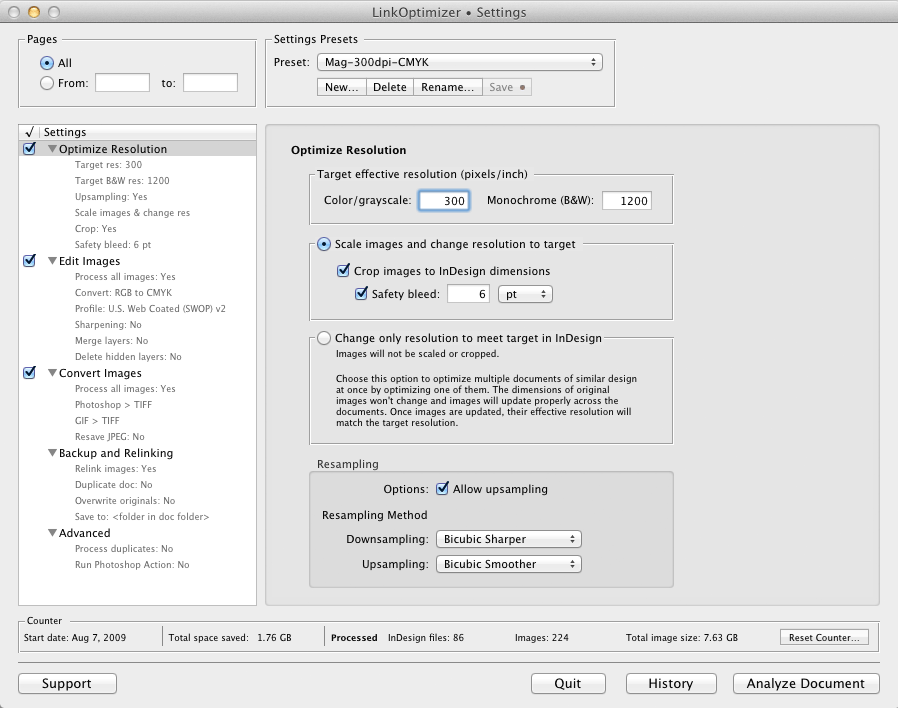
LinkOptimizer works automatically with Adobe Photoshop to eliminate the excess image data of InDesign links, perform essential image adjustments and convert image formats. For example, with just a click of a button users can:
* Scale and crop images to match their dimensions in InDesign
* Change their resolution to 300 dpi
* Convert RGB images to CMYK
* Resave JPEG images as PSD
* Run a Photoshop Action on each image
At the end of processing, LinkOptimizer reimports images to InDesign at 100% in their precise position. In addition, the software can apply sharpening filters, merge layers and delete hidden ones, and process copies of InDesign documents and images instead of original files. As a result, users can save gigabytes of disk space and countless hours of optimizing images manually, accelerate document output, reduce job turnaround and cut costs through faster processing.
Pricing and Availability:
LinkOptimizer can be purchased from BitsDuJour at 50% off for $129.95 (USD) on February 2 only. Trial is also available for download. LinkOptimizer is available for Mac OS X 10.6-10.10 and works with InDesign CS3-CC 2014.
Zevrix Solutions: http://zevrix.com
LinkOptimizer: http://www.bitsdujour.com/software/linkoptimizer
Download LinkOptimizer: http://zevrix.com/LinkOptimizer.dmg
Screenshot: http://zevrix.com/screenshots/lo4/optres-win.gif
Located in Toronto, Canada, Zevrix Solutions provides automation and productivity solutions for Adobe Creative Cloud software, PDF workflows, graphic file diagnostics and Microsoft Office output on Mac OS. Zevrix is dedicated to help professionals increase their profits through automating everyday tasks, producing error-free documents, saving disk space and cutting production costs. For more information, visit their website. Copyright (C) 2015 Zevrix Solutions. All Rights Reserved. Other trademarks and registered trademarks may be the property of their respective owners.
*******
Link To Article: http://prmac.com/release-id-73195.htm
*******
---------------------------------------------------------------------------------
Note that you can alter delivered distributions at any time.
Login to your account on prMac to alter your channel selection, or to opt-out at any time.
LinkOptimizer for InDesign at 50% off on BitsDuJour: February 2 Only - Published on 02/02/15
Zevrix Solutions announces that LinkOptimizer, its popular workflow automation solution for Adobe InDesign, is available at 50% off on the discount website BitsDuJour on February 2 only. Awarded 4 out of 5 starts by Computer Arts magazine, LinkOptimizer helps reduce InDesign link size, speed up processing and reduce production costs. The software lets users eliminate excess image data of InDesign links, perform essential image adjustments and convert file formats with just a click of a button.
Toronto (ON) Canada - Zevrix Solutions is proud to announce that LinkOptimizer, its popular workflow automation solution for Adobe InDesign, is available at 50% off on the discount website BitsDuJour today, February 2 only. Awarded 4 out of 5 starts by Computer Arts magazine, LinkOptimizer automates complex image manipulation tasks allowing users to significantly reduce the size of InDesign links, save processing time and reduce production costs.
"LinkOptimizer makes me extremely happy", says Nynke Tiekstra, the owner of design studio ColtsfootMedia in Friesland, Netherlands. "It converted 10,000 images in a 1800 pages project saving us at least 40 hours work, and it proved to be 100% accurate."
LinkOptimizer works automatically with Adobe Photoshop to eliminate the excess image data of InDesign links, perform essential image adjustments and convert image formats. For example, with just a click of a button users can:
* Scale and crop images to match their dimensions in InDesign
* Change their resolution to 300 dpi
* Convert RGB images to CMYK
* Resave JPEG images as PSD
* Run a Photoshop Action on each image
At the end of processing, LinkOptimizer reimports images to InDesign at 100% in their precise position. In addition, the software can apply sharpening filters, merge layers and delete hidden ones, and process copies of InDesign documents and images instead of original files. As a result, users can save gigabytes of disk space and countless hours of optimizing images manually, accelerate document output, reduce job turnaround and cut costs through faster processing.
Pricing and Availability:
LinkOptimizer can be purchased from BitsDuJour at 50% off for $129.95 (USD) on February 2 only. Trial is also available for download. LinkOptimizer is available for Mac OS X 10.6-10.10 and works with InDesign CS3-CC 2014.
Zevrix Solutions: http://zevrix.com
LinkOptimizer: http://www.bitsdujour.com/software/linkoptimizer
Download LinkOptimizer: http://zevrix.com/LinkOptimizer.dmg
Screenshot: http://zevrix.com/screenshots/lo4/optres-win.gif
Located in Toronto, Canada, Zevrix Solutions provides automation and productivity solutions for Adobe Creative Cloud software, PDF workflows, graphic file diagnostics and Microsoft Office output on Mac OS. Zevrix is dedicated to help professionals increase their profits through automating everyday tasks, producing error-free documents, saving disk space and cutting production costs. For more information, visit their website. Copyright (C) 2015 Zevrix Solutions. All Rights Reserved. Other trademarks and registered trademarks may be the property of their respective owners.
*******
Link To Article: http://prmac.com/release-id-73195.htm
*******
---------------------------------------------------------------------------------
Note that you can alter delivered distributions at any time.
Login to your account on prMac to alter your channel selection, or to opt-out at any time.
Subscribe to:
Posts (Atom)