A new article has been published at prMac.
Injaia releases new budgeting app: My Little Accountant for iOS - Published on 02/10/15
Brisbane based developer, Injaia has introduced My Little Accountant 1.0, its new financial app for iPad and iPhone. Accountant is the personal accountant that is always there to help you manage your spending. The app combines income and expense tracking with an extensive set of reports and tools to plan a budget or a trip. All reports support sending a copy via email, uploading a copy to Dropbox or printing to an AirPrint compatible printer.
Brisbane, Australia - Injaia has announced the release of My Little Accountant for iPad and iPhone. My Little Accountant helps users to monitor and to control their finances. Users can build a comprehensive budget and record all of their income and expenses, both one off and recurring. The app will then track their performance relative to their budget. Each week, My Little Accountant will automatically provide a summary of their performance. The summary combines both a quantitive assessment (where money was spent and how much) and a qualitative assessment (performance relative to previous weeks).
A comprehensive range of reports have been built into My Little Accountant to provide users a detailed picture of their financial activity. In addition to the weekly summary, the app provides details of spending over time and breakdowns of spending by category. All reports support sending a copy via email, uploading a copy to Dropbox or printing to an AirPrint compatible printer. The Professional Edition of My Little Accountant (available via in-app purchase) also includes transaction statements and profit and loss reports.
Paired with the reports are a set of built-in tools to assist the user in controlling their finances. The Budget Planner allows a user to build a detailed budget controlling both overall weekly spending and spending by category. The Trip Planner enables users to cost out a trip factoring in spending money, one off (fixed) costs and recurring (daily costs). My Little Accountant will then track the user�s progress towards building up the required savings for the trip. Finally, users can export their income and expense information via email or Dropbox using either Comma Separated Value (CSV) or Quicken Interchange Format (QIF) files.
Key features:
* Integrated training system will teach you step-by-step how to use My Little Accountant
* Quickly and easily record your income and expenses
* Setup schedules for recurring income and expenses
* Categorise your expenses to help build a detailed picture of your spending
* Take and store a picture of the receipt for an expense for your records
* Synchronise your information between compatible devices with iCloud
* Use the built-in reports to analyse where your money is going and when
* Send a copy of any report by email or upload it to Dropbox (requires a Dropbox account)
* Print any report to an AirPrint compatible printer
* Receive regular feedback on how well you are managing your budget with the built-in Week in Review report
* Plan out a detailed budget quickly using the built-in Budget Planner tool
* Send a copy of your budget as a PDF document via email or upload it to Dropbox
Use the Trip Planner to calculate how much that two week trip to Hawaii will cost and track your progress towards building the required savings.
Device Requirements:
* iOS 7 and above
* Optimised for iPad, iPhone 5/5s, iPhone 6 and iPhone 6 Plus
* 10.5 MB
Pricing and Availability:
My Little Accountant 1.0 is available worldwide on the App Store in the Finance category for $3.99 USD (GBP 2.49, AUD 4.99, NZD 4.99).
Injaia: http://www.injaia.com/
My Little Accountant 1.0: http://www.injaia.com/my-little-accountant-for-ipad/
Purchase and Download: https://itunes.apple.com/app/my-little-accountant/id839383363
Screenshot (Home Screen): http://www.injaia.com/wp-content/uploads/2014/06/MLA-iPad-Home-Screen.png
Screenshot (Budget Planner): http://www.injaia.com/wp-content/uploads/2014/06/MLA-iPad-Budget.png
Screenshot (Trip Planner): http://www.injaia.com/wp-content/uploads/2014/06/MLA-iPad-Trip-Planner.png
Injaia is a mobile software company based Brisbane, Australia. Injaia has released two other mobile applications for iOS. The time tracking and invoicing app "Contractor's Little Helper" and the travel money tracking app, "Travel Money Tracker." Injaia was started by Dr Iain McManus, a former game developer whose credits include Bioshock: Infinite, The Bureau: XCOM Declassified and Medieval II: Total War. All Material and Software (C) Copyright 2015 Injaia. All Rights Reserved. Apple, the Apple logo, iPhone, iPod, iPad and iCloud are registered trademarks of Apple Inc. in the U.S. and/or other countries. Other trademarks and registered trademarks may be the property of their respective owners.
*******
Link To Article: http://prmac.com/release-id-73296.htm
*******
---------------------------------------------------------------------------------
Note that you can alter delivered distributions at any time.
Login to your account on prMac to alter your channel selection, or to opt-out at any time.


Parking Puzzle Game Released for iPhone, iPad, Android
A new article has been published at prMac.
Parking Puzzle Game Released for iPhone, iPad, Android - Published on 02/10/15
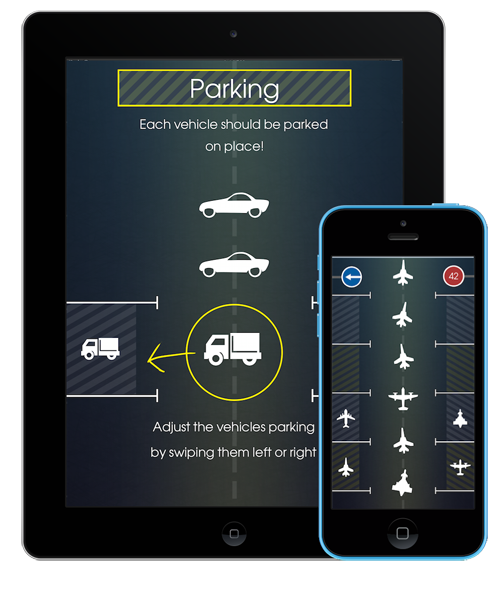
iThinkdiff has released Parking Puzzle Game 1.0, their new game title for iOS and Android devices. Parking lets puzzle players of all ages try to park a variety of different vehicles into the correct parking space. As the pace of the game increases, players will need to fully concentrate on every vehicle and parking space. Vehicles come in several entertaining varieties, including cars, trucks, motorcycles, bicycles, and even tractors and horses.
Melaka, Malaysia - iThinkdiff has announced the release of Parking Puzzle Game 1.0, its new game title for iOS and Android devices. A game of fun and concentration, Parking lets puzzle players of all ages try to park a variety of different vehicles into the correct parking space. As the pace of the game increases, players will need to fully concentrate on every vehicle and parking space - helping the player build their ability to concentrate while still having fun.
Key Features
* A simple interface makes the game easy to play for players of all ages and skill levels. Using the touchscreen, players slide the vehicle into the parking space with their fingers
* An online leaderboard lets players see how they compare to other players, pushing them to reach more challenging levels and further improve their concentration skills
* Vehicles come in several entertaining varieties: cars, trucks, motorcycles, bicycles, and even tractors and horses
Mahmud Ahsan, iThinkdiff's Lead Software Engineer, said, "The game is challenging, as the user will have to concentrate very much to put each vehicle into the correct parking space." Helping the user have fun while building concentration skills is a key part of the game.
Game play is simple and obvious: each vehicle enters from the top of the screen. The player must use their finger to swipe the vehicle into a matching parking space. As the game progresses, vehicles begin to move faster and the parking spots occasionally change vehicle types, requiring the the user concentrate not just on the stream of vehicles but on keeping track of the parking spaces.
This gradual increase in speed and complexity allows users to start at any level and steadily build up their concentration and response time. The top players will be listed on the built-in leaderboard, and every player can see how they rank compared to other players. The game includes both music and sound effects, and all of the graphics were specially created to look good on Retina displays.
Device Requirements:
* iPhone, iPad, and iPod touch
* Optimized for iPhone 5, iPhone 6/6 Plus
* Requires iOS 7.0 or later
* 49.8 MB
Pricing and Availability:
Parking Puzzle Game 1.0 is Free and available worldwide through the App Store in the Games category. There is also an Android version available on Google Play.
Parking Puzzle Game 1.0: http://ithinkdiff.net/ios-games/parking/
Download from iTunes: https://itunes.apple.com/app/parking-puzzle-game/id958037663
Download from Google Play: https://play.google.com/store/apps/details?id=net.ithinkdiff.parking
YouTube Video (Game Play): https://www.youtube.com/watch?v=jjOD26c9u2Q
Screenshot: http://2a2cc343f5995d2fb948-5cc402153e846059e29478934321d3c6.r70.cf1.rackcdn.com/2015/01/parking_ithinkdiff.png
App Icon: http://a3.mzstatic.com/us/r30/Purple3/v4/12/30/5f/12305f5f-dc7a-cc22-6c68-b9a5e508c6e0/icon350x350.jpeg
Founded in 2010 by programmer Mahmud Ahsan, iThinkdiff is a leading creator of educational and entertainment apps for iPhones, iPads, and Android devices. With over 8 million total downloads, thousands of five-star reviews, and 15 million monthly ad impressions, iThinkdiff games and translation apps are frequently featured on the Apple iTunes homepage. Copyright (C) 2010-2015 iThinkdiff. All Rights Reserved. Apple, the Apple logo, iPhone, iPad, iPad mini, iPod touch, and Mac are registered trademarks of Apple Inc. in the U.S. and/or other countries. Other trademarks and registered trademarks may be the property of their respective owners.
*******
Link To Article: http://prmac.com/release-id-73295.htm
*******
---------------------------------------------------------------------------------
Note that you can alter delivered distributions at any time.
Login to your account on prMac to alter your channel selection, or to opt-out at any time.
Parking Puzzle Game Released for iPhone, iPad, Android - Published on 02/10/15
iThinkdiff has released Parking Puzzle Game 1.0, their new game title for iOS and Android devices. Parking lets puzzle players of all ages try to park a variety of different vehicles into the correct parking space. As the pace of the game increases, players will need to fully concentrate on every vehicle and parking space. Vehicles come in several entertaining varieties, including cars, trucks, motorcycles, bicycles, and even tractors and horses.
Melaka, Malaysia - iThinkdiff has announced the release of Parking Puzzle Game 1.0, its new game title for iOS and Android devices. A game of fun and concentration, Parking lets puzzle players of all ages try to park a variety of different vehicles into the correct parking space. As the pace of the game increases, players will need to fully concentrate on every vehicle and parking space - helping the player build their ability to concentrate while still having fun.
Key Features
* A simple interface makes the game easy to play for players of all ages and skill levels. Using the touchscreen, players slide the vehicle into the parking space with their fingers
* An online leaderboard lets players see how they compare to other players, pushing them to reach more challenging levels and further improve their concentration skills
* Vehicles come in several entertaining varieties: cars, trucks, motorcycles, bicycles, and even tractors and horses
Mahmud Ahsan, iThinkdiff's Lead Software Engineer, said, "The game is challenging, as the user will have to concentrate very much to put each vehicle into the correct parking space." Helping the user have fun while building concentration skills is a key part of the game.
Game play is simple and obvious: each vehicle enters from the top of the screen. The player must use their finger to swipe the vehicle into a matching parking space. As the game progresses, vehicles begin to move faster and the parking spots occasionally change vehicle types, requiring the the user concentrate not just on the stream of vehicles but on keeping track of the parking spaces.
This gradual increase in speed and complexity allows users to start at any level and steadily build up their concentration and response time. The top players will be listed on the built-in leaderboard, and every player can see how they rank compared to other players. The game includes both music and sound effects, and all of the graphics were specially created to look good on Retina displays.
Device Requirements:
* iPhone, iPad, and iPod touch
* Optimized for iPhone 5, iPhone 6/6 Plus
* Requires iOS 7.0 or later
* 49.8 MB
Pricing and Availability:
Parking Puzzle Game 1.0 is Free and available worldwide through the App Store in the Games category. There is also an Android version available on Google Play.
Parking Puzzle Game 1.0: http://ithinkdiff.net/ios-games/parking/
Download from iTunes: https://itunes.apple.com/app/parking-puzzle-game/id958037663
Download from Google Play: https://play.google.com/store/apps/details?id=net.ithinkdiff.parking
YouTube Video (Game Play): https://www.youtube.com/watch?v=jjOD26c9u2Q
Screenshot: http://2a2cc343f5995d2fb948-5cc402153e846059e29478934321d3c6.r70.cf1.rackcdn.com/2015/01/parking_ithinkdiff.png
App Icon: http://a3.mzstatic.com/us/r30/Purple3/v4/12/30/5f/12305f5f-dc7a-cc22-6c68-b9a5e508c6e0/icon350x350.jpeg

Founded in 2010 by programmer Mahmud Ahsan, iThinkdiff is a leading creator of educational and entertainment apps for iPhones, iPads, and Android devices. With over 8 million total downloads, thousands of five-star reviews, and 15 million monthly ad impressions, iThinkdiff games and translation apps are frequently featured on the Apple iTunes homepage. Copyright (C) 2010-2015 iThinkdiff. All Rights Reserved. Apple, the Apple logo, iPhone, iPad, iPad mini, iPod touch, and Mac are registered trademarks of Apple Inc. in the U.S. and/or other countries. Other trademarks and registered trademarks may be the property of their respective owners.
*******
Link To Article: http://prmac.com/release-id-73295.htm
*******
---------------------------------------------------------------------------------
Note that you can alter delivered distributions at any time.
Login to your account on prMac to alter your channel selection, or to opt-out at any time.
WidgeTunes 1.0 released for iOS - Easily Navigate Your Playlists
A new article has been published at prMac.
WidgeTunes 1.0 released for iOS - Easily Navigate Your Playlists - Published on 02/10/15
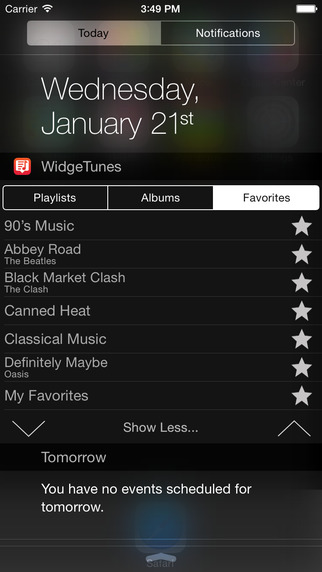
Independent developer, Georgios Trigonakis has released WidgeTunes 1.0, a new Notification Center widget for iPhone. View all your iPhone playlists and albums on a easy-to-use widget. WidgeTunes lets you choose to play your favorite music without unlock your screen or open the Music app. Just swipe down from the top of the screen on your iPhone and select a playlist or album from WidgeTunes widget. Save any album or playlist to your favorites, so you can find it easily.
Athens, Greece - Independent developer, Georgios Trigonakis has announced the release of WidgeTunes 1.0, a new Notification Center widget for iPhone. WidgeTunes offers the easiest way to play music on iPhone. View all your iPhone playlists and albums on a easy-to-use widget. This app lets you choose to play your favorite music without unlock your screen or open the Music app.
Just swipe down from the top of the screen on your iPhone and select a playlist or album from WidgeTunes widget. Save any album or playlist to your favorites, so you can find it easily. To add a playlist or album to favorites, tap on star button. To remove a playlist or album from favorites tap again on full star button. View your favorites playlists and albums on Favorites tab.
WidgeTunes Features:
* Notification Center widget
* Full iPhone's playlists and album list
* User favorites playlists and albums
* Can play iTunes match playlists and albums (no need to download to play them)
Device Requirements:
* iPhone, iPad, and iPod touch
* Optimized for iPhone 5, iPhone 6/6 Plus
* Requires iOS 8.1 or later
* 0.4 MB
Pricing and Availability:
WidgeTunes 1.0 is only $0.99 USD (or equivalent amount in other currencies) and available worldwide exclusively through the App Store in the Music category. A limited number of Promotional Codes are available to members of the media. Journalists interested in receiving one should contact us on our contact Email. A press kit including screenshots, icons and other related media are available for download.
WidgeTunes 1.0: http://www.gtrigonakis.com/widgetunesios
Purchase and Download: https://itunes.apple.com/app/id960088577
Screenshot: http://a3.mzstatic.com/us/r30/Purple1/v4/65/54/f4/6554f4fb-8f8e-d4b1-8c2d-dc1e241fd8f0/screen322x572.jpeg
App Icon: http://a1.mzstatic.com/us/r30/Purple3/v4/00/96/bd/0096bd68-4c3e-a826-4788-4f6fbc85d29e/icon175x175.jpeg
Press Kit (zip): https://www.dropbox.com/s/risz3xtg5gvkz1a/WidgeTunesIOSPressKit.zip?dl=1
Georgios Trigonakis is a Athens, Greece based indie Mac/iOS developer. Since 2011, Georgios Trigonakis have released many Mac and iOS apps, with over 50,000 users. All Material and Software (C) Copyright 2015 Georgios Trigonakis. All Rights Reserved. Apple, the Apple logo, Mac OS X, iPhone, iPod, iPad and Macintosh are registered trademarks of Apple Inc. in the U.S. and/or other countries. Other trademarks and registered trademarks may be the property of their respective owners.
*******
Link To Article: http://prmac.com/release-id-73294.htm
*******
---------------------------------------------------------------------------------
Note that you can alter delivered distributions at any time.
Login to your account on prMac to alter your channel selection, or to opt-out at any time.
WidgeTunes 1.0 released for iOS - Easily Navigate Your Playlists - Published on 02/10/15
Independent developer, Georgios Trigonakis has released WidgeTunes 1.0, a new Notification Center widget for iPhone. View all your iPhone playlists and albums on a easy-to-use widget. WidgeTunes lets you choose to play your favorite music without unlock your screen or open the Music app. Just swipe down from the top of the screen on your iPhone and select a playlist or album from WidgeTunes widget. Save any album or playlist to your favorites, so you can find it easily.
Athens, Greece - Independent developer, Georgios Trigonakis has announced the release of WidgeTunes 1.0, a new Notification Center widget for iPhone. WidgeTunes offers the easiest way to play music on iPhone. View all your iPhone playlists and albums on a easy-to-use widget. This app lets you choose to play your favorite music without unlock your screen or open the Music app.
Just swipe down from the top of the screen on your iPhone and select a playlist or album from WidgeTunes widget. Save any album or playlist to your favorites, so you can find it easily. To add a playlist or album to favorites, tap on star button. To remove a playlist or album from favorites tap again on full star button. View your favorites playlists and albums on Favorites tab.
WidgeTunes Features:
* Notification Center widget
* Full iPhone's playlists and album list
* User favorites playlists and albums
* Can play iTunes match playlists and albums (no need to download to play them)
Device Requirements:
* iPhone, iPad, and iPod touch
* Optimized for iPhone 5, iPhone 6/6 Plus
* Requires iOS 8.1 or later
* 0.4 MB
Pricing and Availability:
WidgeTunes 1.0 is only $0.99 USD (or equivalent amount in other currencies) and available worldwide exclusively through the App Store in the Music category. A limited number of Promotional Codes are available to members of the media. Journalists interested in receiving one should contact us on our contact Email. A press kit including screenshots, icons and other related media are available for download.
WidgeTunes 1.0: http://www.gtrigonakis.com/widgetunesios
Purchase and Download: https://itunes.apple.com/app/id960088577
Screenshot: http://a3.mzstatic.com/us/r30/Purple1/v4/65/54/f4/6554f4fb-8f8e-d4b1-8c2d-dc1e241fd8f0/screen322x572.jpeg
App Icon: http://a1.mzstatic.com/us/r30/Purple3/v4/00/96/bd/0096bd68-4c3e-a826-4788-4f6fbc85d29e/icon175x175.jpeg

Press Kit (zip): https://www.dropbox.com/s/risz3xtg5gvkz1a/WidgeTunesIOSPressKit.zip?dl=1
Georgios Trigonakis is a Athens, Greece based indie Mac/iOS developer. Since 2011, Georgios Trigonakis have released many Mac and iOS apps, with over 50,000 users. All Material and Software (C) Copyright 2015 Georgios Trigonakis. All Rights Reserved. Apple, the Apple logo, Mac OS X, iPhone, iPod, iPad and Macintosh are registered trademarks of Apple Inc. in the U.S. and/or other countries. Other trademarks and registered trademarks may be the property of their respective owners.
*******
Link To Article: http://prmac.com/release-id-73294.htm
*******
---------------------------------------------------------------------------------
Note that you can alter delivered distributions at any time.
Login to your account on prMac to alter your channel selection, or to opt-out at any time.
Alfred and the Dragon - 7th YTMS Guided Read-Aloud Book Teaches Alphabet
A new article has been published at prMac.
Alfred and the Dragon - 7th YTMS Guided Read-Aloud Book Teaches Alphabet - Published on 02/10/15
You TELL Me Stories (YTMS) has released Alfred and the Dragon with WordWinks and Retell, Record & Share 1.0.2 for iOS, the seventh illustrated book app in the You TELL Me Stories Library. Alfred and the Dragon teaches children how to recognize letters and sounds, and helps parents practice the most effective way to read aloud through WordWinks. Kids can also build memory and comprehension through the Retell, Record and Share function that allows them to record the story in their own voice.
Weston, Connecticut - You TELL Me Stories (YTMS) has announced the release and immediate availability of Alfred and the Dragon with WordWinks and Retell, Record & Share 1.0.2 for iPad, iPhone, and iPod touch devices. Alfred and the Dragon is the seventh illustrated book app in the award-winning You TELL Me Stories Library.
"Praised by the academic community, (the) You TELL Me Stories app immerses children in stories and then encourages them to recount details of the story in their own words," reports Greta Jenkins of Families Online Magazine. "Featuring delightful artwork and engaging content, kids learn and have fun too." (17 June 2013)
Written by Eugene Coco and illustrated by Gilbert Contreras, Alfred and the Dragon is the story of a boy who gets swept away to a far-off land where a Goblin has the lovely Princess Imari trapped inside a glass jar. With the help of a friendly Dragon, Alfred frees the Princess and flies her back home. Featuring colorful illustrations and an engaging storyline, Alfred and the Dragon teaches children how to recognize letters and their sounds.
Feature Highlights:
* Delightful story that teaches letter sounds
* Helps create readers before they can read
* Teaches parents how to read to kids
* Colorful illustrations
* Narrated by a master teacher and professional voiceover actor
* Ability for child to record their own version of the story
* Developed by Language and Literacy Experts
* Meets National Core Curriculum for PreK-K
* Free Activity Book that reinforces basic concepts and storytelling
Alfred and the Dragon provides kids the opportunity to practice their storytelling skills through the Retell, Record and Share function. By allowing children to record the story in their own voice, Retell, Record and Share helps build important skills such as memory/recall, comprehension, speaking skills, sequencing, vocabulary, and analysis. Retell, Record and Share also allows users to share the child's recording of Alfred and the Dragon directly from the app.
"You TELL Me Stories are bright, colorful and entertaining ebooks created by educators and language experts for you and your child to enjoy together again and again," explains Lynn Rubin of You TELL Me Stories. "With beautiful illustrations and a delightful story, Alfred and the Dragon provides an engaging way to bring parents and children together. Following the letters of the alphabet, Alfred and the Dragon teaches children how to recognize letters and their sounds, while capturing their imagination along the way. Come on this wonderful adventure with Alfred and see how much of the alphabet your child can learn!"
Device Requirements:
* iPhone, iPad or iPod touch
* Requires iOS 5.1.1 or later
* 285 MB
Pricing and Availability:
As an introductory offer, Alfred and the Dragon 1.0.2 is only $2.99 (USD) and available worldwide exclusively through the App Store in the Books category. Review copies are available upon request.
You Tell Me Stories: http://youtellmestories.com
Alfred and the Dragon 1.0.2: http://youtellmestories.com/portfolio/our-ebook-apps/
Purchase and Download : https://itunes.apple.com/app/id952587284
Screenshot 1: http://a1.mzstatic.com/us/r30/Purple3/v4/32/8c/5d/328c5d65-9e4a-2ece-7ad7-bfed089882d1/screen520x924.jpeg
Screenshot 2: http://a4.mzstatic.com/us/r30/Purple5/v4/98/35/a1/9835a1d2-9a28-84c0-e8f8-6d96a145b0e1/screen520x924.jpeg
App Icon: http://a2.mzstatic.com/us/r30/Purple1/v4/db/90/45/db90459d-c331-2cd3-9512-b95a5032d19b/icon175x175.jpeg
Based in Weston, Connecticut, You TELL Me Stories was founded by Alexandra Hartenbaum and Lynn Rubin in 2011. The Company publishes children's preschool picture books for iPhone and iPad. The You TELL Me Stories App is a unique educational initiative dedicated to the development of "Read-Aloud" books uniquely designed so that the experience for the child and adult is modeled on methods validated by research. This evidenced based approach to reading aloud builds the necessary oral language and emergent literacy skills required for success in school ... and life! Because HOW you read to a child, and not just how often, makes a difference. Copyright (C) 2011-2015 You TELL Me Stories, LLC. All Rights Reserved. Apple, the Apple logo, iPhone, and iPod are registered trademarks of Apple Inc. in the U.S. and/or other countries. Other trademarks and registered trademarks may be the property of their respective owners.
*******
Link To Article: http://prmac.com/release-id-73293.htm
*******
---------------------------------------------------------------------------------
Note that you can alter delivered distributions at any time.
Login to your account on prMac to alter your channel selection, or to opt-out at any time.
Alfred and the Dragon - 7th YTMS Guided Read-Aloud Book Teaches Alphabet - Published on 02/10/15
You TELL Me Stories (YTMS) has released Alfred and the Dragon with WordWinks and Retell, Record & Share 1.0.2 for iOS, the seventh illustrated book app in the You TELL Me Stories Library. Alfred and the Dragon teaches children how to recognize letters and sounds, and helps parents practice the most effective way to read aloud through WordWinks. Kids can also build memory and comprehension through the Retell, Record and Share function that allows them to record the story in their own voice.
Weston, Connecticut - You TELL Me Stories (YTMS) has announced the release and immediate availability of Alfred and the Dragon with WordWinks and Retell, Record & Share 1.0.2 for iPad, iPhone, and iPod touch devices. Alfred and the Dragon is the seventh illustrated book app in the award-winning You TELL Me Stories Library.
"Praised by the academic community, (the) You TELL Me Stories app immerses children in stories and then encourages them to recount details of the story in their own words," reports Greta Jenkins of Families Online Magazine. "Featuring delightful artwork and engaging content, kids learn and have fun too." (17 June 2013)
Written by Eugene Coco and illustrated by Gilbert Contreras, Alfred and the Dragon is the story of a boy who gets swept away to a far-off land where a Goblin has the lovely Princess Imari trapped inside a glass jar. With the help of a friendly Dragon, Alfred frees the Princess and flies her back home. Featuring colorful illustrations and an engaging storyline, Alfred and the Dragon teaches children how to recognize letters and their sounds.
Feature Highlights:
* Delightful story that teaches letter sounds
* Helps create readers before they can read
* Teaches parents how to read to kids
* Colorful illustrations
* Narrated by a master teacher and professional voiceover actor
* Ability for child to record their own version of the story
* Developed by Language and Literacy Experts
* Meets National Core Curriculum for PreK-K
* Free Activity Book that reinforces basic concepts and storytelling
Alfred and the Dragon provides kids the opportunity to practice their storytelling skills through the Retell, Record and Share function. By allowing children to record the story in their own voice, Retell, Record and Share helps build important skills such as memory/recall, comprehension, speaking skills, sequencing, vocabulary, and analysis. Retell, Record and Share also allows users to share the child's recording of Alfred and the Dragon directly from the app.
"You TELL Me Stories are bright, colorful and entertaining ebooks created by educators and language experts for you and your child to enjoy together again and again," explains Lynn Rubin of You TELL Me Stories. "With beautiful illustrations and a delightful story, Alfred and the Dragon provides an engaging way to bring parents and children together. Following the letters of the alphabet, Alfred and the Dragon teaches children how to recognize letters and their sounds, while capturing their imagination along the way. Come on this wonderful adventure with Alfred and see how much of the alphabet your child can learn!"
Device Requirements:
* iPhone, iPad or iPod touch
* Requires iOS 5.1.1 or later
* 285 MB
Pricing and Availability:
As an introductory offer, Alfred and the Dragon 1.0.2 is only $2.99 (USD) and available worldwide exclusively through the App Store in the Books category. Review copies are available upon request.
You Tell Me Stories: http://youtellmestories.com
Alfred and the Dragon 1.0.2: http://youtellmestories.com/portfolio/our-ebook-apps/
Purchase and Download : https://itunes.apple.com/app/id952587284
Screenshot 1: http://a1.mzstatic.com/us/r30/Purple3/v4/32/8c/5d/328c5d65-9e4a-2ece-7ad7-bfed089882d1/screen520x924.jpeg

Screenshot 2: http://a4.mzstatic.com/us/r30/Purple5/v4/98/35/a1/9835a1d2-9a28-84c0-e8f8-6d96a145b0e1/screen520x924.jpeg
App Icon: http://a2.mzstatic.com/us/r30/Purple1/v4/db/90/45/db90459d-c331-2cd3-9512-b95a5032d19b/icon175x175.jpeg
Based in Weston, Connecticut, You TELL Me Stories was founded by Alexandra Hartenbaum and Lynn Rubin in 2011. The Company publishes children's preschool picture books for iPhone and iPad. The You TELL Me Stories App is a unique educational initiative dedicated to the development of "Read-Aloud" books uniquely designed so that the experience for the child and adult is modeled on methods validated by research. This evidenced based approach to reading aloud builds the necessary oral language and emergent literacy skills required for success in school ... and life! Because HOW you read to a child, and not just how often, makes a difference. Copyright (C) 2011-2015 You TELL Me Stories, LLC. All Rights Reserved. Apple, the Apple logo, iPhone, and iPod are registered trademarks of Apple Inc. in the U.S. and/or other countries. Other trademarks and registered trademarks may be the property of their respective owners.
*******
Link To Article: http://prmac.com/release-id-73293.htm
*******
---------------------------------------------------------------------------------
Note that you can alter delivered distributions at any time.
Login to your account on prMac to alter your channel selection, or to opt-out at any time.
Agile Tortoise celebrates release of Drafts 4.1 with 20% off sale
A new article has been published at prMac.
Agile Tortoise celebrates release of Drafts 4.1 with 20% off sale - Published on 02/09/15
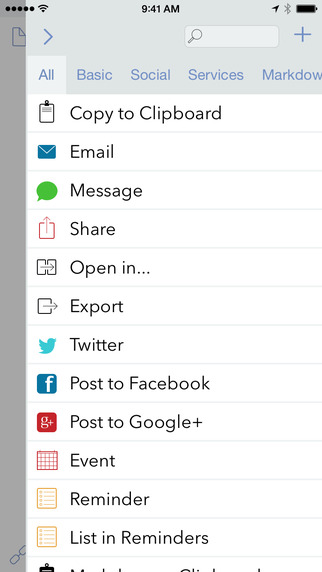
Agile Tortoise announces the immediate availability of Drafts 4.1. Drafts is a quick capture note taking app for iPhone and iPad. The 4.1 update adds multi-draft selection tools, and builds on other new features added since the 4.0 release. Drafts has continued to improve-adding support for creating native Google Docs files, customizable printing actions and the ability to create and append to files in iCloud Drive and more. Drafts is 20% off for a limited time to celebrate the update.
North Richland Hills, Texas - Agile Tortoise is pleased to announce the release of Drafts 4.1 for iPhone and iPad. Drafts is a quick capture note taking app with incredibly flexible output actions that can send text to almost anywhere. With the release of Drafts 4 in October, 2014, Agile Tortoise reinvented the popular productivity app for iOS 8. Since the release of 4.0, Drafts has continued to improve-adding support for creating native Google Docs files, customizable printing actions and the ability to create and append to files in iCloud Drive and more.
Continuing this trend, Drafts 4.1 adds new features including:
* A great new multi-select feature to enable easier management of more than one draft, allowing archiving, flagging and even merging of selected drafts
* Improved editing and ordering of actions in the the action list
Agile Tortoise has been publishing a series of integration guides and screencasts to introduce features and help customers get the most out of Drafts integration with services like Evernote, Reminders, Twitter and popular apps like OmniFocus and Fantastical. These guides are available on the Agile Tortoise help center.
Drafts continues to be one of the most updated and best supported apps on the App Store. Get more out of your iOS devices with Drafts.
Device Requirements:
* iPhone, iPad, and iPod touch
* Requires iOS 8.0 or later
* Optimized for iPhone 5, 6/6 Plus
* 12.4 MB
Pricing and Availability:
Drafts 4 - Quickly Capture Notes, Share Anywhere! 4.1 is $7.99 USD (or equivalent amount in other currencies) and available worldwide exclusively through the App Store in the Productivity category. To celebrate the 4.1 release, Drafts is 20% off through February 12, 2015.
Drafts 4.1: http://agiletortoise.com/drafts
Purchase and Download: https://itunes.apple.com/app/drafts/id905337691
Agile Tortoise Help Center: http://help.agiletortoise.com
Screenshot: http://a1.mzstatic.com/us/r30/Purple5/v4/e1/ef/1d/e1ef1dd8-7da8-c7a5-d68a-6263eda80fa6/screen322x572.jpeg
App Icon: http://a3.mzstatic.com/us/r30/Purple3/v4/b8/7f/b5/b87fb5cf-19be-e855-8aff-526c0096aa7e/icon175x175.png
Media Assets: http://agiletortoise.com/drafts/press-kit.html
Founded in 2006, Agile Tortoise, Inc. is an independent software shop that develops mobile and web software both for end-users and clients. Agile Tortoise, Inc. is based in Dallas-Fort Worth, TX. For more information, visit Agile Tortoise online. Copyright (C) 2006-2015 Agile Tortoise, Inc. All Rights Reserved. Apple, the Apple logo, iPhone, iPod and iPad are registered trademarks of Apple Inc. in the U.S. and/or other countries.
*******
Link To Article: http://prmac.com/release-id-73342.htm
*******
---------------------------------------------------------------------------------
Note that you can alter delivered distributions at any time.
Login to your account on prMac to alter your channel selection, or to opt-out at any time.
Agile Tortoise celebrates release of Drafts 4.1 with 20% off sale - Published on 02/09/15
Agile Tortoise announces the immediate availability of Drafts 4.1. Drafts is a quick capture note taking app for iPhone and iPad. The 4.1 update adds multi-draft selection tools, and builds on other new features added since the 4.0 release. Drafts has continued to improve-adding support for creating native Google Docs files, customizable printing actions and the ability to create and append to files in iCloud Drive and more. Drafts is 20% off for a limited time to celebrate the update.
North Richland Hills, Texas - Agile Tortoise is pleased to announce the release of Drafts 4.1 for iPhone and iPad. Drafts is a quick capture note taking app with incredibly flexible output actions that can send text to almost anywhere. With the release of Drafts 4 in October, 2014, Agile Tortoise reinvented the popular productivity app for iOS 8. Since the release of 4.0, Drafts has continued to improve-adding support for creating native Google Docs files, customizable printing actions and the ability to create and append to files in iCloud Drive and more.
Continuing this trend, Drafts 4.1 adds new features including:
* A great new multi-select feature to enable easier management of more than one draft, allowing archiving, flagging and even merging of selected drafts
* Improved editing and ordering of actions in the the action list
Agile Tortoise has been publishing a series of integration guides and screencasts to introduce features and help customers get the most out of Drafts integration with services like Evernote, Reminders, Twitter and popular apps like OmniFocus and Fantastical. These guides are available on the Agile Tortoise help center.
Drafts continues to be one of the most updated and best supported apps on the App Store. Get more out of your iOS devices with Drafts.
Device Requirements:
* iPhone, iPad, and iPod touch
* Requires iOS 8.0 or later
* Optimized for iPhone 5, 6/6 Plus
* 12.4 MB
Pricing and Availability:
Drafts 4 - Quickly Capture Notes, Share Anywhere! 4.1 is $7.99 USD (or equivalent amount in other currencies) and available worldwide exclusively through the App Store in the Productivity category. To celebrate the 4.1 release, Drafts is 20% off through February 12, 2015.
Drafts 4.1: http://agiletortoise.com/drafts
Purchase and Download: https://itunes.apple.com/app/drafts/id905337691
Agile Tortoise Help Center: http://help.agiletortoise.com
Screenshot: http://a1.mzstatic.com/us/r30/Purple5/v4/e1/ef/1d/e1ef1dd8-7da8-c7a5-d68a-6263eda80fa6/screen322x572.jpeg
App Icon: http://a3.mzstatic.com/us/r30/Purple3/v4/b8/7f/b5/b87fb5cf-19be-e855-8aff-526c0096aa7e/icon175x175.png

Media Assets: http://agiletortoise.com/drafts/press-kit.html
Founded in 2006, Agile Tortoise, Inc. is an independent software shop that develops mobile and web software both for end-users and clients. Agile Tortoise, Inc. is based in Dallas-Fort Worth, TX. For more information, visit Agile Tortoise online. Copyright (C) 2006-2015 Agile Tortoise, Inc. All Rights Reserved. Apple, the Apple logo, iPhone, iPod and iPad are registered trademarks of Apple Inc. in the U.S. and/or other countries.
*******
Link To Article: http://prmac.com/release-id-73342.htm
*******
---------------------------------------------------------------------------------
Note that you can alter delivered distributions at any time.
Login to your account on prMac to alter your channel selection, or to opt-out at any time.
World of Khaos - Localization Info, Release Date and Pricing Unveiled
A new article has been published at prMac.
World of Khaos - Localization Info, Release Date and Pricing Unveiled - Published on 02/08/15
Rapid Turtle Games announced that World of Khaos, an upcoming tower defense game will be available worldwide on February 12, 2015 for iOS and Mac. The tower defense game casts you in the role of the leader of resistance in a post-apocalyptic world. A fanatic rules the world with an unstoppable army of robots, mutants and cyborgs. With many upgrades, power-ups, achievements, and more World of Khaos will take tower defense games to a whole new level.
Subotica, Serbia - Rapid Turtle Games announced that World of Khaos, an upcoming tower defense game will be available worldwide on February 12, 2015 for iOS and Mac, with a price of $1.99 and $4.99 respectively. The game will be fully localized into 9 languages: English, German, Spanish, French, Italian, Russian, Japanese, Korean and Simplified Chinese.
This adrenaline-pumping tower defense game casts you in the role of the leader of resistance in a post-apocalyptic world. After an asteroid impact on Earth, the civilization is destroyed, and a new world order has arisen. A fanatic rules the world with an unstoppable army of robots, mutants and cyborgs.
The player takes command of the last resistance base, and with an arsenal of powerful weapons and upgrades needs to defeat the brutal army of war machines. It's all-out chaos and mayhem from the very start. Players will enjoy the intense and nonstop action that never lets up until the credits roll. With many upgrades, power-ups, achievements, wide variety of enemies and big bosses this game will take tower defense games to a whole new level.
The Story:
On September 29, 2028 an unexpected asteroid with high iridium content hit the Earth with catastrophic consequences. With extreme amount of dust, moisture and radiation it destroyed the civilization, as we know it. The survivors concentrated around the remaining water resources and formed heavily guarded districts. Local wars between districts were common. Soon after the impact, iridium became the world currency.
The location of the asteroid impact was the area with the highest iridium content. District 1, the closest to the impact soon started to exploit the good properties of this rare metal to create the most advanced army of robots, mutants and cyborgs. War was always about resources and control. This time is no different. With superior technology, plenty of iridium and a fanatic leader obsessed with domination, District 1 quickly crushed the districts that didn't obey to the new world order.
District 13 is the only remaining place on Earth where the people are still free. They founded the Resistance, the sole fighting force for freedom and the mankind's last hope, led by a man called Punk. The brutal army of war machines is at the doorstep of District 13. As it turns out soon, a much greater challenge is awaiting them here. Let the battle begin.
Game features:
* Two dozen of enemies ranging from robots, mutants and cyborgs
* Big bosses
* Wide range of weapons and power-ups
* Beautiful and unique post-apocalyptic background for each stage
* Rich particle effects
* Achievements and leaderboards
* Adrenaline pumping music
* Plenty of sounds effects and voice-overs for the characters
* Available in languages: English, German, Spanish, French, Italian, Russian, Japanese, Korean and Simplified Chinese
World of Khaos: http://rapidturtlegames.com/worldofkhaos.html
YouTube Video (Trailer): https://www.youtube.com/watch?v=xu7_LalMHP0
YouTube Video (Gameplay #1): https://www.youtube.com/watch?v=S0FMmHEpVOg
YouTube Video (Gameplay #2): https://www.youtube.com/watch?v=XICNbqQgv-w
Screenshots (zip): http://rapidturtlegames.com/press/wok_screenshots2.zip
App Icon: http://rapidturtlegames.com/press/wok_icon.jpg
Rapid Turtle Games develops addictive and fun games for the iPhone, iPad, Android, Mac and PC. All Material and Software (C) Copyright 2015 Rapid Turtle Games. All Rights Reserved. Apple, the Apple logo, iPhone, iPod and iPad are registered trademarks of Apple Inc. in the U.S. and/or other countries. Other trademarks and registered trademarks may be the property of their respective owners.
*******
Link To Article: http://prmac.com/release-id-73341.htm
*******
---------------------------------------------------------------------------------
Note that you can alter delivered distributions at any time.
Login to your account on prMac to alter your channel selection, or to opt-out at any time.
World of Khaos - Localization Info, Release Date and Pricing Unveiled - Published on 02/08/15
Rapid Turtle Games announced that World of Khaos, an upcoming tower defense game will be available worldwide on February 12, 2015 for iOS and Mac. The tower defense game casts you in the role of the leader of resistance in a post-apocalyptic world. A fanatic rules the world with an unstoppable army of robots, mutants and cyborgs. With many upgrades, power-ups, achievements, and more World of Khaos will take tower defense games to a whole new level.
Subotica, Serbia - Rapid Turtle Games announced that World of Khaos, an upcoming tower defense game will be available worldwide on February 12, 2015 for iOS and Mac, with a price of $1.99 and $4.99 respectively. The game will be fully localized into 9 languages: English, German, Spanish, French, Italian, Russian, Japanese, Korean and Simplified Chinese.
This adrenaline-pumping tower defense game casts you in the role of the leader of resistance in a post-apocalyptic world. After an asteroid impact on Earth, the civilization is destroyed, and a new world order has arisen. A fanatic rules the world with an unstoppable army of robots, mutants and cyborgs.
The player takes command of the last resistance base, and with an arsenal of powerful weapons and upgrades needs to defeat the brutal army of war machines. It's all-out chaos and mayhem from the very start. Players will enjoy the intense and nonstop action that never lets up until the credits roll. With many upgrades, power-ups, achievements, wide variety of enemies and big bosses this game will take tower defense games to a whole new level.
The Story:
On September 29, 2028 an unexpected asteroid with high iridium content hit the Earth with catastrophic consequences. With extreme amount of dust, moisture and radiation it destroyed the civilization, as we know it. The survivors concentrated around the remaining water resources and formed heavily guarded districts. Local wars between districts were common. Soon after the impact, iridium became the world currency.
The location of the asteroid impact was the area with the highest iridium content. District 1, the closest to the impact soon started to exploit the good properties of this rare metal to create the most advanced army of robots, mutants and cyborgs. War was always about resources and control. This time is no different. With superior technology, plenty of iridium and a fanatic leader obsessed with domination, District 1 quickly crushed the districts that didn't obey to the new world order.
District 13 is the only remaining place on Earth where the people are still free. They founded the Resistance, the sole fighting force for freedom and the mankind's last hope, led by a man called Punk. The brutal army of war machines is at the doorstep of District 13. As it turns out soon, a much greater challenge is awaiting them here. Let the battle begin.
Game features:
* Two dozen of enemies ranging from robots, mutants and cyborgs
* Big bosses
* Wide range of weapons and power-ups
* Beautiful and unique post-apocalyptic background for each stage
* Rich particle effects
* Achievements and leaderboards
* Adrenaline pumping music
* Plenty of sounds effects and voice-overs for the characters
* Available in languages: English, German, Spanish, French, Italian, Russian, Japanese, Korean and Simplified Chinese
World of Khaos: http://rapidturtlegames.com/worldofkhaos.html
YouTube Video (Trailer): https://www.youtube.com/watch?v=xu7_LalMHP0
YouTube Video (Gameplay #1): https://www.youtube.com/watch?v=S0FMmHEpVOg
YouTube Video (Gameplay #2): https://www.youtube.com/watch?v=XICNbqQgv-w
Screenshots (zip): http://rapidturtlegames.com/press/wok_screenshots2.zip
App Icon: http://rapidturtlegames.com/press/wok_icon.jpg

Rapid Turtle Games develops addictive and fun games for the iPhone, iPad, Android, Mac and PC. All Material and Software (C) Copyright 2015 Rapid Turtle Games. All Rights Reserved. Apple, the Apple logo, iPhone, iPod and iPad are registered trademarks of Apple Inc. in the U.S. and/or other countries. Other trademarks and registered trademarks may be the property of their respective owners.
*******
Link To Article: http://prmac.com/release-id-73341.htm
*******
---------------------------------------------------------------------------------
Note that you can alter delivered distributions at any time.
Login to your account on prMac to alter your channel selection, or to opt-out at any time.
Unit Pricer App Now Does Unit Conversions
A new article has been published at prMac.
Unit Pricer App Now Does Unit Conversions - Published on 02/08/15
Toronto based Glass Bottle Apps announces Unit Pricer 2.1.0, and update to its popular price comparison app for iOS and Android devices. Unit Pricer calculates unit prices by entering a price, a size and selecting a unit from a list. Users can compare up to four unit prices side-by-side with the best price instantly highlighted. Users can now compare items with multiple different units, for example an item measured in grams compared with an item measured in pounds and an item measured in ounces.
Toronto, Canada - The latest update to Unit Pricer, one of the original apps by Glass Bottle Apps, adds the ability to do unit conversions at the same time as doing unit conversions. This update, which will roll out on schedule February 6, 2015, adds to the functionality, while keeping the simple-to-use core features unchanged. Users simply need to tap on either the "convert" button, or on the size unit to choose which unit they want to convert from. The unit price calculation will then convert from the chosen unit to a pre-selected base unit. The latest update comes with an improved help screen to give a quick reference on how to set up the unit conversions.
Unit Pricer is an app that quickly and simply calculates unit prices by entering a price, a size and selecting a unit from the list. In only a few taps, users can compare up to four unit prices side-by-side with the best price instantly highlighted. As of recent updates, users can also save prices for future reference and share the deals they find with their friends, as well as convert between multiple units.
"It's especially useful when items go on sale and stores don't always show the unit price on the label," explains Glass Bottle Apps cofounder Kenji Ferguson, "Now you can quickly make sure you are getting the best deal, and quickly share that deal with your friends."
Device Requirements:
* iPhone, iPad, and iPod touch
* Optimized for iPhone 5, iPhone 6/6 Plus
* Requires iOS 7.0 or later
* 4.6 MB
Pricing and Availability:
Unit Pricer 2.1.0 is Free and available worldwide exclusively through the App Store in the Utilities category. There is also an Android version available on Google Play and Amazon.
Glass Bottle Apps: http://www.glassbottleapps.com/
Unit Pricer 2.1.0: http://www.glassbottleapps.com/unit-pricer-premium/
Download from iTunes: https://itunes.apple.com/app/unit-pricer/id771198124
Screenshot: http://www.glassbottleapps.com/?attachment_id=1252
Promotional Image: http://www.glassbottleapps.com/wp-content/uploads/promobanner-unitpricer.png
Glass Bottle Apps is a Toronto based development team producing apps available for iPhone, iPod touch, Android phones, Android tablets and Kindle Fire devices. Their goal is to give people elegant solutions to help people spend less, save more, and stress less. We value simplicity and efficiency and we aim to have that reflected in our easy-to-use apps. All Material and Software (C) Copyright 2014 Glass Bottle Apps. All Rights Reserved. Apple, the Apple logo, iPhone, iPod and iPad are registered trademarks of Apple Inc. in the U.S. and/or other countries. Other trademarks and registered trademarks may be the property of their respective owners.
*******
Link To Article: http://prmac.com/release-id-73340.htm
*******
---------------------------------------------------------------------------------
Note that you can alter delivered distributions at any time.
Login to your account on prMac to alter your channel selection, or to opt-out at any time.
Unit Pricer App Now Does Unit Conversions - Published on 02/08/15
Toronto based Glass Bottle Apps announces Unit Pricer 2.1.0, and update to its popular price comparison app for iOS and Android devices. Unit Pricer calculates unit prices by entering a price, a size and selecting a unit from a list. Users can compare up to four unit prices side-by-side with the best price instantly highlighted. Users can now compare items with multiple different units, for example an item measured in grams compared with an item measured in pounds and an item measured in ounces.
Toronto, Canada - The latest update to Unit Pricer, one of the original apps by Glass Bottle Apps, adds the ability to do unit conversions at the same time as doing unit conversions. This update, which will roll out on schedule February 6, 2015, adds to the functionality, while keeping the simple-to-use core features unchanged. Users simply need to tap on either the "convert" button, or on the size unit to choose which unit they want to convert from. The unit price calculation will then convert from the chosen unit to a pre-selected base unit. The latest update comes with an improved help screen to give a quick reference on how to set up the unit conversions.
Unit Pricer is an app that quickly and simply calculates unit prices by entering a price, a size and selecting a unit from the list. In only a few taps, users can compare up to four unit prices side-by-side with the best price instantly highlighted. As of recent updates, users can also save prices for future reference and share the deals they find with their friends, as well as convert between multiple units.
"It's especially useful when items go on sale and stores don't always show the unit price on the label," explains Glass Bottle Apps cofounder Kenji Ferguson, "Now you can quickly make sure you are getting the best deal, and quickly share that deal with your friends."
Device Requirements:
* iPhone, iPad, and iPod touch
* Optimized for iPhone 5, iPhone 6/6 Plus
* Requires iOS 7.0 or later
* 4.6 MB
Pricing and Availability:
Unit Pricer 2.1.0 is Free and available worldwide exclusively through the App Store in the Utilities category. There is also an Android version available on Google Play and Amazon.
Glass Bottle Apps: http://www.glassbottleapps.com/
Unit Pricer 2.1.0: http://www.glassbottleapps.com/unit-pricer-premium/
Download from iTunes: https://itunes.apple.com/app/unit-pricer/id771198124
Screenshot: http://www.glassbottleapps.com/?attachment_id=1252
Promotional Image: http://www.glassbottleapps.com/wp-content/uploads/promobanner-unitpricer.png

Glass Bottle Apps is a Toronto based development team producing apps available for iPhone, iPod touch, Android phones, Android tablets and Kindle Fire devices. Their goal is to give people elegant solutions to help people spend less, save more, and stress less. We value simplicity and efficiency and we aim to have that reflected in our easy-to-use apps. All Material and Software (C) Copyright 2014 Glass Bottle Apps. All Rights Reserved. Apple, the Apple logo, iPhone, iPod and iPad are registered trademarks of Apple Inc. in the U.S. and/or other countries. Other trademarks and registered trademarks may be the property of their respective owners.
*******
Link To Article: http://prmac.com/release-id-73340.htm
*******
---------------------------------------------------------------------------------
Note that you can alter delivered distributions at any time.
Login to your account on prMac to alter your channel selection, or to opt-out at any time.
Subscribe to:
Posts (Atom)