A new article has been published at prMac.
OftenType for iOS8 - Custom Quick Keys Help Avoid Repeated Typing - Published on 02/23/15
Entrepreneur and independent developer Artem Pochepetskyi has released OftenType 1.0.1, an update to his keyboard application for iOS8. Developed by a small group of independent developers, OftenType allows anyone to expand their default keyboard with custom quick keys for frequently used texts. To avoid repetitive typing, users can easily setup special keys for e-mail, surname, address and more. Version 1.0.1 introduces new visual improvements and fixes minor bugs.
Kyiv, Ukraine - Entrepreneur and independent developer Artem Pochepetskyi is proud to announce the release of OftenType 1.0.1, an update to his keyboard application for iOS8. Developed by a small group of independent developers, OftenType allows anyone to expand their default keyboard with custom quick keys for frequently used texts. To avoid repetitive typing, users can easily setup special keys for e-mail, surname, address and more.
"Unlike alternative custom keyboard players that came from Android, from the start we considered iOS as our main environment and had done our best to enhance native iOS feeling for users of our extension. We think that typing experience in the iPhone is great and there is no need to replace the native keyboard," said Artem Pochepetsky, OftenType Founder. "But there are some ways to expand it and make a little better. OftenType can surely do this. The idea came up a year ago when I was researching apps. After signing in tones of apps I wished there was one button to insert e-mail. No news on 3rd party keyboards were available at that time. Then I went deeper in the topic and was sure that custom keyboards in iOS should be available to 8th or 9th update. I decided to take the risk investing my time and money in the development. And in Spring 2014 Apple announced keyboard extensions in iOS newest update."
The first release offers such features: unlimited key quantity; extensions to store up to 4 snippets in one key, secure data stored only on user's device, with a clear easy-to-use iOS8-style interface. Version 1.0.1 introduces new visual improvements and fixes minor bugs.
Device Requirements:
* iPhone, iPad, and iPod touch
* Optimized for iPhone 5, iPhone 6/6 Plus
* Requires iOS 8.1 or later
* 8.1 MB
Pricing and Availability:
OftenType 1.0.1 is only $0.99 USD (or equivalent amount in other currencies) and available worldwide exclusively through the App Store in the Utilities category.
OftenType 1.0.1: http://www.oftentype.com
Purchase and Download: https://itunes.apple.com/app/id943946871
Vimeo Video: https://vimeo.com/114468988
Media Assets: https://www.dropbox.com/sh/yl5ztrppbqm140j/AAADVWBfZp0xRLB4Rlk3gOkfa?dl=0
Located in Kyiv, Ukraine, Artem Pochepetskyi is an entrepreneur and independent developer. With the help of a team of developers, OftenType was born. All Material and Software (C) Copyright 2015 Artem Pochepetskyi. All Rights Reserved. Apple, the Apple logo, iPhone, iPod and iPad are registered trademarks of Apple Inc. in the U.S. and/or other countries. Other trademarks and registered trademarks may be the property of their respective owners.
*******
Link To Article: http://prmac.com/release-id-73558.htm
*******
---------------------------------------------------------------------------------
Note that you can alter delivered distributions at any time.
Login to your account on prMac to alter your channel selection, or to opt-out at any time.

Output Factory for Adobe InDesign Improves Alternate Layouts Handling
A new article has been published at prMac.
Output Factory for Adobe InDesign Improves Alternate Layouts Handling - Published on 02/23/15
Toronto based Zevrix Solutions today announces Output Factory 1.5.18, a maintenance update to its output automation solution for Adobe InDesign. Output Factory automates printing, exporting and post-processing from InDesign and offers batch processing, export as single pages, variable file names, layer versioning, preflighting, output history and more. The new version addresses an issue in which a bug in InDesign installation could result in incorrect output results.
Toronto (ON) Canada - Zevrix Solutions today announces the release of Output Factory 1.5.18, a maintenance update to its solution to automate printing, exporting and post-processing from Adobe InDesign. Output Factory automates and simplifies workflows of printers, prepress bureaus, ad agencies and publishing houses worldwide by offering batch processing with powerful and time-saving output options.
"Output Factory has been the single biggest time-saver I've encountered in years of print production," says Mike Agate, Production Manager of Which?, Europe's largest consumer rights organization. "Easily saves hours a week, producing bullet-proof documents over and over... With the reduction in head count and efficiency savings, it must have paid for itself 500 times over."
The new version addresses a bug in InDesign installation that can prevent Output Factory from retrieving the list of document's alternate layouts. This error could result in incorrect output page range, erroneous file names and other issues. Output Factory now informs the user about the installation error, its possible consequences and steps to take to resolve the problem.
With Output Factory users only need to select InDesign files, adjust workflow settings, and the software will do the rest automatically. Built-in preflighting ensures that no output errors will be left unnoticed. The program supports all popular output formats and offers the following key features:
* Output multiple InDesign files with a single click
* Export as single pages
* Output to several formats at once
* Output layer combinations as single files
* Update modified links automatically
* Variable output file names
* Preflight files before processing and skip errors
* Detailed output history
Pricing and Availability:
Output Factory can be purchased from Zevrix website for $169.95 USD (Light version $120, Server $700), as well as from authorized resellers and Adobe Exchange. Trial is also available for download. BatchOutput users can upgrade to Output Factory for $84.97. Output Factory requires Mac OS X 10.6-10.10 and Adobe InDesign CS3-CC 2014.
Zevrix Solutions: http://zevrix.com
Output Factory 1.5.18: http://zevrix.com/OutputFactory.php
Download Output Factory: http://zevrix.com/OutputFactory.dmg
Purchase: http://zevrix.com/store.php
Screenshot: http://zevrix.com/screenshots/of1/main-results.png
Located in Toronto, Canada, Zevrix Solutions provides automation and productivity solutions for Adobe Creative Cloud software, PDF workflows, graphic file diagnostics and Microsoft Office output on Mac OS. Zevrix is dedicated to help professionals increase their profits through automating everyday tasks, producing error-free documents, saving disk space and cutting production costs. For more information, visit their website. Copyright (C) 2015 Zevrix Solutions. All Rights Reserved. Other trademarks and registered trademarks may be the property of their respective owners.
*******
Link To Article: http://prmac.com/release-id-73568.htm
*******
---------------------------------------------------------------------------------
Note that you can alter delivered distributions at any time.
Login to your account on prMac to alter your channel selection, or to opt-out at any time.
Output Factory for Adobe InDesign Improves Alternate Layouts Handling - Published on 02/23/15
Toronto based Zevrix Solutions today announces Output Factory 1.5.18, a maintenance update to its output automation solution for Adobe InDesign. Output Factory automates printing, exporting and post-processing from InDesign and offers batch processing, export as single pages, variable file names, layer versioning, preflighting, output history and more. The new version addresses an issue in which a bug in InDesign installation could result in incorrect output results.
Toronto (ON) Canada - Zevrix Solutions today announces the release of Output Factory 1.5.18, a maintenance update to its solution to automate printing, exporting and post-processing from Adobe InDesign. Output Factory automates and simplifies workflows of printers, prepress bureaus, ad agencies and publishing houses worldwide by offering batch processing with powerful and time-saving output options.
"Output Factory has been the single biggest time-saver I've encountered in years of print production," says Mike Agate, Production Manager of Which?, Europe's largest consumer rights organization. "Easily saves hours a week, producing bullet-proof documents over and over... With the reduction in head count and efficiency savings, it must have paid for itself 500 times over."
The new version addresses a bug in InDesign installation that can prevent Output Factory from retrieving the list of document's alternate layouts. This error could result in incorrect output page range, erroneous file names and other issues. Output Factory now informs the user about the installation error, its possible consequences and steps to take to resolve the problem.
With Output Factory users only need to select InDesign files, adjust workflow settings, and the software will do the rest automatically. Built-in preflighting ensures that no output errors will be left unnoticed. The program supports all popular output formats and offers the following key features:
* Output multiple InDesign files with a single click
* Export as single pages
* Output to several formats at once
* Output layer combinations as single files
* Update modified links automatically
* Variable output file names
* Preflight files before processing and skip errors
* Detailed output history
Pricing and Availability:
Output Factory can be purchased from Zevrix website for $169.95 USD (Light version $120, Server $700), as well as from authorized resellers and Adobe Exchange. Trial is also available for download. BatchOutput users can upgrade to Output Factory for $84.97. Output Factory requires Mac OS X 10.6-10.10 and Adobe InDesign CS3-CC 2014.
Zevrix Solutions: http://zevrix.com
Output Factory 1.5.18: http://zevrix.com/OutputFactory.php
Download Output Factory: http://zevrix.com/OutputFactory.dmg
Purchase: http://zevrix.com/store.php
Screenshot: http://zevrix.com/screenshots/of1/main-results.png

Located in Toronto, Canada, Zevrix Solutions provides automation and productivity solutions for Adobe Creative Cloud software, PDF workflows, graphic file diagnostics and Microsoft Office output on Mac OS. Zevrix is dedicated to help professionals increase their profits through automating everyday tasks, producing error-free documents, saving disk space and cutting production costs. For more information, visit their website. Copyright (C) 2015 Zevrix Solutions. All Rights Reserved. Other trademarks and registered trademarks may be the property of their respective owners.
*******
Link To Article: http://prmac.com/release-id-73568.htm
*******
---------------------------------------------------------------------------------
Note that you can alter delivered distributions at any time.
Login to your account on prMac to alter your channel selection, or to opt-out at any time.
Amazing Box Runner for iOS combines running, jumping and flying gameplay
A new article has been published at prMac.
Amazing Box Runner for iOS combines running, jumping and flying gameplay - Published on 02/23/15
LouisvdbGames today introduces Amazing Box Runner 1.0, its fun new endless runner game for iOS and Android devices. This free-to-play title offers quick one touch gameplay as the runner jumps and flies around a cardboard box world. Players begin as a silhouette paper cutout, jumping and making backflips to avoid obstacles like flying pins and spinning box cutters. The game environment has been designed in a cardboard box style that complements the one-touch gameplay that is easy to master.
Milton Keynes, United Kingdom - LouisvdbGames today is proud to announce the release and immediate availability of Amazing Box Runner 1.0, its fun new endless runner game for iOS and Android devices. This free-to-play title offers quick one touch gameplay as the runner jumps and flies around a cardboard box world. In the game, you begin as a silhouette paper cutout, jumping and making backflips to avoid obstacles like flying pins and spinning box cutters. The game environment has been designed in a cardboard box style that complements the one-touch gameplay that is easy to master. The higher and more difficult the obstacles are, the more points the player will score.
"It's not too difficult and a really fun game. I really like the paper plane idea too, it fits well with the theme." - Marshall Mareroa, Beta Tester.
While the gameplay is presented in short bursts, the world has been designed to provide players with variety. Special attention was given to the platforms which has gaps between them and are at different heights. This combined with the flying aspects makes the game more fun. The game has a highly competitive scoring feature that is in great demand in today's connected world.
"Amazing Box Runner was designed to be an addictive bus-stop game, that can be picked up quickly. There were several challenges with changing the physics of the game to switch from a runner to a flying game at certain points, but it was worth it," explained Louis van den Berg, developer and founder of UK based LouisvdbGames. "Overall, Amazing Box Runner has been received very well by the beta test group, which like the variety of running and flying game play making it a more addictive game."
Device Requirements:
* iPhone, iPad, and iPod touch
* Optimized for iPhone 5, iPhone 6/6 Plus
* Requires iOS 6.0 or later
* 30.4 MB
Pricing and Availability:
Amazing Box Runner 1.0 is Free and available worldwide through the App Store in the Games category. There is also an Android version available on Google Play.
Amazing Box Runner 1.0: http://www.louisvdbgames.com/amazing-box-runner.html
Download from iTunes: https://itunes.apple.com/app/id953420538
Download from Google Play: https://play.google.com/store/apps/details?id=com.louisvdbgames.boxrunner&reviewId=0
YouTube Video (Trailer): https://www.youtube.com/watch?v=nBa8vPf_2gs
App Icon: https://www.dropbox.com/s/xzd08n96ux2xrh5/Icon%20512.png?dl=0
Press Kit (Zip): http://www.louisvdbgames.com/uploads/7/8/3/9/7839131/presskit.zip
LouisvdbGames is an indie developer outfit founded by Louis van den Berg in England, UK in 2014. With a vision to make great, easy to pick up games with simple but satisfying user experience. LouisvadbGames strive to constantly improve and make every game better than the previous. At LouisvdbGames it is all about the user experience. All Material and Software (C) Copyright 2015 / Loius van den Berg. All Rights Reserved. Apple, the Apple logo, iPhone, iPod and iPad are registered trademarks of Apple Inc. in the U.S. and/or other countries. Other trademarks and registered trademarks may be the property of their respective owners.
*******
Link To Article: http://prmac.com/release-id-73567.htm
*******
---------------------------------------------------------------------------------
Note that you can alter delivered distributions at any time.
Login to your account on prMac to alter your channel selection, or to opt-out at any time.
Amazing Box Runner for iOS combines running, jumping and flying gameplay - Published on 02/23/15
LouisvdbGames today introduces Amazing Box Runner 1.0, its fun new endless runner game for iOS and Android devices. This free-to-play title offers quick one touch gameplay as the runner jumps and flies around a cardboard box world. Players begin as a silhouette paper cutout, jumping and making backflips to avoid obstacles like flying pins and spinning box cutters. The game environment has been designed in a cardboard box style that complements the one-touch gameplay that is easy to master.
Milton Keynes, United Kingdom - LouisvdbGames today is proud to announce the release and immediate availability of Amazing Box Runner 1.0, its fun new endless runner game for iOS and Android devices. This free-to-play title offers quick one touch gameplay as the runner jumps and flies around a cardboard box world. In the game, you begin as a silhouette paper cutout, jumping and making backflips to avoid obstacles like flying pins and spinning box cutters. The game environment has been designed in a cardboard box style that complements the one-touch gameplay that is easy to master. The higher and more difficult the obstacles are, the more points the player will score.
"It's not too difficult and a really fun game. I really like the paper plane idea too, it fits well with the theme." - Marshall Mareroa, Beta Tester.
While the gameplay is presented in short bursts, the world has been designed to provide players with variety. Special attention was given to the platforms which has gaps between them and are at different heights. This combined with the flying aspects makes the game more fun. The game has a highly competitive scoring feature that is in great demand in today's connected world.
"Amazing Box Runner was designed to be an addictive bus-stop game, that can be picked up quickly. There were several challenges with changing the physics of the game to switch from a runner to a flying game at certain points, but it was worth it," explained Louis van den Berg, developer and founder of UK based LouisvdbGames. "Overall, Amazing Box Runner has been received very well by the beta test group, which like the variety of running and flying game play making it a more addictive game."
Device Requirements:
* iPhone, iPad, and iPod touch
* Optimized for iPhone 5, iPhone 6/6 Plus
* Requires iOS 6.0 or later
* 30.4 MB
Pricing and Availability:
Amazing Box Runner 1.0 is Free and available worldwide through the App Store in the Games category. There is also an Android version available on Google Play.
Amazing Box Runner 1.0: http://www.louisvdbgames.com/amazing-box-runner.html
Download from iTunes: https://itunes.apple.com/app/id953420538
Download from Google Play: https://play.google.com/store/apps/details?id=com.louisvdbgames.boxrunner&reviewId=0
YouTube Video (Trailer): https://www.youtube.com/watch?v=nBa8vPf_2gs
App Icon: https://www.dropbox.com/s/xzd08n96ux2xrh5/Icon%20512.png?dl=0

Press Kit (Zip): http://www.louisvdbgames.com/uploads/7/8/3/9/7839131/presskit.zip
LouisvdbGames is an indie developer outfit founded by Louis van den Berg in England, UK in 2014. With a vision to make great, easy to pick up games with simple but satisfying user experience. LouisvadbGames strive to constantly improve and make every game better than the previous. At LouisvdbGames it is all about the user experience. All Material and Software (C) Copyright 2015 / Loius van den Berg. All Rights Reserved. Apple, the Apple logo, iPhone, iPod and iPad are registered trademarks of Apple Inc. in the U.S. and/or other countries. Other trademarks and registered trademarks may be the property of their respective owners.
*******
Link To Article: http://prmac.com/release-id-73567.htm
*******
---------------------------------------------------------------------------------
Note that you can alter delivered distributions at any time.
Login to your account on prMac to alter your channel selection, or to opt-out at any time.
Adaptive Storage-Top Desk for Mac Eliminates Clutter and Tools
A new article has been published at prMac.
Adaptive Storage-Top Desk for Mac Eliminates Clutter and Tools - Published on 02/23/15
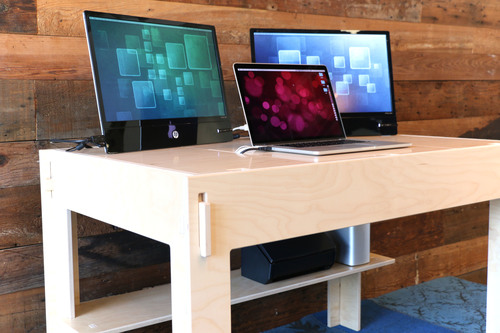
Klevr Furniture today announces their new Storage-Top Desk for Mac, a functional design built specifically for iMacs and MacBooks. Each desk is made to order and conveniently stows away cables, power adaptors, and additional clutter. Table-top notches are strategically placed for MacBook and iMac connectors, and movable panels allow easy access to storage. The sleek design offers plenty of work space for the avid Mac user and provides storage underneath for printers and accessories.
Fort Worth, Texas - Klevr Furniture today is proud to announce the Storage-Top Desk for Mac, a sleek design tailored for iMac and MacBook users. Developed specifically to leverage the Mac's unique capabilities, Klevr Furniture offers a desk space with built-in functionality to hide cable wires, power adaptors and clutter. Strategically placed notches and movable panels make storage and set-up easy and convenient. The Storage-Top Desk is incredibly strong and built to last, yet it requires no tools and assembles by hand in only a couple of minutes.
The unique desktop has three movable panels, each containing portholes for various devices. The center panel contains a central notch for the iMac's rear plugs, while the two other panels offer notches that line up with the ports on the sides of MacBooks. Additional front and back notches are available for supplementary devices and wires, plus they double as finger-grooves for easy removal of panels. Panels conveniently glide on felt-lined rails and hang aside the desk when accessing the storage compartment. The two side panels are 12 inches wide, an ideal size for document scanners, 3D printers and more.
The Storage-Top Desk for Mac was created by a Mac software developer to elevate the nuances and complement the experience of modern iMacs and MacBooks. This desk is perfect for students who need a compact and efficient work environment. It is also a great choice for professional or personal Mac users that prefer a sleek, clutter-free workspace to enhance their daily experience. It offers a rock-solid comfortable design that increases productivity for long periods of time while providing a hidden home for peripherals and wires.
Feature Highlights:
* Conceals wires, cables, and power adaptors
* Panels can be moved around for easy access to contents
* Portholes oriented for various devices
* Rounded edges for comfort and safety
* Lower shelf for extra storage
* Fits iMacs, MacBooks, iPads, and more
* Modern and sleek design complements the Mac
* Birch plywood with laminated surfaces for durability
* Flat pack for transport and convenient storage when not in use
* Easy tool-free assembly
* Made to order
The desktop has 46" x 30" of usable space and is made of strong pre-finished Finnish birch plywood that is laminated for a glass-smooth finish. Every edge is rounded for comfort and safety, and every panel is reversible for longer life should one get scratched or damaged. The durable construction offers owners the ability to assemble and disassemble the desk repeatedly without damage or wear. Klevr Furniture's patented design focuses on providing owners with an effortless assembly process. The tool-free design replaces damage prone press-fit joints with tabs and slots that easily and safely snap together by hand. No other tools necessary.
The Storage-Top Desk for Mac is made to order and can be assembled in minutes. The flat pack design allows owners to easily transport the desk or to conveniently store it away in less than five inches of space. Klevr Furniture also provides additional pieces like stackable shelves and coffee tables to complement the Storage-Top Desk and create a complete office environment, or to be used separately in different living spaces.
"My years of experience as an engineer and Mac software developer gave me an edge to provide Mac users like myself an affordable and practical solution for a clutter-free workspace," said Brock Brandenberg, president of Klevr Furniture. "The modern day Mac user wants that pristine, picture-perfect environment, but unfortunately almost every one of us is burdened with a tangle of untidy cables and accessories. The Storage-Top Desk provides a really sleek and functional way to organize and hide nearly all of your equipment, so you can focus on the Mac and not the chaos."
Product Details
* Size: 48 inches wide, 30 inches deep, and 30 inches tall
* Compartment: 43.75 inches long, 27.5 inches wide, and 4.0 inches deep
* Color: Natural birch with clear laminate
* Weight: 80lbs
Pricing and Availability:
Storage-Top Desk for Mac in Natural finish is $399 (USD) and is available today exclusively through the company website. The Quartz Gray finish is $499 and will be available in March. Klevr Furniture is made to order here in the USA and manufacturing time is usually 1-3 business days. Complete information about countries, cities, units and currencies can be found on Klevr Furniture's homepage.
Bergdesign: http://bergdesign.com
Klevr Furniture: http://klevr.us
Purchase: http://klevr.us/storage-top-desk-for-mac
Screenshot 1: http://static1.squarespace.com/static/51e88fcfe4b00137547d4c74/542445f3e4b0b3329c3cc3d8/54244608e4b0b6a58665edef/1412392984977/IMG_6576.jpg?format=500w
Screenshot 2: http://static1.squarespace.com/static/51e88fcfe4b00137547d4c74/542445f3e4b0b3329c3cc3d8/54244ae4e4b0ac0d5fc808fc/1412393001498/IMG_6671.jpg?format=500w
Logo: http://static1.squarespace.com/static/51e88fcfe4b00137547d4c74/t/5229f0ece4b05116fdbf0fd4/1422307720707/?format=400w
Based in Fort Worth, Texas, Bergdesign, Inc. is a Mac software development and product design company. Bergdesign embodies years of product development and software engineering experience into each product with a focus on practical solutions that optimize time and enhance productivity for the modern-day Mac user. All Material and Software (C) Copyright 2001-2015 Bergdesign, Inc. All Rights Reserved. Apple, the Apple logo, Macintosh and Mac OS X are registered trademarks of Apple Inc. in the U.S. and/or other countries. Other trademarks and registered trademarks may be the property of their respective owners.
*******
Link To Article: http://prmac.com/release-id-73557.htm
*******
---------------------------------------------------------------------------------
Note that you can alter delivered distributions at any time.
Login to your account on prMac to alter your channel selection, or to opt-out at any time.
Adaptive Storage-Top Desk for Mac Eliminates Clutter and Tools - Published on 02/23/15
Klevr Furniture today announces their new Storage-Top Desk for Mac, a functional design built specifically for iMacs and MacBooks. Each desk is made to order and conveniently stows away cables, power adaptors, and additional clutter. Table-top notches are strategically placed for MacBook and iMac connectors, and movable panels allow easy access to storage. The sleek design offers plenty of work space for the avid Mac user and provides storage underneath for printers and accessories.
Fort Worth, Texas - Klevr Furniture today is proud to announce the Storage-Top Desk for Mac, a sleek design tailored for iMac and MacBook users. Developed specifically to leverage the Mac's unique capabilities, Klevr Furniture offers a desk space with built-in functionality to hide cable wires, power adaptors and clutter. Strategically placed notches and movable panels make storage and set-up easy and convenient. The Storage-Top Desk is incredibly strong and built to last, yet it requires no tools and assembles by hand in only a couple of minutes.
The unique desktop has three movable panels, each containing portholes for various devices. The center panel contains a central notch for the iMac's rear plugs, while the two other panels offer notches that line up with the ports on the sides of MacBooks. Additional front and back notches are available for supplementary devices and wires, plus they double as finger-grooves for easy removal of panels. Panels conveniently glide on felt-lined rails and hang aside the desk when accessing the storage compartment. The two side panels are 12 inches wide, an ideal size for document scanners, 3D printers and more.
The Storage-Top Desk for Mac was created by a Mac software developer to elevate the nuances and complement the experience of modern iMacs and MacBooks. This desk is perfect for students who need a compact and efficient work environment. It is also a great choice for professional or personal Mac users that prefer a sleek, clutter-free workspace to enhance their daily experience. It offers a rock-solid comfortable design that increases productivity for long periods of time while providing a hidden home for peripherals and wires.
Feature Highlights:
* Conceals wires, cables, and power adaptors
* Panels can be moved around for easy access to contents
* Portholes oriented for various devices
* Rounded edges for comfort and safety
* Lower shelf for extra storage
* Fits iMacs, MacBooks, iPads, and more
* Modern and sleek design complements the Mac
* Birch plywood with laminated surfaces for durability
* Flat pack for transport and convenient storage when not in use
* Easy tool-free assembly
* Made to order
The desktop has 46" x 30" of usable space and is made of strong pre-finished Finnish birch plywood that is laminated for a glass-smooth finish. Every edge is rounded for comfort and safety, and every panel is reversible for longer life should one get scratched or damaged. The durable construction offers owners the ability to assemble and disassemble the desk repeatedly without damage or wear. Klevr Furniture's patented design focuses on providing owners with an effortless assembly process. The tool-free design replaces damage prone press-fit joints with tabs and slots that easily and safely snap together by hand. No other tools necessary.
The Storage-Top Desk for Mac is made to order and can be assembled in minutes. The flat pack design allows owners to easily transport the desk or to conveniently store it away in less than five inches of space. Klevr Furniture also provides additional pieces like stackable shelves and coffee tables to complement the Storage-Top Desk and create a complete office environment, or to be used separately in different living spaces.
"My years of experience as an engineer and Mac software developer gave me an edge to provide Mac users like myself an affordable and practical solution for a clutter-free workspace," said Brock Brandenberg, president of Klevr Furniture. "The modern day Mac user wants that pristine, picture-perfect environment, but unfortunately almost every one of us is burdened with a tangle of untidy cables and accessories. The Storage-Top Desk provides a really sleek and functional way to organize and hide nearly all of your equipment, so you can focus on the Mac and not the chaos."
Product Details
* Size: 48 inches wide, 30 inches deep, and 30 inches tall
* Compartment: 43.75 inches long, 27.5 inches wide, and 4.0 inches deep
* Color: Natural birch with clear laminate
* Weight: 80lbs
Pricing and Availability:
Storage-Top Desk for Mac in Natural finish is $399 (USD) and is available today exclusively through the company website. The Quartz Gray finish is $499 and will be available in March. Klevr Furniture is made to order here in the USA and manufacturing time is usually 1-3 business days. Complete information about countries, cities, units and currencies can be found on Klevr Furniture's homepage.
Bergdesign: http://bergdesign.com
Klevr Furniture: http://klevr.us
Purchase: http://klevr.us/storage-top-desk-for-mac
Screenshot 1: http://static1.squarespace.com/static/51e88fcfe4b00137547d4c74/542445f3e4b0b3329c3cc3d8/54244608e4b0b6a58665edef/1412392984977/IMG_6576.jpg?format=500w

Screenshot 2: http://static1.squarespace.com/static/51e88fcfe4b00137547d4c74/542445f3e4b0b3329c3cc3d8/54244ae4e4b0ac0d5fc808fc/1412393001498/IMG_6671.jpg?format=500w
Logo: http://static1.squarespace.com/static/51e88fcfe4b00137547d4c74/t/5229f0ece4b05116fdbf0fd4/1422307720707/?format=400w
Based in Fort Worth, Texas, Bergdesign, Inc. is a Mac software development and product design company. Bergdesign embodies years of product development and software engineering experience into each product with a focus on practical solutions that optimize time and enhance productivity for the modern-day Mac user. All Material and Software (C) Copyright 2001-2015 Bergdesign, Inc. All Rights Reserved. Apple, the Apple logo, Macintosh and Mac OS X are registered trademarks of Apple Inc. in the U.S. and/or other countries. Other trademarks and registered trademarks may be the property of their respective owners.
*******
Link To Article: http://prmac.com/release-id-73557.htm
*******
---------------------------------------------------------------------------------
Note that you can alter delivered distributions at any time.
Login to your account on prMac to alter your channel selection, or to opt-out at any time.
Pomodoro Time 1.0 for Mac OS X - Time and Task Management Tool
A new article has been published at prMac.
Pomodoro Time 1.0 for Mac OS X - Time and Task Management Tool - Published on 02/23/15
XwaveSoft today introduces Pomodoro Time 1.0, the Mac version of their popular time management app for iPhone & iPad. Designed specifically to boost productivity by using the Pomodoro Technique. The app provides a mix of timeboxing, timed rest stops, task management, a goal completion list, and customized productivity analysis. View and compare weekly or monthly progress of total time spent on tasks to accurately adjust actions to be more efficient. The app syncs between Mac, iPhone and iPad.
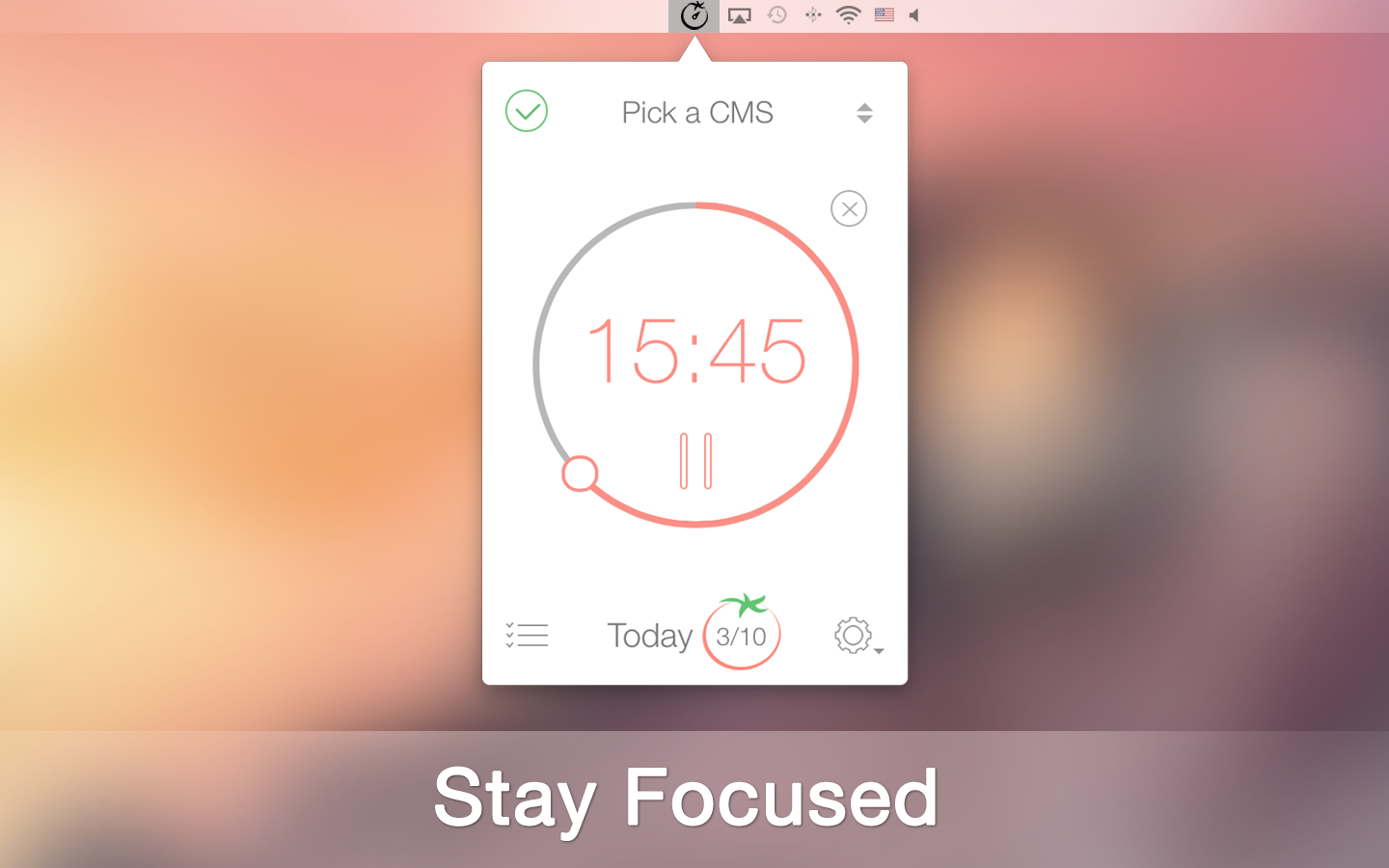
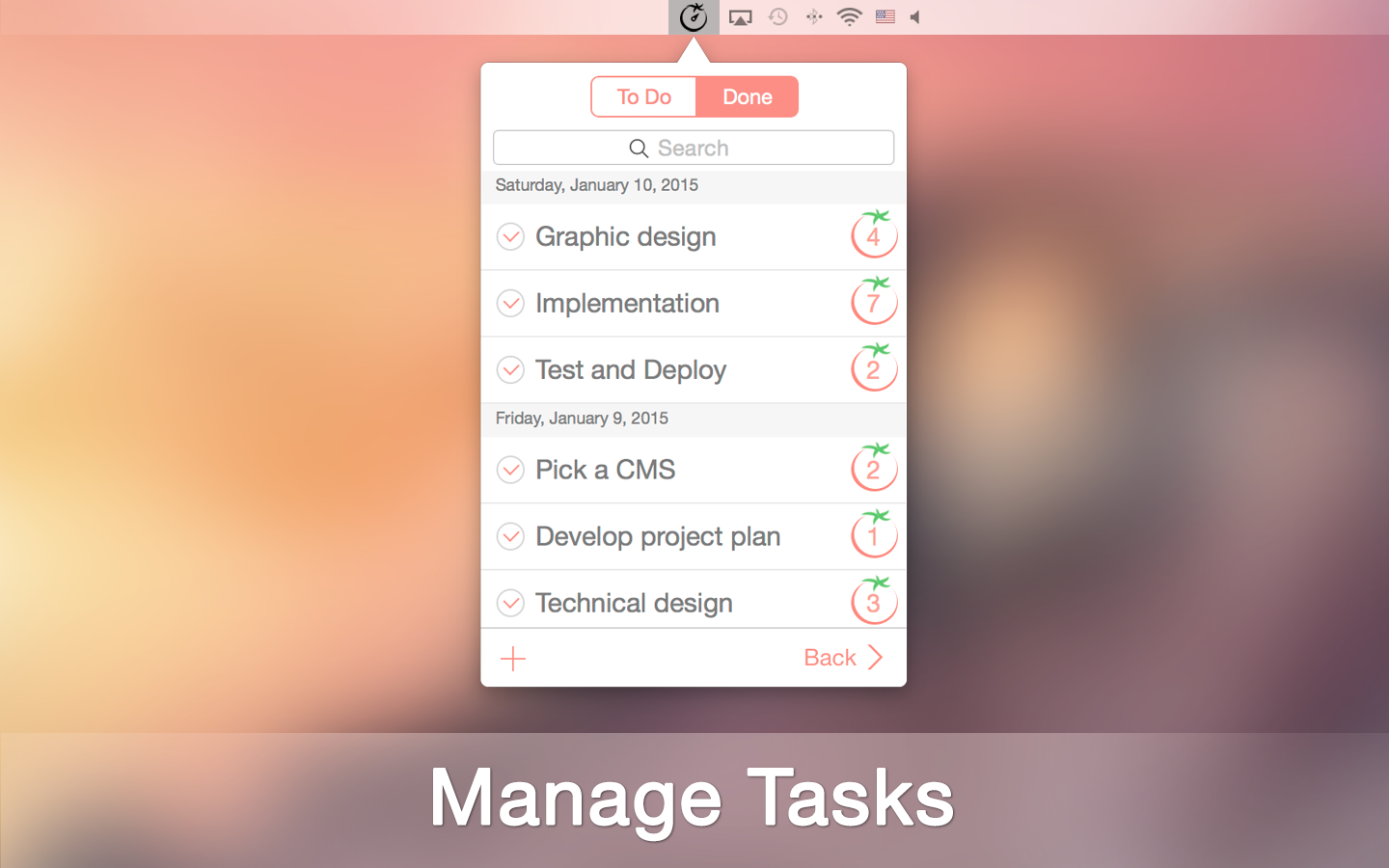
Odessa, Ukraine - XwaveSoft today is proud to announce the release and immediate availability of Pomodoro Time 1.0, the Mac version of their popular time management tool for iPhone & iPad. Input tasks and manage progress using the Pomodoro Technique, a method of combining timeboxing with rewards to rest. Helpful tools such as alarm notifications, customized break options, and an overview of exercises per week make monitoring progress easier than ever and helps users stay focused, while enhancing productivity.
The Pomodoro Technique is based on the idea that individuals are more likely to produce results and complete activities with a break down of work into intervals of 25 minutes, separated by short breaks. Pomodoro Time allows users to customize task duration outside of the standard timeframe to fit individual needs, from 5 minutes to 60 minutes with customized breaks in between. After a few Pomodoros are complete, users may take longer breaks to revive focus and energy.
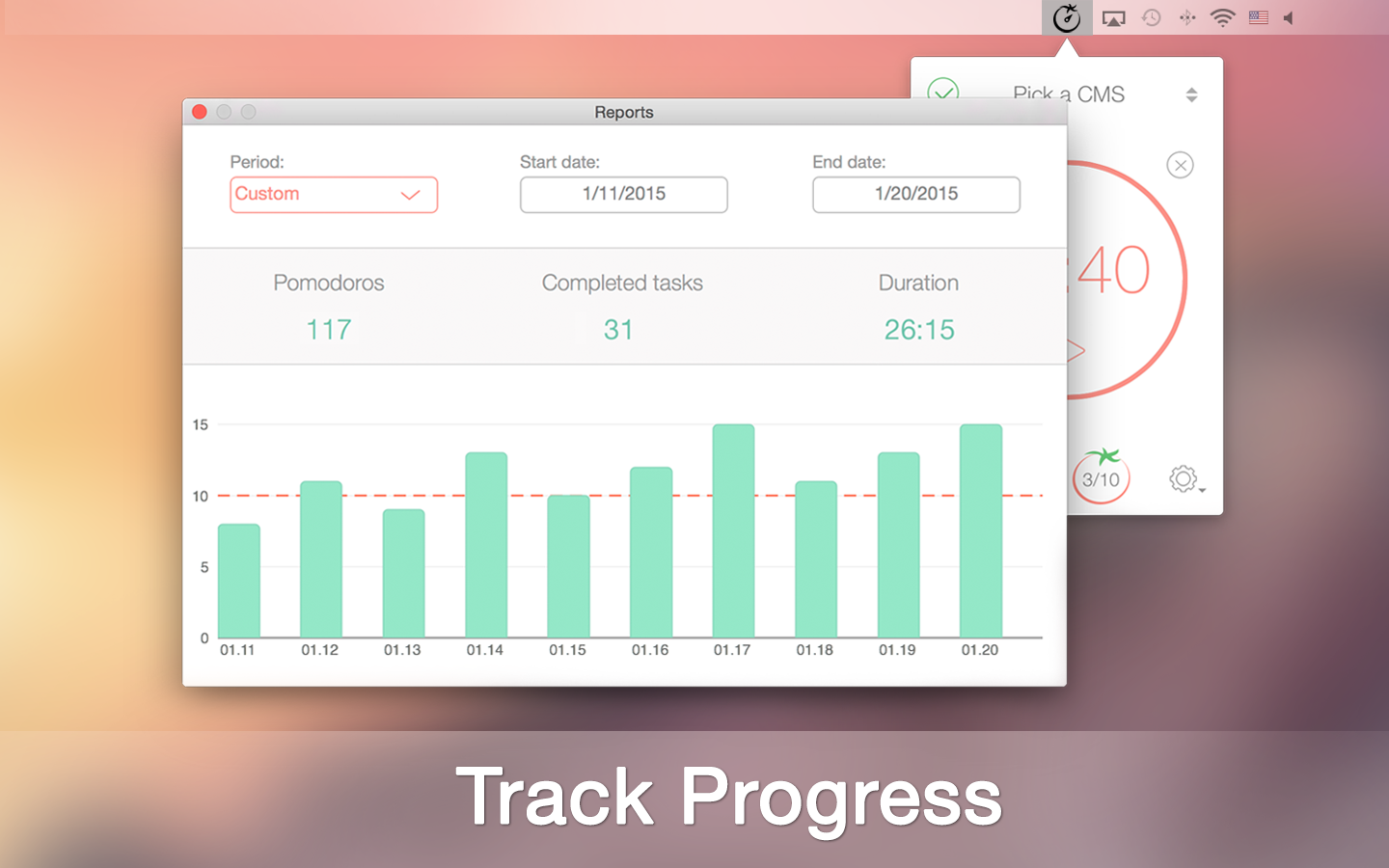
Pomodoro Time is great for anyone looking to chart and optimize time for executing tasks. The application allows users to view the amount of completed tasks versus projected tasks and the average duration it takes to complete assignments on a weekly basis. Users can compare success rates week to week with a graph that offers users a visual perspective of progress.
Perfect for personal errands, business projects, student assignments, educators, house chores, health and fitness routines, or just about any responsibility that requires an assistant to help complete to-do lists. Essentially, Pomodoro Time offers a unique strategy to keep users' attention on the goal for longer periods of time without the common burn out. The idea is to hard-wire individuals to take short breaks in between tasks with longer breaks permitted after a few Pomodoros have been completed.
Professionals can use Pomodoro Time to allot timeframes for answering morning emails or toggling between projects for multi-tasking success. With strategic rest-stops, the app increases productivity by decreasing loss of focus. At a glance, users will see a timer displayed for the current task at hand and notifications will sound when an action is required. Users have the flexibility to start, pause, or skip the current Pomodoro and move onto another as priorities change throughout the day and users may need to toggle between tasks.
Feature Highlights:
* Manage time and tasks
* Track progress throughout the week, month or custom period
* Set and track targeted number of tasks to complete
Customize to maximize productivity:
* Pomodoro duration
* Short break duration
* Long break duration
* Number of Pomodoros between long breaks
* Target number of Pomodoros to complete per day
* Ability to start, pause, or skip Pomodoros
* Optional ticking sound
* Alarm sounds while app runs in the background
* Interactive notifications
* Option to launch at start-up
* Syncs between iPad, iPhone and Mac
* Also available for iPhone and iPad
Pomodoro Time launches at startup and continually runs in the background to let alarms sound so users will never miss a deadline. Users can sync OS X application across iPhone, iPad and Mac for an organized and succinct working environment. Pomodoro Time can be present wherever it is needed, allowing users to rest assure that responsibilities will not be forgotten.
The color scheme offers an optimistic view on daily time management by helping to reduce the mundane necessity of completing one's chores. The minimalistic interface reduces the frustrations of compiling to-do lists and several post-its, while breaking from a task to check the clock (then dwell on the clock... and so on). It also helps to keep users focused with a simple, but powerful display of the timer, which distracts users from wanting to take a few minutes to socialize or peruse the Web when faced with a tedious, but important job.
"When taxed with a project assignment, we noticed that people from all industries and personality types became anxious and counter-productive when faced with the notion of balancing many priorities with short deadlines," said Denys Yevenko, CEO/Founder of XwaveSoft. "our goal is to provide people with a powerful productivity tool, combining the Pomodoro Technique, to make time management a breeze. Ultimately, to re-train individuals to give their body and brain the needed rest to re-group and stay productive for longer periods of time."
System Requirements:
* Requires OS X 10.8 or later
* 2.3 MB
Pricing and Availability:
Pomodoro Time 1.0 is only $2.99 (USD) and available worldwide through the Mac App Store in the Productivity category. Review copies are available upon request. Complete information about countries, cities, categories and subcategories, units and currencies the application contains can be found on XwaveSoft's homepage.
Pomodoro Time 1.0: http://xwavesoft.com/pomodoro-timer-for-iphone-ipad-mac-os-x.html
Purchase and Download: https://itunes.apple.com/app/pomodoro-time-focus-timer/id961632517
Screenshot 1: http://xwavesoft.com/press/pomodoro-time/pomodoro-time-mac-screen-1.png
Screenshot 2: http://xwavesoft.com/press/pomodoro-time/pomodoro-time-mac-screen-2.png
Screenshot 3: http://xwavesoft.com/press/pomodoro-time/pomodoro-time-mac-screen-3.png
Application Icon: http://xwavesoft.com/press/pomodoro-time/pomodoro-time-icon-mac.png
Based in Odessa, Ukraine, XwaveSoft is a privately owned software development company. Founded in 2009 by Denys Yevenko, XwaveSoft is focused on developing high-quality iOS and OS X applications. Long-term experience and professional expertise of the company's management and personnel guarantee the high quality of its products. All Material and Software (C) Copyright 2015 XwaveSoft. All Rights Reserved. Pomodoro and Pomodoro Technique are registered trademarks of Francesco Cirillo. XwaveSoft is not affiliated with Pomodoro, Pomodoro Technique or Francesco Cirillo. Apple, the Apple logo, Macintosh and Mac OS X are registered trademarks of Apple Inc. in the U.S. and/or other countries. Other trademarks and registered trademarks may be the property of their respective owners.
*******
Link To Article: http://prmac.com/release-id-73556.htm
*******
---------------------------------------------------------------------------------
Note that you can alter delivered distributions at any time.
Login to your account on prMac to alter your channel selection, or to opt-out at any time.
Pomodoro Time 1.0 for Mac OS X - Time and Task Management Tool - Published on 02/23/15
XwaveSoft today introduces Pomodoro Time 1.0, the Mac version of their popular time management app for iPhone & iPad. Designed specifically to boost productivity by using the Pomodoro Technique. The app provides a mix of timeboxing, timed rest stops, task management, a goal completion list, and customized productivity analysis. View and compare weekly or monthly progress of total time spent on tasks to accurately adjust actions to be more efficient. The app syncs between Mac, iPhone and iPad.
Odessa, Ukraine - XwaveSoft today is proud to announce the release and immediate availability of Pomodoro Time 1.0, the Mac version of their popular time management tool for iPhone & iPad. Input tasks and manage progress using the Pomodoro Technique, a method of combining timeboxing with rewards to rest. Helpful tools such as alarm notifications, customized break options, and an overview of exercises per week make monitoring progress easier than ever and helps users stay focused, while enhancing productivity.
The Pomodoro Technique is based on the idea that individuals are more likely to produce results and complete activities with a break down of work into intervals of 25 minutes, separated by short breaks. Pomodoro Time allows users to customize task duration outside of the standard timeframe to fit individual needs, from 5 minutes to 60 minutes with customized breaks in between. After a few Pomodoros are complete, users may take longer breaks to revive focus and energy.
Pomodoro Time is great for anyone looking to chart and optimize time for executing tasks. The application allows users to view the amount of completed tasks versus projected tasks and the average duration it takes to complete assignments on a weekly basis. Users can compare success rates week to week with a graph that offers users a visual perspective of progress.
Perfect for personal errands, business projects, student assignments, educators, house chores, health and fitness routines, or just about any responsibility that requires an assistant to help complete to-do lists. Essentially, Pomodoro Time offers a unique strategy to keep users' attention on the goal for longer periods of time without the common burn out. The idea is to hard-wire individuals to take short breaks in between tasks with longer breaks permitted after a few Pomodoros have been completed.
Professionals can use Pomodoro Time to allot timeframes for answering morning emails or toggling between projects for multi-tasking success. With strategic rest-stops, the app increases productivity by decreasing loss of focus. At a glance, users will see a timer displayed for the current task at hand and notifications will sound when an action is required. Users have the flexibility to start, pause, or skip the current Pomodoro and move onto another as priorities change throughout the day and users may need to toggle between tasks.
Feature Highlights:
* Manage time and tasks
* Track progress throughout the week, month or custom period
* Set and track targeted number of tasks to complete
Customize to maximize productivity:
* Pomodoro duration
* Short break duration
* Long break duration
* Number of Pomodoros between long breaks
* Target number of Pomodoros to complete per day
* Ability to start, pause, or skip Pomodoros
* Optional ticking sound
* Alarm sounds while app runs in the background
* Interactive notifications
* Option to launch at start-up
* Syncs between iPad, iPhone and Mac
* Also available for iPhone and iPad
Pomodoro Time launches at startup and continually runs in the background to let alarms sound so users will never miss a deadline. Users can sync OS X application across iPhone, iPad and Mac for an organized and succinct working environment. Pomodoro Time can be present wherever it is needed, allowing users to rest assure that responsibilities will not be forgotten.
The color scheme offers an optimistic view on daily time management by helping to reduce the mundane necessity of completing one's chores. The minimalistic interface reduces the frustrations of compiling to-do lists and several post-its, while breaking from a task to check the clock (then dwell on the clock... and so on). It also helps to keep users focused with a simple, but powerful display of the timer, which distracts users from wanting to take a few minutes to socialize or peruse the Web when faced with a tedious, but important job.
"When taxed with a project assignment, we noticed that people from all industries and personality types became anxious and counter-productive when faced with the notion of balancing many priorities with short deadlines," said Denys Yevenko, CEO/Founder of XwaveSoft. "our goal is to provide people with a powerful productivity tool, combining the Pomodoro Technique, to make time management a breeze. Ultimately, to re-train individuals to give their body and brain the needed rest to re-group and stay productive for longer periods of time."
System Requirements:
* Requires OS X 10.8 or later
* 2.3 MB
Pricing and Availability:
Pomodoro Time 1.0 is only $2.99 (USD) and available worldwide through the Mac App Store in the Productivity category. Review copies are available upon request. Complete information about countries, cities, categories and subcategories, units and currencies the application contains can be found on XwaveSoft's homepage.
Pomodoro Time 1.0: http://xwavesoft.com/pomodoro-timer-for-iphone-ipad-mac-os-x.html
Purchase and Download: https://itunes.apple.com/app/pomodoro-time-focus-timer/id961632517
Screenshot 1: http://xwavesoft.com/press/pomodoro-time/pomodoro-time-mac-screen-1.png
Screenshot 2: http://xwavesoft.com/press/pomodoro-time/pomodoro-time-mac-screen-2.png
Screenshot 3: http://xwavesoft.com/press/pomodoro-time/pomodoro-time-mac-screen-3.png
Application Icon: http://xwavesoft.com/press/pomodoro-time/pomodoro-time-icon-mac.png

Based in Odessa, Ukraine, XwaveSoft is a privately owned software development company. Founded in 2009 by Denys Yevenko, XwaveSoft is focused on developing high-quality iOS and OS X applications. Long-term experience and professional expertise of the company's management and personnel guarantee the high quality of its products. All Material and Software (C) Copyright 2015 XwaveSoft. All Rights Reserved. Pomodoro and Pomodoro Technique are registered trademarks of Francesco Cirillo. XwaveSoft is not affiliated with Pomodoro, Pomodoro Technique or Francesco Cirillo. Apple, the Apple logo, Macintosh and Mac OS X are registered trademarks of Apple Inc. in the U.S. and/or other countries. Other trademarks and registered trademarks may be the property of their respective owners.
*******
Link To Article: http://prmac.com/release-id-73556.htm
*******
---------------------------------------------------------------------------------
Note that you can alter delivered distributions at any time.
Login to your account on prMac to alter your channel selection, or to opt-out at any time.
MapItOut 13.0: Linked Navigation,Travel Planner And Record Workout Stats
A new article has been published at prMac.
MapItOut 13.0: Linked Navigation,Travel Planner And Record Workout Stats - Published on 02/23/15
Independent developer Santo Porpiglia today announces MapItOut 13.0, an update to his powerful travel app for iOS devices. MapItOut allows users to quickly create and save maps for their destination or trip. Map markers can be added to note landmarks or points of interest. Directions can be accessed within the app. Also, log exercise routes with stats on speed, time, distance, and elevation. The new interface allows access to all functions on the main page for effortless traveling and planning.
Farmingdale, New York - Independent developer Santo Porpiglia today is pleased to announce the release and immediate availability of MapItOut 13.0, an update to his travel app for iPhone, iPad, and iPod touch devices. Users can make their travel plans with MapItOut's online tools to quickly create maps and access them offline.
"You can use Mapitout to find pretty much anything you could need for a trip away, even if it's just out your front door cafes, casinos, even parking lots or wave heights at the beach. Do it either on the fly, or before you head out by saving points of interest to a map you can use later," said writer Jon Allen of Tapscape. "A full feature maps app and travel planner that does what it says it does, without making your movements available to faceless network marketers... it offers a good all-in-one alternative to the map giants." (January 18, 2015)
Aside from its handy travel planner, MapItOut provides access to a helpful navigation tool that can be used per location to find directions, or used in conjunction with the saved travel planner destinations. What's more, users can log and record motion statistics to assess speed, distance, and elevation within a route. MapItOut provides an all-in-one synced and intuitive tool so users never have to leave the app for this added health benefit and goal tracker.
The newest version of MapItOut updated several features to improve functionality. The new interface design allows users to access all major functions of the app from the main page. Now, users can search for any location at launch, without the added hassle of navigating to another page within the app. Other shortcuts include sharing location with friends, POI, and options, which connects to itinerary, weather, nearby flights and rooms, car finder and other helpful tools.
Feature Highlights:
* Enhanced, Simple and intuitive User Interface
* All major functions accessible from launch page
* Search any city or destination on main page
* Search for specific places and venues
* Car finder
* Search Points of Interest
* Add markers to map for landmarks and points of interest
* Obtain directions within app
* Save routes and itineraries to access offline
* Share publicly to Facebook and Twitter
* Share privately via Bluetooth, SMS, or E-mail
* Generates directions for walking, travel, route, and driving
* RunMap creates maps of route and includes graphs and stats on speed, time, distance, and elevation
* No data collected
MapItOut prompts the user to begin by entering a city name or address located anywhere in the world and reveals its location in a pinpoint on the map. By selecting Next, users can search for multiple addresses during one session. Users can also research Points of Interest (POI) nearby by tapping the POI button at the top of the interface. POIs are categorically divided into Map Types. They include:
* Golf
* Restaurants
* Bars
* Cafes
* Hotels
* Museums
* Theaters
* Beaches
* Coffee
* Casinos
* Airports
* Movie theaters
* Parking
* Ski
* Shopping
* Activities
"What makes MapItOut a great App is that it's completely packed with features. If there is anything that you'd want in a travel App you're guaranteed to find it here," said Mohini Singh, Writer at TheAppleGoogle. "But what gives MapItOut an upper hand over other similar apps is its ability to mark out places of interest and create the optimum itinerary through all the marked locations. Once you've planned your journey, you can also book flights and hotels. In addition to this, you can save the maps and travel itineraries for future reference." (January 06, 2015)
When a Map Type is selected, markers display each of the POIs in the area. The markers show a description and the address of the POI. By tapping the Information button on the POI marker, MapItOut will display a satellite image of the POI and offer the option to further research the POI online, add it to the calendar, save and share it, or get directions to it.
Once the map is saved, MapItOut can generate directions within it using Apple Maps from the user's current location. Users can select to receive directions for walking, travel, route, or driving and save them. Saved maps can be sent through the Connect button and shared on Facebook and Twitter, which can be a useful way of keeping friends in the loop. Maps can be E-mailed or messaged privately or shared through the Bluetooth chat function with another individual.
MapItOut includes several additional unique features to make an effective tool for users. The RunMap feature is designed for individuals who walk, jog, or bike and want to record data from their exercise route. Route can be recorded from either the Save button or through the RunMap button at the bottom of the interface. Once the route is completed, users can view statistical details of the route such as speed, time, distance, and elevation. The stats log can also be displayed in a chart format and shared.
Another neat feature is selecting Parked under Options to save a parked car's location so users can easily find their vehicle. The clean design offers every feature imaginable under four categories on one streamlined and modern page. The POI, Options, Connect, and Destination categories exhibit all the functions of MapItOut to save users time and energy, so they can spend it on planning their next experience. A detailed user's manual can be found on the app's homepage.
"MapItOut is the only app you need to plan for your next trip, running route, or travel destination," says independent developer Santo Porpiglia. "The latest design will help you get the most out of your trip with a full range of features that are incredibly easy to use and conveniently accessible from the homepage, with just one click. MapItOut is also secure since none of your data is ever collected or sold. Turn your iOS devices into a full navigation system, travel planner, and workout buddy with MapItOut."
Supported Languages:
MapItOut supports English, Bokmal, Norwegian, Czech, Danish, Dutch, Finnish, French, German, Greek, Hebrew, Italian, Japanese, Portuguese, Russian, Simplified Chinese, Slovak, Spanish, Swedish, Turkish and Ukrainian languages.
Device Requirements:
* iPhone, iPad, or iPod touch
* Requires iOS 8.1 or later
* 12.6 MB
Pricing and Availability:
For a limited time, MapItOut 13.0 is only $1.99 (USD) and available worldwide exclusively through the App Store in the Travel category. Review copies are available upon request. Complete information about countries, cities, categories and subcategories, units and currencies the application contains can be found on MapItOut's homepage.
MapItOut 13.0: http://www.mapitoutapp.com
Purchase and Download: https://itunes.apple.com/app/mapitout-route-travel-planner/id731514774
Demo Videos: http://www.mapitoutapp.com/demo.html
Screenshot 1: http://a5.mzstatic.com/us/r30/Purple3/v4/9f/8e/c5/9f8ec5b1-e8b5-5948-0d91-a9d8b8b5b1b9/screen568x568.jpeg
Screenshot 2: http://a5.mzstatic.com/us/r30/Purple3/v4/90/9d/e1/909de150-5b54-5779-fe22-ded1fa6d2248/screen568x568.jpeg
App Icon: http://a1.mzstatic.com/us/r30/Purple1/v4/1f/c2/d2/1fc2d24b-9894-957a-5ab6-fb975f1625a5/icon175x175.png
Based in Farmingdale, New York, Santo Porpiglia is an independent software developer. He primarily develops applications for the iOS platform. Copyright (C) 2015 Santo Porpiglia. All Rights Reserved. Apple, the Apple logo, iPhone, iPad, and iPod are registered trademarks of Apple Inc. in the U.S. and/or other countries.
*******
Link To Article: http://prmac.com/release-id-73555.htm
*******
---------------------------------------------------------------------------------
Note that you can alter delivered distributions at any time.
Login to your account on prMac to alter your channel selection, or to opt-out at any time.
MapItOut 13.0: Linked Navigation,Travel Planner And Record Workout Stats - Published on 02/23/15
Independent developer Santo Porpiglia today announces MapItOut 13.0, an update to his powerful travel app for iOS devices. MapItOut allows users to quickly create and save maps for their destination or trip. Map markers can be added to note landmarks or points of interest. Directions can be accessed within the app. Also, log exercise routes with stats on speed, time, distance, and elevation. The new interface allows access to all functions on the main page for effortless traveling and planning.
Farmingdale, New York - Independent developer Santo Porpiglia today is pleased to announce the release and immediate availability of MapItOut 13.0, an update to his travel app for iPhone, iPad, and iPod touch devices. Users can make their travel plans with MapItOut's online tools to quickly create maps and access them offline.
"You can use Mapitout to find pretty much anything you could need for a trip away, even if it's just out your front door cafes, casinos, even parking lots or wave heights at the beach. Do it either on the fly, or before you head out by saving points of interest to a map you can use later," said writer Jon Allen of Tapscape. "A full feature maps app and travel planner that does what it says it does, without making your movements available to faceless network marketers... it offers a good all-in-one alternative to the map giants." (January 18, 2015)
Aside from its handy travel planner, MapItOut provides access to a helpful navigation tool that can be used per location to find directions, or used in conjunction with the saved travel planner destinations. What's more, users can log and record motion statistics to assess speed, distance, and elevation within a route. MapItOut provides an all-in-one synced and intuitive tool so users never have to leave the app for this added health benefit and goal tracker.
The newest version of MapItOut updated several features to improve functionality. The new interface design allows users to access all major functions of the app from the main page. Now, users can search for any location at launch, without the added hassle of navigating to another page within the app. Other shortcuts include sharing location with friends, POI, and options, which connects to itinerary, weather, nearby flights and rooms, car finder and other helpful tools.
Feature Highlights:
* Enhanced, Simple and intuitive User Interface
* All major functions accessible from launch page
* Search any city or destination on main page
* Search for specific places and venues
* Car finder
* Search Points of Interest
* Add markers to map for landmarks and points of interest
* Obtain directions within app
* Save routes and itineraries to access offline
* Share publicly to Facebook and Twitter
* Share privately via Bluetooth, SMS, or E-mail
* Generates directions for walking, travel, route, and driving
* RunMap creates maps of route and includes graphs and stats on speed, time, distance, and elevation
* No data collected
MapItOut prompts the user to begin by entering a city name or address located anywhere in the world and reveals its location in a pinpoint on the map. By selecting Next, users can search for multiple addresses during one session. Users can also research Points of Interest (POI) nearby by tapping the POI button at the top of the interface. POIs are categorically divided into Map Types. They include:
* Golf
* Restaurants
* Bars
* Cafes
* Hotels
* Museums
* Theaters
* Beaches
* Coffee
* Casinos
* Airports
* Movie theaters
* Parking
* Ski
* Shopping
* Activities
"What makes MapItOut a great App is that it's completely packed with features. If there is anything that you'd want in a travel App you're guaranteed to find it here," said Mohini Singh, Writer at TheAppleGoogle. "But what gives MapItOut an upper hand over other similar apps is its ability to mark out places of interest and create the optimum itinerary through all the marked locations. Once you've planned your journey, you can also book flights and hotels. In addition to this, you can save the maps and travel itineraries for future reference." (January 06, 2015)
When a Map Type is selected, markers display each of the POIs in the area. The markers show a description and the address of the POI. By tapping the Information button on the POI marker, MapItOut will display a satellite image of the POI and offer the option to further research the POI online, add it to the calendar, save and share it, or get directions to it.
Once the map is saved, MapItOut can generate directions within it using Apple Maps from the user's current location. Users can select to receive directions for walking, travel, route, or driving and save them. Saved maps can be sent through the Connect button and shared on Facebook and Twitter, which can be a useful way of keeping friends in the loop. Maps can be E-mailed or messaged privately or shared through the Bluetooth chat function with another individual.
MapItOut includes several additional unique features to make an effective tool for users. The RunMap feature is designed for individuals who walk, jog, or bike and want to record data from their exercise route. Route can be recorded from either the Save button or through the RunMap button at the bottom of the interface. Once the route is completed, users can view statistical details of the route such as speed, time, distance, and elevation. The stats log can also be displayed in a chart format and shared.
Another neat feature is selecting Parked under Options to save a parked car's location so users can easily find their vehicle. The clean design offers every feature imaginable under four categories on one streamlined and modern page. The POI, Options, Connect, and Destination categories exhibit all the functions of MapItOut to save users time and energy, so they can spend it on planning their next experience. A detailed user's manual can be found on the app's homepage.
"MapItOut is the only app you need to plan for your next trip, running route, or travel destination," says independent developer Santo Porpiglia. "The latest design will help you get the most out of your trip with a full range of features that are incredibly easy to use and conveniently accessible from the homepage, with just one click. MapItOut is also secure since none of your data is ever collected or sold. Turn your iOS devices into a full navigation system, travel planner, and workout buddy with MapItOut."
Supported Languages:
MapItOut supports English, Bokmal, Norwegian, Czech, Danish, Dutch, Finnish, French, German, Greek, Hebrew, Italian, Japanese, Portuguese, Russian, Simplified Chinese, Slovak, Spanish, Swedish, Turkish and Ukrainian languages.
Device Requirements:
* iPhone, iPad, or iPod touch
* Requires iOS 8.1 or later
* 12.6 MB
Pricing and Availability:
For a limited time, MapItOut 13.0 is only $1.99 (USD) and available worldwide exclusively through the App Store in the Travel category. Review copies are available upon request. Complete information about countries, cities, categories and subcategories, units and currencies the application contains can be found on MapItOut's homepage.
MapItOut 13.0: http://www.mapitoutapp.com
Purchase and Download: https://itunes.apple.com/app/mapitout-route-travel-planner/id731514774
Demo Videos: http://www.mapitoutapp.com/demo.html
Screenshot 1: http://a5.mzstatic.com/us/r30/Purple3/v4/9f/8e/c5/9f8ec5b1-e8b5-5948-0d91-a9d8b8b5b1b9/screen568x568.jpeg

Screenshot 2: http://a5.mzstatic.com/us/r30/Purple3/v4/90/9d/e1/909de150-5b54-5779-fe22-ded1fa6d2248/screen568x568.jpeg

App Icon: http://a1.mzstatic.com/us/r30/Purple1/v4/1f/c2/d2/1fc2d24b-9894-957a-5ab6-fb975f1625a5/icon175x175.png

Based in Farmingdale, New York, Santo Porpiglia is an independent software developer. He primarily develops applications for the iOS platform. Copyright (C) 2015 Santo Porpiglia. All Rights Reserved. Apple, the Apple logo, iPhone, iPad, and iPod are registered trademarks of Apple Inc. in the U.S. and/or other countries.
*******
Link To Article: http://prmac.com/release-id-73555.htm
*******
---------------------------------------------------------------------------------
Note that you can alter delivered distributions at any time.
Login to your account on prMac to alter your channel selection, or to opt-out at any time.
Explain Anything from Anywhere with Splicesr for iPhone and iPad
A new article has been published at prMac.
Explain Anything from Anywhere with Splicesr for iPhone and iPad - Published on 02/23/15
DocuBuzz today announces Splice.sr 1.5 for iOS, a smart Show & Tell app that helps users compose and share their thoughts quickly and precisely from anywhere. A winner of the 2014 Tabby Awards/Business competition, Splice.sr lets anyone create great audio-visual presentations by splicing together any content while recording a voice-over narrative. These presentations can then be replayed in any web browser on any device. Version 1.5 is upgraded to a universal app for both the iPhone and iPad.
Singapore - Splicesr by DocuBuzz is a smart Show & Tell app that lets users compose and share their ideas quickly and precisely from anywhere. Splice.sr was first released as an iPad app in August 2014 and went on to be sleeted as a winner of the 2014 Tabby Awards competition for business apps (Education & Training category). Splicesr has now been upgraded to a universal app that is compatible with the iPhone, iPad and iPod touch.
Sharing ideas is difficult when the audience cannot be engaged in real-time. Key elements of the message are left out if silent presentation slides are distributed, while lengthy reports do not capture the crux of the idea succinctly. Splicesr solves this problem by allowing the user to quickly create compelling, bite sized audio-visual presentations that can be replayed through any web browser on any device.
With Splicesr, the user can record a voice-over narrative while paging through and marking-up any content on the iPhone or iPad. Images, slides, documents and a virtual whiteboard can all be spliced together seamlessly with a verbal explanation. Once the user has captured his or her thoughts, a link to the presentation can be shared through email or other messaging apps. The presentation can also be easily posted to social networks such as Facebook and Twitter or embedded into blogs and websites.
Presentations created with Splicesr can be played back in any web browser on any device at anytime. The Splicesr app is not required to replay or interact with these presentations. Viewers can replay the full audio-visual presentations in any browser. They can also download a PDF copy of all the slides used in a presentation and post questions and pin comments to specific points in the presentation timeline.
Splicesr can be used in a wide range of contexts. Teachers can create personalised, just-in-time e-tutorials to engage their students beyond the classroom. Entrepreneurs can share compelling audio-visual presentations to explain their concepts precisely. Managers can annotate and append verbal instruction to any document to provide clear instructions and detailed feedback. Splicesr lets users teach, pitch or explain anything to anyone from anywhere, making it an invaluable addition to any knowledge worker's toolbox.
Device Requirements:
* Compatible with iPhone, iPad and iPod touch
* Requires iOS 7.0 or later
* 16.2 MB
Pricing and Availability:
Splice.sr 1.5 is Free and available worldwide exclusively through the App Store in the Education category.
Splicesr 1.5: http://www.splice.sr
Download from iTunes: https://itunes.apple.com/app/id891919787
YouTube Video (Overview): https://www.youtube.com/watch?v=3niIDnXd8-c
Media Assets: http://www.docubuzz.com/press/splicesr
DocuBuzz is a Singapore-based startup that is focussed on developing mobile, content-centred collaboration solutions. DocuBuzz is a graduate of the Founder's Institute incubation program and is backed by seed funding from FocusTech Ventures and Crystal Horse Investments. All Material and Software (C) Copyright 2015 DocuBuzz Pte Ltd. All Rights Reserved. Apple, the Apple logo, iPhone, iPod and iPad are registered trademarks of Apple Inc. in the U.S. and/or other countries. Other trademarks and registered trademarks may be the property of their respective owners.
*******
Link To Article: http://prmac.com/release-id-73539.htm
*******
---------------------------------------------------------------------------------
Note that you can alter delivered distributions at any time.
Login to your account on prMac to alter your channel selection, or to opt-out at any time.
Explain Anything from Anywhere with Splicesr for iPhone and iPad - Published on 02/23/15
DocuBuzz today announces Splice.sr 1.5 for iOS, a smart Show & Tell app that helps users compose and share their thoughts quickly and precisely from anywhere. A winner of the 2014 Tabby Awards/Business competition, Splice.sr lets anyone create great audio-visual presentations by splicing together any content while recording a voice-over narrative. These presentations can then be replayed in any web browser on any device. Version 1.5 is upgraded to a universal app for both the iPhone and iPad.
Singapore - Splicesr by DocuBuzz is a smart Show & Tell app that lets users compose and share their ideas quickly and precisely from anywhere. Splice.sr was first released as an iPad app in August 2014 and went on to be sleeted as a winner of the 2014 Tabby Awards competition for business apps (Education & Training category). Splicesr has now been upgraded to a universal app that is compatible with the iPhone, iPad and iPod touch.
Sharing ideas is difficult when the audience cannot be engaged in real-time. Key elements of the message are left out if silent presentation slides are distributed, while lengthy reports do not capture the crux of the idea succinctly. Splicesr solves this problem by allowing the user to quickly create compelling, bite sized audio-visual presentations that can be replayed through any web browser on any device.
With Splicesr, the user can record a voice-over narrative while paging through and marking-up any content on the iPhone or iPad. Images, slides, documents and a virtual whiteboard can all be spliced together seamlessly with a verbal explanation. Once the user has captured his or her thoughts, a link to the presentation can be shared through email or other messaging apps. The presentation can also be easily posted to social networks such as Facebook and Twitter or embedded into blogs and websites.
Presentations created with Splicesr can be played back in any web browser on any device at anytime. The Splicesr app is not required to replay or interact with these presentations. Viewers can replay the full audio-visual presentations in any browser. They can also download a PDF copy of all the slides used in a presentation and post questions and pin comments to specific points in the presentation timeline.
Splicesr can be used in a wide range of contexts. Teachers can create personalised, just-in-time e-tutorials to engage their students beyond the classroom. Entrepreneurs can share compelling audio-visual presentations to explain their concepts precisely. Managers can annotate and append verbal instruction to any document to provide clear instructions and detailed feedback. Splicesr lets users teach, pitch or explain anything to anyone from anywhere, making it an invaluable addition to any knowledge worker's toolbox.
Device Requirements:
* Compatible with iPhone, iPad and iPod touch
* Requires iOS 7.0 or later
* 16.2 MB
Pricing and Availability:
Splice.sr 1.5 is Free and available worldwide exclusively through the App Store in the Education category.
Splicesr 1.5: http://www.splice.sr
Download from iTunes: https://itunes.apple.com/app/id891919787
YouTube Video (Overview): https://www.youtube.com/watch?v=3niIDnXd8-c
Media Assets: http://www.docubuzz.com/press/splicesr
DocuBuzz is a Singapore-based startup that is focussed on developing mobile, content-centred collaboration solutions. DocuBuzz is a graduate of the Founder's Institute incubation program and is backed by seed funding from FocusTech Ventures and Crystal Horse Investments. All Material and Software (C) Copyright 2015 DocuBuzz Pte Ltd. All Rights Reserved. Apple, the Apple logo, iPhone, iPod and iPad are registered trademarks of Apple Inc. in the U.S. and/or other countries. Other trademarks and registered trademarks may be the property of their respective owners.
*******
Link To Article: http://prmac.com/release-id-73539.htm
*******
---------------------------------------------------------------------------------
Note that you can alter delivered distributions at any time.
Login to your account on prMac to alter your channel selection, or to opt-out at any time.
Subscribe to:
Posts (Atom)