A new article has been published at prMac.
Polished Play Releases Core Animator 1.0 - Animation Tool for Mac OS X - Published on 02/24/15
Utah based Polished Play, LLC has introduced Core Animator 1.0, the company's new animation tool for Mac OS X. Currently featured on the Mac App Store, Core Animator was specifically developed to help designers, animators, and developers alike bring more creativity and interactivity to their apps. This simple visual tool allows iOS and Mac developers to quickly and easily create animations and export them to native Objective-C or Swift code.
Layton, Utah - Polished Play, LLC has announced the release of Core Animator 1.0, the company's new animation tool for Mac OS X. Currently featured by Apple, Core Animator was specifically developed to help designers, animators, and developers alike bring more creativity and interactivity to their apps. This simple visual tool allows iOS and Mac developers to quickly and easily create animations and export them to native Objective-C or Swift code.
Core Animator allows the user to visually create 2D animations based on properties such as translation, scale, rotation and opacity. Several easing options help to smooth out the animations and give them life. The interaction of all animations can be seen together in a project preview. Finally, native Objective-C or Swift code is generated for use in Xcode and Interface Builder:
Use Cases:
* Character rigs
* Tutorial / Instructions
* Animated Focus Points
* UI Elements
* Full Scenes / Books
* Subtle Animated enhancement to any app
Animatable Properties:
* Translation
* Scale
* Rotation
* Opacity
* Image Sources
* Z-Order Position
Easing Options:
* Linear
* Ease In
* Ease Out
* Ease In/Out
* Overshoot
* Anticipate
* Anticipate/Overshoot
Retina Support:
* Drag an image in with an @2x suffix and we'll generate and manage the duplicate 1x asset for you
Special Effects:
* KeyAll option has the ability to "lock down" your animation at a particular time to prevent accidental modifications
Export Options:
* Obj-C or Swift Code
* iOS or OS X code
* Clipping or UnBounded
* Image Management options
* Full Preview Pane of all animations that can run simultaneously to check for conflicts and/or desired behaviors
Sample Projects Included:
* Examples on creating animations along with integration documentation for Xcode projects
"While hand coding rotational values for walk cycles in one of our apps, we decided there must be a better way to create animations that target Apple's Core frameworks," said Heber Sheffield, co-founder of Utah-based Polished Play, LLC. "After a thorough search, we came to the conclusion that there was no proper solution to the problem at hand. The decision was made to create something that would fill this need, both for ourselves, and others that might be looking for a similar tool. If you have, or would like to have, even a single animation in your app, Core Animator will save you time and money."
Every developer's creations will run beautifully using Apple's native frameworks. Every app deserves animation. Now, it's simple to implement. Core Animator gives every devveloper simple visual tools to create stunning animations. They can focus on the best ways to bring their apps to life and Core Animator will take care of the Swift or Obj-C code.
System Requirements:
* OS X 10.10 or later
* 64-bit processor
* 3.8 MB
Pricing and Availability:
For a limited time, Core Animator 1.0 is on sale for $79.99 USD (20% Off) and available worldwide through the Mac App Store in the Developer Tools category. A trial version of the tool is available. Promo codes are available upon request. To learn more, please visit Core Animator's official website.
Polished Play: http://www.polishedplay.com/
Core Animator 1.0: http://www.coreanimator.com/
Download Trial: http://www.coreanimator.com/s/Core-Animator-Trialapp.zip
Purchase and Download: https://itunes.apple.com/us/app/core-animator/id934434650?mt=12
Screenshot: http://a2.mzstatic.com/us/r30/Purple3/v4/d6/f4/8c/d6f48ca2-e233-ee3d-cb01-97b4338db69a/screen800x500.jpeg
Application Icon: http://a2.mzstatic.com/us/r30/Purple5/v4/98/ba/0a/98ba0aa9-4e53-eb4a-2695-fa1876a6ab0d/icon128-2x.png
Polished Play was co-founded in 2009 by Heber Sheffield and Lance Harris. The company was created with the goal of providing rich, interactive, native iOS content. They are best known for the animated story theater app: Puppet Pals. Giving their users the ability to express their creativity and imagination has always been a driving force behind Polished Play's creations. All Material and Software (C) Copyright 2015 Polished Play, LLC. All Rights Reserved. Apple, the Apple logo, Mac OS X, iPhone iPod, iPad and Macintosh are registered trademarks of Apple Inc. in the U.S. and/or other countries. Other trademarks and registered trademarks may be the property of their respective owners.
*******
Link To Article: http://prmac.com/release-id-73534.htm
*******
---------------------------------------------------------------------------------
Note that you can alter delivered distributions at any time.
Login to your account on prMac to alter your channel selection, or to opt-out at any time.



VPN Unlimited offers Upgraded 3.0 for More Secure Internet Surfing
A new article has been published at prMac.
VPN Unlimited offers Upgraded 3.0 for More Secure Internet Surfing - Published on 02/24/15
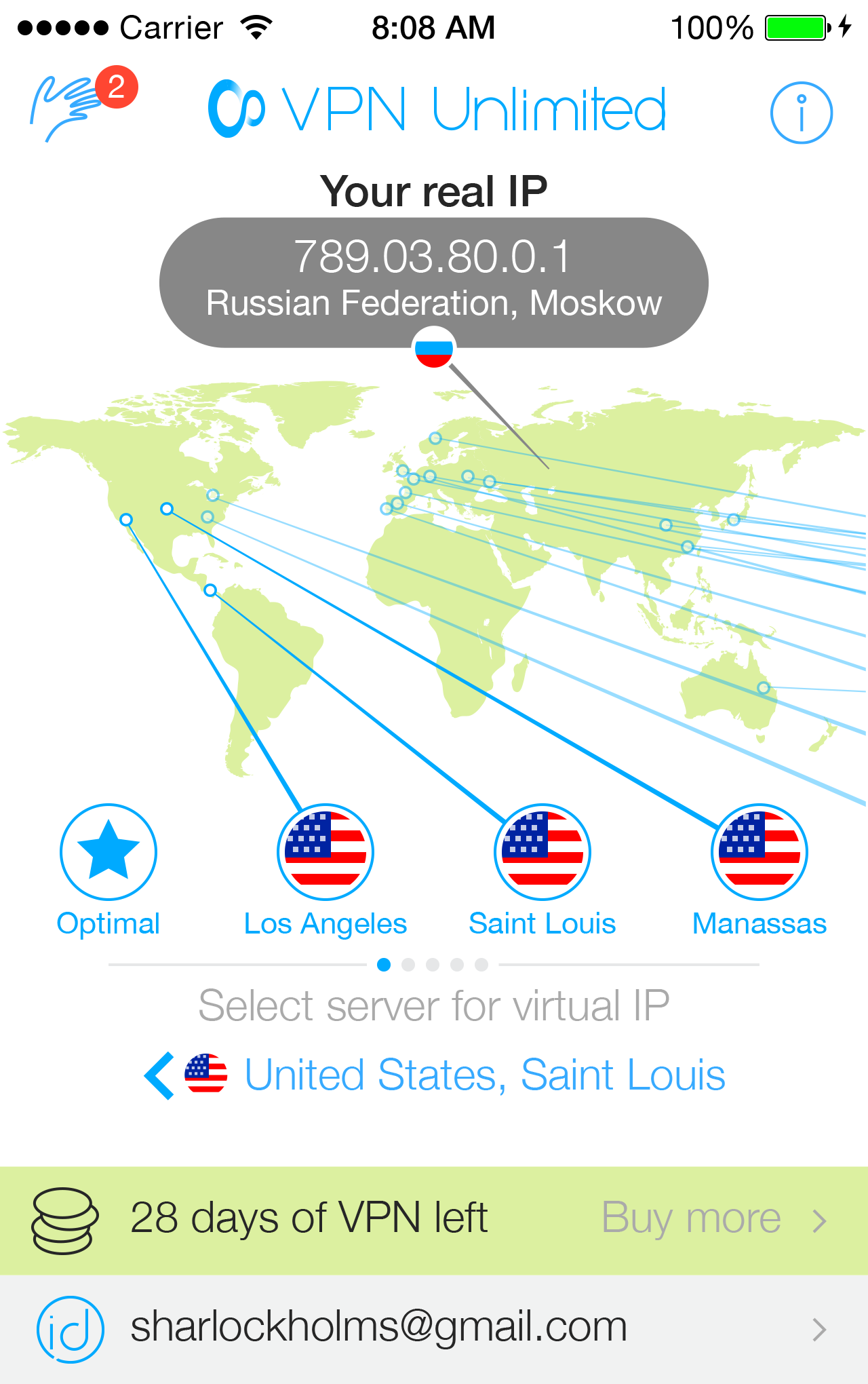
Simplex Solutions Inc. has announced VPN Unlimited 3.0, an update to their popular virtual private network service for iOS and Android. VPN Unlimited offers ultimate online security with powerful encryption along with high connection speed and with no restrictions. Version 3.0 sports a redesigned UI with quick access to a set of new features and easy-to-use options. A single VPN account can be used on up to 5 electronic devices of customer's choice, be it desktop, laptop, smartphone or tablet.
New York, New York - Simplex Solutions Inc., the developer of cutting-edge apps and online security services, has announced the new VPN Unlimited version 3.0. Proved to be in high demand in the past 12 months, the company has already received about 1.3 million users worldwide and it is closing to 1.5 million customers fast. Up-to-date with the latest web upgrades and app releases for new operating systems including iOS 8 and Android 5.0 (Lollypop), the company offers VPN service ensuring ultimate online security through powerful encryption along with high connection speed without any restrictions. The secure connection is available for all major OS such as Mac OS X, MS Windows, Linux, iOS and Android. The redesigned intuitive UI offers quick access to a set of new functional features and easy-to-use options. Single VPN account can be used on up to 5 electronic devices of customer's choice, be it desktop, laptop, iPhone or tablet.
Fresh UI Design:
The Simplex Solutions Inc. team has focused on delivering a differentiated approach to a secure online experience through trendy and intuitive interface design. With a focus on innovation with an easy-to-collaborate UI, the new interface design features clarity and depth. Clarity has a simple concept, meaning clean design and simple layout as a form of communication between user and app. Whether a client wants to sign in to their account, use the VPN service on different devices, or switch between dozens of server locations, the refreshed design allows anyone to secure a fast internet connection.
Renewed VPN Unlimited Features:
An anonymous web surfing experience comes through a lens of VPN service, which means no restrictions on connection speed and bandwidth. The design is leveraged to a greater extent. The improved version of VPN app has a greater stability with quick access to security features and a wide selection of global servers. Recently, the company added new servers in Ukraine, Japan, US-Miami, US-Houston, US-Dallas, Canada-West, Hong Kong, and Romania, which are activated automatically by a single tap.
Users are able to download the VPN server list manually, and have an instant secure connection to any of them around the globe - or simply let the app choose an optimal server on their behalf. Customers may install all region profiles on a selected device with additional support of IPsec manual mode, PPTP and OpenVPN protocols. The new iOS 8 API allows convenient switching of locations without a need to reload the profiles. The team has done numerous app improvements for users located in China and Iran, where customers will benefit from continuous and uninterrupted service.
Supported Languages:
In addition, the company has introduced the Brasil app localization, which will be highly appreciated by Portugal-speaking users, who will benefit from processing their payments through convenient and trustworthy HyperCard. Also, VPN Unlimited app is available in different localizations, including German, Japanese, Korean, Chinese, Russian, and Turkish. Covering safe online banking, keeping private web entertainment activities, securing any kind of Internet connection especially WiFi, giving access to territory-restricted content and the most favorite shows, with VPN service there are much more possibilities with 100% assurance of the online security, protection and anonymity.
Affordable Pricing and Trial VPN:
The VPN Unlimited service has proven to be extremely cost-efficient, making it one of the top choices for consumers' online protection. Now, the service is available starting at only $1.99 (USD) for a vacation subscription. To buy VPN version 3.0, pleace visit the App Store, Google Play and company's official website.
VPN Unlimited 3.0: https://www.vpnunlimitedapp.com
Download for Multiple Platforms: https://www.vpnunlimitedapp.com/downloads
VPN Unlimited Pricing: https://www.vpnunlimitedapp.com/pricing
Screenshot: https://static.simplexsolutionsinc.com/images/screenshots/main-page-1.png
App Icon: http://a2.mzstatic.com/us/r30/Purple6/v4/a4/32/a5/a432a51f-0ae0-d321-4ed3-c239179b5e47/icon175x175.png
Based in New York, Simplex Solutions Inc. is an independent software development company, specializing in high-quality iOS, Mac OS applications and web services for improved productivity and better user experience. Copyright (C) 2015 Simplex Solutions Inc. All Rights Reserved. Apple, the Apple logo, iPhone, iPad, iPad mini, iPod touch, and Mac are registered trademarks of Apple Inc. in the U.S. and/or other countries. Other trademarks and registered trademarks may be the property of their respective owners.
*******
Link To Article: http://prmac.com/release-id-73533.htm
*******
---------------------------------------------------------------------------------
Note that you can alter delivered distributions at any time.
Login to your account on prMac to alter your channel selection, or to opt-out at any time.
VPN Unlimited offers Upgraded 3.0 for More Secure Internet Surfing - Published on 02/24/15
Simplex Solutions Inc. has announced VPN Unlimited 3.0, an update to their popular virtual private network service for iOS and Android. VPN Unlimited offers ultimate online security with powerful encryption along with high connection speed and with no restrictions. Version 3.0 sports a redesigned UI with quick access to a set of new features and easy-to-use options. A single VPN account can be used on up to 5 electronic devices of customer's choice, be it desktop, laptop, smartphone or tablet.
New York, New York - Simplex Solutions Inc., the developer of cutting-edge apps and online security services, has announced the new VPN Unlimited version 3.0. Proved to be in high demand in the past 12 months, the company has already received about 1.3 million users worldwide and it is closing to 1.5 million customers fast. Up-to-date with the latest web upgrades and app releases for new operating systems including iOS 8 and Android 5.0 (Lollypop), the company offers VPN service ensuring ultimate online security through powerful encryption along with high connection speed without any restrictions. The secure connection is available for all major OS such as Mac OS X, MS Windows, Linux, iOS and Android. The redesigned intuitive UI offers quick access to a set of new functional features and easy-to-use options. Single VPN account can be used on up to 5 electronic devices of customer's choice, be it desktop, laptop, iPhone or tablet.
Fresh UI Design:
The Simplex Solutions Inc. team has focused on delivering a differentiated approach to a secure online experience through trendy and intuitive interface design. With a focus on innovation with an easy-to-collaborate UI, the new interface design features clarity and depth. Clarity has a simple concept, meaning clean design and simple layout as a form of communication between user and app. Whether a client wants to sign in to their account, use the VPN service on different devices, or switch between dozens of server locations, the refreshed design allows anyone to secure a fast internet connection.
Renewed VPN Unlimited Features:
An anonymous web surfing experience comes through a lens of VPN service, which means no restrictions on connection speed and bandwidth. The design is leveraged to a greater extent. The improved version of VPN app has a greater stability with quick access to security features and a wide selection of global servers. Recently, the company added new servers in Ukraine, Japan, US-Miami, US-Houston, US-Dallas, Canada-West, Hong Kong, and Romania, which are activated automatically by a single tap.
Users are able to download the VPN server list manually, and have an instant secure connection to any of them around the globe - or simply let the app choose an optimal server on their behalf. Customers may install all region profiles on a selected device with additional support of IPsec manual mode, PPTP and OpenVPN protocols. The new iOS 8 API allows convenient switching of locations without a need to reload the profiles. The team has done numerous app improvements for users located in China and Iran, where customers will benefit from continuous and uninterrupted service.
Supported Languages:
In addition, the company has introduced the Brasil app localization, which will be highly appreciated by Portugal-speaking users, who will benefit from processing their payments through convenient and trustworthy HyperCard. Also, VPN Unlimited app is available in different localizations, including German, Japanese, Korean, Chinese, Russian, and Turkish. Covering safe online banking, keeping private web entertainment activities, securing any kind of Internet connection especially WiFi, giving access to territory-restricted content and the most favorite shows, with VPN service there are much more possibilities with 100% assurance of the online security, protection and anonymity.
Affordable Pricing and Trial VPN:
The VPN Unlimited service has proven to be extremely cost-efficient, making it one of the top choices for consumers' online protection. Now, the service is available starting at only $1.99 (USD) for a vacation subscription. To buy VPN version 3.0, pleace visit the App Store, Google Play and company's official website.
VPN Unlimited 3.0: https://www.vpnunlimitedapp.com
Download for Multiple Platforms: https://www.vpnunlimitedapp.com/downloads
VPN Unlimited Pricing: https://www.vpnunlimitedapp.com/pricing
Screenshot: https://static.simplexsolutionsinc.com/images/screenshots/main-page-1.png
App Icon: http://a2.mzstatic.com/us/r30/Purple6/v4/a4/32/a5/a432a51f-0ae0-d321-4ed3-c239179b5e47/icon175x175.png

Based in New York, Simplex Solutions Inc. is an independent software development company, specializing in high-quality iOS, Mac OS applications and web services for improved productivity and better user experience. Copyright (C) 2015 Simplex Solutions Inc. All Rights Reserved. Apple, the Apple logo, iPhone, iPad, iPad mini, iPod touch, and Mac are registered trademarks of Apple Inc. in the U.S. and/or other countries. Other trademarks and registered trademarks may be the property of their respective owners.
*******
Link To Article: http://prmac.com/release-id-73533.htm
*******
---------------------------------------------------------------------------------
Note that you can alter delivered distributions at any time.
Login to your account on prMac to alter your channel selection, or to opt-out at any time.
LinkOptimizer for Adobe InDesign Now Supports Multi-state Objects
A new article has been published at prMac.
LinkOptimizer for Adobe InDesign Now Supports Multi-state Objects - Published on 02/24/15
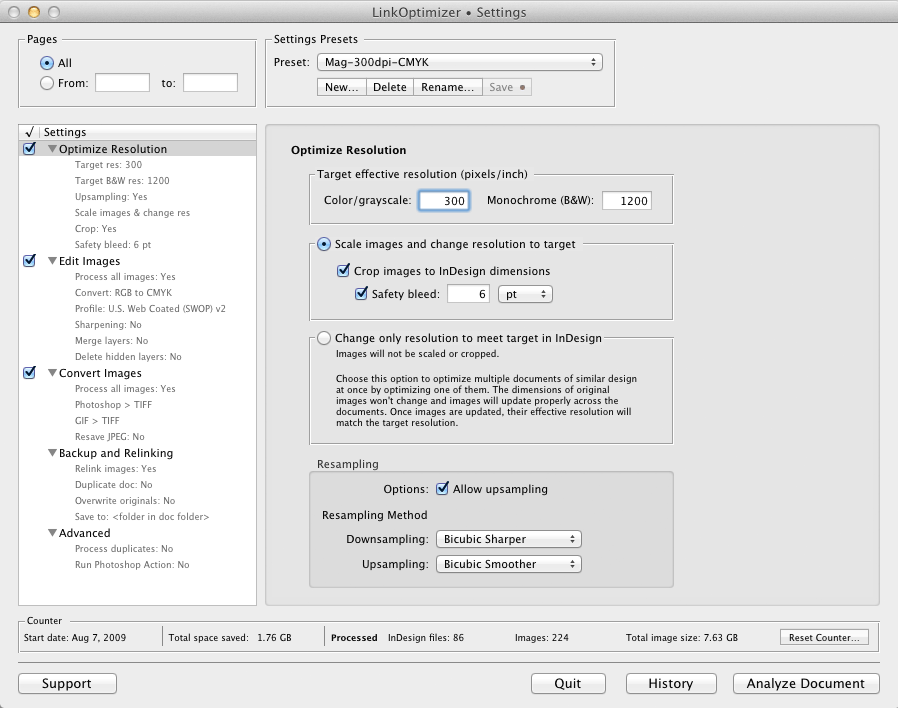
Toronto based Zevrix Solutions has announced LinkOptimizer 4.9.33, a maintenance update to its popular workflow automation solution for Adobe InDesign. LinkOptimizer allows users to reduce the size of InDesign links and speed up processing by automatically eliminating excess image data, performing essential image adjustments and converting file formats. The new version supports processing of multi-state objects in InDesign CC 2014 documents and fixes some safety bleed related issues.
Toronto (ON) Canada - Zevrix Solutions has announced the release of LinkOptimizer 4.9.33, a maintenance update to its popular workflow automation solution for Adobe InDesign. Awarded 4 out of 5 stars by Computer Arts magazine, LinkOptimizer automates complex image manipulation tasks allowing to significantly reduce the size of InDesign links, save processing time and reduce production costs.
The new version introduces full support for multi-state objects in InDesign CC 2014 documents. In previous versions only active links of multi-state objects were processed. The new update also fixes an issue in which the link safety bleed could be reset to zero during analyzing, improves the bleed value formatting and fixes certain user interface issues on Mac OS X Yosemite.
"LinkOptimizer makes me extremely happy", says Nynke Tiekstra, the owner of design studio ColtsfootMedia in Friesland, Netherlands. "It converted 10,000 images in a 1800 pages project saving us at least 40 hours work, and it proved to be 100% accurate."
LinkOptimizer works automatically with Adobe Photoshop to eliminate the excess image data of InDesign links, perform essential image adjustments and convert image formats. For example, with just a click of a button users can:
* Scale and crop images to match their dimensions in InDesign
* Change resolution to 300 dpi
* Convert RGB images to CMYK
* Resave JPEG images as TIFF
* Run a Photoshop Action on each image
At the end of processing, LinkOptimizer reimports images to InDesign at 100% in their precise position. In addition, the software can apply sharpening filters, merge layers and delete hidden ones, and process copies of InDesign links instead of original files.
Pricing and Availability:
LinkOptimizer can be purchased from Zevrix website for $259.95 USD (Light version: $179.95) as well as from authorized resellers and Adobe Exchange. Trial is also available for download. The update is free for LinkOptimizer 4.x users and $130 to upgrade from previous versions. LinkOptimizer requires Mac OS X 10.6-10.10 and Adobe InDesign and Photoshop CS3-CC 2014.
Zevrix Solutions: http://zevrix.com
LinkOptimizer 4.9.33: http://zevrix.com/LinkOptimizer.php
Download LinkOptimizer: http://zevrix.com/LinkOptimizer.dmg
Purchase: http://zevrix.com/store.php
Screenshot: http://zevrix.com/screenshots/lo4/optres-win.gif
Located in Toronto, Canada, Zevrix Solutions provides automation and productivity solutions for Adobe Creative Suite and Creative Cloud software, PDF workflows, graphic file diagnostics and Microsoft Office output on Mac OS. Zevrix is dedicated to help professionals increase their profits through automating everyday tasks, producing error-free documents, saving disk space and cutting production costs. For more information, visit their website. Copyright (C) 2015 Zevrix Solutions. All Rights Reserved. Other trademarks and registered trademarks may be the property of their respective owners.
*******
Link To Article: http://prmac.com/release-id-73532.htm
*******
---------------------------------------------------------------------------------
Note that you can alter delivered distributions at any time.
Login to your account on prMac to alter your channel selection, or to opt-out at any time.
LinkOptimizer for Adobe InDesign Now Supports Multi-state Objects - Published on 02/24/15
Toronto based Zevrix Solutions has announced LinkOptimizer 4.9.33, a maintenance update to its popular workflow automation solution for Adobe InDesign. LinkOptimizer allows users to reduce the size of InDesign links and speed up processing by automatically eliminating excess image data, performing essential image adjustments and converting file formats. The new version supports processing of multi-state objects in InDesign CC 2014 documents and fixes some safety bleed related issues.
Toronto (ON) Canada - Zevrix Solutions has announced the release of LinkOptimizer 4.9.33, a maintenance update to its popular workflow automation solution for Adobe InDesign. Awarded 4 out of 5 stars by Computer Arts magazine, LinkOptimizer automates complex image manipulation tasks allowing to significantly reduce the size of InDesign links, save processing time and reduce production costs.
The new version introduces full support for multi-state objects in InDesign CC 2014 documents. In previous versions only active links of multi-state objects were processed. The new update also fixes an issue in which the link safety bleed could be reset to zero during analyzing, improves the bleed value formatting and fixes certain user interface issues on Mac OS X Yosemite.
"LinkOptimizer makes me extremely happy", says Nynke Tiekstra, the owner of design studio ColtsfootMedia in Friesland, Netherlands. "It converted 10,000 images in a 1800 pages project saving us at least 40 hours work, and it proved to be 100% accurate."
LinkOptimizer works automatically with Adobe Photoshop to eliminate the excess image data of InDesign links, perform essential image adjustments and convert image formats. For example, with just a click of a button users can:
* Scale and crop images to match their dimensions in InDesign
* Change resolution to 300 dpi
* Convert RGB images to CMYK
* Resave JPEG images as TIFF
* Run a Photoshop Action on each image
At the end of processing, LinkOptimizer reimports images to InDesign at 100% in their precise position. In addition, the software can apply sharpening filters, merge layers and delete hidden ones, and process copies of InDesign links instead of original files.
Pricing and Availability:
LinkOptimizer can be purchased from Zevrix website for $259.95 USD (Light version: $179.95) as well as from authorized resellers and Adobe Exchange. Trial is also available for download. The update is free for LinkOptimizer 4.x users and $130 to upgrade from previous versions. LinkOptimizer requires Mac OS X 10.6-10.10 and Adobe InDesign and Photoshop CS3-CC 2014.
Zevrix Solutions: http://zevrix.com
LinkOptimizer 4.9.33: http://zevrix.com/LinkOptimizer.php
Download LinkOptimizer: http://zevrix.com/LinkOptimizer.dmg
Purchase: http://zevrix.com/store.php
Screenshot: http://zevrix.com/screenshots/lo4/optres-win.gif
Located in Toronto, Canada, Zevrix Solutions provides automation and productivity solutions for Adobe Creative Suite and Creative Cloud software, PDF workflows, graphic file diagnostics and Microsoft Office output on Mac OS. Zevrix is dedicated to help professionals increase their profits through automating everyday tasks, producing error-free documents, saving disk space and cutting production costs. For more information, visit their website. Copyright (C) 2015 Zevrix Solutions. All Rights Reserved. Other trademarks and registered trademarks may be the property of their respective owners.
*******
Link To Article: http://prmac.com/release-id-73532.htm
*******
---------------------------------------------------------------------------------
Note that you can alter delivered distributions at any time.
Login to your account on prMac to alter your channel selection, or to opt-out at any time.
Hot Rider! - Fills Carpooling App Gap for Busy Professionals Worldwide
A new article has been published at prMac.
Hot Rider! - Fills Carpooling App Gap for Busy Professionals Worldwide - Published on 02/24/15
Hot Rider! 1.1 from Mustafa Mun innovatively fills the carpooling app gap by enabling professionals to connect in real-time, so they can either give or receive a ride. Featuring a clear and well-organized interface, users can easily identify whether they're a driver, or whether they're a passenger. Drivers then publish their schedule and identify their route using the app's built-in maps. Passengers can browse various possibilities to find one that meets their schedule and destination.
Cupertino, California - While there are plenty of carpooling apps that cater to regular daily commuters, busy professionals continue to get stuck standing in long taxi line-ups, or paying premium fees for a limousine. Well, that's a situation that developer Mustafa Mun found unacceptable, but instead of suffering or complaining, he did something far more productive: he created the solution and called it Hot Rider! Designed exclusively to serve the needs of busy professionals in various cities around the world, Hot Rider! innovatively fills the carpooling app gap. Here's how it works:
* Professionals download the no-cost app from the App Store or Google Play
* Next, they log in directly from their LinkedIn account - which is a welcome feature that saves time
* From there, they identify whether they're a driver (i.e. they're offering a ride), or whether they're a passenger (i.e. they need a ride)
* Drivers publish their schedule and identify their route using the app's built-in maps
* Save routes for quick, easy access in the future
* Passengers browse various possibilities to find one that meets their schedule and destination
* If there is a potential fit, drivers and passengers communicate directly with each other in real-time through the app's built-in messaging panel
* If the fit is confirmed, the carpool takes place and the previously agreed-upon fee is paid
* When it's all over, drivers and passengers have the opportunity to rate the experience for the benefit of other professionals in the Hot Rider! community
In addition to this straightforward user experience, what helps Hot Rider! stand out is its clear and well-organized interface. Unlike some carpooling apps that have somewhat of a "video game" feel, one look at Hot Rider! instantly reveals that it is designed by busy professionals, for busy professionals. As such, everything is intuitively laid out and precisely where it's supposed to be.
"Busy professionals shouldn't be shut out of the carpooling app revolution, but that's exactly what's happening," commented Mustafa Mun. "And that's why I created Hot Rider! With ease and simplicity, it addresses the needs of professional carpoolers in busy cities".
Device Requirements:
* iPhone, iPad, and iPod touch
* Requires iOS 7.0 or later
* 4.1 MB
Pricing and Availability:
Hot Rider! 1.1, the new no-cost carpooling app that helps busy professionals save time and money worldwide, is available worldwide through the App Store in the Business category. There is also an Android version available on Google Play.
Hot Rider! 1.1: http://hotridersclub.com
More Info: http://apps.appshout.com/hot-rider/
Download from iTunes: https://itunes.apple.com/app/id925998566
Download from Google Play: https://play.google.com/store/apps/details?id=com.Hotrider
Blip Video (Demo): http://blip.tv/dailyappshow/hot-rider-iphone-app-demo-dailyappshow-7152594
App Icon: http://apps.appshout.com/hot-rider/images/icon.png
Based in Mumbai, India Mustafa Mun graduated from Brunel University, London in 2010 with specialization in eCommerce. With experience of working on a large variety of development projects and applications, Mustafa has now launched his own applications, Waytaskers and HotRider, for mobile devices. Mustafa has more plans and is working on some new projects which will soon be a Micro ERP project which shall be launched during 2015. All Material and Software (C) Copyright 2013 Mustafa Mun. All Rights Reserved. Apple, the Apple logo, iPhone, iPod and iPad are registered trademarks of Apple Inc. in the U.S. and/or other countries. Other trademarks and registered trademarks may be the property of their respective owners.
*******
Link To Article: http://prmac.com/release-id-73531.htm
*******
---------------------------------------------------------------------------------
Note that you can alter delivered distributions at any time.
Login to your account on prMac to alter your channel selection, or to opt-out at any time.
Hot Rider! - Fills Carpooling App Gap for Busy Professionals Worldwide - Published on 02/24/15
Hot Rider! 1.1 from Mustafa Mun innovatively fills the carpooling app gap by enabling professionals to connect in real-time, so they can either give or receive a ride. Featuring a clear and well-organized interface, users can easily identify whether they're a driver, or whether they're a passenger. Drivers then publish their schedule and identify their route using the app's built-in maps. Passengers can browse various possibilities to find one that meets their schedule and destination.
Cupertino, California - While there are plenty of carpooling apps that cater to regular daily commuters, busy professionals continue to get stuck standing in long taxi line-ups, or paying premium fees for a limousine. Well, that's a situation that developer Mustafa Mun found unacceptable, but instead of suffering or complaining, he did something far more productive: he created the solution and called it Hot Rider! Designed exclusively to serve the needs of busy professionals in various cities around the world, Hot Rider! innovatively fills the carpooling app gap. Here's how it works:
* Professionals download the no-cost app from the App Store or Google Play
* Next, they log in directly from their LinkedIn account - which is a welcome feature that saves time
* From there, they identify whether they're a driver (i.e. they're offering a ride), or whether they're a passenger (i.e. they need a ride)
* Drivers publish their schedule and identify their route using the app's built-in maps
* Save routes for quick, easy access in the future
* Passengers browse various possibilities to find one that meets their schedule and destination
* If there is a potential fit, drivers and passengers communicate directly with each other in real-time through the app's built-in messaging panel
* If the fit is confirmed, the carpool takes place and the previously agreed-upon fee is paid
* When it's all over, drivers and passengers have the opportunity to rate the experience for the benefit of other professionals in the Hot Rider! community
In addition to this straightforward user experience, what helps Hot Rider! stand out is its clear and well-organized interface. Unlike some carpooling apps that have somewhat of a "video game" feel, one look at Hot Rider! instantly reveals that it is designed by busy professionals, for busy professionals. As such, everything is intuitively laid out and precisely where it's supposed to be.
"Busy professionals shouldn't be shut out of the carpooling app revolution, but that's exactly what's happening," commented Mustafa Mun. "And that's why I created Hot Rider! With ease and simplicity, it addresses the needs of professional carpoolers in busy cities".
Device Requirements:
* iPhone, iPad, and iPod touch
* Requires iOS 7.0 or later
* 4.1 MB
Pricing and Availability:
Hot Rider! 1.1, the new no-cost carpooling app that helps busy professionals save time and money worldwide, is available worldwide through the App Store in the Business category. There is also an Android version available on Google Play.
Hot Rider! 1.1: http://hotridersclub.com
More Info: http://apps.appshout.com/hot-rider/
Download from iTunes: https://itunes.apple.com/app/id925998566
Download from Google Play: https://play.google.com/store/apps/details?id=com.Hotrider
Blip Video (Demo): http://blip.tv/dailyappshow/hot-rider-iphone-app-demo-dailyappshow-7152594
App Icon: http://apps.appshout.com/hot-rider/images/icon.png

Based in Mumbai, India Mustafa Mun graduated from Brunel University, London in 2010 with specialization in eCommerce. With experience of working on a large variety of development projects and applications, Mustafa has now launched his own applications, Waytaskers and HotRider, for mobile devices. Mustafa has more plans and is working on some new projects which will soon be a Micro ERP project which shall be launched during 2015. All Material and Software (C) Copyright 2013 Mustafa Mun. All Rights Reserved. Apple, the Apple logo, iPhone, iPod and iPad are registered trademarks of Apple Inc. in the U.S. and/or other countries. Other trademarks and registered trademarks may be the property of their respective owners.
*******
Link To Article: http://prmac.com/release-id-73531.htm
*******
---------------------------------------------------------------------------------
Note that you can alter delivered distributions at any time.
Login to your account on prMac to alter your channel selection, or to opt-out at any time.
PhotoVideoCollage - Free Video Collage Maker for Mac
A new article has been published at prMac.
PhotoVideoCollage - Free Video Collage Maker for Mac - Published on 02/23/15
Bits&Coffee has released PhotoVideoCollage 1.0, a new Mac app that empowers users to create beautiful and engaging photo & video collages enhanced with music, and custom built for sharing on Instagram, Vine, Facebook, and YouTube. The app is designed with great attention to details. The user can select a layout template from a multitude of presets. PhotoVideoCollage also allows the user to edit each video by choosing which segment of the video to play.
Craiova, Romania - Bits&Coffee has released PhotoVideoCollage which brings the classic photo collage to the next level. Not only can users add photos but also videos, and mix the soundtracks with their favorite music. The app is designed with great attention to details. The user can select a layout template from a multitude of presets. Photos and videos can then be added to the layout, and additional settings like border width, curvature, color, and texture can be set. The placement of the photos and videos inside the collage can be easily changed with drag and drop.
PhotoVideoCollage allows the user to edit each video by choosing which segment of the video to play. An MP3 or WAV audio file can also be added with the option of selecting the starting position. The audio stream can then be mixed with the soundtracks of previously imported videos.
After the photo and video collage has been completed, the user can preview the collage before saving it to disk. The resolution of the resulting video can then be selected for up to full HD.
System Requirements:
* Requires OS X 10.8 or later
* 5.3 MB
Pricing and Availability:
PhotoVideoCollage v. 1.0 is free with no advertising and available worldwide exclusively through the Mac App Store in the Photography category. The app has premium features locked under a single in-app purchase ($9.99).
PhotoVideoCollage 1.0: http://photovideocollage.com/
Download from MAS: https://itunes.apple.com/app/id960693998
Screenshot: http://a3.mzstatic.com/us/r30/Purple3/v4/86/42/ec/8642ec4c-3522-b5b5-9c6b-0f7a48a753f2/screen800x500.jpeg
App Icon: http://a3.mzstatic.com/us/r30/Purple1/v4/eb/ff/b1/ebffb1d2-2c82-1bb6-08df-cce020a11123/icon256.png
Since 2007, Bits&Coffee has been developing and marketing multimedia apps on iOS, Mac, and Windows. In addition to PhotoVideoCollage for Mac it also offers PhotoVideoCollage for iOS, as well as other Mac/Win apps like BatchPhoto, and iOS apps like VideoSound, VideoStory, PhotoMarks. All Material and Software (C) Copyright 2015 Bits&Coffee. All Rights Reserved. Apple, the Apple logo, Macintosh and Mac OS X are registered trademarks of Apple Inc. in the U.S. and/or other countries. Other trademarks and registered trademarks may be the property of their respective owners.
*******
Link To Article: http://prmac.com/release-id-73578.htm
*******
---------------------------------------------------------------------------------
Note that you can alter delivered distributions at any time.
Login to your account on prMac to alter your channel selection, or to opt-out at any time.
PhotoVideoCollage - Free Video Collage Maker for Mac - Published on 02/23/15
Bits&Coffee has released PhotoVideoCollage 1.0, a new Mac app that empowers users to create beautiful and engaging photo & video collages enhanced with music, and custom built for sharing on Instagram, Vine, Facebook, and YouTube. The app is designed with great attention to details. The user can select a layout template from a multitude of presets. PhotoVideoCollage also allows the user to edit each video by choosing which segment of the video to play.
Craiova, Romania - Bits&Coffee has released PhotoVideoCollage which brings the classic photo collage to the next level. Not only can users add photos but also videos, and mix the soundtracks with their favorite music. The app is designed with great attention to details. The user can select a layout template from a multitude of presets. Photos and videos can then be added to the layout, and additional settings like border width, curvature, color, and texture can be set. The placement of the photos and videos inside the collage can be easily changed with drag and drop.
PhotoVideoCollage allows the user to edit each video by choosing which segment of the video to play. An MP3 or WAV audio file can also be added with the option of selecting the starting position. The audio stream can then be mixed with the soundtracks of previously imported videos.
After the photo and video collage has been completed, the user can preview the collage before saving it to disk. The resolution of the resulting video can then be selected for up to full HD.
System Requirements:
* Requires OS X 10.8 or later
* 5.3 MB
Pricing and Availability:
PhotoVideoCollage v. 1.0 is free with no advertising and available worldwide exclusively through the Mac App Store in the Photography category. The app has premium features locked under a single in-app purchase ($9.99).
PhotoVideoCollage 1.0: http://photovideocollage.com/
Download from MAS: https://itunes.apple.com/app/id960693998
Screenshot: http://a3.mzstatic.com/us/r30/Purple3/v4/86/42/ec/8642ec4c-3522-b5b5-9c6b-0f7a48a753f2/screen800x500.jpeg

App Icon: http://a3.mzstatic.com/us/r30/Purple1/v4/eb/ff/b1/ebffb1d2-2c82-1bb6-08df-cce020a11123/icon256.png
Since 2007, Bits&Coffee has been developing and marketing multimedia apps on iOS, Mac, and Windows. In addition to PhotoVideoCollage for Mac it also offers PhotoVideoCollage for iOS, as well as other Mac/Win apps like BatchPhoto, and iOS apps like VideoSound, VideoStory, PhotoMarks. All Material and Software (C) Copyright 2015 Bits&Coffee. All Rights Reserved. Apple, the Apple logo, Macintosh and Mac OS X are registered trademarks of Apple Inc. in the U.S. and/or other countries. Other trademarks and registered trademarks may be the property of their respective owners.
*******
Link To Article: http://prmac.com/release-id-73578.htm
*******
---------------------------------------------------------------------------------
Note that you can alter delivered distributions at any time.
Login to your account on prMac to alter your channel selection, or to opt-out at any time.
Frogg - amazing, modern to-do list app for iOS
A new article has been published at prMac.
Frogg - amazing, modern to-do list app for iOS - Published on 02/23/15
Freelancer, designer and developer, Maciej Kosmulski today announces Frogg, an amazing, modern to-do list app, inspired by the great book "Eat that Frog!" written by Brian Tracy about how to get more done in less time. The app is designed to make productivity fun. Feel the difference of the unique and beautiful gesture-driven interface. Simplicity & natural behaviour give the opportunity to focus on those things that really matter to you. Frogg is available for iPhone and iPad devices with iOS8.
Gdansk, Poland - Freelancer, designer and developer, Maciej Kosmulski today introduces Frogg, an amazing, modern to-do list app. The Pareto principle (known as the 80/20 Rule) states that, 80% of the effects come from 20% of the causes. In short it means that you should focus on those things that really make a difference to your results. How to achieve that?
* Make to-do lists of everything you want - write down your goals, tasks and ideas
* Organize lists by priority and sequence
* Review lists and mark the most important items using Frogg Button
* Do what is most important first
* Repeat above everyday. Plan every day in advance
Highlights:
* Revolutionary Experience - Frogg app is designed to make you happy. Feel the difference of the unique and beautiful gesture-driven interface.
* Collect Your Goals - Write down them all, your goals, tasks and ideas. Feel the power of the written word.
* Hunt Your Froggs - Find out what's most important to you. Frogg lets you review all your lists easily. It's time to catch some Froggs!
* Feel Great - Do the most important things first and take over the control. This will put a smile on your face!
* Always With You - How close are you with your iPhone? Love your iPad also? Frogg is always there!
* Sync Powered by Dropbox - Frogg sync is powered by the great Dropbox API. There is no need to login to Dropbox to use Frogg. Linking with your Dropbox Account allows you to sync to-do lists on multiple devices or just to have a backup.
* Feel Safe - Your data is yours. Your Frogg to-do lists are stored only on your devices or on your linked Dropbox Account. Nowhere else!
* Light and Dark Theme - Switch to the light or the dark theme for your best daytime or nighttime experience. It's a very easy accessible option just for your convenience.
Crafted with Love and Laser Precision, the Frogg app is designed to be perfect at every detail. Each behaviour, each pixel of the screen and each animation was designed to give you the best experience. And this is going to be a continious improvement process.
Frogg does not offer iCloud support, however Frogg sync is powered by the Dropbox Datastore API. This provides the opportunity for building an Android and Web app in the future. Frogg does not support Background App Refresh. There is a lot to do! A sneak peek of what you can expect in the future are: reminders with custom repeat options, iOS Today Extension, iOS Action Extension and predefined and custom filters.
Device Requirements:
* iPhone, iPad, and iPod touch
* Requires iOS 8.1 or later
* Optimized for iPhone 5, 6/6 Plus
* 14.7 MB
Pricing and Availability:
Frogg - Modern To-Do List, Checklists and Daily Task Manager 1.0 is free and available worldwide exclusively through the App Store in the Productivity category. Removing Ads is available as In-App Purchase priced at $4.99.
Frogg 1.0: http://getfrogg.com
Download from iTunes: https://itunes.apple.com/app/frogg/id958865691
Screenshots: http://getfrogg.com/#screenshot-section
Press Kit (zip): http://getfrogg.com/Frogg-press-kit.zip
Maciej Kosmulski is a freelancer, designer and developer. Crafted with love and laser precision in Gdansk, Poland, Europe. All Material and Software (C) Copyright 2015 Maciej Kosmulski. All Rights Reserved. Apple, the Apple logo, iPhone, iPod and iPad are registered trademarks of Apple Inc. in the U.S. and/or other countries. Other trademarks and registered trademarks may be the property of their respective owners.
*******
Link To Article: http://prmac.com/release-id-73577.htm
*******
---------------------------------------------------------------------------------
Note that you can alter delivered distributions at any time.
Login to your account on prMac to alter your channel selection, or to opt-out at any time.
Frogg - amazing, modern to-do list app for iOS - Published on 02/23/15
Freelancer, designer and developer, Maciej Kosmulski today announces Frogg, an amazing, modern to-do list app, inspired by the great book "Eat that Frog!" written by Brian Tracy about how to get more done in less time. The app is designed to make productivity fun. Feel the difference of the unique and beautiful gesture-driven interface. Simplicity & natural behaviour give the opportunity to focus on those things that really matter to you. Frogg is available for iPhone and iPad devices with iOS8.
Gdansk, Poland - Freelancer, designer and developer, Maciej Kosmulski today introduces Frogg, an amazing, modern to-do list app. The Pareto principle (known as the 80/20 Rule) states that, 80% of the effects come from 20% of the causes. In short it means that you should focus on those things that really make a difference to your results. How to achieve that?
* Make to-do lists of everything you want - write down your goals, tasks and ideas
* Organize lists by priority and sequence
* Review lists and mark the most important items using Frogg Button
* Do what is most important first
* Repeat above everyday. Plan every day in advance
Highlights:
* Revolutionary Experience - Frogg app is designed to make you happy. Feel the difference of the unique and beautiful gesture-driven interface.
* Collect Your Goals - Write down them all, your goals, tasks and ideas. Feel the power of the written word.
* Hunt Your Froggs - Find out what's most important to you. Frogg lets you review all your lists easily. It's time to catch some Froggs!
* Feel Great - Do the most important things first and take over the control. This will put a smile on your face!
* Always With You - How close are you with your iPhone? Love your iPad also? Frogg is always there!
* Sync Powered by Dropbox - Frogg sync is powered by the great Dropbox API. There is no need to login to Dropbox to use Frogg. Linking with your Dropbox Account allows you to sync to-do lists on multiple devices or just to have a backup.
* Feel Safe - Your data is yours. Your Frogg to-do lists are stored only on your devices or on your linked Dropbox Account. Nowhere else!
* Light and Dark Theme - Switch to the light or the dark theme for your best daytime or nighttime experience. It's a very easy accessible option just for your convenience.
Crafted with Love and Laser Precision, the Frogg app is designed to be perfect at every detail. Each behaviour, each pixel of the screen and each animation was designed to give you the best experience. And this is going to be a continious improvement process.
Frogg does not offer iCloud support, however Frogg sync is powered by the Dropbox Datastore API. This provides the opportunity for building an Android and Web app in the future. Frogg does not support Background App Refresh. There is a lot to do! A sneak peek of what you can expect in the future are: reminders with custom repeat options, iOS Today Extension, iOS Action Extension and predefined and custom filters.
Device Requirements:
* iPhone, iPad, and iPod touch
* Requires iOS 8.1 or later
* Optimized for iPhone 5, 6/6 Plus
* 14.7 MB
Pricing and Availability:
Frogg - Modern To-Do List, Checklists and Daily Task Manager 1.0 is free and available worldwide exclusively through the App Store in the Productivity category. Removing Ads is available as In-App Purchase priced at $4.99.
Frogg 1.0: http://getfrogg.com
Download from iTunes: https://itunes.apple.com/app/frogg/id958865691
Screenshots: http://getfrogg.com/#screenshot-section
Press Kit (zip): http://getfrogg.com/Frogg-press-kit.zip
Maciej Kosmulski is a freelancer, designer and developer. Crafted with love and laser precision in Gdansk, Poland, Europe. All Material and Software (C) Copyright 2015 Maciej Kosmulski. All Rights Reserved. Apple, the Apple logo, iPhone, iPod and iPad are registered trademarks of Apple Inc. in the U.S. and/or other countries. Other trademarks and registered trademarks may be the property of their respective owners.
*******
Link To Article: http://prmac.com/release-id-73577.htm
*******
---------------------------------------------------------------------------------
Note that you can alter delivered distributions at any time.
Login to your account on prMac to alter your channel selection, or to opt-out at any time.
U&Me Rolls Out Stickers, Offline Messaging & Voice Chat features
A new article has been published at prMac.
U&Me Rolls Out Stickers, Offline Messaging & Voice Chat features - Published on 02/23/15
In an effort to compete with other recognized instant messaging services, U&Me Messenger, a free cross-platform messaging application introduced by U&Me Communications, has announced some major updates. The updated version of U&Me Messenger consists of features like walkie-talkie, stickers, last seen and offline messaging. These updates are now being rolled out for Android devices and are apparent in view of the highly competitive instant messaging industry.
Malaysia, India - With the competition facing from new emerging chat applications and the existing competitors like WhatsApp, WeChat and more, U&Me has introduced new and innovative features for its application to make a difference and attract new users.
"We have gone from texting to sharing images, videos, voice notes and documents over messaging. At U&Me Messenger, we are constantly working on reinventing messaging, to make it simpler, easier and better to use in this mobile first world" - says the Product manager of U&Me.
New Features:
* Say It With U&Me Stickers
Sometimes words are not enough to express yourself better; in order to make messaging more interesting, U&Me Messenger has introduced a set of stickers which users can exchange for fun. Totally, 10 new sticker categories are available in the sticker shop of U&Me.
* Walkie-Talkie
If you are on the go and unable to type, the new feature of U&Me 'Walkie talkie' or Voice Notes will enable users to broadcast voice messages. This new feature is available on the right side of the send message button. To send a voice message, all you need to do is simply press, hold and talk before sending it.
* Last Seen & Better Privacy
Though last seen feature is already available with some of the chat applications, U&Me has also introduced the same feature. However, other privacy options such as hiding a specific post on My Wall, hiding profile picture, phone number, and birthday are not available with many chat applications. In addition, U&Me is the first one to introduce passcode pattern in the instant messaging app. User can set a passcode to U&Me and prevent others accessing their information.
* Offline Messaging
Using offline messaging feature, users can chat with their friends even when they are not online. When a user goes offline during a chat, the opposite person can send free SMS to continue the conversation. All the U&Me users are provided with a quota of 100 SMS which they can use to send offline messages to their friends.
Launched in the year 2013, by U&Me Communications, a technology company from Malaysia, U&Me Messenger is a free instant messaging app. Within 6 months from its launch, U&Me has managed to get vast user base and maintained an active monthly retention rate of 90 percent. With the launch of new updates and features, U&Me Communication is expecting an increase in user base and app downloads.
Device Requirements:
* iPhone, iPad, and iPod touch
* Requires iOS 6.1 or later
* 17.8 MB
Pricing and Availability:
U&Me Messenger 1.0.15 is free and available worldwide through the App Store in the Social Networking category. There is also an Android version available on Google Play.
U&Me Communication: http://www.uandme.org/messenger/
U&Me Messenger 1.0.15: https://itunes.apple.com/app/u-me-messenger/id815546212
Download from Google Play: https://play.google.com/store/apps/details?id=com.omtech.uandme
Screenshot: http://a2.mzstatic.com/us/r30/Purple3/v4/60/f5/ab/60f5abca-c64c-ca92-89a4-78d9e81cc588/screen568x568.jpeg
App Icon: http://a2.mzstatic.com/us/r30/Purple5/v4/05/0f/bd/050fbd32-9f37-3f80-56d0-7aa5fbf2c9b6/icon175x175.png
U&Me Communication is a technology start-up found in Kuala Lumpur, the capital of Malaysia. The aim of U&Me Communication is to provide secure, reliable and flexible alternative to regular mobile texting, leveraging technology tools and best practices. U&Me Messenger is the brain child of U&Me Communication that has swept the market with its stunning UI and brand-new features. Within six months of its launch, U&Me has achieved thousands of downloads, with an active monthly retention rate of 90%. All Material and Software (C) Copyright 2015 U&Me Communication. All Rights Reserved. Apple, the Apple logo, iPhone, iPod and iPad are registered trademarks of Apple Inc. in the U.S. and/or other countries. Other trademarks and registered trademarks may be the property of their respective owners.
*******
Link To Article: http://prmac.com/release-id-73576.htm
*******
---------------------------------------------------------------------------------
Note that you can alter delivered distributions at any time.
Login to your account on prMac to alter your channel selection, or to opt-out at any time.
U&Me Rolls Out Stickers, Offline Messaging & Voice Chat features - Published on 02/23/15
In an effort to compete with other recognized instant messaging services, U&Me Messenger, a free cross-platform messaging application introduced by U&Me Communications, has announced some major updates. The updated version of U&Me Messenger consists of features like walkie-talkie, stickers, last seen and offline messaging. These updates are now being rolled out for Android devices and are apparent in view of the highly competitive instant messaging industry.
Malaysia, India - With the competition facing from new emerging chat applications and the existing competitors like WhatsApp, WeChat and more, U&Me has introduced new and innovative features for its application to make a difference and attract new users.
"We have gone from texting to sharing images, videos, voice notes and documents over messaging. At U&Me Messenger, we are constantly working on reinventing messaging, to make it simpler, easier and better to use in this mobile first world" - says the Product manager of U&Me.
New Features:
* Say It With U&Me Stickers
Sometimes words are not enough to express yourself better; in order to make messaging more interesting, U&Me Messenger has introduced a set of stickers which users can exchange for fun. Totally, 10 new sticker categories are available in the sticker shop of U&Me.
* Walkie-Talkie
If you are on the go and unable to type, the new feature of U&Me 'Walkie talkie' or Voice Notes will enable users to broadcast voice messages. This new feature is available on the right side of the send message button. To send a voice message, all you need to do is simply press, hold and talk before sending it.
* Last Seen & Better Privacy
Though last seen feature is already available with some of the chat applications, U&Me has also introduced the same feature. However, other privacy options such as hiding a specific post on My Wall, hiding profile picture, phone number, and birthday are not available with many chat applications. In addition, U&Me is the first one to introduce passcode pattern in the instant messaging app. User can set a passcode to U&Me and prevent others accessing their information.
* Offline Messaging
Using offline messaging feature, users can chat with their friends even when they are not online. When a user goes offline during a chat, the opposite person can send free SMS to continue the conversation. All the U&Me users are provided with a quota of 100 SMS which they can use to send offline messages to their friends.
Launched in the year 2013, by U&Me Communications, a technology company from Malaysia, U&Me Messenger is a free instant messaging app. Within 6 months from its launch, U&Me has managed to get vast user base and maintained an active monthly retention rate of 90 percent. With the launch of new updates and features, U&Me Communication is expecting an increase in user base and app downloads.
Device Requirements:
* iPhone, iPad, and iPod touch
* Requires iOS 6.1 or later
* 17.8 MB
Pricing and Availability:
U&Me Messenger 1.0.15 is free and available worldwide through the App Store in the Social Networking category. There is also an Android version available on Google Play.
U&Me Communication: http://www.uandme.org/messenger/
U&Me Messenger 1.0.15: https://itunes.apple.com/app/u-me-messenger/id815546212
Download from Google Play: https://play.google.com/store/apps/details?id=com.omtech.uandme
Screenshot: http://a2.mzstatic.com/us/r30/Purple3/v4/60/f5/ab/60f5abca-c64c-ca92-89a4-78d9e81cc588/screen568x568.jpeg

App Icon: http://a2.mzstatic.com/us/r30/Purple5/v4/05/0f/bd/050fbd32-9f37-3f80-56d0-7aa5fbf2c9b6/icon175x175.png

U&Me Communication is a technology start-up found in Kuala Lumpur, the capital of Malaysia. The aim of U&Me Communication is to provide secure, reliable and flexible alternative to regular mobile texting, leveraging technology tools and best practices. U&Me Messenger is the brain child of U&Me Communication that has swept the market with its stunning UI and brand-new features. Within six months of its launch, U&Me has achieved thousands of downloads, with an active monthly retention rate of 90%. All Material and Software (C) Copyright 2015 U&Me Communication. All Rights Reserved. Apple, the Apple logo, iPhone, iPod and iPad are registered trademarks of Apple Inc. in the U.S. and/or other countries. Other trademarks and registered trademarks may be the property of their respective owners.
*******
Link To Article: http://prmac.com/release-id-73576.htm
*******
---------------------------------------------------------------------------------
Note that you can alter delivered distributions at any time.
Login to your account on prMac to alter your channel selection, or to opt-out at any time.
Subscribe to:
Posts (Atom)