A new article has been published at prMac.
Bus Simulator 2015 Features 3D Next-Gen Graphics, Real City Maps & More - Published on 02/24/15
Bus Simulator 2015 from Ovilex Soft gives users the chance to experience what it's like to be a real bus driver, as they pick up and drop off passengers, deal with traffic and weather conditions, and complete their routes. Featuring lifelike driver controls, this new no-cost iOS and Android app features 3D next generation graphics, 15 buses, realistic city maps, multiple terrain options, changing weather conditions, an intelligent traffic system and more.
Cupertino, California - People who've always wondered what it would feel like to get behind the wheel of a bus and pick up and drop off passengers, navigate through traffic, manage multiple dashboard controls, and adjust to changing weather conditions, can now head to the App Store or Google Play and pick up the new no-cost app Bus Simulator 2015.
Created by Ovilex Soft, Bus Simulator 2015 has been designed with the same meticulous attention-to-detail and next generation graphics as the company's other popular and highly-rated driving simulation apps, which include: Real Driving 3D, Truck Driving 3D, Motorcycle Driving 3D and more. Users can simply go for a ride and experience what it's like to get behind the wheel of an actual bus, or just like a real bus driver they can follow a designated route that involves picking up and dropping off passengers. Described by an enthusiastic user as "very fun to play and addictive", Bus Simulator 2015's special features include:
* 15 ultra-realistic buses to choose from, including double-decker, school bus, articulated and more
* Lifelike driver controls, including responsive steering, tilt steering, gauges, open/close door button, and more
* Several realistic maps to choose form, including Los Angeles, Paris, Rome, Berlin, Alaska and more
* Multiple location options, including city, countryside, mountain, desert, and snowy terrain
* Custom weather conditions
* An intelligent traffic system
* Highly-detailed interiors and animated sequences for when passengers board and disembark the bus
* Realistic visual damage resulting from collisions with other vehicles or obstacles (e.g. trees, poles, etc.)
"Fans of our other releases have come to expect a very high level of detail and realism from our driving simulation apps, and we worked extremely to make sure that Bus Simulator 2015 met that standard for excellence, and would be considered simply the best bus game available," commented Marusac Alexandru of Ovilex Soft. "And at the same time, we made sure that Bus Driving 2015 was a lot of fun, and full of exciting new challenges!"
Device Requirements:
* iPhone, iPad, and iPod touch
* Requires iOS 4.3 or later
* 76.9 MB
Pricing and Availability:
Bus Simulator 2015 (v1.2.0), the new no-cost bus driving simulator app from Ovilex Soft, is available worldwide through the App Store in the Games category. There is also an Android version available on Google Play.
Bus Simulator 2015 (v1.2.0): http://www.ovilex.com/app/bus-simulator-2015/
More Info: http://apps.appshout.com/bus-simulator-2015
Download from iTunes: https://itunes.apple.com/app/bus-simulator-2015/id959865119
Download from Google Play: https://play.google.com/store/apps/details?id=com.ovilex.bussimulator2015
Blip Video (Demo): http://blip.tv/dailyappshow/bus-simulator-2015-android-app-demo-dailyappshow-7161042
App Icon: http://apps.appshout.com/bus-simulator-2015/images/icon.png
Ovilex Soft is a new games company that focuses on making the best simulators on Google Play and the App Store. With a variety of planned future projects and continuous attention to quality control, the company will became an important developer within the simulator/racing game market. All Material and Software (C) Copyright 2015 Ovilex Soft. All Rights Reserved. Apple, the Apple logo, iPhone, iPod and iPad are registered trademarks of Apple Inc. in the U.S. and/or other countries. Other trademarks and registered trademarks may be the property of their respective owners.
*******
Link To Article: http://prmac.com/release-id-73587.htm
*******
---------------------------------------------------------------------------------
Note that you can alter delivered distributions at any time.
Login to your account on prMac to alter your channel selection, or to opt-out at any time.


Tippy - Your Tip / Gratuity Buddy
A new article has been published at prMac.
Tippy - Your Tip / Gratuity Buddy - Published on 02/24/15
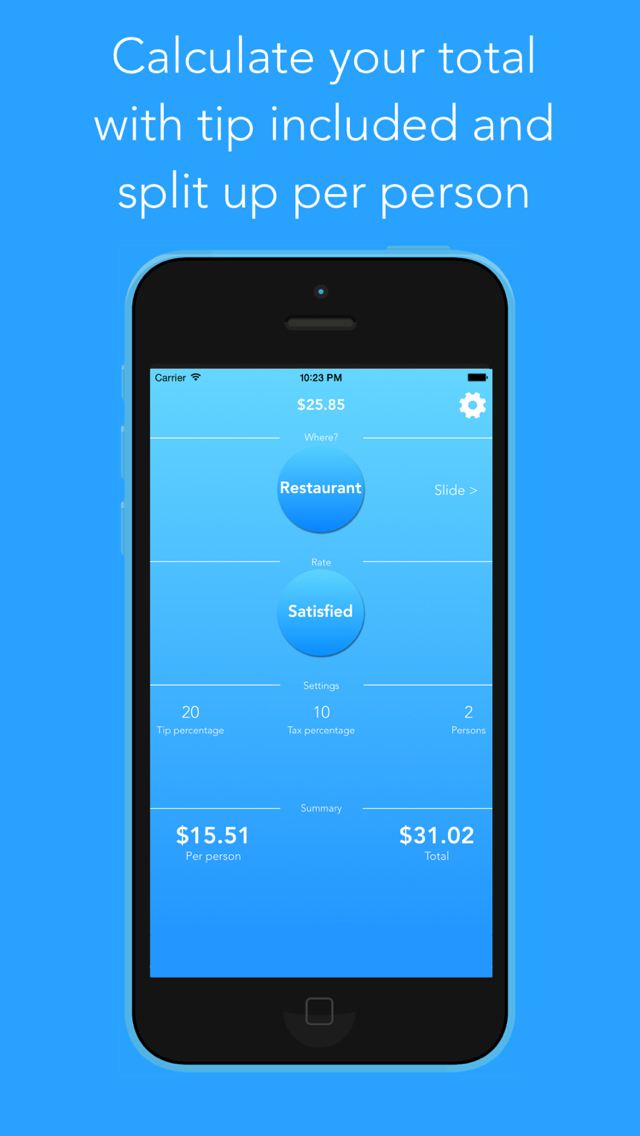
Black Lemon Dev today introduces Tippy 1.0, its new food & drink/lifestyle app developed for iPhone. Tippy helps you to determine the correct tip for your bill. With the app you are able to calculate your tip of the pre-tax bill amount, round up the total or split the bill. Inside the app there are 7 presets for common places like a "Restaurant" or a "Bar" in case you do not know how much you actually should tip depending on your satisfaction.
Castrop-Rauxel, Germany - Today, Black Lemon Dev is proud to announce that Tippy 1.0 for iOS has been released in all regions. Tippy is an app that helps you to determine the tip amount for a specific bill. This happens either with the user choosing a preset for a common place like a "Restaurant" or a "Bar" or with user input for all available parameters like the tip percentage. Additionally, Tippy offers the ability to calculate the proper tip pre-tax, as well as the ability to round up the total or split the bill for a set number of persons.
"A lot of people are unsure about the amount they have to tip. Therefore we decided to build an application which helps these people to calculate their tip easy and fast." said Torben Richter, Developer of Tippy.
Tippy is completely free of charge at this time. "I have always been a supporter of letting your customers test your app before they have to invest any money in it. Of course there is the possibility to remove the Ads from the app for example. There also will be a convenient function to replace the preset percentages with your own so you do not have to edit the number every time but all of the calculation and the basic functionality will be free for ever." continued Torben Richter.
Device Requirements:
* iPhone or iPod touch
* Requires iOS 7.0 or late
* 1.5 MB
Pricing and Available:
Tippy 1.0 is completely free to use and is available worldwide exclusively through the App Store in the Food & Drink/Lifestyle category.
Black Lemon Dev: http://www.blacklemondev.org
Tippy 1.0: http://www.blacklemondev.org/tippy
Download from iTunes: https://itunes.apple.com/app/id967654152
Screenshot: https://is5-ssl.mzstatic.com/image/thumb/Purple1/v4/8b/3d/a5/8b3da599-e54c-cc1b-bf59-aa29306d315e/pr_source.jpg/640x1136ss-80.png
App Icon: http://blacklemondev.org/images/AppIcon_Tippy.png
Located in Castrop-Rauxel, Germany, Black Lemon is a new indie software studio established in 2015. The company's focus is on mobile app development for the iOS platform. All Material and Software (C) Copyright 2015 Black Lemon Dev. All Rights Reserved. Apple, the Apple logo, iPhone, iPod and iPad are registered trademarks of Apple Inc. in the U.S. and/or other countries. Other trademarks and registered trademarks may be the property of their respective owners.
*******
Link To Article: http://prmac.com/release-id-73583.htm
*******
---------------------------------------------------------------------------------
Note that you can alter delivered distributions at any time.
Login to your account on prMac to alter your channel selection, or to opt-out at any time.
Tippy - Your Tip / Gratuity Buddy - Published on 02/24/15
Black Lemon Dev today introduces Tippy 1.0, its new food & drink/lifestyle app developed for iPhone. Tippy helps you to determine the correct tip for your bill. With the app you are able to calculate your tip of the pre-tax bill amount, round up the total or split the bill. Inside the app there are 7 presets for common places like a "Restaurant" or a "Bar" in case you do not know how much you actually should tip depending on your satisfaction.
Castrop-Rauxel, Germany - Today, Black Lemon Dev is proud to announce that Tippy 1.0 for iOS has been released in all regions. Tippy is an app that helps you to determine the tip amount for a specific bill. This happens either with the user choosing a preset for a common place like a "Restaurant" or a "Bar" or with user input for all available parameters like the tip percentage. Additionally, Tippy offers the ability to calculate the proper tip pre-tax, as well as the ability to round up the total or split the bill for a set number of persons.
"A lot of people are unsure about the amount they have to tip. Therefore we decided to build an application which helps these people to calculate their tip easy and fast." said Torben Richter, Developer of Tippy.
Tippy is completely free of charge at this time. "I have always been a supporter of letting your customers test your app before they have to invest any money in it. Of course there is the possibility to remove the Ads from the app for example. There also will be a convenient function to replace the preset percentages with your own so you do not have to edit the number every time but all of the calculation and the basic functionality will be free for ever." continued Torben Richter.
Device Requirements:
* iPhone or iPod touch
* Requires iOS 7.0 or late
* 1.5 MB
Pricing and Available:
Tippy 1.0 is completely free to use and is available worldwide exclusively through the App Store in the Food & Drink/Lifestyle category.
Black Lemon Dev: http://www.blacklemondev.org
Tippy 1.0: http://www.blacklemondev.org/tippy
Download from iTunes: https://itunes.apple.com/app/id967654152
Screenshot: https://is5-ssl.mzstatic.com/image/thumb/Purple1/v4/8b/3d/a5/8b3da599-e54c-cc1b-bf59-aa29306d315e/pr_source.jpg/640x1136ss-80.png
App Icon: http://blacklemondev.org/images/AppIcon_Tippy.png

Located in Castrop-Rauxel, Germany, Black Lemon is a new indie software studio established in 2015. The company's focus is on mobile app development for the iOS platform. All Material and Software (C) Copyright 2015 Black Lemon Dev. All Rights Reserved. Apple, the Apple logo, iPhone, iPod and iPad are registered trademarks of Apple Inc. in the U.S. and/or other countries. Other trademarks and registered trademarks may be the property of their respective owners.
*******
Link To Article: http://prmac.com/release-id-73583.htm
*******
---------------------------------------------------------------------------------
Note that you can alter delivered distributions at any time.
Login to your account on prMac to alter your channel selection, or to opt-out at any time.
WaterField Unveils Padded Gear Pouch for Electronics, Entertainment
A new article has been published at prMac.
WaterField Unveils Padded Gear Pouch for Electronics, Entertainment - Published on 02/24/15
San Francisco manufacturer, WaterField Designs today announces the new Padded Gear Pouch. Available in waxed canvas or ballistic nylon with vegetable-tanned, premium leather accents, this sleek accessory pouch protects and organizes with padded pockets, self-locking zippers and water-resistant textiles. Compact and light, the Padded Gear Pouch features one main compartment with several padded pockets and one front pocket with two organizational mesh pockets inside.
San Francisco, California - WaterField Designs today is proud to announce the new Padded Gear Pouch in waxed canvas or ballistic nylon with vegetable-tanned, premium leather accents. The sleek accessory pouch protects and organizes with padded pockets, self-locking zippers and water-resistant textiles. Compact and light, the Padded Gear Pouch remains thin for easy packing, even when fully stuffed.
The Padded Gear Pouch features one main compartment with several padded pockets and one front pocket with two organizational mesh pockets inside. Each compartment closes with self-locking zippers. Both the tan waxed canvas and the black ballistic nylon color choices offer excellent water resistance.
The Padded Gear Pouch is useful for:
* Tech professionals: iPad mini in large padded pocket, portable mouse and hard-drive in smaller padded pockets, headphones and wallet in main compartment. Front pockets for keys and additional cables.
* Travelers: eyeglasses in large padded pocket, phone, medications and headphones in smaller padded pockets, passport, wallet and boarding pass in main compartment. Front pockets for keys, Altoids, receipts and other miscellany.
* Entertainment lovers: Jambox speaker in main compartment, Apple TV or Roku and iPhone in smaller padded compartments, cables and ear buds in front organizational pockets.
"We like to offer our customers innovative ways to stay organized and protect their electronics on the go," explained company owner, Gary Waterfield. "The Padded Gear Pouch remains flat and light even when packed to the brim, making it much easier to stash in a bag or suitcase than bulky items. So versatile, it makes the ideal organizational pouch for just about anyone."
WaterField Designs, an innovative leader in custom laptop sleeves and designer bags and cases for digital gear, designs and manufactures all products entirely in San Francisco. The Padded Gear Pouch can be mixed and matched with other WaterField favorites including the Staad Laptop BackPack, the Bolt Briefcase, the VertiGo bag and others.
Pricing and Availability:
The all-new Padded Gear Pouch is priced at $59.00 (USD). Colors: Tan waxed canvas with grizzly leather trim or black ballistic nylon with black leather trim. Leather is full-grain, vegetable-tanned. Dimensions: 9.5 x 5.5 x 1.3 inches. Weight: 6 oz. Shipping begins February 27 from the WaterField Designs online store.
WaterField Designs: http://www.sfbags.com/
Padded Gear Pouch: http://www.sfbags.com/products/padded-gear-pouch
YouTube Video (Padded Gear Pouch Demo): https://www.youtube.com/watch?v=IUdSKcwIXSc
Screenshot: http://cdn.shopify.com/s/files/1/0281/2796/products/uUEn0DCRAqv2dAwoLMkxq03mEbNgqY3ZqPfNgH3kOZg_grande.jpg?v=1424729773
WaterField Designs is an innovative San Francisco designer and manufacturer of bags and cases for tech-savvy consumers who want to stylishly and responsibly transport their technology. WaterField manufactures custom-fitted, high-quality cases and bags for a full-range of laptop computers, smartphones, tablets, gaming devices and other digital gear. All products are manufactured to exacting standards entirely in San Francisco. More information at "Our Story." WaterField Designs, Staad, VertiGo and Bolt and SFBags are trademarks of WaterField Designs. Other company & product names may be trademarks of their respective owners. Copyright (C) 2009-2015 WaterField Designs. All Rights Reserved. Other trademarks and registered trademarks may be the property of their respective owners.
*******
Link To Article: http://prmac.com/release-id-73581.htm
*******
---------------------------------------------------------------------------------
Note that you can alter delivered distributions at any time.
Login to your account on prMac to alter your channel selection, or to opt-out at any time.
WaterField Unveils Padded Gear Pouch for Electronics, Entertainment - Published on 02/24/15
San Francisco manufacturer, WaterField Designs today announces the new Padded Gear Pouch. Available in waxed canvas or ballistic nylon with vegetable-tanned, premium leather accents, this sleek accessory pouch protects and organizes with padded pockets, self-locking zippers and water-resistant textiles. Compact and light, the Padded Gear Pouch features one main compartment with several padded pockets and one front pocket with two organizational mesh pockets inside.
San Francisco, California - WaterField Designs today is proud to announce the new Padded Gear Pouch in waxed canvas or ballistic nylon with vegetable-tanned, premium leather accents. The sleek accessory pouch protects and organizes with padded pockets, self-locking zippers and water-resistant textiles. Compact and light, the Padded Gear Pouch remains thin for easy packing, even when fully stuffed.
The Padded Gear Pouch features one main compartment with several padded pockets and one front pocket with two organizational mesh pockets inside. Each compartment closes with self-locking zippers. Both the tan waxed canvas and the black ballistic nylon color choices offer excellent water resistance.
The Padded Gear Pouch is useful for:
* Tech professionals: iPad mini in large padded pocket, portable mouse and hard-drive in smaller padded pockets, headphones and wallet in main compartment. Front pockets for keys and additional cables.
* Travelers: eyeglasses in large padded pocket, phone, medications and headphones in smaller padded pockets, passport, wallet and boarding pass in main compartment. Front pockets for keys, Altoids, receipts and other miscellany.
* Entertainment lovers: Jambox speaker in main compartment, Apple TV or Roku and iPhone in smaller padded compartments, cables and ear buds in front organizational pockets.
"We like to offer our customers innovative ways to stay organized and protect their electronics on the go," explained company owner, Gary Waterfield. "The Padded Gear Pouch remains flat and light even when packed to the brim, making it much easier to stash in a bag or suitcase than bulky items. So versatile, it makes the ideal organizational pouch for just about anyone."
WaterField Designs, an innovative leader in custom laptop sleeves and designer bags and cases for digital gear, designs and manufactures all products entirely in San Francisco. The Padded Gear Pouch can be mixed and matched with other WaterField favorites including the Staad Laptop BackPack, the Bolt Briefcase, the VertiGo bag and others.
Pricing and Availability:
The all-new Padded Gear Pouch is priced at $59.00 (USD). Colors: Tan waxed canvas with grizzly leather trim or black ballistic nylon with black leather trim. Leather is full-grain, vegetable-tanned. Dimensions: 9.5 x 5.5 x 1.3 inches. Weight: 6 oz. Shipping begins February 27 from the WaterField Designs online store.
WaterField Designs: http://www.sfbags.com/
Padded Gear Pouch: http://www.sfbags.com/products/padded-gear-pouch
YouTube Video (Padded Gear Pouch Demo): https://www.youtube.com/watch?v=IUdSKcwIXSc
Screenshot: http://cdn.shopify.com/s/files/1/0281/2796/products/uUEn0DCRAqv2dAwoLMkxq03mEbNgqY3ZqPfNgH3kOZg_grande.jpg?v=1424729773

WaterField Designs is an innovative San Francisco designer and manufacturer of bags and cases for tech-savvy consumers who want to stylishly and responsibly transport their technology. WaterField manufactures custom-fitted, high-quality cases and bags for a full-range of laptop computers, smartphones, tablets, gaming devices and other digital gear. All products are manufactured to exacting standards entirely in San Francisco. More information at "Our Story." WaterField Designs, Staad, VertiGo and Bolt and SFBags are trademarks of WaterField Designs. Other company & product names may be trademarks of their respective owners. Copyright (C) 2009-2015 WaterField Designs. All Rights Reserved. Other trademarks and registered trademarks may be the property of their respective owners.
*******
Link To Article: http://prmac.com/release-id-73581.htm
*******
---------------------------------------------------------------------------------
Note that you can alter delivered distributions at any time.
Login to your account on prMac to alter your channel selection, or to opt-out at any time.
Forex News Alarm App released on the iOS App Store
A new article has been published at prMac.
Forex News Alarm App released on the iOS App Store - Published on 02/24/15
Flagforex today introduces fxNewsAlarm 1.0, its new financial app developed for iPhone, iPad and iPod touch devices. fxNewsAlarm is a must-have productivity alarm app for forex and news traders who need to be notified of key news events for the upcoming week. fxNewsAlarm gets the news event from forexfactory economic calendar and displays them in a list for iOS users to view. The list is sorted by their country of release and level of impact which range from low, medium to high.
Singapore - Flagforex today is proud to announce the release of fxNewsAlarm 1.0, its new financial app developed for iPhone, iPad and iPod touch devices. Set forex news alarm to any iOS device easily with a single tap. fxNewsAlarm allows forex traders to be notified of key event market risks prior to any country news release.
News and currency traders who often missed the time release of specific news event can now receive the alarm and get informed prior to the news event. Unlike alternative financial apps that only show the economic news calendar, fxNewsAlarm takes notifications one step further by allowing alarm to be easily preset with these important events.
fxNewsAlarm gets the news event from forexfactory economic calendar and displays them in a list for iOS users to view. The list is sorted by their country of release and level of impact which range from low, medium to high. The app will get weekly news event from these countries: United States, Australia, Canada, Switzerland, China, Eurozone, United Kingdom, Japan and New Zealand. Users who wish to view the news event in greater detail can also get the following metadata:
* Date of release
* Time of release
* Country
* Impact
* Forecast data
* Previous data
Setting an alarm on the selected news event is as simple as tapping the ''Add'' button next to the news event name. Next, the alarm can be accessed or changed in the device's reminder app by launching the reminder app from the home screen. Go to the default fxNewsAlarm list and the added event item should be found. Click more to view or make changes to the alarm alert timing.
Added events are marked by a checkmark next to the news item in app. Removing the added item is as easy as swiping the row to the left and tap delete. The news item's alarm will be removed from the device. fxNewsAlarm is a must-have productivity alarm app for forex and news traders who need to be notified of key news events for the upcoming week. Now in two easy steps, users can set alarm by launching the app, locate the news event and tap add to set alarm.
Device Requirements:
* iPhone, iPad, and iPod touch
* Optimized for iPhone 5, iPhone 6/6 Plus
* Requires iOS 7.1 or later
* 2.8 MB
Pricing and Availability:
fxNewsAlarm 1.0 is $3.99 USD (or equivalent amount in other currencies) and available worldwide exclusively through the App Store in the Finance category.
fxNewsAlarm 1.0: http://www.flagforex.com/forexnewsalarm
Purchase and Download: https://itunes.apple.com/us/app/fxnewsalarm/id962672650
Screenshot: http://a4.mzstatic.com/us/r30/Purple3/v4/a2/2f/60/a22f60c9-3896-3ca1-b71e-81a541dfc44b/screen322x572.jpeg
App Icon: http://a5.mzstatic.com/us/r30/Purple1/v4/cb/33/b2/cb33b253-0b34-ec19-898c-bac04e618b67/icon175x175.png
Flagforex has been developing forex trading tools and apps for manual forex traders and investors since 2008. The business has developed 3 trading software packages on Metatrader 4 platform and 2 apps on the iOS app store which help to automate various trading processes for forex traders. The business has also partnered with currency brokers to come out with more institutionalized software applications and services that benefit the entire trading community. All Material and Software (C) Copyright 2015 Flag One Pte Ltd. All Rights Reserved. Apple, the Apple logo, iPhone, iPod and iPad are registered trademarks of Apple Inc. in the U.S. and/or other countries. Other trademarks and registered trademarks may be the property of their respective owners.
*******
Link To Article: http://prmac.com/release-id-73580.htm
*******
---------------------------------------------------------------------------------
Note that you can alter delivered distributions at any time.
Login to your account on prMac to alter your channel selection, or to opt-out at any time.
Forex News Alarm App released on the iOS App Store - Published on 02/24/15
Flagforex today introduces fxNewsAlarm 1.0, its new financial app developed for iPhone, iPad and iPod touch devices. fxNewsAlarm is a must-have productivity alarm app for forex and news traders who need to be notified of key news events for the upcoming week. fxNewsAlarm gets the news event from forexfactory economic calendar and displays them in a list for iOS users to view. The list is sorted by their country of release and level of impact which range from low, medium to high.
Singapore - Flagforex today is proud to announce the release of fxNewsAlarm 1.0, its new financial app developed for iPhone, iPad and iPod touch devices. Set forex news alarm to any iOS device easily with a single tap. fxNewsAlarm allows forex traders to be notified of key event market risks prior to any country news release.
News and currency traders who often missed the time release of specific news event can now receive the alarm and get informed prior to the news event. Unlike alternative financial apps that only show the economic news calendar, fxNewsAlarm takes notifications one step further by allowing alarm to be easily preset with these important events.
fxNewsAlarm gets the news event from forexfactory economic calendar and displays them in a list for iOS users to view. The list is sorted by their country of release and level of impact which range from low, medium to high. The app will get weekly news event from these countries: United States, Australia, Canada, Switzerland, China, Eurozone, United Kingdom, Japan and New Zealand. Users who wish to view the news event in greater detail can also get the following metadata:
* Date of release
* Time of release
* Country
* Impact
* Forecast data
* Previous data
Setting an alarm on the selected news event is as simple as tapping the ''Add'' button next to the news event name. Next, the alarm can be accessed or changed in the device's reminder app by launching the reminder app from the home screen. Go to the default fxNewsAlarm list and the added event item should be found. Click more to view or make changes to the alarm alert timing.
Added events are marked by a checkmark next to the news item in app. Removing the added item is as easy as swiping the row to the left and tap delete. The news item's alarm will be removed from the device. fxNewsAlarm is a must-have productivity alarm app for forex and news traders who need to be notified of key news events for the upcoming week. Now in two easy steps, users can set alarm by launching the app, locate the news event and tap add to set alarm.
Device Requirements:
* iPhone, iPad, and iPod touch
* Optimized for iPhone 5, iPhone 6/6 Plus
* Requires iOS 7.1 or later
* 2.8 MB
Pricing and Availability:
fxNewsAlarm 1.0 is $3.99 USD (or equivalent amount in other currencies) and available worldwide exclusively through the App Store in the Finance category.
fxNewsAlarm 1.0: http://www.flagforex.com/forexnewsalarm
Purchase and Download: https://itunes.apple.com/us/app/fxnewsalarm/id962672650
Screenshot: http://a4.mzstatic.com/us/r30/Purple3/v4/a2/2f/60/a22f60c9-3896-3ca1-b71e-81a541dfc44b/screen322x572.jpeg

App Icon: http://a5.mzstatic.com/us/r30/Purple1/v4/cb/33/b2/cb33b253-0b34-ec19-898c-bac04e618b67/icon175x175.png

Flagforex has been developing forex trading tools and apps for manual forex traders and investors since 2008. The business has developed 3 trading software packages on Metatrader 4 platform and 2 apps on the iOS app store which help to automate various trading processes for forex traders. The business has also partnered with currency brokers to come out with more institutionalized software applications and services that benefit the entire trading community. All Material and Software (C) Copyright 2015 Flag One Pte Ltd. All Rights Reserved. Apple, the Apple logo, iPhone, iPod and iPad are registered trademarks of Apple Inc. in the U.S. and/or other countries. Other trademarks and registered trademarks may be the property of their respective owners.
*******
Link To Article: http://prmac.com/release-id-73580.htm
*******
---------------------------------------------------------------------------------
Note that you can alter delivered distributions at any time.
Login to your account on prMac to alter your channel selection, or to opt-out at any time.
Boatrax Lets Boaters Share Experiences, Manage Logs Like a Pro & More
A new article has been published at prMac.
Boatrax Lets Boaters Share Experiences, Manage Logs Like a Pro & More - Published on 02/24/15
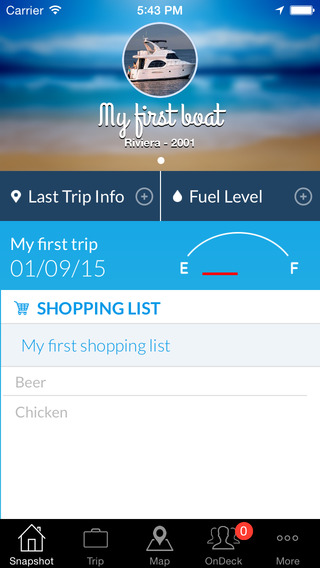
Miami based Boatster LLC has announced Boatrax, its new app for boating enthusiasts. The app features several built-in tools, including a Boat Snapshot, Trip Log, Maintenance Log, Fuel & Expense Log, Crew Sharing, and a Shopping List. The new no-cost app helps boaters enjoyably share their experiences with friends and family, easily keep detailed, organized logs just like the pros, and take their love of boating to new heights.
Cupertino, California - Boaters of all skill and experience levels - from those just beginning their nautical adventure, to seasoned veterans who've soared upon lakes, seas and oceans around the world - can download the unique no-cost app Borax. They can enjoyably share their experiences with friends and family, easily keep detailed, organized logs just like the pros, and take their love of boating to new heights.
Developed by Boatster LLC, Boatrax is inspired by the vision of helping boaters enjoy all of the joys and excitement of boating the moment they board, rather than being bogged down by management or maintenance tasks. To that end, Boatrax offers a suite of practical features, including:
* A "Boat Snapshot" to quickly assess boat status, including fuel level, previous trip information, and a categorized list of items that need to be purchased
* A "Trip Log" to add trip destinations, turn on/off engines and generators, and trace trips in real-time via a built-in map. Boaters can also invite friends, and assign them various shopping items for the next trip.
* A "Maintenance Log" to track scheduled boat maintenance, and categorize maintenance for improved reporting. Boaters can also add a maintenance shopping list to ensure that they have everything they need for a safe and enjoyable experience.
* A "Fuel & Expense Log" to keep track of costs, budgets and fuel purchases. Boaters can also manage expense categories for even greater control
* A "Crew Sharing" option that gives crew members access to manage trips, logs and expenses, so that they can help with overall management
* A "Shopping List" to manage all needed supplies. As noted above, various shopping items can be designated for maintenance purposes, while friends can have specific shopping items assigned to them.
In addition to these management and maintenance-related functions, a key factor that sets Boatrax apart is its built-in social sharing. In a matter of seconds, boaters can share photos of their experiences via the "On Deck" social wall. They can also send user-specific posts and photos via their user profile, as well as view and follow both boat profiles and trip profiles.
And when it comes to planning the next on-board get together, boaters can use the app to invite friends and family. They can also check pending invitations to see who has confirmed their attendance, who is unavailable, and who may need a reminder.
"Only those who have experienced what it's like to board a boat truly understand how it feels, and what it means," commented David Villegas of Boatster LLC. "We created Boatrax to celebrate the magic and wonder of boating, and to ensure that when boaters board their boat, their only goal is to rediscover how wonderful it is to be alive!"
Boatrax is the unique new no-cost app that lets boaters share their experiences with friends and family, easily and conveniently manage logs like a pro, and take their love of boating to new heights.
Device Requirements:
* iPhone, iPad, and iPod touch
* Requires iOS 6.1 or later
* 15.2 MB
Pricing and Availability:
Boatrax 1.6 is free and available worldwide exclusively through the App Store in the Utilities category. A version for Android devices is currently in development, and will be released in the near future.
Boatrax 1.6: http://apps.appshout.com/boatrax/
More info: http://boatrax.com/
Download from iTunes: https://itunes.apple.com/app/id925715779
Video Demo: http://blip.tv/dailyappshow/boatrax-iphone-app-demo-dailyappshow-7153152
Screenshot: http://a3.mzstatic.com/us/r30/Purple1/v4/34/05/88/34058866-5cc9-7423-eb58-77c3c9e82c4a/screen568x568.jpeg
App Icon: http://apps.appshout.com/boatrax/images/icon.png
Based in Miami, Boatster LLC are experienced software developers with a philosophy to develop innovative and easy to use mobile applications, with a focus on the boating and leisure industries. All Material and Software (C) Copyright 2015 Boatster LLC. All Rights Reserved. Apple, the Apple logo, iPhone, iPod and iPad are registered trademarks of Apple Inc. in the U.S. and/or other countries. Other trademarks and registered trademarks may be the property of their respective owners.
*******
Link To Article: http://prmac.com/release-id-73537.htm
*******
---------------------------------------------------------------------------------
Note that you can alter delivered distributions at any time.
Login to your account on prMac to alter your channel selection, or to opt-out at any time.
Boatrax Lets Boaters Share Experiences, Manage Logs Like a Pro & More - Published on 02/24/15
Miami based Boatster LLC has announced Boatrax, its new app for boating enthusiasts. The app features several built-in tools, including a Boat Snapshot, Trip Log, Maintenance Log, Fuel & Expense Log, Crew Sharing, and a Shopping List. The new no-cost app helps boaters enjoyably share their experiences with friends and family, easily keep detailed, organized logs just like the pros, and take their love of boating to new heights.
Cupertino, California - Boaters of all skill and experience levels - from those just beginning their nautical adventure, to seasoned veterans who've soared upon lakes, seas and oceans around the world - can download the unique no-cost app Borax. They can enjoyably share their experiences with friends and family, easily keep detailed, organized logs just like the pros, and take their love of boating to new heights.
Developed by Boatster LLC, Boatrax is inspired by the vision of helping boaters enjoy all of the joys and excitement of boating the moment they board, rather than being bogged down by management or maintenance tasks. To that end, Boatrax offers a suite of practical features, including:
* A "Boat Snapshot" to quickly assess boat status, including fuel level, previous trip information, and a categorized list of items that need to be purchased
* A "Trip Log" to add trip destinations, turn on/off engines and generators, and trace trips in real-time via a built-in map. Boaters can also invite friends, and assign them various shopping items for the next trip.
* A "Maintenance Log" to track scheduled boat maintenance, and categorize maintenance for improved reporting. Boaters can also add a maintenance shopping list to ensure that they have everything they need for a safe and enjoyable experience.
* A "Fuel & Expense Log" to keep track of costs, budgets and fuel purchases. Boaters can also manage expense categories for even greater control
* A "Crew Sharing" option that gives crew members access to manage trips, logs and expenses, so that they can help with overall management
* A "Shopping List" to manage all needed supplies. As noted above, various shopping items can be designated for maintenance purposes, while friends can have specific shopping items assigned to them.
In addition to these management and maintenance-related functions, a key factor that sets Boatrax apart is its built-in social sharing. In a matter of seconds, boaters can share photos of their experiences via the "On Deck" social wall. They can also send user-specific posts and photos via their user profile, as well as view and follow both boat profiles and trip profiles.
And when it comes to planning the next on-board get together, boaters can use the app to invite friends and family. They can also check pending invitations to see who has confirmed their attendance, who is unavailable, and who may need a reminder.
"Only those who have experienced what it's like to board a boat truly understand how it feels, and what it means," commented David Villegas of Boatster LLC. "We created Boatrax to celebrate the magic and wonder of boating, and to ensure that when boaters board their boat, their only goal is to rediscover how wonderful it is to be alive!"
Boatrax is the unique new no-cost app that lets boaters share their experiences with friends and family, easily and conveniently manage logs like a pro, and take their love of boating to new heights.
Device Requirements:
* iPhone, iPad, and iPod touch
* Requires iOS 6.1 or later
* 15.2 MB
Pricing and Availability:
Boatrax 1.6 is free and available worldwide exclusively through the App Store in the Utilities category. A version for Android devices is currently in development, and will be released in the near future.
Boatrax 1.6: http://apps.appshout.com/boatrax/
More info: http://boatrax.com/
Download from iTunes: https://itunes.apple.com/app/id925715779
Video Demo: http://blip.tv/dailyappshow/boatrax-iphone-app-demo-dailyappshow-7153152
Screenshot: http://a3.mzstatic.com/us/r30/Purple1/v4/34/05/88/34058866-5cc9-7423-eb58-77c3c9e82c4a/screen568x568.jpeg
App Icon: http://apps.appshout.com/boatrax/images/icon.png

Based in Miami, Boatster LLC are experienced software developers with a philosophy to develop innovative and easy to use mobile applications, with a focus on the boating and leisure industries. All Material and Software (C) Copyright 2015 Boatster LLC. All Rights Reserved. Apple, the Apple logo, iPhone, iPod and iPad are registered trademarks of Apple Inc. in the U.S. and/or other countries. Other trademarks and registered trademarks may be the property of their respective owners.
*******
Link To Article: http://prmac.com/release-id-73537.htm
*******
---------------------------------------------------------------------------------
Note that you can alter delivered distributions at any time.
Login to your account on prMac to alter your channel selection, or to opt-out at any time.
Limit Point Software releases Mailings 2.1.2
A new article has been published at prMac.
Limit Point Software releases Mailings 2.1.2 - Published on 02/24/15
Limit Point Software has announced Mailings 2.1.2, a mature, high-grade mail delivery app for sending personalized email messages to large groups of contacts. For business or personal use, Mailings is capable of sending thousands of messages, or just a hundred, directly and privately from your own Mac. Using Mailings ensures the privacy of recipient addresses, message content and tracking data. Send messages securely with SSL, and monitor delivery with the Message Monitor.
Port Jefferson, New York - Limit Point Software has announced the release of Mailings 2.1.2, a mature, high-grade mail delivery app for sending personalized email messages to large groups of contacts. For business or personal use, Mailings is capable of sending thousands of messages, or just a hundred, directly and privately from your own Mac. Using Mailings ensures the privacy of recipient addresses, message content and tracking data.
Conveniently employ Mailings anytime to email:
* Newsletters
* Marketing campaigns
* Mail's Stationary postcards and announcements
* Any web page on the Internet
* Raw source generated by other mail clients
Connect with your customers by publishing to the web with the tools of your choice and then share by email with Mailings, optionally using safe, secure connections. Easily track your results with the Message Monitor by listening for messages that have been opened, right on your Mac. Tracking data is stored in a database on your computer, in human readable XML text format, and can be organized separately for each mailing or as "all in one."
With no intention of re-inventing the wheel, Mailings integrates with other key applications you already have for performing certain tasks. This includes preview and SPAM detection in Mail and other mail clients, sending any web page loaded in Safari and other browsers, accessing Address Book for addressing and customizing message content. This integration is so tight in fact that Mailings is a breeze to learn and fun to use! Written only for Mac OS X, a distinctive characteristic of Mailings is the simple interface that facilitates quick and easy access to its many powerful features including:
General:
* Easy to use, intuitive interface
* Handles thousands of recipients
* Secure (SSL) messaging for private delivery
* Document oriented for managing re-usable settings
* Automated mail server setup, multiple server support
* Real message preview to aid junk mail detection
Addressing Recipients:
* Extensive Address Book support including smart groups & distribution lists
* Import recipients and tagged data from CSV files
* Import recipients from Entourage groups directly
Message Composition:
* Sends web pages and HTML or plain text files
* Supports Mail Stationary
* Loads current browser URLs
* Attachments of any type
* HTML with embedded images
* Built-in template tags for easy personalization
* Templates support Address Book card data
* AppleScript execution for implementing custom template tags
* Preamble and epilogue for HTML message body
* Plain text alternative option for HTML messages
* Sends raw source (eml) messages
* Supports all character sets
* HTML imaging
* Multi-page PDF splitting, folder zipping
Templates:
* Tailor-made messages using template tags
* Various personalization capabilities
* Templates support Address Book card data
* AppleScript Template tags
* Subject line can include template tags
* Attachment pathnames can include template tags
Sending, Tracking and Logging:
* Error recovery automatically resends to unsent recipients
* Message Monitor tells you who opened your messages
* Message rate control, "Throttle," to meet mail server bandwidth
* "Simulate Send" mode for testing or learning the program
* Console logging, with optional detailed mode
* Detailed progress monitoring
* Automatic report generation at completion
* Automatic raw source archiving at mailing completion
* Scheduling for sending at off-peak times
* Mail priority, return receipt, X-Mailer headers
Mailing's evolution has been guided by the suggestions of very many users over the course of several years. This is what makes the Mailings feature list so remarkable and relevant. Our objective is to continue this tradition of adopting user input to extend its functionality, please join the Mailings community.
System Requirements:
Mac OS X version 10.7 and above
Pricing and Availability:
Mailings is available on our website and in the Mac App Store for just $19.99 (USD). A fully functional 30 day demo is available on the Mailings website.
Mailings 2.1.2: http://www.limit-point.com/products/mailings/
Download Trial: http://www.limit-point.com/Mailings/Mailings.dmg
Purchase and Download (MAS): https://itunes.apple.com/us/app/mailings/id407294117?mt=12
Screenshot: http://a1.mzstatic.com/us/r30/Purple/v4/7c/c3/f1/7cc3f16a-77a9-9e57-3a31-6a1c4911e338/screen800x500.jpeg
Application Icon: http://a1.mzstatic.com/us/r30/Purple1/v4/8f/ec/80/8fec8026-f089-4a5e-868c-de14e22939b2/icon128-2x.png
Limit Point Software has been avidly developing software for the Mac community since 1997. In order to improve the usefulness, simplicity and dependability of our products user feedback has always been highly welcome and encouraged. Our products cover a diverse range of applications. The internet applications include bulk emailing, HTML form processing, web crawling and document indexing and searching. The Utilities suite is a large collection of small programs for combining movies, processing images in batch, file property editing, and much more. Copyright (C) 2015 Limit Point Software. All Rights Reserved. Apple, the Apple logo and Macintosh are registered trademarks of Apple Inc. in the U.S. and/or other countries.
*******
Link To Article: http://prmac.com/release-id-73536.htm
*******
---------------------------------------------------------------------------------
Note that you can alter delivered distributions at any time.
Login to your account on prMac to alter your channel selection, or to opt-out at any time.
Limit Point Software releases Mailings 2.1.2 - Published on 02/24/15
Limit Point Software has announced Mailings 2.1.2, a mature, high-grade mail delivery app for sending personalized email messages to large groups of contacts. For business or personal use, Mailings is capable of sending thousands of messages, or just a hundred, directly and privately from your own Mac. Using Mailings ensures the privacy of recipient addresses, message content and tracking data. Send messages securely with SSL, and monitor delivery with the Message Monitor.
Port Jefferson, New York - Limit Point Software has announced the release of Mailings 2.1.2, a mature, high-grade mail delivery app for sending personalized email messages to large groups of contacts. For business or personal use, Mailings is capable of sending thousands of messages, or just a hundred, directly and privately from your own Mac. Using Mailings ensures the privacy of recipient addresses, message content and tracking data.
Conveniently employ Mailings anytime to email:
* Newsletters
* Marketing campaigns
* Mail's Stationary postcards and announcements
* Any web page on the Internet
* Raw source generated by other mail clients
Connect with your customers by publishing to the web with the tools of your choice and then share by email with Mailings, optionally using safe, secure connections. Easily track your results with the Message Monitor by listening for messages that have been opened, right on your Mac. Tracking data is stored in a database on your computer, in human readable XML text format, and can be organized separately for each mailing or as "all in one."
With no intention of re-inventing the wheel, Mailings integrates with other key applications you already have for performing certain tasks. This includes preview and SPAM detection in Mail and other mail clients, sending any web page loaded in Safari and other browsers, accessing Address Book for addressing and customizing message content. This integration is so tight in fact that Mailings is a breeze to learn and fun to use! Written only for Mac OS X, a distinctive characteristic of Mailings is the simple interface that facilitates quick and easy access to its many powerful features including:
General:
* Easy to use, intuitive interface
* Handles thousands of recipients
* Secure (SSL) messaging for private delivery
* Document oriented for managing re-usable settings
* Automated mail server setup, multiple server support
* Real message preview to aid junk mail detection
Addressing Recipients:
* Extensive Address Book support including smart groups & distribution lists
* Import recipients and tagged data from CSV files
* Import recipients from Entourage groups directly
Message Composition:
* Sends web pages and HTML or plain text files
* Supports Mail Stationary
* Loads current browser URLs
* Attachments of any type
* HTML with embedded images
* Built-in template tags for easy personalization
* Templates support Address Book card data
* AppleScript execution for implementing custom template tags
* Preamble and epilogue for HTML message body
* Plain text alternative option for HTML messages
* Sends raw source (eml) messages
* Supports all character sets
* HTML imaging
* Multi-page PDF splitting, folder zipping
Templates:
* Tailor-made messages using template tags
* Various personalization capabilities
* Templates support Address Book card data
* AppleScript Template tags
* Subject line can include template tags
* Attachment pathnames can include template tags
Sending, Tracking and Logging:
* Error recovery automatically resends to unsent recipients
* Message Monitor tells you who opened your messages
* Message rate control, "Throttle," to meet mail server bandwidth
* "Simulate Send" mode for testing or learning the program
* Console logging, with optional detailed mode
* Detailed progress monitoring
* Automatic report generation at completion
* Automatic raw source archiving at mailing completion
* Scheduling for sending at off-peak times
* Mail priority, return receipt, X-Mailer headers
Mailing's evolution has been guided by the suggestions of very many users over the course of several years. This is what makes the Mailings feature list so remarkable and relevant. Our objective is to continue this tradition of adopting user input to extend its functionality, please join the Mailings community.
System Requirements:
Mac OS X version 10.7 and above
Pricing and Availability:
Mailings is available on our website and in the Mac App Store for just $19.99 (USD). A fully functional 30 day demo is available on the Mailings website.
Mailings 2.1.2: http://www.limit-point.com/products/mailings/
Download Trial: http://www.limit-point.com/Mailings/Mailings.dmg
Purchase and Download (MAS): https://itunes.apple.com/us/app/mailings/id407294117?mt=12
Screenshot: http://a1.mzstatic.com/us/r30/Purple/v4/7c/c3/f1/7cc3f16a-77a9-9e57-3a31-6a1c4911e338/screen800x500.jpeg

Application Icon: http://a1.mzstatic.com/us/r30/Purple1/v4/8f/ec/80/8fec8026-f089-4a5e-868c-de14e22939b2/icon128-2x.png

Limit Point Software has been avidly developing software for the Mac community since 1997. In order to improve the usefulness, simplicity and dependability of our products user feedback has always been highly welcome and encouraged. Our products cover a diverse range of applications. The internet applications include bulk emailing, HTML form processing, web crawling and document indexing and searching. The Utilities suite is a large collection of small programs for combining movies, processing images in batch, file property editing, and much more. Copyright (C) 2015 Limit Point Software. All Rights Reserved. Apple, the Apple logo and Macintosh are registered trademarks of Apple Inc. in the U.S. and/or other countries.
*******
Link To Article: http://prmac.com/release-id-73536.htm
*******
---------------------------------------------------------------------------------
Note that you can alter delivered distributions at any time.
Login to your account on prMac to alter your channel selection, or to opt-out at any time.
EarthDesk 6.5 Adds Screen Spanning in Mavericks and Yosemite
A new article has been published at prMac.
EarthDesk 6.5 Adds Screen Spanning in Mavericks and Yosemite - Published on 02/24/15
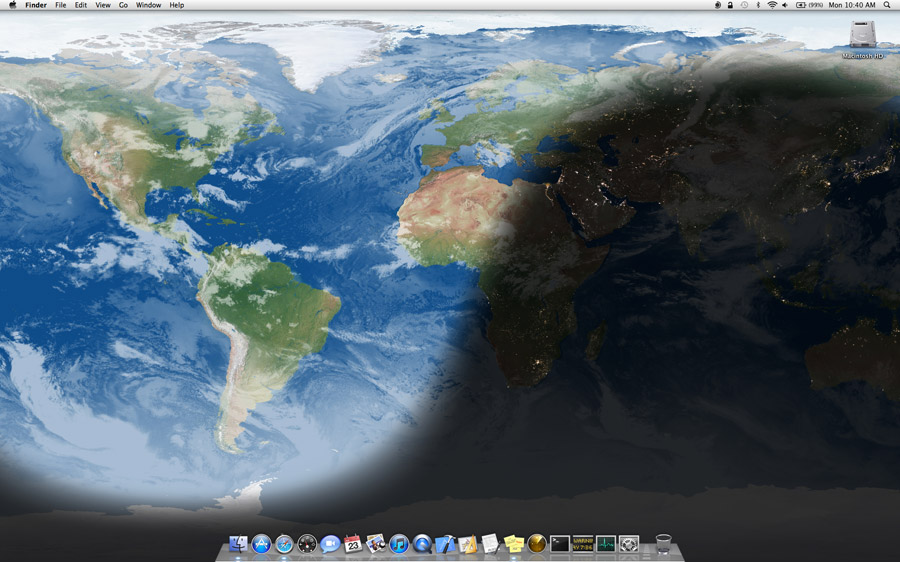
Xeric Design has updated EarthDesk, its award-winning, real-time dynamic desktop map, to support screen spanning in Mavericks and Yosemite. EarthDesk replaces your static desktop with an image of the Earth showing current sun, moon and city illumination, as well as global cloud coverage. The software operates silently in the background, keeping your desktop updated while you work. EarthDesk's dynamic desktop is continuously displayed as your desktop background.
Incline Village, Nevada - Xeric Design has updated EarthDesk, its award-winning, real-time dynamic desktop map, to support screen spanning in Mavericks and Yosemite. EarthDesk replaces your static desktop with an image of the Earth showing current sun, moon and city illumination, as well as global cloud coverage. The software operates silently in the background, keeping your desktop updated while you work. EarthDesk's dynamic desktop is continuously displayed as your desktop background.
EarthDesk 6.5 allows users to span the desktop map image across multiple displays and includes improvements for better operation under Yosemite.
Major new features introduced in EarthDesk 6:
* All new city database with support for adding, editing and removing of cities
* EarthDesk can now label and plot user-selected cities on any map display
* Maps can include a configurable overlay of latitude and longitude lines
* The intensity of the night darkness shadow can now be easily adjusted
* New moonlight shading options provide more control over the map appearance
* Displays the current positions of the sun and moon over the Earth
* Plots the current location of the International Space Station
* Creates named collections of settings (presets) to quickly change perspectives
* Updated political map with current borders including South Sudan
* New Globe and Azimuthal positioning controls provide finer control
System Requirements:
* Mac OS X 10.6 or later
Pricing and Availability:
Single user copies may be purchased for $24.95 (USD). Upgrades are available for $12.95 for licensed users of version 5 and $17.95 for licensed users of versions 1-4. Cloud access is available starting at $9.95 for a single user. A bundle including EarthDesk and high-res cloud access is $32.95. For more details, please refer to our website. Editorial Review copies and high resolution screenshots are available to qualified persons upon request.
Xeric Design: http://www.xericdesign.com
EarthDesk 6: http://www.xericdesign.com/earthdesk.php
Download EarthDesk: http://mirror.xericdesign.com/software/earthdesk.dmg
Purchase: http://www.xericdesign.com/purchase.php
Screenshot: http://www.xericdesign.com/images/earthdesk/xd12-screen-shadedrelief-large.jpg
Application Icon: http://www.xericdesign.com/images/upgrade/xd12-icon-edsk-326x264.jpg
Xeric Design, based in Incline Village, Nevada, is a leader in global time and mapping software. Its flagship product, EarthDesk, for both Macintosh and Windows, is enjoyed by users in more than 140 countries. Copyright (C) 2015 Xeric Design. All Rights Reserved. Apple, the Apple logo and Mac OS X are registered trademarks of Apple Inc. in the U.S. and/or other countries.
*******
Link To Article: http://prmac.com/release-id-73535.htm
*******
---------------------------------------------------------------------------------
Note that you can alter delivered distributions at any time.
Login to your account on prMac to alter your channel selection, or to opt-out at any time.
EarthDesk 6.5 Adds Screen Spanning in Mavericks and Yosemite - Published on 02/24/15
Xeric Design has updated EarthDesk, its award-winning, real-time dynamic desktop map, to support screen spanning in Mavericks and Yosemite. EarthDesk replaces your static desktop with an image of the Earth showing current sun, moon and city illumination, as well as global cloud coverage. The software operates silently in the background, keeping your desktop updated while you work. EarthDesk's dynamic desktop is continuously displayed as your desktop background.
Incline Village, Nevada - Xeric Design has updated EarthDesk, its award-winning, real-time dynamic desktop map, to support screen spanning in Mavericks and Yosemite. EarthDesk replaces your static desktop with an image of the Earth showing current sun, moon and city illumination, as well as global cloud coverage. The software operates silently in the background, keeping your desktop updated while you work. EarthDesk's dynamic desktop is continuously displayed as your desktop background.
EarthDesk 6.5 allows users to span the desktop map image across multiple displays and includes improvements for better operation under Yosemite.
Major new features introduced in EarthDesk 6:
* All new city database with support for adding, editing and removing of cities
* EarthDesk can now label and plot user-selected cities on any map display
* Maps can include a configurable overlay of latitude and longitude lines
* The intensity of the night darkness shadow can now be easily adjusted
* New moonlight shading options provide more control over the map appearance
* Displays the current positions of the sun and moon over the Earth
* Plots the current location of the International Space Station
* Creates named collections of settings (presets) to quickly change perspectives
* Updated political map with current borders including South Sudan
* New Globe and Azimuthal positioning controls provide finer control
System Requirements:
* Mac OS X 10.6 or later
Pricing and Availability:
Single user copies may be purchased for $24.95 (USD). Upgrades are available for $12.95 for licensed users of version 5 and $17.95 for licensed users of versions 1-4. Cloud access is available starting at $9.95 for a single user. A bundle including EarthDesk and high-res cloud access is $32.95. For more details, please refer to our website. Editorial Review copies and high resolution screenshots are available to qualified persons upon request.
Xeric Design: http://www.xericdesign.com
EarthDesk 6: http://www.xericdesign.com/earthdesk.php
Download EarthDesk: http://mirror.xericdesign.com/software/earthdesk.dmg
Purchase: http://www.xericdesign.com/purchase.php
Screenshot: http://www.xericdesign.com/images/earthdesk/xd12-screen-shadedrelief-large.jpg
Application Icon: http://www.xericdesign.com/images/upgrade/xd12-icon-edsk-326x264.jpg

Xeric Design, based in Incline Village, Nevada, is a leader in global time and mapping software. Its flagship product, EarthDesk, for both Macintosh and Windows, is enjoyed by users in more than 140 countries. Copyright (C) 2015 Xeric Design. All Rights Reserved. Apple, the Apple logo and Mac OS X are registered trademarks of Apple Inc. in the U.S. and/or other countries.
*******
Link To Article: http://prmac.com/release-id-73535.htm
*******
---------------------------------------------------------------------------------
Note that you can alter delivered distributions at any time.
Login to your account on prMac to alter your channel selection, or to opt-out at any time.
Subscribe to:
Posts (Atom)