A new article has been published at prMac.
Dayo - Share Days Lets People Capture the Full Story of their Day - Published on 02/24/15
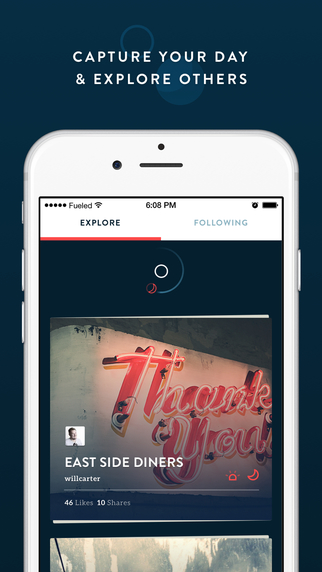
Independent developer, Michael Gaeddert today introduces Dayo - Share Days 1.0, his brand new social networking app for iOS devices. Dayo is about capturing your life through photos. This app makes it fun and easy to share your memories in beautiful detail each and every day. Dayo lets users publish vivid photos and text so they can share the full story of their day as a combined, integrated and synthesized whole - rather than as disconnected moments or status updates.
Cupertino, California - Regardless of the advanced features or functions they may offer, a major design flaw in social networking apps is that they limit people to just sharing moments or events during a day, rather than the overall impressions and experiences of a full day. Well, that's a problem that developer Michael Gaeddert set out to solve with his new no-cost app Dayo - Share Days, and by all accounts he has not only achieved his goal, but may have ushered in a whole genre of social networking apps in the process. Unlike anything the app world has seen before, Dayo - Share Days lets users:
1. Capture what happens throughout their day via a series of text and photos, which can either be taken with their iPhone or uploaded from the camera roll.
2. Automatically combine those assets into a beautiful and personalized daily album.
3. Share their album - which the app refers to as "Days" - with friends and followers, or directly to various social networks.
Each of the Days that users create and share can be richly detailed with multiple text entries and photos, or they can take a minimalist "less is more" approach. There are no rules, and users have the freedom to create what fits their mood and preference. And when it comes to viewing Days, users simply swipe down to scroll through the album, or swipe right to read comments. They can also easily like, share, comment or republish their favorite Days. Other Dayo - Share Days special features include:
* The option to explore trending "Days", so that users can discover new and interesting people from around the world
* A clean and elegant interface that neatly displays each uploaded photo, its associated text, the posting time, and the number of likes and shares it has received so far
* A dashboard that shows users how many days they've been active in the Dayo - Share Days community, how many followers they have, and how many users they are following
* The ability for users to preview and explore the app without having to create an account
"Traditional social networking apps only let people share moments, not days," commented Michael Gaeddert. "But Dayo - Share Days overcomes this limitation by letting users publish vivid photos and text so they can share the full story of their day as a combined, integrated and synthesized whole - rather than as disconnected moments or status updates."
Device Requirements:
* iPhone, iPad, and iPod touch
* Optimized for iPhone 5, iPhone 6/6 Plus
* Requires iOS 8.0 or later
* 25.9 MB
Pricing and Availability:
Dayo - Share Days 1.0 is Free and available worldwide exclusively through the App Store in the Social Networking category.
Dayo - Share Days 1.0: http://dayoapp.co
More Info: http://apps.appshout.com/dayo-share-days/
Download from iTunes: https://itunes.apple.com/app/dayo-share-days/id961210800
Screenshot: http://a4.mzstatic.com/us/r30/Purple1/v4/38/43/b6/3843b6d7-d9f9-b0c5-d53f-4fbfa962b129/screen322x572.jpeg
App Icon: http://apps.appshout.com/dayo-share-days/images/icon.png
Michael Gaeddert is a 26 year old graduate of Purdue. He is passionate about life and all things tech. Dayo is his first venture into joining the tech world and he is anxious to provide his users with a beautiful and fun user experience on Dayo! All Material and Software (C) Copyright 2015 Michael Gaeddert. All Rights Reserved. Apple, the Apple logo, iPhone, iPod and iPad are registered trademarks of Apple Inc. in the U.S. and/or other countries. Other trademarks and registered trademarks may be the property of their respective owners.
*******
Link To Article: http://prmac.com/release-id-73598.htm
*******
---------------------------------------------------------------------------------
Note that you can alter delivered distributions at any time.
Login to your account on prMac to alter your channel selection, or to opt-out at any time.


Insights for OS X Used for Probabilistic Renewable Energy Forecasting
A new article has been published at prMac.
Insights for OS X Used for Probabilistic Renewable Energy Forecasting - Published on 02/24/15
KnowledgeMiner Software announced the remarkable application of their critically acclaimed collection of self-learning forecasting technologies implemented in Insights for OS X to a set of high-priority probabilistic energy forecasting problems posed by renewables and the smart grid world. Insights is a professional tool for building predictive models from data of complex systems. It is currently used by NASA, MIT, Mobil, Pfizer, and many other corporations and research institutes worldwide.
Berlin, Germany - KnowledgeMiner Software today is pleased to announce the remarkable application of their critically acclaimed collection of self-organizing, automated forecasting technologies implemented in Insights for OS X to a set of high-priority probabilistic energy forecasting problems. Based on a 12-week rolling real-world forecasting scenario in four categories - electric load, electricity price, wind and solar power forecasting - for up to 10 sites, Insights' self-learning forecasting skills ended up in top five positions in all categories of the Global Energy Forecasting Competition (GEFCom2014) organized by the IEEE Power & Energy Society and the University of North Carolina at Charlotte.
"With only four teams out of more than 500 from over 40 countries successfully finished all four challenging GEFCom2014 forecasting tracks, this underlines the very high predictive power and productivity of Insights for Mac OS X right out-of-the-box. We are happy and proud to provide this proven high quality to our customers to allow them to easily, fast, and reliably turn data into knowledge to solve complex and urgent problems in their field," Frank Lemke of KnowledgeMiner Software commented.
Insights for OS X is a professional, yet convenient tool for building predictive models from data of complex systems autonomously. Taking observational data that describes a problem, system, or process, the software constructs a working mathematical model. Compatible with data stored in a variety of popular formats (e.g., Microsoft Excel), its AI-powered, self-organizing modeling algorithms allow users to easily extract new and useful knowledge to support decision-making. All models can be exported to Excel, AppleScript, or Matlab for further deployment.
Feature Highlights:
* Original, high-dimensional, self-learning, inductive knowledge mining with ease
* Automatically develops models and model ensembles from data, and it generates the equation that describes the data as a mathematical interpretation of how the model works
* Integrates all complex tasks, such as variables selection from up to 2000 inputs, knowledge extraction, model development and validation, into one process and hides it from user
* Live Prediction Validation technology
* Model export to Microsoft Excel, ready-to-use AppleScript code, or TEXT to be used in Matlab
* Powered by 64-bit, parallel, cross-platform (OS X, Windows), self-organizing modeling engine for multi-core CPUs and projects integration
Complex systems demand that we abandon the classical, hard approach of creating analytical models using theoretical systems analysis, since we often have incomplete knowledge of the processes involved, which forces us to make vague guesses about the internal workings at various stages of the analysis. Environmental, social, and socio-economic systems are but three examples. This approach is time consuming, inflexible, and leads to results that are questionable, ambiguous, and qualitative in nature. These challenges, as well as the nascent Internet of Things, require a paradigm shift in model building toward inductive modeling and forecasting technologies based on self-organization.
Insights for OS X is applied to health and life sciences related problems, sales prediction, financial and resource planning, engineering problems, climate change modeling and forecasting, and many others, and it is currently used by NASA, MIT, Columbia University, Merck, Mobil, Pfizer, and many other corporations, universities, research institutes, and individuals worldwide.
Language Support:
* English, Spanish, and German
System Requirements:
* OS X 10.7 or later
* Any Mac with 64-bit CPU, 8 GB RAM recommended
* Minimum screen resolution of 1280 x 768 pixel
* For Excel support, Excel versions 2011 or 2008
Pricing and Availability:
Insights for OS X is available as a Free, Advanced or Pro version exclusively from the KnowledgeMiner Software website. Academic versions can be purchased by contacting KnowledgeMiner Software directly. Review copies are available on request.
Insights for OS X: http://www.knowledgeminer.eu
GEFCom2014: http://www.ieee-pes.org/past-announcements/158-uncategorised/758-ieee-power-energy-society-launches-the-global-energy-forecasting-competition-2014
Download Insights: http://www.knowledgeminer.eu/download.html
Purchase: http://www.knowledgeminer.eu/store.html
Screenshot: http://www.knowledgeminer.eu/img/shot_1.png
App Icon: http://www.knowledgeminer.eu/img/knowledgeminer_icon.png
Located in Berlin, Germany, KnowledgeMiner Software was founded in 1993 by Frank Lemke. The company is active in research, development, consulting, and application of self-organizing modeling and knowledge discovery technologies. It developed and implemented a number of original technologies for validation of inductively built data mining models. KMS has been doing consulting in model development and prediction of toxicological and eco-toxicological hazards and risks of chemical compounds from experimental data for regulatory purposes within REACH and participated in three international research projects funded by the European Commission related to QSAR. Other fields of activity have been climate change related modeling and prediction problems, sales and demand predictions, macro- and micro-economic modeling problems like national economy and balance sheet prediction, energy consumption analysis and prediction, medical diagnosis, and wastewater reuse problems. Copyright (C) 2015
KnowledgeMiner Software. All Rights Reserved. Apple, the Apple logo, Mac OS X, and Macintosh are registered trademarks of Apple Inc. in the U.S. and/or other countries. Other trademarks and registered trademarks may be the property of their respective owners.
*******
Link To Article: http://prmac.com/release-id-73582.htm
*******
---------------------------------------------------------------------------------
Note that you can alter delivered distributions at any time.
Login to your account on prMac to alter your channel selection, or to opt-out at any time.
Insights for OS X Used for Probabilistic Renewable Energy Forecasting - Published on 02/24/15
KnowledgeMiner Software announced the remarkable application of their critically acclaimed collection of self-learning forecasting technologies implemented in Insights for OS X to a set of high-priority probabilistic energy forecasting problems posed by renewables and the smart grid world. Insights is a professional tool for building predictive models from data of complex systems. It is currently used by NASA, MIT, Mobil, Pfizer, and many other corporations and research institutes worldwide.
Berlin, Germany - KnowledgeMiner Software today is pleased to announce the remarkable application of their critically acclaimed collection of self-organizing, automated forecasting technologies implemented in Insights for OS X to a set of high-priority probabilistic energy forecasting problems. Based on a 12-week rolling real-world forecasting scenario in four categories - electric load, electricity price, wind and solar power forecasting - for up to 10 sites, Insights' self-learning forecasting skills ended up in top five positions in all categories of the Global Energy Forecasting Competition (GEFCom2014) organized by the IEEE Power & Energy Society and the University of North Carolina at Charlotte.
"With only four teams out of more than 500 from over 40 countries successfully finished all four challenging GEFCom2014 forecasting tracks, this underlines the very high predictive power and productivity of Insights for Mac OS X right out-of-the-box. We are happy and proud to provide this proven high quality to our customers to allow them to easily, fast, and reliably turn data into knowledge to solve complex and urgent problems in their field," Frank Lemke of KnowledgeMiner Software commented.
Insights for OS X is a professional, yet convenient tool for building predictive models from data of complex systems autonomously. Taking observational data that describes a problem, system, or process, the software constructs a working mathematical model. Compatible with data stored in a variety of popular formats (e.g., Microsoft Excel), its AI-powered, self-organizing modeling algorithms allow users to easily extract new and useful knowledge to support decision-making. All models can be exported to Excel, AppleScript, or Matlab for further deployment.
Feature Highlights:
* Original, high-dimensional, self-learning, inductive knowledge mining with ease
* Automatically develops models and model ensembles from data, and it generates the equation that describes the data as a mathematical interpretation of how the model works
* Integrates all complex tasks, such as variables selection from up to 2000 inputs, knowledge extraction, model development and validation, into one process and hides it from user
* Live Prediction Validation technology
* Model export to Microsoft Excel, ready-to-use AppleScript code, or TEXT to be used in Matlab
* Powered by 64-bit, parallel, cross-platform (OS X, Windows), self-organizing modeling engine for multi-core CPUs and projects integration
Complex systems demand that we abandon the classical, hard approach of creating analytical models using theoretical systems analysis, since we often have incomplete knowledge of the processes involved, which forces us to make vague guesses about the internal workings at various stages of the analysis. Environmental, social, and socio-economic systems are but three examples. This approach is time consuming, inflexible, and leads to results that are questionable, ambiguous, and qualitative in nature. These challenges, as well as the nascent Internet of Things, require a paradigm shift in model building toward inductive modeling and forecasting technologies based on self-organization.
Insights for OS X is applied to health and life sciences related problems, sales prediction, financial and resource planning, engineering problems, climate change modeling and forecasting, and many others, and it is currently used by NASA, MIT, Columbia University, Merck, Mobil, Pfizer, and many other corporations, universities, research institutes, and individuals worldwide.
Language Support:
* English, Spanish, and German
System Requirements:
* OS X 10.7 or later
* Any Mac with 64-bit CPU, 8 GB RAM recommended
* Minimum screen resolution of 1280 x 768 pixel
* For Excel support, Excel versions 2011 or 2008
Pricing and Availability:
Insights for OS X is available as a Free, Advanced or Pro version exclusively from the KnowledgeMiner Software website. Academic versions can be purchased by contacting KnowledgeMiner Software directly. Review copies are available on request.
Insights for OS X: http://www.knowledgeminer.eu
GEFCom2014: http://www.ieee-pes.org/past-announcements/158-uncategorised/758-ieee-power-energy-society-launches-the-global-energy-forecasting-competition-2014
Download Insights: http://www.knowledgeminer.eu/download.html
Purchase: http://www.knowledgeminer.eu/store.html
Screenshot: http://www.knowledgeminer.eu/img/shot_1.png

App Icon: http://www.knowledgeminer.eu/img/knowledgeminer_icon.png

Located in Berlin, Germany, KnowledgeMiner Software was founded in 1993 by Frank Lemke. The company is active in research, development, consulting, and application of self-organizing modeling and knowledge discovery technologies. It developed and implemented a number of original technologies for validation of inductively built data mining models. KMS has been doing consulting in model development and prediction of toxicological and eco-toxicological hazards and risks of chemical compounds from experimental data for regulatory purposes within REACH and participated in three international research projects funded by the European Commission related to QSAR. Other fields of activity have been climate change related modeling and prediction problems, sales and demand predictions, macro- and micro-economic modeling problems like national economy and balance sheet prediction, energy consumption analysis and prediction, medical diagnosis, and wastewater reuse problems. Copyright (C) 2015
KnowledgeMiner Software. All Rights Reserved. Apple, the Apple logo, Mac OS X, and Macintosh are registered trademarks of Apple Inc. in the U.S. and/or other countries. Other trademarks and registered trademarks may be the property of their respective owners.
*******
Link To Article: http://prmac.com/release-id-73582.htm
*******
---------------------------------------------------------------------------------
Note that you can alter delivered distributions at any time.
Login to your account on prMac to alter your channel selection, or to opt-out at any time.
A fix 240fps videos recorded under artificial lights - Flicker Be Gone
A new article has been published at prMac.
A fix 240fps videos recorded under artificial lights - Flicker Be Gone - Published on 02/24/15
Warsaw based Motivapps today announces Flicker Be Gone 1.2, its new video app developed for iPhone, iPad and iPod touch devices. Shooting video in slow-motion under artificial lights quite often causes uncomfortable flicker. Flicker Be Gone will postprocess your video by averaging the frames' brightness to remove the flicker. This slightly lowers the quality of a video, but makes it far more pleasant to watch. There are two videos that demonstrate the effect.
Warsaw, Poland - Motivapps today is proud to announce the release of Flicker Be Gone 1.2, its new video app developed for iPhone, iPad and iPod touch devices. Shooting video in slow-motion under artificial lights quite often causes uncomfortable flicker. This app will postprocess your video and remove the flicker. Flicker Be Gone processes the video by averaging the frames' brightness. This slightly lowers the quality of a video, but makes it far more pleasant to watch. There are two videos that demonstrate the effect.
"Plenty of iPhone 6 users reported a problem with super slow motion videos, an irritating flicker appearing due to artificial lights," explained Tomasz Kolinko, founder of Warsaw based Motivapps. "While the next iOS version may have appropriate filters to deal with the issue, a new app from Motivapps is probably the only tool on the market to fix this right now."
The effect happens due to fluorescent lights lighting up 50-60 times a second. Both human eyes and regular video recording equipment don't catch this, but once iPhone starts recording with 240fps, this becomes a serious issue. For years there existed desktop apps that removed the effect from professional videos, and probably within the next year such a filter will become an integral part of iOS. But currently probably the only way to deal with the issue directly on the device is to use Flicker Be Gone.
Device Requirements:
* iPhone, iPad, and iPod touch
* Optimized for iPhone 5, iPhone 6/6 Plus
* Requires iOS 7.0 or later
* 2.6 MB
Pricing and Availability:
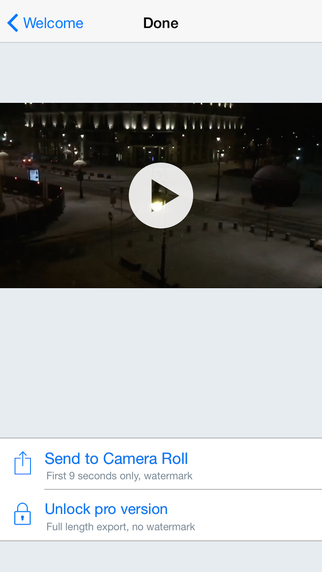
Flicker Be Gone 1.2 is Free (with in-app purchase) and available worldwide exclusively through the App Store in the Photo & Video category. The free version allows the user to save the first 9 seconds of the video, and puts a watermark on it. The unlimited full version costs $1.99 (USD).
Motivapps: http://www.motivapps.com/
Flicker Be Gone 1.2: https://itunes.apple.com/app/flicker-be-gone/id958089320
YouTube Video (Snow): https://www.youtube.com/watch?v=N3t1sOvbwLE
YouTube Video (Party): https://www.youtube.com/watch?v=ZtHGBD3MZ70
Screenshot: http://a2.mzstatic.com/us/r30/Purple1/v4/f4/d3/0a/f4d30a3b-4d45-a40f-d511-a08bcc93bdce/screen322x572.jpeg
App Icon: http://a4.mzstatic.com/us/r30/Purple3/v4/54/27/ad/5427ade6-8b1c-24cd-8460-e5539e82fb29/icon175x175.png
Motivapps is an indie development company located in Warsaw, Poland. The company takes pride in delivering novel solutions to various problems. The company is best known for releasing AppCodes, one of the very first ever tools for App Store SEO. All Material and Software (C) Copyright 2015 Motivapps. All Rights Reserved. Apple, the Apple logo, iPhone, iPod and iPad are registered trademarks of Apple Inc. in the U.S. and/or other countries. Other trademarks and registered trademarks may be the property of their respective owners.
*******
Link To Article: http://prmac.com/release-id-73579.htm
*******
---------------------------------------------------------------------------------
Note that you can alter delivered distributions at any time.
Login to your account on prMac to alter your channel selection, or to opt-out at any time.
A fix 240fps videos recorded under artificial lights - Flicker Be Gone - Published on 02/24/15
Warsaw based Motivapps today announces Flicker Be Gone 1.2, its new video app developed for iPhone, iPad and iPod touch devices. Shooting video in slow-motion under artificial lights quite often causes uncomfortable flicker. Flicker Be Gone will postprocess your video by averaging the frames' brightness to remove the flicker. This slightly lowers the quality of a video, but makes it far more pleasant to watch. There are two videos that demonstrate the effect.
Warsaw, Poland - Motivapps today is proud to announce the release of Flicker Be Gone 1.2, its new video app developed for iPhone, iPad and iPod touch devices. Shooting video in slow-motion under artificial lights quite often causes uncomfortable flicker. This app will postprocess your video and remove the flicker. Flicker Be Gone processes the video by averaging the frames' brightness. This slightly lowers the quality of a video, but makes it far more pleasant to watch. There are two videos that demonstrate the effect.
"Plenty of iPhone 6 users reported a problem with super slow motion videos, an irritating flicker appearing due to artificial lights," explained Tomasz Kolinko, founder of Warsaw based Motivapps. "While the next iOS version may have appropriate filters to deal with the issue, a new app from Motivapps is probably the only tool on the market to fix this right now."
The effect happens due to fluorescent lights lighting up 50-60 times a second. Both human eyes and regular video recording equipment don't catch this, but once iPhone starts recording with 240fps, this becomes a serious issue. For years there existed desktop apps that removed the effect from professional videos, and probably within the next year such a filter will become an integral part of iOS. But currently probably the only way to deal with the issue directly on the device is to use Flicker Be Gone.
Device Requirements:
* iPhone, iPad, and iPod touch
* Optimized for iPhone 5, iPhone 6/6 Plus
* Requires iOS 7.0 or later
* 2.6 MB
Pricing and Availability:
Flicker Be Gone 1.2 is Free (with in-app purchase) and available worldwide exclusively through the App Store in the Photo & Video category. The free version allows the user to save the first 9 seconds of the video, and puts a watermark on it. The unlimited full version costs $1.99 (USD).
Motivapps: http://www.motivapps.com/
Flicker Be Gone 1.2: https://itunes.apple.com/app/flicker-be-gone/id958089320
YouTube Video (Snow): https://www.youtube.com/watch?v=N3t1sOvbwLE
YouTube Video (Party): https://www.youtube.com/watch?v=ZtHGBD3MZ70
Screenshot: http://a2.mzstatic.com/us/r30/Purple1/v4/f4/d3/0a/f4d30a3b-4d45-a40f-d511-a08bcc93bdce/screen322x572.jpeg
App Icon: http://a4.mzstatic.com/us/r30/Purple3/v4/54/27/ad/5427ade6-8b1c-24cd-8460-e5539e82fb29/icon175x175.png

Motivapps is an indie development company located in Warsaw, Poland. The company takes pride in delivering novel solutions to various problems. The company is best known for releasing AppCodes, one of the very first ever tools for App Store SEO. All Material and Software (C) Copyright 2015 Motivapps. All Rights Reserved. Apple, the Apple logo, iPhone, iPod and iPad are registered trademarks of Apple Inc. in the U.S. and/or other countries. Other trademarks and registered trademarks may be the property of their respective owners.
*******
Link To Article: http://prmac.com/release-id-73579.htm
*******
---------------------------------------------------------------------------------
Note that you can alter delivered distributions at any time.
Login to your account on prMac to alter your channel selection, or to opt-out at any time.
Bus Simulator 2015 Features 3D Next-Gen Graphics, Real City Maps & More
A new article has been published at prMac.
Bus Simulator 2015 Features 3D Next-Gen Graphics, Real City Maps & More - Published on 02/24/15
Bus Simulator 2015 from Ovilex Soft gives users the chance to experience what it's like to be a real bus driver, as they pick up and drop off passengers, deal with traffic and weather conditions, and complete their routes. Featuring lifelike driver controls, this new no-cost iOS and Android app features 3D next generation graphics, 15 buses, realistic city maps, multiple terrain options, changing weather conditions, an intelligent traffic system and more.
Cupertino, California - People who've always wondered what it would feel like to get behind the wheel of a bus and pick up and drop off passengers, navigate through traffic, manage multiple dashboard controls, and adjust to changing weather conditions, can now head to the App Store or Google Play and pick up the new no-cost app Bus Simulator 2015.
Created by Ovilex Soft, Bus Simulator 2015 has been designed with the same meticulous attention-to-detail and next generation graphics as the company's other popular and highly-rated driving simulation apps, which include: Real Driving 3D, Truck Driving 3D, Motorcycle Driving 3D and more. Users can simply go for a ride and experience what it's like to get behind the wheel of an actual bus, or just like a real bus driver they can follow a designated route that involves picking up and dropping off passengers. Described by an enthusiastic user as "very fun to play and addictive", Bus Simulator 2015's special features include:
* 15 ultra-realistic buses to choose from, including double-decker, school bus, articulated and more
* Lifelike driver controls, including responsive steering, tilt steering, gauges, open/close door button, and more
* Several realistic maps to choose form, including Los Angeles, Paris, Rome, Berlin, Alaska and more
* Multiple location options, including city, countryside, mountain, desert, and snowy terrain
* Custom weather conditions
* An intelligent traffic system
* Highly-detailed interiors and animated sequences for when passengers board and disembark the bus
* Realistic visual damage resulting from collisions with other vehicles or obstacles (e.g. trees, poles, etc.)
"Fans of our other releases have come to expect a very high level of detail and realism from our driving simulation apps, and we worked extremely to make sure that Bus Simulator 2015 met that standard for excellence, and would be considered simply the best bus game available," commented Marusac Alexandru of Ovilex Soft. "And at the same time, we made sure that Bus Driving 2015 was a lot of fun, and full of exciting new challenges!"
Device Requirements:
* iPhone, iPad, and iPod touch
* Requires iOS 4.3 or later
* 76.9 MB
Pricing and Availability:
Bus Simulator 2015 (v1.2.0), the new no-cost bus driving simulator app from Ovilex Soft, is available worldwide through the App Store in the Games category. There is also an Android version available on Google Play.
Bus Simulator 2015 (v1.2.0): http://www.ovilex.com/app/bus-simulator-2015/
More Info: http://apps.appshout.com/bus-simulator-2015
Download from iTunes: https://itunes.apple.com/app/bus-simulator-2015/id959865119
Download from Google Play: https://play.google.com/store/apps/details?id=com.ovilex.bussimulator2015
Blip Video (Demo): http://blip.tv/dailyappshow/bus-simulator-2015-android-app-demo-dailyappshow-7161042
App Icon: http://apps.appshout.com/bus-simulator-2015/images/icon.png
Ovilex Soft is a new games company that focuses on making the best simulators on Google Play and the App Store. With a variety of planned future projects and continuous attention to quality control, the company will became an important developer within the simulator/racing game market. All Material and Software (C) Copyright 2015 Ovilex Soft. All Rights Reserved. Apple, the Apple logo, iPhone, iPod and iPad are registered trademarks of Apple Inc. in the U.S. and/or other countries. Other trademarks and registered trademarks may be the property of their respective owners.
*******
Link To Article: http://prmac.com/release-id-73587.htm
*******
---------------------------------------------------------------------------------
Note that you can alter delivered distributions at any time.
Login to your account on prMac to alter your channel selection, or to opt-out at any time.
Bus Simulator 2015 Features 3D Next-Gen Graphics, Real City Maps & More - Published on 02/24/15
Bus Simulator 2015 from Ovilex Soft gives users the chance to experience what it's like to be a real bus driver, as they pick up and drop off passengers, deal with traffic and weather conditions, and complete their routes. Featuring lifelike driver controls, this new no-cost iOS and Android app features 3D next generation graphics, 15 buses, realistic city maps, multiple terrain options, changing weather conditions, an intelligent traffic system and more.
Cupertino, California - People who've always wondered what it would feel like to get behind the wheel of a bus and pick up and drop off passengers, navigate through traffic, manage multiple dashboard controls, and adjust to changing weather conditions, can now head to the App Store or Google Play and pick up the new no-cost app Bus Simulator 2015.
Created by Ovilex Soft, Bus Simulator 2015 has been designed with the same meticulous attention-to-detail and next generation graphics as the company's other popular and highly-rated driving simulation apps, which include: Real Driving 3D, Truck Driving 3D, Motorcycle Driving 3D and more. Users can simply go for a ride and experience what it's like to get behind the wheel of an actual bus, or just like a real bus driver they can follow a designated route that involves picking up and dropping off passengers. Described by an enthusiastic user as "very fun to play and addictive", Bus Simulator 2015's special features include:
* 15 ultra-realistic buses to choose from, including double-decker, school bus, articulated and more
* Lifelike driver controls, including responsive steering, tilt steering, gauges, open/close door button, and more
* Several realistic maps to choose form, including Los Angeles, Paris, Rome, Berlin, Alaska and more
* Multiple location options, including city, countryside, mountain, desert, and snowy terrain
* Custom weather conditions
* An intelligent traffic system
* Highly-detailed interiors and animated sequences for when passengers board and disembark the bus
* Realistic visual damage resulting from collisions with other vehicles or obstacles (e.g. trees, poles, etc.)
"Fans of our other releases have come to expect a very high level of detail and realism from our driving simulation apps, and we worked extremely to make sure that Bus Simulator 2015 met that standard for excellence, and would be considered simply the best bus game available," commented Marusac Alexandru of Ovilex Soft. "And at the same time, we made sure that Bus Driving 2015 was a lot of fun, and full of exciting new challenges!"
Device Requirements:
* iPhone, iPad, and iPod touch
* Requires iOS 4.3 or later
* 76.9 MB
Pricing and Availability:
Bus Simulator 2015 (v1.2.0), the new no-cost bus driving simulator app from Ovilex Soft, is available worldwide through the App Store in the Games category. There is also an Android version available on Google Play.
Bus Simulator 2015 (v1.2.0): http://www.ovilex.com/app/bus-simulator-2015/
More Info: http://apps.appshout.com/bus-simulator-2015
Download from iTunes: https://itunes.apple.com/app/bus-simulator-2015/id959865119
Download from Google Play: https://play.google.com/store/apps/details?id=com.ovilex.bussimulator2015
Blip Video (Demo): http://blip.tv/dailyappshow/bus-simulator-2015-android-app-demo-dailyappshow-7161042
App Icon: http://apps.appshout.com/bus-simulator-2015/images/icon.png

Ovilex Soft is a new games company that focuses on making the best simulators on Google Play and the App Store. With a variety of planned future projects and continuous attention to quality control, the company will became an important developer within the simulator/racing game market. All Material and Software (C) Copyright 2015 Ovilex Soft. All Rights Reserved. Apple, the Apple logo, iPhone, iPod and iPad are registered trademarks of Apple Inc. in the U.S. and/or other countries. Other trademarks and registered trademarks may be the property of their respective owners.
*******
Link To Article: http://prmac.com/release-id-73587.htm
*******
---------------------------------------------------------------------------------
Note that you can alter delivered distributions at any time.
Login to your account on prMac to alter your channel selection, or to opt-out at any time.
Tippy - Your Tip / Gratuity Buddy
A new article has been published at prMac.
Tippy - Your Tip / Gratuity Buddy - Published on 02/24/15
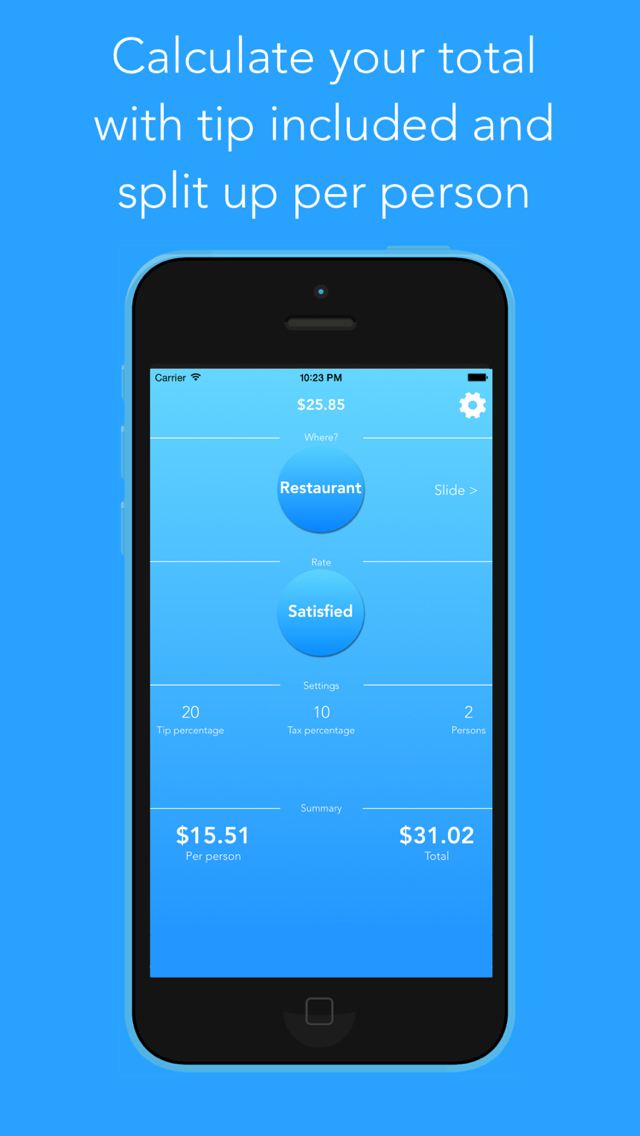
Black Lemon Dev today introduces Tippy 1.0, its new food & drink/lifestyle app developed for iPhone. Tippy helps you to determine the correct tip for your bill. With the app you are able to calculate your tip of the pre-tax bill amount, round up the total or split the bill. Inside the app there are 7 presets for common places like a "Restaurant" or a "Bar" in case you do not know how much you actually should tip depending on your satisfaction.
Castrop-Rauxel, Germany - Today, Black Lemon Dev is proud to announce that Tippy 1.0 for iOS has been released in all regions. Tippy is an app that helps you to determine the tip amount for a specific bill. This happens either with the user choosing a preset for a common place like a "Restaurant" or a "Bar" or with user input for all available parameters like the tip percentage. Additionally, Tippy offers the ability to calculate the proper tip pre-tax, as well as the ability to round up the total or split the bill for a set number of persons.
"A lot of people are unsure about the amount they have to tip. Therefore we decided to build an application which helps these people to calculate their tip easy and fast." said Torben Richter, Developer of Tippy.
Tippy is completely free of charge at this time. "I have always been a supporter of letting your customers test your app before they have to invest any money in it. Of course there is the possibility to remove the Ads from the app for example. There also will be a convenient function to replace the preset percentages with your own so you do not have to edit the number every time but all of the calculation and the basic functionality will be free for ever." continued Torben Richter.
Device Requirements:
* iPhone or iPod touch
* Requires iOS 7.0 or late
* 1.5 MB
Pricing and Available:
Tippy 1.0 is completely free to use and is available worldwide exclusively through the App Store in the Food & Drink/Lifestyle category.
Black Lemon Dev: http://www.blacklemondev.org
Tippy 1.0: http://www.blacklemondev.org/tippy
Download from iTunes: https://itunes.apple.com/app/id967654152
Screenshot: https://is5-ssl.mzstatic.com/image/thumb/Purple1/v4/8b/3d/a5/8b3da599-e54c-cc1b-bf59-aa29306d315e/pr_source.jpg/640x1136ss-80.png
App Icon: http://blacklemondev.org/images/AppIcon_Tippy.png
Located in Castrop-Rauxel, Germany, Black Lemon is a new indie software studio established in 2015. The company's focus is on mobile app development for the iOS platform. All Material and Software (C) Copyright 2015 Black Lemon Dev. All Rights Reserved. Apple, the Apple logo, iPhone, iPod and iPad are registered trademarks of Apple Inc. in the U.S. and/or other countries. Other trademarks and registered trademarks may be the property of their respective owners.
*******
Link To Article: http://prmac.com/release-id-73583.htm
*******
---------------------------------------------------------------------------------
Note that you can alter delivered distributions at any time.
Login to your account on prMac to alter your channel selection, or to opt-out at any time.
Tippy - Your Tip / Gratuity Buddy - Published on 02/24/15
Black Lemon Dev today introduces Tippy 1.0, its new food & drink/lifestyle app developed for iPhone. Tippy helps you to determine the correct tip for your bill. With the app you are able to calculate your tip of the pre-tax bill amount, round up the total or split the bill. Inside the app there are 7 presets for common places like a "Restaurant" or a "Bar" in case you do not know how much you actually should tip depending on your satisfaction.
Castrop-Rauxel, Germany - Today, Black Lemon Dev is proud to announce that Tippy 1.0 for iOS has been released in all regions. Tippy is an app that helps you to determine the tip amount for a specific bill. This happens either with the user choosing a preset for a common place like a "Restaurant" or a "Bar" or with user input for all available parameters like the tip percentage. Additionally, Tippy offers the ability to calculate the proper tip pre-tax, as well as the ability to round up the total or split the bill for a set number of persons.
"A lot of people are unsure about the amount they have to tip. Therefore we decided to build an application which helps these people to calculate their tip easy and fast." said Torben Richter, Developer of Tippy.
Tippy is completely free of charge at this time. "I have always been a supporter of letting your customers test your app before they have to invest any money in it. Of course there is the possibility to remove the Ads from the app for example. There also will be a convenient function to replace the preset percentages with your own so you do not have to edit the number every time but all of the calculation and the basic functionality will be free for ever." continued Torben Richter.
Device Requirements:
* iPhone or iPod touch
* Requires iOS 7.0 or late
* 1.5 MB
Pricing and Available:
Tippy 1.0 is completely free to use and is available worldwide exclusively through the App Store in the Food & Drink/Lifestyle category.
Black Lemon Dev: http://www.blacklemondev.org
Tippy 1.0: http://www.blacklemondev.org/tippy
Download from iTunes: https://itunes.apple.com/app/id967654152
Screenshot: https://is5-ssl.mzstatic.com/image/thumb/Purple1/v4/8b/3d/a5/8b3da599-e54c-cc1b-bf59-aa29306d315e/pr_source.jpg/640x1136ss-80.png
App Icon: http://blacklemondev.org/images/AppIcon_Tippy.png

Located in Castrop-Rauxel, Germany, Black Lemon is a new indie software studio established in 2015. The company's focus is on mobile app development for the iOS platform. All Material and Software (C) Copyright 2015 Black Lemon Dev. All Rights Reserved. Apple, the Apple logo, iPhone, iPod and iPad are registered trademarks of Apple Inc. in the U.S. and/or other countries. Other trademarks and registered trademarks may be the property of their respective owners.
*******
Link To Article: http://prmac.com/release-id-73583.htm
*******
---------------------------------------------------------------------------------
Note that you can alter delivered distributions at any time.
Login to your account on prMac to alter your channel selection, or to opt-out at any time.
WaterField Unveils Padded Gear Pouch for Electronics, Entertainment
A new article has been published at prMac.
WaterField Unveils Padded Gear Pouch for Electronics, Entertainment - Published on 02/24/15
San Francisco manufacturer, WaterField Designs today announces the new Padded Gear Pouch. Available in waxed canvas or ballistic nylon with vegetable-tanned, premium leather accents, this sleek accessory pouch protects and organizes with padded pockets, self-locking zippers and water-resistant textiles. Compact and light, the Padded Gear Pouch features one main compartment with several padded pockets and one front pocket with two organizational mesh pockets inside.
San Francisco, California - WaterField Designs today is proud to announce the new Padded Gear Pouch in waxed canvas or ballistic nylon with vegetable-tanned, premium leather accents. The sleek accessory pouch protects and organizes with padded pockets, self-locking zippers and water-resistant textiles. Compact and light, the Padded Gear Pouch remains thin for easy packing, even when fully stuffed.
The Padded Gear Pouch features one main compartment with several padded pockets and one front pocket with two organizational mesh pockets inside. Each compartment closes with self-locking zippers. Both the tan waxed canvas and the black ballistic nylon color choices offer excellent water resistance.
The Padded Gear Pouch is useful for:
* Tech professionals: iPad mini in large padded pocket, portable mouse and hard-drive in smaller padded pockets, headphones and wallet in main compartment. Front pockets for keys and additional cables.
* Travelers: eyeglasses in large padded pocket, phone, medications and headphones in smaller padded pockets, passport, wallet and boarding pass in main compartment. Front pockets for keys, Altoids, receipts and other miscellany.
* Entertainment lovers: Jambox speaker in main compartment, Apple TV or Roku and iPhone in smaller padded compartments, cables and ear buds in front organizational pockets.
"We like to offer our customers innovative ways to stay organized and protect their electronics on the go," explained company owner, Gary Waterfield. "The Padded Gear Pouch remains flat and light even when packed to the brim, making it much easier to stash in a bag or suitcase than bulky items. So versatile, it makes the ideal organizational pouch for just about anyone."
WaterField Designs, an innovative leader in custom laptop sleeves and designer bags and cases for digital gear, designs and manufactures all products entirely in San Francisco. The Padded Gear Pouch can be mixed and matched with other WaterField favorites including the Staad Laptop BackPack, the Bolt Briefcase, the VertiGo bag and others.
Pricing and Availability:
The all-new Padded Gear Pouch is priced at $59.00 (USD). Colors: Tan waxed canvas with grizzly leather trim or black ballistic nylon with black leather trim. Leather is full-grain, vegetable-tanned. Dimensions: 9.5 x 5.5 x 1.3 inches. Weight: 6 oz. Shipping begins February 27 from the WaterField Designs online store.
WaterField Designs: http://www.sfbags.com/
Padded Gear Pouch: http://www.sfbags.com/products/padded-gear-pouch
YouTube Video (Padded Gear Pouch Demo): https://www.youtube.com/watch?v=IUdSKcwIXSc
Screenshot: http://cdn.shopify.com/s/files/1/0281/2796/products/uUEn0DCRAqv2dAwoLMkxq03mEbNgqY3ZqPfNgH3kOZg_grande.jpg?v=1424729773
WaterField Designs is an innovative San Francisco designer and manufacturer of bags and cases for tech-savvy consumers who want to stylishly and responsibly transport their technology. WaterField manufactures custom-fitted, high-quality cases and bags for a full-range of laptop computers, smartphones, tablets, gaming devices and other digital gear. All products are manufactured to exacting standards entirely in San Francisco. More information at "Our Story." WaterField Designs, Staad, VertiGo and Bolt and SFBags are trademarks of WaterField Designs. Other company & product names may be trademarks of their respective owners. Copyright (C) 2009-2015 WaterField Designs. All Rights Reserved. Other trademarks and registered trademarks may be the property of their respective owners.
*******
Link To Article: http://prmac.com/release-id-73581.htm
*******
---------------------------------------------------------------------------------
Note that you can alter delivered distributions at any time.
Login to your account on prMac to alter your channel selection, or to opt-out at any time.
WaterField Unveils Padded Gear Pouch for Electronics, Entertainment - Published on 02/24/15
San Francisco manufacturer, WaterField Designs today announces the new Padded Gear Pouch. Available in waxed canvas or ballistic nylon with vegetable-tanned, premium leather accents, this sleek accessory pouch protects and organizes with padded pockets, self-locking zippers and water-resistant textiles. Compact and light, the Padded Gear Pouch features one main compartment with several padded pockets and one front pocket with two organizational mesh pockets inside.
San Francisco, California - WaterField Designs today is proud to announce the new Padded Gear Pouch in waxed canvas or ballistic nylon with vegetable-tanned, premium leather accents. The sleek accessory pouch protects and organizes with padded pockets, self-locking zippers and water-resistant textiles. Compact and light, the Padded Gear Pouch remains thin for easy packing, even when fully stuffed.
The Padded Gear Pouch features one main compartment with several padded pockets and one front pocket with two organizational mesh pockets inside. Each compartment closes with self-locking zippers. Both the tan waxed canvas and the black ballistic nylon color choices offer excellent water resistance.
The Padded Gear Pouch is useful for:
* Tech professionals: iPad mini in large padded pocket, portable mouse and hard-drive in smaller padded pockets, headphones and wallet in main compartment. Front pockets for keys and additional cables.
* Travelers: eyeglasses in large padded pocket, phone, medications and headphones in smaller padded pockets, passport, wallet and boarding pass in main compartment. Front pockets for keys, Altoids, receipts and other miscellany.
* Entertainment lovers: Jambox speaker in main compartment, Apple TV or Roku and iPhone in smaller padded compartments, cables and ear buds in front organizational pockets.
"We like to offer our customers innovative ways to stay organized and protect their electronics on the go," explained company owner, Gary Waterfield. "The Padded Gear Pouch remains flat and light even when packed to the brim, making it much easier to stash in a bag or suitcase than bulky items. So versatile, it makes the ideal organizational pouch for just about anyone."
WaterField Designs, an innovative leader in custom laptop sleeves and designer bags and cases for digital gear, designs and manufactures all products entirely in San Francisco. The Padded Gear Pouch can be mixed and matched with other WaterField favorites including the Staad Laptop BackPack, the Bolt Briefcase, the VertiGo bag and others.
Pricing and Availability:
The all-new Padded Gear Pouch is priced at $59.00 (USD). Colors: Tan waxed canvas with grizzly leather trim or black ballistic nylon with black leather trim. Leather is full-grain, vegetable-tanned. Dimensions: 9.5 x 5.5 x 1.3 inches. Weight: 6 oz. Shipping begins February 27 from the WaterField Designs online store.
WaterField Designs: http://www.sfbags.com/
Padded Gear Pouch: http://www.sfbags.com/products/padded-gear-pouch
YouTube Video (Padded Gear Pouch Demo): https://www.youtube.com/watch?v=IUdSKcwIXSc
Screenshot: http://cdn.shopify.com/s/files/1/0281/2796/products/uUEn0DCRAqv2dAwoLMkxq03mEbNgqY3ZqPfNgH3kOZg_grande.jpg?v=1424729773

WaterField Designs is an innovative San Francisco designer and manufacturer of bags and cases for tech-savvy consumers who want to stylishly and responsibly transport their technology. WaterField manufactures custom-fitted, high-quality cases and bags for a full-range of laptop computers, smartphones, tablets, gaming devices and other digital gear. All products are manufactured to exacting standards entirely in San Francisco. More information at "Our Story." WaterField Designs, Staad, VertiGo and Bolt and SFBags are trademarks of WaterField Designs. Other company & product names may be trademarks of their respective owners. Copyright (C) 2009-2015 WaterField Designs. All Rights Reserved. Other trademarks and registered trademarks may be the property of their respective owners.
*******
Link To Article: http://prmac.com/release-id-73581.htm
*******
---------------------------------------------------------------------------------
Note that you can alter delivered distributions at any time.
Login to your account on prMac to alter your channel selection, or to opt-out at any time.
Forex News Alarm App released on the iOS App Store
A new article has been published at prMac.
Forex News Alarm App released on the iOS App Store - Published on 02/24/15
Flagforex today introduces fxNewsAlarm 1.0, its new financial app developed for iPhone, iPad and iPod touch devices. fxNewsAlarm is a must-have productivity alarm app for forex and news traders who need to be notified of key news events for the upcoming week. fxNewsAlarm gets the news event from forexfactory economic calendar and displays them in a list for iOS users to view. The list is sorted by their country of release and level of impact which range from low, medium to high.
Singapore - Flagforex today is proud to announce the release of fxNewsAlarm 1.0, its new financial app developed for iPhone, iPad and iPod touch devices. Set forex news alarm to any iOS device easily with a single tap. fxNewsAlarm allows forex traders to be notified of key event market risks prior to any country news release.
News and currency traders who often missed the time release of specific news event can now receive the alarm and get informed prior to the news event. Unlike alternative financial apps that only show the economic news calendar, fxNewsAlarm takes notifications one step further by allowing alarm to be easily preset with these important events.
fxNewsAlarm gets the news event from forexfactory economic calendar and displays them in a list for iOS users to view. The list is sorted by their country of release and level of impact which range from low, medium to high. The app will get weekly news event from these countries: United States, Australia, Canada, Switzerland, China, Eurozone, United Kingdom, Japan and New Zealand. Users who wish to view the news event in greater detail can also get the following metadata:
* Date of release
* Time of release
* Country
* Impact
* Forecast data
* Previous data
Setting an alarm on the selected news event is as simple as tapping the ''Add'' button next to the news event name. Next, the alarm can be accessed or changed in the device's reminder app by launching the reminder app from the home screen. Go to the default fxNewsAlarm list and the added event item should be found. Click more to view or make changes to the alarm alert timing.
Added events are marked by a checkmark next to the news item in app. Removing the added item is as easy as swiping the row to the left and tap delete. The news item's alarm will be removed from the device. fxNewsAlarm is a must-have productivity alarm app for forex and news traders who need to be notified of key news events for the upcoming week. Now in two easy steps, users can set alarm by launching the app, locate the news event and tap add to set alarm.
Device Requirements:
* iPhone, iPad, and iPod touch
* Optimized for iPhone 5, iPhone 6/6 Plus
* Requires iOS 7.1 or later
* 2.8 MB
Pricing and Availability:
fxNewsAlarm 1.0 is $3.99 USD (or equivalent amount in other currencies) and available worldwide exclusively through the App Store in the Finance category.
fxNewsAlarm 1.0: http://www.flagforex.com/forexnewsalarm
Purchase and Download: https://itunes.apple.com/us/app/fxnewsalarm/id962672650
Screenshot: http://a4.mzstatic.com/us/r30/Purple3/v4/a2/2f/60/a22f60c9-3896-3ca1-b71e-81a541dfc44b/screen322x572.jpeg
App Icon: http://a5.mzstatic.com/us/r30/Purple1/v4/cb/33/b2/cb33b253-0b34-ec19-898c-bac04e618b67/icon175x175.png
Flagforex has been developing forex trading tools and apps for manual forex traders and investors since 2008. The business has developed 3 trading software packages on Metatrader 4 platform and 2 apps on the iOS app store which help to automate various trading processes for forex traders. The business has also partnered with currency brokers to come out with more institutionalized software applications and services that benefit the entire trading community. All Material and Software (C) Copyright 2015 Flag One Pte Ltd. All Rights Reserved. Apple, the Apple logo, iPhone, iPod and iPad are registered trademarks of Apple Inc. in the U.S. and/or other countries. Other trademarks and registered trademarks may be the property of their respective owners.
*******
Link To Article: http://prmac.com/release-id-73580.htm
*******
---------------------------------------------------------------------------------
Note that you can alter delivered distributions at any time.
Login to your account on prMac to alter your channel selection, or to opt-out at any time.
Forex News Alarm App released on the iOS App Store - Published on 02/24/15
Flagforex today introduces fxNewsAlarm 1.0, its new financial app developed for iPhone, iPad and iPod touch devices. fxNewsAlarm is a must-have productivity alarm app for forex and news traders who need to be notified of key news events for the upcoming week. fxNewsAlarm gets the news event from forexfactory economic calendar and displays them in a list for iOS users to view. The list is sorted by their country of release and level of impact which range from low, medium to high.
Singapore - Flagforex today is proud to announce the release of fxNewsAlarm 1.0, its new financial app developed for iPhone, iPad and iPod touch devices. Set forex news alarm to any iOS device easily with a single tap. fxNewsAlarm allows forex traders to be notified of key event market risks prior to any country news release.
News and currency traders who often missed the time release of specific news event can now receive the alarm and get informed prior to the news event. Unlike alternative financial apps that only show the economic news calendar, fxNewsAlarm takes notifications one step further by allowing alarm to be easily preset with these important events.
fxNewsAlarm gets the news event from forexfactory economic calendar and displays them in a list for iOS users to view. The list is sorted by their country of release and level of impact which range from low, medium to high. The app will get weekly news event from these countries: United States, Australia, Canada, Switzerland, China, Eurozone, United Kingdom, Japan and New Zealand. Users who wish to view the news event in greater detail can also get the following metadata:
* Date of release
* Time of release
* Country
* Impact
* Forecast data
* Previous data
Setting an alarm on the selected news event is as simple as tapping the ''Add'' button next to the news event name. Next, the alarm can be accessed or changed in the device's reminder app by launching the reminder app from the home screen. Go to the default fxNewsAlarm list and the added event item should be found. Click more to view or make changes to the alarm alert timing.
Added events are marked by a checkmark next to the news item in app. Removing the added item is as easy as swiping the row to the left and tap delete. The news item's alarm will be removed from the device. fxNewsAlarm is a must-have productivity alarm app for forex and news traders who need to be notified of key news events for the upcoming week. Now in two easy steps, users can set alarm by launching the app, locate the news event and tap add to set alarm.
Device Requirements:
* iPhone, iPad, and iPod touch
* Optimized for iPhone 5, iPhone 6/6 Plus
* Requires iOS 7.1 or later
* 2.8 MB
Pricing and Availability:
fxNewsAlarm 1.0 is $3.99 USD (or equivalent amount in other currencies) and available worldwide exclusively through the App Store in the Finance category.
fxNewsAlarm 1.0: http://www.flagforex.com/forexnewsalarm
Purchase and Download: https://itunes.apple.com/us/app/fxnewsalarm/id962672650
Screenshot: http://a4.mzstatic.com/us/r30/Purple3/v4/a2/2f/60/a22f60c9-3896-3ca1-b71e-81a541dfc44b/screen322x572.jpeg

App Icon: http://a5.mzstatic.com/us/r30/Purple1/v4/cb/33/b2/cb33b253-0b34-ec19-898c-bac04e618b67/icon175x175.png

Flagforex has been developing forex trading tools and apps for manual forex traders and investors since 2008. The business has developed 3 trading software packages on Metatrader 4 platform and 2 apps on the iOS app store which help to automate various trading processes for forex traders. The business has also partnered with currency brokers to come out with more institutionalized software applications and services that benefit the entire trading community. All Material and Software (C) Copyright 2015 Flag One Pte Ltd. All Rights Reserved. Apple, the Apple logo, iPhone, iPod and iPad are registered trademarks of Apple Inc. in the U.S. and/or other countries. Other trademarks and registered trademarks may be the property of their respective owners.
*******
Link To Article: http://prmac.com/release-id-73580.htm
*******
---------------------------------------------------------------------------------
Note that you can alter delivered distributions at any time.
Login to your account on prMac to alter your channel selection, or to opt-out at any time.
Subscribe to:
Posts (Atom)