A new article has been published at prMac.
Title Challenge: Football Management on iOS released by Kyan Games - Published on 03/02/15
UK based Kyan Games Ltd today announces Title Challenge - Football Management 1.0.1, an important update to their fun-to-play game title designed exclusively for iPhone, iPad and iPod touch devices. Inspired by the early football management games of the 90s, Title Challenge is a back-to-basics Football Manager game. Manage your favourite club from England, Spain, Germany, France and Italy. Version 1.0.1 includes a new community forum as well as minor bug fixes.
Guildford, United Kingdom - Kyan Games Ltd today is very proud to announce the release of Title Challenge - Football Management 1.0.1, an important update to their fun-to-play game title designed exclusively for iPhone, iPad and iPod touch devices. Inspired by the early football management games of the 90s, Title Challenge is a back-to-basics Football Manager game.
Due to popular demand, version 1.0.1 includes a community forum where the player's custom databases and gameplay tips can be shared. At the tap of a button, users can now share screenshots of your success with your Facebook friends or Twitter followers. The app also includes other minor bug fixes and user improvements.
Features:
* Manage your favourite club from England, Spain, Germany, France and Italy
* Update players and clubs using the free built-in data editor
* Fast-paced gameplay - Complete a season in a matter of hours
* Autosave feature - Pick up and play right where you left off
* Play anywhere - No internet connection required
* Drag and drop tactics with intelligent positioning
* Upgrade your training facilities to develop the stars of the future
* Upgrade your stadium to increase your club reputation
* Use your scouting network to identify transfer targets
Laurent Maguire also runs Rodeo Games where he created the Hunters series and the Games Workshop title Warhammer Quest. "I love the early Championship Manager games, basically since the release of CM 93 I've owned and played them to death. I still play modded version of those games now using DOSbox," stated Laurent Maguire, director at Kyan Games. "We felt these early games were a perfect fit for mobile and the existing games weren't quite hitting the spot for us. So we decided to pursue our dream of building a "back to basics" football management game with a focus on fewer features, designed for mobile. The user interface is a big deal for me and I thought this was an area we could really make ourselves stand out from the crowd. We had an idea early on that we wanted to bring some life and humour into the game using illustrations. We saw Dave Will's work for Liverpool FC and it turned out he also loved playing the same old games as us, so he knew exactly what we were trying to
achieve."
Reviews
* "There's a clean, flat aesthetic running through everything I've seen of Title Challenge" - Pocket Tactics
* "Addictive, smart and definitive" - Gaming Nation UK
* "The user interface is beautiful and much better than Football Manager Handheld" - FMH Vibe
* "Beautiful UI design and awesome game design, I actually couldn't ask for more" - Modern Jamming
* "A great addition to any fan of the sports simulation franchise family" - imPlayin
* "Puts the fun back into managing your favourite club" - App Advice
Paul Sturgess is a web developer turned app developer. He also witnessed Arsenal's invincible season first hand as a season ticket holder at Highbury. "I've never really stopped playing the classic Champ Man 01/02 release and I still pour hours into Sensible World of Soccer. Both of these games have the perfect balance of fun gameplay features and just enough 'real-life' simulation, explained Paul Sturgess, app developer for the game. "We've gone through several different iterations on the design. You can only really know if it's working by playing the game itself. We got a bare-bones prototype working as quickly as possible and just kept adjusting and tweaking it, making lots of minor improvements over time. Some people have said the loading screens are their favourite bit. It was loads of fun finding all the classic and funny quotes to use. We used what could have been a really dull screen as an opportunity to show we're not taking ourselves too seriously, plus some of the things
footballers say are hilarious."
The game design was handled by Laurent Maguire and Paul Sturgess. All programming was done by Paul Sturgess and Ahmet Abdi
The user Interface and branding by Thom Dorkings, and Dave Will illustrated the app.
Device Requirements:
* iPhone, iPad, and iPod touch
* Optimized for iPhone 5, iPhone 6/6 Plus
* Requires iOS 7.0 or later
* 59.5 MB
Pricing and Availability:
Title Challenge - Football Management 1.0.1 is $3.99 USD (or equivalent amount in other currencies) and available worldwide exclusively through the App Store in the Games category. There are 3 in-app purchases - all of which allow you to invest varying amounts of money into your club. Title Challenge does not require you to unlock any content and does not halt or restrict your progress at any time. There are no adverts in the game. Love playing Title Challenge? Please help us out and take a moment to review us on the App Store!
Kyan Games: http://kyan.com/
Title Challenge � Football Management 1.0.1: http://www.titlechallenge.com
Purchase and Download: http://itunes.apple.com/app/id959982756
YouTube Video (Trailer): https://www.youtube.com/watch?v=dVxzSpKP-x8
Media Assets: http://www.titlechallenge.com/press/
Press Kit (zip): http://www.titlechallenge.com/Title%20Challenge%20Press%20Kit.zip
Headquartered in Guildford, United Kingdom, Kyan Games is a small indie games outfit set up in 2013. The company is fast approaching their 10th birthday, with a combined experience of 128 years building web applications and websites of all shapes and sizes. Whether working for small start-ups, or large blue-chip corporations they apply the same levels of thought, care and attention to detail. All Material and Software (C) Copyright 2013-2015 Kyan Games. All Rights Reserved. Apple, the Apple logo, iPhone, iPod and iPad are registered trademarks of Apple Inc. in the U.S. and/or other countries. Other trademarks and registered trademarks may be the property of their respective owners.
*******
Link To Article: http://prmac.com/release-id-73695.htm
*******
---------------------------------------------------------------------------------
Note that you can alter delivered distributions at any time.
Login to your account on prMac to alter your channel selection, or to opt-out at any time.

Comprehension Builder 1 and 2 are available on iOS/Android/Google Chrome
A new article has been published at prMac.
Comprehension Builder 1 and 2 are available on iOS/Android/Google Chrome - Published on 03/02/15
Comprehension Builder 1 and Comprehension Builder 2 are the unique educational apps that teach construction of simple sentences in color-coded parts, with subject, verb, object and preposition components while asking "Wh" questions to build comprehension. You can create your own questions, sentences and photos and record your own voice. The self created content can be synced among different mobile devices with the user's Dropbox - an advantage for teachers in the classroom.
San Jose, California - Comprehension Builder 1 & 2, developed by AbiTalk Incorporated, are aimed at children from four years and upwards, and are relevant to early readers/writers as well as children with learning difficulties in special education settings. The apps offer the engaging and interactive way to learn a very important language skill. High quality photos and the ability to truly customize the apps for more than one student by creating your own sentences and questions, easily and quickly, make the apps a definite keeper.
Whether you are trying to target something specific or have a child that responds to familiar people or things, that feature is just a must have. The apps can also be used to help kids with sentence building, early grammar, articulation, receptive vocabulary and expressive vocabulary. The sentence structures offered in the app start off very simple, but they become more complex as you choose different groups, and that is before you factor in a higher difficulty level, so the app can grow with one child, or with a classroom, as it supports unlimited users. The self created content can be synced among different mobile devices with the user's Dropbox - an advantage for teachers in the classroom.
Comprehension Builder 1 is a unique educational app that teaches construction of simple sentences in color-coded parts, with subject, verb, object and preposition components while asking "Wh" questions - (Who? What? Where?) to build comprehension. This bottom-up approach is presented in five different sections of sentences types, from simple to complex sentence forms, all presented in present tense. Three levels are also included:
* Level one - with color-coded sentence parts and matching areas to move sentence parts in making sentences
* Level two - with color-coded sentence parts without the color-coding to match for more independent sentence-building
* Level three - Each word is presented separately, without color-coding, for the highest level of difficulty in constructing a sentence
In addition to the levels, there are also five different sentence types that increase in complexity. Other fantastic features of this app are the recording options (to record children as they produce sentences), the ability to track data for specific children, and the option to add self-created content to the app.
Comprehension Builder 2 is the second app in this series, with more complex sentence structure, including past and future tense verbs and prepositional phrases. This app builds comprehension of higher level questions - When? How?, and Why? A new component to this app is the level with multiple-choice questions.
Since these apps have launched, positive feedback has been pouring in from Parents, Teachers, Speech-Language Pathologists, and Special Educators who love these new apps. The AppyMall reviewers gave Comprehension Builder 5-stars and a rave review!
Comprehension Builder 1 & 2 are available on Apple App Store, Google Play, Amazon (Android), Chrome Web Store, Barnes and Noble (Nook), and Samsung Galaxy Apps.
Developed by Emmy Chen of AbiTalk, an app developer who leads the market in educational apps, Comprehension Builder is the first in a series of apps that focus on helping children to understand and use language. Emmy partnered with a Speech-Language Pathologist, Heidi Maloney, to collaborate and share the best ideas and content to focus on language and educational standards. Please visit AbiTalk online to check out these apps and more.
AbiTalk Mobile Education Apps: http://www.abitalk.com/
Comprehension Builder for iPad/iPhone: https://itunes.apple.com/us/app/comprehension-builder-english/id955295037?ls=1&mt=8&uo=4&at=11l4V8&ct=prmac
Comprehension Builder 2 for iPad/iPhone: https://itunes.apple.com/us/app/comprehension-builder-2-wh/id964370695?ls=1&mt=8&uo=4&at=11l4V8&ct=prmac
Comprehension Builder on Google Play: https://play.google.com/store/apps/details?id=com.abitalk.compbuilder
Comprehension Builder 2 on Google Play: https://play.google.com/store/apps/details?id=com.abitalk.compbuilder2
Comprehension Builder on Amazon: http://www.amazon.com/Abitalk-Comprehension-Builder-2/dp/B00T76WNDK/
AbiTalk offers over three hundred cross platform mobile apps focused on reading, math, science, phonics and languages. Their apps are packed with content, but each one focuses on a single skill, allowing kids to progress at their own pace. Bonuses and awards built into each app encourage players to keep practicing. As parents, we understand how kids learn and what gets them excited. As developers, we are able to channel that knowledge into educational games your kids will want to play. All Material and Software (C) Copyright 2015 AbiTalk. All Rights Reserved. Apple, the Apple logo, iPhone, iPod and iPad are registered trademarks of Apple Inc. in the U.S. and/or other countries. Other trademarks and registered trademarks may be the property of their respective owners.
*******
Link To Article: http://prmac.com/release-id-73688.htm
*******
---------------------------------------------------------------------------------
Note that you can alter delivered distributions at any time.
Login to your account on prMac to alter your channel selection, or to opt-out at any time.
Comprehension Builder 1 and 2 are available on iOS/Android/Google Chrome - Published on 03/02/15
Comprehension Builder 1 and Comprehension Builder 2 are the unique educational apps that teach construction of simple sentences in color-coded parts, with subject, verb, object and preposition components while asking "Wh" questions to build comprehension. You can create your own questions, sentences and photos and record your own voice. The self created content can be synced among different mobile devices with the user's Dropbox - an advantage for teachers in the classroom.
San Jose, California - Comprehension Builder 1 & 2, developed by AbiTalk Incorporated, are aimed at children from four years and upwards, and are relevant to early readers/writers as well as children with learning difficulties in special education settings. The apps offer the engaging and interactive way to learn a very important language skill. High quality photos and the ability to truly customize the apps for more than one student by creating your own sentences and questions, easily and quickly, make the apps a definite keeper.
Whether you are trying to target something specific or have a child that responds to familiar people or things, that feature is just a must have. The apps can also be used to help kids with sentence building, early grammar, articulation, receptive vocabulary and expressive vocabulary. The sentence structures offered in the app start off very simple, but they become more complex as you choose different groups, and that is before you factor in a higher difficulty level, so the app can grow with one child, or with a classroom, as it supports unlimited users. The self created content can be synced among different mobile devices with the user's Dropbox - an advantage for teachers in the classroom.
Comprehension Builder 1 is a unique educational app that teaches construction of simple sentences in color-coded parts, with subject, verb, object and preposition components while asking "Wh" questions - (Who? What? Where?) to build comprehension. This bottom-up approach is presented in five different sections of sentences types, from simple to complex sentence forms, all presented in present tense. Three levels are also included:
* Level one - with color-coded sentence parts and matching areas to move sentence parts in making sentences
* Level two - with color-coded sentence parts without the color-coding to match for more independent sentence-building
* Level three - Each word is presented separately, without color-coding, for the highest level of difficulty in constructing a sentence
In addition to the levels, there are also five different sentence types that increase in complexity. Other fantastic features of this app are the recording options (to record children as they produce sentences), the ability to track data for specific children, and the option to add self-created content to the app.
Comprehension Builder 2 is the second app in this series, with more complex sentence structure, including past and future tense verbs and prepositional phrases. This app builds comprehension of higher level questions - When? How?, and Why? A new component to this app is the level with multiple-choice questions.
Since these apps have launched, positive feedback has been pouring in from Parents, Teachers, Speech-Language Pathologists, and Special Educators who love these new apps. The AppyMall reviewers gave Comprehension Builder 5-stars and a rave review!
Comprehension Builder 1 & 2 are available on Apple App Store, Google Play, Amazon (Android), Chrome Web Store, Barnes and Noble (Nook), and Samsung Galaxy Apps.
Developed by Emmy Chen of AbiTalk, an app developer who leads the market in educational apps, Comprehension Builder is the first in a series of apps that focus on helping children to understand and use language. Emmy partnered with a Speech-Language Pathologist, Heidi Maloney, to collaborate and share the best ideas and content to focus on language and educational standards. Please visit AbiTalk online to check out these apps and more.
AbiTalk Mobile Education Apps: http://www.abitalk.com/
Comprehension Builder for iPad/iPhone: https://itunes.apple.com/us/app/comprehension-builder-english/id955295037?ls=1&mt=8&uo=4&at=11l4V8&ct=prmac
Comprehension Builder 2 for iPad/iPhone: https://itunes.apple.com/us/app/comprehension-builder-2-wh/id964370695?ls=1&mt=8&uo=4&at=11l4V8&ct=prmac
Comprehension Builder on Google Play: https://play.google.com/store/apps/details?id=com.abitalk.compbuilder
Comprehension Builder 2 on Google Play: https://play.google.com/store/apps/details?id=com.abitalk.compbuilder2
Comprehension Builder on Amazon: http://www.amazon.com/Abitalk-Comprehension-Builder-2/dp/B00T76WNDK/
AbiTalk offers over three hundred cross platform mobile apps focused on reading, math, science, phonics and languages. Their apps are packed with content, but each one focuses on a single skill, allowing kids to progress at their own pace. Bonuses and awards built into each app encourage players to keep practicing. As parents, we understand how kids learn and what gets them excited. As developers, we are able to channel that knowledge into educational games your kids will want to play. All Material and Software (C) Copyright 2015 AbiTalk. All Rights Reserved. Apple, the Apple logo, iPhone, iPod and iPad are registered trademarks of Apple Inc. in the U.S. and/or other countries. Other trademarks and registered trademarks may be the property of their respective owners.
*******
Link To Article: http://prmac.com/release-id-73688.htm
*******
---------------------------------------------------------------------------------
Note that you can alter delivered distributions at any time.
Login to your account on prMac to alter your channel selection, or to opt-out at any time.
Package Central for Adobe InDesign Improves Email Notifications
A new article has been published at prMac.
Package Central for Adobe InDesign Improves Email Notifications - Published on 03/02/15
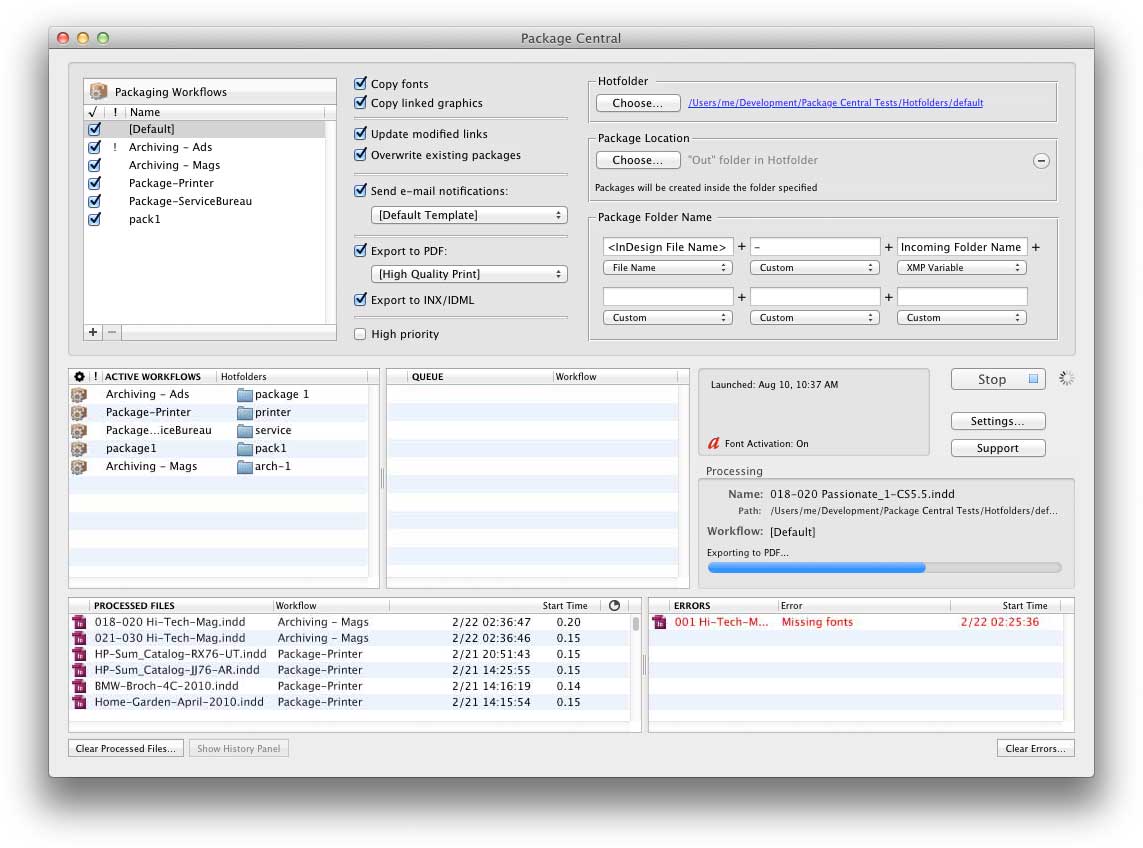
Toronto based Zevrix Solutions today announces Package Central 1.9, a feature update to its file packaging automation solution for Adobe InDesign. Package Central automates InDesign document collection by processing files from hot folders. The software offloads file packaging to a central system leaving operator workstations free from the collection process. Version 1.9 introduces a new email notification engine with support for SSL connection security and improved performance on OS X Yosemite.
Toronto (ON) Canada - Zevrix Solutions today is proud to announce the release of Package Central 1.9, a feature update to its document packaging automation solution for Adobe InDesign. Originally developed for a major publisher in the United States, the software automates InDesign packaging by processing files from hot folders. Package Central offloads file packaging to a central system leaving operator workstations free from the document collection process.
The new version introduces a new email notification engine which adds support for SSL and TLS connection security, transfer progress and other advanced features. The new engine also solves some email transmission issues on Mac OS X Yosemite.
Under Package Central workflow, production artists, prepress operators and designers simply submit InDesign files to hot folders that reside on a network. The software then automatically collects InDesign documents along with their fonts and links. Operator workstations will never again be tied up by the packaging process.
Package Central performs all its tasks automatically on a dedicated workstation, can run absolutely unattended, and supports unlimited users on a network. It offers the following key features and benefits:
* Automatically collect InDesign files from watched hot folders
* Create hot folders for various packaging settings
* Create PDF and INX/IDML files on the fly
* Automatic e-mail notifications of process stages and errors
* Variable package folder names
* Update modified links automatically
* XML metadata-based processing
* Detailed processing logs
* Easy to install and use
Pricing and Availability:
Package Central can be purchased for $299.95 (USD) from Zevrix website, as well as from authorized resellers. Trial is also available for download. Package Central requires Mac OS X 10.6-10.10 and Adobe InDesign CS4-CC 2014.
Zevrix Solutions: http://zevrix.com
Package Central 1.9: http://zevrix.com/PackageCentral.php
Download Package Central: http://zevrix.com/PackageCentral.dmg
Purchase: http://zevrix.com/store.php
Screenshot: http://zevrix.com/screenshots/pac/pac-main.jpg
Located in Toronto, Canada, Zevrix Solutions provides automation and productivity solutions for Adobe Creative Cloud and Creative Suite software, PDF workflows, graphic file diagnostics and Microsoft Office output on Mac OS. Zevrix is dedicated to help professionals increase their profits through automating everyday tasks, producing error-free documents, saving disk space and cutting production costs. For more information, visit their website. Copyright (C) 2015 Zevrix Solutions. All Rights Reserved. Other trademarks and registered trademarks may be the property of their respective owners.
*******
Link To Article: http://prmac.com/release-id-73687.htm
*******
---------------------------------------------------------------------------------
Note that you can alter delivered distributions at any time.
Login to your account on prMac to alter your channel selection, or to opt-out at any time.
Package Central for Adobe InDesign Improves Email Notifications - Published on 03/02/15
Toronto based Zevrix Solutions today announces Package Central 1.9, a feature update to its file packaging automation solution for Adobe InDesign. Package Central automates InDesign document collection by processing files from hot folders. The software offloads file packaging to a central system leaving operator workstations free from the collection process. Version 1.9 introduces a new email notification engine with support for SSL connection security and improved performance on OS X Yosemite.
Toronto (ON) Canada - Zevrix Solutions today is proud to announce the release of Package Central 1.9, a feature update to its document packaging automation solution for Adobe InDesign. Originally developed for a major publisher in the United States, the software automates InDesign packaging by processing files from hot folders. Package Central offloads file packaging to a central system leaving operator workstations free from the document collection process.
The new version introduces a new email notification engine which adds support for SSL and TLS connection security, transfer progress and other advanced features. The new engine also solves some email transmission issues on Mac OS X Yosemite.
Under Package Central workflow, production artists, prepress operators and designers simply submit InDesign files to hot folders that reside on a network. The software then automatically collects InDesign documents along with their fonts and links. Operator workstations will never again be tied up by the packaging process.
Package Central performs all its tasks automatically on a dedicated workstation, can run absolutely unattended, and supports unlimited users on a network. It offers the following key features and benefits:
* Automatically collect InDesign files from watched hot folders
* Create hot folders for various packaging settings
* Create PDF and INX/IDML files on the fly
* Automatic e-mail notifications of process stages and errors
* Variable package folder names
* Update modified links automatically
* XML metadata-based processing
* Detailed processing logs
* Easy to install and use
Pricing and Availability:
Package Central can be purchased for $299.95 (USD) from Zevrix website, as well as from authorized resellers. Trial is also available for download. Package Central requires Mac OS X 10.6-10.10 and Adobe InDesign CS4-CC 2014.
Zevrix Solutions: http://zevrix.com
Package Central 1.9: http://zevrix.com/PackageCentral.php
Download Package Central: http://zevrix.com/PackageCentral.dmg
Purchase: http://zevrix.com/store.php
Screenshot: http://zevrix.com/screenshots/pac/pac-main.jpg
Located in Toronto, Canada, Zevrix Solutions provides automation and productivity solutions for Adobe Creative Cloud and Creative Suite software, PDF workflows, graphic file diagnostics and Microsoft Office output on Mac OS. Zevrix is dedicated to help professionals increase their profits through automating everyday tasks, producing error-free documents, saving disk space and cutting production costs. For more information, visit their website. Copyright (C) 2015 Zevrix Solutions. All Rights Reserved. Other trademarks and registered trademarks may be the property of their respective owners.
*******
Link To Article: http://prmac.com/release-id-73687.htm
*******
---------------------------------------------------------------------------------
Note that you can alter delivered distributions at any time.
Login to your account on prMac to alter your channel selection, or to opt-out at any time.
Mac-Chi Announces Wordaux 1.0.1 - Easy-To-Use Basic Data Mining for OS X
A new article has been published at prMac.
Mac-Chi Announces Wordaux 1.0.1 - Easy-To-Use Basic Data Mining for OS X - Published on 03/02/15
Mac-Chi announces Wordaux 1.0.1, a data extraction tool, designed to empower Mac users to leverage data as they encounter it. Wordaux can be used by sales executives, students doing research, hipster life-hackers, or just the generally curious. Examples of usage include: creating contacts directly from spreadsheet data, building a note base for a research paper, augmenting an existing spreadsheet with data found on the web, or following up on interesting articles found while surfing the web.
Austin, Texas - Mac-Chi today is proud to announce the release Wordaux 1.0.1, a data extraction tool, designed to empower Mac users to leverage data as they encounter it. Wordaux can be used by sales executives, students doing research, hipster life-hackers, or just the generally curious. Examples of usage include: creating contacts direclty from spreadsheet data, building a note base for a research paper, augmenting an existing spreadsheet with data found on the web, or following up on interesting articles found while surfing the web.
Wordaux features a powerful set of integrated one-click user actions for Apple's Calendar, Contacts, Maps, Notes, Pages, Reminders, Safari, and TextEdit as well as Microsoft's Excel, Outlook 2011, and Word. Wordaux also provides full contextual support for each of the standard OS X Share actions.
Wordaux recognizes four data sources: selected text, the Clipboard, files, and webpages. With the exception of the clipboard, all the data source provide a citation to the source document. This citation can be optionally included in the universally supported drag actions as well as in most of the user actions. Wordaux extracts seven data types: names, email addresses, phone numbers, postal addresses, urls, dates, and a user supplied custom regex. The extracted data is presented in standard OS X tables and Wordaux provides immediate drag-ability.
Supported user actions include:
* Create a new contact - Wordaux automatically assembles candidate contacts to be stored in either Apple's Contacts or Microsoft Outlook 2011
* Search using Safari - for example, find all the names mentioned in an article and dig deeper on those individuals
* Open a tabbed Safari window - extract all the links in a data source and examine those of interest in a single window
* Append to existing Note or New Note - works with either Apple Notes or Outlook 2011 Notes
* New document or Append to existing document - works with Apple's TextEdit or Pages or Microsoft Word
* New spreadsheet or Append to existing spreadsheet - works with Apple's Numbers or Microsoft Excel
System Requirements:
* Mac OS X Version 10.9 or later (OS X Mavericks & Yosemite)
* 64-bit Intel
* 7.1 MB Hard Drive space
Pricing and Availability:
Wordaux 1.0.1 is available for $14.99 (USD) exclusively from the Mac App Store in the Business category.
Wordaux 1.0.1: http://www.wordaux.com
Purchase and Download (MAS): https://itunes.apple.com/us/app/wordaux/id736488349
Screenshots: http://www.wordaux.com/images
Application Icon: http://www.wordaux.com/assets/wordauxIcon.png
Located in historic fun-loving Austin, Texas, Mac-Chi is a privately funded company founded in 2010 by Steve Cronin. Mac-Chi focuses exclusively on OS X and iOS platforms. Copyright 2006-2015 Mac-Chi. All Rights Reserved. Apple, the Apple logo, Mac OS X and Macintosh are registered trademarks of Apple Computer in the U.S. and/or other countries. Other trademarks and registered trademarks may be the property of their respective owners.
*******
Link To Article: http://prmac.com/release-id-73685.htm
*******
---------------------------------------------------------------------------------
Note that you can alter delivered distributions at any time.
Login to your account on prMac to alter your channel selection, or to opt-out at any time.
Mac-Chi Announces Wordaux 1.0.1 - Easy-To-Use Basic Data Mining for OS X - Published on 03/02/15
Mac-Chi announces Wordaux 1.0.1, a data extraction tool, designed to empower Mac users to leverage data as they encounter it. Wordaux can be used by sales executives, students doing research, hipster life-hackers, or just the generally curious. Examples of usage include: creating contacts directly from spreadsheet data, building a note base for a research paper, augmenting an existing spreadsheet with data found on the web, or following up on interesting articles found while surfing the web.
Austin, Texas - Mac-Chi today is proud to announce the release Wordaux 1.0.1, a data extraction tool, designed to empower Mac users to leverage data as they encounter it. Wordaux can be used by sales executives, students doing research, hipster life-hackers, or just the generally curious. Examples of usage include: creating contacts direclty from spreadsheet data, building a note base for a research paper, augmenting an existing spreadsheet with data found on the web, or following up on interesting articles found while surfing the web.
Wordaux features a powerful set of integrated one-click user actions for Apple's Calendar, Contacts, Maps, Notes, Pages, Reminders, Safari, and TextEdit as well as Microsoft's Excel, Outlook 2011, and Word. Wordaux also provides full contextual support for each of the standard OS X Share actions.
Wordaux recognizes four data sources: selected text, the Clipboard, files, and webpages. With the exception of the clipboard, all the data source provide a citation to the source document. This citation can be optionally included in the universally supported drag actions as well as in most of the user actions. Wordaux extracts seven data types: names, email addresses, phone numbers, postal addresses, urls, dates, and a user supplied custom regex. The extracted data is presented in standard OS X tables and Wordaux provides immediate drag-ability.
Supported user actions include:
* Create a new contact - Wordaux automatically assembles candidate contacts to be stored in either Apple's Contacts or Microsoft Outlook 2011
* Search using Safari - for example, find all the names mentioned in an article and dig deeper on those individuals
* Open a tabbed Safari window - extract all the links in a data source and examine those of interest in a single window
* Append to existing Note or New Note - works with either Apple Notes or Outlook 2011 Notes
* New document or Append to existing document - works with Apple's TextEdit or Pages or Microsoft Word
* New spreadsheet or Append to existing spreadsheet - works with Apple's Numbers or Microsoft Excel
System Requirements:
* Mac OS X Version 10.9 or later (OS X Mavericks & Yosemite)
* 64-bit Intel
* 7.1 MB Hard Drive space
Pricing and Availability:
Wordaux 1.0.1 is available for $14.99 (USD) exclusively from the Mac App Store in the Business category.
Wordaux 1.0.1: http://www.wordaux.com
Purchase and Download (MAS): https://itunes.apple.com/us/app/wordaux/id736488349
Screenshots: http://www.wordaux.com/images
Application Icon: http://www.wordaux.com/assets/wordauxIcon.png

Located in historic fun-loving Austin, Texas, Mac-Chi is a privately funded company founded in 2010 by Steve Cronin. Mac-Chi focuses exclusively on OS X and iOS platforms. Copyright 2006-2015 Mac-Chi. All Rights Reserved. Apple, the Apple logo, Mac OS X and Macintosh are registered trademarks of Apple Computer in the U.S. and/or other countries. Other trademarks and registered trademarks may be the property of their respective owners.
*******
Link To Article: http://prmac.com/release-id-73685.htm
*******
---------------------------------------------------------------------------------
Note that you can alter delivered distributions at any time.
Login to your account on prMac to alter your channel selection, or to opt-out at any time.
Concrete Foundation Estimator for iOS - Estimate & Bid on Concrete Jobs
A new article has been published at prMac.
Concrete Foundation Estimator for iOS - Estimate & Bid on Concrete Jobs - Published on 03/02/15
Progress Builders today introduces Concrete Foundation Estimator 1.1.1 for iOS, a very efficient and extremely powerful productivity tool for all contractors and owner-builders. Concrete Foundation Estimator was specifically designed to simplify and speed up the process of estimating and bidding on concrete jobs. Easily create professional, editable, easy-to-understand construction bids, estimates, and quotes. Users can retrieve and modify estimates in seconds, make revisions and much more.
San Jose, California - Progress Builders today is proud to announce the release of Concrete Foundation Estimator 1.1.1, their new business app developed for iPhone, iPad and iPod touch devices. Developed by a real engineer and builder, Concrete Foundation Estimator is a very efficient and extremely powerful productivity tool for all contractors and owner-builders. This app was specifically designed to simplify and speed up the process of estimating and bidding on concrete jobs. Concrete Foundation Estimator helps anyone create professional, editable, easy-to-understand construction bids, estimates, and quotes, including all or any part of the following:
* Concrete demolition of existing slabs and footings
* Excavation volume and cost using manual labor or machinery
* Extracted soil hauling and dumping fees
* Crushed concrete hauling and dumping fees
* Materials cost and volume for:
* Footings
* Stem walls
* Piers
* Slabs
* Reinforcement
* Shear walls
* Anchor bolts
* All thread retrofits
* Concrete ready-mix or in bags
* Volume, cost and waste %
* Labor for piers, reinforcement assembly and concrete pouring
* Cost of concrete pumping
* Adjustable Workman's compensation rate
* Sales tax in your area for all materials
* Job overhead
* Custom fields to add to estimate
The Concrete Foundation Estimator application features a built-in portfolio page that saves all projects. Users can retrieve and modify estimates in seconds, make revisions, create PDF quotes or Excel editable spreadsheets. The app also offers a built-in Tutorials with tips for how to gather values from the plans and illustrated explanations for each section. The company also has built a webpage with FAQ's, to help answer any additional questions (and could use good suggestions for future updates).
"You don't have to worry about materials and labor cost every time you create an estimate," explained Ilya Fedulov, founder of San Jose-based Progress Builders. "CFE comes with preset settings, which you can adjust at your own level of price, time and use of materials. First time into the app you will need to go over all sections and update preset values. Occasionally you need to update material or labor cost. Future app version will allow periodically updates materials cost."
Device Requirements:
* iPhone, iPad, and iPod touch
* Requires iOS 8.0 or later
* 7.3 MB
Pricing and Availability:
Concrete Foundation Estimator 1.1.1 is $4.99 USD (or equivalent amount in other currencies) and available worldwide exclusively through the App Store in the Business category.
Progress Builders: http://progress-builders.com
Concrete Foundation Estimator 1.1.1: http://realbuilderadvice.com
Purchase and Download: https://itunes.apple.com/app/concrete-foundation-estimator/id961062189
Screenshot 1: http://a3.mzstatic.com/us/r30/Purple1/v4/6c/54/de/6c54de3c-31df-770d-c73d-a715b75d6575/screen568x568.jpeg
Screenshot 2: http://a3.mzstatic.com/us/r30/Purple5/v4/e8/ab/3a/e8ab3ac1-744a-d318-c450-4bc537308be7/screen568x568.jpeg
App Icon: http://a1.mzstatic.com/us/r30/Purple5/v4/b4/e9/9b/b4e99bfd-ac4e-d2f2-33f2-c339a64de942/icon175x175.png
Progress Builders is a full-service, Design-build company, working on residential construction market of San Francisco Bay Area. We are one-stop shop for all your building needs. Architectural plans, structural engineering, civil engineering, Title 24, green building checklist, soil reports and anything else - all in one place. We manage the project from first draft to last finish nail. All Material and Software (C) Copyright 2014 Progress Builders. All Rights Reserved. Apple, the Apple logo, iPhone, iPod and iPad are registered trademarks of Apple Inc. in the U.S. and/or other countries. Other trademarks and registered trademarks may be the property of their respective owners.
*******
Link To Article: http://prmac.com/release-id-73653.htm
*******
---------------------------------------------------------------------------------
Note that you can alter delivered distributions at any time.
Login to your account on prMac to alter your channel selection, or to opt-out at any time.
Concrete Foundation Estimator for iOS - Estimate & Bid on Concrete Jobs - Published on 03/02/15
Progress Builders today introduces Concrete Foundation Estimator 1.1.1 for iOS, a very efficient and extremely powerful productivity tool for all contractors and owner-builders. Concrete Foundation Estimator was specifically designed to simplify and speed up the process of estimating and bidding on concrete jobs. Easily create professional, editable, easy-to-understand construction bids, estimates, and quotes. Users can retrieve and modify estimates in seconds, make revisions and much more.
San Jose, California - Progress Builders today is proud to announce the release of Concrete Foundation Estimator 1.1.1, their new business app developed for iPhone, iPad and iPod touch devices. Developed by a real engineer and builder, Concrete Foundation Estimator is a very efficient and extremely powerful productivity tool for all contractors and owner-builders. This app was specifically designed to simplify and speed up the process of estimating and bidding on concrete jobs. Concrete Foundation Estimator helps anyone create professional, editable, easy-to-understand construction bids, estimates, and quotes, including all or any part of the following:
* Concrete demolition of existing slabs and footings
* Excavation volume and cost using manual labor or machinery
* Extracted soil hauling and dumping fees
* Crushed concrete hauling and dumping fees
* Materials cost and volume for:
* Footings
* Stem walls
* Piers
* Slabs
* Reinforcement
* Shear walls
* Anchor bolts
* All thread retrofits
* Concrete ready-mix or in bags
* Volume, cost and waste %
* Labor for piers, reinforcement assembly and concrete pouring
* Cost of concrete pumping
* Adjustable Workman's compensation rate
* Sales tax in your area for all materials
* Job overhead
* Custom fields to add to estimate
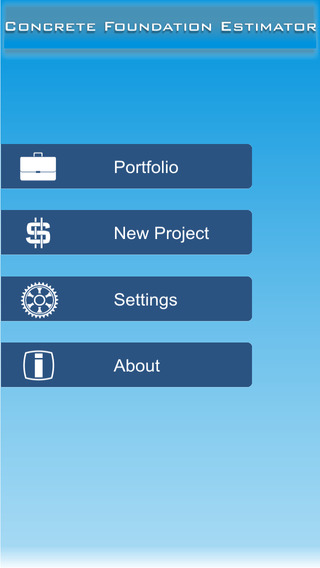
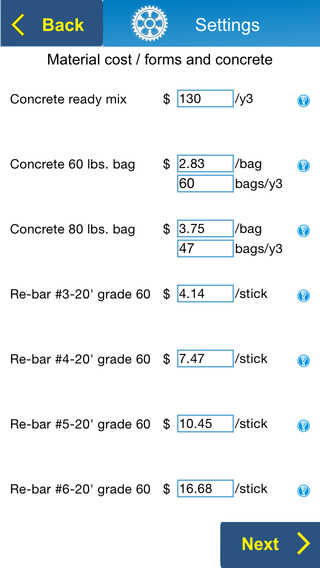
The Concrete Foundation Estimator application features a built-in portfolio page that saves all projects. Users can retrieve and modify estimates in seconds, make revisions, create PDF quotes or Excel editable spreadsheets. The app also offers a built-in Tutorials with tips for how to gather values from the plans and illustrated explanations for each section. The company also has built a webpage with FAQ's, to help answer any additional questions (and could use good suggestions for future updates).
"You don't have to worry about materials and labor cost every time you create an estimate," explained Ilya Fedulov, founder of San Jose-based Progress Builders. "CFE comes with preset settings, which you can adjust at your own level of price, time and use of materials. First time into the app you will need to go over all sections and update preset values. Occasionally you need to update material or labor cost. Future app version will allow periodically updates materials cost."
Device Requirements:
* iPhone, iPad, and iPod touch
* Requires iOS 8.0 or later
* 7.3 MB
Pricing and Availability:
Concrete Foundation Estimator 1.1.1 is $4.99 USD (or equivalent amount in other currencies) and available worldwide exclusively through the App Store in the Business category.
Progress Builders: http://progress-builders.com
Concrete Foundation Estimator 1.1.1: http://realbuilderadvice.com
Purchase and Download: https://itunes.apple.com/app/concrete-foundation-estimator/id961062189
Screenshot 1: http://a3.mzstatic.com/us/r30/Purple1/v4/6c/54/de/6c54de3c-31df-770d-c73d-a715b75d6575/screen568x568.jpeg
Screenshot 2: http://a3.mzstatic.com/us/r30/Purple5/v4/e8/ab/3a/e8ab3ac1-744a-d318-c450-4bc537308be7/screen568x568.jpeg
App Icon: http://a1.mzstatic.com/us/r30/Purple5/v4/b4/e9/9b/b4e99bfd-ac4e-d2f2-33f2-c339a64de942/icon175x175.png

Progress Builders is a full-service, Design-build company, working on residential construction market of San Francisco Bay Area. We are one-stop shop for all your building needs. Architectural plans, structural engineering, civil engineering, Title 24, green building checklist, soil reports and anything else - all in one place. We manage the project from first draft to last finish nail. All Material and Software (C) Copyright 2014 Progress Builders. All Rights Reserved. Apple, the Apple logo, iPhone, iPod and iPad are registered trademarks of Apple Inc. in the U.S. and/or other countries. Other trademarks and registered trademarks may be the property of their respective owners.
*******
Link To Article: http://prmac.com/release-id-73653.htm
*******
---------------------------------------------------------------------------------
Note that you can alter delivered distributions at any time.
Login to your account on prMac to alter your channel selection, or to opt-out at any time.
eJuice Calc recipe calculator now available on iPhone/iPad
A new article has been published at prMac.
eJuice Calc recipe calculator now available on iPhone/iPad - Published on 03/02/15
Spiral Star Development introduces eJuice Calc 1.0.1, the mobile version of their web-based calculator for DIY e-juice enthusiasts. The calculator allows DIY e-juice recipe creators the ability to fine-tune their recipes, given a variety of inputs, including PG/VG ratio, nicotine strength, and flavors. Recipes can be saved and edited on the phone, which makes it easy to remember what went into that favored "banana cream" recipe. eJuice Calc does the math for you.
Gulfport, Florida - Spiral Star Development is proud to announce the release of eJuice Calc 1.0.1, the mobile version of their web-based calculator for DIY e-juice enthusiasts. Responding to the needs of the growing DIY e-juice community, the calculator offers the ability to customize and save e-juice recipes right on an iPhone or iPad.
The calculator offers a variety of inputs, including PG/VG ratio, total volume, nicotine level, and flavors. This allows recipe creators to craft recipes that cater directly to the ever-picky e-juice consumer. Whether it's a 3mg, 6mg, or higher nicotine strength, or a 22%/78% target PG/VG ratio desired, eJuice Calc does the math for you.
Another key feature of the app is the ability to add unlimited flavors to a recipe. Many high-profile e-juice calculators allow only a fixed number of flavors, and the company considered unlimited recipe flavors a must-have in version 1. In addition, the flavor percentage and PG/VG ratio can be customized for each flavor.
Spiral Star Development is currently listening to and responding to community feedback, including feature requests. Features such as mix-by-weight, recipe cloning, and default recipe customization have been requested, and are planned for implementation in the near future.
Device Requirements:
* iPhone, iPad, and iPod touch
* Optimized for iPhone 5, iPhone 6/6 Plus
* 3.7 MB
Pricing and Availability:
eJuice Calc 1.0.1 is only $0.99 USD (or equivalent amount in other currencies) and available worldwide exclusively through the App Store in the Utilities category. In addition, a free version of the calculator is available at eJuice Calc online.
eJuice Calc 1.0.1: http://ejuicecalcapp.com
Purchase and Download: https://itunes.apple.com/app/ejuice-calc/id967128745
Screenshot: http://res.cloudinary.com/hrscywv4p/image/upload/c_limit,f_auto,h_900,q_80,w_1200/v1/259458/iphone_ss_iolrzz.png
App Icon: http://www.ejuicecalc.com/images/ejuice-calc-app-icon.png
Spiral Star Development is located in sunny, Gulfport, FL, and develops software for the web and mobile. All Material and Software (C) Copyright 2015 Spiral Star Development. All Rights Reserved. Apple, the Apple logo, iPhone, iPod and iPad are registered trademarks of Apple Inc. in the U.S. and/or other countries. Other trademarks and registered trademarks may be the property of their respective owners.
*******
Link To Article: http://prmac.com/release-id-73686.htm
*******
---------------------------------------------------------------------------------
Note that you can alter delivered distributions at any time.
Login to your account on prMac to alter your channel selection, or to opt-out at any time.
eJuice Calc recipe calculator now available on iPhone/iPad - Published on 03/02/15
Spiral Star Development introduces eJuice Calc 1.0.1, the mobile version of their web-based calculator for DIY e-juice enthusiasts. The calculator allows DIY e-juice recipe creators the ability to fine-tune their recipes, given a variety of inputs, including PG/VG ratio, nicotine strength, and flavors. Recipes can be saved and edited on the phone, which makes it easy to remember what went into that favored "banana cream" recipe. eJuice Calc does the math for you.
Gulfport, Florida - Spiral Star Development is proud to announce the release of eJuice Calc 1.0.1, the mobile version of their web-based calculator for DIY e-juice enthusiasts. Responding to the needs of the growing DIY e-juice community, the calculator offers the ability to customize and save e-juice recipes right on an iPhone or iPad.
The calculator offers a variety of inputs, including PG/VG ratio, total volume, nicotine level, and flavors. This allows recipe creators to craft recipes that cater directly to the ever-picky e-juice consumer. Whether it's a 3mg, 6mg, or higher nicotine strength, or a 22%/78% target PG/VG ratio desired, eJuice Calc does the math for you.
Another key feature of the app is the ability to add unlimited flavors to a recipe. Many high-profile e-juice calculators allow only a fixed number of flavors, and the company considered unlimited recipe flavors a must-have in version 1. In addition, the flavor percentage and PG/VG ratio can be customized for each flavor.
Spiral Star Development is currently listening to and responding to community feedback, including feature requests. Features such as mix-by-weight, recipe cloning, and default recipe customization have been requested, and are planned for implementation in the near future.
Device Requirements:
* iPhone, iPad, and iPod touch
* Optimized for iPhone 5, iPhone 6/6 Plus
* 3.7 MB
Pricing and Availability:
eJuice Calc 1.0.1 is only $0.99 USD (or equivalent amount in other currencies) and available worldwide exclusively through the App Store in the Utilities category. In addition, a free version of the calculator is available at eJuice Calc online.
eJuice Calc 1.0.1: http://ejuicecalcapp.com
Purchase and Download: https://itunes.apple.com/app/ejuice-calc/id967128745
Screenshot: http://res.cloudinary.com/hrscywv4p/image/upload/c_limit,f_auto,h_900,q_80,w_1200/v1/259458/iphone_ss_iolrzz.png

App Icon: http://www.ejuicecalc.com/images/ejuice-calc-app-icon.png

Spiral Star Development is located in sunny, Gulfport, FL, and develops software for the web and mobile. All Material and Software (C) Copyright 2015 Spiral Star Development. All Rights Reserved. Apple, the Apple logo, iPhone, iPod and iPad are registered trademarks of Apple Inc. in the U.S. and/or other countries. Other trademarks and registered trademarks may be the property of their respective owners.
*******
Link To Article: http://prmac.com/release-id-73686.htm
*******
---------------------------------------------------------------------------------
Note that you can alter delivered distributions at any time.
Login to your account on prMac to alter your channel selection, or to opt-out at any time.
Adventure Hero from Virtualinfocom
A new article has been published at prMac.
Adventure Hero from Virtualinfocom - Published on 02/28/15
Virtualinfocom announces its new game, Adventure Hero for the iPhone, iPad and iPod touch. Fight with the nature as you have become tiny and go to Kailash for Lord Ganesha who will be saving you and make you big. Adventure Hero is based on an Indian folk tale story which gives the user a real pleasure to play. Different places to visit different places to explore and different places to see. Adventure Hero is available through the App Store in the Games category.
Kolkata, India - Virtualinfocom is pleased to introduce the big adventures of a Little Hero Kid. Fight with nature as you have become tiny and go to Kailash for Lord Ganesha who will be saving you and make you big. The game is based on an Indian folk tale story which gives the user a real pleasure to play. Different places to visit different places to explore and different places to see.
The best adventure game on mobile with fast paced action. Move him around and go to a unforgettable journey. Bittu, a naughty little boy, is unthinkingly cruel to animals. He goes his merry way till a terrible crime causes him to be turned into a Thumbkin with no prospect of return to the human world.
Now, he is at the mercy of the very same animals he has wronged, and is desperate to make amends. But all the animals are happy with his situation! Finally, the pet lame swan of the family takes pity and Hriday is wafted away on his creaky wings to the Himalayas in search of Lord Ganesha who can save him.
The hero is suppose to go to the Kailash to please Lord Ganesha. Have some great fights with the local animals as he becames a small kid. He is now looking for help from the other animals but as earlier he was such a bad boy. No one is now helping him.
Features:
* Simple swipe control of action game
* Different types of food, more on the way
* Beautiful graphics
* Folk based Bengali music
Device Requirements:
* iPhone 3GS/4,4S/5,5c,5s/6, 6 Plus, iPad, iPod touch (3rd generation) and later
* Requires iOS 4.0 or later
* 46.5 MB
Pricing and Availability:
Adventure Hero 1.0 is only $0.99 USD (or equivalent amount in other currencies) and available worldwide exclusively through the App Store in the Games category.
Virtualinfocom: http://www.virtualinfocom.com
Adventure Hero 1.0: https://itunes.apple.com/app/adventure-hero/id907388284
Screenshot 1: http://a5.mzstatic.com/us/r30/Purple5/v4/f4/78/8f/f4788f28-2fea-c36b-27eb-a7e3eb0692de/screen520x924.jpeg
Screenshot 2: http://a1.mzstatic.com/us/r30/Purple5/v4/8f/89/b9/8f89b9d9-8634-69be-c3f3-c6d95c72e11e/screen520x924.jpeg
App Icon: http://a1.mzstatic.com/us/r30/Purple3/v4/51/82/62/518262dd-d481-fe80-18ca-f2c05d98ee4b/icon175x175.jpeg
Established in 1998, Virtualinfocom is known for many innovations in IT solution , game development animation. It all started with a dream. A dream to Bring Art and Technology Together Successfully, in a way that would allow the world to reap the benefits of creativity armed with Information technology. That dream shaped Virtualinfocom. An organization that, 16 years after its inception, offers knowledge solutions to 67000+ clients across 34 countries, with a network of over 12 centers and subsidiaries. All Material and Software (C) Copyright 2015 Virtualinfocom. All Rights Reserved. Apple, the Apple logo, iPhone, iPod and iPad are registered trademarks of Apple Inc. in the U.S. and/or other countries. Other trademarks and registered trademarks may be the property of their respective owners.
*******
Link To Article: http://prmac.com/release-id-73679.htm
*******
---------------------------------------------------------------------------------
Note that you can alter delivered distributions at any time.
Login to your account on prMac to alter your channel selection, or to opt-out at any time.
Adventure Hero from Virtualinfocom - Published on 02/28/15
Virtualinfocom announces its new game, Adventure Hero for the iPhone, iPad and iPod touch. Fight with the nature as you have become tiny and go to Kailash for Lord Ganesha who will be saving you and make you big. Adventure Hero is based on an Indian folk tale story which gives the user a real pleasure to play. Different places to visit different places to explore and different places to see. Adventure Hero is available through the App Store in the Games category.
Kolkata, India - Virtualinfocom is pleased to introduce the big adventures of a Little Hero Kid. Fight with nature as you have become tiny and go to Kailash for Lord Ganesha who will be saving you and make you big. The game is based on an Indian folk tale story which gives the user a real pleasure to play. Different places to visit different places to explore and different places to see.
The best adventure game on mobile with fast paced action. Move him around and go to a unforgettable journey. Bittu, a naughty little boy, is unthinkingly cruel to animals. He goes his merry way till a terrible crime causes him to be turned into a Thumbkin with no prospect of return to the human world.
Now, he is at the mercy of the very same animals he has wronged, and is desperate to make amends. But all the animals are happy with his situation! Finally, the pet lame swan of the family takes pity and Hriday is wafted away on his creaky wings to the Himalayas in search of Lord Ganesha who can save him.
The hero is suppose to go to the Kailash to please Lord Ganesha. Have some great fights with the local animals as he becames a small kid. He is now looking for help from the other animals but as earlier he was such a bad boy. No one is now helping him.
Features:
* Simple swipe control of action game
* Different types of food, more on the way
* Beautiful graphics
* Folk based Bengali music
Device Requirements:
* iPhone 3GS/4,4S/5,5c,5s/6, 6 Plus, iPad, iPod touch (3rd generation) and later
* Requires iOS 4.0 or later
* 46.5 MB
Pricing and Availability:
Adventure Hero 1.0 is only $0.99 USD (or equivalent amount in other currencies) and available worldwide exclusively through the App Store in the Games category.
Virtualinfocom: http://www.virtualinfocom.com
Adventure Hero 1.0: https://itunes.apple.com/app/adventure-hero/id907388284
Screenshot 1: http://a5.mzstatic.com/us/r30/Purple5/v4/f4/78/8f/f4788f28-2fea-c36b-27eb-a7e3eb0692de/screen520x924.jpeg

Screenshot 2: http://a1.mzstatic.com/us/r30/Purple5/v4/8f/89/b9/8f89b9d9-8634-69be-c3f3-c6d95c72e11e/screen520x924.jpeg

App Icon: http://a1.mzstatic.com/us/r30/Purple3/v4/51/82/62/518262dd-d481-fe80-18ca-f2c05d98ee4b/icon175x175.jpeg

Established in 1998, Virtualinfocom is known for many innovations in IT solution , game development animation. It all started with a dream. A dream to Bring Art and Technology Together Successfully, in a way that would allow the world to reap the benefits of creativity armed with Information technology. That dream shaped Virtualinfocom. An organization that, 16 years after its inception, offers knowledge solutions to 67000+ clients across 34 countries, with a network of over 12 centers and subsidiaries. All Material and Software (C) Copyright 2015 Virtualinfocom. All Rights Reserved. Apple, the Apple logo, iPhone, iPod and iPad are registered trademarks of Apple Inc. in the U.S. and/or other countries. Other trademarks and registered trademarks may be the property of their respective owners.
*******
Link To Article: http://prmac.com/release-id-73679.htm
*******
---------------------------------------------------------------------------------
Note that you can alter delivered distributions at any time.
Login to your account on prMac to alter your channel selection, or to opt-out at any time.
Subscribe to:
Posts (Atom)