A new article has been published at prMac.
Thin Space - a story-based interactive game - Published on 03/02/15
Studios Atoz Inc. announces its new app, Thin Space for the iOS platform. It is a totally new type of iPhone game that requires you to read between the lines of what is written & what is hidden. Available in the Books category on the App Store, Thin Space is a story-based interactive game featuring riddles, narrative puzzles & original story. Featuring an original story & a cast of intriguing characters, Thin Space is a unique experience for everyone who loves to dream beyond the written word.
Montreal, Canada - Studios Atoz Inc. is pleased to announce its new app, Thin Space. Ada has baffling dreams of high strangeness which leave her on the brink of insanity. Determined to understand this attack on her psyche, Ada embarks on an adventure that leads her to Peru and an ancient astronomical site called Chankillo. Beneath the stars, Ada will confront an ancient evil as she travels between realities, life and death, in what is known as the Thin Space.
Thin Space is a totally new type of iPhone game that requires you to read between the lines of what is written and what is hidden. Available in the Books category on the App Store, Thin Space is a story-based interactive game featuring riddles, narrative puzzles and original story.
Is it an impossible plan? Is there any hope for mankind? Heaven and Earth, the Celtic saying goes, are only three feet apart, but in thin places that distance is even shorter.
Key Features:
* Intriguing original story written specifically for the game
* Enthralling interactive puzzles based on the narrative
* Read and spot the clues to help Ada on her quest to solve the mystery
* Designed to be enjoyable in a stress-free way that draws the player deep into the story
Device Requirements:
* iPhone, iPad, and iPod touch
* Requires iOS 6.0 or later
* 51.0 MB
Pricing and Availability:
Thin Space 1.0 is $1.99 USD (or equivalent amount in other currencies) and available worldwide exclusively through the App Store in the Books category.
Thin Space 1.0: http://atozstudios.com
Purchase and Download: https://itunes.apple.com/WebObjects/MZStore.woa/wa/viewSoftware?id=945173545&mt=8
More info: http://www.wattpad.com/user/YJ_Atoz
YouTube Video (Preview): https://www.youtube.com/watch?v=jGuP6v6fH-A&feature=youtu.be
Screenshots: http://atozstudios.com/?page_id=467
Studios Atoz Inc. is a Montreal-based indie game company founded to create quality story-based games for mobile devices. Thin Space is the first game developed for iOS. All Material and Software (C) Copyright 2015 Studios Atoz Inc. All Rights Reserved. Apple, the Apple logo, iPhone, iPod and iPad are registered trademarks of Apple Inc. in the U.S. and/or other countries. Other trademarks and registered trademarks may be the property of their respective owners.
*******
Link To Article: http://prmac.com/release-id-73704.htm
*******
---------------------------------------------------------------------------------
Note that you can alter delivered distributions at any time.
Login to your account on prMac to alter your channel selection, or to opt-out at any time.

City Defense is Fun with Haypi Kingdom: The Return of the King 1.0.7
A new article has been published at prMac.
City Defense is Fun with Haypi Kingdom: The Return of the King 1.0.7 - Published on 03/02/15
Haypi Co., Ltd. today announces Haypi Kingdom: The Return of the King 1.0.7, an update to their popular war strategy MMO developed for iOS devices. Set in the Middle Age, things are so restless in this kingdom of magic and darkness. Save your people from suffering and chaos; construct a new superpower from the ruins; expand your realm and protect it from invaders. The new version of the game offers more fun strategies, when it comes to City Defense.
Shanghai, China - Haypi Co., Ltd. today is proud to announce the release and immediate availability of Haypi Kingdom: The Return of the King 1.0.7, an update to their popular war strategy MMO developed for iPhone, iPad and iPod touch devices. Haypi Kingdom: The Return of the King is a fun mobile game that puts players to into the roles of feudal lords in the dark and chaotic medieval times. They get to develop cities, expand territories, recruit heroes and much more. The multi-player feature allows players from all over the world to team up with allies, as they besiege forts and conquer lands. This amazing war strategy MMO has proven itself extremely popular amongst players. Every update makes it better and better and a worthy brother game of Haypi's first hit Haypi Kingdom.
The new version of the game offers more fun strategies, when it comes to City Defense. Now the challenge is even more intriguing, because the strategic efforts of the lords do make a difference, now more than ever. Thanks to new Strategy option implemented to Barracks Defense, from now on players can set up customized configurations against attacks and plunders from enemies (that is via the Attacked/Plundered tabs in the Barracks). Apart from that, other options have also been added to the defense configuration.
Now players can assign troops to defend against "Ranged Troops" or "Melee Troops". Making use of a good defense strategy is difficult, but the wittiest pals can put it to good use. Another big improvement to the game is the feature of building new defensive facilities. Trap, Log and Spear have been introduced to the game, creating a new way for players to defend their outer cities. Last but not least, Equipment Upgrade and VIP level-up info have been added to scroller news.
Except for launching great updates, Haypi Co., Ltd. often organizes exciting activities for almost all major holidays. Since the developer is based in China, bountiful activities and events for the fans were announced in celebration of the Chinese New Year. They all bring amazing gifts to the players from all over the world.
Device Requirements:
* iPhone, iPad, and iPod touch
* Requires iOS 6.0 or later
* 41.4 MB
Pricing and Availability:
Haypi Kingdom: The Return of the King 1.0.7 is Free and available worldwide exclusively through the App Store in the Games category. This strategy war game is fun, challenging and gives a sense of achievement. All brave heroes are invited to this amazing world!
Haypi Kingdom: The Return of the King 1.0.7: http://www.haypi.com/rotk/index.htm
Download from iTunes: https://itunes.apple.com/app/haypi-kingdom-return-king/id904874944
Screenshot 1: http://a3.mzstatic.com/us/r30/Purple4/v4/06/97/71/06977195-7a77-3ca6-65de-0c817ac21559/screen480x480.jpeg
Screenshot 2: http://a2.mzstatic.com/us/r30/Purple3/v4/1e/17/f2/1e17f299-e887-191f-15fb-36a430a9c57d/screen480x480.jpeg
Screenshot 3: http://a2.mzstatic.com/us/r30/Purple3/v4/dd/3e/bb/dd3ebb54-6578-f06f-aa4c-6947ca8f0923/screen480x480.jpeg
App Icon: http://a1.mzstatic.com/us/r30/Purple5/v4/cc/b5/db/ccb5db78-8b48-bac7-e9c2-7456305e2d00/mzl.pzdethuw.175x175-75.jpg
Haypi Co., Ltd. is a private company founded in 2008 and based in China. Haypi is the creator of Haypi Kingdom, Haypi Dragon and Haypi Monster, three popular MMORPGs downloaded over several million times by players from around the world. Copyright (C) 2015 Haypi Inc. All Rights Reserved. Apple, the Apple logo, iPhone, iPod and iPad are registered trademarks of Apple Inc. in the U.S. and/or other countries.
*******
Link To Article: http://prmac.com/release-id-73699.htm
*******
---------------------------------------------------------------------------------
Note that you can alter delivered distributions at any time.
Login to your account on prMac to alter your channel selection, or to opt-out at any time.
City Defense is Fun with Haypi Kingdom: The Return of the King 1.0.7 - Published on 03/02/15
Haypi Co., Ltd. today announces Haypi Kingdom: The Return of the King 1.0.7, an update to their popular war strategy MMO developed for iOS devices. Set in the Middle Age, things are so restless in this kingdom of magic and darkness. Save your people from suffering and chaos; construct a new superpower from the ruins; expand your realm and protect it from invaders. The new version of the game offers more fun strategies, when it comes to City Defense.
Shanghai, China - Haypi Co., Ltd. today is proud to announce the release and immediate availability of Haypi Kingdom: The Return of the King 1.0.7, an update to their popular war strategy MMO developed for iPhone, iPad and iPod touch devices. Haypi Kingdom: The Return of the King is a fun mobile game that puts players to into the roles of feudal lords in the dark and chaotic medieval times. They get to develop cities, expand territories, recruit heroes and much more. The multi-player feature allows players from all over the world to team up with allies, as they besiege forts and conquer lands. This amazing war strategy MMO has proven itself extremely popular amongst players. Every update makes it better and better and a worthy brother game of Haypi's first hit Haypi Kingdom.
The new version of the game offers more fun strategies, when it comes to City Defense. Now the challenge is even more intriguing, because the strategic efforts of the lords do make a difference, now more than ever. Thanks to new Strategy option implemented to Barracks Defense, from now on players can set up customized configurations against attacks and plunders from enemies (that is via the Attacked/Plundered tabs in the Barracks). Apart from that, other options have also been added to the defense configuration.
Now players can assign troops to defend against "Ranged Troops" or "Melee Troops". Making use of a good defense strategy is difficult, but the wittiest pals can put it to good use. Another big improvement to the game is the feature of building new defensive facilities. Trap, Log and Spear have been introduced to the game, creating a new way for players to defend their outer cities. Last but not least, Equipment Upgrade and VIP level-up info have been added to scroller news.
Except for launching great updates, Haypi Co., Ltd. often organizes exciting activities for almost all major holidays. Since the developer is based in China, bountiful activities and events for the fans were announced in celebration of the Chinese New Year. They all bring amazing gifts to the players from all over the world.
Device Requirements:
* iPhone, iPad, and iPod touch
* Requires iOS 6.0 or later
* 41.4 MB
Pricing and Availability:
Haypi Kingdom: The Return of the King 1.0.7 is Free and available worldwide exclusively through the App Store in the Games category. This strategy war game is fun, challenging and gives a sense of achievement. All brave heroes are invited to this amazing world!
Haypi Kingdom: The Return of the King 1.0.7: http://www.haypi.com/rotk/index.htm
Download from iTunes: https://itunes.apple.com/app/haypi-kingdom-return-king/id904874944
Screenshot 1: http://a3.mzstatic.com/us/r30/Purple4/v4/06/97/71/06977195-7a77-3ca6-65de-0c817ac21559/screen480x480.jpeg

Screenshot 2: http://a2.mzstatic.com/us/r30/Purple3/v4/1e/17/f2/1e17f299-e887-191f-15fb-36a430a9c57d/screen480x480.jpeg

Screenshot 3: http://a2.mzstatic.com/us/r30/Purple3/v4/dd/3e/bb/dd3ebb54-6578-f06f-aa4c-6947ca8f0923/screen480x480.jpeg

App Icon: http://a1.mzstatic.com/us/r30/Purple5/v4/cc/b5/db/ccb5db78-8b48-bac7-e9c2-7456305e2d00/mzl.pzdethuw.175x175-75.jpg

Haypi Co., Ltd. is a private company founded in 2008 and based in China. Haypi is the creator of Haypi Kingdom, Haypi Dragon and Haypi Monster, three popular MMORPGs downloaded over several million times by players from around the world. Copyright (C) 2015 Haypi Inc. All Rights Reserved. Apple, the Apple logo, iPhone, iPod and iPad are registered trademarks of Apple Inc. in the U.S. and/or other countries.
*******
Link To Article: http://prmac.com/release-id-73699.htm
*******
---------------------------------------------------------------------------------
Note that you can alter delivered distributions at any time.
Login to your account on prMac to alter your channel selection, or to opt-out at any time.
Print Messages or Export SMS as PDF from iPhone using SMS Export Plus
A new article has been published at prMac.
Print Messages or Export SMS as PDF from iPhone using SMS Export Plus - Published on 03/02/15
mTouchLabs today announces SMS Export Plus 1.7, their productivity app exclusively for iPhone and iPod touch. SMS Export Plus allows you to print, backup iMessages and SMS from your iPhone. Messages can be save as PDF using SMS Export Plus. you can archive and maintain records of all your messages at a single location in Excel file. Browse all backup messages in the .xls file very easily. You can filter messages by sender or sort messages by time and date.
Hyderabad, India - mTouchLabs today is proud to announce the release of SMS Export Plus 1.7, their productivity app exclusively for iPhone and iPod touch. The texts on your iPhone are now one of your most important forms of communication with your friends, family, loved ones. Maybe a friend sent you a funny joke that you want to save or maybe you need to make a backup of a text for legal purposes or may be running low on storage space?. Whatever the reason, SMS Export Plus lets you access and save your iPhone's messages on your Mac or PC in most widely used excel format or PDF. Also it is very convenient to Print messages from directly your iPhone.
No need to worry about loosing important messages of your iPhone. By using SMS export plus app anyone can preserve all messages in Excel file. SMS Export Plus gives you the ease of a tabular format to scan through your messages quicker. You can sort your messages based on multiple criteria, leveraging the sorting feature of a tabular format. With SMS Export Plus, you can now save your messages rather than delete them to free up some memory on your iOS devices.
Feature Highlights:
* Print SMS or Messages
* Save messages from each contact as PDF file
* Filter messages by contact before exporting
* Save exported messages directly to your computer
* Backup messages are saved in .xls format
* Email the backup messages in excel file format
* Browse all backup messages in the .xls file very easily - You can filter messages by sender or sort messages by time & date
* Easy to search for any message in your backup file
* You can export SMS or iMessages of Multiple devices into multiple excel files
* Detailed help guide available within the app
SMS Export plus is listed in Top 100 charts of Productivity category in the US.
Device Requirements:
* iPhone, iPad and iPod touch
* Requires iOS 7.0 or later
* This app is optimized for iPhone 5, iPhone 6 and iPhone 6 Plus
* 4.8 MB
Pricing and Availability:
Available the wonderful feature-rich SMS Export Plus 1.7 at just $3.99 (USD) worldwide from the App Store under the Productivity category. SMS Export Plus has been rated 4 by many of its existing users.
SMS Export Plus 1.7: http://www.smsexportplus.com
Purchase and Download: https://itunes.apple.com/app/sms-export-plus-backup-sms/id766405351
Screenshot 1: http://a1.mzstatic.com/us/r30/Purple1/v4/61/1e/64/611e6415-58eb-6cdb-a1e9-3df2f10c1ee3/screen696x696.jpeg
Screenshot 2: http://a2.mzstatic.com/us/r30/Purple3/v4/7e/ad/c3/7eadc3b3-aaf8-b014-5b4f-3a51ee960b80/screen696x696.jpeg
App Icon: http://a3.mzstatic.com/us/r30/Purple6/v4/96/32/8f/96328f0b-d772-6764-b6c6-5e877f065eb4/mzl.vljbqoob.175x175-75.jpg
mTouchLabs is a pioneer in the mobile development arena, releasing applications that are swift, visually appealing, and highly intuitive. Copyright (C) 2015 mTouchLabs. All Rights Reserved. Apple, the Apple logo, iPhone, iPad, iPad mini, iPod touch, and Mac are registered trademarks of Apple Inc. in the U.S. and/or other countries. Other trademarks and registered trademarks may be the property of their respective owners.
*******
Link To Article: http://prmac.com/release-id-73702.htm
*******
---------------------------------------------------------------------------------
Note that you can alter delivered distributions at any time.
Login to your account on prMac to alter your channel selection, or to opt-out at any time.
Print Messages or Export SMS as PDF from iPhone using SMS Export Plus - Published on 03/02/15
mTouchLabs today announces SMS Export Plus 1.7, their productivity app exclusively for iPhone and iPod touch. SMS Export Plus allows you to print, backup iMessages and SMS from your iPhone. Messages can be save as PDF using SMS Export Plus. you can archive and maintain records of all your messages at a single location in Excel file. Browse all backup messages in the .xls file very easily. You can filter messages by sender or sort messages by time and date.
Hyderabad, India - mTouchLabs today is proud to announce the release of SMS Export Plus 1.7, their productivity app exclusively for iPhone and iPod touch. The texts on your iPhone are now one of your most important forms of communication with your friends, family, loved ones. Maybe a friend sent you a funny joke that you want to save or maybe you need to make a backup of a text for legal purposes or may be running low on storage space?. Whatever the reason, SMS Export Plus lets you access and save your iPhone's messages on your Mac or PC in most widely used excel format or PDF. Also it is very convenient to Print messages from directly your iPhone.
No need to worry about loosing important messages of your iPhone. By using SMS export plus app anyone can preserve all messages in Excel file. SMS Export Plus gives you the ease of a tabular format to scan through your messages quicker. You can sort your messages based on multiple criteria, leveraging the sorting feature of a tabular format. With SMS Export Plus, you can now save your messages rather than delete them to free up some memory on your iOS devices.
Feature Highlights:
* Print SMS or Messages
* Save messages from each contact as PDF file
* Filter messages by contact before exporting
* Save exported messages directly to your computer
* Backup messages are saved in .xls format
* Email the backup messages in excel file format
* Browse all backup messages in the .xls file very easily - You can filter messages by sender or sort messages by time & date
* Easy to search for any message in your backup file
* You can export SMS or iMessages of Multiple devices into multiple excel files
* Detailed help guide available within the app
SMS Export plus is listed in Top 100 charts of Productivity category in the US.
Device Requirements:
* iPhone, iPad and iPod touch
* Requires iOS 7.0 or later
* This app is optimized for iPhone 5, iPhone 6 and iPhone 6 Plus
* 4.8 MB
Pricing and Availability:
Available the wonderful feature-rich SMS Export Plus 1.7 at just $3.99 (USD) worldwide from the App Store under the Productivity category. SMS Export Plus has been rated 4 by many of its existing users.
SMS Export Plus 1.7: http://www.smsexportplus.com
Purchase and Download: https://itunes.apple.com/app/sms-export-plus-backup-sms/id766405351
Screenshot 1: http://a1.mzstatic.com/us/r30/Purple1/v4/61/1e/64/611e6415-58eb-6cdb-a1e9-3df2f10c1ee3/screen696x696.jpeg
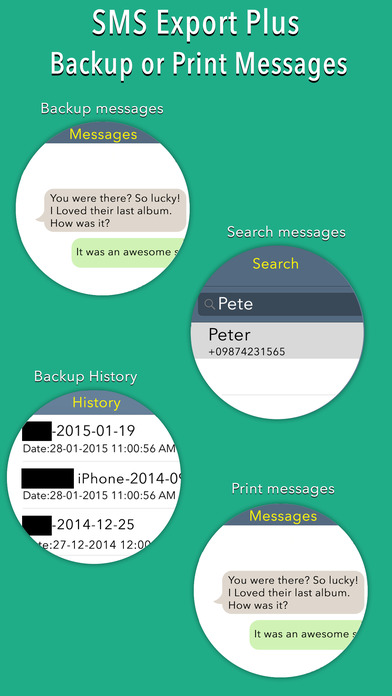
Screenshot 2: http://a2.mzstatic.com/us/r30/Purple3/v4/7e/ad/c3/7eadc3b3-aaf8-b014-5b4f-3a51ee960b80/screen696x696.jpeg

App Icon: http://a3.mzstatic.com/us/r30/Purple6/v4/96/32/8f/96328f0b-d772-6764-b6c6-5e877f065eb4/mzl.vljbqoob.175x175-75.jpg

mTouchLabs is a pioneer in the mobile development arena, releasing applications that are swift, visually appealing, and highly intuitive. Copyright (C) 2015 mTouchLabs. All Rights Reserved. Apple, the Apple logo, iPhone, iPad, iPad mini, iPod touch, and Mac are registered trademarks of Apple Inc. in the U.S. and/or other countries. Other trademarks and registered trademarks may be the property of their respective owners.
*******
Link To Article: http://prmac.com/release-id-73702.htm
*******
---------------------------------------------------------------------------------
Note that you can alter delivered distributions at any time.
Login to your account on prMac to alter your channel selection, or to opt-out at any time.
Verve Magazine extends its global digital reach with Magzter
A new article has been published at prMac.
Verve Magazine extends its global digital reach with Magzter - Published on 03/02/15
India's premier luxury lifestyle Women's Interest magazine, Verve is now on the world's largest and fastest growing global digital cross-platform newsstand and magazine & book store, Magzter. Anuradha Mahindra, the editor and publisher of Verve, has received top billing in Avenue Asia's list of Indians involved in the media. Marching towards its 19th year, Verve has worn the crown as vanguard of the lifestyle industry in India since its inception.
New York, New York - India's premier luxury lifestyle Women's Interest magazine, Verve is now on the world's largest and fastest growing global digital cross-platform newsstand and magazine & book store, Magzter. Anuradha Mahindra, the editor and publisher of Verve, has received top billing in Avenue Asia's list of Indians involved in the media.
Marching towards its 19th year, Verve, India's home-grown magazine, has worn the crown as vanguard of the lifestyle industry in India since its inception. Verve, which is about the international Indian woman who rubs shoulders with the world with confidence and elan is now poised to reach a global audience of over 25 million readers on Magzter's digital platform.
Several publishers from India opt to go digital on Magzter as presence on the platform creates massive awareness globally for their brands and magazines; that too with just a single upload. Added supplementary features like social sharing, Live updates and great discounts on subscriptions; give publishers and users a winning combination.
The magazine exudes the spirit of today's woman and celebrates the interests of the multifaceted contemporary global Indian, including fashion, beauty and style, glamour, arts and culture, travel and wellness. Verve is a prime catalyst for conversations around contemporary Indian culture in the world; a quality that transcends further than the pages of the magazine with Verve-organized offline event initiatives as well.
In the latest issue Verve celebrates romance and relationships!
Cover girls Erika Packard and Mariia Cherniakovych spell glamour and haute style in an exclusive fashion shoot as they speak about the men in their lives, their equation with each other and the excitement of it all. Verve recreates silver screen style in its annual edition of the Bollywood style awards. It also explores the 'I' in relationships for women have begun to celebrate their personal time. Experience the various delights of Paris and zip through Valencia in this issue.
"Verve is pleased to have been a part of Magzter for the last couple of years. We see it as a progressive platform and have faith in the growing readership of the Indian audience on online channels. We have seen a positive growth in readers engaging on the digital version of our Print edition via Magzter. Taking Verve's glossy Print edition online to millions of subscribers is a valuable service, which increases the reach of our publication and particularly so in a self-service tablet publishing solution. Magzter has demystified the act of online publishing!" - Sitanshi Talati-Parikh, Digital Editor, Verve Magazine
"It is great to have Verve on our newsstand. Known for its stylish approach to showcasing lifestyles, Verve is also well-regarded for its interesting features on the role of Indian culture and its significance around the world. Culturally sensitive with aesthetic sensibilities, Verve is fashion with thought. I am sure our global readers on Magzter will come to find this publication catchy, exciting and charming." - Girish Ramdas, CEO, Magzter Inc.
"Verve is a must-read for the urban, contemporary, lifestyle-savvy consumer in India. As India's very own home-made lifestyle, fashion and luxury women's magazine, Verve is the complete package with an unmistakable Indian edge. Magzter's popularity in India can be credited to the instant availability of content such as this, that is digitally delivered to all parts of the country and the rest of world with just one-click. Welcome aboard Verve!" - Vijay Radhakrishnan, President, Magzter Inc.
Verve Magazine is 19 years old. Started by Anuradha Mahindra in 1995, it turned 18 December 2013, in a stellar issue that you can see here. It is India's first and only home-grown women's luxury lifestyle monthly. Being a glossy, the emphasis on paper, printing, processing and aesthetics is intrinsic, but what people come back to it is the quality of content. It has always been a platform for talent to find a voice and gain recognition. Some of the most iconic, creative individuals have first been seen in the pages of Verve.
Magzter counts among its publisher customers some marquee names including Hearst (USA), American Media (USA), Bloomberg (USA), Dennis Publishing (UK), Time Inc. UK, Media24 (South Africa), Edipresse Asia (Hong Kong), India Today Group (India), WorldWide Media (India), Maxim Inc. (USA), Black Enterprise (USA), Singapore Press Holdings (Singapore), RBA (Spain) and Grupo Expansion (Mexico). Magzter has been rapidly increasing its publisher base with magazines from over 50 countries including the United States, United Kingdom, Germany, Spain, China, Hong Kong, India, Indonesia, Mexico, Thailand, Philippines, Malaysia, Singapore, and more; making it truly the #1 choice for magazine readers and publishers globally.
Device Requirements:
* iPhone, iPad, and iPod touch
* Optimized for iPhone 5, iPhone 6/6 Plus
* Requires iOS 7.0 or later
* 16.6 MB
Pricing and Availability:
Magzter - Magazine & Book Store 4.0.1 is free and available worldwide through the App Store in the News category. The magazine is priced at USD $17.80 for an annual subscription on Magzter. The Indian currency value for the same would be INR 1100 for an annual subscription. Magzter also launched a path-breaking �All You Can Read� subscription service called Magzter GOLD, which gives digital readers unlimited access to 2,000+ magazines for a low monthly price. The app is also available on Google Play, and Windows 8, the web, Amazon App Store, Kindle Fire, and NOOK and is expanding to more platforms soon. Magzter's easy purchase and renewal systems ensure subscriptions are paid on time, eliminating the need for paper checks and postal mail issues. Users can buy their magazines on any of the above devices/platforms and seamlessly port their purchases to any other devices, a feature unique to Magzter.
Magzter - Magazine & Book Store 4.0.1: http://www.magzter.com
Download from iTunes: https://itunes.apple.com/app/magzter-magazine-store/id412163953
Download from Google Play: https://play.google.com/store/apps/details?id=com.dci.magzter&hl=en
Download from Windows 8: http://apps.microsoft.com/windows/en-in/app/magzter/d6cf8e63-6af5-4710-b5e9-d3a0514292c6
Screenshot: http://a2.mzstatic.com/us/r30/Purple1/v4/68/46/13/684613b6-f129-2889-bcd6-57fde35c8eff/screen480x480.jpeg
App Icon: http://a2.mzstatic.com/us/r30/Purple5/v4/81/fc/d3/81fcd369-00cd-a585-26d7-ee2f176c3c4b/mzl.orihehsu.175x175-75.jpg
Magzter Inc. is the world's largest and fastest growing self-service, cross-platform digital magazine store and newsstand with over 24 million digital consumers, more than 5,000 magazines, thousands of books from over 2,000 publishers. Headquartered in New York, Magzter has its local offices in London, Paris, Barcelona, Munich, Amsterdam, Cape Town, Chennai and Singapore and will soon be expanding to other countries. Founded by global entrepreneurs, Girish Ramdas and Vijayakumar Radhakrishnan in June 2011, Magzter enables magazine publishers around the world to create and deliver digital editions of their titles to global consumers. Powered by its proprietary OREY Click Publishing System(R), Magzter also enables their customers to publish interactive/audio-visual content in the magazine as it supports HTML 5. Magzter launched Magzter GOLD subscription service to give digital readers unlimited access to 1000s of magazines for a low monthly price.All Material and Software (C)
Copyright 2015 Magzter Inc. All Rights Reserved. Apple, the Apple logo, iPhone, iPod and iPad are registered trademarks of Apple Inc. in the U.S. and/or other countries. Other trademarks and registered trademarks may be the property of their respective owners.
*******
Link To Article: http://prmac.com/release-id-73703.htm
*******
---------------------------------------------------------------------------------
Note that you can alter delivered distributions at any time.
Login to your account on prMac to alter your channel selection, or to opt-out at any time.
Verve Magazine extends its global digital reach with Magzter - Published on 03/02/15
India's premier luxury lifestyle Women's Interest magazine, Verve is now on the world's largest and fastest growing global digital cross-platform newsstand and magazine & book store, Magzter. Anuradha Mahindra, the editor and publisher of Verve, has received top billing in Avenue Asia's list of Indians involved in the media. Marching towards its 19th year, Verve has worn the crown as vanguard of the lifestyle industry in India since its inception.
New York, New York - India's premier luxury lifestyle Women's Interest magazine, Verve is now on the world's largest and fastest growing global digital cross-platform newsstand and magazine & book store, Magzter. Anuradha Mahindra, the editor and publisher of Verve, has received top billing in Avenue Asia's list of Indians involved in the media.
Marching towards its 19th year, Verve, India's home-grown magazine, has worn the crown as vanguard of the lifestyle industry in India since its inception. Verve, which is about the international Indian woman who rubs shoulders with the world with confidence and elan is now poised to reach a global audience of over 25 million readers on Magzter's digital platform.
Several publishers from India opt to go digital on Magzter as presence on the platform creates massive awareness globally for their brands and magazines; that too with just a single upload. Added supplementary features like social sharing, Live updates and great discounts on subscriptions; give publishers and users a winning combination.
The magazine exudes the spirit of today's woman and celebrates the interests of the multifaceted contemporary global Indian, including fashion, beauty and style, glamour, arts and culture, travel and wellness. Verve is a prime catalyst for conversations around contemporary Indian culture in the world; a quality that transcends further than the pages of the magazine with Verve-organized offline event initiatives as well.
In the latest issue Verve celebrates romance and relationships!
Cover girls Erika Packard and Mariia Cherniakovych spell glamour and haute style in an exclusive fashion shoot as they speak about the men in their lives, their equation with each other and the excitement of it all. Verve recreates silver screen style in its annual edition of the Bollywood style awards. It also explores the 'I' in relationships for women have begun to celebrate their personal time. Experience the various delights of Paris and zip through Valencia in this issue.
"Verve is pleased to have been a part of Magzter for the last couple of years. We see it as a progressive platform and have faith in the growing readership of the Indian audience on online channels. We have seen a positive growth in readers engaging on the digital version of our Print edition via Magzter. Taking Verve's glossy Print edition online to millions of subscribers is a valuable service, which increases the reach of our publication and particularly so in a self-service tablet publishing solution. Magzter has demystified the act of online publishing!" - Sitanshi Talati-Parikh, Digital Editor, Verve Magazine
"It is great to have Verve on our newsstand. Known for its stylish approach to showcasing lifestyles, Verve is also well-regarded for its interesting features on the role of Indian culture and its significance around the world. Culturally sensitive with aesthetic sensibilities, Verve is fashion with thought. I am sure our global readers on Magzter will come to find this publication catchy, exciting and charming." - Girish Ramdas, CEO, Magzter Inc.
"Verve is a must-read for the urban, contemporary, lifestyle-savvy consumer in India. As India's very own home-made lifestyle, fashion and luxury women's magazine, Verve is the complete package with an unmistakable Indian edge. Magzter's popularity in India can be credited to the instant availability of content such as this, that is digitally delivered to all parts of the country and the rest of world with just one-click. Welcome aboard Verve!" - Vijay Radhakrishnan, President, Magzter Inc.
Verve Magazine is 19 years old. Started by Anuradha Mahindra in 1995, it turned 18 December 2013, in a stellar issue that you can see here. It is India's first and only home-grown women's luxury lifestyle monthly. Being a glossy, the emphasis on paper, printing, processing and aesthetics is intrinsic, but what people come back to it is the quality of content. It has always been a platform for talent to find a voice and gain recognition. Some of the most iconic, creative individuals have first been seen in the pages of Verve.
Magzter counts among its publisher customers some marquee names including Hearst (USA), American Media (USA), Bloomberg (USA), Dennis Publishing (UK), Time Inc. UK, Media24 (South Africa), Edipresse Asia (Hong Kong), India Today Group (India), WorldWide Media (India), Maxim Inc. (USA), Black Enterprise (USA), Singapore Press Holdings (Singapore), RBA (Spain) and Grupo Expansion (Mexico). Magzter has been rapidly increasing its publisher base with magazines from over 50 countries including the United States, United Kingdom, Germany, Spain, China, Hong Kong, India, Indonesia, Mexico, Thailand, Philippines, Malaysia, Singapore, and more; making it truly the #1 choice for magazine readers and publishers globally.
Device Requirements:
* iPhone, iPad, and iPod touch
* Optimized for iPhone 5, iPhone 6/6 Plus
* Requires iOS 7.0 or later
* 16.6 MB
Pricing and Availability:
Magzter - Magazine & Book Store 4.0.1 is free and available worldwide through the App Store in the News category. The magazine is priced at USD $17.80 for an annual subscription on Magzter. The Indian currency value for the same would be INR 1100 for an annual subscription. Magzter also launched a path-breaking �All You Can Read� subscription service called Magzter GOLD, which gives digital readers unlimited access to 2,000+ magazines for a low monthly price. The app is also available on Google Play, and Windows 8, the web, Amazon App Store, Kindle Fire, and NOOK and is expanding to more platforms soon. Magzter's easy purchase and renewal systems ensure subscriptions are paid on time, eliminating the need for paper checks and postal mail issues. Users can buy their magazines on any of the above devices/platforms and seamlessly port their purchases to any other devices, a feature unique to Magzter.
Magzter - Magazine & Book Store 4.0.1: http://www.magzter.com
Download from iTunes: https://itunes.apple.com/app/magzter-magazine-store/id412163953
Download from Google Play: https://play.google.com/store/apps/details?id=com.dci.magzter&hl=en
Download from Windows 8: http://apps.microsoft.com/windows/en-in/app/magzter/d6cf8e63-6af5-4710-b5e9-d3a0514292c6
Screenshot: http://a2.mzstatic.com/us/r30/Purple1/v4/68/46/13/684613b6-f129-2889-bcd6-57fde35c8eff/screen480x480.jpeg

App Icon: http://a2.mzstatic.com/us/r30/Purple5/v4/81/fc/d3/81fcd369-00cd-a585-26d7-ee2f176c3c4b/mzl.orihehsu.175x175-75.jpg

Magzter Inc. is the world's largest and fastest growing self-service, cross-platform digital magazine store and newsstand with over 24 million digital consumers, more than 5,000 magazines, thousands of books from over 2,000 publishers. Headquartered in New York, Magzter has its local offices in London, Paris, Barcelona, Munich, Amsterdam, Cape Town, Chennai and Singapore and will soon be expanding to other countries. Founded by global entrepreneurs, Girish Ramdas and Vijayakumar Radhakrishnan in June 2011, Magzter enables magazine publishers around the world to create and deliver digital editions of their titles to global consumers. Powered by its proprietary OREY Click Publishing System(R), Magzter also enables their customers to publish interactive/audio-visual content in the magazine as it supports HTML 5. Magzter launched Magzter GOLD subscription service to give digital readers unlimited access to 1000s of magazines for a low monthly price.All Material and Software (C)
Copyright 2015 Magzter Inc. All Rights Reserved. Apple, the Apple logo, iPhone, iPod and iPad are registered trademarks of Apple Inc. in the U.S. and/or other countries. Other trademarks and registered trademarks may be the property of their respective owners.
*******
Link To Article: http://prmac.com/release-id-73703.htm
*******
---------------------------------------------------------------------------------
Note that you can alter delivered distributions at any time.
Login to your account on prMac to alter your channel selection, or to opt-out at any time.
Audio Switcher 2.5.3 for OS X - Menu Bar Applet for Audio
A new article has been published at prMac.
Audio Switcher 2.5.3 for OS X - Menu Bar Applet for Audio - Published on 03/02/15
Spike Software Inc. today announces Audio Switcher 2.5.3, an update to its popular menubar applet utility exclusively for Mac OS X. Audio Switcher allows you to quickly switch your audio input and output between different audio devices. It automatically detects when your audio devices are connected or disconnected and you can even set a given device as your default input or output device. Version 2.5.3 adds a preference where the audio device's manufacturer's name can appear in the menu.
Skokie, Illinois - Spike Software Inc. is proud to announce the release of Audio Switcher 2.5.3, an important update for its popular menubar applet utility developed exclusively for Mac OS X. Audio Switcher allows you to quickly switch your audio input and output between different audio devices.
Originally released in 2007, Audio Switcher supports a wide range of devices, such as Griffin Technology's Powermate and other USB audio devices, Apple's Thunderbolt monitors, AirPlay devices, such as the AirPort Express or Apple TV, along with Firewire devices and, of course, the built-in audio hardware of your Mac desktop or laptop.
Audio Switcher resides in the Status Bar, making it conveniently accessible from any application. Audio Switcher automatically detects when your audio devices are connected or disconnected and you can even set a given device as your default input or output device and Audio Switcher will switch to this device anytime it is connected. Audio Switcher also allows you to set a default volume or gain level for your devices. When switching between your devices, you can set a default volume or gain and when switching to a new device, Audio Switcher can automatically set the volume or gain. Setting Audio Switcher as a login item allows all of these features to work as soon as it launches.
This version adds a preference where the audio device's manufacturer's name can appear in the menu, just below the device. This provides a benefit to users with multiple devices with the same name.
Audio Switcher was originally developed to fill a void in the otherwise excellent Mac OS X. Earlier versions of the OS did not allow simple switching between audio devices. Users had to open the System Preferences and select devices there. Audio Switcher was developed in 2007 to allow users a simpler, more direct way of switching devices; from the menubar. Apple has since made this simpler as well, but Audio Switcher goes a bit further still. by allowing users to select default devices and volume and gain levels. Audio Switcher is continually updated with new features and users are invited to make suggestions they believe will make it an even better product.
System Requirements:
* OS X 10.7 or later
* 64-bit processor
* 1.7 MB
Pricing and Availability:
Audio Switcher 2.5.3 is $4.99 USD (or equivalent amount in other currencies) and available worldwide through the Mac App Store in the Utilities category. Current users can receive the free update via the Mac Store. Visit Spike Software online for more information, support and to leave feedback.
Spike Software: http://www.spikesoft.net/
Audio Switcher 2.5.3: http://www.spikesoft.net/?page_id=21
Purchase and Download (MAS): https://itunes.apple.com/us/app/audio-switcher/id930245446?mt=12
Screenshot: http://a3.mzstatic.com/us/r30/Purple3/v4/d6/5e/ee/d65eee73-6d58-547d-750f-9f270ccad198/screen800x500.jpeg
Application Icon: http://a2.mzstatic.com/us/r30/Purple3/v4/25/f0/a8/25f0a871-1455-9ff3-f460-ea3231ad1906/icon256.png
Located in Skokie, Illinois, Spike Software is a small development studio founded by Lorenzo Thurman. The company specializes in Mac and iOS utility software. All Material and Software (C) Copyright 2015 Spike Software Inc. All Rights Reserved. Apple, the Apple logo, Mac OS X iPhone, iPod, iPad and Macintosh are registered trademarks of Apple Inc. in the U.S. and/or other countries. Other trademarks and registered trademarks may be the property of their respective owners.
*******
Link To Article: http://prmac.com/release-id-73697.htm
*******
---------------------------------------------------------------------------------
Note that you can alter delivered distributions at any time.
Login to your account on prMac to alter your channel selection, or to opt-out at any time.
Audio Switcher 2.5.3 for OS X - Menu Bar Applet for Audio - Published on 03/02/15
Spike Software Inc. today announces Audio Switcher 2.5.3, an update to its popular menubar applet utility exclusively for Mac OS X. Audio Switcher allows you to quickly switch your audio input and output between different audio devices. It automatically detects when your audio devices are connected or disconnected and you can even set a given device as your default input or output device. Version 2.5.3 adds a preference where the audio device's manufacturer's name can appear in the menu.
Skokie, Illinois - Spike Software Inc. is proud to announce the release of Audio Switcher 2.5.3, an important update for its popular menubar applet utility developed exclusively for Mac OS X. Audio Switcher allows you to quickly switch your audio input and output between different audio devices.
Originally released in 2007, Audio Switcher supports a wide range of devices, such as Griffin Technology's Powermate and other USB audio devices, Apple's Thunderbolt monitors, AirPlay devices, such as the AirPort Express or Apple TV, along with Firewire devices and, of course, the built-in audio hardware of your Mac desktop or laptop.
Audio Switcher resides in the Status Bar, making it conveniently accessible from any application. Audio Switcher automatically detects when your audio devices are connected or disconnected and you can even set a given device as your default input or output device and Audio Switcher will switch to this device anytime it is connected. Audio Switcher also allows you to set a default volume or gain level for your devices. When switching between your devices, you can set a default volume or gain and when switching to a new device, Audio Switcher can automatically set the volume or gain. Setting Audio Switcher as a login item allows all of these features to work as soon as it launches.
This version adds a preference where the audio device's manufacturer's name can appear in the menu, just below the device. This provides a benefit to users with multiple devices with the same name.
Audio Switcher was originally developed to fill a void in the otherwise excellent Mac OS X. Earlier versions of the OS did not allow simple switching between audio devices. Users had to open the System Preferences and select devices there. Audio Switcher was developed in 2007 to allow users a simpler, more direct way of switching devices; from the menubar. Apple has since made this simpler as well, but Audio Switcher goes a bit further still. by allowing users to select default devices and volume and gain levels. Audio Switcher is continually updated with new features and users are invited to make suggestions they believe will make it an even better product.
System Requirements:
* OS X 10.7 or later
* 64-bit processor
* 1.7 MB
Pricing and Availability:
Audio Switcher 2.5.3 is $4.99 USD (or equivalent amount in other currencies) and available worldwide through the Mac App Store in the Utilities category. Current users can receive the free update via the Mac Store. Visit Spike Software online for more information, support and to leave feedback.
Spike Software: http://www.spikesoft.net/
Audio Switcher 2.5.3: http://www.spikesoft.net/?page_id=21
Purchase and Download (MAS): https://itunes.apple.com/us/app/audio-switcher/id930245446?mt=12
Screenshot: http://a3.mzstatic.com/us/r30/Purple3/v4/d6/5e/ee/d65eee73-6d58-547d-750f-9f270ccad198/screen800x500.jpeg

Application Icon: http://a2.mzstatic.com/us/r30/Purple3/v4/25/f0/a8/25f0a871-1455-9ff3-f460-ea3231ad1906/icon256.png

Located in Skokie, Illinois, Spike Software is a small development studio founded by Lorenzo Thurman. The company specializes in Mac and iOS utility software. All Material and Software (C) Copyright 2015 Spike Software Inc. All Rights Reserved. Apple, the Apple logo, Mac OS X iPhone, iPod, iPad and Macintosh are registered trademarks of Apple Inc. in the U.S. and/or other countries. Other trademarks and registered trademarks may be the property of their respective owners.
*******
Link To Article: http://prmac.com/release-id-73697.htm
*******
---------------------------------------------------------------------------------
Note that you can alter delivered distributions at any time.
Login to your account on prMac to alter your channel selection, or to opt-out at any time.
Flying Pig releases Edouard Universe version 2.0 for OS X
A new article has been published at prMac.
Flying Pig releases Edouard Universe version 2.0 for OS X - Published on 03/02/15
Flying Pig today announces a new major update of the whole Edouard Universe. Edouard 2.0, Edouard Warehouse 2.0 and Edouard POS 2.0 are now available and 100% cloud based solutions. The 2.0 version brings major changes to the Edouard universe. Following a very brief registration from the OS X app, the users can now access their dedicated cloud server instance within minutes. These instances are accessed securely & remotely from anywhere in the world from all of your Edouard client applications.
Cupertino, California - Today, Flying Pig is proud to announce a new major update of the whole Edouard Universe. Edouard 2.0, Edouard Warehouse 2.0 and Edouard POS 2.0 are now available and 100% cloud based. The 2.0 version brings major changes to the Edouard universe.
First, Edouard is now 100% cloud based. The in-house server which was available in Edouard 1.1 is no longer available. Following a very brief registration from the OS X app, the users can now access their dedicated cloud server instance within minutes. These instances are accessed securely, remotely from anywhere in the world from all of your Edouard client applications.
Second, Edouard is now much cheaper. Subscription starts at $29 (USD) per slot per month compared to $99 previously. The previously used metric of the connection slot is preserved. As a reminder, connection slots are active connections to the server regardless of the number of user accounts.
Finally, Edouard 2.0 brings countless improvements. Among those, users will enjoy new import schemes, new inventory management tools, a new Network Monitor, a new identification system, search in every table and outlines, completions in combos, and lots of bugs fixes.
Cherry on top of the cake: The free slot from Edouard 1.6 is preserved in Edouard 2.0. These free slots are accessible from the registration like any other regular subscription. These subscriptions are for a single connection slot to a shared cloud server instance with dedicated database. The users' data are isolated and the computing and networking ressources are shared.
Edouard is now cheaper, easier to set up and fully maintained by Flying Pig. Flying Pig is commited to provide more videos explaining all details about Edouard and encourages users to check these first. This media will make it easier for users to grasp the power of Edouard.
As a reminder, Edouard is a complete all-in-one, multi-users, client-server, business management software universe designed to empower Small and Medium Businesses worldwide, covering sales, purchases, manufacturing, inventory management, contact management, accounting, statistics and more. The Apps run on OS X Yosemite or iOS 8 and are all available as a free download from the App Stores. For all information about the Edouard universe please visit the product page. For more information about Flying Pig, please visit Flying Pig's home page.
Flying Pig: http://flyingpigcorp.com
Edouard 2.0: http://edouardapp.com
Flying Pig Corporation was created in 2010, to continue the work of Flying Pig Sarl in the North American market. Flying Pig was initially founded in France in 2007, with the objective of creating exceptionally efficient and innovative computer software-based solutions. Both companies belong to the VARA SAS, Thiercelin family holding, including the historical family-owned and operated business, founded in 1809. Thiercelin 1809 has been running Edouard since 2010. Copyright (C) 2015 Flying Pig Corporation. All Rights Reserved. Apple, the Apple logo, Macintosh, Mac OS X, iPhone, and iPad are registered trademarks of Apple Inc. in the U.S. and/or other countries.
*******
Link To Article: http://prmac.com/release-id-73696.htm
*******
---------------------------------------------------------------------------------
Note that you can alter delivered distributions at any time.
Login to your account on prMac to alter your channel selection, or to opt-out at any time.
Flying Pig releases Edouard Universe version 2.0 for OS X - Published on 03/02/15
Flying Pig today announces a new major update of the whole Edouard Universe. Edouard 2.0, Edouard Warehouse 2.0 and Edouard POS 2.0 are now available and 100% cloud based solutions. The 2.0 version brings major changes to the Edouard universe. Following a very brief registration from the OS X app, the users can now access their dedicated cloud server instance within minutes. These instances are accessed securely & remotely from anywhere in the world from all of your Edouard client applications.
Cupertino, California - Today, Flying Pig is proud to announce a new major update of the whole Edouard Universe. Edouard 2.0, Edouard Warehouse 2.0 and Edouard POS 2.0 are now available and 100% cloud based. The 2.0 version brings major changes to the Edouard universe.
First, Edouard is now 100% cloud based. The in-house server which was available in Edouard 1.1 is no longer available. Following a very brief registration from the OS X app, the users can now access their dedicated cloud server instance within minutes. These instances are accessed securely, remotely from anywhere in the world from all of your Edouard client applications.
Second, Edouard is now much cheaper. Subscription starts at $29 (USD) per slot per month compared to $99 previously. The previously used metric of the connection slot is preserved. As a reminder, connection slots are active connections to the server regardless of the number of user accounts.
Finally, Edouard 2.0 brings countless improvements. Among those, users will enjoy new import schemes, new inventory management tools, a new Network Monitor, a new identification system, search in every table and outlines, completions in combos, and lots of bugs fixes.
Cherry on top of the cake: The free slot from Edouard 1.6 is preserved in Edouard 2.0. These free slots are accessible from the registration like any other regular subscription. These subscriptions are for a single connection slot to a shared cloud server instance with dedicated database. The users' data are isolated and the computing and networking ressources are shared.
Edouard is now cheaper, easier to set up and fully maintained by Flying Pig. Flying Pig is commited to provide more videos explaining all details about Edouard and encourages users to check these first. This media will make it easier for users to grasp the power of Edouard.
As a reminder, Edouard is a complete all-in-one, multi-users, client-server, business management software universe designed to empower Small and Medium Businesses worldwide, covering sales, purchases, manufacturing, inventory management, contact management, accounting, statistics and more. The Apps run on OS X Yosemite or iOS 8 and are all available as a free download from the App Stores. For all information about the Edouard universe please visit the product page. For more information about Flying Pig, please visit Flying Pig's home page.
Flying Pig: http://flyingpigcorp.com
Edouard 2.0: http://edouardapp.com
Flying Pig Corporation was created in 2010, to continue the work of Flying Pig Sarl in the North American market. Flying Pig was initially founded in France in 2007, with the objective of creating exceptionally efficient and innovative computer software-based solutions. Both companies belong to the VARA SAS, Thiercelin family holding, including the historical family-owned and operated business, founded in 1809. Thiercelin 1809 has been running Edouard since 2010. Copyright (C) 2015 Flying Pig Corporation. All Rights Reserved. Apple, the Apple logo, Macintosh, Mac OS X, iPhone, and iPad are registered trademarks of Apple Inc. in the U.S. and/or other countries.
*******
Link To Article: http://prmac.com/release-id-73696.htm
*******
---------------------------------------------------------------------------------
Note that you can alter delivered distributions at any time.
Login to your account on prMac to alter your channel selection, or to opt-out at any time.
Zerodebug brings USB connectivity to the world of iOS MIDI and Audio
A new article has been published at prMac.
Zerodebug brings USB connectivity to the world of iOS MIDI and Audio - Published on 03/02/15
Berlin based Zerodebug today introduces midimux 1.0, their new midi-via-usb app developed for iPhone, iPad and iPod touch devices. midimux seamlessly integrates your iPad/iPhone into your music production environment. The app talks MIDI to your Mac using the standard USB to lightning or 30 pin cable - worry-free, reliable and at an ultra low-latency. Musicians on iOS are no longer forced to rely on WIFI packets or external hardware to communicate MIDI data between a Mac and an iOS Device.
Berlin, Germany - Zerodebug today is proud to announce the release and immediate availability of midimux 1.0, their new midi-via-usb app developed for iPhone, iPad and iPod touch devices. Created by the developers of touchAble, midimux is the first of a pair of apps that aim to finally make iOS devices an integral part of any studio.
midimux lets you:
* Control iOS apps with hardware controllers that are connected to your Mac
* Sequence and play iOS apps using a DAW running on your Mac
* Control Mac applications or hardware connected to it, using Lemur, TouchOSC or any other app that uses MIDI
* Use iOS apps to play and sequence hardware instruments that are connected to your Mac
* Create virtual MIDI ports on the iPad/iPhone that can be mirrored to the Mac or other iDevices
* Connect more than one iOS device to the Mac - and send MIDI data between them
All this wired - via the simple usb to lightning/30 pin cable. Plug-In the iOS device, open an app, and its MIDI ports will automatically appear on the Mac, ready for use with any DAW. Vice versa, all controllers and MIDI hardware connected to the Mac will immediately be visible and usable by any app on the iPad. In short: midimux creates virtual copies of MIDI devices connected to the Mac or iDevice.
If you have a MIDI device connected to your Mac, midimux will create a copy of it on the iDevice - and thus allowing other apps to talk to it directly. Any byte of MIDI received by the MIDI device on the Mac will be piped to and received on the virtual copy of that device on the iOS device - and is then usable by its apps. Data sent out by apps to the virtual copy on the iOS device will be piped back via usb and sent to the real device on the Mac. The same is true the other way around. If an app creates a virtual MIDI port (e.G. Animoog), midimux will create a copy of that port on the Mac, naming it 'Animoog @ iPad' - ready to be used with any DAW.
If an app does not create a virtual MIDI port, midimux always gives the possibility to create virtual ports manually. these can then be used by any apps on any of the iOS devices to send MIDI to the Mac. or other iDevices. or both. and back. at the same time ;)
midimux handles MIDI timestamps with great care to ensure stable timings and clock signals across the different devices.
Features:
* Creates Mirrors of all MIDI devices that are connected to the computer on the connected iOS devices
* Creates Mirrors of all MIDI ports available on the iOS device on the Mac
* Lets you create custom virtual Ports that can be used by both sides of the connection to communicate
* Does it all via a wired usb connection - using the standard charge & sync cable
Device Requirements:
* iPhone, iPad, and iPod touch
* Requires iOS 5.1.1 or later
* 5.2 MB
Pricing and Availability:
midimux 1.0 is $9.99 USD (or equivalent amount in other currencies) and available worldwide exclusively through the App Store in the Music category. midimux currently only works with Mac, a version for Windows is being worked on. audiomux, the partner-app of midimux, allows low latency two-way streaming of audio between a mac and multiple iOS devices via the standard 30pin/lightning usb cable. It is currently awaiting for approval by apple and will be available for $9.99 USD. midimux and audiomux will be available as a bundle for $14.99 USD.
midimux 1.0: http://www.midimux.com
Purchase and Download (iOS): https://itunes.apple.com/us/app/midimux/id963133945
Press Kit (zip): http://www.midimux.com/downloads/midimux_images.zip
Press Kit for audiomux (zip): http://www.midimux.com/downloads/audiomux_images.zip
Screenshot: http://a4.mzstatic.com/us/r30/Purple3/v4/f9/0f/59/f90f59d3-af7c-29c6-566e-72912a6220cd/screen480x480.jpeg
App Icon: http://a4.mzstatic.com/us/r30/Purple3/v4/a8/27/81/a827813f-d61c-e3e4-025a-6aa3875c9203/icon175x175.jpeg
Zerodebug is an indie development team from Berlin, founded by Christian Blomert and Sylvain Garcia in 2010. It is widely known for developing touchAble, the popular Ableton Live controller, used by countless artists worldwide. Copyright (C) 2015 Zerodebug. All Rights Reserved. Apple, the Apple logo, iPhone, iPod and iPad are registered trademarks of Apple Inc. in the U.S. and/or other countries. Other trademarks and registered trademarks may be the property of their respective owners.
*******
Link To Article: http://prmac.com/release-id-73698.htm
*******
---------------------------------------------------------------------------------
Note that you can alter delivered distributions at any time.
Login to your account on prMac to alter your channel selection, or to opt-out at any time.
Zerodebug brings USB connectivity to the world of iOS MIDI and Audio - Published on 03/02/15
Berlin based Zerodebug today introduces midimux 1.0, their new midi-via-usb app developed for iPhone, iPad and iPod touch devices. midimux seamlessly integrates your iPad/iPhone into your music production environment. The app talks MIDI to your Mac using the standard USB to lightning or 30 pin cable - worry-free, reliable and at an ultra low-latency. Musicians on iOS are no longer forced to rely on WIFI packets or external hardware to communicate MIDI data between a Mac and an iOS Device.
Berlin, Germany - Zerodebug today is proud to announce the release and immediate availability of midimux 1.0, their new midi-via-usb app developed for iPhone, iPad and iPod touch devices. Created by the developers of touchAble, midimux is the first of a pair of apps that aim to finally make iOS devices an integral part of any studio.
midimux lets you:
* Control iOS apps with hardware controllers that are connected to your Mac
* Sequence and play iOS apps using a DAW running on your Mac
* Control Mac applications or hardware connected to it, using Lemur, TouchOSC or any other app that uses MIDI
* Use iOS apps to play and sequence hardware instruments that are connected to your Mac
* Create virtual MIDI ports on the iPad/iPhone that can be mirrored to the Mac or other iDevices
* Connect more than one iOS device to the Mac - and send MIDI data between them
All this wired - via the simple usb to lightning/30 pin cable. Plug-In the iOS device, open an app, and its MIDI ports will automatically appear on the Mac, ready for use with any DAW. Vice versa, all controllers and MIDI hardware connected to the Mac will immediately be visible and usable by any app on the iPad. In short: midimux creates virtual copies of MIDI devices connected to the Mac or iDevice.
If you have a MIDI device connected to your Mac, midimux will create a copy of it on the iDevice - and thus allowing other apps to talk to it directly. Any byte of MIDI received by the MIDI device on the Mac will be piped to and received on the virtual copy of that device on the iOS device - and is then usable by its apps. Data sent out by apps to the virtual copy on the iOS device will be piped back via usb and sent to the real device on the Mac. The same is true the other way around. If an app creates a virtual MIDI port (e.G. Animoog), midimux will create a copy of that port on the Mac, naming it 'Animoog @ iPad' - ready to be used with any DAW.
If an app does not create a virtual MIDI port, midimux always gives the possibility to create virtual ports manually. these can then be used by any apps on any of the iOS devices to send MIDI to the Mac. or other iDevices. or both. and back. at the same time ;)
midimux handles MIDI timestamps with great care to ensure stable timings and clock signals across the different devices.
Features:
* Creates Mirrors of all MIDI devices that are connected to the computer on the connected iOS devices
* Creates Mirrors of all MIDI ports available on the iOS device on the Mac
* Lets you create custom virtual Ports that can be used by both sides of the connection to communicate
* Does it all via a wired usb connection - using the standard charge & sync cable
Device Requirements:
* iPhone, iPad, and iPod touch
* Requires iOS 5.1.1 or later
* 5.2 MB
Pricing and Availability:
midimux 1.0 is $9.99 USD (or equivalent amount in other currencies) and available worldwide exclusively through the App Store in the Music category. midimux currently only works with Mac, a version for Windows is being worked on. audiomux, the partner-app of midimux, allows low latency two-way streaming of audio between a mac and multiple iOS devices via the standard 30pin/lightning usb cable. It is currently awaiting for approval by apple and will be available for $9.99 USD. midimux and audiomux will be available as a bundle for $14.99 USD.
midimux 1.0: http://www.midimux.com
Purchase and Download (iOS): https://itunes.apple.com/us/app/midimux/id963133945
Press Kit (zip): http://www.midimux.com/downloads/midimux_images.zip
Press Kit for audiomux (zip): http://www.midimux.com/downloads/audiomux_images.zip
Screenshot: http://a4.mzstatic.com/us/r30/Purple3/v4/f9/0f/59/f90f59d3-af7c-29c6-566e-72912a6220cd/screen480x480.jpeg

App Icon: http://a4.mzstatic.com/us/r30/Purple3/v4/a8/27/81/a827813f-d61c-e3e4-025a-6aa3875c9203/icon175x175.jpeg

Zerodebug is an indie development team from Berlin, founded by Christian Blomert and Sylvain Garcia in 2010. It is widely known for developing touchAble, the popular Ableton Live controller, used by countless artists worldwide. Copyright (C) 2015 Zerodebug. All Rights Reserved. Apple, the Apple logo, iPhone, iPod and iPad are registered trademarks of Apple Inc. in the U.S. and/or other countries. Other trademarks and registered trademarks may be the property of their respective owners.
*******
Link To Article: http://prmac.com/release-id-73698.htm
*******
---------------------------------------------------------------------------------
Note that you can alter delivered distributions at any time.
Login to your account on prMac to alter your channel selection, or to opt-out at any time.
Subscribe to:
Posts (Atom)