A new article has been published at prMac.
Bus Simulator 2015 Features 3D Next-Gen Graphics, Real City Maps & More - Published on 03/03/15
Bus Simulator 2015 from Ovilex Soft gives users the chance to experience what it's like to be a real bus driver, as they pick up and drop off passengers, deal with traffic and weather conditions, and complete their routes. Featuring lifelike driver controls, this new no-cost iOS and Android app features 3D next generation graphics, 15 buses, realistic city maps, multiple terrain options, changing weather conditions, an intelligent traffic system and more.
Cupertino, California - People who've always wondered what it would feel like to get behind the wheel of a bus and pick up and drop off passengers, navigate through traffic, manage multiple dashboard controls, and adjust to changing weather conditions, can head to the App Store or Google Play and pick up the new no-cost app Bus Simulator 2015.
Created by Ovilex Soft, Bus Simulator 2015 has been designed with the same meticulous attention-to-detail and next generation graphics as the company's other popular and highly-rated driving simulation apps, which include: Real Driving 3D, Truck Driving 3D, Motorcycle Driving 3D and more. Users can simply go for a ride and experience what it's like to get behind the wheel of an actual bus, or just like a real bus driver they can follow a designated route that involves picking up and dropping off passengers. Described by an enthusiastic user as "very fun to play and addictive", Bus Simulator 2015's special features include:
* 15 ultra-realistic buses to choose from, including double-decker, school bus, articulated and more
* Lifelike driver controls, including responsive steering, tilt steering, gauges, open/close door button, and more
* Several realistic maps to choose form, including Los Angeles, Paris, Rome, Berlin, Alaska and more
* Multiple location options, including city, countryside, mountain, desert, and snowy terrain
* Custom weather conditions
* An intelligent traffic system
* Highly-detailed interiors and animated sequences for when passengers board and disembark the bus
* Realistic visual damage resulting from collisions with other vehicles or obstacles (e.g. trees, poles, etc.)
"Fans of our other releases have come to expect a very high level of detail and realism from our driving simulation apps, and we worked extremely to make sure that Bus Simulator 2015 met that standard for excellence, and would be considered simply the best bus game available," commented Marusac Alexandru of Ovilex Soft. "And at the same time, we made sure that Bus Driving 2015 was a lot of fun, and full of exciting new challenges!"
Device Requirements:
* iPhone, iPad, and iPod touch
* Requires iOS 4.3 or later
* 76.9 MB
Pricing and Availability:
Bus Simulator 2015 (v1.2.0), the new no-cost bus driving simulator app from Ovilex Soft, is available worldwide through the App Store in the Games category. There is also an Android version available on Google Play.
Bus Simulator 2015 (v1.2.0): http://www.ovilex.com/app/bus-simulator-2015/
More Info: http://apps.appshout.com/bus-simulator-2015
Download from iTunes: https://itunes.apple.com/app/bus-simulator-2015/id959865119
Download from Google Play: https://play.google.com/store/apps/details?id=com.ovilex.bussimulator2015
Blip Video (Demo): http://blip.tv/dailyappshow/bus-simulator-2015-android-app-demo-dailyappshow-7161042
App Icon: http://apps.appshout.com/bus-simulator-2015/images/icon.png
Ovilex Soft is a new games company that focuses on making the best simulators on Google Play and the App Store. With a variety of planned future projects and continuous attention to quality control, the company will became an important developer within the simulator/racing game market. All Material and Software (C) Copyright 2015 Ovilex Soft. All Rights Reserved. Apple, the Apple logo, iPhone, iPod and iPad are registered trademarks of Apple Inc. in the U.S. and/or other countries. Other trademarks and registered trademarks may be the property of their respective owners.
*******
Link To Article: http://prmac.com/release-id-73672.htm
*******
---------------------------------------------------------------------------------
Note that you can alter delivered distributions at any time.
Login to your account on prMac to alter your channel selection, or to opt-out at any time.


WaterField Unveils Padded Gear Pouch for Electronics, Entertainment
A new article has been published at prMac.
WaterField Unveils Padded Gear Pouch for Electronics, Entertainment - Published on 03/03/15
San Francisco manufacturer, WaterField Designs has announced the new Padded Gear Pouch. Available in waxed canvas or ballistic nylon with vegetable-tanned, premium leather accents, this sleek accessory pouch protects and organizes with padded pockets, self-locking zippers and water-resistant textiles. Compact and light, the Padded Gear Pouch features one main compartment with several padded pockets and one front pocket with two organizational mesh pockets inside.
San Francisco, California - WaterField Designs has announced the new Padded Gear Pouch in waxed canvas or ballistic nylon with vegetable-tanned, premium leather accents. The sleek accessory pouch protects and organizes with padded pockets, self-locking zippers and water-resistant textiles. Compact and light, the Padded Gear Pouch remains thin for easy packing, even when fully stuffed.
The Padded Gear Pouch features one main compartment with several padded pockets and one front pocket with two organizational mesh pockets inside. Each compartment closes with self-locking zippers. Both the tan waxed canvas and the black ballistic nylon color choices offer excellent water resistance.
The Padded Gear Pouch is useful for:
* Tech professionals: iPad mini in large padded pocket, portable mouse and hard-drive in smaller padded pockets, headphones and wallet in main compartment. Front pockets for keys and additional cables.
* Travelers: eyeglasses in large padded pocket, phone, medications and headphones in smaller padded pockets, passport, wallet and boarding pass in main compartment. Front pockets for keys, Altoids, receipts and other miscellany.
* Entertainment lovers: Jambox speaker in main compartment, Apple TV or Roku and iPhone in smaller padded compartments, cables and ear buds in front organizational pockets.
"We like to offer our customers innovative ways to stay organized and protect their electronics on the go," explained company owner, Gary Waterfield. "The Padded Gear Pouch remains flat and light even when packed to the brim, making it much easier to stash in a bag or suitcase than bulky items. So versatile, it makes the ideal organizational pouch for just about anyone."
WaterField Designs, an innovative leader in custom laptop sleeves and designer bags and cases for digital gear, designs and manufactures all products entirely in San Francisco. The Padded Gear Pouch can be mixed and matched with other WaterField favorites including the Staad Laptop BackPack, the Bolt Briefcase, the VertiGo bag and others.
Pricing and Availability:
The all-new Padded Gear Pouch is priced at $59.00 (USD). Colors: Tan waxed canvas with grizzly leather trim or black ballistic nylon with black leather trim. Leather is full-grain, vegetable-tanned. Dimensions: 9.5 x 5.5 x 1.3 inches. Weight: 6 oz. Shipping begins February 27 from the WaterField Designs online store.
WaterField Designs: http://www.sfbags.com/
Padded Gear Pouch: http://www.sfbags.com/products/padded-gear-pouch
YouTube Video (Padded Gear Pouch Demo): https://www.youtube.com/watch?v=IUdSKcwIXSc
Screenshot: http://cdn.shopify.com/s/files/1/0281/2796/products/uUEn0DCRAqv2dAwoLMkxq03mEbNgqY3ZqPfNgH3kOZg_grande.jpg?v=1424729773
WaterField Designs is an innovative San Francisco designer and manufacturer of bags and cases for tech-savvy consumers who want to stylishly and responsibly transport their technology. WaterField manufactures custom-fitted, high-quality cases and bags for a full-range of laptop computers, smartphones, tablets, gaming devices and other digital gear. All products are manufactured to exacting standards entirely in San Francisco. More information at "Our Story." WaterField Designs, Staad, VertiGo and Bolt and SFBags are trademarks of WaterField Designs. Other company & product names may be trademarks of their respective owners. Copyright (C) 2009-2015 WaterField Designs. All Rights Reserved. Other trademarks and registered trademarks may be the property of their respective owners.
*******
Link To Article: http://prmac.com/release-id-73671.htm
*******
---------------------------------------------------------------------------------
Note that you can alter delivered distributions at any time.
Login to your account on prMac to alter your channel selection, or to opt-out at any time.
WaterField Unveils Padded Gear Pouch for Electronics, Entertainment - Published on 03/03/15
San Francisco manufacturer, WaterField Designs has announced the new Padded Gear Pouch. Available in waxed canvas or ballistic nylon with vegetable-tanned, premium leather accents, this sleek accessory pouch protects and organizes with padded pockets, self-locking zippers and water-resistant textiles. Compact and light, the Padded Gear Pouch features one main compartment with several padded pockets and one front pocket with two organizational mesh pockets inside.
San Francisco, California - WaterField Designs has announced the new Padded Gear Pouch in waxed canvas or ballistic nylon with vegetable-tanned, premium leather accents. The sleek accessory pouch protects and organizes with padded pockets, self-locking zippers and water-resistant textiles. Compact and light, the Padded Gear Pouch remains thin for easy packing, even when fully stuffed.
The Padded Gear Pouch features one main compartment with several padded pockets and one front pocket with two organizational mesh pockets inside. Each compartment closes with self-locking zippers. Both the tan waxed canvas and the black ballistic nylon color choices offer excellent water resistance.
The Padded Gear Pouch is useful for:
* Tech professionals: iPad mini in large padded pocket, portable mouse and hard-drive in smaller padded pockets, headphones and wallet in main compartment. Front pockets for keys and additional cables.
* Travelers: eyeglasses in large padded pocket, phone, medications and headphones in smaller padded pockets, passport, wallet and boarding pass in main compartment. Front pockets for keys, Altoids, receipts and other miscellany.
* Entertainment lovers: Jambox speaker in main compartment, Apple TV or Roku and iPhone in smaller padded compartments, cables and ear buds in front organizational pockets.
"We like to offer our customers innovative ways to stay organized and protect their electronics on the go," explained company owner, Gary Waterfield. "The Padded Gear Pouch remains flat and light even when packed to the brim, making it much easier to stash in a bag or suitcase than bulky items. So versatile, it makes the ideal organizational pouch for just about anyone."
WaterField Designs, an innovative leader in custom laptop sleeves and designer bags and cases for digital gear, designs and manufactures all products entirely in San Francisco. The Padded Gear Pouch can be mixed and matched with other WaterField favorites including the Staad Laptop BackPack, the Bolt Briefcase, the VertiGo bag and others.
Pricing and Availability:
The all-new Padded Gear Pouch is priced at $59.00 (USD). Colors: Tan waxed canvas with grizzly leather trim or black ballistic nylon with black leather trim. Leather is full-grain, vegetable-tanned. Dimensions: 9.5 x 5.5 x 1.3 inches. Weight: 6 oz. Shipping begins February 27 from the WaterField Designs online store.
WaterField Designs: http://www.sfbags.com/
Padded Gear Pouch: http://www.sfbags.com/products/padded-gear-pouch
YouTube Video (Padded Gear Pouch Demo): https://www.youtube.com/watch?v=IUdSKcwIXSc
Screenshot: http://cdn.shopify.com/s/files/1/0281/2796/products/uUEn0DCRAqv2dAwoLMkxq03mEbNgqY3ZqPfNgH3kOZg_grande.jpg?v=1424729773

WaterField Designs is an innovative San Francisco designer and manufacturer of bags and cases for tech-savvy consumers who want to stylishly and responsibly transport their technology. WaterField manufactures custom-fitted, high-quality cases and bags for a full-range of laptop computers, smartphones, tablets, gaming devices and other digital gear. All products are manufactured to exacting standards entirely in San Francisco. More information at "Our Story." WaterField Designs, Staad, VertiGo and Bolt and SFBags are trademarks of WaterField Designs. Other company & product names may be trademarks of their respective owners. Copyright (C) 2009-2015 WaterField Designs. All Rights Reserved. Other trademarks and registered trademarks may be the property of their respective owners.
*******
Link To Article: http://prmac.com/release-id-73671.htm
*******
---------------------------------------------------------------------------------
Note that you can alter delivered distributions at any time.
Login to your account on prMac to alter your channel selection, or to opt-out at any time.
Tippy - Your Tip / Gratuity Buddy
A new article has been published at prMac.
Tippy - Your Tip / Gratuity Buddy - Published on 03/03/15
Black Lemon Dev has introduced Tippy 1.0, its new food & drink/lifestyle app developed for iPhone. Tippy helps you to determine the correct tip for your bill. With the app you are able to calculate your tip of the pre-tax bill amount, round up the total or split the bill. Inside the app there are 7 presets for common places like a "Restaurant" or a "Bar" in case you do not know how much you actually should tip depending on your satisfaction.
Castrop-Rauxel, Germany - Today, Black Lemon Dev has announced that Tippy 1.0 for iOS has been released in all regions. Tippy is an app that helps you to determine the tip amount for a specific bill. This happens either with the user choosing a preset for a common place like a "Restaurant" or a "Bar" or with user input for all available parameters like the tip percentage. Additionally, Tippy offers the ability to calculate the proper tip pre-tax, as well as the ability to round up the total or split the bill for a set number of persons.
"A lot of people are unsure about the amount they have to tip. Therefore we decided to build an application which helps these people to calculate their tip easy and fast." said Torben Richter, Developer of Tippy.
Tippy is completely free of charge at this time. "I have always been a supporter of letting your customers test your app before they have to invest any money in it. Of course there is the possibility to remove the Ads from the app for example. There also will be a convenient function to replace the preset percentages with your own so you do not have to edit the number every time but all of the calculation and the basic functionality will be free for ever." continued Torben Richter.
Device Requirements:
* iPhone or iPod touch
* Requires iOS 7.0 or late
* 1.5 MB
Pricing and Available:
Tippy 1.0 is completely free to use and is available worldwide exclusively through the App Store in the Food & Drink/Lifestyle category.
Black Lemon Dev: http://www.blacklemondev.org
Tippy 1.0: http://www.blacklemondev.org/tippy
Download from iTunes: https://itunes.apple.com/app/id967654152
Screenshot: https://is5-ssl.mzstatic.com/image/thumb/Purple1/v4/8b/3d/a5/8b3da599-e54c-cc1b-bf59-aa29306d315e/pr_source.jpg/640x1136ss-80.png
App Icon: http://blacklemondev.org/images/AppIcon_Tippy.png
Located in Castrop-Rauxel, Germany, Black Lemon is a new indie software studio established in 2015. The company's focus is on mobile app development for the iOS platform. All Material and Software (C) Copyright 2015 Black Lemon Dev. All Rights Reserved. Apple, the Apple logo, iPhone, iPod and iPad are registered trademarks of Apple Inc. in the U.S. and/or other countries. Other trademarks and registered trademarks may be the property of their respective owners.
*******
Link To Article: http://prmac.com/release-id-73670.htm
*******
---------------------------------------------------------------------------------
Note that you can alter delivered distributions at any time.
Login to your account on prMac to alter your channel selection, or to opt-out at any time.
Tippy - Your Tip / Gratuity Buddy - Published on 03/03/15
Black Lemon Dev has introduced Tippy 1.0, its new food & drink/lifestyle app developed for iPhone. Tippy helps you to determine the correct tip for your bill. With the app you are able to calculate your tip of the pre-tax bill amount, round up the total or split the bill. Inside the app there are 7 presets for common places like a "Restaurant" or a "Bar" in case you do not know how much you actually should tip depending on your satisfaction.
Castrop-Rauxel, Germany - Today, Black Lemon Dev has announced that Tippy 1.0 for iOS has been released in all regions. Tippy is an app that helps you to determine the tip amount for a specific bill. This happens either with the user choosing a preset for a common place like a "Restaurant" or a "Bar" or with user input for all available parameters like the tip percentage. Additionally, Tippy offers the ability to calculate the proper tip pre-tax, as well as the ability to round up the total or split the bill for a set number of persons.
"A lot of people are unsure about the amount they have to tip. Therefore we decided to build an application which helps these people to calculate their tip easy and fast." said Torben Richter, Developer of Tippy.
Tippy is completely free of charge at this time. "I have always been a supporter of letting your customers test your app before they have to invest any money in it. Of course there is the possibility to remove the Ads from the app for example. There also will be a convenient function to replace the preset percentages with your own so you do not have to edit the number every time but all of the calculation and the basic functionality will be free for ever." continued Torben Richter.
Device Requirements:
* iPhone or iPod touch
* Requires iOS 7.0 or late
* 1.5 MB
Pricing and Available:
Tippy 1.0 is completely free to use and is available worldwide exclusively through the App Store in the Food & Drink/Lifestyle category.
Black Lemon Dev: http://www.blacklemondev.org
Tippy 1.0: http://www.blacklemondev.org/tippy
Download from iTunes: https://itunes.apple.com/app/id967654152
Screenshot: https://is5-ssl.mzstatic.com/image/thumb/Purple1/v4/8b/3d/a5/8b3da599-e54c-cc1b-bf59-aa29306d315e/pr_source.jpg/640x1136ss-80.png
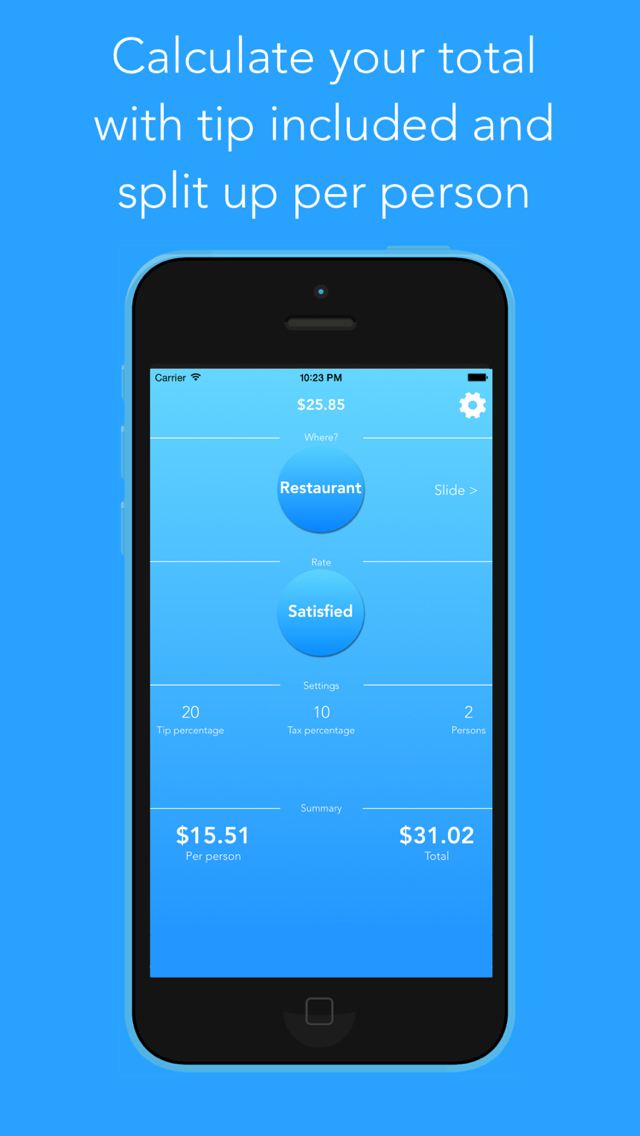
App Icon: http://blacklemondev.org/images/AppIcon_Tippy.png

Located in Castrop-Rauxel, Germany, Black Lemon is a new indie software studio established in 2015. The company's focus is on mobile app development for the iOS platform. All Material and Software (C) Copyright 2015 Black Lemon Dev. All Rights Reserved. Apple, the Apple logo, iPhone, iPod and iPad are registered trademarks of Apple Inc. in the U.S. and/or other countries. Other trademarks and registered trademarks may be the property of their respective owners.
*******
Link To Article: http://prmac.com/release-id-73670.htm
*******
---------------------------------------------------------------------------------
Note that you can alter delivered distributions at any time.
Login to your account on prMac to alter your channel selection, or to opt-out at any time.
Forex News Alarm App released on the iOS App Store
A new article has been published at prMac.
Forex News Alarm App released on the iOS App Store - Published on 03/03/15
Flagforex has introduced fxNewsAlarm 1.0, its new financial app developed for iPhone, iPad and iPod touch devices. fxNewsAlarm is a must-have productivity alarm app for forex and news traders who need to be notified of key news events for the upcoming week. fxNewsAlarm gets the news event from forexfactory economic calendar and displays them in a list for iOS users to view. The list is sorted by their country of release and level of impact which range from low, medium to high.
Singapore - Flagforex has announced the release of fxNewsAlarm 1.0, its new financial app developed for iPhone, iPad and iPod touch devices. Set forex news alarm to any iOS device easily with a single tap. fxNewsAlarm allows forex traders to be notified of key event market risks prior to any country news release.
News and currency traders who often missed the time release of specific news event can now receive the alarm and get informed prior to the news event. Unlike alternative financial apps that only show the economic news calendar, fxNewsAlarm takes notifications one step further by allowing alarm to be easily preset with these important events.
fxNewsAlarm gets the news event from forexfactory economic calendar and displays them in a list for iOS users to view. The list is sorted by their country of release and level of impact which range from low, medium to high. The app will get weekly news event from these countries: United States, Australia, Canada, Switzerland, China, Eurozone, United Kingdom, Japan and New Zealand. Users who wish to view the news event in greater detail can also get the following metadata:
* Date of release
* Time of release
* Country
* Impact
* Forecast data
* Previous data
Setting an alarm on the selected news event is as simple as tapping the ''Add'' button next to the news event name. Next, the alarm can be accessed or changed in the device's reminder app by launching the reminder app from the home screen. Go to the default fxNewsAlarm list and the added event item should be found. Click more to view or make changes to the alarm alert timing.
Added events are marked by a checkmark next to the news item in app. Removing the added item is as easy as swiping the row to the left and tap delete. The news item's alarm will be removed from the device. fxNewsAlarm is a must-have productivity alarm app for forex and news traders who need to be notified of key news events for the upcoming week. Now in two easy steps, users can set alarm by launching the app, locate the news event and tap add to set alarm.
Device Requirements:
* iPhone, iPad, and iPod touch
* Optimized for iPhone 5, iPhone 6/6 Plus
* Requires iOS 7.1 or later
* 2.8 MB
Pricing and Availability:
fxNewsAlarm 1.0 is $3.99 USD (or equivalent amount in other currencies) and available worldwide exclusively through the App Store in the Finance category.
fxNewsAlarm 1.0: http://www.flagforex.com/forexnewsalarm
Purchase and Download: https://itunes.apple.com/us/app/fxnewsalarm/id962672650
Screenshot: http://a4.mzstatic.com/us/r30/Purple3/v4/a2/2f/60/a22f60c9-3896-3ca1-b71e-81a541dfc44b/screen322x572.jpeg
App Icon: http://a5.mzstatic.com/us/r30/Purple1/v4/cb/33/b2/cb33b253-0b34-ec19-898c-bac04e618b67/icon175x175.png
Flagforex has been developing forex trading tools and apps for manual forex traders and investors since 2008. The business has developed 3 trading software packages on Metatrader 4 platform and 2 apps on the iOS app store which help to automate various trading processes for forex traders. The business has also partnered with currency brokers to come out with more institutionalized software applications and services that benefit the entire trading community. All Material and Software (C) Copyright 2015 Flag One Pte Ltd. All Rights Reserved. Apple, the Apple logo, iPhone, iPod and iPad are registered trademarks of Apple Inc. in the U.S. and/or other countries. Other trademarks and registered trademarks may be the property of their respective owners.
*******
Link To Article: http://prmac.com/release-id-73669.htm
*******
---------------------------------------------------------------------------------
Note that you can alter delivered distributions at any time.
Login to your account on prMac to alter your channel selection, or to opt-out at any time.
Forex News Alarm App released on the iOS App Store - Published on 03/03/15
Flagforex has introduced fxNewsAlarm 1.0, its new financial app developed for iPhone, iPad and iPod touch devices. fxNewsAlarm is a must-have productivity alarm app for forex and news traders who need to be notified of key news events for the upcoming week. fxNewsAlarm gets the news event from forexfactory economic calendar and displays them in a list for iOS users to view. The list is sorted by their country of release and level of impact which range from low, medium to high.
Singapore - Flagforex has announced the release of fxNewsAlarm 1.0, its new financial app developed for iPhone, iPad and iPod touch devices. Set forex news alarm to any iOS device easily with a single tap. fxNewsAlarm allows forex traders to be notified of key event market risks prior to any country news release.
News and currency traders who often missed the time release of specific news event can now receive the alarm and get informed prior to the news event. Unlike alternative financial apps that only show the economic news calendar, fxNewsAlarm takes notifications one step further by allowing alarm to be easily preset with these important events.
fxNewsAlarm gets the news event from forexfactory economic calendar and displays them in a list for iOS users to view. The list is sorted by their country of release and level of impact which range from low, medium to high. The app will get weekly news event from these countries: United States, Australia, Canada, Switzerland, China, Eurozone, United Kingdom, Japan and New Zealand. Users who wish to view the news event in greater detail can also get the following metadata:
* Date of release
* Time of release
* Country
* Impact
* Forecast data
* Previous data
Setting an alarm on the selected news event is as simple as tapping the ''Add'' button next to the news event name. Next, the alarm can be accessed or changed in the device's reminder app by launching the reminder app from the home screen. Go to the default fxNewsAlarm list and the added event item should be found. Click more to view or make changes to the alarm alert timing.
Added events are marked by a checkmark next to the news item in app. Removing the added item is as easy as swiping the row to the left and tap delete. The news item's alarm will be removed from the device. fxNewsAlarm is a must-have productivity alarm app for forex and news traders who need to be notified of key news events for the upcoming week. Now in two easy steps, users can set alarm by launching the app, locate the news event and tap add to set alarm.
Device Requirements:
* iPhone, iPad, and iPod touch
* Optimized for iPhone 5, iPhone 6/6 Plus
* Requires iOS 7.1 or later
* 2.8 MB
Pricing and Availability:
fxNewsAlarm 1.0 is $3.99 USD (or equivalent amount in other currencies) and available worldwide exclusively through the App Store in the Finance category.
fxNewsAlarm 1.0: http://www.flagforex.com/forexnewsalarm
Purchase and Download: https://itunes.apple.com/us/app/fxnewsalarm/id962672650
Screenshot: http://a4.mzstatic.com/us/r30/Purple3/v4/a2/2f/60/a22f60c9-3896-3ca1-b71e-81a541dfc44b/screen322x572.jpeg

App Icon: http://a5.mzstatic.com/us/r30/Purple1/v4/cb/33/b2/cb33b253-0b34-ec19-898c-bac04e618b67/icon175x175.png

Flagforex has been developing forex trading tools and apps for manual forex traders and investors since 2008. The business has developed 3 trading software packages on Metatrader 4 platform and 2 apps on the iOS app store which help to automate various trading processes for forex traders. The business has also partnered with currency brokers to come out with more institutionalized software applications and services that benefit the entire trading community. All Material and Software (C) Copyright 2015 Flag One Pte Ltd. All Rights Reserved. Apple, the Apple logo, iPhone, iPod and iPad are registered trademarks of Apple Inc. in the U.S. and/or other countries. Other trademarks and registered trademarks may be the property of their respective owners.
*******
Link To Article: http://prmac.com/release-id-73669.htm
*******
---------------------------------------------------------------------------------
Note that you can alter delivered distributions at any time.
Login to your account on prMac to alter your channel selection, or to opt-out at any time.
Virtual TimeClock 15 Goes Green with Electronic Employee Timecards
A new article has been published at prMac.
Virtual TimeClock 15 Goes Green with Electronic Employee Timecards - Published on 03/03/15
California based Redcort Software Inc. today announces Virtual TimeClock 15, an important update to the company's popular timecard management application for Macintosh and Windows PC computers. Virtual TimeClock impartially records the exact time as it occurs, removing any guessing or estimating of arrivals, departures, breaks and lunches. Version 15 adds electronic timecard approval system and a suite of data security enhancements to keep pace with today's increased need for data privacy.
Fresno, California - Managing employee hours from timecard to paycheck has never been easier or more secure with the new Virtual TimeClock 15 release available today from Redcort Software Inc. Virtual TimeClock 15 brings a powerful new Payroll Approval system that dramatically simplifies the management of timecards for payroll. Addressing the growing need for data security, Virtual TimeClock 15 provides enhanced security and encryption features that help to ensure employee time clock data remains secure.
"With the new electronic approval, my staff will be able to electronically approve their timesheet without the hassle of printing them out and signing them," enthused Craig Pelham, General Manager of the General Nelson Inn in Bardstown, Kentucky. "In an effort to be more green, this is a huge success! No more wasting paper or toner. No risk of misplaced time cards while waiting for manager approval of hours and overtime."
"As more data lives and travels on the Internet, issues surrounding data privacy and security have become a regular part of the news," remarked Keith DeLong, CEO of Redcort Software Inc. "As a response, we've enhanced security throughout Virtual TimeClock 15 without sacrificing the ease of use our customers love." Enhanced data encryption is used throughout the program. Database files are now encrypted on disk and client-server connections in Virtual TimeClock Network Edition are now TLS encrypted. In addition, a suite of new password rules, features, and security options help ensure the privacy of Virtual TimeClock users.
Pricing and Availability:
Virtual TimeClock software for Macintosh and Windows PC computers starts at $99 (USD). Annual software maintenance and support as well as generously discounted upgrade pricing is available. Full pricing details are available online at the Redcort Software store.
Redcort Software: http://www.redcort.com
Virtual TimeClock 15: http://www.redcort.com/timeclock
Free Virtual TimeClock Software Trial: http://www.redcort.com/timeclock/free-timeclock-software-trial
Download Virtual TimeClock Software: http://www.redcort.com/download
Purchase and Pricing: http://www.redcort.com/store
Frequently Asked Questions: http://www.redcort.com/support
Redcort Software pursues a collaborative relationship with customers through direct engagement, regular feedback and knowledgeable, U.S. based technical support specialists. Hundreds of thousands of users in over 60 countries rely on Virtual TimeClock software every day. (C) 2014 Redcort Software, Inc. All rights reserved. Virtual TimeClock and Virtual TimeClock Pro are registered trademarks of Redcort Software, Inc. All other names mentioned are trademarks or registered trademarks of their respective holders in the United States and other countries.
*******
Link To Article: http://prmac.com/release-id-73707.htm
*******
---------------------------------------------------------------------------------
Note that you can alter delivered distributions at any time.
Login to your account on prMac to alter your channel selection, or to opt-out at any time.
Virtual TimeClock 15 Goes Green with Electronic Employee Timecards - Published on 03/03/15
California based Redcort Software Inc. today announces Virtual TimeClock 15, an important update to the company's popular timecard management application for Macintosh and Windows PC computers. Virtual TimeClock impartially records the exact time as it occurs, removing any guessing or estimating of arrivals, departures, breaks and lunches. Version 15 adds electronic timecard approval system and a suite of data security enhancements to keep pace with today's increased need for data privacy.
Fresno, California - Managing employee hours from timecard to paycheck has never been easier or more secure with the new Virtual TimeClock 15 release available today from Redcort Software Inc. Virtual TimeClock 15 brings a powerful new Payroll Approval system that dramatically simplifies the management of timecards for payroll. Addressing the growing need for data security, Virtual TimeClock 15 provides enhanced security and encryption features that help to ensure employee time clock data remains secure.
"With the new electronic approval, my staff will be able to electronically approve their timesheet without the hassle of printing them out and signing them," enthused Craig Pelham, General Manager of the General Nelson Inn in Bardstown, Kentucky. "In an effort to be more green, this is a huge success! No more wasting paper or toner. No risk of misplaced time cards while waiting for manager approval of hours and overtime."
"As more data lives and travels on the Internet, issues surrounding data privacy and security have become a regular part of the news," remarked Keith DeLong, CEO of Redcort Software Inc. "As a response, we've enhanced security throughout Virtual TimeClock 15 without sacrificing the ease of use our customers love." Enhanced data encryption is used throughout the program. Database files are now encrypted on disk and client-server connections in Virtual TimeClock Network Edition are now TLS encrypted. In addition, a suite of new password rules, features, and security options help ensure the privacy of Virtual TimeClock users.
Pricing and Availability:
Virtual TimeClock software for Macintosh and Windows PC computers starts at $99 (USD). Annual software maintenance and support as well as generously discounted upgrade pricing is available. Full pricing details are available online at the Redcort Software store.
Redcort Software: http://www.redcort.com
Virtual TimeClock 15: http://www.redcort.com/timeclock
Free Virtual TimeClock Software Trial: http://www.redcort.com/timeclock/free-timeclock-software-trial
Download Virtual TimeClock Software: http://www.redcort.com/download
Purchase and Pricing: http://www.redcort.com/store
Frequently Asked Questions: http://www.redcort.com/support
Redcort Software pursues a collaborative relationship with customers through direct engagement, regular feedback and knowledgeable, U.S. based technical support specialists. Hundreds of thousands of users in over 60 countries rely on Virtual TimeClock software every day. (C) 2014 Redcort Software, Inc. All rights reserved. Virtual TimeClock and Virtual TimeClock Pro are registered trademarks of Redcort Software, Inc. All other names mentioned are trademarks or registered trademarks of their respective holders in the United States and other countries.
*******
Link To Article: http://prmac.com/release-id-73707.htm
*******
---------------------------------------------------------------------------------
Note that you can alter delivered distributions at any time.
Login to your account on prMac to alter your channel selection, or to opt-out at any time.
Pomodoro Time 1.0 for Mac OS X - Time and Task Management Tool
A new article has been published at prMac.
Pomodoro Time 1.0 for Mac OS X - Time and Task Management Tool - Published on 03/02/15
XwaveSoft has introduced Pomodoro Time 1.0, the Mac version of their popular time management app for iPhone & iPad. Designed specifically to boost productivity by using the Pomodoro Technique. The app provides a mix of timeboxing, timed rest stops, task management, a goal completion list, and customized productivity analysis. View and compare weekly or monthly progress of total time spent on tasks to accurately adjust actions to be more efficient. The app syncs between Mac, iPhone and iPad.
Odessa, Ukraine - XwaveSoft has announced the release and immediate availability of Pomodoro Time 1.0, the Mac version of their popular time management tool for iPhone & iPad. Input tasks and manage progress using the Pomodoro Technique, a method of combining timeboxing with rewards to rest. Helpful tools such as alarm notifications, customized break options, and an overview of exercises per week make monitoring progress easier than ever and helps users stay focused, while enhancing productivity.
The Pomodoro Technique is based on the idea that individuals are more likely to produce results and complete activities with a break down of work into intervals of 25 minutes, separated by short breaks. Pomodoro Time allows users to customize task duration outside of the standard timeframe to fit individual needs, from 5 minutes to 60 minutes with customized breaks in between. After a few Pomodoros are complete, users may take longer breaks to revive focus and energy.
Pomodoro Time is great for anyone looking to chart and optimize time for executing tasks. The application allows users to view the amount of completed tasks versus projected tasks and the average duration it takes to complete assignments on a weekly basis. Users can compare success rates week to week with a graph that offers users a visual perspective of progress.
Perfect for personal errands, business projects, student assignments, educators, house chores, health and fitness routines, or just about any responsibility that requires an assistant to help complete to-do lists. Essentially, Pomodoro Time offers a unique strategy to keep users' attention on the goal for longer periods of time without the common burn out. The idea is to hard-wire individuals to take short breaks in between tasks with longer breaks permitted after a few Pomodoros have been completed.
Professionals can use Pomodoro Time to allot timeframes for answering morning emails or toggling between projects for multi-tasking success. With strategic rest-stops, the app increases productivity by decreasing loss of focus. At a glance, users will see a timer displayed for the current task at hand and notifications will sound when an action is required. Users have the flexibility to start, pause, or skip the current Pomodoro and move onto another as priorities change throughout the day and users may need to toggle between tasks.
Feature Highlights:
* Manage time and tasks
* Track progress throughout the week, month or custom period
* Set and track targeted number of tasks to complete
Customize to maximize productivity:
* Pomodoro duration
* Short break duration
* Long break duration
* Number of Pomodoros between long breaks
* Target number of Pomodoros to complete per day
* Ability to start, pause, or skip Pomodoros
* Optional ticking sound
* Alarm sounds while app runs in the background
* Interactive notifications
* Option to launch at start-up
* Syncs between iPad, iPhone and Mac
* Also available for iPhone and iPad
Pomodoro Time launches at startup and continually runs in the background to let alarms sound so users will never miss a deadline. Users can sync OS X application across iPhone, iPad and Mac for an organized and succinct working environment. Pomodoro Time can be present wherever it is needed, allowing users to rest assure that responsibilities will not be forgotten.
The color scheme offers an optimistic view on daily time management by helping to reduce the mundane necessity of completing one's chores. The minimalistic interface reduces the frustrations of compiling to-do lists and several post-its, while breaking from a task to check the clock (then dwell on the clock... and so on). It also helps to keep users focused with a simple, but powerful display of the timer, which distracts users from wanting to take a few minutes to socialize or peruse the Web when faced with a tedious, but important job.
"When taxed with a project assignment, we noticed that people from all industries and personality types became anxious and counter-productive when faced with the notion of balancing many priorities with short deadlines," said Denys Yevenko, CEO/Founder of XwaveSoft. "our goal is to provide people with a powerful productivity tool, combining the Pomodoro Technique, to make time management a breeze. Ultimately, to re-train individuals to give their body and brain the needed rest to re-group and stay productive for longer periods of time."
System Requirements:
* Requires OS X 10.8 or later
* 2.3 MB
Pricing and Availability:
Pomodoro Time 1.0 is only $2.99 (USD) and available worldwide through the Mac App Store in the Productivity category. Review copies are available upon request. Complete information about countries, cities, categories and subcategories, units and currencies the application contains can be found on XwaveSoft's homepage.
Pomodoro Time 1.0: http://xwavesoft.com/pomodoro-timer-for-iphone-ipad-mac-os-x.html
Purchase and Download: https://itunes.apple.com/app/pomodoro-time-focus-timer/id961632517
Screenshot 1: http://xwavesoft.com/press/pomodoro-time/pomodoro-time-mac-screen-1.png
Screenshot 2: http://xwavesoft.com/press/pomodoro-time/pomodoro-time-mac-screen-2.png
Screenshot 3: http://xwavesoft.com/press/pomodoro-time/pomodoro-time-mac-screen-3.png
Application Icon: http://xwavesoft.com/press/pomodoro-time/pomodoro-time-icon-mac.png
Based in Odessa, Ukraine, XwaveSoft is a privately owned software development company. Founded in 2009 by Denys Yevenko, XwaveSoft is focused on developing high-quality iOS and OS X applications. Long-term experience and professional expertise of the company's management and personnel guarantee the high quality of its products. All Material and Software (C) Copyright 2015 XwaveSoft. All Rights Reserved. Pomodoro and Pomodoro Technique are registered trademarks of Francesco Cirillo. XwaveSoft is not affiliated with Pomodoro, Pomodoro Technique or Francesco Cirillo. Apple, the Apple logo, Macintosh and Mac OS X are registered trademarks of Apple Inc. in the U.S. and/or other countries. Other trademarks and registered trademarks may be the property of their respective owners.
*******
Link To Article: http://prmac.com/release-id-73659.htm
*******
---------------------------------------------------------------------------------
Note that you can alter delivered distributions at any time.
Login to your account on prMac to alter your channel selection, or to opt-out at any time.
Pomodoro Time 1.0 for Mac OS X - Time and Task Management Tool - Published on 03/02/15
XwaveSoft has introduced Pomodoro Time 1.0, the Mac version of their popular time management app for iPhone & iPad. Designed specifically to boost productivity by using the Pomodoro Technique. The app provides a mix of timeboxing, timed rest stops, task management, a goal completion list, and customized productivity analysis. View and compare weekly or monthly progress of total time spent on tasks to accurately adjust actions to be more efficient. The app syncs between Mac, iPhone and iPad.
Odessa, Ukraine - XwaveSoft has announced the release and immediate availability of Pomodoro Time 1.0, the Mac version of their popular time management tool for iPhone & iPad. Input tasks and manage progress using the Pomodoro Technique, a method of combining timeboxing with rewards to rest. Helpful tools such as alarm notifications, customized break options, and an overview of exercises per week make monitoring progress easier than ever and helps users stay focused, while enhancing productivity.
The Pomodoro Technique is based on the idea that individuals are more likely to produce results and complete activities with a break down of work into intervals of 25 minutes, separated by short breaks. Pomodoro Time allows users to customize task duration outside of the standard timeframe to fit individual needs, from 5 minutes to 60 minutes with customized breaks in between. After a few Pomodoros are complete, users may take longer breaks to revive focus and energy.
Pomodoro Time is great for anyone looking to chart and optimize time for executing tasks. The application allows users to view the amount of completed tasks versus projected tasks and the average duration it takes to complete assignments on a weekly basis. Users can compare success rates week to week with a graph that offers users a visual perspective of progress.
Perfect for personal errands, business projects, student assignments, educators, house chores, health and fitness routines, or just about any responsibility that requires an assistant to help complete to-do lists. Essentially, Pomodoro Time offers a unique strategy to keep users' attention on the goal for longer periods of time without the common burn out. The idea is to hard-wire individuals to take short breaks in between tasks with longer breaks permitted after a few Pomodoros have been completed.
Professionals can use Pomodoro Time to allot timeframes for answering morning emails or toggling between projects for multi-tasking success. With strategic rest-stops, the app increases productivity by decreasing loss of focus. At a glance, users will see a timer displayed for the current task at hand and notifications will sound when an action is required. Users have the flexibility to start, pause, or skip the current Pomodoro and move onto another as priorities change throughout the day and users may need to toggle between tasks.
Feature Highlights:
* Manage time and tasks
* Track progress throughout the week, month or custom period
* Set and track targeted number of tasks to complete
Customize to maximize productivity:
* Pomodoro duration
* Short break duration
* Long break duration
* Number of Pomodoros between long breaks
* Target number of Pomodoros to complete per day
* Ability to start, pause, or skip Pomodoros
* Optional ticking sound
* Alarm sounds while app runs in the background
* Interactive notifications
* Option to launch at start-up
* Syncs between iPad, iPhone and Mac
* Also available for iPhone and iPad
Pomodoro Time launches at startup and continually runs in the background to let alarms sound so users will never miss a deadline. Users can sync OS X application across iPhone, iPad and Mac for an organized and succinct working environment. Pomodoro Time can be present wherever it is needed, allowing users to rest assure that responsibilities will not be forgotten.
The color scheme offers an optimistic view on daily time management by helping to reduce the mundane necessity of completing one's chores. The minimalistic interface reduces the frustrations of compiling to-do lists and several post-its, while breaking from a task to check the clock (then dwell on the clock... and so on). It also helps to keep users focused with a simple, but powerful display of the timer, which distracts users from wanting to take a few minutes to socialize or peruse the Web when faced with a tedious, but important job.
"When taxed with a project assignment, we noticed that people from all industries and personality types became anxious and counter-productive when faced with the notion of balancing many priorities with short deadlines," said Denys Yevenko, CEO/Founder of XwaveSoft. "our goal is to provide people with a powerful productivity tool, combining the Pomodoro Technique, to make time management a breeze. Ultimately, to re-train individuals to give their body and brain the needed rest to re-group and stay productive for longer periods of time."
System Requirements:
* Requires OS X 10.8 or later
* 2.3 MB
Pricing and Availability:
Pomodoro Time 1.0 is only $2.99 (USD) and available worldwide through the Mac App Store in the Productivity category. Review copies are available upon request. Complete information about countries, cities, categories and subcategories, units and currencies the application contains can be found on XwaveSoft's homepage.
Pomodoro Time 1.0: http://xwavesoft.com/pomodoro-timer-for-iphone-ipad-mac-os-x.html
Purchase and Download: https://itunes.apple.com/app/pomodoro-time-focus-timer/id961632517
Screenshot 1: http://xwavesoft.com/press/pomodoro-time/pomodoro-time-mac-screen-1.png
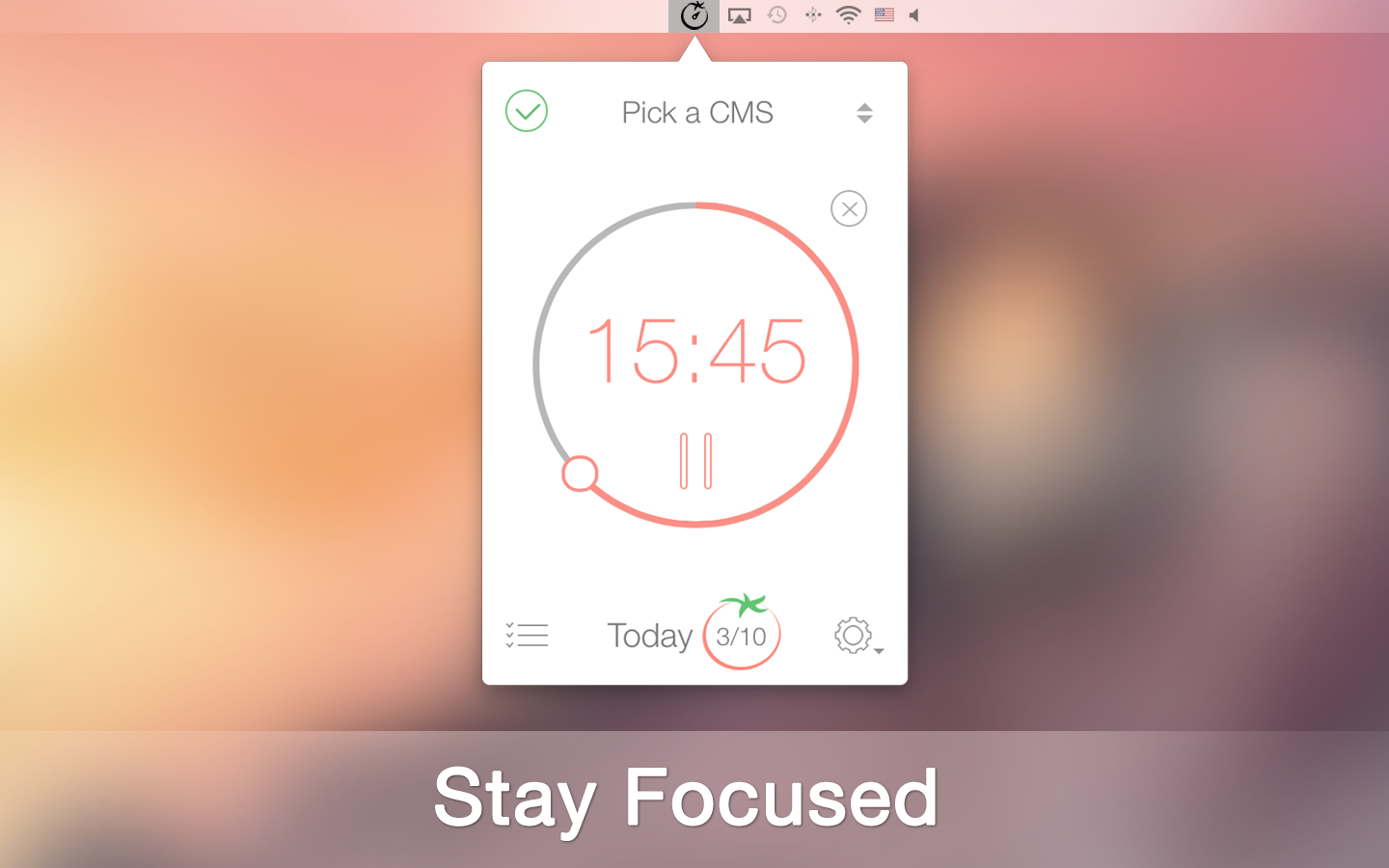
Screenshot 2: http://xwavesoft.com/press/pomodoro-time/pomodoro-time-mac-screen-2.png
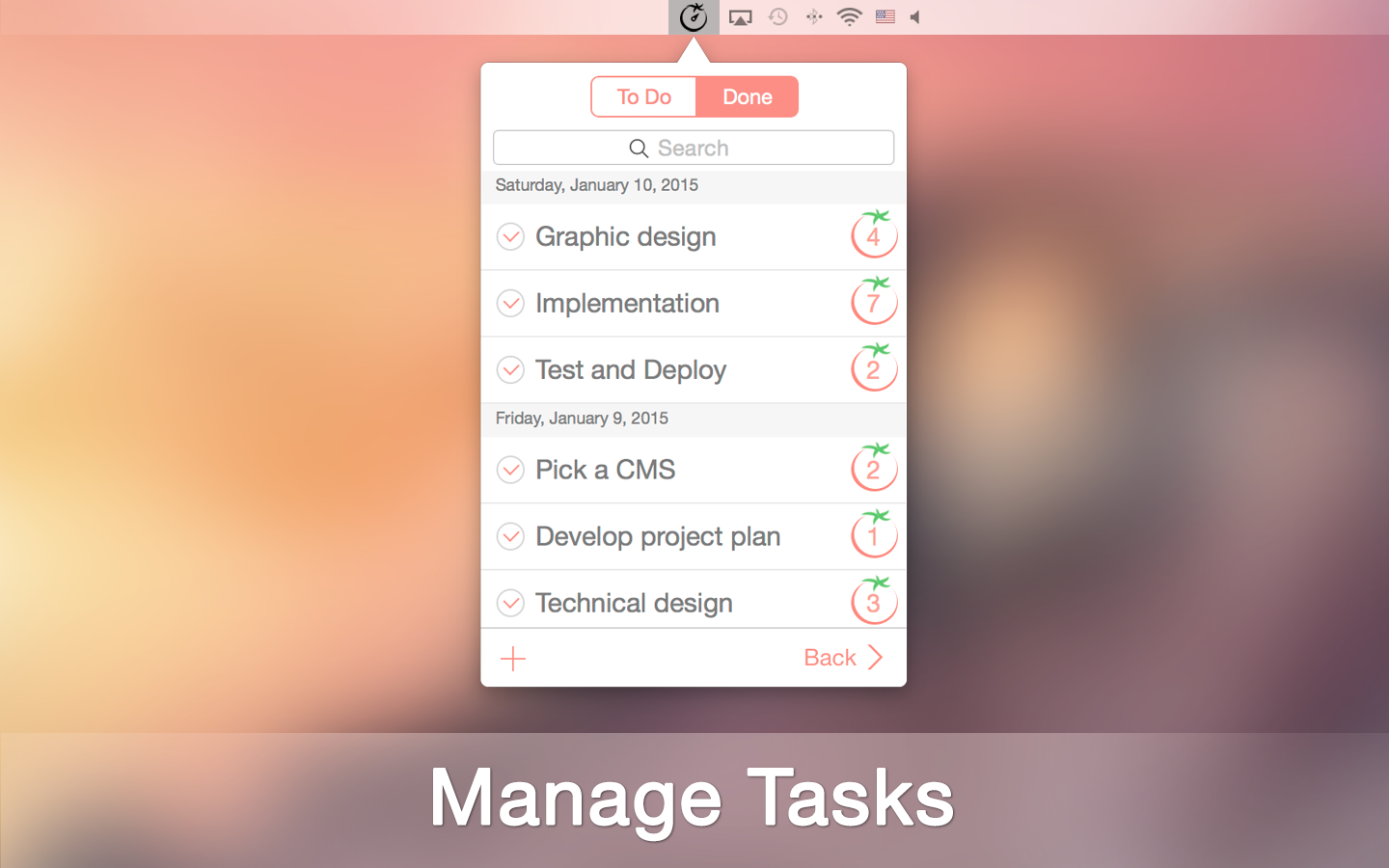
Screenshot 3: http://xwavesoft.com/press/pomodoro-time/pomodoro-time-mac-screen-3.png
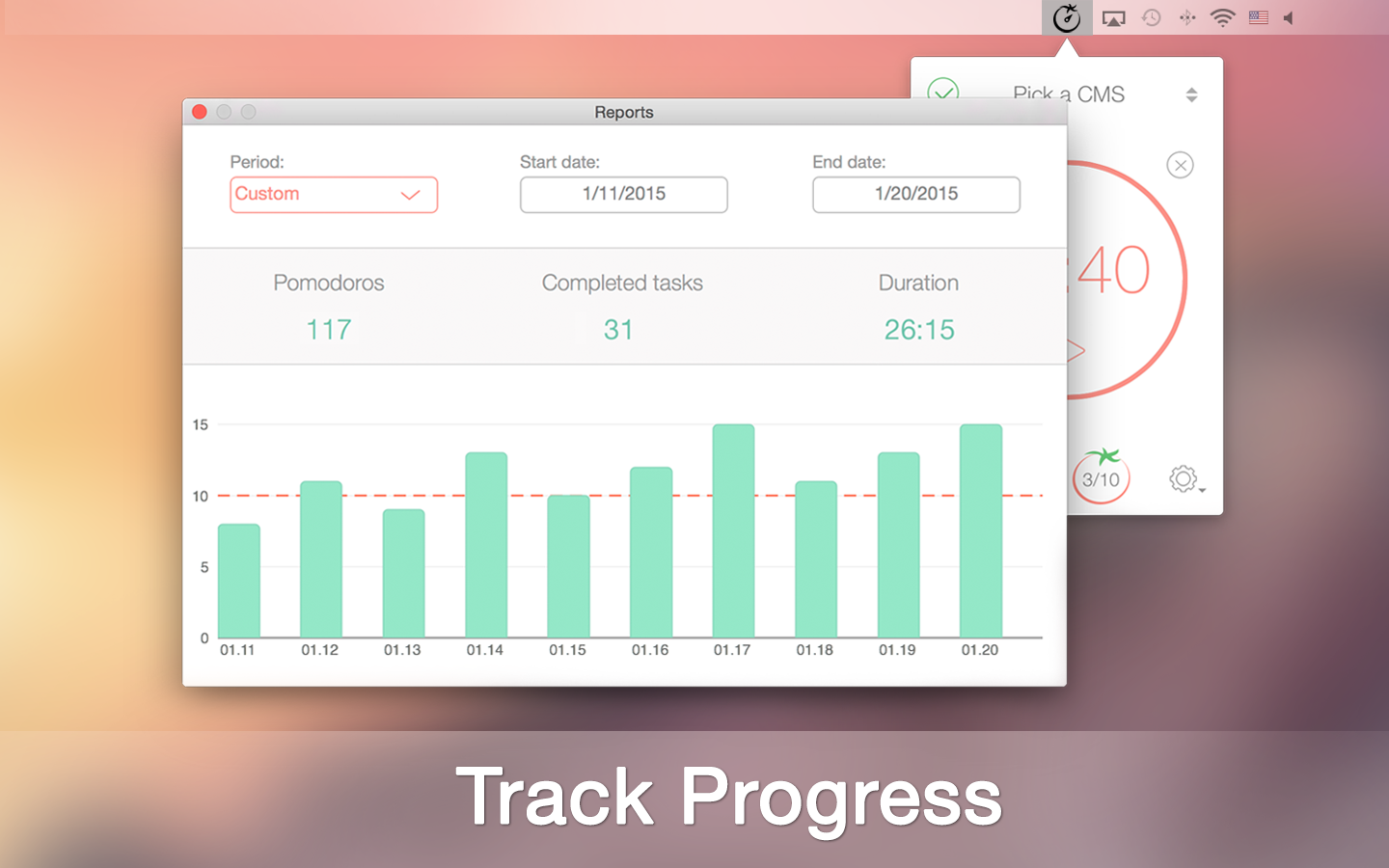
Application Icon: http://xwavesoft.com/press/pomodoro-time/pomodoro-time-icon-mac.png

Based in Odessa, Ukraine, XwaveSoft is a privately owned software development company. Founded in 2009 by Denys Yevenko, XwaveSoft is focused on developing high-quality iOS and OS X applications. Long-term experience and professional expertise of the company's management and personnel guarantee the high quality of its products. All Material and Software (C) Copyright 2015 XwaveSoft. All Rights Reserved. Pomodoro and Pomodoro Technique are registered trademarks of Francesco Cirillo. XwaveSoft is not affiliated with Pomodoro, Pomodoro Technique or Francesco Cirillo. Apple, the Apple logo, Macintosh and Mac OS X are registered trademarks of Apple Inc. in the U.S. and/or other countries. Other trademarks and registered trademarks may be the property of their respective owners.
*******
Link To Article: http://prmac.com/release-id-73659.htm
*******
---------------------------------------------------------------------------------
Note that you can alter delivered distributions at any time.
Login to your account on prMac to alter your channel selection, or to opt-out at any time.
StyleMatic app is your intelligent pocket stylist
A new article has been published at prMac.
StyleMatic app is your intelligent pocket stylist - Published on 03/02/15
The Stylematic Team has announced StyleMatic, the pocket stylist that gives you daily fashion recommendations that are purchasable directly through the app. The pocket stylist becomes your expert personal stylist as it learns your style through things you put in your closet as well as through pictures you add of things you love. These can be items you see at the store, web, or even worn by people on the street.
an Francisco, California - The Stylematic Team has announced StyleMatic, your intelligent pocket stylist. Make your Stylematic closet by saving items you love from recommended feed and add your own items. Ask your friends about them, vote, and compare!
StyleMatic is a pocket stylist that gives you daily fashion recommendations that are purchasable directly through the app. The pocket stylist becomes an expert personal stylist as it learns your style through things you put to your closet as well as through pictures you add of things you love (these can be things you see at the store, web, or even worn by people on the street).
Upload items into your digital closet and ask your friends style questions to improve your daily recs! The app leverages the feedback from your friends and your social behavior to give you more targeted recommendations as well.
StyleMatic is a fun and addictive mobile app that delivers style recommendations that instantly complement user preferences. The app leverages its user base to provide a global, crowd-sourced perspective for personalizing fashion recommendations.
Features:
* Fashion News to show yourself and to follow style mavens and stylistas for the looks you enjoy
* Recommended feed with the millions of items from the shops you are fond of and which you can purchase
* Closet where you can upload items from multiple sources
* Chat where you can ask questions directly to your friends
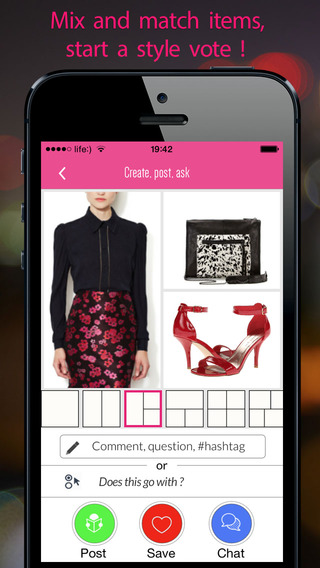
* Make collages, getting a second opinion from friends by asking style questions or making a vote
Device Requirements:
* iPhone, iPad, and iPod touch
* Requires iOS 7.0 or later
* 44.6 MB
Pricing and Availability:
StyleMatic � Personal Stylist & Fashion Shopping 2.0.1 is free and available worldwide exclusively through the App Store in the Lifestyle category.
StyleMatic 2.0.1: http://stylematic.co
Download from iTunes: https://itunes.apple.com/app/stylematic/id731089069
More info: http://sendp.com/ad/StyleMatic.pdf
Screenshot 1: http://a2.mzstatic.com/us/r30/Purple3/v4/6e/35/60/6e3560e4-5a2d-b4c9-8d9b-2c80dd5fe6ca/screen568x568.jpeg
Screenshot 2: http://a2.mzstatic.com/us/r30/Purple5/v4/17/fb/d3/17fbd395-a4cd-1f2c-5d05-10489cf89fbd/screen568x568.jpeg
App Icon: http://a4.mzstatic.com/us/r30/Purple1/v4/63/ab/94/63ab9459-89a4-c30c-e288-6eb3baa3688f/icon175x175.png
Stylematic Team created a mobile app that provides personalized style recommendations and deals while you are shopping at the store. A Pandora for style recommendations that learns as you shop. StyleMatic available on the App Store since October 31 2013. All Material and Software (C) Copyright 2015 Stylematic Team. All Rights Reserved. Apple, the Apple logo, iPhone, iPod and iPad are registered trademarks of Apple Inc. in the U.S. and/or other countries. Other trademarks and registered trademarks may be the property of their respective owners.
*******
Link To Article: http://prmac.com/release-id-73668.htm
*******
---------------------------------------------------------------------------------
Note that you can alter delivered distributions at any time.
Login to your account on prMac to alter your channel selection, or to opt-out at any time.
StyleMatic app is your intelligent pocket stylist - Published on 03/02/15
The Stylematic Team has announced StyleMatic, the pocket stylist that gives you daily fashion recommendations that are purchasable directly through the app. The pocket stylist becomes your expert personal stylist as it learns your style through things you put in your closet as well as through pictures you add of things you love. These can be items you see at the store, web, or even worn by people on the street.
an Francisco, California - The Stylematic Team has announced StyleMatic, your intelligent pocket stylist. Make your Stylematic closet by saving items you love from recommended feed and add your own items. Ask your friends about them, vote, and compare!
StyleMatic is a pocket stylist that gives you daily fashion recommendations that are purchasable directly through the app. The pocket stylist becomes an expert personal stylist as it learns your style through things you put to your closet as well as through pictures you add of things you love (these can be things you see at the store, web, or even worn by people on the street).
Upload items into your digital closet and ask your friends style questions to improve your daily recs! The app leverages the feedback from your friends and your social behavior to give you more targeted recommendations as well.
StyleMatic is a fun and addictive mobile app that delivers style recommendations that instantly complement user preferences. The app leverages its user base to provide a global, crowd-sourced perspective for personalizing fashion recommendations.
Features:
* Fashion News to show yourself and to follow style mavens and stylistas for the looks you enjoy
* Recommended feed with the millions of items from the shops you are fond of and which you can purchase
* Closet where you can upload items from multiple sources
* Chat where you can ask questions directly to your friends
* Make collages, getting a second opinion from friends by asking style questions or making a vote
Device Requirements:
* iPhone, iPad, and iPod touch
* Requires iOS 7.0 or later
* 44.6 MB
Pricing and Availability:
StyleMatic � Personal Stylist & Fashion Shopping 2.0.1 is free and available worldwide exclusively through the App Store in the Lifestyle category.
StyleMatic 2.0.1: http://stylematic.co
Download from iTunes: https://itunes.apple.com/app/stylematic/id731089069
More info: http://sendp.com/ad/StyleMatic.pdf
Screenshot 1: http://a2.mzstatic.com/us/r30/Purple3/v4/6e/35/60/6e3560e4-5a2d-b4c9-8d9b-2c80dd5fe6ca/screen568x568.jpeg

Screenshot 2: http://a2.mzstatic.com/us/r30/Purple5/v4/17/fb/d3/17fbd395-a4cd-1f2c-5d05-10489cf89fbd/screen568x568.jpeg
App Icon: http://a4.mzstatic.com/us/r30/Purple1/v4/63/ab/94/63ab9459-89a4-c30c-e288-6eb3baa3688f/icon175x175.png

Stylematic Team created a mobile app that provides personalized style recommendations and deals while you are shopping at the store. A Pandora for style recommendations that learns as you shop. StyleMatic available on the App Store since October 31 2013. All Material and Software (C) Copyright 2015 Stylematic Team. All Rights Reserved. Apple, the Apple logo, iPhone, iPod and iPad are registered trademarks of Apple Inc. in the U.S. and/or other countries. Other trademarks and registered trademarks may be the property of their respective owners.
*******
Link To Article: http://prmac.com/release-id-73668.htm
*******
---------------------------------------------------------------------------------
Note that you can alter delivered distributions at any time.
Login to your account on prMac to alter your channel selection, or to opt-out at any time.
Subscribe to:
Posts (Atom)