A new article has been published at prMac.
GraphicConverter 9.6 Adds New Features To Award-Winning Image Utility - Published on 03/10/15
Macintosh developer and publisher, Lemke Software GmbH today announces GraphicConverter 9.6, a powerful update to its award-winning image utility for OS X. With the ability to export in almost 80 different formats, GraphicConverter is a universal image editing program that features image conversion from more than 200 graphic file formats. Version 9.6 includes several new and updated features such as imports from various photo editing programs, and is a free update to all Version 9.x customers.
Peine, Germany - Longtime Macintosh developer and publisher, Lemke Software GmbH today is pleased the announce the release and immediate availability of GraphicConverter 9.6, a significant update to its award-winning image utility for Mac OS X. Described as the equivalent of a "Swiss Army Knife," GraphicConverter is a universal image editing program that features image conversion from more than 200 graphic file formats into almost 80 different file formats.
"Mac users everywhere have known Lemke Software GmbH and the software called GraphicConverter as a staple in the Mac toolbox -- and one of the most loyal, service oriented software developers in the industry," says Fred Showker of Graphic Design & Publishing Center. "GraphicConverter was one of the first and most robust graphics programs to appear for the Mac. It started life as public domain and evolved into shareware. From its slideshow functions to supporting hundreds of formats, it's the best."
Feature Highlights:
* Ability to open files in 200 graphics formats
* Ability to export in almost 80 different formats
* Import directly from camera (also RAW)
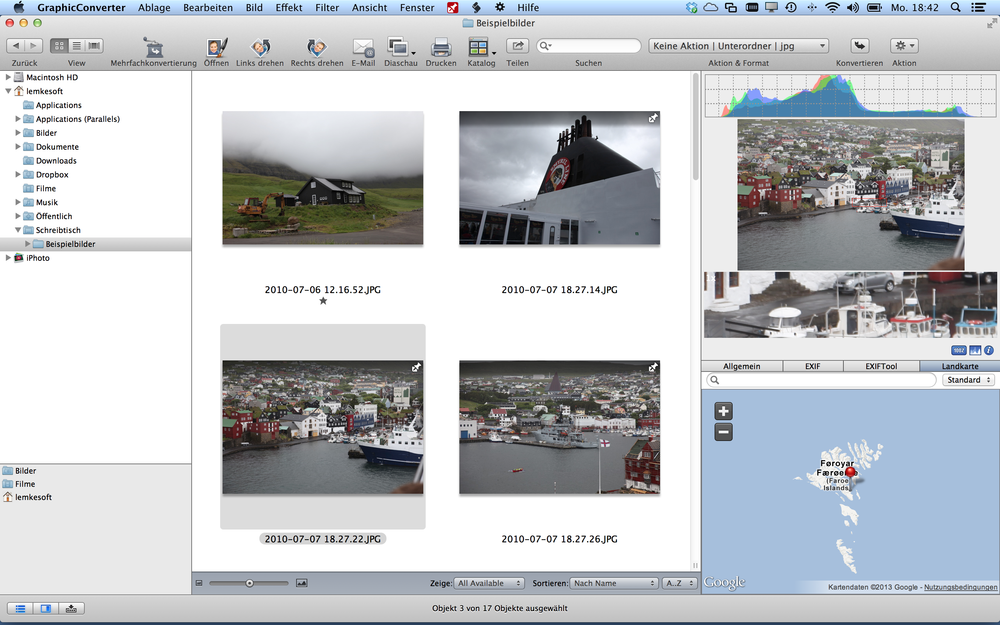
* Catalog generation (web, print, picture)
* TWAIN and image capture interface for scanners
* Direct support of the photo services Google+, Flickr, and Locr
* Graphical file and picture browser
* Slide show functions
* Powerful batch processor feature
* Support for Applescript
* Express picture enhancement function
* Basic functions for editing pictures
* Advanced functions, effects, and filters for picture manipulation
* Plug-in architecture
* Color management with ColorSync and ICC profiles
* 3D image support
* Enhancement and creation of pictures for user on the Internet
* Supports the latest technologies of the different Mac OS versions
* Support for the JPEG2000 format
* Multilingual (12 available languages)
* Image verifier, which can regularly verify images on NAS devices
* Ability to browse local copies on cloud services like DropBox, SkyDrive, Copy, Amazon Cloud and Google Drive
"You don't need a professional-level tool like Adobe Photoshop $409.98 at technetmicro, and the built-in tools in iPhoto and Preview aren't powerful enough to get the job done," said Edward Mendelson of PCMag. "The app you need is GraphicConverter, a low-priced graphic toolkit that does almost anything you can imagine to almost any image format, no matter how arcane or ancient." (27 Jan 2014)
Named an Editor's Choice by PCMagazine (2012 and 27 Jan 2014), Version 9.6 has incorporated several new features to increase the power and improve the functionality of GraphicConverter including:
* Photoshop pattern file import
* Optional indicator for iOS HDR files to browser
* Batch SVG to PDF (vector) conversion
* Import and export better portable graphics
* User defined fill patterns
* Provides vignetting correction
* Freeze and atmosphere filters
* Invert luminance and hue
* Available temperature effect filter
* Shift channels left and right
* Optional "Information palette follow main window"
* Mark possible images of HDR series
* Ability to paste into selection
* Optional import and export of Photoshop PSD layers
* Import of GIMP xcf with layers
* Import of JPEG XR (.jxr)
* Import of HD Photo (.hdp)
* Import of Windows Media Photo (.wdp)
* Smart crop Applescript command
* Auto red eye correction
* Reduce to Palette tool
In addition to its broad number of new options, GraphicConverter has made several significant updates to existing features within its popular image utility app. They are:
* Display in Open Street Map will now show a marker
* Added automatic rename option to overwrite dialog
* Brush tool supports pressure of sensitive pen
* Additional custom scale display mode to slideshow
* Improved mime decoding
* Scale dialog
* Optional exif data indicator to browser
* Additional sort into subfolder option
* Added import/export support for XMP data in JPEG2000 compatible to Photoshop
* Added help tags to the icons in the browser thumbnails
* Redesigned iptc export and import in convert and modify
* Improved CMYK PSD import
* Import of CMYK PSD with alpha added
* Improved display of profile details in the information window
* TIFF import supports now in addition CMYK uncompressed with alpha channel
* Added support for pixeltype 6 and 16 bit per channel to deltavision import
* Added detection of exif data in the browser thumbnail area for PSD and webp
* Corrupt GPS data will no longer be reported as file has gps
* Norwegian translation updated
* Import of optional alpha channel from Adobe TIFFs with alpha channel only in Adobe Image Resource Block added
* Iptc keywords etc. can separated by space as option
* Convert and modify will apply the selected file filter to the subfolders during the conversion, too
* Added display of JPEG file quality
"With over 1.5 million users worldwide, GraphicConverter is one of the most utilized professional programs on the market," says Thorsten Lemke, founder of Lemke Software GmbH. "Both amateur photographers and professional designers love its quality, vast array of features, and ease of use. They also appreciate that GraphicConverter is available on a trial basis with few restrictions and at your leisure until you decide to purchase. Version 9.6 is even a free update to Version 9.x customers. GraphicConverter has even impressed Apple, who included GraphicConverter as a pre-installed application on many of their computers. Our newest version continues the tradition of making GraphicConverter the best image utility tool for Macs."
Language Support:
* English, Chinese (traditional and simplified), Czech, Danish, Dutch, French, German, Italian, Norwegian, Russian, Spanish, and Swedish languages
System Requirements:
* OS X 10.7 or later
* 64 bit processor
Pricing and Availability:
GraphicConverter 9.6 is only $39.95 (USD) and available worldwide through the Mac App Store in the Photography category. It can also be directly purchased online from the Lemkesoft website. GraphicConverter 9.6 is a free update for all customers of version 9.x. Upgrades from older versions of GraphicConverter are available for $25.95 (USD).
Lemkesoft: http://www.lemkesoft.com/
GraphicConverter 9.6: http://www.lemkesoft.de/en/products
Key features: http://www.lemkesoft.de/en/products/graphicconverter/key-features
Try it Free or Purchase from Lemkesoft: http://www.lemkesoft.de/en/products/graphicconverter/download
Screenshot: http://www.lemkesoft.de/typo3temp/pics/68e44297f1.png
Application Icon: http://a5.mzstatic.com/us/r30/Purple/v4/08/06/bd/0806bdf3-a718-4896-0903-827d02eaefa3/GraphicConverter.175x175-75.png
Based in Peine, Germany, Lemke Software GmbH is a developer and publisher of Macintosh software. Founded by Thorsten Lemke in 2002, the main focus and passion of Lemke Software is centered on the maintenance and further development of GraphicConverter. Lemke Software also develops individual solutions for special customer requirements. All Material and Software (C) Copyright 2015 Lemke Software GmbH. All Rights Reserved. Apple, the Apple logo, Macintosh and Mac OS X are registered trademarks of Apple Inc. in the U.S. and/or other countries. Other trademarks and registered trademarks may be the property of their respective owners.
*******
Link To Article: http://prmac.com/release-id-73822.htm
*******
---------------------------------------------------------------------------------
Note that you can alter delivered distributions at any time.
Login to your account on prMac to alter your channel selection, or to opt-out at any time.


Vocab Tool App Presents the Most Spectacular Listening Feature for iOS
A new article has been published at prMac.
Vocab Tool App Presents the Most Spectacular Listening Feature for iOS - Published on 03/10/15
The Vocab Tool team today introduces Vocab Tool 1.0, its new vocabulary teaching aid for iOS. Vocab Tool offers a unique learning process which facilitates users to memorize words permanently within a short time, using various and customizable methods, tasks, tempos. An AirPlay supported Listening feature spins a globe made of words while reading them out with their meanings. Additionally, a Text search feature searches simultaneously each word of a text in the dictionary.
Budapest, Hungary - The Vocab Tool team is proud to announce the release of Vocab Tool 1.0, its new vocabulary teaching aid for iPhone and iPad. Vocab Tool offers a unique learning process which facilitates users to memorize words permanently within a short time, using various and customizable methods, tasks, tempos. The app has two never-before seen solutions to impress users: AirPlay supported Listening feature spins a globe made of words while reading them out with their meanings. And Text search feature searches simultaneously each word of a text in the dictionary.
Vocab Tool creates learning sessions based on user preferences. The words are collected in packs in the Word pack menu. Users just set the pack(s) they want to learn and learning can be started on the Learning board. It starts teaching 20 words per session, which can be changed (5 - 200 ) to as many as the user would like. The sessions contain randomly selected words from all word packs on the learning board.
Vocab Tool will teach the meaning, pronunciation and spelling of words. The engaging teaching process varies Flashcards with smiley-based ranking, 'Choose from five' exercises and spelling games. This won't stop until the user memorizes the words or taps the finish button. Then comes the Listening exercise, which is also worth watching on any iOS device or on TV. The user can listen to the last learned session, saved sessions or selection of all words (1-2000 vocab items).
Practicing and learning the words in context is essential. The Text Search feature is great to check the meaning of the learned words with 1 tap, while reading a text. All without leaving the page or searching words one by one. The app searches all words of the text in the app's dictionary and displays the meanings (shows exact matches).
Text recognition helps the Text search feature. It is a convenient way of adding text from photo to the text field. The user can take a picture directly from the app or just select one from the device. The app is preset for instant use with sample packs and sample text to try all features. But personalization is a main feature as well. Users are allowed to customize e.g:
* The learning method: 3 algorithms are available, plus unscheduled learning
* The learning speed: 5 speed level offered
* The task types: 3 task types can be switched on/off
* The number of words per listening: maximum value can be set between 1-2000
* The learning direction: e.g. from English-Spanish to Spanish-English
Adding words to Vocab Tool is surprisingly easy. Word sets, public and user sets as well, can be downloaded from Quizlet.com and Cram.com directly from Vocab Tool app. Words without limitation can be imported from xls, xlsx and csv files. The developer provides community surface where Vocab Tool packs and user created packs are available for downloading and rating. And the users can share their words via email, AirDrop, and more.
Further important information:
* The app is available in English, German, French, Spanish and Hungarian languages
* Suitable for learning words in any language
* Displays 30 days learning schedule
* Provides word searching in dictionary per language
The developer knows: learning vocabulary is a time-consuming activity, which requires engaging and personalized solutions if the student wants to stay focused and to be successful. Vocab Tool provides these main factors with really cool features, which make the app suitable for students of every age and level, demanding either pressing or slower result.
Device Requirements:
* iPhone, iPad, and iPod touch
* Requires iOS 7.0 or later
* Optimized for iPhone 4S, iPhone 5, iPhone 6/6 Plus
* 68.5 MB
Pricing and Availability:
Vocab Tool 1.0 is Free and available worldwide exclusively through the App Store in the Education category. There is also a Pro version available for $2.99 (USD) that offers a banner-free surface, iCloud backup and restore, option to listen to saved Vocab Tool listening files as well as the option for changing learning speed. 5 speeds are available to speed up the algorithm if someone needs fast result.
Vocab Tool 1.0: http://www.vocabtoolapp.com/
Download from iTunes: https://itunes.apple.com/app/vocab-tool/id924861536
YouTube Video (Demo): https://www.youtube.com/watch?v=ImgyBg5qnnY
Screenshot (Learning Board): https://plus.google.com/105525301634783979353/photos/photo/6123948176548015298?pid=6123948176548015298&oid=105525301634783979353
Screenshot (Flashcard): https://plus.google.com/105525301634783979353/photos/photo/6123944430949116354?pid=6123944430949116354&oid=105525301634783979353
App Icon: https://plus.google.com/105525301634783979353/photos/photo/6123944099680681122?pid=6123944099680681122&oid=105525301634783979353
Located in Budapest, Hungary independent developer, Gabor Devenyi is a qualified and experienced programmer. Gabor has been programming for over 20 years and owns a software development company. His team is huge fan of Apple products. All Material and Software (C) Copyright 2015 Gabor Devenyi. All Rights Reserved. Apple, the Apple logo, iPhone, iPod and iPad are registered trademarks of Apple Inc. in the U.S. and/or other countries. Other trademarks and registered trademarks may be the property of their respective owners.
*******
Link To Article: http://prmac.com/release-id-73821.htm
*******
---------------------------------------------------------------------------------
Note that you can alter delivered distributions at any time.
Login to your account on prMac to alter your channel selection, or to opt-out at any time.
Vocab Tool App Presents the Most Spectacular Listening Feature for iOS - Published on 03/10/15
The Vocab Tool team today introduces Vocab Tool 1.0, its new vocabulary teaching aid for iOS. Vocab Tool offers a unique learning process which facilitates users to memorize words permanently within a short time, using various and customizable methods, tasks, tempos. An AirPlay supported Listening feature spins a globe made of words while reading them out with their meanings. Additionally, a Text search feature searches simultaneously each word of a text in the dictionary.
Budapest, Hungary - The Vocab Tool team is proud to announce the release of Vocab Tool 1.0, its new vocabulary teaching aid for iPhone and iPad. Vocab Tool offers a unique learning process which facilitates users to memorize words permanently within a short time, using various and customizable methods, tasks, tempos. The app has two never-before seen solutions to impress users: AirPlay supported Listening feature spins a globe made of words while reading them out with their meanings. And Text search feature searches simultaneously each word of a text in the dictionary.
Vocab Tool creates learning sessions based on user preferences. The words are collected in packs in the Word pack menu. Users just set the pack(s) they want to learn and learning can be started on the Learning board. It starts teaching 20 words per session, which can be changed (5 - 200 ) to as many as the user would like. The sessions contain randomly selected words from all word packs on the learning board.
Vocab Tool will teach the meaning, pronunciation and spelling of words. The engaging teaching process varies Flashcards with smiley-based ranking, 'Choose from five' exercises and spelling games. This won't stop until the user memorizes the words or taps the finish button. Then comes the Listening exercise, which is also worth watching on any iOS device or on TV. The user can listen to the last learned session, saved sessions or selection of all words (1-2000 vocab items).
Practicing and learning the words in context is essential. The Text Search feature is great to check the meaning of the learned words with 1 tap, while reading a text. All without leaving the page or searching words one by one. The app searches all words of the text in the app's dictionary and displays the meanings (shows exact matches).
Text recognition helps the Text search feature. It is a convenient way of adding text from photo to the text field. The user can take a picture directly from the app or just select one from the device. The app is preset for instant use with sample packs and sample text to try all features. But personalization is a main feature as well. Users are allowed to customize e.g:
* The learning method: 3 algorithms are available, plus unscheduled learning
* The learning speed: 5 speed level offered
* The task types: 3 task types can be switched on/off
* The number of words per listening: maximum value can be set between 1-2000
* The learning direction: e.g. from English-Spanish to Spanish-English
Adding words to Vocab Tool is surprisingly easy. Word sets, public and user sets as well, can be downloaded from Quizlet.com and Cram.com directly from Vocab Tool app. Words without limitation can be imported from xls, xlsx and csv files. The developer provides community surface where Vocab Tool packs and user created packs are available for downloading and rating. And the users can share their words via email, AirDrop, and more.
Further important information:
* The app is available in English, German, French, Spanish and Hungarian languages
* Suitable for learning words in any language
* Displays 30 days learning schedule
* Provides word searching in dictionary per language
The developer knows: learning vocabulary is a time-consuming activity, which requires engaging and personalized solutions if the student wants to stay focused and to be successful. Vocab Tool provides these main factors with really cool features, which make the app suitable for students of every age and level, demanding either pressing or slower result.
Device Requirements:
* iPhone, iPad, and iPod touch
* Requires iOS 7.0 or later
* Optimized for iPhone 4S, iPhone 5, iPhone 6/6 Plus
* 68.5 MB
Pricing and Availability:
Vocab Tool 1.0 is Free and available worldwide exclusively through the App Store in the Education category. There is also a Pro version available for $2.99 (USD) that offers a banner-free surface, iCloud backup and restore, option to listen to saved Vocab Tool listening files as well as the option for changing learning speed. 5 speeds are available to speed up the algorithm if someone needs fast result.
Vocab Tool 1.0: http://www.vocabtoolapp.com/
Download from iTunes: https://itunes.apple.com/app/vocab-tool/id924861536
YouTube Video (Demo): https://www.youtube.com/watch?v=ImgyBg5qnnY
Screenshot (Learning Board): https://plus.google.com/105525301634783979353/photos/photo/6123948176548015298?pid=6123948176548015298&oid=105525301634783979353
Screenshot (Flashcard): https://plus.google.com/105525301634783979353/photos/photo/6123944430949116354?pid=6123944430949116354&oid=105525301634783979353
App Icon: https://plus.google.com/105525301634783979353/photos/photo/6123944099680681122?pid=6123944099680681122&oid=105525301634783979353
Located in Budapest, Hungary independent developer, Gabor Devenyi is a qualified and experienced programmer. Gabor has been programming for over 20 years and owns a software development company. His team is huge fan of Apple products. All Material and Software (C) Copyright 2015 Gabor Devenyi. All Rights Reserved. Apple, the Apple logo, iPhone, iPod and iPad are registered trademarks of Apple Inc. in the U.S. and/or other countries. Other trademarks and registered trademarks may be the property of their respective owners.
*******
Link To Article: http://prmac.com/release-id-73821.htm
*******
---------------------------------------------------------------------------------
Note that you can alter delivered distributions at any time.
Login to your account on prMac to alter your channel selection, or to opt-out at any time.
Anchorium 1.0 introduced for OS X - Free SEO App
A new article has been published at prMac.
Anchorium 1.0 introduced for OS X - Free SEO App - Published on 03/10/15
Paris based SitePenalise today introduces Anchorium 1.0, a free SEO app for Mac OS X. The key in strengthening the position of websites is understanding how search engine bots analyzes them. Anchorium demystifies the world of search engine optimization by looking at and analyzing inbound linking on websites. Presenting users information in easy-to-understand terms, Anchorium clearly shows the importance of website links and their relationship to their own websites.
Paris, France - SitePenalise, the search engine optimization specialists, today is proud to announce the release of Anchorium 1.0, a free Mac SEO app to help your business find customers online. Anchorium is most useful for individuals and businesses wanting to improve the position of their websites on Google and on other search engines.
Many website owners are mystified by how search engines works, why their own sites do not show up on any search results and what they should do about it. The app Anchorium demystifies the world of search engine optimization, commonly known as SEO. It clearly shows people the importance of website links and their relationship to their own websites The key in strengthening the position of websites is understanding how search engine bots analyzes and penalizes websites, and Anchorium shows users this information in easy-to-understand terms.
How Does Anchorium Work and Who Should Use it?
Like many of the search engine bots, Anchorium looks at and analyzes inbound linking on websites. However, engines like Google and Yahoo do not reveal their findings. This means that Anchorium will help website owners understand how the web pages are linked together, which is important in how Google determines how much power and exposure a website receives. As most people with websites know, If a site is findable their website will receive more traffic and, in turn, that will translate in increased sales, profit, customers, etc.
Anchorium aims to help anyone with a website be searched and be found. Not only does it explain in plain English what is happening within the infrastructure of websites and offers suggestions for improvement, but also, Anchorium is entirely free-of-charge. There are not even any in-app purchases.
System Requirements:
* OS X 10.10 or later
* 64-bit processor
* 1.0 MB
Pricing and Availability:
Anchorium 1.0 is Free and available worldwide through the Mac App Store in the Business category.
SitePenalise: https://www.sitepenalise.fr
Anchorium 1.0: https://www.sitepenalise.fr/free-mac-seo-software-anchorium/
More Info: https://www.sitepenalise.fr/french-seo-agency/
Download from Mac App Store: https://itunes.apple.com/app/anchorium/id971354472
Download Trial: http://www.sitepenalise.fr/files/anchorium.zip
Screenshot: http://a2.mzstatic.com/us/r30/Purple3/v4/46/69/a7/4669a780-91dc-e4fa-ee8d-2c694f922fd8/screen800x500.jpeg
SitePenalise are SEO consultants based in France and the United States, with clients from all over the world. For more information, contact Patrice Krysztofiak. All Material and Software (C) Copyright 2015 SEO consultants. All Rights Reserved. Apple, the Apple logo, Mac OS X and Macintosh are registered trademarks of Apple Inc. in the U.S. and/or other countries. Other trademarks and registered trademarks may be the property of their respective owners.
*******
Link To Article: http://prmac.com/release-id-73807.htm
*******
---------------------------------------------------------------------------------
Note that you can alter delivered distributions at any time.
Login to your account on prMac to alter your channel selection, or to opt-out at any time.
Anchorium 1.0 introduced for OS X - Free SEO App - Published on 03/10/15
Paris based SitePenalise today introduces Anchorium 1.0, a free SEO app for Mac OS X. The key in strengthening the position of websites is understanding how search engine bots analyzes them. Anchorium demystifies the world of search engine optimization by looking at and analyzing inbound linking on websites. Presenting users information in easy-to-understand terms, Anchorium clearly shows the importance of website links and their relationship to their own websites.
Paris, France - SitePenalise, the search engine optimization specialists, today is proud to announce the release of Anchorium 1.0, a free Mac SEO app to help your business find customers online. Anchorium is most useful for individuals and businesses wanting to improve the position of their websites on Google and on other search engines.
Many website owners are mystified by how search engines works, why their own sites do not show up on any search results and what they should do about it. The app Anchorium demystifies the world of search engine optimization, commonly known as SEO. It clearly shows people the importance of website links and their relationship to their own websites The key in strengthening the position of websites is understanding how search engine bots analyzes and penalizes websites, and Anchorium shows users this information in easy-to-understand terms.
How Does Anchorium Work and Who Should Use it?
Like many of the search engine bots, Anchorium looks at and analyzes inbound linking on websites. However, engines like Google and Yahoo do not reveal their findings. This means that Anchorium will help website owners understand how the web pages are linked together, which is important in how Google determines how much power and exposure a website receives. As most people with websites know, If a site is findable their website will receive more traffic and, in turn, that will translate in increased sales, profit, customers, etc.
Anchorium aims to help anyone with a website be searched and be found. Not only does it explain in plain English what is happening within the infrastructure of websites and offers suggestions for improvement, but also, Anchorium is entirely free-of-charge. There are not even any in-app purchases.
System Requirements:
* OS X 10.10 or later
* 64-bit processor
* 1.0 MB
Pricing and Availability:
Anchorium 1.0 is Free and available worldwide through the Mac App Store in the Business category.
SitePenalise: https://www.sitepenalise.fr
Anchorium 1.0: https://www.sitepenalise.fr/free-mac-seo-software-anchorium/
More Info: https://www.sitepenalise.fr/french-seo-agency/
Download from Mac App Store: https://itunes.apple.com/app/anchorium/id971354472
Download Trial: http://www.sitepenalise.fr/files/anchorium.zip
Screenshot: http://a2.mzstatic.com/us/r30/Purple3/v4/46/69/a7/4669a780-91dc-e4fa-ee8d-2c694f922fd8/screen800x500.jpeg

SitePenalise are SEO consultants based in France and the United States, with clients from all over the world. For more information, contact Patrice Krysztofiak. All Material and Software (C) Copyright 2015 SEO consultants. All Rights Reserved. Apple, the Apple logo, Mac OS X and Macintosh are registered trademarks of Apple Inc. in the U.S. and/or other countries. Other trademarks and registered trademarks may be the property of their respective owners.
*******
Link To Article: http://prmac.com/release-id-73807.htm
*******
---------------------------------------------------------------------------------
Note that you can alter delivered distributions at any time.
Login to your account on prMac to alter your channel selection, or to opt-out at any time.
Alternative Browser YEP! for iOS now supports additional file formats
A new article has been published at prMac.
Alternative Browser YEP! for iOS now supports additional file formats - Published on 03/10/15
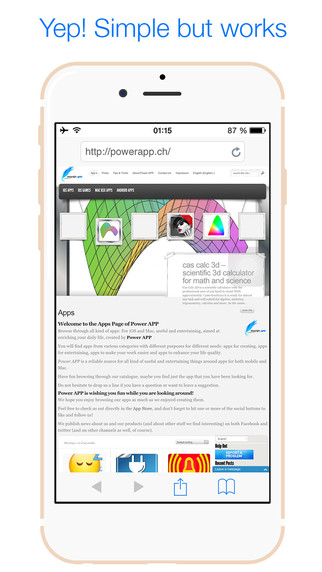
Power App AG today announces Yep! Browser for iOS8 version 1.3.0, an update to their popular web browser for iPhone and iPad. Yep! is an alternative browser for iOS with a focus on stability. Yep! was designed specifically to be as slim as possible and carrying no unnecessary bloat. No frilly things and shiny surfaces with this browser, but reliable functionability where it matters. In the latest update support for more file formats have been added, mainly sound and movie formats.
Pfaeffikon, Switzerland - Power App AG today is proud to announce the release of Yep! Browser for iOS8 (v1.3.0), an update to their popular web browser for iPhone and iPad. Yep! hit the App Store shortly after the release of iOS 8, when it became clear that all standard browsers had issues with iOS 8 like freezing and being slow. That's why Yep! originally was designed to be as slim as possible and carrying no unnecessary bloat. Of course, such a slim browser comes with the backlash of limited functionality. Power APP now decided to update their browser and add additional features, mainly additional sound and movie formats to ensure compatibility.
"We found that Yep! is still faster than many other browser for iOS while running more stable. But at the same time we had the feeling it needs to grow up. So we decided to give it an update and add additional functionality. Of course the main focus still is on stability and avoiding ballast that would have a negative impact on speed and performance. In fact, the most asked question from users was exactly this, to allow additional sound and movie formats." as Christian Schaffner, GM of Power APP explains.
Version1.3.0 now supports mp3, caff, aiff, ogg, wma, m4a, m4v, wmv, 3gp ,mp4, mov, avi, mkv, mpeg, mpg, flv and vob file types.
Device Requirements:
* iPhone, iPad, and iPod touch
* Optimized for iPhone 5, iPhone 6/6 Plus
* Requires iOS 6.0 or later
* 15.3 MB
Pricing and Availability:
Yep! Browser for iOS8 (v1.3.0) is only $0.99 USD (or equivalent amount in other currencies) and available worldwide exclusively through the App Store in the Productivity category.
Power App: http://www.powerapp.ch
Yep! Browser for iOS8 (v1.3.0): http://powerapp.ch/product/yep-browser-ios8/
Purchase and Download: https://itunes.apple.com/app/yep!-browser-for-ios8/id920850887
Screenshot: http://a1.mzstatic.com/us/r30/Purple1/v4/b1/73/d9/b173d9ec-5c25-6002-afdf-cc41d5c208de/screen322x572.jpeg
App Icon: http://a1.mzstatic.com/us/r30/Purple3/v4/18/94/e0/1894e06f-573d-53b9-ecc3-9dda64e5697a/icon175x175.png
Based in Pfaeffikon, Switzerland, Power App AG is an independent company founded in 2010 by Christian Schaffner. Power App's main focus is developing powerful, versatile applications for the Mac and iOS platforms. Copyright (C) 2010-2015 Power App AG. All Rights Reserved. Apple, the Apple logo, Mac, iPhone, iPod, and iPad are registered trademarks of Apple Inc. in the U.S. and/or other countries. Other trademarks and registered trademarks may be the property of their respective owners.
*******
Link To Article: http://prmac.com/release-id-73811.htm
*******
---------------------------------------------------------------------------------
Note that you can alter delivered distributions at any time.
Login to your account on prMac to alter your channel selection, or to opt-out at any time.
Alternative Browser YEP! for iOS now supports additional file formats - Published on 03/10/15
Power App AG today announces Yep! Browser for iOS8 version 1.3.0, an update to their popular web browser for iPhone and iPad. Yep! is an alternative browser for iOS with a focus on stability. Yep! was designed specifically to be as slim as possible and carrying no unnecessary bloat. No frilly things and shiny surfaces with this browser, but reliable functionability where it matters. In the latest update support for more file formats have been added, mainly sound and movie formats.
Pfaeffikon, Switzerland - Power App AG today is proud to announce the release of Yep! Browser for iOS8 (v1.3.0), an update to their popular web browser for iPhone and iPad. Yep! hit the App Store shortly after the release of iOS 8, when it became clear that all standard browsers had issues with iOS 8 like freezing and being slow. That's why Yep! originally was designed to be as slim as possible and carrying no unnecessary bloat. Of course, such a slim browser comes with the backlash of limited functionality. Power APP now decided to update their browser and add additional features, mainly additional sound and movie formats to ensure compatibility.
"We found that Yep! is still faster than many other browser for iOS while running more stable. But at the same time we had the feeling it needs to grow up. So we decided to give it an update and add additional functionality. Of course the main focus still is on stability and avoiding ballast that would have a negative impact on speed and performance. In fact, the most asked question from users was exactly this, to allow additional sound and movie formats." as Christian Schaffner, GM of Power APP explains.
Version1.3.0 now supports mp3, caff, aiff, ogg, wma, m4a, m4v, wmv, 3gp ,mp4, mov, avi, mkv, mpeg, mpg, flv and vob file types.
Device Requirements:
* iPhone, iPad, and iPod touch
* Optimized for iPhone 5, iPhone 6/6 Plus
* Requires iOS 6.0 or later
* 15.3 MB
Pricing and Availability:
Yep! Browser for iOS8 (v1.3.0) is only $0.99 USD (or equivalent amount in other currencies) and available worldwide exclusively through the App Store in the Productivity category.
Power App: http://www.powerapp.ch
Yep! Browser for iOS8 (v1.3.0): http://powerapp.ch/product/yep-browser-ios8/
Purchase and Download: https://itunes.apple.com/app/yep!-browser-for-ios8/id920850887
Screenshot: http://a1.mzstatic.com/us/r30/Purple1/v4/b1/73/d9/b173d9ec-5c25-6002-afdf-cc41d5c208de/screen322x572.jpeg
App Icon: http://a1.mzstatic.com/us/r30/Purple3/v4/18/94/e0/1894e06f-573d-53b9-ecc3-9dda64e5697a/icon175x175.png

Based in Pfaeffikon, Switzerland, Power App AG is an independent company founded in 2010 by Christian Schaffner. Power App's main focus is developing powerful, versatile applications for the Mac and iOS platforms. Copyright (C) 2010-2015 Power App AG. All Rights Reserved. Apple, the Apple logo, Mac, iPhone, iPod, and iPad are registered trademarks of Apple Inc. in the U.S. and/or other countries. Other trademarks and registered trademarks may be the property of their respective owners.
*******
Link To Article: http://prmac.com/release-id-73811.htm
*******
---------------------------------------------------------------------------------
Note that you can alter delivered distributions at any time.
Login to your account on prMac to alter your channel selection, or to opt-out at any time.
WaterField Unveils the Slim Zip Brief for New 12-inch Apple MacBook
A new article has been published at prMac.
WaterField Unveils the Slim Zip Brief for New 12-inch Apple MacBook - Published on 03/10/15
Local San Francisco manufacturer, WaterField Designs today announces the refined Zip Briefcase designed to enhance the 12-inch Apple MacBooks' thin, light features. Plush padding cushions the 12-inch Apple MacBook in a custom-sized pocket with an additional two pockets that protect and stow a hard drive, power supply or other accessories. Available in waxed canvas or ballistic nylon, this Made-in-America, ultra-slim MacBook bag is available exclusively from the WaterField Designs online store.
San Francisco, California - WaterField Designs today is proud to announce the refined Zip Brief, created to protect and showcase the new 12-inch Apple MacBook. Ideal for portability, the ultra-slim Zip looks sleek from every angle. Lined with sumptuously-soft material, the Zip's internal pockets cradle the MacBook on one side and accessories on the other, and an angled front pocket holds a smartphone, wallet or commuter pass. The exterior combines leather with waxed canvas or ballistic nylon for a comfortable yet sophisticated look. TSA-friendly, the Zip can be fully opened for airport security while contents remain safely secured.
"The new 12-inch MacBook is so elegant that we wanted to create a brief that enhanced its sleek design," said owner Gary Waterfield. "We created a compact, lightweight case that stays ultra-slim even when packed, and we carefully designed it to included only necessary features. Our new cashmere-soft lining is amazing; run your fingers through it, and you'll know your MacBook is getting top treatment."
The Zip Brief is available in tan waxed canvas or black ballistic nylon with full-grain, naturally-tanned leather trim. Inside, plush padding cushions the 12-inch Apple MacBook in a custom-sized pocket and an additional two pockets protect and stow a hard drive, power supply or other accessories. A few files or a notebook fit easily into the center main compartment of the MacBook bag. For quick access items, an angled front pocket keeps items safe yet accessible. Waterproof zippers extend around three sides of the Zip, allowing travelers to lay the MacBook bag flat and leave contents inside and protected when going through airport security. The Zip has two nylon handles and a removable suspension shoulder strap. When closed, the Zip's sleek profile hangs lightly against the body.
Pricing and Availability:
The Zip Brief is priced at $179.00 (USD). Color/Materials: Tan waxed cotton canvas or black ballistic nylon base. Accents and trim in full-grain, vegetable-tanned, black, chocolate or grizzly leather. Bag includes two nylon handles and a detachable suspension shoulder strap. Pre-order now. Shipping begins March 31, 2015.
WaterField Designs: http://www.sfbags.com/
Zip Brief for 12-inch MacBook: http://www.sfbags.com/products/zip-briefcase
12-inch MacBook Bag and Case Collection: http://www.sfbags.com/collections/12-macbook-sleeves-and-cases
Screenshot: http://cdn.shopify.com/s/files/1/0281/2796/products/GuXaDJhEeoMyD7LRPXMQ-1HaVMjP_4PrBkcUBd5szXU_grande.jpg?v=1425955063
WaterField Designs is an innovative San Francisco designer and manufacturer of bags and cases for tech-savvy consumers who want to stylishly and responsibly transport their technology. WaterField manufactures custom-fitted, high-quality cases and bags for a full-range of laptop computers, smartphones, tablets, gaming devices and other digital gear. All products are manufactured to exacting standards entirely in San Francisco. More information at "Our Story". WaterField Designs and Zip Brief are trademarks of WaterField Designs. Other company/product names may be trademarks of their respective owners. Copyright (C) 2009-2015 WaterField Designs. All Rights Reserved. Apple, the Apple logo and MacBook are registered trademarks of Apple Inc. in the U.S. and/or other countries. Other trademarks and registered trademarks may be the property of their respective owners.
*******
Link To Article: http://prmac.com/release-id-73810.htm
*******
---------------------------------------------------------------------------------
Note that you can alter delivered distributions at any time.
Login to your account on prMac to alter your channel selection, or to opt-out at any time.
WaterField Unveils the Slim Zip Brief for New 12-inch Apple MacBook - Published on 03/10/15
Local San Francisco manufacturer, WaterField Designs today announces the refined Zip Briefcase designed to enhance the 12-inch Apple MacBooks' thin, light features. Plush padding cushions the 12-inch Apple MacBook in a custom-sized pocket with an additional two pockets that protect and stow a hard drive, power supply or other accessories. Available in waxed canvas or ballistic nylon, this Made-in-America, ultra-slim MacBook bag is available exclusively from the WaterField Designs online store.
San Francisco, California - WaterField Designs today is proud to announce the refined Zip Brief, created to protect and showcase the new 12-inch Apple MacBook. Ideal for portability, the ultra-slim Zip looks sleek from every angle. Lined with sumptuously-soft material, the Zip's internal pockets cradle the MacBook on one side and accessories on the other, and an angled front pocket holds a smartphone, wallet or commuter pass. The exterior combines leather with waxed canvas or ballistic nylon for a comfortable yet sophisticated look. TSA-friendly, the Zip can be fully opened for airport security while contents remain safely secured.
"The new 12-inch MacBook is so elegant that we wanted to create a brief that enhanced its sleek design," said owner Gary Waterfield. "We created a compact, lightweight case that stays ultra-slim even when packed, and we carefully designed it to included only necessary features. Our new cashmere-soft lining is amazing; run your fingers through it, and you'll know your MacBook is getting top treatment."
The Zip Brief is available in tan waxed canvas or black ballistic nylon with full-grain, naturally-tanned leather trim. Inside, plush padding cushions the 12-inch Apple MacBook in a custom-sized pocket and an additional two pockets protect and stow a hard drive, power supply or other accessories. A few files or a notebook fit easily into the center main compartment of the MacBook bag. For quick access items, an angled front pocket keeps items safe yet accessible. Waterproof zippers extend around three sides of the Zip, allowing travelers to lay the MacBook bag flat and leave contents inside and protected when going through airport security. The Zip has two nylon handles and a removable suspension shoulder strap. When closed, the Zip's sleek profile hangs lightly against the body.
Pricing and Availability:
The Zip Brief is priced at $179.00 (USD). Color/Materials: Tan waxed cotton canvas or black ballistic nylon base. Accents and trim in full-grain, vegetable-tanned, black, chocolate or grizzly leather. Bag includes two nylon handles and a detachable suspension shoulder strap. Pre-order now. Shipping begins March 31, 2015.
WaterField Designs: http://www.sfbags.com/
Zip Brief for 12-inch MacBook: http://www.sfbags.com/products/zip-briefcase
12-inch MacBook Bag and Case Collection: http://www.sfbags.com/collections/12-macbook-sleeves-and-cases
Screenshot: http://cdn.shopify.com/s/files/1/0281/2796/products/GuXaDJhEeoMyD7LRPXMQ-1HaVMjP_4PrBkcUBd5szXU_grande.jpg?v=1425955063

WaterField Designs is an innovative San Francisco designer and manufacturer of bags and cases for tech-savvy consumers who want to stylishly and responsibly transport their technology. WaterField manufactures custom-fitted, high-quality cases and bags for a full-range of laptop computers, smartphones, tablets, gaming devices and other digital gear. All products are manufactured to exacting standards entirely in San Francisco. More information at "Our Story". WaterField Designs and Zip Brief are trademarks of WaterField Designs. Other company/product names may be trademarks of their respective owners. Copyright (C) 2009-2015 WaterField Designs. All Rights Reserved. Apple, the Apple logo and MacBook are registered trademarks of Apple Inc. in the U.S. and/or other countries. Other trademarks and registered trademarks may be the property of their respective owners.
*******
Link To Article: http://prmac.com/release-id-73810.htm
*******
---------------------------------------------------------------------------------
Note that you can alter delivered distributions at any time.
Login to your account on prMac to alter your channel selection, or to opt-out at any time.
Kids In Touch Offers Free Text Messaging App for Military Families
A new article has been published at prMac.
Kids In Touch Offers Free Text Messaging App for Military Families - Published on 03/10/15
Justin Noel, developer of Kids In Touch, today announced that he will be giving away free lifetime subscriptions to military families who want to communicate with loved ones back home. Kids In Touch is already loved by parents in over 20 countries because it lets kids communicate safely with known family and friends via text messaging and photos. Families can send and receive text and photo messages from a spouse and children as often as they want.
Frisco, Texas - Justin Noel, developer of Kids In Touch, today announced that he will be giving away free lifetime subscriptions to military families who want to communicate with loved ones back home. Kids In Touch is already loved by parents in over 20 countries because it lets kids communicate safely with known family and friends via text messaging and photos. Military families are encouraged to download the app - available for iPhone, iPad, and iPod touch - free on the iTunes App Store.
"Being in the military is hard," says Justin Noel, Kids In Touch creator and former Navy Electronics Technician. "During my service, I had lots of trouble staying in touch with my family. It was just too expensive and difficult to arrange calls over changing time zones. Kids In Touch was built to solve that problem, and I'm proud to extend this lifeline to our men and women in uniform for no cost."
Members of the military can download the app free and sign up for a lifetime subscription at no cost for themselves and their families. Whether in Fairfield or Fallujah, they can send and receive text and photo messages from a spouse and children as often as they want. Unlike phone calls, no long distance or texting fees apply when using Kids In Touch.
With young children of his own, Noel wants to help military families, and recalls the difficulties of staying in touch during his own time in the military. "Younger kids are especially shy and reluctant to use the phone," he remembers. "Kids think messaging is way more fun than a phone call, and love that they can share photos and short texts any time they want."
Providing a safe way to text is important for all kids in today's digital age, but it is absolutely critical for keeping military families connected. Too often, service members leave as their child's best friend only to come back as a complete stranger. "This time, you won't be a stranger when you come home," promises Noel.
Device Requirements:
* iPhone, iPad, and iPod touch
* Optimized for iPhone 5, iPhone 6/6 Plus
* Requires iOS 6.0 or later
* 21.1 MB
Pricing and Availability:
Kids In Touch 2.0.0 is Free and available worldwide exclusively through the App Store in the Social Networking category. An Android version is coming soon. Military families are asked send a photo of themselves in uniform using the Kids In Touch app to Justin Noel, or post to @KidsInTouch on Twitter or Facebook. Displaying the photo on the Kids In Touch website or social media is not a requirement for the promotion, but families are encouraged to state their preference.
Kids In Touch 2.0.0: https://kidsintouch.com
Download from iTunes: https://itunes.apple.com/app/kids-in-touch/id719526952
Media Assets: https://kidsintouch.com/press.html
Justin Noel is a former Navy Electronics Technician (ET-2) and father of two young children. After serving his country in the military, he turned toward software development in the telecommunications industry. Through several small startups, Noel developed and sold AppBeacon, one of the original iPhone app directories, to a Fortune-1000 company. The idea for Kids In Touch came from his experience trying to extend communication between his children, family, and friends, without the dangers and expense of traditional cell phones. He started Kids In Touch to create the first messaging app parents would feel safe letting their children use. All Material and Software (C) Copyright 2015 Kids In Touch. All Rights Reserved. Apple, the Apple logo, iPhone, iPod and iPad are registered trademarks of Apple Inc. in the U.S. and/or other countries. Other trademarks and registered trademarks may be the property of their respective owners.
*******
Link To Article: http://prmac.com/release-id-73809.htm
*******
---------------------------------------------------------------------------------
Note that you can alter delivered distributions at any time.
Login to your account on prMac to alter your channel selection, or to opt-out at any time.
Kids In Touch Offers Free Text Messaging App for Military Families - Published on 03/10/15
Justin Noel, developer of Kids In Touch, today announced that he will be giving away free lifetime subscriptions to military families who want to communicate with loved ones back home. Kids In Touch is already loved by parents in over 20 countries because it lets kids communicate safely with known family and friends via text messaging and photos. Families can send and receive text and photo messages from a spouse and children as often as they want.
Frisco, Texas - Justin Noel, developer of Kids In Touch, today announced that he will be giving away free lifetime subscriptions to military families who want to communicate with loved ones back home. Kids In Touch is already loved by parents in over 20 countries because it lets kids communicate safely with known family and friends via text messaging and photos. Military families are encouraged to download the app - available for iPhone, iPad, and iPod touch - free on the iTunes App Store.
"Being in the military is hard," says Justin Noel, Kids In Touch creator and former Navy Electronics Technician. "During my service, I had lots of trouble staying in touch with my family. It was just too expensive and difficult to arrange calls over changing time zones. Kids In Touch was built to solve that problem, and I'm proud to extend this lifeline to our men and women in uniform for no cost."
Members of the military can download the app free and sign up for a lifetime subscription at no cost for themselves and their families. Whether in Fairfield or Fallujah, they can send and receive text and photo messages from a spouse and children as often as they want. Unlike phone calls, no long distance or texting fees apply when using Kids In Touch.
With young children of his own, Noel wants to help military families, and recalls the difficulties of staying in touch during his own time in the military. "Younger kids are especially shy and reluctant to use the phone," he remembers. "Kids think messaging is way more fun than a phone call, and love that they can share photos and short texts any time they want."
Providing a safe way to text is important for all kids in today's digital age, but it is absolutely critical for keeping military families connected. Too often, service members leave as their child's best friend only to come back as a complete stranger. "This time, you won't be a stranger when you come home," promises Noel.
Device Requirements:
* iPhone, iPad, and iPod touch
* Optimized for iPhone 5, iPhone 6/6 Plus
* Requires iOS 6.0 or later
* 21.1 MB
Pricing and Availability:
Kids In Touch 2.0.0 is Free and available worldwide exclusively through the App Store in the Social Networking category. An Android version is coming soon. Military families are asked send a photo of themselves in uniform using the Kids In Touch app to Justin Noel, or post to @KidsInTouch on Twitter or Facebook. Displaying the photo on the Kids In Touch website or social media is not a requirement for the promotion, but families are encouraged to state their preference.
Kids In Touch 2.0.0: https://kidsintouch.com
Download from iTunes: https://itunes.apple.com/app/kids-in-touch/id719526952
Media Assets: https://kidsintouch.com/press.html
Justin Noel is a former Navy Electronics Technician (ET-2) and father of two young children. After serving his country in the military, he turned toward software development in the telecommunications industry. Through several small startups, Noel developed and sold AppBeacon, one of the original iPhone app directories, to a Fortune-1000 company. The idea for Kids In Touch came from his experience trying to extend communication between his children, family, and friends, without the dangers and expense of traditional cell phones. He started Kids In Touch to create the first messaging app parents would feel safe letting their children use. All Material and Software (C) Copyright 2015 Kids In Touch. All Rights Reserved. Apple, the Apple logo, iPhone, iPod and iPad are registered trademarks of Apple Inc. in the U.S. and/or other countries. Other trademarks and registered trademarks may be the property of their respective owners.
*******
Link To Article: http://prmac.com/release-id-73809.htm
*******
---------------------------------------------------------------------------------
Note that you can alter delivered distributions at any time.
Login to your account on prMac to alter your channel selection, or to opt-out at any time.
Creative Pro User Group Network Announces Las Vegas SuperMeet
A new article has been published at prMac.
Creative Pro User Group Network Announces Las Vegas SuperMeet - Published on 03/10/15
The Creative Pro User Group (CPUG) Network have announced that the 14th Annual Las Vegas SuperMeet will take place on Tuesday, April 14, 2015 in the Royale Ballroom at the Riviera Hotel in Las Vegas Nevada. The SuperMeet promises to be the single largest gathering of Final Cut Pro, Adobe, Avid and DaVinci Resolve editors, gurus, digital filmmakers and content creators during the 2015 NAB Show. Earlybird tickets are on sale now.
Los Angeles, CA / Boston, MA - Fourteenth annual industry networking gala to help foster film and media community attending 2015 NAB Show. The Creative Pro User Group (CPUG) Network have announced that the Fourteenth Annual Las Vegas SuperMeet will take place on Tuesday, April 14, 2015 in the Royale Ballroom at the Riviera Hotel and Casino in Las Vegas Nevada. Doors open at 4:30PM with the "SuperMeet Digital Showcase," featuring over 30 software and hardware developers. Presentations will begin at 7:00PM and continue until 11:00PM. Earlybird tickets are on sale online only for the price of $10.00 each plus ticket fee (Early Bird price ends March 11, 2015) and $7.00 for students and Teachers with valid student ID. The Las Vegas SuperMeet promises to be the single largest gathering of Final Cut Pro, Adobe, Avid and DaVinci Resolve editors, gurus, digital filmmakers and content creators during the 2015 NAB Show. It is expected this SuperMeet will sell out as historically every Las
Vegas SuperMeet sells out.
The SuperMeet agenda has not been announced and will not until shortly before the event, but will feature user driven presentations from Blackmagic Design, Adobe, Ripple Training, iZotope, Genarts, HP, Other World Computing and more.
Rounding out the evening will be the always wild and crazy "World Famous Raffle" where tens of thousands worth of valuable prizes will be handed out to dozens of lucky winners.
Doors to the SuperMeet will open at 4:30PM with the "SuperMeet Digital Showcase," featuring over 30 software and hardware developers. Here, attendees can enjoy a few cocktails, network and party with industry peers, talk one on one with leading manufacturers and learn about the latest trends in collaborative editing workflows for postproduction and broadcast markets.
Those who would like to attend the 2015 NAB Show can register for a free exhibits-only pass via SuperMeet promo code DF121 on the Nab Show web site. Attendees can also save $100 off of SMART or Conference Flex Pass via SuperMeet promo code DF145. For complete details on the SuperMeet including driving and transit directions, a current list of raffle prizes and how to purchase tickets, visit the SuperMeet website.
SuperMeet: http://supermeet.com
Nab Show: http://www.nabshow.com
Blackmagic Design: https://www.blackmagicdesign.com
Adobe: http://www.adobe.com/creativecloud.html
Ripple Training: https://www.rippletraining.com
HP: http://www8.hp.com/us/en/campaigns/workstations/overview.html?jumpid=ex_r11260_go_zworkstations
Creative Pro User Group (CPUG) Network SuperMeets are social gatherings of Final Cut Pro, Adobe, Avid and DaVinci Resolve editors, gurus, digital filmmakers and content creators from throughout the world who use or want to learn to use Macintosh-based workflows. SuperMeets started as a grassroots movement to connect Apple FCP Editors at a local level. Now in its fourteenth year, the producers behind the SuperMeets have harnessed the energy of local chapters globally and turned SuperMeets into the industry's most influential user-organized series of global events. The SuperMeet agenda usually includes user-driven demos of new products, digital video tips and tricks, and filmmaker show and tells, including a SuperMeet Digital Showcase with vendors and small developers providing workflow solutions for digital filmmakers and content creators. All product and company names herein may be trademarks of their respective owners.
*******
Link To Article: http://prmac.com/release-id-73808.htm
*******
---------------------------------------------------------------------------------
Note that you can alter delivered distributions at any time.
Login to your account on prMac to alter your channel selection, or to opt-out at any time.
Creative Pro User Group Network Announces Las Vegas SuperMeet - Published on 03/10/15
The Creative Pro User Group (CPUG) Network have announced that the 14th Annual Las Vegas SuperMeet will take place on Tuesday, April 14, 2015 in the Royale Ballroom at the Riviera Hotel in Las Vegas Nevada. The SuperMeet promises to be the single largest gathering of Final Cut Pro, Adobe, Avid and DaVinci Resolve editors, gurus, digital filmmakers and content creators during the 2015 NAB Show. Earlybird tickets are on sale now.
Los Angeles, CA / Boston, MA - Fourteenth annual industry networking gala to help foster film and media community attending 2015 NAB Show. The Creative Pro User Group (CPUG) Network have announced that the Fourteenth Annual Las Vegas SuperMeet will take place on Tuesday, April 14, 2015 in the Royale Ballroom at the Riviera Hotel and Casino in Las Vegas Nevada. Doors open at 4:30PM with the "SuperMeet Digital Showcase," featuring over 30 software and hardware developers. Presentations will begin at 7:00PM and continue until 11:00PM. Earlybird tickets are on sale online only for the price of $10.00 each plus ticket fee (Early Bird price ends March 11, 2015) and $7.00 for students and Teachers with valid student ID. The Las Vegas SuperMeet promises to be the single largest gathering of Final Cut Pro, Adobe, Avid and DaVinci Resolve editors, gurus, digital filmmakers and content creators during the 2015 NAB Show. It is expected this SuperMeet will sell out as historically every Las
Vegas SuperMeet sells out.
The SuperMeet agenda has not been announced and will not until shortly before the event, but will feature user driven presentations from Blackmagic Design, Adobe, Ripple Training, iZotope, Genarts, HP, Other World Computing and more.
Rounding out the evening will be the always wild and crazy "World Famous Raffle" where tens of thousands worth of valuable prizes will be handed out to dozens of lucky winners.
Doors to the SuperMeet will open at 4:30PM with the "SuperMeet Digital Showcase," featuring over 30 software and hardware developers. Here, attendees can enjoy a few cocktails, network and party with industry peers, talk one on one with leading manufacturers and learn about the latest trends in collaborative editing workflows for postproduction and broadcast markets.
Those who would like to attend the 2015 NAB Show can register for a free exhibits-only pass via SuperMeet promo code DF121 on the Nab Show web site. Attendees can also save $100 off of SMART or Conference Flex Pass via SuperMeet promo code DF145. For complete details on the SuperMeet including driving and transit directions, a current list of raffle prizes and how to purchase tickets, visit the SuperMeet website.
SuperMeet: http://supermeet.com
Nab Show: http://www.nabshow.com
Blackmagic Design: https://www.blackmagicdesign.com
Adobe: http://www.adobe.com/creativecloud.html
Ripple Training: https://www.rippletraining.com
HP: http://www8.hp.com/us/en/campaigns/workstations/overview.html?jumpid=ex_r11260_go_zworkstations
Creative Pro User Group (CPUG) Network SuperMeets are social gatherings of Final Cut Pro, Adobe, Avid and DaVinci Resolve editors, gurus, digital filmmakers and content creators from throughout the world who use or want to learn to use Macintosh-based workflows. SuperMeets started as a grassroots movement to connect Apple FCP Editors at a local level. Now in its fourteenth year, the producers behind the SuperMeets have harnessed the energy of local chapters globally and turned SuperMeets into the industry's most influential user-organized series of global events. The SuperMeet agenda usually includes user-driven demos of new products, digital video tips and tricks, and filmmaker show and tells, including a SuperMeet Digital Showcase with vendors and small developers providing workflow solutions for digital filmmakers and content creators. All product and company names herein may be trademarks of their respective owners.
*******
Link To Article: http://prmac.com/release-id-73808.htm
*******
---------------------------------------------------------------------------------
Note that you can alter delivered distributions at any time.
Login to your account on prMac to alter your channel selection, or to opt-out at any time.
Subscribe to:
Posts (Atom)