A new article has been published at prMac.
Migalolo - Dive Under the Sea With this Educational Musical eBook - Published on 03/17/15
Happy Diamond Music Studio Limited today releases Migalolo 1.1, a brand new 90-minute eBook for iOS & Android devices. Already ranking 4th place in the Books category on iTunes, Migalolo will captivate young audiences as they learn about key topics related to ocean conservation. Migalolo's rich graphics and animation-style eBook lead children to learn about the science of the seas as they are educated alongside a diverse cast of sea creatures, from friendly fish to sassy seabirds and more.
Hong Kong, China - Recently, multimedia company, Happy Diamond Music Studio announced the launch of one of the company's most entertaining and educational new eBook apps: Migalolo [Books - Free]. Award-winning Composer Shirley Choi and her creative team at Happy Diamond Music Studio designed this app to take kids on an underwater adventure from the Great Barrier reef in Australia all the way across the Pacific Ocean to the shores of Hong Kong.
Children can expand their creativity and broaden their imaginations with Migalolo. Kids will join Henry, an ordinary boy with an extraordinary love for everything related to the sea, as he explores the ocean and summons the magical Sea Fairy. His whole life changes when the Sea Fairy turns him into a dolphin and sends him on a mysterious mission. Luckily for Henry, the Sea Fairy transforms his best friend and pet cat, Iko, into a dolphin, too. Together, Henry and Iko are spirited across the ocean to the Great Barrier Reef in Australia where both wonder and danger await.
Migalolo's rich graphics and animation-style eBook lead children to learn about the science of the seas as they are educated alongside a diverse cast of sea creatures, from friendly fish to sassy seabirds and more. The app's unique combination of entertaining and educational aspects along with original songs written by award winning composer Siu Lui Shirley Choi, explain important ocean concepts in fun and easy-to-understand ways.
The app is comprised of ten interactive chapters featuring foot-tapping and fin-flapping original songs. Each tune has a story of its own and children of all ages will dive in and sing along with their new ocean friends. Happy Diamond Music Studios invites children under water with a diverse cast of sea creatures to experience the majesty of the seas.
Device Requirements:
* iPhone, iPad, and iPod touch
* Requires iOS 6.0 or later
* 392 MB
Pricing and Availability:
Migalolo ocean ebook 1.1 is Free and available worldwide exclusively through the App Store in the Books category. There is also an Android version available on Google Play.
Happy Diamond Music Studio: http://www.happydiamondmusic.com/
Migalolo ocean ebook 1.1: https://itunes.apple.com/us/app/migalolo-ocean-ebook-1st-2nd/id950565738
Download from Google Play: https://play.google.com/store/apps/details?id=com.migalolo.book
Screenshot 1: http://a4.mzstatic.com/us/r30/Purple3/v4/64/48/c0/6448c008-9ceb-f938-e32b-31695ad4c01c/screen480x480.jpeg
Screenshot 2: http://a2.mzstatic.com/us/r30/Purple3/v4/41/95/e7/4195e7aa-cc4d-c26a-df9e-5cfa05036c15/screen520x924.jpeg
App Icon: http://a1.mzstatic.com/us/r30/Purple3/v4/0e/d2/fe/0ed2fefc-e7ed-b323-109b-77b7507ae671/icon175x175.jpeg
Award winning Composer Shirley Choi is the creative force behind Happy Diamond Music Studio, an innovation multi-media company that seeks to educate children through music. Ms. Choi has traveled the globe and understands the importance of teaching kids at early ages of our planet's fragility. Happy Diamond Music Studios focuses on the goal of educating kids about the environment through musical adventure stories that espouse the concepts of friendship, faith and love. The company also seeks to educate children through engaging stories about the nature and our threatened environment, from facts about ecosystems to concepts of conservation. All Material and Software (C) Copyright 2015 Happy Diamond Music Studio Limited. All Rights Reserved. Apple, the Apple logo, iPhone, iPod and iPad are registered trademarks of Apple Inc. in the U.S. and/or other countries. Other trademarks and registered trademarks may be the property of their respective owners.
*******
Link To Article: http://prmac.com/release-id-73912.htm
*******
---------------------------------------------------------------------------------
Note that you can alter delivered distributions at any time.
Login to your account on prMac to alter your channel selection, or to opt-out at any time.


SonicPics gets major updates, adds background music, new sharing options
A new article has been published at prMac.
SonicPics gets major updates, adds background music, new sharing options - Published on 03/17/15
Michigan based Humble Daisy today announces SonicPics 2.5, a major update to its popular digital storytelling app for iOS devices. SonicPics lets you create, narrate and share custom photo slide shows. The app records your voice while you flip through your images and automatically synchronizes your images to the audio recording. Publish your recordings to YouTube, share them via WiFi, save to your photo library, or email to your friends. Half price through Wednesday.
Ann Arbor, Michigan - Humble Daisy today is proud to announce the release and immediate availability of SonicPics 2.5, a major update to its popular digital storytelling app for iOS devices. SonicPics lets you create, narrate and share custom photo slide shows. The app records your voice while you flip through your images and automatically synchronizes your images to the audio recording. Publish your recordings to YouTube, share them via WiFi, save to your photo library, or email to your friends. Half price through Wednesday.
SonicPics is a tool for creating and narrating custom photo slide shows on the iPhone, iPod touch, and iPad. SonicPics lets users select images from the iOS device's photo library or built in camera to make custom slideshows. They can then record a voiceover, narrating the images as they swipe through them. Once finished, users can export a video with their images synchronized to their narration. Recordings can then be shared in a variety of ways including posting to YouTube.
"We are really excited about the new features we are adding to SonicPics in this release!" explained Dave Chmura, CEO of Humble Daisy, Inc. "The number one requested feature has been the ability to add a background track when making a recording, which is part of this release."
SonicPics is a great fit for the classroom. "SonicPics is one of our go-to apps any time we need to hear from our students about their thinking and learning." Carlyn Skibba explained in a review of the app. It is great "for any teacher who wants peek "under the hood" and really understand the complexity of student thought."
Update Includes:
* Added - Ability to add and record background music
* Added - Support for the 6 and 6XL
* Added - New share options. Now share with YouTube, DropBox, Vimeo, Facebook, Google , iCloud, email, iMessage, Evernote, Slack, Storehouse, HipChat, and more
* Updated - Major User Interface updates
* Updated - Recording processing speeds improved
* Fixed - Several minor bugs and user interface enhancements
SonicPics Feature Highlights Include:
* Create and narrate custom photo slideshows
* Records your voice and/or background music while you flip through your images
* Automatically synchronizes your images to the audio recording
* Publish your recordings to YouTube, Vimeo, Dropbox, Evernote, Google , iCloud, iMessage, Slack, Storehouse, email, and more...
* Present your stories on the big screen using video out while recording or to watch recordings
* Make .m4v movies of your images and narrations from your iPhone or iPod touch or iPad
* Recordings processed right on your phone, no 3rd party service required
* Intuitive user interface
Device Requirements:
* iPad, iPhone, or iPod touch (2nd generation)
* Requires iOS 7.1 or later
* 4.53 MB
Pricing and Availability:
To celebrate this release, SonicPics 2.5.0 will be available for only $0.99 (USD) through Wednesday (Reg $1.99). It is available worldwide exclusively through the App Store in the Photo & Video category. Review copies are available to the media upon request.
SonicPics 2.5.0: http://www.sonicpics.com
Purchase and Download: http://itunes.apple.com/app/id345295488
Screenshot 1: http://sonicpics.com/images/screenshots/iPad/StartRecording.png
Screenshot 2: http://sonicpics.com/images/screenshots/iPad/EditProject.png
Screenshot 3: http://sonicpics.com/images/screenshots/iPad/ProjectChooser.png
App Icon: http://sonicpics.com/images/Logos/SonicPics_Icon.png
Headquartered in Ann Arbor, Michigan, Humble Daisy, Inc. is a privately funded company founded in 2002 by husband-wife team of David and Michael Chmura. With a focus on the Mac platform, Humble Daisy's goal is to provide simple and elegant, user-centered solutions to facilitate personal and professional success. Copyright 2002-2015 Humble Daisy, Inc. All Rights Reserved. Apple, the Apple logo, and Keynote are registered trademarks of Apple Computer in the U.S. and/or other countries.
*******
Link To Article: http://prmac.com/release-id-73926.htm
*******
---------------------------------------------------------------------------------
Note that you can alter delivered distributions at any time.
Login to your account on prMac to alter your channel selection, or to opt-out at any time.
SonicPics gets major updates, adds background music, new sharing options - Published on 03/17/15
Michigan based Humble Daisy today announces SonicPics 2.5, a major update to its popular digital storytelling app for iOS devices. SonicPics lets you create, narrate and share custom photo slide shows. The app records your voice while you flip through your images and automatically synchronizes your images to the audio recording. Publish your recordings to YouTube, share them via WiFi, save to your photo library, or email to your friends. Half price through Wednesday.
Ann Arbor, Michigan - Humble Daisy today is proud to announce the release and immediate availability of SonicPics 2.5, a major update to its popular digital storytelling app for iOS devices. SonicPics lets you create, narrate and share custom photo slide shows. The app records your voice while you flip through your images and automatically synchronizes your images to the audio recording. Publish your recordings to YouTube, share them via WiFi, save to your photo library, or email to your friends. Half price through Wednesday.
SonicPics is a tool for creating and narrating custom photo slide shows on the iPhone, iPod touch, and iPad. SonicPics lets users select images from the iOS device's photo library or built in camera to make custom slideshows. They can then record a voiceover, narrating the images as they swipe through them. Once finished, users can export a video with their images synchronized to their narration. Recordings can then be shared in a variety of ways including posting to YouTube.
"We are really excited about the new features we are adding to SonicPics in this release!" explained Dave Chmura, CEO of Humble Daisy, Inc. "The number one requested feature has been the ability to add a background track when making a recording, which is part of this release."
SonicPics is a great fit for the classroom. "SonicPics is one of our go-to apps any time we need to hear from our students about their thinking and learning." Carlyn Skibba explained in a review of the app. It is great "for any teacher who wants peek "under the hood" and really understand the complexity of student thought."
Update Includes:
* Added - Ability to add and record background music
* Added - Support for the 6 and 6XL
* Added - New share options. Now share with YouTube, DropBox, Vimeo, Facebook, Google , iCloud, email, iMessage, Evernote, Slack, Storehouse, HipChat, and more
* Updated - Major User Interface updates
* Updated - Recording processing speeds improved
* Fixed - Several minor bugs and user interface enhancements
SonicPics Feature Highlights Include:
* Create and narrate custom photo slideshows
* Records your voice and/or background music while you flip through your images
* Automatically synchronizes your images to the audio recording
* Publish your recordings to YouTube, Vimeo, Dropbox, Evernote, Google , iCloud, iMessage, Slack, Storehouse, email, and more...
* Present your stories on the big screen using video out while recording or to watch recordings
* Make .m4v movies of your images and narrations from your iPhone or iPod touch or iPad
* Recordings processed right on your phone, no 3rd party service required
* Intuitive user interface
Device Requirements:
* iPad, iPhone, or iPod touch (2nd generation)
* Requires iOS 7.1 or later
* 4.53 MB
Pricing and Availability:
To celebrate this release, SonicPics 2.5.0 will be available for only $0.99 (USD) through Wednesday (Reg $1.99). It is available worldwide exclusively through the App Store in the Photo & Video category. Review copies are available to the media upon request.
SonicPics 2.5.0: http://www.sonicpics.com
Purchase and Download: http://itunes.apple.com/app/id345295488
Screenshot 1: http://sonicpics.com/images/screenshots/iPad/StartRecording.png

Screenshot 2: http://sonicpics.com/images/screenshots/iPad/EditProject.png

Screenshot 3: http://sonicpics.com/images/screenshots/iPad/ProjectChooser.png

App Icon: http://sonicpics.com/images/Logos/SonicPics_Icon.png

Headquartered in Ann Arbor, Michigan, Humble Daisy, Inc. is a privately funded company founded in 2002 by husband-wife team of David and Michael Chmura. With a focus on the Mac platform, Humble Daisy's goal is to provide simple and elegant, user-centered solutions to facilitate personal and professional success. Copyright 2002-2015 Humble Daisy, Inc. All Rights Reserved. Apple, the Apple logo, and Keynote are registered trademarks of Apple Computer in the U.S. and/or other countries.
*******
Link To Article: http://prmac.com/release-id-73926.htm
*******
---------------------------------------------------------------------------------
Note that you can alter delivered distributions at any time.
Login to your account on prMac to alter your channel selection, or to opt-out at any time.
Clear the Grid a puzzle game for iOS - Arm flapping fun and frustration
A new article has been published at prMac.
Clear the Grid a puzzle game for iOS - Arm flapping fun and frustration - Published on 03/17/15
UK based Studio Plinth today launches Clear the Grid, a universal game for iOS. Aimed at casual gamers of all ages Clear the Grid is that most unusual of things a game of skill. Players clear the grid by sliding tiles to match 3 or more tiles, clearing the tiles to win. 100 levels to clear through skill. Clear the Grid is free to download which includes the first 10 levels, then there is an in app purchase to unlock all 100 levels forever. All future updates will be free.
Edinburgh, United Kingdom - Scotland based Studio Plinth today is proud to launch Clear the Grid, a universal game for iOS. Aimed at casual gamers of all ages Clear the Grid is that most unusual of things a game of skill. It's free to download which includes the first 10 levels there is then an In App Purchase of $1.99 USD (launch sale price $0.99 USD) to unlock all 100 levels forever. All future updates will be free.
Clear the Grid has one goal which is to clear the grid. Slide the tiles on the perpetually scrolling grid to match 3 or more tiles, clear all the tiles to win. Don't leave less than 3 tiles of any colour or it is game over. Easy to learn but hard to master, thinking ahead is essential. This is a game of skill, just you against the grid.
Each level is unique, a different shape, a different size. As the levels progress ever more challenging grids are presented with new tiles Splits and Bullseyes being introduced to keep you on your toes.
Device Requirements:
* Compatible with iPhone, iPad, and iPod touch
* Requires iOS 7.1 or later
* Optimized for iPhone 5, iPhone 6, and iPhone 6 Plus
* 3.1 MB
Pricing and Availability:
Clear the Grid 1.0.1 is free to download and available worldwide exclusively through the App Store in the Games category.
Studio Plinth: http://studioplinth.com
Clear the Grid 1.0.1: http://studioplinth.com/clear-the-grid
Download from iTunes: https://itunes.apple.com/app/clear-the-grid/id948280553
Screenshot 1: http://studioplinth.com/s/3.png
Screenshot 2: http://studioplinth.com/s/2.png
Press Kit (zip): http://studioplinth.com/s/Presspack-ew67.zip
Studio Plinth was co-founded by Sanya Sever and Jay Forster-Davies in 2012. They are based in Edinburgh and this is their second app of many (they hope) as they desperately need a yacht or at least a 10 foot dingy in a sunnier part of the world. The risk of rickets with the miserable Scottish weather is just too great. Copyright (C) 2015 Studio Plinth. All Rights Reserved. Apple, the Apple logo, iPhone, iPod and iPad are registered trademarks of Apple Inc. in the U.S. and/or other countries.
*******
Link To Article: http://prmac.com/release-id-73925.htm
*******
---------------------------------------------------------------------------------
Note that you can alter delivered distributions at any time.
Login to your account on prMac to alter your channel selection, or to opt-out at any time.
Clear the Grid a puzzle game for iOS - Arm flapping fun and frustration - Published on 03/17/15
UK based Studio Plinth today launches Clear the Grid, a universal game for iOS. Aimed at casual gamers of all ages Clear the Grid is that most unusual of things a game of skill. Players clear the grid by sliding tiles to match 3 or more tiles, clearing the tiles to win. 100 levels to clear through skill. Clear the Grid is free to download which includes the first 10 levels, then there is an in app purchase to unlock all 100 levels forever. All future updates will be free.
Edinburgh, United Kingdom - Scotland based Studio Plinth today is proud to launch Clear the Grid, a universal game for iOS. Aimed at casual gamers of all ages Clear the Grid is that most unusual of things a game of skill. It's free to download which includes the first 10 levels there is then an In App Purchase of $1.99 USD (launch sale price $0.99 USD) to unlock all 100 levels forever. All future updates will be free.
Clear the Grid has one goal which is to clear the grid. Slide the tiles on the perpetually scrolling grid to match 3 or more tiles, clear all the tiles to win. Don't leave less than 3 tiles of any colour or it is game over. Easy to learn but hard to master, thinking ahead is essential. This is a game of skill, just you against the grid.
Each level is unique, a different shape, a different size. As the levels progress ever more challenging grids are presented with new tiles Splits and Bullseyes being introduced to keep you on your toes.
Device Requirements:
* Compatible with iPhone, iPad, and iPod touch
* Requires iOS 7.1 or later
* Optimized for iPhone 5, iPhone 6, and iPhone 6 Plus
* 3.1 MB
Pricing and Availability:
Clear the Grid 1.0.1 is free to download and available worldwide exclusively through the App Store in the Games category.
Studio Plinth: http://studioplinth.com
Clear the Grid 1.0.1: http://studioplinth.com/clear-the-grid
Download from iTunes: https://itunes.apple.com/app/clear-the-grid/id948280553
Screenshot 1: http://studioplinth.com/s/3.png

Screenshot 2: http://studioplinth.com/s/2.png

Press Kit (zip): http://studioplinth.com/s/Presspack-ew67.zip
Studio Plinth was co-founded by Sanya Sever and Jay Forster-Davies in 2012. They are based in Edinburgh and this is their second app of many (they hope) as they desperately need a yacht or at least a 10 foot dingy in a sunnier part of the world. The risk of rickets with the miserable Scottish weather is just too great. Copyright (C) 2015 Studio Plinth. All Rights Reserved. Apple, the Apple logo, iPhone, iPod and iPad are registered trademarks of Apple Inc. in the U.S. and/or other countries.
*******
Link To Article: http://prmac.com/release-id-73925.htm
*******
---------------------------------------------------------------------------------
Note that you can alter delivered distributions at any time.
Login to your account on prMac to alter your channel selection, or to opt-out at any time.
GoodReader makes signing documents on iPad quicker and more secure
A new article has been published at prMac.
GoodReader makes signing documents on iPad quicker and more secure - Published on 03/17/15
GoodReader, the world's top-selling PDF reader and file management app for iPhone and iPad, has made adding a signature to documents quicker and more secure than any other document reader. The updated app now enables users to pre-compose signatures, save them securely in GoodReader, and add them to documents in only three taps. When a document needs to be signed, the user simply chooses one of the pre-composed signatures stored in GoodReader.
Topeka, Kansas - GoodReader, the world's top-selling PDF reader and file management app for iPhone and iPad, has made adding a signature to documents quicker and more secure than any other document reader. GoodReader now offers 3-tap access to pre-composed signatures, which are stored securely and can optionally be protected by a fingerprint on devices equipped with Touch ID.
GoodReader 4.10 now enables users to pre-compose signatures, save them securely in GoodReader, and add them to documents in only three taps. The ability to digitally sign documents and send them from a mobile device is a very attractive feature to business users, but for those who must digitally sign many documents a day, access to pre-composed signatures is a huge time-saver. When a document needs to be signed, the user simply chooses one of the pre-composed signatures stored in GoodReader.
Adding a digital signature to a document on iPad or iPhone is super simple in GoodReader:
* Tap-and-hold on an empty spot on a PDF page
* Select "Sign" from the popup menu
* First time users of this Signature feature will then create one or more pre-composed signatures (up to four on an iPad, and up to two on an iPhone)
* Select one of the available signatures from the menu
All pre-composed signatures are stored on a device in encrypted form. The signatures are never uploaded anywhere and never backed up. Additionally, if a device is equipped with Touch ID, users can protect their pre-composed signatures with their fingerprints.
"We know a lot of our business and government users must digitally sign dozens of documents a day ," said Yuri Selukoff, president of Good.iWare. "By providing an easy yet secure way for our customers to sign documents, we make sure that they are able to enjoy the simplicity of working with their documents without fear of those documents being signed without their authorization."
About GoodReader:
GoodReader is known throughout the world as the top document reader for viewing, navigating and annotating large PDF documents on an iPhone and iPad. GoodReader aims to deliver the most file viewing and sharing options, while remaining simple to use. With GoodReader, users not only have the ability to do virtually anything they'd like with documents on an iPhone or iPad, they also enjoy unequaled file downloading and sharing with all major networking protocols and cloud services.
Often referred to as "the missing file system for iOS," GoodReader is also able to organize thousands of files into an easily manageable hierarchy of folders and files. GoodReader has also set the standard for iOS document readers in the enterprise, offering a high level of document security and synchronization with remote servers.
Device Requirements:
* iPhone, iPad, and iPod touch
* Requires iOS 6.0 or later
* Optimized for iPhone 5,6/6 Plus
* 38.4 MB
Pricing and Availability:
GoodReader 4.10.0 is only $4.99 USD (or equivalent amount in other currencies) and available worldwide exclusively through the App Store in the Productivity category.
GoodReader 4.10.0: http://www.goodreader.com
Purchase and Download: https://itunes.apple.com/app/goodreader/id777310222
Screenshot: http://a2.mzstatic.com/us/r30/Purple3/v4/a6/0e/2f/a60e2f76-afbe-e28d-aca0-0db6263c5b3f/screen322x572.jpeg
App Icon: http://goodreader.com/images/gr-icon-96.jpg
Good.iWare focuses on creating quality mobile applications for the iPhone and iPad. For more information, visit the company's website. Copyright (C) 2015 Good.iWare. All Rights Reserved. Apple, the Apple logo, iPhone, iPod and iPad are registered trademarks of Apple Inc. in the U.S. and/or other countries.
*******
Link To Article: http://prmac.com/release-id-73924.htm
*******
---------------------------------------------------------------------------------
Note that you can alter delivered distributions at any time.
Login to your account on prMac to alter your channel selection, or to opt-out at any time.
GoodReader makes signing documents on iPad quicker and more secure - Published on 03/17/15
GoodReader, the world's top-selling PDF reader and file management app for iPhone and iPad, has made adding a signature to documents quicker and more secure than any other document reader. The updated app now enables users to pre-compose signatures, save them securely in GoodReader, and add them to documents in only three taps. When a document needs to be signed, the user simply chooses one of the pre-composed signatures stored in GoodReader.
Topeka, Kansas - GoodReader, the world's top-selling PDF reader and file management app for iPhone and iPad, has made adding a signature to documents quicker and more secure than any other document reader. GoodReader now offers 3-tap access to pre-composed signatures, which are stored securely and can optionally be protected by a fingerprint on devices equipped with Touch ID.
GoodReader 4.10 now enables users to pre-compose signatures, save them securely in GoodReader, and add them to documents in only three taps. The ability to digitally sign documents and send them from a mobile device is a very attractive feature to business users, but for those who must digitally sign many documents a day, access to pre-composed signatures is a huge time-saver. When a document needs to be signed, the user simply chooses one of the pre-composed signatures stored in GoodReader.
Adding a digital signature to a document on iPad or iPhone is super simple in GoodReader:
* Tap-and-hold on an empty spot on a PDF page
* Select "Sign" from the popup menu
* First time users of this Signature feature will then create one or more pre-composed signatures (up to four on an iPad, and up to two on an iPhone)
* Select one of the available signatures from the menu
All pre-composed signatures are stored on a device in encrypted form. The signatures are never uploaded anywhere and never backed up. Additionally, if a device is equipped with Touch ID, users can protect their pre-composed signatures with their fingerprints.
"We know a lot of our business and government users must digitally sign dozens of documents a day ," said Yuri Selukoff, president of Good.iWare. "By providing an easy yet secure way for our customers to sign documents, we make sure that they are able to enjoy the simplicity of working with their documents without fear of those documents being signed without their authorization."
About GoodReader:
GoodReader is known throughout the world as the top document reader for viewing, navigating and annotating large PDF documents on an iPhone and iPad. GoodReader aims to deliver the most file viewing and sharing options, while remaining simple to use. With GoodReader, users not only have the ability to do virtually anything they'd like with documents on an iPhone or iPad, they also enjoy unequaled file downloading and sharing with all major networking protocols and cloud services.
Often referred to as "the missing file system for iOS," GoodReader is also able to organize thousands of files into an easily manageable hierarchy of folders and files. GoodReader has also set the standard for iOS document readers in the enterprise, offering a high level of document security and synchronization with remote servers.
Device Requirements:
* iPhone, iPad, and iPod touch
* Requires iOS 6.0 or later
* Optimized for iPhone 5,6/6 Plus
* 38.4 MB
Pricing and Availability:
GoodReader 4.10.0 is only $4.99 USD (or equivalent amount in other currencies) and available worldwide exclusively through the App Store in the Productivity category.
GoodReader 4.10.0: http://www.goodreader.com
Purchase and Download: https://itunes.apple.com/app/goodreader/id777310222
Screenshot: http://a2.mzstatic.com/us/r30/Purple3/v4/a6/0e/2f/a60e2f76-afbe-e28d-aca0-0db6263c5b3f/screen322x572.jpeg

App Icon: http://goodreader.com/images/gr-icon-96.jpg

Good.iWare focuses on creating quality mobile applications for the iPhone and iPad. For more information, visit the company's website. Copyright (C) 2015 Good.iWare. All Rights Reserved. Apple, the Apple logo, iPhone, iPod and iPad are registered trademarks of Apple Inc. in the U.S. and/or other countries.
*******
Link To Article: http://prmac.com/release-id-73924.htm
*******
---------------------------------------------------------------------------------
Note that you can alter delivered distributions at any time.
Login to your account on prMac to alter your channel selection, or to opt-out at any time.
Words with Colors is a first-of-its-kind word game for iOS and Android
A new article has been published at prMac.
Words with Colors is a first-of-its-kind word game for iOS and Android - Published on 03/17/15
Block18 Media AB today announces Words with Colors (WWC), a new word game for iOS and Android designed to be "pick up and play" offering fast and challenging 2-player competition. WWC pits you against friends, random opponents or computer AI where each player chooses a word and then attempts to guess their opponent's word first. As players guess a letter, they receive hints in color code form to assist them in guessing the word. Words with Colors is available for both iOS and Android platforms.
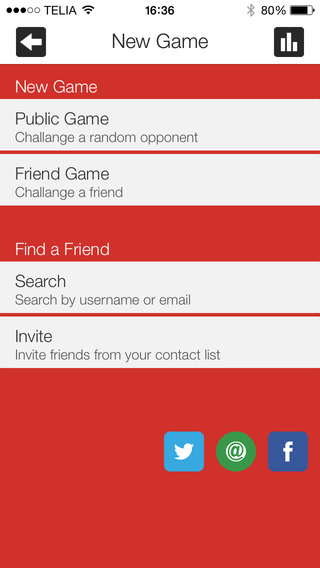
Orsundsbro, Sweden - Today available for immediate release from Block18 Media AB, 'Words with Colors' is a first-of-its-kind for iOS and Android devices. Words with Colors is a fast-paced and challenging word game, reminiscent of Mastermind. To begin playing the player must first create a username and, optionally, submit an email address. Once a username is created players can choose to immediately play in a public game or invite friends to play from their contact list. Once a challenger has been found each player chooses a word (4, 5, 6, or 7 letters). In order to win you must correctly guess your opponents word in as few guesses as possible. With each letter you guess you receive hints in the form of color codes: red, wrong letter; yellow, correct letter, wrong location; green, correct letter, correct location.
Words with Colors is immediately available worldwide in English and Swedish for both iOS and Android platforms. The game allows for push notifications and social chat. An in-game tutorial is also shown when a user starts a game for the first time and can also be accessed in the settings tab. The app is free-to-play and contains a small advertisement at the game creation screen. Players may choose to purchase a premium account in the options menu that will remove any advertisements.
Device Requirements:
* iPhone, iPad, and iPod touch
* Requires iOS 5.1.1 or later
* 3.2 MB
Pricing and Availability:
Words With Colors 1.0 is free and available worldwide through the App Store in the Games category. There is also an Android version available on Google Play.
Words with Colors 1.0: http://www.block18.com
Download from iTunes: https://itunes.apple.com/app/words-with-colors/id825992143
Download from Google Play: https://play.google.com/store/apps/details?id=com.apptonix.android.wordswithcolors
Screenshot: http://a1.mzstatic.com/us/r30/Purple5/v4/a2/29/06/a2290646-972e-7d10-7474-3587860e4248/screen568x568.jpeg
App Icon: http://a3.mzstatic.com/us/r30/Purple4/v4/62/fe/06/62fe0616-c5df-119a-a588-f32c0c2873af/icon175x175.jpeg
Media Assets: http://www.block18.com/wp-content/uploads/2015/03/english-pressrelease-wordswithcolors.pdf
Block18 Media AB was established in 2014 and is an independent software and graphic design firm. Block18 Media's main focus is developing useful and entertaining applications for iOS and Android platforms. Our clients include Construction, Non-Profit, Healthcare, eCommerce, Travel, Mobile Gaming, Advertising, Retail. Copyright (C) 2014-2015 Block18 Media AB. All Rights Reserved. Apple, the Apple logo, iPhone, iPod and iPad are registered trademarks of Apple Inc. in the U.S. and/or other countries.
*******
Link To Article: http://prmac.com/release-id-73917.htm
*******
---------------------------------------------------------------------------------
Note that you can alter delivered distributions at any time.
Login to your account on prMac to alter your channel selection, or to opt-out at any time.
Words with Colors is a first-of-its-kind word game for iOS and Android - Published on 03/17/15
Block18 Media AB today announces Words with Colors (WWC), a new word game for iOS and Android designed to be "pick up and play" offering fast and challenging 2-player competition. WWC pits you against friends, random opponents or computer AI where each player chooses a word and then attempts to guess their opponent's word first. As players guess a letter, they receive hints in color code form to assist them in guessing the word. Words with Colors is available for both iOS and Android platforms.
Orsundsbro, Sweden - Today available for immediate release from Block18 Media AB, 'Words with Colors' is a first-of-its-kind for iOS and Android devices. Words with Colors is a fast-paced and challenging word game, reminiscent of Mastermind. To begin playing the player must first create a username and, optionally, submit an email address. Once a username is created players can choose to immediately play in a public game or invite friends to play from their contact list. Once a challenger has been found each player chooses a word (4, 5, 6, or 7 letters). In order to win you must correctly guess your opponents word in as few guesses as possible. With each letter you guess you receive hints in the form of color codes: red, wrong letter; yellow, correct letter, wrong location; green, correct letter, correct location.
Words with Colors is immediately available worldwide in English and Swedish for both iOS and Android platforms. The game allows for push notifications and social chat. An in-game tutorial is also shown when a user starts a game for the first time and can also be accessed in the settings tab. The app is free-to-play and contains a small advertisement at the game creation screen. Players may choose to purchase a premium account in the options menu that will remove any advertisements.
Device Requirements:
* iPhone, iPad, and iPod touch
* Requires iOS 5.1.1 or later
* 3.2 MB
Pricing and Availability:
Words With Colors 1.0 is free and available worldwide through the App Store in the Games category. There is also an Android version available on Google Play.
Words with Colors 1.0: http://www.block18.com
Download from iTunes: https://itunes.apple.com/app/words-with-colors/id825992143
Download from Google Play: https://play.google.com/store/apps/details?id=com.apptonix.android.wordswithcolors
Screenshot: http://a1.mzstatic.com/us/r30/Purple5/v4/a2/29/06/a2290646-972e-7d10-7474-3587860e4248/screen568x568.jpeg
App Icon: http://a3.mzstatic.com/us/r30/Purple4/v4/62/fe/06/62fe0616-c5df-119a-a588-f32c0c2873af/icon175x175.jpeg

Media Assets: http://www.block18.com/wp-content/uploads/2015/03/english-pressrelease-wordswithcolors.pdf
Block18 Media AB was established in 2014 and is an independent software and graphic design firm. Block18 Media's main focus is developing useful and entertaining applications for iOS and Android platforms. Our clients include Construction, Non-Profit, Healthcare, eCommerce, Travel, Mobile Gaming, Advertising, Retail. Copyright (C) 2014-2015 Block18 Media AB. All Rights Reserved. Apple, the Apple logo, iPhone, iPod and iPad are registered trademarks of Apple Inc. in the U.S. and/or other countries.
*******
Link To Article: http://prmac.com/release-id-73917.htm
*******
---------------------------------------------------------------------------------
Note that you can alter delivered distributions at any time.
Login to your account on prMac to alter your channel selection, or to opt-out at any time.
Nisus Software, Inc. Releases Nisus Writer Pro 2.1
A new article has been published at prMac.
Nisus Software, Inc. Releases Nisus Writer Pro 2.1 - Published on 03/17/15
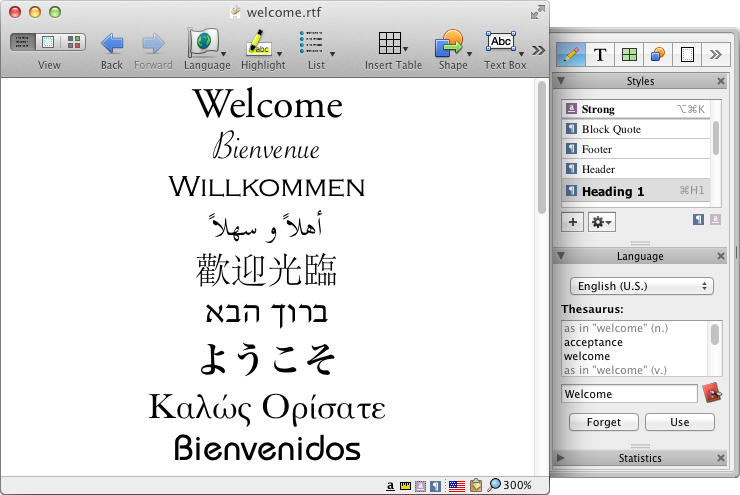
California based Nisus Software, Inc. today announces Nisus Writer Pro 2.1, an important update to their critically acclaimed word processor for Mac OS X. Now 64 bit and sandboxed, version 2.1 includes iCloud support, autosave, versions, bug fixes, improvements, and macro language enhancements. These new features add to an already rich feature set that include an intuitive interface, multilingual text support, powerful find and replace, easy to use style system, and so much more.
Solana Beach, California - Nisus Software today is proud to announce the release of Nisus Writer Pro 2.1, the latest release of their powerful word processor for the Mac. This new version contains the following fixes and additions:
* Added support for Mac OS X autosave, where changes to all opens documents are saved regularly
* Added support for Mac OS X document versioning, where a user can browse and revert to older versions of any document
* Added support for iCloud
* Nisus Writer Pro is now 64-bit
* Other bug fixes, improvements, and macro language enhancements
These new features add to an already rich feature set that includes an intuitive interface, multilingual text support, powerful find and replace, easy to use style system, multipart selections, collaboration tools (comments and track changes), and a native file format (RTF) that almost any word processor can read.
Nisus Writer Pro can be updated from within the app. Select "Check for Updates" from the "Nisus Writer Pro" menu and follow the instructions. You can also download the update from the Pro update pages.
System Requirements:
* Nisus Writer Pro 2.1 requires OS X 10.7.5 or above
Pricing and Availability:
Nisus Writer Pro 2.1 is available now from the Nisus website and soon from the Mac App Store. Nisus Writer Pro is only $79 (USD). An upgrade from Pro 1.x is $49. A three license Family Pack is available for $99. An academic version is also available.
Nisus Software: http://www.nisus.com
Nisus Writer Pro 2.1: http://nisus.com/pro
Download Trial: http://nisus.com/pro/download.php
Purchase Nisus Writer Pro: http://nisus.com/store
Screenshot: http://nisus.com/pro/images/screenshots/interface.png
Press Kit (zip): http://nisus.com/pr/files/NWP-nisusman.tiff.zip
For over 25 years, Nisus Software, Inc. has developed award winning text and productivity tools for the Macintosh, such as Nisus Writer Pro, Nisus Writer Express, Nisus Thesaurus, and InfoClick. Copyright (C) 2015 Nisus Software, Inc. All Rights Reserved. Apple, the Apple logo, and Macintosh are registered trademarks of Apple Inc. in the U.S. and/or other countries.
*******
Link To Article: http://prmac.com/release-id-73914.htm
*******
---------------------------------------------------------------------------------
Note that you can alter delivered distributions at any time.
Login to your account on prMac to alter your channel selection, or to opt-out at any time.
Nisus Software, Inc. Releases Nisus Writer Pro 2.1 - Published on 03/17/15
California based Nisus Software, Inc. today announces Nisus Writer Pro 2.1, an important update to their critically acclaimed word processor for Mac OS X. Now 64 bit and sandboxed, version 2.1 includes iCloud support, autosave, versions, bug fixes, improvements, and macro language enhancements. These new features add to an already rich feature set that include an intuitive interface, multilingual text support, powerful find and replace, easy to use style system, and so much more.
Solana Beach, California - Nisus Software today is proud to announce the release of Nisus Writer Pro 2.1, the latest release of their powerful word processor for the Mac. This new version contains the following fixes and additions:
* Added support for Mac OS X autosave, where changes to all opens documents are saved regularly
* Added support for Mac OS X document versioning, where a user can browse and revert to older versions of any document
* Added support for iCloud
* Nisus Writer Pro is now 64-bit
* Other bug fixes, improvements, and macro language enhancements
These new features add to an already rich feature set that includes an intuitive interface, multilingual text support, powerful find and replace, easy to use style system, multipart selections, collaboration tools (comments and track changes), and a native file format (RTF) that almost any word processor can read.
Nisus Writer Pro can be updated from within the app. Select "Check for Updates" from the "Nisus Writer Pro" menu and follow the instructions. You can also download the update from the Pro update pages.
System Requirements:
* Nisus Writer Pro 2.1 requires OS X 10.7.5 or above
Pricing and Availability:
Nisus Writer Pro 2.1 is available now from the Nisus website and soon from the Mac App Store. Nisus Writer Pro is only $79 (USD). An upgrade from Pro 1.x is $49. A three license Family Pack is available for $99. An academic version is also available.
Nisus Software: http://www.nisus.com
Nisus Writer Pro 2.1: http://nisus.com/pro
Download Trial: http://nisus.com/pro/download.php
Purchase Nisus Writer Pro: http://nisus.com/store
Screenshot: http://nisus.com/pro/images/screenshots/interface.png
Press Kit (zip): http://nisus.com/pr/files/NWP-nisusman.tiff.zip
For over 25 years, Nisus Software, Inc. has developed award winning text and productivity tools for the Macintosh, such as Nisus Writer Pro, Nisus Writer Express, Nisus Thesaurus, and InfoClick. Copyright (C) 2015 Nisus Software, Inc. All Rights Reserved. Apple, the Apple logo, and Macintosh are registered trademarks of Apple Inc. in the U.S. and/or other countries.
*******
Link To Article: http://prmac.com/release-id-73914.htm
*******
---------------------------------------------------------------------------------
Note that you can alter delivered distributions at any time.
Login to your account on prMac to alter your channel selection, or to opt-out at any time.
New Game Square Up! - A Retro-looking Iteration of Dot Up!
A new article has been published at prMac.
New Game Square Up! - A Retro-looking Iteration of Dot Up! - Published on 03/17/15
Switchback Media today announces Square Up! 1.1, an update to its fun-to-play game title developed for iPhone, iPad and iPod touch devices. With a retro feel and one-touch controls, this endless game offers a unique variation to the popular Dot Up! gameplay. Square Up! offers a fresh take on the endless skills-type game with some unique features that might just give it the edge. Version 1.1 includes a new "Save Me" feature that offers the user a second chance after a death.
Lansdale, Pennsylvania - Switchback Media today is proud to announce the release of Square Up! 1.1, an update to its fun-to-play game title developed for iPhone, iPad and iPod touch devices. With a retro feel and one-touch controls, this endless game offers a unique variation to the popular Dot Up! gameplay.
One-touch gameplay seems to be the craze right now, and Square Up! offers a fresh, if not retro, take on the endless skills-type game. The gameplay echoes games like Dot Up!, but with Square Up! there are some unique features that might just give it the edge.
"I decided to design Square Up! after playing Dot Up! I admit, but the inspiration to make Square Up! came with my initial frustration with the game," says Chris Allan of Switchback Media. "I thought the game was great but there was room for improvements, so I figured this would be a fun personal challenge to take on."
Features:
* Minimalist, retro graphics
* One-touch, endless gameplay
* Infinite variation on challenges, so you never get the same thing twice
* Save me feature that offers the player a second chance
* Level progression based on total score
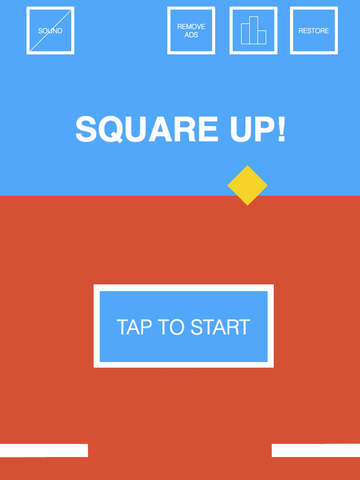
The two main goals with Square Up! were to tighten the gameplay up a bit, so the player feels more in control of the main character, and to vary the challenges more so that the player can never get comfortable with what will come next. Another interesting aspect of Square Up! is that the background changes colors as the player progresses through the game to indicate some sort of achievement or progress. If you play it, you will notice that around a score of 20 the background changes to purple and then again to red at around 40. More levels are in the plan for future updates as well.
Regarding graphics, Chris said, "I wanted to go with a very retro look, so I kept the menus and buttons very minimalistic. I'm kind of hoping that it has a look and feel of an early 80's video game.
Lastly, in newest version just released, there is a "Save Me" feature which essentially allows the player a second chance upon death. A continue of sorts. If someone is close to their high score, this save me option might be exactly what they need to make it so. There are a limited number of free "Save Me's" and more can be purchased for $.99.
Device Requirements:
* iPhone, iPad, and iPod touch
* Optimized for iPhone 5, iPhone 6/6 Plus
* Requires iOS 6.0 or later
* Languages: English
* 10.1 MB
Pricing and Availability:
Square Up! 1.1 is Free and available worldwide exclusively through the App Store in the Games category. "Remove Ads" upgrade and extra "Save Me's" can be purchased for $.99 (USD) each. Look for more minimalist games from Switchback Media in the near future.
Switchback Media: http://switchbackapps.com/
Square Up! 1.1: https://itunes.apple.com/app/square-up!/id962294634
Screenshot 1: http://a1.mzstatic.com/us/r30/Purple1/v4/d3/b6/ef/d3b6efe4-cd7f-9cce-f10e-0dd6b5719218/screen480x480.jpeg
Screenshot 2: http://a4.mzstatic.com/us/r30/Purple3/v4/fc/c0/aa/fcc0aa6e-0c17-aca4-e591-ebc23f047813/screen480x480.jpeg
App Icon: http://a5.mzstatic.com/us/r30/Purple3/v4/db/a2/05/dba2056a-ecf3-5c45-5a25-dfec4fabcb4f/icon175x175.jpeg
Switchback Media LLC is an independent app development company based out of Lansdale, PA. Founded in 2012 Switchback Media LLC has released dozens of apps and games, and continues deliver fun and high quality apps for all types of genres. Copyright (C) 2015 Switchback Media LLC. All Rights Reserved. Apple, the Apple logo, iPhone, iPod and iPad are registered trademarks of Apple Inc. in the U.S. and/or other countries.
*******
Link To Article: http://prmac.com/release-id-73913.htm
*******
---------------------------------------------------------------------------------
Note that you can alter delivered distributions at any time.
Login to your account on prMac to alter your channel selection, or to opt-out at any time.
New Game Square Up! - A Retro-looking Iteration of Dot Up! - Published on 03/17/15
Switchback Media today announces Square Up! 1.1, an update to its fun-to-play game title developed for iPhone, iPad and iPod touch devices. With a retro feel and one-touch controls, this endless game offers a unique variation to the popular Dot Up! gameplay. Square Up! offers a fresh take on the endless skills-type game with some unique features that might just give it the edge. Version 1.1 includes a new "Save Me" feature that offers the user a second chance after a death.
Lansdale, Pennsylvania - Switchback Media today is proud to announce the release of Square Up! 1.1, an update to its fun-to-play game title developed for iPhone, iPad and iPod touch devices. With a retro feel and one-touch controls, this endless game offers a unique variation to the popular Dot Up! gameplay.
One-touch gameplay seems to be the craze right now, and Square Up! offers a fresh, if not retro, take on the endless skills-type game. The gameplay echoes games like Dot Up!, but with Square Up! there are some unique features that might just give it the edge.
"I decided to design Square Up! after playing Dot Up! I admit, but the inspiration to make Square Up! came with my initial frustration with the game," says Chris Allan of Switchback Media. "I thought the game was great but there was room for improvements, so I figured this would be a fun personal challenge to take on."
Features:
* Minimalist, retro graphics
* One-touch, endless gameplay
* Infinite variation on challenges, so you never get the same thing twice
* Save me feature that offers the player a second chance
* Level progression based on total score
The two main goals with Square Up! were to tighten the gameplay up a bit, so the player feels more in control of the main character, and to vary the challenges more so that the player can never get comfortable with what will come next. Another interesting aspect of Square Up! is that the background changes colors as the player progresses through the game to indicate some sort of achievement or progress. If you play it, you will notice that around a score of 20 the background changes to purple and then again to red at around 40. More levels are in the plan for future updates as well.
Regarding graphics, Chris said, "I wanted to go with a very retro look, so I kept the menus and buttons very minimalistic. I'm kind of hoping that it has a look and feel of an early 80's video game.
Lastly, in newest version just released, there is a "Save Me" feature which essentially allows the player a second chance upon death. A continue of sorts. If someone is close to their high score, this save me option might be exactly what they need to make it so. There are a limited number of free "Save Me's" and more can be purchased for $.99.
Device Requirements:
* iPhone, iPad, and iPod touch
* Optimized for iPhone 5, iPhone 6/6 Plus
* Requires iOS 6.0 or later
* Languages: English
* 10.1 MB
Pricing and Availability:
Square Up! 1.1 is Free and available worldwide exclusively through the App Store in the Games category. "Remove Ads" upgrade and extra "Save Me's" can be purchased for $.99 (USD) each. Look for more minimalist games from Switchback Media in the near future.
Switchback Media: http://switchbackapps.com/
Square Up! 1.1: https://itunes.apple.com/app/square-up!/id962294634
Screenshot 1: http://a1.mzstatic.com/us/r30/Purple1/v4/d3/b6/ef/d3b6efe4-cd7f-9cce-f10e-0dd6b5719218/screen480x480.jpeg
Screenshot 2: http://a4.mzstatic.com/us/r30/Purple3/v4/fc/c0/aa/fcc0aa6e-0c17-aca4-e591-ebc23f047813/screen480x480.jpeg

App Icon: http://a5.mzstatic.com/us/r30/Purple3/v4/db/a2/05/dba2056a-ecf3-5c45-5a25-dfec4fabcb4f/icon175x175.jpeg

Switchback Media LLC is an independent app development company based out of Lansdale, PA. Founded in 2012 Switchback Media LLC has released dozens of apps and games, and continues deliver fun and high quality apps for all types of genres. Copyright (C) 2015 Switchback Media LLC. All Rights Reserved. Apple, the Apple logo, iPhone, iPod and iPad are registered trademarks of Apple Inc. in the U.S. and/or other countries.
*******
Link To Article: http://prmac.com/release-id-73913.htm
*******
---------------------------------------------------------------------------------
Note that you can alter delivered distributions at any time.
Login to your account on prMac to alter your channel selection, or to opt-out at any time.
Subscribe to:
Posts (Atom)