A new article has been published at prMac.
All iNutrient Apps - Half Off When Buying the iOS App Bundle - Published on 04/02/15
Independent iOS Developer, James Hollender has set it up so when you purchase all ten iNutrient apps as a bundle, you get the apps for half off the Regular purchase separately price. These apps cover the following nutrients: Calories, Carbohydrates, Cholesterol, Fiber, Potassium, Proteins, Saturated Fat, Sodium, Sugars and Vitamin K. This collection is great for those interested in looking up the values in foods and don't need to collect the information based on your food intake.
Revere, Massachusetts - Independent iOS Developer, James Hollender has set it up so when you purchase all ten iNutrient apps as a bundle, you get the apps for half off the Regular purchase separately price. These apps include data from the USDA National Nutrient Database covering the following nutrients: Calories, Carbohydrates, Cholesterol, Fiber, Potassium, Proteins, Saturated Fat, Sodium, Sugars and Vitamin K. All ten apps are universal apps that can be used on the iPhone, iPad or iPod touch devices.
1. iKals - iNutrient: Calories:
The iKals app provides information about foods and how they are rated for Calorie content. This is provided as a means to assist in deciding which foods to eat. The food servings are rated from EXTREMELY LOW in Calories all the way up to EXTREMELY HIGH. The following colors help readily identify which is which:
* Black = EXTREMELY HIGH in Calories (500 - 1,181)
* Dark Red = VERY HIGH in Calories (400 - 499)
* Red = HIGH in Calories (300 - 399)
* Orange = MODERATELY HIGH in Calories (250 - 299)
* Yellow = MODERATE in Calories (200 - 249)
* Light Green = MODERATELY LOW in Calories (150 - 199)
* Green = LOW in Calories (100 - 149)
* Cyan = VERY LOW in Calories (50 - 99)
* White = EXTREMELY LOW in Calories (00 - 49)
2. iCarbs - iNutrient: Carbohydrates:
The iCarbs app provides information about foods and how they are rated for carbohydrate content. This is provided as a means to assist in deciding which foods to eat. If you are a bodybuilder, you probably want to have a high intake of carbohydrates, but on the other hand if you have diabetes you need to make sure you don't exceed your recommended daily amount of carbohydrates. The food servings are rated from EXTREMELY LOW in Carbohydrates all the way up to EXTREMELY HIGH. The following colors help readily identify which is which:
* Black = EXTREMELY HIGH in Carbohydrates (Carbs) (45.01 - 166.46 g)
* Dark Red = VERY HIGH in Carbs (30.01 - 45.00 g)
* Red = HIGH in Carbs (15.01 - 30.0 g)
* Orange = MODERATELY HIGH in Carbs (12.01 - 15.00 g)
* Yellow = MODERATE in Carbs (9.01 - 12.00 g)
* Yellow-Green = MODERATELY LOW in Carbs (6.01 - 9.00 g)
* Green = LOW in Carbs (3.01 - 6.00 g)
* Cyan = VERY LOW in Carbs (0.01 - 3.00 g)
* White = EXTREMELY LOW in Carbs (0.00 g)
3. iCholesterol - iNutrient: Dietary Cholesterol:
The iCholesterol app provides information about foods and how they are rated for content of dietary cholesterol. This is provided as a means to assist in deciding which foods to eat. The food servings are rated from EXTREMELY LOW in cholesterol all the way up to EXTREMELY HIGH. The following colors help readily identify which is which:
* Black = EXTREMELY HIGH in Cholesterol (151 - 641 mg)
* Dark Red = VERY HIGH in Cholesterol (81 - 150 mg)
* Red = HIGH in Cholesterol (51 - 80 mg)
* Orange = MODERATELY HIGH in Cholesterol (31 - 50 mg)
* Yellow = MODERATE in Cholesterol (21 - 30 mg)
* Light Green = MODERATELY LOW in Cholesterol (11 - 20 mg)
* Green = LOW in Cholesterol (6 - 10 mg)
* Cyan = VERY LOW in Cholesterol (1 - 5 mg)
* White = EXTREMELY LOW in Cholesterol (0 mg)
4. iFiber - iNutrient: Fiber:
The iFiber app provides information about foods and how they are rated for content of fiber. This is provided as a means to assist in deciding which foods to eat. The food servings are rated from EXTREMELY LOW in fiber all the way up to EXTREMELY HIGH. The following colors help readily identify which is which:
* Black = EXTREMELY HIGH in Fiber (10.1 - 31.2 g)
* Dark Red = VERY HIGH in Fiber (8.1 - 10.0 g)
* Red = HIGH in Fiber (6.1 - 8.0 g)
* Orange = MODERATELY HIGH in Fiber (4.1 - 6.0 g)
* Yellow = MODERATE in Fiber (3.1 - 4.0 g)
* Light Green = MODERATELY LOW in Fiber (2.1 - 3.0 g)
* Green = LOW in Fiber (1.1 - 2.0 g)
* Cyan = VERY LOW in Fiber (0.1 - 1.0 g)
* White = EXTREMELY LOW in Fiber (0.00 g)
5. iPotassium - iNutrient: Potassium:
The iPotassium app provides information about foods and how they are rated for content of potassium. This is provided as a means to assist in deciding which foods to eat. The food servings are rated from EXTREMELY LOW in potassium all the way up to EXTREMELY HIGH. The following colors help readily identify which is which:
* Black = EXTREMELY HIGH in Potassium (> 700 mg)
* Dark Red = VERY HIGH in Potassium (501 - 700 mg)
* Red = HIGH in Potassium (351 - 500 mg)
* Orange = MODERATELY HIGH in Potassium (201 - 350 mg)
* Yellow = MODERATE in Potassium (151 - 200 mg)
* Light Green = MODERATELY LOW in Potassium (101 - 150 mg)
* Green = LOW in Potassium (51 - 100 mg)
* Cyan = VERY LOW in Potassium (11 - 50 mg)
* White = EXTREMELY LOW in Potassium (0 - 10 mg)
6. iProteins - iNutrient: Proteins:
The iProteins app provides information about foods and how they are rated for protein content. This is provided as a means to assist in deciding which foods to eat. If you are a bodybuilder, you probably want to have a high intake of carbohydrates, but on the other hand if you are a vegan then you want to make sure you are taking in a sufficient amount of protein. The food servings are rated from EXTREMELY LOW in Proteins all the way up to EXTREMELY HIGH. The following colors help readily identify which is which:
* Black = EXTREMELY HIGH in Proteins (30.01 - 51.89 g)
* Dark Red = VERY HIGH in Proteins (20.01 - 30.00 g)
* Red = HIGH in Proteins (15.01 - 20.00 g)
* Orange = MODERATELY HIGH in Proteins (12.01 - 15.00 g)
* Yellow = MODERATE in Proteins (9.01 - 12.00 g)
* Yellow-Green = MODERATELY LOW in Proteins (6.01 ➤ 9.00 g)
* Green = LOW in Proteins (3.01 - 6.00 g)
* Cyan = VERY LOW in Proteins (0.01 - 3.00 g)
* White = EXTREMELY LOW in Proteins (0.00 g)
7. iSatFat - iNutrient: Saturated Fat:
The iSatFat app provides information about foods and how they are rated for content of saturated fat. This is provided as a means to assist in deciding which foods to eat. The food servings are rated from EXTREMELY LOW in fiber all the way up to EXTREMELY HIGH. The following colors help readily identify which is which:
* Black = EXTREMELY HIGH in Saturated Fat (10.001 - 33.000 g)
* Dark Red = VERY HIGH in Saturated Fat (5.001 - 10.000 g)
* Red = HIGH in Saturated Fat (3.001 - 5.000 g)
* Orange = MODERATELY HIGH in Saturated Fat (1.001 - 3.000 g)
* Yellow = MODERATE in Saturated Fat (0.501 - 1.000 g)
* Light Green = MODERATELY LOW in Saturated Fat (0.101 - 0.500 g)
* Green = LOW in Saturated Fat (0.011 - 0.100 g)
* Cyan = VERY LOW in Saturated Fat (0.001 - 0.010 g)
* White = EXTREMELY LOW in Saturated Fat (0.000 g)
8. iSodium - iNutrient: Sodium:
The iSodium app provides information about foods and how they are rated for content of sodium. This is provided as a means to assist in deciding which foods to eat. The food servings are rated from EXTREMELY LOW in cholesterol all the way up to EXTREMELY HIGH. The following colors help readily identify which is which:
* Black = EXTREMELY HIGH in Sodium (> 1,000 mg)
* Dark Red = VERY HIGH in Sodium (501 - 1,000 mg)
* Red = HIGH in Sodium (401 - 500 mg)
* Orange = MODERATELY HIGH in Sodium (301 - 400 mg)
* Yellow = MODERATE in Sodium (201 - 300 mg)
* Light Green = MODERATELY LOW in Sodium (141 - 200 mg)
* Green = LOW in Sodium (51 - 140 mg)
* Cyan = VERY LOW in Sodium (11 - 50 mg)
* White = EXTREMELY LOW in Sodium (0 - 10 mg)
9. iSugars - iNutrient: Sugars:
The iSugars app provides information about foods and how they are rated for content of sugars. This is provided as a means to assist in deciding which foods to eat. The food servings are rated from EXTREMELY LOW in sugars all the way up to EXTREMELY HIGH. The following colors help readily identify which is which:
* Black = EXTREMELY HIGH in Sugars (40.01 - 166.46 g)
* Dark Red = VERY HIGH in Sugars (30.01 - 40.00 g)
* Red = HIGH in Sugars (20.01 - 30.0 g)
* Orange = MODERATELY HIGH in Sugars (15.01 - 20.00 g)
* Yellow = MODERATE in Sugars (10.01 - 15.00 g)
* Light Green = MODERATELY LOW in Sugars (5.01 - 10.00 g)
* Green = LOW in Sugars (1.01 - 5.00 g)
* Cyan = VERY LOW in Sugars (0.01 - 1.00 g)
* White = EXTREMELY LOW in Sugars (0.00 g)
10. Vitamin K - oNutrient: Vitamins K1, K1D & K2:
The Vitamin K app provides information about foods and how they are rated for Vitamin K content. This is provided as a means to assist in deciding which foods to eat if you are using blood thinning medications such as Coumadin or Warfarin. The food servings are rated from NO Vitamin K all the way up to EXTREMELY HIGH in Vitamin K. The following colors help readily identify which is which:
* Black = EXTREMELY HIGH in Vitamin K (700.0 - 1146.6 mcg)
* Dark Red = VERY HIGH in Vitamin K (300.0 - 699.9 mcg)
* Red = HIGH in Vitamin K (25.0 - 299.9 mcg)
* Orange = MODERATELY HIGH in Vitamin K (20.0 - 24.9 mcg)
* Yellow = MODERATE in Vitamin K (15.0 - 19.9 mcg)
* Light Green = MODERATELY LOW in Vitamin K (10.0 - 14.9 mcg)
* Green = LOW in Vitamin K (5.0 - 9.9 mcg)
* Cyan = VERY LOW in Vitamin K (0.1 - 4.9 mcg)
* White = EXTREMELY LOW in Vitamin K (0.0 mcg)
This collection would be good if you're only interested in looking up the values in foods and don't need to collect the information based on your food intake ... otherwise consider the single iNutrients app where you can record information once for all ten nutrients and you can create your own custom food definitions.
James Hollender: http://www.hollender.com/index.html
All iNutrient Apps Bundle: https://itunes.apple.com/app-bundle/all-inutrient-apps/id917498465
Most Popular iNutrient Apps Bundle: https://itunes.apple.com/app-bundle/most-popular-inutrient-apps/id917503222
iNutrients App: https://itunes.apple.com/us/app/id580660547
Life Inventory + iNutrients App Bundle: https://itunes.apple.com/app-bundle/life-inventory-+-inutrients/id917511270
Life Inventory for iPad + iNutrients App Bundle: https://itunes.apple.com/app-bundle/life-inventory-for-ipad-plus/id917511236
Based in Revere, Massachusetts, Indie developer James Hollender is a well seasoned Information Technology professional who has been familiar with Apple products since the days of the first Macintosh computer and has been involved with object oriented programming since the introduction of Java, culminating most recently in writing apps in Objective C for the iPhone, iPod touch and iPad. His innovative ideas have resulted in numerous suggestions and other awards including a commendation from The President of the United States. James Hollender has been involved writing iPhone and iPad apps with Foliage, Kronos, Olympus, Cross Country Automotive Services (now Agero), and Valmarc Corporation. Copyright (C) 2010-2015 James Hollender. All Rights Reserved. Apple, the Apple logo, iPhone, and iPod are registered trademarks of Apple Inc. in the U.S. and/or other countries. Other trademarks and registered trademarks may be the property of their respective owners.
*******
Link To Article: http://prmac.com/release-id-74213.htm
*******
---------------------------------------------------------------------------------
Note that you can alter delivered distributions at any time.
Login to your account on prMac to alter your channel selection, or to opt-out at any time.

Grumpy Rhino Games announces new puzzle platformer: Five Hopes
A new article has been published at prMac.
Grumpy Rhino Games announces new puzzle platformer: Five Hopes - Published on 04/02/15
UK based indie studio, Grumpy Rhino Games today announce the up-and-coming Five Hopes, their new game title for iPhone, iPad and iPod touch devices. In Five Hopes, the player is an unassuming boy who can turn into different heroes, switching between them to complete puzzles and defeat enemies. A charming little puzzle platformer set in a fantasy world, Five Hopes blends action, puzzle and RPG elements to create a casual game with a lot of depth. It will launch on the 15th of April, 2015.
Cambridge, United Kingdom - Indie studio Grumpy Rhino Games is excited to announce that Five Hopes will launch on the 15th of April 2015 on iPhone, iPad and iPod touch. Five Hopes is a game about a boy overcoming his demons. A charming little puzzle platformer, set in a fantasy world, Five Hopes blends action, puzzle and RPG elements to create a casual game with a lot of depth.
In Five Hopes the player is an unassuming boy who can turn into different heroes, switching between them to complete puzzles and defeat enemies. Switch to the Wizard to levitate up a cliff, blow up a demon, then find a sword - turn into the Warrior and pick up a heavy barrel to place on a switch, opening a door. As the Boy progresses through the levels, unlocking new mechanics and heroes, these obstacles become more and more challenging.
Five Hopes starts when the world's four greatest heroes die at the hands of a demon called Despair. A lone boy is left to save the world by wielding their powers. The Boy must make his way through grasslands and deserts battling each of his demons, from nervy Anxiety to lazy Apathy. The story unfolds through humourous cutscenes climaxing in a huge boss encounter at the end of each zone.
Game Features
* Five playable heroes each with different strengths, weaknesses and abilities
* 24 handcrafted levels spread over two zones
* 12 different enemies, each with a distinct personality and unique abilities
* Loads to collect, discover and unlock (including 15 shop items, 54 hidden diamonds and 18 hidden scrolls)
* Beautiful, hand-painted 3D graphics set in a 2D platform world
Pricing and Availability:
Five Hopes will cost $2.99. It will be entirely advert-free and contains no in-app purchases. Future content is planned, including a new zone with 12 additional levels. Five Hopes is an iOS exclusive on launch. Android, Windows and Mac versions are planned for release later in the year. Please contact us to arrange a pre-release playthrough of Five Hopes.
Five Hopes: http://www.fivehopes.com
YouTube Video (Trailer): https://www.youtube.com/watch?v=blvS_JDgSkM
Screenshot 1: http://www.grumpyrhinogames.com/wp-content/uploads/2015/03/Bosses1136.jpg
Screenshot 2: http://www.grumpyrhinogames.com/wp-content/uploads/2015/03/Fight1136.jpg
Screenshot 3: http://www.grumpyrhinogames.com/wp-content/uploads/2015/03/Swap1136.jpg
App Icon: http://www.grumpyrhinogames.com/wp-content/uploads/2015/03/FiveHopesIconFullCurved.png
Based in Cambridge, United Kingdom, Grumpy Rhino Games is a one-man studio founded by Sebastian Davies in 2013. The company's core ethos is to create lovingly crafted games and to monetize them fairly. Before starting Grumpy Rhino Games Sebastian worked at Jagex Ltd for four years on their flagship product RuneScape, first as a Content Developer and, later, a Senior Designer. All Material and Software (C) Copyright 2015 Grumpy Rhino Games. All Rights Reserved. Apple, the Apple logo, iPhone, iPod and iPad are registered trademarks of Apple Inc. in the U.S. and/or other countries. Other trademarks and registered trademarks may be the property of their respective owners.
*******
Link To Article: http://prmac.com/release-id-74211.htm
*******
---------------------------------------------------------------------------------
Note that you can alter delivered distributions at any time.
Login to your account on prMac to alter your channel selection, or to opt-out at any time.
Grumpy Rhino Games announces new puzzle platformer: Five Hopes - Published on 04/02/15
UK based indie studio, Grumpy Rhino Games today announce the up-and-coming Five Hopes, their new game title for iPhone, iPad and iPod touch devices. In Five Hopes, the player is an unassuming boy who can turn into different heroes, switching between them to complete puzzles and defeat enemies. A charming little puzzle platformer set in a fantasy world, Five Hopes blends action, puzzle and RPG elements to create a casual game with a lot of depth. It will launch on the 15th of April, 2015.
Cambridge, United Kingdom - Indie studio Grumpy Rhino Games is excited to announce that Five Hopes will launch on the 15th of April 2015 on iPhone, iPad and iPod touch. Five Hopes is a game about a boy overcoming his demons. A charming little puzzle platformer, set in a fantasy world, Five Hopes blends action, puzzle and RPG elements to create a casual game with a lot of depth.
In Five Hopes the player is an unassuming boy who can turn into different heroes, switching between them to complete puzzles and defeat enemies. Switch to the Wizard to levitate up a cliff, blow up a demon, then find a sword - turn into the Warrior and pick up a heavy barrel to place on a switch, opening a door. As the Boy progresses through the levels, unlocking new mechanics and heroes, these obstacles become more and more challenging.
Five Hopes starts when the world's four greatest heroes die at the hands of a demon called Despair. A lone boy is left to save the world by wielding their powers. The Boy must make his way through grasslands and deserts battling each of his demons, from nervy Anxiety to lazy Apathy. The story unfolds through humourous cutscenes climaxing in a huge boss encounter at the end of each zone.
Game Features
* Five playable heroes each with different strengths, weaknesses and abilities
* 24 handcrafted levels spread over two zones
* 12 different enemies, each with a distinct personality and unique abilities
* Loads to collect, discover and unlock (including 15 shop items, 54 hidden diamonds and 18 hidden scrolls)
* Beautiful, hand-painted 3D graphics set in a 2D platform world
Pricing and Availability:
Five Hopes will cost $2.99. It will be entirely advert-free and contains no in-app purchases. Future content is planned, including a new zone with 12 additional levels. Five Hopes is an iOS exclusive on launch. Android, Windows and Mac versions are planned for release later in the year. Please contact us to arrange a pre-release playthrough of Five Hopes.
Five Hopes: http://www.fivehopes.com
YouTube Video (Trailer): https://www.youtube.com/watch?v=blvS_JDgSkM
Screenshot 1: http://www.grumpyrhinogames.com/wp-content/uploads/2015/03/Bosses1136.jpg

Screenshot 2: http://www.grumpyrhinogames.com/wp-content/uploads/2015/03/Fight1136.jpg

Screenshot 3: http://www.grumpyrhinogames.com/wp-content/uploads/2015/03/Swap1136.jpg

App Icon: http://www.grumpyrhinogames.com/wp-content/uploads/2015/03/FiveHopesIconFullCurved.png

Based in Cambridge, United Kingdom, Grumpy Rhino Games is a one-man studio founded by Sebastian Davies in 2013. The company's core ethos is to create lovingly crafted games and to monetize them fairly. Before starting Grumpy Rhino Games Sebastian worked at Jagex Ltd for four years on their flagship product RuneScape, first as a Content Developer and, later, a Senior Designer. All Material and Software (C) Copyright 2015 Grumpy Rhino Games. All Rights Reserved. Apple, the Apple logo, iPhone, iPod and iPad are registered trademarks of Apple Inc. in the U.S. and/or other countries. Other trademarks and registered trademarks may be the property of their respective owners.
*******
Link To Article: http://prmac.com/release-id-74211.htm
*******
---------------------------------------------------------------------------------
Note that you can alter delivered distributions at any time.
Login to your account on prMac to alter your channel selection, or to opt-out at any time.
Icon Rush is a Challenging Puzzle Game Worthy of Tetris-Level Addiction
A new article has been published at prMac.
Icon Rush is a Challenging Puzzle Game Worthy of Tetris-Level Addiction - Published on 04/02/15
In Icon Rush from RappTech B.V., gamers must make horizontal, vertical, or diagonal combinations of at least three icons on a 4x5 grid, either by matching the same letter, the same badge number, or the same color. Combinations can be made horizontally, vertically and diagonally, and to be successful gamers must rely on their spatial awareness and calculation skills. Icon Rush has been beautifully designed with rich, vivid colors that are pleasant, soothing and fun.
Cupertino, California - A little over 30 years ago, Tetris arrived on the scene and turned millions of ordinary people into full-fledged addicts who played, slept, ate and even dreamed the legendary shape-shifting game. Well, fast forward a few decades, and development company RappTech B.V. has created a challenging and fun new game that is arguably the first one in recent memory that is worthy of Tetris-level addiction: Icon Rush.
Available at no-cost for iOS, Icon Rush is brilliantly simple: gamers must make combinations of at least three icons on a 4x5 grid, either by matching the same letter, the same badge number, or the same color. Combinations can be made horizontally, vertically and diagonally, and to be successful gamers must rely on their spatial awareness and calculation skills.
Aside from its intuitive gameplay and the Tetris-like euphoria that erupts when a trio of similar icons is successfully combined, Icon Rush has been beautifully designed with rich, vivid colors that are pleasant, soothing and fun. The music and sound effects are also well-chosen, and can be muted for gamers who are playing late at night, on a flight, at work, or anyplace else. There's also a high score counter and a badge score for gamers to keep track of their progress, and give them something to aim for when it's time for a new game.
"Icons and badges are everywhere around us, and our lives are increasingly being influenced by them," commented Rogier van Vliet of RappTech B.V. "Now with Icon Rush, people of all ages - from 8 to 88 - can play with them and have some fun, while they build their spatial awareness and calculation skills!"
Device Requirements:
* iPhone, iPad, and iPod touch
* Requires iOS 6.0 or later
* 15.8 MB
Pricing and Availability:
Icon Rush 1.3, the challenging and fun puzzle game that is worthy of Tetris-level addiction, is Free and available worldwide exclusively through the App Store in the Games category.
RappTech: http://www.rapptech.nl/
Icon Rush 1.3: http://apps.appshout.com/icon-rush/
Download from iTunes : https://itunes.apple.com/app/icon-rush/id947444609
Blip Video (Demo): http://blip.tv/dailyappshow/icon-rush-iphone-app-demo-dailyappshow-7179853
Screenshot : http://a2.mzstatic.com/us/r30/Purple3/v4/81/c9/98/81c99847-9781-218f-f378-bcbe46b891ed/screen480x480.jpeg
App Icon : http://apps.appshout.com/icon-rush/images/icon.png
Based in Reeuwijk, the Netherlands and incorporated in July 2013, RappTech B.V. designs, develops and crafts applications for mobile devices. With a philosophy of making great games that combine tough challenges with fun gameplay, their various titles, including "Badger?", "Raptris", "Clever Mower" and "Icon Rush" showcase this ethos with addictive logic based puzzle solving, and colorful presentation. All Material and Software (C) Copyright 2015 RappTech B.V. All Rights Reserved. Apple, the Apple logo, iPhone, iPod and iPad are registered trademarks of Apple Inc. in the U.S. and/or other countries. Other trademarks and registered trademarks may be the property of their respective owners.
*******
Link To Article: http://prmac.com/release-id-74210.htm
*******
---------------------------------------------------------------------------------
Note that you can alter delivered distributions at any time.
Login to your account on prMac to alter your channel selection, or to opt-out at any time.
Icon Rush is a Challenging Puzzle Game Worthy of Tetris-Level Addiction - Published on 04/02/15
In Icon Rush from RappTech B.V., gamers must make horizontal, vertical, or diagonal combinations of at least three icons on a 4x5 grid, either by matching the same letter, the same badge number, or the same color. Combinations can be made horizontally, vertically and diagonally, and to be successful gamers must rely on their spatial awareness and calculation skills. Icon Rush has been beautifully designed with rich, vivid colors that are pleasant, soothing and fun.
Cupertino, California - A little over 30 years ago, Tetris arrived on the scene and turned millions of ordinary people into full-fledged addicts who played, slept, ate and even dreamed the legendary shape-shifting game. Well, fast forward a few decades, and development company RappTech B.V. has created a challenging and fun new game that is arguably the first one in recent memory that is worthy of Tetris-level addiction: Icon Rush.
Available at no-cost for iOS, Icon Rush is brilliantly simple: gamers must make combinations of at least three icons on a 4x5 grid, either by matching the same letter, the same badge number, or the same color. Combinations can be made horizontally, vertically and diagonally, and to be successful gamers must rely on their spatial awareness and calculation skills.
Aside from its intuitive gameplay and the Tetris-like euphoria that erupts when a trio of similar icons is successfully combined, Icon Rush has been beautifully designed with rich, vivid colors that are pleasant, soothing and fun. The music and sound effects are also well-chosen, and can be muted for gamers who are playing late at night, on a flight, at work, or anyplace else. There's also a high score counter and a badge score for gamers to keep track of their progress, and give them something to aim for when it's time for a new game.
"Icons and badges are everywhere around us, and our lives are increasingly being influenced by them," commented Rogier van Vliet of RappTech B.V. "Now with Icon Rush, people of all ages - from 8 to 88 - can play with them and have some fun, while they build their spatial awareness and calculation skills!"
Device Requirements:
* iPhone, iPad, and iPod touch
* Requires iOS 6.0 or later
* 15.8 MB
Pricing and Availability:
Icon Rush 1.3, the challenging and fun puzzle game that is worthy of Tetris-level addiction, is Free and available worldwide exclusively through the App Store in the Games category.
RappTech: http://www.rapptech.nl/
Icon Rush 1.3: http://apps.appshout.com/icon-rush/
Download from iTunes : https://itunes.apple.com/app/icon-rush/id947444609
Blip Video (Demo): http://blip.tv/dailyappshow/icon-rush-iphone-app-demo-dailyappshow-7179853
Screenshot : http://a2.mzstatic.com/us/r30/Purple3/v4/81/c9/98/81c99847-9781-218f-f378-bcbe46b891ed/screen480x480.jpeg

App Icon : http://apps.appshout.com/icon-rush/images/icon.png

Based in Reeuwijk, the Netherlands and incorporated in July 2013, RappTech B.V. designs, develops and crafts applications for mobile devices. With a philosophy of making great games that combine tough challenges with fun gameplay, their various titles, including "Badger?", "Raptris", "Clever Mower" and "Icon Rush" showcase this ethos with addictive logic based puzzle solving, and colorful presentation. All Material and Software (C) Copyright 2015 RappTech B.V. All Rights Reserved. Apple, the Apple logo, iPhone, iPod and iPad are registered trademarks of Apple Inc. in the U.S. and/or other countries. Other trademarks and registered trademarks may be the property of their respective owners.
*******
Link To Article: http://prmac.com/release-id-74210.htm
*******
---------------------------------------------------------------------------------
Note that you can alter delivered distributions at any time.
Login to your account on prMac to alter your channel selection, or to opt-out at any time.
Adam Elements iKlips - Indiegogo launch followed by a cascade of support
A new article has been published at prMac.
Adam Elements iKlips - Indiegogo launch followed by a cascade of support - Published on 04/02/15
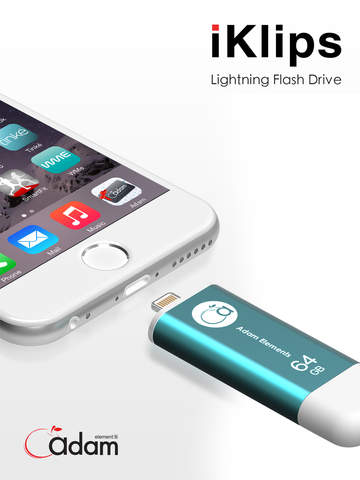
Adam Elements Indiegogo launch is followed by a cascade of support. In less than 5 days iKlips reached its goal and still going strong. Apple MFi-certified, produced using ultra high-speed top quality MLC flash memory, iKlips is a flash drive/app combination designed for iPhone, iPad and iPod touch. iKlips allows you to share the data easily between iOS lightning devices and Mac and PC computers. Early Bird pricing on iKlips is still available on Indiegogo with free worldwide shipping.
Taipei, Taiwan - Adam Elements iKlips, World's Fastest Apple Lightning Flash Drive for iPhone and iPad: Indiegogo launch is followed by a cascade of support. In less than 5 days iKlips reached its Indiegogo goal and still going strong. Early Bird pricing iKlips still available on Indiegogo with free worldwide shipping.
iKlips is Apple MFi-certified, produced using ultra high-speed top quality MLC flash memory. It is fully compatible with all iOS, PC, and Mac devices, making it a breeze to share and backup iPhone and iPad files and increase storage space. iKlips is a perfect smart mobile storage solution for both work and play! iKlips is Red Dot 2015 Award Winner.
Get ready to experience the world's fastest read/write speed, highest quality MLC components, and ultra convenient dual-interface design! Adam Elements, the leading smart lifestyle solutions brand, is excited to announce the upcoming launch of the innovative iKlips flash drive. This Lightning / USB 3.0 dual-interface flash drive is specially designed for the iPhone and iPad and supports iOS, PC, and Mac devices. Simply plug and play to share files, backup photos, and play music and videos. Now you can efficiently and quickly transmit data between iOS and other devices without using internet, cloud system, or iTunes. Moreover, storage capacity can be instantly expanded to up to 128GB.
iKlips is produced using top quality MLC flash memory components that not only provide greater stability and a longer product lifespan, but also enable iKlips to offer the world's fastest flash drive read/write speeds for the iPhone and iPad (Lightning read/write speed: 14/8 MB/s; USB 3.0 read/write speed: 140/20 MB/s). Thanks to the world's most energy-efficient design, using iKlips has absolutely zero effect on the battery life of an iPhone or iPad. Exclusively developed and manufactured by Adam Elements, iKlips has an ultra-slim and exquisite aluminum alloy exterior. As a high quality Apple MFi certified product, iKlips delivers a refreshingly smart mobile storage experience.
iKlips consists of a dual-interface integrated design with full Apple Lightning and USB 3.0 functionality, allowing users to conveniently share and transfer files between an iPhone, iPad, PC, and Mac. Through a free iOS app, you can instantly store valuable photos and videos from your iPhone and iPad onto the iKlips and transfer them to your home computer. In addition you can directly view photos and documents, and play music, TV series, and movies stored on iKlips on any iOS device without having to worry about the device's storage capacity. iPhone and iPad data can be backed up at any time without having to use a computer or iTunes. iKlips files and folders can be directly managed on the device.
iKlips has been chosen by Red Dot jury in Germany and awarded for design. Find Red Dot website here: http://en.red-dot.org/
iKlips OTG flash drive series was developed by the Adam Elements team and is exclusively manufactured in Taiwan. The iKlips will be available soon through quality Adam Elements distributors worldwide in four storage capacities: 16GB, 32GB, 64GB, and 128GB. iKlips is currently the only high-capacity and top quality flash drive in the market that uses high-speed MLC components.
Adam Elements: http://www.adamelements.com/
iKlips 1.0.1: http://www.adamelements.com/iKlips/index20.html
Download from iTunes: https://itunes.apple.com/app/iklips/id931739124
Indiegogo Campaign: https://www.indiegogo.com/projects/iklips-world-s-fastest-flash-drive-for-iphone-ipad
Screenshot: http://a2.mzstatic.com/us/r30/Purple5/v4/99/2d/89/992d8914-3364-1e43-811a-6ca8e60045ac/screen480x480.jpeg
App Icon: http://a1.mzstatic.com/us/r30/Purple5/v4/bb/14/ee/bb14eed3-1e08-1615-64aa-2df92ca54815/icon175x175.png
Adam Elements is a leading supplier of intelligent lifestyle solutions. We strive to enhance user experience with digital technology and continuously develop mobile, information and communication products. Our products span various fields including mobile devices, peripherals for smart devices, smart wearable products and smart lifestyle equipment. We also integrate our hardware products and peripherals to develop and design smart software applications, providing our customers with a complete range of products and services. Adam Elements is also the authorized dealer for various smart mobile devices from international brands. We are headquartered in Taiwan, with business spanning across China, Hong Kong, Japan, Malaysia, Singapore, Russia, Turkey, the Middle East and Germany. All Material and Software (C) Copyright 2015 Adam Elements. All Rights Reserved. Apple, the Apple logo, iPhone, iPod and iPad are registered trademarks of Apple Inc. in the U.S. and/or other countries. Other
trademarks and registered trademarks may be the property of their respective owners.
*******
Link To Article: http://prmac.com/release-id-74209.htm
*******
---------------------------------------------------------------------------------
Note that you can alter delivered distributions at any time.
Login to your account on prMac to alter your channel selection, or to opt-out at any time.
Adam Elements iKlips - Indiegogo launch followed by a cascade of support - Published on 04/02/15
Adam Elements Indiegogo launch is followed by a cascade of support. In less than 5 days iKlips reached its goal and still going strong. Apple MFi-certified, produced using ultra high-speed top quality MLC flash memory, iKlips is a flash drive/app combination designed for iPhone, iPad and iPod touch. iKlips allows you to share the data easily between iOS lightning devices and Mac and PC computers. Early Bird pricing on iKlips is still available on Indiegogo with free worldwide shipping.
Taipei, Taiwan - Adam Elements iKlips, World's Fastest Apple Lightning Flash Drive for iPhone and iPad: Indiegogo launch is followed by a cascade of support. In less than 5 days iKlips reached its Indiegogo goal and still going strong. Early Bird pricing iKlips still available on Indiegogo with free worldwide shipping.
iKlips is Apple MFi-certified, produced using ultra high-speed top quality MLC flash memory. It is fully compatible with all iOS, PC, and Mac devices, making it a breeze to share and backup iPhone and iPad files and increase storage space. iKlips is a perfect smart mobile storage solution for both work and play! iKlips is Red Dot 2015 Award Winner.
Get ready to experience the world's fastest read/write speed, highest quality MLC components, and ultra convenient dual-interface design! Adam Elements, the leading smart lifestyle solutions brand, is excited to announce the upcoming launch of the innovative iKlips flash drive. This Lightning / USB 3.0 dual-interface flash drive is specially designed for the iPhone and iPad and supports iOS, PC, and Mac devices. Simply plug and play to share files, backup photos, and play music and videos. Now you can efficiently and quickly transmit data between iOS and other devices without using internet, cloud system, or iTunes. Moreover, storage capacity can be instantly expanded to up to 128GB.
iKlips is produced using top quality MLC flash memory components that not only provide greater stability and a longer product lifespan, but also enable iKlips to offer the world's fastest flash drive read/write speeds for the iPhone and iPad (Lightning read/write speed: 14/8 MB/s; USB 3.0 read/write speed: 140/20 MB/s). Thanks to the world's most energy-efficient design, using iKlips has absolutely zero effect on the battery life of an iPhone or iPad. Exclusively developed and manufactured by Adam Elements, iKlips has an ultra-slim and exquisite aluminum alloy exterior. As a high quality Apple MFi certified product, iKlips delivers a refreshingly smart mobile storage experience.
iKlips consists of a dual-interface integrated design with full Apple Lightning and USB 3.0 functionality, allowing users to conveniently share and transfer files between an iPhone, iPad, PC, and Mac. Through a free iOS app, you can instantly store valuable photos and videos from your iPhone and iPad onto the iKlips and transfer them to your home computer. In addition you can directly view photos and documents, and play music, TV series, and movies stored on iKlips on any iOS device without having to worry about the device's storage capacity. iPhone and iPad data can be backed up at any time without having to use a computer or iTunes. iKlips files and folders can be directly managed on the device.
iKlips has been chosen by Red Dot jury in Germany and awarded for design. Find Red Dot website here: http://en.red-dot.org/
iKlips OTG flash drive series was developed by the Adam Elements team and is exclusively manufactured in Taiwan. The iKlips will be available soon through quality Adam Elements distributors worldwide in four storage capacities: 16GB, 32GB, 64GB, and 128GB. iKlips is currently the only high-capacity and top quality flash drive in the market that uses high-speed MLC components.
Adam Elements: http://www.adamelements.com/
iKlips 1.0.1: http://www.adamelements.com/iKlips/index20.html
Download from iTunes: https://itunes.apple.com/app/iklips/id931739124
Indiegogo Campaign: https://www.indiegogo.com/projects/iklips-world-s-fastest-flash-drive-for-iphone-ipad
Screenshot: http://a2.mzstatic.com/us/r30/Purple5/v4/99/2d/89/992d8914-3364-1e43-811a-6ca8e60045ac/screen480x480.jpeg
App Icon: http://a1.mzstatic.com/us/r30/Purple5/v4/bb/14/ee/bb14eed3-1e08-1615-64aa-2df92ca54815/icon175x175.png
Adam Elements is a leading supplier of intelligent lifestyle solutions. We strive to enhance user experience with digital technology and continuously develop mobile, information and communication products. Our products span various fields including mobile devices, peripherals for smart devices, smart wearable products and smart lifestyle equipment. We also integrate our hardware products and peripherals to develop and design smart software applications, providing our customers with a complete range of products and services. Adam Elements is also the authorized dealer for various smart mobile devices from international brands. We are headquartered in Taiwan, with business spanning across China, Hong Kong, Japan, Malaysia, Singapore, Russia, Turkey, the Middle East and Germany. All Material and Software (C) Copyright 2015 Adam Elements. All Rights Reserved. Apple, the Apple logo, iPhone, iPod and iPad are registered trademarks of Apple Inc. in the U.S. and/or other countries. Other
trademarks and registered trademarks may be the property of their respective owners.
*******
Link To Article: http://prmac.com/release-id-74209.htm
*******
---------------------------------------------------------------------------------
Note that you can alter delivered distributions at any time.
Login to your account on prMac to alter your channel selection, or to opt-out at any time.
Affinity Designer 1.2 now available on the Mac App Store
A new article has been published at prMac.
Affinity Designer 1.2 now available on the Mac App Store - Published on 04/02/15
Serif Europe Ltd today announces Affinity Designer 1.2, an important update to their award-winning professional illustration app for Mac OS X. Whether you�re working on graphics for marketing materials, websites, icons, UI design or just like creating cool concept art, Affinity Designer will revolutionize how you work. Version 1.2 offers fantastic new features, new languages, performance enhancements, and improvements that take working with a creative suite to a completely new level.
Nottingham, United Kingdom - Serif today is delighted to announce that its award-winning professional illustration app for Mac, Affinity Designer, is updated with fantastic new features, new languages, performance enhancements, and improvements that take working with a creative suite to a completely new level.
Available through the Mac App Store, this free update introduces an intuitive, time-saving Corner tool, a much-requested and very fluid Text-on-a-path feature, and Pixel Alignment Mode for Web & UI design. A new capability to save undo History with documents lets users slide back in time to inspect a design - or go back and take it in a new direction - many days, weeks or months after it was last edited.
With new seamless document switching into Affinity Photo beta and a common file format for saving without worry, designers can take advantage of the strengths of both apps and just focus on design. Saved document History also allows Affinity Photo to undo editing steps that were performed in Affinity Designer and vice versa.
"Affinity Designer has had a meteoric start, with early recognition from Apple and from our amazing pro designer customers." says Ashley Hewson, Serif's Managing Director. "After lots of hard work from the Affinity dev team we're delighted to deliver on our promise of new features and enhancements for our customers, totally free of charge. The new design features, UI tweaks, compatibility improvements, and usability updates will allow pro designers to achieve even more in even less time. The team also managed to squeeze more performance out of the Affinity Designer engine - we've raised the bar higher yet again. Affinity Photo compatibility and a shared History are also helping show how good a modern creative suite can be."
Affinity Designer 1.2 New Features, Improvements and Fixes:
* Text-on-a-path
* Corner tool
* German, Spanish, French and US English languages (and language selection)
* Force Pixel Alignment mode for accurate UI and Web design
* Added dashed line styles for Strokes
* History can be saved with documents
* Affinity app switching added to support Affinity Photo
* Export slices to SVG, EPS and PDF formats
* Open .ase (Adobe(R) Swatch Exchange) colour palettes
* Import brushes automatically by double-clicking .afbrushes files
* Even faster throughout, especially brush tools
* More accurate colour management and colour picking
* Improved import and export for PSD, PSD, and SVG
* Improved EPS output with Affinity's own EPS exporter
* Enhanced Yosemite look and feel
* Refreshed UI panels with new behaviours and improved reliability
* Font display size preference for the UI
* Rectangle and rounded rectangle shapes merged, and the ellipse, pie, and donut are merged
* More brush customisation
* Many OpenType, typography, and text performance enhancements
* Improved stability throughout, plus fixes to improve OS X Lion support
* Plus 100s of other tweaks, improvements and fixes
Tony Brightman, head of Affinity development adds "Changes to Affinity apps demand a high level of polish, so we're very grateful for all the input we've had from designers since our last update. I'm delighted to say that we've made Affinity Designer even more useful in professional settings and even more usable; the overall experience is incredibly smooth. As a team we're also delighted to better welcome a wider audience of designers with German, Spanish, French and US English languages now built in alongside the original UK English."
Device Requirements:
* OS X 10.7 or later
* 64-bit processor
* 126 MB
Pricing and Availability:
The free update to Affinity Designer 1.2 is available exclusively via the Mac App Store in the Graphics & Design category. And for those yet to buy Affinity Designer it is available for just GBP 39.99 / Euro 49.99 / $49.99 with no subscription. Please contact Dale Cook for more information or content. For corporate enquiries please contact Ashley Hewson.
Affinity Designer 1.2: https://affinity.serif.com
Purchase and Download (MAS): https://itunes.apple.com/app/Affinity_Designer/id824171161
Promo Video: https://vimeo.com/123111373
Media Assets: https://www.dropbox.com/sh/hfbi7cqcyvdv2ao/AABs5ptXVI_At6Zb7C2aNDJZa?dl=0
Serif was founded in 1987, and through its history has launched many award winning graphics software for Windows. 5 years ago Serif set out to produce an entirely new range of professional graphic applications for Mac under a new brand called Affinity. Affinity Designer (vector drawing) was released in October 2014, and is being followed by Affinity Photo in late spring 2015 and Affinity Publisher in early 2016. Serif has 130 employees at its head office, development and European sales centre in Nottingham, UK. All Material and Software (C) Copyright 1987-2015 Serif. All Rights Reserved. Apple, the Apple logo, Mac OS X and Macintosh are registered trademarks of Apple Inc. in the U.S. and/or other countries. Other trademarks and registered trademarks may be the property of their respective owners.
*******
Link To Article: http://prmac.com/release-id-74208.htm
*******
---------------------------------------------------------------------------------
Note that you can alter delivered distributions at any time.
Login to your account on prMac to alter your channel selection, or to opt-out at any time.
Affinity Designer 1.2 now available on the Mac App Store - Published on 04/02/15
Serif Europe Ltd today announces Affinity Designer 1.2, an important update to their award-winning professional illustration app for Mac OS X. Whether you�re working on graphics for marketing materials, websites, icons, UI design or just like creating cool concept art, Affinity Designer will revolutionize how you work. Version 1.2 offers fantastic new features, new languages, performance enhancements, and improvements that take working with a creative suite to a completely new level.
Nottingham, United Kingdom - Serif today is delighted to announce that its award-winning professional illustration app for Mac, Affinity Designer, is updated with fantastic new features, new languages, performance enhancements, and improvements that take working with a creative suite to a completely new level.
Available through the Mac App Store, this free update introduces an intuitive, time-saving Corner tool, a much-requested and very fluid Text-on-a-path feature, and Pixel Alignment Mode for Web & UI design. A new capability to save undo History with documents lets users slide back in time to inspect a design - or go back and take it in a new direction - many days, weeks or months after it was last edited.
With new seamless document switching into Affinity Photo beta and a common file format for saving without worry, designers can take advantage of the strengths of both apps and just focus on design. Saved document History also allows Affinity Photo to undo editing steps that were performed in Affinity Designer and vice versa.
"Affinity Designer has had a meteoric start, with early recognition from Apple and from our amazing pro designer customers." says Ashley Hewson, Serif's Managing Director. "After lots of hard work from the Affinity dev team we're delighted to deliver on our promise of new features and enhancements for our customers, totally free of charge. The new design features, UI tweaks, compatibility improvements, and usability updates will allow pro designers to achieve even more in even less time. The team also managed to squeeze more performance out of the Affinity Designer engine - we've raised the bar higher yet again. Affinity Photo compatibility and a shared History are also helping show how good a modern creative suite can be."
Affinity Designer 1.2 New Features, Improvements and Fixes:
* Text-on-a-path
* Corner tool
* German, Spanish, French and US English languages (and language selection)
* Force Pixel Alignment mode for accurate UI and Web design
* Added dashed line styles for Strokes
* History can be saved with documents
* Affinity app switching added to support Affinity Photo
* Export slices to SVG, EPS and PDF formats
* Open .ase (Adobe(R) Swatch Exchange) colour palettes
* Import brushes automatically by double-clicking .afbrushes files
* Even faster throughout, especially brush tools
* More accurate colour management and colour picking
* Improved import and export for PSD, PSD, and SVG
* Improved EPS output with Affinity's own EPS exporter
* Enhanced Yosemite look and feel
* Refreshed UI panels with new behaviours and improved reliability
* Font display size preference for the UI
* Rectangle and rounded rectangle shapes merged, and the ellipse, pie, and donut are merged
* More brush customisation
* Many OpenType, typography, and text performance enhancements
* Improved stability throughout, plus fixes to improve OS X Lion support
* Plus 100s of other tweaks, improvements and fixes
Tony Brightman, head of Affinity development adds "Changes to Affinity apps demand a high level of polish, so we're very grateful for all the input we've had from designers since our last update. I'm delighted to say that we've made Affinity Designer even more useful in professional settings and even more usable; the overall experience is incredibly smooth. As a team we're also delighted to better welcome a wider audience of designers with German, Spanish, French and US English languages now built in alongside the original UK English."
Device Requirements:
* OS X 10.7 or later
* 64-bit processor
* 126 MB
Pricing and Availability:
The free update to Affinity Designer 1.2 is available exclusively via the Mac App Store in the Graphics & Design category. And for those yet to buy Affinity Designer it is available for just GBP 39.99 / Euro 49.99 / $49.99 with no subscription. Please contact Dale Cook for more information or content. For corporate enquiries please contact Ashley Hewson.
Affinity Designer 1.2: https://affinity.serif.com
Purchase and Download (MAS): https://itunes.apple.com/app/Affinity_Designer/id824171161
Promo Video: https://vimeo.com/123111373
Media Assets: https://www.dropbox.com/sh/hfbi7cqcyvdv2ao/AABs5ptXVI_At6Zb7C2aNDJZa?dl=0
Serif was founded in 1987, and through its history has launched many award winning graphics software for Windows. 5 years ago Serif set out to produce an entirely new range of professional graphic applications for Mac under a new brand called Affinity. Affinity Designer (vector drawing) was released in October 2014, and is being followed by Affinity Photo in late spring 2015 and Affinity Publisher in early 2016. Serif has 130 employees at its head office, development and European sales centre in Nottingham, UK. All Material and Software (C) Copyright 1987-2015 Serif. All Rights Reserved. Apple, the Apple logo, Mac OS X and Macintosh are registered trademarks of Apple Inc. in the U.S. and/or other countries. Other trademarks and registered trademarks may be the property of their respective owners.
*******
Link To Article: http://prmac.com/release-id-74208.htm
*******
---------------------------------------------------------------------------------
Note that you can alter delivered distributions at any time.
Login to your account on prMac to alter your channel selection, or to opt-out at any time.
Understanding Math - Addition and Subtraction
A new article has been published at prMac.
Understanding Math - Addition and Subtraction - Published on 04/02/15
Award-winning developer, appp media today introduces Understanding Math - Addition and Subtraction 1.0, their new educational app for iOS devices. Designed for kids 9 - 18, Understanding Math is the second in a series based on J. Bruner's Learning Theory "Three Modes of Representation." Kids can practice and learn to add and subtract in 4 different one-player games or demonstrate their skills in the two-player Duel. Universal in language, Understanding Math supports Common Core Standards.
Munich, Germany - Award-winning developer, appp media today is pleased to announce the release and immediate availability of Understanding Math - Addition and Subtraction 1.0, their new educational app for iOS devices. Designed for kids ages 9-18 years, Understanding Math teaches children fluency in addition and subtraction within 100.
Understanding Math - Addition and Subtraction is the second in a series of educational apps based on J. Bruner's Learning Theory "Three Modes of Representation." Enactive, iconic, and symbolic representation are present in the app's combination of action-based, image-based, and language/mathematical symbols-based gameplay. This allows the app to be universally understood since navigation occurs by symbols only. Localized for 13 different countries, the short written texts designated for parents and teachers are provided in a variety of languages.
With colorful and engaging designs, kids can learn and practice addition and subtraction in four different one-player games, or demonstrate their mathematical skills in a two-player Duel. Difficulty levels can be adjusted in single and multi-player modes. Universal in language, Understanding Math supports specific Common Core Standards and uses multitouch or writing recognition.
Designed for use in schools, Understanding Math encourages a child's development and mathematical understanding by tracking progress and providing unique features that are beneficial to educators. Understanding Math allows unlimited user profiles, detailed reports, individual settings, and is COPPA compliant. Tracking student activity is a breeze with a graph that shows students' quantity, quality, and time. Educator's can also view recent and total achievements for each individual game and delete scores to track activity in the next lesson.
Feature Highlights:
* Comfortable and simplified User Interface
* Based on J. Bruner's Learning Theory "Three Modes of Representation"
* Uses navigational symbols only to be universally understood
* Combination of action-based, image-based, and language/mathematical symbols-based gameplay
* Six game quadrants: Addition - Tap with your fingers, Addition, Subtraction, Duel, Training, and Toolbox
* Uses multitouch and writing recognition
* Supports Common Core Standards
* Unlimited user profiles available
* Provides detailed reports of user's activity by quantity, quality, and time
* Ability to set different levels of difficulty
* Includes two-player game: Duel
* Points only awarded for solved problems
* Wrong answers are not scored
* Data tracking reports available
* 100% kid-friendly and COPPA-compliant with no ads, no in-app purchases, no tracking, and no social media
* Parental gate protects exterior links
* Extensive and easy to understand user's manual available
* iOS universal
Understanding Math - Addition and Subtraction is divided into six portions: Addition - Tap with your fingers, Addition, Subtraction, Duel, Training, and Toolbox. Users can also click on the homescreen's question mark for detailed instructions and Common Core Standards information for each game. A button on the upper right hand screen of each game also provides quick access to instructions
Addition - Tap with your fingers is a multitouch approach, where kids are given a set of shortened addition equations to add. The aim is for kids to use their fingers and tap the first set of numbers, followed by the second set of numbers onto the screen, totalling the answer. Kids can use as many fingers as necessary simultaneously. After the problem has been solved, the child can pop the objects on the screen by touching them, to illicit a sound and erase the screen for the next equation. Users can choose from a bubble or car objects, which honk as they are tapped away. Addition - Tap with your fingers meets the Common Core Standard of understanding addition.
Note: Users must turn off the "Multitasking Gestures" under "General Settings" on an iPad before starting the Addition - Tap with your fingers portion of the game, as it will close the app. iPad reads five finger taps as a command to turn off its system.
The Addition and Subtraction portions of the app are similar in approach. Children solve the problem by dragging down the correct amount of tens and ones from the upper half of the screen into the empty vessels at the bottom, until the correct amount of circles have been filled. With this didactic material users can see and understand that ten is a bundle of ten ones. Children can take a close look at the white numbers to see how the place value changes. The aim is to drag down tens and ones until the number displayed in white matches the answer. Kids can find this number at the bottom of the screen in Addition or middle of the screen in Subtraction. These games meets the Common Core Standard of understanding place value, plus addition and subtraction.
In the Training game, kids solve the problem by writing the solution onto the screen. Help is provided by the iconic representation of the numbers on the display. Training game meets the Common Core Standard of fluently adding and subtracting within 20 or 100 and using mental strategies, such as the relationship between addition and subtraction.
Duel requires that two players compete against each other in solving an equation. Each player can choose from four levels of difficulty. After tapping the sun to begin, different equations that must be solved pop up on both sides of the screen. With writing recognition, players stand on opposite sides of the screen and draw their answer as equations are presented, The first player to enter the correct solution earns a star. Earning 5 stars wins the game although results are not tracked in the scoreboard. Like the Training game, Duel meets the Common Core Standard of fluently adding and subtracting within 20 or 100 using mental strategies.''
Understanding Math - Addition and Subtraction also includes an educational Toolbox. By entering their own equation, kids can further explore addition and subtraction relations. The board can be adjusted for individual use and can activate the factors, addition, subtraction, and the solution separately. A training section is also included, where kids can practice solving equations by drawing answers onto the screen. Help is provided by iconic representation of the numbers, which look similar to the Addition and Subtraction game displays. Help can be deactivated by clicking on the stop hand next. Training meets the Common Core Standard of fluently adding and subtracting within 20 or 100 using mental strategies.
To encourage lots of gameplay, Understanding Math only awards stars for solved problems. Children are not penalized for incorrect answers. After 10 correct answers, kids receive a new object.
"Understanding Math - Addition and Subtraction is our exciting new game that helps kids understand and practice adding and subtracting by repetition, exploration, and changing the negative stigma behind learning math," explains Kristin Heitmann, owner of appp media. "Aligned with Common Core Standards, Understanding Math challenges and engages children with 4 different single player games, an option to train, and a personal toolbox for free exploration of mathematical relations. Kids can even turn the app into a multi-player game by duelling against their friends, or even parents to see who can solve the mathematical equation first."
She adds, "Also, you don't have to worry about your child playing independently because we take your child's privacy and online safety very seriously. Like our other award-winning apps, Understanding Math is 100% kid-friendly and COPPA-compliant. There are no ads, no in-app purchases, no social media sharing, and no data collection or sharing. We store our privacy policy and links to other apps securely behind a parental gate. Understanding Math - Addition and Subtraction is the best way for your child to become fluent up to 100 and forever confident in their number solving abilities!"
Supported Languages:
Understanding Math - Addition and Subtraction supports English, Czech, Dutch, French, German, Italian, Japanese, Korean, Polish, Portuguese, Russian, Simplified Chinese, Spanish, Swedish, Traditional Chinese, and Turkish languages.
Device Requirements:
* iPhone, iPad or iPod touch
* Requires iOS 5.1.1 or later
* 33.7 MB
Pricing and Availability:
For a limited time, Understanding Math - Addition and Subtraction 1.0 is only $1.99 (USD) and available worldwide exclusively through the App Store in the Education category. After April 16th, it will be available for $3.99 (USD). Review copies are available upon request.
appp media: http://apppmedia.com/en/?lang=en
Understanding Math - Addition and Subtraction 1.0: http://apppmedia.com/en/understanding-maths-aus-en/?lang=en
Purchase and Download: https://itunes.apple.com/app/id970643203
Teacher's Manual (pdf): http://apppmedia.com/en/wp-content/uploads/sites/2/2015/03/Teachers_Manual_+-verysmall.pdf
Screenshot: http://a3.mzstatic.com/r30/Purple3/v4/1b/b1/92/1bb19267-080c-d428-7076-8bf6557c5870/screen322x572.jpeg
App Icon: http://apppmedia.com/wp-content/uploads/2015/03/icon_AditiSub_100px.png
Based in Munich, Germany, appp media creates award-winning apps for children that are designed by a primary school teacher and illustrated by a well-known children's book artist. Founded in 2013 by Kristin Heitmann, appp media was awarded the "Deutscher Computerspielpreis" as the Best Game for Children in Germany. appp media takes online privacy seriously and is a proud founding member of Moms With App's "Know What's Inside" seal. appp media has also been given a Parents' Choice Award and a kidsSafe seal. Copyright (C) 2015 appp media UG. All Rights Reserved. Apple, the Apple logo, iPhone, iPad and iPod are registered trademarks of Apple Inc. in the U.S. and/or other countries.
*******
Link To Article: http://prmac.com/release-id-74207.htm
*******
---------------------------------------------------------------------------------
Note that you can alter delivered distributions at any time.
Login to your account on prMac to alter your channel selection, or to opt-out at any time.
Understanding Math - Addition and Subtraction - Published on 04/02/15
Award-winning developer, appp media today introduces Understanding Math - Addition and Subtraction 1.0, their new educational app for iOS devices. Designed for kids 9 - 18, Understanding Math is the second in a series based on J. Bruner's Learning Theory "Three Modes of Representation." Kids can practice and learn to add and subtract in 4 different one-player games or demonstrate their skills in the two-player Duel. Universal in language, Understanding Math supports Common Core Standards.
Munich, Germany - Award-winning developer, appp media today is pleased to announce the release and immediate availability of Understanding Math - Addition and Subtraction 1.0, their new educational app for iOS devices. Designed for kids ages 9-18 years, Understanding Math teaches children fluency in addition and subtraction within 100.
Understanding Math - Addition and Subtraction is the second in a series of educational apps based on J. Bruner's Learning Theory "Three Modes of Representation." Enactive, iconic, and symbolic representation are present in the app's combination of action-based, image-based, and language/mathematical symbols-based gameplay. This allows the app to be universally understood since navigation occurs by symbols only. Localized for 13 different countries, the short written texts designated for parents and teachers are provided in a variety of languages.
With colorful and engaging designs, kids can learn and practice addition and subtraction in four different one-player games, or demonstrate their mathematical skills in a two-player Duel. Difficulty levels can be adjusted in single and multi-player modes. Universal in language, Understanding Math supports specific Common Core Standards and uses multitouch or writing recognition.
Designed for use in schools, Understanding Math encourages a child's development and mathematical understanding by tracking progress and providing unique features that are beneficial to educators. Understanding Math allows unlimited user profiles, detailed reports, individual settings, and is COPPA compliant. Tracking student activity is a breeze with a graph that shows students' quantity, quality, and time. Educator's can also view recent and total achievements for each individual game and delete scores to track activity in the next lesson.
Feature Highlights:
* Comfortable and simplified User Interface
* Based on J. Bruner's Learning Theory "Three Modes of Representation"
* Uses navigational symbols only to be universally understood
* Combination of action-based, image-based, and language/mathematical symbols-based gameplay
* Six game quadrants: Addition - Tap with your fingers, Addition, Subtraction, Duel, Training, and Toolbox
* Uses multitouch and writing recognition
* Supports Common Core Standards
* Unlimited user profiles available
* Provides detailed reports of user's activity by quantity, quality, and time
* Ability to set different levels of difficulty
* Includes two-player game: Duel
* Points only awarded for solved problems
* Wrong answers are not scored
* Data tracking reports available
* 100% kid-friendly and COPPA-compliant with no ads, no in-app purchases, no tracking, and no social media
* Parental gate protects exterior links
* Extensive and easy to understand user's manual available
* iOS universal
Understanding Math - Addition and Subtraction is divided into six portions: Addition - Tap with your fingers, Addition, Subtraction, Duel, Training, and Toolbox. Users can also click on the homescreen's question mark for detailed instructions and Common Core Standards information for each game. A button on the upper right hand screen of each game also provides quick access to instructions
Addition - Tap with your fingers is a multitouch approach, where kids are given a set of shortened addition equations to add. The aim is for kids to use their fingers and tap the first set of numbers, followed by the second set of numbers onto the screen, totalling the answer. Kids can use as many fingers as necessary simultaneously. After the problem has been solved, the child can pop the objects on the screen by touching them, to illicit a sound and erase the screen for the next equation. Users can choose from a bubble or car objects, which honk as they are tapped away. Addition - Tap with your fingers meets the Common Core Standard of understanding addition.
Note: Users must turn off the "Multitasking Gestures" under "General Settings" on an iPad before starting the Addition - Tap with your fingers portion of the game, as it will close the app. iPad reads five finger taps as a command to turn off its system.
The Addition and Subtraction portions of the app are similar in approach. Children solve the problem by dragging down the correct amount of tens and ones from the upper half of the screen into the empty vessels at the bottom, until the correct amount of circles have been filled. With this didactic material users can see and understand that ten is a bundle of ten ones. Children can take a close look at the white numbers to see how the place value changes. The aim is to drag down tens and ones until the number displayed in white matches the answer. Kids can find this number at the bottom of the screen in Addition or middle of the screen in Subtraction. These games meets the Common Core Standard of understanding place value, plus addition and subtraction.
In the Training game, kids solve the problem by writing the solution onto the screen. Help is provided by the iconic representation of the numbers on the display. Training game meets the Common Core Standard of fluently adding and subtracting within 20 or 100 and using mental strategies, such as the relationship between addition and subtraction.
Duel requires that two players compete against each other in solving an equation. Each player can choose from four levels of difficulty. After tapping the sun to begin, different equations that must be solved pop up on both sides of the screen. With writing recognition, players stand on opposite sides of the screen and draw their answer as equations are presented, The first player to enter the correct solution earns a star. Earning 5 stars wins the game although results are not tracked in the scoreboard. Like the Training game, Duel meets the Common Core Standard of fluently adding and subtracting within 20 or 100 using mental strategies.''
Understanding Math - Addition and Subtraction also includes an educational Toolbox. By entering their own equation, kids can further explore addition and subtraction relations. The board can be adjusted for individual use and can activate the factors, addition, subtraction, and the solution separately. A training section is also included, where kids can practice solving equations by drawing answers onto the screen. Help is provided by iconic representation of the numbers, which look similar to the Addition and Subtraction game displays. Help can be deactivated by clicking on the stop hand next. Training meets the Common Core Standard of fluently adding and subtracting within 20 or 100 using mental strategies.
To encourage lots of gameplay, Understanding Math only awards stars for solved problems. Children are not penalized for incorrect answers. After 10 correct answers, kids receive a new object.
"Understanding Math - Addition and Subtraction is our exciting new game that helps kids understand and practice adding and subtracting by repetition, exploration, and changing the negative stigma behind learning math," explains Kristin Heitmann, owner of appp media. "Aligned with Common Core Standards, Understanding Math challenges and engages children with 4 different single player games, an option to train, and a personal toolbox for free exploration of mathematical relations. Kids can even turn the app into a multi-player game by duelling against their friends, or even parents to see who can solve the mathematical equation first."
She adds, "Also, you don't have to worry about your child playing independently because we take your child's privacy and online safety very seriously. Like our other award-winning apps, Understanding Math is 100% kid-friendly and COPPA-compliant. There are no ads, no in-app purchases, no social media sharing, and no data collection or sharing. We store our privacy policy and links to other apps securely behind a parental gate. Understanding Math - Addition and Subtraction is the best way for your child to become fluent up to 100 and forever confident in their number solving abilities!"
Supported Languages:
Understanding Math - Addition and Subtraction supports English, Czech, Dutch, French, German, Italian, Japanese, Korean, Polish, Portuguese, Russian, Simplified Chinese, Spanish, Swedish, Traditional Chinese, and Turkish languages.
Device Requirements:
* iPhone, iPad or iPod touch
* Requires iOS 5.1.1 or later
* 33.7 MB
Pricing and Availability:
For a limited time, Understanding Math - Addition and Subtraction 1.0 is only $1.99 (USD) and available worldwide exclusively through the App Store in the Education category. After April 16th, it will be available for $3.99 (USD). Review copies are available upon request.
appp media: http://apppmedia.com/en/?lang=en
Understanding Math - Addition and Subtraction 1.0: http://apppmedia.com/en/understanding-maths-aus-en/?lang=en
Purchase and Download: https://itunes.apple.com/app/id970643203
Teacher's Manual (pdf): http://apppmedia.com/en/wp-content/uploads/sites/2/2015/03/Teachers_Manual_+-verysmall.pdf
Screenshot: http://a3.mzstatic.com/r30/Purple3/v4/1b/b1/92/1bb19267-080c-d428-7076-8bf6557c5870/screen322x572.jpeg

App Icon: http://apppmedia.com/wp-content/uploads/2015/03/icon_AditiSub_100px.png

Based in Munich, Germany, appp media creates award-winning apps for children that are designed by a primary school teacher and illustrated by a well-known children's book artist. Founded in 2013 by Kristin Heitmann, appp media was awarded the "Deutscher Computerspielpreis" as the Best Game for Children in Germany. appp media takes online privacy seriously and is a proud founding member of Moms With App's "Know What's Inside" seal. appp media has also been given a Parents' Choice Award and a kidsSafe seal. Copyright (C) 2015 appp media UG. All Rights Reserved. Apple, the Apple logo, iPhone, iPad and iPod are registered trademarks of Apple Inc. in the U.S. and/or other countries.
*******
Link To Article: http://prmac.com/release-id-74207.htm
*******
---------------------------------------------------------------------------------
Note that you can alter delivered distributions at any time.
Login to your account on prMac to alter your channel selection, or to opt-out at any time.
Pixolini Releases 10 Reasons for iOS - Express Your Gratitude
A new article has been published at prMac.
Pixolini Releases 10 Reasons for iOS - Express Your Gratitude - Published on 04/02/15
Pixolini, Inc. today introduces 10 Reasons 1.0, their new lifestyle app for iPhone and iPad devices. Take a minute to think of a moment when you were truly happy. 10 Reasons offers a great way to express gratitude for the people in your life. Enter the name of someone you're grateful for and up to 10 reasons you appreciate them. Keep it private or send your list to that person as an image, text, or PDF. Sharing options include social media like Twitter, Facebook, email, and text.
Conyers, Georgia - When is the last time you expressed your appreciation for someone special in your life? Take a minute to think of a moment when you were truly happy. Who made that moment so special? Let them know! Introducing 10 Reasons for iOS, a sister app of Wants and Needs - Gratitude Journal.
10 Reasons offers a great way to express gratitude for the people in your life. Enter the name of someone you're grateful for and up to 10 reasons you appreciate them. Keep it private or send your list to that person as an image, text, or PDF. Sharing options include social media like twitter and Facebook, email, and text. 10 Reasons is a great addition to a gratitude journal, create private entries or publicly express your appreciation.
Glad For
* Name a person that you are Glad For
* Name items that you are Glad For
* List up to 10 reasons why you are glad for that person
* Top 3 reasons list for all entries
Features
* Share to Social Media or by email
* Export to PDF
* Print
* iCloud Sync
I am Glad For (examples):
* Dad
* Mom
* Wife
* Relatives
* Friends
* John, Linda...
* What I have
* Doctors
* Health
* Talent
* iPad, iPhone
* Technology
* App that you like
* Podcast
* Life
* Sports
* Gratitude
* God, Religion
* Items that make our life easier
* Anything ...
Device Requirements:
* iPhone, iPad, and iPod touch
* Optimized for iPhone 5, iPhone 6/6 Plus
* Requires iOS 8.2 or later
* 13.2 MB
Pricing and Availability:
10 Reasons 1.0 is $1.99 USD (or equivalent amount in other currencies) and available worldwide exclusively through the App Store in the Lifestyle category.
Pixolini: http://www.pixolini.com
10 Reasons 1.0: http://10reasonsapp.com/
Purchase and Download: https://itunes.apple.com/app/10-reasons-i-am-glad-for-gratitude/id970745181
YouTube Video (iPhone Preview): https://www.youtube.com/watch?v=mQTyLQWprWE
Screenshot: http://a5.mzstatic.com/us/r30/Purple2/v4/aa/f1/95/aaf1955d-1c0b-ff57-eefc-cf40e15f9b79/screen480x480.jpeg
Press Kit (zip): https://dl.dropboxusercontent.com/content_link/za7PJBc1DhWgqfIScN9sTNDXqe6I56MynB7VTXXUTSTT3zOn951lgtj6hsndTFrN?dl=1
Based in Georgia, Pixolini was founded to develop with several important values; simple and easy to use, visually striking and quality with affordability. Copyright (C) 2015 Pixolini, Inc. All Rights Reserved. Apple, the Apple logo, iPhone, and iPod are registered trademarks of Apple Inc. in the U.S. and/or other countries. Other trademarks and registered trademarks may be the property of their respective owners.
*******
Link To Article: http://prmac.com/release-id-74206.htm
*******
---------------------------------------------------------------------------------
Note that you can alter delivered distributions at any time.
Login to your account on prMac to alter your channel selection, or to opt-out at any time.
Pixolini Releases 10 Reasons for iOS - Express Your Gratitude - Published on 04/02/15
Pixolini, Inc. today introduces 10 Reasons 1.0, their new lifestyle app for iPhone and iPad devices. Take a minute to think of a moment when you were truly happy. 10 Reasons offers a great way to express gratitude for the people in your life. Enter the name of someone you're grateful for and up to 10 reasons you appreciate them. Keep it private or send your list to that person as an image, text, or PDF. Sharing options include social media like Twitter, Facebook, email, and text.
Conyers, Georgia - When is the last time you expressed your appreciation for someone special in your life? Take a minute to think of a moment when you were truly happy. Who made that moment so special? Let them know! Introducing 10 Reasons for iOS, a sister app of Wants and Needs - Gratitude Journal.
10 Reasons offers a great way to express gratitude for the people in your life. Enter the name of someone you're grateful for and up to 10 reasons you appreciate them. Keep it private or send your list to that person as an image, text, or PDF. Sharing options include social media like twitter and Facebook, email, and text. 10 Reasons is a great addition to a gratitude journal, create private entries or publicly express your appreciation.
Glad For
* Name a person that you are Glad For
* Name items that you are Glad For
* List up to 10 reasons why you are glad for that person
* Top 3 reasons list for all entries
Features
* Share to Social Media or by email
* Export to PDF
* iCloud Sync
I am Glad For (examples):
* Dad
* Mom
* Wife
* Relatives
* Friends
* John, Linda...
* What I have
* Doctors
* Health
* Talent
* iPad, iPhone
* Technology
* App that you like
* Podcast
* Life
* Sports
* Gratitude
* God, Religion
* Items that make our life easier
* Anything ...
Device Requirements:
* iPhone, iPad, and iPod touch
* Optimized for iPhone 5, iPhone 6/6 Plus
* Requires iOS 8.2 or later
* 13.2 MB
Pricing and Availability:
10 Reasons 1.0 is $1.99 USD (or equivalent amount in other currencies) and available worldwide exclusively through the App Store in the Lifestyle category.
Pixolini: http://www.pixolini.com
10 Reasons 1.0: http://10reasonsapp.com/
Purchase and Download: https://itunes.apple.com/app/10-reasons-i-am-glad-for-gratitude/id970745181
YouTube Video (iPhone Preview): https://www.youtube.com/watch?v=mQTyLQWprWE
Screenshot: http://a5.mzstatic.com/us/r30/Purple2/v4/aa/f1/95/aaf1955d-1c0b-ff57-eefc-cf40e15f9b79/screen480x480.jpeg

Press Kit (zip): https://dl.dropboxusercontent.com/content_link/za7PJBc1DhWgqfIScN9sTNDXqe6I56MynB7VTXXUTSTT3zOn951lgtj6hsndTFrN?dl=1
Based in Georgia, Pixolini was founded to develop with several important values; simple and easy to use, visually striking and quality with affordability. Copyright (C) 2015 Pixolini, Inc. All Rights Reserved. Apple, the Apple logo, iPhone, and iPod are registered trademarks of Apple Inc. in the U.S. and/or other countries. Other trademarks and registered trademarks may be the property of their respective owners.
*******
Link To Article: http://prmac.com/release-id-74206.htm
*******
---------------------------------------------------------------------------------
Note that you can alter delivered distributions at any time.
Login to your account on prMac to alter your channel selection, or to opt-out at any time.
Subscribe to:
Posts (Atom)