A new article has been published at prMac.
Tap numbers fast in Fast Tap Numbers for iOS - Published on 04/07/15
Indie game development studio, NipaDidIt has announced Fast Tap Numbers 1.0, their new game title for iOS and Android devices. Fast Tap Numbers was designed with the simple idea of tapping numbers in order as fast as possible. There are 3 different game modes to choose from. While each one has the same basic idea of tapping the numbers in order as fast as possible, starting from number 1, all the game modes have a different goals to accomplish.
Teuva, Finland - Indie game development studio, NipaDidIt has announced the release of Fast Tap Numbers 1.0, their new game title for iOS and Android devices. The game has a simple idea of tapping numbers in order as fast as possible. There are 3 different game modes to choose from. While each one has the same basic idea of tapping the numbers in order as fast as possible, starting from number 1, all the game modes have a different goals to accomplish.
* In the "60 Seconds" mode you have one minute of time to tap as many numbers as you can before the time runs out.
* The "Survival" mode is similar to "60 Seconds" mode, but you have only 5 seconds to start with, and each number you tap gives you 1 second more time.
* "Up to 50" mode has no time limit. The idea is to tap your way up to number 50 as fast as you can.
Device Requirements:
* iPhone, iPad or iPod touch
* Requires iOS 6.0 or above
* 16.6 MB
Pricing and Availability:
Fast Tap Numbers 1.0 is free and available worldwide through the App Store in the Games category. The game is also available on Google Play and Amazon AppStore. Visit NipaDidIt's website for more info about the game.
Fast Tap Numbers 1.0: http://nipadidit.weebly.com/fast-tap-numbers.html
Download from iTunes: https://itunes.apple.com/app/fast-tap-numbers/id975524109
Download from Google Play: https://play.google.com/store/apps/details?id=com.nipadidit.taptapnumbers
Download from Amazon: http://www.amazon.com/gp/product/B00UKU12X4
Promotional Image: http://a5.mzstatic.com/us/r30/Purple3/v4/b2/9e/26/b29e26b7-6130-35c5-7de9-674b61e1d358/screen480x480.jpeg
App Icon: http://a3.mzstatic.com/us/r30/Purple1/v4/2f/e2/26/2fe22629-cd77-bfab-5a31-13eb5bca8830/icon175x175.jpeg
Located in Teuva, Finland, NipaDidIt is an indie game development studio founded by Nico Rosvall. Nico makes simple and fun-to-play games in his spare time. All Material and Software (C) Copyright 2013 NipaDidIt. All Rights Reserved. Apple, the Apple logo, iPhone, iPod and iPad are registered trademarks of Apple Inc. in the U.S. and/or other countries. Other trademarks and registered trademarks may be the property of their respective owners.
*******
Link To Article: http://prmac.com/release-id-74243.htm
*******
---------------------------------------------------------------------------------
Note that you can alter delivered distributions at any time.
Login to your account on prMac to alter your channel selection, or to opt-out at any time.



The premier sales advice book - Simply Selling! is available on iBooks
A new article has been published at prMac.
The premier sales advice book - Simply Selling! is available on iBooks - Published on 04/07/15
Independent developer and author, Mark Dennis has announced Simply Selling!, a new premier sales advice book available exclusively on iBooks in 51 countries. Fully understand the important concepts of selling professionally. Mark Dennis had more than three decades of international sales and management experience to draw from when he wrote this book, and his intention was to provide the necessary advice that would enable salespeople in all industries to become sales professionals.
Surrey (BC) Canada - Independent developer and author, Mark Dennis has announced the release of Simply Selling!, a new premier sales advice book available exclusively on iBooks in 51 countries. Mark Dennis had more than three decades of international sales and management experience to draw from when he wrote this book, and his intention was to provide the necessary advice that would enable salespeople in all industries to become sales professionals.
"I am excited to publish my sales advice book on iBooks, where it will be readily available for people in the sales industry to read and reread on their iPads as often as necessary to fully understand the important concepts of selling professionally," said Mr. Dennis.
Success for Mr. Dennis comes from a dedicated work ethic, and an understanding that positive thoughts are paramount to achieving positive results. Each chapter in Simply Selling! is illustrated with beautiful photography embossed with timeless motivational quotes that were designed to inspire salespeople to want to achieve more in their careers.
As a world traveller, Mr. Dennis has immersed himself in various cultures across six continents and many island nations. It is this exposure to the world's populations that helped provide Mark with a strong understanding of human nature, and the factors that motivate people to act as they do. This intimate knowledge forms an integral part of the teachings in his book.
Mr. Dennis dedicates much of his free time to bettering himself, and continues to learn on a daily basis. The one famous quote that Mark holds dearly is; "Live as if you were to die tomorrow. Learn as if you were to live forever." - Gandhi.
Who will benefit by reading Simply Selling!? "Every person working in sales, regardless of their industry, and every customer who is lucky enough to encounter the salesperson who has," says Mark.
Pricing and Availability:
Simply Selling! is available exclusively on iBooks at the introductory price of $12.99 (USD) in the US and Canada, as well as in 49 other worldwide locations. To view this book, you must have an iPad with iBooks 3 or later and iOS 5.1 or later, or a Mac with iBooks 1.0 or later and OS X 10.9 or later. Mark posts several motivational tweets daily @SimplySellingMD on Twitter.
Simply Selling!: http://simplysellinginfo.com
Purchase and Download: https://itunes.apple.com/book/simply-selling!/id836736106
Book Cover: http://a4.mzstatic.com/us/r30/Publication/v4/4b/a0/52/4ba05291-849d-695e-e880-a960783a3ba0/cover225x225.jpeg
Located in Surrey, B.C. Canada, Mark Dennis is an independent developer and author. Mr. Dennis's international sales expertise comes from exposure to working onboard luxury cruise ships in the duty-free shops right through to representing some of the finest watch and jewelry brands the world has to offer while living in the Caribbean. As well as selling, Mark successfully managed a number of businesses over the years, from jewelry shops to retail, all the while holding firm to his belief that in order to get the most out of people, you must always treat them with the same respect and understanding that you would like for them to treat you with in return. All Material and Software (C) Copyright 2015 Mark Dennis. All Rights Reserved. Apple, the Apple logo, iPhone, iPod and iPad are registered trademarks of Apple Inc. in the U.S. and/or other countries. Other trademarks and registered trademarks may be the property of their respective owners.
*******
Link To Article: http://prmac.com/release-id-74242.htm
*******
---------------------------------------------------------------------------------
Note that you can alter delivered distributions at any time.
Login to your account on prMac to alter your channel selection, or to opt-out at any time.
The premier sales advice book - Simply Selling! is available on iBooks - Published on 04/07/15
Independent developer and author, Mark Dennis has announced Simply Selling!, a new premier sales advice book available exclusively on iBooks in 51 countries. Fully understand the important concepts of selling professionally. Mark Dennis had more than three decades of international sales and management experience to draw from when he wrote this book, and his intention was to provide the necessary advice that would enable salespeople in all industries to become sales professionals.
Surrey (BC) Canada - Independent developer and author, Mark Dennis has announced the release of Simply Selling!, a new premier sales advice book available exclusively on iBooks in 51 countries. Mark Dennis had more than three decades of international sales and management experience to draw from when he wrote this book, and his intention was to provide the necessary advice that would enable salespeople in all industries to become sales professionals.
"I am excited to publish my sales advice book on iBooks, where it will be readily available for people in the sales industry to read and reread on their iPads as often as necessary to fully understand the important concepts of selling professionally," said Mr. Dennis.
Success for Mr. Dennis comes from a dedicated work ethic, and an understanding that positive thoughts are paramount to achieving positive results. Each chapter in Simply Selling! is illustrated with beautiful photography embossed with timeless motivational quotes that were designed to inspire salespeople to want to achieve more in their careers.
As a world traveller, Mr. Dennis has immersed himself in various cultures across six continents and many island nations. It is this exposure to the world's populations that helped provide Mark with a strong understanding of human nature, and the factors that motivate people to act as they do. This intimate knowledge forms an integral part of the teachings in his book.
Mr. Dennis dedicates much of his free time to bettering himself, and continues to learn on a daily basis. The one famous quote that Mark holds dearly is; "Live as if you were to die tomorrow. Learn as if you were to live forever." - Gandhi.
Who will benefit by reading Simply Selling!? "Every person working in sales, regardless of their industry, and every customer who is lucky enough to encounter the salesperson who has," says Mark.
Pricing and Availability:
Simply Selling! is available exclusively on iBooks at the introductory price of $12.99 (USD) in the US and Canada, as well as in 49 other worldwide locations. To view this book, you must have an iPad with iBooks 3 or later and iOS 5.1 or later, or a Mac with iBooks 1.0 or later and OS X 10.9 or later. Mark posts several motivational tweets daily @SimplySellingMD on Twitter.
Simply Selling!: http://simplysellinginfo.com
Purchase and Download: https://itunes.apple.com/book/simply-selling!/id836736106
Book Cover: http://a4.mzstatic.com/us/r30/Publication/v4/4b/a0/52/4ba05291-849d-695e-e880-a960783a3ba0/cover225x225.jpeg

Located in Surrey, B.C. Canada, Mark Dennis is an independent developer and author. Mr. Dennis's international sales expertise comes from exposure to working onboard luxury cruise ships in the duty-free shops right through to representing some of the finest watch and jewelry brands the world has to offer while living in the Caribbean. As well as selling, Mark successfully managed a number of businesses over the years, from jewelry shops to retail, all the while holding firm to his belief that in order to get the most out of people, you must always treat them with the same respect and understanding that you would like for them to treat you with in return. All Material and Software (C) Copyright 2015 Mark Dennis. All Rights Reserved. Apple, the Apple logo, iPhone, iPod and iPad are registered trademarks of Apple Inc. in the U.S. and/or other countries. Other trademarks and registered trademarks may be the property of their respective owners.
*******
Link To Article: http://prmac.com/release-id-74242.htm
*******
---------------------------------------------------------------------------------
Note that you can alter delivered distributions at any time.
Login to your account on prMac to alter your channel selection, or to opt-out at any time.
24U announces Cryptor for iPhone, iPad, and iPod touch
A new article has been published at prMac.
24U announces Cryptor for iPhone, iPad, and iPod touch - Published on 04/07/15
24U Software has announced Cryptor 1.0, a new mobile application for iOS devices. Cryptor can encrypt or decrypt the current contents of the user's clipboard as well as data provided to it by other applications through an URI or HTTP request. This makes the app a great companion for FileMaker Go and others. Users can easily encrypt or decrypt via the clipboard to protect any text or image manually, with multiple encryption keys that allow for sending encrypted data to someone else and more.
Zvole, Czech Republic - 24U Software has announced the immediate availability of Cryptor, a new mobile application for iPhone, iPad, and iPod touch. Cryptor can encrypt or decrypt the current contents of the user's clipboard as well as data provided to it by other applications through an URI or HTTP request, making it, besides others, a great companion for FileMaker(R) Go.
Main features:
* Encrypt/decrypt clipboard to protect any text or image manually
* Multiple encryption keys allow for sending encrypted data to someone else
* URI scheme lets other apps (such as FileMaker Go) easily use Cryptor as a service
* Built-in HTTP server can provide the service from background
How Cryptor works:
Cryptor lets the user create multiple encryption keys and then use them to encrypt and decrypt data. User can choose which key will be used for encryption, and Cryptor automatically identifies the correct key to use for decryption as long as it is installed.
Cryptor responds to URI queries from other apps to let them use it as a service. Launching a properly constructed URI from a different app will switch over to Cryptor, encrypt or decrypt data, and switch back to the requesting app.
Cryptor also includes a built-in HTTP server to allow other apps on the same device to repeatedly use its services without constantly switching between the client app and Cryptor, which would be very inconvenient for the user. Due to the restrictions for iOS, the HTTP server can be started by a single URI request and remains active for a limited time after Cryptor gets switched to background.
Cryptor was primarily designed to be a great companion for FileMaker Go, which does not have its own native functions for strong encryption on demand, but it can be well used as a service by other apps as well.
Device Requirements:
* iPhone, iPad and iPod touch
* Requires iOS 7.0 or later
* Optimized for iPhone 5
* 7.3 MB
Pricing and Availability:
24U Cryptor 1.0 is $1.99 USD (offers optional features via in-app purchase) and available worldwide exclusively through the App Store in the Utilities category.
24U Software: http://www.24usoftware.com/
24U Cryptor 1.0: http://www.24usoftware.com/Cryptor
Purchase and Download: https://itunes.apple.com/us/app/cryptor/id850248305
Media Assets: http://www.24usoftware.com/pr/
24U is a key vendor of plug-ins for FileMaker Pro and a producer of FM Bench, the tool for auditing and optimizing FileMaker solutions. We unveiled the Marvelous Optimization Formula and teach how to efficiently optimize performance of your solution and processes by focusing on real bottlenecks. Optimizing your performance... Inventing unique iOS applications... Helping organizations to get more out of their technologies... Dedicated to creating the easiest to use FileMaker plug-ins... We connect the dare of education with the experience of industry to achieve the impossible. (C) 2015 24U s.r.o. All rights reserved. 24U and 24U Software are trademarks of 24U s.r.o. FileMaker is a trademark of FileMaker, Inc., registered in the U.S. and other countries. All other trademarks are the property of their respective owners. Pricing and availability are subject to change without notice.
*******
Link To Article: http://prmac.com/release-id-74241.htm
*******
---------------------------------------------------------------------------------
Note that you can alter delivered distributions at any time.
Login to your account on prMac to alter your channel selection, or to opt-out at any time.
24U announces Cryptor for iPhone, iPad, and iPod touch - Published on 04/07/15
24U Software has announced Cryptor 1.0, a new mobile application for iOS devices. Cryptor can encrypt or decrypt the current contents of the user's clipboard as well as data provided to it by other applications through an URI or HTTP request. This makes the app a great companion for FileMaker Go and others. Users can easily encrypt or decrypt via the clipboard to protect any text or image manually, with multiple encryption keys that allow for sending encrypted data to someone else and more.
Zvole, Czech Republic - 24U Software has announced the immediate availability of Cryptor, a new mobile application for iPhone, iPad, and iPod touch. Cryptor can encrypt or decrypt the current contents of the user's clipboard as well as data provided to it by other applications through an URI or HTTP request, making it, besides others, a great companion for FileMaker(R) Go.
Main features:
* Encrypt/decrypt clipboard to protect any text or image manually
* Multiple encryption keys allow for sending encrypted data to someone else
* URI scheme lets other apps (such as FileMaker Go) easily use Cryptor as a service
* Built-in HTTP server can provide the service from background
How Cryptor works:
Cryptor lets the user create multiple encryption keys and then use them to encrypt and decrypt data. User can choose which key will be used for encryption, and Cryptor automatically identifies the correct key to use for decryption as long as it is installed.
Cryptor responds to URI queries from other apps to let them use it as a service. Launching a properly constructed URI from a different app will switch over to Cryptor, encrypt or decrypt data, and switch back to the requesting app.
Cryptor also includes a built-in HTTP server to allow other apps on the same device to repeatedly use its services without constantly switching between the client app and Cryptor, which would be very inconvenient for the user. Due to the restrictions for iOS, the HTTP server can be started by a single URI request and remains active for a limited time after Cryptor gets switched to background.
Cryptor was primarily designed to be a great companion for FileMaker Go, which does not have its own native functions for strong encryption on demand, but it can be well used as a service by other apps as well.
Device Requirements:
* iPhone, iPad and iPod touch
* Requires iOS 7.0 or later
* Optimized for iPhone 5
* 7.3 MB
Pricing and Availability:
24U Cryptor 1.0 is $1.99 USD (offers optional features via in-app purchase) and available worldwide exclusively through the App Store in the Utilities category.
24U Software: http://www.24usoftware.com/
24U Cryptor 1.0: http://www.24usoftware.com/Cryptor
Purchase and Download: https://itunes.apple.com/us/app/cryptor/id850248305
Media Assets: http://www.24usoftware.com/pr/
24U is a key vendor of plug-ins for FileMaker Pro and a producer of FM Bench, the tool for auditing and optimizing FileMaker solutions. We unveiled the Marvelous Optimization Formula and teach how to efficiently optimize performance of your solution and processes by focusing on real bottlenecks. Optimizing your performance... Inventing unique iOS applications... Helping organizations to get more out of their technologies... Dedicated to creating the easiest to use FileMaker plug-ins... We connect the dare of education with the experience of industry to achieve the impossible. (C) 2015 24U s.r.o. All rights reserved. 24U and 24U Software are trademarks of 24U s.r.o. FileMaker is a trademark of FileMaker, Inc., registered in the U.S. and other countries. All other trademarks are the property of their respective owners. Pricing and availability are subject to change without notice.
*******
Link To Article: http://prmac.com/release-id-74241.htm
*******
---------------------------------------------------------------------------------
Note that you can alter delivered distributions at any time.
Login to your account on prMac to alter your channel selection, or to opt-out at any time.
500 Coloring Pages App - Fun for hours for all ages
A new article has been published at prMac.
500 Coloring Pages App - Fun for hours for all ages - Published on 04/07/15
Playground has announced 500 Coloring Pages, its new coloring app developed for iOS and Android devices. Coloring is an activity that never gets old, and now, kids can have fun for hours with the new 500 Coloring Pages app. Children and adults alike are able to choose from 500 coloring pages of varying difficulty. Everyone will find something for themselves; enthusiasts of fast cars and dinosaurs as well as fans of fairies and sweet kitties.
Sopot, Poland - Playground, a small mobile development studio, has announced the release of 500 Coloring Pages, its new coloring app developed for iOS and Android devices (Kindle Fire included). Coloring is an activity that never gets old. Now, you or your kid/relative can have fun for hours with the new 500 Coloring Pages app. Children and adults alike are able to choose from 500 coloring pages of varying difficulty. Everyone will find something for themselves among those five hundred colouring pages - enthusiasts of fast cars and dinosaurs as well as fans of fairies and sweet kitties. Great fun for many hours, this game can keep kids busy for quite a while - do not over use it this way though!
There are three difficulty levels for easy, medium and hard, with lots of categories e.g.: cars (racing cars, lorries and buses); animals (cats, dogs, birds); dinosaurs; aeroplanes; Easter; Christmas; Halloween; Valentine's Day; fairies. You will certainly find something that you will like. You can save your finished works in the gallery and send them to your family and friends.
This app is great for spending time together in a family - pass the iPad along the family and do a coloring contest. Coloring small details is easy thanks to the ability to zoom in. Export all the work, share it with distant relatives. Compare your most creative approaches to coloring. And most important - have fun!
Device Requirements:
* iPhone, iPad, and iPod touch
* Optimized for iPhone 5, iPhone 6/6 Plus
* Requires iOS 8.1 or later
* 16.8 MB
Pricing and Availability:
500 Coloring Pages (v.15.04.18) is $1.99 USD (or equivalent amount in other currencies) and available worldwide through the App Store in the Games category. There is also an Android version available on Google Play and Amazon.
500 Coloring Pages (v.15.04.18): http://500coloringpages.com/
Purchase and Download (iOS): https://itunes.apple.com/app/500-coloring-pages-coloring/id978107460
Purchase and Download (Google Play): https://play.google.com/store/apps/details?id=pl.ayground.a500coloringpages
Screenshot: http://500coloringpages.com/img/portfolio/coloring1.png
App Icon: http://500coloringpages.com/img/icon.png
Playground is a privately held, software development studio based in Sopot, Poland. Founded by Piotr Nowacki, the company's focus is on family-friendly educational apps for children. All Material and Software (C) Copyright 2015 Playground. All Rights Reserved. Apple, the Apple logo, iPhone, iPod and iPad are registered trademarks of Apple Inc. in the U.S. and/or other countries. Other trademarks and registered trademarks may be the property of their respective owners.
*******
Link To Article: http://prmac.com/release-id-74240.htm
*******
---------------------------------------------------------------------------------
Note that you can alter delivered distributions at any time.
Login to your account on prMac to alter your channel selection, or to opt-out at any time.
500 Coloring Pages App - Fun for hours for all ages - Published on 04/07/15
Playground has announced 500 Coloring Pages, its new coloring app developed for iOS and Android devices. Coloring is an activity that never gets old, and now, kids can have fun for hours with the new 500 Coloring Pages app. Children and adults alike are able to choose from 500 coloring pages of varying difficulty. Everyone will find something for themselves; enthusiasts of fast cars and dinosaurs as well as fans of fairies and sweet kitties.
Sopot, Poland - Playground, a small mobile development studio, has announced the release of 500 Coloring Pages, its new coloring app developed for iOS and Android devices (Kindle Fire included). Coloring is an activity that never gets old. Now, you or your kid/relative can have fun for hours with the new 500 Coloring Pages app. Children and adults alike are able to choose from 500 coloring pages of varying difficulty. Everyone will find something for themselves among those five hundred colouring pages - enthusiasts of fast cars and dinosaurs as well as fans of fairies and sweet kitties. Great fun for many hours, this game can keep kids busy for quite a while - do not over use it this way though!
There are three difficulty levels for easy, medium and hard, with lots of categories e.g.: cars (racing cars, lorries and buses); animals (cats, dogs, birds); dinosaurs; aeroplanes; Easter; Christmas; Halloween; Valentine's Day; fairies. You will certainly find something that you will like. You can save your finished works in the gallery and send them to your family and friends.
This app is great for spending time together in a family - pass the iPad along the family and do a coloring contest. Coloring small details is easy thanks to the ability to zoom in. Export all the work, share it with distant relatives. Compare your most creative approaches to coloring. And most important - have fun!
Device Requirements:
* iPhone, iPad, and iPod touch
* Optimized for iPhone 5, iPhone 6/6 Plus
* Requires iOS 8.1 or later
* 16.8 MB
Pricing and Availability:
500 Coloring Pages (v.15.04.18) is $1.99 USD (or equivalent amount in other currencies) and available worldwide through the App Store in the Games category. There is also an Android version available on Google Play and Amazon.
500 Coloring Pages (v.15.04.18): http://500coloringpages.com/
Purchase and Download (iOS): https://itunes.apple.com/app/500-coloring-pages-coloring/id978107460
Purchase and Download (Google Play): https://play.google.com/store/apps/details?id=pl.ayground.a500coloringpages
Screenshot: http://500coloringpages.com/img/portfolio/coloring1.png

App Icon: http://500coloringpages.com/img/icon.png

Playground is a privately held, software development studio based in Sopot, Poland. Founded by Piotr Nowacki, the company's focus is on family-friendly educational apps for children. All Material and Software (C) Copyright 2015 Playground. All Rights Reserved. Apple, the Apple logo, iPhone, iPod and iPad are registered trademarks of Apple Inc. in the U.S. and/or other countries. Other trademarks and registered trademarks may be the property of their respective owners.
*******
Link To Article: http://prmac.com/release-id-74240.htm
*******
---------------------------------------------------------------------------------
Note that you can alter delivered distributions at any time.
Login to your account on prMac to alter your channel selection, or to opt-out at any time.
Textkraft update increases productivity of writers and translators
A new article has been published at prMac.
Textkraft update increases productivity of writers and translators - Published on 04/07/15
Central to Textkraft Professional's update to version 3.2 are many new features which focus on increasing the productivity of mobile writing processes. Highlights are a search and replace toolbar, a document overview function, a comparison tool, native support of Google Drive and Microsoft OneDrive, a reading text aloud function, as well as a novel "Extended Forward Delete" function, that was developed in collaboration with professional translators.
Neuss, Germany - infovole GmbH has released the 5th major update for their iOS text editor Textkraft within 6 months. Central to Textkraft Professional's update to version 3.2 are many new features which focus on increasing the productivity of mobile writing and translation processes.
The new search and replace toolbar works with the intelligent SASR (Search and Smart Replace) technology. The configurable full-text search provides a wide range of navigation functions to find and change specific text passages. Another time saving speciality is the intelligent replace function, which retains case sensitivity when words are replaced.
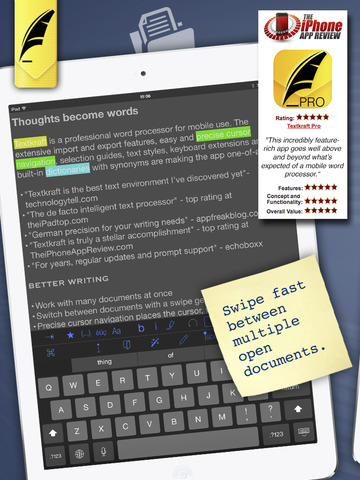
The new Overview simplifies the handling of multiple documents. It displays all open files as well-arranged thumbnails. Changing the order of documents, as well as creating working copies, comparing different text versions, closing documents, and quickly bringing a specific text frontmost for editing can be managed right out of the Overview. The comparison tool shows either the complete original document with all deletions, additions and corrections or just a short list of changes, whereas all unchanged passages stay concealed.
A texts' perception from the outside is a necessary part of a professional quality check. If no test reader is at hand or simply undesired, the own ears can help to proofread the writing: Textkraft offers a brand new reading aloud function for this task. Languages can be switched and the speech rate can be adjusted during the reading of multilingual documents. Additionally, particularly difficult passages can be repeated at will and a sentence-wise forward and rewind is possible at any time.
The new "Extended Forward Delete" function was designed in collaboration with professional translators. This unique feature deletes all characters in front of the cursor until the character is reached, which was prior to the initiation of the function on the left side of the cursor. If no stop character is found, the function deletes up until the end of the paragraph. This new feature speeds up the typical translation process. Examples can be found in the blog post referenced below.
The update also provides many upgrades and improvements of already established features: The suspension of document limits, comparison of non-editable documents, bookmarking of folders, the quick determination of storage locations, a scrollbar and persistent scroll positions for preview documents, opening of RTF and image files, direct printing of PDFs and images, customizing the paragraph and line spacing, an auto-prefix function for lists and indexes, more detail information in file listings, support for styling shortcuts of external keyboards, passcode protection with TouchID support and many improvements concerning BOX, iCloud Drive, Evernote, the automatic sentence selection, the memory requirement and the handling of bad internet connections.
Pricing and Availability:
Textkraft Professional 3.2 is available as a free update in the App Store today. New users can purchase the app until Easter weekend for just $5.99 / GBP4.49 / Euro5,99. The regular price after the promotion is $9.99 / GBP 7.99 / Euro 9.99. The app supports iPads with all iOS 7.1 and iOS 8 versions.
infovole: http://www.infovole.com
Textkraft Professional 3.2: https://www.infovole.de/en/updates-en/springtime-update-textkraft-3-2-is-available
Purchase and Download: https://itunes.apple.com/app/textkraft-professional/id482550275
Promotional Image: http://www.infovole.de/download/Textkraft_320_Wall_EN_PM.jpg
Screenshot: http://a2.mzstatic.com/us/r30/Purple1/v4/42/0b/e1/420be115-dcef-1c2d-9915-78aed934bca0/screen480x480.jpeg
App Icon: http://a2.mzstatic.com/us/r30/Purple3/v4/02/cb/7d/02cb7d5a-7d69-6981-bfd8-44eee6edf36d/icon175x175.png
The infovole GmbH, based in Neuss, Germany, was founded in 2010. The company focuses on the development and marketing of mobile applications. Consulting, conception, design, development, App Store distribution and marketing; the service line portfolio of infovole covers the entire production and conversion chain of a modern software application. infovole consults customers in the planning and execution of app projects, even without being producers themselves. The smart text editor Textkraft for iPad and iPhone - with more than 3 million downloads - is the most known app of infovole. Other current projects are the casual gaming app "Monster Spin" and the Digital Fair Guide, developed in collaboration with REWE Groups' DER-Touristik. All Material and Software (C) Copyright 2015 infovole GmbH. All Rights Reserved. Apple, the Apple logo, iPhone, iPod and iPad are registered trademarks of Apple Inc. in the U.S. and/or other countries. Other trademarks and registered trademarks may be the
property of their respective owners.
*******
Link To Article: http://prmac.com/release-id-74239.htm
*******
---------------------------------------------------------------------------------
Note that you can alter delivered distributions at any time.
Login to your account on prMac to alter your channel selection, or to opt-out at any time.
Textkraft update increases productivity of writers and translators - Published on 04/07/15
Central to Textkraft Professional's update to version 3.2 are many new features which focus on increasing the productivity of mobile writing processes. Highlights are a search and replace toolbar, a document overview function, a comparison tool, native support of Google Drive and Microsoft OneDrive, a reading text aloud function, as well as a novel "Extended Forward Delete" function, that was developed in collaboration with professional translators.
Neuss, Germany - infovole GmbH has released the 5th major update for their iOS text editor Textkraft within 6 months. Central to Textkraft Professional's update to version 3.2 are many new features which focus on increasing the productivity of mobile writing and translation processes.
The new search and replace toolbar works with the intelligent SASR (Search and Smart Replace) technology. The configurable full-text search provides a wide range of navigation functions to find and change specific text passages. Another time saving speciality is the intelligent replace function, which retains case sensitivity when words are replaced.
The new Overview simplifies the handling of multiple documents. It displays all open files as well-arranged thumbnails. Changing the order of documents, as well as creating working copies, comparing different text versions, closing documents, and quickly bringing a specific text frontmost for editing can be managed right out of the Overview. The comparison tool shows either the complete original document with all deletions, additions and corrections or just a short list of changes, whereas all unchanged passages stay concealed.
A texts' perception from the outside is a necessary part of a professional quality check. If no test reader is at hand or simply undesired, the own ears can help to proofread the writing: Textkraft offers a brand new reading aloud function for this task. Languages can be switched and the speech rate can be adjusted during the reading of multilingual documents. Additionally, particularly difficult passages can be repeated at will and a sentence-wise forward and rewind is possible at any time.
The new "Extended Forward Delete" function was designed in collaboration with professional translators. This unique feature deletes all characters in front of the cursor until the character is reached, which was prior to the initiation of the function on the left side of the cursor. If no stop character is found, the function deletes up until the end of the paragraph. This new feature speeds up the typical translation process. Examples can be found in the blog post referenced below.
The update also provides many upgrades and improvements of already established features: The suspension of document limits, comparison of non-editable documents, bookmarking of folders, the quick determination of storage locations, a scrollbar and persistent scroll positions for preview documents, opening of RTF and image files, direct printing of PDFs and images, customizing the paragraph and line spacing, an auto-prefix function for lists and indexes, more detail information in file listings, support for styling shortcuts of external keyboards, passcode protection with TouchID support and many improvements concerning BOX, iCloud Drive, Evernote, the automatic sentence selection, the memory requirement and the handling of bad internet connections.
Pricing and Availability:
Textkraft Professional 3.2 is available as a free update in the App Store today. New users can purchase the app until Easter weekend for just $5.99 / GBP4.49 / Euro5,99. The regular price after the promotion is $9.99 / GBP 7.99 / Euro 9.99. The app supports iPads with all iOS 7.1 and iOS 8 versions.
infovole: http://www.infovole.com
Textkraft Professional 3.2: https://www.infovole.de/en/updates-en/springtime-update-textkraft-3-2-is-available
Purchase and Download: https://itunes.apple.com/app/textkraft-professional/id482550275
Promotional Image: http://www.infovole.de/download/Textkraft_320_Wall_EN_PM.jpg

Screenshot: http://a2.mzstatic.com/us/r30/Purple1/v4/42/0b/e1/420be115-dcef-1c2d-9915-78aed934bca0/screen480x480.jpeg
App Icon: http://a2.mzstatic.com/us/r30/Purple3/v4/02/cb/7d/02cb7d5a-7d69-6981-bfd8-44eee6edf36d/icon175x175.png

The infovole GmbH, based in Neuss, Germany, was founded in 2010. The company focuses on the development and marketing of mobile applications. Consulting, conception, design, development, App Store distribution and marketing; the service line portfolio of infovole covers the entire production and conversion chain of a modern software application. infovole consults customers in the planning and execution of app projects, even without being producers themselves. The smart text editor Textkraft for iPad and iPhone - with more than 3 million downloads - is the most known app of infovole. Other current projects are the casual gaming app "Monster Spin" and the Digital Fair Guide, developed in collaboration with REWE Groups' DER-Touristik. All Material and Software (C) Copyright 2015 infovole GmbH. All Rights Reserved. Apple, the Apple logo, iPhone, iPod and iPad are registered trademarks of Apple Inc. in the U.S. and/or other countries. Other trademarks and registered trademarks may be the
property of their respective owners.
*******
Link To Article: http://prmac.com/release-id-74239.htm
*******
---------------------------------------------------------------------------------
Note that you can alter delivered distributions at any time.
Login to your account on prMac to alter your channel selection, or to opt-out at any time.
LinkOptimizer 4.9.36 for Adobe InDesign Improves Photoshop Processing
A new article has been published at prMac.
LinkOptimizer 4.9.36 for Adobe InDesign Improves Photoshop Processing - Published on 04/07/15
Toronto based Zevrix Solutions has announced LinkOptimizer 4.9.36, a maintenance update to its workflow automation solution for Adobe InDesign. LinkOptimizer allows users to reduce the size of InDesign links and speed up processing by automatically eliminating excess image data, performing essential image adjustments and converting file formats. The new version improves the reliability of Photoshop image processing and addresses some issues related to settings presets management.
Toronto (ON) Canada - Zevrix Solutions has announced the release of LinkOptimizer 4.9.36, a maintenance update to its workflow automation solution for Adobe InDesign. Awarded 4 out of 5 stars by Computer Arts magazine, LinkOptimizer automates complex image manipulation tasks allowing to significantly reduce the size of InDesign links, save processing time and reduce production costs. The new version offers the following fixes an improvements:
* Fixed an issue in which InDesign links could not be resized when Photoshop opened files from its autorecovery folder on launch
* Improved reliability of settings presets management
* Fixed an error that could occur when selecting a settings preset under certain conditions
* Improved memory management and other minor fixes
"LinkOptimizer makes cutting huge linked images down to size a cinch," reports Computer Arts. "For those wanting to quickly optimize their images and cut down on processing time, LinkOptimizer is a very smart choice."
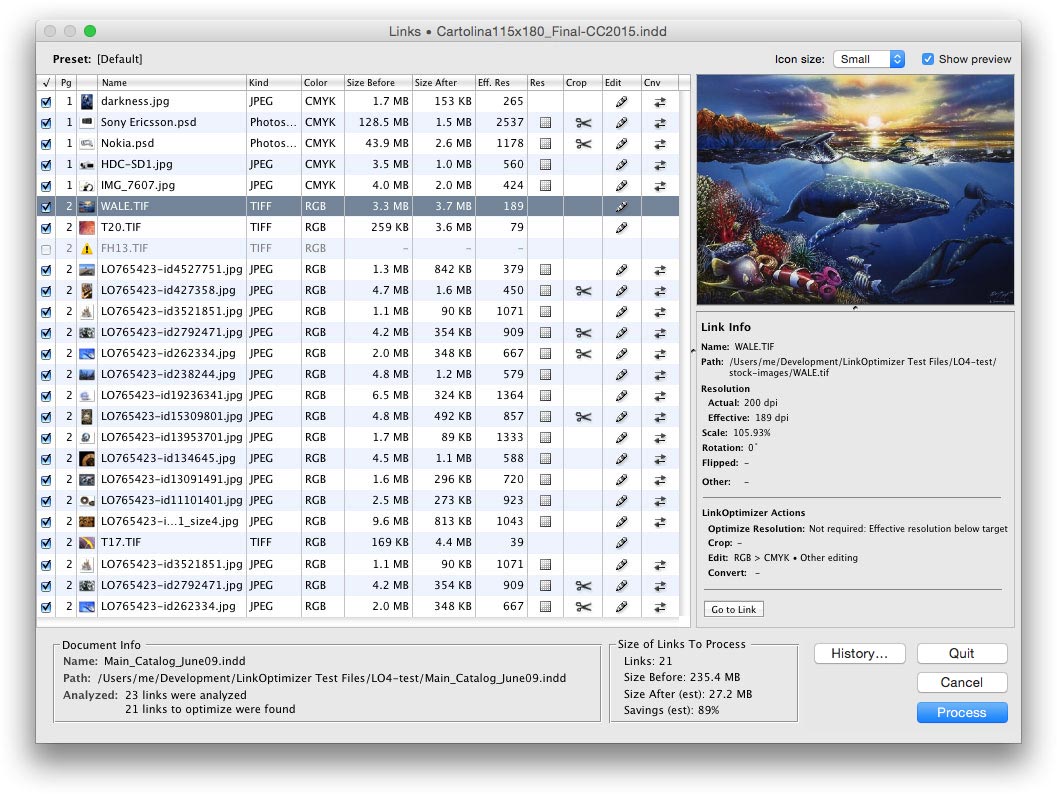
LinkOptimizer works automatically with Photoshop to eliminate the excess image data of InDesign links, perform essential image adjustments and convert image formats. For example, with just a click of a button users can:
* Scale and crop images to match their dimensions in InDesign
* Change resolution to 300 dpi
* Convert RGB images to specific CMYK profile
* Resave JPEG images as PSD
* Run a Photoshop Action on each image
At the end of processing, LinkOptimizer will reimport images to InDesign at 100% in their precise position. As a result, users can save gigabytes of disk space, accelerate document output, reduce job turnaround and cut costs through faster processing.
Pricing and Availability:
LinkOptimizer can be purchased from Zevrix website for $259.95 USD (Light version: $179.95) as well as from authorized resellers and Adobe Exchange. Trial is also available for download. The update is free for LinkOptimizer 4.x users and $130 to upgrade from previous versions. LinkOptimizer requires Mac OS X 10.6-10.10 and Adobe InDesign and Photoshop CS3-CC 2014.
Zevrix Solutions: http://zevrix.com
LinkOptimizer 4.9.36: http://zevrix.com/LinkOptimizer.php
Download LinkOptimizer: http://zevrix.com/LinkOptimizer.dmg
Purchase: http://zevrix.com/store.php
Screenshot: http://zevrix.com/screenshots/lo4/links-lrg-med.jpg
Located in Toronto, Canada, Zevrix Solutions provides automation and productivity solutions for Adobe Creative Cloud and Creative Suite software, PDF workflows, graphic file diagnostics and Microsoft Office output on Mac OS. Zevrix is dedicated to help professionals increase their profits through automating everyday tasks, producing error-free documents, saving disk space and cutting production costs. For more information, visit their website. Copyright (C) 2015 Zevrix Solutions. All Rights Reserved. Other trademarks and registered trademarks may be the property of their respective owners.
*******
Link To Article: http://prmac.com/release-id-74238.htm
*******
---------------------------------------------------------------------------------
Note that you can alter delivered distributions at any time.
Login to your account on prMac to alter your channel selection, or to opt-out at any time.
LinkOptimizer 4.9.36 for Adobe InDesign Improves Photoshop Processing - Published on 04/07/15
Toronto based Zevrix Solutions has announced LinkOptimizer 4.9.36, a maintenance update to its workflow automation solution for Adobe InDesign. LinkOptimizer allows users to reduce the size of InDesign links and speed up processing by automatically eliminating excess image data, performing essential image adjustments and converting file formats. The new version improves the reliability of Photoshop image processing and addresses some issues related to settings presets management.
Toronto (ON) Canada - Zevrix Solutions has announced the release of LinkOptimizer 4.9.36, a maintenance update to its workflow automation solution for Adobe InDesign. Awarded 4 out of 5 stars by Computer Arts magazine, LinkOptimizer automates complex image manipulation tasks allowing to significantly reduce the size of InDesign links, save processing time and reduce production costs. The new version offers the following fixes an improvements:
* Fixed an issue in which InDesign links could not be resized when Photoshop opened files from its autorecovery folder on launch
* Improved reliability of settings presets management
* Fixed an error that could occur when selecting a settings preset under certain conditions
* Improved memory management and other minor fixes
"LinkOptimizer makes cutting huge linked images down to size a cinch," reports Computer Arts. "For those wanting to quickly optimize their images and cut down on processing time, LinkOptimizer is a very smart choice."
LinkOptimizer works automatically with Photoshop to eliminate the excess image data of InDesign links, perform essential image adjustments and convert image formats. For example, with just a click of a button users can:
* Scale and crop images to match their dimensions in InDesign
* Change resolution to 300 dpi
* Convert RGB images to specific CMYK profile
* Resave JPEG images as PSD
* Run a Photoshop Action on each image
At the end of processing, LinkOptimizer will reimport images to InDesign at 100% in their precise position. As a result, users can save gigabytes of disk space, accelerate document output, reduce job turnaround and cut costs through faster processing.
Pricing and Availability:
LinkOptimizer can be purchased from Zevrix website for $259.95 USD (Light version: $179.95) as well as from authorized resellers and Adobe Exchange. Trial is also available for download. The update is free for LinkOptimizer 4.x users and $130 to upgrade from previous versions. LinkOptimizer requires Mac OS X 10.6-10.10 and Adobe InDesign and Photoshop CS3-CC 2014.
Zevrix Solutions: http://zevrix.com
LinkOptimizer 4.9.36: http://zevrix.com/LinkOptimizer.php
Download LinkOptimizer: http://zevrix.com/LinkOptimizer.dmg
Purchase: http://zevrix.com/store.php
Screenshot: http://zevrix.com/screenshots/lo4/links-lrg-med.jpg
Located in Toronto, Canada, Zevrix Solutions provides automation and productivity solutions for Adobe Creative Cloud and Creative Suite software, PDF workflows, graphic file diagnostics and Microsoft Office output on Mac OS. Zevrix is dedicated to help professionals increase their profits through automating everyday tasks, producing error-free documents, saving disk space and cutting production costs. For more information, visit their website. Copyright (C) 2015 Zevrix Solutions. All Rights Reserved. Other trademarks and registered trademarks may be the property of their respective owners.
*******
Link To Article: http://prmac.com/release-id-74238.htm
*******
---------------------------------------------------------------------------------
Note that you can alter delivered distributions at any time.
Login to your account on prMac to alter your channel selection, or to opt-out at any time.
GoodTask 2 has been updated to fully feature Mac OS X 10.10 Yosemite
A new article has been published at prMac.
GoodTask 2 has been updated to fully feature Mac OS X 10.10 Yosemite - Published on 04/07/15
Haha Interactive has announced GoodTask 2, an important update to their popular to-do/task manager application for Mac OS X. GoodTask works on top of Apple's stock Reminders app. Completely re-imagined to fully feature Mac OS X 10.10 Yosemite, GoodTask 2 has been rebuilt from the ground to make it more powerful with better usability. Love your stock Reminders app but feel like you need some more? Get GoodTask 2 and it's done. Now on sale at 25% off.
Seoul, Korea - Haha Interactive has announced the release of GoodTask 2, an update to their popular to-do/task manager application for Mac OS X. Love your stock Reminders app but feel like you need some more? Get GoodTask 2 and it's done. Reminders have been completely re-imagined and with GoodTask 2, it's now a powerful task manager.
GoodTask 2 has been updated to fully feature Mac OS X 10.10 Yosemite. It's a free update for existing users and is now on sale at 25% off for a limited time. GoodTask 2 has been rebuilt from the ground to make it more powerful with better usability:
* Your tasks are on a calendar. View your tasks on daily/weekly/monthly basis. Navigate through dates and see what you've done and what you should do.
* Tags can be added on your title or notes easily. You can make Tag Lists to manage them separately. Switching between tags are simply done with a right-click. Use Reminders with GTD method or any way you want.
* Add new tasks with Smart Add. Make your own rules and add new tasks easily. Command-enter will let you keep the settings to make multiple tasks super fast.
* Make your own Smart Lists with merged lists with priorities filter
* Right-click tasks to quickly change due dates, lists, priorities and change tags
* All tasks/ Undated/ Recurring/ Overdue/ Location-based/ Priority tasks can be shown separately
* Due dates and alarm time can be managed separately
* Search through your upcoming and completed tasks
* Today Widget to complete your tasks right away
* Menu bar component to add tasks and view your upcoming tasks at a glance
* Notifications
* Beautiful translucent windows with optional Dark mode (Manual or Scheduled)
System Requirements:
* OS X 10.10 or later
* 64-bit processor
* 4.8 MB
Pricing and Availability:
For a limited time, GoodTask 2 (v2.0) is only $14.99 (Reg $19.99) and available worldwide through the Mac App Store in the Productivity category. It is a free update for existing users.
GoodTask 2 (v2.0): http://goodtaskapp.com/mac
Purchase and Download (MAS): http://itunes.apple.com/app/id860443915
Download Trial: https://dl.dropboxusercontent.com/u/46810179/GoodTask2-Trial.zip
YouTube Video: https://www.youtube.com/watch?v=odFyGw_wq_Y
Screenshot: http://a1.mzstatic.com/us/r30/Purple3/v4/de/56/d4/de56d4a1-2514-a9fb-6064-6edb75301251/screen800x500.jpeg
Press Kit (zip): https://dl.dropboxusercontent.com/u/46810179/GoodTask-PressKit.zip
Based in Seoul, Korea, Haha Interactive is an indie software company founded by Hanbum Kim. The company's goal is to make beautiful products that are easy and fun with an intuitive user experience. Copyright (C) 2015 Haha Interactive. All Rights Reserved. Apple, the Apple logo, iPhone, iPod and iPad are registered trademarks of Apple Inc. in the U.S. and/or other countries.
*******
Link To Article: http://prmac.com/release-id-74237.htm
*******
---------------------------------------------------------------------------------
Note that you can alter delivered distributions at any time.
Login to your account on prMac to alter your channel selection, or to opt-out at any time.
GoodTask 2 has been updated to fully feature Mac OS X 10.10 Yosemite - Published on 04/07/15
Haha Interactive has announced GoodTask 2, an important update to their popular to-do/task manager application for Mac OS X. GoodTask works on top of Apple's stock Reminders app. Completely re-imagined to fully feature Mac OS X 10.10 Yosemite, GoodTask 2 has been rebuilt from the ground to make it more powerful with better usability. Love your stock Reminders app but feel like you need some more? Get GoodTask 2 and it's done. Now on sale at 25% off.
Seoul, Korea - Haha Interactive has announced the release of GoodTask 2, an update to their popular to-do/task manager application for Mac OS X. Love your stock Reminders app but feel like you need some more? Get GoodTask 2 and it's done. Reminders have been completely re-imagined and with GoodTask 2, it's now a powerful task manager.
GoodTask 2 has been updated to fully feature Mac OS X 10.10 Yosemite. It's a free update for existing users and is now on sale at 25% off for a limited time. GoodTask 2 has been rebuilt from the ground to make it more powerful with better usability:
* Your tasks are on a calendar. View your tasks on daily/weekly/monthly basis. Navigate through dates and see what you've done and what you should do.
* Tags can be added on your title or notes easily. You can make Tag Lists to manage them separately. Switching between tags are simply done with a right-click. Use Reminders with GTD method or any way you want.
* Add new tasks with Smart Add. Make your own rules and add new tasks easily. Command-enter will let you keep the settings to make multiple tasks super fast.
* Make your own Smart Lists with merged lists with priorities filter
* Right-click tasks to quickly change due dates, lists, priorities and change tags
* All tasks/ Undated/ Recurring/ Overdue/ Location-based/ Priority tasks can be shown separately
* Due dates and alarm time can be managed separately
* Search through your upcoming and completed tasks
* Today Widget to complete your tasks right away
* Menu bar component to add tasks and view your upcoming tasks at a glance
* Notifications
* Beautiful translucent windows with optional Dark mode (Manual or Scheduled)
System Requirements:
* OS X 10.10 or later
* 64-bit processor
* 4.8 MB
Pricing and Availability:
For a limited time, GoodTask 2 (v2.0) is only $14.99 (Reg $19.99) and available worldwide through the Mac App Store in the Productivity category. It is a free update for existing users.
GoodTask 2 (v2.0): http://goodtaskapp.com/mac
Purchase and Download (MAS): http://itunes.apple.com/app/id860443915
Download Trial: https://dl.dropboxusercontent.com/u/46810179/GoodTask2-Trial.zip
YouTube Video: https://www.youtube.com/watch?v=odFyGw_wq_Y
Screenshot: http://a1.mzstatic.com/us/r30/Purple3/v4/de/56/d4/de56d4a1-2514-a9fb-6064-6edb75301251/screen800x500.jpeg

Press Kit (zip): https://dl.dropboxusercontent.com/u/46810179/GoodTask-PressKit.zip
Based in Seoul, Korea, Haha Interactive is an indie software company founded by Hanbum Kim. The company's goal is to make beautiful products that are easy and fun with an intuitive user experience. Copyright (C) 2015 Haha Interactive. All Rights Reserved. Apple, the Apple logo, iPhone, iPod and iPad are registered trademarks of Apple Inc. in the U.S. and/or other countries.
*******
Link To Article: http://prmac.com/release-id-74237.htm
*******
---------------------------------------------------------------------------------
Note that you can alter delivered distributions at any time.
Login to your account on prMac to alter your channel selection, or to opt-out at any time.
Subscribe to:
Posts (Atom)