A new article has been published at prMac.
Food Tycoon - Run your very own fast food restaurant - Published on 04/13/15
Independent developer, Michael Sherwin today introduces Food Tycoon 1.2.2, his new game title developed for iOS devices. In Food Tycoon you are the owner of a small diner with dreams of moving up the food chain. Make your menu, set your prices, manage your employees, and grow your business into a bustling restaurant. This in-depth management SIM offers hour and hours of challenges just waiting to be conquered. Climb the food chain to become a true food tycoon!
Eden Prairie, Minnesota - Independent developer, Michael Sherwin today is proud to announce the release of Food Tycoon 1.2.2, his new game title developed for iPhone, iPad and iPod touch. Run your very own fast food restaurant and go from diner to bustling restaurant! Do you have what it takes to be the best in the business?
Ever dreamed of running your very own restaurant? Plan your menu, set your prices, manage your employees, and climb the food chain to become a true food tycoon! Manage your restaurants finances, supplies and public image and you could end up with hundreds of customers to serve! Are you up to the task, or will the industry dash your hopes and dreams?
Features:
* Cook burgers, French fries, hot dogs, ribs, chicken, and more
* Run a business! Food tycoon is more than just making food
* Manage up to 12 employees
* Upgrade your kitchen with new equipment
* Start in a small diner and grow into a bustling restaurant
* Add a drive-thru to your restaurant and earn more money
* Beautiful 3d graphics
* Day and night cycles
* 20 achievements
* No in-app purchases
Device Requirements:
* iPhone 4S/5/5C/5S/6, iPod touch (5th generation), and iPad
* Requires iOS 8.0 or later
* 96.7 MB
Pricing and Availability:
Food Tycoon 1.2.2 costs $2.99 (USD) and is available worldwide through the App Store in the Games category.
Food Tycoon 1.2.2: http://msherwin.com/app/food-tycoon/
Purchase and Download: https://itunes.apple.com/app/food-tycoon/id963369934
Screenshot 1: http://msherwin.com/food/1.png
Screenshot 2: http://msherwin.com/food/3.png
Screenshot 3: http://msherwin.com/food/4.png
App Icon: http://msherwin.com/food/icon.png
Michael Sherwin is an independent developer based in Minnesota and started developing apps in 2012. All Material and Software (C) Copyright 2015 Michael Sherwin. All Rights Reserved. Apple, the Apple logo, iPhone, iPod and iPad are registered trademarks of Apple Inc. in the U.S. and/or other countries. Other trademarks and registered trademarks may be the property of their respective owners.
*******
Link To Article: http://prmac.com/release-id-74358.htm
*******
---------------------------------------------------------------------------------
Note that you can alter delivered distributions at any time.
Login to your account on prMac to alter your channel selection, or to opt-out at any time.





DiNiCo releases tinyCalc 2.0 for Apple Watch, iPhone and iPad
A new article has been published at prMac.
DiNiCo releases tinyCalc 2.0 for Apple Watch, iPhone and iPad - Published on 04/13/15
Boston based software company, DiNiCo, today introduces tinyCalc 2.0, the best calculator for Apple Watch. Traditional calculators have too many buttons for such a small screen. tinyCalc solves this with its unique design, which still allows you to use every function of a standard scientific calculator by way of the Magic Buttons. Your work and favorite functions sync to your iPhone. tinyCalc for Apple Watch is full featured, simple to use, and you will love having it on your wrist at all times.
Boston, Massachusetts - DiNiCo, an independent software company, today introduces tinyCalc 2.0, the best calculator for Apple Watch. Traditional calculators have too many buttons for such a small screen. tinyCalc solves this with its unique design, which still allows you to use every function of a standard scientific calculator by way of the Magic Buttons. Your work and favorite functions sync to your iPhone. tinyCalc for Apple Watch is full featured, simple to use, and you will love having it on your wrist at all times.
The original tinyCalc, an innovative custom calculator app and widget for iPhone and iPad devices, also receives an update. Improvements to the widget include more options when tapping the display label (Undo, Copy, Paste, App) and animations that match the style of the Apple Watch app. App improvements include shake to undo and improved design of settings menu. Overall improvements to all versions of tinyCalc include international formatting, large and tiny numbers displaying correctly, and other minor optimizations. Full featured, yet simple-to-use, you will love how comfortable tinyCalc is to use with one hand on all iPhone models.
Widgets should be compact, but comfortable to use. The tinyCalc widget was designed with this in mind. The app allows you to see all of your functions; no need to rotate your phone to get to everything, and the minimalistic design lets you focus on what matters. Work in the app on an iPhone or iPad, in the widget, or on your Apple Watch- whatever you do syncs between them all. You can even customize the buttons, so, from students to professionals, tinyCalc is the calculator for everybody.
"This custom calculator has a lot going for it." - AppAdvice
User testimonials:
* "tinyCalc is fast [...] almost every calculator I've ever tried for my iPhone or iPad has been slow as molasses."
* "I have an iPhone 6 plus and I love [having] the calculator on the lower half of the screen which makes it easy to use with one hand."
* "Great for most purposes. Love the widget function!"
Features:
* Exclusively for Apple Watch, the most portable version of tinyCalc yet
* Widget works without even unlocking your device on iPhone and iPad
* All standard scientific calculator functions
* Customizable buttons, including the Magic Buttons
* Move functions to the Magic Buttons and they appear there in the widget as well on Apple Watch
* Open app from anywhere by tapping the top area of the widget
* Copy/paste the currently typed number
* Shake to undo in the app
Settings include:
* Degree/radian modes and optional animations
* 8 great themes
* Move the numpad to the bottom to make tinyCalc more like traditional calculators
Device Requirements:
* Apple Watch, iPhone, iPad, and iPod touch
* Requires iOS 8.0 or later (8.2 for Apple Watch)
* 3.2 MB
Pricing and Availability:
tinyCalc 2.0 is only $0.99 USD (or equivalent amount in other currencies) and available worldwide exclusively through the App Store in the Utilities category. Follow us on Twitter at @tinyCalc, and let us know if you have questions or concerns.
tinyCalc 2.0: http://www.dinicosoftware.com
Purchase and Download: https://itunes.apple.com/app/tinycalc/id919006147
Animated GIF (How To): http://i.imgur.com/1F4ylYu.gifv
Animated GIF (Magic Buttons): http://i.imgur.com/WQbUI1D.gifv
Screenshot (Home Screen): http://i.imgur.com/cxYerPx.png
App Icon: http://i.imgur.com/y6gmaqs.png
Located in Boston, Massachusetts, DiNiCo is an independent software company established by CEO Michael Dinicola. All Material and Software (C) Copyright 2014-2015 DiNiCo. All Rights Reserved. Apple, the Apple logo, iPhone, iPod and iPad are registered trademarks of Apple Inc. in the U.S. and/or other countries. Other trademarks and registered trademarks may be the property of their respective owners.
*******
Link To Article: http://prmac.com/release-id-74357.htm
*******
---------------------------------------------------------------------------------
Note that you can alter delivered distributions at any time.
Login to your account on prMac to alter your channel selection, or to opt-out at any time.
DiNiCo releases tinyCalc 2.0 for Apple Watch, iPhone and iPad - Published on 04/13/15
Boston based software company, DiNiCo, today introduces tinyCalc 2.0, the best calculator for Apple Watch. Traditional calculators have too many buttons for such a small screen. tinyCalc solves this with its unique design, which still allows you to use every function of a standard scientific calculator by way of the Magic Buttons. Your work and favorite functions sync to your iPhone. tinyCalc for Apple Watch is full featured, simple to use, and you will love having it on your wrist at all times.
Boston, Massachusetts - DiNiCo, an independent software company, today introduces tinyCalc 2.0, the best calculator for Apple Watch. Traditional calculators have too many buttons for such a small screen. tinyCalc solves this with its unique design, which still allows you to use every function of a standard scientific calculator by way of the Magic Buttons. Your work and favorite functions sync to your iPhone. tinyCalc for Apple Watch is full featured, simple to use, and you will love having it on your wrist at all times.
The original tinyCalc, an innovative custom calculator app and widget for iPhone and iPad devices, also receives an update. Improvements to the widget include more options when tapping the display label (Undo, Copy, Paste, App) and animations that match the style of the Apple Watch app. App improvements include shake to undo and improved design of settings menu. Overall improvements to all versions of tinyCalc include international formatting, large and tiny numbers displaying correctly, and other minor optimizations. Full featured, yet simple-to-use, you will love how comfortable tinyCalc is to use with one hand on all iPhone models.
Widgets should be compact, but comfortable to use. The tinyCalc widget was designed with this in mind. The app allows you to see all of your functions; no need to rotate your phone to get to everything, and the minimalistic design lets you focus on what matters. Work in the app on an iPhone or iPad, in the widget, or on your Apple Watch- whatever you do syncs between them all. You can even customize the buttons, so, from students to professionals, tinyCalc is the calculator for everybody.
"This custom calculator has a lot going for it." - AppAdvice
User testimonials:
* "tinyCalc is fast [...] almost every calculator I've ever tried for my iPhone or iPad has been slow as molasses."
* "I have an iPhone 6 plus and I love [having] the calculator on the lower half of the screen which makes it easy to use with one hand."
* "Great for most purposes. Love the widget function!"
Features:
* Exclusively for Apple Watch, the most portable version of tinyCalc yet
* Widget works without even unlocking your device on iPhone and iPad
* All standard scientific calculator functions
* Customizable buttons, including the Magic Buttons
* Move functions to the Magic Buttons and they appear there in the widget as well on Apple Watch
* Open app from anywhere by tapping the top area of the widget
* Copy/paste the currently typed number
* Shake to undo in the app
Settings include:
* Degree/radian modes and optional animations
* 8 great themes
* Move the numpad to the bottom to make tinyCalc more like traditional calculators
Device Requirements:
* Apple Watch, iPhone, iPad, and iPod touch
* Requires iOS 8.0 or later (8.2 for Apple Watch)
* 3.2 MB
Pricing and Availability:
tinyCalc 2.0 is only $0.99 USD (or equivalent amount in other currencies) and available worldwide exclusively through the App Store in the Utilities category. Follow us on Twitter at @tinyCalc, and let us know if you have questions or concerns.
tinyCalc 2.0: http://www.dinicosoftware.com
Purchase and Download: https://itunes.apple.com/app/tinycalc/id919006147
Animated GIF (How To): http://i.imgur.com/1F4ylYu.gifv
Animated GIF (Magic Buttons): http://i.imgur.com/WQbUI1D.gifv
Screenshot (Home Screen): http://i.imgur.com/cxYerPx.png

App Icon: http://i.imgur.com/y6gmaqs.png

Located in Boston, Massachusetts, DiNiCo is an independent software company established by CEO Michael Dinicola. All Material and Software (C) Copyright 2014-2015 DiNiCo. All Rights Reserved. Apple, the Apple logo, iPhone, iPod and iPad are registered trademarks of Apple Inc. in the U.S. and/or other countries. Other trademarks and registered trademarks may be the property of their respective owners.
*******
Link To Article: http://prmac.com/release-id-74357.htm
*******
---------------------------------------------------------------------------------
Note that you can alter delivered distributions at any time.
Login to your account on prMac to alter your channel selection, or to opt-out at any time.
MTara Apps Releases Edges - Save the Ball Free Game for iOS and Android
A new article has been published at prMac.
MTara Apps Releases Edges - Save the Ball Free Game for iOS and Android - Published on 04/13/15
MTara Apps today announces Edges - Save The Ball 1.0.1, a fun, challenging game for iPhone, iPad and Android devices. Featuring an easy-to-use interface, slick graphics, a vivid color palette and clean, solid lines, players simply tap the ball on the screen to make it avoid the lines. Edges - Save the Ball is for gamers of all ages, and can also be a social experience as players can post their scores and compete with other players in their social circle thanks to Game Center.
Hyderabad, India - MTara Apps, the developer behind world famous apps like The Unbeatable Game, Tease UR Brain, Fly Wings and Pair the Objects, today is proud to announce the release of Edges - Save The Ball 1.0.1, a fun, challenging game for iPhone, the iPad and Android devices. Edges - Save the Ball is for gamers of all ages, and can also be a social experience as players can post their scores and compete with other players in their social circle thanks to Game Center.
As with many of the historically great games, the concept is simple - don't let the ball hit the lines - but challenging. The interface is easy to use - simply tap the ball on the screen to make it avoid the lines - and the graphics are slick, using a vivid color palette and clean, solid lines. Game play is fast and exciting as the ball rolls quickly towards the obstacles that must be avoided.
Key Features:
* Fast & exciting game play
* Vivid, modern & incredible graphics
* Share, compete score with friends amongst your social circle or via Game Center
* Highly addictive and Free to play
"We believe that users are more attracted to and love playing simple addictive games on their mobile" said Director - Dilip Semwal at MTara Apps. "Inspired from KetchApp Mobiles, MTara Apps believe addictive games like these are best suited for mobile gaming. The players can unlock different pattern of balls by collecting the diamonds."
"The graphics are absolutely vivid, modern and incredible," said reviewer lamthattoan75. "Edges - Save The Ball is highly addictive, simple and fun to play, but hard to master. It is simple but very addictive. I can compete with friends and family via Game Center and also share my score on Social media like Facebook and Twitter."
Device Requirements:
* iPhone, iPad, and iPod touch
* Optimized for iPhone�5, iPhone 6/6 Plus
* Requires iOS 7.0 or later
* 7.6 MB
Pricing and Availability:
Edges - Save The Ball 1.0.1 is Free and available worldwide through the App Store in the Games category. There is also an Android version available on Google Play.
Edges - Save The Ball 1.0.1: http://www.mtaraapps.com/edges.html
Download from iTunes: https://itunes.apple.com/app/edges-save-the-ball/id939480302
YouTube Video: https://www.youtube.com/watch?v=OoRewl4NU6E
Screenshot 1: https://dilipsemwal.files.wordpress.com/2015/03/2.png
Screenshot 2: https://dilipsemwal.files.wordpress.com/2015/03/3-1.png
App Icon: https://dilipsemwal.files.wordpress.com/2015/03/icon-1024.jpg
MTara Apps is backed by MTara Power Systems Private Limited. It thrives to develop games that are simple addictive and fun to play. Founded in 2014, the company is on a mission to develop game apps which can be loved by People of all age groups. All Material and Software (C) Copyright 2015 MTara Apps. All Rights Reserved. Apple, the Apple logo, iPhone, iPod and iPad are registered trademarks of Apple Inc. in the U.S. and/or other countries. Other trademarks and registered trademarks may be the property of their respective owners.
*******
Link To Article: http://prmac.com/release-id-74355.htm
*******
---------------------------------------------------------------------------------
Note that you can alter delivered distributions at any time.
Login to your account on prMac to alter your channel selection, or to opt-out at any time.
MTara Apps Releases Edges - Save the Ball Free Game for iOS and Android - Published on 04/13/15
MTara Apps today announces Edges - Save The Ball 1.0.1, a fun, challenging game for iPhone, iPad and Android devices. Featuring an easy-to-use interface, slick graphics, a vivid color palette and clean, solid lines, players simply tap the ball on the screen to make it avoid the lines. Edges - Save the Ball is for gamers of all ages, and can also be a social experience as players can post their scores and compete with other players in their social circle thanks to Game Center.
Hyderabad, India - MTara Apps, the developer behind world famous apps like The Unbeatable Game, Tease UR Brain, Fly Wings and Pair the Objects, today is proud to announce the release of Edges - Save The Ball 1.0.1, a fun, challenging game for iPhone, the iPad and Android devices. Edges - Save the Ball is for gamers of all ages, and can also be a social experience as players can post their scores and compete with other players in their social circle thanks to Game Center.
As with many of the historically great games, the concept is simple - don't let the ball hit the lines - but challenging. The interface is easy to use - simply tap the ball on the screen to make it avoid the lines - and the graphics are slick, using a vivid color palette and clean, solid lines. Game play is fast and exciting as the ball rolls quickly towards the obstacles that must be avoided.
Key Features:
* Fast & exciting game play
* Vivid, modern & incredible graphics
* Share, compete score with friends amongst your social circle or via Game Center
* Highly addictive and Free to play
"We believe that users are more attracted to and love playing simple addictive games on their mobile" said Director - Dilip Semwal at MTara Apps. "Inspired from KetchApp Mobiles, MTara Apps believe addictive games like these are best suited for mobile gaming. The players can unlock different pattern of balls by collecting the diamonds."
"The graphics are absolutely vivid, modern and incredible," said reviewer lamthattoan75. "Edges - Save The Ball is highly addictive, simple and fun to play, but hard to master. It is simple but very addictive. I can compete with friends and family via Game Center and also share my score on Social media like Facebook and Twitter."
Device Requirements:
* iPhone, iPad, and iPod touch
* Optimized for iPhone�5, iPhone 6/6 Plus
* Requires iOS 7.0 or later
* 7.6 MB
Pricing and Availability:
Edges - Save The Ball 1.0.1 is Free and available worldwide through the App Store in the Games category. There is also an Android version available on Google Play.
Edges - Save The Ball 1.0.1: http://www.mtaraapps.com/edges.html
Download from iTunes: https://itunes.apple.com/app/edges-save-the-ball/id939480302
YouTube Video: https://www.youtube.com/watch?v=OoRewl4NU6E
Screenshot 1: https://dilipsemwal.files.wordpress.com/2015/03/2.png

Screenshot 2: https://dilipsemwal.files.wordpress.com/2015/03/3-1.png

App Icon: https://dilipsemwal.files.wordpress.com/2015/03/icon-1024.jpg

MTara Apps is backed by MTara Power Systems Private Limited. It thrives to develop games that are simple addictive and fun to play. Founded in 2014, the company is on a mission to develop game apps which can be loved by People of all age groups. All Material and Software (C) Copyright 2015 MTara Apps. All Rights Reserved. Apple, the Apple logo, iPhone, iPod and iPad are registered trademarks of Apple Inc. in the U.S. and/or other countries. Other trademarks and registered trademarks may be the property of their respective owners.
*******
Link To Article: http://prmac.com/release-id-74355.htm
*******
---------------------------------------------------------------------------------
Note that you can alter delivered distributions at any time.
Login to your account on prMac to alter your channel selection, or to opt-out at any time.
Cheatsheet 2.0 for iOS - for the little things you never remember
A new article has been published at prMac.
Cheatsheet 2.0 for iOS - for the little things you never remember - Published on 04/13/15
Independent developer, Adam Overholtzer today announces Cheatsheet 2.0, an update to his popular productivity app for iPhone and iPad devices. Cheatsheet is for the little things you never remember. Write them down and then refer to them anytime in the Today Widget or paste them anywhere with the Custom Keyboard. No more fumbling to unlock your phone and find your notes app; Cheatsheet is as easy as pulling down Notification Center or pulling up the keyboard.
Mountain View, California - Independent developer, Adam Overholtzer today is proud to announce the release of Cheatsheet 2.0, the biggest update ever to his 5-star reviewed productivity app for iPhone and iPad. Cheatsheet 2.0 adds a keyboard extension so you can paste text anywhere and a share extension so you can add things to Cheatsheet from any app.
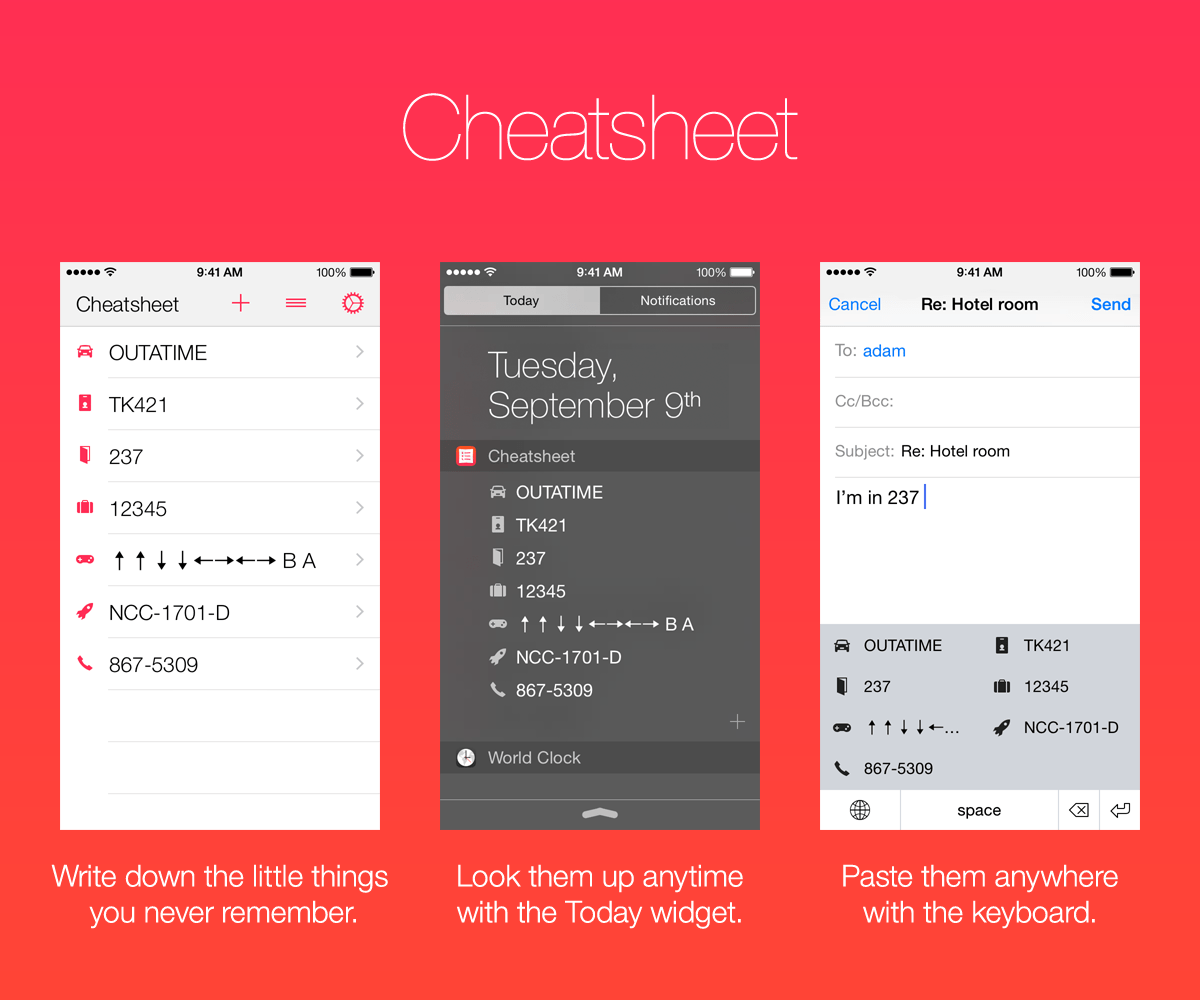
Cheatsheet is for the little things you never remember: hotel rooms, license plates, luggage combination, ID numbers. Write them down in Cheatsheet and then refer to them anytime in the Today Widget or paste them anywhere with the Custom Keyboard. No more fumbling to unlock your phone and find your notes app; Cheatsheet is as easy as pulling down Notification Center or pulling up the keyboard.
New in Cheatsheet 2.0:
* Two new extensions give you more ways to get things in or out of Cheatsheet
* Keyboard extension: paste your cheats anywhere
* Action extension: send text or URLs to Cheatsheet from any app via the share sheet
* 37 new icons and more than a dozen redesigns
* Cheatsheet Pro: unlock new features and icons and help support the ongoing development of the app
* New app icon, new widget features, and more
App Features:
* Simple UI for adding and managing your cheats
* 86 hint icons to help you recognize what you're looking for
* Quickly copy a cheat by tapping-and-holding on a row
* Includes easy, 3-step instructions for adding the Today Widget to your Notification Center
* No security. Please don't use Cheatsheet for important passwords or personal information
Today Widget:
* Shows up to 10 of your cheats. (Up to 16 in the iPad version)
* Tap the "+" button to jump to the Add Cheat screen
* Option to copy or open the selected cheat
Keyboard Extension:
* Shows up to 50 cheats, which you can insert anywhere you can use a custom keyboard
* Includes space, delete, and return keys to help with simple edits
Advanced Features:
* Action extension: send text or URLs to Cheatsheet from any app via the share sheet
* Customize the Cheatsheet widget's appearance and behavior to suit your needs
* URL scheme for adding a cheat: cheatsheet://add?text=everything is awesome
Cheatsheet Pro:
* Unlock the full keyboard, action extension, and 25 new icons with one easy in-app purchase
* Purchases will help support the ongoing development of Cheatsheet
Device Requirements:
* iPhone, iPad, or iPod touch
* iOS 8.1 or higher
* 9.0 MB
Pricing and Availability:
Cheatsheet Quick Reference and Notes 2.0 is free and available worldwide exclusively through the App Store in the Productivity category. Learn more and download the app at Cheatsheet's official website.
Cheatsheet Quick Reference and Notes 2.0: http://www.overdesigned.net/cheatsheet/
Download from iTunes: http://itunes.apple.com/app/id914665829
Screenshot: http://www.overdesigned.net/cheatsheet/banner.png
App Icon: http://www.overdesigned.net/cheatsheet/iTunesArtwork.png
Press Kit (zip): http://www.overdesigned.net/cheatsheet/cheatsheet-press-kit.zip
Cheatsheet was made by Adam Overholtzer, a UX designer and iOS developer living in California. He never remembers his employee ID number. All Material and Software (C) Copyright 2015 Adam Overholtzer,. All Rights Reserved. Apple, the Apple logo, iPhone, iPod and iPad are registered trademarks of Apple Inc. in the U.S. and/or other countries. Other trademarks and registered trademarks may be the property of their respective owners.
*******
Link To Article: http://prmac.com/release-id-74354.htm
*******
---------------------------------------------------------------------------------
Note that you can alter delivered distributions at any time.
Login to your account on prMac to alter your channel selection, or to opt-out at any time.
Cheatsheet 2.0 for iOS - for the little things you never remember - Published on 04/13/15
Independent developer, Adam Overholtzer today announces Cheatsheet 2.0, an update to his popular productivity app for iPhone and iPad devices. Cheatsheet is for the little things you never remember. Write them down and then refer to them anytime in the Today Widget or paste them anywhere with the Custom Keyboard. No more fumbling to unlock your phone and find your notes app; Cheatsheet is as easy as pulling down Notification Center or pulling up the keyboard.
Mountain View, California - Independent developer, Adam Overholtzer today is proud to announce the release of Cheatsheet 2.0, the biggest update ever to his 5-star reviewed productivity app for iPhone and iPad. Cheatsheet 2.0 adds a keyboard extension so you can paste text anywhere and a share extension so you can add things to Cheatsheet from any app.
Cheatsheet is for the little things you never remember: hotel rooms, license plates, luggage combination, ID numbers. Write them down in Cheatsheet and then refer to them anytime in the Today Widget or paste them anywhere with the Custom Keyboard. No more fumbling to unlock your phone and find your notes app; Cheatsheet is as easy as pulling down Notification Center or pulling up the keyboard.
New in Cheatsheet 2.0:
* Two new extensions give you more ways to get things in or out of Cheatsheet
* Keyboard extension: paste your cheats anywhere
* Action extension: send text or URLs to Cheatsheet from any app via the share sheet
* 37 new icons and more than a dozen redesigns
* Cheatsheet Pro: unlock new features and icons and help support the ongoing development of the app
* New app icon, new widget features, and more
App Features:
* Simple UI for adding and managing your cheats
* 86 hint icons to help you recognize what you're looking for
* Quickly copy a cheat by tapping-and-holding on a row
* Includes easy, 3-step instructions for adding the Today Widget to your Notification Center
* No security. Please don't use Cheatsheet for important passwords or personal information
Today Widget:
* Shows up to 10 of your cheats. (Up to 16 in the iPad version)
* Tap the "+" button to jump to the Add Cheat screen
* Option to copy or open the selected cheat
Keyboard Extension:
* Shows up to 50 cheats, which you can insert anywhere you can use a custom keyboard
* Includes space, delete, and return keys to help with simple edits
Advanced Features:
* Action extension: send text or URLs to Cheatsheet from any app via the share sheet
* Customize the Cheatsheet widget's appearance and behavior to suit your needs
* URL scheme for adding a cheat: cheatsheet://add?text=everything is awesome
Cheatsheet Pro:
* Unlock the full keyboard, action extension, and 25 new icons with one easy in-app purchase
* Purchases will help support the ongoing development of Cheatsheet
Device Requirements:
* iPhone, iPad, or iPod touch
* iOS 8.1 or higher
* 9.0 MB
Pricing and Availability:
Cheatsheet Quick Reference and Notes 2.0 is free and available worldwide exclusively through the App Store in the Productivity category. Learn more and download the app at Cheatsheet's official website.
Cheatsheet Quick Reference and Notes 2.0: http://www.overdesigned.net/cheatsheet/
Download from iTunes: http://itunes.apple.com/app/id914665829
Screenshot: http://www.overdesigned.net/cheatsheet/banner.png
App Icon: http://www.overdesigned.net/cheatsheet/iTunesArtwork.png

Press Kit (zip): http://www.overdesigned.net/cheatsheet/cheatsheet-press-kit.zip
Cheatsheet was made by Adam Overholtzer, a UX designer and iOS developer living in California. He never remembers his employee ID number. All Material and Software (C) Copyright 2015 Adam Overholtzer,. All Rights Reserved. Apple, the Apple logo, iPhone, iPod and iPad are registered trademarks of Apple Inc. in the U.S. and/or other countries. Other trademarks and registered trademarks may be the property of their respective owners.
*******
Link To Article: http://prmac.com/release-id-74354.htm
*******
---------------------------------------------------------------------------------
Note that you can alter delivered distributions at any time.
Login to your account on prMac to alter your channel selection, or to opt-out at any time.
Introducing the sequel to Seven Academy's Busy Shapes: Crazy Gears
A new article has been published at prMac.
Introducing the sequel to Seven Academy's Busy Shapes: Crazy Gears - Published on 04/12/15
Seven Academy has released Crazy Gears 1.0.1, its new educational app for iPhone, iPad and iPod touch devices. Explore a captivating digital playground in this tantalizing puzzle game. Children ages 5-8 manipulate gears, chains, rods, and pulleys, to pull themselves through each level, which teaches them how different mechanisms affect one another when constructing a machine. This DIY experience is perfect for the young maker in your life.
Cupertino, California - Seven Academy has announced the release of Crazy Gears 1.0.1, its new educational app for iPhone, iPad and iPod touch devices. Crazy Gears was conceived as a tribute to mathematician and educational technologist, Seymour Papert, in hopes of providing children with the inspiration to discover and understand the physical properties of mechanisms found in their everyday lives. As a young boy, Papert fell in love with gears. Their movement fascinated him in every way and inspired his career.
Explore a captivating digital playground in this tantalizing puzzle game. Children ages 5-8 manipulate gears, chains, rods, and pulleys, to pull themselves through each level, which teaches them how different mechanisms affect one another when constructing a machine. This DIY experience is perfect for young makers everywhere.
Other Crazy Gears special features include:
* No rules
* No explicit instructions
* Kid Friendly Design
* Powerful Artificial Intelligence
* Seamless Interaction
* Multiple Language Support
* Crash Resistant Design
* Bold, bright colors
* Automatic Memory
* Certified COPPA Compliant by PRIVO
"One of the great things about this app is that it explores STEM subjects in a manner that allows children to build upon and deepen their understanding of how mechanisms work together. They are free test out their theories by manipulating the objects in the game, and will ultimately solve complex brain teasers independently," comments Nathalie Gauthier of Seven Academy. "Kids who enjoyed playing Busy Shapes will love this app because it maintains the simple, clean, and colorful esthetic of Busy Shapes, while catering to the fact that those kids are now two years older and looking for something different and perhaps a little more complex. The game also has an addictive quality that makes it difficult to put down. We even have some parents playing it!"
Device Requirements:
* iPhone, iPad, and iPod touch
* Requires iOS 8.0 or later
* 52.0 MB
Pricing and Availability:
Crazy Gears 1.0.1 is only $0.99 USD (or equivalent amount in other currencies) and available worldwide exclusively through the App Store in the Education category.
Crazy Gears 1.0.1: http://www.crazybusyapps.com/
More Info: http://apps.appshout.com/crazy-gears/
Download from iTunes : https://itunes.apple.com/app/crazy-gears/id967327312
Screenshot : http://a3.mzstatic.com/us/r30/Purple1/v4/67/0c/31/670c3189-14cd-8ad2-be10-b7b793f563ea/screen480x480.jpeg
App Icon : http://apps.appshout.com/crazy-gears/images/icon.png
Seven Academy is a multi-award winning app developer whose games have been highly acclaimed by Children's Technology Review as well as Parents' Choice. The company's mission is to provide children with enjoyable early-learning activities using the latest technologies. Its team members, many of whom are young parents or teachers, strive to produce tools that motivate and inspire children to learn, play, and progress. All Material and Software (C) Copyright 2015 Seven Academy. All Rights Reserved. Apple, the Apple logo, iPhone, iPod and iPad are registered trademarks of Apple Inc. in the U.S. and/or other countries. Other trademarks and registered trademarks may be the property of their respective owners.
*******
Link To Article: http://prmac.com/release-id-74325.htm
*******
---------------------------------------------------------------------------------
Note that you can alter delivered distributions at any time.
Login to your account on prMac to alter your channel selection, or to opt-out at any time.
Introducing the sequel to Seven Academy's Busy Shapes: Crazy Gears - Published on 04/12/15
Seven Academy has released Crazy Gears 1.0.1, its new educational app for iPhone, iPad and iPod touch devices. Explore a captivating digital playground in this tantalizing puzzle game. Children ages 5-8 manipulate gears, chains, rods, and pulleys, to pull themselves through each level, which teaches them how different mechanisms affect one another when constructing a machine. This DIY experience is perfect for the young maker in your life.
Cupertino, California - Seven Academy has announced the release of Crazy Gears 1.0.1, its new educational app for iPhone, iPad and iPod touch devices. Crazy Gears was conceived as a tribute to mathematician and educational technologist, Seymour Papert, in hopes of providing children with the inspiration to discover and understand the physical properties of mechanisms found in their everyday lives. As a young boy, Papert fell in love with gears. Their movement fascinated him in every way and inspired his career.
Explore a captivating digital playground in this tantalizing puzzle game. Children ages 5-8 manipulate gears, chains, rods, and pulleys, to pull themselves through each level, which teaches them how different mechanisms affect one another when constructing a machine. This DIY experience is perfect for young makers everywhere.
Other Crazy Gears special features include:
* No rules
* No explicit instructions
* Kid Friendly Design
* Powerful Artificial Intelligence
* Seamless Interaction
* Multiple Language Support
* Crash Resistant Design
* Bold, bright colors
* Automatic Memory
* Certified COPPA Compliant by PRIVO
"One of the great things about this app is that it explores STEM subjects in a manner that allows children to build upon and deepen their understanding of how mechanisms work together. They are free test out their theories by manipulating the objects in the game, and will ultimately solve complex brain teasers independently," comments Nathalie Gauthier of Seven Academy. "Kids who enjoyed playing Busy Shapes will love this app because it maintains the simple, clean, and colorful esthetic of Busy Shapes, while catering to the fact that those kids are now two years older and looking for something different and perhaps a little more complex. The game also has an addictive quality that makes it difficult to put down. We even have some parents playing it!"
Device Requirements:
* iPhone, iPad, and iPod touch
* Requires iOS 8.0 or later
* 52.0 MB
Pricing and Availability:
Crazy Gears 1.0.1 is only $0.99 USD (or equivalent amount in other currencies) and available worldwide exclusively through the App Store in the Education category.
Crazy Gears 1.0.1: http://www.crazybusyapps.com/
More Info: http://apps.appshout.com/crazy-gears/
Download from iTunes : https://itunes.apple.com/app/crazy-gears/id967327312
Screenshot : http://a3.mzstatic.com/us/r30/Purple1/v4/67/0c/31/670c3189-14cd-8ad2-be10-b7b793f563ea/screen480x480.jpeg
App Icon : http://apps.appshout.com/crazy-gears/images/icon.png

Seven Academy is a multi-award winning app developer whose games have been highly acclaimed by Children's Technology Review as well as Parents' Choice. The company's mission is to provide children with enjoyable early-learning activities using the latest technologies. Its team members, many of whom are young parents or teachers, strive to produce tools that motivate and inspire children to learn, play, and progress. All Material and Software (C) Copyright 2015 Seven Academy. All Rights Reserved. Apple, the Apple logo, iPhone, iPod and iPad are registered trademarks of Apple Inc. in the U.S. and/or other countries. Other trademarks and registered trademarks may be the property of their respective owners.
*******
Link To Article: http://prmac.com/release-id-74325.htm
*******
---------------------------------------------------------------------------------
Note that you can alter delivered distributions at any time.
Login to your account on prMac to alter your channel selection, or to opt-out at any time.
Side-by-Side PDF Editor Easy Annotate Is Now Available For iPad
A new article has been published at prMac.
Side-by-Side PDF Editor Easy Annotate Is Now Available For iPad - Published on 04/12/15
Make me Blue B.V. has released Easy Annotate 2.1, a major update to their popular dual PDF annotation app for iPad tablets. Perfect for for professionals and students alike, Easy Annotate is unique for the ability to display, annotate and link two documents simultaneously, side-by-side. Easy Annotate has simple but powerful annotation features packed in an intuitive and beautiful interface. Version 2.1 further increases ease-of-use and improves workflow.
Cupertino, California - Easy Annotate, the most popular dual PDF annotation app has received much praise for its practical value and simple design, making it easy to annotate two PDF documents next to each other and to link them. The favorite study app of many students and professionals received a major update to further increase easy of use and improve workflow, adding features such as improved Korean script support, text font and size editing and line thickness adjustment. In addition, the newest version has been released for free, which has led to over 20.000 downloads in the first week.
Easy Annotate is an ideal PDF annotation app that is unique for the ability to display, annotate and link two documents simultaneously. This makes it much easier to:
* Learn languages by comparing two documents in different languages
* Compare different versions of a document
* Study with references
Besides showing two files at once, Easy Annotate is also great for highlighting a single document, as it has simple but powerful annotation features packed in an intuitive and beautiful interface.
The features of Easy Annotate include:
New: Korean script support
New: Change text fonts and size
New: Adjust line thickness
Edit Side-By-Side:
* Open two PDFs next to each other to review, compare, annotate, study or lookup references.
Link PDFs:
* Link documents to create references for easy lookup. Tap the link later to automatically open the linked document next to the referring one.
Annotate:
* Highlight, underline, note, draw or squiggle - Users can annotate pdfs their way and can even add sounds, signatures, stamps and images.
Export & Share:
* Export annotated documents to Dropbox, Google Drive or WebDAV account, or send them to iTunes. PDFs can be share to colleagues or printed with annotations directly from Easy Annotate for easy sharing.
Much More:
* Bookmarks, outline displays, multiple view modes, full dictionary support, text-to-speech, and more.
"Since our launch, we've been listening carefully to the feedback from our users. In fact, most new features and changes were suggestions from our users", comments Chris van der Kuil, the man behind Easy Annotate, "We want to thank all for their feedback and positive comments. We have a great product, both for students and professionals, and expect that many more will enjoy it!"
Device Requirements:
* Compatible with iPad
* Requires iOS 7.0 or later
* 23.4 MB
Pricing and Availability:
Easy Annotate 2.1 is Free and available worldwide exclusively through the App Store in the Productivity category.
Easy Annotate 2.1: http://www.easy-annotate.com/
More Info: http://apps.appshout.com/easy-annotate/
Download from iTunes : https://itunes.apple.com/app/easy-annotate-dual-pdf-editor/id727622263
Screenshot : http://a2.mzstatic.com/us/r30/Purple3/v4/4d/51/d2/4d51d270-a6c6-d489-2fee-6652cd67d498/screen480x480.jpeg
App Icon : http://apps.appshout.com/easy-annotate/images/icon.png
Founded three years ago in Rotterdam, Chris van der Kuil and Freek Sanders have been enjoying themselves while working on their app ideas. All Material and Software (C) Copyright 2015 Make me Blue B.V. All Rights Reserved. Apple, the Apple logo, iPhone, iPod and iPad are registered trademarks of Apple Inc. in the U.S. and/or other countries. Other trademarks and registered trademarks may be the property of their respective owners.
*******
Link To Article: http://prmac.com/release-id-74322.htm
*******
---------------------------------------------------------------------------------
Note that you can alter delivered distributions at any time.
Login to your account on prMac to alter your channel selection, or to opt-out at any time.
Side-by-Side PDF Editor Easy Annotate Is Now Available For iPad - Published on 04/12/15
Make me Blue B.V. has released Easy Annotate 2.1, a major update to their popular dual PDF annotation app for iPad tablets. Perfect for for professionals and students alike, Easy Annotate is unique for the ability to display, annotate and link two documents simultaneously, side-by-side. Easy Annotate has simple but powerful annotation features packed in an intuitive and beautiful interface. Version 2.1 further increases ease-of-use and improves workflow.
Cupertino, California - Easy Annotate, the most popular dual PDF annotation app has received much praise for its practical value and simple design, making it easy to annotate two PDF documents next to each other and to link them. The favorite study app of many students and professionals received a major update to further increase easy of use and improve workflow, adding features such as improved Korean script support, text font and size editing and line thickness adjustment. In addition, the newest version has been released for free, which has led to over 20.000 downloads in the first week.
Easy Annotate is an ideal PDF annotation app that is unique for the ability to display, annotate and link two documents simultaneously. This makes it much easier to:
* Learn languages by comparing two documents in different languages
* Compare different versions of a document
* Study with references
Besides showing two files at once, Easy Annotate is also great for highlighting a single document, as it has simple but powerful annotation features packed in an intuitive and beautiful interface.
The features of Easy Annotate include:
New: Korean script support
New: Change text fonts and size
New: Adjust line thickness
Edit Side-By-Side:
* Open two PDFs next to each other to review, compare, annotate, study or lookup references.
Link PDFs:
* Link documents to create references for easy lookup. Tap the link later to automatically open the linked document next to the referring one.
Annotate:
* Highlight, underline, note, draw or squiggle - Users can annotate pdfs their way and can even add sounds, signatures, stamps and images.
Export & Share:
* Export annotated documents to Dropbox, Google Drive or WebDAV account, or send them to iTunes. PDFs can be share to colleagues or printed with annotations directly from Easy Annotate for easy sharing.
Much More:
* Bookmarks, outline displays, multiple view modes, full dictionary support, text-to-speech, and more.
"Since our launch, we've been listening carefully to the feedback from our users. In fact, most new features and changes were suggestions from our users", comments Chris van der Kuil, the man behind Easy Annotate, "We want to thank all for their feedback and positive comments. We have a great product, both for students and professionals, and expect that many more will enjoy it!"
Device Requirements:
* Compatible with iPad
* Requires iOS 7.0 or later
* 23.4 MB
Pricing and Availability:
Easy Annotate 2.1 is Free and available worldwide exclusively through the App Store in the Productivity category.
Easy Annotate 2.1: http://www.easy-annotate.com/
More Info: http://apps.appshout.com/easy-annotate/
Download from iTunes : https://itunes.apple.com/app/easy-annotate-dual-pdf-editor/id727622263
Screenshot : http://a2.mzstatic.com/us/r30/Purple3/v4/4d/51/d2/4d51d270-a6c6-d489-2fee-6652cd67d498/screen480x480.jpeg

App Icon : http://apps.appshout.com/easy-annotate/images/icon.png

Founded three years ago in Rotterdam, Chris van der Kuil and Freek Sanders have been enjoying themselves while working on their app ideas. All Material and Software (C) Copyright 2015 Make me Blue B.V. All Rights Reserved. Apple, the Apple logo, iPhone, iPod and iPad are registered trademarks of Apple Inc. in the U.S. and/or other countries. Other trademarks and registered trademarks may be the property of their respective owners.
*******
Link To Article: http://prmac.com/release-id-74322.htm
*******
---------------------------------------------------------------------------------
Note that you can alter delivered distributions at any time.
Login to your account on prMac to alter your channel selection, or to opt-out at any time.
BrickArena for iOS - A Fun Multiplayer Game for Tetris Fans
A new article has been published at prMac.
BrickArena for iOS - A Fun Multiplayer Game for Tetris Fans - Published on 04/09/15
Alexander Summers announces BrickArena for iOS devices. Inspired by the classic arcade game Tetris, this captivating game takes tetromino puzzles to the whole new level. In addition to an exciting single player mode, the game also offers an competitive two player mode where you clear lines from your screen, while adding lines to your opponent's screen. Pair up with other online players via Game Center, or play via Wi-Fi or Bluetooth with friends.
Los Angeles, California - Inspired by the classic arcade game Tetris, developer Alexander Summers has created BrickArena, an exciting iOS game to play alone or with friends. This captivating game takes tetromino puzzles to the whole new level. BrickArena adds colors and some fun to your life while training your mind to think fast. The object of the single-player game is to eliminate the most lines while getting achievement points. In multiplayer mode users can play against computer, or another person which will turn boredom into an entertaining pastime. Users will need to do their best to pack the opponent's screen with as many extra lines as possible.
Your every victory is failure for your opponent. Every 2 lines cleared at a time add 1 extra line to your opponent's screen. 3 cleared lines will add 2 lines, while 4 cleared lines will add 3 extra lines on the opponent's display. Users can pair up via Game Center and play with other online gamers, or connect via WiFi or Bluetooth with friends. BrickArena is a remarkable application due to the opportunity to play with friends. Easy to learn and control, BrickArena offers players the opportunity to earn achievement points and share them with friends in Facebook and Twitter.
Device Requirements:
* iPhone, iPad, and iPod touch
* Requires iOS 7 or later
* Language: English
* 30.0 MB
Pricing and availability:
Brick Arena 1.0 is a free application available worldwide exclusively through the App Store in the Games category.
BrickArena 1.0: http://polarisasym.wix.com/brickarena
Download From iTunes: https://itunes.apple.com/app/brickarena/id933141719
Screenshot: http://i.share.pho.to/a510e379_o.png
App Icon: http://i.share.pho.to/48be0341_o.png
Alexander Summers is an individual developer working on several interesting projects at a time. His experience in application development lets him create intriguing projects. All Material and Software (C) Copyright 2015 Alexander Summers. All Rights Reserved. Apple, the Apple logo, iPhone, iPod and iPad are registered trademarks of Apple Inc. in the U.S. and/or other countries. Other trademarks and registered trademarks may be the property of their respective owners.
*******
Link To Article: http://prmac.com/release-id-74345.htm
*******
---------------------------------------------------------------------------------
Note that you can alter delivered distributions at any time.
Login to your account on prMac to alter your channel selection, or to opt-out at any time.
BrickArena for iOS - A Fun Multiplayer Game for Tetris Fans - Published on 04/09/15
Alexander Summers announces BrickArena for iOS devices. Inspired by the classic arcade game Tetris, this captivating game takes tetromino puzzles to the whole new level. In addition to an exciting single player mode, the game also offers an competitive two player mode where you clear lines from your screen, while adding lines to your opponent's screen. Pair up with other online players via Game Center, or play via Wi-Fi or Bluetooth with friends.
Los Angeles, California - Inspired by the classic arcade game Tetris, developer Alexander Summers has created BrickArena, an exciting iOS game to play alone or with friends. This captivating game takes tetromino puzzles to the whole new level. BrickArena adds colors and some fun to your life while training your mind to think fast. The object of the single-player game is to eliminate the most lines while getting achievement points. In multiplayer mode users can play against computer, or another person which will turn boredom into an entertaining pastime. Users will need to do their best to pack the opponent's screen with as many extra lines as possible.
Your every victory is failure for your opponent. Every 2 lines cleared at a time add 1 extra line to your opponent's screen. 3 cleared lines will add 2 lines, while 4 cleared lines will add 3 extra lines on the opponent's display. Users can pair up via Game Center and play with other online gamers, or connect via WiFi or Bluetooth with friends. BrickArena is a remarkable application due to the opportunity to play with friends. Easy to learn and control, BrickArena offers players the opportunity to earn achievement points and share them with friends in Facebook and Twitter.
Device Requirements:
* iPhone, iPad, and iPod touch
* Requires iOS 7 or later
* Language: English
* 30.0 MB
Pricing and availability:
Brick Arena 1.0 is a free application available worldwide exclusively through the App Store in the Games category.
BrickArena 1.0: http://polarisasym.wix.com/brickarena
Download From iTunes: https://itunes.apple.com/app/brickarena/id933141719
Screenshot: http://i.share.pho.to/a510e379_o.png

App Icon: http://i.share.pho.to/48be0341_o.png

Alexander Summers is an individual developer working on several interesting projects at a time. His experience in application development lets him create intriguing projects. All Material and Software (C) Copyright 2015 Alexander Summers. All Rights Reserved. Apple, the Apple logo, iPhone, iPod and iPad are registered trademarks of Apple Inc. in the U.S. and/or other countries. Other trademarks and registered trademarks may be the property of their respective owners.
*******
Link To Article: http://prmac.com/release-id-74345.htm
*******
---------------------------------------------------------------------------------
Note that you can alter delivered distributions at any time.
Login to your account on prMac to alter your channel selection, or to opt-out at any time.
Subscribe to:
Posts (Atom)