A new article has been published at prMac.
App Camp For Girls Releases Quiz Compendium App - Published on 04/28/15
App Camp For Girls releases the Quiz Compendium for iOS devices, a collection of 15 personality quiz apps created by middle school girls in one week at camp. Using Macs, the girls worked together in project teams from a bare-bones template in Xcode to create all the quiz content & adapt the code to make a functional quiz app. App Camp For Girls is a non-profit organization aimed at tipping the scales of gender imbalance in software with accessible educational programs focused on iOS development.
Portland, Oregon - App Camp For Girls, a non-profit organization aimed at tipping the scales of gender imbalance in software with accessible educational programs focused on iOS development, has released the Quiz Compendium, available on the App Store for 99 cents.
The Quiz Compendium is a collection of 15 personality quiz apps created by middle school girls during a week at App Camp. Each short quiz provides answers to a range of questions. Users can learn what their superpower is, where they should go on vacation, and even what their breakfast choices say about their personality.
"The camp program is structured around building an app in one week," said Jean MacDonald, App Camp For Girls founder. "The goal is to give campers that sense of accomplishment that all software developers experience when they use their finished app on a device."
Using Macs, the girls worked together in project teams from a bare-bones template in Xcode to create all the quiz content and adapt the code to make a functional quiz app. Each camper is given an iPod touch to use for the week so they have a device for testing and presenting their work.
"We feel strongly that the girls should use the same tools that professional developers use," explained Nat Osten, director of curriculum and engineering. "It's important to demystify the process, if we want to encourage more girls to pursue software development as a career."
In one week, the campers brainstorm ideas, design icons and interface, build their quizzes in Xcode, and make their own swag. Each session culminates in a fun pitch session with a panel of women investors and entrepreneurs, where the girls get to show off their work.
Applications are still being accepted for the Summer 2015 sessions in Vancouver (Canada) and Seattle at the App Camp For Girls website. The two Portland sessions have been filled, but the waitlists are open.
Summer 2015 camp session dates:
Vancouver, BC: July 6-10, 2015
Seattle, WA: July 13-17, 2015
Portland, OR:: July 27-31 and August 17-21, 2015
(The plan for a 2015 session in New Jersey has been put on hold.)
Contents of the App Camp Quiz Compendium
* What is Your Spirit Animal?
* What Coffee Shop Drink Are You?
* Which Planet Are You?
* What Super Power Do You Have?
* When Are You From?
* In Which Career Would You Excel?
* Where Should You Visit Next?
* The Personality Quiz
* Which Social Media App Are You?
* The Quirk Quiz
* What Kind of Penguin Are You?
* Greek God Quiz
* What Element Are You?
* Which Mythological Creature Are You?
* The Sorting Hat
The App Camp Quiz Compendium requires iOS 8.3 or later.
App Camp For Girls: http://appcamp4girls.com
Quiz Compendium: https://itunes.apple.com/us/app/app-camp-quiz-compendium/id942207154
Media Assets: https://www.dropbox.com/sh/v5nbrs01yow6k8o/AAAVGz6jZugErz6PHSNApkxaa?dl=0
App Camp For Girls seeks to address the gender imbalance in technology professions by inspiring middle-school age girls with a broad introduction to the process of app development, from brainstorming and designing ideas to building and pitching their apps. We believe that the experience of creating an app that runs on a device in one week can spark the enthusiasm that will propel girls to pursue further tech education. In addition, App Camp For Girls is a place for women in the tech community to come together, network, and provide mutual support in their endeavors to advance in the field of software development. We encourage and support our volunteers to continue their own education in programming and design. All Material and Software (C) Copyright 2015 App Camp For Girls. All Rights Reserved. Apple, the Apple logo, Mac OS X iPhone, iPod, iPad and Macintosh are registered trademarks of Apple Inc. in the U.S. and/or other countries. Other trademarks and registered trademarks may be
the property of their respective owners.
*******
Link To Article: http://prmac.com/release-id-74670.htm
*******
---------------------------------------------------------------------------------
Note that you can alter delivered distributions at any time.
Login to your account on prMac to alter your channel selection, or to opt-out at any time.

Disk Drill data recovery app for Mac gets an update
A new article has been published at prMac.
Disk Drill data recovery app for Mac gets an update - Published on 04/28/15
Atlanta based data recovery software vendor, CleverFiles today announces Disk Drill 2.4.417, a free full-featured data recovery solution for Mac home and office users, with optional PRO edition available that activates more powerful features. Disk Drill for Mac OS X boasts a robust set of file recovery tools that can undelete files from almost any device: internal and external hard drives, memory cards, USB flash drives, mountable cameras, iPods and more.
Atlanta, Georgia - CleverFiles, a well-known Mac data recovery software vendor, has now released Disk Drill 2.4.417, a free full-featured data recovery solution for Mac home and office users, with optional PRO edition available that activates more powerful features.
Disk Drill for Mac OS X boasts a robust set of file recovery tools that can undelete files from almost any device: internal and external hard drives, memory cards, USB flash drives, mountable cameras, iPods (non-iOS), etc. It supports recovery from all major file systems including NTFS, FAT, HFS/HFS , and EXT2/EXT3/EXT4. Disk Drill's unique algorithms will help anyone recover lost data, repair damaged partitions and find files that were mistakenly trashed.
In addition to recovery of a multitude of file formats, Disk Drill has 2 indispensable proprietary data protection features known as "Recovery Vault" and "Guaranteed Recovery". They both preserve a copy of the metadata of a user's files so that they are recovered almost automatically if deleted by mistake or store an invisible copy of a deleted file, if you want to. Disk Drill's protection mechanism literally turns data recovery into a couple of clicks. CleverFiles knowledgebase has an in-depth explanation of both protection features.
Disk Drill 2.4.417 for Mac OS X adds a number of new file signatures to the database, including LWS (LightWave 3D Scene File), LWO (LightWave 3D Object File), ALS (Ableton Live Set File), SKETCH (Sketch vector drawing) and others. Disk Drill improves recovery of update file formats for Apple Numbers, Pages and Keynote, announces better performance, etc.
Disk Drill, Mac Edition, has been around for more than 5 years now, and proved to be an award-winning data recovery app with outstanding support. Its all-embracing set of do-it-yourself features allows you to repair drives, recover deleted files, monitor disk health and status, and rescue lost data.
Website: http://www.cleverfiles.com
Disk Drill 2.4.417 for Mac: http://help.cleverfiles.com/disk-drill-2-4-417
Download Disk Drill: http://www.cleverfiles.com/download/diskdrill.dmg
Disk Drill PRO for Mac : http://www.cleverfiles.com/pro.html
Screenshot: http://www.cleverfiles.com/images/screenshots/dd2-mac-hd-scanning-process.png
App Icon: http://help.cleverfiles.com/wp-content/uploads/2011/09/new-dd-logo-preview1.png
Disk Drill is the brainchild of CleverFiles, the brand owned by 508 Software, LLC, based in Atlanta, Georgia. Established in 2001, CleverFiles is a privately owned software developer, specializing in system software utilities for Mac OS X. The company delivers top-notch solutions having a friendly team of thirty professionals. Copyright (C) 2001-2015 Cleverfiles Software. All Rights Reserved. Apple, the Apple logo, Mac OS X and Macintosh are registered trademarks of Apple Inc. in the U.S. and/or other countries.
*******
Link To Article: http://prmac.com/release-id-74663.htm
*******
---------------------------------------------------------------------------------
Note that you can alter delivered distributions at any time.
Login to your account on prMac to alter your channel selection, or to opt-out at any time.
Disk Drill data recovery app for Mac gets an update - Published on 04/28/15
Atlanta based data recovery software vendor, CleverFiles today announces Disk Drill 2.4.417, a free full-featured data recovery solution for Mac home and office users, with optional PRO edition available that activates more powerful features. Disk Drill for Mac OS X boasts a robust set of file recovery tools that can undelete files from almost any device: internal and external hard drives, memory cards, USB flash drives, mountable cameras, iPods and more.
Atlanta, Georgia - CleverFiles, a well-known Mac data recovery software vendor, has now released Disk Drill 2.4.417, a free full-featured data recovery solution for Mac home and office users, with optional PRO edition available that activates more powerful features.
Disk Drill for Mac OS X boasts a robust set of file recovery tools that can undelete files from almost any device: internal and external hard drives, memory cards, USB flash drives, mountable cameras, iPods (non-iOS), etc. It supports recovery from all major file systems including NTFS, FAT, HFS/HFS , and EXT2/EXT3/EXT4. Disk Drill's unique algorithms will help anyone recover lost data, repair damaged partitions and find files that were mistakenly trashed.
In addition to recovery of a multitude of file formats, Disk Drill has 2 indispensable proprietary data protection features known as "Recovery Vault" and "Guaranteed Recovery". They both preserve a copy of the metadata of a user's files so that they are recovered almost automatically if deleted by mistake or store an invisible copy of a deleted file, if you want to. Disk Drill's protection mechanism literally turns data recovery into a couple of clicks. CleverFiles knowledgebase has an in-depth explanation of both protection features.
Disk Drill 2.4.417 for Mac OS X adds a number of new file signatures to the database, including LWS (LightWave 3D Scene File), LWO (LightWave 3D Object File), ALS (Ableton Live Set File), SKETCH (Sketch vector drawing) and others. Disk Drill improves recovery of update file formats for Apple Numbers, Pages and Keynote, announces better performance, etc.
Disk Drill, Mac Edition, has been around for more than 5 years now, and proved to be an award-winning data recovery app with outstanding support. Its all-embracing set of do-it-yourself features allows you to repair drives, recover deleted files, monitor disk health and status, and rescue lost data.
Website: http://www.cleverfiles.com
Disk Drill 2.4.417 for Mac: http://help.cleverfiles.com/disk-drill-2-4-417
Download Disk Drill: http://www.cleverfiles.com/download/diskdrill.dmg
Disk Drill PRO for Mac : http://www.cleverfiles.com/pro.html
Screenshot: http://www.cleverfiles.com/images/screenshots/dd2-mac-hd-scanning-process.png

App Icon: http://help.cleverfiles.com/wp-content/uploads/2011/09/new-dd-logo-preview1.png

Disk Drill is the brainchild of CleverFiles, the brand owned by 508 Software, LLC, based in Atlanta, Georgia. Established in 2001, CleverFiles is a privately owned software developer, specializing in system software utilities for Mac OS X. The company delivers top-notch solutions having a friendly team of thirty professionals. Copyright (C) 2001-2015 Cleverfiles Software. All Rights Reserved. Apple, the Apple logo, Mac OS X and Macintosh are registered trademarks of Apple Inc. in the U.S. and/or other countries.
*******
Link To Article: http://prmac.com/release-id-74663.htm
*******
---------------------------------------------------------------------------------
Note that you can alter delivered distributions at any time.
Login to your account on prMac to alter your channel selection, or to opt-out at any time.
ConceptDraw PRO v10 by CS Odessa Has a New ATM UML Diagrams Solution
A new article has been published at prMac.
ConceptDraw PRO v10 by CS Odessa Has a New ATM UML Diagrams Solution - Published on 04/28/15
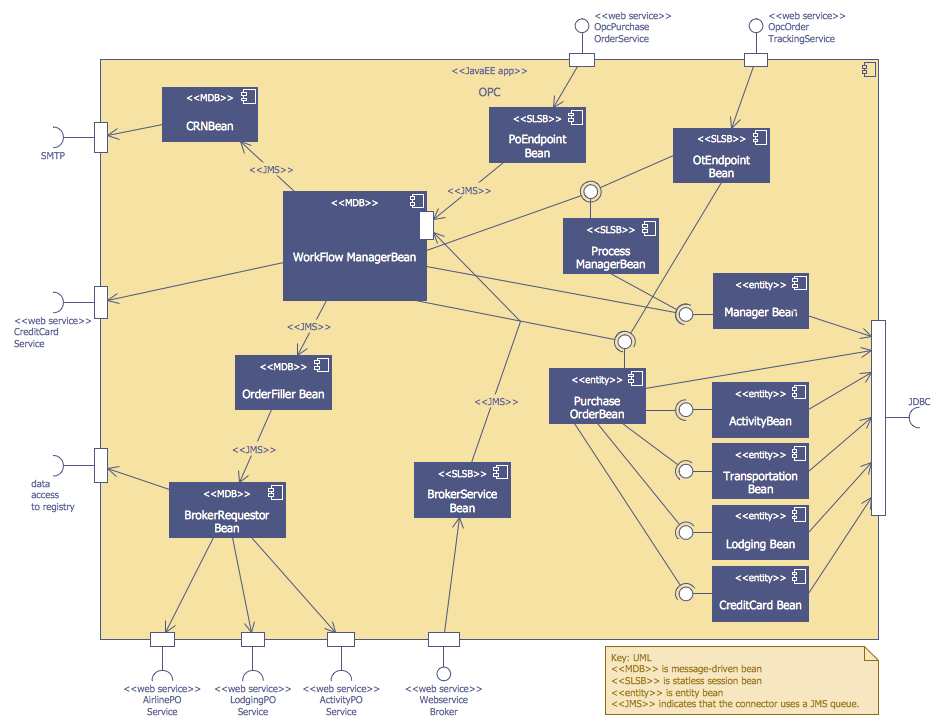
CS Odessa today announces the availability of a new ATM UML Solution in ConceptDraw Solution Park. Developed exclusively for banking industry software specialists who design and build ATM solutions and systems, the new solution turns ConceptDraw PRO into an effective UML diagram creator, with comprehensive image libraries enabling you to visually represent ATM processes, as well as any type of banking system. The UML solution for banking is comprised of 14 libraries which contain 182 objects.
San Jose, California - CS Odessa, developer of the industry leading cross platform business graphics and diagramming tool - ConceptDraw PRO v10, has today announced the availability of a new ATM UML Solution in ConceptDraw Solution Park. The solution, based on ConceptDraw PRO's powerful vector drawing features, allows you to build diagrams in an instant and is available for $25 USD to current owners of ConceptDraw PRO v10. The UML solution for banking is comprised of 14 libraries which contain 182 objects.
The new solution turns ConceptDraw PRO into an effective UML diagram creator, with comprehensive image libraries enabling you to visually represent ATM processes, as well as any type of banking system.
The ATM UML Diagrams Solution is available now for banking industry software specialists who design and build ATM solutions and systems.
ConceptDraw PRO is compatible with Apple OS X and Microsoft Windows. ConceptDraw PRO retails for $199 USD. ConceptDraw PRO v10 is now included in ConceptDraw Office v3 which retails for $499 USD
ConceptDraw Office v3 is an integrated set of visualization products and document exchange technologies. ConceptDraw Office consists of a diagramming platform, a mind mapping tool, and a project management tool. These tools are essential to generate business diagrams, mind maps, project plans, dashboards, presenta tions, schematics, and any other business visualizations.
ConceptDraw Solution Park is an online collection of visual solutions for knowledge workers designed to provide productivity increasing solutions for all ConceptDraw products. ConceptDraw Solution Park contains many subject areas for professional applications. It delivers solutions for Project Management, Business Productivity, Universal Diagramming and Collaboration. Find out more about ConceptDraw Products and Solutions, visit CS Odessa online.
ConceptDraw PRO v10: http://www.conceptdraw.com/products/drawing-tool
ConceptDraw Solution Park: http://www.conceptdraw.com/solution-park
ConceptDraw ATM UML Diagrams Solution: http://www.conceptdraw.com/solution-park/software-atm-uml-diagrams
Download Free Trial: https://my.conceptdraw.com/registration/
Purchase: https://my.conceptdraw.com/buy/pricing_purchasing.php
Screenshot: http://www.conceptdraw.com/samples/resource/images/solutions//Software-Development-ATM-UML-Diagrams-OPC-Runtime-Refinement-View.png
Founded in 1993, Computer Systems Odessa supplies cross-platform productivity tools and graphic technologies to professional and corporate users around the world. From their headquarters in Odessa, Ukraine, and offices in San Jose, CA, and Boston, MA, CS Odessa sells internationally in over 150 countries, both directly and through resellers. The ConceptDraw Productivity Line has won numerous awards and is used by hundreds of thousands, including Fortune 500 companies, U.S. Federal Government agencies, small and medium businesses, and students and educators around the globe. Computer Systems Odessa. ConceptDraw is a registered trademark, and ConceptDraw Office, ConceptDraw Solution Park, ConceptDraw PRO, ConceptDraw MINDMAP, ConceptDraw PROJECT, and ConceptDraw Solution Browser are trademarks of CS Odessa. All other trademarks and registered trademarks are the properties of their respective owners.
*******
Link To Article: http://prmac.com/release-id-74669.htm
*******
---------------------------------------------------------------------------------
Note that you can alter delivered distributions at any time.
Login to your account on prMac to alter your channel selection, or to opt-out at any time.
ConceptDraw PRO v10 by CS Odessa Has a New ATM UML Diagrams Solution - Published on 04/28/15
CS Odessa today announces the availability of a new ATM UML Solution in ConceptDraw Solution Park. Developed exclusively for banking industry software specialists who design and build ATM solutions and systems, the new solution turns ConceptDraw PRO into an effective UML diagram creator, with comprehensive image libraries enabling you to visually represent ATM processes, as well as any type of banking system. The UML solution for banking is comprised of 14 libraries which contain 182 objects.
San Jose, California - CS Odessa, developer of the industry leading cross platform business graphics and diagramming tool - ConceptDraw PRO v10, has today announced the availability of a new ATM UML Solution in ConceptDraw Solution Park. The solution, based on ConceptDraw PRO's powerful vector drawing features, allows you to build diagrams in an instant and is available for $25 USD to current owners of ConceptDraw PRO v10. The UML solution for banking is comprised of 14 libraries which contain 182 objects.
The new solution turns ConceptDraw PRO into an effective UML diagram creator, with comprehensive image libraries enabling you to visually represent ATM processes, as well as any type of banking system.
The ATM UML Diagrams Solution is available now for banking industry software specialists who design and build ATM solutions and systems.
ConceptDraw PRO is compatible with Apple OS X and Microsoft Windows. ConceptDraw PRO retails for $199 USD. ConceptDraw PRO v10 is now included in ConceptDraw Office v3 which retails for $499 USD
ConceptDraw Office v3 is an integrated set of visualization products and document exchange technologies. ConceptDraw Office consists of a diagramming platform, a mind mapping tool, and a project management tool. These tools are essential to generate business diagrams, mind maps, project plans, dashboards, presenta tions, schematics, and any other business visualizations.
ConceptDraw Solution Park is an online collection of visual solutions for knowledge workers designed to provide productivity increasing solutions for all ConceptDraw products. ConceptDraw Solution Park contains many subject areas for professional applications. It delivers solutions for Project Management, Business Productivity, Universal Diagramming and Collaboration. Find out more about ConceptDraw Products and Solutions, visit CS Odessa online.
ConceptDraw PRO v10: http://www.conceptdraw.com/products/drawing-tool
ConceptDraw Solution Park: http://www.conceptdraw.com/solution-park
ConceptDraw ATM UML Diagrams Solution: http://www.conceptdraw.com/solution-park/software-atm-uml-diagrams
Download Free Trial: https://my.conceptdraw.com/registration/
Purchase: https://my.conceptdraw.com/buy/pricing_purchasing.php
Screenshot: http://www.conceptdraw.com/samples/resource/images/solutions//Software-Development-ATM-UML-Diagrams-OPC-Runtime-Refinement-View.png
Founded in 1993, Computer Systems Odessa supplies cross-platform productivity tools and graphic technologies to professional and corporate users around the world. From their headquarters in Odessa, Ukraine, and offices in San Jose, CA, and Boston, MA, CS Odessa sells internationally in over 150 countries, both directly and through resellers. The ConceptDraw Productivity Line has won numerous awards and is used by hundreds of thousands, including Fortune 500 companies, U.S. Federal Government agencies, small and medium businesses, and students and educators around the globe. Computer Systems Odessa. ConceptDraw is a registered trademark, and ConceptDraw Office, ConceptDraw Solution Park, ConceptDraw PRO, ConceptDraw MINDMAP, ConceptDraw PROJECT, and ConceptDraw Solution Browser are trademarks of CS Odessa. All other trademarks and registered trademarks are the properties of their respective owners.
*******
Link To Article: http://prmac.com/release-id-74669.htm
*******
---------------------------------------------------------------------------------
Note that you can alter delivered distributions at any time.
Login to your account on prMac to alter your channel selection, or to opt-out at any time.
Maintain Releases Cocktail 8.3.1 (Yosemite Edition)
A new article has been published at prMac.
Maintain Releases Cocktail 8.3.1 (Yosemite Edition) - Published on 04/28/15
Maintain today announces Cocktail 8.3.1 (Yosemite Edition), the latest maintenance update for users running OS X Yosemite. Cocktail is a general purpose utility for OS X that lets users clean, repair and optimize their Macs. This version fixes compatibility issues with 1Password and Evernote browser extensions. It also contains improvements on the network optimization feature and updated Automator actions. The update is highly recommended for all users of Cocktail (Yosemite Edition).
Ekero, Sweden - Maintain today is pleased to announce the release of Cocktail 8.3.1 (Yosemite Edition), the latest maintenance update of Cocktail for users running OS X Yosemite 10.10. The update is highly recommended for all users of Cocktail (Yosemite Edition).
What's New:
* Fixed compatibility issues with 1Password and Evernote browser extensions
* Improvements on the network optimization feature
* Updated Automator actions
System Requirements:
Cocktail 8.3.1 (Yosemite Edition) requires OS X Yosemite 10.10 to run. Cocktail (Mavericks Edition) for OS X 10.9, Cocktail (Mountain Lion Edition) for OS X 10.8 and Cocktail (Lion Edition) for OS X 10.7 are available for download from Maintain website.
Pricing and Availability:
Cocktail 8.3.1 (Yosemite Edition) is $19.00 (USD) for a single user license and available for purchase from the Maintain website.
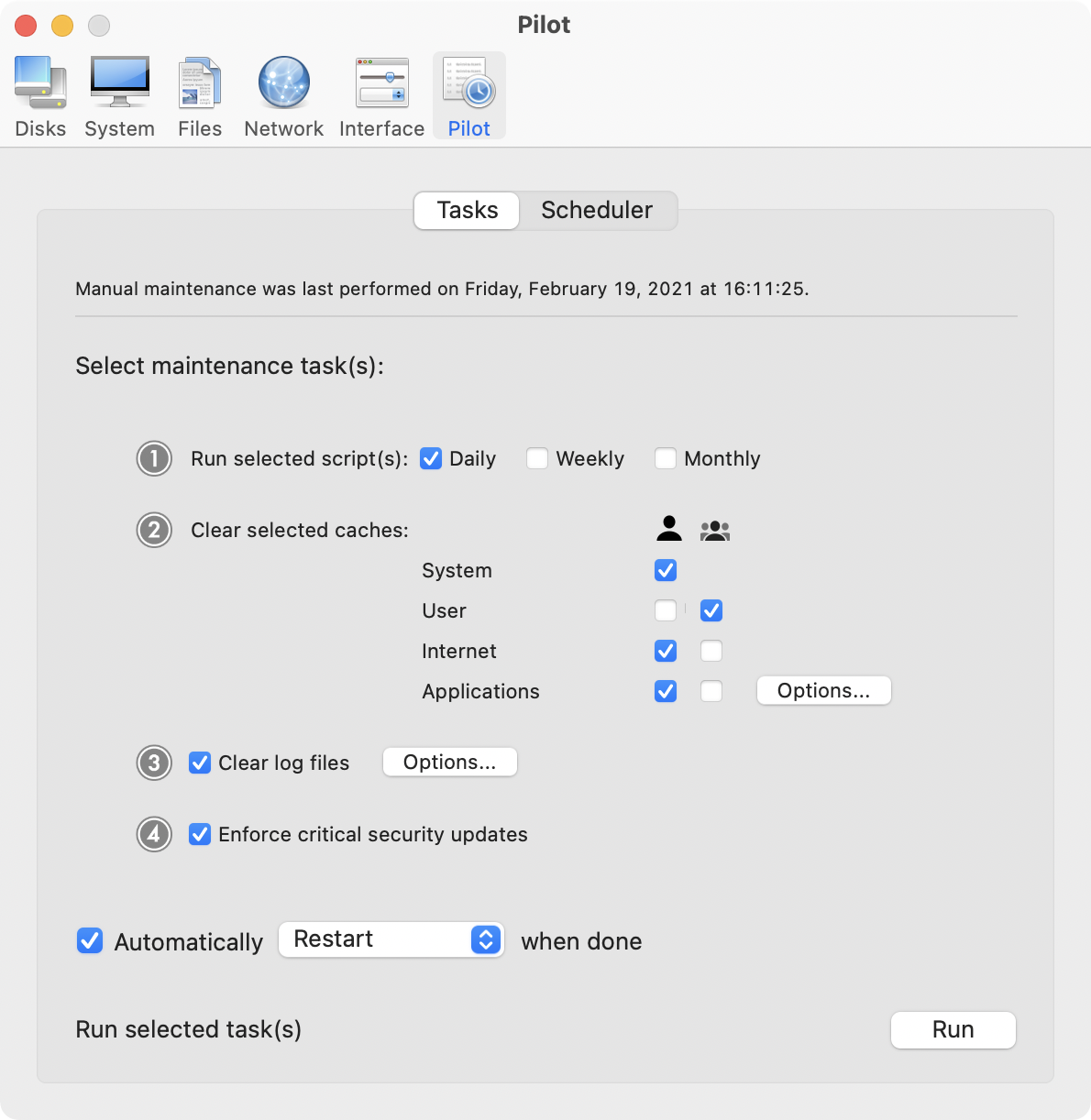
Cocktail is a general purpose utility for OS X that lets you clean, repair and optimize your Mac. The application serves up a perfect mix of maintenance tools and tweaks, all accessible through a clean and easy to use interface. Cocktail's features are arranged into five categories that helps you manage various aspects of your computer. It also comes with an automatic Pilot mode that allows you to simply press a button and relax, knowing that Cocktail will take care of the rest.
Disk:
* Automatically check S.M.A.R.T. status of disks
* Enable or disable journaling
* Repair disk permissions
* Reset home directory permissions and Access Control Lists
* Set disk sleep (spindown) time and change other sleep settings
System:
* Run periodic maintenance scripts
* Purge inactive memory and optimize virtual memory usage
* Enabled or disable virtual memory swapping
* Manage Spotlight indexing
* Erase Spotlight indexes
* Modify Time Machine settings
* Rebuild Mail's Envelope Index
* Rebuild Launch Services database
* Update locate and whatis databases
* Force empty the Trash
* Change startup mode or set startup delay
* Disable startup sound
* Disable Notification Center
Files:
* Clear system caches
* Clear user caches
* Clear font caches
* Clear virtual memory swap files
* Clear temporary files
* Clear Internet caches
* Clear cookies, download lists, form values and history files
* Clear Adobe Flash Player caches and cookies
* Search for corrupted preference files
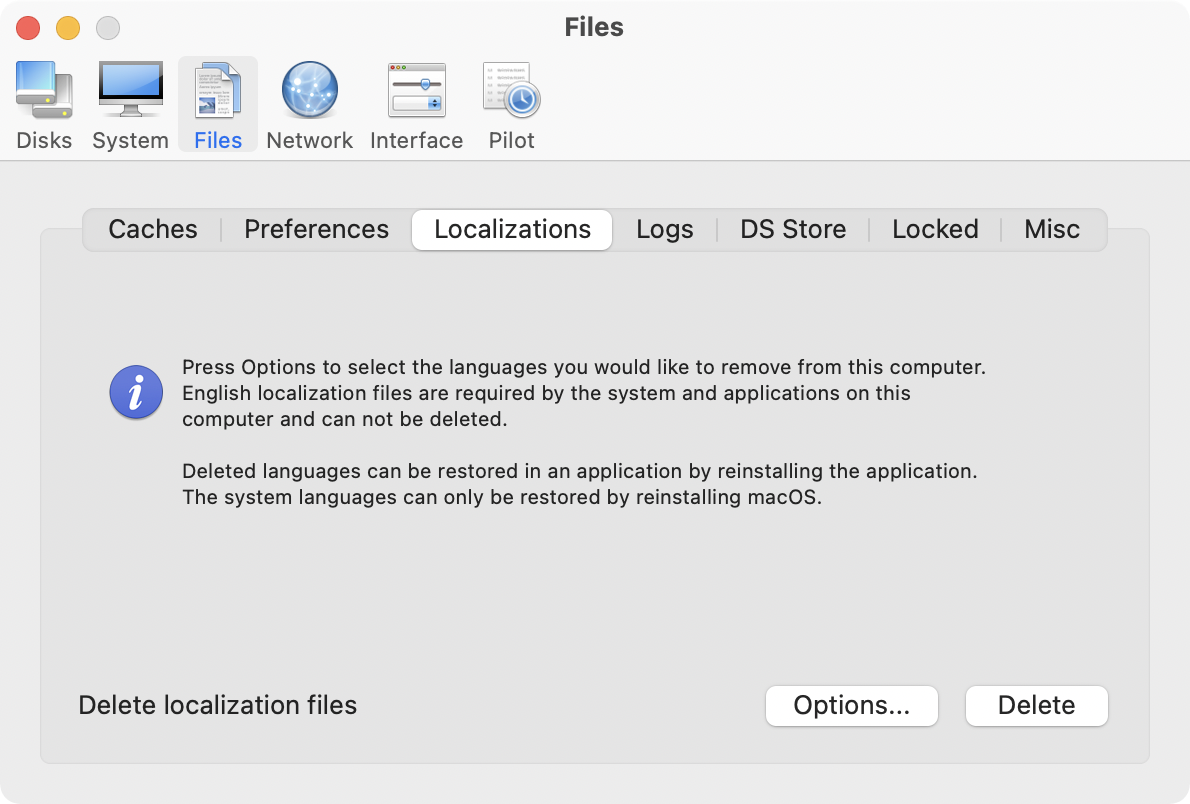
* Delete unnecessary localization (language resources) files
* Clear and manage (view, print and save) log files
* Clear DNS cache
* Delete invisible DS Store files
* Delete locked or inaccessible items
Network:
* Change speed, duplex and MTU of network cards
* Easily optimize network settings for common connection types
* Modify IP configuration parameters
Interface:
* Customize look and features of Finder, Dock, login window and other system services
* Modify hidden settings of Safari, iTunes and QuickTime
Cocktail 8.3.1 (Yosemite Edition): http://www.maintain.se/cocktail
Download Cocktail 8.3.1 (Yosemite Edition): http://usa.maintain.se/CocktailYE.dmg
Vimeo Video: https://vimeo.com/109816714
Screenshot 1: http://www.maintain.se/downloads/screenshots/screenshot1.png
Screenshot 2: http://www.maintain.se/downloads/screenshots/screenshot2.png
Application Icon: http://www.maintain.se/downloads/screenshots/icon.png
Maintain develops tailored applications for Mac users. We work towards creating technical solutions which maintain your computer and make it as efficient and easy to use as possible. In addition, we offer comprehensive consultancy and support services which cover everything from operation of existing systems to purchase and implementation of new technical solutions. Among our clients are: Major League Baseball, Puma, The New York Times, Sony Pictures, Ericsson, Fortum, The City Of Calgary, Peak Performance, Loreal, Harvard University, Los Angeles Times, Swedish Film Institute, Weber, ESPN, Business Week, Swedish National Police Board, Norwegian Broadcasting Corporation, Getty Images, University of Texas, South Park Studios, CompUSA, bwin, Lockheed Martin, Defense Intelligence Agency, University of Michigan and hundred of thousands of Mac users around the world. Copyright (C) 2015 Maintain. All Rights Reserved. Apple, the Apple logo and Mac are registered trademarks of Apple Inc. in
the U.S. and/or other countries.
*******
Link To Article: http://prmac.com/release-id-74668.htm
*******
---------------------------------------------------------------------------------
Note that you can alter delivered distributions at any time.
Login to your account on prMac to alter your channel selection, or to opt-out at any time.
Maintain Releases Cocktail 8.3.1 (Yosemite Edition) - Published on 04/28/15
Maintain today announces Cocktail 8.3.1 (Yosemite Edition), the latest maintenance update for users running OS X Yosemite. Cocktail is a general purpose utility for OS X that lets users clean, repair and optimize their Macs. This version fixes compatibility issues with 1Password and Evernote browser extensions. It also contains improvements on the network optimization feature and updated Automator actions. The update is highly recommended for all users of Cocktail (Yosemite Edition).
Ekero, Sweden - Maintain today is pleased to announce the release of Cocktail 8.3.1 (Yosemite Edition), the latest maintenance update of Cocktail for users running OS X Yosemite 10.10. The update is highly recommended for all users of Cocktail (Yosemite Edition).
What's New:
* Fixed compatibility issues with 1Password and Evernote browser extensions
* Improvements on the network optimization feature
* Updated Automator actions
System Requirements:
Cocktail 8.3.1 (Yosemite Edition) requires OS X Yosemite 10.10 to run. Cocktail (Mavericks Edition) for OS X 10.9, Cocktail (Mountain Lion Edition) for OS X 10.8 and Cocktail (Lion Edition) for OS X 10.7 are available for download from Maintain website.
Pricing and Availability:
Cocktail 8.3.1 (Yosemite Edition) is $19.00 (USD) for a single user license and available for purchase from the Maintain website.
Cocktail is a general purpose utility for OS X that lets you clean, repair and optimize your Mac. The application serves up a perfect mix of maintenance tools and tweaks, all accessible through a clean and easy to use interface. Cocktail's features are arranged into five categories that helps you manage various aspects of your computer. It also comes with an automatic Pilot mode that allows you to simply press a button and relax, knowing that Cocktail will take care of the rest.
Disk:
* Automatically check S.M.A.R.T. status of disks
* Enable or disable journaling
* Repair disk permissions
* Reset home directory permissions and Access Control Lists
* Set disk sleep (spindown) time and change other sleep settings
System:
* Run periodic maintenance scripts
* Purge inactive memory and optimize virtual memory usage
* Enabled or disable virtual memory swapping
* Manage Spotlight indexing
* Erase Spotlight indexes
* Modify Time Machine settings
* Rebuild Mail's Envelope Index
* Rebuild Launch Services database
* Update locate and whatis databases
* Force empty the Trash
* Change startup mode or set startup delay
* Disable startup sound
* Disable Notification Center
Files:
* Clear system caches
* Clear user caches
* Clear font caches
* Clear virtual memory swap files
* Clear temporary files
* Clear Internet caches
* Clear cookies, download lists, form values and history files
* Clear Adobe Flash Player caches and cookies
* Search for corrupted preference files
* Delete unnecessary localization (language resources) files
* Clear and manage (view, print and save) log files
* Clear DNS cache
* Delete invisible DS Store files
* Delete locked or inaccessible items
Network:
* Change speed, duplex and MTU of network cards
* Easily optimize network settings for common connection types
* Modify IP configuration parameters
Interface:
* Customize look and features of Finder, Dock, login window and other system services
* Modify hidden settings of Safari, iTunes and QuickTime
Cocktail 8.3.1 (Yosemite Edition): http://www.maintain.se/cocktail
Download Cocktail 8.3.1 (Yosemite Edition): http://usa.maintain.se/CocktailYE.dmg
Vimeo Video: https://vimeo.com/109816714
Screenshot 1: http://www.maintain.se/downloads/screenshots/screenshot1.png
Screenshot 2: http://www.maintain.se/downloads/screenshots/screenshot2.png
Application Icon: http://www.maintain.se/downloads/screenshots/icon.png

Maintain develops tailored applications for Mac users. We work towards creating technical solutions which maintain your computer and make it as efficient and easy to use as possible. In addition, we offer comprehensive consultancy and support services which cover everything from operation of existing systems to purchase and implementation of new technical solutions. Among our clients are: Major League Baseball, Puma, The New York Times, Sony Pictures, Ericsson, Fortum, The City Of Calgary, Peak Performance, Loreal, Harvard University, Los Angeles Times, Swedish Film Institute, Weber, ESPN, Business Week, Swedish National Police Board, Norwegian Broadcasting Corporation, Getty Images, University of Texas, South Park Studios, CompUSA, bwin, Lockheed Martin, Defense Intelligence Agency, University of Michigan and hundred of thousands of Mac users around the world. Copyright (C) 2015 Maintain. All Rights Reserved. Apple, the Apple logo and Mac are registered trademarks of Apple Inc. in
the U.S. and/or other countries.
*******
Link To Article: http://prmac.com/release-id-74668.htm
*******
---------------------------------------------------------------------------------
Note that you can alter delivered distributions at any time.
Login to your account on prMac to alter your channel selection, or to opt-out at any time.
Choosr for iOS makes crowd sourcing simple, effective and fun
A new article has been published at prMac.
Choosr for iOS makes crowd sourcing simple, effective and fun - Published on 04/28/15
App development company, Lexington Creative today introduces Choosr 1.0, their ground-breaking new app for iOS devices. Choosr lets people easily and accurately crowdsource opinions on virtually anything. Users pose a question and upload up to 4 options, consisting of images and/or statements, while other users vote for their preferred option. To ensure targeted and accurate answers, uploaders can filter by age and sex, while users judging can select categories that interest them.
San Jose, California - Available today, the ground-breaking iOS app Choosr lets anyone easily and accurately crowdsource opinions on virtually anything. Users can both ask questions and vote on others' at the same time. When posting a question, users give up to 4 options, each one consisting of an image and/or statement/caption. To get a target audience's opinion, they can also filter the age range and sex of the voters.
To ensure accurate answering, when voting users select categories that interest them and can skip questions that they can't or don't want to answer. The result is a quick, easily sourced and targeted answer to virtually any question - from "what should I wear tonight?" to "Which is the best logo for my hardware business?"
Creator Alex Harrington says he had the idea when thinking about an app that would simply help people choose what to wear: "But I thought, why stop at that? Why not let them ask anything at all? There's a whole source of untapped opinions and thoughts that we can bring right to people's fingertips."
Issues and decisions that the app could be used to get opinions on include:
* Fashion ("What should I wear?")
* Fun hypotheticals ("Would you rather...?")
* Interest in a new idea ("would you use an app that locates florists?")
* Business decisions ("Which logo looks best?" or "which product packaging looks best"?
* Purchases ("Which color suits our walls best?" or "Which puppy should I buy?")
* Teen interests ("Who's hotter - 1D or Justin Bieber?")
* Relationships ("What should I get my wife for anniversary?" or "what should I do about a cheating partner?")
With its simple layout, featuring an Instagram-style tab bar, the app is easy and intuitive for new users.
Device Requirements:
* iPhone, iPad, and iPod touch
* Requires iOS 7.0 or later
* 14.8 MB
Pricing and Availability:
Choosr 1.0 is Free and available worldwide exclusively through the App Store in the Entertainment category.
Choosr 1.0: http://www.choosrapp.com
Download from iTunes: https://itunes.apple.com/app/choosr/id937978747
YouTube Video: https://www.youtube.com/watch?v=TN0w73F9PVA
Screenshot 1: https://www.dropbox.com/s/4lywps63qo8uusv/bestpic.PNG?dl=0
Screenshot 2: https://www.dropbox.com/s/n86lqb03flcujnd/Votessofar.png?dl=0
App Icon: https://www.dropbox.com/s/6a119oynnk834rb/choosr%20icon%20final%20-%20beveled.png?dl=0
Located in San Jose, California and Sydney, Australia, Lexington Creative is an app development company that was founded in 2009. All Material and Software (C) Copyright 2009-2015 Lexington Creative. All Rights Reserved. Apple, the Apple logo, iPhone, iPod and iPad are registered trademarks of Apple Inc. in the U.S. and/or other countries. Other trademarks and registered trademarks may be the property of their respective owners.
*******
Link To Article: http://prmac.com/release-id-74665.htm
*******
---------------------------------------------------------------------------------
Note that you can alter delivered distributions at any time.
Login to your account on prMac to alter your channel selection, or to opt-out at any time.
Choosr for iOS makes crowd sourcing simple, effective and fun - Published on 04/28/15
App development company, Lexington Creative today introduces Choosr 1.0, their ground-breaking new app for iOS devices. Choosr lets people easily and accurately crowdsource opinions on virtually anything. Users pose a question and upload up to 4 options, consisting of images and/or statements, while other users vote for their preferred option. To ensure targeted and accurate answers, uploaders can filter by age and sex, while users judging can select categories that interest them.
San Jose, California - Available today, the ground-breaking iOS app Choosr lets anyone easily and accurately crowdsource opinions on virtually anything. Users can both ask questions and vote on others' at the same time. When posting a question, users give up to 4 options, each one consisting of an image and/or statement/caption. To get a target audience's opinion, they can also filter the age range and sex of the voters.
To ensure accurate answering, when voting users select categories that interest them and can skip questions that they can't or don't want to answer. The result is a quick, easily sourced and targeted answer to virtually any question - from "what should I wear tonight?" to "Which is the best logo for my hardware business?"
Creator Alex Harrington says he had the idea when thinking about an app that would simply help people choose what to wear: "But I thought, why stop at that? Why not let them ask anything at all? There's a whole source of untapped opinions and thoughts that we can bring right to people's fingertips."
Issues and decisions that the app could be used to get opinions on include:
* Fashion ("What should I wear?")
* Fun hypotheticals ("Would you rather...?")
* Interest in a new idea ("would you use an app that locates florists?")
* Business decisions ("Which logo looks best?" or "which product packaging looks best"?
* Purchases ("Which color suits our walls best?" or "Which puppy should I buy?")
* Teen interests ("Who's hotter - 1D or Justin Bieber?")
* Relationships ("What should I get my wife for anniversary?" or "what should I do about a cheating partner?")
With its simple layout, featuring an Instagram-style tab bar, the app is easy and intuitive for new users.
Device Requirements:
* iPhone, iPad, and iPod touch
* Requires iOS 7.0 or later
* 14.8 MB
Pricing and Availability:
Choosr 1.0 is Free and available worldwide exclusively through the App Store in the Entertainment category.
Choosr 1.0: http://www.choosrapp.com
Download from iTunes: https://itunes.apple.com/app/choosr/id937978747
YouTube Video: https://www.youtube.com/watch?v=TN0w73F9PVA
Screenshot 1: https://www.dropbox.com/s/4lywps63qo8uusv/bestpic.PNG?dl=0

Screenshot 2: https://www.dropbox.com/s/n86lqb03flcujnd/Votessofar.png?dl=0

App Icon: https://www.dropbox.com/s/6a119oynnk834rb/choosr%20icon%20final%20-%20beveled.png?dl=0

Located in San Jose, California and Sydney, Australia, Lexington Creative is an app development company that was founded in 2009. All Material and Software (C) Copyright 2009-2015 Lexington Creative. All Rights Reserved. Apple, the Apple logo, iPhone, iPod and iPad are registered trademarks of Apple Inc. in the U.S. and/or other countries. Other trademarks and registered trademarks may be the property of their respective owners.
*******
Link To Article: http://prmac.com/release-id-74665.htm
*******
---------------------------------------------------------------------------------
Note that you can alter delivered distributions at any time.
Login to your account on prMac to alter your channel selection, or to opt-out at any time.
TaskInsight 3.7 enhances actions and speech control for task management
A new article has been published at prMac.
TaskInsight 3.7 enhances actions and speech control for task management - Published on 04/28/15
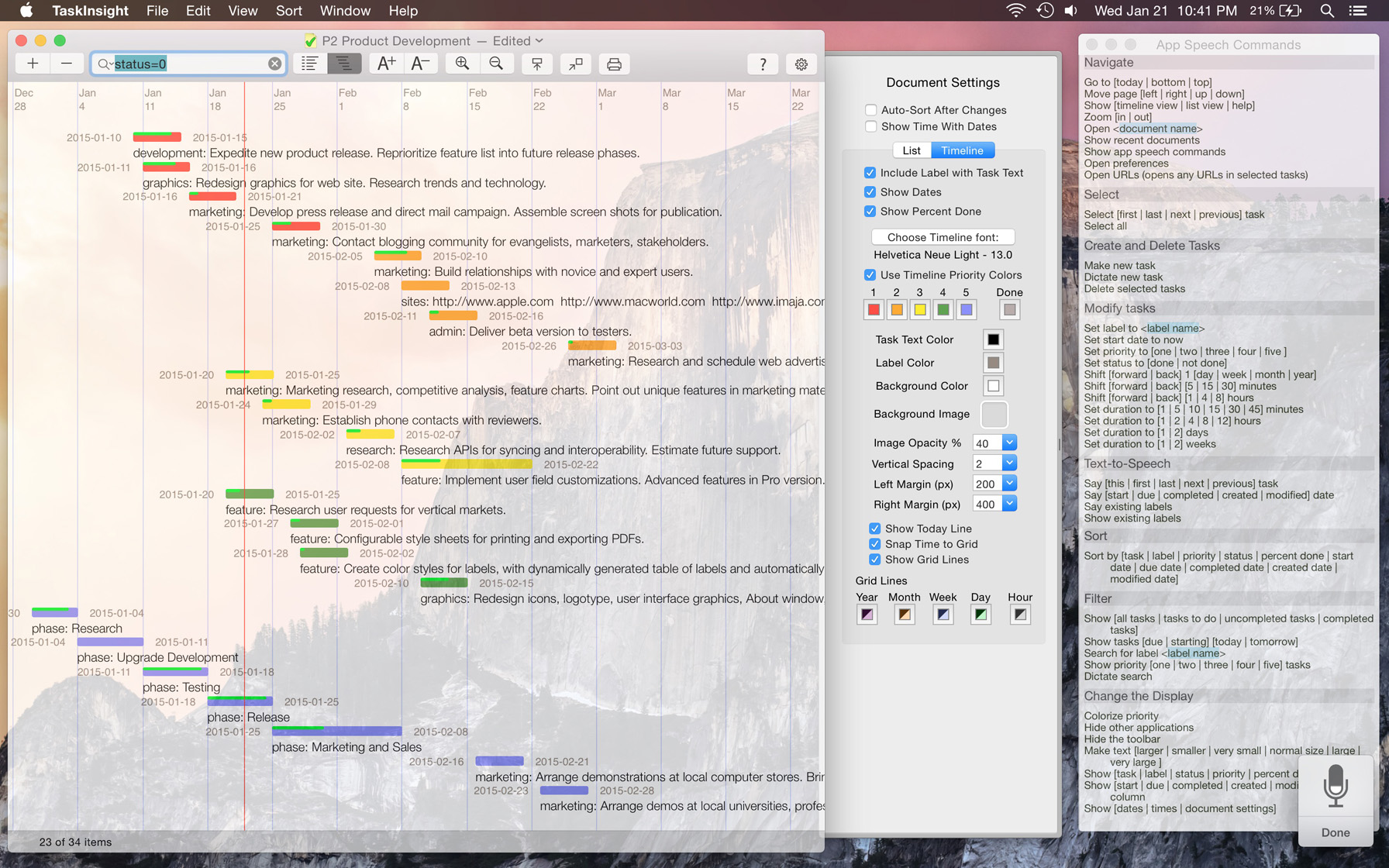
California based Imaja today announces TaskInsight 3.7, an important update to its productivity and business app for Mac OS X. TaskInsight features task list and timeline management, for productivity and business, with a rich feature set and iCloud support on Mac OS X. Import and export functions support TSV and XML files for sharing with other applications. This update enhances the speech controls and provides new actions for task list and timeline management.
Berkeley, California - Imaja today is proud to announce the release of TaskInsight 3.7, enhancing the speech controls and providing new actions for task list and timeline management. TaskInsight is a tool for productivity and business, with a rich feature set and iCloud support on Mac OS X.
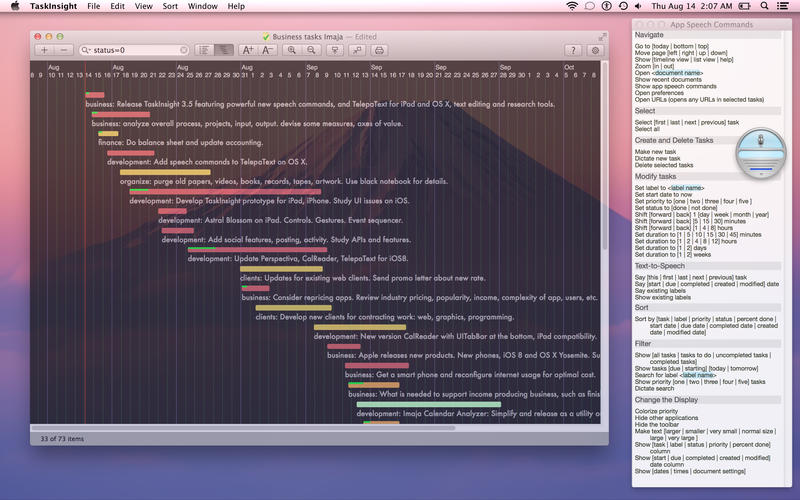
Control TaskInsight with your voice and the speech commands module. Select and change tasks and views with speech commands. Listen to TaskInsight speak tasks, details and other information about the system. Using speech controls lets you work with your task documents hands-free and eyes-free. Task management functions are faster and easier to perform with speech commands. Use the App Speech Commands window for reference. Speech Commands are available as an In App Purchase.
Significant new features:
* The speech commands system has been enhanced with many new commands. A new quick reference view displays the complete speech commands phrase system and variations.
* On systems with trackpads, use pinch and spread touch gestures for zooming in the Timeline view, and for text resizing.
* Easily open all of the URLs (web or file links) in selected tasks, for fast viewing of web page references, or references to files, folders, or apps on your system. Use a keyboard shortcut to open URLs.
* Use window transparency to beautifully integrate your customized task views with your background desktop pictures.
* Added support for iCloud Drive on Yosemite, and continuing support for iCloud on older OS X systems.
* New AppleScript scripts perform useful functions on task documents, to modify tasks and task display settings. One useful new script is Reschedule Tasks Sequentially.
Imaja's Greg Jalbert, project manager and software developer, points out the salient new features, "The enhanced speech controls make it even faster and easier to work with project schedules and task attributes. I've expanded my use of TaskInsight on several new projects, from 50 to 500 tasks."
TaskInsight's foundation includes priorities, labels, color coding, timeline and table views, background images, manual and automatic sorting, customizable views, several optional fields, easy importation of tasks, and contextual menus.
Essential functions include Search, Recent Searches, Shift Time, complex sorting, text font, size and color setttings, background color, image and transparency settings, priority colors for List and Timeline views, a full set of keyboard shortcuts and keyboard navigation options, and many more. To share task documents, import and export functions support TSV (tab-separated values) and XML files, or export PDFs via the Print command.
System Requirements
* Mac OS X 10.7 or later
* 1.5 MB
Pricing and Availability:
TaskInsight 3.7 is available for the price of $19.99 (USD), available worldwide exclusively from Apple's Mac App Store in the Productivity and Business categories.
Imaja: http://www.imaja.com
TaskInsight 3.7: http://www.imaja.com/taskinsight
Purchase and Download: https://itunes.apple.com/app/taskinsight/id417939044
Video Introduction: http://a5.mzstatic.com/us/r30/Purple1/v4/20/4c/23/204c2325-b039-49d3-d365-f1b14e0216e2/screen800x500.jpeg
Screenshot: http://www.imaja.com/taskinsight/images/TaskInsight37-screenshot.jpg
App Icon: http://a4.mzstatic.com/us/r30/Purple1/v4/e0/8e/d8/e08ed869-4a05-a441-7fc4-d08719543de7/icon128-2x.png
Located in Berkeley, California, USA, Imaja was founded in 1985 by Greg Jalbert. The company develops and publishes a variety of productivity, business, graphic design, animation, music and educational software for Mac OS X, iOS and Mac OS 9, and music and video. All Material and Software (C) 1985-2015 Imaja / All Rights Reserved. Apple, Mac OS X and Macintosh are registered trademarks of Apple Computer in the U.S. and/or other countries.
*******
Link To Article: http://prmac.com/release-id-74662.htm
*******
---------------------------------------------------------------------------------
Note that you can alter delivered distributions at any time.
Login to your account on prMac to alter your channel selection, or to opt-out at any time.
TaskInsight 3.7 enhances actions and speech control for task management - Published on 04/28/15
California based Imaja today announces TaskInsight 3.7, an important update to its productivity and business app for Mac OS X. TaskInsight features task list and timeline management, for productivity and business, with a rich feature set and iCloud support on Mac OS X. Import and export functions support TSV and XML files for sharing with other applications. This update enhances the speech controls and provides new actions for task list and timeline management.
Berkeley, California - Imaja today is proud to announce the release of TaskInsight 3.7, enhancing the speech controls and providing new actions for task list and timeline management. TaskInsight is a tool for productivity and business, with a rich feature set and iCloud support on Mac OS X.
Control TaskInsight with your voice and the speech commands module. Select and change tasks and views with speech commands. Listen to TaskInsight speak tasks, details and other information about the system. Using speech controls lets you work with your task documents hands-free and eyes-free. Task management functions are faster and easier to perform with speech commands. Use the App Speech Commands window for reference. Speech Commands are available as an In App Purchase.
Significant new features:
* The speech commands system has been enhanced with many new commands. A new quick reference view displays the complete speech commands phrase system and variations.
* On systems with trackpads, use pinch and spread touch gestures for zooming in the Timeline view, and for text resizing.
* Easily open all of the URLs (web or file links) in selected tasks, for fast viewing of web page references, or references to files, folders, or apps on your system. Use a keyboard shortcut to open URLs.
* Use window transparency to beautifully integrate your customized task views with your background desktop pictures.
* Added support for iCloud Drive on Yosemite, and continuing support for iCloud on older OS X systems.
* New AppleScript scripts perform useful functions on task documents, to modify tasks and task display settings. One useful new script is Reschedule Tasks Sequentially.
Imaja's Greg Jalbert, project manager and software developer, points out the salient new features, "The enhanced speech controls make it even faster and easier to work with project schedules and task attributes. I've expanded my use of TaskInsight on several new projects, from 50 to 500 tasks."
TaskInsight's foundation includes priorities, labels, color coding, timeline and table views, background images, manual and automatic sorting, customizable views, several optional fields, easy importation of tasks, and contextual menus.
Essential functions include Search, Recent Searches, Shift Time, complex sorting, text font, size and color setttings, background color, image and transparency settings, priority colors for List and Timeline views, a full set of keyboard shortcuts and keyboard navigation options, and many more. To share task documents, import and export functions support TSV (tab-separated values) and XML files, or export PDFs via the Print command.
System Requirements
* Mac OS X 10.7 or later
* 1.5 MB
Pricing and Availability:
TaskInsight 3.7 is available for the price of $19.99 (USD), available worldwide exclusively from Apple's Mac App Store in the Productivity and Business categories.
Imaja: http://www.imaja.com
TaskInsight 3.7: http://www.imaja.com/taskinsight
Purchase and Download: https://itunes.apple.com/app/taskinsight/id417939044
Video Introduction: http://a5.mzstatic.com/us/r30/Purple1/v4/20/4c/23/204c2325-b039-49d3-d365-f1b14e0216e2/screen800x500.jpeg
Screenshot: http://www.imaja.com/taskinsight/images/TaskInsight37-screenshot.jpg
App Icon: http://a4.mzstatic.com/us/r30/Purple1/v4/e0/8e/d8/e08ed869-4a05-a441-7fc4-d08719543de7/icon128-2x.png

Located in Berkeley, California, USA, Imaja was founded in 1985 by Greg Jalbert. The company develops and publishes a variety of productivity, business, graphic design, animation, music and educational software for Mac OS X, iOS and Mac OS 9, and music and video. All Material and Software (C) 1985-2015 Imaja / All Rights Reserved. Apple, Mac OS X and Macintosh are registered trademarks of Apple Computer in the U.S. and/or other countries.
*******
Link To Article: http://prmac.com/release-id-74662.htm
*******
---------------------------------------------------------------------------------
Note that you can alter delivered distributions at any time.
Login to your account on prMac to alter your channel selection, or to opt-out at any time.
Curly The Pig Breaks Pigs Can't Fly Stereotype With The New App Launch
A new article has been published at prMac.
Curly The Pig Breaks Pigs Can't Fly Stereotype With The New App Launch - Published on 04/28/15
Theta Apps today introduces Curly 1.0, their cute new addicting tilt and fast finger tapping game for iOS devices. Throughout this high-score based game, players take the role of Curly the pig and fly on ropes through the Big City to achieve the highest amount of points by dodging and destroying meteors while gaining special abilities. As the game progresses, meteors will fall faster and fill the screen intensively, making it quite challenging to keep Curly alive.
Newark, Delaware - Today, Theta Apps announced the iOS launch of Curly, an addicting tilt and fast finger tapping game. Throughout this high-score based game, players take the role of Curly the pig and fly on ropes through the Big City to achieve the highest amount of points by dodging and destroying meteors while gaining special abilities. Although hard to believe, adult pigs can run at speeds of up to 11 miles per hour (Source: PETA) Curly the pig can fly twice as fast in this thrilling game.
"Curly provides players of all ages an escape from daily stresses and transfers them into an exciting new world, while keeping them literally on the edge of their seats with the easy-to-use tilt and tap combination gameplay Curly offers," said Theodore Papouloglou, President and Owner. "The average online game playing addict is around 35 years old, so forget about the adage that you can't teach an old dog, or pig, new tricks!"
In Curly, the main goal is for players to collect points and stay alive for as long as possible by avoiding the meteors and picking up everything else. As the game progresses, meteors will fall faster and fill the screen intensively, making it quite challenging to keep Curly alive. Yet the special abilities that appear during the game will prove to be life savers. Players can recover spiderwebs and shoot them at the meteors, but what will definitely come in handy is the Buzz soda-can and grenade. Players can use the Buzz soda-can to gain five seconds of invincibility to break through the meteors for points while grenades can blow up every meteor on the screen. The free version limits users to the shooting web ability while the pro version includes all other abilities. There is no age limit for Curly, this game is endless fun created for players of all ages.
About Curly
As Curly travels to the big city his journey takes an unexpected turn. Upon arrival, Curly notices that something isn't right and soon enough he spots the trouble coming straight at him. Suddenly, out of nowhere and while panic strikes him, a rope of hope was brought to his attention. Help Curly get out of this mess by dodging and destroying the meteors while gaining special abilities throughout the game.
Device Requirements:
* iPhone, iPad, and iPod touch
* Optimized for iPhone 5
* Requires iOS 5.0 or later
* 62.7 MB
Pricing and Availability:
Curly Pro 1.0 is only $0.99 USD (or equivalent amount in other currencies) and available worldwide exclusively through the App Store in the Games category. There is also a free version of Curly available on the App Store. The free version limits users to the shooting web ability while the pro version includes all other abilities.
Curly 1.0: http://www.thetaapps.com/Curly.html
Download from iTunes: https://itunes.apple.com/app/curly-free/id965558847
Purchase and Download: https://itunes.apple.com/app/curly-pro/id965565394
YouTube Video (Storyline): https://www.youtube.com/watch?v=_Lh33F9ZcYw
YouTube Video (Gameplay): https://www.youtube.com/watch?v=0UCXPlPyfdA
App icon: https://scontent-ams.xx.fbcdn.net/hphotos-xfa1/v/t1.0-9/p720x720/11041718_960693477288010_670382447530293621_n.jpg?oh=4fff47abc69ccdf10d8f5de66e70c434&oe=55A06967
Theta Apps is a U.S. based studio which was created in 2014 in order to develop entertaining games and innovative mobile applications for both iOS and Android platforms. All Material and Software (C) Copyright 2015 Theta Apps. All Rights Reserved. Apple, the Apple logo, iPhone, iPod and iPad are registered trademarks of Apple Inc. in the U.S. and/or other countries. Other trademarks and registered trademarks may be the property of their respective owners.
*******
Link To Article: http://prmac.com/release-id-74661.htm
*******
---------------------------------------------------------------------------------
Note that you can alter delivered distributions at any time.
Login to your account on prMac to alter your channel selection, or to opt-out at any time.
Curly The Pig Breaks Pigs Can't Fly Stereotype With The New App Launch - Published on 04/28/15
Theta Apps today introduces Curly 1.0, their cute new addicting tilt and fast finger tapping game for iOS devices. Throughout this high-score based game, players take the role of Curly the pig and fly on ropes through the Big City to achieve the highest amount of points by dodging and destroying meteors while gaining special abilities. As the game progresses, meteors will fall faster and fill the screen intensively, making it quite challenging to keep Curly alive.
Newark, Delaware - Today, Theta Apps announced the iOS launch of Curly, an addicting tilt and fast finger tapping game. Throughout this high-score based game, players take the role of Curly the pig and fly on ropes through the Big City to achieve the highest amount of points by dodging and destroying meteors while gaining special abilities. Although hard to believe, adult pigs can run at speeds of up to 11 miles per hour (Source: PETA) Curly the pig can fly twice as fast in this thrilling game.
"Curly provides players of all ages an escape from daily stresses and transfers them into an exciting new world, while keeping them literally on the edge of their seats with the easy-to-use tilt and tap combination gameplay Curly offers," said Theodore Papouloglou, President and Owner. "The average online game playing addict is around 35 years old, so forget about the adage that you can't teach an old dog, or pig, new tricks!"
In Curly, the main goal is for players to collect points and stay alive for as long as possible by avoiding the meteors and picking up everything else. As the game progresses, meteors will fall faster and fill the screen intensively, making it quite challenging to keep Curly alive. Yet the special abilities that appear during the game will prove to be life savers. Players can recover spiderwebs and shoot them at the meteors, but what will definitely come in handy is the Buzz soda-can and grenade. Players can use the Buzz soda-can to gain five seconds of invincibility to break through the meteors for points while grenades can blow up every meteor on the screen. The free version limits users to the shooting web ability while the pro version includes all other abilities. There is no age limit for Curly, this game is endless fun created for players of all ages.
About Curly
As Curly travels to the big city his journey takes an unexpected turn. Upon arrival, Curly notices that something isn't right and soon enough he spots the trouble coming straight at him. Suddenly, out of nowhere and while panic strikes him, a rope of hope was brought to his attention. Help Curly get out of this mess by dodging and destroying the meteors while gaining special abilities throughout the game.
Device Requirements:
* iPhone, iPad, and iPod touch
* Optimized for iPhone 5
* Requires iOS 5.0 or later
* 62.7 MB
Pricing and Availability:
Curly Pro 1.0 is only $0.99 USD (or equivalent amount in other currencies) and available worldwide exclusively through the App Store in the Games category. There is also a free version of Curly available on the App Store. The free version limits users to the shooting web ability while the pro version includes all other abilities.
Curly 1.0: http://www.thetaapps.com/Curly.html
Download from iTunes: https://itunes.apple.com/app/curly-free/id965558847
Purchase and Download: https://itunes.apple.com/app/curly-pro/id965565394
YouTube Video (Storyline): https://www.youtube.com/watch?v=_Lh33F9ZcYw
YouTube Video (Gameplay): https://www.youtube.com/watch?v=0UCXPlPyfdA
App icon: https://scontent-ams.xx.fbcdn.net/hphotos-xfa1/v/t1.0-9/p720x720/11041718_960693477288010_670382447530293621_n.jpg?oh=4fff47abc69ccdf10d8f5de66e70c434&oe=55A06967

Theta Apps is a U.S. based studio which was created in 2014 in order to develop entertaining games and innovative mobile applications for both iOS and Android platforms. All Material and Software (C) Copyright 2015 Theta Apps. All Rights Reserved. Apple, the Apple logo, iPhone, iPod and iPad are registered trademarks of Apple Inc. in the U.S. and/or other countries. Other trademarks and registered trademarks may be the property of their respective owners.
*******
Link To Article: http://prmac.com/release-id-74661.htm
*******
---------------------------------------------------------------------------------
Note that you can alter delivered distributions at any time.
Login to your account on prMac to alter your channel selection, or to opt-out at any time.
Subscribe to:
Posts (Atom)