A new article has been published at prMac.
Contra for iOS launches - Aims to Disrupt Traditional News - Published on 04/29/15
Independent developers, Rohan Kapur and Lenny Khazan have announced Contra 1.0.1, their new social opinions platform for iOS devices. Contra allows anyone to voice their opinions and get educated on any controversial topic. Users are able to post two-sided controversial topics from the latest in current affairs, tech, philosophy, politics, and more. Users can vote for either side, publish their personal opinion, and argue against other opinions via threaded discussions.
Singapore - Independent developers, Rohan Kapur and Lenny Khazan have announced the release of Contra 1.0.1, their new social opinions platform developed exclusively for iOS devices. Contra allows anyone to voice their opinions and get educated on any controversial topic. Users are able to post two-sided controversial topics from the latest in current affairs, tech, philosophy, politics, and more. For example: Does Artificial Intelligence really pose a threat to humanity? Users can vote for either side (Yes or No in this case), publish their personal opinion, and argue against others' opinions via threaded discussions.
* Curious? Pose a two-sided topic
* Ready to learn? Browse through people's opinions
* Feel strongly? Publish your own opinion
* Disagree? Partake in debate with others
Browse through simple and concise user-generated opinions from multiple perspectives to get both sides of the story, rather than reading one long, complex, and short-sighted news article which usually only gives you one.
Follow people, and receive updates from the Social feed. Or better - subscribe to your favorite categories, and find topics you'll love in the Interesting feed. Check out the current trending topics in the Hot feed, to see what people are talking about. Customize your own profile with a profile picture, bio, website, location, and more. Receive instant push notifications when somebody replies to you. Contra also makes it easy to share opinions and topics at any point of time to your friends on the network or on others eg. Facebook and Twitter.
Device Requirements:
* iPhone, iPad, and iPod touch
* Requires iOS 8.0 or later
* 9.3 MB
Pricing and Availability:
Contra 1.0.1 is free and available worldwide exclusively through the App Store in the Social Networking and News category.
Contra 1.0.1: http://getcontra.com
Download from iTunes: https://itunes.apple.com/app/contra-social-opinions-platform/id965626204
Promotional Banner: http://storage.googleapis.com/contra_resources/banner.png
App Icon: http://storage.googleapis.com/contra_resources/iTunesArtwork%402x.png
The co-founders of Contra are two 16 year old independent developers; Lenny Khazan, and Rohan Kapur. Lenny is based in Long Island, New York, while Rohan is based in Singapore. They met each other while on student scholarship at WWDC 2013. Their focus is on building a social opinions platform that serves to consumers and the enterprise market. All Material and Software (C) Copyright 2014 Rohan Kapur. All Rights Reserved. Apple, the Apple logo, iPhone, iPod and iPad are registered trademarks of Apple Inc. in the U.S. and/or other countries. Other trademarks and registered trademarks may be the property of their respective owners.
*******
Link To Article: http://prmac.com/release-id-74605.htm
*******
---------------------------------------------------------------------------------
Note that you can alter delivered distributions at any time.
Login to your account on prMac to alter your channel selection, or to opt-out at any time.


Audio Notebook Pocket - Sound Recorder for iPhone and iPod touch
A new article has been published at prMac.
Audio Notebook Pocket - Sound Recorder for iPhone and iPod touch - Published on 04/29/15
Seattle based app studio, Qrayon has announced Audio Notebook Pocket 1.0, an integrated voice recorder and notebook for iPhone and iPod touch devices. Perfect for meetings, lectures, interviews or note taking on-the-go, Audio Notebook Pocket features advanced playback controls with variable speed playback up to 2X, an integrated text notebook, with color-coded category tags to keep your notes organized. Audio recording works even in the background, and supports unlimited length.
Seattle, Washington - App studio, Qrayon has announced the release and immediate availability of Audio Notebook Pocket 1.0, an integrated voice recorder and notebook for iPhone and iPod touch devices. Audio Notebook Pocket features advanced playback controls with variable speed playback up to 2X, integrated text notebook, and color-coded category tags to keep your notes organized. Audio recording works even in the background, and supports unlimited length.
Audio Notebook's advanced sound processing can clearly record lectures from across the room, even with the iPhone's built-in microphone.
Audio Notebook combines two essential tools, an audio recorder and a note editor. It is perfect for:
* Students: To record all your lectures, and take notes on all your classes
* Professionals: For every meeting and interview
* Everyone else: To capture your thoughts and ideas for all of life's projects
Audio Notebook lets you record meetings, lectures, or interviews and take notes at the same time, with just your iPhone. Edit and add to your notes while recording or reviewing later. When you're done, you can email your notes and recordings with a tap. Audio is recorded in a high quality MPEG-4 format that is compatible across a wide variety of platforms and devices.
When reviewing your audio notes, you can adjust the playback speed, up to 2x, saving you time. You can also easily rewind or skip ahead by 5 seconds with a single tap on the controls.
You can color code your notes with multiple categories to easily find them later. Notes can be filtered by category, making it easy to group notes by different projects.
Category names can be customized, as can the editor font.
Other Features:
* Works great in both landscape and portrait mode
* Optimized for the larger screens on iPhone 6 and iPhone 6 Plus
* Automatic spell check
* Share notes and recordings via Email
* Bulk copy all your notes and recordings to your Mac or PC via iTunes File Sharing
* Variable play speed: 1x, 1.5x, or 2x. Great for zipping through recordings
* Instant seek. Just tap on the timeline
* Quick skip by 5 second increments, forwards or back
* Unlimited audio recording time, all day if you like
* Background recording: Switch to different Apps, and even record while your iPhone is locked
* High quality MPEG-4 audio: An hour takes approximately 12MB
* Multiple tracks per note: Stop and continue recording as many times as needed
* Record and take notes simultaneously
Device Requirements:
* Compatible with iPhone and iPod touch
* Requires iOS 8.0 or later
* 5 MB
Pricing and Availability:
Audio Notebook Pocket 1.0 is now available in the App Store worldwide in the Productivity category at the introductory price of $0.99 USD.
Audio Notebook Pocket 1.0: http://www.qrayon.com/home/AudioNotebookPocket/
Purchase and Download: https://itunes.apple.com/app/audio-notebook-pocket-sound/id984093691
Media Assets: http://www.qrayon.com/home/AudioNotebookPocket/media.aspx
Based in Seattle, Washington, Qrayon is a pioneering developer of productivity and education Apps for the iPad and iPhone. Qrayon's suite of Apps include Audio Notebook, Vittle, Inkflow, AirSketch, Stickyboard, and Air Projector. Their Apps are currently being used in classrooms and offices all over the world. All Material and Software Copyright (C) 2015 Qrayon, LLC. All Rights Reserved. Apple, the Apple logo, iPhone, iPod and iPad are registered trademarks of Apple Inc. in the U.S. and/or other countries. Other trademarks and registered trademarks may be the property of their respective owners.
*******
Link To Article: http://prmac.com/release-id-74604.htm
*******
---------------------------------------------------------------------------------
Note that you can alter delivered distributions at any time.
Login to your account on prMac to alter your channel selection, or to opt-out at any time.
Audio Notebook Pocket - Sound Recorder for iPhone and iPod touch - Published on 04/29/15
Seattle based app studio, Qrayon has announced Audio Notebook Pocket 1.0, an integrated voice recorder and notebook for iPhone and iPod touch devices. Perfect for meetings, lectures, interviews or note taking on-the-go, Audio Notebook Pocket features advanced playback controls with variable speed playback up to 2X, an integrated text notebook, with color-coded category tags to keep your notes organized. Audio recording works even in the background, and supports unlimited length.
Seattle, Washington - App studio, Qrayon has announced the release and immediate availability of Audio Notebook Pocket 1.0, an integrated voice recorder and notebook for iPhone and iPod touch devices. Audio Notebook Pocket features advanced playback controls with variable speed playback up to 2X, integrated text notebook, and color-coded category tags to keep your notes organized. Audio recording works even in the background, and supports unlimited length.
Audio Notebook's advanced sound processing can clearly record lectures from across the room, even with the iPhone's built-in microphone.
Audio Notebook combines two essential tools, an audio recorder and a note editor. It is perfect for:
* Students: To record all your lectures, and take notes on all your classes
* Professionals: For every meeting and interview
* Everyone else: To capture your thoughts and ideas for all of life's projects
Audio Notebook lets you record meetings, lectures, or interviews and take notes at the same time, with just your iPhone. Edit and add to your notes while recording or reviewing later. When you're done, you can email your notes and recordings with a tap. Audio is recorded in a high quality MPEG-4 format that is compatible across a wide variety of platforms and devices.
When reviewing your audio notes, you can adjust the playback speed, up to 2x, saving you time. You can also easily rewind or skip ahead by 5 seconds with a single tap on the controls.
You can color code your notes with multiple categories to easily find them later. Notes can be filtered by category, making it easy to group notes by different projects.
Category names can be customized, as can the editor font.
Other Features:
* Works great in both landscape and portrait mode
* Optimized for the larger screens on iPhone 6 and iPhone 6 Plus
* Automatic spell check
* Share notes and recordings via Email
* Bulk copy all your notes and recordings to your Mac or PC via iTunes File Sharing
* Variable play speed: 1x, 1.5x, or 2x. Great for zipping through recordings
* Instant seek. Just tap on the timeline
* Quick skip by 5 second increments, forwards or back
* Unlimited audio recording time, all day if you like
* Background recording: Switch to different Apps, and even record while your iPhone is locked
* High quality MPEG-4 audio: An hour takes approximately 12MB
* Multiple tracks per note: Stop and continue recording as many times as needed
* Record and take notes simultaneously
Device Requirements:
* Compatible with iPhone and iPod touch
* Requires iOS 8.0 or later
* 5 MB
Pricing and Availability:
Audio Notebook Pocket 1.0 is now available in the App Store worldwide in the Productivity category at the introductory price of $0.99 USD.
Audio Notebook Pocket 1.0: http://www.qrayon.com/home/AudioNotebookPocket/
Purchase and Download: https://itunes.apple.com/app/audio-notebook-pocket-sound/id984093691
Media Assets: http://www.qrayon.com/home/AudioNotebookPocket/media.aspx
Based in Seattle, Washington, Qrayon is a pioneering developer of productivity and education Apps for the iPad and iPhone. Qrayon's suite of Apps include Audio Notebook, Vittle, Inkflow, AirSketch, Stickyboard, and Air Projector. Their Apps are currently being used in classrooms and offices all over the world. All Material and Software Copyright (C) 2015 Qrayon, LLC. All Rights Reserved. Apple, the Apple logo, iPhone, iPod and iPad are registered trademarks of Apple Inc. in the U.S. and/or other countries. Other trademarks and registered trademarks may be the property of their respective owners.
*******
Link To Article: http://prmac.com/release-id-74604.htm
*******
---------------------------------------------------------------------------------
Note that you can alter delivered distributions at any time.
Login to your account on prMac to alter your channel selection, or to opt-out at any time.
KeyCue 7.5 can omit shortcuts and offers improved installer
A new article has been published at prMac.
KeyCue 7.5 can omit shortcuts and offers improved installer - Published on 04/29/15
Ergonis Software has released KeyCue 7.5, an improved version of the company's popular keyboard shortcut cheat sheet. With a simple keystroke or click, KeyCue displays a table with all available keyboard shortcuts, system-wide hotkeys, and more. Version 7.5 allows you to omit keyboard shortcuts from the shortcut table. This is particularly useful for shortcuts that you know already. The new version also highly improves the convenience of getting informed about and installing new versions.
Perg, Austria - Ergonis Software has released KeyCue 7.5, an improved version of the company's popular keyboard shortcut cheat sheet. KeyCue is a handy tool for learning and remembering keyboard shortcuts. With a simple keystroke or click, KeyCue displays a table with all available keyboard shortcuts, system-wide hotkeys, as well as key combinations for triggering macros in Keyboard Maestro, QuicKeys and iKey.
KeyCue 7.5 allows you to omit keyboard shortcuts from the shortcut table. This is particularly useful for shortcuts that you know already. It reduces the size of the shortcut table, helps to find other shortcuts faster, and thus increases your learning speed. You can omit shortcuts for specific applications or system-wide for all applications.
The new version also highly improves the convenience of getting informed about and installing new versions. When a new version is available, you can now check the new features and enhancements before downloading the new version. The built-in installer has been adapted to new functions and appearance of Yosemite and helps with purchasing and updating licenses when the current license does not cover the new version.
KeyCue 7.5 adds many further improvements and enhancements that improve overall stability and compatibility with Yosemite and third-party applications. Visit Ergonis Software's website to learn more about the changes in this release and to download and try the new version.
The productivity paradox of keyboard shortcuts is that shortcuts were designed to increase productivity. However, productivity actually decreases when applications provide large numbers of shortcuts, in particular when the shortcuts are defined inconsistently across applications. KeyCue's elegantly simple solution is to display an instant overview of currently available keyboard shortcuts - application-specific menu shortcuts as well as system-wide hotkeys and user-defined shortcut descriptions. Over time, KeyCue users will automatically remember frequently used shortcuts and start working more efficiently.
KeyCue has already received many awards, including a 4.5-Mice award from MacWorld magazine.
System Requirements:
KeyCue 7.5 requires Mac OS X 10.6 or newer and is fully compatible with OS X Yosemite (10.10).
Availability and Ordering:
The upgrade to KeyCue 7.5 is free for anyone who owns a valid license for KeyCue 7. Upgrade paths are available for owners of older licenses. For information about purchases, including enterprise licenses, volume discounts, and upgrade pricing offers, see the company's web site.
Ergonis Software: http://www.ergonis.com
KeyCue 7.5: http://www.ergonis.com/products/keycue
KeyCue Features: http://www.ergonis.com/products/keycue/features.html
Download KeyCue: http://www.ergonis.com/downloads/keycue-install.dmg
Purchase: https://store.ergonis.com/products/keycue
Media Assets: http://www.ergonis.com/press
Headquartered in Perg, Austria, Ergonis Software Gmbh is a privately held software development company founded in 2002. With a focus on innovation, Ergonis develops ergonomic and intuitive software that boosts the productivity of Mac and PC users alike. Copyright 2002-2015 Ergonis Software Gmbh. All Rights Reserved. Ergonis products are either registered trademarks or trademarks of Ergonis Software GmbH. Other company and product names may be trademarks of their respective owners.
*******
Link To Article: http://prmac.com/release-id-74603.htm
*******
---------------------------------------------------------------------------------
Note that you can alter delivered distributions at any time.
Login to your account on prMac to alter your channel selection, or to opt-out at any time.
KeyCue 7.5 can omit shortcuts and offers improved installer - Published on 04/29/15
Ergonis Software has released KeyCue 7.5, an improved version of the company's popular keyboard shortcut cheat sheet. With a simple keystroke or click, KeyCue displays a table with all available keyboard shortcuts, system-wide hotkeys, and more. Version 7.5 allows you to omit keyboard shortcuts from the shortcut table. This is particularly useful for shortcuts that you know already. The new version also highly improves the convenience of getting informed about and installing new versions.
Perg, Austria - Ergonis Software has released KeyCue 7.5, an improved version of the company's popular keyboard shortcut cheat sheet. KeyCue is a handy tool for learning and remembering keyboard shortcuts. With a simple keystroke or click, KeyCue displays a table with all available keyboard shortcuts, system-wide hotkeys, as well as key combinations for triggering macros in Keyboard Maestro, QuicKeys and iKey.
KeyCue 7.5 allows you to omit keyboard shortcuts from the shortcut table. This is particularly useful for shortcuts that you know already. It reduces the size of the shortcut table, helps to find other shortcuts faster, and thus increases your learning speed. You can omit shortcuts for specific applications or system-wide for all applications.
The new version also highly improves the convenience of getting informed about and installing new versions. When a new version is available, you can now check the new features and enhancements before downloading the new version. The built-in installer has been adapted to new functions and appearance of Yosemite and helps with purchasing and updating licenses when the current license does not cover the new version.
KeyCue 7.5 adds many further improvements and enhancements that improve overall stability and compatibility with Yosemite and third-party applications. Visit Ergonis Software's website to learn more about the changes in this release and to download and try the new version.
The productivity paradox of keyboard shortcuts is that shortcuts were designed to increase productivity. However, productivity actually decreases when applications provide large numbers of shortcuts, in particular when the shortcuts are defined inconsistently across applications. KeyCue's elegantly simple solution is to display an instant overview of currently available keyboard shortcuts - application-specific menu shortcuts as well as system-wide hotkeys and user-defined shortcut descriptions. Over time, KeyCue users will automatically remember frequently used shortcuts and start working more efficiently.
KeyCue has already received many awards, including a 4.5-Mice award from MacWorld magazine.
System Requirements:
KeyCue 7.5 requires Mac OS X 10.6 or newer and is fully compatible with OS X Yosemite (10.10).
Availability and Ordering:
The upgrade to KeyCue 7.5 is free for anyone who owns a valid license for KeyCue 7. Upgrade paths are available for owners of older licenses. For information about purchases, including enterprise licenses, volume discounts, and upgrade pricing offers, see the company's web site.
Ergonis Software: http://www.ergonis.com
KeyCue 7.5: http://www.ergonis.com/products/keycue
KeyCue Features: http://www.ergonis.com/products/keycue/features.html
Download KeyCue: http://www.ergonis.com/downloads/keycue-install.dmg
Purchase: https://store.ergonis.com/products/keycue
Media Assets: http://www.ergonis.com/press
Headquartered in Perg, Austria, Ergonis Software Gmbh is a privately held software development company founded in 2002. With a focus on innovation, Ergonis develops ergonomic and intuitive software that boosts the productivity of Mac and PC users alike. Copyright 2002-2015 Ergonis Software Gmbh. All Rights Reserved. Ergonis products are either registered trademarks or trademarks of Ergonis Software GmbH. Other company and product names may be trademarks of their respective owners.
*******
Link To Article: http://prmac.com/release-id-74603.htm
*******
---------------------------------------------------------------------------------
Note that you can alter delivered distributions at any time.
Login to your account on prMac to alter your channel selection, or to opt-out at any time.
Bingo Super Brings New Spin To Multi-Themed, Multi-Player Bingo
A new article has been published at prMac.
Bingo Super Brings New Spin To Multi-Themed, Multi-Player Bingo - Published on 04/29/15
Tidda Games have announced Bingo Super 1.1.3, an update to their popular multi-themed, multi-player bingo game for iOS and Android devices. Get ready for Bingo Super, the ultimate multi-player network bingo game. This fast moving adventure has multi-levels, tons of fun goodies to achieve, collect and surprise power plays. Bingo Super gives away daily bonus tickets and free play time. Version 1.1.3 includes the option to buy more gems at cheaper rate.
Bangalore, India - Tidda Games, the developers of Bingo Super, have released version 1.1.3 of the popular multi-themed, multi-player bingo game for iOS. Bingo Super is also available on the Google play and Amazon app stores. Bingo Super is the ultimate multi-player bingo game, providing fast-moving adventure across multiple levels.
Raj Kumar, Tidda Games CEO and Lead Developer says, "We created Bingo Super to be different from the other bingo type games available on mobile. Having the ability to play with other bingo enthusiasts was critical, which is why we started with a multi-player platform. In addition, we wanted to ensure that our game players would never become bored with Bingo Super, so we created a number of themes that provide for changing aesthetics over time."
Bingo Super gives away daily bonus tickets and free play time. Plus, players can purchase more tickets with in-app "gem" purchases.
Bingo Super features include:
* Multi-player
* Multi-level
* Multi-themed (Bingo City, Bingo Party, Bingo Beach, Bingo Soccer, Bingo Forest, Bingo Halloween, Bingo Airport)
* Unlock achievements at different targets
* Bonus tickets and achievement bonuses
* Play up to 8 tickets simultaneously
* Power play / game booster
* And more
Device Requirements:
* iPhone, iPad, and iPod touch
* iOS 5.1 or later
* 11.4 MB
Pricing and Availability:
Bingo Super 1.1.3 is Free to download and available worldwide through the iTunes App Store, Google play and Amazon App Store in the Games category. Additional in-app purchases are available.
Bingo Super 1.1.3: http://tiddagames.com/bingo.aspx
Download from iTunes: https://itunes.apple.com/app/bingo-super/id808879066
Download from Google Play: https://play.google.com/store/apps/details?id=com.ts.bingo
Download from Amazon: http://www.amazon.com/gp/mas/dl/android?p=com.ts.bingo
Screenshot: http://tiddagames.com/image%5Cscreen%5Ccom.ts.bingo_screen2.png
App Icon: http://a4.mzstatic.com/us/r30/Purple3/v4/ce/58/b9/ce58b96f-4de4-2000-ea01-e7dc18c8a0fe/icon175x175.jpeg
Tide Games is a gaming division of Tarkik Solutions. Tide Games developed smart phone apps and games for the iOS and Android platforms, specializing in Card and Casino games. All Material and Software (C) Copyright 2015 Tarkik Solutions. All Rights Reserved. Apple, the Apple logo, iPhone, iPod and iPad are registered trademarks of Apple Inc. in the U.S. and/or other countries. Other trademarks and registered trademarks may be the property of their respective owners.
*******
Link To Article: http://prmac.com/release-id-74602.htm
*******
---------------------------------------------------------------------------------
Note that you can alter delivered distributions at any time.
Login to your account on prMac to alter your channel selection, or to opt-out at any time.
Bingo Super Brings New Spin To Multi-Themed, Multi-Player Bingo - Published on 04/29/15
Tidda Games have announced Bingo Super 1.1.3, an update to their popular multi-themed, multi-player bingo game for iOS and Android devices. Get ready for Bingo Super, the ultimate multi-player network bingo game. This fast moving adventure has multi-levels, tons of fun goodies to achieve, collect and surprise power plays. Bingo Super gives away daily bonus tickets and free play time. Version 1.1.3 includes the option to buy more gems at cheaper rate.
Bangalore, India - Tidda Games, the developers of Bingo Super, have released version 1.1.3 of the popular multi-themed, multi-player bingo game for iOS. Bingo Super is also available on the Google play and Amazon app stores. Bingo Super is the ultimate multi-player bingo game, providing fast-moving adventure across multiple levels.
Raj Kumar, Tidda Games CEO and Lead Developer says, "We created Bingo Super to be different from the other bingo type games available on mobile. Having the ability to play with other bingo enthusiasts was critical, which is why we started with a multi-player platform. In addition, we wanted to ensure that our game players would never become bored with Bingo Super, so we created a number of themes that provide for changing aesthetics over time."
Bingo Super gives away daily bonus tickets and free play time. Plus, players can purchase more tickets with in-app "gem" purchases.
Bingo Super features include:
* Multi-player
* Multi-level
* Multi-themed (Bingo City, Bingo Party, Bingo Beach, Bingo Soccer, Bingo Forest, Bingo Halloween, Bingo Airport)
* Unlock achievements at different targets
* Bonus tickets and achievement bonuses
* Play up to 8 tickets simultaneously
* Power play / game booster
* And more
Device Requirements:
* iPhone, iPad, and iPod touch
* iOS 5.1 or later
* 11.4 MB
Pricing and Availability:
Bingo Super 1.1.3 is Free to download and available worldwide through the iTunes App Store, Google play and Amazon App Store in the Games category. Additional in-app purchases are available.
Bingo Super 1.1.3: http://tiddagames.com/bingo.aspx
Download from iTunes: https://itunes.apple.com/app/bingo-super/id808879066
Download from Google Play: https://play.google.com/store/apps/details?id=com.ts.bingo
Download from Amazon: http://www.amazon.com/gp/mas/dl/android?p=com.ts.bingo
Screenshot: http://tiddagames.com/image%5Cscreen%5Ccom.ts.bingo_screen2.png

App Icon: http://a4.mzstatic.com/us/r30/Purple3/v4/ce/58/b9/ce58b96f-4de4-2000-ea01-e7dc18c8a0fe/icon175x175.jpeg

Tide Games is a gaming division of Tarkik Solutions. Tide Games developed smart phone apps and games for the iOS and Android platforms, specializing in Card and Casino games. All Material and Software (C) Copyright 2015 Tarkik Solutions. All Rights Reserved. Apple, the Apple logo, iPhone, iPod and iPad are registered trademarks of Apple Inc. in the U.S. and/or other countries. Other trademarks and registered trademarks may be the property of their respective owners.
*******
Link To Article: http://prmac.com/release-id-74602.htm
*******
---------------------------------------------------------------------------------
Note that you can alter delivered distributions at any time.
Login to your account on prMac to alter your channel selection, or to opt-out at any time.
Blackjack Mini - First and Best Blackjack Game Launches on Apple Watch
A new article has been published at prMac.
Blackjack Mini - First and Best Blackjack Game Launches on Apple Watch - Published on 04/28/15
Robot 5 Studios announces Blackjack Mini, the first, best, and most complete blackjack card game for the Apple Watch. Play complete games of blackjack against the dealer. Brush up on your blackjack skills. Enjoy the fully animated card play. Double, split, and change your bets. hardcore blackjack players will enjoy full access to the game at anytime, while casual blackjack players can play a hand here and there without ever taking out their iPhone.
New York, New York - Robot 5 Studios announces Blackjack Mini, the first, best, and most complete blackjack card game that's specially crafted for the Apple Watch. Brush up on your blackjack skills against the dealer.
Play complete games of blackjack against the dealer. Players that need to practice their strategy or card counting during a busy day at work, or on a crowded subway will love this game. Hardcore blackjack players will love this game for giving them access to blackjack action at all times. Casual blackjack players will be able to play a hand or 2 here or there without ever taking out their iPhone.
Why Does This Game Stand Out? You'll notice how the cards animate out of the top-right deck and into their proper place in the dealer's hand and player's hand. Cards can overlap each other and flip over from back to front. Splitting cards show the active and inactive cards animating in and out. All these animations are expected in iPhone games, but are nearly impossible to build in Apple Watch games. We've experimented with countless prototypes and experiments to get our Blackjack Mini game to where it is today, and we think players will love it.
Features:
* Fully animated cards
* Double, split, and change your bets
* See how you match up with other Apple Watch players in the Game Center
Device Requirements:
* iPhone and Apple Watch
* Requires iOS 8.2 or later
* Optimized for iPhone 5, iPhone 6, and iPhone 6 Plus
* 10.0 MB
Pricing and Availability:
Blackjack Mini 0.9 is $0.99 (USD) and is available worldwide, exclusively through the App Store in the Games category.
Robot 5 Studios Website: http://robot5studios.com/
Blackjack Mini: http://robot5studios.com/blackjack
Download from iTunes: https://itunes.apple.com/app/id981974990
Youtube Video: https://www.youtube.com/watch?v=tcwFyJysTG8
Screenshot: http://robot5studios.com/images/blackjack/screenshot-arm-1.png
App Icon: http://robot5studios.com/images/blackjack/app-icon.png
Robot 5 Studios is a New York-based gaming studio founded in 2015 that is 100% focused on building casual mini games for the Apple Watch. With this singular focus on building Apple Watch games, our gaming studio is in the perfect position to explore this latest generation gaming platform. All Material and Software (C) 2015 Robot 5 Studios LLC. All Rights Reserved. Apple, the Apple logo, iPod, the iPod logo, are registered trademarks of Apple Computer in the U.S. and/or other countries.
*******
Link To Article: http://prmac.com/release-id-74636.htm
*******
---------------------------------------------------------------------------------
Note that you can alter delivered distributions at any time.
Login to your account on prMac to alter your channel selection, or to opt-out at any time.
Blackjack Mini - First and Best Blackjack Game Launches on Apple Watch - Published on 04/28/15
Robot 5 Studios announces Blackjack Mini, the first, best, and most complete blackjack card game for the Apple Watch. Play complete games of blackjack against the dealer. Brush up on your blackjack skills. Enjoy the fully animated card play. Double, split, and change your bets. hardcore blackjack players will enjoy full access to the game at anytime, while casual blackjack players can play a hand here and there without ever taking out their iPhone.
New York, New York - Robot 5 Studios announces Blackjack Mini, the first, best, and most complete blackjack card game that's specially crafted for the Apple Watch. Brush up on your blackjack skills against the dealer.
Play complete games of blackjack against the dealer. Players that need to practice their strategy or card counting during a busy day at work, or on a crowded subway will love this game. Hardcore blackjack players will love this game for giving them access to blackjack action at all times. Casual blackjack players will be able to play a hand or 2 here or there without ever taking out their iPhone.
Why Does This Game Stand Out? You'll notice how the cards animate out of the top-right deck and into their proper place in the dealer's hand and player's hand. Cards can overlap each other and flip over from back to front. Splitting cards show the active and inactive cards animating in and out. All these animations are expected in iPhone games, but are nearly impossible to build in Apple Watch games. We've experimented with countless prototypes and experiments to get our Blackjack Mini game to where it is today, and we think players will love it.
Features:
* Fully animated cards
* Double, split, and change your bets
* See how you match up with other Apple Watch players in the Game Center
Device Requirements:
* iPhone and Apple Watch
* Requires iOS 8.2 or later
* Optimized for iPhone 5, iPhone 6, and iPhone 6 Plus
* 10.0 MB
Pricing and Availability:
Blackjack Mini 0.9 is $0.99 (USD) and is available worldwide, exclusively through the App Store in the Games category.
Robot 5 Studios Website: http://robot5studios.com/
Blackjack Mini: http://robot5studios.com/blackjack
Download from iTunes: https://itunes.apple.com/app/id981974990
Youtube Video: https://www.youtube.com/watch?v=tcwFyJysTG8
Screenshot: http://robot5studios.com/images/blackjack/screenshot-arm-1.png

App Icon: http://robot5studios.com/images/blackjack/app-icon.png

Robot 5 Studios is a New York-based gaming studio founded in 2015 that is 100% focused on building casual mini games for the Apple Watch. With this singular focus on building Apple Watch games, our gaming studio is in the perfect position to explore this latest generation gaming platform. All Material and Software (C) 2015 Robot 5 Studios LLC. All Rights Reserved. Apple, the Apple logo, iPod, the iPod logo, are registered trademarks of Apple Computer in the U.S. and/or other countries.
*******
Link To Article: http://prmac.com/release-id-74636.htm
*******
---------------------------------------------------------------------------------
Note that you can alter delivered distributions at any time.
Login to your account on prMac to alter your channel selection, or to opt-out at any time.
Calculator+ for Apple Watch - The Free Calculator App for Your Wrist
A new article has been published at prMac.
Calculator+ for Apple Watch - The Free Calculator App for Your Wrist - Published on 04/28/15
xNeat announces Calculator+ the Apple Watch calculator done right. Calculator+ strikes the perfect balance between having big buttons for the tiny screen of the Apple Watch, and a minimum number of clicks to do the operations. With predefined themes designed to match the various Apple Watch band colors, Calculator+ is attractive as well as useful. Calculator+ also offers a powerful iPhone calculator, as well as access from the iOS 8 Today Screen in the Notification Center.
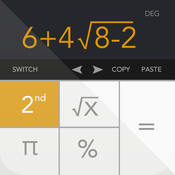
Cairo, Egypt - Calculator+ by xNeat is an Apple Watch calculator done right. Calculator+ by xNeat not only it has an attractive look, but also it is a highly usable Calculator. Given the small screen of the Apple Watch, you need to use innovative methods for the layout, and that is what Calculator+ does best. It has big number buttons in the main screen, and you can simply swipe right for fast plus, and swipe left to see the result.
Another cool thing about xNeat Calculator+ for Apple Watch is the predefined themes list that you can choose from. The theme colors are inspired from the official Apple Watch bands, which makes for a perfect match with them.
Calculator+ by xNeat for Apple Watch not only covers the basic operations, (addition, subtraction, multiplication, and division), but it can also use brackets or even use percent to calculate sales and taxes on the go.
Calculator+ comes with two predefined layouts to choose from. If your main operation is "+" you can stick to layout 1, however if you do more advanced operations that involves multiplication, division, percent and use brackets, then you can use layout 2.
Calculator+ on the iPhone is powerful as well, and allows you to easily fallback to a full fledged calculator to do lengthy operations. Calculator+ contains 5 different calculators merged into one: Scientific Calculator; Handwriting Calculator; System of linear equations solver; Quadratic formula solver, and Graphing Calculator.
Calculator+ by xNeat is simple yet powerful, which makes it suitable for non-techy people as well as math people, since all the advanced features are either separated in a different screen or hidden in the second screen.
If you have iOS 8.0 , you can also access the xNeat calculator from the "Today Screen" in the Notification Center.
FEATURES:
* Elegant and Intuitive interface
* Supports handwriting
* Displays both the equation and the result at the same time
* Supports Fraction and Percent
* Supports many scientific functions
* Advanced editing by easily going back and forth
* Can be added to Today Screen
* Apple Watch support
Device Requirements:
* Compatible with iPhone, iPad, iPod touch, and Apple Watch
* Requires iOS 7.0 or later
* Optimized for iPhone 5, iPhone 6, and iPhone 6 Plus
* 5.2 MB
Pricing and Availability:
Calculator+ 2.0.5 is free and available worldwide exclusively through the App Store in the Productivity category.
xNeat: http://www.xneat.com/windows-manager/company.htm
Calculator+: http://www.borderwidth.com/2015/04/calculators-for-apple-watch.html
Download From iTunes: https://itunes.apple.com/app/calculator+-by-xneat-math/id351815470
Calculator+ Video: https://www.youtube.com/watch?v=-V7rRJsasPA
Screenshot: https://blogger.googleusercontent.com/img/b/R29vZ2xl/AVvXsEjFWETiXMCQYQLG4YWW7_PqYGCPu1JCbDmyQTjtfgQPI7FubITG4n_1Kr4nv5m1GMal8USjP4lZBPea4dt2aQnTIojteb9tsu1DcGex1KG_Yjp7Hk-6KifvXJfp1raBs-NWSpJMH-VNs6rm/s1600/calculators_apple_watch.png
App Icon: http://a2.mzstatic.com/us/r30/Purple1/v4/e8/3c/ce/e83cce85-a74b-87a9-e153-40a1ba0ac1ff/icon175x175.png
Based in Cairo, Egypt, xNeat was founded by Ahmed Sabry and his wife Sara Ragab in 2005. xNeat is a software development company located at 30 4' N 31 28' E, specializing in the development of desktop and mobile applications. xNeat follows Bigweld's slogan in the 2005 animated film, Robots, "See a need, fill a need," and do it neat. Copyright (C) 2015 xNeat. All Rights Reserved. Apple, the Apple logo, iPhone, and iPod are registered trademarks of Apple Inc. in the U.S. and/or other countries. Other trademarks and registered trademarks may be the property of their respective owners.
*******
Link To Article: http://prmac.com/release-id-74666.htm
*******
---------------------------------------------------------------------------------
Note that you can alter delivered distributions at any time.
Login to your account on prMac to alter your channel selection, or to opt-out at any time.
Calculator+ for Apple Watch - The Free Calculator App for Your Wrist - Published on 04/28/15
xNeat announces Calculator+ the Apple Watch calculator done right. Calculator+ strikes the perfect balance between having big buttons for the tiny screen of the Apple Watch, and a minimum number of clicks to do the operations. With predefined themes designed to match the various Apple Watch band colors, Calculator+ is attractive as well as useful. Calculator+ also offers a powerful iPhone calculator, as well as access from the iOS 8 Today Screen in the Notification Center.
Cairo, Egypt - Calculator+ by xNeat is an Apple Watch calculator done right. Calculator+ by xNeat not only it has an attractive look, but also it is a highly usable Calculator. Given the small screen of the Apple Watch, you need to use innovative methods for the layout, and that is what Calculator+ does best. It has big number buttons in the main screen, and you can simply swipe right for fast plus, and swipe left to see the result.
Another cool thing about xNeat Calculator+ for Apple Watch is the predefined themes list that you can choose from. The theme colors are inspired from the official Apple Watch bands, which makes for a perfect match with them.
Calculator+ by xNeat for Apple Watch not only covers the basic operations, (addition, subtraction, multiplication, and division), but it can also use brackets or even use percent to calculate sales and taxes on the go.
Calculator+ comes with two predefined layouts to choose from. If your main operation is "+" you can stick to layout 1, however if you do more advanced operations that involves multiplication, division, percent and use brackets, then you can use layout 2.
Calculator+ on the iPhone is powerful as well, and allows you to easily fallback to a full fledged calculator to do lengthy operations. Calculator+ contains 5 different calculators merged into one: Scientific Calculator; Handwriting Calculator; System of linear equations solver; Quadratic formula solver, and Graphing Calculator.
Calculator+ by xNeat is simple yet powerful, which makes it suitable for non-techy people as well as math people, since all the advanced features are either separated in a different screen or hidden in the second screen.
If you have iOS 8.0 , you can also access the xNeat calculator from the "Today Screen" in the Notification Center.
FEATURES:
* Elegant and Intuitive interface
* Supports handwriting
* Displays both the equation and the result at the same time
* Supports Fraction and Percent
* Supports many scientific functions
* Advanced editing by easily going back and forth
* Can be added to Today Screen
* Apple Watch support
Device Requirements:
* Compatible with iPhone, iPad, iPod touch, and Apple Watch
* Requires iOS 7.0 or later
* Optimized for iPhone 5, iPhone 6, and iPhone 6 Plus
* 5.2 MB
Pricing and Availability:
Calculator+ 2.0.5 is free and available worldwide exclusively through the App Store in the Productivity category.
xNeat: http://www.xneat.com/windows-manager/company.htm
Calculator+: http://www.borderwidth.com/2015/04/calculators-for-apple-watch.html
Download From iTunes: https://itunes.apple.com/app/calculator+-by-xneat-math/id351815470
Calculator+ Video: https://www.youtube.com/watch?v=-V7rRJsasPA
Screenshot: https://blogger.googleusercontent.com/img/b/R29vZ2xl/AVvXsEjFWETiXMCQYQLG4YWW7_PqYGCPu1JCbDmyQTjtfgQPI7FubITG4n_1Kr4nv5m1GMal8USjP4lZBPea4dt2aQnTIojteb9tsu1DcGex1KG_Yjp7Hk-6KifvXJfp1raBs-NWSpJMH-VNs6rm/s1600/calculators_apple_watch.png

App Icon: http://a2.mzstatic.com/us/r30/Purple1/v4/e8/3c/ce/e83cce85-a74b-87a9-e153-40a1ba0ac1ff/icon175x175.png
Based in Cairo, Egypt, xNeat was founded by Ahmed Sabry and his wife Sara Ragab in 2005. xNeat is a software development company located at 30 4' N 31 28' E, specializing in the development of desktop and mobile applications. xNeat follows Bigweld's slogan in the 2005 animated film, Robots, "See a need, fill a need," and do it neat. Copyright (C) 2015 xNeat. All Rights Reserved. Apple, the Apple logo, iPhone, and iPod are registered trademarks of Apple Inc. in the U.S. and/or other countries. Other trademarks and registered trademarks may be the property of their respective owners.
*******
Link To Article: http://prmac.com/release-id-74666.htm
*******
---------------------------------------------------------------------------------
Note that you can alter delivered distributions at any time.
Login to your account on prMac to alter your channel selection, or to opt-out at any time.
MobileEndorse - The free IOS App for E-Signatures - has been released
A new article has been published at prMac.
MobileEndorse - The free IOS App for E-Signatures - has been released - Published on 04/28/15
MobileEndorse Inc. today introduces MobileEndorse 1.0 for iOS devices, their new mobile solution for E-Signature with ERM integration. MobileEndorse is the free-to-use, free-to-sign App for E-Signatures on documents. Users can sign or request signatures from other users, and retrieve the signed document for archive. It is built to facilitate mobile collaboration, and to achieve paperless in workspace. The whole share-and-sign process for documents becomes paperless, so to save trees.
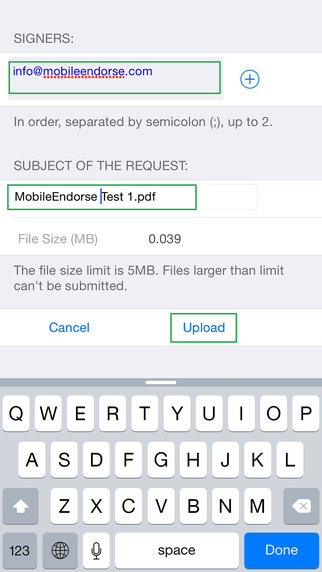
New York City, New York - MobileEndorse Inc. today is proud to announce the release of MobileEndorse 1.0 for iOS devices, their new mobile solution for E-Signature with ERM integration. MobileEndorse is the free-to-use, free-to-sign App for E-Signatures on documents. Users can sign or request signatures from other users, and retrieve the signed document for archive.
"Every company is using a lot of papers, which costs a lot and is not environmentally friendly. With MobileEndorse the whole share-and-sign process of document becomes paperless on mobile devices. We can save some trees with this product, so to keep the air fresh and the earth green." said the COO, Maggie He.
Features:
* IOS 7.1 and up, free to use, and free to sign
* Signers can sign in sequence
* Secured communication and storage on Cloud
* Adapter for Enterprise provides integration with ERM and workflows, e.g., SharePoint Online or file system
* On-premise installation is also available
The product is built for general purpose, that it can be used by individuals for personal document signing and archiving; as well as by enterprise for control and management of business documents with signatures. It is built to facilitate mobile collaboration, and to achieve paperless in workspace.
Device Requirements:
* iPhone, iPad, and iPod touch
* Optimized for iPhone 5, iPhone 6/6 Plus
* Requires iOS 7.1 or later
* 0.9 MB
Pricing and Availability:
MobileEndorse 1.0 is Free and available worldwide exclusively through the App Store in the Productivity category.
MobileEndorse 1.0: http://mobileendorse.azurewebsites.net/
Download from iTunes: https://itunes.apple.com/app/mobileendorse/id975602650
YouTube Video (Teaser): https://www.youtube.com/watch?v=wcGgnsnS1Lk
Screenshot: http://a1.mzstatic.com/us/r30/Purple5/v4/22/fa/cb/22facba9-3a3e-5e40-6f1b-86450c9f31c6/screen322x572.jpeg
App Icon: http://a2.mzstatic.com/us/r30/Purple3/v4/c9/89/90/c98990ae-7d6e-9abf-1690-ca24ba61121a/icon175x175.jpeg
Located in New York, MobileEndorse Inc. focuses on mobile collaboration. The company provides cloud-based mobile solutions for E-Signature, Enterprise portal and ERM integration. All Material and Software (C) Copyright 2015 MobileEndorse Inc. All Rights Reserved. Apple, the Apple logo, iPhone, iPod and iPad are registered trademarks of Apple Inc. in the U.S. and/or other countries. Other trademarks and registered trademarks may be the property of their respective owners.
*******
Link To Article: http://prmac.com/release-id-74672.htm
*******
---------------------------------------------------------------------------------
Note that you can alter delivered distributions at any time.
Login to your account on prMac to alter your channel selection, or to opt-out at any time.
MobileEndorse - The free IOS App for E-Signatures - has been released - Published on 04/28/15
MobileEndorse Inc. today introduces MobileEndorse 1.0 for iOS devices, their new mobile solution for E-Signature with ERM integration. MobileEndorse is the free-to-use, free-to-sign App for E-Signatures on documents. Users can sign or request signatures from other users, and retrieve the signed document for archive. It is built to facilitate mobile collaboration, and to achieve paperless in workspace. The whole share-and-sign process for documents becomes paperless, so to save trees.
New York City, New York - MobileEndorse Inc. today is proud to announce the release of MobileEndorse 1.0 for iOS devices, their new mobile solution for E-Signature with ERM integration. MobileEndorse is the free-to-use, free-to-sign App for E-Signatures on documents. Users can sign or request signatures from other users, and retrieve the signed document for archive.
"Every company is using a lot of papers, which costs a lot and is not environmentally friendly. With MobileEndorse the whole share-and-sign process of document becomes paperless on mobile devices. We can save some trees with this product, so to keep the air fresh and the earth green." said the COO, Maggie He.
Features:
* IOS 7.1 and up, free to use, and free to sign
* Signers can sign in sequence
* Secured communication and storage on Cloud
* Adapter for Enterprise provides integration with ERM and workflows, e.g., SharePoint Online or file system
* On-premise installation is also available
The product is built for general purpose, that it can be used by individuals for personal document signing and archiving; as well as by enterprise for control and management of business documents with signatures. It is built to facilitate mobile collaboration, and to achieve paperless in workspace.
Device Requirements:
* iPhone, iPad, and iPod touch
* Optimized for iPhone 5, iPhone 6/6 Plus
* Requires iOS 7.1 or later
* 0.9 MB
Pricing and Availability:
MobileEndorse 1.0 is Free and available worldwide exclusively through the App Store in the Productivity category.
MobileEndorse 1.0: http://mobileendorse.azurewebsites.net/
Download from iTunes: https://itunes.apple.com/app/mobileendorse/id975602650
YouTube Video (Teaser): https://www.youtube.com/watch?v=wcGgnsnS1Lk
Screenshot: http://a1.mzstatic.com/us/r30/Purple5/v4/22/fa/cb/22facba9-3a3e-5e40-6f1b-86450c9f31c6/screen322x572.jpeg
App Icon: http://a2.mzstatic.com/us/r30/Purple3/v4/c9/89/90/c98990ae-7d6e-9abf-1690-ca24ba61121a/icon175x175.jpeg

Located in New York, MobileEndorse Inc. focuses on mobile collaboration. The company provides cloud-based mobile solutions for E-Signature, Enterprise portal and ERM integration. All Material and Software (C) Copyright 2015 MobileEndorse Inc. All Rights Reserved. Apple, the Apple logo, iPhone, iPod and iPad are registered trademarks of Apple Inc. in the U.S. and/or other countries. Other trademarks and registered trademarks may be the property of their respective owners.
*******
Link To Article: http://prmac.com/release-id-74672.htm
*******
---------------------------------------------------------------------------------
Note that you can alter delivered distributions at any time.
Login to your account on prMac to alter your channel selection, or to opt-out at any time.
Subscribe to:
Posts (Atom)