A new article has been published at prMac.
Runaway Balloon has launched - And now it's up to you to keep it afloat - Published on 04/30/15
Runaway Balloon is a fun and challenging game from independent game developer, Nikolai Webb, for iPhone, iPod touch and iPad devices. The objective is to keep a balloon afloat above the rooftops by tapping on the screen and collect as many coins as possible. However, there are various hazards along the way including chimneys, antennas, and birds that the player has to avoid otherwise it's game over! Players can share scores and challenge friends via Game Center as well as social media.
Brooklyn, New York - Independent game developer, Nikolai Webb has announced the release of Runaway Balloon 1.3, a fun and challenging game for iPhone, iPod touch and iPad devices. Runaway Balloon is designed for all ages, and allows players to share scores and challenge friends via Game Center as well as social media.
The objective of Runaway Balloon is simple - the player has to keep a balloon afloat above the rooftops by tapping on the screen and collect as many coins as possible. However, there are various hazards along the way including chimneys, antennas, and birds that the player has to avoid otherwise it's game over! The game speed increases very subtly the more coins the player collects, creating exciting and unpredictable gameplay.
Key Features:
* Challenging and exciting gameplay
* High-end 2D graphics and particle effects
* Enjoyable soundtrack
* Game Center leaderboard
* Free to play
Initial reviews have been very positive: "Great animation and smooth game play. I love the added goal of getting coins. I could play this game all day." said reviewer Aaaadaaaam. "Perfect for long commutes! Easy and addicting to play!" added reviewer Mallydally.
Device Requirements:
* iPhone, iPad, and iPod touch
* Optimized for iPhone 5 and iPhone 6
* Requires iOS 5.1.1 or later
* 22.7 MB
Pricing and Availability:
Runaway Balloon 1.3 is Free and available worldwide exclusively through the App Store in the Games category.
Runaway Balloon 1.3: http://www.runawayballoongame.com
Download from iTunes: https://itunes.apple.com/app/id969866693
Screenshot 1: http://www.runawayballoongame.com/img/screenshots/01.jpg
Screenshot 2: http://www.runawayballoongame.com/img/screenshots/03.jpg
Screenshot 3: http://www.runawayballoongame.com/img/screenshots/04.jpg
App Icon: http://www.runawayballoongame.com/tile.png
Nikolai Webb is an independent developer based in Brooklyn, NY with over 15 years of experience in the interactive digital media industry. All Material and Software (C) 2011-2015 Webb Interactive LLC / All Rights Reserved. Apple, the Apple logo, iPhone, iPod and iPad are registered trademarks of Apple Inc. in the U.S. and/or other countries. Other trademarks and registered trademarks may be the property of their respective owners.
*******
Link To Article: http://prmac.com/release-id-74626.htm
*******
---------------------------------------------------------------------------------
Note that you can alter delivered distributions at any time.
Login to your account on prMac to alter your channel selection, or to opt-out at any time.


Introducing ShaBOOYAH - America's Number #1 Natural Hair Mobile App
A new article has been published at prMac.
Introducing ShaBOOYAH - America's Number #1 Natural Hair Mobile App - Published on 04/30/15
cAPPtivations has announced ShaBOOYAH 1.0, their new lifestyle app for iOS and Android devices. Conceived by a woman with natural hair, ShaBOOYAH offers the Natural hair community a beautiful, low-cost entry into mobile digital adaptability and convenience. The app allows anyone to easily access a plethora of blogs, meetups, events, salons, video playlists, video tutorials, audio podcasts, discussion forums, and much more, regarding the beauty of and care for naturally kinky or curly hair.
Atlanta, Georgia - cAPPtivations has announced the release of ShaBOOYAH, the iOS app that offers the Natural Hair community a beautiful, low-cost entry into mobile digital adaptability and convenience. ShaBOOYAH allows users to easily access a plethora of blogs, meetups, events, salons, video playlists, video tutorials, audio podcasts - and much more - regarding the beauty of and care for naturally kinky or curly hair.
The ShaBOOYAH concept was conceived by a woman with natural hair; who had neither the time nor inclination to sit in front of a computer screen, surfing the web endlessly in pursuit of resources for natural hair products, styles, tutorials, events and discussion forums.
The ShaBOOYAH website includes app install links, as well as a full, online natural hair products store. Through the online store, app users and non-users alike can shop for their favorite natural hair care and maintenance formulas and styling tools. The creator derived the name partially from the popular twitter hashtag, #shabooyarollcall and partially as a homage to the #NaeNae ShaBOOYAH/YEET dance, song & video by 99 Percent.
Features:
* Keep track of the latest events in the natural hair universe
* Capture selfies and share them with the natural hair world
* Keep a diary of your natural hair journey
* Check the latest natural hair blogs, vlogs and meetups
* Listen to audio of a Natural Hair Podcast
* Peep the video playlists straight from youtube
* See video tutorials of the latest natural hairstyles and growth methods
* Discern hair type once and for all - with the convenient hair typing guide
* View the fabulous photo galleries of natural hair beauties
* Post comments, reviews, ideas, questions for ShaBOOYAH on the app fan wall
* Connect with shabooyah on popular social media sites
Supported Languages:
ShaBOOYAH supports English, Arabic, Bokmal, Norwegian, Catalan, Czech, Danish, Dutch, Finnish, French, German, Greek, Hebrew, Hungarian, Indonesian, Italian, Japanese, Korean, Polish, Portuguese, Romanian, Russian, Simplified Chinese, Spanish, Swedish, Traditional Chinese and Turkish languages.
Device Requirements:
* iPhone, iPad, and iPod touch
* Requires iOS 6.0 or later
* 24.9 MB
Pricing and Availability:
ShaBOOYAH 1.0 is $0.99 USD (or equivalent amount in other currencies) and is available worldwide through the App Store in the Lifestyle category. An Android version of the app is also available via Google Play.
ShaBOOYAH 1.0: http://shabooyah.com
Purchase and Download: https://itunes.apple.com/app/shabooyah/id982388432
Screenshot: http://a4.mzstatic.com/us/r30/Purple1/v4/c1/a3/74/c1a37499-cf77-701d-bc30-cc7e3afa323e/screen568x568.jpeg
App Icon: http://a3.mzstatic.com/us/r30/Purple3/v4/26/f6/15/26f6158e-2f2e-2b1c-d7ea-36cb2e2fbd0e/icon175x175.jpeg
cAPPtivations is making mobile apps affordable and simple for small businesses. At cAPPtivations, we're completely dedicated to creating mobile engagement solutions that solve your business problems. We bring mobile strategy expertise, unmatched technology, and a client-driven services team to achieve the business results you seek: Increased customer engagement, direct revenue generation, and reduced operating expenses. We create Captivating Apps for Smart Devices and Smart Businesses. Copyright (C) 2015 cAPPtivations All Rights Reserved. Apple, the Apple logo, iPhone, iPod and iPad are registered trademarks of Apple Inc. in the U.S. and/or other countries. Other trademarks and registered trademarks may be the property of their respective owners.
*******
Link To Article: http://prmac.com/release-id-74625.htm
*******
---------------------------------------------------------------------------------
Note that you can alter delivered distributions at any time.
Login to your account on prMac to alter your channel selection, or to opt-out at any time.
Introducing ShaBOOYAH - America's Number #1 Natural Hair Mobile App - Published on 04/30/15
cAPPtivations has announced ShaBOOYAH 1.0, their new lifestyle app for iOS and Android devices. Conceived by a woman with natural hair, ShaBOOYAH offers the Natural hair community a beautiful, low-cost entry into mobile digital adaptability and convenience. The app allows anyone to easily access a plethora of blogs, meetups, events, salons, video playlists, video tutorials, audio podcasts, discussion forums, and much more, regarding the beauty of and care for naturally kinky or curly hair.
Atlanta, Georgia - cAPPtivations has announced the release of ShaBOOYAH, the iOS app that offers the Natural Hair community a beautiful, low-cost entry into mobile digital adaptability and convenience. ShaBOOYAH allows users to easily access a plethora of blogs, meetups, events, salons, video playlists, video tutorials, audio podcasts - and much more - regarding the beauty of and care for naturally kinky or curly hair.
The ShaBOOYAH concept was conceived by a woman with natural hair; who had neither the time nor inclination to sit in front of a computer screen, surfing the web endlessly in pursuit of resources for natural hair products, styles, tutorials, events and discussion forums.
The ShaBOOYAH website includes app install links, as well as a full, online natural hair products store. Through the online store, app users and non-users alike can shop for their favorite natural hair care and maintenance formulas and styling tools. The creator derived the name partially from the popular twitter hashtag, #shabooyarollcall and partially as a homage to the #NaeNae ShaBOOYAH/YEET dance, song & video by 99 Percent.
Features:
* Keep track of the latest events in the natural hair universe
* Capture selfies and share them with the natural hair world
* Keep a diary of your natural hair journey
* Check the latest natural hair blogs, vlogs and meetups
* Listen to audio of a Natural Hair Podcast
* Peep the video playlists straight from youtube
* See video tutorials of the latest natural hairstyles and growth methods
* Discern hair type once and for all - with the convenient hair typing guide
* View the fabulous photo galleries of natural hair beauties
* Post comments, reviews, ideas, questions for ShaBOOYAH on the app fan wall
* Connect with shabooyah on popular social media sites
Supported Languages:
ShaBOOYAH supports English, Arabic, Bokmal, Norwegian, Catalan, Czech, Danish, Dutch, Finnish, French, German, Greek, Hebrew, Hungarian, Indonesian, Italian, Japanese, Korean, Polish, Portuguese, Romanian, Russian, Simplified Chinese, Spanish, Swedish, Traditional Chinese and Turkish languages.
Device Requirements:
* iPhone, iPad, and iPod touch
* Requires iOS 6.0 or later
* 24.9 MB
Pricing and Availability:
ShaBOOYAH 1.0 is $0.99 USD (or equivalent amount in other currencies) and is available worldwide through the App Store in the Lifestyle category. An Android version of the app is also available via Google Play.
ShaBOOYAH 1.0: http://shabooyah.com
Purchase and Download: https://itunes.apple.com/app/shabooyah/id982388432
Screenshot: http://a4.mzstatic.com/us/r30/Purple1/v4/c1/a3/74/c1a37499-cf77-701d-bc30-cc7e3afa323e/screen568x568.jpeg

App Icon: http://a3.mzstatic.com/us/r30/Purple3/v4/26/f6/15/26f6158e-2f2e-2b1c-d7ea-36cb2e2fbd0e/icon175x175.jpeg

cAPPtivations is making mobile apps affordable and simple for small businesses. At cAPPtivations, we're completely dedicated to creating mobile engagement solutions that solve your business problems. We bring mobile strategy expertise, unmatched technology, and a client-driven services team to achieve the business results you seek: Increased customer engagement, direct revenue generation, and reduced operating expenses. We create Captivating Apps for Smart Devices and Smart Businesses. Copyright (C) 2015 cAPPtivations All Rights Reserved. Apple, the Apple logo, iPhone, iPod and iPad are registered trademarks of Apple Inc. in the U.S. and/or other countries. Other trademarks and registered trademarks may be the property of their respective owners.
*******
Link To Article: http://prmac.com/release-id-74625.htm
*******
---------------------------------------------------------------------------------
Note that you can alter delivered distributions at any time.
Login to your account on prMac to alter your channel selection, or to opt-out at any time.
Open Planet Software introduces Highnote for Apple Watch
A new article has been published at prMac.
Open Planet Software introduces Highnote for Apple Watch - Published on 04/30/15
UK based Open Planet Software has announced Highnote 2.2, an important update to their popular music player and practice tool for iOS devices. Highnote allows musicians and dancers to independently adjust the tempo and key of the music in their iPhone's library as it plays, making it an invaluable practice tool. Version 2.2 is now compatible with Apple Watch, making it more convenient than ever to adjust the tempo and key of the music in iPhone's library as it plays.
Inverurie, United Kingdom - Open Planet Software has announced that the latest release of Highnote, their popular music player and practice tool, is compatible with Apple Watch; making it more convenient than ever to adjust the tempo and key of the music in iPhone's library as it plays. Highnote allows musicians and dancers to independently adjust the tempo and key of the music in their iPhone's library as it plays, making it an invaluable practice tool.
Feature Highlights:
* Adjust the tempo of music, in real time, as it plays
* Adjust the key of music, in real time, as it plays
* Play any track from the music library on your iPhone, iPad or iPod touch
* Play a track once or in a continuous loop
* AirPlay support for output to wireless speakers or Apple TV
* Control the tempo and key from Apple Watch
"We carefully considered how Apple Watch could be used to enhance a musician's practice routine, so we designed an incredibly simple interface with large, clear controls to make it easy to use while holding a musical instrument" said Gordon Murrison, co-founder of Open Planet Software. "We've also found that Apple Watch makes Highnote a great music player for fitness enthusiasts - you can run or work out to your favourite tracks at a speed that suits you. You can even set it to loop, then each time it repeats, increase the tempo and try to keep up!"
Device Requirements:
* iPhone, iPad, iPod touch and Apple Watch
* Optimized for iPhone 5, iPhone 6/6 Plus
* Requires iOS 8.0 or later
* 0.3 MB
Pricing and Availability:
Highnote 2.2 is $4.99 USD (or equivalent amount in other currencies) and available worldwide exclusively through the App Store in the Music category.
Open Planet Software: http://www.openplanetsoftware.com/
Highnote 2.2: http://www.openplanetsoftware.com/highnote
More Info: http://blog.openplanetsoftware.com/post/112502331773/designing-an-apple-watch-app
Purchase and Download: https://itunes.apple.com/app/highnote-tempo-key-control/id592398757
Screenshot (Apple Watch): http://downloads.openplanetsoftware.com/downloads/highnote/screenshots/watch.png
Screenshot (iPad + iPhone): http://downloads.openplanetsoftware.com/downloads/highnote/screenshots/ipad+iphone.png
Located in tranquil Inverurie, United Kingdom, Open Planet Software is a small, privately held company founded in 2007 by Gordon Murrison and Gavin MacLean. After more than ten years designing, developing and managing software projects for some of the UK's largest telecoms, utility and marine companies, they founded Open Planet Software to specialize in the creation of software for Mac OS and iOS. Driven by fanatical attention to detail, Open Planet Software embraces industry leading software engineering practices to ensure their applications meet the exacting standards expected by the Apple community. Copyright (C) 2007-2015 Open Planet Software. All Rights Reserved. Apple, the Apple logo, Apple Watch, iPhone, iPad and iPod are registered trademarks of Apple Inc. in the U.S. and/or other countries.
*******
Link To Article: http://prmac.com/release-id-74624.htm
*******
---------------------------------------------------------------------------------
Note that you can alter delivered distributions at any time.
Login to your account on prMac to alter your channel selection, or to opt-out at any time.
Open Planet Software introduces Highnote for Apple Watch - Published on 04/30/15
UK based Open Planet Software has announced Highnote 2.2, an important update to their popular music player and practice tool for iOS devices. Highnote allows musicians and dancers to independently adjust the tempo and key of the music in their iPhone's library as it plays, making it an invaluable practice tool. Version 2.2 is now compatible with Apple Watch, making it more convenient than ever to adjust the tempo and key of the music in iPhone's library as it plays.
Inverurie, United Kingdom - Open Planet Software has announced that the latest release of Highnote, their popular music player and practice tool, is compatible with Apple Watch; making it more convenient than ever to adjust the tempo and key of the music in iPhone's library as it plays. Highnote allows musicians and dancers to independently adjust the tempo and key of the music in their iPhone's library as it plays, making it an invaluable practice tool.
Feature Highlights:
* Adjust the tempo of music, in real time, as it plays
* Adjust the key of music, in real time, as it plays
* Play any track from the music library on your iPhone, iPad or iPod touch
* Play a track once or in a continuous loop
* AirPlay support for output to wireless speakers or Apple TV
* Control the tempo and key from Apple Watch
"We carefully considered how Apple Watch could be used to enhance a musician's practice routine, so we designed an incredibly simple interface with large, clear controls to make it easy to use while holding a musical instrument" said Gordon Murrison, co-founder of Open Planet Software. "We've also found that Apple Watch makes Highnote a great music player for fitness enthusiasts - you can run or work out to your favourite tracks at a speed that suits you. You can even set it to loop, then each time it repeats, increase the tempo and try to keep up!"
Device Requirements:
* iPhone, iPad, iPod touch and Apple Watch
* Optimized for iPhone 5, iPhone 6/6 Plus
* Requires iOS 8.0 or later
* 0.3 MB
Pricing and Availability:
Highnote 2.2 is $4.99 USD (or equivalent amount in other currencies) and available worldwide exclusively through the App Store in the Music category.
Open Planet Software: http://www.openplanetsoftware.com/
Highnote 2.2: http://www.openplanetsoftware.com/highnote
More Info: http://blog.openplanetsoftware.com/post/112502331773/designing-an-apple-watch-app
Purchase and Download: https://itunes.apple.com/app/highnote-tempo-key-control/id592398757
Screenshot (Apple Watch): http://downloads.openplanetsoftware.com/downloads/highnote/screenshots/watch.png

Screenshot (iPad + iPhone): http://downloads.openplanetsoftware.com/downloads/highnote/screenshots/ipad+iphone.png

Located in tranquil Inverurie, United Kingdom, Open Planet Software is a small, privately held company founded in 2007 by Gordon Murrison and Gavin MacLean. After more than ten years designing, developing and managing software projects for some of the UK's largest telecoms, utility and marine companies, they founded Open Planet Software to specialize in the creation of software for Mac OS and iOS. Driven by fanatical attention to detail, Open Planet Software embraces industry leading software engineering practices to ensure their applications meet the exacting standards expected by the Apple community. Copyright (C) 2007-2015 Open Planet Software. All Rights Reserved. Apple, the Apple logo, Apple Watch, iPhone, iPad and iPod are registered trademarks of Apple Inc. in the U.S. and/or other countries.
*******
Link To Article: http://prmac.com/release-id-74624.htm
*******
---------------------------------------------------------------------------------
Note that you can alter delivered distributions at any time.
Login to your account on prMac to alter your channel selection, or to opt-out at any time.
New WhereNotes App for Apple Watch Introduces Location-Based Notes
A new article has been published at prMac.
New WhereNotes App for Apple Watch Introduces Location-Based Notes - Published on 04/30/15
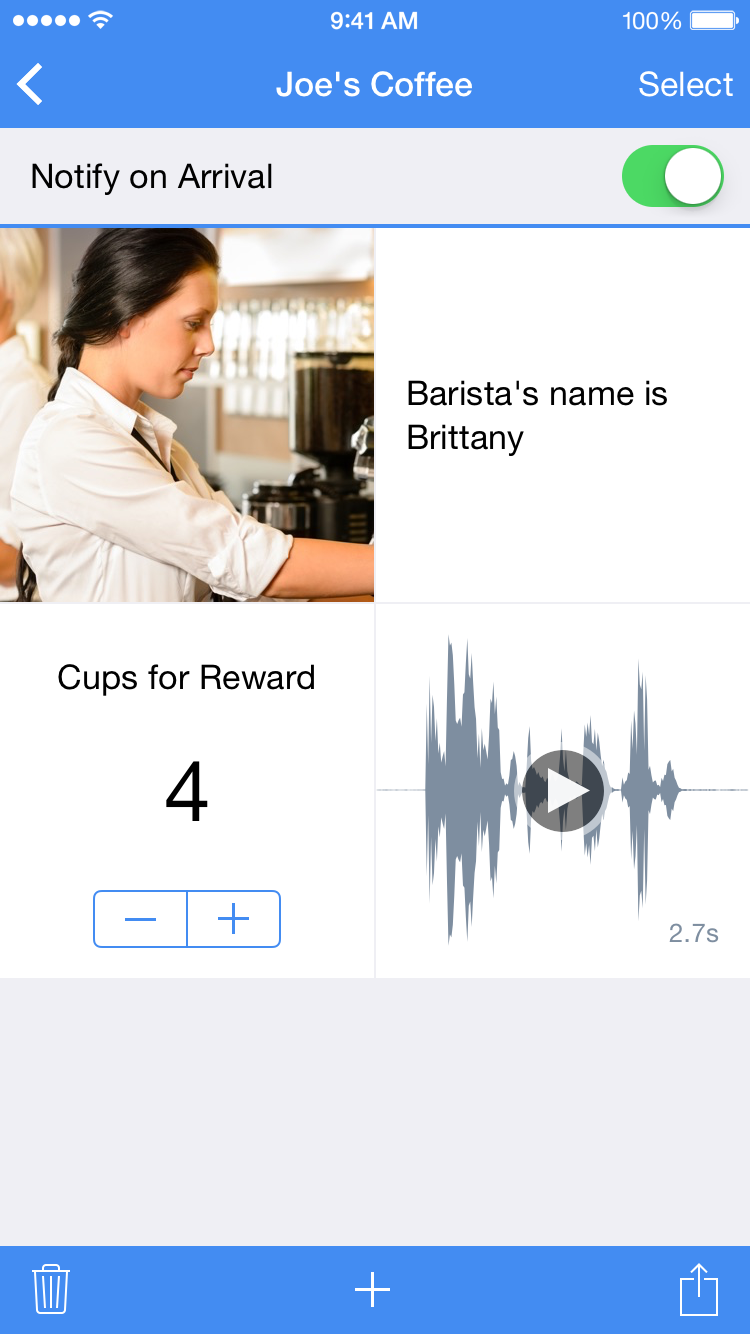
Juicy Bits has announced WhereNotes 1.0.1, its new productivity app for iPhone and Apple Watch. WhereNotes makes it easy for users to remember photos, text, and audio recordings for a specific location and quickly recall those items when they return. In addition to photos, users can add text, checkboxes to mark an item as "checked" and counters to keep a count of visits, uses, redemptions and more. While all data is kept private, users can choose to share specific attachments or entire notes.
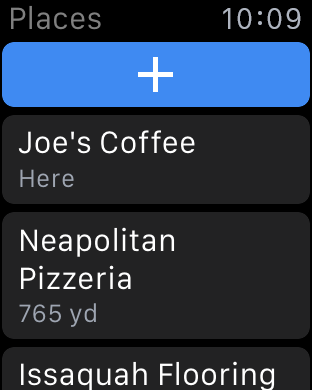
Sammamish, Washington - Juicy Bits, maker of three App Store Best of the Year award winners and two Editors' Choice apps, has released WhereNotes for iPhone and Apple Watch. WhereNotes makes it easy for users to remember photos, text, and audio recordings for a specific location and quickly recall those items when they return. It's like having a private notebook at each place they visit.
"I discovered that a lot of my friends - like me - take photos to remember specific products or favorite meals," says Mike Swanson, Founder of Juicy Bits. "When returning to a location, they find themselves scrolling through hundreds of photos in their photo gallery, often giving up in frustration. WhereNotes was created to make it easy for users to remember important photos, text, and audio and to associate those items with a specific location. Because WhereNotes works with the Apple Watch, notes are quickly accessible from a user's wrist."
In addition to photos, users can add text (for example, to remember important names), audio recordings, checkboxes (to mark something as "checked"), and counters (to keep a count of visits, uses, redemptions, etc.).
While all data is kept private, users can choose to share specific attachments or entire notes. This makes it easy to send, for example, a set of items that are typically bought at a favorite grocery store. When the recipient opens the shared note in WhereNotes, it will automatically appear at the top of the list when near the store. On Apple Watch, they can easily swipe to see all items on the list.
A pinning feature is available to lock frequently-used notes to the top of the list so they are always available. Other features includes the ability to receive an alert when arriving at a specific place, travel directions to a place, and backup and restore of all data.
Pricing and Availability:
WhereNotes 1.0.1 is currently available for free on the App Store in the Productivity category. A single "Unlock Everything" in-app purchase for $4.99 USD enables all premium features. WhereNotes runs on Apple Watch (with compatible iPhone) and iPhone 4s (or later) with iOS 8.0 (or later).
Juicy Bits: http://www.juicybitssoftware.com
WhereNotes 1.0.1: http://itunes.apple.com/app/id958837793
Screenshot (iPhone): http://www.juicybitssoftware.com/images/media/wherenotes/1.0.1/WhereNotes%20iPhone.png
Places Screenshot (Watch): http://www.juicybitssoftware.com/images/media/wherenotes/1.0.1/WhereNotes%20Watch%20Places.png
Dictation Screenshot (Watch): http://www.juicybitssoftware.com/images/media/wherenotes/1.0.1/WhereNotes%20Watch%20Dictation.png
App Icon: http://www.juicybitssoftware.com/images/media/wherenotes/1.0.1/WhereNotes%20Icon.png
Founded in 2009, Juicy Bits is a small company that produces unique, freshly squeezed software for mobile devices. Their first release, 3D Camera, earned 4 1/2 mice (out of 5) from Macworld and is frequently among the top photography apps worldwide. Their Layout app was named by Apple as one of the best photo apps of 2012, and Halftone, with over two million user downloads, was named by Apple as one of the best photo apps as part of App Store Rewind 2011. Halftone 2, an Apple Editors' Choice, was also selected for the App Store Best of 2013. Copyright (C) 2009-2015 Juicy Bits. All Rights Reserved. Apple, the Apple logo, iPhone, iPod and iPad are registered trademarks of Apple Inc. in the U.S. and/or other countries.
*******
Link To Article: http://prmac.com/release-id-74623.htm
*******
---------------------------------------------------------------------------------
Note that you can alter delivered distributions at any time.
Login to your account on prMac to alter your channel selection, or to opt-out at any time.
New WhereNotes App for Apple Watch Introduces Location-Based Notes - Published on 04/30/15
Juicy Bits has announced WhereNotes 1.0.1, its new productivity app for iPhone and Apple Watch. WhereNotes makes it easy for users to remember photos, text, and audio recordings for a specific location and quickly recall those items when they return. In addition to photos, users can add text, checkboxes to mark an item as "checked" and counters to keep a count of visits, uses, redemptions and more. While all data is kept private, users can choose to share specific attachments or entire notes.
Sammamish, Washington - Juicy Bits, maker of three App Store Best of the Year award winners and two Editors' Choice apps, has released WhereNotes for iPhone and Apple Watch. WhereNotes makes it easy for users to remember photos, text, and audio recordings for a specific location and quickly recall those items when they return. It's like having a private notebook at each place they visit.
"I discovered that a lot of my friends - like me - take photos to remember specific products or favorite meals," says Mike Swanson, Founder of Juicy Bits. "When returning to a location, they find themselves scrolling through hundreds of photos in their photo gallery, often giving up in frustration. WhereNotes was created to make it easy for users to remember important photos, text, and audio and to associate those items with a specific location. Because WhereNotes works with the Apple Watch, notes are quickly accessible from a user's wrist."
In addition to photos, users can add text (for example, to remember important names), audio recordings, checkboxes (to mark something as "checked"), and counters (to keep a count of visits, uses, redemptions, etc.).
While all data is kept private, users can choose to share specific attachments or entire notes. This makes it easy to send, for example, a set of items that are typically bought at a favorite grocery store. When the recipient opens the shared note in WhereNotes, it will automatically appear at the top of the list when near the store. On Apple Watch, they can easily swipe to see all items on the list.
A pinning feature is available to lock frequently-used notes to the top of the list so they are always available. Other features includes the ability to receive an alert when arriving at a specific place, travel directions to a place, and backup and restore of all data.
Pricing and Availability:
WhereNotes 1.0.1 is currently available for free on the App Store in the Productivity category. A single "Unlock Everything" in-app purchase for $4.99 USD enables all premium features. WhereNotes runs on Apple Watch (with compatible iPhone) and iPhone 4s (or later) with iOS 8.0 (or later).
Juicy Bits: http://www.juicybitssoftware.com
WhereNotes 1.0.1: http://itunes.apple.com/app/id958837793
Screenshot (iPhone): http://www.juicybitssoftware.com/images/media/wherenotes/1.0.1/WhereNotes%20iPhone.png
Places Screenshot (Watch): http://www.juicybitssoftware.com/images/media/wherenotes/1.0.1/WhereNotes%20Watch%20Places.png
Dictation Screenshot (Watch): http://www.juicybitssoftware.com/images/media/wherenotes/1.0.1/WhereNotes%20Watch%20Dictation.png
App Icon: http://www.juicybitssoftware.com/images/media/wherenotes/1.0.1/WhereNotes%20Icon.png

Founded in 2009, Juicy Bits is a small company that produces unique, freshly squeezed software for mobile devices. Their first release, 3D Camera, earned 4 1/2 mice (out of 5) from Macworld and is frequently among the top photography apps worldwide. Their Layout app was named by Apple as one of the best photo apps of 2012, and Halftone, with over two million user downloads, was named by Apple as one of the best photo apps as part of App Store Rewind 2011. Halftone 2, an Apple Editors' Choice, was also selected for the App Store Best of 2013. Copyright (C) 2009-2015 Juicy Bits. All Rights Reserved. Apple, the Apple logo, iPhone, iPod and iPad are registered trademarks of Apple Inc. in the U.S. and/or other countries.
*******
Link To Article: http://prmac.com/release-id-74623.htm
*******
---------------------------------------------------------------------------------
Note that you can alter delivered distributions at any time.
Login to your account on prMac to alter your channel selection, or to opt-out at any time.
The Brainstormer App brings Inspiration to the Apple Watch
A new article has been published at prMac.
The Brainstormer App brings Inspiration to the Apple Watch - Published on 04/30/15
The Brainstormer 2.0.0, an idea-generating app for iPhone, iPad and Android devices, supports the Apple Watch. The Brainstormer is a unique idea generating app, based on a physical idea wheel constructed by concept artist Andrew Bosley and developed by Tapnik Software. Users have the freedom to edit the wheels to fit their process, from simply tweaking the built-in lists to creating entirely new scenarios from scratch. This major update adds several new features.
Berkeley, California - The Brainstormer, an idea-generating app for iPhone, iPad and Android devices, supports the Apple Watch. The Brainstormer is a unique idea generating app, based on a physical idea wheel constructed by concept artist Andrew Bosley and developed by Tapnik Software. The Brainstormer has three spinning wheels featuring plot/conflict, theme/setting and subject/location. By manipulating the wheels, or randomly spinning, the user generates combinations that make fantastic creative prompts for writing, sketching or any creative activity. Users have the freedom to edit the wheels to fit their process, from simply tweaking the built-in lists to creating entirely new scenarios from scratch.
A new Science-Fiction themed Brainstormer has been added, and more wheels will be made available online. In addition, this major update adds several new features including exporting and sharing wheels, and editing your custom wheels from a desktop browser.
The Brainstormer has been widely used in teaching, by creative writing and sketch groups, and by thousands of creative writers and artists. It was featured in 2014 at the Digi.lit digital publishing conference from LitQuake.
The Brainstormer is a bit of kindling for creative minds. A tactile tool to randomly combine a plot, a subject and a setting or style, the Brainstormer can provide that elusive moment of inspiration for writers, painters, or any kind of creative endeavor. It's a great way to combat creative block, to spark new ideas for a new project or to summon up quick subjects for doodling, sketching or journaling.
About Andrew Bosley:
Andrew Bosley is a Concept Artist and Illustrator based in Prescott, AZ. Andrew graduated from SJSU in San Jose, California with a Bachelor in Fine Arts and Illustration.
Device Requirements:
* iPhone, iPad, and iPod touch
* Optimized for iPhone 5, iPhone 6/6 Plus
* Requires iOS 6.0 or later
* 27.8 MB
Pricing and Availability:
The Brainstormer 2.0.0 is $1.99 USD (or equivalent amount in other currencies) and available worldwide through the App Store in the Productivity category. There is also an Android version available on Google Play.
The Brainstormer 2.0.0: http://www.tapnik.com/brainstormer/
Purchase and Download: https://itunes.apple.com/app/the-brainstormer/id374496865
Andrew Bosley: http://bosleyart.com/
Screenshot (Apple Watch): http://www.tapnik.com/images/brainstormer_apple_watch.png
Screenshot (iPhone): http://www.tapnik.com/images/brainstormer_iphone6.png
App Icon: http://a2.mzstatic.com/us/r30/Purple3/v4/40/6c/d7/406cd71d-eafd-465b-7fc8-f164cbd5aa17/icon175x175.jpeg
Headquartered in Berkeley, California, Tapnik is a privately held development studio established in 2009. The company focuses exclusively on making creative apps and games. All Material and Software (C) Copyright 2015 Tapnik Software. All Rights Reserved. Apple, the Apple logo, iPhone, iPod and iPad are registered trademarks of Apple Inc. in the U.S. and/or other countries. Other trademarks and registered trademarks may be the property of their respective owners.
*******
Link To Article: http://prmac.com/release-id-74622.htm
*******
---------------------------------------------------------------------------------
Note that you can alter delivered distributions at any time.
Login to your account on prMac to alter your channel selection, or to opt-out at any time.
The Brainstormer App brings Inspiration to the Apple Watch - Published on 04/30/15
The Brainstormer 2.0.0, an idea-generating app for iPhone, iPad and Android devices, supports the Apple Watch. The Brainstormer is a unique idea generating app, based on a physical idea wheel constructed by concept artist Andrew Bosley and developed by Tapnik Software. Users have the freedom to edit the wheels to fit their process, from simply tweaking the built-in lists to creating entirely new scenarios from scratch. This major update adds several new features.
Berkeley, California - The Brainstormer, an idea-generating app for iPhone, iPad and Android devices, supports the Apple Watch. The Brainstormer is a unique idea generating app, based on a physical idea wheel constructed by concept artist Andrew Bosley and developed by Tapnik Software. The Brainstormer has three spinning wheels featuring plot/conflict, theme/setting and subject/location. By manipulating the wheels, or randomly spinning, the user generates combinations that make fantastic creative prompts for writing, sketching or any creative activity. Users have the freedom to edit the wheels to fit their process, from simply tweaking the built-in lists to creating entirely new scenarios from scratch.
A new Science-Fiction themed Brainstormer has been added, and more wheels will be made available online. In addition, this major update adds several new features including exporting and sharing wheels, and editing your custom wheels from a desktop browser.
The Brainstormer has been widely used in teaching, by creative writing and sketch groups, and by thousands of creative writers and artists. It was featured in 2014 at the Digi.lit digital publishing conference from LitQuake.
The Brainstormer is a bit of kindling for creative minds. A tactile tool to randomly combine a plot, a subject and a setting or style, the Brainstormer can provide that elusive moment of inspiration for writers, painters, or any kind of creative endeavor. It's a great way to combat creative block, to spark new ideas for a new project or to summon up quick subjects for doodling, sketching or journaling.
About Andrew Bosley:
Andrew Bosley is a Concept Artist and Illustrator based in Prescott, AZ. Andrew graduated from SJSU in San Jose, California with a Bachelor in Fine Arts and Illustration.
Device Requirements:
* iPhone, iPad, and iPod touch
* Optimized for iPhone 5, iPhone 6/6 Plus
* Requires iOS 6.0 or later
* 27.8 MB
Pricing and Availability:
The Brainstormer 2.0.0 is $1.99 USD (or equivalent amount in other currencies) and available worldwide through the App Store in the Productivity category. There is also an Android version available on Google Play.
The Brainstormer 2.0.0: http://www.tapnik.com/brainstormer/
Purchase and Download: https://itunes.apple.com/app/the-brainstormer/id374496865
Andrew Bosley: http://bosleyart.com/
Screenshot (Apple Watch): http://www.tapnik.com/images/brainstormer_apple_watch.png

Screenshot (iPhone): http://www.tapnik.com/images/brainstormer_iphone6.png

App Icon: http://a2.mzstatic.com/us/r30/Purple3/v4/40/6c/d7/406cd71d-eafd-465b-7fc8-f164cbd5aa17/icon175x175.jpeg

Headquartered in Berkeley, California, Tapnik is a privately held development studio established in 2009. The company focuses exclusively on making creative apps and games. All Material and Software (C) Copyright 2015 Tapnik Software. All Rights Reserved. Apple, the Apple logo, iPhone, iPod and iPad are registered trademarks of Apple Inc. in the U.S. and/or other countries. Other trademarks and registered trademarks may be the property of their respective owners.
*******
Link To Article: http://prmac.com/release-id-74622.htm
*******
---------------------------------------------------------------------------------
Note that you can alter delivered distributions at any time.
Login to your account on prMac to alter your channel selection, or to opt-out at any time.
Carmen for iOS: Visualize music on your iPhone, iPad and Apple Watch
A new article has been published at prMac.
Carmen for iOS: Visualize music on your iPhone, iPad and Apple Watch - Published on 04/30/15
Oregon-based Manytoed Creations LLC has announced Carmen 3.2, an update to their new music visualizer app for iOS, now supporting the Apple Watch! Carmen lets you see the music you are listening to on your iOS device through a variety of visualizers. With a focus on the visuals, Carmen features a clean and intuitive user interface, supporting gestures to control the music and visuals. And now you can see the Signature visualizer on your new Apple Watch while the music plays on your iPhone.
Philomath, Oregon - Manytoed Creations LLC has announced the release and immediate availability of Carmen 3.2, an update to their new music visualizer app for iOS, now supporting the Apple Watch! Carmen lets you see the music you are listening to on your iOS device through a variety of visualizers. With a focus on the visuals, Carmen features a clean and intuitive user interface, supporting gestures to control the music and visuals. And now you can see the Signature visualizer on your new Apple Watch while the music plays on your iPhone.
Carmen does not use the microphone for audio input. It analyzes the music directly from your library while it is playing. Carmen is perfect for viewing and listening through headphones, AirPlay or a speaker dock. You can easily control playback with simple gestures, such as a two finger tap for play / pause, one finger swipes for next / previous, two finger swipes for changing visualizers and more. Carmen is integrated with the iOS music playing system and supports remote control when in a speaker dock, album artwork and audio control on the lock screen, and AirPlay through iOS.
Features:
* Visualize your music
* See the Signature visualizer on your Apple Watch while the music plays on your iPhone!
* Elegant and simple user interface allows you to focus on the visuals
* Universal and supports full resolution retina displays, in all orientations, on iPhone, iPod touch and iPad
* Several diverse visualizers to choose from
* Customize colors
* Custom music picker that works in both portrait and landscape modes
* Choose music by song, artist, album or playlist
* Remote control when docked
* Control playback and see album art on the lock screen
Device Requirements:
* iPhone, iPad or iPod touch
* iOS 8.2 or higher
* Universal Application
* 6 MB
Pricing and Availability:
Carmen 3.2 is $2.99 (USD) and available worldwide, exclusively through the App Store in the Music and Entertainment categories. Promotional codes for review are available upon request.
Carmen 3.2: http://manytoed.com
Purchase and Download: http://itunes.apple.com/app/carmen/id509951424
YouTube Video: http://www.youtube.com/watch?v=_ifCl9zfikA
Screenshot (iPhone): http://www.manytoed.com/wp-content/uploads/2012/04/iPhoneLandscape2.png
Screenshot (iPad): http://www.manytoed.com/wp-content/uploads/2012/04/iPadLandscape7.png
Screenshot (Apple Watch): http://www.manytoed.com/wp-content/uploads/2015/04/WatchShots.jpg
Manytoed Creations LLC is a mobile development company founded in 2012. We focus on applications for iOS platforms. Copyright (C) 2015 Manytoed Creations LLC. All Rights Reserved. Apple, the Apple logo, iPhone, iPod, and iPad are registered trademarks of Apple Inc. in the U.S. and/or other countries.
*******
Link To Article: http://prmac.com/release-id-74621.htm
*******
---------------------------------------------------------------------------------
Note that you can alter delivered distributions at any time.
Login to your account on prMac to alter your channel selection, or to opt-out at any time.
Carmen for iOS: Visualize music on your iPhone, iPad and Apple Watch - Published on 04/30/15
Oregon-based Manytoed Creations LLC has announced Carmen 3.2, an update to their new music visualizer app for iOS, now supporting the Apple Watch! Carmen lets you see the music you are listening to on your iOS device through a variety of visualizers. With a focus on the visuals, Carmen features a clean and intuitive user interface, supporting gestures to control the music and visuals. And now you can see the Signature visualizer on your new Apple Watch while the music plays on your iPhone.
Philomath, Oregon - Manytoed Creations LLC has announced the release and immediate availability of Carmen 3.2, an update to their new music visualizer app for iOS, now supporting the Apple Watch! Carmen lets you see the music you are listening to on your iOS device through a variety of visualizers. With a focus on the visuals, Carmen features a clean and intuitive user interface, supporting gestures to control the music and visuals. And now you can see the Signature visualizer on your new Apple Watch while the music plays on your iPhone.
Carmen does not use the microphone for audio input. It analyzes the music directly from your library while it is playing. Carmen is perfect for viewing and listening through headphones, AirPlay or a speaker dock. You can easily control playback with simple gestures, such as a two finger tap for play / pause, one finger swipes for next / previous, two finger swipes for changing visualizers and more. Carmen is integrated with the iOS music playing system and supports remote control when in a speaker dock, album artwork and audio control on the lock screen, and AirPlay through iOS.
Features:
* Visualize your music
* See the Signature visualizer on your Apple Watch while the music plays on your iPhone!
* Elegant and simple user interface allows you to focus on the visuals
* Universal and supports full resolution retina displays, in all orientations, on iPhone, iPod touch and iPad
* Several diverse visualizers to choose from
* Customize colors
* Custom music picker that works in both portrait and landscape modes
* Choose music by song, artist, album or playlist
* Remote control when docked
* Control playback and see album art on the lock screen
Device Requirements:
* iPhone, iPad or iPod touch
* iOS 8.2 or higher
* Universal Application
* 6 MB
Pricing and Availability:
Carmen 3.2 is $2.99 (USD) and available worldwide, exclusively through the App Store in the Music and Entertainment categories. Promotional codes for review are available upon request.
Carmen 3.2: http://manytoed.com
Purchase and Download: http://itunes.apple.com/app/carmen/id509951424
YouTube Video: http://www.youtube.com/watch?v=_ifCl9zfikA
Screenshot (iPhone): http://www.manytoed.com/wp-content/uploads/2012/04/iPhoneLandscape2.png

Screenshot (iPad): http://www.manytoed.com/wp-content/uploads/2012/04/iPadLandscape7.png

Screenshot (Apple Watch): http://www.manytoed.com/wp-content/uploads/2015/04/WatchShots.jpg

Manytoed Creations LLC is a mobile development company founded in 2012. We focus on applications for iOS platforms. Copyright (C) 2015 Manytoed Creations LLC. All Rights Reserved. Apple, the Apple logo, iPhone, iPod, and iPad are registered trademarks of Apple Inc. in the U.S. and/or other countries.
*******
Link To Article: http://prmac.com/release-id-74621.htm
*******
---------------------------------------------------------------------------------
Note that you can alter delivered distributions at any time.
Login to your account on prMac to alter your channel selection, or to opt-out at any time.
Godspeed Commander Touches Down on iOS and Android
A new article has been published at prMac.
Godspeed Commander Touches Down on iOS and Android - Published on 04/30/15
Nah-Meen Studios today introduces Godspeed Commander 1.0, their new game title for iOS & Android devices. With intense, real time, cross-platform combat, Godspeed Commander places players in control of their destiny as they customize spaceships, select weapons, hire crew and battle with friends or strangers across the galaxy. The game creates its signature multiplayer experience with inspiration from Sci-Fi, Action & Strategy genres & combat rooted in the platform's successful Match-3 mechanic.
Pearl River, New York - Nah-Meen Studios today is proud to announce the release and immediate availability of Godspeed Commander 1.0, their new game title for iOS and Android devices. Godspeed Commander places players in a vibrant, randomly generated space where they battle with other players, climbing the ranks from Civilian to become the most deadly Commander in the galaxy. Players select from 10 ships to command in battle. Each ship needs to be outfitted with weapons, a process left entirely up to the player's imagination. They choose from 7 systems which are represented as "gems" on the combat matching board. Across the 7 system types, there are over 50 different items to choose from with varying shapes that fit together in different configurations, making every ship unique. As players make matches during combat, the weapons they have placed on their ship attack their opponent in real time.
Godspeed launches with 3 types of combat: Online Battles, Bounty Hunting and Facebook friend matches. An online battle pairs two players (with ships in the same class) against each other in combat. Players improve their rating by winning online battles with the highest rated players displayed on the daily leaderboard. A Bounty Hunt is a solo match offline during which players compete against a computer. In addition to these two battle modes, players can challenge their friends through Facebook in unranked combat. Each battle earns players Commander Credits (used to upgrade ships) and experience points (used to climb the ranks).
Players can select Crew to take into battle and reinforce the ships they have built. Crew abilities range from adding blocks to the match board to the ability to reboot your opponent's board in the middle of combat. Selecting crew that compliment a specific ship build will prove to be a rewarding strategy. For example, a Crew member that multiplies the effect of every Shield match will be useful on a ship with a lot of shield components.
Further custom features include an avatar creation system with over a trillion combinations and the ability to write custom taglines to taunt your opponents during combat.
The Nah-Meen team is excited to take its game development to the next level with a real time, cross platform, multiplayer game. "We're a small studio, it's a big step for us. Our previous release, Trial by Survival, had multiplayer elements but there was no Player vs. Player. Everyone asks for more Player vs. Player, so we built the entire game around it," says Bradley Wollman, the artist for Nah-Meen Studios.
Device Requirements:
* iPhone, iPad, and iPod touch
* Optimized for iPhone 5, iPhone 6/6 Plus
* Requires iOS 6.0 or later
* 91.3 MB
Pricing and Availability:
Godspeed Commander 1.0 is Free and available worldwide through the App Store in the Games category. There is also an Android version available on Google Play.
Nah-Meen Studios: http://www.nahmeenstudios.com/
Godspeed Commander 1.0: http://www.nahmeenstudios.com/godspeedcommander
Download from iTunes: https://itunes.apple.com/us/app/id913674745
YouTube Video (Trailer): https://www.youtube.com/watch?v=GMuEMwZ3yK4
Screenshot: http://a4.mzstatic.com/us/r30/Purple3/v4/7d/7f/83/7d7f831c-b59e-be2f-cb35-dd7a347ff00d/screen480x480.jpeg
App Icon: http://a2.mzstatic.com/us/r30/Purple1/v4/55/1c/50/551c5040-087b-63b4-05de-fc068c5c1425/icon175x175.jpeg
Established in 2012, Nah-Meen Studios has been developing games for mobile devices that are all about fun. The company's first title was Meowch!, released in 2012. The company's second title, Trial by Survival was released in 2013. Copyright (C) 2015 Nah-Meen Studios LLC. All Rights Reserved. Apple, the Apple logo, iPhone, iPad, iPad mini, iPod touch, and Mac are registered trademarks of Apple Inc. in the U.S. and/or other countries. Other trademarks and registered trademarks may be the property of their respective owners.
*******
Link To Article: http://prmac.com/release-id-74701.htm
*******
---------------------------------------------------------------------------------
Note that you can alter delivered distributions at any time.
Login to your account on prMac to alter your channel selection, or to opt-out at any time.
Godspeed Commander Touches Down on iOS and Android - Published on 04/30/15
Nah-Meen Studios today introduces Godspeed Commander 1.0, their new game title for iOS & Android devices. With intense, real time, cross-platform combat, Godspeed Commander places players in control of their destiny as they customize spaceships, select weapons, hire crew and battle with friends or strangers across the galaxy. The game creates its signature multiplayer experience with inspiration from Sci-Fi, Action & Strategy genres & combat rooted in the platform's successful Match-3 mechanic.
Pearl River, New York - Nah-Meen Studios today is proud to announce the release and immediate availability of Godspeed Commander 1.0, their new game title for iOS and Android devices. Godspeed Commander places players in a vibrant, randomly generated space where they battle with other players, climbing the ranks from Civilian to become the most deadly Commander in the galaxy. Players select from 10 ships to command in battle. Each ship needs to be outfitted with weapons, a process left entirely up to the player's imagination. They choose from 7 systems which are represented as "gems" on the combat matching board. Across the 7 system types, there are over 50 different items to choose from with varying shapes that fit together in different configurations, making every ship unique. As players make matches during combat, the weapons they have placed on their ship attack their opponent in real time.
Godspeed launches with 3 types of combat: Online Battles, Bounty Hunting and Facebook friend matches. An online battle pairs two players (with ships in the same class) against each other in combat. Players improve their rating by winning online battles with the highest rated players displayed on the daily leaderboard. A Bounty Hunt is a solo match offline during which players compete against a computer. In addition to these two battle modes, players can challenge their friends through Facebook in unranked combat. Each battle earns players Commander Credits (used to upgrade ships) and experience points (used to climb the ranks).
Players can select Crew to take into battle and reinforce the ships they have built. Crew abilities range from adding blocks to the match board to the ability to reboot your opponent's board in the middle of combat. Selecting crew that compliment a specific ship build will prove to be a rewarding strategy. For example, a Crew member that multiplies the effect of every Shield match will be useful on a ship with a lot of shield components.
Further custom features include an avatar creation system with over a trillion combinations and the ability to write custom taglines to taunt your opponents during combat.
The Nah-Meen team is excited to take its game development to the next level with a real time, cross platform, multiplayer game. "We're a small studio, it's a big step for us. Our previous release, Trial by Survival, had multiplayer elements but there was no Player vs. Player. Everyone asks for more Player vs. Player, so we built the entire game around it," says Bradley Wollman, the artist for Nah-Meen Studios.
Device Requirements:
* iPhone, iPad, and iPod touch
* Optimized for iPhone 5, iPhone 6/6 Plus
* Requires iOS 6.0 or later
* 91.3 MB
Pricing and Availability:
Godspeed Commander 1.0 is Free and available worldwide through the App Store in the Games category. There is also an Android version available on Google Play.
Nah-Meen Studios: http://www.nahmeenstudios.com/
Godspeed Commander 1.0: http://www.nahmeenstudios.com/godspeedcommander
Download from iTunes: https://itunes.apple.com/us/app/id913674745
YouTube Video (Trailer): https://www.youtube.com/watch?v=GMuEMwZ3yK4
Screenshot: http://a4.mzstatic.com/us/r30/Purple3/v4/7d/7f/83/7d7f831c-b59e-be2f-cb35-dd7a347ff00d/screen480x480.jpeg

App Icon: http://a2.mzstatic.com/us/r30/Purple1/v4/55/1c/50/551c5040-087b-63b4-05de-fc068c5c1425/icon175x175.jpeg

Established in 2012, Nah-Meen Studios has been developing games for mobile devices that are all about fun. The company's first title was Meowch!, released in 2012. The company's second title, Trial by Survival was released in 2013. Copyright (C) 2015 Nah-Meen Studios LLC. All Rights Reserved. Apple, the Apple logo, iPhone, iPad, iPad mini, iPod touch, and Mac are registered trademarks of Apple Inc. in the U.S. and/or other countries. Other trademarks and registered trademarks may be the property of their respective owners.
*******
Link To Article: http://prmac.com/release-id-74701.htm
*******
---------------------------------------------------------------------------------
Note that you can alter delivered distributions at any time.
Login to your account on prMac to alter your channel selection, or to opt-out at any time.
Subscribe to:
Posts (Atom)