A new article has been published at prMac.
Anawiki Shuffles Things Up with Avalon Legends Solitaire 2 - Published on 05/05/15
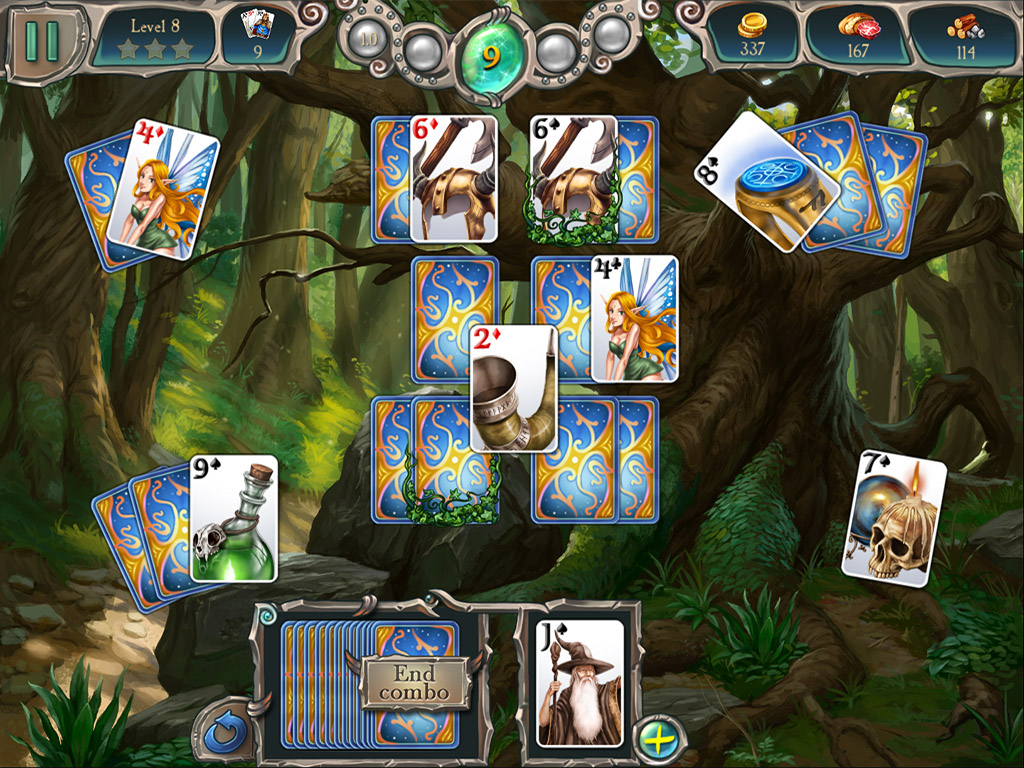
Anawiki Games has announced Avalon Legends Solitaire 2 for OS X. Blending solitaire gameplay with kingdom-building progression, this sequel casts the player in the role of the Royal Druid as he seeks to gather resources through the use of his magic cards, and rebuild the kingdom in Arthur's absence. Avalon Legends Solitaire 2 introduces a great deal more gameplay in between the levels.The game features 300 levels and high-definition graphics optimized for large screens and Retina displays.
Stargard Szczecinski, Poland - Anawiki Games has announced the release of Avalon Legends Solitaire 2, a highly-entertaining blend of solitaire gameplay and kingdom building. It is the third game in the company's Avalon series, following up on the success of both Runes of Avalon and the original Avalon Legends Solitaire, which was released in 2011.
The game is currently available exclusively through the developer's website, and will be released on major portals and the Mac App Store in May. An iOS version for iPad and iPhone is also in the works.
"The idea behind the original Avalon Legends Solitaire was to take two things that have always worked well for us - the Avalon setting, and solitaire games - and blend them together," says Roman Budzowski, Anawiki owner and lead developer, "It seemed like a sure recipe for a hit, and sure enough, the game did well, so we knew we'd have to do a sequel sooner or later."
The sequel's story begins shortly after the events of the original game. Having saved King Arthur's life, the Druids of Avalon have formed a close alliance with Camelot and maintain a permanent presence in Arthur's court in the form of the Royal Druid, Mallard. A time of peace follows, only to be interrupted by a goblin invasion. With Camelot lying in ruins and Arthur away at war, the player takes on the role of Mallard as he seeks to gather resources and rebuild the kingdom.
Although the solitaire mechanics stick close to the model established by the first game, Avalon Legends Solitaire 2 introduces a great deal more gameplay in between the levels.
"After the original Avalon Legends Solitaire, we did another solitaire game in a different setting, called Seven Seas Solitaire," explains Budzowski, "One thing we discovered through that game is that players really enjoy building things, so we decided to bring that back into the Avalon world, but in an even more central way. Building is really the primary objective of the game now, and playing solitaire is how you do that."
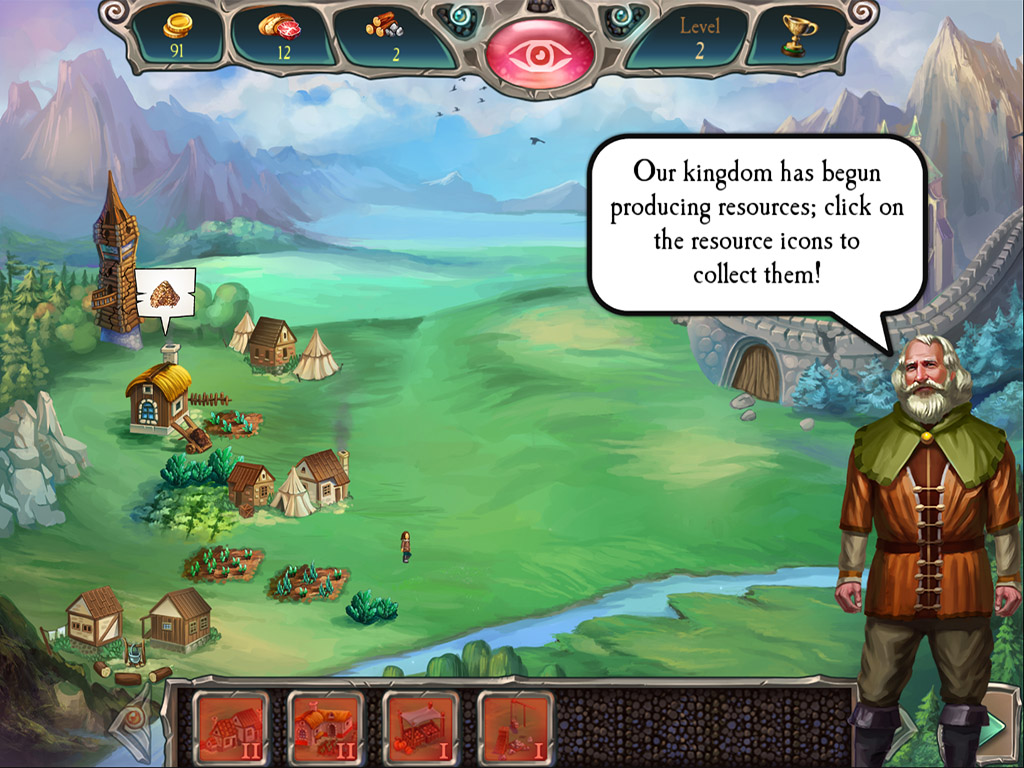
By beating solitaire levels, the player earns the three resources needed to rebuild Camelot: Gold, Food and Materials. The player must then choose carefully how to prioritize his reconstruction efforts; the buildings are not merely cosmetic upgrades to the kingdom screen, but provide tangible benefits to the player, producing additional resources, allowing the purchase of power-ups and more.
Avalon Legends Solitaire 2 was a year and a half in the making, and the effort shows. There are 300 levels to play, 30 buildings to construct and a whopping 24 different power-ups to purchase, each with its own unique effects on the gameplay. The artwork is gorgeous, and all of it was crafted at 2048 x 1536 resolution, so it's crisp and detailed even on larger screens and Retina displays.
Based on their performance, players are awarded a one-, two- or three-star grade for each level. Three stars are only awarded for completely clearing a level, which can become quite tricky as the game progresses. There's no limit to the number of attempts a player can make in order to chase that elusive third star, however, so the game offers a huge number of hours of play as well as lots of replay value.
Anawiki Games: http://www.anawiki.com
Avalon Legends Solitaire 2: http://www.anawiki.com/game/avalon-legends-solitaire-2
Download Avalon Legends Solitaire 2: http://www.anawiki.com/download/avalon-legends-solitaire-2?os=mac
Screenshot 1: http://www.anawiki.com/screens/anawiki/avalon-legends-solitaire-2/b1.jpg
Screenshot 2: http://www.anawiki.com/screens/anawiki/avalon-legends-solitaire-2/b2.jpg
Screenshot 3: http://www.anawiki.com/screens/anawiki/avalon-legends-solitaire-2/b3.jpg
Based in Stargard Szczecinski, Poland, Anawiki Games was founded in 2004 as a small independent game developer, with a focus on casual games, emphasizing storytelling as well as game play. Anawiki crated games like Runes of Avalon, Seven Seas Solitaire, Arizona Rose and Magic Heroes. Copyright (C) 2015 Anawiki Games. All Rights Reserved. Apple, the Apple logo and Mac OS X platforms are trademarks of Apple Inc. in the U.S. and/or other countries.
*******
Link To Article: http://prmac.com/release-id-74730.htm
*******
---------------------------------------------------------------------------------
Note that you can alter delivered distributions at any time.
Login to your account on prMac to alter your channel selection, or to opt-out at any time.


VideoSoap-iOS Video App for Audio Restoration available on the App Store
A new article has been published at prMac.
VideoSoap-iOS Video App for Audio Restoration available on the App Store - Published on 05/05/15
The new VideoSoap iOS app offers audio restoration for videos. VideoSoap is so easy-to-use that even average consumers can use it to fix audio problems, without requiring any audio expertise. VideoSoap solves common audio noise problems like background noises, distortion, and low-volume while providing production-quality enhancement of the video's audio. The iOS app is ideal for users who want great sounding audio on their video projects such as family movies, interviews, and training videos.
Sausalito, California - The new VideoSoap app offers easy-to-use audio restoration for videos on the Apple iPhone and iPad. VideoSoap is so easy-to-use that even average consumers can use it to fix audio problems, without requiring any audio expertise. VideoSoap solves audio noise problems like unwanted hiss and background noises, distortion, low-volume, and also provides production-quality enhancement of the video's audio. The iOS app is ideal for users who want great sounding audio on their video projects such as family movies, interviews, and training videos.
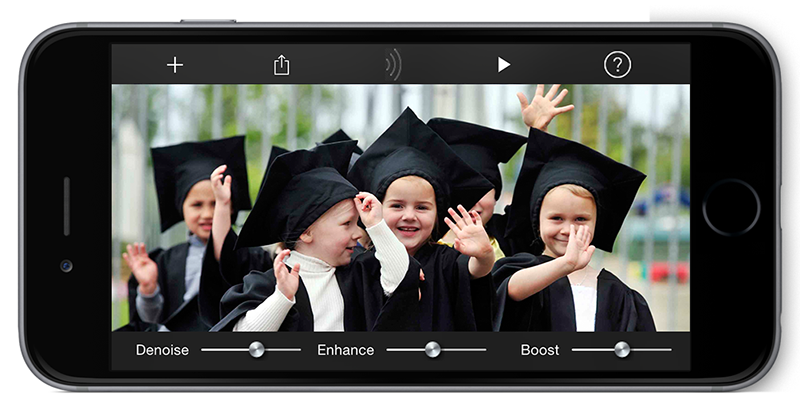
VideoSoap is built on the award-winning SoundSoap noise reduction technology used by thousands of audio professionals and enthusiasts worldwide to deliver stunning audio in their video and audio projects. VideoSoap allows users to open a video stored on their iOS device, adjust a few simple controls, and then save the video back to their Camera Roll or share the video over Facebook, Email, Messaging, AirDrop, and other destinations. The resulting videos have no loss of video quality.
With its highly intelligent Learn Noise feature, VideoSoap pinpoints the sounds to remove while leaving the rest of the audio intact. A de-clipping feature automatically detects and fixes distortion on audio that was recorded too loud, using advanced digital signal processing. The de-clipper produces stunning restorations of clipped audio. VideoSoap also features a Volume Booster to intelligently boost the volume of audio tracks that are too quiet. VideoSoap's digital signal processing increases the loudness of the audio without introducing distortion.
"Our audio restoration technologies have always been exciting because they are so accessible to the average consumer," said Steve Berkley, Founder of Soundness. "Mobile devices are where people are recording and uploading their videos now, so we are thrilled to bring this amazing technology to a mobile workflow."
Device Requirements:
* iPhone, iPad, and iPod touch
* Requires iOS 8.2 or later
* 10.8 MB
Pricing and Availability:
VideoSoap 4.0.2 is $24.99 USD (or equivalent amount in other currencies) and available worldwide exclusively through the App Store in the Photo & Video category.
Soundness: http://www.soundness-llc.com
VideoSoap 4.0.2: http://www.soundness-llc.com/products/videosoap/
Purchase and Download: https://itunes.apple.com/app/videosoap/id950170166
Screenshot: http://www.soundness-llc.com/products/videosoap/images/vs_iphone.png
App Icon: http://www.soundness-llc.com/products/videosoap/images/vsicon.png
Soundness is a privately held audio technology company based in Sausalito, CA USA. Soundness products are tailored for consumers and professionals alike, with the common goal of augmenting the audio listening experience. From the audio pulsing through your headphones to the professional recording studios that put it all together, Soundness technology powers extraordinary audio for everyone. All Material and Software (C) Copyright 2015 Soundness Corporation. All Rights Reserved. Apple, the Apple logo, OS X, iPad, iPhone, iPod and Macintosh are registered trademarks of Apple Inc. in the U.S. and/or other countries. Other trademarks and registered trademarks may be the property of their respective owners.
*******
Link To Article: http://prmac.com/release-id-74729.htm
*******
---------------------------------------------------------------------------------
Note that you can alter delivered distributions at any time.
Login to your account on prMac to alter your channel selection, or to opt-out at any time.
VideoSoap-iOS Video App for Audio Restoration available on the App Store - Published on 05/05/15
The new VideoSoap iOS app offers audio restoration for videos. VideoSoap is so easy-to-use that even average consumers can use it to fix audio problems, without requiring any audio expertise. VideoSoap solves common audio noise problems like background noises, distortion, and low-volume while providing production-quality enhancement of the video's audio. The iOS app is ideal for users who want great sounding audio on their video projects such as family movies, interviews, and training videos.
Sausalito, California - The new VideoSoap app offers easy-to-use audio restoration for videos on the Apple iPhone and iPad. VideoSoap is so easy-to-use that even average consumers can use it to fix audio problems, without requiring any audio expertise. VideoSoap solves audio noise problems like unwanted hiss and background noises, distortion, low-volume, and also provides production-quality enhancement of the video's audio. The iOS app is ideal for users who want great sounding audio on their video projects such as family movies, interviews, and training videos.
VideoSoap is built on the award-winning SoundSoap noise reduction technology used by thousands of audio professionals and enthusiasts worldwide to deliver stunning audio in their video and audio projects. VideoSoap allows users to open a video stored on their iOS device, adjust a few simple controls, and then save the video back to their Camera Roll or share the video over Facebook, Email, Messaging, AirDrop, and other destinations. The resulting videos have no loss of video quality.
With its highly intelligent Learn Noise feature, VideoSoap pinpoints the sounds to remove while leaving the rest of the audio intact. A de-clipping feature automatically detects and fixes distortion on audio that was recorded too loud, using advanced digital signal processing. The de-clipper produces stunning restorations of clipped audio. VideoSoap also features a Volume Booster to intelligently boost the volume of audio tracks that are too quiet. VideoSoap's digital signal processing increases the loudness of the audio without introducing distortion.
"Our audio restoration technologies have always been exciting because they are so accessible to the average consumer," said Steve Berkley, Founder of Soundness. "Mobile devices are where people are recording and uploading their videos now, so we are thrilled to bring this amazing technology to a mobile workflow."
Device Requirements:
* iPhone, iPad, and iPod touch
* Requires iOS 8.2 or later
* 10.8 MB
Pricing and Availability:
VideoSoap 4.0.2 is $24.99 USD (or equivalent amount in other currencies) and available worldwide exclusively through the App Store in the Photo & Video category.
Soundness: http://www.soundness-llc.com
VideoSoap 4.0.2: http://www.soundness-llc.com/products/videosoap/
Purchase and Download: https://itunes.apple.com/app/videosoap/id950170166
Screenshot: http://www.soundness-llc.com/products/videosoap/images/vs_iphone.png
App Icon: http://www.soundness-llc.com/products/videosoap/images/vsicon.png

Soundness is a privately held audio technology company based in Sausalito, CA USA. Soundness products are tailored for consumers and professionals alike, with the common goal of augmenting the audio listening experience. From the audio pulsing through your headphones to the professional recording studios that put it all together, Soundness technology powers extraordinary audio for everyone. All Material and Software (C) Copyright 2015 Soundness Corporation. All Rights Reserved. Apple, the Apple logo, OS X, iPad, iPhone, iPod and Macintosh are registered trademarks of Apple Inc. in the U.S. and/or other countries. Other trademarks and registered trademarks may be the property of their respective owners.
*******
Link To Article: http://prmac.com/release-id-74729.htm
*******
---------------------------------------------------------------------------------
Note that you can alter delivered distributions at any time.
Login to your account on prMac to alter your channel selection, or to opt-out at any time.
Indigo Domotics Releases New iOS Control Client
A new article has been published at prMac.
Indigo Domotics Releases New iOS Control Client - Published on 05/04/15
Indigo Domotics today announces Indigo Touch 2.0, a major update of its popular control client for iOS devices. Indigo Touch is optimized for remotely controlling lighting, appliances, HVAC, ceiling fans, sprinklers and more. It will automatically connect to the required Indigo Smart Home Hub software installed in your home on a Mac, to communicate with Z-Wave, INSTEON and/or X10 compatible hardware. This major version adds many new features including full support for all Indigo device types.
Dallas, Texas - Indigo Domotics, the leading provider of smart home hub software for the Apple(R) Mac(R) platform, today announced the immediate availability of Indigo Touch 2.0 for iOS, a major update of its popular control app. Indigo Domotics has long been the leader in Mac-based smart home hub software. This major new version of the Indigo Touch control app adds many new features including full support for all Indigo device types.
"The new features in Indigo Touch 2.0 add significant usability advancements for our customers. One of the most requested features is the ability to view the Event Log. This not only helps users verify actions and diagnose issues more quickly, but helps monitor the health of the system," said Jay Martin, CEO.
The release includes other often requested features, such as full device details for all devices including custom states and connection status, additional controls for all built-in device types, inline device controls in tables, and control tap sounds to confirm when a control has been touched. All iOS devices are supported at their native screen sizes, and graphical control pages have improved rendering and responsiveness.
"Indigo Touch 2.0 represents a complete redesign of the app. It is now a modern iOS App, designed from the ground up to have the iOS 7/8 look and feel. This includes all new graphics created specifically to match iOS guidelines," said Matt Bendiksen, CTO. "We also spent significant time making sure that the release was rock solid and optimized for the fastest possible device responsiveness."
Device Requirements:
* iPhone, iPad, and iPod touch
* Optimized for iPhone 5, iPhone 6/6 Plus
* Requires iOS 7.1 or later
* 7.7 MB
Pricing and Availability:
Indigo Touch 2.0 (app) is Free and available worldwide exclusively through the App Store in the Lifestyle category. Those interested in Indigo can download the Indigo Touch App online and connect to a demo server. A free 30-day trial of the Indigo software may also be requested from Perceptive Automation online. Indigo Touch 2.0 will connect to the Indigo v4 and up. Full functionality requires Indigo v6.1.0 or later, which is a free upgrade to all Indigo 6 users. Discounted upgrade pricing is available from Indigo 4 and 5 to Indigo 6.
Indigo Touch 2.0.5: http://www.indigodomo.com/touch.html
Download from iTunes: https://itunes.apple.com/app/indigo-touch/id305247971
Screenshot 1: http://cloud.goprism.com/screenshots/indigo_touch_2_device_page.png
Screenshot 2: http://cloud.goprism.com/screenshots/indigo_touch_2_irrigation_page.png
Screenshot 3: http://cloud.goprism.com/screenshots/indigo_touch_2_control_page.png
Screenshot 4: http://cloud.goprism.com/screenshots/indigo_touch_2_event_log.png
Founded in 2002, Indigo Domotics is the provider of Indigo, an intuitive suite of software and services that make creating the smart home easy. Indigo is the only Mac-based smart home solution that supports INSTEON, Z-Wave, and X10 natively and simultaneously, with over 110 3rd party plugins that provide support for hundreds of other smart devices, protocols, and services. Indigo Domotics and Indigo are trademarks of Perceptive Automation, LLC. Other company and product names may be trademarks of their respective owners.
*******
Link To Article: http://prmac.com/release-id-74772.htm
*******
---------------------------------------------------------------------------------
Note that you can alter delivered distributions at any time.
Login to your account on prMac to alter your channel selection, or to opt-out at any time.
Indigo Domotics Releases New iOS Control Client - Published on 05/04/15
Indigo Domotics today announces Indigo Touch 2.0, a major update of its popular control client for iOS devices. Indigo Touch is optimized for remotely controlling lighting, appliances, HVAC, ceiling fans, sprinklers and more. It will automatically connect to the required Indigo Smart Home Hub software installed in your home on a Mac, to communicate with Z-Wave, INSTEON and/or X10 compatible hardware. This major version adds many new features including full support for all Indigo device types.
Dallas, Texas - Indigo Domotics, the leading provider of smart home hub software for the Apple(R) Mac(R) platform, today announced the immediate availability of Indigo Touch 2.0 for iOS, a major update of its popular control app. Indigo Domotics has long been the leader in Mac-based smart home hub software. This major new version of the Indigo Touch control app adds many new features including full support for all Indigo device types.
"The new features in Indigo Touch 2.0 add significant usability advancements for our customers. One of the most requested features is the ability to view the Event Log. This not only helps users verify actions and diagnose issues more quickly, but helps monitor the health of the system," said Jay Martin, CEO.
The release includes other often requested features, such as full device details for all devices including custom states and connection status, additional controls for all built-in device types, inline device controls in tables, and control tap sounds to confirm when a control has been touched. All iOS devices are supported at their native screen sizes, and graphical control pages have improved rendering and responsiveness.
"Indigo Touch 2.0 represents a complete redesign of the app. It is now a modern iOS App, designed from the ground up to have the iOS 7/8 look and feel. This includes all new graphics created specifically to match iOS guidelines," said Matt Bendiksen, CTO. "We also spent significant time making sure that the release was rock solid and optimized for the fastest possible device responsiveness."
Device Requirements:
* iPhone, iPad, and iPod touch
* Optimized for iPhone 5, iPhone 6/6 Plus
* Requires iOS 7.1 or later
* 7.7 MB
Pricing and Availability:
Indigo Touch 2.0 (app) is Free and available worldwide exclusively through the App Store in the Lifestyle category. Those interested in Indigo can download the Indigo Touch App online and connect to a demo server. A free 30-day trial of the Indigo software may also be requested from Perceptive Automation online. Indigo Touch 2.0 will connect to the Indigo v4 and up. Full functionality requires Indigo v6.1.0 or later, which is a free upgrade to all Indigo 6 users. Discounted upgrade pricing is available from Indigo 4 and 5 to Indigo 6.
Indigo Touch 2.0.5: http://www.indigodomo.com/touch.html
Download from iTunes: https://itunes.apple.com/app/indigo-touch/id305247971
Screenshot 1: http://cloud.goprism.com/screenshots/indigo_touch_2_device_page.png

Screenshot 2: http://cloud.goprism.com/screenshots/indigo_touch_2_irrigation_page.png

Screenshot 3: http://cloud.goprism.com/screenshots/indigo_touch_2_control_page.png

Screenshot 4: http://cloud.goprism.com/screenshots/indigo_touch_2_event_log.png

Founded in 2002, Indigo Domotics is the provider of Indigo, an intuitive suite of software and services that make creating the smart home easy. Indigo is the only Mac-based smart home solution that supports INSTEON, Z-Wave, and X10 natively and simultaneously, with over 110 3rd party plugins that provide support for hundreds of other smart devices, protocols, and services. Indigo Domotics and Indigo are trademarks of Perceptive Automation, LLC. Other company and product names may be trademarks of their respective owners.
*******
Link To Article: http://prmac.com/release-id-74772.htm
*******
---------------------------------------------------------------------------------
Note that you can alter delivered distributions at any time.
Login to your account on prMac to alter your channel selection, or to opt-out at any time.
Evade Maze for iOS - Fun and Fast Paced Continuing Space Game
A new article has been published at prMac.
Evade Maze for iOS - Fun and Fast Paced Continuing Space Game - Published on 05/04/15
Comis D.o.o announces Evade Maze 1.0.6, its latest game title for iOS, Android and Html5. Attracting both young and adult game players alike with its unique concept, Evade Maze is an educational and fast-paced game where players need to evade space objects. Players have to drag their Alien Player using a mouse or the touch commands and so evade being caught. The app has a wide range of problem-solving games that assist kids in improving their memory and focus skills.
Velenje, Slovenia - Comis D.o.o, an innovative game development company, is proud to announce the release of Evade Maze 1.0.6, its latest game title for iOS, Android and Html5. Attracting both young and adult game players alike with its unique concept, Evade Maze is an educational and fast-paced game where players need to evade space objects.
According to sources, Evade Maze is helping kids develop their intelligence and reasoning power with its impressive concept and features. The app is found helpful for improving concentration skills and memory in children. The game is absolutely free and easy for kids to play. They just have use the drag and drop feature or click anywhere in the game.
Speaking to the media, a representative from the company stated, "We are happy that our new app is helping kids develop better skills and memory power. The Evade Maze app features fast-paced gameplay that will surprise even top skilled players. The concept of the game is 'evade and survive' using easy learned tricks. We have designed the game as an educational app for children aged four to twelve. However adults can also enjoy the game." He further added, "We aim to help people relieve the stress of daily life by playing innovative and fun games."
Experts also found that playing Evade Maze can help kids improve their concentration levels and enhance memory. This is an educational app designed for iPhone, iPad and all Android devices. The app has a wide range of problem-solving games that assist kids in improving their remembrance and focus skills. At present this game is available in English.
Players have to drag their 'Alien Player' using a mouse or the touch commands and so evade being caught. The game does not have levels as such; players should just evade until they are caught. The fast-paced features in the game make it get faster and more difficult with time. Evade Maze is getting an amazing response and positive reviews from experts and critics for its captivating content and impressive animations. According to some game experts, playing this game regularly for few hours can help a child enhance their mental growth and skills. Parents are also finding the game concept useful for their children. Players can make the game more interesting by competing with others worldwide and attempting to beat other's high scores.
When contacted, Rick Brown from NY said, "Evade Maze is such a cute game with an interesting format for kids. My eight years old son is a huge fan of this game. Sometimes I also play the game to relieve stress and I feel like a kid again. The most important thing about this game is that you do not have to be highly tech savvy or use your mind on an extreme level. The easy to go concept makes it perfect for the kids and the adults."
Device Requirements:
* iPhone, iPad, and iPod touch
* Requires iOS 8.0 or later
* 20.6 MB
Pricing and Availability:
Evade Maze 1.0.6 is Free and available worldwide exclusively through the App Store in the Games category.
Evade Maze 1.0.6: http://evademaze.com
Download from iTunes: https://itunes.apple.com/app/id946174876
Screenshot 1: http://evademaze.com/wp-content/uploads/2014/10/evade-maze_scr2.png
Screenshot 2: http://evademaze.com/wp-content/uploads/2014/10/evade-maze_scr5.png
Screenshot 3: http://evademaze.com/wp-content/uploads/2014/10/evade-maze_scr4.png
App Icon: http://evademaze.com/wp-content/uploads/2015/04/icon-256.png
Comis d.o.o. is a new and innovative game development company for iOS, Android and html5 games. The Slovenian company is using the latest technology to develop fast paced games for everyone. The company's mission is to see everyone happy while playing their games. All Material and Software (C) Copyright 2015 Comis d.o.o.. All Rights Reserved. Apple, the Apple logo, iPhone, iPod and iPad are registered trademarks of Apple Inc. in the U.S. and/or other countries. Other trademarks and registered trademarks may be the property of their respective owners.
*******
Link To Article: http://prmac.com/release-id-74771.htm
*******
---------------------------------------------------------------------------------
Note that you can alter delivered distributions at any time.
Login to your account on prMac to alter your channel selection, or to opt-out at any time.
Evade Maze for iOS - Fun and Fast Paced Continuing Space Game - Published on 05/04/15
Comis D.o.o announces Evade Maze 1.0.6, its latest game title for iOS, Android and Html5. Attracting both young and adult game players alike with its unique concept, Evade Maze is an educational and fast-paced game where players need to evade space objects. Players have to drag their Alien Player using a mouse or the touch commands and so evade being caught. The app has a wide range of problem-solving games that assist kids in improving their memory and focus skills.
Velenje, Slovenia - Comis D.o.o, an innovative game development company, is proud to announce the release of Evade Maze 1.0.6, its latest game title for iOS, Android and Html5. Attracting both young and adult game players alike with its unique concept, Evade Maze is an educational and fast-paced game where players need to evade space objects.
According to sources, Evade Maze is helping kids develop their intelligence and reasoning power with its impressive concept and features. The app is found helpful for improving concentration skills and memory in children. The game is absolutely free and easy for kids to play. They just have use the drag and drop feature or click anywhere in the game.
Speaking to the media, a representative from the company stated, "We are happy that our new app is helping kids develop better skills and memory power. The Evade Maze app features fast-paced gameplay that will surprise even top skilled players. The concept of the game is 'evade and survive' using easy learned tricks. We have designed the game as an educational app for children aged four to twelve. However adults can also enjoy the game." He further added, "We aim to help people relieve the stress of daily life by playing innovative and fun games."
Experts also found that playing Evade Maze can help kids improve their concentration levels and enhance memory. This is an educational app designed for iPhone, iPad and all Android devices. The app has a wide range of problem-solving games that assist kids in improving their remembrance and focus skills. At present this game is available in English.
Players have to drag their 'Alien Player' using a mouse or the touch commands and so evade being caught. The game does not have levels as such; players should just evade until they are caught. The fast-paced features in the game make it get faster and more difficult with time. Evade Maze is getting an amazing response and positive reviews from experts and critics for its captivating content and impressive animations. According to some game experts, playing this game regularly for few hours can help a child enhance their mental growth and skills. Parents are also finding the game concept useful for their children. Players can make the game more interesting by competing with others worldwide and attempting to beat other's high scores.
When contacted, Rick Brown from NY said, "Evade Maze is such a cute game with an interesting format for kids. My eight years old son is a huge fan of this game. Sometimes I also play the game to relieve stress and I feel like a kid again. The most important thing about this game is that you do not have to be highly tech savvy or use your mind on an extreme level. The easy to go concept makes it perfect for the kids and the adults."
Device Requirements:
* iPhone, iPad, and iPod touch
* Requires iOS 8.0 or later
* 20.6 MB
Pricing and Availability:
Evade Maze 1.0.6 is Free and available worldwide exclusively through the App Store in the Games category.
Evade Maze 1.0.6: http://evademaze.com
Download from iTunes: https://itunes.apple.com/app/id946174876
Screenshot 1: http://evademaze.com/wp-content/uploads/2014/10/evade-maze_scr2.png

Screenshot 2: http://evademaze.com/wp-content/uploads/2014/10/evade-maze_scr5.png

Screenshot 3: http://evademaze.com/wp-content/uploads/2014/10/evade-maze_scr4.png

App Icon: http://evademaze.com/wp-content/uploads/2015/04/icon-256.png

Comis d.o.o. is a new and innovative game development company for iOS, Android and html5 games. The Slovenian company is using the latest technology to develop fast paced games for everyone. The company's mission is to see everyone happy while playing their games. All Material and Software (C) Copyright 2015 Comis d.o.o.. All Rights Reserved. Apple, the Apple logo, iPhone, iPod and iPad are registered trademarks of Apple Inc. in the U.S. and/or other countries. Other trademarks and registered trademarks may be the property of their respective owners.
*******
Link To Article: http://prmac.com/release-id-74771.htm
*******
---------------------------------------------------------------------------------
Note that you can alter delivered distributions at any time.
Login to your account on prMac to alter your channel selection, or to opt-out at any time.
LinkedPIXEL Announces Scribblify 4.0 for iOS - Imaginative Paint App
A new article has been published at prMac.
LinkedPIXEL Announces Scribblify 4.0 for iOS - Imaginative Paint App - Published on 05/04/15
Celebrating the fourth anniversary of this unique and imaginative drawing app for iPhone, iPad and iPod touch, linkedPIXEL today announces the release of Scribblify 4.0. The update contains dozens of all new brushes and enhancements and has been fully optimized for iPhone 6+ and iOS 8+. Scribblify comes packed with 112 fun and original brushes and backgrounds (84 in the free version), many mirror and kaleidoscope drawing modes, dynamic color effects, a smudge tool and more.
Marshfield, Wisconsin - Celebrating the fourth anniversary of this unique and imaginative doodle app for iPhone, iPad and iPod touch, linkedPIXEL is thrilled to announce the release of Scribblify 4.0. With dozens of enhancements and new features plus 112 amazing brushes (84 in the free version), the latest installment of Scribblify promises to bring even more enjoyment to children and adults of all ages and skill levels.
Scribblify 4.0 has been optimized for better support and performance in iOS 8 and the latest line of iOS devices including the iPhone 6 and iPhone 6+. 28 additional brushes and backgrounds are now available, bringing the total number of brushes and backgrounds to 112 for paid users and 84 for those using the free version.
In addition, Scribblify 4.0 includes a new smear/smudge tool for advanced blending effects. A six-way kaleidoscope drawing mode is also available and image importing has been enhanced to utilize the full canvas area. All previously known issues and bugs were addressed in this version; the shake to erase feature has been fully restored to work with iOS 8 . Users on the high resolution iPhone 6+ will now have a larger drawing canvas and more space than they did with the previous version of Scribblify.
Key Features:
* Paint using 112 original brushes (84 in the free version) to create endlessly fascinating and creative compositions
* Choose from 560 brilliant base colors and create custom blends using a variety of innovative effects
* Select from 110 distinct background textures (84 in the free version)
* Create incredible kaleidoscope designs using any of Scribblify's unique brushes and color effects and various mirror mode options
* Enable plasma, multicolor, color variance and other effects to produce rich blending styles
* Smear the paint around the screen and manually blend colors using the smear / smudge tool
* Add a secondary color for advanced mixing with all of the other color effects
* Save art to your library or export it via email, text message, Twitter, Facebook, Flickr, Tumblr, Dropbox or Instagram
* Full retina support for the latest iPhones, iPod touches and iPads
* Ultra-smooth drawing capabilities with multi-touch support
New Features:
* 28 new and unique brushes and backgrounds
* New smear (smudge) tool for creative blending and dynamic effects
* Additional 6-way mirror kaleidoscope mode
* Fixed shake-to-erase feature not working in iOS 8
* Enhanced resolution and optimized for iPhone 6/6 and iOS 8
* Improved social sharing options including sending via text message (iOS 7 )
* Artwork can now be shared by email at full resolution
* Imported images will now scale to fill the entire canvas by default
* Dozens of assorted bug fixes and enhancements
From natural to abstract and everything in between, Scribblify allows anyone to create spectacular artwork in seconds--limited only by one's imagination. Scribblify is a universal app that works great across all iOS devices including iPhone, iPod touch, iPad and iPad Mini. With full retina and iPhone 6+ support, users will enjoy stunning clarity and larger drawing canvases when using any high resolution device including all of the latest Apple products.
Device Requirements:
* iPhone, iPad, and iPod touch
* Optimized for iPhone 5, iPhone 6/6 Plus
* Requires iOS 6.1 or later
* Universal Application
* 22.6 MB
Pricing and Availability:
Scribblify 4.0 is $1.99 USD (or equivalent amount in other currencies) and available worldwide exclusively through the App Store in the Entertainment category. There is also a free ad-supported version of Scribblify available. The full version includes over two dozen additional brushes and backgrounds, as well as a 14-point kaleidoscope mode not found in the free version. Help is available on the official Scribblify website. Please contact support for any assistance.
Scribblify 4.0: http://scribblify.com/
Download from iTunes: https://itunes.apple.com/app/id598393442
Purchase and Download: https://itunes.apple.com/app/id412842078
Art Gallery: http://scribblify.com/gallery.html
Screenshots: http://scribblify.com/marketing.html
App Icon: http://scribblify.com/icon.png
After more than a decade of contract-based desktop application and game development, linkedPIXEL LLC was formally established in 2010 to produce innovative and entertaining mobile applications for all ages. As a small indie company, linkedPIXEL is currently focused exclusively on developing and deploying iOS-compatible apps with plans of expanding to other digital markets in the near future. The first mobile application released by linkedPIXEL was Scribblify, a universal drawing application for iOS that gained popularity due to its unique brushes and color effects. Recently, linkedPIXEL LLC won three consecutive worldwide app development competitions sponsored by Intel, including the App Innovation Contest two years in a row for Scribblify and other apps. Copyright (C) 2010-2015 linkedPIXEL LLC. All Rights Reserved. Apple, the Apple logo, iPhone, iPod and iPad are registered trademarks of Apple Inc. in the U.S. and/or other countries.
*******
Link To Article: http://prmac.com/release-id-74766.htm
*******
---------------------------------------------------------------------------------
Note that you can alter delivered distributions at any time.
Login to your account on prMac to alter your channel selection, or to opt-out at any time.
LinkedPIXEL Announces Scribblify 4.0 for iOS - Imaginative Paint App - Published on 05/04/15
Celebrating the fourth anniversary of this unique and imaginative drawing app for iPhone, iPad and iPod touch, linkedPIXEL today announces the release of Scribblify 4.0. The update contains dozens of all new brushes and enhancements and has been fully optimized for iPhone 6+ and iOS 8+. Scribblify comes packed with 112 fun and original brushes and backgrounds (84 in the free version), many mirror and kaleidoscope drawing modes, dynamic color effects, a smudge tool and more.
Marshfield, Wisconsin - Celebrating the fourth anniversary of this unique and imaginative doodle app for iPhone, iPad and iPod touch, linkedPIXEL is thrilled to announce the release of Scribblify 4.0. With dozens of enhancements and new features plus 112 amazing brushes (84 in the free version), the latest installment of Scribblify promises to bring even more enjoyment to children and adults of all ages and skill levels.
Scribblify 4.0 has been optimized for better support and performance in iOS 8 and the latest line of iOS devices including the iPhone 6 and iPhone 6+. 28 additional brushes and backgrounds are now available, bringing the total number of brushes and backgrounds to 112 for paid users and 84 for those using the free version.
In addition, Scribblify 4.0 includes a new smear/smudge tool for advanced blending effects. A six-way kaleidoscope drawing mode is also available and image importing has been enhanced to utilize the full canvas area. All previously known issues and bugs were addressed in this version; the shake to erase feature has been fully restored to work with iOS 8 . Users on the high resolution iPhone 6+ will now have a larger drawing canvas and more space than they did with the previous version of Scribblify.
Key Features:
* Paint using 112 original brushes (84 in the free version) to create endlessly fascinating and creative compositions
* Choose from 560 brilliant base colors and create custom blends using a variety of innovative effects
* Select from 110 distinct background textures (84 in the free version)
* Create incredible kaleidoscope designs using any of Scribblify's unique brushes and color effects and various mirror mode options
* Enable plasma, multicolor, color variance and other effects to produce rich blending styles
* Smear the paint around the screen and manually blend colors using the smear / smudge tool
* Add a secondary color for advanced mixing with all of the other color effects
* Save art to your library or export it via email, text message, Twitter, Facebook, Flickr, Tumblr, Dropbox or Instagram
* Full retina support for the latest iPhones, iPod touches and iPads
* Ultra-smooth drawing capabilities with multi-touch support
New Features:
* 28 new and unique brushes and backgrounds
* New smear (smudge) tool for creative blending and dynamic effects
* Additional 6-way mirror kaleidoscope mode
* Fixed shake-to-erase feature not working in iOS 8
* Enhanced resolution and optimized for iPhone 6/6 and iOS 8
* Improved social sharing options including sending via text message (iOS 7 )
* Artwork can now be shared by email at full resolution
* Imported images will now scale to fill the entire canvas by default
* Dozens of assorted bug fixes and enhancements
From natural to abstract and everything in between, Scribblify allows anyone to create spectacular artwork in seconds--limited only by one's imagination. Scribblify is a universal app that works great across all iOS devices including iPhone, iPod touch, iPad and iPad Mini. With full retina and iPhone 6+ support, users will enjoy stunning clarity and larger drawing canvases when using any high resolution device including all of the latest Apple products.
Device Requirements:
* iPhone, iPad, and iPod touch
* Optimized for iPhone 5, iPhone 6/6 Plus
* Requires iOS 6.1 or later
* Universal Application
* 22.6 MB
Pricing and Availability:
Scribblify 4.0 is $1.99 USD (or equivalent amount in other currencies) and available worldwide exclusively through the App Store in the Entertainment category. There is also a free ad-supported version of Scribblify available. The full version includes over two dozen additional brushes and backgrounds, as well as a 14-point kaleidoscope mode not found in the free version. Help is available on the official Scribblify website. Please contact support for any assistance.
Scribblify 4.0: http://scribblify.com/
Download from iTunes: https://itunes.apple.com/app/id598393442
Purchase and Download: https://itunes.apple.com/app/id412842078
Art Gallery: http://scribblify.com/gallery.html
Screenshots: http://scribblify.com/marketing.html
App Icon: http://scribblify.com/icon.png

After more than a decade of contract-based desktop application and game development, linkedPIXEL LLC was formally established in 2010 to produce innovative and entertaining mobile applications for all ages. As a small indie company, linkedPIXEL is currently focused exclusively on developing and deploying iOS-compatible apps with plans of expanding to other digital markets in the near future. The first mobile application released by linkedPIXEL was Scribblify, a universal drawing application for iOS that gained popularity due to its unique brushes and color effects. Recently, linkedPIXEL LLC won three consecutive worldwide app development competitions sponsored by Intel, including the App Innovation Contest two years in a row for Scribblify and other apps. Copyright (C) 2010-2015 linkedPIXEL LLC. All Rights Reserved. Apple, the Apple logo, iPhone, iPod and iPad are registered trademarks of Apple Inc. in the U.S. and/or other countries.
*******
Link To Article: http://prmac.com/release-id-74766.htm
*******
---------------------------------------------------------------------------------
Note that you can alter delivered distributions at any time.
Login to your account on prMac to alter your channel selection, or to opt-out at any time.
Speak As You See Pronunciation App for iOS Available Free for 48 Hours
A new article has been published at prMac.
Speak As You See Pronunciation App for iOS Available Free for 48 Hours - Published on 05/04/15
The Speak As You See English pronunciation app for iOS will be available for free download for 48 hours only, from May 14-15, 2015. The app uses innovative 3D graphics to show what is happening inside the mouth when trying to pronounce some sounds and words in English. The app targets adults and children learning English as a foreign language and people with difficulties in speaking. Anyone downloading the app during the free 48 hour period will receive the full app.
Bangkok, Thailand - As children in many countries go back to school after their holidays, Learning Technologies International will be making life a little easier for some with a free download of their Speak As You See English Pronunciation 1.0 iOS app.
For 48 hours only, the Speak As You See iPhone/iPad universal app will be available for free on the Apple App Store. The free download will be from May 14-15, 2015.
App developer Neill deHaan said: "Even though the app is not expensive, we recognize that every penny counts for some parents, and some children without credit cards may want to download the app themselves - this is their chance."
There are no paid upgrades in the app so anybody downloading the app in the 48-hour period will get the full app and be entitled to any future upgrades for free also.
The app uses innovative 3D graphics to show what is happening inside the mouth when trying to pronounce some sounds and words in English. Senior Partner Scott Gannon said: "The app is designed equally for children and adults but we have noticed that children enjoy the graphics, especially those suffering with aphasia or communication disorders."
The Speak As You See iOS app targets adults and children learning English as a foreign language and people with difficulties in speaking (English). The app normally costs US$4.99.
A Windows/Macintosh version of the software including a special suction-cup mirror is also available at The Learning Technologies International website. (Windows/Mac software not included in free offer.)
Device Requirements:
* iPhone, iPad, and iPod touch
* Requires iOS 6.1 or later
* 216 MB
Pricing and Availability:
Speak As You See - Learn English Language Pronunciation 1.0 is normally $4.99 and is available exclusively worldwide in the App Store. The app will be available free for a limited time, from May 14-15, 2015.
Learning Technologies International: http://www.learningtechnologiesinternational.com
Speak As You See: http://www.learningtechnologiesinternational.com/product.html
Download: https://itunes.apple.com/app/speak-as-you-see-learn-english/id905746823
Screenshot: http://a1.mzstatic.com/us/r30/Purple3/v4/52/e3/fd/52e3fdc5-1aab-38ee-0f8c-1550d4a9bb17/screen480x480.jpeg
App Icon: http://a3.mzstatic.com/us/r30/Purple3/v4/f5/98/97/f5989764-b696-5264-470b-74d15cec52a6/icon175x175.jpeg
Learning Technologies International is a software company specializing in software to assist pronunciation for learners of English as a foreign language and for people with communication disorders. All Material and Software (C) Copyright 2015 Learning Technologies International. All Rights Reserved. Apple, the Apple logo, iPhone, iPod and iPad are registered trademarks of Apple Inc. in the U.S. and/or other countries. Other trademarks and registered trademarks may be the property of their respective owners.
*******
Link To Article: http://prmac.com/release-id-74770.htm
*******
---------------------------------------------------------------------------------
Note that you can alter delivered distributions at any time.
Login to your account on prMac to alter your channel selection, or to opt-out at any time.
Speak As You See Pronunciation App for iOS Available Free for 48 Hours - Published on 05/04/15
The Speak As You See English pronunciation app for iOS will be available for free download for 48 hours only, from May 14-15, 2015. The app uses innovative 3D graphics to show what is happening inside the mouth when trying to pronounce some sounds and words in English. The app targets adults and children learning English as a foreign language and people with difficulties in speaking. Anyone downloading the app during the free 48 hour period will receive the full app.
Bangkok, Thailand - As children in many countries go back to school after their holidays, Learning Technologies International will be making life a little easier for some with a free download of their Speak As You See English Pronunciation 1.0 iOS app.
For 48 hours only, the Speak As You See iPhone/iPad universal app will be available for free on the Apple App Store. The free download will be from May 14-15, 2015.
App developer Neill deHaan said: "Even though the app is not expensive, we recognize that every penny counts for some parents, and some children without credit cards may want to download the app themselves - this is their chance."
There are no paid upgrades in the app so anybody downloading the app in the 48-hour period will get the full app and be entitled to any future upgrades for free also.
The app uses innovative 3D graphics to show what is happening inside the mouth when trying to pronounce some sounds and words in English. Senior Partner Scott Gannon said: "The app is designed equally for children and adults but we have noticed that children enjoy the graphics, especially those suffering with aphasia or communication disorders."
The Speak As You See iOS app targets adults and children learning English as a foreign language and people with difficulties in speaking (English). The app normally costs US$4.99.
A Windows/Macintosh version of the software including a special suction-cup mirror is also available at The Learning Technologies International website. (Windows/Mac software not included in free offer.)
Device Requirements:
* iPhone, iPad, and iPod touch
* Requires iOS 6.1 or later
* 216 MB
Pricing and Availability:
Speak As You See - Learn English Language Pronunciation 1.0 is normally $4.99 and is available exclusively worldwide in the App Store. The app will be available free for a limited time, from May 14-15, 2015.
Learning Technologies International: http://www.learningtechnologiesinternational.com
Speak As You See: http://www.learningtechnologiesinternational.com/product.html
Download: https://itunes.apple.com/app/speak-as-you-see-learn-english/id905746823
Screenshot: http://a1.mzstatic.com/us/r30/Purple3/v4/52/e3/fd/52e3fdc5-1aab-38ee-0f8c-1550d4a9bb17/screen480x480.jpeg

App Icon: http://a3.mzstatic.com/us/r30/Purple3/v4/f5/98/97/f5989764-b696-5264-470b-74d15cec52a6/icon175x175.jpeg

Learning Technologies International is a software company specializing in software to assist pronunciation for learners of English as a foreign language and for people with communication disorders. All Material and Software (C) Copyright 2015 Learning Technologies International. All Rights Reserved. Apple, the Apple logo, iPhone, iPod and iPad are registered trademarks of Apple Inc. in the U.S. and/or other countries. Other trademarks and registered trademarks may be the property of their respective owners.
*******
Link To Article: http://prmac.com/release-id-74770.htm
*******
---------------------------------------------------------------------------------
Note that you can alter delivered distributions at any time.
Login to your account on prMac to alter your channel selection, or to opt-out at any time.
MyiCloudBackup.com: Download your iPhone iCloud Backups Online!
A new article has been published at prMac.
MyiCloudBackup.com: Download your iPhone iCloud Backups Online! - Published on 05/02/15
Apple fans and users are now in full control of their iCloud data. MyiCloudBackup.com is the best site to download iCloud Backups in 3 simple steps. MyiCloudBackup.com will download your iCloud backups and deliver them to your email. You can check for iCloud Backups for free. Recover all your iPhone, iPad or iPod touch Backups now! If it has an iCloud backup, you will be able to download and recover it easily via this extremely easy to use service.
New York City, NY - MyiCloudBackup.com unveils the most easy to use tool to download iCloud backups online available today. The extremely easy to use service works for iPhone, iPad or iPods, recover all iCloud backups no matter which Apple device you use. If it has an iCloud backup, you will be able to download and recover it easily.
"Long gone are the days where we couldn't even know where our iCloud Backups where stored" stated Mike, creator of MyiCloudBackup.com "We're thrilled to introduce the most easy to use service to download your iCloud Backups. It won't take you more than 30 seconds."
"I remember the day I lost my iPhone," continued Miller, "I was vacationing in South America and because I couldn't buy a new iPhone there, I realized until I buy a new one I wouldn't able to see and check all my photos. That's when I committed to create a simple service so people won't experience this anymore"
You can download your iCloud backups and even check them for FREE.
"I really would love to see Apple create this tool themselves but they don't," Mike said about being upset about Apple's complete control over their user's data. "Think about how wrong is it that they don't allow you to get your data if you don't buy a new device. That completely changed the game for me"
Pricing and Availability:
The MyiCloudBackup service is available at the MyiCloudBackup website. Users can check their iCloud backups for free.
MyiCloudBackup: http://www.MyiCloudBackup.com
How to Download an iCloud Backup: https://www.youtube.com/watch?v=qBDE1Y9l7To
Located in Manhattan, NY, MyiCloudBackup was founded in 2015 by Mike Miller. All Material and Software Copyright (C) 2015 MyiCloudBackup. All Rights Reserved. Apple, the Apple logo, iPhone, iPad and iPod are registered trademarks of Apple Inc. in the U.S. and/or other countries.
*******
Link To Article: http://prmac.com/release-id-74769.htm
*******
---------------------------------------------------------------------------------
Note that you can alter delivered distributions at any time.
Login to your account on prMac to alter your channel selection, or to opt-out at any time.
MyiCloudBackup.com: Download your iPhone iCloud Backups Online! - Published on 05/02/15
Apple fans and users are now in full control of their iCloud data. MyiCloudBackup.com is the best site to download iCloud Backups in 3 simple steps. MyiCloudBackup.com will download your iCloud backups and deliver them to your email. You can check for iCloud Backups for free. Recover all your iPhone, iPad or iPod touch Backups now! If it has an iCloud backup, you will be able to download and recover it easily via this extremely easy to use service.
New York City, NY - MyiCloudBackup.com unveils the most easy to use tool to download iCloud backups online available today. The extremely easy to use service works for iPhone, iPad or iPods, recover all iCloud backups no matter which Apple device you use. If it has an iCloud backup, you will be able to download and recover it easily.
"Long gone are the days where we couldn't even know where our iCloud Backups where stored" stated Mike, creator of MyiCloudBackup.com "We're thrilled to introduce the most easy to use service to download your iCloud Backups. It won't take you more than 30 seconds."
"I remember the day I lost my iPhone," continued Miller, "I was vacationing in South America and because I couldn't buy a new iPhone there, I realized until I buy a new one I wouldn't able to see and check all my photos. That's when I committed to create a simple service so people won't experience this anymore"
You can download your iCloud backups and even check them for FREE.
"I really would love to see Apple create this tool themselves but they don't," Mike said about being upset about Apple's complete control over their user's data. "Think about how wrong is it that they don't allow you to get your data if you don't buy a new device. That completely changed the game for me"
Pricing and Availability:
The MyiCloudBackup service is available at the MyiCloudBackup website. Users can check their iCloud backups for free.
MyiCloudBackup: http://www.MyiCloudBackup.com
How to Download an iCloud Backup: https://www.youtube.com/watch?v=qBDE1Y9l7To
Located in Manhattan, NY, MyiCloudBackup was founded in 2015 by Mike Miller. All Material and Software Copyright (C) 2015 MyiCloudBackup. All Rights Reserved. Apple, the Apple logo, iPhone, iPad and iPod are registered trademarks of Apple Inc. in the U.S. and/or other countries.
*******
Link To Article: http://prmac.com/release-id-74769.htm
*******
---------------------------------------------------------------------------------
Note that you can alter delivered distributions at any time.
Login to your account on prMac to alter your channel selection, or to opt-out at any time.
Subscribe to:
Posts (Atom)