A new article has been published at prMac.
New Wear Reader App Takes Reading Everywhere the Apple Watch Can Go - Published on 05/05/15
Massachusetts based Jacoh LLC introduces Wear Reader 1.1.0, their new app for iOS and Apple Watch. Wear Reader enables users to read books on-the-go right on their Apple Watch, without the need for tablets or physical copies of the reading material. While phone screens offer a large, handheld, and manual way of reading, Wear Reader delivers text in a unique manner. Words are displayed one at a time automatically, at an adjustable reading speed.
Cambridge, Massachusetts - The Wear Reader app by Jacoh enables users to read books on the go right on their Apple Watch without the need for tablets or physical copies of the reading material. Wear Reader rapidly displays text, one word after another, on the surface of the Apple Watch to enable users to read books quickly, yet remember all of the text they have read.
Avid readers often find themselves in situations where they have time to continue reading a book, but the space or circumstances do not allow them that opportunity," said Jason Boggess, CEO of Jacoh. "With Wear Reader, you can now pick up where you left off on the subway on the way home while still being able to hold on to the train with both hands and without worrying about someone knocking your phone or eReader out of your hands."
While phone screens offer a large, handheld, and manual way of reading, Wear Reader delivers text in a unique manner. Words are displayed one at a time automatically, at an adjustable reading speed. Readers can read as slow as 50 Word Per Minute (WPM) or as fast as 1000 and the reading pace is adjustable per book in case users want to take a classic novel slow, but an action-packed thriller fast. Serial presentation of text allows readers to suppress their inner vocalization of the book, enabling them to read faster while still retaining all the information. Readers are less likely to "space out" like some do while scanning long pages of text, as the automatic advancement of words keep wearers engaged.
Users can choose to view longer words for a longer amount of time or treat every word the same. There are also options to pause the flow after every chapter to catch a quick break, or continue reading right on through. The black text on a white background design reduces eyestrain associated with focusing on large blocks of text. The eyes also work less by staying in one place instead of darting around the pages of a book, which permits the reader to stay reading longer. The format lends itself to reading in dark or low-lighted areas, while improving battery life. For those that are curious about knowing how far they are into a book, progress bars appear on top of the reading screen to show how far the read is into the book and current chapter.
The app closely replicates the experience of quickly navigating a book, allowing readers to easily jump around chapters or change books without using their iPhone. Bookmarks automatically record the last position users were in for each book, so it is easy to pick up where you left off. Fast-forward and rewind options make re-read parts a breeze.
Features
* Imports ePub book format, Microsoft(C) Word Docx files, and Text Formats
* Adjustable speed to read at a quick or leisurely pace
* Quickly change books and chapters on both the iPhone and Apple Watch
* White text on a dark background reduces eyestrain and increases battery life
* Fast-forward and rewind buttons for quick navigation
* Have your entire library on the watch - no need to upload or download books
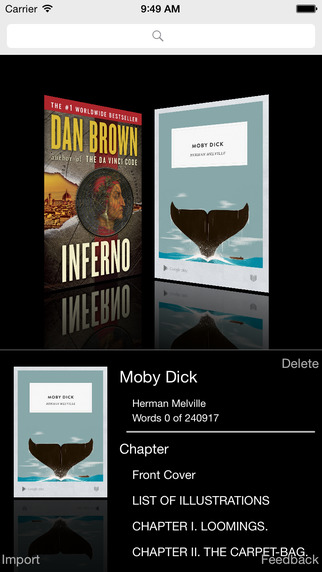
* Cover display for beautiful library browsing
The introduction of tablets and eReaders opened up new possibilities of reading on the go and carrying your entire library with you digitally," said Boggess. "Our app brings that dream to life by automating the reading process and taking books to new, unexpected locations. For the first time on Apple mobile platforms, you can now read and adventure, while having an adventure."
Device Requirements:
* iPhone, iPad, and iPod touch
* Compatible with Apple Watch paired with iPhone
* Optimized for iPhone 5, iPhone 6/6 Plus
* Requires iOS 8.2 or later
* 10.7 MB
Pricing and Availability:
Wear Reader 1.1.0 is $1.99 USD (or equivalent amount in other currencies) and available worldwide exclusively through the App Store in the Books category.
Wear Reader 1.1.0: http://wearreader.com/
Download from iTunes: https://itunes.apple.com/app/wear-reader/id955700510
Download from Google Play: https://play.google.com/store/apps/details?id=com.jacoh.wearreader
Screenshot 1: http://a1.mzstatic.com/us/r30/Purple1/v4/ed/a8/dd/eda8dd91-de56-d536-36b1-d9cb1dcc56d5/screen322x572.jpeg
Screenshot 2: http://a2.mzstatic.com/us/r30/Purple3/v4/a0/90/ba/a090ba03-9381-fb82-0d78-0e39d87d257d/screen390x390.jpeg
App Icon: http://a3.mzstatic.com/us/r30/Purple7/v4/f7/b3/35/f7b335f4-a7a1-016c-c1aa-0cf84adaa7c0/icon175x175.jpeg
Jacoh LLC is a Boston area startup looking to push the boundaries of technology. In addition to doing consulting and development for iOS, Android, and Web applications, Jacoh is actively pursuing research into the futures of computing and electronic collaboration. Wear Reader-related code, text, and images Copyright(C) 2015, Jacoh LLC. All Rights Reserved. Apple, the Apple logo, iPhone, are registered trademarks of Apple Inc. in the U.S. and/or other countries. Other trademarks and registered trademarks may be the property of their respective owners.
*******
Link To Article: http://prmac.com/release-id-74775.htm
*******
---------------------------------------------------------------------------------
Note that you can alter delivered distributions at any time.
Login to your account on prMac to alter your channel selection, or to opt-out at any time.



newMacgadgets Introduces The iPhone 6 Lock and Cable Security Kit
A new article has been published at prMac.
newMacgadgets Introduces The iPhone 6 Lock and Cable Security Kit - Published on 05/05/15
California based newMacgadgets has introduced the iPhone 6 Security Kit designed for the new iPhone 6 (4.7 model). The new iPhone 6 Security Kit adds to newMacgadget's popular line of security products designed exclusively for Apple's iPhone and iPad devices. The iPhone 6 Security Kit includes a 40" black PVC coated steel wire cable and brass padlock. Aluminum brackets, with rubber inserts, attach to the sides of iPhone 6 to provide a lightweight and secure fit.
San Diego, California - newMacgadgets has introduced the iPhone 6 Security Kit designed for the new iPhone 6 (4.7 model). The new iPhone 6 Security Kit adds to newMacgadget's popular line of security products designed exclusively for Apple's iPhone and iPad products. The new iPhone 6 Security Kit includes a 40" black PVC coated steel wire cable and brass padlock. Aluminum brackets, with included rubber inserts, attach to the sides of iPhone 6 to provide a lightweight and secure fit. Once secured the iPhone 6 has full-flexibility in any direction.
Also included, is a 4 1/2" clear acrylic stand for displaying the iPhone 6. The acrylic stand can be mounted to the table with a clear double sided adhesive strip (included), or with non-skid bump-on clear feet (also included).
Ideal uses for the iPhone 6 Security Kit include: retail store displays, trade-shows and conferences, schools, special events and dozens more. If you are looking for a secure and stylish solution for housing the new iPhone 6, then look no further.
newMacgadgets also plans on introducing a security kit for the full-size iPhone 6 in the next several months. Visit their site to view their full-line of products including their popular selling acrylic displays for the iPad, iPad mini and iPad Air.
iPhone 6 Security Kit: http://newpcgadgets.com/products/iphone_6_security_kit/
iPhone 6 Wall Mount: http://newpcgadgets.com/products/iphone_6_wall_mount/
Image (iPhone 6 Security Kit): http://newpcgadgets.com/products/iphone_6_security_kit/images/iphone_6_security_kit_lg.jpg
Image 2 (iPhone 6 Security Kit): http://newpcgadgets.com/products/iphone_6_security_kit/images/iphone_6_security_kit_rear_lg.jpg
Image 3 (iPhone 6 Security Kit): http://newpcgadgets.com/products/iphone_6_security_kit/images/iphone_6_security_kit_components_lg.jpg
Image (iPhone 6 Wall Mount): http://newpcgadgets.com/products/iphone_6_wall_mount/images/iphone-6-wall-mount-lrg_2.jpg
newMacgadgets a division of newPCgadgets, designs innovative products and accessories for Apple and PC computers, laptops and mobile devices. With over 20 years of experience they have designed over 150 products for large companies like Apple, IBM and Epson. Copyright (C) 2015 newMacgadgets. All Rights Reserved. Apple, the Apple logo, iPhone, iPod and iPad are registered trademarks of Apple Inc. in the U.S. and/or other countries.
*******
Link To Article: http://prmac.com/release-id-74787.htm
*******
---------------------------------------------------------------------------------
Note that you can alter delivered distributions at any time.
Login to your account on prMac to alter your channel selection, or to opt-out at any time.
newMacgadgets Introduces The iPhone 6 Lock and Cable Security Kit - Published on 05/05/15
California based newMacgadgets has introduced the iPhone 6 Security Kit designed for the new iPhone 6 (4.7 model). The new iPhone 6 Security Kit adds to newMacgadget's popular line of security products designed exclusively for Apple's iPhone and iPad devices. The iPhone 6 Security Kit includes a 40" black PVC coated steel wire cable and brass padlock. Aluminum brackets, with rubber inserts, attach to the sides of iPhone 6 to provide a lightweight and secure fit.
San Diego, California - newMacgadgets has introduced the iPhone 6 Security Kit designed for the new iPhone 6 (4.7 model). The new iPhone 6 Security Kit adds to newMacgadget's popular line of security products designed exclusively for Apple's iPhone and iPad products. The new iPhone 6 Security Kit includes a 40" black PVC coated steel wire cable and brass padlock. Aluminum brackets, with included rubber inserts, attach to the sides of iPhone 6 to provide a lightweight and secure fit. Once secured the iPhone 6 has full-flexibility in any direction.
Also included, is a 4 1/2" clear acrylic stand for displaying the iPhone 6. The acrylic stand can be mounted to the table with a clear double sided adhesive strip (included), or with non-skid bump-on clear feet (also included).
Ideal uses for the iPhone 6 Security Kit include: retail store displays, trade-shows and conferences, schools, special events and dozens more. If you are looking for a secure and stylish solution for housing the new iPhone 6, then look no further.
newMacgadgets also plans on introducing a security kit for the full-size iPhone 6 in the next several months. Visit their site to view their full-line of products including their popular selling acrylic displays for the iPad, iPad mini and iPad Air.
iPhone 6 Security Kit: http://newpcgadgets.com/products/iphone_6_security_kit/
iPhone 6 Wall Mount: http://newpcgadgets.com/products/iphone_6_wall_mount/
Image (iPhone 6 Security Kit): http://newpcgadgets.com/products/iphone_6_security_kit/images/iphone_6_security_kit_lg.jpg

Image 2 (iPhone 6 Security Kit): http://newpcgadgets.com/products/iphone_6_security_kit/images/iphone_6_security_kit_rear_lg.jpg

Image 3 (iPhone 6 Security Kit): http://newpcgadgets.com/products/iphone_6_security_kit/images/iphone_6_security_kit_components_lg.jpg

Image (iPhone 6 Wall Mount): http://newpcgadgets.com/products/iphone_6_wall_mount/images/iphone-6-wall-mount-lrg_2.jpg

newMacgadgets a division of newPCgadgets, designs innovative products and accessories for Apple and PC computers, laptops and mobile devices. With over 20 years of experience they have designed over 150 products for large companies like Apple, IBM and Epson. Copyright (C) 2015 newMacgadgets. All Rights Reserved. Apple, the Apple logo, iPhone, iPod and iPad are registered trademarks of Apple Inc. in the U.S. and/or other countries.
*******
Link To Article: http://prmac.com/release-id-74787.htm
*******
---------------------------------------------------------------------------------
Note that you can alter delivered distributions at any time.
Login to your account on prMac to alter your channel selection, or to opt-out at any time.
Get your digital copy of SHE Canada Magazine on Magzter
A new article has been published at prMac.
Get your digital copy of SHE Canada Magazine on Magzter - Published on 05/05/15
Canada's leading fashion, lifestyle and entertainment magazine, SHE Canada, is now available for global readers to purchase on Magzter, the world's largest and fastest growing global digital multi-platform magazine newsstand and bookstore. Established in 2012, SHE Canada magazine is affiliated with SHE Magazine, that has been in publication for 50 years. It is one of the most widely read English language publications by South Asian women between the ages 20 and 40 in Canada.
New York, New York - Canada's leading fashion, lifestyle and entertainment magazine, SHE Canada, is now available for global readers to purchase on the world's largest and fastest growing global digital multi-platform magazine newsstand and bookstore, Magzter. Established in 2012, SHE Canada magazine is affiliated with SHE Magazine, that has been in publication for 50 years.
SHE Canada is one of the most widely read English language publications by South Asian women between the ages 20 and 40 in Canada. SHE Canada's original and timely articles have been impressing the readers, while the editorial supremacy makes this magazine stand out from other fashion and lifestyle magazines. By partnering with Magzter, SHE Canada will now reach out to over 25 million subscribers across the world, who can enjoy reading the magazine any time on their favorite devices.
The latest issue of SHE Canada features exclusive interviews with Bollywood star Dia Mirza, and writer & director Afia Nathaniel. Don't miss out out on the most coveted fashion trends and the exciting travel story on Amsterdam.
"SHE Canada is excited to partner with Magzter in an effort to expand our reach and grow our online presence. Magzter makes it easy to promote your digital publication with easy to use functions, and efficient sales tools in addition to their network of 25 million subscribers. Their interactive platform engages the digital consumer on a global scale and allows you to feel confident that Magzter will help you reach your online goals." - Aly Zorn, Assistant National Account Director, SHE Canada
"We are delighted to have SHE Canada, one of the best-selling fashion magazines in Canada, on board. SHE Canada strikes the right chord with the South Asian women in Canada, thanks to the relatable and diverse stories on high fashion and lifestyle topics." - Girish Ramdas, CEO, Magzter Inc.
"SHE Canada magazine has been setting the fashion trends for people in Canada, and with Magzter, the magazine is all set to reach millions of fashionistas around the globe. I personally love their exclusive interviews, that reveal the candid side of the most sought-after celebrities." - Vijay Radhakrishnan, President, Magzter Inc.
Device Requirements:
* iPhone, iPad, and iPod touch
* Optimized for iPhone 5, iPhone 6/6 Plus
* Requires iOS 7.0 or later
* 16.8 MB
Pricing and Availability:
Magzter - Magazine & Book Store 4.2 is free and available worldwide through the App Store in the News category. A bi-monthly magazine, SHE Canada is priced at $12.99 (USD) for an annual subscription on Magzter. Magzter also launched a path-breaking "All You Can Read" subscription service called Magzter GOLD, which gives digital readers unlimited access to 2,000+ magazines for a low monthly price. The app is also available on Google Play, and Windows 8, the web, Amazon App Store, Kindle Fire, and NOOK and is expanding to more platforms soon. Magzter's easy purchase and renewal systems ensure subscriptions are paid on time, eliminating the need for paper checks and postal mail issues. Users can buy their magazines on any of the above devices/platforms and seamlessly port their purchases to any other devices, a feature unique to Magzter.
Magzter - Magazine & Book Store 4.2: http://www.magzter.com
Download from iTunes: https://itunes.apple.com/app/magzter-magazine-store/id412163953
Download from Google Play: https://play.google.com/store/apps/details?id=com.dci.magzter&hl=en
Download from Windows 8: http://apps.microsoft.com/windows/en-in/app/magzter/d6cf8e63-6af5-4710-b5e9-d3a0514292c6
Screenshot: http://cdn.magzter.com/1405620243/1430422944/images/thumb/390_thumb_1.jpg
App Icon: http://a2.mzstatic.com/us/r30/Purple5/v4/81/fc/d3/81fcd369-00cd-a585-26d7-ee2f176c3c4b/mzl.orihehsu.175x175-75.jpg
Magzter is the world's largest and fastest growing global digital multi-platform magazine newsstand and bookstore with over 25 million digital consumers, more than 5,500 magazines, thousands of books from over 2,500 publishers. Headquartered in New York, Magzter has its local offices in London, Paris, Barcelona, Munich, Amsterdam, Helsinki, Cape Town, Chennai and Singapore and will soon be expanding to other countries. Founded by global entrepreneurs, Girish Ramdas and Vijay Radhakrishnan in June 2011, Magzter enables magazine publishers around the world to create and deliver digital editions of their titles to global consumers. Powered by its proprietary OREY Click Publishing System(R), Magzter also enables their customers to publish interactive/audio-visual content in the magazine as it supports HTML5. Magzter launched Magzter GOLD subscription service to give digital readers unlimited access to thousands of magazines for a low monthly price.All Material and Software (C) Copyright
2015 Magzter Inc. All Rights Reserved. Apple, the Apple logo, iPhone, iPod and iPad are registered trademarks of Apple Inc. in the U.S. and/or other countries. Other trademarks and registered trademarks may be the property of their respective owners.
*******
Link To Article: http://prmac.com/release-id-74786.htm
*******
---------------------------------------------------------------------------------
Note that you can alter delivered distributions at any time.
Login to your account on prMac to alter your channel selection, or to opt-out at any time.
Get your digital copy of SHE Canada Magazine on Magzter - Published on 05/05/15
Canada's leading fashion, lifestyle and entertainment magazine, SHE Canada, is now available for global readers to purchase on Magzter, the world's largest and fastest growing global digital multi-platform magazine newsstand and bookstore. Established in 2012, SHE Canada magazine is affiliated with SHE Magazine, that has been in publication for 50 years. It is one of the most widely read English language publications by South Asian women between the ages 20 and 40 in Canada.
New York, New York - Canada's leading fashion, lifestyle and entertainment magazine, SHE Canada, is now available for global readers to purchase on the world's largest and fastest growing global digital multi-platform magazine newsstand and bookstore, Magzter. Established in 2012, SHE Canada magazine is affiliated with SHE Magazine, that has been in publication for 50 years.
SHE Canada is one of the most widely read English language publications by South Asian women between the ages 20 and 40 in Canada. SHE Canada's original and timely articles have been impressing the readers, while the editorial supremacy makes this magazine stand out from other fashion and lifestyle magazines. By partnering with Magzter, SHE Canada will now reach out to over 25 million subscribers across the world, who can enjoy reading the magazine any time on their favorite devices.
The latest issue of SHE Canada features exclusive interviews with Bollywood star Dia Mirza, and writer & director Afia Nathaniel. Don't miss out out on the most coveted fashion trends and the exciting travel story on Amsterdam.
"SHE Canada is excited to partner with Magzter in an effort to expand our reach and grow our online presence. Magzter makes it easy to promote your digital publication with easy to use functions, and efficient sales tools in addition to their network of 25 million subscribers. Their interactive platform engages the digital consumer on a global scale and allows you to feel confident that Magzter will help you reach your online goals." - Aly Zorn, Assistant National Account Director, SHE Canada
"We are delighted to have SHE Canada, one of the best-selling fashion magazines in Canada, on board. SHE Canada strikes the right chord with the South Asian women in Canada, thanks to the relatable and diverse stories on high fashion and lifestyle topics." - Girish Ramdas, CEO, Magzter Inc.
"SHE Canada magazine has been setting the fashion trends for people in Canada, and with Magzter, the magazine is all set to reach millions of fashionistas around the globe. I personally love their exclusive interviews, that reveal the candid side of the most sought-after celebrities." - Vijay Radhakrishnan, President, Magzter Inc.
Device Requirements:
* iPhone, iPad, and iPod touch
* Optimized for iPhone 5, iPhone 6/6 Plus
* Requires iOS 7.0 or later
* 16.8 MB
Pricing and Availability:
Magzter - Magazine & Book Store 4.2 is free and available worldwide through the App Store in the News category. A bi-monthly magazine, SHE Canada is priced at $12.99 (USD) for an annual subscription on Magzter. Magzter also launched a path-breaking "All You Can Read" subscription service called Magzter GOLD, which gives digital readers unlimited access to 2,000+ magazines for a low monthly price. The app is also available on Google Play, and Windows 8, the web, Amazon App Store, Kindle Fire, and NOOK and is expanding to more platforms soon. Magzter's easy purchase and renewal systems ensure subscriptions are paid on time, eliminating the need for paper checks and postal mail issues. Users can buy their magazines on any of the above devices/platforms and seamlessly port their purchases to any other devices, a feature unique to Magzter.
Magzter - Magazine & Book Store 4.2: http://www.magzter.com
Download from iTunes: https://itunes.apple.com/app/magzter-magazine-store/id412163953
Download from Google Play: https://play.google.com/store/apps/details?id=com.dci.magzter&hl=en
Download from Windows 8: http://apps.microsoft.com/windows/en-in/app/magzter/d6cf8e63-6af5-4710-b5e9-d3a0514292c6
Screenshot: http://cdn.magzter.com/1405620243/1430422944/images/thumb/390_thumb_1.jpg

App Icon: http://a2.mzstatic.com/us/r30/Purple5/v4/81/fc/d3/81fcd369-00cd-a585-26d7-ee2f176c3c4b/mzl.orihehsu.175x175-75.jpg

Magzter is the world's largest and fastest growing global digital multi-platform magazine newsstand and bookstore with over 25 million digital consumers, more than 5,500 magazines, thousands of books from over 2,500 publishers. Headquartered in New York, Magzter has its local offices in London, Paris, Barcelona, Munich, Amsterdam, Helsinki, Cape Town, Chennai and Singapore and will soon be expanding to other countries. Founded by global entrepreneurs, Girish Ramdas and Vijay Radhakrishnan in June 2011, Magzter enables magazine publishers around the world to create and deliver digital editions of their titles to global consumers. Powered by its proprietary OREY Click Publishing System(R), Magzter also enables their customers to publish interactive/audio-visual content in the magazine as it supports HTML5. Magzter launched Magzter GOLD subscription service to give digital readers unlimited access to thousands of magazines for a low monthly price.All Material and Software (C) Copyright
2015 Magzter Inc. All Rights Reserved. Apple, the Apple logo, iPhone, iPod and iPad are registered trademarks of Apple Inc. in the U.S. and/or other countries. Other trademarks and registered trademarks may be the property of their respective owners.
*******
Link To Article: http://prmac.com/release-id-74786.htm
*******
---------------------------------------------------------------------------------
Note that you can alter delivered distributions at any time.
Login to your account on prMac to alter your channel selection, or to opt-out at any time.
Disk Cartography Disk Space Analyzer Debuts in Mac App Store
A new article has been published at prMac.
Disk Cartography Disk Space Analyzer Debuts in Mac App Store - Published on 05/05/15
Atlanta based CleverFiles introduces Disk Cartography 1.1, their new new disk space analyzing tool for Mac OS X. On sale for a limited time, Disk Cartography enables anyone to quickly and easily map their drives and remove large files. It can map almost any type of drive connected to a Mac, including hard drives, memory cards, USB flash drives, and even network drives. Entire drives can be scanned, or users can choose to drill down to a specific folder or subfolder.
Atlanta, Georgia - CleverFiles is proud to introduce Disk Cartography to the Mac App Store. This professional disk analyzing tool makes visualizing and freeing up space on hard drives easy and efficient. Its unique folder structure visualization brings immediate clarity to drive storage, showing which apps, movies, photo and music collections are taking up the most space.
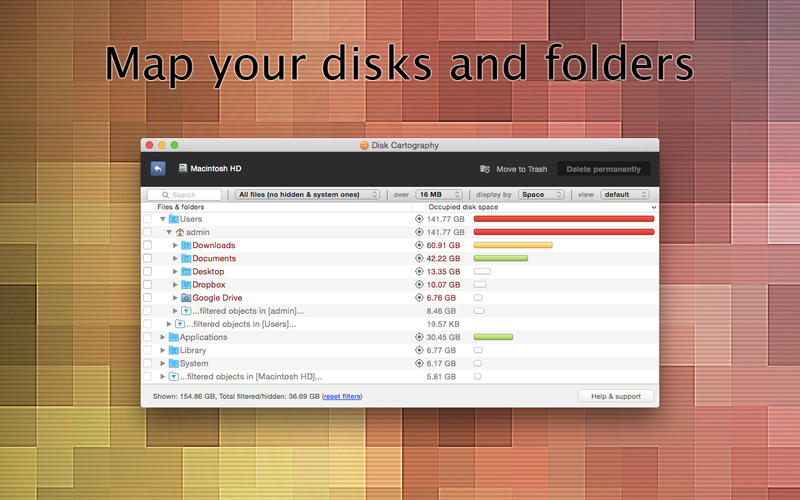
Disk Cartography can map almost any type of drive connected to a Mac - hard drives, memory cards, USB flash drives, and even network drives. Entire drives can be scanned, or users can choose to drill down to a specific folder or subfolder. This is useful to scan and clean out cloud-connected storage folders like Dropbox and Google Drive. Files and folders are color-coded so you can see at a glance which ones are taking up the most space.
Users can choose to sort the results by file/folder size, percentage of space used within a parent folder, or by number of files within a folder. Results can then be further filtered by file type, keyword, and file size. This means users can quickly and easily identify files that are taking up too much space. Once space hogs are identified, Disk Cartography makes it easy to delete the files and will immediately update the disk map in real time.
System Requirements:
* OS X 10.7 or later
* 64-bit processor
* 0.9 MB
Pricing and Availability:
Disk Cartography 1.1 is on sale for $1.99 for a limited time in the Mac App Store, till May 7th, 2015. The app is the brainchild of CleverFiles, based in Atlanta, Georgia.
Cleverfiles Software: http://www.cleverfiles.com/
Disk Cartography 1.1: https://itunes.apple.com/app/disk-cartography-clever-disk/id905264208
Screenshot: http://a4.mzstatic.com/us/r30/Purple5/v4/aa/69/74/aa6974a4-303d-9d7b-300d-056e581861ec/screen800x500.jpeg
Application Icon: http://a4.mzstatic.com/us/r30/Purple3/v4/89/1f/04/891f04b9-1c7c-77e9-cc85-0488e57f0f1a/icon256.png
Established in 2001, CleverFiles is a privately owned software developer, specializing in system software utilities for Mac OS X. The company delivers top-notch solutions having a friendly team of thirty professionals. Copyright (C) 2001-2015 Cleverfiles Software. All Rights Reserved. Apple, the Apple logo, Mac OS X and Macintosh are registered trademarks of Apple Inc. in the U.S. and/or other countries.
*******
Link To Article: http://prmac.com/release-id-74774.htm
*******
---------------------------------------------------------------------------------
Note that you can alter delivered distributions at any time.
Login to your account on prMac to alter your channel selection, or to opt-out at any time.
Disk Cartography Disk Space Analyzer Debuts in Mac App Store - Published on 05/05/15
Atlanta based CleverFiles introduces Disk Cartography 1.1, their new new disk space analyzing tool for Mac OS X. On sale for a limited time, Disk Cartography enables anyone to quickly and easily map their drives and remove large files. It can map almost any type of drive connected to a Mac, including hard drives, memory cards, USB flash drives, and even network drives. Entire drives can be scanned, or users can choose to drill down to a specific folder or subfolder.
Atlanta, Georgia - CleverFiles is proud to introduce Disk Cartography to the Mac App Store. This professional disk analyzing tool makes visualizing and freeing up space on hard drives easy and efficient. Its unique folder structure visualization brings immediate clarity to drive storage, showing which apps, movies, photo and music collections are taking up the most space.
Disk Cartography can map almost any type of drive connected to a Mac - hard drives, memory cards, USB flash drives, and even network drives. Entire drives can be scanned, or users can choose to drill down to a specific folder or subfolder. This is useful to scan and clean out cloud-connected storage folders like Dropbox and Google Drive. Files and folders are color-coded so you can see at a glance which ones are taking up the most space.
Users can choose to sort the results by file/folder size, percentage of space used within a parent folder, or by number of files within a folder. Results can then be further filtered by file type, keyword, and file size. This means users can quickly and easily identify files that are taking up too much space. Once space hogs are identified, Disk Cartography makes it easy to delete the files and will immediately update the disk map in real time.
System Requirements:
* OS X 10.7 or later
* 64-bit processor
* 0.9 MB
Pricing and Availability:
Disk Cartography 1.1 is on sale for $1.99 for a limited time in the Mac App Store, till May 7th, 2015. The app is the brainchild of CleverFiles, based in Atlanta, Georgia.
Cleverfiles Software: http://www.cleverfiles.com/
Disk Cartography 1.1: https://itunes.apple.com/app/disk-cartography-clever-disk/id905264208
Screenshot: http://a4.mzstatic.com/us/r30/Purple5/v4/aa/69/74/aa6974a4-303d-9d7b-300d-056e581861ec/screen800x500.jpeg
Application Icon: http://a4.mzstatic.com/us/r30/Purple3/v4/89/1f/04/891f04b9-1c7c-77e9-cc85-0488e57f0f1a/icon256.png

Established in 2001, CleverFiles is a privately owned software developer, specializing in system software utilities for Mac OS X. The company delivers top-notch solutions having a friendly team of thirty professionals. Copyright (C) 2001-2015 Cleverfiles Software. All Rights Reserved. Apple, the Apple logo, Mac OS X and Macintosh are registered trademarks of Apple Inc. in the U.S. and/or other countries.
*******
Link To Article: http://prmac.com/release-id-74774.htm
*******
---------------------------------------------------------------------------------
Note that you can alter delivered distributions at any time.
Login to your account on prMac to alter your channel selection, or to opt-out at any time.
Econ Technologies Updates ChronoSync For Mac To 4.6.1
A new article has been published at prMac.
Econ Technologies Updates ChronoSync For Mac To 4.6.1 - Published on 05/05/15
Econ Technologies today releases ChronoSync 4.6.1, the professional-quality, 3-in-1 app that Mac owners rely upon for standard backup, bootable backup, and folder synchronization. The app takes backup and synchronization performance to a whole new level. ChronoSync 4.6.1 is more than a maintenance release containing new features to go along with several fixes. Most notably, version 4.6.1 improves efficiency of backing up package files and maintaining bootable backups.
Casselberry, Florida - Econ Technologies today is proud to announce the release of ChronoSync 4.6.1, the professional-quality, 3-in-1 app that Mac owners rely upon for standard backup, bootable backup, and folder synchronization. ChronoSync 4.6.1 is more than a maintenance release containing new features to go along with several fixes. Most notably, ChronoSync 4.6.1 improves efficiency of backing up package files and maintaining bootable backups. ChronoSync, the complete Mac backup, bootable backup, and folder synchronizing app works with any device you can connect to a Mac such as external drives, thumb drives, network volumes, remote Macs, or even a PC. Download and try it out or purchase ChronoSync for $49.99. As always, existing users update for free. We have continuously improved ChronoSync for over ten years and never charged for an update.
ChronoSync 4.6.1 includes new package file handling options, increased efficiency of maintaining bootable backups, enhanced progress reporting, as well as many more additional tweaks and fixes. The new package "Merge" option is the most efficient manner to handle large iPhoto, Pictures, Aperture or iMovie libraries. Learn more about 'The Package Conundrum' and how ChronoSync handles syncing, backing up, and archiving package files better than any other app. Check out the complete list of new features online.
This update follows the major release of ChronoSync 4.6 which includes over a dozen major new features. ChronoSync 4.6 takes backup and synchronization performance to a whole new level with SmartScan, an advanced algorithm for analyzing a volume for changes. File system analysis can often be the most time consuming part of a synchronization or backup. While SmartScan won't copy your files any faster, detecting which ones need to be copied can see dramatic speed improvements. Depending on your usage patterns, you may realize improvements ranging from 1x to 50x faster. SmartScan works across ChronoAgent connections too, so remote syncs and backups can see enormous speed gains!
Pricing and Availability:
ChronoSync, the complete Mac backup, bootable backup, and folder synchronizing app is designed to work on Mac OS X 10.8 and higher. Full working trial licenses are available or purchase ChronoSync for $49.99 (USD). ChronoAgent is a Mac Utility that allows any local or remote Mac to accept direct, secure connections from ChronoSync. Full working trial licenses are available or purchase ChronoAgent for $14.99. ChronoMonitor is an iPhone app that monitors Macs running ChronoSync or ChronoAgent. ChronoMonitor is available in the Apple App Store for $3.99. Check out our Press Page for artwork and more information about ChronoSync, ChronoAgent, and ChronoMonitor.
Econ Technologies: http://www.econtechnologies.com/index.html
ChronoSync 4.6.1: http://www.econtechnologies.com/chronosync/current.html
Release Notes: http://www.econtechnologies.com/chronosync/notes.html
The Package Conundrum: http://www.econtechnologies.com/chronosync/TN-CS-package-conundrum.html
Download ChronoSync: http://www.econtechnologies.com/downloads/downloads.html
Media Assets: http://www.econtechnologies.com/about/media.html
Econ Technologies, Inc has been creating Apple(R) software for over 20 years including the ChronoSync Connection which links ChronoSync(TM) for Mac(R) OS X, ChronoAgent(TM) for Mac(R) OS X, and InterConneX(R) for the iPhone(R) and iPad(R) together. Econ continuously updates all our apps and never charges for new versions. No user is left behind! All Material and Software (C) Copyright 2015 Econ Technologies. All Rights Reserved. Apple, the Apple logo, Macintosh and Mac OS X are registered trademarks of Apple Inc. in the U.S. and/or other countries. Other trademarks and registered trademarks may be the property of their respective owners.
*******
Link To Article: http://prmac.com/release-id-74785.htm
*******
---------------------------------------------------------------------------------
Note that you can alter delivered distributions at any time.
Login to your account on prMac to alter your channel selection, or to opt-out at any time.
Econ Technologies Updates ChronoSync For Mac To 4.6.1 - Published on 05/05/15
Econ Technologies today releases ChronoSync 4.6.1, the professional-quality, 3-in-1 app that Mac owners rely upon for standard backup, bootable backup, and folder synchronization. The app takes backup and synchronization performance to a whole new level. ChronoSync 4.6.1 is more than a maintenance release containing new features to go along with several fixes. Most notably, version 4.6.1 improves efficiency of backing up package files and maintaining bootable backups.
Casselberry, Florida - Econ Technologies today is proud to announce the release of ChronoSync 4.6.1, the professional-quality, 3-in-1 app that Mac owners rely upon for standard backup, bootable backup, and folder synchronization. ChronoSync 4.6.1 is more than a maintenance release containing new features to go along with several fixes. Most notably, ChronoSync 4.6.1 improves efficiency of backing up package files and maintaining bootable backups. ChronoSync, the complete Mac backup, bootable backup, and folder synchronizing app works with any device you can connect to a Mac such as external drives, thumb drives, network volumes, remote Macs, or even a PC. Download and try it out or purchase ChronoSync for $49.99. As always, existing users update for free. We have continuously improved ChronoSync for over ten years and never charged for an update.
ChronoSync 4.6.1 includes new package file handling options, increased efficiency of maintaining bootable backups, enhanced progress reporting, as well as many more additional tweaks and fixes. The new package "Merge" option is the most efficient manner to handle large iPhoto, Pictures, Aperture or iMovie libraries. Learn more about 'The Package Conundrum' and how ChronoSync handles syncing, backing up, and archiving package files better than any other app. Check out the complete list of new features online.
This update follows the major release of ChronoSync 4.6 which includes over a dozen major new features. ChronoSync 4.6 takes backup and synchronization performance to a whole new level with SmartScan, an advanced algorithm for analyzing a volume for changes. File system analysis can often be the most time consuming part of a synchronization or backup. While SmartScan won't copy your files any faster, detecting which ones need to be copied can see dramatic speed improvements. Depending on your usage patterns, you may realize improvements ranging from 1x to 50x faster. SmartScan works across ChronoAgent connections too, so remote syncs and backups can see enormous speed gains!
Pricing and Availability:
ChronoSync, the complete Mac backup, bootable backup, and folder synchronizing app is designed to work on Mac OS X 10.8 and higher. Full working trial licenses are available or purchase ChronoSync for $49.99 (USD). ChronoAgent is a Mac Utility that allows any local or remote Mac to accept direct, secure connections from ChronoSync. Full working trial licenses are available or purchase ChronoAgent for $14.99. ChronoMonitor is an iPhone app that monitors Macs running ChronoSync or ChronoAgent. ChronoMonitor is available in the Apple App Store for $3.99. Check out our Press Page for artwork and more information about ChronoSync, ChronoAgent, and ChronoMonitor.
Econ Technologies: http://www.econtechnologies.com/index.html
ChronoSync 4.6.1: http://www.econtechnologies.com/chronosync/current.html
Release Notes: http://www.econtechnologies.com/chronosync/notes.html
The Package Conundrum: http://www.econtechnologies.com/chronosync/TN-CS-package-conundrum.html
Download ChronoSync: http://www.econtechnologies.com/downloads/downloads.html
Media Assets: http://www.econtechnologies.com/about/media.html
Econ Technologies, Inc has been creating Apple(R) software for over 20 years including the ChronoSync Connection which links ChronoSync(TM) for Mac(R) OS X, ChronoAgent(TM) for Mac(R) OS X, and InterConneX(R) for the iPhone(R) and iPad(R) together. Econ continuously updates all our apps and never charges for new versions. No user is left behind! All Material and Software (C) Copyright 2015 Econ Technologies. All Rights Reserved. Apple, the Apple logo, Macintosh and Mac OS X are registered trademarks of Apple Inc. in the U.S. and/or other countries. Other trademarks and registered trademarks may be the property of their respective owners.
*******
Link To Article: http://prmac.com/release-id-74785.htm
*******
---------------------------------------------------------------------------------
Note that you can alter delivered distributions at any time.
Login to your account on prMac to alter your channel selection, or to opt-out at any time.
Notebooks 8 for iOS adds PDF Reader and Background Sync for Dropbox
A new article has been published at prMac.
Notebooks 8 for iOS adds PDF Reader and Background Sync for Dropbox - Published on 05/05/15
Independent developer Alfons Schmid today announces Notebooks 8 for iPad and iPhone, a major upgrade to his productivity application which integrates text processing, document organization and task management. Notebooks 8 adds a full featured PDF reader with annotations, search, bookmarks and more. It also tightens its integration with Dropbox by adding automatic synchronization and background refresh, which makes Dropbox sync a "set and forget" experience in Notebooks.
Salzburg, Austria - Alfons Schmid today is pleased to announce the release of Notebooks 8 for iPad and iPhone, a major upgrade to his application, which has a sting focus on text processing, but also allows users to organize documents and files in multiple hierarchies, and which integrates task management on top. This unique combination allows an uninterrupted train of thoughts when creating documents, consulting supportive documentation, producing ideas, breaking them down into tasks and assigning them to their designated lists.
The addition of powerful PDF tools in Notebooks 8 further increases its versatility. The tools allow users to annotate PDF documents by highlighting phrases in various colors, adding comments, notes and handwritten text or drawings, and stamping symbols or signatures onto the PDF. Users can easily browse documents by swiping through the pages, or quickly navigate large documents by using the thumbnail view; users can also set bookmarks, search the documents' full text and much more. As far as PDF handling is concerned, Notebooks' PDF Reader leaves little to be desired.
Notebooks 8 takes synchronization with Dropbox to the next level. It is now able to start a sync with Dropbox without user interaction, taking advantage of iOS "background refresh": when the user is working in another app or while the device is not being used at all, iOS wakes up Notebooks at irregular intervals and gives it the chance to sync with Dropbox. - Even without background refresh, Notebooks is able to quickly detect changes on Dropbox and import the corresponding documents. This can take place automatically while the user is working in Notebooks, or it can be triggered with a simple gesture. So whenever the user opens Notebooks, the changes made on Dropbox have already been imported.
Notebooks, originally designed to do away with paper notes, has evolved into a powerful productivity app and includes a text processor for formatted documents, plain text and Markdown, provides space to store and organize files and documents, and supports complex task management. Synchronization with Dropbox or WebDAV servers makes it easy to import and export documents and to synchronize the contents of Notebooks between multiple devices (iOS, Mac and PC). Despite its power, Notebooks strives to be light weight. It allows users to selectively turn functionality on and off and keep the user interface as simple as possible.
Users can create beautifully formatted documents using WYSIWYG style editing, create formatted HTML using Markdown, or simply type plain text notes, and all while using custom fonts, colors, and patterns. A user-defined row of extra keys for characters that are hard to reach on the built-in keyboard allows customization and provides timesaving shortcuts. It is easy to convert between formats, or to turn a documents into a PDF or even an eBook.
Notebooks supports unlimited nested structures (books) to organize documents by topics, subjects, projects or any personal preferences. This makes it easy to separate private notes from business documents, client data from journal entries, school subjects from each other and so on. A book in Notebooks displays its contents either as a list of documents, or as a list of tasks with due dates and alert times (if desired). Task lists can be nested, too, which allows users to split complex projects into smaller, less intimidating packages which are easy to manage.
Notebooks handles all of a user's notes and documents like HTML, RTF, PDF, MS Office, iWork, email, photos, videos or web archives. It features a number of options that facilitate import, export and synchronization between multiple devices (iOS, Mac and PC), with Dropbox and WebDAV sync being two of the most prominent. With this unique combination of features, Notebooks has the potential to replace multiple apps:
* Text Editor
* Word Processor
* Task Manager
* File Organizer
* Markdown Composer (and HTML to Markdown converter)
* PDF Reader
* PDF Converter
* eBook Creator
* Email Archive
Whether users want to draft or outline a business presentation, type a chapter of a short-story, list inventory, save web pages for reading later, write an entry in a diary or journal, tick off tasks, or just capture notes and ideas on the go, Notebooks is the all-inclusive note application that will effortlessly handle all tasks.
Notebooks for Mac OS X and Windows are the desktop counterparts that synchronize and integrate with Notebooks for iPad and iPhone. They are available from the Notebooks website.
Language Support:
* U.S. English, German, French, and Spanish
Device Requirements:
* iPhone, iPad, or iPod touch
* Requires iOS 7.0 or later
* 19.1 MB
Pricing and Availability:
Notebooks 8 (for iPad and iPhone) is $9.99 (USD), available worldwide exclusively through the App Store in the Productivity category. Review copies are available on request. Notebooks PDF Reader is available as an in-app-purchase for $3.99 (USD).
Notebooks 8.0: http://www.notebooksapp.com
Feature Changes: http://www.notebooksapp.com/notebooks-8-for-ipad-and-iphone/
Purchase and Download: https://itunes.apple.com/app/id780438662
Notebooks PDF Reader: http://www.notebooksapp.com/ios/notebooks-pdf-reader/
Screenshot: http://a3.mzstatic.com/us/r30/Purple4/v4/33/5c/34/335c346a-d1da-fe25-f793-5fb662d02644/screen480x480.jpeg
App Icon: http://a5.mzstatic.com/us/r30/Purple3/v4/32/b2/49/32b249b0-509e-622a-c2f1-8071979620c9/icon175x175.jpeg
Based in Salzburg, Austria, indie developer Alfons Schmid holds a degree in Computer Science and has spent the past ten years in sales and consulting in the field of Document Management. Today he works as a freelance consultant for customers throughout Central Europe. He originally created Notebooks for iPhone and iPad to meet his own requirements. Copyright (C) 2008-2015 Alfons Schmid. All Rights Reserved. Apple, the Apple logo, iPhone, and iPod are registered trademarks of Apple Inc. in the U.S. and/or other countries. Other trademarks and registered trademarks may be the property of their respective owners.
*******
Link To Article: http://prmac.com/release-id-74776.htm
*******
---------------------------------------------------------------------------------
Note that you can alter delivered distributions at any time.
Login to your account on prMac to alter your channel selection, or to opt-out at any time.
Notebooks 8 for iOS adds PDF Reader and Background Sync for Dropbox - Published on 05/05/15
Independent developer Alfons Schmid today announces Notebooks 8 for iPad and iPhone, a major upgrade to his productivity application which integrates text processing, document organization and task management. Notebooks 8 adds a full featured PDF reader with annotations, search, bookmarks and more. It also tightens its integration with Dropbox by adding automatic synchronization and background refresh, which makes Dropbox sync a "set and forget" experience in Notebooks.
Salzburg, Austria - Alfons Schmid today is pleased to announce the release of Notebooks 8 for iPad and iPhone, a major upgrade to his application, which has a sting focus on text processing, but also allows users to organize documents and files in multiple hierarchies, and which integrates task management on top. This unique combination allows an uninterrupted train of thoughts when creating documents, consulting supportive documentation, producing ideas, breaking them down into tasks and assigning them to their designated lists.
The addition of powerful PDF tools in Notebooks 8 further increases its versatility. The tools allow users to annotate PDF documents by highlighting phrases in various colors, adding comments, notes and handwritten text or drawings, and stamping symbols or signatures onto the PDF. Users can easily browse documents by swiping through the pages, or quickly navigate large documents by using the thumbnail view; users can also set bookmarks, search the documents' full text and much more. As far as PDF handling is concerned, Notebooks' PDF Reader leaves little to be desired.
Notebooks 8 takes synchronization with Dropbox to the next level. It is now able to start a sync with Dropbox without user interaction, taking advantage of iOS "background refresh": when the user is working in another app or while the device is not being used at all, iOS wakes up Notebooks at irregular intervals and gives it the chance to sync with Dropbox. - Even without background refresh, Notebooks is able to quickly detect changes on Dropbox and import the corresponding documents. This can take place automatically while the user is working in Notebooks, or it can be triggered with a simple gesture. So whenever the user opens Notebooks, the changes made on Dropbox have already been imported.
Notebooks, originally designed to do away with paper notes, has evolved into a powerful productivity app and includes a text processor for formatted documents, plain text and Markdown, provides space to store and organize files and documents, and supports complex task management. Synchronization with Dropbox or WebDAV servers makes it easy to import and export documents and to synchronize the contents of Notebooks between multiple devices (iOS, Mac and PC). Despite its power, Notebooks strives to be light weight. It allows users to selectively turn functionality on and off and keep the user interface as simple as possible.
Users can create beautifully formatted documents using WYSIWYG style editing, create formatted HTML using Markdown, or simply type plain text notes, and all while using custom fonts, colors, and patterns. A user-defined row of extra keys for characters that are hard to reach on the built-in keyboard allows customization and provides timesaving shortcuts. It is easy to convert between formats, or to turn a documents into a PDF or even an eBook.
Notebooks supports unlimited nested structures (books) to organize documents by topics, subjects, projects or any personal preferences. This makes it easy to separate private notes from business documents, client data from journal entries, school subjects from each other and so on. A book in Notebooks displays its contents either as a list of documents, or as a list of tasks with due dates and alert times (if desired). Task lists can be nested, too, which allows users to split complex projects into smaller, less intimidating packages which are easy to manage.
Notebooks handles all of a user's notes and documents like HTML, RTF, PDF, MS Office, iWork, email, photos, videos or web archives. It features a number of options that facilitate import, export and synchronization between multiple devices (iOS, Mac and PC), with Dropbox and WebDAV sync being two of the most prominent. With this unique combination of features, Notebooks has the potential to replace multiple apps:
* Text Editor
* Word Processor
* Task Manager
* File Organizer
* Markdown Composer (and HTML to Markdown converter)
* PDF Reader
* PDF Converter
* eBook Creator
* Email Archive
Whether users want to draft or outline a business presentation, type a chapter of a short-story, list inventory, save web pages for reading later, write an entry in a diary or journal, tick off tasks, or just capture notes and ideas on the go, Notebooks is the all-inclusive note application that will effortlessly handle all tasks.
Notebooks for Mac OS X and Windows are the desktop counterparts that synchronize and integrate with Notebooks for iPad and iPhone. They are available from the Notebooks website.
Language Support:
* U.S. English, German, French, and Spanish
Device Requirements:
* iPhone, iPad, or iPod touch
* Requires iOS 7.0 or later
* 19.1 MB
Pricing and Availability:
Notebooks 8 (for iPad and iPhone) is $9.99 (USD), available worldwide exclusively through the App Store in the Productivity category. Review copies are available on request. Notebooks PDF Reader is available as an in-app-purchase for $3.99 (USD).
Notebooks 8.0: http://www.notebooksapp.com
Feature Changes: http://www.notebooksapp.com/notebooks-8-for-ipad-and-iphone/
Purchase and Download: https://itunes.apple.com/app/id780438662
Notebooks PDF Reader: http://www.notebooksapp.com/ios/notebooks-pdf-reader/
Screenshot: http://a3.mzstatic.com/us/r30/Purple4/v4/33/5c/34/335c346a-d1da-fe25-f793-5fb662d02644/screen480x480.jpeg

App Icon: http://a5.mzstatic.com/us/r30/Purple3/v4/32/b2/49/32b249b0-509e-622a-c2f1-8071979620c9/icon175x175.jpeg

Based in Salzburg, Austria, indie developer Alfons Schmid holds a degree in Computer Science and has spent the past ten years in sales and consulting in the field of Document Management. Today he works as a freelance consultant for customers throughout Central Europe. He originally created Notebooks for iPhone and iPad to meet his own requirements. Copyright (C) 2008-2015 Alfons Schmid. All Rights Reserved. Apple, the Apple logo, iPhone, and iPod are registered trademarks of Apple Inc. in the U.S. and/or other countries. Other trademarks and registered trademarks may be the property of their respective owners.
*******
Link To Article: http://prmac.com/release-id-74776.htm
*******
---------------------------------------------------------------------------------
Note that you can alter delivered distributions at any time.
Login to your account on prMac to alter your channel selection, or to opt-out at any time.
Tarot Readings - Four new apps for fortune tellings and cards divination
A new article has been published at prMac.
Tarot Readings - Four new apps for fortune tellings and cards divination - Published on 05/05/15
Astraport Inc. has announced four new and unique mobile applications for all learners and professional readers by divination cards - Tarot Readings, Lenormand Readings, Playing Cards fortune tellings, Oracles and Runes divinations. Whether you are a Tarot expert or an amateur, these apps will help you predict your future, get to know yourself and the people around you better, find out answers to your questions, plan your life and avoid possible problems and danger.
Astrakhan, Russian Federation - Astraport Inc. has announced four new and unique mobile applications for all learners and professional readers by divination cards - Tarot Readings, Lenormand Readings, Playing Cards fortune tellings, Oracles and Runes divinations. This is the best fortune-telling apps based on iOS and Android mobile platforms. Free for phone and tablets.
The unbeaten functionality of these apps makes them the world's best fortune-telling tool ever created, while their revolutionary upgrades take cards readings to a whole new level. Whether you are a Tarot expert or an amateur, these apps will help you predict your future, get to know yourself and the people around you better, find out answers to your questions, plan your life and avoid possible problems and danger. They are always with you, no Internet connection is required. Unique capabilities that you won't find in any other app or even Tarot books:
* The Subconscious Mind card selection mode. It's more than just random card selection. Now you direct your energy and extrasensory abilities chosen by the cards.
* Card pair meanings. Over 2,000 meanings.
* Meanings depending on the sphere. Love, work/career, health, advice. For upright and reversed cards!
* The Constructor to design your own spreads. Create your own spreads and tell fortunes. Change the background, delete cards, use significators, add text - your capabilities are unlimited.
* Fortune-telling Diary. You can save all your predictions to view them later to compare with reality, while all the cards will still keep their meanings!
Spread analysis. Each fortune-telling session is followed by a detailed statistical analysis and general interpretation based on the cards.
* Fortune-telling Calendar. The embedded lunar calendar will indicate how accurate the predictions are at each specific day.
* The card of the day. What will happen to you tomorrow? Count on your good luck.
* Over 120 spreads. 7 spread categories with previews and descriptions. A spread gets available for fortune-telling with just one touch.
* Three card spreading modes.
* Deck division. Tell fortunes using only the Major Arcana or Minor Arcana.
* Music and sounds. Naturally, they can be disabled in the settings.
* 6-7 card decks. Classic and traditional Tarot card decks.Posting a picture of your spread in your social network accounts and forwarding it to your email.
* Selecting a Significator. Press on "S" and get four options of selecting a Significator: Randomly, from a list, based on the querent's date of birth (the one whose fortunes are told), based on the querent's looks. After the Significator is selected, you can pull it to any empty area so it doesn't distract you from the spread and the rest of the cards.
* An extra cards. Press on the button " " at the end of your fortune-telling session, if the question you asked hasn't been answered or needs clarification or an additional question has been asked, and now you can pull several more cards (up to three) and get additional interpretations. The interpretation of the spread is recalculated based on these extra cards. Extra cards can be pulled aside so they don't distract you from the rest of the cards.
* Complete with a tutorial mode and video instructions.
* An individual cards reading and answer to your most burning question from an expert (paid service).
Fortune Telling Apps: http://apps.virtual-fortune-teller.com
Download From iTunes: https://itunes.apple.com/app/tarot-reading-free-fortune/id982185420
Download From Google Play: https://play.google.com/store/apps/details?id=air.com.astraport.tarotreading.en
Download From Amazon: http://www.amazon.com/gp/mas/dl/android?p=air.com.astraport.tarotreading.en
Screenshot: http://virtual-fortune-teller.com/assets/images/s1.jpg
App Icon: http://virtual-fortune-teller.com/assets/_500.jpg
Based in in Astrakhan, Russia, Astraport is a mobile software development company founded in 2009. The team consists of three developers, programmer, system administrator and designer. The company has released several apps for the mobile platform on psychology, self-knowledge and esoterica subjects. All applications are available for iOS and Android devices. Copyright (C) 2015 Astraport Inc. All Rights Reserved. Apple, the Apple logo, iPhone, iPod and iPad are registered trademarks of Apple Inc. in the U.S. and/or other countries.
*******
Link To Article: http://prmac.com/release-id-74773.htm
*******
---------------------------------------------------------------------------------
Note that you can alter delivered distributions at any time.
Login to your account on prMac to alter your channel selection, or to opt-out at any time.
Tarot Readings - Four new apps for fortune tellings and cards divination - Published on 05/05/15
Astraport Inc. has announced four new and unique mobile applications for all learners and professional readers by divination cards - Tarot Readings, Lenormand Readings, Playing Cards fortune tellings, Oracles and Runes divinations. Whether you are a Tarot expert or an amateur, these apps will help you predict your future, get to know yourself and the people around you better, find out answers to your questions, plan your life and avoid possible problems and danger.
Astrakhan, Russian Federation - Astraport Inc. has announced four new and unique mobile applications for all learners and professional readers by divination cards - Tarot Readings, Lenormand Readings, Playing Cards fortune tellings, Oracles and Runes divinations. This is the best fortune-telling apps based on iOS and Android mobile platforms. Free for phone and tablets.
The unbeaten functionality of these apps makes them the world's best fortune-telling tool ever created, while their revolutionary upgrades take cards readings to a whole new level. Whether you are a Tarot expert or an amateur, these apps will help you predict your future, get to know yourself and the people around you better, find out answers to your questions, plan your life and avoid possible problems and danger. They are always with you, no Internet connection is required. Unique capabilities that you won't find in any other app or even Tarot books:
* The Subconscious Mind card selection mode. It's more than just random card selection. Now you direct your energy and extrasensory abilities chosen by the cards.
* Card pair meanings. Over 2,000 meanings.
* Meanings depending on the sphere. Love, work/career, health, advice. For upright and reversed cards!
* The Constructor to design your own spreads. Create your own spreads and tell fortunes. Change the background, delete cards, use significators, add text - your capabilities are unlimited.
* Fortune-telling Diary. You can save all your predictions to view them later to compare with reality, while all the cards will still keep their meanings!
Spread analysis. Each fortune-telling session is followed by a detailed statistical analysis and general interpretation based on the cards.
* Fortune-telling Calendar. The embedded lunar calendar will indicate how accurate the predictions are at each specific day.
* The card of the day. What will happen to you tomorrow? Count on your good luck.
* Over 120 spreads. 7 spread categories with previews and descriptions. A spread gets available for fortune-telling with just one touch.
* Three card spreading modes.
* Deck division. Tell fortunes using only the Major Arcana or Minor Arcana.
* Music and sounds. Naturally, they can be disabled in the settings.
* 6-7 card decks. Classic and traditional Tarot card decks.Posting a picture of your spread in your social network accounts and forwarding it to your email.
* Selecting a Significator. Press on "S" and get four options of selecting a Significator: Randomly, from a list, based on the querent's date of birth (the one whose fortunes are told), based on the querent's looks. After the Significator is selected, you can pull it to any empty area so it doesn't distract you from the spread and the rest of the cards.
* An extra cards. Press on the button " " at the end of your fortune-telling session, if the question you asked hasn't been answered or needs clarification or an additional question has been asked, and now you can pull several more cards (up to three) and get additional interpretations. The interpretation of the spread is recalculated based on these extra cards. Extra cards can be pulled aside so they don't distract you from the rest of the cards.
* Complete with a tutorial mode and video instructions.
* An individual cards reading and answer to your most burning question from an expert (paid service).
Fortune Telling Apps: http://apps.virtual-fortune-teller.com
Download From iTunes: https://itunes.apple.com/app/tarot-reading-free-fortune/id982185420
Download From Google Play: https://play.google.com/store/apps/details?id=air.com.astraport.tarotreading.en
Download From Amazon: http://www.amazon.com/gp/mas/dl/android?p=air.com.astraport.tarotreading.en
Screenshot: http://virtual-fortune-teller.com/assets/images/s1.jpg

App Icon: http://virtual-fortune-teller.com/assets/_500.jpg

Based in in Astrakhan, Russia, Astraport is a mobile software development company founded in 2009. The team consists of three developers, programmer, system administrator and designer. The company has released several apps for the mobile platform on psychology, self-knowledge and esoterica subjects. All applications are available for iOS and Android devices. Copyright (C) 2015 Astraport Inc. All Rights Reserved. Apple, the Apple logo, iPhone, iPod and iPad are registered trademarks of Apple Inc. in the U.S. and/or other countries.
*******
Link To Article: http://prmac.com/release-id-74773.htm
*******
---------------------------------------------------------------------------------
Note that you can alter delivered distributions at any time.
Login to your account on prMac to alter your channel selection, or to opt-out at any time.
Subscribe to:
Posts (Atom)