A new article has been published at prMac.
Remo MORE now empowers Mac Users with remote Mac Device Management - Published on 05/06/15
Remo Software recently launched Remo MORE for Mac, offering a wide range of options that enable users to keep their Mac devices fit and secure, safeguards kids, locate devices on map and keep their family safe and connected at any time. It removes junk files, resolves start up issues and enhances device memory to improve Mac performance significantly. Whether it is Mac desktop, MacBook or any Mac device, Remo MORE manages them all in a few clicks.
Bangalore, India - Remo Software, developer of multi-platform apps and a member of Open Interconnect Consortium, recently launched Remo MORE Mac version offering a wide range of options that enable users to keep their Mac devices fit and secure, safeguards kids, locate devices on map and keep their family safe and connected at any time.
Remo MORE maintenance features can optimize Mac devices by fixing issues and keeping Mac devices clean. It removes junk files, resolves start up issues and enhances device memory to improve Mac performance significantly. The remote function of this app enables to do maintenance remotely on any Mac device. It also offers various features that help monitor, control, boost and locate Mac devices from anywhere. Whether it is Mac desktop, MacBook or any Mac device, Remo MORE manages them all in a few clicks.
At home level managing the Mac devices is made simpler with Remo MORE. It provides administrative rights to the head of the family to take charge of all the devices to enhance its performance, manage online and offline activities of kids, secure & locate devices on map. Not only Mac devices, you can even manage and optimize the devices with Windows, Android and iOS platforms. And Remo MORE can be even deployed at an Enterprise level to achieve remote device management.
"Remo MORE for Mac provides maintenance, security, enhancement, and management of the devices. We are continuously working on making the experience better for end users and new ways to control, maintain and secure devices" said spokesperson of Remo Software.
Remo MORE: http://www.remosoftware.com/domore
How to Boost Mac Laptop: http://www.remosoftware.com/how-to-boost-mac-laptop-using-remo-more
Register: https://my.remosoftware.com/register
Logo: http://www.remosoftware.com/more-media-kit/remo-more-logo.png
App Icon: http://www.remosoftware.com/more-media-kit/remo-more-icon.png
Media Assets: http://www.remosoftware.com/more-media-kit/
Remo Software established in 2011, develops system utilities for multiple platforms that helps consumer to recover, repair, manage, optimize and enhance their device usability. Through its intense research and consumer centric approach, it offers apps that could interoperate around various platforms like Windows, Mac, Android and iOS. Copyright (C) 2015 Remo Software. All Rights Reserved. Apple, the Apple logo and OS X are registered trademarks of Apple Inc. in the U.S. and/or other countries. All other trademarks acknowledged.
*******
Link To Article: http://prmac.com/release-id-74806.htm
*******
---------------------------------------------------------------------------------
Note that you can alter delivered distributions at any time.
Login to your account on prMac to alter your channel selection, or to opt-out at any time.


ownCloud Access - iOS productivity app for the most popular free cloud
A new article has been published at prMac.
ownCloud Access - iOS productivity app for the most popular free cloud - Published on 05/06/15
infovole GmbH today introduces ownCloud Access 1.0, the first app of the company's "Cloud Access" series for iOS devices. ownCloud Access gives you control over your ownCloud files on the go. Manage files and folders, view documents and edit text files on your iPhone. ownCloud Access provides dozens of productivity features, like the fast access to recently edited and favorite documents, file management functions, offline storage, gesture controlled zooming & panning and much much more.
Neuss, Germany - ownCloud Access is the first app of the new "Cloud Access" series from infovole GmbH. ownCloud Access gives you control over your ownCloud files on the go. Manage files and folders, view documents and edit text files on your iPhone. These apps provide native access to popular cloud services and deliver an integrated working environment to handle cloud content on mobile devices.
The main difference to usual cloud clients is the document centric approach of ownCloud Access. The app cares about content first, not only about managing a file system. The app can open multiple files from a cloud and keep them open, just before the next meeting or a quick research-on-the-morning-train starts. A simple swipe gesture navigates back and forth between several Office or PDF documents and personal notes. The well-arranged document overview shows all open documents as a thumbnail and allows fast access, order change and closing of documents.
The real magic about ownCloud Access is, that it combines all documents for a special task in one app, side by side, already opened, fast accessible, without additional downloading times. In combination with the sophisticated text editor, which automatically synchronizes ideas and thoughts with ownCloud, the app offers an efficient and feature-rich working environment.
ownCloud Access provides dozens of productivity features, like the fast access to recently edited and favorite documents, file management functions, offline storage, gesture controlled zooming and panning, a special scrollbar for large documents, unlimited import and export options, a wide range of file formats, WYSIWYG printing, precise cursor navigation and selection guides for text, font styling, colored highlighters and much more.
ownCloud is a open source cloud server which addresses users who want to keep their data under own control. ownCloud services are secure and customizable for individuals, small businesses and large enterprises. The ownCloud Access app connects to any ownCloud server, providing a universal solution for clouds of service providers, personal ownCloud installations at home, or enterprise servers.
In conjunction with the public release of ownCloud Access at the App Store, infovole starts a new OEM program for service providers and enterprises, that want to operate their own cloud app. These OEM apps have built-in, preconfigured and secure connections to data plans or company servers. On demand they are customized and rebranded with individual icons, images, UI components and special functions and can be distributed under an own App Store account.
For service providers the OEM app can be offered as a free sales tool to increase visibility or as an additional service to increase customer retention. Other companies can operate the app as in-house solution, to give employees fast and secure access to critical corporate data. The Cloud Access OEM apps can be configured to provide access to one or multiple cloud services, including Dropbox, Google Drive, iCloud Drive, Microsoft OneDrive, ownCloud, WebDAV, Evernote, or BOX.
Pricing and Availability:
ownCloud Access 1.0 for the iPhone is available at the App Store in the Productivity category. The app runs on iOS 7.1 or newer and is available for an introductory price of $1.99 / GBP 1.49 / Euro 1.99. The Cloud Access OEM apps can be acquired from $9,200.00 as a one-time purchase, including customization - with no mandatory follow-up costs. Yearly or monthly subscriptions are available, starting from $4,900.00 per year, with included maintenance and support. iPad and Android versions and other cloud services are available on demand.
infovole: http://www.infovole.com
ownCloud Access 1.0: http://www.infovole.de/en/new/owncloud-access-your-cloud-goes-out/
Purchase and Download: https://itunes.apple.com/app/owncloud-access-viewer-editor/id988343137
Screenshot: http://a1.mzstatic.com/us/r30/Purple7/v4/7c/f1/45/7cf145fc-5626-f74f-86f6-29736720e28f/screen322x572.jpeg
App Icon: http://a5.mzstatic.com/us/r30/Purple1/v4/99/62/0c/99620cd5-904e-a7ba-c679-00a6e90a38f6/icon175x175.jpeg
infovole GmbH, based in Germany, focuses on the development and marketing of mobile applications. Consulting, conception, design, development, App Store distribution, ASO and marketing; the service line portfolio of infovole covers the entire production and conversion chain of a mobile app. infovole consults customers in the planning and execution of app projects, even without being producers themselves. The smart text editor Textkraft for iPad, iPhone and Apple Watch - with more than 3,6 million downloads - is the most known app of infovole. Other current projects are the casual gaming app "Monster Spin" and the "Digital Fair Guide", developed in collaboration with REWE Groups' DER-Touristik. All Material and Software (C) Copyright 2015 infovole GmbH. All Rights Reserved. Apple, the Apple logo, iPhone, iPod and iPad are registered trademarks of Apple Inc. in the U.S. and/or other countries. Other trademarks and registered trademarks may be the property of their respective owners.
*******
Link To Article: http://prmac.com/release-id-74805.htm
*******
---------------------------------------------------------------------------------
Note that you can alter delivered distributions at any time.
Login to your account on prMac to alter your channel selection, or to opt-out at any time.
ownCloud Access - iOS productivity app for the most popular free cloud - Published on 05/06/15
infovole GmbH today introduces ownCloud Access 1.0, the first app of the company's "Cloud Access" series for iOS devices. ownCloud Access gives you control over your ownCloud files on the go. Manage files and folders, view documents and edit text files on your iPhone. ownCloud Access provides dozens of productivity features, like the fast access to recently edited and favorite documents, file management functions, offline storage, gesture controlled zooming & panning and much much more.
Neuss, Germany - ownCloud Access is the first app of the new "Cloud Access" series from infovole GmbH. ownCloud Access gives you control over your ownCloud files on the go. Manage files and folders, view documents and edit text files on your iPhone. These apps provide native access to popular cloud services and deliver an integrated working environment to handle cloud content on mobile devices.
The main difference to usual cloud clients is the document centric approach of ownCloud Access. The app cares about content first, not only about managing a file system. The app can open multiple files from a cloud and keep them open, just before the next meeting or a quick research-on-the-morning-train starts. A simple swipe gesture navigates back and forth between several Office or PDF documents and personal notes. The well-arranged document overview shows all open documents as a thumbnail and allows fast access, order change and closing of documents.
The real magic about ownCloud Access is, that it combines all documents for a special task in one app, side by side, already opened, fast accessible, without additional downloading times. In combination with the sophisticated text editor, which automatically synchronizes ideas and thoughts with ownCloud, the app offers an efficient and feature-rich working environment.
ownCloud Access provides dozens of productivity features, like the fast access to recently edited and favorite documents, file management functions, offline storage, gesture controlled zooming and panning, a special scrollbar for large documents, unlimited import and export options, a wide range of file formats, WYSIWYG printing, precise cursor navigation and selection guides for text, font styling, colored highlighters and much more.
ownCloud is a open source cloud server which addresses users who want to keep their data under own control. ownCloud services are secure and customizable for individuals, small businesses and large enterprises. The ownCloud Access app connects to any ownCloud server, providing a universal solution for clouds of service providers, personal ownCloud installations at home, or enterprise servers.
In conjunction with the public release of ownCloud Access at the App Store, infovole starts a new OEM program for service providers and enterprises, that want to operate their own cloud app. These OEM apps have built-in, preconfigured and secure connections to data plans or company servers. On demand they are customized and rebranded with individual icons, images, UI components and special functions and can be distributed under an own App Store account.
For service providers the OEM app can be offered as a free sales tool to increase visibility or as an additional service to increase customer retention. Other companies can operate the app as in-house solution, to give employees fast and secure access to critical corporate data. The Cloud Access OEM apps can be configured to provide access to one or multiple cloud services, including Dropbox, Google Drive, iCloud Drive, Microsoft OneDrive, ownCloud, WebDAV, Evernote, or BOX.
Pricing and Availability:
ownCloud Access 1.0 for the iPhone is available at the App Store in the Productivity category. The app runs on iOS 7.1 or newer and is available for an introductory price of $1.99 / GBP 1.49 / Euro 1.99. The Cloud Access OEM apps can be acquired from $9,200.00 as a one-time purchase, including customization - with no mandatory follow-up costs. Yearly or monthly subscriptions are available, starting from $4,900.00 per year, with included maintenance and support. iPad and Android versions and other cloud services are available on demand.
infovole: http://www.infovole.com
ownCloud Access 1.0: http://www.infovole.de/en/new/owncloud-access-your-cloud-goes-out/
Purchase and Download: https://itunes.apple.com/app/owncloud-access-viewer-editor/id988343137
Screenshot: http://a1.mzstatic.com/us/r30/Purple7/v4/7c/f1/45/7cf145fc-5626-f74f-86f6-29736720e28f/screen322x572.jpeg

App Icon: http://a5.mzstatic.com/us/r30/Purple1/v4/99/62/0c/99620cd5-904e-a7ba-c679-00a6e90a38f6/icon175x175.jpeg

infovole GmbH, based in Germany, focuses on the development and marketing of mobile applications. Consulting, conception, design, development, App Store distribution, ASO and marketing; the service line portfolio of infovole covers the entire production and conversion chain of a mobile app. infovole consults customers in the planning and execution of app projects, even without being producers themselves. The smart text editor Textkraft for iPad, iPhone and Apple Watch - with more than 3,6 million downloads - is the most known app of infovole. Other current projects are the casual gaming app "Monster Spin" and the "Digital Fair Guide", developed in collaboration with REWE Groups' DER-Touristik. All Material and Software (C) Copyright 2015 infovole GmbH. All Rights Reserved. Apple, the Apple logo, iPhone, iPod and iPad are registered trademarks of Apple Inc. in the U.S. and/or other countries. Other trademarks and registered trademarks may be the property of their respective owners.
*******
Link To Article: http://prmac.com/release-id-74805.htm
*******
---------------------------------------------------------------------------------
Note that you can alter delivered distributions at any time.
Login to your account on prMac to alter your channel selection, or to opt-out at any time.
Image Transfer backup your memories on PC, Dropbox, GoogleDrive & Flickr
A new article has been published at prMac.
Image Transfer backup your memories on PC, Dropbox, GoogleDrive & Flickr - Published on 05/06/15
CapableBits today announces Transfer 2.0, an important update to their popular productivity app for iOS devices. Image Transfer 2.0 is the ultimate app for sharing and keeping photos either between devices, computer or Dropbox, Google Drive and Flickr. Easily transfer media from your PC or Mac to iPhone, iPod touch and iPad and vice versa, over your local Wi-Fi network. Now Image Transfer supports the key storages you've been asking for.
Odessa, Ukraine - CapableBits today is pleased to announce the release of Image Transfer 2.0, an important update to their popular productivity app for iOS devices. Image Transfer 2.0 is the ultimate app for sharing and keeping photos either between devices, computer or Dropbox, Google Drive and Flickr. Now Image Transfer supports the key storages you've been asking for. Over 3 000,000 people downloaded Image Transfer and entrusted their precious media files. This honor transformed it into #1 app in more than 20 countries all over the world. And now Image Transfer becomes even better. Please welcome version 2.0.
Transfer 2.0 features:
* Exchange photos and videos between iPads, iPhones and iPods Touch over your local Wi-Fi network
* Upload photos and videos to Dropbox, Google Drive and Flickr in a snap
* Transfer media from your PC or Mac to iPhone, iPod touch and iPad and vice versa
Handy 2.0 UI at your service:
* Easy gestures for multiple photos and videos selection
* Quick short linking to the folder with newly uploaded media files (you'll obviously like it for Dropbox, Google Drive, Flickr)
* No additional software needed
* Safe and stable background transferring
Image Transfer really solves transferring issues for you, saving your time and nerves. Backup and safely keep your photo moments on Computer, Dropbox, Flickr or Google Drive with Image Transfer 2.0. Give it a try and enjoy the simplicity and guaranteed result. It is time to forget about emailing photos to yourself or one-by-one upload. Start sharing best moments of your life quickly and safely. Come and get Image Transfer now!
Supported Languages:
* English, German, Japanese, Russian, Simplified Chinese and Spanish
Device Requirements:
* Computer with any operating system
* iPhone, iPad, and iPod touch
* Requires iOS 6.0 or later
* 8.4 MB
Pricing and Availability:
Image Transfer 2.0 is Free and available worldwide exclusively through the App Store in the Productivity category.
CapableBits: http://capablebits.com
Image Transfer 2.0: https://itunes.apple.com/app/apple-store/id588696602?pt=676016&ct=prmac&mt=8
YouTube Video (Perview): https://www.youtube.com/watch?v=glxZYL2cI7Y
Screenshot: http://a5.mzstatic.com/us/r30/Purple7/v4/38/b2/89/38b28946-8315-4edf-f97f-563861169055/screen480x480.jpeg
App Icon: http://a2.mzstatic.com/us/r30/Purple7/v4/d1/7a/a1/d17aa15b-a97c-b2f9-6b37-5c39dc7aae57/icon175x175.png
Press Kit (zip): http://capablebits.com/image_transfer/Image_transfer_screens.zip
CapableBits is mobile developer since 2011. Also we are working as media specialists for our partners needs. All Material and Software (C) Copyright 2015 CapableBits. All Rights Reserved. Apple, the Apple logo, iPhone, iPod and iPad are registered trademarks of Apple Inc. in the U.S. and/or other countries. Other trademarks and registered trademarks may be the property of their respective owners.
*******
Link To Article: http://prmac.com/release-id-74796.htm
*******
---------------------------------------------------------------------------------
Note that you can alter delivered distributions at any time.
Login to your account on prMac to alter your channel selection, or to opt-out at any time.
Image Transfer backup your memories on PC, Dropbox, GoogleDrive & Flickr - Published on 05/06/15
CapableBits today announces Transfer 2.0, an important update to their popular productivity app for iOS devices. Image Transfer 2.0 is the ultimate app for sharing and keeping photos either between devices, computer or Dropbox, Google Drive and Flickr. Easily transfer media from your PC or Mac to iPhone, iPod touch and iPad and vice versa, over your local Wi-Fi network. Now Image Transfer supports the key storages you've been asking for.
Odessa, Ukraine - CapableBits today is pleased to announce the release of Image Transfer 2.0, an important update to their popular productivity app for iOS devices. Image Transfer 2.0 is the ultimate app for sharing and keeping photos either between devices, computer or Dropbox, Google Drive and Flickr. Now Image Transfer supports the key storages you've been asking for. Over 3 000,000 people downloaded Image Transfer and entrusted their precious media files. This honor transformed it into #1 app in more than 20 countries all over the world. And now Image Transfer becomes even better. Please welcome version 2.0.
Transfer 2.0 features:
* Exchange photos and videos between iPads, iPhones and iPods Touch over your local Wi-Fi network
* Upload photos and videos to Dropbox, Google Drive and Flickr in a snap
* Transfer media from your PC or Mac to iPhone, iPod touch and iPad and vice versa
Handy 2.0 UI at your service:
* Easy gestures for multiple photos and videos selection
* Quick short linking to the folder with newly uploaded media files (you'll obviously like it for Dropbox, Google Drive, Flickr)
* No additional software needed
* Safe and stable background transferring
Image Transfer really solves transferring issues for you, saving your time and nerves. Backup and safely keep your photo moments on Computer, Dropbox, Flickr or Google Drive with Image Transfer 2.0. Give it a try and enjoy the simplicity and guaranteed result. It is time to forget about emailing photos to yourself or one-by-one upload. Start sharing best moments of your life quickly and safely. Come and get Image Transfer now!
Supported Languages:
* English, German, Japanese, Russian, Simplified Chinese and Spanish
Device Requirements:
* Computer with any operating system
* iPhone, iPad, and iPod touch
* Requires iOS 6.0 or later
* 8.4 MB
Pricing and Availability:
Image Transfer 2.0 is Free and available worldwide exclusively through the App Store in the Productivity category.
CapableBits: http://capablebits.com
Image Transfer 2.0: https://itunes.apple.com/app/apple-store/id588696602?pt=676016&ct=prmac&mt=8
YouTube Video (Perview): https://www.youtube.com/watch?v=glxZYL2cI7Y
Screenshot: http://a5.mzstatic.com/us/r30/Purple7/v4/38/b2/89/38b28946-8315-4edf-f97f-563861169055/screen480x480.jpeg

App Icon: http://a2.mzstatic.com/us/r30/Purple7/v4/d1/7a/a1/d17aa15b-a97c-b2f9-6b37-5c39dc7aae57/icon175x175.png

Press Kit (zip): http://capablebits.com/image_transfer/Image_transfer_screens.zip
CapableBits is mobile developer since 2011. Also we are working as media specialists for our partners needs. All Material and Software (C) Copyright 2015 CapableBits. All Rights Reserved. Apple, the Apple logo, iPhone, iPod and iPad are registered trademarks of Apple Inc. in the U.S. and/or other countries. Other trademarks and registered trademarks may be the property of their respective owners.
*******
Link To Article: http://prmac.com/release-id-74796.htm
*******
---------------------------------------------------------------------------------
Note that you can alter delivered distributions at any time.
Login to your account on prMac to alter your channel selection, or to opt-out at any time.
TV Ad Workout 1.0 introduced for iPhone and iPad - New Fitness App
A new article has been published at prMac.
TV Ad Workout 1.0 introduced for iPhone and iPad - New Fitness App - Published on 05/06/15
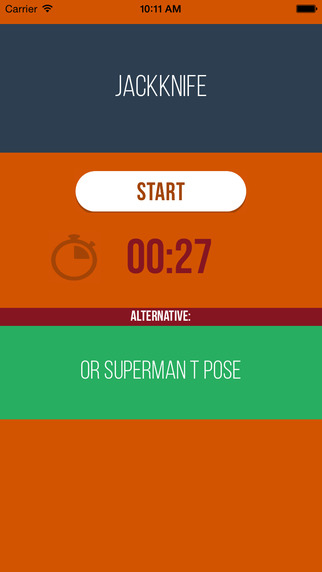
Independent developer, Shawn Berry today introduces TV Ad Workout 1.0, his new fitness app for iPhone and iPad devices. Featuring an easy-to-use interface, TV Ad Workout reads exercises aloud as you continue using the application, with no discouraging charts or detailed logging. Simply click the start button and get one of over 70 exercises to perform within 30 seconds that requires no special equipment. The simple controls make this a must-have app for anyone.
Bethel Park, Pennsylvania - Independent developer, Shawn Berry today is pleased to announce the release of TV Ad Workout for iPhone and iPad devices. The TV Ad Workout App features an easy to use interface. Simply click the start button and get one of over 70 exercises to perform within 30 seconds that requires no special equipment. The simple controls make this a must-have app for anyone.
Some people want to work out and get healthy, but just can't determine what to do. Some start a routine and get bored with it quickly. And others believe they just don't have the time- It seems overwhelming with all of their life demands so they can't commit to a contiguous block of 45 minutes; or they tell themselves they will get serious and start next Monday, and yet that day never seems to come. This app was designed to combat the boredom, lack of time and confusion that comes with just determining what to do.
Despite the claim that there is no time to exercise, one of people's regular activities is sitting in front of the television at some point during their day. And on most networks there are advertisements that take approximately 30 seconds each to air. Everyone has at least those 30 second intervals to do something for themselves.
Sure 30 seconds will not make one fit, but if done repeatedly for months or years, a person will have something to show for it. Just like one fast food meal will not not make one unhealthy, yet done constantly, that person will have something to show for it years down the line. This app has over 70 exercises built in that require no equipment and the most scaled down process to get you moving.
Benefits:
* Simple easy to use interface, no swiping back and forth in multiple screens
* An alternate random exercise is displayed in case the user is unable to perform the main exercise
* Reads exercises aloud as you continue using the application
* No discouraging charts or detailed logging
* A positive, encouraging message is displayed at the end of each exercise to give motivation
* New exercises and features are already in the works
"A powerful tool that will keep one's focus on their fitness and eliminate wasting time while watching TV" says Shawn Berry.
"Every passing moment is yet another chance to turn it all around...this app is your opportunity." - Dr. Zac Burkett of Doctor Fitness Chiropractic
The simple controls make this a must-have app for anyone.
Device Requirements:
* iPhone, iPod touch, and iPad
* Requires iOS 8.3 or later
* 5.5 MB
Pricing and Availability:
TV Ad Workout 1.0 will be offered for free for a limited time worldwide exclusively through the App Store in the Health and Fitness category.
TV Ad Workout 1.0: http://zombiebrainapps.weebly.com/tv-ad-workout.html
Download from iTunes: https://itunes.apple.com/app/tv-ad-workout/id987732453
Screenshot: http://a5.mzstatic.com/us/r30/Purple5/v4/78/e5/f8/78e5f893-6878-8737-6872-88bb883021a7/screen322x572.jpeg
App Icon: http://zombiebrainapps.weebly.com/uploads/5/1/1/4/51143971/7669713.png?227
Based in Pittsburgh, Pensylvania, independent developer Shawn Berry is focused on creating useful, state-of-the-art applications for the iOS platform. Copyright (C) 2015 Shawn Berry. All Rights Reserved. Apple, the Apple logo, iPhone, iPod and iPad are registered trademarks of Apple Inc. in the U.S. and/or other countries.
*******
Link To Article: http://prmac.com/release-id-74795.htm
*******
---------------------------------------------------------------------------------
Note that you can alter delivered distributions at any time.
Login to your account on prMac to alter your channel selection, or to opt-out at any time.
TV Ad Workout 1.0 introduced for iPhone and iPad - New Fitness App - Published on 05/06/15
Independent developer, Shawn Berry today introduces TV Ad Workout 1.0, his new fitness app for iPhone and iPad devices. Featuring an easy-to-use interface, TV Ad Workout reads exercises aloud as you continue using the application, with no discouraging charts or detailed logging. Simply click the start button and get one of over 70 exercises to perform within 30 seconds that requires no special equipment. The simple controls make this a must-have app for anyone.
Bethel Park, Pennsylvania - Independent developer, Shawn Berry today is pleased to announce the release of TV Ad Workout for iPhone and iPad devices. The TV Ad Workout App features an easy to use interface. Simply click the start button and get one of over 70 exercises to perform within 30 seconds that requires no special equipment. The simple controls make this a must-have app for anyone.
Some people want to work out and get healthy, but just can't determine what to do. Some start a routine and get bored with it quickly. And others believe they just don't have the time- It seems overwhelming with all of their life demands so they can't commit to a contiguous block of 45 minutes; or they tell themselves they will get serious and start next Monday, and yet that day never seems to come. This app was designed to combat the boredom, lack of time and confusion that comes with just determining what to do.
Despite the claim that there is no time to exercise, one of people's regular activities is sitting in front of the television at some point during their day. And on most networks there are advertisements that take approximately 30 seconds each to air. Everyone has at least those 30 second intervals to do something for themselves.
Sure 30 seconds will not make one fit, but if done repeatedly for months or years, a person will have something to show for it. Just like one fast food meal will not not make one unhealthy, yet done constantly, that person will have something to show for it years down the line. This app has over 70 exercises built in that require no equipment and the most scaled down process to get you moving.
Benefits:
* Simple easy to use interface, no swiping back and forth in multiple screens
* An alternate random exercise is displayed in case the user is unable to perform the main exercise
* Reads exercises aloud as you continue using the application
* No discouraging charts or detailed logging
* A positive, encouraging message is displayed at the end of each exercise to give motivation
* New exercises and features are already in the works
"A powerful tool that will keep one's focus on their fitness and eliminate wasting time while watching TV" says Shawn Berry.
"Every passing moment is yet another chance to turn it all around...this app is your opportunity." - Dr. Zac Burkett of Doctor Fitness Chiropractic
The simple controls make this a must-have app for anyone.
Device Requirements:
* iPhone, iPod touch, and iPad
* Requires iOS 8.3 or later
* 5.5 MB
Pricing and Availability:
TV Ad Workout 1.0 will be offered for free for a limited time worldwide exclusively through the App Store in the Health and Fitness category.
TV Ad Workout 1.0: http://zombiebrainapps.weebly.com/tv-ad-workout.html
Download from iTunes: https://itunes.apple.com/app/tv-ad-workout/id987732453
Screenshot: http://a5.mzstatic.com/us/r30/Purple5/v4/78/e5/f8/78e5f893-6878-8737-6872-88bb883021a7/screen322x572.jpeg
App Icon: http://zombiebrainapps.weebly.com/uploads/5/1/1/4/51143971/7669713.png?227

Based in Pittsburgh, Pensylvania, independent developer Shawn Berry is focused on creating useful, state-of-the-art applications for the iOS platform. Copyright (C) 2015 Shawn Berry. All Rights Reserved. Apple, the Apple logo, iPhone, iPod and iPad are registered trademarks of Apple Inc. in the U.S. and/or other countries.
*******
Link To Article: http://prmac.com/release-id-74795.htm
*******
---------------------------------------------------------------------------------
Note that you can alter delivered distributions at any time.
Login to your account on prMac to alter your channel selection, or to opt-out at any time.
Parallax It! - First mobile app for adding 3D-like effect to any photo
A new article has been published at prMac.
Parallax It! - First mobile app for adding 3D-like effect to any photo - Published on 05/06/15
California based Qbikal Software LLC today introduces Parallax It! 1.0, their new iOS app that turns photos into stunning, 3D-like videos with music and text. With Parallax It! you have all of the tools to create high quality parallax videos without any previous experience. Final parallax videos can be saved and shared on Instagram, Facebook, Twitter, YouTube or any other social platform. This truly innovative app allows users to bring life to any photo in just a few minutes.
San Jose, California - Qbikal Software LLC today is pleased to announce the release and immediate availability of Parallax It! 1.0, their new iOS app that turns photos into stunning, 3D-like videos with music and text. This truly innovative app allows users to bring life to any photo in just a few minutes.
At the core of this app lays parallax effect. You have seen it used in TV commercials, music videos, and movies. "Parallax It!" is the first app to bring it into the mobile world. Achieving this effect in the desktop world is not easy and can be time consuming. You would have to purchase new software tools and learn how to use them.
With "Parallax It!" you have all of the tools you need in a single app, at the fraction of the cost, and you can still create high quality parallax videos without any previous experience. Final parallax videos can be saved and shared on Instagram, Facebook, Twitter, YouTube or any other social platform.
Language Support:
* English, French, German, Italian, Japanese, Simplified Chinese and Spanish
Device Requirements:
* iPhone, iPad, and iPod touch
* Optimized for iPhone 5, iPhone 6/6 Plus
* Requires iOS 8.0 or later
* 4.7 MB
Pricing and Availability:
For a limited time only, Parallax It! 1.0 is on sale for $1.99 USD (or equivalent amount in other currencies) and available worldwide exclusively through the App Store in the Photo and Video category.
Parallax It! 1.0: http://www.parallaxitapp.com
Direct Download Link: https://itunes.apple.com/app/parallax-it!/id936228955
YouTube Video (Trailer): https://www.youtube.com/watch?v=CwI3hAEvApw
Screenshot: http://www.parallaxitapp.com/press/screenshot.png
App Icon: http://www.parallaxitapp.com/press/icon.png
Based in San Jose, California, Qbikal Software, LLC was founded by Alexander Ivanov in 2007. Qbikal Software specializes in development of apps for the iOS platform. Copyright (C) 2007-2015 Qbikal Software, LLC. All Rights Reserved. Apple, the Apple logo, iPhone, and iPod are registered trademarks of Apple Inc. in the U.S. and/or other countries. Other trademarks and registered trademarks may be the property of their respective owners.
*******
Link To Article: http://prmac.com/release-id-74789.htm
*******
---------------------------------------------------------------------------------
Note that you can alter delivered distributions at any time.
Login to your account on prMac to alter your channel selection, or to opt-out at any time.
Parallax It! - First mobile app for adding 3D-like effect to any photo - Published on 05/06/15
California based Qbikal Software LLC today introduces Parallax It! 1.0, their new iOS app that turns photos into stunning, 3D-like videos with music and text. With Parallax It! you have all of the tools to create high quality parallax videos without any previous experience. Final parallax videos can be saved and shared on Instagram, Facebook, Twitter, YouTube or any other social platform. This truly innovative app allows users to bring life to any photo in just a few minutes.
San Jose, California - Qbikal Software LLC today is pleased to announce the release and immediate availability of Parallax It! 1.0, their new iOS app that turns photos into stunning, 3D-like videos with music and text. This truly innovative app allows users to bring life to any photo in just a few minutes.
At the core of this app lays parallax effect. You have seen it used in TV commercials, music videos, and movies. "Parallax It!" is the first app to bring it into the mobile world. Achieving this effect in the desktop world is not easy and can be time consuming. You would have to purchase new software tools and learn how to use them.
With "Parallax It!" you have all of the tools you need in a single app, at the fraction of the cost, and you can still create high quality parallax videos without any previous experience. Final parallax videos can be saved and shared on Instagram, Facebook, Twitter, YouTube or any other social platform.
Language Support:
* English, French, German, Italian, Japanese, Simplified Chinese and Spanish
Device Requirements:
* iPhone, iPad, and iPod touch
* Optimized for iPhone 5, iPhone 6/6 Plus
* Requires iOS 8.0 or later
* 4.7 MB
Pricing and Availability:
For a limited time only, Parallax It! 1.0 is on sale for $1.99 USD (or equivalent amount in other currencies) and available worldwide exclusively through the App Store in the Photo and Video category.
Parallax It! 1.0: http://www.parallaxitapp.com
Direct Download Link: https://itunes.apple.com/app/parallax-it!/id936228955
YouTube Video (Trailer): https://www.youtube.com/watch?v=CwI3hAEvApw
Screenshot: http://www.parallaxitapp.com/press/screenshot.png

App Icon: http://www.parallaxitapp.com/press/icon.png

Based in San Jose, California, Qbikal Software, LLC was founded by Alexander Ivanov in 2007. Qbikal Software specializes in development of apps for the iOS platform. Copyright (C) 2007-2015 Qbikal Software, LLC. All Rights Reserved. Apple, the Apple logo, iPhone, and iPod are registered trademarks of Apple Inc. in the U.S. and/or other countries. Other trademarks and registered trademarks may be the property of their respective owners.
*******
Link To Article: http://prmac.com/release-id-74789.htm
*******
---------------------------------------------------------------------------------
Note that you can alter delivered distributions at any time.
Login to your account on prMac to alter your channel selection, or to opt-out at any time.
Bel Math Apps releases Math Fraction 2.0 - Popular educational iPad app
A new article has been published at prMac.
Bel Math Apps releases Math Fraction 2.0 - Popular educational iPad app - Published on 05/06/15
California based Bel Math Apps today announces Math Fraction 2.0, an important update to their popular educational app for iPad devices. Focusing on quizzes for common fractions and decimals, Math Fraction covers addition, subtraction, multiplication and division. Content is aligned with CCSS Mathematics Standards and covers the domains of CCSS for grades 4 through 6, including operations and algebraic thinking, number and operations in base ten, the number system. Version 2.0 sports a new UI.
San Jose, California - Bel Math Apps today is thrilled to announce the release of Math Fraction 2.0, an important update to their popular educational app developed exclusively for iPad devices. Math Fraction offers an advanced approach to practicing elementary/middle school mathematics and provides a wide spectrum of math exercises with fractions & decimals covering addition, subtraction, multiplication and division. Math Fraction content is aligned with CCSS Mathematics Standards and covers the domains of CCSS for grades 4 through 6, including Operations & Algebraic Thinking, Number & Operations in Base Ten, The Number System.
Math Fraction can be used by students to hone math skills, by parents to examine kids' math knowledge, and by teachers to create tests. Math Fraction offers six executive pages: "CF + -" for adding/subtracting fractions, "CF x (divide) for multiplying/dividing fractions, "+ DEC" for adding decimals, "- DEC" for subtracting decimals, "x DEC" for multiplying decimals, "(divide) DEC" for dividing decimals with quizzes in the corresponding arithmetic operations. Quizzes for decimals have 4 levels of complexity. Each executive page has a special screen section where records of the current session are logged.
Most important features of the presented app:
* Easy to learn, easy to operate
* No distractions
* The flexible nature of the apps allows to fit the needs of any student
* The app help parents and educators to locate their students' weak spots, and to quickly improve the students' skills and performance in those areas
* Math Fraction allows sending the results of the practice session to the parent or teacher immediately after a session is finished
Device Requirements:
* Compatible with iPad
* Requires iOS 6.0 or later
* 2.4 MB
Pricing and Availability:
Math Fraction 2.0 is only $0.99 USD (or equivalent amount in other currencies) and available worldwide exclusively through the App Store in the Education category. For more information, or promo codes, please contact Bel Math Apps online.
Bel Math Apps: http://www.belmathapps.com/
Math Fraction 2.0: http://www.belmathapps.com/MathFraction/startMathFraction.html
Purchase and Download: https://itunes.apple.com/app/math-fraction/id641330085
Screenshot: http://a2.mzstatic.com/us/r30/Purple7/v4/4c/09/4f/4c094f26-ef7d-02e6-01cc-51ebea440a0a/screen480x480.jpeg
App Icon: http://a3.mzstatic.com/us/r30/Purple5/v4/c4/f9/bc/c4f9bc7b-bb8a-3913-a1bb-a665499d8e89/icon175x175.jpeg
Bel Math Apps is a small company that was created 3 years ago by a husband and wife (both with a Ph.D. in Mathematics and with teaching experience). Bel Math Apps specializes in mobile apps for the iOS and Android that help to analyze and enhance kids math skills by offering a new approach to practicing elementary and middle school mathematics. Quizzes offered by Bel Math cover all arithmetic operations with whole numbers, fractions, decimals and integers; Statistics (mean, median, mode, range). Currently 7 applications are available on the AppStore and 2 on Google Play. Applications have a few levels of complexity, which allow the alignment of the application with any grade-level standards. Another important feature of Bel Math Apps applications provide the ability for parents/teachers to get or send a real time email notification about practice results. For more information please contact Bel Math Apps. All Material and Software (C) Copyright 2015 Bel Math Apps. All Rights
Reserved. Apple, the Apple logo, iPhone, iPod and iPad are registered trademarks of Apple Inc. in the U.S. and/or other countries. Other trademarks and registered trademarks may be the property of their respective owners.
*******
Link To Article: http://prmac.com/release-id-74794.htm
*******
---------------------------------------------------------------------------------
Note that you can alter delivered distributions at any time.
Login to your account on prMac to alter your channel selection, or to opt-out at any time.
Bel Math Apps releases Math Fraction 2.0 - Popular educational iPad app - Published on 05/06/15
California based Bel Math Apps today announces Math Fraction 2.0, an important update to their popular educational app for iPad devices. Focusing on quizzes for common fractions and decimals, Math Fraction covers addition, subtraction, multiplication and division. Content is aligned with CCSS Mathematics Standards and covers the domains of CCSS for grades 4 through 6, including operations and algebraic thinking, number and operations in base ten, the number system. Version 2.0 sports a new UI.
San Jose, California - Bel Math Apps today is thrilled to announce the release of Math Fraction 2.0, an important update to their popular educational app developed exclusively for iPad devices. Math Fraction offers an advanced approach to practicing elementary/middle school mathematics and provides a wide spectrum of math exercises with fractions & decimals covering addition, subtraction, multiplication and division. Math Fraction content is aligned with CCSS Mathematics Standards and covers the domains of CCSS for grades 4 through 6, including Operations & Algebraic Thinking, Number & Operations in Base Ten, The Number System.
Math Fraction can be used by students to hone math skills, by parents to examine kids' math knowledge, and by teachers to create tests. Math Fraction offers six executive pages: "CF + -" for adding/subtracting fractions, "CF x (divide) for multiplying/dividing fractions, "+ DEC" for adding decimals, "- DEC" for subtracting decimals, "x DEC" for multiplying decimals, "(divide) DEC" for dividing decimals with quizzes in the corresponding arithmetic operations. Quizzes for decimals have 4 levels of complexity. Each executive page has a special screen section where records of the current session are logged.
Most important features of the presented app:
* Easy to learn, easy to operate
* No distractions
* The flexible nature of the apps allows to fit the needs of any student
* The app help parents and educators to locate their students' weak spots, and to quickly improve the students' skills and performance in those areas
* Math Fraction allows sending the results of the practice session to the parent or teacher immediately after a session is finished
Device Requirements:
* Compatible with iPad
* Requires iOS 6.0 or later
* 2.4 MB
Pricing and Availability:
Math Fraction 2.0 is only $0.99 USD (or equivalent amount in other currencies) and available worldwide exclusively through the App Store in the Education category. For more information, or promo codes, please contact Bel Math Apps online.
Bel Math Apps: http://www.belmathapps.com/
Math Fraction 2.0: http://www.belmathapps.com/MathFraction/startMathFraction.html
Purchase and Download: https://itunes.apple.com/app/math-fraction/id641330085
Screenshot: http://a2.mzstatic.com/us/r30/Purple7/v4/4c/09/4f/4c094f26-ef7d-02e6-01cc-51ebea440a0a/screen480x480.jpeg

App Icon: http://a3.mzstatic.com/us/r30/Purple5/v4/c4/f9/bc/c4f9bc7b-bb8a-3913-a1bb-a665499d8e89/icon175x175.jpeg

Bel Math Apps is a small company that was created 3 years ago by a husband and wife (both with a Ph.D. in Mathematics and with teaching experience). Bel Math Apps specializes in mobile apps for the iOS and Android that help to analyze and enhance kids math skills by offering a new approach to practicing elementary and middle school mathematics. Quizzes offered by Bel Math cover all arithmetic operations with whole numbers, fractions, decimals and integers; Statistics (mean, median, mode, range). Currently 7 applications are available on the AppStore and 2 on Google Play. Applications have a few levels of complexity, which allow the alignment of the application with any grade-level standards. Another important feature of Bel Math Apps applications provide the ability for parents/teachers to get or send a real time email notification about practice results. For more information please contact Bel Math Apps. All Material and Software (C) Copyright 2015 Bel Math Apps. All Rights
Reserved. Apple, the Apple logo, iPhone, iPod and iPad are registered trademarks of Apple Inc. in the U.S. and/or other countries. Other trademarks and registered trademarks may be the property of their respective owners.
*******
Link To Article: http://prmac.com/release-id-74794.htm
*******
---------------------------------------------------------------------------------
Note that you can alter delivered distributions at any time.
Login to your account on prMac to alter your channel selection, or to opt-out at any time.
Share Talking 3D Emoji Videos straight to Messenger in this new App
A new article has been published at prMac.
Share Talking 3D Emoji Videos straight to Messenger in this new App - Published on 05/06/15
Melbourne based developer, Top Apps & Games Group today introduces Talking 3D Emoji for Facebook Messenger 1.0, its fun and highly addictive iOS app. Talking 3D Emoji for Facebook Messenger allows you to choose from 10 different cute 3D Emojis to record and send hilarious videos to your friends exclusively through Facebook Messenger. The emojis can hear everything your say. Listen to their funny voice and laugh out loud when they repeat what you say.
Melbourne, Australia - Top Apps & Games Group today is pleased to announce the release and immediate availability of Talking 3D Emojis for Facebook Messenger. It is so simple to use - all you need to do is choose your favorite Emoji then record & send your hilarious video to your friends via Facebook Messenger. There are 10 amazing 3D Emojis to choose from - start with the more conventional 'Smiley' and 'Angry' Emojis, and then move onto the less familiar but no less enjoyable 'Chilli', 'Love Heart' and 'Tooth' Emojis. There is even a 'Talking Poo' Emoji!
Feature Highlights:
* Colorful and simple User Interface
* 10 super-cute Emojis to choose from
* Record & send hilarious videos exclusively through Facebook Messenger
In order to stand out from the competition, creator Nick Power from Top Apps & Games Group knew that it must be "simple to use" and "add another dimension to the Emojis that people use every day, by making them 3D and allowing you to record & send hilarious videos to your friends exclusively through Facebook Messenger."
Device Requirements:
* iPhone, iPad or iPod touch
* Requires iOS 7.0 or later
* 37.9 MB
Pricing and Availability:
Talking 3D Emoji for Facebook Messenger 1.0 is free and available worldwide exclusively through the App Store in the Utilities category.
Top Apps & Games Group: http://www.njpapps.com/
Talking 3D Emoji for Facebook Messenger 1.0: http://www.njpapps.com/app/talking-3d-emoji-for-messenger/
Download from iTunes: https://itunes.apple.com/app/id981807745
Screenshot: http://a1.mzstatic.com/us/r30/Purple1/v4/0e/8d/c2/0e8dc268-552c-1490-8b2d-f31d3e8e27c3/screen480x480.jpeg
App Icon: http://a5.mzstatic.com/us/r30/Purple5/v4/58/2b/cb/582bcb40-c7d2-0219-45e4-0fe0885659b3/icon175x175.png
Based in Melbourne, Australia, Top Apps & Games Group is passionate about creating fun, interactive and entertaining apps that appeal to users of all ages. Founded in 2013, the goal of Top Apps & Games Group is to develop entertainment apps for the iOS platform. Copyright (C) 2015 Top Apps & Games Group Pty Ltd. All Rights Reserved. Apple, the Apple logo, iPhone, iPod and iPad are registered trademarks of Apple Inc. in the U.S. and/or other countries. Other trademarks and registered trademarks may be the property of their respective owners.
*******
Link To Article: http://prmac.com/release-id-74793.htm
*******
---------------------------------------------------------------------------------
Note that you can alter delivered distributions at any time.
Login to your account on prMac to alter your channel selection, or to opt-out at any time.
Share Talking 3D Emoji Videos straight to Messenger in this new App - Published on 05/06/15
Melbourne based developer, Top Apps & Games Group today introduces Talking 3D Emoji for Facebook Messenger 1.0, its fun and highly addictive iOS app. Talking 3D Emoji for Facebook Messenger allows you to choose from 10 different cute 3D Emojis to record and send hilarious videos to your friends exclusively through Facebook Messenger. The emojis can hear everything your say. Listen to their funny voice and laugh out loud when they repeat what you say.
Melbourne, Australia - Top Apps & Games Group today is pleased to announce the release and immediate availability of Talking 3D Emojis for Facebook Messenger. It is so simple to use - all you need to do is choose your favorite Emoji then record & send your hilarious video to your friends via Facebook Messenger. There are 10 amazing 3D Emojis to choose from - start with the more conventional 'Smiley' and 'Angry' Emojis, and then move onto the less familiar but no less enjoyable 'Chilli', 'Love Heart' and 'Tooth' Emojis. There is even a 'Talking Poo' Emoji!
Feature Highlights:
* Colorful and simple User Interface
* 10 super-cute Emojis to choose from
* Record & send hilarious videos exclusively through Facebook Messenger
In order to stand out from the competition, creator Nick Power from Top Apps & Games Group knew that it must be "simple to use" and "add another dimension to the Emojis that people use every day, by making them 3D and allowing you to record & send hilarious videos to your friends exclusively through Facebook Messenger."
Device Requirements:
* iPhone, iPad or iPod touch
* Requires iOS 7.0 or later
* 37.9 MB
Pricing and Availability:
Talking 3D Emoji for Facebook Messenger 1.0 is free and available worldwide exclusively through the App Store in the Utilities category.
Top Apps & Games Group: http://www.njpapps.com/
Talking 3D Emoji for Facebook Messenger 1.0: http://www.njpapps.com/app/talking-3d-emoji-for-messenger/
Download from iTunes: https://itunes.apple.com/app/id981807745
Screenshot: http://a1.mzstatic.com/us/r30/Purple1/v4/0e/8d/c2/0e8dc268-552c-1490-8b2d-f31d3e8e27c3/screen480x480.jpeg

App Icon: http://a5.mzstatic.com/us/r30/Purple5/v4/58/2b/cb/582bcb40-c7d2-0219-45e4-0fe0885659b3/icon175x175.png

Based in Melbourne, Australia, Top Apps & Games Group is passionate about creating fun, interactive and entertaining apps that appeal to users of all ages. Founded in 2013, the goal of Top Apps & Games Group is to develop entertainment apps for the iOS platform. Copyright (C) 2015 Top Apps & Games Group Pty Ltd. All Rights Reserved. Apple, the Apple logo, iPhone, iPod and iPad are registered trademarks of Apple Inc. in the U.S. and/or other countries. Other trademarks and registered trademarks may be the property of their respective owners.
*******
Link To Article: http://prmac.com/release-id-74793.htm
*******
---------------------------------------------------------------------------------
Note that you can alter delivered distributions at any time.
Login to your account on prMac to alter your channel selection, or to opt-out at any time.
Subscribe to:
Posts (Atom)