A new article has been published at prMac.
Collaborating Game Developers Lead Mobile Pack in Deflate-Gate Ruling - Published on 05/07/15
Back in Late January 2015, New York based Chunky Apps and TimeDriven Games teamed up to launch the first "Deflate-Gate" game through the iOS and Google Play App stores in response to the accusations that the New England Patriots were involved in deflating footballs during the AFC championship game. Fans can participate in the simulated football deflating activities from an entertainment perspective, but avoid the complex and pending emotional fallout from the findings of Wells' report.
Long Beach, New York - Back in Late January 2015, New York based Chunky Apps and TimeDriven Games teamed up to launch the first "Deflate-Gate" game through the iOS and Google Play App stores in response to the accusations that the New England Patriots were involved in deflating footballs during the AFC championship game. Like any fan or casual observer, the developers had no idea what the results of any investigations would deliver.
Three months later, the release of the Wells Report fingers select New England Patriots personnel as "more likely than not" aware of and involved in the infractions. The ruling comes as a reminder that the NFL is a big business with many layers. With the release of the Deflate-Gate game, fans can participate in the simulated football deflating activities from an entertainment perspective, but avoid the complex and pending emotional fallout sure to come from the findings of Wells' report.
"The release of our game sought to provide levity for our close friends and NFL fans after watching this years AFC championship game. At Chunky Apps we transform contentious and sometimes challenging situations into a fun experience where everyone can walk away with a smile and good energy. The gameplay is simple, fun and puts you in the mind and body of an equipment employee trying to outsmart the referee. The result delivers fun no matter which team you root for." said developer Noah Malewicz.
Deflate-Gate is a "speed-of-completion" roleplay game in the Free-to-Play format for iOS and Android devices. Players become an equipment employee responsible for deflating 12 footballs down to 10.5 PSI as fast as one can before the big game without being caught by a constantly peering official. The exhilarating experience of being on the field and in-the game is what sets Deflate-Gate apart from other games. In the animated, cartoon style that Chunky Apps and TimeDriven Games are known for, a football, a visible air pressure-gauge and an ever inquisitive referee are on screen and within the same proximity. Simply stated, "something has to be done". Users must avoid the referee while using a seamless press-and-lift thumbplay motion to decrease the ball air pressure as quickly as possible.
"The initial reception of our Deflate-Gate game has been very good so far," said Malewicz. "People are starting to catch on and enjoy the gameplay. We're confident that with the recent Wells investigation ruling, even more players will download it and enjoy the fun."
Features:
* Intuitive user interface
* Unique gameplay
* Excellent cartoon graphics, animation and sounds
Chunky Apps and TimeDriven Games continue to deliver on that rare combination of sweet graphics, intuitive game play, and a gripping storyline that can keep you going for hours. Said Malewicz, "It's always been more than just a game to us. We always want to take pivotal, emotional events and channel them towards the bright side. With Deflate-Gate, we're re-directing that frustrated sports fan towards a smile. The world can stand to have a good laugh. I'm confident people will enjoy playing it as much as we have enjoyed creating it."
About TimeDriven Games:
TimeDriven Games is an independent game development studio passionate about every dimension of gameplay. We thrive on bringing together our gaming creativity with the most entertaining and whimsical characters out there.
Device Requirements:
* iPhone, iPad, and iPod touch
* Optimized for iPhone 5, iPhone 6/6 Plus
* Requires iOS 6.0 or later
* 22.8 MB
Pricing and Availability:
Deflate-Gate 1.0 is Free and available worldwide through the App Store in the Games category. There is also an Android version available on Google Play.
Deflate-Gate 1.0: http://www.chunkyapps.com/deflate-gate
Download from iTunes: https://itunes.apple.com/app/deflate-gate/id960714630
Download from Google Play: https://play.google.com/store/apps/details?id=com.chunkybits.deflategate.a
Screenshot 1: http://www.chunkyapps.com/wp-content/uploads/2015/05/1.-iphone5.png
Screenshot 2: http://www.chunkyapps.com/wp-content/uploads/2015/05/3.-iphone5.png
App Icon: http://www.chunkyapps.com/wp-content/uploads/2015/01/Deflate-Gate-Icon.png
Chunky Apps is a small, independent development studio passionate about making fun, cartoony apps and games for mobile devices. Copyright (C) 2015 by Chunky Apps. All Rights Reserved. Apple, the Apple logo, iPhone, iPod and iPad are registered trademarks of Apple Inc. in the U.S. and/or other countries.
*******
Link To Article: http://prmac.com/release-id-74834.htm
*******
---------------------------------------------------------------------------------
Note that you can alter delivered distributions at any time.
Login to your account on prMac to alter your channel selection, or to opt-out at any time.




English To Bulgarian Dictionary Broadcast for IOS app
A new article has been published at prMac.
English To Bulgarian Dictionary Broadcast for IOS app - Published on 05/07/15
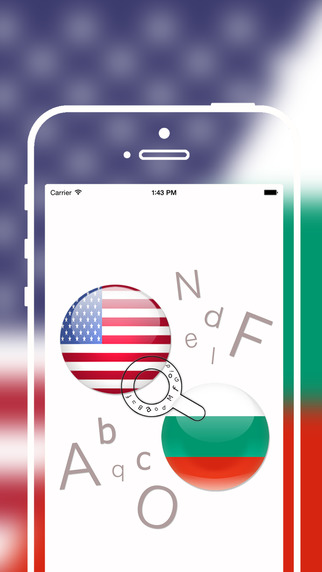
Developer Grigori Jlavyan announces the release of Offline English to Bulgarian Translator / Dictionary 1.0 for iOS. The English to Bulgarian Translation Dictionary's enormous number of words provides you with an ideal opportunity to find the definition and translation of almost any word you want. The app's on-device dictionary offers access to a dictionary, including synonyms, antonyms, idioms, slang, and contemporary words, even without an available Internet connection.
Yerevan, Armenia - Developer Grigori Jlavyan is proud to announce the release of Offline English to Bulgarian Language Translator / Dictionary 1.0. The English to Bulgarian Translation Dictionary's enormous number of words provides you with an ideal opportunity to seek and find the definition and the translation of any word you want. This contemporary application is an offline app with Five hundred thousand words, and enables you to use the dictionary anywhere and anytime, even when Internet access is unavailable.
Features Include:
* Deepening your understanding of verb conjugations, spelling, and pronunciation
* Learn word formations and the origins of words
* Show the structural relationships in a foreign language and the grammatical functions of words
* See example sentences with each word you are searching
* Discover the translation variants of English words and phrases
* Find word definitions
* Create unlimited lists of the unknown words in a section called "Favorites"
We did our best to make the following English to Bulgarian Translate Dictionary with comprehensive range of words and made in mind with our users' convenience. The application will encourage users to investigate foreign languages in a thorough way.
Device Requirements:
* iPhone, iPad, and iPod touch
* Optimized for iPhone 5, iPhone 6, and iPhone 6 Plus
* Requires iOS 6.0 or later
* 81.7 MB
Pricing and Availability:
* Offline English to Bulgarian Language Translator / Dictionary 1.0 is free, and available worldwide exclusively in the App Store in the Education category.
iOSRegion: http://iosregion.com/
Offline English to Bulgarian Language Translator / Dictionary 1.0: https://itunes.apple.com/app/offline-english-to-bulgarian/id979137888
Screenshot: http://a4.mzstatic.com/us/r30/Purple5/v4/3f/8a/2e/3f8a2e67-f8b8-0596-edb4-8f6d2d149a8e/screen322x572.jpeg
App Icon: http://a4.mzstatic.com/us/r30/Purple5/v4/eb/63/85/eb63850e-465a-e269-c1f0-2c3a3ca61565/icon175x175.png
The author of this cutting edge application is Grigori Jlavyan, who makes all the best tools for your devices. Copyright (C) 2015 Grigori Jlavyan. All Rights Reserved. Apple, the Apple logo, iPhone, iPad and iPod are registered trademarks of Apple Inc. in the U.S. and/or other countries.
*******
Link To Article: http://prmac.com/release-id-74819.htm
*******
---------------------------------------------------------------------------------
Note that you can alter delivered distributions at any time.
Login to your account on prMac to alter your channel selection, or to opt-out at any time.
English To Bulgarian Dictionary Broadcast for IOS app - Published on 05/07/15
Developer Grigori Jlavyan announces the release of Offline English to Bulgarian Translator / Dictionary 1.0 for iOS. The English to Bulgarian Translation Dictionary's enormous number of words provides you with an ideal opportunity to find the definition and translation of almost any word you want. The app's on-device dictionary offers access to a dictionary, including synonyms, antonyms, idioms, slang, and contemporary words, even without an available Internet connection.
Yerevan, Armenia - Developer Grigori Jlavyan is proud to announce the release of Offline English to Bulgarian Language Translator / Dictionary 1.0. The English to Bulgarian Translation Dictionary's enormous number of words provides you with an ideal opportunity to seek and find the definition and the translation of any word you want. This contemporary application is an offline app with Five hundred thousand words, and enables you to use the dictionary anywhere and anytime, even when Internet access is unavailable.
Features Include:
* Deepening your understanding of verb conjugations, spelling, and pronunciation
* Learn word formations and the origins of words
* Show the structural relationships in a foreign language and the grammatical functions of words
* See example sentences with each word you are searching
* Discover the translation variants of English words and phrases
* Find word definitions
* Create unlimited lists of the unknown words in a section called "Favorites"
We did our best to make the following English to Bulgarian Translate Dictionary with comprehensive range of words and made in mind with our users' convenience. The application will encourage users to investigate foreign languages in a thorough way.
Device Requirements:
* iPhone, iPad, and iPod touch
* Optimized for iPhone 5, iPhone 6, and iPhone 6 Plus
* Requires iOS 6.0 or later
* 81.7 MB
Pricing and Availability:
* Offline English to Bulgarian Language Translator / Dictionary 1.0 is free, and available worldwide exclusively in the App Store in the Education category.
iOSRegion: http://iosregion.com/
Offline English to Bulgarian Language Translator / Dictionary 1.0: https://itunes.apple.com/app/offline-english-to-bulgarian/id979137888
Screenshot: http://a4.mzstatic.com/us/r30/Purple5/v4/3f/8a/2e/3f8a2e67-f8b8-0596-edb4-8f6d2d149a8e/screen322x572.jpeg
App Icon: http://a4.mzstatic.com/us/r30/Purple5/v4/eb/63/85/eb63850e-465a-e269-c1f0-2c3a3ca61565/icon175x175.png

The author of this cutting edge application is Grigori Jlavyan, who makes all the best tools for your devices. Copyright (C) 2015 Grigori Jlavyan. All Rights Reserved. Apple, the Apple logo, iPhone, iPad and iPod are registered trademarks of Apple Inc. in the U.S. and/or other countries.
*******
Link To Article: http://prmac.com/release-id-74819.htm
*******
---------------------------------------------------------------------------------
Note that you can alter delivered distributions at any time.
Login to your account on prMac to alter your channel selection, or to opt-out at any time.
Dreaming In Binary Announces The Halo Timer for iOS - Coming Soon
A new article has been published at prMac.
Dreaming In Binary Announces The Halo Timer for iOS - Coming Soon - Published on 05/07/15
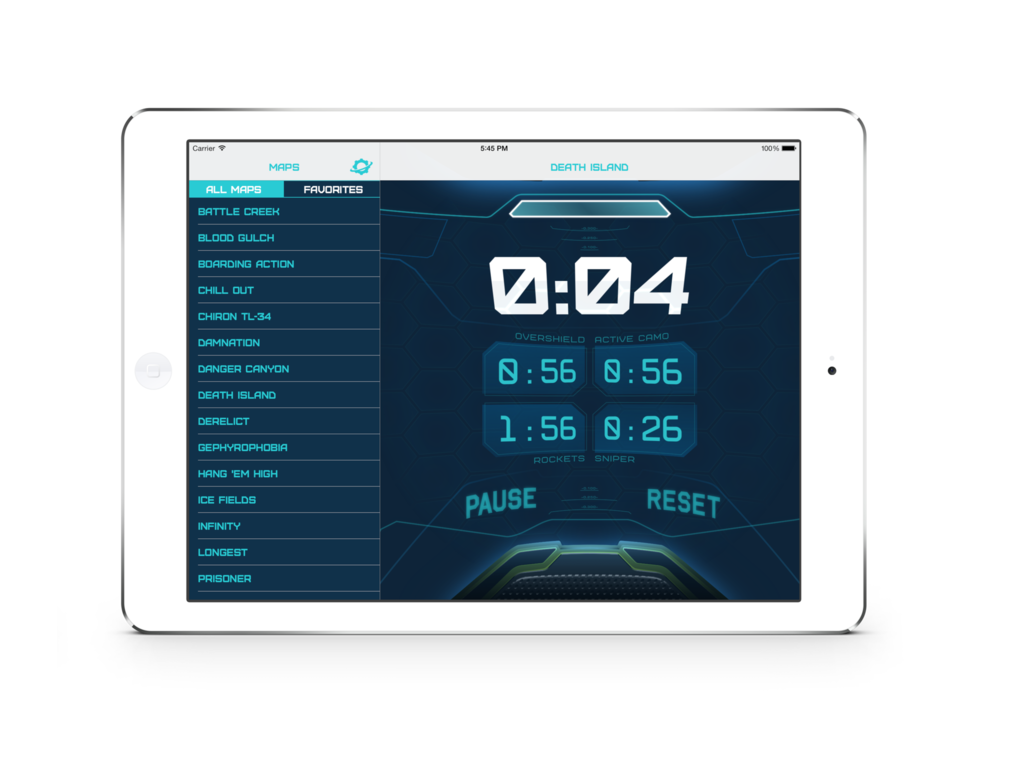
Dreaming In Binary announces The Halo Timer for iOS. This universal app helps Halo fans all over the world compete in online multiplayer by keeping track of weapon spawns. The Halo Timer was designed and developed by avid Halo fans. From the settings menu down to the core functionality, all of it was designed to fit in with the Halo universe. Using the app, players will know when the rockets, sniper rifle, cloak, and overshield respawn back on the map.
Ozark, Missouri - Dreaming In Binary is proud to announce The Halo Timer for iOS. The Halo Timer Universal app promises to help any Halo fan be instantly more competitive in online multiplayer by keeping track of when every power weapon or item respawns during a multiplayer match.
The Halo Timer was designed and developed by avid Halo fans. From the settings menu down to the core functionality, all of it was designed to fit in with the Halo universe. The Halo Timer promises to support every single Halo:Combat Evolved multiplayer map ever released. Using the app, players will know when the rockets, sniper rifle, cloak, and overshield respawn back on the map.
Players can easily get started with the app due to its easy to learn interface. When a multiplayer match begins, the only action players need to take is to press "Start" on the Halo Timer, and it takes care of the rest. From then on, players will be notified when a power item returns back to the map from audio and visual cues. With support for every map, players using The Halo Timer will always have the competitive advantage.
The Halo Timer is a universal application that will launch for both the iPad and iPhone in the App Store at the end of May. It will be free of charge, and will contain no in-app purchases.
Dreaming in Binary: http://www.dreaminginbinary.co
Halo Timer: http://www.dreaminginbinary.co/halo-timer/
Screenshot - iPhone: http://i1184.photobucket.com/albums/z335/jordanmorganapps/iPhone_zpssh77di6m.png
Screenshot - iPad: http://i1184.photobucket.com/albums/z335/jordanmorganapps/iPad_zpsluy82bs6.png
Located in Ozark, MO/USA, Dreaming In Binary LLC was founded May of this year by Jordan Morgan and his wife Jansyn. They are focused on creating helpful iOS apps that make everyone's day to day a little smoother. All Material and Software (C) 2015 Dreaming In Binary LLC / All Rights Reserved. Apple, the Apple logo, iPhone, iPod and iPad are registered trademarks of Apple Inc. in the U.S. and/or other countries. Other trademarks and registered trademarks may be the property of their respective owners.
*******
Link To Article: http://prmac.com/release-id-74832.htm
*******
---------------------------------------------------------------------------------
Note that you can alter delivered distributions at any time.
Login to your account on prMac to alter your channel selection, or to opt-out at any time.
Dreaming In Binary Announces The Halo Timer for iOS - Coming Soon - Published on 05/07/15
Dreaming In Binary announces The Halo Timer for iOS. This universal app helps Halo fans all over the world compete in online multiplayer by keeping track of weapon spawns. The Halo Timer was designed and developed by avid Halo fans. From the settings menu down to the core functionality, all of it was designed to fit in with the Halo universe. Using the app, players will know when the rockets, sniper rifle, cloak, and overshield respawn back on the map.
Ozark, Missouri - Dreaming In Binary is proud to announce The Halo Timer for iOS. The Halo Timer Universal app promises to help any Halo fan be instantly more competitive in online multiplayer by keeping track of when every power weapon or item respawns during a multiplayer match.
The Halo Timer was designed and developed by avid Halo fans. From the settings menu down to the core functionality, all of it was designed to fit in with the Halo universe. The Halo Timer promises to support every single Halo:Combat Evolved multiplayer map ever released. Using the app, players will know when the rockets, sniper rifle, cloak, and overshield respawn back on the map.
Players can easily get started with the app due to its easy to learn interface. When a multiplayer match begins, the only action players need to take is to press "Start" on the Halo Timer, and it takes care of the rest. From then on, players will be notified when a power item returns back to the map from audio and visual cues. With support for every map, players using The Halo Timer will always have the competitive advantage.
The Halo Timer is a universal application that will launch for both the iPad and iPhone in the App Store at the end of May. It will be free of charge, and will contain no in-app purchases.
Dreaming in Binary: http://www.dreaminginbinary.co
Halo Timer: http://www.dreaminginbinary.co/halo-timer/
Screenshot - iPhone: http://i1184.photobucket.com/albums/z335/jordanmorganapps/iPhone_zpssh77di6m.png

Screenshot - iPad: http://i1184.photobucket.com/albums/z335/jordanmorganapps/iPad_zpsluy82bs6.png
Located in Ozark, MO/USA, Dreaming In Binary LLC was founded May of this year by Jordan Morgan and his wife Jansyn. They are focused on creating helpful iOS apps that make everyone's day to day a little smoother. All Material and Software (C) 2015 Dreaming In Binary LLC / All Rights Reserved. Apple, the Apple logo, iPhone, iPod and iPad are registered trademarks of Apple Inc. in the U.S. and/or other countries. Other trademarks and registered trademarks may be the property of their respective owners.
*******
Link To Article: http://prmac.com/release-id-74832.htm
*******
---------------------------------------------------------------------------------
Note that you can alter delivered distributions at any time.
Login to your account on prMac to alter your channel selection, or to opt-out at any time.
New Update for Theme Inn's Bundle for MS Office
A new article has been published at prMac.
New Update for Theme Inn's Bundle for MS Office - Published on 05/07/15
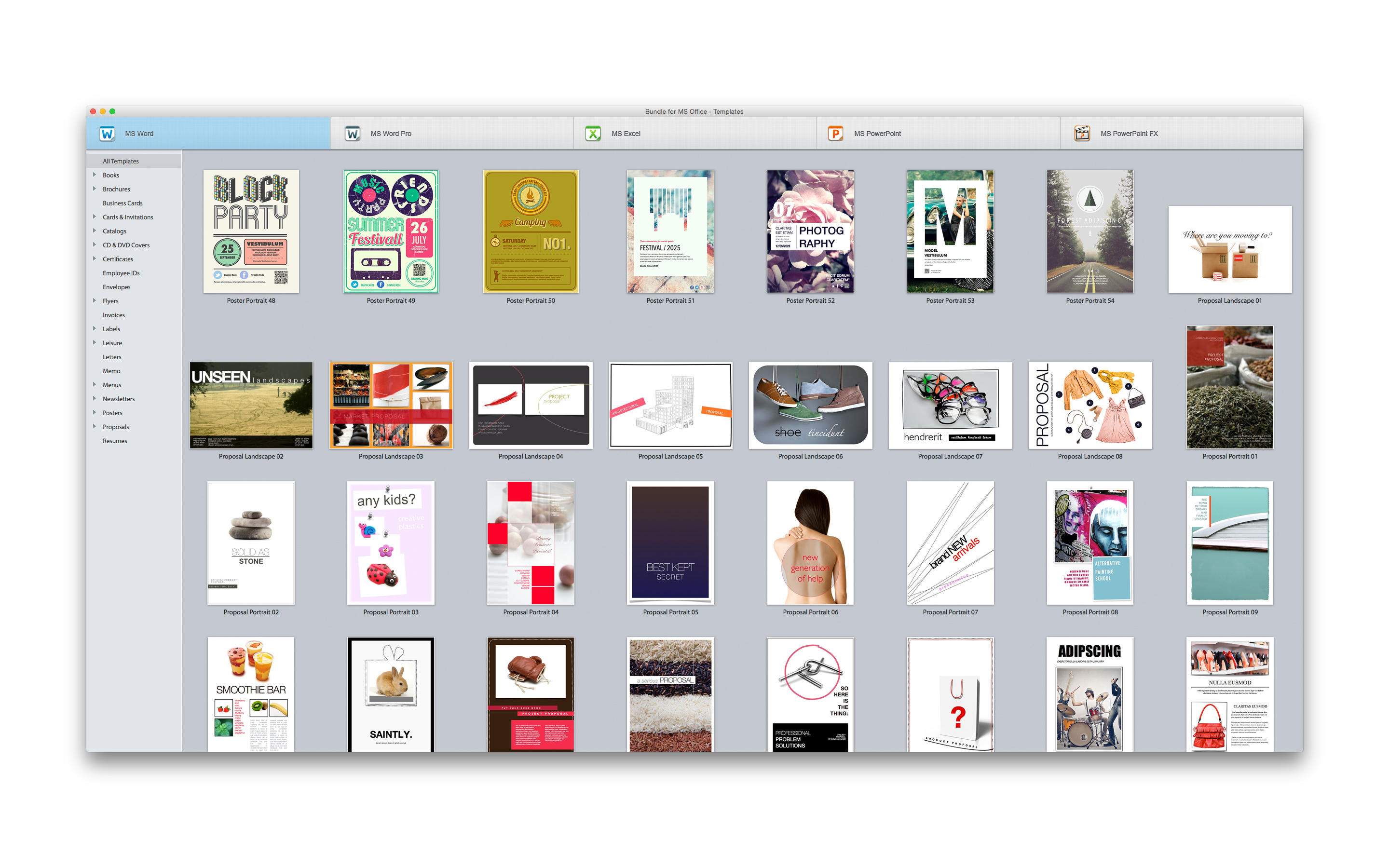
Graphic design company, Theme Inn today announces Bundle for MS Office - Templates 3.0, an important update to its high-quality templates for Microsoft Office for Macintosh. The new update adds 55 fresh designs for MS Word for Mac. In total, Bundle for MS Office contains 5 collections of elegant and easily-customizable designs. It provides an inclusive variety of designs, from letters and brochures to greeting cards and books. All templates are available in US and international page sizes.
Sakiai, Lithuania - Theme Inn, a graphic design company that specializes in creating high-quality templates, today is proud to announce the release of Bundle for MS Office 3.0, an update to their popular productivity application for OS X. Theme Inn has again expanded its selection of templates for MS Office users. This new update adds 55 fresh designs for MS Word for Mac.
In total, Bundle for MS Office contains 5 collections of elegant and easily-customizable designs. The Templates for MS Word set now supplies a kit of 1,421 easy-to-use templates for creating business and personal documents with Word. It provides an inclusive variety of designs, from letters and brochures to greeting cards and books. All templates are available in US and international page sizes.
The second high-quality pack, Templates for MS Excel, now offers 160 diverse and functional templates for Excel. They make daily chores a lot more manageable, whether used for business or personal needs such as vacation planning. Users can personalize the templates to their requirements: create tables, make calculations, draw diagrams, and insert images. Excel templates are also available in US and international page sizes.
The Templates for MS PowerPoint set incorporates 160 first-class designs for PowerPoint presentations. More than just good-looking backgrounds, these templates consist of up to 20 individual master slides. This allows users to choose the best layout for their information, whether it is almost entirely made up of bullet points, consists of a mix of text and illustrations, or presents multiple graphs and tables.
Templates Pro for MS Word is a collection of 40 template lines, designed to give an outstanding unified, design to all documents representing a user's company. With Templates Pro for MS Word, users can turn their documents into part of a successful advertising campaign.
The Motion Themes set is created for exclusive PowerPoint presentations. The pack includes 20 themes, each providing 14 master slides, which allow users to choose the ideal layout for their ideas, proposals, and solutions.
System Requirements:
* OS X 10.6.6 or later
* 5.58 GB
Pricing and Availability:
Bundle for MS Office 3.0 is $39.99 USD (or equivalent amount in other currencies) and available worldwide through the Mac App Store in the Productivity category.
Theme Inn: http://www.themeinn.com/
Bundle for MS Office 3.0: http://www.themeinn.com/vh_app/bundle-for-ms-office/
Purchase and Download (MAS): https://itunes.apple.com/app/bundle-for-ms-office-templates/id525718996
Screenshot: https://is3-ssl.mzstatic.com/image/thumb/Purple7/v4/44/6f/fa/446ffa1e-2fee-7931-d82c-56a9fd95a549/pr_source.jpg/2880x1800ss-80.png
Application Icon: http://a4.mzstatic.com/us/r30/Purple3/v4/70/db/4b/70db4b1d-b153-9cbd-2193-c4cd8bc174c5/icon128-2x.png
Theme Inn is a team of professional Mac designers who specialize in developing high-quality templates for Microsoft Office for Mac. The company defines its work through careful attention to rich visuals, ease of use and wide adaptability. Theme Inn's products are designed to save users time and help them achieve the best results. Copyright (C) 2015 Theme Inn. All Rights Reserved. Apple, the Apple logo, and Macintosh are registered trademarks of Apple Inc. in the U.S. and/or other countries.
*******
Link To Article: http://prmac.com/release-id-74831.htm
*******
---------------------------------------------------------------------------------
Note that you can alter delivered distributions at any time.
Login to your account on prMac to alter your channel selection, or to opt-out at any time.
New Update for Theme Inn's Bundle for MS Office - Published on 05/07/15
Graphic design company, Theme Inn today announces Bundle for MS Office - Templates 3.0, an important update to its high-quality templates for Microsoft Office for Macintosh. The new update adds 55 fresh designs for MS Word for Mac. In total, Bundle for MS Office contains 5 collections of elegant and easily-customizable designs. It provides an inclusive variety of designs, from letters and brochures to greeting cards and books. All templates are available in US and international page sizes.
Sakiai, Lithuania - Theme Inn, a graphic design company that specializes in creating high-quality templates, today is proud to announce the release of Bundle for MS Office 3.0, an update to their popular productivity application for OS X. Theme Inn has again expanded its selection of templates for MS Office users. This new update adds 55 fresh designs for MS Word for Mac.
In total, Bundle for MS Office contains 5 collections of elegant and easily-customizable designs. The Templates for MS Word set now supplies a kit of 1,421 easy-to-use templates for creating business and personal documents with Word. It provides an inclusive variety of designs, from letters and brochures to greeting cards and books. All templates are available in US and international page sizes.
The second high-quality pack, Templates for MS Excel, now offers 160 diverse and functional templates for Excel. They make daily chores a lot more manageable, whether used for business or personal needs such as vacation planning. Users can personalize the templates to their requirements: create tables, make calculations, draw diagrams, and insert images. Excel templates are also available in US and international page sizes.
The Templates for MS PowerPoint set incorporates 160 first-class designs for PowerPoint presentations. More than just good-looking backgrounds, these templates consist of up to 20 individual master slides. This allows users to choose the best layout for their information, whether it is almost entirely made up of bullet points, consists of a mix of text and illustrations, or presents multiple graphs and tables.
Templates Pro for MS Word is a collection of 40 template lines, designed to give an outstanding unified, design to all documents representing a user's company. With Templates Pro for MS Word, users can turn their documents into part of a successful advertising campaign.
The Motion Themes set is created for exclusive PowerPoint presentations. The pack includes 20 themes, each providing 14 master slides, which allow users to choose the ideal layout for their ideas, proposals, and solutions.
System Requirements:
* OS X 10.6.6 or later
* 5.58 GB
Pricing and Availability:
Bundle for MS Office 3.0 is $39.99 USD (or equivalent amount in other currencies) and available worldwide through the Mac App Store in the Productivity category.
Theme Inn: http://www.themeinn.com/
Bundle for MS Office 3.0: http://www.themeinn.com/vh_app/bundle-for-ms-office/
Purchase and Download (MAS): https://itunes.apple.com/app/bundle-for-ms-office-templates/id525718996
Screenshot: https://is3-ssl.mzstatic.com/image/thumb/Purple7/v4/44/6f/fa/446ffa1e-2fee-7931-d82c-56a9fd95a549/pr_source.jpg/2880x1800ss-80.png
Application Icon: http://a4.mzstatic.com/us/r30/Purple3/v4/70/db/4b/70db4b1d-b153-9cbd-2193-c4cd8bc174c5/icon128-2x.png

Theme Inn is a team of professional Mac designers who specialize in developing high-quality templates for Microsoft Office for Mac. The company defines its work through careful attention to rich visuals, ease of use and wide adaptability. Theme Inn's products are designed to save users time and help them achieve the best results. Copyright (C) 2015 Theme Inn. All Rights Reserved. Apple, the Apple logo, and Macintosh are registered trademarks of Apple Inc. in the U.S. and/or other countries.
*******
Link To Article: http://prmac.com/release-id-74831.htm
*******
---------------------------------------------------------------------------------
Note that you can alter delivered distributions at any time.
Login to your account on prMac to alter your channel selection, or to opt-out at any time.
touchbyte releases PhotoSync 3.0 for iOS
A new article has been published at prMac.
touchbyte releases PhotoSync 3.0 for iOS - Published on 05/07/15
touchbyte today released PhotoSync 3.0 for iOS - a major upgrade to the most versatile and powerful app to transfer, backup and share photos & videos over the air. PhotoSync 3.0 for iOS includes over 50 new features and has been entirely rewritten to take full advantage of iOS 8 and it's new photos capabilities. The update also introduces transfer from/to Amazon Cloud Drive, iCloud Photo Library integration and support for the new OS X Photos App.
Hamburg, Germany - touchbyte today is proud to announce the release of PhotoSync 3.0 for iOS - a major upgrade to the most versatile and powerful app to transfer, backup and share photos & videos over the air.
PhotoSync 3.0 for iOS includes over 50 new features and has been entirely rewritten to take full advantage of iOS 8 and it's new photos capabilities. The update also introduces transfer from/to Amazon Cloud Drive, iCloud Photo Library integration and support for the new OS X Photos App.
Introduced in February 2011 and used by over a million photographers, PhotoSync is a long time favorite amongst iPhone/iPad users to backup and transfer their photos & videos to computer, other mobile devices (iOS and Android), NAS, and cloud and photo services.
Today's update update adds even more power and flexibility to an already versatile product. PhotoSync for iOS is now capable of deleting photos & videos automatically after a successful transfer. It also takes photo organization to a new level by offering full access to Moments and Smart Albums like Panoramas, Videos, Favorites, Screenshots and Slo-Mo. The automatic subdirectory creation by date, custom filenames, support for bursts, photo & video edits, as well as RAW JPEG complete the comprehensive feature set.
PhotoSync's Autotransfer feature backups all new photos & videos to a predefined target automatically in the background. In PhotoSync 3.0 for iOS, iBeacons can now be defined as triggers for Autotransfer.
"For anyone looking for a secure and flexible way to transfer & backup their photos & videos, PhotoSync is the right choice. There are no subscription costs nor In-App-Purchases," says Hendrik Holtmann, CEO of touchbyte.
PhotoSync for iOS also ships with a French, German, Spanish, Japanese, Korean, Traditional Chinese and Simplified Chinese localization.
Accompanying the release of PhotoSync 3.0 for iOS, touchbyte has also developed new versions of the free PhotoSync Companion for Mac & Windows PC available for download on the website.
Device Requirements:
* iPhone, iPad, and iPod touch
* Requires iOS 7.0 or later
* Optimized for iPhone 5, 6/6 Plus
* 28.4 MB
Pricing and Availability:
PhotoSync - wireless photo and video transfer, backup and share app 3.0 is $2.99 USD (or equivalent amount in other currencies) and available worldwide through the App Store in the Photo & Video category. There is also an Android version available on Google Play.
PhotoSync 3.0: http://www.photosync-app.com
Purchase and Download: https://itunes.apple.com/app/photosync-drahtlos-fotos-und/id415850124
New Features: http://www.photosync-app.com/photosync/en/feature-list-30.html
PhotoSync for PC & Mac (Direct Download): http://www.photosync-app.com/photosync/en/downloads.html
touchbyte GmbH was founded 2010 in Hamburg, Germany and specializes on software development for mobile devices. Copyright (C) 2015 touchbyte GmbH All Rights Reserved. Apple, the Apple logo, iPhone, iPad, iPad mini, iPod touch, and Mac are registered trademarks of Apple Inc. in the U.S. and/or other countries. Android is a registered trademark of Google Inc. Other trademarks and registered trademarks may be the property of their respective owners.
*******
Link To Article: http://prmac.com/release-id-74830.htm
*******
---------------------------------------------------------------------------------
Note that you can alter delivered distributions at any time.
Login to your account on prMac to alter your channel selection, or to opt-out at any time.
touchbyte releases PhotoSync 3.0 for iOS - Published on 05/07/15
touchbyte today released PhotoSync 3.0 for iOS - a major upgrade to the most versatile and powerful app to transfer, backup and share photos & videos over the air. PhotoSync 3.0 for iOS includes over 50 new features and has been entirely rewritten to take full advantage of iOS 8 and it's new photos capabilities. The update also introduces transfer from/to Amazon Cloud Drive, iCloud Photo Library integration and support for the new OS X Photos App.
Hamburg, Germany - touchbyte today is proud to announce the release of PhotoSync 3.0 for iOS - a major upgrade to the most versatile and powerful app to transfer, backup and share photos & videos over the air.
PhotoSync 3.0 for iOS includes over 50 new features and has been entirely rewritten to take full advantage of iOS 8 and it's new photos capabilities. The update also introduces transfer from/to Amazon Cloud Drive, iCloud Photo Library integration and support for the new OS X Photos App.
Introduced in February 2011 and used by over a million photographers, PhotoSync is a long time favorite amongst iPhone/iPad users to backup and transfer their photos & videos to computer, other mobile devices (iOS and Android), NAS, and cloud and photo services.
Today's update update adds even more power and flexibility to an already versatile product. PhotoSync for iOS is now capable of deleting photos & videos automatically after a successful transfer. It also takes photo organization to a new level by offering full access to Moments and Smart Albums like Panoramas, Videos, Favorites, Screenshots and Slo-Mo. The automatic subdirectory creation by date, custom filenames, support for bursts, photo & video edits, as well as RAW JPEG complete the comprehensive feature set.
PhotoSync's Autotransfer feature backups all new photos & videos to a predefined target automatically in the background. In PhotoSync 3.0 for iOS, iBeacons can now be defined as triggers for Autotransfer.
"For anyone looking for a secure and flexible way to transfer & backup their photos & videos, PhotoSync is the right choice. There are no subscription costs nor In-App-Purchases," says Hendrik Holtmann, CEO of touchbyte.
PhotoSync for iOS also ships with a French, German, Spanish, Japanese, Korean, Traditional Chinese and Simplified Chinese localization.
Accompanying the release of PhotoSync 3.0 for iOS, touchbyte has also developed new versions of the free PhotoSync Companion for Mac & Windows PC available for download on the website.
Device Requirements:
* iPhone, iPad, and iPod touch
* Requires iOS 7.0 or later
* Optimized for iPhone 5, 6/6 Plus
* 28.4 MB
Pricing and Availability:
PhotoSync - wireless photo and video transfer, backup and share app 3.0 is $2.99 USD (or equivalent amount in other currencies) and available worldwide through the App Store in the Photo & Video category. There is also an Android version available on Google Play.
PhotoSync 3.0: http://www.photosync-app.com
Purchase and Download: https://itunes.apple.com/app/photosync-drahtlos-fotos-und/id415850124
New Features: http://www.photosync-app.com/photosync/en/feature-list-30.html
PhotoSync for PC & Mac (Direct Download): http://www.photosync-app.com/photosync/en/downloads.html
touchbyte GmbH was founded 2010 in Hamburg, Germany and specializes on software development for mobile devices. Copyright (C) 2015 touchbyte GmbH All Rights Reserved. Apple, the Apple logo, iPhone, iPad, iPad mini, iPod touch, and Mac are registered trademarks of Apple Inc. in the U.S. and/or other countries. Android is a registered trademark of Google Inc. Other trademarks and registered trademarks may be the property of their respective owners.
*******
Link To Article: http://prmac.com/release-id-74830.htm
*******
---------------------------------------------------------------------------------
Note that you can alter delivered distributions at any time.
Login to your account on prMac to alter your channel selection, or to opt-out at any time.
English To Chinese Translator Dictionary App for iOS
A new article has been published at prMac.
English To Chinese Translator Dictionary App for iOS - Published on 05/07/15
Developer Grigori Jlavyan announces the release of Offline English to Chinese Language Translator / Dictionary 1.0 for iOS. The English to Chinese Translation Dictionary's enormous number of words provides you with an ideal opportunity to find the definition and translation of almost any word you want. The app's on-device dictionary offers access to a 6,000 word dictionary, including synonyms, antonyms, idioms, slang, and contemporary words, even without an available Internet connection.
Yerevan, Armenia - Developer Grigori Jlavyan is proud to announce the release of Offline English to Chinese Language Translator / Dictionary 1.0. The English to Chinese Translation Dictionary's enormous number of words provides you with an ideal opportunity to seek and find the definition and the translation of any word you want. This contemporary application is an offline app with six hundred thousand words, and enables you to use the dictionary anywhere and anytime, even when Internet access is unavailable.
Features Include:
* Includes URX ZHEN Chinese - English Dictionary (Author -Markus Spitzer)
* Includes Chinese (T) - English Dictionary (Author - Babylon Ltd.)
* Type the word and the application instantly displays the most likely results
* Synonyms and antonyms of entered words with an over 300,000 synonym word count.
* Access a huge collection of idioms and phrasal verbs, as well as slang terms
* Access contemporary words, including their audio pronunciations
* Create unlimited lists of the unknown words in a section called "Favorites"
We did our best to make the following English to Chinese Translate Dictionary with comprehensive range of words and made in mind with our users' convenience. The application will encourage users to investigate foreign languages in a thorough way.
Device Requirements:
* iPhone, iPad, and iPod touch
* Optimized for iPhone 5, iPhone 6, and iPhone 6 Plus
* Requires iOS 6.0 or later
* 91.8 MB
Pricing and Availability:
* Offline English to Chinese Language Translator / Dictionary 1.0 is free, and available worldwide exclusively in the App Store in the Education category.
iOS Region: http://iosregion.com/
Offline English to Chinese Language Translator / Dictionary 1.0: https://itunes.apple.com/app/offline-english-to-chinese/id979135309
Screenshot: http://a2.mzstatic.com/us/r30/Purple5/v4/37/7a/bd/377abd74-9b72-9513-2a59-bf7dcec53c99/screen322x572.jpeg
App Icon: http://a4.mzstatic.com/us/r30/Purple1/v4/7b/4a/7b/7b4a7bb5-7f6c-27f9-c911-51fb5a53b962/icon175x175.jpeg
The author of this cutting edge application is Grigori Jlavyan, who makes all the best tools for your devices. Copyright (C) 2015 Grigori Jlavyan. All Rights Reserved. Apple, the Apple logo, iPhone, iPad and iPod are registered trademarks of Apple Inc. in the U.S. and/or other countries.
*******
Link To Article: http://prmac.com/release-id-74818.htm
*******
---------------------------------------------------------------------------------
Note that you can alter delivered distributions at any time.
Login to your account on prMac to alter your channel selection, or to opt-out at any time.
English To Chinese Translator Dictionary App for iOS - Published on 05/07/15
Developer Grigori Jlavyan announces the release of Offline English to Chinese Language Translator / Dictionary 1.0 for iOS. The English to Chinese Translation Dictionary's enormous number of words provides you with an ideal opportunity to find the definition and translation of almost any word you want. The app's on-device dictionary offers access to a 6,000 word dictionary, including synonyms, antonyms, idioms, slang, and contemporary words, even without an available Internet connection.
Yerevan, Armenia - Developer Grigori Jlavyan is proud to announce the release of Offline English to Chinese Language Translator / Dictionary 1.0. The English to Chinese Translation Dictionary's enormous number of words provides you with an ideal opportunity to seek and find the definition and the translation of any word you want. This contemporary application is an offline app with six hundred thousand words, and enables you to use the dictionary anywhere and anytime, even when Internet access is unavailable.
Features Include:
* Includes URX ZHEN Chinese - English Dictionary (Author -Markus Spitzer)
* Includes Chinese (T) - English Dictionary (Author - Babylon Ltd.)
* Type the word and the application instantly displays the most likely results
* Synonyms and antonyms of entered words with an over 300,000 synonym word count.
* Access a huge collection of idioms and phrasal verbs, as well as slang terms
* Access contemporary words, including their audio pronunciations
* Create unlimited lists of the unknown words in a section called "Favorites"
We did our best to make the following English to Chinese Translate Dictionary with comprehensive range of words and made in mind with our users' convenience. The application will encourage users to investigate foreign languages in a thorough way.
Device Requirements:
* iPhone, iPad, and iPod touch
* Optimized for iPhone 5, iPhone 6, and iPhone 6 Plus
* Requires iOS 6.0 or later
* 91.8 MB
Pricing and Availability:
* Offline English to Chinese Language Translator / Dictionary 1.0 is free, and available worldwide exclusively in the App Store in the Education category.
iOS Region: http://iosregion.com/
Offline English to Chinese Language Translator / Dictionary 1.0: https://itunes.apple.com/app/offline-english-to-chinese/id979135309
Screenshot: http://a2.mzstatic.com/us/r30/Purple5/v4/37/7a/bd/377abd74-9b72-9513-2a59-bf7dcec53c99/screen322x572.jpeg

App Icon: http://a4.mzstatic.com/us/r30/Purple1/v4/7b/4a/7b/7b4a7bb5-7f6c-27f9-c911-51fb5a53b962/icon175x175.jpeg

The author of this cutting edge application is Grigori Jlavyan, who makes all the best tools for your devices. Copyright (C) 2015 Grigori Jlavyan. All Rights Reserved. Apple, the Apple logo, iPhone, iPad and iPod are registered trademarks of Apple Inc. in the U.S. and/or other countries.
*******
Link To Article: http://prmac.com/release-id-74818.htm
*******
---------------------------------------------------------------------------------
Note that you can alter delivered distributions at any time.
Login to your account on prMac to alter your channel selection, or to opt-out at any time.
CloudSlice: Simply smarter storage for your precious photos is here
A new article has been published at prMac.
CloudSlice: Simply smarter storage for your precious photos is here - Published on 05/07/15
Introducing CloudSlice, the up-and-coming iOS app from Escape Velocity Apps that will let you use your favorite cloud services in a whole new way. Secure your photos on the cloud with CloudSlice�s encrypt, slice and store technology. The app will let you link up to 5 cloud storage services to your iOS devices and use them as if they were a single cloud storage location. Each image will be encrypted using a key only you possess and divided into slices. CloudSlice will be available May 19, 2015.
Cumming, Georgia - Today, Escape Velocity Apps is pleased to announce CloudSlice, the up-and-coming new iOS app that lets you use your favorite cloud services in a whole new way. CloudSlice will let you link up to 5 cloud storage services to your iOS devices and use them as if they were a single cloud storage location. When you upload a photo using CloudSlice, each image will be encrypted using a key only you possess and divided into slices. These slices are then uploaded to the different cloud storage services you have linked to the app.
This approach provides improved security, because your complete photo is not stored anywhere on the cloud � only the slices exist on the storage servers. If any individual cloud storage service is compromised, no one can get a copy of your photo, only slices. Since each slice only contains pieces of encrypted image data, your photos are not exposed.
Take charge of your own photo privacy. Your photos are encrypted by a password that only you know � your CloudSlice password is never sent to any third-party, so keep it safe.
CloudSlice supports the following cloud storage services:
* iCloud
* Dropbox
* Microsoft OneDrive
* Google Drive
* Box
CloudSlice adds a layer of security that you control on top of the security measures already provided by your cloud storage service, helping you keep your photos to yourself.
CloudSlice will be available May 19 on the App Store for an introductory price of $4.99 (USD). Visit us online for updates and more information.
Cloud Slice: http://cloudsliceapp.com/
Located in Cumming, Georgia, Escape Velocity Apps is a software development company established in 2010. Copyright (C) 2010-2015 Escape Velocity Apps LLC. All Rights Reserved. Apple, the Apple logo, iPhone, iPod and iPad are registered trademarks of Apple Inc. in the U.S. and/or other countries. Other trademarks and registered trademarks may be the property of their respective owners.
*******
Link To Article: http://prmac.com/release-id-74817.htm
*******
---------------------------------------------------------------------------------
Note that you can alter delivered distributions at any time.
Login to your account on prMac to alter your channel selection, or to opt-out at any time.
CloudSlice: Simply smarter storage for your precious photos is here - Published on 05/07/15
Introducing CloudSlice, the up-and-coming iOS app from Escape Velocity Apps that will let you use your favorite cloud services in a whole new way. Secure your photos on the cloud with CloudSlice�s encrypt, slice and store technology. The app will let you link up to 5 cloud storage services to your iOS devices and use them as if they were a single cloud storage location. Each image will be encrypted using a key only you possess and divided into slices. CloudSlice will be available May 19, 2015.
Cumming, Georgia - Today, Escape Velocity Apps is pleased to announce CloudSlice, the up-and-coming new iOS app that lets you use your favorite cloud services in a whole new way. CloudSlice will let you link up to 5 cloud storage services to your iOS devices and use them as if they were a single cloud storage location. When you upload a photo using CloudSlice, each image will be encrypted using a key only you possess and divided into slices. These slices are then uploaded to the different cloud storage services you have linked to the app.
This approach provides improved security, because your complete photo is not stored anywhere on the cloud � only the slices exist on the storage servers. If any individual cloud storage service is compromised, no one can get a copy of your photo, only slices. Since each slice only contains pieces of encrypted image data, your photos are not exposed.
Take charge of your own photo privacy. Your photos are encrypted by a password that only you know � your CloudSlice password is never sent to any third-party, so keep it safe.
CloudSlice supports the following cloud storage services:
* iCloud
* Dropbox
* Microsoft OneDrive
* Google Drive
* Box
CloudSlice adds a layer of security that you control on top of the security measures already provided by your cloud storage service, helping you keep your photos to yourself.
CloudSlice will be available May 19 on the App Store for an introductory price of $4.99 (USD). Visit us online for updates and more information.
Cloud Slice: http://cloudsliceapp.com/
Located in Cumming, Georgia, Escape Velocity Apps is a software development company established in 2010. Copyright (C) 2010-2015 Escape Velocity Apps LLC. All Rights Reserved. Apple, the Apple logo, iPhone, iPod and iPad are registered trademarks of Apple Inc. in the U.S. and/or other countries. Other trademarks and registered trademarks may be the property of their respective owners.
*******
Link To Article: http://prmac.com/release-id-74817.htm
*******
---------------------------------------------------------------------------------
Note that you can alter delivered distributions at any time.
Login to your account on prMac to alter your channel selection, or to opt-out at any time.
Subscribe to:
Posts (Atom)