A new article has been published at prMac.
DFX Version 2.0 Is Now Fully Midi-Compatible - Published on 05/12/15
Paris based Fingerlab today announces DFX - Digital Multi-FX 2.0, an important update to their wildly popular real-time quad multi-effects processor for iPad. Plug in any audio source. Select one, two, three or four effects amongst 35 hi-quality digital audio effects and explore endless sonic possibilities. Version 2.0 is now fully Midi compatible and works with any Midi controller or keyboard. Plug your controller and drive any button or fader directly from DFX. Simple, intuitive and fun!
Paris, France - Fingerlab today is proud to announce the release of DFX - Digital Multi-FX 2.0, an important update to their wildly popular real-time quad multi-effects processor for iPad. Simple, intuitive and fun, with no user guide required, DFX features an intuitive and beautiful user interface for easy playability and instant fun. DFX version 2.0 is now fully Midi compatible and works with any Midi controller or keyboard. Plug your controller and drive any button or fader directly from DFX.
Plug in any audio source, a guitar, a bass, a microphone, a DJ mixer. Or play your favorite iOS synth or drum machine with Audiobus or Apple Inter-App Audio. Or why not playing a track from your iTunes Music Library? Or even more just use one of the built-in tone synthesizers. Select one, two, three or four effects amongst 35 hi-quality digital audio effects and explore endless sonic possibilities. Delays, echos, reverbs, filters, tremolo, autowah, compressors, distortions, vocoders, resonators, with more possibilities than you can imagine. Expand your sonic world to new frontiers:
* 10 effect categories
* Delays: Sync Delay, Ping Pong, Tape Delay
* Reverbs: Metal box, Hall, Descent, Reflections, Freeze,
* Filters: High Pass, Low Pass, High Shelf, Low Shelf
* Phase: Phase Flux, Vibe Chorus, Phase Shift
* Modulation: Wave Tremolo, AutoWah, Envelope Follower, Ring Modulator
* Distortion: Wave Shaper, Bias, Raw, Bit Crusher, Synthizer
* Voice FX: Vocoder, Resonator, Formant Simulator
* Pan: Stereolizer, AutoPan, Leslie
* Dynamics: Noise Gate, Compressor
* Instruments: High Tone Synth, Bass Tone Synth
* Audiobus compatible
* Audio Inter-App compatible
* 4 playable trackpads with real-time waveforms
* Live Effect Swapping
* Live recording
* Recordings manager
* Recordings exporter
* Built-in Countdown
* Built-in Tone Synths (high and bass)
* Built-in Output Limiter for a controlled output
* Built-in Metronome
* Tempo Synced animations
* Effect Solo Mode
* iTunes playback
* Presets Manager (factory & user)
* Fullscreen Favorite Presets for fast live access
"We are curious. We like new experiences. We welcome unexpected discoveries. And we are musicians," said Antoine Lepoutre, co-founder of Paris based Fingerlab SARL. "It therefore was an obvious choice for us to develop for the iPad the multi-effects that we wanted, that we needed for our thirst for sound. Four powerful and multipurpose chained effects, driven by trackpads for fast and easy sonic explorations. Like a million of pedal boards on a device. We are indie developers and our goal is to create the greatest user experience for mobile devices. We are driven by our passions: creatIng music, making photography and playing video games. Enjoy!"
Device Requirements:
* Compatible with iPad
* Requires iOS 7.0 or later
* 21.7 MB
Pricing and Availability:
DFX - Digital Multi-FX 2.0 is $3.99 USD (or equivalent amount in other currencies) and available worldwide exclusively through the App Store in the Music category.
Fingerlab: http://fingerlab.net
DFX - Digital Multi-FX 2.0: http://fingerlab.net/portfolio/dfx
Purchase and Download: https://itunes.apple.com/app/dfx-digital-multi-fx/id921970043
YouTube Video (Demo): https://www.youtube.com/watch?v=95ZEjpw8IVo
Based in Paris, France, FingerLab is an independent app development and publishing studio which was established in the year 2010. Fingerlab is fuelled by the passions and multiple and mixed skills of its three core members and recurrent collaborators like Jonas Errikson. In 2012, it won the Apple Design Award for its DM1-The Drum Machine, as well as featured in the iTunes App Store in several categories including Best of 2013 (Music), App of the Week, and Hall of Fame. All Material and Software (C) Copyright 2010-2015 Fingerlab SARL. All Rights Reserved. Apple, the Apple logo, iPhone, iPod and iPad are registered trademarks of Apple Inc. in the U.S. and/or other countries. Other trademarks and registered trademarks may be the property of their respective owners.
*******
Link To Article: http://prmac.com/release-id-74897.htm
*******
---------------------------------------------------------------------------------
Note that you can alter delivered distributions at any time.
Login to your account on prMac to alter your channel selection, or to opt-out at any time.

Output Factory Server for Adobe InDesign Adds PDF Security Automation
A new article has been published at prMac.
Output Factory Server for Adobe InDesign Adds PDF Security Automation - Published on 05/12/15
Zevrix Solutions announces Output Factory Server 1.2, a feature update to its output workflow automation solution for Adobe InDesign. Output Factory Server automates printing and exporting from InDesign by processing files from hot folders. The software offloads output tasks to a central system leaving operator workstations free from the output process. The new version lets users automate creation of secure PDF files with password protection, encryption, print restrictions, and other options.
Toronto (ON) Canada - Zevrix Solutions today is proud to announce the release of Output Factory Server 1.2, a feature update to its solution to automate printing, exporting and post-processing from Adobe InDesign. Developed originally for a major magazine publisher in the United States to free up their operator computers from outputting InDesign files, the software automates InDesign workflow by processing files from watched hot folders.
The new version allows to incorporate PDF security options into workflow settings, thus letting users create secure PDF files automatically from hot folders. Output Factory is the only tool that can automate this process as even InDesign's built-in PDF export presets don't allow users to save the security features. Output Factory offers all the PDF security methods available from Adobe, such as password protection, encryption, and restriction of printing, copying and editing.
"Output Factory Server is an extremely useful utility for a busy production facility or advertising agency", writes David Creamer in Layers magazine, "It can save lots of time - which equates to money."
Under the Output Factory Server workflow, production artists, prepress operators and designers simply copy InDesign jobs to hot folders that reside on a network. Users can create hot folders for different output targets such as hi-res PDF, large format printing, EPUB files and so on. The software offers the following key features:
* Print and export InDesign files from watched hot folders
* Supports print, PDF, PostScript, TIFF, EPUB and other formats
* Automatic e-mail notifications
* Export InDesign files as single pages
* Layer versioning
* Variable output file names
* Preflight files before output
* Serve unlimited users on a network
Pricing and Availability:
Output Factory Server can be purchased from Zevrix web site for $699.95 (USD), as well as from authorized resellers. Trial is also available for download. BatchOutput Server users can upgrade for $350. Output Factory Server runs on Mac OS X 10.6-10.10 and works with Adobe InDesign CS3-CC 2014.
Zevrix Solutions: http://zevrix.com
Output Factory Server 1.2: http://zevrix.com/OutputFactoryServer.php
Download Output Factory Server: http://zevrix.com/OutputFactoryServer.dmg
Purchase: http://zevrix.com/store.php
Screenshot: http://zevrix.com/screenshots/ofs1/ofs-beta-pdf.jpg
Located in Toronto, Canada, Zevrix Solutions provides automation and productivity solutions for Adobe Creative Cloud and Creative Suite software, PDF workflows, graphic file diagnostics and Microsoft Office output on Mac OS. Zevrix is dedicated to help professionals increase their profits through automating everyday tasks, producing error-free documents, saving disk space and cutting production costs. For more information, visit their website. Copyright (C) 2015 Zevrix Solutions. All Rights Reserved. Other trademarks and registered trademarks may be the property of their respective owners.
*******
Link To Article: http://prmac.com/release-id-74899.htm
*******
---------------------------------------------------------------------------------
Note that you can alter delivered distributions at any time.
Login to your account on prMac to alter your channel selection, or to opt-out at any time.
Output Factory Server for Adobe InDesign Adds PDF Security Automation - Published on 05/12/15
Zevrix Solutions announces Output Factory Server 1.2, a feature update to its output workflow automation solution for Adobe InDesign. Output Factory Server automates printing and exporting from InDesign by processing files from hot folders. The software offloads output tasks to a central system leaving operator workstations free from the output process. The new version lets users automate creation of secure PDF files with password protection, encryption, print restrictions, and other options.
Toronto (ON) Canada - Zevrix Solutions today is proud to announce the release of Output Factory Server 1.2, a feature update to its solution to automate printing, exporting and post-processing from Adobe InDesign. Developed originally for a major magazine publisher in the United States to free up their operator computers from outputting InDesign files, the software automates InDesign workflow by processing files from watched hot folders.
The new version allows to incorporate PDF security options into workflow settings, thus letting users create secure PDF files automatically from hot folders. Output Factory is the only tool that can automate this process as even InDesign's built-in PDF export presets don't allow users to save the security features. Output Factory offers all the PDF security methods available from Adobe, such as password protection, encryption, and restriction of printing, copying and editing.
"Output Factory Server is an extremely useful utility for a busy production facility or advertising agency", writes David Creamer in Layers magazine, "It can save lots of time - which equates to money."
Under the Output Factory Server workflow, production artists, prepress operators and designers simply copy InDesign jobs to hot folders that reside on a network. Users can create hot folders for different output targets such as hi-res PDF, large format printing, EPUB files and so on. The software offers the following key features:
* Print and export InDesign files from watched hot folders
* Supports print, PDF, PostScript, TIFF, EPUB and other formats
* Automatic e-mail notifications
* Export InDesign files as single pages
* Layer versioning
* Variable output file names
* Preflight files before output
* Serve unlimited users on a network
Pricing and Availability:
Output Factory Server can be purchased from Zevrix web site for $699.95 (USD), as well as from authorized resellers. Trial is also available for download. BatchOutput Server users can upgrade for $350. Output Factory Server runs on Mac OS X 10.6-10.10 and works with Adobe InDesign CS3-CC 2014.
Zevrix Solutions: http://zevrix.com
Output Factory Server 1.2: http://zevrix.com/OutputFactoryServer.php
Download Output Factory Server: http://zevrix.com/OutputFactoryServer.dmg
Purchase: http://zevrix.com/store.php
Screenshot: http://zevrix.com/screenshots/ofs1/ofs-beta-pdf.jpg

Located in Toronto, Canada, Zevrix Solutions provides automation and productivity solutions for Adobe Creative Cloud and Creative Suite software, PDF workflows, graphic file diagnostics and Microsoft Office output on Mac OS. Zevrix is dedicated to help professionals increase their profits through automating everyday tasks, producing error-free documents, saving disk space and cutting production costs. For more information, visit their website. Copyright (C) 2015 Zevrix Solutions. All Rights Reserved. Other trademarks and registered trademarks may be the property of their respective owners.
*******
Link To Article: http://prmac.com/release-id-74899.htm
*******
---------------------------------------------------------------------------------
Note that you can alter delivered distributions at any time.
Login to your account on prMac to alter your channel selection, or to opt-out at any time.
NeoFinder 6.7 released for OS X - Keep Track of your Digital Files
A new article has been published at prMac.
NeoFinder 6.7 released for OS X - Keep Track of your Digital Files - Published on 05/12/15
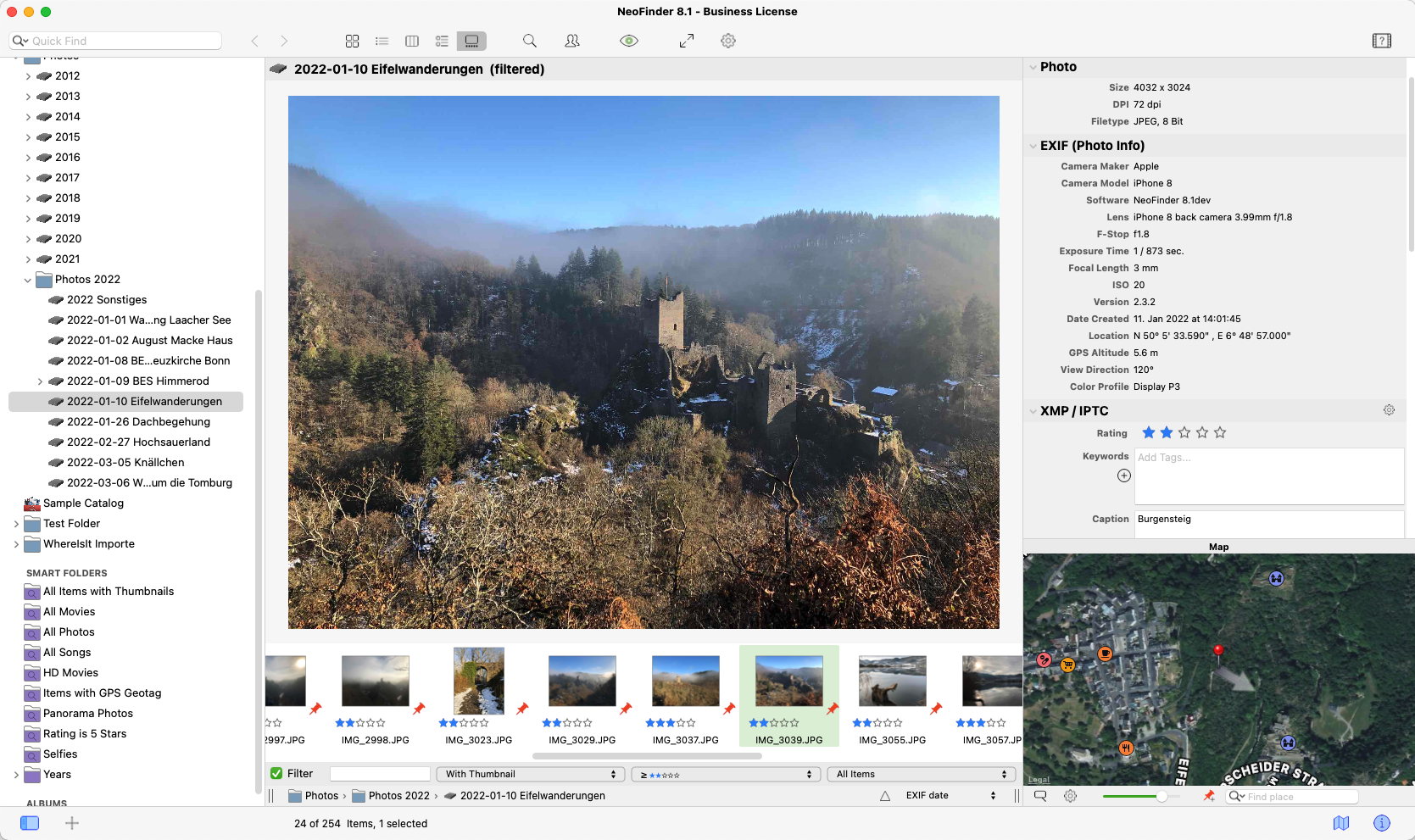
Norbert M. Doerner has released NeoFinder for Mac 6.7 (was CDFinder). NeoFinder makes it easier than ever to keep track of your digital files, photos, songs, movies, fonts on hard drives, USB sticks, servers, Blu-ray disks, DVD-ROMs, CDROMs, and any other digital media. NeoFinder generates thumbnails and reads a lot of metadata during cataloging, for powerful search possibilities. The new version has improved cataloging of RAW, DPX, and Open Office files, and more.
Langenhahn, Germany - Norbert M. Doerner has released NeoFinder 6.7 (formerly known as CDFinder). The new version has improved cataloging of RAW, DPX, and Open Office files, and more. NeoFinder makes it easier than ever to keep track of your digital files, photos, songs, movies, fonts on hard disks, USB sticks, server disks, Blu-ray disks, DVD-ROMs, CDROMs, and any other digital media. NeoFinder generates thumbnails and reads a lot of metadata during cataloging, for powerful search possibilities, smart folders, albums, and more.
New Features in NeoFinder 6.7:
* Can now catalog the contents Open Office text files ('.odt' and '.ott')
* NeoFinder can now catalog DPX (Digital Picture Exchange) video still images and read their SMTPE timecode
* Added support to catalog PhaseOne RAW images ('.iiq')
* Added support to catalog Leica RAW images ('.rwl')
* NeoFinder can now catalog the structure of CBR and CBZ (Comic Book Archives) files
* You can now edit the comment for multiple items in catalogs at once in the Inspector
* Several additional columns can now be edited directly in the List View
* You can now catalog the Adobe XMP data in PNG images
* Several Importers can ignore invisible files during the Import
* You can now sort the Icon View by Modification Date and by Path
* The DatabaseSettings.xml now has a new section to completely ignore certain files during cataloging, for example XMP sidecar files
* IPTC keywords and Tags are now displayed sorted in the Inspector
* You can now edit the item names in Column View
NeoFinder Highlights:
Metadata - NeoFinder catalogs metadata of songs, movies, fonts, and photos, including the MP3-Tags of several audio file formats, EXIF, GPS, and IPTC data of photos, and also Adobe XMP information. All these are clearly arranged in the user interface, and can be extensively searched. For numerous photo and video formats, fonts, and text files, NeoFinder generates thumbnails during cataloging, displaying them in all list and icon views.
Integration - Offering a tight connection to major productivity tools, such as Adobe Creative Suite, Microsoft Office, Roxio Toast, FileMaker Pro, Apples Spotlight and Finder, and the extensive support of drag&drop into other applications, NeoFinder can support many workflow scenarios.
Geotagging - Only NeoFinder offers the integrated GeoFinder, which searches for photos taken near a spot, or the KMZ export for coordinates and photo thumbnails as a way to give geolocated photos to friends. NeoFinder can even geotag photos itself, no other software needed. And only NeoFinder displays amazing facts about any geolocation in the unique Wikipedia Inspector.
Networking - Store your catalog database on a server for access from all Macs in the network, and with the sidekick product abeMeda (was CDWinder for Windows) even from Microsoft Windows.
Mobile - Keep your NeoFinder database with you on your iPhone or iPad with the separate NeoFinder for iOS app.
Since the initial release of CDFinder 1.0 in 1995, more than 60,000 customers in 95 countries around the world are using CDFinder and now NeoFinder to organise their digital library, and manage their data archive and backups, including NASA, IKEA, BBC, Mattel, Rand McNally, Pfizer, Random House, Oracle, and Warner Bros.
Language Support:
* German, English, French, Swedish, Italian, Spanish, Dutch, and Japanese
System Requirements:
* Requires Mac OS X v10.6, 10.7, 10.8, 10.9, or 10.10 Mavericks
* Previous CDFinder and NeoFinder versions for older Mac OS versions are still available
* Separate app for iOS (iPhone and iPad) is available, too
Pricing and Availability:
NeoFinder 6 is a paid update to licensed users of CDFinder, update price starting at 19 Euros. Cross-grades for users of competing applications (DiskLibrary, FileFinder, CatFinder, Canto Cumulus, Disk Tracker, DiskCatalogMaker, Atomic View, iView Media Pro, and more) are available. A free NeoFinder demo version can be downloaded from the NeoFinder website, the price for new users starts at 29,00 (EUR). Multiple user packs are available for network users. NeoFinder 6.6 is a free update to all NeoFinder customers.
NeoFinder 6.7: http://www.cdfinder.de/
Download NeoFinder: http://www.cdfinder.de/neofinder.zip
Purchase: http://www.cdfinder.de/en/order.html
Screenshot: http://www.cdfinder.de/main-screenshot.jpg
Application Icon: http://www.cdfinder.de/rw_common/images/NeoFinder%20Icon%20128%20px%20Alpha.png
Norbert M. Doerner is a computer scientist with a love for integration and cool products. He develops great Macintosh software since 1991. Popular products include the disk cataloger NeoFinder (was CDFinder), various plugins for the Finder, iPhoto and Aperture, and the audio transcription software F5.app. Copyright (C) 1991-2015 Norbert M. Doerner. Apple, the Apple logo, Mac and Macintosh are registered trademarks of Apple Inc. in the U.S. and/or other countries. Other trademarks and registered trademarks may be the property of their respective owners.
*******
Link To Article: http://prmac.com/release-id-74898.htm
*******
---------------------------------------------------------------------------------
Note that you can alter delivered distributions at any time.
Login to your account on prMac to alter your channel selection, or to opt-out at any time.
NeoFinder 6.7 released for OS X - Keep Track of your Digital Files - Published on 05/12/15
Norbert M. Doerner has released NeoFinder for Mac 6.7 (was CDFinder). NeoFinder makes it easier than ever to keep track of your digital files, photos, songs, movies, fonts on hard drives, USB sticks, servers, Blu-ray disks, DVD-ROMs, CDROMs, and any other digital media. NeoFinder generates thumbnails and reads a lot of metadata during cataloging, for powerful search possibilities. The new version has improved cataloging of RAW, DPX, and Open Office files, and more.
Langenhahn, Germany - Norbert M. Doerner has released NeoFinder 6.7 (formerly known as CDFinder). The new version has improved cataloging of RAW, DPX, and Open Office files, and more. NeoFinder makes it easier than ever to keep track of your digital files, photos, songs, movies, fonts on hard disks, USB sticks, server disks, Blu-ray disks, DVD-ROMs, CDROMs, and any other digital media. NeoFinder generates thumbnails and reads a lot of metadata during cataloging, for powerful search possibilities, smart folders, albums, and more.
New Features in NeoFinder 6.7:
* Can now catalog the contents Open Office text files ('.odt' and '.ott')
* NeoFinder can now catalog DPX (Digital Picture Exchange) video still images and read their SMTPE timecode
* Added support to catalog PhaseOne RAW images ('.iiq')
* Added support to catalog Leica RAW images ('.rwl')
* NeoFinder can now catalog the structure of CBR and CBZ (Comic Book Archives) files
* You can now edit the comment for multiple items in catalogs at once in the Inspector
* Several additional columns can now be edited directly in the List View
* You can now catalog the Adobe XMP data in PNG images
* Several Importers can ignore invisible files during the Import
* You can now sort the Icon View by Modification Date and by Path
* The DatabaseSettings.xml now has a new section to completely ignore certain files during cataloging, for example XMP sidecar files
* IPTC keywords and Tags are now displayed sorted in the Inspector
* You can now edit the item names in Column View
NeoFinder Highlights:
Metadata - NeoFinder catalogs metadata of songs, movies, fonts, and photos, including the MP3-Tags of several audio file formats, EXIF, GPS, and IPTC data of photos, and also Adobe XMP information. All these are clearly arranged in the user interface, and can be extensively searched. For numerous photo and video formats, fonts, and text files, NeoFinder generates thumbnails during cataloging, displaying them in all list and icon views.
Integration - Offering a tight connection to major productivity tools, such as Adobe Creative Suite, Microsoft Office, Roxio Toast, FileMaker Pro, Apples Spotlight and Finder, and the extensive support of drag&drop into other applications, NeoFinder can support many workflow scenarios.
Geotagging - Only NeoFinder offers the integrated GeoFinder, which searches for photos taken near a spot, or the KMZ export for coordinates and photo thumbnails as a way to give geolocated photos to friends. NeoFinder can even geotag photos itself, no other software needed. And only NeoFinder displays amazing facts about any geolocation in the unique Wikipedia Inspector.
Networking - Store your catalog database on a server for access from all Macs in the network, and with the sidekick product abeMeda (was CDWinder for Windows) even from Microsoft Windows.
Mobile - Keep your NeoFinder database with you on your iPhone or iPad with the separate NeoFinder for iOS app.
Since the initial release of CDFinder 1.0 in 1995, more than 60,000 customers in 95 countries around the world are using CDFinder and now NeoFinder to organise their digital library, and manage their data archive and backups, including NASA, IKEA, BBC, Mattel, Rand McNally, Pfizer, Random House, Oracle, and Warner Bros.
Language Support:
* German, English, French, Swedish, Italian, Spanish, Dutch, and Japanese
System Requirements:
* Requires Mac OS X v10.6, 10.7, 10.8, 10.9, or 10.10 Mavericks
* Previous CDFinder and NeoFinder versions for older Mac OS versions are still available
* Separate app for iOS (iPhone and iPad) is available, too
Pricing and Availability:
NeoFinder 6 is a paid update to licensed users of CDFinder, update price starting at 19 Euros. Cross-grades for users of competing applications (DiskLibrary, FileFinder, CatFinder, Canto Cumulus, Disk Tracker, DiskCatalogMaker, Atomic View, iView Media Pro, and more) are available. A free NeoFinder demo version can be downloaded from the NeoFinder website, the price for new users starts at 29,00 (EUR). Multiple user packs are available for network users. NeoFinder 6.6 is a free update to all NeoFinder customers.
NeoFinder 6.7: http://www.cdfinder.de/
Download NeoFinder: http://www.cdfinder.de/neofinder.zip
Purchase: http://www.cdfinder.de/en/order.html
Screenshot: http://www.cdfinder.de/main-screenshot.jpg
Application Icon: http://www.cdfinder.de/rw_common/images/NeoFinder%20Icon%20128%20px%20Alpha.png

Norbert M. Doerner is a computer scientist with a love for integration and cool products. He develops great Macintosh software since 1991. Popular products include the disk cataloger NeoFinder (was CDFinder), various plugins for the Finder, iPhoto and Aperture, and the audio transcription software F5.app. Copyright (C) 1991-2015 Norbert M. Doerner. Apple, the Apple logo, Mac and Macintosh are registered trademarks of Apple Inc. in the U.S. and/or other countries. Other trademarks and registered trademarks may be the property of their respective owners.
*******
Link To Article: http://prmac.com/release-id-74898.htm
*******
---------------------------------------------------------------------------------
Note that you can alter delivered distributions at any time.
Login to your account on prMac to alter your channel selection, or to opt-out at any time.
xScan 4.0 for Mac - Monitor The Health of a Single Mac or Multiple Macs
A new article has been published at prMac.
xScan 4.0 for Mac - Monitor The Health of a Single Mac or Multiple Macs - Published on 05/12/15
ADNX Software today announces xScan 4.0, an important update to their popular system monitor utility for Mac OS X. The software is available in two versions. xScanSolo allows users to monitor the behavior and health of a single Mac. xScanPro allows monitoring multiple Macs from any remote location. Version 4.0 sports a modern interface, which includes 12 customizable widgets that allow users to configure the display differently for each computer, according to the specific needs of each machine.
Villeurbanne, France - ADNX Software today is proud to announce the release and immediate availability of xScan 4.0, an important update to their popular system monitor utility for Mac OS X. xScanSolo allows users to monitor the behavior and health of a single Mac computer. xScanPro allows users to monitor the health of multiple Macs from any remote location. Most customers of xScan 3 can get the new xScanSolo 4.0 version for free.
xScan 4 offers a concept that is quite different from previous versions. The new application features a more modern user interface, with almost all aspects of the UI allowing for customization. xScan 4 includes a set of 12 widgets that offer the flexibility for customized views in the main window, and display options are available for each widget. The possibilities are endless. ADNX is already working on more widgets for future versions. The application can be extended in many ways. If users have an idea for widgets, they should feel free to send their feedback to ADNX.
"We are proud to be releasing xScan 4. The new version is a complete rewrite from our previous version, and represents 8 months of development. The utility was then tested on hundreds of configurations over a three month period," says ADNX CEO Patrice Calligaris. "xScan 4's monitoring and alert capabilities will help users keep their Macs running strong."
Available widgets and options for both versions of xScan 4.0 include:
* Computer (model, screen size, graphic card, VRAM, last boot, serial number, startup disk)
* Processor (gauge, graph, value - all processors, just one)
* Memory (gauge, graph, value - free, active, used, apps, all values)
* Network (graph, value - average, all interfaces, just one)
* Disk (pie chart, gauge, value - users can select the disk)
* Processes (top one, top 5, top 10 - real time or average)
* Temperature (gauge, graph, value - celcius, fahrenheit)
* IP address (choice of the interface or router)
* Fans (gauge, graph, value)
* Battery (pie chart, gauge, value - time until full, time left)
* Web server (Apache, MYSQL, PHP - versions detected)
* System (version, name)
List of available OS X notifications:
* Hardware issues on the motherboard (detected by sensors)
* Problems related to the processor (temperature)
* Fan issues (related to the speed)
* Disk issues (S.M.A.R.T status)
* Main disk capacity (checks if there is enough space)
* Blocked processes (using too much CPU level)
* Hacker attacks (computer takeover attempts)
* MySQL health (database issues)
xScanSolo 4 Features:
Completely rewritten, xScanSolo 4 features a modern user interface, allowing users to drag and drop xScan widgets of their choice onto a main window. Each widget has multiple display options, thus allowing configuration of the display to be different for each monitored computer, according to the specific needs of each machine. The utility also alerts users in real time about major problems with the hardware or with the hard drives connected to their Mac. It will also supply information about general issues with the operating system and a number of different processes.
xScanPro 4 Features:
xScanPro 4 is a powerful solution that allows users to monitor the behavior and health of multiple Mac computers. It can alert users in real-time about hardware issues, supplying information about problems with the operating system, disks, or processes.
Two options are available for the xScanPro monitoring application:
* Users who have a Mac server available with a fixed IP address, (which can be located on a local network, or in a data center, accessible via the Internet), can install a server application. This application requires OS X 10.8 Mountain Lion or any later version. The xScanPro Daemon is installed on all monitored computers, which then collects information about the computer and continually monitors the health of all components. Once collected, the information is centralized on the server. This allows users to access the data from any location without any issues with firewalls, routers, or proxy servers. (A trial version is available with limited features.)
* If users do not have a dedicated Mac server available, they can opt to use the xStream cloud service. This secure, high performance service allows users to monitor up to 10 Mac computers or servers. An annual subscription plan is available, and interested parties can setup a trial account which will allow them to monitor up to 3 computers, free for 30 days.
All Macs that are to be monitored by the xScanPro service will require the installation of a xScanPro Daemon system process. ADNX provides a simple to use installer.
System Requirements:
* OS X 10.9 Mavericks or OS X 10.10 Yosemite or higher
* Intel Processor
Pricing and Availability:
xScanSolo 4.0 is available for 29 Euros (Around $33 USD), and xScanPro 4.0 is available for 199 Euros (Around $223 USD), and both are available at the ADNX Software website. Both versions of xScan 4.0 boast the latest in available technologies, and thus require OS X 10.9 Mavericks or OS X 10.10 Yosemite, two versions of OS X that are already being used by more than 80% of Mac users. A pro version of xScan will be available for the iPhone, iPad, and Apple Watch later this summer.
ADNX Software: https://apps.adnx.com
xScanSolo 4: https://apps.adnx.com/en/apps/xScanSolo
xScanPro 4: https://apps.adnx.com/en/apps/xScanPro
Screenshot (xScanSolo): https://apps.adnx.com/images/webdata/xScanSolo1.jpg?v=1430481353509
Screenshot (xScanPro): https://apps.adnx.com/images/webdata/xScanProS1.jpg?v=1431076272638
ADNX SARL was established in 2001, founded by Patrice Calligaris with the goal of providing innovative solutions for Apple users. In 2013, the decision was made to focus on professional solutions. ADNX is now a market-leading development team. They are committed to delivering high quality solutions to customers at competitive prices. Every day, their goal is to create solutions that will make their customer's experience with Apple products more enjoyable and user-friendly. All Material and Software (C) Copyright 2015 ADNX SARL. All Rights Reserved. Apple, the Apple logo, Macintosh and Mac OS X are registered trademarks of Apple Inc. in the U.S. and/or other countries. Other trademarks and registered trademarks may be the property of their respective owners.
*******
Link To Article: http://prmac.com/release-id-74896.htm
*******
---------------------------------------------------------------------------------
Note that you can alter delivered distributions at any time.
Login to your account on prMac to alter your channel selection, or to opt-out at any time.
xScan 4.0 for Mac - Monitor The Health of a Single Mac or Multiple Macs - Published on 05/12/15
ADNX Software today announces xScan 4.0, an important update to their popular system monitor utility for Mac OS X. The software is available in two versions. xScanSolo allows users to monitor the behavior and health of a single Mac. xScanPro allows monitoring multiple Macs from any remote location. Version 4.0 sports a modern interface, which includes 12 customizable widgets that allow users to configure the display differently for each computer, according to the specific needs of each machine.
Villeurbanne, France - ADNX Software today is proud to announce the release and immediate availability of xScan 4.0, an important update to their popular system monitor utility for Mac OS X. xScanSolo allows users to monitor the behavior and health of a single Mac computer. xScanPro allows users to monitor the health of multiple Macs from any remote location. Most customers of xScan 3 can get the new xScanSolo 4.0 version for free.
xScan 4 offers a concept that is quite different from previous versions. The new application features a more modern user interface, with almost all aspects of the UI allowing for customization. xScan 4 includes a set of 12 widgets that offer the flexibility for customized views in the main window, and display options are available for each widget. The possibilities are endless. ADNX is already working on more widgets for future versions. The application can be extended in many ways. If users have an idea for widgets, they should feel free to send their feedback to ADNX.
"We are proud to be releasing xScan 4. The new version is a complete rewrite from our previous version, and represents 8 months of development. The utility was then tested on hundreds of configurations over a three month period," says ADNX CEO Patrice Calligaris. "xScan 4's monitoring and alert capabilities will help users keep their Macs running strong."
Available widgets and options for both versions of xScan 4.0 include:
* Computer (model, screen size, graphic card, VRAM, last boot, serial number, startup disk)
* Processor (gauge, graph, value - all processors, just one)
* Memory (gauge, graph, value - free, active, used, apps, all values)
* Network (graph, value - average, all interfaces, just one)
* Disk (pie chart, gauge, value - users can select the disk)
* Processes (top one, top 5, top 10 - real time or average)
* Temperature (gauge, graph, value - celcius, fahrenheit)
* IP address (choice of the interface or router)
* Fans (gauge, graph, value)
* Battery (pie chart, gauge, value - time until full, time left)
* Web server (Apache, MYSQL, PHP - versions detected)
* System (version, name)
List of available OS X notifications:
* Hardware issues on the motherboard (detected by sensors)
* Problems related to the processor (temperature)
* Fan issues (related to the speed)
* Disk issues (S.M.A.R.T status)
* Main disk capacity (checks if there is enough space)
* Blocked processes (using too much CPU level)
* Hacker attacks (computer takeover attempts)
* MySQL health (database issues)
xScanSolo 4 Features:
Completely rewritten, xScanSolo 4 features a modern user interface, allowing users to drag and drop xScan widgets of their choice onto a main window. Each widget has multiple display options, thus allowing configuration of the display to be different for each monitored computer, according to the specific needs of each machine. The utility also alerts users in real time about major problems with the hardware or with the hard drives connected to their Mac. It will also supply information about general issues with the operating system and a number of different processes.
xScanPro 4 Features:
xScanPro 4 is a powerful solution that allows users to monitor the behavior and health of multiple Mac computers. It can alert users in real-time about hardware issues, supplying information about problems with the operating system, disks, or processes.
Two options are available for the xScanPro monitoring application:
* Users who have a Mac server available with a fixed IP address, (which can be located on a local network, or in a data center, accessible via the Internet), can install a server application. This application requires OS X 10.8 Mountain Lion or any later version. The xScanPro Daemon is installed on all monitored computers, which then collects information about the computer and continually monitors the health of all components. Once collected, the information is centralized on the server. This allows users to access the data from any location without any issues with firewalls, routers, or proxy servers. (A trial version is available with limited features.)
* If users do not have a dedicated Mac server available, they can opt to use the xStream cloud service. This secure, high performance service allows users to monitor up to 10 Mac computers or servers. An annual subscription plan is available, and interested parties can setup a trial account which will allow them to monitor up to 3 computers, free for 30 days.
All Macs that are to be monitored by the xScanPro service will require the installation of a xScanPro Daemon system process. ADNX provides a simple to use installer.
System Requirements:
* OS X 10.9 Mavericks or OS X 10.10 Yosemite or higher
* Intel Processor
Pricing and Availability:
xScanSolo 4.0 is available for 29 Euros (Around $33 USD), and xScanPro 4.0 is available for 199 Euros (Around $223 USD), and both are available at the ADNX Software website. Both versions of xScan 4.0 boast the latest in available technologies, and thus require OS X 10.9 Mavericks or OS X 10.10 Yosemite, two versions of OS X that are already being used by more than 80% of Mac users. A pro version of xScan will be available for the iPhone, iPad, and Apple Watch later this summer.
ADNX Software: https://apps.adnx.com
xScanSolo 4: https://apps.adnx.com/en/apps/xScanSolo
xScanPro 4: https://apps.adnx.com/en/apps/xScanPro
Screenshot (xScanSolo): https://apps.adnx.com/images/webdata/xScanSolo1.jpg?v=1430481353509

Screenshot (xScanPro): https://apps.adnx.com/images/webdata/xScanProS1.jpg?v=1431076272638

ADNX SARL was established in 2001, founded by Patrice Calligaris with the goal of providing innovative solutions for Apple users. In 2013, the decision was made to focus on professional solutions. ADNX is now a market-leading development team. They are committed to delivering high quality solutions to customers at competitive prices. Every day, their goal is to create solutions that will make their customer's experience with Apple products more enjoyable and user-friendly. All Material and Software (C) Copyright 2015 ADNX SARL. All Rights Reserved. Apple, the Apple logo, Macintosh and Mac OS X are registered trademarks of Apple Inc. in the U.S. and/or other countries. Other trademarks and registered trademarks may be the property of their respective owners.
*******
Link To Article: http://prmac.com/release-id-74896.htm
*******
---------------------------------------------------------------------------------
Note that you can alter delivered distributions at any time.
Login to your account on prMac to alter your channel selection, or to opt-out at any time.
Haven - A Creative Writing Tool for Mac OS X
A new article has been published at prMac.
Haven - A Creative Writing Tool for Mac OS X - Published on 05/12/15
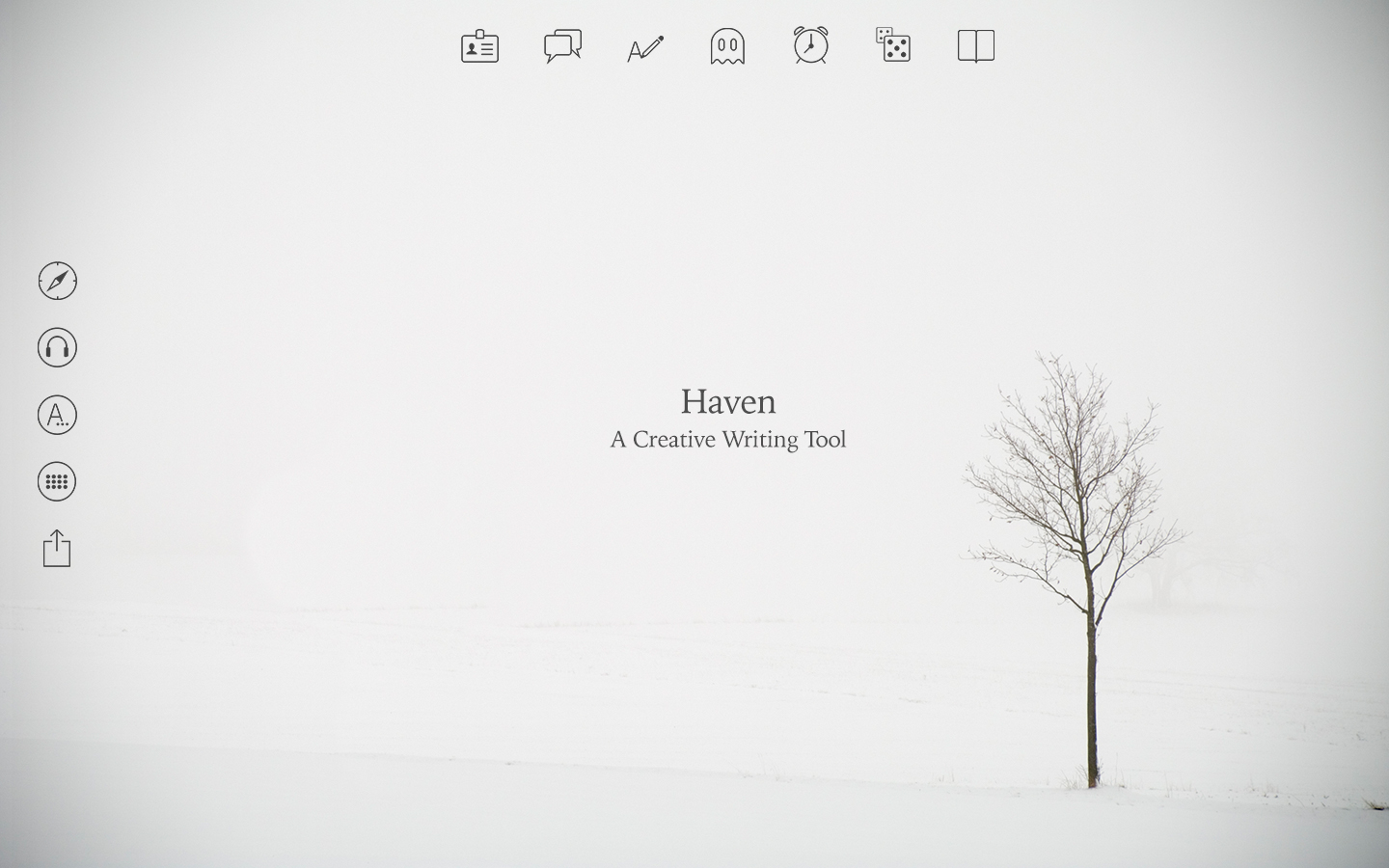
London-based Wow!Systems has released Haven, a new writing tool for Mac OS X that helps all kinds of amateur and professional writers to get inspired and focused on their writing. There are many writing tools, but what writers really need is a good place to write. Haven offers several different locations/themes as well as some of the most used creative writing techniques and tools, including a character builder, plot generator, a timer, and more. Haven is not just a tool, but a place to write.
London, UK - Wow!Systems is proud to release Haven, a new writing tool for Mac OS X. Haven is a new writing tool that helps both amateur and professional writers to get inspired. Allowing them to get focused on their writing, stimulating their creativity and creating a peaceful mind-set, while offering bullet-proof creative writing aids. Haven transports the user to a multitude of ambiances, offering a place to write in several distinct localizations.
Writing itself is not a language but a form of technology. Based on this fact, Wow! tried to conceive and develop a better way to use this fabulous technology called writing. We investigated, talked to writers, creatives, scientists, students, regular folks, and the crazy ones. We have prototyped, got inspired, frustrated and blocked. We finally came up with the needed concept, the main idea.
There are many writing tools but what writers really need is a good place to write. For the creative, the junior, the senior, the discrete, the obsessed, the hipster, the geek or just for yourself. We've created Haven, software that is not just a tool, but a place to write. As a place to write, Haven offers several different locations/themes as well as some of the most used creative writing techniques and tools!
THEMES
Select from several places to write. From snowy Jutland to mysterious Kyoto or the vibrant Berlin, there are 8 different animated themes with corresponding music ambiance included.
CHARACTER BUILDER
Get rapid inspiration in order to create your character. Appearance, occupation and traits are suggested randomly as you click.
PLOT GENERATOR
Using another well-known technique, this generator puts two characters at a random place, situation and under a given plot.
RANDOM WORDS
This creative writing technique makes you focus on a random word in a subliminal way. A 3D word appears to float around to help you brainstorm.
MYTHS & LEGENDS
According to your location (theme), this feature will display mythical stories about that place.
TIMER
Use this feature to be more productive by establishing writing goals and setting up timers.
INSPIRATION DICE
Roll these abstract dice to generate words in three categories for creative story writing: mood, object and terrain. Invent new storylines through abstract brainstorming using the given prompts.
THE CLASSICS
Meditate and feel inspired by classical literature related to your writing location (theme). All bundled on a neat 3D paper wrap.
CUSTOMIZE
Choose your favorite font style (4 of the most used fonts by writers are included), change or turn off ambient soundtracks and keystroke sounds. Quickly share your creative texts by email or social media channels.
System Requirements:
* OS X 10.10 or later
* 64-bit processor
* 360 MB
Pricing and Availability
Haven 1.0 is $9.99 USD (or equivalent amount in other currencies) and available worldwide exclusively through the Mac App Store in the Productivity category.
Haven 1.0: http://www.placetowrite.com
Purchase and Download: https://itunes.apple.com/app/haven-a-creative-writing-tool/id988357965
Video Trailer: https://www.youtube.com/watch?v=YClE93NtrOs
Features Overview Video: https://www.youtube.com/watch?v=nSnfagDd8yg
Screenshot: https://is3-ssl.mzstatic.com/image/thumb/Purple1/v4/37/4b/39/374b39d8-d323-6e14-85bc-a6ca09fc2880/pr_source.jpg/1440x900ss-80.png
App Icon: http://placetowrite.com/img/logo.png
Wow!Systems is a software house founded in 2008. It specializes in interactive solutions and software development for MacOS X, and delivers experiences that really make people go "Wow!" Aapplying novel interaction techniques to areas such as tourism, culture, marketing, education and entertainment. All Material and Software (C) Copyright 2015 Wow!Systems. All Rights Reserved. Apple, the Apple logo, Macintosh and Mac OS X are registered trademarks of Apple Inc. in the U.S. and/or other countries. Other trademarks and registered trademarks may be the property of their respective owners.
*******
Link To Article: http://prmac.com/release-id-74895.htm
*******
---------------------------------------------------------------------------------
Note that you can alter delivered distributions at any time.
Login to your account on prMac to alter your channel selection, or to opt-out at any time.
Haven - A Creative Writing Tool for Mac OS X - Published on 05/12/15
London-based Wow!Systems has released Haven, a new writing tool for Mac OS X that helps all kinds of amateur and professional writers to get inspired and focused on their writing. There are many writing tools, but what writers really need is a good place to write. Haven offers several different locations/themes as well as some of the most used creative writing techniques and tools, including a character builder, plot generator, a timer, and more. Haven is not just a tool, but a place to write.
London, UK - Wow!Systems is proud to release Haven, a new writing tool for Mac OS X. Haven is a new writing tool that helps both amateur and professional writers to get inspired. Allowing them to get focused on their writing, stimulating their creativity and creating a peaceful mind-set, while offering bullet-proof creative writing aids. Haven transports the user to a multitude of ambiances, offering a place to write in several distinct localizations.
Writing itself is not a language but a form of technology. Based on this fact, Wow! tried to conceive and develop a better way to use this fabulous technology called writing. We investigated, talked to writers, creatives, scientists, students, regular folks, and the crazy ones. We have prototyped, got inspired, frustrated and blocked. We finally came up with the needed concept, the main idea.
There are many writing tools but what writers really need is a good place to write. For the creative, the junior, the senior, the discrete, the obsessed, the hipster, the geek or just for yourself. We've created Haven, software that is not just a tool, but a place to write. As a place to write, Haven offers several different locations/themes as well as some of the most used creative writing techniques and tools!
THEMES
Select from several places to write. From snowy Jutland to mysterious Kyoto or the vibrant Berlin, there are 8 different animated themes with corresponding music ambiance included.
CHARACTER BUILDER
Get rapid inspiration in order to create your character. Appearance, occupation and traits are suggested randomly as you click.
PLOT GENERATOR
Using another well-known technique, this generator puts two characters at a random place, situation and under a given plot.
RANDOM WORDS
This creative writing technique makes you focus on a random word in a subliminal way. A 3D word appears to float around to help you brainstorm.
MYTHS & LEGENDS
According to your location (theme), this feature will display mythical stories about that place.
TIMER
Use this feature to be more productive by establishing writing goals and setting up timers.
INSPIRATION DICE
Roll these abstract dice to generate words in three categories for creative story writing: mood, object and terrain. Invent new storylines through abstract brainstorming using the given prompts.
THE CLASSICS
Meditate and feel inspired by classical literature related to your writing location (theme). All bundled on a neat 3D paper wrap.
CUSTOMIZE
Choose your favorite font style (4 of the most used fonts by writers are included), change or turn off ambient soundtracks and keystroke sounds. Quickly share your creative texts by email or social media channels.
System Requirements:
* OS X 10.10 or later
* 64-bit processor
* 360 MB
Pricing and Availability
Haven 1.0 is $9.99 USD (or equivalent amount in other currencies) and available worldwide exclusively through the Mac App Store in the Productivity category.
Haven 1.0: http://www.placetowrite.com
Purchase and Download: https://itunes.apple.com/app/haven-a-creative-writing-tool/id988357965
Video Trailer: https://www.youtube.com/watch?v=YClE93NtrOs
Features Overview Video: https://www.youtube.com/watch?v=nSnfagDd8yg
Screenshot: https://is3-ssl.mzstatic.com/image/thumb/Purple1/v4/37/4b/39/374b39d8-d323-6e14-85bc-a6ca09fc2880/pr_source.jpg/1440x900ss-80.png
App Icon: http://placetowrite.com/img/logo.png

Wow!Systems is a software house founded in 2008. It specializes in interactive solutions and software development for MacOS X, and delivers experiences that really make people go "Wow!" Aapplying novel interaction techniques to areas such as tourism, culture, marketing, education and entertainment. All Material and Software (C) Copyright 2015 Wow!Systems. All Rights Reserved. Apple, the Apple logo, Macintosh and Mac OS X are registered trademarks of Apple Inc. in the U.S. and/or other countries. Other trademarks and registered trademarks may be the property of their respective owners.
*******
Link To Article: http://prmac.com/release-id-74895.htm
*******
---------------------------------------------------------------------------------
Note that you can alter delivered distributions at any time.
Login to your account on prMac to alter your channel selection, or to opt-out at any time.
English To Hindi Translator Dictionary App for iOS
A new article has been published at prMac.
English To Hindi Translator Dictionary App for iOS - Published on 05/12/15
Developer Grigori Jlavyan announces the release of Offline English to Hindi Language Translator / Dictionary 1.0 for iOS. The English to Hindi Translation Dictionary's enormous number of words provides you with an ideal opportunity to find the definition and translation of almost any word you want. The app's on-device dictionary offers access to a dictionary, including synonyms, antonyms, idioms, slang, and contemporary words, even without an available Internet connection.
Yerevan, Armenia - Independent developer Grigori Jlavyan is proud to announce the release of Offline English to Hindi Language Translator / Dictionary 1.0. The dictionary is an offline application with more than 450.000 words, allowing users to find the translation and the definition of words. The offline feature enables use of the dictionary anywhere and anytime, even when Internet access is unavailable.
Features:
* Availability of wide-ranging synonyms and antonyms with approximately 10,000 synonym variants
* Understand word formations and the origins of words
* Find trustworthy translations of colloquial and formal words as well as conjugation of verbs and declension of nouns
* Gain knowledge of technical translations in addition to slang terms, idiomatic forms and phrasal verbs
* Save an unlimited number of unknown words in "Favorites"
* Study structural relationships in a foreign language
* Learn grammatical functions of words by bringing usage examples of each word searched
The English to Hindi Translate Dictionary offers an ideal opportunity to seek and get the translation as well as the meaning of words, everywhere and anytime. Access the dictionary without the need for an Internet connection.
Device Requirements:
* iPhone, iPad, and iPod touch
* Requires iOS 6.0 or later
* 37.1 MB
Pricing and Availability:
* Offline English to Hindi Language Translator / Dictionary 1.0 is free, and available worldwide exclusively in the App Store in the Education category.
iOSRegion: http://iosregion.com/
Offline English to Hindi Language Translator / Dictionary 1.0: https://itunes.apple.com/app/offline-english-to-hindi-language/id979133565
Screenshot: http://a4.mzstatic.com/us/r30/Purple1/v4/36/83/46/36834605-7dbf-a6c7-40e4-394ecb3c10ca/screen568x568.jpeg
App Icon: http://a1.mzstatic.com/us/r30/Purple3/v4/7e/3a/89/7e3a890f-55d0-5414-f669-caf6a14f2095/icon175x175.png
The author of this cutting edge application is Grigori Jlavyan, who makes all the best tools for your devices. Copyright (C) 2015 Grigori Jlavyan. All Rights Reserved. Apple, the Apple logo, iPhone, iPad and iPod are registered trademarks of Apple Inc. in the U.S. and/or other countries.
*******
Link To Article: http://prmac.com/release-id-74824.htm
*******
---------------------------------------------------------------------------------
Note that you can alter delivered distributions at any time.
Login to your account on prMac to alter your channel selection, or to opt-out at any time.
English To Hindi Translator Dictionary App for iOS - Published on 05/12/15
Developer Grigori Jlavyan announces the release of Offline English to Hindi Language Translator / Dictionary 1.0 for iOS. The English to Hindi Translation Dictionary's enormous number of words provides you with an ideal opportunity to find the definition and translation of almost any word you want. The app's on-device dictionary offers access to a dictionary, including synonyms, antonyms, idioms, slang, and contemporary words, even without an available Internet connection.
Yerevan, Armenia - Independent developer Grigori Jlavyan is proud to announce the release of Offline English to Hindi Language Translator / Dictionary 1.0. The dictionary is an offline application with more than 450.000 words, allowing users to find the translation and the definition of words. The offline feature enables use of the dictionary anywhere and anytime, even when Internet access is unavailable.
Features:
* Availability of wide-ranging synonyms and antonyms with approximately 10,000 synonym variants
* Understand word formations and the origins of words
* Find trustworthy translations of colloquial and formal words as well as conjugation of verbs and declension of nouns
* Gain knowledge of technical translations in addition to slang terms, idiomatic forms and phrasal verbs
* Save an unlimited number of unknown words in "Favorites"
* Study structural relationships in a foreign language
* Learn grammatical functions of words by bringing usage examples of each word searched
The English to Hindi Translate Dictionary offers an ideal opportunity to seek and get the translation as well as the meaning of words, everywhere and anytime. Access the dictionary without the need for an Internet connection.
Device Requirements:
* iPhone, iPad, and iPod touch
* Requires iOS 6.0 or later
* 37.1 MB
Pricing and Availability:
* Offline English to Hindi Language Translator / Dictionary 1.0 is free, and available worldwide exclusively in the App Store in the Education category.
iOSRegion: http://iosregion.com/
Offline English to Hindi Language Translator / Dictionary 1.0: https://itunes.apple.com/app/offline-english-to-hindi-language/id979133565
Screenshot: http://a4.mzstatic.com/us/r30/Purple1/v4/36/83/46/36834605-7dbf-a6c7-40e4-394ecb3c10ca/screen568x568.jpeg
App Icon: http://a1.mzstatic.com/us/r30/Purple3/v4/7e/3a/89/7e3a890f-55d0-5414-f669-caf6a14f2095/icon175x175.png

The author of this cutting edge application is Grigori Jlavyan, who makes all the best tools for your devices. Copyright (C) 2015 Grigori Jlavyan. All Rights Reserved. Apple, the Apple logo, iPhone, iPad and iPod are registered trademarks of Apple Inc. in the U.S. and/or other countries.
*******
Link To Article: http://prmac.com/release-id-74824.htm
*******
---------------------------------------------------------------------------------
Note that you can alter delivered distributions at any time.
Login to your account on prMac to alter your channel selection, or to opt-out at any time.
Power APP released Version 1.6.0 of Battery Doc for iOS
A new article has been published at prMac.
Power APP released Version 1.6.0 of Battery Doc for iOS - Published on 05/12/15
Power App AG today announces Battery Doc 1.6.0, an important feature update to their popular battery management app for iPhone, iPad and iPod touch devices. Battery Doc uses proprietary algorithms to determine the remaining uptime for the device. The displayed numbers either show the remaining uptime for the actual state of the device or the remaining uptime for specific uses. Version 1.6.0 contains minor bug fixes as well as a few additional options for the Apple Watch.
Pfaeffikon, Switzerland - Power App AG today is proud to announce the release of Battery Doc 1.6.0, an important feature update to their popular battery management app developed exclusively for iPhone, iPad and iPod touch devices. The new version is 1.6.0 and contains bug fixes as well as a few additional options for the Apple Watch. The Bug fixes are non critical and are mostly related to display in foreign languages.
"Adapting Battery Doc to the Apple Watch brought its own challenges since the information that can be displayed on a watch display is very reduced compared to other iOS devices. One of the challenges is to fit the various elements into the smaller display. For some languages the errors have been found only after the last version already hit the App Store, so we pushed this update to hit the App Store as soon as possible" as Christian Schaffner, General Manager of Power APP, explained the short interval for this release.
Battery Doc shows the remaining up-time of an iOS device based on the actual current that is drained from the battery. Based on this measurements various options to maximize battery life can be shown, the calculations are based on a proprietary algorithm developed by Power APP.
Device Requirements:
* iPhone, iPad, and iPod touch and Apple Watch
* Requires iOS 6.0 or later
* 5.8 MB
Pricing and Availability:
Battery Doc 1.6.0 is $1.99 USD (or equivalent amount in other currencies) and available worldwide exclusively through the App Store in the Productivity category.
Power App: http://www.powerapp.ch
Battery Doc 1.6.0: http://powerapp.ch/product/batterydoc/
Purchase and Download: https://itunes.apple.com/app/battery-doc-professional-battery/id578400895
Screenshot 1: http://a3.mzstatic.com/us/r30/Purple3/v4/10/11/f6/1011f6c2-9e06-8605-794f-175f4eced6db/screen480x480.jpeg
Screenshot 2: http://a5.mzstatic.com/us/r30/Purple2/v4/49/53/45/49534551-c497-9db5-e48d-4902593b1163/screen480x480.jpeg
App Icon: http://a1.mzstatic.com/us/r30/Purple7/v4/6c/c2/03/6cc203ba-a6c4-5714-a5b8-bbc234f217dc/icon175x175.jpeg
Based in Pfaeffikon, Switzerland, Power App AG is an independent company founded in 2010 by Christian Schaffner. Power App's main focus is developing powerful, versatile applications for the Mac and iOS platforms. Copyright (C) 2010-2015 Power App AG. All Rights Reserved. Apple, the Apple logo, Mac, iPhone, iPod, and iPad are registered trademarks of Apple Inc. in the U.S. and/or other countries. Other trademarks and registered trademarks may be the property of their respective owners.
*******
Link To Article: http://prmac.com/release-id-74867.htm
*******
---------------------------------------------------------------------------------
Note that you can alter delivered distributions at any time.
Login to your account on prMac to alter your channel selection, or to opt-out at any time.
Power APP released Version 1.6.0 of Battery Doc for iOS - Published on 05/12/15
Power App AG today announces Battery Doc 1.6.0, an important feature update to their popular battery management app for iPhone, iPad and iPod touch devices. Battery Doc uses proprietary algorithms to determine the remaining uptime for the device. The displayed numbers either show the remaining uptime for the actual state of the device or the remaining uptime for specific uses. Version 1.6.0 contains minor bug fixes as well as a few additional options for the Apple Watch.
Pfaeffikon, Switzerland - Power App AG today is proud to announce the release of Battery Doc 1.6.0, an important feature update to their popular battery management app developed exclusively for iPhone, iPad and iPod touch devices. The new version is 1.6.0 and contains bug fixes as well as a few additional options for the Apple Watch. The Bug fixes are non critical and are mostly related to display in foreign languages.
"Adapting Battery Doc to the Apple Watch brought its own challenges since the information that can be displayed on a watch display is very reduced compared to other iOS devices. One of the challenges is to fit the various elements into the smaller display. For some languages the errors have been found only after the last version already hit the App Store, so we pushed this update to hit the App Store as soon as possible" as Christian Schaffner, General Manager of Power APP, explained the short interval for this release.
Battery Doc shows the remaining up-time of an iOS device based on the actual current that is drained from the battery. Based on this measurements various options to maximize battery life can be shown, the calculations are based on a proprietary algorithm developed by Power APP.
Device Requirements:
* iPhone, iPad, and iPod touch and Apple Watch
* Requires iOS 6.0 or later
* 5.8 MB
Pricing and Availability:
Battery Doc 1.6.0 is $1.99 USD (or equivalent amount in other currencies) and available worldwide exclusively through the App Store in the Productivity category.
Power App: http://www.powerapp.ch
Battery Doc 1.6.0: http://powerapp.ch/product/batterydoc/
Purchase and Download: https://itunes.apple.com/app/battery-doc-professional-battery/id578400895
Screenshot 1: http://a3.mzstatic.com/us/r30/Purple3/v4/10/11/f6/1011f6c2-9e06-8605-794f-175f4eced6db/screen480x480.jpeg

Screenshot 2: http://a5.mzstatic.com/us/r30/Purple2/v4/49/53/45/49534551-c497-9db5-e48d-4902593b1163/screen480x480.jpeg

App Icon: http://a1.mzstatic.com/us/r30/Purple7/v4/6c/c2/03/6cc203ba-a6c4-5714-a5b8-bbc234f217dc/icon175x175.jpeg

Based in Pfaeffikon, Switzerland, Power App AG is an independent company founded in 2010 by Christian Schaffner. Power App's main focus is developing powerful, versatile applications for the Mac and iOS platforms. Copyright (C) 2010-2015 Power App AG. All Rights Reserved. Apple, the Apple logo, Mac, iPhone, iPod, and iPad are registered trademarks of Apple Inc. in the U.S. and/or other countries. Other trademarks and registered trademarks may be the property of their respective owners.
*******
Link To Article: http://prmac.com/release-id-74867.htm
*******
---------------------------------------------------------------------------------
Note that you can alter delivered distributions at any time.
Login to your account on prMac to alter your channel selection, or to opt-out at any time.
Subscribe to:
Posts (Atom)