A new article has been published at prMac.
Team Lumo announce Cat Dream Simulator - Published on 05/19/15
Award winning developers, Team Lumo today announces the up and coming release of Lumo's Cat, the final installment in their simulation trilogy for iOS devices. Lumo's Cat is a single-player Real Time Defence game for MOBA playing, cat-lovers on the move. The game simulates what takes place inside your cat's dreams. Lumo's Cat is due out for iPhone and iPad Summer 2015, but eager players can see the game at MCM Comic Con London 22nd - 24th May.
Leamington Spa, United Kingdom - With award winning games such as Kumo Lumo (the cloud simulator) and Lumo Deliveries Inc. (the logistics management and beatnik sim) to their name; artisan development collective Team Lumo have quickly established a reputation for creating innovative simulation experiences. Now Team Lumo announces the final installment in their simulation trilogy: Lumo's Cat (the cat dream simulator).
Lumo's Cat is a single-player Real Time Defence game for MOBA playing, cat-lovers on the move. Lumo's Cat blurs the boundaries between the RTS and Tower Defence genres. The game simulates what takes place inside your cat's dreams - and your cat is under attack! Hordes of raucous mice are sweeping in from every direction, each trying to awaken your sleeping cat. Your job is to deploy the Cat Defence Squad to fight off the mice and keep the cat asleep.
As in real life, the food your cat eats before bed affects the dreams it has. In Lumo's Cat, players can modify the difficulty of each game to suit their skill or mood by feeding the cat different food before it goes to sleep.
Each level successfully completed adds a new pattern to the ever lengthening Cat Blanket - with the design entirely dependent on the food you just fed the cat. This gives each player a completely unique blanket that reflects their individual game experience and personal artistic taste! Players can share their blanket design with friends, and see what they have created!
Project Lead, Steve Stopps says "We have been working closely with our future players, and we believe that together we have created something truly special. If you love frenetic action packed strategy games, cats, cheese and paisley blankets, then Lumo's Cat was quite literally made for you."
Lumo's Cat is due out for iPhone and iPad Summer 2015, but eager players can see the game at MCM Comic Con London 22nd - 24th May.
Team Lumo: http://teamlumo.com
Part of Leamington Spa's Arch Creative scene and financially backed by video game investment specialist, Daedalus Partners LLP, Team Lumo are a collective of like minded developers who aim to make unique experiences to surprise and delight players. The six-person team has nearly 50 years combined experience of making games, but believes it is its passion in combining elements from the fringes of pop-culture that really sets them apart. All Material and Software (C) Copyright 2015 Team Lumo. All Rights Reserved. Apple, the Apple logo, iPhone, iPod and iPad are registered trademarks of Apple Inc. in the U.S. and/or other countries. Other trademarks and registered trademarks may be the property of their respective owners.
*******
Link To Article: http://prmac.com/release-id-75027.htm
*******
---------------------------------------------------------------------------------
Note that you can alter delivered distributions at any time.
Login to your account on prMac to alter your channel selection, or to opt-out at any time.

Paddle Rolls Out In-App Analytics SDK For Neglected Mac App Developers
A new article has been published at prMac.
Paddle Rolls Out In-App Analytics SDK For Neglected Mac App Developers - Published on 05/19/15
London-based startup Paddle announces their free analytics SDK for Mac developers, which allows them to track both App Store and independently distributed apps from a single dashboard. With Apple's new analytics platform currently iOS only, Paddle's SDK provides neglected Mac developers with a free, easy-to-integrate method for gathering data about their apps and users. With simple integration involving just 3 lines of code, the SDK is incredibly easy to setup.
London, United Kingdom - Paddle is pleased to announce their free analytics SDK for Mac developers, allowing them to track both App Store and independently distributed apps from a single dashboard. With Apple's new analytics platform currently iOS only, Paddle's SDK provides neglected Mac developers with a free, easy-to-integrate method for gathering data about their apps and users.�
"Since the launch of Apple's Analytics product, we've heard from hundreds of frustrated developers wondering why Apple has abandoned analytics support for the Mac,� says Paddle�s Founder and CEO, Christian Owens. "Being reasonably well known among Mac developers, the team decided we had to do something about it! So we sat down and optimized our existing analytics product with a whole new set of features specifically for Mac developers (regardless of if they sell on the App Store or outside the App Store).�
As integration is simple, involving just 3 lines of code, the SDK is incredibly easy to setup. Developers can start tracking real-time data like:
* Daily, weekly & monthly active users
* Number of installs, updates & launches
* Devices & OS versions being used
* Location data and more
* App-specific custom events�
Paddle also provides an analytics SDK for iOS, making it quite simple for developers to manage all of their data for desktop & mobile from one place. �Our goal is to become an �all in one toolkit� for developers, making it easy for them to manage everything from payments and trial versions to in-app analytics,� adds Owens. �Developers love to build awesome products, and our tools give them more time to do just that.�
Pricing and Availability:
The Paddle Analytics SDK for Mac Developers is free, and more information and signup is available at Paddle online.
Paddle: https://paddle.com/?utm_source=prmac&utm_medium=press_release&utm_campaign=mac_analytics
Paddle Analytics for Mac: https://www.paddle.com/mac-analytics?utm_source=prmac&utm_medium=press_release&utm_campaign=mac_analytics
Paddle makes it simple for developers to focus on building awesome products. Founded in 2012 and based in the heart of London, Paddle�s checkout and range of tools allow developers to manage everything from payments and trial versions to analytics in one place � leaving them to spend more time doing what they�re good at. All Material and Software Copyright (C) 2015 Paddle.com. All Rights Reserved. Apple, the Apple logo, Macintosh and Mac OS X are registered trademarks of Apple Inc. in the U.S. and/or other countries. Other trademarks and registered trademarks may be the property of their respective owners.
*******
Link To Article: http://prmac.com/release-id-75012.htm
*******
---------------------------------------------------------------------------------
Note that you can alter delivered distributions at any time.
Login to your account on prMac to alter your channel selection, or to opt-out at any time.
Paddle Rolls Out In-App Analytics SDK For Neglected Mac App Developers - Published on 05/19/15
London-based startup Paddle announces their free analytics SDK for Mac developers, which allows them to track both App Store and independently distributed apps from a single dashboard. With Apple's new analytics platform currently iOS only, Paddle's SDK provides neglected Mac developers with a free, easy-to-integrate method for gathering data about their apps and users. With simple integration involving just 3 lines of code, the SDK is incredibly easy to setup.
London, United Kingdom - Paddle is pleased to announce their free analytics SDK for Mac developers, allowing them to track both App Store and independently distributed apps from a single dashboard. With Apple's new analytics platform currently iOS only, Paddle's SDK provides neglected Mac developers with a free, easy-to-integrate method for gathering data about their apps and users.�
"Since the launch of Apple's Analytics product, we've heard from hundreds of frustrated developers wondering why Apple has abandoned analytics support for the Mac,� says Paddle�s Founder and CEO, Christian Owens. "Being reasonably well known among Mac developers, the team decided we had to do something about it! So we sat down and optimized our existing analytics product with a whole new set of features specifically for Mac developers (regardless of if they sell on the App Store or outside the App Store).�
As integration is simple, involving just 3 lines of code, the SDK is incredibly easy to setup. Developers can start tracking real-time data like:
* Daily, weekly & monthly active users
* Number of installs, updates & launches
* Devices & OS versions being used
* Location data and more
* App-specific custom events�
Paddle also provides an analytics SDK for iOS, making it quite simple for developers to manage all of their data for desktop & mobile from one place. �Our goal is to become an �all in one toolkit� for developers, making it easy for them to manage everything from payments and trial versions to in-app analytics,� adds Owens. �Developers love to build awesome products, and our tools give them more time to do just that.�
Pricing and Availability:
The Paddle Analytics SDK for Mac Developers is free, and more information and signup is available at Paddle online.
Paddle: https://paddle.com/?utm_source=prmac&utm_medium=press_release&utm_campaign=mac_analytics
Paddle Analytics for Mac: https://www.paddle.com/mac-analytics?utm_source=prmac&utm_medium=press_release&utm_campaign=mac_analytics
Paddle makes it simple for developers to focus on building awesome products. Founded in 2012 and based in the heart of London, Paddle�s checkout and range of tools allow developers to manage everything from payments and trial versions to analytics in one place � leaving them to spend more time doing what they�re good at. All Material and Software Copyright (C) 2015 Paddle.com. All Rights Reserved. Apple, the Apple logo, Macintosh and Mac OS X are registered trademarks of Apple Inc. in the U.S. and/or other countries. Other trademarks and registered trademarks may be the property of their respective owners.
*******
Link To Article: http://prmac.com/release-id-75012.htm
*******
---------------------------------------------------------------------------------
Note that you can alter delivered distributions at any time.
Login to your account on prMac to alter your channel selection, or to opt-out at any time.
Bitolithic releases ThinkBook 2.0 for iOS: Note-Taking and Outlining App
A new article has been published at prMac.
Bitolithic releases ThinkBook 2.0 for iOS: Note-Taking and Outlining App - Published on 05/19/15
Bitolithic today announces ThinkBook 2.0.1, an important update to their flexible note-taking and outlining app for iPhone, iPad and iPod touch devices. By being very flexible, ThinkBook adapts to its users and not the other way around. The app supports multiple note types, including text notes, todos, questions and projects. Notebooks and pages behave just like other notes, they can be arranged however the user wants. Version 2.0.1 gets iPhone support, a new look and iCloud integration.
Aspendale, Australia - Bitolithic, creator of Comic Zeal, today is pleased to announce the release of ThinkBook 2.0.1, an important update to their flexible note-taking and outlining app for iPhone, iPad and iPod touch devices. Imagine the next step up from a todo list app. It has todos, sure, but it also lets you take notes, organize them into outlines, make projects from them and track your progress. It keeps questions, and their answers, together. It lets you make up dashboards, import documents and images, put all this stuff into pages, and the pages into notebooks. Sounds good? That's ThinkBook.
By being very flexible, ThinkBook adapts to its users, not the other way around. ThinkBook's most distinctive feature is the slider; the user can push notes, pages, notebooks ... anything into it. Then go anywhere in their library and drag them out. An incredibly fast way of re-arranging information.
Update Highlights:
* Universal app, our most requested feature was ThinkBook for the iPhone. Version 2.0 delivers
* A brand-new look for iOS 8. Every element of ThinkBook has been redesigned to fit the new iOS 8 visual style
* ThinkBook can now import, export and backup to any Cloud service available through the iOS 8 document picker
* Use iCloud to update your notes between devices
* More notebook covers, there are now two default ones, and you can buy ten more
* Dark themes, there are three default themes, they have light backgrounds like the old ones, and you can buy three more with dark backgrounds
Device Requirements:
* iPhone, iPad, and iPod touch
* Optimized for iPhone 5, iPhone 6/6 Plus
* Requires iOS 8.0 or later
* Universal Application
* 31.8 MB
Pricing and Availability:
ThinkBook 2.0.1 is Free and available worldwide exclusively through the App Store in the Productivity category.
ThinkBook 2.0.1: http://www.thinkbookapp.com
Download from iTunes: https://itunes.apple.com/app/id421926271
Screenshot: https://dl.dropboxusercontent.com/u/2693052/iPad%201.jpg
App Icon: https://dl.dropboxusercontent.com/u/2693052/ThinkBook%20Icon.png
Press Kit (zip): https://dl.dropboxusercontent.com/u/2693052/Media%20Pack%202.0.zip
Based in Melbourne, Australia, bitolithic is a tiny company developing great software. Their first product, Comic Zeal was the first comic reader on the iPhone and remains the most successful one on the platform. Now with ThinkBook, bitolithic are helping their customers be creative. Copyright (C) 2015 bitolithic. All Rights Reserved. Apple, the Apple logo, iPhone, iPod and iPad are registered trademarks of Apple Inc. in the U.S. and/or other countries.
*******
Link To Article: http://prmac.com/release-id-75016.htm
*******
---------------------------------------------------------------------------------
Note that you can alter delivered distributions at any time.
Login to your account on prMac to alter your channel selection, or to opt-out at any time.
Bitolithic releases ThinkBook 2.0 for iOS: Note-Taking and Outlining App - Published on 05/19/15
Bitolithic today announces ThinkBook 2.0.1, an important update to their flexible note-taking and outlining app for iPhone, iPad and iPod touch devices. By being very flexible, ThinkBook adapts to its users and not the other way around. The app supports multiple note types, including text notes, todos, questions and projects. Notebooks and pages behave just like other notes, they can be arranged however the user wants. Version 2.0.1 gets iPhone support, a new look and iCloud integration.
Aspendale, Australia - Bitolithic, creator of Comic Zeal, today is pleased to announce the release of ThinkBook 2.0.1, an important update to their flexible note-taking and outlining app for iPhone, iPad and iPod touch devices. Imagine the next step up from a todo list app. It has todos, sure, but it also lets you take notes, organize them into outlines, make projects from them and track your progress. It keeps questions, and their answers, together. It lets you make up dashboards, import documents and images, put all this stuff into pages, and the pages into notebooks. Sounds good? That's ThinkBook.
By being very flexible, ThinkBook adapts to its users, not the other way around. ThinkBook's most distinctive feature is the slider; the user can push notes, pages, notebooks ... anything into it. Then go anywhere in their library and drag them out. An incredibly fast way of re-arranging information.
Update Highlights:
* Universal app, our most requested feature was ThinkBook for the iPhone. Version 2.0 delivers
* A brand-new look for iOS 8. Every element of ThinkBook has been redesigned to fit the new iOS 8 visual style
* ThinkBook can now import, export and backup to any Cloud service available through the iOS 8 document picker
* Use iCloud to update your notes between devices
* More notebook covers, there are now two default ones, and you can buy ten more
* Dark themes, there are three default themes, they have light backgrounds like the old ones, and you can buy three more with dark backgrounds
Device Requirements:
* iPhone, iPad, and iPod touch
* Optimized for iPhone 5, iPhone 6/6 Plus
* Requires iOS 8.0 or later
* Universal Application
* 31.8 MB
Pricing and Availability:
ThinkBook 2.0.1 is Free and available worldwide exclusively through the App Store in the Productivity category.
ThinkBook 2.0.1: http://www.thinkbookapp.com
Download from iTunes: https://itunes.apple.com/app/id421926271
Screenshot: https://dl.dropboxusercontent.com/u/2693052/iPad%201.jpg

App Icon: https://dl.dropboxusercontent.com/u/2693052/ThinkBook%20Icon.png

Press Kit (zip): https://dl.dropboxusercontent.com/u/2693052/Media%20Pack%202.0.zip
Based in Melbourne, Australia, bitolithic is a tiny company developing great software. Their first product, Comic Zeal was the first comic reader on the iPhone and remains the most successful one on the platform. Now with ThinkBook, bitolithic are helping their customers be creative. Copyright (C) 2015 bitolithic. All Rights Reserved. Apple, the Apple logo, iPhone, iPod and iPad are registered trademarks of Apple Inc. in the U.S. and/or other countries.
*******
Link To Article: http://prmac.com/release-id-75016.htm
*******
---------------------------------------------------------------------------------
Note that you can alter delivered distributions at any time.
Login to your account on prMac to alter your channel selection, or to opt-out at any time.
Duplicate 1.0 - Free Enhanced Copy and Paste for Mac OS X 10.10 Yosemite
A new article has been published at prMac.
Duplicate 1.0 - Free Enhanced Copy and Paste for Mac OS X 10.10 Yosemite - Published on 05/19/15
MacDaddy today introduces Duplicate 1.0, its new productivity application developed specifically for OS X Yosemite. Duplicate enhances the OS X Finder's standard copy and paste functionality by making them more efficient, as well as performing approximately 10% faster than stock copy and paste methods. Duplicate can also copy large folders with no issues involving file permissions, as well as the ability to copy entire volumes, creating an exact duplicate bootable copy of the original volume.
Breckenridge, Colorado - MacDaddy today is proud to announce the release and immediate availability of Duplicate 1.0, its new productivity application developed specifically for OS X Yosemite. Duplicate enhances the OS X Finder's standard copy and paste functionality by making them more efficient and performing approximately 10% faster than the stock functions. While duplicate works via Finder just like standard copy and paste, its abilities are much more enhanced. In addition to Duplicate's greater efficiency and increased speed, it can also copy large folders, or even entire volumes at once.
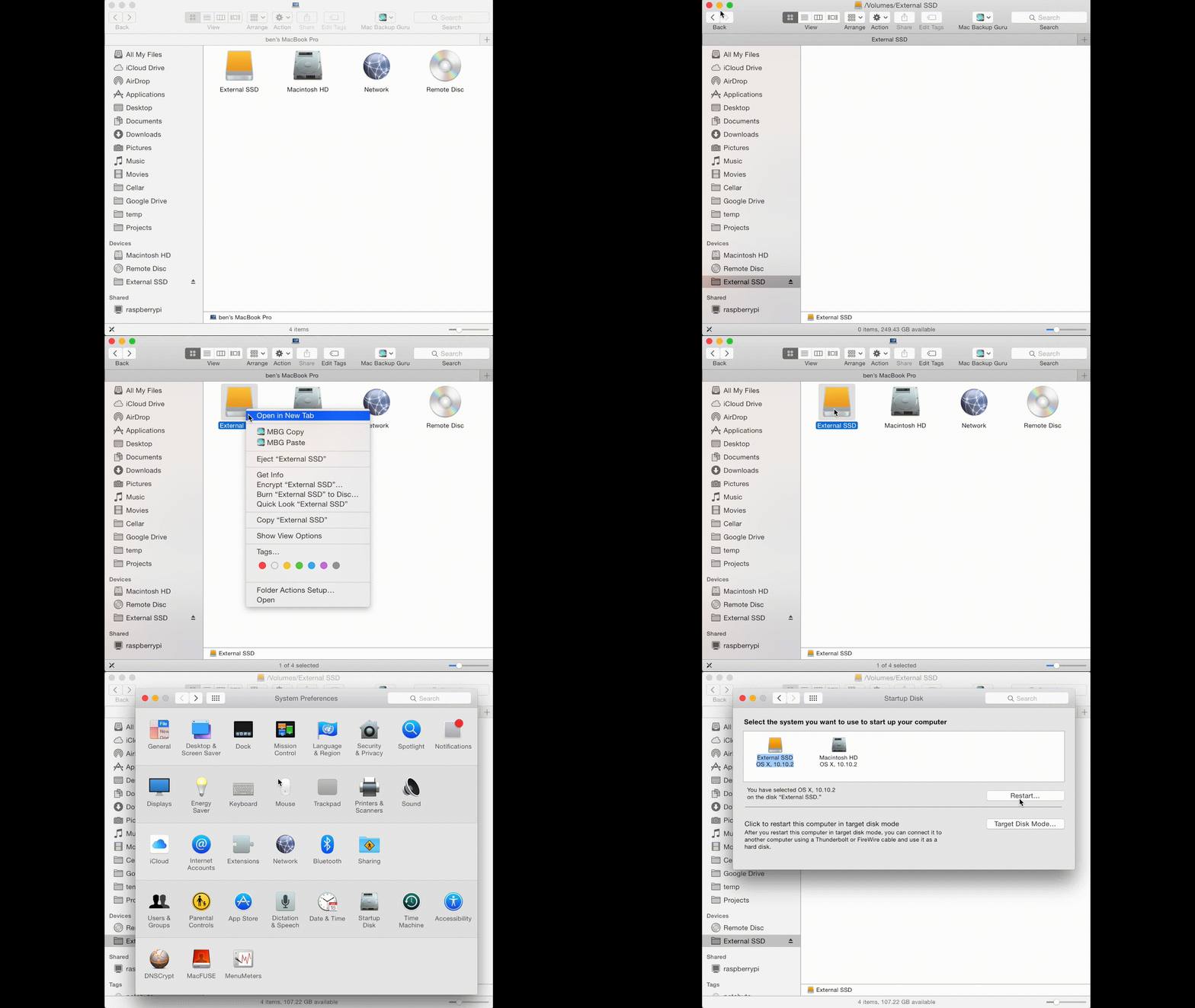
Duplicate installs itself as an option into the contextual menu that appears when you Control-Click or right-click a file, folder, or drive. This makes Duplicate just as easy to use as the standard OS X copy and paste functions, while providing a copy and paste operation that is both faster and more efficient. Duplicate avoids failed copies with large folders, and users won't experience any issues with permissions as they sometime do with the standard Copy and Paste functions. Duplicate creates an exact duplicate of the data that is copied and pasted using the app.
Features:
* Copies and pastes data up to 10% faster than OS X's standard functions
* As easy to use as the standard OS X copy and paste functions
* Copy and paste large folders
* Copy and paste entire volumes
* Duplicate copied volumes are bootable
"Using the stock OS X copy and paste functions built-in to OS X Yosemite 10.10 can frustrate some users," says MacDaddy CEO Ben Slaney. "When copying large folders, they sometimes encounter issues with permissions and failed copies with large folders. Duplicate fixes all of that, while being just as easy to use as the stock copy and paste functions."
Whenever Duplicate is used to copy data, it makes an exact duplicate, which can even pass the "Backup Bouncer Test," which is a test that determines whether a perfect copy of a file and all associated data is made, which many utility apps, (including the Finder's native copy and paste), fail.
Duplicate preserves the following when it copies data:
* Basic permissions, ownership, and timestamps
* Symbolic links
* Ownership of symbolic links
* Hard links
* Resource forks
* Finder flags
* Finder locks
* Finder creation date
* BSD flags
* Extended attributes (on files, directories, and symbolic links)
* Access Control Lists (on files, directories, and symbolic links)
* FIFOs
* Devices
* Any combinations of the above
One ultimate test for Duplicate is that it can even be used to copy and paste an entire volume to another drive, resulting in a bootable drive. Volume copy and paste is an extremely handy feature for those looking to easily create test volumes when they're wanting to experiment with different setups and configurations on their Mac.
"By using Duplicate to make an exact copy of their Mac OS X volume, users can use the Duplicate copy to try out various configurations and changes without worrying about harming their daily use system's hard drive and its data," continues Slaney. "This protects users who enjoy tinkering with their systems, offering complete protection from accidentally and irreversibly altering their Mac's configuration by mistake."
System Requirements:
* OS X 10.10 Yosemite or later
* 64-Bit Intel processor
* 4.7 MB
Pricing and Availability:
Duplicate 1.0 is Free and is available worldwide exclusively as a direct download from the MacDaddy website.
MacDaddy: http://macdaddy.io
Duplicate 1.0: http://macdaddy.io/duplicate/
Download Duplicate: http://macdaddy.io/Duplicate.zip
Screenshot (Animated Gif): http://macdaddy.io/wp-content/uploads/2012/12/MacBackupGuruCopyPasteBootableVolume.gif
Screenshot: http://macdaddy.io/wp-content/uploads/2015/05/DuplicateScreenshot.png
MacDaddy, a subsidiary of Mac OSX File Recovery, aims to bring the most powerful but easy to use disk utilities for OS X to the public. MacDaddy is dedicated to making extremely powerful low-level software that is ridiculously easy to use. All Material and Software (C) Copyright 2015 MacDaddy. All Rights Reserved. Apple, the Apple logo, Macintosh and Mac OS X are registered trademarks of Apple Inc. in the U.S. and/or other countries. Other trademarks and registered trademarks may be the property of their respective owners.
*******
Link To Article: http://prmac.com/release-id-75015.htm
*******
---------------------------------------------------------------------------------
Note that you can alter delivered distributions at any time.
Login to your account on prMac to alter your channel selection, or to opt-out at any time.
Duplicate 1.0 - Free Enhanced Copy and Paste for Mac OS X 10.10 Yosemite - Published on 05/19/15
MacDaddy today introduces Duplicate 1.0, its new productivity application developed specifically for OS X Yosemite. Duplicate enhances the OS X Finder's standard copy and paste functionality by making them more efficient, as well as performing approximately 10% faster than stock copy and paste methods. Duplicate can also copy large folders with no issues involving file permissions, as well as the ability to copy entire volumes, creating an exact duplicate bootable copy of the original volume.
Breckenridge, Colorado - MacDaddy today is proud to announce the release and immediate availability of Duplicate 1.0, its new productivity application developed specifically for OS X Yosemite. Duplicate enhances the OS X Finder's standard copy and paste functionality by making them more efficient and performing approximately 10% faster than the stock functions. While duplicate works via Finder just like standard copy and paste, its abilities are much more enhanced. In addition to Duplicate's greater efficiency and increased speed, it can also copy large folders, or even entire volumes at once.
Duplicate installs itself as an option into the contextual menu that appears when you Control-Click or right-click a file, folder, or drive. This makes Duplicate just as easy to use as the standard OS X copy and paste functions, while providing a copy and paste operation that is both faster and more efficient. Duplicate avoids failed copies with large folders, and users won't experience any issues with permissions as they sometime do with the standard Copy and Paste functions. Duplicate creates an exact duplicate of the data that is copied and pasted using the app.
Features:
* Copies and pastes data up to 10% faster than OS X's standard functions
* As easy to use as the standard OS X copy and paste functions
* Copy and paste large folders
* Copy and paste entire volumes
* Duplicate copied volumes are bootable
"Using the stock OS X copy and paste functions built-in to OS X Yosemite 10.10 can frustrate some users," says MacDaddy CEO Ben Slaney. "When copying large folders, they sometimes encounter issues with permissions and failed copies with large folders. Duplicate fixes all of that, while being just as easy to use as the stock copy and paste functions."
Whenever Duplicate is used to copy data, it makes an exact duplicate, which can even pass the "Backup Bouncer Test," which is a test that determines whether a perfect copy of a file and all associated data is made, which many utility apps, (including the Finder's native copy and paste), fail.
Duplicate preserves the following when it copies data:
* Basic permissions, ownership, and timestamps
* Symbolic links
* Ownership of symbolic links
* Hard links
* Resource forks
* Finder flags
* Finder locks
* Finder creation date
* BSD flags
* Extended attributes (on files, directories, and symbolic links)
* Access Control Lists (on files, directories, and symbolic links)
* FIFOs
* Devices
* Any combinations of the above
One ultimate test for Duplicate is that it can even be used to copy and paste an entire volume to another drive, resulting in a bootable drive. Volume copy and paste is an extremely handy feature for those looking to easily create test volumes when they're wanting to experiment with different setups and configurations on their Mac.
"By using Duplicate to make an exact copy of their Mac OS X volume, users can use the Duplicate copy to try out various configurations and changes without worrying about harming their daily use system's hard drive and its data," continues Slaney. "This protects users who enjoy tinkering with their systems, offering complete protection from accidentally and irreversibly altering their Mac's configuration by mistake."
System Requirements:
* OS X 10.10 Yosemite or later
* 64-Bit Intel processor
* 4.7 MB
Pricing and Availability:
Duplicate 1.0 is Free and is available worldwide exclusively as a direct download from the MacDaddy website.
MacDaddy: http://macdaddy.io
Duplicate 1.0: http://macdaddy.io/duplicate/
Download Duplicate: http://macdaddy.io/Duplicate.zip
Screenshot (Animated Gif): http://macdaddy.io/wp-content/uploads/2012/12/MacBackupGuruCopyPasteBootableVolume.gif
Screenshot: http://macdaddy.io/wp-content/uploads/2015/05/DuplicateScreenshot.png

MacDaddy, a subsidiary of Mac OSX File Recovery, aims to bring the most powerful but easy to use disk utilities for OS X to the public. MacDaddy is dedicated to making extremely powerful low-level software that is ridiculously easy to use. All Material and Software (C) Copyright 2015 MacDaddy. All Rights Reserved. Apple, the Apple logo, Macintosh and Mac OS X are registered trademarks of Apple Inc. in the U.S. and/or other countries. Other trademarks and registered trademarks may be the property of their respective owners.
*******
Link To Article: http://prmac.com/release-id-75015.htm
*******
---------------------------------------------------------------------------------
Note that you can alter delivered distributions at any time.
Login to your account on prMac to alter your channel selection, or to opt-out at any time.
English To Swedish Translator Dictionary App for iOS
A new article has been published at prMac.
English To Swedish Translator Dictionary App for iOS - Published on 05/19/15
Developer Grigori Jlavyan announces the release of Offline English to Swedish Translator / Dictionary 1.0 for iOS. The English to Swedish Translation Dictionary's enormous number of words provides you with an ideal opportunity to find the definition and translation of almost any word you want. The on-device dictionary offers access to a dictionary, verb conjugations, spelling and pronunciation, as well as word formations and the origins of words, all without the need for an Internet connection.
Yerevan, Armenia - Developer Grigori Jlavyan is proud to announce the release of Offline English to Swedish Language Translator / Dictionary 1.0. The English to Swedish Translation Dictionary's enormous number of words provides you with an ideal opportunity to seek and find the definition and the translation of any word you want. This contemporary application is an offline app with approximately 400,000 words, and enables you to use the dictionary anywhere and anytime, even when Internet access is unavailable.
Features Include:
* Shows the structural relationships in a foreign language
* Learn grammatical functions of words
* Example sentences with each word searched for
* Deepens understanding of verb conjugations, spelling, and pronunciation
* Teaches word formations and the origins of words
* Teaches grammatical functions of words
* Start typing a word and the app instantly displays the most likely results
* Find word definitions
* Availability of wide-ranging synonyms and antonyms
* Create unlimited lists of the unknown words in a section called "Favorites"
We did our best to make the English to Swedish Translate Dictionary with a comprehensive range of words and made in mind with our users' convenience. The application will encourage users to investigate foreign languages in a thorough way.
Device Requirements:
* iPhone, iPad, and iPod touch
* Optimized for iPhone 5, iPhone 6, and iPhone 6 Plus
* Requires iOS 6.0 or later
* 30.7 MB
Pricing and Availability:
Offline English to Swedish Language Translator / Dictionary 1.0 is free, and available worldwide exclusively in the App Store in the Education category.
iOSRegion: http://iosregion.com/
Download: https://itunes.apple.com/app/offline-english-to-swedish/id979135994
Screenshot: http://a3.mzstatic.com/us/r30/Purple5/v4/9a/a4/23/9aa423e0-c896-005c-009f-9f3231800181/screen322x572.jpeg
App Icon: http://a3.mzstatic.com/us/r30/Purple1/v4/8d/cf/dd/8dcfdd4e-c649-3071-536b-a39f9acd2ed3/icon175x175.jpeg
The author of this cutting edge application is Grigori Jlavyan, who makes all the best tools for your devices. Copyright (C) 2015 Grigori Jlavyan. All Rights Reserved. Apple, the Apple logo, iPhone, iPad and iPod are registered trademarks of Apple Inc. in the U.S. and/or other countries.
*******
Link To Article: http://prmac.com/release-id-74913.htm
*******
---------------------------------------------------------------------------------
Note that you can alter delivered distributions at any time.
Login to your account on prMac to alter your channel selection, or to opt-out at any time.
English To Swedish Translator Dictionary App for iOS - Published on 05/19/15
Developer Grigori Jlavyan announces the release of Offline English to Swedish Translator / Dictionary 1.0 for iOS. The English to Swedish Translation Dictionary's enormous number of words provides you with an ideal opportunity to find the definition and translation of almost any word you want. The on-device dictionary offers access to a dictionary, verb conjugations, spelling and pronunciation, as well as word formations and the origins of words, all without the need for an Internet connection.
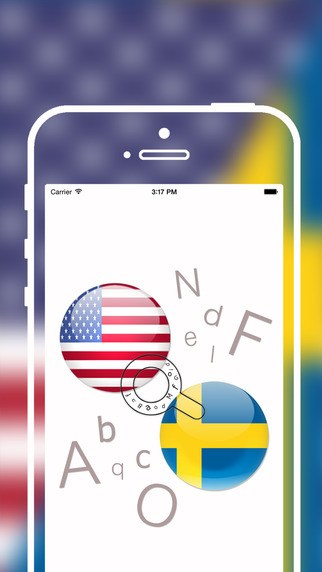
Yerevan, Armenia - Developer Grigori Jlavyan is proud to announce the release of Offline English to Swedish Language Translator / Dictionary 1.0. The English to Swedish Translation Dictionary's enormous number of words provides you with an ideal opportunity to seek and find the definition and the translation of any word you want. This contemporary application is an offline app with approximately 400,000 words, and enables you to use the dictionary anywhere and anytime, even when Internet access is unavailable.
Features Include:
* Shows the structural relationships in a foreign language
* Learn grammatical functions of words
* Example sentences with each word searched for
* Deepens understanding of verb conjugations, spelling, and pronunciation
* Teaches word formations and the origins of words
* Teaches grammatical functions of words
* Start typing a word and the app instantly displays the most likely results
* Find word definitions
* Availability of wide-ranging synonyms and antonyms
* Create unlimited lists of the unknown words in a section called "Favorites"
We did our best to make the English to Swedish Translate Dictionary with a comprehensive range of words and made in mind with our users' convenience. The application will encourage users to investigate foreign languages in a thorough way.
Device Requirements:
* iPhone, iPad, and iPod touch
* Optimized for iPhone 5, iPhone 6, and iPhone 6 Plus
* Requires iOS 6.0 or later
* 30.7 MB
Pricing and Availability:
Offline English to Swedish Language Translator / Dictionary 1.0 is free, and available worldwide exclusively in the App Store in the Education category.
iOSRegion: http://iosregion.com/
Download: https://itunes.apple.com/app/offline-english-to-swedish/id979135994
Screenshot: http://a3.mzstatic.com/us/r30/Purple5/v4/9a/a4/23/9aa423e0-c896-005c-009f-9f3231800181/screen322x572.jpeg
App Icon: http://a3.mzstatic.com/us/r30/Purple1/v4/8d/cf/dd/8dcfdd4e-c649-3071-536b-a39f9acd2ed3/icon175x175.jpeg

The author of this cutting edge application is Grigori Jlavyan, who makes all the best tools for your devices. Copyright (C) 2015 Grigori Jlavyan. All Rights Reserved. Apple, the Apple logo, iPhone, iPad and iPod are registered trademarks of Apple Inc. in the U.S. and/or other countries.
*******
Link To Article: http://prmac.com/release-id-74913.htm
*******
---------------------------------------------------------------------------------
Note that you can alter delivered distributions at any time.
Login to your account on prMac to alter your channel selection, or to opt-out at any time.
bluespots for iOS - Discover Friends All Around You
A new article has been published at prMac.
bluespots for iOS - Discover Friends All Around You - Published on 05/19/15
Brainstorm ideas.life has released bluespots 2.1, an update to their popular social networking app for iPhone and iPad devices. Providing real-time location updates, as well as distance and direction, new features allow users to discover their friends around them within a mile radius. The app can discover and notify users even if it is running in background. Users can poke or connect instantly with their friends. A handy in-app purchase can unlock all advanced features and get rid of ads.
Bangalore, India - Brainstorm ideas.life today is pleased to announce the release of bluespots 2.1, an update to their popular social networking app developed for iPhone and iPad devices. Providing real-time location updates, including distance and direction, bluespots allows users to discover their friends around them. If a user's friends are using the bluespots application they will be able to discover friends and their friends will discover them.
Discover new friends at local bar or a club. Anyone can meet new people who are around them, and make new friends. bluespots can discover and notify users even when it is running in background. bluespots works by using the user's phone number as an identity. So if a user is on bluespots, then their friends who have them listed in their contacts will be able to discover them using bluespots. Anyone will be able to discover other bluespots users, which are not in the contacts, based on the privacy settings of both users.
With this update, anyone can now discover friends who are within one mile of their location. Users can poke their friends instantly. Connect with them over a call, SMS and WhatsApp. All these premium features can be unlocked by an In-App purchase.
"Ever wondered when you are in a busy place like shopping mall, market, restaurant, club, bar or a pub and wanted to know who is around or wanted to discover your friends nearby. bluespots is an answer to this," explained Dushyant Gaur, founder of Brainstorm ideas.life.
bluespots combines Bluetooth and Geo location based discovery. Hence it doesn't require clear skies, and even works inside buildings. It doesn't require any Bluetooth pairing or configuration. Users just need to keep their device's Bluetooth and location services on. Since it is based on Low Energy, it is optimized for power consumption and will not drain the device's battery. bluespots can discover and notify users even if it is running in background.
Languages:
English, Spanish, Japanese, Korean, Chinese (Simplified) and Chinese (Traditional)
Device Requirements:
* iPhone and iPad
* Requires iOS 7.0 or later
* Optimized for iPhone 5, iPhone 6, and iPhone 6 Plus
* 10.6 MB
Pricing and Availability:
bluespots 2.1 is Free and available worldwide exclusively through the App Store in the Social Networking category. Users can get access to all of the app's premium features via an in-app purchase of $0.99 USD (or equivalent amount in other currencies).
bluespots 2.1: http://www.brainstormideas.life/bluespots.html
Brainstorm ideas.life: http://www.brainstormideas.life/
Download: https://itunes.apple.com/app/bluespots-free/id954789562
Screenshot: http://a5.mzstatic.com/us/r30/Purple1/v4/e2/52/82/e2528245-8c6d-2488-3ff7-79af96597c98/screen322x572.jpeg
App Icon: http://a4.mzstatic.com/us/r30/Purple5/v4/54/20/d6/5420d63f-fb81-1938-221d-887a28466ca8/icon175x175.png
Brainstorm ideas.life is an early stage technology startup with a motive of translating real simple ideas into products which can bring value to life. When technology and life collide, you'll always find a great story. The company is focused on building innovative products which can be the keys to unlocking, capturing and creating incredible new life experiences. All Material and Software (C) Copyright 2015 Brainstorm ideas.life. All Rights Reserved. Apple, the Apple logo, iPhone, iPod and iPad are registered trademarks of Apple Inc. in the U.S. and/or other countries. Other trademarks and registered trademarks may be the property of their respective owners.
*******
Link To Article: http://prmac.com/release-id-75014.htm
*******
---------------------------------------------------------------------------------
Note that you can alter delivered distributions at any time.
Login to your account on prMac to alter your channel selection, or to opt-out at any time.
bluespots for iOS - Discover Friends All Around You - Published on 05/19/15
Brainstorm ideas.life has released bluespots 2.1, an update to their popular social networking app for iPhone and iPad devices. Providing real-time location updates, as well as distance and direction, new features allow users to discover their friends around them within a mile radius. The app can discover and notify users even if it is running in background. Users can poke or connect instantly with their friends. A handy in-app purchase can unlock all advanced features and get rid of ads.
Bangalore, India - Brainstorm ideas.life today is pleased to announce the release of bluespots 2.1, an update to their popular social networking app developed for iPhone and iPad devices. Providing real-time location updates, including distance and direction, bluespots allows users to discover their friends around them. If a user's friends are using the bluespots application they will be able to discover friends and their friends will discover them.
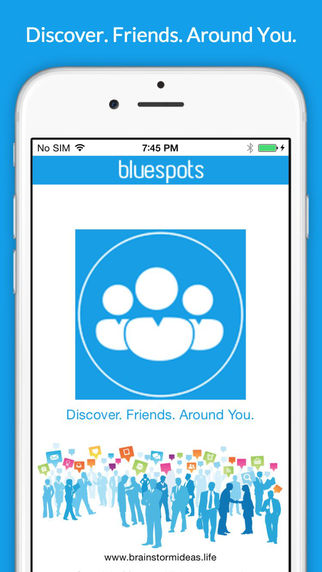
Discover new friends at local bar or a club. Anyone can meet new people who are around them, and make new friends. bluespots can discover and notify users even when it is running in background. bluespots works by using the user's phone number as an identity. So if a user is on bluespots, then their friends who have them listed in their contacts will be able to discover them using bluespots. Anyone will be able to discover other bluespots users, which are not in the contacts, based on the privacy settings of both users.
With this update, anyone can now discover friends who are within one mile of their location. Users can poke their friends instantly. Connect with them over a call, SMS and WhatsApp. All these premium features can be unlocked by an In-App purchase.
"Ever wondered when you are in a busy place like shopping mall, market, restaurant, club, bar or a pub and wanted to know who is around or wanted to discover your friends nearby. bluespots is an answer to this," explained Dushyant Gaur, founder of Brainstorm ideas.life.
bluespots combines Bluetooth and Geo location based discovery. Hence it doesn't require clear skies, and even works inside buildings. It doesn't require any Bluetooth pairing or configuration. Users just need to keep their device's Bluetooth and location services on. Since it is based on Low Energy, it is optimized for power consumption and will not drain the device's battery. bluespots can discover and notify users even if it is running in background.
Languages:
English, Spanish, Japanese, Korean, Chinese (Simplified) and Chinese (Traditional)
Device Requirements:
* iPhone and iPad
* Requires iOS 7.0 or later
* Optimized for iPhone 5, iPhone 6, and iPhone 6 Plus
* 10.6 MB
Pricing and Availability:
bluespots 2.1 is Free and available worldwide exclusively through the App Store in the Social Networking category. Users can get access to all of the app's premium features via an in-app purchase of $0.99 USD (or equivalent amount in other currencies).
bluespots 2.1: http://www.brainstormideas.life/bluespots.html
Brainstorm ideas.life: http://www.brainstormideas.life/
Download: https://itunes.apple.com/app/bluespots-free/id954789562
Screenshot: http://a5.mzstatic.com/us/r30/Purple1/v4/e2/52/82/e2528245-8c6d-2488-3ff7-79af96597c98/screen322x572.jpeg
App Icon: http://a4.mzstatic.com/us/r30/Purple5/v4/54/20/d6/5420d63f-fb81-1938-221d-887a28466ca8/icon175x175.png

Brainstorm ideas.life is an early stage technology startup with a motive of translating real simple ideas into products which can bring value to life. When technology and life collide, you'll always find a great story. The company is focused on building innovative products which can be the keys to unlocking, capturing and creating incredible new life experiences. All Material and Software (C) Copyright 2015 Brainstorm ideas.life. All Rights Reserved. Apple, the Apple logo, iPhone, iPod and iPad are registered trademarks of Apple Inc. in the U.S. and/or other countries. Other trademarks and registered trademarks may be the property of their respective owners.
*******
Link To Article: http://prmac.com/release-id-75014.htm
*******
---------------------------------------------------------------------------------
Note that you can alter delivered distributions at any time.
Login to your account on prMac to alter your channel selection, or to opt-out at any time.
Stream Player 1.0.6 - The Lightweight Internet Stream Player for OS X
A new article has been published at prMac.
Stream Player 1.0.6 - The Lightweight Internet Stream Player for OS X - Published on 05/19/15
MeMyselfAndI has released Stream Player 1.0.6, an update to its lightweight internet stream player for Mac OS X. Stream Player offers several smart features to aid OneClick stream playing in a dedicated player window. Developed to be very simple to use, the app include features often missed in alternative players. Stream Player offers quick opening of the source media stream, either from OS X services, contextual menus or using drag & drop onto the application dock icon, and more.
Budapest, Hungary - MeMyselfAndI is proud to announce the release of Stream Player 1.0.6, an important update to its lightweight internet stream player developed for Mac OS X. Stream Player offers several smart features to aid OneClick stream playing in a dedicated player window. Stream Player was developed specifically to be very simple to use, but include features often missed in alternative players.
Currently available features:
* Full screen, always on top and caption-less player windows
* Player window arrangement in tile layout, ideal for watching multiple web cams at once
* Automatic stream title detection
* Automatic embedding of well known video URLs as full sized window content
* Automatic reopen of selected stream windows at Stream Player startup
* Customizable sub-menu hierarchy to store streams in a structured manner, Watch Later, Favorites, etc. lists
* Customizable application quit behavior, you can keep Stream Player in status menu or let it exit normally or automatically if all windows are closed
* Customizable web stream content behaviors, enabling-disabling navigation, context menus, editing
Quick opening as a source of a media stream, either from OS X services and context menus or using drag & drop onto the application dock icon, status menu icon or any stream window: URLs, URL text or HTML source snippet selection, and Local HTML files.
"What really motivates me to spend nights stuck on the computer keyboard? Good question, One I've asked myself several times!" explained Istvan Hoffmann, founder of MeMyselfAndI. "Maybe just to have fun, because creating something useful for others can really be a very good feeling. Sometimes just starting to create a quick solution for a missing functionality and finding that it's growing into a complex application. Mostly just working on my job. The reason does not really matter. One thing is sure, I'm always wanted to do that my way, that means for me, as error proof, useful and feature rich as it can be. I hope you will enjoy them as much as I did whilst created them."
System Requirements:
* OS X 10.8 or later
* Intel 64-bit processor
* 1.9 MB
Pricing and Availability:
Stream Player 1.0.6 is $1.99 USD (or equivalent amount in other currencies) and available exclusively worldwide through the Mac App Store in the Video category.
MeMyselfAndI: http://hofione.wix.com/memyselfandi
Stream Player 1.0.6: http://hofione.wix.com/memyselfandi#!stream-player/c8pg
Purchase and Download (MAS): https://itunes.apple.com/app/stream-player/id931235000
Screenshot: http://a3.mzstatic.com/us/r30/Purple5/v4/17/8b/09/178b09a6-3392-344d-1ae2-cdb0efd1ce2f/screen800x500.jpeg
Application Icon: http://a1.mzstatic.com/eu/r30/Purple3/v4/c7/14/c6/c714c619-4d5d-0652-572a-6abd99c141ce/icon128-2x.png
Located in Budapest, Hungary, MeMyselfAndI is a small development studio founded by Istvan Hoffmann with the focus on creating simple but useful Mac applications. All Material and Software (C) Copyright 2015 MeMyselfAndI. All Rights Reserved. Apple, the Apple logo, Macintosh and Mac OS X are registered trademarks of Apple Inc. in the U.S. and/or other countries. Other trademarks and registered trademarks may be the property of their respective owners.
*******
Link To Article: http://prmac.com/release-id-75013.htm
*******
---------------------------------------------------------------------------------
Note that you can alter delivered distributions at any time.
Login to your account on prMac to alter your channel selection, or to opt-out at any time.
Stream Player 1.0.6 - The Lightweight Internet Stream Player for OS X - Published on 05/19/15
MeMyselfAndI has released Stream Player 1.0.6, an update to its lightweight internet stream player for Mac OS X. Stream Player offers several smart features to aid OneClick stream playing in a dedicated player window. Developed to be very simple to use, the app include features often missed in alternative players. Stream Player offers quick opening of the source media stream, either from OS X services, contextual menus or using drag & drop onto the application dock icon, and more.
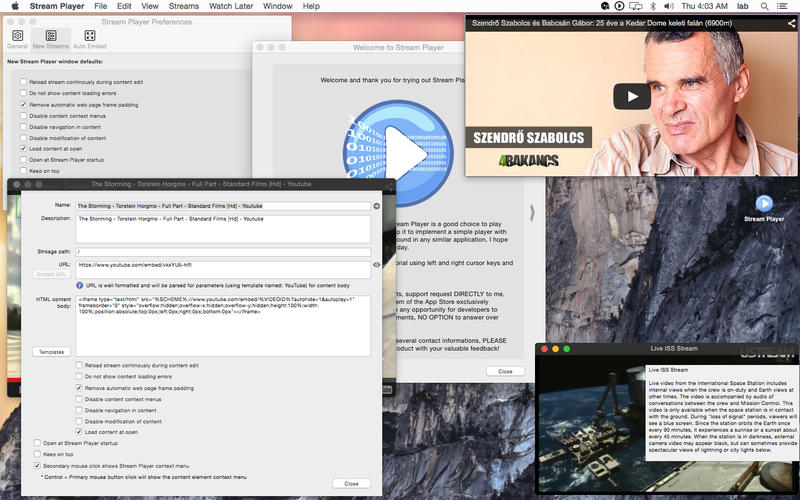
Budapest, Hungary - MeMyselfAndI is proud to announce the release of Stream Player 1.0.6, an important update to its lightweight internet stream player developed for Mac OS X. Stream Player offers several smart features to aid OneClick stream playing in a dedicated player window. Stream Player was developed specifically to be very simple to use, but include features often missed in alternative players.
Currently available features:
* Full screen, always on top and caption-less player windows
* Player window arrangement in tile layout, ideal for watching multiple web cams at once
* Automatic stream title detection
* Automatic embedding of well known video URLs as full sized window content
* Automatic reopen of selected stream windows at Stream Player startup
* Customizable sub-menu hierarchy to store streams in a structured manner, Watch Later, Favorites, etc. lists
* Customizable application quit behavior, you can keep Stream Player in status menu or let it exit normally or automatically if all windows are closed
* Customizable web stream content behaviors, enabling-disabling navigation, context menus, editing
Quick opening as a source of a media stream, either from OS X services and context menus or using drag & drop onto the application dock icon, status menu icon or any stream window: URLs, URL text or HTML source snippet selection, and Local HTML files.
"What really motivates me to spend nights stuck on the computer keyboard? Good question, One I've asked myself several times!" explained Istvan Hoffmann, founder of MeMyselfAndI. "Maybe just to have fun, because creating something useful for others can really be a very good feeling. Sometimes just starting to create a quick solution for a missing functionality and finding that it's growing into a complex application. Mostly just working on my job. The reason does not really matter. One thing is sure, I'm always wanted to do that my way, that means for me, as error proof, useful and feature rich as it can be. I hope you will enjoy them as much as I did whilst created them."
System Requirements:
* OS X 10.8 or later
* Intel 64-bit processor
* 1.9 MB
Pricing and Availability:
Stream Player 1.0.6 is $1.99 USD (or equivalent amount in other currencies) and available exclusively worldwide through the Mac App Store in the Video category.
MeMyselfAndI: http://hofione.wix.com/memyselfandi
Stream Player 1.0.6: http://hofione.wix.com/memyselfandi#!stream-player/c8pg
Purchase and Download (MAS): https://itunes.apple.com/app/stream-player/id931235000
Screenshot: http://a3.mzstatic.com/us/r30/Purple5/v4/17/8b/09/178b09a6-3392-344d-1ae2-cdb0efd1ce2f/screen800x500.jpeg
Application Icon: http://a1.mzstatic.com/eu/r30/Purple3/v4/c7/14/c6/c714c619-4d5d-0652-572a-6abd99c141ce/icon128-2x.png

Located in Budapest, Hungary, MeMyselfAndI is a small development studio founded by Istvan Hoffmann with the focus on creating simple but useful Mac applications. All Material and Software (C) Copyright 2015 MeMyselfAndI. All Rights Reserved. Apple, the Apple logo, Macintosh and Mac OS X are registered trademarks of Apple Inc. in the U.S. and/or other countries. Other trademarks and registered trademarks may be the property of their respective owners.
*******
Link To Article: http://prmac.com/release-id-75013.htm
*******
---------------------------------------------------------------------------------
Note that you can alter delivered distributions at any time.
Login to your account on prMac to alter your channel selection, or to opt-out at any time.
Subscribe to:
Posts (Atom)