A new article has been published at prMac.
Candy Camera for iOS Updated - Photos With Real-Time Filters and Effects - Published on 05/20/15
JP Brothers today releases Candy Camera 1.53.1, an update to their photo app for iOS devices. Candy Camera allows anyone to take photos, apply real-time artistic filters, and easily edit them. This entertaining photo app also includes unique photo beautification effects, including blemish removal, make-up functions, and a handy slimming effect. Users can share their photos by posting it to popular social networks. With over 100 photo frames, this version's new stickers only add to the fun!
Seoul, Korea - JP Brothers is pleased today to announce the release of Candy Camera 1.53.1 for iOS devices. Candy Camera allows users to capture precious moments with their iPhone, without the hassle of applying filters afterwards. Candy Camera offers over 100 unique artistic filters, easy photo editing options, and the ability to post to Instagram, Facebook, Twitter, and more. Take selfies, edit and add effects with just the swipe of a finger, and then share them with friends.
Candy Camera's real-time filters show users the results before they take the shot, and do not require tinkering with any settings there afterwards. With over 100 unique artistic filters, the app also includes a skin correction filter, which was created specifically for taking selfies. Candy Camera's easy editing controls allow users to edit the brightness, contrast, saturation, and resolution, of photos. Anyone can crop and rotate photos, apply a Mosaic function, or a Lomo effect.
"Users love posting selfies on popular social networks like Facebook and Instagram," says JP Brothers CEO Ji Ho Seo. "Candy Camera makes it easy to take a photo, applying real-time effects with just a quick swipe of a finger. Then they can edit the photo, adding whichever beautification effect they'd like, and share it with friends and family over the Internet. As of July 2014, Candy Camera, had served more than 40,000,000 global users and had generated more than 2,600,000,000 unique photos. So you can see how popular the app is!"
Features:
* Real-time filters instantly show what a photo will look like.
* 100+ artistic and unique filters, including a skin correction filter specifically for selfies
* Simple and easy editing: Change brightness, contrast, saturation, resolution, crop and rotate photos
* Special Mosaic function, and Lomo effect
* Skin whitening effect, Blemish removal, Make-up functions - eyeliner, mascara and blush
* Slimming effect - no blurring, only natural slimming functions
* Make pictures artsy with light effects
* Make pictures stand out with about 100 photo frames available
* Create unique pictures with a diverse range of stickers
* Version 1.53.1 includes a new set of stickers
* Instantly share photos to Instagram, Facebook, Twitter and more
Candy Camera also provides the tools for users to perform beautification and makeup effects with a single touch. Photos can be beautified via skin whitening effects, blemish removal, and make-up functions - including: eyeliner, mascara and blush - as well as a slimming effect, which contains no blurring, only a natural slimming function.
Once users have applied effects and filters, they can make their photos stand out with artsy effects, nearly 100 picture frames, and fun, colorful stickers. When a photo looks just as it should, it can be instantly shared to social networks, including Instagram, Facebook, Twitter, and more.
"Our photo frames and colorful range of fun stickers is what really makes Candy Camera stand out," continued Ji Ho Seo. "With the unlimited possibilities of all the effects, filters, stickers and frames, users can start out with the same photo, and never wind up with the same end result twice. Candy Camera's great features will have users creating beautiful photos, and indulging themselves and others into the world of beautiful, fascinating, and memorable photos. The photos will create an impression that will last forever!"
Supported Languages:
* English, Italian, Japanese, Korean, Simplified Chinese, Spanish and Traditional Chinese
Device Requirements:
* iPhone, iPad, and iPod touch
* iOS 6.0 or later
* 22.6MB
Pricing and Availability:
Candy Camera 1.53.1 is free, and available worldwide through the App Store in the Photo and Video category. Users can also update to the Pro Version via an in-app purchase of $7.99, which unlocks all of the camera features. The Pro Version includes all of the sticker packs, which are also available separately as in-app purchases of $0.99 or $1.99.
JP Brothers: http://www.jp-brothers.com/
Candy Camera 1.53.1: http://www.jp-brothers.com/#!candy-camera/c1j5v
Download from iTunes: https://itunes.apple.com/app/candy-camera/id881267423
Download from Google Play: https://play.google.com/store/apps/details?id=com.joeware.android.gpulumera&hl=en
Screenshot: http://a1.mzstatic.com/us/r30/Purple3/v4/9a/59/38/9a5938c2-ba07-0a90-d435-ecbe09cc4731/screen568x568.jpeg
App Icon: http://a4.mzstatic.com/us/r30/Purple3/v4/cf/01/4b/cf014bf0-dc79-b99e-d199-e321725f50ee/icon175x175.png
Located in Seoul, Korea, JP Brothers, Inc. was founded in 2011 by Ji Ho Seo, and is committed to deliver the best experience of taking, keeping, and sharing mobile photos. JP Brothers are passionate about designing and crafting top quality services to satisfy their users. Copyright (C) 2015 JP Brothers, Inc. All Rights Reserved. Apple, the Apple logo, iPhone, iPad and iPod are registered trademarks of Apple Inc. in the U.S. and/or other countries.
*******
Link To Article: http://prmac.com/release-id-75041.htm
*******
---------------------------------------------------------------------------------
Note that you can alter delivered distributions at any time.
Login to your account on prMac to alter your channel selection, or to opt-out at any time.


Time tracking simpler than ever with OfficeTime on Apple Watch
A new article has been published at prMac.
Time tracking simpler than ever with OfficeTime on Apple Watch - Published on 05/20/15
OfficeTime is now available on the revolutionary Apple Watch. OfficeTime was developed specifically to help freelancers and small business owners increase their income through more accurately-tracked time. OfficeTime users can now walk into a meeting, tap his or her wrist, walk out, tap it again and, at the end of the week, be able to produce a report on how they spent their time. By making time-tracking that simple, OfficeTime will enable entrepreneurs to become more productive.
London, United Kingdom - OfficeTime, the time-tracking app that revolutionized time tracking and enabled freelancers and small business owners to increase their income through more accurately-tracked time, is now available on the revolutionary Apple Watch.
The goal of the Apple Watch version of OfficeTime is for users to walk into a meeting, tap his or her wrist, walk out, tap it again and, at the end of the week, be able to produce a report on how they spent their time. By making time-tracking that simple, OfficeTime will enable entrepreneurs to track more time, provide clients with more accurate invoices, and become more productive by getting detailed reports on how they spend their time each week.
"The hardest part of tracking your day is actually tracking it," says Stephen Dodd, CEO of OfficeTime.net. "Anything that removes a barrier which prevents you from tracking your time is going to make it that much easier to see where you've been productive and where you haven't. A core principle of OfficeTime is simplicity, because if tracking time is complicated and burdensome, people won't make the effort to do it. The Apple Watch with OfficeTime will make it easier than ever."
Ideal for anyone who bills by the hour or project, OfficeTime makes recording and tracking time and expenses simple with a clean, elegant interface. The iPhone and iPad versions focus on ease-of-use, recognizing that if time tracking is simple to do, users will be more likely to take the time to do it. OfficeTime takes great care to minimize how many finger taps it takes to do something.
The Apple Watch, desktop and mobile versions of OfficeTime are designed to balance features and ease-of-use, enables users to easily track exactly what they do each day and how much they spend. OfficeTime supports busy professionals who invoice on an hourly fee schedule - or who simply need to know where they are spending their time to be more productive or against a fixed-cost project.
The company is so confident in OfficeTime's ability to produce a tangible return-on-investment that it offers a full money-back guarantee if the app doesn't pay for itself by registering more time than the user otherwise would have logged and invoiced.
The Apple Watch version of OfficeTime is available for free with the purchase of the version for iPhone and iPad. The iPhone and iPad version is available in the iTunes App Store for $7.99 (USD), while the desktop versions for PC and Mac can be purchased at OfficeTime online for $47. Unlike web-based time-tracking applications, OfficeTime does not require a monthly subscription fee.
OfficeTime 2.3: http://www.officetime.net
More Info: http://www.officetime.net/blog/officetime-for-the-apple-watch-is-here/
Purchase and Download (iOS and Apple Watch): https://itunes.apple.com/app/officetime-time-tracking-expense/id431473484
Download for Mac or PC: http://sites.fastspring.com/officetime/product/catalog?__utma=78583626.1921265041.1432098741.1432098741.1432098741.1&__utmb=78583626.1.10.1432098741&__utmc=78583626&__utmx=-&__utmz=78583626.1432098741.1.1.utmcsr=(direct)|utmccn=(direct)|utmcmd=(none)&__ut
Promotional Image: http://www.officetime.net/blog/wp-content/uploads/2015/04/image001.jpg
App Icon: http://www.officetime.net/includes/images/press_page/p_ios_logo.png
OfficeTime was established in 2003 as a spin-off from Transcena Design of Edmonton, Canada. OfficeTime was developed in response to Transcena's urgent need for an easy-to-use, effective, time-tracking application. Designed and continually improved by the same developers who were relying on it every day, OfficeTime was an immediate success when released to the public. Copyright (C) 2015 OfficeTime. All Rights Reserved. Apple, the Apple logo, iPhone, iPod, iPad and Macintosh are registered trademarks of Apple Inc. in the U.S. and/or other countries.
*******
Link To Article: http://prmac.com/release-id-75038.htm
*******
---------------------------------------------------------------------------------
Note that you can alter delivered distributions at any time.
Login to your account on prMac to alter your channel selection, or to opt-out at any time.
Time tracking simpler than ever with OfficeTime on Apple Watch - Published on 05/20/15
OfficeTime is now available on the revolutionary Apple Watch. OfficeTime was developed specifically to help freelancers and small business owners increase their income through more accurately-tracked time. OfficeTime users can now walk into a meeting, tap his or her wrist, walk out, tap it again and, at the end of the week, be able to produce a report on how they spent their time. By making time-tracking that simple, OfficeTime will enable entrepreneurs to become more productive.
London, United Kingdom - OfficeTime, the time-tracking app that revolutionized time tracking and enabled freelancers and small business owners to increase their income through more accurately-tracked time, is now available on the revolutionary Apple Watch.
The goal of the Apple Watch version of OfficeTime is for users to walk into a meeting, tap his or her wrist, walk out, tap it again and, at the end of the week, be able to produce a report on how they spent their time. By making time-tracking that simple, OfficeTime will enable entrepreneurs to track more time, provide clients with more accurate invoices, and become more productive by getting detailed reports on how they spend their time each week.
"The hardest part of tracking your day is actually tracking it," says Stephen Dodd, CEO of OfficeTime.net. "Anything that removes a barrier which prevents you from tracking your time is going to make it that much easier to see where you've been productive and where you haven't. A core principle of OfficeTime is simplicity, because if tracking time is complicated and burdensome, people won't make the effort to do it. The Apple Watch with OfficeTime will make it easier than ever."
Ideal for anyone who bills by the hour or project, OfficeTime makes recording and tracking time and expenses simple with a clean, elegant interface. The iPhone and iPad versions focus on ease-of-use, recognizing that if time tracking is simple to do, users will be more likely to take the time to do it. OfficeTime takes great care to minimize how many finger taps it takes to do something.
The Apple Watch, desktop and mobile versions of OfficeTime are designed to balance features and ease-of-use, enables users to easily track exactly what they do each day and how much they spend. OfficeTime supports busy professionals who invoice on an hourly fee schedule - or who simply need to know where they are spending their time to be more productive or against a fixed-cost project.
The company is so confident in OfficeTime's ability to produce a tangible return-on-investment that it offers a full money-back guarantee if the app doesn't pay for itself by registering more time than the user otherwise would have logged and invoiced.
The Apple Watch version of OfficeTime is available for free with the purchase of the version for iPhone and iPad. The iPhone and iPad version is available in the iTunes App Store for $7.99 (USD), while the desktop versions for PC and Mac can be purchased at OfficeTime online for $47. Unlike web-based time-tracking applications, OfficeTime does not require a monthly subscription fee.
OfficeTime 2.3: http://www.officetime.net
More Info: http://www.officetime.net/blog/officetime-for-the-apple-watch-is-here/
Purchase and Download (iOS and Apple Watch): https://itunes.apple.com/app/officetime-time-tracking-expense/id431473484
Download for Mac or PC: http://sites.fastspring.com/officetime/product/catalog?__utma=78583626.1921265041.1432098741.1432098741.1432098741.1&__utmb=78583626.1.10.1432098741&__utmc=78583626&__utmx=-&__utmz=78583626.1432098741.1.1.utmcsr=(direct)|utmccn=(direct)|utmcmd=(none)&__ut
Promotional Image: http://www.officetime.net/blog/wp-content/uploads/2015/04/image001.jpg

App Icon: http://www.officetime.net/includes/images/press_page/p_ios_logo.png

OfficeTime was established in 2003 as a spin-off from Transcena Design of Edmonton, Canada. OfficeTime was developed in response to Transcena's urgent need for an easy-to-use, effective, time-tracking application. Designed and continually improved by the same developers who were relying on it every day, OfficeTime was an immediate success when released to the public. Copyright (C) 2015 OfficeTime. All Rights Reserved. Apple, the Apple logo, iPhone, iPod, iPad and Macintosh are registered trademarks of Apple Inc. in the U.S. and/or other countries.
*******
Link To Article: http://prmac.com/release-id-75038.htm
*******
---------------------------------------------------------------------------------
Note that you can alter delivered distributions at any time.
Login to your account on prMac to alter your channel selection, or to opt-out at any time.
Minder Softworks announces strategic partnership, new application
A new article has been published at prMac.
Minder Softworks announces strategic partnership, new application - Published on 05/20/15
Minder Softworks announces that it has forged a strategic partnership with Insider Software, established provider of FontAgent Pro & Smasher. Together the companies have developed Expo, a next-generation digital asset manager for Mac OS X. Designed with a creative professional's workflow in mind, Expo helps users find, organize, and use their digital media. Rather than spending time manually organizing media files, Expo's powerful tagging engine allows users to "tag & forget" their media files.
olumbus, Ohio - Minder Softworks announces that it has forged a strategic parnetship with Insider Software, and together have developed Expo, a next-generation digital asset manager (DAM) for creative professionals. Expo allows graphic designers, multimedia producers, software developers, and anyone who uses digital media to easily manage their digital assets. Expo makes it easy for users to find and save stock media online using a built-in web browser, save files from their hard drive, manage usage licenses, and more.
Expo was designed to speed and simplify the tasks of managing media, from concept through final approval. Rather than spending time manually organizing media files, Expo's powerful tagging engine allows users to "tag and forget" their media files. Expo's library, users are prompted to add tags, notes, and other metadata while the information is fresh on their minds. Embedded metadata such as filesystem tags, and IPTC & EXIF data is also added to Expo's database. Later when a file is needed, all the user has to do is search for it. In this way, the user never has to come up with an organizational system, manually arrange and name files, and never has to remember a file name or folder location.
Users aren't limited to adding images from online sources with its built-in web browser. They can add images, audio, video, vector EPS, PDF, and any file type from any location. All media added to Expo is saved in Expo's own library, where it is protected from accidental edits. The library can be moved to any location, including external hard drives, servers, and cloud drives like Dropbox.
Finding media is as easy as adding it. Users can manually add assets to Folders, find them by creating Smart Folders, or search their entire library. Users can browse through thumbnails of their media in an iPhoto-like collection, then select any asset for a larger preview and more information. QuickTime-supported media are playable within Expo.
Using files is equally simple. Users can drag files from Expo directly into the desired application: Adobe Illustrator or InDesign, Apple's iWork or iLife, Microsoft Office, Pixelmator, RapidWeaver, even Xcode. Any application that supports the file type via drag and drop will work with Expo. Double-clicking a file opens it in the default application for that file type.
Minder Softworks is a Columbus, Ohio-based company that develops applications for the Macintosh. Insider Software is recognized leader in font management applications, with its flagship applications FontAgent Pro and FontAgent Pro Server in use around the world.
System Requirements:
* Expo will run on any Intel Mac running OS X 10.8 or later
* A minimum screen resolution of 1280 x 1024 is also required
Pricing and Availability:
A free 30-day demo is available for immediate download as a 30-day demo from Insider Software online. For a limited time, a full license can be purchased for the introductory price of $149 (USD).
Minder Softworks: http://www.mindersoftworks.com/
Expo: http://insidersoftware.com/expo
Minder Softworks is dedicated to developing software that helps users make sense of their information, while harnessing the full power of their computer. Our aim is to develop software that is intuitive, easy to use, and a good value for our customers. Copyright (C) 2015 Minder Softworks. All Rights Reserved. Apple, the Apple logo, Mac OS X and Macintosh are registered trademarks of Apple Inc. in the U.S. and/or other countries.
*******
Link To Article: http://prmac.com/release-id-75036.htm
*******
---------------------------------------------------------------------------------
Note that you can alter delivered distributions at any time.
Login to your account on prMac to alter your channel selection, or to opt-out at any time.
Minder Softworks announces strategic partnership, new application - Published on 05/20/15
Minder Softworks announces that it has forged a strategic partnership with Insider Software, established provider of FontAgent Pro & Smasher. Together the companies have developed Expo, a next-generation digital asset manager for Mac OS X. Designed with a creative professional's workflow in mind, Expo helps users find, organize, and use their digital media. Rather than spending time manually organizing media files, Expo's powerful tagging engine allows users to "tag & forget" their media files.
olumbus, Ohio - Minder Softworks announces that it has forged a strategic parnetship with Insider Software, and together have developed Expo, a next-generation digital asset manager (DAM) for creative professionals. Expo allows graphic designers, multimedia producers, software developers, and anyone who uses digital media to easily manage their digital assets. Expo makes it easy for users to find and save stock media online using a built-in web browser, save files from their hard drive, manage usage licenses, and more.
Expo was designed to speed and simplify the tasks of managing media, from concept through final approval. Rather than spending time manually organizing media files, Expo's powerful tagging engine allows users to "tag and forget" their media files. Expo's library, users are prompted to add tags, notes, and other metadata while the information is fresh on their minds. Embedded metadata such as filesystem tags, and IPTC & EXIF data is also added to Expo's database. Later when a file is needed, all the user has to do is search for it. In this way, the user never has to come up with an organizational system, manually arrange and name files, and never has to remember a file name or folder location.
Users aren't limited to adding images from online sources with its built-in web browser. They can add images, audio, video, vector EPS, PDF, and any file type from any location. All media added to Expo is saved in Expo's own library, where it is protected from accidental edits. The library can be moved to any location, including external hard drives, servers, and cloud drives like Dropbox.
Finding media is as easy as adding it. Users can manually add assets to Folders, find them by creating Smart Folders, or search their entire library. Users can browse through thumbnails of their media in an iPhoto-like collection, then select any asset for a larger preview and more information. QuickTime-supported media are playable within Expo.
Using files is equally simple. Users can drag files from Expo directly into the desired application: Adobe Illustrator or InDesign, Apple's iWork or iLife, Microsoft Office, Pixelmator, RapidWeaver, even Xcode. Any application that supports the file type via drag and drop will work with Expo. Double-clicking a file opens it in the default application for that file type.
Minder Softworks is a Columbus, Ohio-based company that develops applications for the Macintosh. Insider Software is recognized leader in font management applications, with its flagship applications FontAgent Pro and FontAgent Pro Server in use around the world.
System Requirements:
* Expo will run on any Intel Mac running OS X 10.8 or later
* A minimum screen resolution of 1280 x 1024 is also required
Pricing and Availability:
A free 30-day demo is available for immediate download as a 30-day demo from Insider Software online. For a limited time, a full license can be purchased for the introductory price of $149 (USD).
Minder Softworks: http://www.mindersoftworks.com/
Expo: http://insidersoftware.com/expo
Minder Softworks is dedicated to developing software that helps users make sense of their information, while harnessing the full power of their computer. Our aim is to develop software that is intuitive, easy to use, and a good value for our customers. Copyright (C) 2015 Minder Softworks. All Rights Reserved. Apple, the Apple logo, Mac OS X and Macintosh are registered trademarks of Apple Inc. in the U.S. and/or other countries.
*******
Link To Article: http://prmac.com/release-id-75036.htm
*******
---------------------------------------------------------------------------------
Note that you can alter delivered distributions at any time.
Login to your account on prMac to alter your channel selection, or to opt-out at any time.
Arena: Monster Alien Shooting Chaos - Release Trailer Announcement
A new article has been published at prMac.
Arena: Monster Alien Shooting Chaos - Release Trailer Announcement - Published on 05/20/15
Berlin based independent developer, Screen Implosion announces a new trailer for the forthcoming release of Arena: Monster Alien Shooting Chaos, its new premium game title iOS devices. Arena: Monster Alien Shooting Chaos is a high speed arcade space shooter game for iOS. AMASC challenges players to chase their highest score on short games of maximum 2 minutes period with an addictive loop between every game session. The release date is the 21st of May 2015 for iPhone and iPad exclusively.
Berlin, Germany - Screen Implosion, a new independent developer, is pleased to announce a new trailer for the forthcoming release of Arena: Monster Alien Shooting Chaos, its new premium game title for iPhone and iPad. The release date is the 21st of May 2015 for iPhone and iPad exclusively. Arena: Monster Alien Shooting Chaos is a high speed arcade space shooter game for iOS. AMASC challenges players to chase their highest score on short games of maximum 2 minutes period with an addictive loop between every game session.
Features:
* High speed
* Classic gameplay contemporary gameplay = awesome
* The original game bringing the auto lock-on feature
* An endless score chaser
* 5 weapons to unlock
* Visual and explosive fun
Arena: Monster Alien Shooting Chaos captures the magic of classic arcade games together with the contemporary feeling providing an outstanding mobile gaming experience. It's a fast game, with sessions from 10" to 2'. It's innovative, the one and only game bringing the auto-lock feature in a shooting arena: the interplanetary combat capsule Zionsk - 10119 will shoot automatically every threatening life form approaching. The resources on the arena remain on every game session thus creating an endless game session loop. Moreover, the 5 special weapons designed to endure the attacks will delight those players looking for an action game with reminiscences of the arcade glorious past.
Arena Monster Alien Shooting Chaos: http://www.screenimplosion.com
Screenshots (zip): http://screenimplosion.com/presskit/arena/images/images.zip
Logos (zip): http://screenimplosion.com/presskit/arena/images/logo.zip
Screen Implosion is an independent developer and editor funded in 2015 in Berlin. Their first release �Arena: Monster Alien Shooting Chaos� will be out worldwide on May, the 21st for iOS exclusively. Screen Implosion strives to produce classic arcade games with a contemporary twist. All Material and Software (C) Copyright 2015 Screen Implosion. All Rights Reserved. Apple, the Apple logo, iPhone, iPod and iPad are registered trademarks of Apple Inc. in the U.S. and/or other countries. Other trademarks and registered trademarks may be the property of their respective owners.
*******
Link To Article: http://prmac.com/release-id-75037.htm
*******
---------------------------------------------------------------------------------
Note that you can alter delivered distributions at any time.
Login to your account on prMac to alter your channel selection, or to opt-out at any time.
Arena: Monster Alien Shooting Chaos - Release Trailer Announcement - Published on 05/20/15
Berlin based independent developer, Screen Implosion announces a new trailer for the forthcoming release of Arena: Monster Alien Shooting Chaos, its new premium game title iOS devices. Arena: Monster Alien Shooting Chaos is a high speed arcade space shooter game for iOS. AMASC challenges players to chase their highest score on short games of maximum 2 minutes period with an addictive loop between every game session. The release date is the 21st of May 2015 for iPhone and iPad exclusively.
Berlin, Germany - Screen Implosion, a new independent developer, is pleased to announce a new trailer for the forthcoming release of Arena: Monster Alien Shooting Chaos, its new premium game title for iPhone and iPad. The release date is the 21st of May 2015 for iPhone and iPad exclusively. Arena: Monster Alien Shooting Chaos is a high speed arcade space shooter game for iOS. AMASC challenges players to chase their highest score on short games of maximum 2 minutes period with an addictive loop between every game session.
Features:
* High speed
* Classic gameplay contemporary gameplay = awesome
* The original game bringing the auto lock-on feature
* An endless score chaser
* 5 weapons to unlock
* Visual and explosive fun
Arena: Monster Alien Shooting Chaos captures the magic of classic arcade games together with the contemporary feeling providing an outstanding mobile gaming experience. It's a fast game, with sessions from 10" to 2'. It's innovative, the one and only game bringing the auto-lock feature in a shooting arena: the interplanetary combat capsule Zionsk - 10119 will shoot automatically every threatening life form approaching. The resources on the arena remain on every game session thus creating an endless game session loop. Moreover, the 5 special weapons designed to endure the attacks will delight those players looking for an action game with reminiscences of the arcade glorious past.
Arena Monster Alien Shooting Chaos: http://www.screenimplosion.com
Screenshots (zip): http://screenimplosion.com/presskit/arena/images/images.zip
Logos (zip): http://screenimplosion.com/presskit/arena/images/logo.zip
Screen Implosion is an independent developer and editor funded in 2015 in Berlin. Their first release �Arena: Monster Alien Shooting Chaos� will be out worldwide on May, the 21st for iOS exclusively. Screen Implosion strives to produce classic arcade games with a contemporary twist. All Material and Software (C) Copyright 2015 Screen Implosion. All Rights Reserved. Apple, the Apple logo, iPhone, iPod and iPad are registered trademarks of Apple Inc. in the U.S. and/or other countries. Other trademarks and registered trademarks may be the property of their respective owners.
*******
Link To Article: http://prmac.com/release-id-75037.htm
*******
---------------------------------------------------------------------------------
Note that you can alter delivered distributions at any time.
Login to your account on prMac to alter your channel selection, or to opt-out at any time.
AppHop 1.5 - Handy App for Developers, Bloggers and Marketers
A new article has been published at prMac.
AppHop 1.5 - Handy App for Developers, Bloggers and Marketers - Published on 05/20/15
WapleStuff today announces AppHop 1.5, a handy tool for app developers, marketers, publishers or any one who does app business. One can bookmark apps for future actions, as well as check out app reviews and ranks across different countries. It also provides you the App Store's current trend as a beautiful infographic. AppHop allows you to quickly filter app reviews, and also allows you to get reviews in your native language as well as local notifications for rank changes.
Chennai, India - WapleStuff today is proud to announce the release of AppHop 1.5 for iPhone. AppHop is a handy tool for app developers, marketers, publishers or any one who deals with different apps on a daily basis. The latest update includes quick conversion of any iTunes link into an affiliate link right in your Today Widget.
Here are the few ways AppHop can help you:
* Bookmark iOS/Mac Apps for future reference.
* Grab the iTunes link from clipboard and bookmark it using the Today Widget.
* Ability to convert any iTunes link into an affiliate link with campaign ID.
* Check iPad or Mac app infos on your iPhone.
* Check current AppStore trends as a beautiful Infographics.
* Track apps (iOS/Mac) ranks and reviews, across multiple stores quickly.
* Translation - get app reviews in your native language.
* Get local notifications for rank changes.
* Quickly filter app reviews.
* Search reviewer in twitter.
* Supports iOS, iPad and Mac apps.
* Dark/Light Modes.
Device Requirements:
* iPhone, iPad, or iPod touch
* Requires iOS 8.0 or later
* This app is optimized for iPhone 6 and iPhone 6 Plus
* 5 MB
Pricing and Availability:
AppHop 1.5 is launching with the limited time price of $6.99 USD (or equivalent amount in other currencies) and available worldwide through the App Store in the Business category from May 19. If you have any questions or feedback please email us, we'd love to hear from you.
WapleStuff: http://www.waplestuff.com
AppHop 1.5: http://www.apphop.waplestuff.com
Purchase and Download: http://itunes.apple.com/app/id887052210
Vimeo Channel: http://vimeo.com/128127345
Media Assets: https://www.behance.net/gallery/26334775/AppHop
Press Kit (zip): http://cl.ly/2M3x0e13241a/download/AppHop%20v1.5%20Press%20Kit.zip
WapleStuff is an upcoming startup by a bunch of young minds with no International acclaims (as of this writing), but committed to craft some of the coolest apps. Copyright (C) 2015 WapleStuff. All Rights Reserved. Apple, the Apple logo, iPhone, iPod and iPad are registered trademarks of Apple Inc. in the U.S. and/or other countries.
*******
Link To Article: http://prmac.com/release-id-75035.htm
*******
---------------------------------------------------------------------------------
Note that you can alter delivered distributions at any time.
Login to your account on prMac to alter your channel selection, or to opt-out at any time.
AppHop 1.5 - Handy App for Developers, Bloggers and Marketers - Published on 05/20/15
WapleStuff today announces AppHop 1.5, a handy tool for app developers, marketers, publishers or any one who does app business. One can bookmark apps for future actions, as well as check out app reviews and ranks across different countries. It also provides you the App Store's current trend as a beautiful infographic. AppHop allows you to quickly filter app reviews, and also allows you to get reviews in your native language as well as local notifications for rank changes.
Chennai, India - WapleStuff today is proud to announce the release of AppHop 1.5 for iPhone. AppHop is a handy tool for app developers, marketers, publishers or any one who deals with different apps on a daily basis. The latest update includes quick conversion of any iTunes link into an affiliate link right in your Today Widget.
Here are the few ways AppHop can help you:
* Bookmark iOS/Mac Apps for future reference.
* Grab the iTunes link from clipboard and bookmark it using the Today Widget.
* Ability to convert any iTunes link into an affiliate link with campaign ID.
* Check iPad or Mac app infos on your iPhone.
* Check current AppStore trends as a beautiful Infographics.
* Track apps (iOS/Mac) ranks and reviews, across multiple stores quickly.
* Translation - get app reviews in your native language.
* Get local notifications for rank changes.
* Quickly filter app reviews.
* Search reviewer in twitter.
* Supports iOS, iPad and Mac apps.
* Dark/Light Modes.
Device Requirements:
* iPhone, iPad, or iPod touch
* Requires iOS 8.0 or later
* This app is optimized for iPhone 6 and iPhone 6 Plus
* 5 MB
Pricing and Availability:
AppHop 1.5 is launching with the limited time price of $6.99 USD (or equivalent amount in other currencies) and available worldwide through the App Store in the Business category from May 19. If you have any questions or feedback please email us, we'd love to hear from you.
WapleStuff: http://www.waplestuff.com
AppHop 1.5: http://www.apphop.waplestuff.com
Purchase and Download: http://itunes.apple.com/app/id887052210
Vimeo Channel: http://vimeo.com/128127345
Media Assets: https://www.behance.net/gallery/26334775/AppHop
Press Kit (zip): http://cl.ly/2M3x0e13241a/download/AppHop%20v1.5%20Press%20Kit.zip
WapleStuff is an upcoming startup by a bunch of young minds with no International acclaims (as of this writing), but committed to craft some of the coolest apps. Copyright (C) 2015 WapleStuff. All Rights Reserved. Apple, the Apple logo, iPhone, iPod and iPad are registered trademarks of Apple Inc. in the U.S. and/or other countries.
*******
Link To Article: http://prmac.com/release-id-75035.htm
*******
---------------------------------------------------------------------------------
Note that you can alter delivered distributions at any time.
Login to your account on prMac to alter your channel selection, or to opt-out at any time.
WheelMasks 1.0 for iOS - Create Harmonic Color Palettes
A new article has been published at prMac.
WheelMasks 1.0 for iOS - Create Harmonic Color Palettes - Published on 05/20/15
Developer and illustrator Roger Tallada has released WheelMasks 1.0 for iOS. The app allows the creation of limited color palettes using the gamut masking method. Limited palettes are a powerful tool to improve the color schemes of paintings and illustrations. WheelMasks can export the palettes as swatches or as an image to other apps. Unlike traditional palette creation apps, WheelMasks' palettes are not limited to just a few colors, making it an ideal tool for the digital painter and colorist.
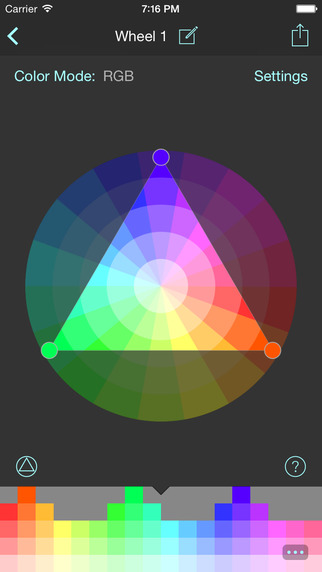
Barcelona, Spain - Independent developer and illustrator Roger Tallada is proud to announce the release of WheelMasks 1.0 for iOS. WheelMasks allows the creation of limited color palettes using the gamut masking method. Limited palettes are a powerful tool to improve the color schemes of paintings and illustrations. WheelMasks can export the palettes as swatches or as an image to other apps. Unlike traditional palette creation apps, WheelMasks' palettes are not limited to just a few colors, making it an ideal tool for the digital painter and colorist.
Features:
* Exports palettes as swatches in the Adobe Swatch Exchange or Procreate Swatches format, or simply exports them as a PNG image
* Several color wheel modes available to choose from: RGB, RYB, RYGB and Equiluminant
* Color wheel configuration with as many segments as the user needs
* Displays the selected colors values in the detailed palette view, both as Hex or decimal RGB values
* Localized to English, Spanish and Catalan
* A selection of preset masks and the capacity to invent new ones by transforming them or creating them from scratch
* Preset masks for the following color schemes: triad, square, tetradic, complementary, accent, split and analogous
A one time In-App purchase of just $4.99 USD (or equivalent amount in other currencies) unlocks all the features of the app. The locked features include the ability to export the swatches to other apps, the option to choose a different color mode other than RGB and the capability to save more than one wheel mask.
Device Requirements:
* iPhone, iPad, and iPod touch
* Optimized for iPhone 5, iPhone 6, and iPhone 6 Plus
* Requires iOS 8.1 or later
* 13.9 MB
Pricing and Availability:
Wheelmasks 1.0 is Free and is available worldwide exclusively through the App Store in the Utilities category. A one time In-App purchase of just $4.99 USD (or equivalent amount in other currencies) unlocks all the features.
WheelMasks 1.0: http://wheelmasks.com
Download: https://itunes.apple.com/app/wheelmasks-harmonic-colors/id911880252
Screenshot: http://a5.mzstatic.com/us/r30/Purple5/v4/1e/74/38/1e743879-d5ee-a975-e5cc-a7fb3090c937/screen322x572.jpeg
App Icon: http://a2.mzstatic.com/us/r30/Purple3/v4/46/b7/9f/46b79ff9-2c16-c003-5c1f-b80a014b9b3c/icon175x175.png
Press Kit (ZIP): http://wheelmasks.com/WheelMasksPressKit.zip
Roger Tallada is a software engineer who also has a career as an illustrator, accumulating more than 15 years of experience between both careers. He's now bringing his experience as an illustrator to software. Copyright (C) 2015 Roger Tallada. All Rights Reserved. Apple, the Apple logo, iPhone, iPad and iPod are registered trademarks of Apple Inc. in the U.S. and/or other countries.
*******
Link To Article: http://prmac.com/release-id-75033.htm
*******
---------------------------------------------------------------------------------
Note that you can alter delivered distributions at any time.
Login to your account on prMac to alter your channel selection, or to opt-out at any time.
WheelMasks 1.0 for iOS - Create Harmonic Color Palettes - Published on 05/20/15
Developer and illustrator Roger Tallada has released WheelMasks 1.0 for iOS. The app allows the creation of limited color palettes using the gamut masking method. Limited palettes are a powerful tool to improve the color schemes of paintings and illustrations. WheelMasks can export the palettes as swatches or as an image to other apps. Unlike traditional palette creation apps, WheelMasks' palettes are not limited to just a few colors, making it an ideal tool for the digital painter and colorist.
Barcelona, Spain - Independent developer and illustrator Roger Tallada is proud to announce the release of WheelMasks 1.0 for iOS. WheelMasks allows the creation of limited color palettes using the gamut masking method. Limited palettes are a powerful tool to improve the color schemes of paintings and illustrations. WheelMasks can export the palettes as swatches or as an image to other apps. Unlike traditional palette creation apps, WheelMasks' palettes are not limited to just a few colors, making it an ideal tool for the digital painter and colorist.
Features:
* Exports palettes as swatches in the Adobe Swatch Exchange or Procreate Swatches format, or simply exports them as a PNG image
* Several color wheel modes available to choose from: RGB, RYB, RYGB and Equiluminant
* Color wheel configuration with as many segments as the user needs
* Displays the selected colors values in the detailed palette view, both as Hex or decimal RGB values
* Localized to English, Spanish and Catalan
* A selection of preset masks and the capacity to invent new ones by transforming them or creating them from scratch
* Preset masks for the following color schemes: triad, square, tetradic, complementary, accent, split and analogous
A one time In-App purchase of just $4.99 USD (or equivalent amount in other currencies) unlocks all the features of the app. The locked features include the ability to export the swatches to other apps, the option to choose a different color mode other than RGB and the capability to save more than one wheel mask.
Device Requirements:
* iPhone, iPad, and iPod touch
* Optimized for iPhone 5, iPhone 6, and iPhone 6 Plus
* Requires iOS 8.1 or later
* 13.9 MB
Pricing and Availability:
Wheelmasks 1.0 is Free and is available worldwide exclusively through the App Store in the Utilities category. A one time In-App purchase of just $4.99 USD (or equivalent amount in other currencies) unlocks all the features.
WheelMasks 1.0: http://wheelmasks.com
Download: https://itunes.apple.com/app/wheelmasks-harmonic-colors/id911880252
Screenshot: http://a5.mzstatic.com/us/r30/Purple5/v4/1e/74/38/1e743879-d5ee-a975-e5cc-a7fb3090c937/screen322x572.jpeg
App Icon: http://a2.mzstatic.com/us/r30/Purple3/v4/46/b7/9f/46b79ff9-2c16-c003-5c1f-b80a014b9b3c/icon175x175.png

Press Kit (ZIP): http://wheelmasks.com/WheelMasksPressKit.zip
Roger Tallada is a software engineer who also has a career as an illustrator, accumulating more than 15 years of experience between both careers. He's now bringing his experience as an illustrator to software. Copyright (C) 2015 Roger Tallada. All Rights Reserved. Apple, the Apple logo, iPhone, iPad and iPod are registered trademarks of Apple Inc. in the U.S. and/or other countries.
*******
Link To Article: http://prmac.com/release-id-75033.htm
*******
---------------------------------------------------------------------------------
Note that you can alter delivered distributions at any time.
Login to your account on prMac to alter your channel selection, or to opt-out at any time.
English To Spanish Dictionary Broadcast for IOS app
A new article has been published at prMac.
English To Spanish Dictionary Broadcast for IOS app - Published on 05/20/15
Developer Grigori Jlavyan announces the release of Offline English to Spanish Translator / Dictionary 1.0 for iOS. The English to Spanish Translation Dictionary's enormous number of words provides you with an ideal opportunity to find the definition and translation of almost any word you want. The app's on-device dictionary offers access to a dictionary, including synonyms, antonyms, idioms, slang, and contemporary words, even without an available Internet connection.
Yerevan, Armenia - Developer Grigori Jlavyan is proud to announce the release of Offline English to Spanish Language Translator / Dictionary 1.0. The English to Spanish Translation Dictionary's enormous number of words provides you with an ideal opportunity to seek and find the definition and the translation of any word you want. This contemporary application is an offline app with 700,000 words, and enables you to use the dictionary anywhere and anytime, even when Internet access is unavailable.
Features Include:
* Audio pronunciations for each of the dictionary words - Tap a word to hear it
* Deepening your understanding of verb conjugations, spelling, and pronunciation
* Learn grammatical functions of words
* See example sentences with each word you are searching
* Find word definitions quickly
* Availability of wide-ranging synonyms and antonyms
* Create unlimited lists of the unknown words in a section called "Favorites"
We did our best to make the English to Spanish Translate Dictionary with a comprehensive range of words and made in mind with our users' convenience. The application will encourage users to investigate foreign languages in a thorough way.
Device Requirements:
* iPhone, iPad, and iPod touch
* Optimized for iPhone 5, iPhone 6, and iPhone 6 Plus
* Requires iOS 6.0 or later
* 88.2 MB
Pricing and Availability:
Offline English to Spanish Language Translator / Dictionary 1.0 is free, and available worldwide exclusively in the App Store in the Education category.
iOSRegion: http://iosregion.com/
Download: https://itunes.apple.com/app/offline-english-to-spanish/id979134087
Screenshot: http://a2.mzstatic.com/us/r30/Purple3/v4/a2/22/7b/a2227bdf-b988-3837-26c8-5c038b30a0ad/screen322x572.jpeg
App Icon: http://a5.mzstatic.com/us/r30/Purple3/v4/e3/2d/78/e32d78b7-1ab7-e176-3fff-22254aa4f4b3/icon175x175.jpeg
The author of this cutting edge application is Grigori Jlavyan, who makes all the best tools for your devices. Copyright (C) 2015 Grigori Jlavyan. All Rights Reserved. Apple, the Apple logo, iPhone, iPad and iPod are registered trademarks of Apple Inc. in the U.S. and/or other countries.
*******
Link To Article: http://prmac.com/release-id-74914.htm
*******
---------------------------------------------------------------------------------
Note that you can alter delivered distributions at any time.
Login to your account on prMac to alter your channel selection, or to opt-out at any time.
English To Spanish Dictionary Broadcast for IOS app - Published on 05/20/15
Developer Grigori Jlavyan announces the release of Offline English to Spanish Translator / Dictionary 1.0 for iOS. The English to Spanish Translation Dictionary's enormous number of words provides you with an ideal opportunity to find the definition and translation of almost any word you want. The app's on-device dictionary offers access to a dictionary, including synonyms, antonyms, idioms, slang, and contemporary words, even without an available Internet connection.
Yerevan, Armenia - Developer Grigori Jlavyan is proud to announce the release of Offline English to Spanish Language Translator / Dictionary 1.0. The English to Spanish Translation Dictionary's enormous number of words provides you with an ideal opportunity to seek and find the definition and the translation of any word you want. This contemporary application is an offline app with 700,000 words, and enables you to use the dictionary anywhere and anytime, even when Internet access is unavailable.
Features Include:
* Audio pronunciations for each of the dictionary words - Tap a word to hear it
* Deepening your understanding of verb conjugations, spelling, and pronunciation
* Learn grammatical functions of words
* See example sentences with each word you are searching
* Find word definitions quickly
* Availability of wide-ranging synonyms and antonyms
* Create unlimited lists of the unknown words in a section called "Favorites"
We did our best to make the English to Spanish Translate Dictionary with a comprehensive range of words and made in mind with our users' convenience. The application will encourage users to investigate foreign languages in a thorough way.
Device Requirements:
* iPhone, iPad, and iPod touch
* Optimized for iPhone 5, iPhone 6, and iPhone 6 Plus
* Requires iOS 6.0 or later
* 88.2 MB
Pricing and Availability:
Offline English to Spanish Language Translator / Dictionary 1.0 is free, and available worldwide exclusively in the App Store in the Education category.
iOSRegion: http://iosregion.com/
Download: https://itunes.apple.com/app/offline-english-to-spanish/id979134087
Screenshot: http://a2.mzstatic.com/us/r30/Purple3/v4/a2/22/7b/a2227bdf-b988-3837-26c8-5c038b30a0ad/screen322x572.jpeg

App Icon: http://a5.mzstatic.com/us/r30/Purple3/v4/e3/2d/78/e32d78b7-1ab7-e176-3fff-22254aa4f4b3/icon175x175.jpeg

The author of this cutting edge application is Grigori Jlavyan, who makes all the best tools for your devices. Copyright (C) 2015 Grigori Jlavyan. All Rights Reserved. Apple, the Apple logo, iPhone, iPad and iPod are registered trademarks of Apple Inc. in the U.S. and/or other countries.
*******
Link To Article: http://prmac.com/release-id-74914.htm
*******
---------------------------------------------------------------------------------
Note that you can alter delivered distributions at any time.
Login to your account on prMac to alter your channel selection, or to opt-out at any time.
Subscribe to:
Posts (Atom)