A new article has been published at prMac.
IdeaPlaces - Where your Ideas and Places connect - for Evernote, Dropbox - Published on 05/29/15
IdeaPlaces, Inc. today announces IdeaPlaces 2.0.7, a landmark update designed to organize notes and pictures by location with Evernote and Dropbox integration. Travellers can plan trips by highlighting points of interest and setting location-based reminders with Google Places and Foursquare integration. Version 2.0.7 now includes an In-App tutorial, location based reminders, new Notes view, Evernote offline improvements, faster loading maps and improvements, as well as minor bug fixes.
Montreal, Canada - IdeaPlaces, Inc. today is pleased to announce the release and immediate availability of IdeaPlaces 2.0.7, a landmark update for the first app designed to organize notes and pictures by location with Evernote and Dropbox integration. This is the next evolution in note taking; helping users pin notes on a map for easier search, greater accuracy, and practical storing. Using Foursquare and Google Places data and quick sharing options, IdeaPlaces will improve collaboration and ultimately drive productivity.
"We noticed many travellers and professionals working in the field did not have a simple, efficient and cost-effective tool to track their notes and pictures by location, explained Ciprian Rarau, CEO of Montreal based IdeaPlaces, Inc. "This is why we built IdeaPlaces. To provide a user-friendly yet powerful way to manage your notes with location information."
IdeaPlaces aims to optimize productivity for busy professionals who often work in the field. It is designed for use on sales visits, location scouting, and in completing site-specific tasks quickly and easily by allowing users to:
* Set location based reminders
* View notes geographically
* Create and sync notes and photos
* Fully integrate notes with Evernote
* Search and filter across Evernote & Dropbox
With IdeaPlaces, travellers can plan trips by highlighting points of interest and setting location-based reminders with Google Places and Foursquare integration. Users are able to take photos within the app and create and access notes on the go. Being able to view all this information on a map makes it easy to recall the details of a trip when you get home.
User data, including pictures, notes, maps and more, are seamlessly integrated with users' existing Evernote content. Designed to be accessible to everyone, IdeaPlaces makes it easy for independent workers looking for productivity tools to be more efficient. No back-office integration is required.
About IdeaPlaces:
IdeaPlaces is the only app that integrates your notes and pictures with Evernote and Dropbox using location-based information. It is designed for mobile professionals and travellers alike.
Recent Achievements
* 15,000 users
* 50,000 downloads
* 4.6 star AppStore rating
* Evernote featured (Travel section)
Device Requirements:
* iPhone, iPad, and iPod touch
* Optimized for iPhone 5, iPhone 6/6 Plus
* Requires iOS 8.0 or later
* 21.9 MB
Pricing and Availability:
IdeaPlaces 2.0.7 is Free and available worldwide exclusively through the App Store in the Productivity category. The app offers an optional subscription package IdeaPlaces Plus ($2.99/month or $29/year). Some of the features provided by the Plus package are access to Evernote offline and Linked notebooks and all map modes (Google Maps, offline maps and satellite/hybrid views).
IdeaPlaces 2.0.7: http://ideaplaces.com
More Info: http://blog.ideaplaces.com/
iTunes: AppStore: https://itunes.apple.com/app/id835446337
Vimeo Video (Demo): http://www.vimeo.com/118992399
Screenshot: http://www.ideaplaces.com/images/WebSitePhone.png
App Icon: http://i.imgur.com/TsYHxYR.png
Headquartered in Montreal, Canada and established in 2014, IdeaPlaces, Inc. aims to improve and enhance the note taking experience for all Evernote users. The IdeaPlaces team is comprised of three individuals with expertise developing and bringing to market novel technologies. IdeaPlaces is a registered trademark of IdeaPlaces, Inc. All Material and Software (C) Copyright 2015 IdeaPlaces, Inc. All Rights Reserved. Apple, the Apple logo, iPhone, iPod and iPad are registered trademarks of Apple Inc. in the U.S. and/or other countries. Other trademarks and registered trademarks may be the property of their respective owners.
*******
Link To Article: http://prmac.com/release-id-75186.htm
*******
---------------------------------------------------------------------------------
Note that you can alter delivered distributions at any time.
Login to your account on prMac to alter your channel selection, or to opt-out at any time.


Hindi Dictionary 12.0 Released with Apple Watch Support
A new article has been published at prMac.
Hindi Dictionary 12.0 Released with Apple Watch Support - Published on 05/29/15
iThinkdiff today announces Hindi Dictionary 12.0, an update to their popular bilingual dictionary app for iOS devices. Featuring a large database, Pronunciation, Online Translator, Phrase Book, Flash cards and games help both students and travelers to translate nearly anything from Hindi into English and vice versa. Version 12.0 introduces Apple Watch support. Now anyone can quickly see recent search history, bookmarked words, translation, phrases and word of the day in their watch.
Melaka, Malaysia - iThinkdiff today is proud to announce the release of Hindi Dictionary 12.0, an update to their popular bilingual dictionary app for iOS devices. Featuring a large database, Pronunciation, Online Translator, Phrase Book, Flash cards and games help both students and travelers to translate nearly anything from Hindi into English and vice versa. Version 12.0 introduces Apple Watch support. Now anyone can quickly see recent search history, bookmarked words, translation, phrases and word of the day in their watch.
The leading iPhone, iPad, and iPod touch bilingual dictionary translates between English and Hindi now extremely useful for Apple Watch support. Lead developer Mahmud Ahsan said, "Now the dictionary will be more useful with the new Apple watch feature. Both students and travelers can use Hindi Dictionary to translate nearly anything from Hindi into English or vice versa.
Over 180 million people speak Hindi, and it is my hope that this dictionary will make communication between Hindi speakers and English speakers easier than ever before" continues Mr. Ahsan, "so it was important for us to help users look up words quickly without having to transliterate them into Latin [English] characters first."
Key Features:
* Translate individual words, phrases, or whole sentences
* Scan text in image by pointing your device camera to search in dictionary
* Cross search feature. Touch a word for a while for the menu [Copy | Define | Search | Pronunciation]
* Bookmark and Recent History for instant recall
* Multiple games to help students improve their English or Hindi vocabulary
* Online & Offline Pronunciation for English & Hindi text
* Flash Card & Word of the Day for vocabulary learning
* Phrase Book
* Apple Watch supported for quick access of saved and recent search words, phrases, translation and word of the day
"Hindi Dictionary was designed for both students and travelers. You can use it as a phrase book for a short trip, or you can use it to learn a language for life. And, at only $4.99 in the App Store, it's cheaper than either a paperback phrase book or even the simplest study guide. A free version with in-app purchase options is also available," said Mr. Ahsan.
Hindi Dictionary's core translation function works offline. But when the user's device is online, several extra features become available, such as an online scoring system which helps students earn Achievements for using app features, plus a vocabulary Leaderboard which rewards the most effective students.
English words link to their Wiktionary page to help users discover the history behind words, and built-in app connections let users send their translations to other apps on their device, such as Facebook, Twitter, Email, and SMS.
All current iPhones, iPads, iPod touch and Apple Watch are supported. Devices with a Retina display will find Spanish Dictionary automatically optimizes itself for high-resolution text display so users don't need to squint.
Device Requirements:
* iPhone, iPad, iPod touch and Apple Watch
* Optimized for iPhone 5, iPhone 6 and iPhone 6 Plus
* Requires iOS 7.0 or later
* Universal app optimized for display on all iOS devices
* 57.0 MB
Pricing and Availability:
Hindi Dictionary 12.0 is $4.99 USD (or equivalent amount in other currencies) and available worldwide exclusively through the App Store in the Education category. A free version with in-app purchase options is also available.
iThinkdiff: http://ithinkdiff.net
Hindi Dictionary 12.0: http://ithinkdiff.net/iphone-applications/hindi-dictionary/
Purchase and Download: https://search.itunes.apple.com/WebObjects/MZSearch.woa/wa/search?media=all&term=iThinkdiff+Hindi+Dictionary
Screenshot: http://2a2cc343f5995d2fb948-5cc402153e846059e29478934321d3c6.r70.cf1.rackcdn.com/2010/11/hindi-dic3.png
App Icon: http://a5.mzstatic.com/us/r30/Purple4/v4/1f/18/96/1f1896d6-ae17-6fe4-f222-dc9cece5ce28/mzl.kjvhkwra.175x175-75.jpg
Founded in 2010 by programmer Mahmud Ahsan, iThinkdiff is a leading creator of educational and entertainment apps for iPhones, iPads, and other Apple iOS devices. With over 7 million total downloads, thousands of five-star reviews, and 15 million monthly ad impressions, iThinkdiff games and translation apps are frequently featured on the Apple iTunes homepage. Copyright (C) 2010-2015 iThinkdiff. All Rights Reserved. Apple, the Apple logo, iPhone, iPad, iPad mini, iPod touch, and Mac are registered trademarks of Apple Inc. in the U.S. and/or other countries. Other trademarks and registered trademarks may be the property of their respective owners.
*******
Link To Article: http://prmac.com/release-id-75187.htm
*******
---------------------------------------------------------------------------------
Note that you can alter delivered distributions at any time.
Login to your account on prMac to alter your channel selection, or to opt-out at any time.
Hindi Dictionary 12.0 Released with Apple Watch Support - Published on 05/29/15
iThinkdiff today announces Hindi Dictionary 12.0, an update to their popular bilingual dictionary app for iOS devices. Featuring a large database, Pronunciation, Online Translator, Phrase Book, Flash cards and games help both students and travelers to translate nearly anything from Hindi into English and vice versa. Version 12.0 introduces Apple Watch support. Now anyone can quickly see recent search history, bookmarked words, translation, phrases and word of the day in their watch.
Melaka, Malaysia - iThinkdiff today is proud to announce the release of Hindi Dictionary 12.0, an update to their popular bilingual dictionary app for iOS devices. Featuring a large database, Pronunciation, Online Translator, Phrase Book, Flash cards and games help both students and travelers to translate nearly anything from Hindi into English and vice versa. Version 12.0 introduces Apple Watch support. Now anyone can quickly see recent search history, bookmarked words, translation, phrases and word of the day in their watch.
The leading iPhone, iPad, and iPod touch bilingual dictionary translates between English and Hindi now extremely useful for Apple Watch support. Lead developer Mahmud Ahsan said, "Now the dictionary will be more useful with the new Apple watch feature. Both students and travelers can use Hindi Dictionary to translate nearly anything from Hindi into English or vice versa.
Over 180 million people speak Hindi, and it is my hope that this dictionary will make communication between Hindi speakers and English speakers easier than ever before" continues Mr. Ahsan, "so it was important for us to help users look up words quickly without having to transliterate them into Latin [English] characters first."
Key Features:
* Translate individual words, phrases, or whole sentences
* Scan text in image by pointing your device camera to search in dictionary
* Cross search feature. Touch a word for a while for the menu [Copy | Define | Search | Pronunciation]
* Bookmark and Recent History for instant recall
* Multiple games to help students improve their English or Hindi vocabulary
* Online & Offline Pronunciation for English & Hindi text
* Flash Card & Word of the Day for vocabulary learning
* Phrase Book
* Apple Watch supported for quick access of saved and recent search words, phrases, translation and word of the day
"Hindi Dictionary was designed for both students and travelers. You can use it as a phrase book for a short trip, or you can use it to learn a language for life. And, at only $4.99 in the App Store, it's cheaper than either a paperback phrase book or even the simplest study guide. A free version with in-app purchase options is also available," said Mr. Ahsan.
Hindi Dictionary's core translation function works offline. But when the user's device is online, several extra features become available, such as an online scoring system which helps students earn Achievements for using app features, plus a vocabulary Leaderboard which rewards the most effective students.
English words link to their Wiktionary page to help users discover the history behind words, and built-in app connections let users send their translations to other apps on their device, such as Facebook, Twitter, Email, and SMS.
All current iPhones, iPads, iPod touch and Apple Watch are supported. Devices with a Retina display will find Spanish Dictionary automatically optimizes itself for high-resolution text display so users don't need to squint.
Device Requirements:
* iPhone, iPad, iPod touch and Apple Watch
* Optimized for iPhone 5, iPhone 6 and iPhone 6 Plus
* Requires iOS 7.0 or later
* Universal app optimized for display on all iOS devices
* 57.0 MB
Pricing and Availability:
Hindi Dictionary 12.0 is $4.99 USD (or equivalent amount in other currencies) and available worldwide exclusively through the App Store in the Education category. A free version with in-app purchase options is also available.
iThinkdiff: http://ithinkdiff.net
Hindi Dictionary 12.0: http://ithinkdiff.net/iphone-applications/hindi-dictionary/
Purchase and Download: https://search.itunes.apple.com/WebObjects/MZSearch.woa/wa/search?media=all&term=iThinkdiff+Hindi+Dictionary
Screenshot: http://2a2cc343f5995d2fb948-5cc402153e846059e29478934321d3c6.r70.cf1.rackcdn.com/2010/11/hindi-dic3.png

App Icon: http://a5.mzstatic.com/us/r30/Purple4/v4/1f/18/96/1f1896d6-ae17-6fe4-f222-dc9cece5ce28/mzl.kjvhkwra.175x175-75.jpg

Founded in 2010 by programmer Mahmud Ahsan, iThinkdiff is a leading creator of educational and entertainment apps for iPhones, iPads, and other Apple iOS devices. With over 7 million total downloads, thousands of five-star reviews, and 15 million monthly ad impressions, iThinkdiff games and translation apps are frequently featured on the Apple iTunes homepage. Copyright (C) 2010-2015 iThinkdiff. All Rights Reserved. Apple, the Apple logo, iPhone, iPad, iPad mini, iPod touch, and Mac are registered trademarks of Apple Inc. in the U.S. and/or other countries. Other trademarks and registered trademarks may be the property of their respective owners.
*******
Link To Article: http://prmac.com/release-id-75187.htm
*******
---------------------------------------------------------------------------------
Note that you can alter delivered distributions at any time.
Login to your account on prMac to alter your channel selection, or to opt-out at any time.
BoomBar for iPhone, iPod touch and Apple Watch
A new article has been published at prMac.
BoomBar for iPhone, iPod touch and Apple Watch - Published on 05/29/15
Brisbane based Dasvibes Digital today introduces BoomBar 1.0.1, a forward thinking iOS application aimed at relieving users of the burden of having to carry around all the barcode cards people use in their daily life. By saving them into different categories, anyone can use their cards by presenting the barcode from their iPhone, iPod touch or Apple Watch. BoomBar can also backup all of the barcodes to iCloud Drive, ensuring a user's personal information is 100% private and secure.
Brisbane, Australia - Dasvibes Digital today is pleased to announce the release of BoomBar 1.0.1, their new lifestyle app developed for iPhone, iPad and iPod touch. BoomBar is a forward thinking application aimed at recording barcodes from various cards used in people's daily life and saving them into different categories, so that anyone can use their cards by presenting the barcode from their iPhone, iPod touch or Apple Watch.
With the release of Apple Watch and the popularity of the iPhone and iPod touch, who still wants to carry a heavy wallet everywhere? BoomBar adopts advanced technology, providing a user-friendly interface, that's easy to learn and use. With BoomBar, your smart lifestyle is only a few taps away. 3 Easy Steps: Scan, Save and Use with your iPhone or Apple Watch.
With the user's permission, BoomBar can backup all the saved barcodes to the their personal iCloud Drive, which means BoomBar's creators and any third-parties do not have access to any data uploaded by the users, which ensures users' information is 100% private and secure. Stop carrying dozens of loyalty and reward cards around! Get BoomBar.
Key Features Include:
* No Ads
* Backup your barcodes to your own iCloud Drive
* No third-party backup of your barcode data
* No tracking of your usage of products and barcodes
Languages:
* English, German, Japanese, Simplified Chinese and Traditional Chinese
Device Requirements:
* Compatible with iPhone, iPad, iPod touch, and Apple Watch
* Requires iOS 7.0 or later
* Optimized for iPhone 5, iPhone 6, and iPhone 6 Plus
* 5.2 MB
Pricing and Availability:
BoomBar 1.0.1 is Free and is available worldwide exclusively through the App Store in the Lifestyle category.
Dasvibes Digital: http://digital.dasvibes.com/
BoomBar 1.0.1: http://www.boombarapp.com
Download from iTunes: https://itunes.apple.com/app/boombar/id981493783
Screenshot: http://digital.dasvibes.com/wp-content/uploads/2015/04/iOS-Simulator-Screen-Shot-20-Apr-2015-9.40.48-pm-209x371.png
Screenshot: http://digital.dasvibes.com/wp-content/uploads/2015/04/iOS-Simulator-Screen-Shot-20-Apr-2015-9.41.17-pm-209x371.png
App Icon: http://a1.mzstatic.com/us/r30/Purple5/v4/a2/3f/b0/a23fb021-75ac-5b3f-5c25-b1c440c88226/icon1024x1024.jpeg
Dasvibes Digital is a Jamaican and Australian based company. The business specializes in creating a vast range of apps. In addition, Dasvibes Digital offers a comprehensive range of services to help people develop their own apps. From the consultation and planning to the distribution and marketing, our company works with our clients all of the way. All Material and Software (C) Copyright 2015 Dasvibes Digital. All Rights Reserved. Apple, the Apple logo, iPhone, iPod and iPad are registered trademarks of Apple Inc. in the U.S. and/or other countries. Other trademarks and registered trademarks may be the property of their respective owners.
*******
Link To Article: http://prmac.com/release-id-75184.htm
*******
---------------------------------------------------------------------------------
Note that you can alter delivered distributions at any time.
Login to your account on prMac to alter your channel selection, or to opt-out at any time.
BoomBar for iPhone, iPod touch and Apple Watch - Published on 05/29/15
Brisbane based Dasvibes Digital today introduces BoomBar 1.0.1, a forward thinking iOS application aimed at relieving users of the burden of having to carry around all the barcode cards people use in their daily life. By saving them into different categories, anyone can use their cards by presenting the barcode from their iPhone, iPod touch or Apple Watch. BoomBar can also backup all of the barcodes to iCloud Drive, ensuring a user's personal information is 100% private and secure.
Brisbane, Australia - Dasvibes Digital today is pleased to announce the release of BoomBar 1.0.1, their new lifestyle app developed for iPhone, iPad and iPod touch. BoomBar is a forward thinking application aimed at recording barcodes from various cards used in people's daily life and saving them into different categories, so that anyone can use their cards by presenting the barcode from their iPhone, iPod touch or Apple Watch.
With the release of Apple Watch and the popularity of the iPhone and iPod touch, who still wants to carry a heavy wallet everywhere? BoomBar adopts advanced technology, providing a user-friendly interface, that's easy to learn and use. With BoomBar, your smart lifestyle is only a few taps away. 3 Easy Steps: Scan, Save and Use with your iPhone or Apple Watch.
With the user's permission, BoomBar can backup all the saved barcodes to the their personal iCloud Drive, which means BoomBar's creators and any third-parties do not have access to any data uploaded by the users, which ensures users' information is 100% private and secure. Stop carrying dozens of loyalty and reward cards around! Get BoomBar.
Key Features Include:
* No Ads
* Backup your barcodes to your own iCloud Drive
* No third-party backup of your barcode data
* No tracking of your usage of products and barcodes
Languages:
* English, German, Japanese, Simplified Chinese and Traditional Chinese
Device Requirements:
* Compatible with iPhone, iPad, iPod touch, and Apple Watch
* Requires iOS 7.0 or later
* Optimized for iPhone 5, iPhone 6, and iPhone 6 Plus
* 5.2 MB
Pricing and Availability:
BoomBar 1.0.1 is Free and is available worldwide exclusively through the App Store in the Lifestyle category.
Dasvibes Digital: http://digital.dasvibes.com/
BoomBar 1.0.1: http://www.boombarapp.com
Download from iTunes: https://itunes.apple.com/app/boombar/id981493783
Screenshot: http://digital.dasvibes.com/wp-content/uploads/2015/04/iOS-Simulator-Screen-Shot-20-Apr-2015-9.40.48-pm-209x371.png

Screenshot: http://digital.dasvibes.com/wp-content/uploads/2015/04/iOS-Simulator-Screen-Shot-20-Apr-2015-9.41.17-pm-209x371.png

App Icon: http://a1.mzstatic.com/us/r30/Purple5/v4/a2/3f/b0/a23fb021-75ac-5b3f-5c25-b1c440c88226/icon1024x1024.jpeg

Dasvibes Digital is a Jamaican and Australian based company. The business specializes in creating a vast range of apps. In addition, Dasvibes Digital offers a comprehensive range of services to help people develop their own apps. From the consultation and planning to the distribution and marketing, our company works with our clients all of the way. All Material and Software (C) Copyright 2015 Dasvibes Digital. All Rights Reserved. Apple, the Apple logo, iPhone, iPod and iPad are registered trademarks of Apple Inc. in the U.S. and/or other countries. Other trademarks and registered trademarks may be the property of their respective owners.
*******
Link To Article: http://prmac.com/release-id-75184.htm
*******
---------------------------------------------------------------------------------
Note that you can alter delivered distributions at any time.
Login to your account on prMac to alter your channel selection, or to opt-out at any time.
Apple Watch eGuide - Tips Guidebook for Apple Watch Released
A new article has been published at prMac.
Apple Watch eGuide - Tips Guidebook for Apple Watch Released - Published on 05/29/15
UK based Stopframe introduces their new Apple Watch eGuide, an in-depth eBook available in the iBookstore that's packed with Apple Watch tips, tutorials and knowledge. Readers will learn how Apple Watch is made, discover in-depth guides to each and every app, how to make the most of its unique operating system and much more. Written by bestselling author T A Rudderham, it's the perfect guidebook for anyone who wants to make the most of their brand new Apple Watch.
Bournemouth, United Kingdom - Stopframe is proud to announce the release of Apple Watch eGuide, an in-depth eBook available in the iBookstore that's packed with Apple Watch tips, tutorials and knowledge. Written by bestselling author T A Rudderham, and priced just $2.99, it's the perfect guidebook for anyone who wants to make the most of their brand new Apple Watch.
Apple Watch is an incredible timekeeping device, made from the most beautiful elements known to man, and fashioned with a precise finish staggering to behold. But it also contains some amazing new technologies, such as haptic feedback, a flexible Retina display, the Digital Crown and a heart rate monitor. All of this technology is contained in a minute device that learns your daily routine, monitors your health and lets you stay in touch with friends and family like never before.
Apple Watch eGuide is here to explain how this amazing device works. Readers will learn how Apple Watch is made, discover in-depth guides to each and every app, how to make the most of its unique operating system and much more. Packed with concise knowledge and colorful images, Apple Watch eGuide is the perfect guidebook for anyone who wants to learn about Apple Watch.
Device Requirements:
* Available on iPhone, iPad, iPod touch, and Mac:
* iOS device with iBooks 1.5 or later and iOS 4.3.3 or later
* Mac with iBooks 1.0 or later and OS X 10.9 or later
* Print Length: 157 Pages
Pricing and Availability:
Apple Watch eGuide is $2.99 USD (or equivalent amount in other currencies) and available worldwide exclusively through the App Store in the Computers category.
Stopframe: http://www.stopframe.co.uk/
Apple Watch eGuide: https://itunes.apple.com/book/apple-watch-eguide/id999331685
Book Cover: http://www.stopframe.co.uk/files/Apple_Watch_eGuide%20Cover.jpg
Press Kit (zip): http://www.stopframe.co.uk/files/guide_to_apple_watch_screenshots.zip
Launched in 2013, Stopframe publishes eBooks and interactive apps that teach users how to use their iOS devices. Stopframe's most notable books to date include iPad Air Guide, The Complete Guide to iOS 7 and iPhone 6 Guide. Copyright (C) 2015 Stopframe. All Rights Reserved. Apple, the Apple logo, iPhone, iPod and iPad are registered trademarks of Apple Inc. in the U.S. and/or other countries. Other trademarks and registered trademarks may be the property of their respective owners.
*******
Link To Article: http://prmac.com/release-id-75185.htm
*******
---------------------------------------------------------------------------------
Note that you can alter delivered distributions at any time.
Login to your account on prMac to alter your channel selection, or to opt-out at any time.
Apple Watch eGuide - Tips Guidebook for Apple Watch Released - Published on 05/29/15
UK based Stopframe introduces their new Apple Watch eGuide, an in-depth eBook available in the iBookstore that's packed with Apple Watch tips, tutorials and knowledge. Readers will learn how Apple Watch is made, discover in-depth guides to each and every app, how to make the most of its unique operating system and much more. Written by bestselling author T A Rudderham, it's the perfect guidebook for anyone who wants to make the most of their brand new Apple Watch.
Bournemouth, United Kingdom - Stopframe is proud to announce the release of Apple Watch eGuide, an in-depth eBook available in the iBookstore that's packed with Apple Watch tips, tutorials and knowledge. Written by bestselling author T A Rudderham, and priced just $2.99, it's the perfect guidebook for anyone who wants to make the most of their brand new Apple Watch.
Apple Watch is an incredible timekeeping device, made from the most beautiful elements known to man, and fashioned with a precise finish staggering to behold. But it also contains some amazing new technologies, such as haptic feedback, a flexible Retina display, the Digital Crown and a heart rate monitor. All of this technology is contained in a minute device that learns your daily routine, monitors your health and lets you stay in touch with friends and family like never before.
Apple Watch eGuide is here to explain how this amazing device works. Readers will learn how Apple Watch is made, discover in-depth guides to each and every app, how to make the most of its unique operating system and much more. Packed with concise knowledge and colorful images, Apple Watch eGuide is the perfect guidebook for anyone who wants to learn about Apple Watch.
Device Requirements:
* Available on iPhone, iPad, iPod touch, and Mac:
* iOS device with iBooks 1.5 or later and iOS 4.3.3 or later
* Mac with iBooks 1.0 or later and OS X 10.9 or later
* Print Length: 157 Pages
Pricing and Availability:
Apple Watch eGuide is $2.99 USD (or equivalent amount in other currencies) and available worldwide exclusively through the App Store in the Computers category.
Stopframe: http://www.stopframe.co.uk/
Apple Watch eGuide: https://itunes.apple.com/book/apple-watch-eguide/id999331685
Book Cover: http://www.stopframe.co.uk/files/Apple_Watch_eGuide%20Cover.jpg

Press Kit (zip): http://www.stopframe.co.uk/files/guide_to_apple_watch_screenshots.zip
Launched in 2013, Stopframe publishes eBooks and interactive apps that teach users how to use their iOS devices. Stopframe's most notable books to date include iPad Air Guide, The Complete Guide to iOS 7 and iPhone 6 Guide. Copyright (C) 2015 Stopframe. All Rights Reserved. Apple, the Apple logo, iPhone, iPod and iPad are registered trademarks of Apple Inc. in the U.S. and/or other countries. Other trademarks and registered trademarks may be the property of their respective owners.
*******
Link To Article: http://prmac.com/release-id-75185.htm
*******
---------------------------------------------------------------------------------
Note that you can alter delivered distributions at any time.
Login to your account on prMac to alter your channel selection, or to opt-out at any time.
Letter Templates Offers a Collection of Sample Letters in One Mac App!
A new article has been published at prMac.
Letter Templates Offers a Collection of Sample Letters in One Mac App! - Published on 05/29/15
Idea2Inspire announces the release and immediate availability of Letter Templates 1.0 for the Mac. Letter Templates is a collection of pre-written sample letters designed to allow users to drafts emails and letters faster and easier. Anyone can open up a letter templates that best suits their purpose, edit it, and then forward it. Users will find a vast catalog of highly professional business letters as well as personal letters, all sorted into appropriate categories.
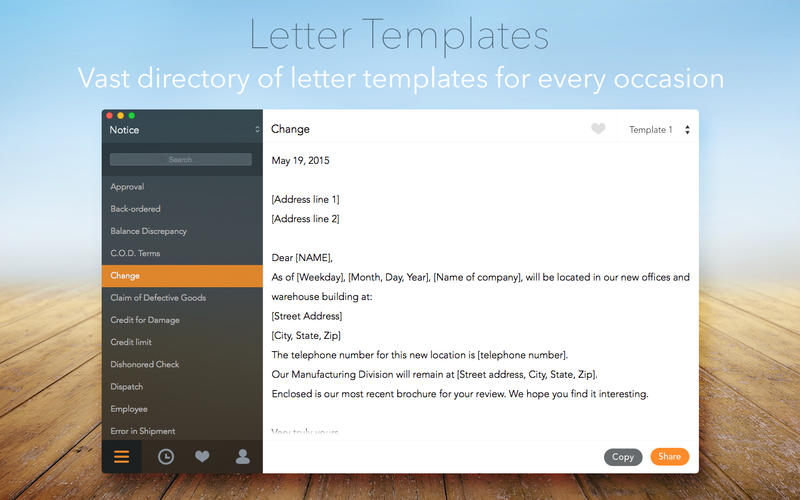
Pensacola, Florida - Idea2Inspire is proud to announce the release of Letter Templates 1.0 for the Mac. Letter Templates is a collection of pre-written sample letters designed to allow users to drafts emails and letters faster and easier. Anyone can open up a letter templates that best suits their purpose, edit it, and then forward it.
Letter Templates consists of a variety of pre-drafted sample letters, covering a number of categories. Users will select from a large variety of options from a vast catalog of letters, which will allow them to draft letters of any kind and forward them for quick results. All the letters in this app are drafted by professionals, which will fetch excellent results. Users will find this to be a very useful app to have on the Mac.
Fetures:
* A vast catalog of highly professional business letters as well as personal letters
* All the letters are sorted into appropriate categories
* Letters are very easy to find and edit
* Simple and easy to operate user interface
* Add user info like Name, Sign and Address in Preference window
* Mark sample letters as Favorite that is used frequently and find them quickly in one place
Device Requirement:
* OS X 10.10 or later
* 64-bit processor
* Size: 1.2 MB
Pricing and Availability:
Letter Templates is $10.99 USD (or equivalent amount in other currencies) available exclusively through the Mac App Store in the Productivity category.
Idea2inspire: http://idea2inspire.com/index.html
Letter Templates 1.0: http://idea2inspire.com/index.html
Purchase and Download (MAS): https://itunes.apple.com/app/letter-templates/id992823763
Screenshot 1: http://a2.mzstatic.com/us/r30/Purple5/v4/f3/51/7e/f3517edd-4d7b-f09a-d3e4-192337a9d33a/screen800x500.jpeg
Screenshot 2: http://a3.mzstatic.com/us/r30/Purple7/v4/9f/e6/fe/9fe6fe5b-5ed4-8bc0-3c8f-130d8ff8bdcd/screen800x500.jpeg
Application Icon: http://a3.mzstatic.com/us/r30/Purple1/v4/e2/df/f8/e2dff8d6-3d72-4d41-4752-a413eefe9f90/icon256.png
Idea2Inspire is an app development studio, based in Florida. We specialize in creating quality iOS and Mac apps to make users lives easier. Idea2Inspire is a bunch of passionate developers that thrives for excellence. We always try to shape our inventory of ideas through our apps. We develop apps that simplify as well as inspire your life. Our dedicated team is really committed in making quality apps. We ensure we achieve our goals in the highly competitive app space. All Material and Software (C) Copyright 2015 Idea2Inspire. All Rights Reserved. Apple, the Apple logo, Macintosh and Mac OS X are registered trademarks of Apple Inc. in the U.S. and/or other countries. Other trademarks and registered trademarks may be the property of their respective owners.
*******
Link To Article: http://prmac.com/release-id-75183.htm
*******
---------------------------------------------------------------------------------
Note that you can alter delivered distributions at any time.
Login to your account on prMac to alter your channel selection, or to opt-out at any time.
Letter Templates Offers a Collection of Sample Letters in One Mac App! - Published on 05/29/15
Idea2Inspire announces the release and immediate availability of Letter Templates 1.0 for the Mac. Letter Templates is a collection of pre-written sample letters designed to allow users to drafts emails and letters faster and easier. Anyone can open up a letter templates that best suits their purpose, edit it, and then forward it. Users will find a vast catalog of highly professional business letters as well as personal letters, all sorted into appropriate categories.
Pensacola, Florida - Idea2Inspire is proud to announce the release of Letter Templates 1.0 for the Mac. Letter Templates is a collection of pre-written sample letters designed to allow users to drafts emails and letters faster and easier. Anyone can open up a letter templates that best suits their purpose, edit it, and then forward it.
Letter Templates consists of a variety of pre-drafted sample letters, covering a number of categories. Users will select from a large variety of options from a vast catalog of letters, which will allow them to draft letters of any kind and forward them for quick results. All the letters in this app are drafted by professionals, which will fetch excellent results. Users will find this to be a very useful app to have on the Mac.
Fetures:
* A vast catalog of highly professional business letters as well as personal letters
* All the letters are sorted into appropriate categories
* Letters are very easy to find and edit
* Simple and easy to operate user interface
* Add user info like Name, Sign and Address in Preference window
* Mark sample letters as Favorite that is used frequently and find them quickly in one place
Device Requirement:
* OS X 10.10 or later
* 64-bit processor
* Size: 1.2 MB
Pricing and Availability:
Letter Templates is $10.99 USD (or equivalent amount in other currencies) available exclusively through the Mac App Store in the Productivity category.
Idea2inspire: http://idea2inspire.com/index.html
Letter Templates 1.0: http://idea2inspire.com/index.html
Purchase and Download (MAS): https://itunes.apple.com/app/letter-templates/id992823763
Screenshot 1: http://a2.mzstatic.com/us/r30/Purple5/v4/f3/51/7e/f3517edd-4d7b-f09a-d3e4-192337a9d33a/screen800x500.jpeg
Screenshot 2: http://a3.mzstatic.com/us/r30/Purple7/v4/9f/e6/fe/9fe6fe5b-5ed4-8bc0-3c8f-130d8ff8bdcd/screen800x500.jpeg

Application Icon: http://a3.mzstatic.com/us/r30/Purple1/v4/e2/df/f8/e2dff8d6-3d72-4d41-4752-a413eefe9f90/icon256.png

Idea2Inspire is an app development studio, based in Florida. We specialize in creating quality iOS and Mac apps to make users lives easier. Idea2Inspire is a bunch of passionate developers that thrives for excellence. We always try to shape our inventory of ideas through our apps. We develop apps that simplify as well as inspire your life. Our dedicated team is really committed in making quality apps. We ensure we achieve our goals in the highly competitive app space. All Material and Software (C) Copyright 2015 Idea2Inspire. All Rights Reserved. Apple, the Apple logo, Macintosh and Mac OS X are registered trademarks of Apple Inc. in the U.S. and/or other countries. Other trademarks and registered trademarks may be the property of their respective owners.
*******
Link To Article: http://prmac.com/release-id-75183.htm
*******
---------------------------------------------------------------------------------
Note that you can alter delivered distributions at any time.
Login to your account on prMac to alter your channel selection, or to opt-out at any time.
Remote Media Manager Pro 1.5 - View and Manage Media with any iOS Device
A new article has been published at prMac.
Remote Media Manager Pro 1.5 - View and Manage Media with any iOS Device - Published on 05/29/15
Macsoftex today introduces Remote Media Manager Pro 1.5, its new easy-to-use file manager and viewer app for iOS devices. With Remote Media Manager Pro, anyone can wirelessly view, copy, move, stream, and manage files between their iOS device and computers, servers, drives and cloud storage, without the need to install any other software. For big screen viewing, users can also stream audio and video from their iOS devices to an HDTV via their Apple TV.
Vitebsk, Belarus - Developer Macsoftex today is proud to announce the release of Remote Media Manager Pro 1.5 for iOS, an intuitive and easy-to-use file manager and viewer compatible with all iOS devices. Remote Media Manager Pro can view, copy, move, stream, and manage files between computers, servers, NAS drives and cloud storage in either direction, without the need to install any other software. This useful app scans and locates devices on any network, and connects in seconds.
Remote Media Manager Pro can play video files, without the need for any type of file conversion. While users can copy files to and from their device if they'd prefer, there is no need to as the app also allows streaming of audio and video from any computer or iOS device on the network. Users can even stream video and audio to their HDTV via an Apple TV.
"Users find themselves jumping through hoops just to view video, or listen to music on their iOS devices," explained Alex Baturski, CEO of Macsoftex. "Remote Media Manager Pro 1.5 gives them the flexibility to watch video or listen to audio no matter where their favorite content is stored on their network or the Internet."
Features:
* Play all video formats without conversion, including: avi, mkv, wmv, mpg, mp4, mov and others
* True streaming audio and video on a network without copying files
* Connect to FTP, SFTP, SMB, WebDAV, and Cloud services
* Wirelessly transfer files from any network device
* Stream music, videos and photos from Dropbox, Google Drive, Box, and Yandex.Disk
* Watch online television, and listen to Internet radio. (M3U playlists support)
* Stream audio and video to an HDTV via an Apple TV device
* Access media library stored on the iOS device (Music, Video, Photos)
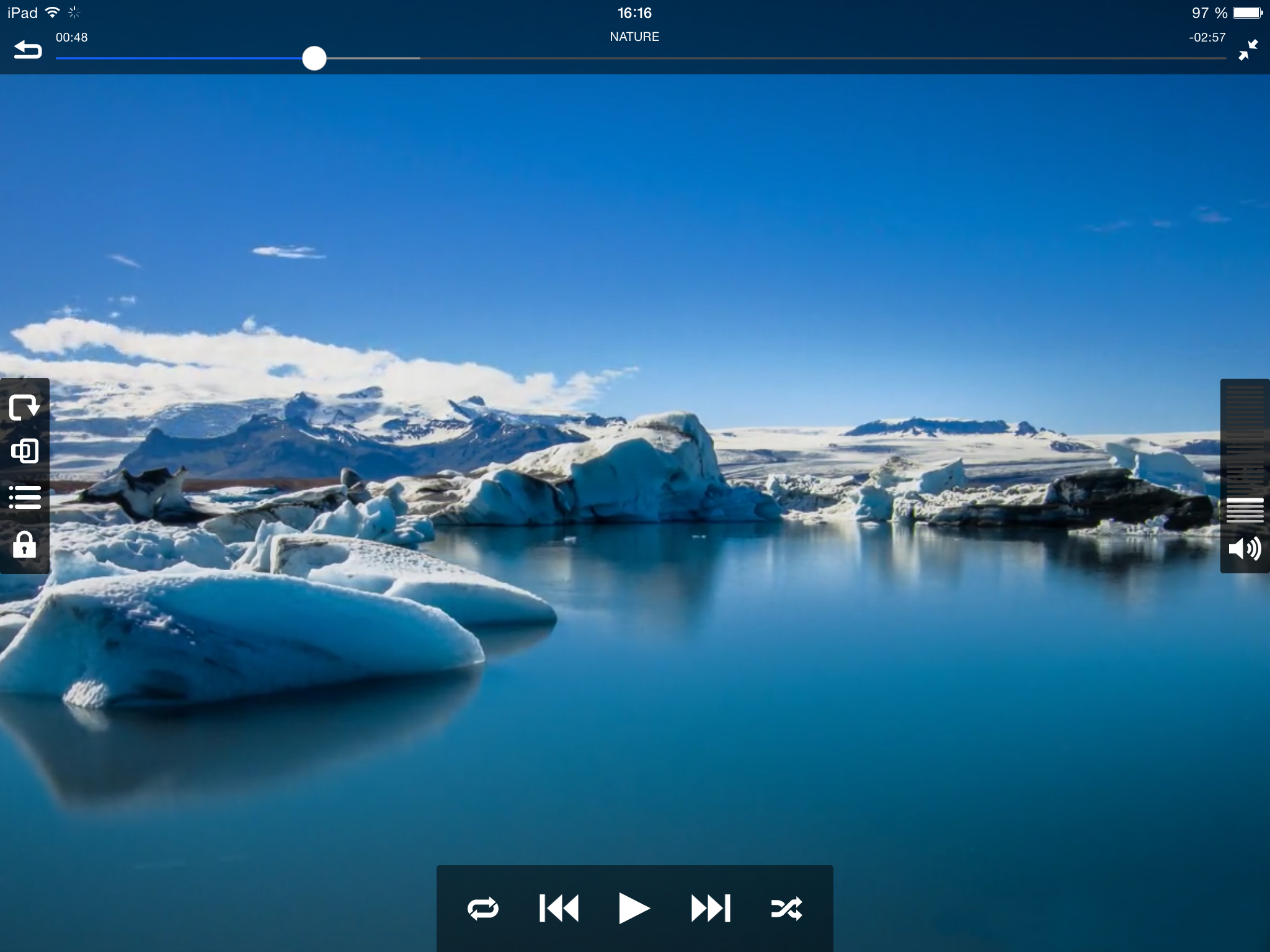
* Control volume and playback using simple screen gestures, or on-screen icons
Remote Media Manager Pro can connect to computers running Mac OS X, Windows and Linux, and can also access files stored on an Apple Time Capsule, FTP, SFTP, SMB, NAS, and WebDAV services, as well as cloud-based services such as Dropbox, Box, and Google Drive. Wirelessly transfer files from any network device, via an easy to use web-based uploading system that allows users to transfer files from their computer or other storage device as simply as loading a web page.
"While many users are content to watch video content on the smaller screen of their iOS devices, there are still those who prefer the big screen," continued Baturski. "For those users, we include the convenient feature of being able to stream both video and audio from an iPhone or iPad to a big screen HDTV, via an Apple TV."
Using AirPlay, users of Remote Media Manager Pro can stream any audio or video content to their HDTV connected device with the tap of an icon. No matter which size screen users are viewing their content on; they can control playback and volume with easy to use screen gestures. Swipe right to fast-forward, swipe left to rewind, swipe up and down to control the volume. If preferred, the usual VCR-like icon controls are also available to control playback.
Customer Jared Shook loves Remote Media Manager Pro's ease of use: "There are so many apps on the App Store that serve the same purpose as this app, but this one in particular does it the best. It offers you access to your local network storage hosted on your Windows PC as well as virtually anywhere on the net. I would recommend this app to anyone looking for the easiest way to access their Network Attached Storage (NAS) from their iPhone, iPad, or iPod because it is truly the easiest to use."
Supported Languages:
Remote Media Manager Pro supports English, Dutch, French, German, Greek, Italian, Japanese, Portuguese, Russian, Spanish, Swedish, Thai and Turkish languages.
Device Requirements:
* iPhone, iPad, and iPod touch
* Optimized for iPhone 5, iPhone 6/6 Plus
* Requires iOS 7.1 or later
* 52.3 MB
Pricing and Availability:
Remote Media Manager Pro 1.5 is $4.99 USD (or equivalent amount in other currencies) and is available worldwide exclusively through the App Store in the Entertainment category. Review copies are available upon request.
Macsoftex: http://www.macsoftex.by
Remote Media Manager Pro 1.5: http://www.macsoftex.by/#!remote-media-manager-en/c1e2f
Purchase and Download: https://itunes.apple.com/app/remote-media-manager-pro-access/id984424713
Screenshot 1: http://macsoftex.com/ams/images/5-ipad_en.jpg
Screenshot 2: http://macsoftex.com/ams/images/4-ipad_en.jpg
App Icon: http://a5.mzstatic.com/us/r30/Purple1/v4/d0/e2/d9/d0e2d92a-daae-ac6a-6169-86c76581454f/icon175x175.jpeg
Established in 2009, Macsoftex was founded by Alex Baturski with the main goal of creating helpful, user-friendly applications. Macsoftex pays utmost attention to the functionality of the apps it creates, striving for high usability and top quality content. Since 2009, Macsoftex has created applications of various types; among them art galleries, music apps, and video apps featuring their proprietary player. Copyright (C) 2015 Macsoftex. All Rights Reserved. Apple, the Apple logo, iPhone and iPod are registered trademarks of Apple Inc. in the U.S. and/or other countries.
*******
Link To Article: http://prmac.com/release-id-75175.htm
*******
---------------------------------------------------------------------------------
Note that you can alter delivered distributions at any time.
Login to your account on prMac to alter your channel selection, or to opt-out at any time.
Remote Media Manager Pro 1.5 - View and Manage Media with any iOS Device - Published on 05/29/15
Macsoftex today introduces Remote Media Manager Pro 1.5, its new easy-to-use file manager and viewer app for iOS devices. With Remote Media Manager Pro, anyone can wirelessly view, copy, move, stream, and manage files between their iOS device and computers, servers, drives and cloud storage, without the need to install any other software. For big screen viewing, users can also stream audio and video from their iOS devices to an HDTV via their Apple TV.
Vitebsk, Belarus - Developer Macsoftex today is proud to announce the release of Remote Media Manager Pro 1.5 for iOS, an intuitive and easy-to-use file manager and viewer compatible with all iOS devices. Remote Media Manager Pro can view, copy, move, stream, and manage files between computers, servers, NAS drives and cloud storage in either direction, without the need to install any other software. This useful app scans and locates devices on any network, and connects in seconds.
Remote Media Manager Pro can play video files, without the need for any type of file conversion. While users can copy files to and from their device if they'd prefer, there is no need to as the app also allows streaming of audio and video from any computer or iOS device on the network. Users can even stream video and audio to their HDTV via an Apple TV.
"Users find themselves jumping through hoops just to view video, or listen to music on their iOS devices," explained Alex Baturski, CEO of Macsoftex. "Remote Media Manager Pro 1.5 gives them the flexibility to watch video or listen to audio no matter where their favorite content is stored on their network or the Internet."
Features:
* Play all video formats without conversion, including: avi, mkv, wmv, mpg, mp4, mov and others
* True streaming audio and video on a network without copying files
* Connect to FTP, SFTP, SMB, WebDAV, and Cloud services
* Wirelessly transfer files from any network device
* Stream music, videos and photos from Dropbox, Google Drive, Box, and Yandex.Disk
* Watch online television, and listen to Internet radio. (M3U playlists support)
* Stream audio and video to an HDTV via an Apple TV device
* Access media library stored on the iOS device (Music, Video, Photos)
* Control volume and playback using simple screen gestures, or on-screen icons
Remote Media Manager Pro can connect to computers running Mac OS X, Windows and Linux, and can also access files stored on an Apple Time Capsule, FTP, SFTP, SMB, NAS, and WebDAV services, as well as cloud-based services such as Dropbox, Box, and Google Drive. Wirelessly transfer files from any network device, via an easy to use web-based uploading system that allows users to transfer files from their computer or other storage device as simply as loading a web page.
"While many users are content to watch video content on the smaller screen of their iOS devices, there are still those who prefer the big screen," continued Baturski. "For those users, we include the convenient feature of being able to stream both video and audio from an iPhone or iPad to a big screen HDTV, via an Apple TV."
Using AirPlay, users of Remote Media Manager Pro can stream any audio or video content to their HDTV connected device with the tap of an icon. No matter which size screen users are viewing their content on; they can control playback and volume with easy to use screen gestures. Swipe right to fast-forward, swipe left to rewind, swipe up and down to control the volume. If preferred, the usual VCR-like icon controls are also available to control playback.
Customer Jared Shook loves Remote Media Manager Pro's ease of use: "There are so many apps on the App Store that serve the same purpose as this app, but this one in particular does it the best. It offers you access to your local network storage hosted on your Windows PC as well as virtually anywhere on the net. I would recommend this app to anyone looking for the easiest way to access their Network Attached Storage (NAS) from their iPhone, iPad, or iPod because it is truly the easiest to use."
Supported Languages:
Remote Media Manager Pro supports English, Dutch, French, German, Greek, Italian, Japanese, Portuguese, Russian, Spanish, Swedish, Thai and Turkish languages.
Device Requirements:
* iPhone, iPad, and iPod touch
* Optimized for iPhone 5, iPhone 6/6 Plus
* Requires iOS 7.1 or later
* 52.3 MB
Pricing and Availability:
Remote Media Manager Pro 1.5 is $4.99 USD (or equivalent amount in other currencies) and is available worldwide exclusively through the App Store in the Entertainment category. Review copies are available upon request.
Macsoftex: http://www.macsoftex.by
Remote Media Manager Pro 1.5: http://www.macsoftex.by/#!remote-media-manager-en/c1e2f
Purchase and Download: https://itunes.apple.com/app/remote-media-manager-pro-access/id984424713
Screenshot 1: http://macsoftex.com/ams/images/5-ipad_en.jpg

Screenshot 2: http://macsoftex.com/ams/images/4-ipad_en.jpg
App Icon: http://a5.mzstatic.com/us/r30/Purple1/v4/d0/e2/d9/d0e2d92a-daae-ac6a-6169-86c76581454f/icon175x175.jpeg

Established in 2009, Macsoftex was founded by Alex Baturski with the main goal of creating helpful, user-friendly applications. Macsoftex pays utmost attention to the functionality of the apps it creates, striving for high usability and top quality content. Since 2009, Macsoftex has created applications of various types; among them art galleries, music apps, and video apps featuring their proprietary player. Copyright (C) 2015 Macsoftex. All Rights Reserved. Apple, the Apple logo, iPhone and iPod are registered trademarks of Apple Inc. in the U.S. and/or other countries.
*******
Link To Article: http://prmac.com/release-id-75175.htm
*******
---------------------------------------------------------------------------------
Note that you can alter delivered distributions at any time.
Login to your account on prMac to alter your channel selection, or to opt-out at any time.
Arrive uses Apple Watch to tell family and friends when you'll get there
A new article has been published at prMac.
Arrive uses Apple Watch to tell family and friends when you'll get there - Published on 05/29/15
Prague based Flow Studio has announced Arrive 1.1, its new location-sharing app for iOS and Apple Watch. Arrive is great for anyone who needs a quick, easy way to tell contacts where they are. Insanely simple to use, anyone can set how long they want to share their position. Then Arrive sends an SMS message with a unique map link to one or more of their existing contacts. The recipient can view this map in the Arrive app or in any browser until it expires.
Prague, Czech Republic - Flow Studio's location-sharing app Arrive is a new Apple Watch app to keep an eye out for. Like any good Apple Watch app should be, Arrive is insanely simple to use. First, you set how long you want to share your position. Then Arrive sends an SMS message with a unique map link to one or more of your existing contacts (no need to maintain a separate list). The recipient can view this map in the Arrive app or in any browser until it expires.
Arrive is great for anyone who needs a quick, easy way to tell contacts where they are, including:
* People with busy schedules
* Parents checking in with their kids
* Runners and bikers who need to share their location during a race
* Friends trying to find each other at a crowded train station, concert, or sporting event
Arrive is the work of independent developer Flow Studio. Co-founder Petr Fodor got the idea for Arrive in a traffic jam when he messaged updates about his delay to a business partner. Existing solutions like Glympse or Life360 seem too complicated, while the Apple Watch offered a great opportunity to make location sharing convenient.
"It's a consumer app to start, but we also plan to integrate Arrive with companies that provide food delivery, valet parking, and more - any service that can benefit from quick and easy location sharing is a potential partner," adds Petr Fodor about the plans for the future.
Device Requirements:
* Compatible with iPhone
* Optimized for iPhone 5, iPhone 6/6 Plus
* Requires iOS 8.0 or later
* 9.5 MB
Pricing and Availability:
Arrive 1.1 is Free and available worldwide exclusively through the App Store in the Navigation category.
Flow Studio: http://www.flowstudiogames.com
Arrive 1.1: http://www.arrv.co
Fact Sheet: https://www.dropbox.com/s/6h7ya8pfazvndyv/Arrive_factsheet.pdf?dl=0
Download from iTunes: https://itunes.apple.com/app/arrive-private-gps-location/id981504763
Media Assets: https://www.dropbox.com/sh/t5dx8ozurfm9cc2/AAA78PbEmUh9yb6R9n98Runta?dl=0
Flow Studio is an independent team based in Prague's TechSquare. Richard Horin and Petr Fodor founded the studio in 2011 so they could lose themselves in the flow: experience of making great mobile apps and games. The most successful titles are Power of Logic, Octagon and Iconic with more than 5 million downloads. Copyright (C) 2011-2015 Flow Studio. All Rights Reserved. Apple, the Apple logo, Macintosh, iPhone, iPad, iPod and Mac OS X are registered trademarks of Apple Inc. in the U.S. and/or other countries.
*******
Link To Article: http://prmac.com/release-id-75136.htm
*******
---------------------------------------------------------------------------------
Note that you can alter delivered distributions at any time.
Login to your account on prMac to alter your channel selection, or to opt-out at any time.
Arrive uses Apple Watch to tell family and friends when you'll get there - Published on 05/29/15
Prague based Flow Studio has announced Arrive 1.1, its new location-sharing app for iOS and Apple Watch. Arrive is great for anyone who needs a quick, easy way to tell contacts where they are. Insanely simple to use, anyone can set how long they want to share their position. Then Arrive sends an SMS message with a unique map link to one or more of their existing contacts. The recipient can view this map in the Arrive app or in any browser until it expires.
Prague, Czech Republic - Flow Studio's location-sharing app Arrive is a new Apple Watch app to keep an eye out for. Like any good Apple Watch app should be, Arrive is insanely simple to use. First, you set how long you want to share your position. Then Arrive sends an SMS message with a unique map link to one or more of your existing contacts (no need to maintain a separate list). The recipient can view this map in the Arrive app or in any browser until it expires.
Arrive is great for anyone who needs a quick, easy way to tell contacts where they are, including:
* People with busy schedules
* Parents checking in with their kids
* Runners and bikers who need to share their location during a race
* Friends trying to find each other at a crowded train station, concert, or sporting event
Arrive is the work of independent developer Flow Studio. Co-founder Petr Fodor got the idea for Arrive in a traffic jam when he messaged updates about his delay to a business partner. Existing solutions like Glympse or Life360 seem too complicated, while the Apple Watch offered a great opportunity to make location sharing convenient.
"It's a consumer app to start, but we also plan to integrate Arrive with companies that provide food delivery, valet parking, and more - any service that can benefit from quick and easy location sharing is a potential partner," adds Petr Fodor about the plans for the future.
Device Requirements:
* Compatible with iPhone
* Optimized for iPhone 5, iPhone 6/6 Plus
* Requires iOS 8.0 or later
* 9.5 MB
Pricing and Availability:
Arrive 1.1 is Free and available worldwide exclusively through the App Store in the Navigation category.
Flow Studio: http://www.flowstudiogames.com
Arrive 1.1: http://www.arrv.co
Fact Sheet: https://www.dropbox.com/s/6h7ya8pfazvndyv/Arrive_factsheet.pdf?dl=0
Download from iTunes: https://itunes.apple.com/app/arrive-private-gps-location/id981504763
Media Assets: https://www.dropbox.com/sh/t5dx8ozurfm9cc2/AAA78PbEmUh9yb6R9n98Runta?dl=0
Flow Studio is an independent team based in Prague's TechSquare. Richard Horin and Petr Fodor founded the studio in 2011 so they could lose themselves in the flow: experience of making great mobile apps and games. The most successful titles are Power of Logic, Octagon and Iconic with more than 5 million downloads. Copyright (C) 2011-2015 Flow Studio. All Rights Reserved. Apple, the Apple logo, Macintosh, iPhone, iPad, iPod and Mac OS X are registered trademarks of Apple Inc. in the U.S. and/or other countries.
*******
Link To Article: http://prmac.com/release-id-75136.htm
*******
---------------------------------------------------------------------------------
Note that you can alter delivered distributions at any time.
Login to your account on prMac to alter your channel selection, or to opt-out at any time.
Subscribe to:
Posts (Atom)