A new article has been published at prMac.
Suburban Aussie Mum Develops Social App: DoubleBud - Published on 05/30/15
Ag and Scott Lacey has announced DoubleBud 1.0.2, their new lifestyle app for iOS devices. DoubleBud aims to inspire and motivate people through other people�s changes. The app provides a single area where users can come together and share before and after images throughout different categories. The app allows users to categorise their photo strips into various categories. All these photos shown in sequence, highlight the changes in a night, in a year or in a few weeks.
Melbourne, Australia - Ever had a business idea and thought that could be a success, but not known where to start. This was exactly the feeling for Ag Lacey before she embarked on developing a large scale social App, DoubleBud. She had an idea for an App but this was coupled with zero technical knowledge, no funding to speak of and being a busy mum to young kids.
Ag says "I felt I just couldn't let the idea go and be left wondering what if...."
The road was longer than expected and didn't come without its setbacks. Expectation at the beginning had to be adjusted and a minimum viable product had to be established after reaching dead ends and costs rising. "Thankfully my husband helped out and with a technically talented developer I was able to see my idea start to take shape. I never thought there could be so much involved with building an app, that's probably a good thing, otherwise I may have not gone down that road"
With so many Apps out in the market, it is getting increasingly difficult to find any gaps, but the DoubleBud App appears to have found a gap in the "now and then" photo market. Human nature determines we are naturally drawn to before and after photos, regardless of topic, whether it be house renovations, weight loss success's, recreated childhood photos or superstars with or without their makeup, they are always fascinating. DoubleBud is an App that caters to exactly all those kinds of before and after photos and it encourages users to be motivated by the content they view and also to put up their own before and after photo strips.
'The aim of DoubleBud is to motivate and inspire people by showing what can be achieved, no better way to accomplish this then through a series of photos'. DoubleBud is set out in various categories such as fit,fast and strong, foodies, outdoor style, indoor style, wheelies etc. Users need a minimum of two photos to form a 'before and after' story but can have as many as they need to highlight the change. The opportunity for business's such as interior designers, builders, hairdressers, personal trainers, gyms, restaurants, car restorers is limitless, customers gravitate towards before and after photos to gain assurance as to what that business can do for them.
For anyone who has tried to step up their own business in a completely unrelated field to what they know, will know the enormous weight of expectation that was on Ag Lacey the developer of the new social App recently released into the AppleStore, DoubleBud. 'The work doesn't stop when the App is released, we are already working on the next update to include video capabilities'.
Device Requirements:
* iPhone, iPad, and iPod touch
* Optimized for iPhone 5, iPhone 6/6 Plus
* Requires iOS 7.1 or later
* 37.1 MB
Pricing and Availability:
DoubleBud 1.0.2 is Free and available worldwide exclusively through the App Store in the Lifestyle category.
DoubleBud 1.0.2: http://doublebud.com
Download from iTunes: https://itunes.apple.com/app/id978245381
Screenshot 1: http://a5.mzstatic.com/us/r30/Purple3/v4/9d/ee/ca/9deeca61-bc11-78ae-fbf2-2a1f2b467c63/screen480x480.jpeg
Screenshot 2: http://a4.mzstatic.com/us/r30/Purple1/v4/f5/b1/09/f5b10903-3ed8-831e-cd69-2f9e89b10dc0/screen480x480.jpeg
App Icon: http://a4.mzstatic.com/us/r30/Purple1/v4/4e/8c/06/4e8c0651-44d1-514e-ee9d-46a9bb9eff5f/icon175x175.jpeg
DoubleBud is a Melbourne, Australia based company, that has recently released a social App: DoubleBud into the Apple Store. DoubleBud is a startup focused on ensuring the continual development and expansion of this new App. The Company was started by Ag and Scott Lacey in April 2014. The aim is for the DoubleBud App to be a positive, social, motivating and inspiring place for users to share before and after stories. All Material and Software (C) Copyright 2015 DoubleBud. All Rights Reserved. Apple, the Apple logo, iPhone, iPod and iPad are registered trademarks of Apple Inc. in the U.S. and/or other countries. Other trademarks and registered trademarks may be the property of their respective owners.
*******
Link To Article: http://prmac.com/release-id-75165.htm
*******
---------------------------------------------------------------------------------
Note that you can alter delivered distributions at any time.
Login to your account on prMac to alter your channel selection, or to opt-out at any time.




Musk Links released for iOS - New Download Manager
A new article has been published at prMac.
Musk Links released for iOS - New Download Manager - Published on 05/30/15
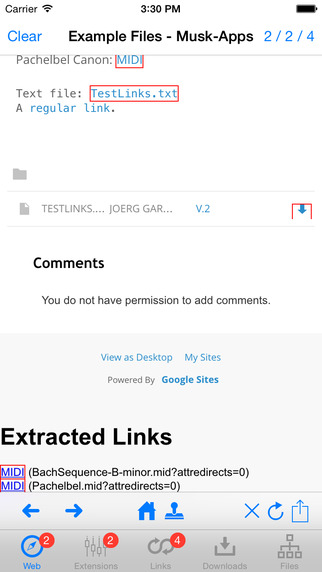
Independent music software developer Joerg Garbers has announced Musk Links 1.0 for iPhone, iPad and iPod touch. The app and its web extension help users to quickly find relevant links in web pages and to download multiples files from web pages more easily. It analyses the web page and highlights links that have pre-selected file extensions. Users can search within these links for textual patterns and download matching files in the background.
Torgau, Germany - Independent music software developer, Joerg Garbers has announced the release of Musk Links 1.0 for iPhone, iPad and iPod touch. The app and its web extension help users to quickly find relevant links in web pages and to download multiples files from web pages more easily. It analyses the web page and highlights links that have pre-selected file extensions. Users can search within these links for textual patterns and download matching files in the background. "Musk Links" is well integrated with Joerg Garbers' other music apps.
Downloading files from web pages can be quite cumbersome and time consuming in iOS: Users have to tap a link in Safari, wait for the download to finish, tap "Open In...", and choose the target app. For multiple downloads, users have to repeat this process. Some apps, like "Musk MIDI Player", therefore embed a web browser to immediately use the downloaded files. However, embedded web browsers often do not support synchronized bookmarking or multiple tabs.
Since iOS 8, users can send the content of a Safari web page to a web extension for custom processing. The "Musk Links" web extension extracts all links from a web page that have pre-selected file extensions. Users can highlight these links in the web page, search for suitable links, select links and download the linked files in the background.
User can manage active downloads and organize, preview and export files. Besides being generally useful, "Musk Links" is an ideal companion app for Joerg Garbers' music apps "Musk MIDI Player", "Musk MIDI Keyboard" and "MIDI SolFa Mode-Go-Round": All downloads are stored in a shared directory and are instantly accessible from all of these apps.
Language Support:
* English
Device Requirements:
* iPhone 3GS/4/4S/5/6/6, iPod touch (3rd/4th/5th generation), and iPad
* Requires iOS 8.0 or later
* Universal app optimized for display on all iOS devices
* 10.7 MB
Pricing and Availability:
Musk Links 1.0 is freely available worldwide exclusively through the App Store in the Utilities category.
Dr. Joerg Garbers: https://sites.google.com/site/jogarbers/swe
Musk Links 1.0: http://sites.google.com/site/muskapps/musklinks
Download from iTunes: https://itunes.apple.com/app/musk-links/id979045985
Screenshot 1: http://a1.mzstatic.com/us/r30/Purple7/v4/65/ec/f0/65ecf01d-d374-48ee-bfa7-4fbeb48219ea/screen322x572.jpeg
Screenshot 2: http://a2.mzstatic.com/us/r30/Purple5/v4/ab/9f/89/ab9f898c-57aa-706f-0877-e6cf2962c9c2/screen322x572.jpeg
App Icon: http://a3.mzstatic.com/us/r30/Purple3/v4/84/ff/ff/84ffff93-e774-94f2-d2bf-c7d426d29415/icon175x175.png
Dr. -Ing. Joerg Garbers has worked in computational music research projects since 1998. He ported Rubato(R) from NextStep(TM) to Mac OS X(R), integrated OpenMusic, Humdrum and Rubato (OHR) and built a music retrieval system for Dutch folk song melodies. As a child, he built his first DIY-MIDI piano system by capturing key presses via the Armstrad CPC 464 joystick port. Copyright (C) 2015 Dr. Joerg Garbers - Softwareentwicklung. All Rights Reserved. Apple, the Apple logo, iPhone, iPod and iPad are registered trademarks of Apple Inc. in the U.S. and/or other countries.
*******
Link To Article: http://prmac.com/release-id-75164.htm
*******
---------------------------------------------------------------------------------
Note that you can alter delivered distributions at any time.
Login to your account on prMac to alter your channel selection, or to opt-out at any time.
Musk Links released for iOS - New Download Manager - Published on 05/30/15
Independent music software developer Joerg Garbers has announced Musk Links 1.0 for iPhone, iPad and iPod touch. The app and its web extension help users to quickly find relevant links in web pages and to download multiples files from web pages more easily. It analyses the web page and highlights links that have pre-selected file extensions. Users can search within these links for textual patterns and download matching files in the background.
Torgau, Germany - Independent music software developer, Joerg Garbers has announced the release of Musk Links 1.0 for iPhone, iPad and iPod touch. The app and its web extension help users to quickly find relevant links in web pages and to download multiples files from web pages more easily. It analyses the web page and highlights links that have pre-selected file extensions. Users can search within these links for textual patterns and download matching files in the background. "Musk Links" is well integrated with Joerg Garbers' other music apps.
Downloading files from web pages can be quite cumbersome and time consuming in iOS: Users have to tap a link in Safari, wait for the download to finish, tap "Open In...", and choose the target app. For multiple downloads, users have to repeat this process. Some apps, like "Musk MIDI Player", therefore embed a web browser to immediately use the downloaded files. However, embedded web browsers often do not support synchronized bookmarking or multiple tabs.
Since iOS 8, users can send the content of a Safari web page to a web extension for custom processing. The "Musk Links" web extension extracts all links from a web page that have pre-selected file extensions. Users can highlight these links in the web page, search for suitable links, select links and download the linked files in the background.
User can manage active downloads and organize, preview and export files. Besides being generally useful, "Musk Links" is an ideal companion app for Joerg Garbers' music apps "Musk MIDI Player", "Musk MIDI Keyboard" and "MIDI SolFa Mode-Go-Round": All downloads are stored in a shared directory and are instantly accessible from all of these apps.
Language Support:
* English
Device Requirements:
* iPhone 3GS/4/4S/5/6/6, iPod touch (3rd/4th/5th generation), and iPad
* Requires iOS 8.0 or later
* Universal app optimized for display on all iOS devices
* 10.7 MB
Pricing and Availability:
Musk Links 1.0 is freely available worldwide exclusively through the App Store in the Utilities category.
Dr. Joerg Garbers: https://sites.google.com/site/jogarbers/swe
Musk Links 1.0: http://sites.google.com/site/muskapps/musklinks
Download from iTunes: https://itunes.apple.com/app/musk-links/id979045985
Screenshot 1: http://a1.mzstatic.com/us/r30/Purple7/v4/65/ec/f0/65ecf01d-d374-48ee-bfa7-4fbeb48219ea/screen322x572.jpeg

Screenshot 2: http://a2.mzstatic.com/us/r30/Purple5/v4/ab/9f/89/ab9f898c-57aa-706f-0877-e6cf2962c9c2/screen322x572.jpeg
App Icon: http://a3.mzstatic.com/us/r30/Purple3/v4/84/ff/ff/84ffff93-e774-94f2-d2bf-c7d426d29415/icon175x175.png

Dr. -Ing. Joerg Garbers has worked in computational music research projects since 1998. He ported Rubato(R) from NextStep(TM) to Mac OS X(R), integrated OpenMusic, Humdrum and Rubato (OHR) and built a music retrieval system for Dutch folk song melodies. As a child, he built his first DIY-MIDI piano system by capturing key presses via the Armstrad CPC 464 joystick port. Copyright (C) 2015 Dr. Joerg Garbers - Softwareentwicklung. All Rights Reserved. Apple, the Apple logo, iPhone, iPod and iPad are registered trademarks of Apple Inc. in the U.S. and/or other countries.
*******
Link To Article: http://prmac.com/release-id-75164.htm
*******
---------------------------------------------------------------------------------
Note that you can alter delivered distributions at any time.
Login to your account on prMac to alter your channel selection, or to opt-out at any time.
Arabic Dictionary 12.0 Released with Apple Watch Support
A new article has been published at prMac.
Arabic Dictionary 12.0 Released with Apple Watch Support - Published on 05/30/15
iThinkdiff has announces Arabic Dictionary 12.0, an update to their popular bilingual dictionary app for iOS devices. Featuring a large database, Pronunciation, Online Translator, Phrase Book, Flash cards and games help both students and travelers to translate nearly anything from Arabic into English and vice versa. Version 12.0 introduces Apple Watch support. Now anyone can quickly see recent search history, bookmarked words, translation, phrases and word of the day in their watch.
Melaka, Malaysia - iThinkdiff has announced the release of Arabic Dictionary 12.0, an update to their popular bilingual dictionary app for iOS devices. Featuring a large database, Pronunciation, Online Translator, Phrase Book, Flash cards and games help both students and travelers to translate nearly anything from Arabic into English and vice versa. Version 12.0 introduces Apple Watch support. Now anyone can quickly see recent search history, bookmarked words, translation, phrases and word of the day in their watch.
The leading iPhone, iPad, and iPod touch bilingual dictionary translates between English and Arabic now extremely useful for Apple Watch support. Lead developer Mahmud Ahsan said, "Now the dictionary will be more useful with the new Apple watch feature. Both students and travelers can use Arabic Dictionary to translate nearly anything from Arabic into English or vice versa. Over 290 million people speak Arabic, and it is my hope that this dictionary will make communication between Arabic speakers and English speakers easier than ever before."
"Wikipedia lists Arabic script as one of the most popular writing systems in the world," continues Mr. Ahsan, "so it was important for us to help users look up words quickly without having to transliterate them into Latin [English] characters first."
Key Features:
* Translate individual words, phrases, or whole sentences
* Scan text in image by pointing your device camera to search in dictionary
* Cross search feature. Touch a word for a while for the menu [Copy | Define | Search | Pronunciation]
* Bookmark and Recent History for instant recall
* Multiple games to help students improve their English or Arabic vocabulary
* Online & Offline Pronunciation for English & Arabic text
* Flash Card & Word of the Day for vocabulary learning
* Phrase Book
* Apple Watch supported for quick access of saved and recent search words, phrases, translation and word of the day.
"Arabic Dictionary was designed for both students and travelers. You can use it as a phrase book for a short trip, or you can use it to learn a language for life. And, at only $4.99 in the App Store, it's cheaper than either a paperback phrase book or even the simplest study guide. A free version with in-app purchase options is also available," said Mr. Ahsan.
Arabic Dictionary's core translation function works offline. But when the user's device is online, several extra features become available, such as an online scoring system which helps students earn Achievements for using app features, plus a vocabulary Leaderboard which rewards the most effective students.
English words link to their Wiktionary page to help users discover the history behind words, and built-in app connections let users send their translations to other apps on their device, such as Facebook, Twitter, Email, and SMS.
All current iPhones, iPads, iPod touch and Apple Watch are supported. Devices with a Retina display will find Spanish Dictionary automatically optimizes itself for high-resolution text display so users don't need to squint.
Device Requirements:
* iPhone, iPad, iPod touch and Apple Watch
* Optimized for iPhone 5, 6/6 Plus
* Requires iOS 7.0 or later
* Universal app optimized for display on all iOS devices
* 53.6 MB
Pricing and Availability:
Arabic Dictionary 12.0 is $4.99 USD (or equivalent amount in other currencies) and available worldwide exclusively through the App Store in the Education category. A free version with in-app purchase options is also available.
iThinkdiff: http://ithinkdiff.net
Arabic Dictionary 12.0: http://ithinkdiff.net/iphone-applications/arabic-dictionary/
Purchase and Download: https://search.itunes.apple.com/WebObjects/MZSearch.woa/wa/search?media=all&term=iThinkdiff+Arabic+Dictionary
Screenshot: http://a4.mzstatic.com/us/r30/Purple4/v4/a4/91/43/a4914338-9b1d-9cad-a7f3-2b4b0920f8ad/screen480x480.jpeg
App Icon: http://a4.mzstatic.com/us/r30/Purple1/v4/62/21/cb/6221cb58-a378-fbd2-88f5-8d5d77bc84d8/mzl.atmyyezb.175x175-75.jpg
Founded in 2010 by programmer Mahmud Ahsan, iThinkdiff is a leading creator of educational and entertainment apps for iPhones, iPads, and other Apple iOS devices. With over 8 million total downloads, thousands of five-star reviews, and 15 million monthly ad impressions, iThinkdiff games and translation apps are frequently featured on the Apple iTunes homepage. Copyright (C) 2010-2015 iThinkdiff. All Rights Reserved. Apple, the Apple logo, iPhone, iPad, iPad mini, iPod touch, and Mac are registered trademarks of Apple Inc. in the U.S. and/or other countries. Other trademarks and registered trademarks may be the property of their respective owners.
*******
Link To Article: http://prmac.com/release-id-75163.htm
*******
---------------------------------------------------------------------------------
Note that you can alter delivered distributions at any time.
Login to your account on prMac to alter your channel selection, or to opt-out at any time.
Arabic Dictionary 12.0 Released with Apple Watch Support - Published on 05/30/15
iThinkdiff has announces Arabic Dictionary 12.0, an update to their popular bilingual dictionary app for iOS devices. Featuring a large database, Pronunciation, Online Translator, Phrase Book, Flash cards and games help both students and travelers to translate nearly anything from Arabic into English and vice versa. Version 12.0 introduces Apple Watch support. Now anyone can quickly see recent search history, bookmarked words, translation, phrases and word of the day in their watch.
Melaka, Malaysia - iThinkdiff has announced the release of Arabic Dictionary 12.0, an update to their popular bilingual dictionary app for iOS devices. Featuring a large database, Pronunciation, Online Translator, Phrase Book, Flash cards and games help both students and travelers to translate nearly anything from Arabic into English and vice versa. Version 12.0 introduces Apple Watch support. Now anyone can quickly see recent search history, bookmarked words, translation, phrases and word of the day in their watch.
The leading iPhone, iPad, and iPod touch bilingual dictionary translates between English and Arabic now extremely useful for Apple Watch support. Lead developer Mahmud Ahsan said, "Now the dictionary will be more useful with the new Apple watch feature. Both students and travelers can use Arabic Dictionary to translate nearly anything from Arabic into English or vice versa. Over 290 million people speak Arabic, and it is my hope that this dictionary will make communication between Arabic speakers and English speakers easier than ever before."
"Wikipedia lists Arabic script as one of the most popular writing systems in the world," continues Mr. Ahsan, "so it was important for us to help users look up words quickly without having to transliterate them into Latin [English] characters first."
Key Features:
* Translate individual words, phrases, or whole sentences
* Scan text in image by pointing your device camera to search in dictionary
* Cross search feature. Touch a word for a while for the menu [Copy | Define | Search | Pronunciation]
* Bookmark and Recent History for instant recall
* Multiple games to help students improve their English or Arabic vocabulary
* Online & Offline Pronunciation for English & Arabic text
* Flash Card & Word of the Day for vocabulary learning
* Phrase Book
* Apple Watch supported for quick access of saved and recent search words, phrases, translation and word of the day.
"Arabic Dictionary was designed for both students and travelers. You can use it as a phrase book for a short trip, or you can use it to learn a language for life. And, at only $4.99 in the App Store, it's cheaper than either a paperback phrase book or even the simplest study guide. A free version with in-app purchase options is also available," said Mr. Ahsan.
Arabic Dictionary's core translation function works offline. But when the user's device is online, several extra features become available, such as an online scoring system which helps students earn Achievements for using app features, plus a vocabulary Leaderboard which rewards the most effective students.
English words link to their Wiktionary page to help users discover the history behind words, and built-in app connections let users send their translations to other apps on their device, such as Facebook, Twitter, Email, and SMS.
All current iPhones, iPads, iPod touch and Apple Watch are supported. Devices with a Retina display will find Spanish Dictionary automatically optimizes itself for high-resolution text display so users don't need to squint.
Device Requirements:
* iPhone, iPad, iPod touch and Apple Watch
* Optimized for iPhone 5, 6/6 Plus
* Requires iOS 7.0 or later
* Universal app optimized for display on all iOS devices
* 53.6 MB
Pricing and Availability:
Arabic Dictionary 12.0 is $4.99 USD (or equivalent amount in other currencies) and available worldwide exclusively through the App Store in the Education category. A free version with in-app purchase options is also available.
iThinkdiff: http://ithinkdiff.net
Arabic Dictionary 12.0: http://ithinkdiff.net/iphone-applications/arabic-dictionary/
Purchase and Download: https://search.itunes.apple.com/WebObjects/MZSearch.woa/wa/search?media=all&term=iThinkdiff+Arabic+Dictionary
Screenshot: http://a4.mzstatic.com/us/r30/Purple4/v4/a4/91/43/a4914338-9b1d-9cad-a7f3-2b4b0920f8ad/screen480x480.jpeg

App Icon: http://a4.mzstatic.com/us/r30/Purple1/v4/62/21/cb/6221cb58-a378-fbd2-88f5-8d5d77bc84d8/mzl.atmyyezb.175x175-75.jpg

Founded in 2010 by programmer Mahmud Ahsan, iThinkdiff is a leading creator of educational and entertainment apps for iPhones, iPads, and other Apple iOS devices. With over 8 million total downloads, thousands of five-star reviews, and 15 million monthly ad impressions, iThinkdiff games and translation apps are frequently featured on the Apple iTunes homepage. Copyright (C) 2010-2015 iThinkdiff. All Rights Reserved. Apple, the Apple logo, iPhone, iPad, iPad mini, iPod touch, and Mac are registered trademarks of Apple Inc. in the U.S. and/or other countries. Other trademarks and registered trademarks may be the property of their respective owners.
*******
Link To Article: http://prmac.com/release-id-75163.htm
*******
---------------------------------------------------------------------------------
Note that you can alter delivered distributions at any time.
Login to your account on prMac to alter your channel selection, or to opt-out at any time.
iNotepad for Mac: write and manage in one single document multiple texts
A new article has been published at prMac.
iNotepad for Mac: write and manage in one single document multiple texts - Published on 05/30/15
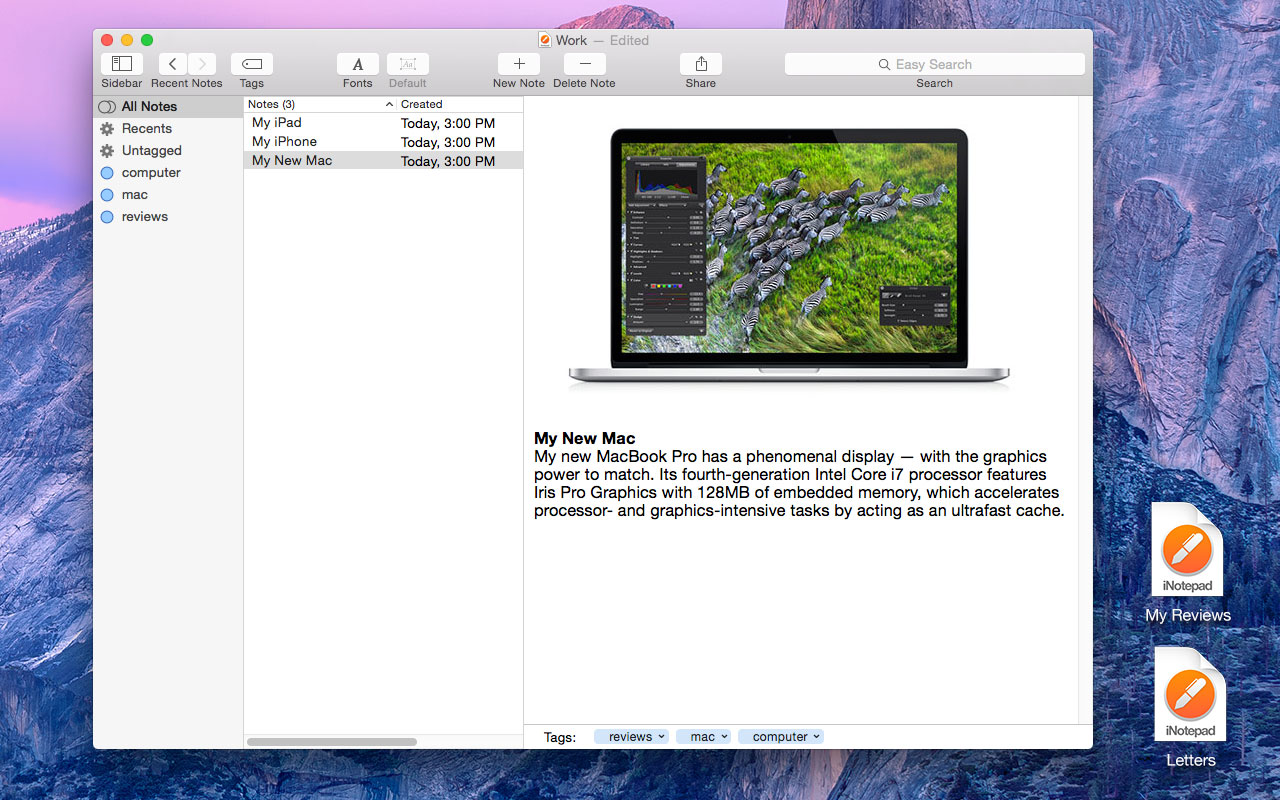
Apimac has released iNotepad, a new app for OS X that let you write and manage in one single document hundreds or even thousands of texts. With iNotepad, you have everything in one place. Write texts and format them as you like, enhance them with images and export them into various standard file formats. iNotepad features intuitive tools for organizing options, tag view, and more. Immediately find what you are looking for with basic or advanced search.
Udine, Italy - Apimac has released iNotepad, a new app for OS X that let you write and manage in one single document hundreds or even thousands of texts. With iNotepad you have everything in one place as opposed to what happens with other apps for writing. Every document in iNotepad may contain hundreds or thousands of texts. For example all the reviews that you wrote for your blog or all the research papers that you wrote for college in the last few years.
Quickly find that text you wrote last year. When you open a document in iNotepad, within you will find all the texts you wrote about that subject, and not only the last text you wrote as in other applications. But the best part is that iNotepad features intuitive tools which are easy to use to immediately find what you are looking for, as well as organizing options, tag view, the possibility to open every text in a separate window, basic or advanced search via Regular Expressions and the quick scrolling through recent texts.
Designed to support all the latest Apple text technology, iNotepad will increase your productivity. Write texts and format them as you like, enhance them with images and export them into various standard file formats. Double-click on one image to edit it on the spot. Double-click on the list to edit the various texts in separate windows while continuing to look up all the other ones in the main window. Quickly find all your texts and notes when you need them thanks to convenient search tools, tags and handy navigable Recents system. iNotepad was born to write and manage multiple texts efficiently and conveniently:
* It supports the latest OS X technology to write any text with formatting and images
* iNotepad documents are designed to gather hundreds or thousands of texts belonging to a specific subject
* Optimize your work allowing you to extensively drag and drop from the Finder and from other applications
* Easily arranges, manages and organizes tons on notes and texts and allows you to quickly find them when you need them
* Easily exports and shares any text or group of texts
* Manages tags to easily classify, view and export the texts you need during your work
* It allows you to export an entire group of texts simply by dragging a tag to the desktop
* Thanks to the use of a password, it protects your privacy and avoids involuntary edits by others using your Mac
System Requirements:
* OS X 10.9 or later
* 64-bit processor
* 4.8 MB
Price and availability:
iNotepad is available today from the Apimac web site at a cost of $24.99 (USD). Early adopters can get a 30% discount providing the coupon code "EARLYDSCNT877100" during the purchasing procedure. Owners of Apimac Notepad 9.9 are entitled a discount when purchasing the new app.
iNotepad: http://www.apimac.com/mac/inotepad/
Download iNotepad: http://www.apimac.com/download/iNotepad.zip
Purchase iNotepad: http://www.apimac.com/store/notepad/
Screenshot: http://www.apimac.com/images/screen_shots/iNotepad-Screenshot.jpg
Application Icon: http://www.apimac.com/images/icons/iNotepad_icon_512x512.png
Apimac is a software company dedicated to create intuitive OS X and iOS apps. People at Apimac aim to put into users hands apps which they can use in a way they do things every day. Right after opening their apps, users can immediately focus on their task, not even noticing that they're using an entirely new software. Copyright 2015 Apimac. All Rights Reserved. Apple, the Apple logo, iOS and OS X are registered trademarks of Apple Computer in the U.S. and/or other countries.
*******
Link To Article: http://prmac.com/release-id-75162.htm
*******
---------------------------------------------------------------------------------
Note that you can alter delivered distributions at any time.
Login to your account on prMac to alter your channel selection, or to opt-out at any time.
iNotepad for Mac: write and manage in one single document multiple texts - Published on 05/30/15
Apimac has released iNotepad, a new app for OS X that let you write and manage in one single document hundreds or even thousands of texts. With iNotepad, you have everything in one place. Write texts and format them as you like, enhance them with images and export them into various standard file formats. iNotepad features intuitive tools for organizing options, tag view, and more. Immediately find what you are looking for with basic or advanced search.
Udine, Italy - Apimac has released iNotepad, a new app for OS X that let you write and manage in one single document hundreds or even thousands of texts. With iNotepad you have everything in one place as opposed to what happens with other apps for writing. Every document in iNotepad may contain hundreds or thousands of texts. For example all the reviews that you wrote for your blog or all the research papers that you wrote for college in the last few years.
Quickly find that text you wrote last year. When you open a document in iNotepad, within you will find all the texts you wrote about that subject, and not only the last text you wrote as in other applications. But the best part is that iNotepad features intuitive tools which are easy to use to immediately find what you are looking for, as well as organizing options, tag view, the possibility to open every text in a separate window, basic or advanced search via Regular Expressions and the quick scrolling through recent texts.
Designed to support all the latest Apple text technology, iNotepad will increase your productivity. Write texts and format them as you like, enhance them with images and export them into various standard file formats. Double-click on one image to edit it on the spot. Double-click on the list to edit the various texts in separate windows while continuing to look up all the other ones in the main window. Quickly find all your texts and notes when you need them thanks to convenient search tools, tags and handy navigable Recents system. iNotepad was born to write and manage multiple texts efficiently and conveniently:
* It supports the latest OS X technology to write any text with formatting and images
* iNotepad documents are designed to gather hundreds or thousands of texts belonging to a specific subject
* Optimize your work allowing you to extensively drag and drop from the Finder and from other applications
* Easily arranges, manages and organizes tons on notes and texts and allows you to quickly find them when you need them
* Easily exports and shares any text or group of texts
* Manages tags to easily classify, view and export the texts you need during your work
* It allows you to export an entire group of texts simply by dragging a tag to the desktop
* Thanks to the use of a password, it protects your privacy and avoids involuntary edits by others using your Mac
System Requirements:
* OS X 10.9 or later
* 64-bit processor
* 4.8 MB
Price and availability:
iNotepad is available today from the Apimac web site at a cost of $24.99 (USD). Early adopters can get a 30% discount providing the coupon code "EARLYDSCNT877100" during the purchasing procedure. Owners of Apimac Notepad 9.9 are entitled a discount when purchasing the new app.
iNotepad: http://www.apimac.com/mac/inotepad/
Download iNotepad: http://www.apimac.com/download/iNotepad.zip
Purchase iNotepad: http://www.apimac.com/store/notepad/
Screenshot: http://www.apimac.com/images/screen_shots/iNotepad-Screenshot.jpg
Application Icon: http://www.apimac.com/images/icons/iNotepad_icon_512x512.png

Apimac is a software company dedicated to create intuitive OS X and iOS apps. People at Apimac aim to put into users hands apps which they can use in a way they do things every day. Right after opening their apps, users can immediately focus on their task, not even noticing that they're using an entirely new software. Copyright 2015 Apimac. All Rights Reserved. Apple, the Apple logo, iOS and OS X are registered trademarks of Apple Computer in the U.S. and/or other countries.
*******
Link To Article: http://prmac.com/release-id-75162.htm
*******
---------------------------------------------------------------------------------
Note that you can alter delivered distributions at any time.
Login to your account on prMac to alter your channel selection, or to opt-out at any time.
ChordsMaestro, Your Personal Music Chord Wizard
A new article has been published at prMac.
ChordsMaestro, Your Personal Music Chord Wizard - Published on 05/30/15
Neonway has updated ChordsMaestro 1.5, its most popular music app for Mac OS X. With no prior experience required, ChordsMaestro enables anyone to play and save chords of their favorite songs on seven different instruments. The app is perfect for beginners, hobby musicians, music students, and fun to use for music lovers of all levels. The update includes support for left-handed users, volume control, piano photos for right hand and images for flat sign representation.
Darmstadt, Germany - Neonway has updated ChordsMaestro 1.5, its most popular music app for Mac OS X. With no prior experience required, ChordsMaestro enables anyone to play and save chords of their favorite songs on seven different instruments. The app is perfect for beginners, hobby musicians, music students, and fun to use for music lovers of all levels. The update includes support for left-handed users, volume control, piano photos for right hand and images for flat sign representation.
ChordsMaestro features seven musical instruments and allows users to play all the chords in their favorite songs. They can select the way they prefer the chords to be represented: notes, piano keys or fret-board keys, for example. All the instruments in the app are interconnected, so users are able to switch between instruments using the same chords, listen to the selected chords in the original sound of their selected instrument; create, save and load the chords for their favorite songs and even transpose the chords to the key best suited for their voice range.
What our customers say:
"ChordMaestro is much more than a chord collection library; it's like having your own personal musical master chord wizard buddy by your side. Instead of fumbling around for the right chord, ChordMaestro provides a fast, easy, and fun way to identify the perfect harmony for musical compositions. It's a handy little tool that I plan to launch many, many times. Each chord features a fret-board representation, a real finger position image, staff notes, and sound. It can also transpose. This is an essential app for beginners and music students and an excellent resource for advanced musicians. What makes this app even more unique is the fact that it features several instruments, not just piano and guitar. Thank you, to the developers, for creating such a great app and selling it at a great price!" - Tommy Zai from Chandler
"very helpful - Just what I've been looking for.I've been looking for a clean program that would let me quickly drag and drop chord diagrams for Ukulele (and it does it for Piano, Guitar, Bass, Banjo, Mandolin, and Balalaika as well). Very neat and easy to use. Perfect for my needs, and I'm only beginning to explore its full powers." - runstrong77 from United States
"This is an app you have to have. It is essential for every beginner (we all are) and music lover. It is not expensive and it is the best way to learn music and chords. The simplest way to be able to play music. To play by chords is much easier than to play by note and it is also the best option to understand music." - jsevillamar from United States
"This is the best app I have ever seen for putting chords on a sheet.I was searching and finaly found what I was looking for!Now I can start creating my own songbooks with chords and lyrics by simply dragging the chords into Pages.Great !!!" - Mykindaguy from Belgium
System Requirements:
* OS X 10.7 or later
* 64-bit processor
* 37.6 MB
Pricing and Availability:
ChordsMaestro 1.5 is $9.99 USD (or equivalent amount in other currencies) and available worldwide through the Mac App Store in the Music category.
ChordsMaestro 1.5: http://neonway.com/apps/chordsmaestro
Purchase and Download (MAS): https://itunes.apple.com/us/app/chordsmaestro/id756502910?mt=12
Promotional Image 1: http://a3.mzstatic.com/us/r30/Purple6/v4/da/22/d6/da22d62e-2e5a-6f8d-ac37-2d261a47c408/screen800x500.jpeg
Promotional Image 2: http://a4.mzstatic.com/us/r30/Purple4/v4/53/14/b7/5314b732-4be2-fdbc-d07d-c00e32c3e08a/screen800x500.jpeg
App Icon: http://neonway.com/apps/chordsmaestro/ChordsMaestro200x200.png
Neonway is a software development company based in Darmstadt, Germany. The company has been developing apps since 2010. All Material and Software (C) Copyright 2010-2015 Neonway. All Rights Reserved. Apple, the Apple logo, iPhone, iPod and iPad are registered trademarks of Apple Inc. in the U.S. and/or other countries. Other trademarks and registered trademarks may be the property of their respective owners.
*******
Link To Article: http://prmac.com/release-id-75161.htm
*******
---------------------------------------------------------------------------------
Note that you can alter delivered distributions at any time.
Login to your account on prMac to alter your channel selection, or to opt-out at any time.
ChordsMaestro, Your Personal Music Chord Wizard - Published on 05/30/15
Neonway has updated ChordsMaestro 1.5, its most popular music app for Mac OS X. With no prior experience required, ChordsMaestro enables anyone to play and save chords of their favorite songs on seven different instruments. The app is perfect for beginners, hobby musicians, music students, and fun to use for music lovers of all levels. The update includes support for left-handed users, volume control, piano photos for right hand and images for flat sign representation.
Darmstadt, Germany - Neonway has updated ChordsMaestro 1.5, its most popular music app for Mac OS X. With no prior experience required, ChordsMaestro enables anyone to play and save chords of their favorite songs on seven different instruments. The app is perfect for beginners, hobby musicians, music students, and fun to use for music lovers of all levels. The update includes support for left-handed users, volume control, piano photos for right hand and images for flat sign representation.
ChordsMaestro features seven musical instruments and allows users to play all the chords in their favorite songs. They can select the way they prefer the chords to be represented: notes, piano keys or fret-board keys, for example. All the instruments in the app are interconnected, so users are able to switch between instruments using the same chords, listen to the selected chords in the original sound of their selected instrument; create, save and load the chords for their favorite songs and even transpose the chords to the key best suited for their voice range.
What our customers say:
"ChordMaestro is much more than a chord collection library; it's like having your own personal musical master chord wizard buddy by your side. Instead of fumbling around for the right chord, ChordMaestro provides a fast, easy, and fun way to identify the perfect harmony for musical compositions. It's a handy little tool that I plan to launch many, many times. Each chord features a fret-board representation, a real finger position image, staff notes, and sound. It can also transpose. This is an essential app for beginners and music students and an excellent resource for advanced musicians. What makes this app even more unique is the fact that it features several instruments, not just piano and guitar. Thank you, to the developers, for creating such a great app and selling it at a great price!" - Tommy Zai from Chandler
"very helpful - Just what I've been looking for.I've been looking for a clean program that would let me quickly drag and drop chord diagrams for Ukulele (and it does it for Piano, Guitar, Bass, Banjo, Mandolin, and Balalaika as well). Very neat and easy to use. Perfect for my needs, and I'm only beginning to explore its full powers." - runstrong77 from United States
"This is an app you have to have. It is essential for every beginner (we all are) and music lover. It is not expensive and it is the best way to learn music and chords. The simplest way to be able to play music. To play by chords is much easier than to play by note and it is also the best option to understand music." - jsevillamar from United States
"This is the best app I have ever seen for putting chords on a sheet.I was searching and finaly found what I was looking for!Now I can start creating my own songbooks with chords and lyrics by simply dragging the chords into Pages.Great !!!" - Mykindaguy from Belgium
System Requirements:
* OS X 10.7 or later
* 64-bit processor
* 37.6 MB
Pricing and Availability:
ChordsMaestro 1.5 is $9.99 USD (or equivalent amount in other currencies) and available worldwide through the Mac App Store in the Music category.
ChordsMaestro 1.5: http://neonway.com/apps/chordsmaestro
Purchase and Download (MAS): https://itunes.apple.com/us/app/chordsmaestro/id756502910?mt=12
Promotional Image 1: http://a3.mzstatic.com/us/r30/Purple6/v4/da/22/d6/da22d62e-2e5a-6f8d-ac37-2d261a47c408/screen800x500.jpeg

Promotional Image 2: http://a4.mzstatic.com/us/r30/Purple4/v4/53/14/b7/5314b732-4be2-fdbc-d07d-c00e32c3e08a/screen800x500.jpeg

App Icon: http://neonway.com/apps/chordsmaestro/ChordsMaestro200x200.png

Neonway is a software development company based in Darmstadt, Germany. The company has been developing apps since 2010. All Material and Software (C) Copyright 2010-2015 Neonway. All Rights Reserved. Apple, the Apple logo, iPhone, iPod and iPad are registered trademarks of Apple Inc. in the U.S. and/or other countries. Other trademarks and registered trademarks may be the property of their respective owners.
*******
Link To Article: http://prmac.com/release-id-75161.htm
*******
---------------------------------------------------------------------------------
Note that you can alter delivered distributions at any time.
Login to your account on prMac to alter your channel selection, or to opt-out at any time.
Learning Sticker Puzzle, puzzle or sticker game? Your kids will tell you
A new article has been published at prMac.
Learning Sticker Puzzle, puzzle or sticker game? Your kids will tell you - Published on 05/30/15
California based development studio, Black Mouton has announced Sticker Puzzle 2.2, an update to their star kids app available on the App Store, Google Play and Amazon. Designed for kids of 2 to 5 years old, this free educational app helps develop the abilities of matching shapes, differentiating colors, learning daily objects by hearing, delicate finger movement and much more. The puzzles come along with real human voice for each sticker, which helps kids understand & learn the object names.
Santa Clara, California - Black Mouton, an independent mobile App development studio, has announced the release of Learning Sticker Puzzle 2.2, an update to their star kids app available on the App Store, Google Play and Amazon. Designed for kids of 2 to 5 years old, this free educational app helps develop the abilities of matching shapes, differentiating colors, learning daily objects by hearing, delicate finger movement and much more.
It's a puzzle and a sticker game at the same time. Unlike simple jigsaw puzzles, each piece here is a sticker and has a meaning, composing an animal, a vehicle, a person, daily objects and so on. Kids learn not only how to complete the puzzle, but also what each piece means in real life.
What is so unique about this app? The multilanguage voice support! The puzzles come along with real human voice for each sticker, which helps kids understand and learn the object names. Currently English voice supported, the upcoming update will include Chinese, and later on expand to French, Spanish and more languages that users can choose from.
"We made our app with LOVE!" said Ye Wang, Co-founder and Chief Designer of Black Mouton, "I'm a mom of a 2.5-year-old girl, so I understand kids' needs as well as parents' concerns." No advertising, no popups, no unexpected interruption or purchase at any time, is what the team guarantees.
Device Requirements:
* iPhone, iPad, and iPod touch
* Optimized for iPhone 5 and iPhone 6
* Requires iOS 5.1.1 or later
* 33.3 MB
Pricing and Availability:
Learning Sticker Puzzle 2.2 is Free and available worldwide through the App Store in the Education category. There is also an Android version available on Google Play and the Amazon Store.
Learning Sticker Puzzle 2.2: http://black-mouton.com/?page_id=267
Download from iTunes: https://itunes.apple.com/app/learning-sticker-puzzle-for/id984230464
Download from Google Play: https://play.google.com/store/apps/details?id=com.BlackMouton.stickerPuzzle
Download from Amazon: http://www.amazon.com/gp/mas/dl/android?p=com.BlackMouton.stickerPuzzle&ref=mas_pm_learning_sticker_puzzle
YouTube Video (Preview): https://www.youtube.com/watch?v=QBpY25Mkrns
Media Assets: https://drive.google.com/drive/u/0/folders/0B9f03uIw3blrfmRXb1R0Q0NtOHd3UlhOWU1tOE1TZGFINDhuSHBVelB0c3hwRm5Lc2oydTg/0B9f03uIw3blrfnZDZlhZaU5TbGI3WnFWc0lTcUtUSUpnN0NxYmtjWTE2bVdRS2xKaUZSek0
Founded in 2012, Black Mouton is an independent mobile app development studio founded by Ye and JiaJing Wang. Specializing in iOS and the Android platforms, the company aims to create beautiful and fun Apps for people's life. Copyright (C) 2015 Black Mouton. All Rights Reserved. Apple, the Apple logo, iPhone, iPod and iPad are registered trademarks of Apple Inc. in the U.S. and/or other countries. Other trademarks and registered trademarks may be the property of their respective owners.
*******
Link To Article: http://prmac.com/release-id-75160.htm
*******
---------------------------------------------------------------------------------
Note that you can alter delivered distributions at any time.
Login to your account on prMac to alter your channel selection, or to opt-out at any time.
Learning Sticker Puzzle, puzzle or sticker game? Your kids will tell you - Published on 05/30/15
California based development studio, Black Mouton has announced Sticker Puzzle 2.2, an update to their star kids app available on the App Store, Google Play and Amazon. Designed for kids of 2 to 5 years old, this free educational app helps develop the abilities of matching shapes, differentiating colors, learning daily objects by hearing, delicate finger movement and much more. The puzzles come along with real human voice for each sticker, which helps kids understand & learn the object names.
Santa Clara, California - Black Mouton, an independent mobile App development studio, has announced the release of Learning Sticker Puzzle 2.2, an update to their star kids app available on the App Store, Google Play and Amazon. Designed for kids of 2 to 5 years old, this free educational app helps develop the abilities of matching shapes, differentiating colors, learning daily objects by hearing, delicate finger movement and much more.
It's a puzzle and a sticker game at the same time. Unlike simple jigsaw puzzles, each piece here is a sticker and has a meaning, composing an animal, a vehicle, a person, daily objects and so on. Kids learn not only how to complete the puzzle, but also what each piece means in real life.
What is so unique about this app? The multilanguage voice support! The puzzles come along with real human voice for each sticker, which helps kids understand and learn the object names. Currently English voice supported, the upcoming update will include Chinese, and later on expand to French, Spanish and more languages that users can choose from.
"We made our app with LOVE!" said Ye Wang, Co-founder and Chief Designer of Black Mouton, "I'm a mom of a 2.5-year-old girl, so I understand kids' needs as well as parents' concerns." No advertising, no popups, no unexpected interruption or purchase at any time, is what the team guarantees.
Device Requirements:
* iPhone, iPad, and iPod touch
* Optimized for iPhone 5 and iPhone 6
* Requires iOS 5.1.1 or later
* 33.3 MB
Pricing and Availability:
Learning Sticker Puzzle 2.2 is Free and available worldwide through the App Store in the Education category. There is also an Android version available on Google Play and the Amazon Store.
Learning Sticker Puzzle 2.2: http://black-mouton.com/?page_id=267
Download from iTunes: https://itunes.apple.com/app/learning-sticker-puzzle-for/id984230464
Download from Google Play: https://play.google.com/store/apps/details?id=com.BlackMouton.stickerPuzzle
Download from Amazon: http://www.amazon.com/gp/mas/dl/android?p=com.BlackMouton.stickerPuzzle&ref=mas_pm_learning_sticker_puzzle
YouTube Video (Preview): https://www.youtube.com/watch?v=QBpY25Mkrns
Media Assets: https://drive.google.com/drive/u/0/folders/0B9f03uIw3blrfmRXb1R0Q0NtOHd3UlhOWU1tOE1TZGFINDhuSHBVelB0c3hwRm5Lc2oydTg/0B9f03uIw3blrfnZDZlhZaU5TbGI3WnFWc0lTcUtUSUpnN0NxYmtjWTE2bVdRS2xKaUZSek0
Founded in 2012, Black Mouton is an independent mobile app development studio founded by Ye and JiaJing Wang. Specializing in iOS and the Android platforms, the company aims to create beautiful and fun Apps for people's life. Copyright (C) 2015 Black Mouton. All Rights Reserved. Apple, the Apple logo, iPhone, iPod and iPad are registered trademarks of Apple Inc. in the U.S. and/or other countries. Other trademarks and registered trademarks may be the property of their respective owners.
*******
Link To Article: http://prmac.com/release-id-75160.htm
*******
---------------------------------------------------------------------------------
Note that you can alter delivered distributions at any time.
Login to your account on prMac to alter your channel selection, or to opt-out at any time.
Ziggy Road 1.0 released for iOS and Android - Zigzag Traffic Racer
A new article has been published at prMac.
Ziggy Road 1.0 released for iOS and Android - Zigzag Traffic Racer - Published on 05/30/15
UK based Abson Developments has announced Ziggy Road 1.0, the latest Secret Box developed game for iOS and Android devices. Ziggy Road ZigZag Traffic Racer is set in the near future, when all cars are self driven by computers. You are the owner of the new AGPO-500. Unfortunately your new car has developed a bug! Rush to take control of the runaway car and zigzag race to avoid everything. Featuring 29 Vehicles, Ziggy Road offers 3D graphics, with hidden Easter Eggs throughout the game.
Huddersfield, United Kingdom - Abson Developments has announced the release and immediate availability of Ziggy Road 1.0, the latest Secret Box developed game for iOS and Android devices. Ziggy Road ZigZag Traffic Racer is set in the near future when all cars are self driven by computers. You are the owner of the new AGPO-500.
Unfortunately your new AGPO-500 has developed a bug! You are about to enter a busy city. Rush to take control of the runaway car and zigzag race to avoid everything! Classic zig zag traffic racer game play has been re-invented and brought bang up to date to give extreme speeds and heart stopping moments. Edge of your seat traffic race game play needing lightning fast reactions to survive.
* On trend 3D graphics
* Extreme speeds running at 60fps (on most devices)
* 29 Vehicles: Fire Engines, USA Muscle cars, Police cars, Trucks, Buses, Taxi and many more
* Three bonus games: Night Rider, Carnage, Zombies
* Leaderboards and Challenges
* 3D sound and Music tracks that react to gameplay
* Hidden features / Easter Eggs throughout the game
* Traffic racer game, but not as you know it
"I love the excitement of watching car chase scenes, and wanted to create the fastest heart stopping runaway car game possible on mobile," explained Lance Abson, Creator of Ziggy Road. "Being a Computer Programmer the development of Computer Driven cars is both exciting and scary!"
Device Requirements:
* iPhone, iPad, and iPod touch iOS 6.0 or later
* 69.3 MB
* Android 2.3 or later
* 31.0 MB
Pricing and Availability:
Ziggy Road 1.0 is free and available worldwide through iTunes App Store, and Google Play in the Games category.
Abson Developments: http://www.abdev.co.uk
Ziggy Road 1.0: https://itunes.apple.com/app/ziggy-road/id976528548
Download from Google Play: https://play.google.com/store/apps/details?id=com.iphonegamesapps.ziggyroad
YouTube Video (Gameplay): https://www.youtube.com/watch?v=uVrcmX4SDNg
YouTube Video (Hidden Feature - No Smoke Without Fire): https://m.youtube.com/watch?v=WoiFeo4RXSU
YouTube Video (Hidden Feature - Crash): https://m.youtube.com/watch?v=Lx3vbDHHoEw
Located in Huddersfield, England, Abson Developments was founded in 2003 by Lance Abson. Lance has 25 years software development experience with 59 commercial publications to date spread over 17 different hardware platforms. With development history dating back to the early Amstrad, Spectrum, and Amiga gaming period, Abson Developments is now at the forefront of mobile technology. Recent focus has been on developing Apple and Android Applications to a high level of excellence commanding respect within the industry. Abson Developments offers private contract work, and also develops its own in-house games and apps. Lance has contracted for many large companies including the BBC, SONY, HSBC, EE, French Connection. And also many startup and small companies. Specializing in both Business and Games software. Full product lifecycle experience from conception to deployment. All Material and Software (C) 2015 Abson Developments Ltd / All Rights Reserved. Ziggy Road is Copyright Abson
Developments Ltd in the U.S. and/or other countries. Apple, the Apple logo, iPhone, iPod and iPad are registered trademarks of Apple Inc. in the U.S. and/or other countries.
*******
Link To Article: http://prmac.com/release-id-75159.htm
*******
---------------------------------------------------------------------------------
Note that you can alter delivered distributions at any time.
Login to your account on prMac to alter your channel selection, or to opt-out at any time.
Ziggy Road 1.0 released for iOS and Android - Zigzag Traffic Racer - Published on 05/30/15
UK based Abson Developments has announced Ziggy Road 1.0, the latest Secret Box developed game for iOS and Android devices. Ziggy Road ZigZag Traffic Racer is set in the near future, when all cars are self driven by computers. You are the owner of the new AGPO-500. Unfortunately your new car has developed a bug! Rush to take control of the runaway car and zigzag race to avoid everything. Featuring 29 Vehicles, Ziggy Road offers 3D graphics, with hidden Easter Eggs throughout the game.
Huddersfield, United Kingdom - Abson Developments has announced the release and immediate availability of Ziggy Road 1.0, the latest Secret Box developed game for iOS and Android devices. Ziggy Road ZigZag Traffic Racer is set in the near future when all cars are self driven by computers. You are the owner of the new AGPO-500.
Unfortunately your new AGPO-500 has developed a bug! You are about to enter a busy city. Rush to take control of the runaway car and zigzag race to avoid everything! Classic zig zag traffic racer game play has been re-invented and brought bang up to date to give extreme speeds and heart stopping moments. Edge of your seat traffic race game play needing lightning fast reactions to survive.
* On trend 3D graphics
* Extreme speeds running at 60fps (on most devices)
* 29 Vehicles: Fire Engines, USA Muscle cars, Police cars, Trucks, Buses, Taxi and many more
* Three bonus games: Night Rider, Carnage, Zombies
* Leaderboards and Challenges
* 3D sound and Music tracks that react to gameplay
* Hidden features / Easter Eggs throughout the game
* Traffic racer game, but not as you know it
"I love the excitement of watching car chase scenes, and wanted to create the fastest heart stopping runaway car game possible on mobile," explained Lance Abson, Creator of Ziggy Road. "Being a Computer Programmer the development of Computer Driven cars is both exciting and scary!"
Device Requirements:
* iPhone, iPad, and iPod touch iOS 6.0 or later
* 69.3 MB
* Android 2.3 or later
* 31.0 MB
Pricing and Availability:
Ziggy Road 1.0 is free and available worldwide through iTunes App Store, and Google Play in the Games category.
Abson Developments: http://www.abdev.co.uk
Ziggy Road 1.0: https://itunes.apple.com/app/ziggy-road/id976528548
Download from Google Play: https://play.google.com/store/apps/details?id=com.iphonegamesapps.ziggyroad
YouTube Video (Gameplay): https://www.youtube.com/watch?v=uVrcmX4SDNg
YouTube Video (Hidden Feature - No Smoke Without Fire): https://m.youtube.com/watch?v=WoiFeo4RXSU
YouTube Video (Hidden Feature - Crash): https://m.youtube.com/watch?v=Lx3vbDHHoEw
Located in Huddersfield, England, Abson Developments was founded in 2003 by Lance Abson. Lance has 25 years software development experience with 59 commercial publications to date spread over 17 different hardware platforms. With development history dating back to the early Amstrad, Spectrum, and Amiga gaming period, Abson Developments is now at the forefront of mobile technology. Recent focus has been on developing Apple and Android Applications to a high level of excellence commanding respect within the industry. Abson Developments offers private contract work, and also develops its own in-house games and apps. Lance has contracted for many large companies including the BBC, SONY, HSBC, EE, French Connection. And also many startup and small companies. Specializing in both Business and Games software. Full product lifecycle experience from conception to deployment. All Material and Software (C) 2015 Abson Developments Ltd / All Rights Reserved. Ziggy Road is Copyright Abson
Developments Ltd in the U.S. and/or other countries. Apple, the Apple logo, iPhone, iPod and iPad are registered trademarks of Apple Inc. in the U.S. and/or other countries.
*******
Link To Article: http://prmac.com/release-id-75159.htm
*******
---------------------------------------------------------------------------------
Note that you can alter delivered distributions at any time.
Login to your account on prMac to alter your channel selection, or to opt-out at any time.
Subscribe to:
Posts (Atom)